ensp无线网络课程设计
通过网盘分享的文件:enap无线网络课设
链接: https://pan.baidu.com/s/1-P26_HYhp_AOpcIpLcA6Yg 提取码: 3ccq
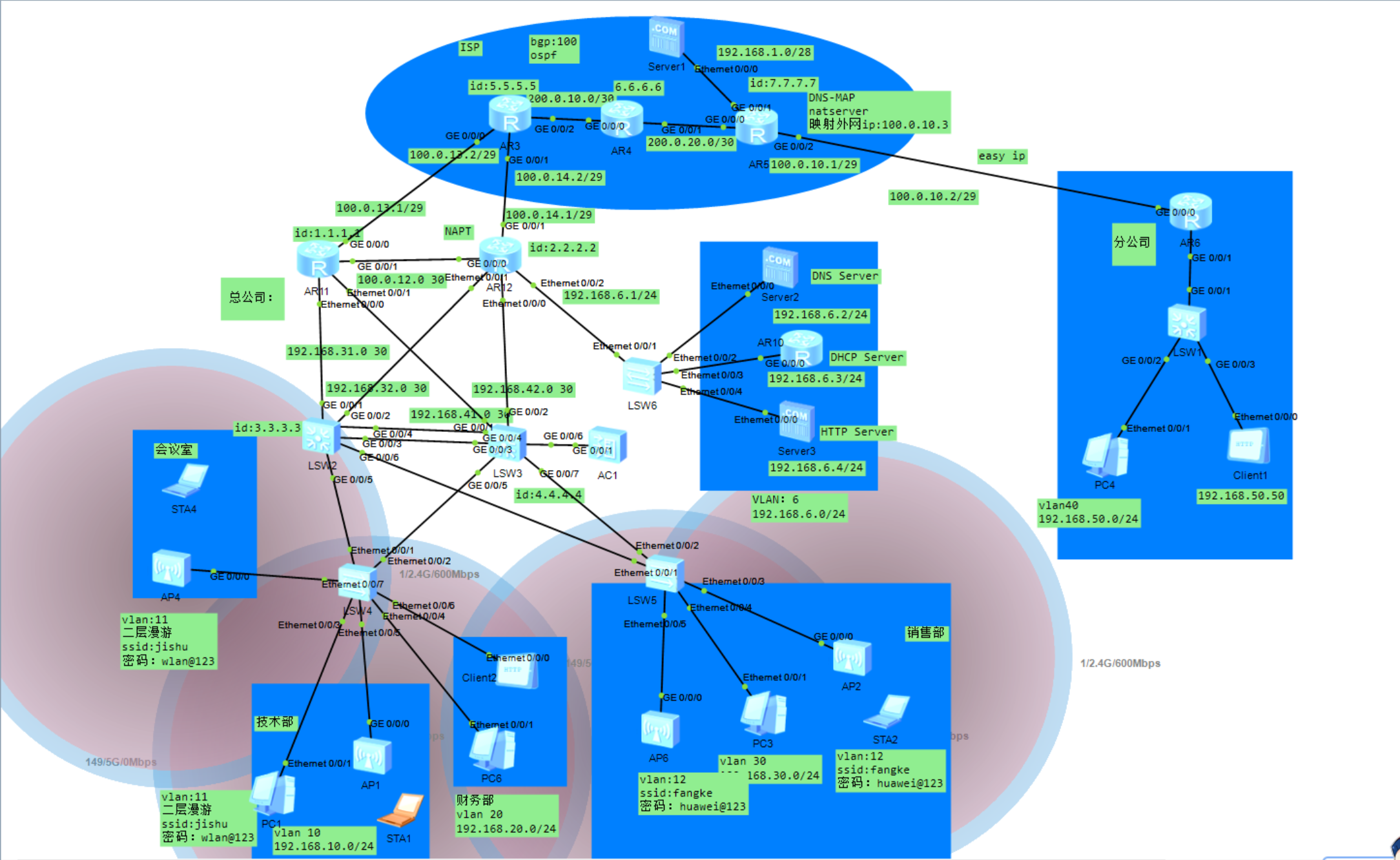
目的与意义:本次课程设计的目的是搭建一个中小型无线网络,通过构建一个稳定、高效的无线网络,显著提升企业的运营效率。员工可以随时随地访问公司资源,进行远程办公或移动办公,从而打破了传统有线网络的束缚,提高了工作效率和灵活性。此外,无线网络还能支持各种移动设备的接入,如智能手机、平板电脑等,使得员工能够利用这些设备更高效地完成任务。其次,无线网络设计有助于降低企业的运营成本。相较于有线网络,无线网络不需要大量的物理线路铺设和维护,从而降低了布线成本和维护成本。无线网络的设计还能优化网络资源的利用,减少不必要的浪费,进一步降低企业的运营成本。再者,无线网络设计能够提升企业的信息安全水平。现代无线网络技术提供了多种安全特性,如加密、身份验证和访问控制等,以确保数据传输的安全性和隐私性。通过合理的无线网络设计,企业可以构建一个安全可靠的网络环境,保护企业敏感信息和客户数据不被泄露或滥用。此外,无线网络设计还能增强企业的竞争力。随着信息技术的不断发展,无线网络已经成为企业开展业务和创新的重要基础设施。通过无线网络设计,企业可以更好地满足客户需求,提供更为便捷和高效的服务,从而在市场竞争中占据更有利的位置。综上所述,中小型无线网络设计对企业的意义在于提升运营效率、降低运营成本、提高信息安全水平以及增强企业竞争力。因此,企业在规划和建设无线网络时,应充分考虑自身需求和特点,选择适合的网络设计方案和技术手段,以实现更好的网络性能和业务效益。
一、功能设计
本次中小型无线网络课程设计主要涉及的技术有:vlan划分,MSTP+VRRP,IPSec VPN,WLAN,web,DNS,FTP服务器,链路聚合,DHCP中继,DNS-MAP等。汇聚层交换机LSW2和LSW3之间配置链路聚合,MSTP+VRRP;汇聚层交换机与两台出口路由器配置OSPF动态路由协议;ISP部分配置OSPF协议和BGP协议,AR5配置DNS-MAP将Server1的ip映射公网IP供分公司的Client1使用;在汇聚层交换机上配置DHCP中继;公司总部使用路由器AR10代替DHCP服务器配置DHCP,出口路由器配置NAPT,使用AC管理瘦AP,配置二层漫游和三层漫游。分公司路由器配置easy ip和DHCP;AR12与AR6配置IPSec VPN实现总公司与分公司的安全通信。
二、详细功能
(1)vlan划分
VID  Status  Property      MAC-LRN Statistics Description

-----------------------------------------------------------------

1    enable  default       enable  disable    VLAN 0001

10   enable  default       enable  disable    VLAN 0010

11   enable  default       enable  disable    VLAN 0011

12   enable  default       enable  disable    VLAN 0012

13   enable  default       enable  disable    VLAN 0013

20   enable  default       enable  disable    VLAN 0020

30   enable  default       enable  disable    VLAN 0030

40   enable  default       enable  disable    VLAN 0040

41   enable  default       enable  disable    VLAN 0041

42   enable  default       enable  disable    VLAN 0042

100  enable  default       enable  disable    VLAN 0100
(2)MSTP配置
[Huawei]stp region-configuration

[Huawei-mst-region]dis this

#

stp region-configuration

 instance 1 vlan 10 20

 instance 2 vlan 30 40

 active region-configuration

[Huawei]dis stp brief

 MSTID  Port                       Role  STP State     Protection

   0    GigabitEthernet0/0/5        DESI  FORWARDING      NONE

   0    GigabitEthernet0/0/7        ROOT  FORWARDING      NONE

   0    Eth-Trunk1                  DESI  FORWARDING      NONE

   1    GigabitEthernet0/0/5        DESI  FORWARDING      NONE

   1    GigabitEthernet0/0/7        MAST  FORWARDING      NONE

   1    Eth-Trunk1                  DESI  FORWARDING      NONE

   2    GigabitEthernet0/0/5        DESI  FORWARDING      NONE

   2    GigabitEthernet0/0/7        MAST  FORWARDING      NONE

   2    Eth-Trunk1                  DESI  FORWARDING      NONE
(3)VRRP配置
以LSW3为例:
interface Vlanif10

  ip address 192.168.10.2 255.255.255.0

  vrrp vrid 1 virtual-ip 192.168.10.254

interface Vlanif20

  ip address 192.168.20.2 255.255.255.0

  vrrp vrid 2 virtual-ip 192.168.20.254

interface Vlanif30

  ip address 192.168.30.2 255.255.255.0

  vrrp vrid 3 virtual-ip 192.168.30.254

  vrrp vrid 3 priority 120

  vrrp vrid 3 preempt-mode timer delay 60

interface Vlanif40

  ip address 192.168.40.2 255.255.255.0

  vrrp vrid 4 virtual-ip 192.168.40.254

  vrrp vrid 4 priority 120

  vrrp vrid 4 preempt-mode timer delay 60

[Huawei]dis vrrp brief

VRID  State        Interface                Type     Virtual IP

----------------------------------------------------------------

1     Backup       Vlanif10                 Normal   192.168.10.254

2     Backup       Vlanif20                 Normal   192.168.20.254

3     Master       Vlanif30                 Normal   192.168.30.254

4     Master       Vlanif40                 Normal   192.168.40.254

----------------------------------------------------------------

Total:4     Master:2     Backup:2     Non-active:0
(4)链路聚合
interface Eth-Trunk1

 port link-type trunk

 port trunk allow-pass vlan 10 20 30 40

 mode lacp-static
(5)DHCP中继
以路由器AR10代替DHCP Server:
ip pool vlan10

  gateway-list 192.168.10.254

  network 192.168.10.0 mask 255.255.255.0

  dns-list 192.168.6.2

ip pool vlan20

  gateway-list 192.168.20.254

  network 192.168.20.0 mask 255.255.255.0

  dns-list 192.168.6.2

ip pool vlan30

  gateway-list 192.168.30.254

  network 192.168.30.0 mask 255.255.255.0

  dns-list 192.168.6.2

ip pool vlan40

  gateway-list 192.168.40.254

  network 192.168.40.0 mask 255.255.255.0

  dns-list 192.168.6.2
LSW2和LSW3:
dhcp select relay

 dhcp relay server-ip 192.168.6.3
(6)NAPT和Easy ip配置
AR12 NAPT:
acl number 2000

  rule 5 permit source 192.168.0.0 0.0.255.255

[Huawei]dis nat address-group 1

 NAT Address-Group Information:

 --------------------------------------

 Index   Start-address      End-address

 --------------------------------------

 1          100.0.14.3       100.0.14.6

 --------------------------------------
AR6 Easy ip:
acl number 2000

   rule 5 permit source 192.168.0.0 0.0.255.255

interface GigabitEthernet0/0/0

   ip address 100.0.10.2 255.255.255.248

nat outbound 2000
(7)OSPF和BGP配置
OSPF以AR12和AR3为例:
AR12:
ospf 1 router-id 2.2.2.2

 default-route-advertise always type 2

 area 0.0.0.0

  network 100.0.12.0 0.0.0.255

  network 100.0.14.0 0.0.0.255

  network 192.168.32.0 0.0.0.255

  network 192.168.42.0 0.0.0.255

 area 0.0.0.1

  network 192.168.6.0 0.0.0.255

  stub no-summary

[Huawei]dis ospf peer brief

 OSPF Process 1 with Router ID 2.2.2.2

  Peer Statistic Information

---------------------------------------------------------------------

 Area Id          Interface                        Neighbor id      State

 0.0.0.0          Vlanif32                         3.3.3.3          Full

 0.0.0.0          Vlanif42                         4.4.4.4          Full

 0.0.0.0          GigabitEthernet0/0/0             1.1.1.1          Full         ---------------------------------------------------------------------
AR3:
ospf 1 router-id 5.5.5.5

 area 0.0.0.0

  network 100.0.13.0 0.0.0.255

  network 100.0.14.0 0.0.0.255

  network 200.0.10.0 0.0.0.255

[Huawei]dis ospf peer brief

 OSPF Process 1 with Router ID 5.5.5.5

  Peer Statistic Information

---------------------------------------------------------------------

 Area Id          Interface                        Neighbor id      State

 0.0.0.0          GigabitEthernet0/0/0             1.1.1.1          Full

 0.0.0.0          GigabitEthernet0/0/1             2.2.2.2          Full

 0.0.0.0          GigabitEthernet0/0/2             6.6.6.6          Full         ---------------------------------------------------------------------
BGP以AR3为例:
bgp 100

 peer 7.7.7.7 as-number 100

 peer 7.7.7.7 connect-interface LoopBack0

 #

 ipv4-family unicast

  undo synchronization

  peer 7.7.7.7 enable
(8)WLAN配置
DHCP:
ip pool vlan100

  gateway-list 192.168.100.1

  network 192.168.100.0 mask 255.255.255.0

  option 43 sub-option 3 ascii 192.168.100.254

ip pool vlan11

  gateway-list 192.168.11.1

  network 192.168.11.0 mask 255.255.255.0

  dns-list 114.114.114.114

ip pool vlan12

  gateway-list 192.168.12.1

  network 192.168.12.0 mask 255.255.255.0

  dns-list 114.114.114.114

ip pool vlan13

  gateway-list 192.168.13.1

  network 192.168.13.0 mask 255.255.255.0

  excluded-ip-address 192.168.13.100

  dns-list 114.114.114.114
WLAN配置:
security-profile name jishu

  security wpa-wpa2 psk pass-phrase %^%#uO5RJaP"6(A'GO-V,Lz/VaUn+gO@5"G)#DF\OI,W%^%# aes

 security-profile name fangke

  security wpa-wpa2 psk pass-phrase %^%#CMk+WTb!(Vr&tWXf":2D`K*x&/x4|'tZX92yB`4G%^%# aes

 ssid-profile name jishu

  ssid jishu

 ssid-profile name fangke

  ssid fangke

vap-profile name jishu

  service-vlan vlan-id 11

  ssid-profile jishu

  security-profile jishu

 vap-profile name fangke

  service-vlan vlan-id 12

  ssid-profile fangke

  security-profile fangke

 ap-group name group1

  regulatory-domain-profile domain1

  radio 0

   vap-profile jishu wlan 1

  radio 1

   vap-profile jishu wlan 1

  radio 2

   vap-profile jishu wlan 1

 ap-group name group2

  regulatory-domain-profile domain1

  radio 0

   vap-profile fangke wlan 2

  radio 1

   vap-profile fangke wlan 2

  radio 2

   vap-profile fangke wlan 2

 ap-group name group3

  regulatory-domain-profile domain1

  radio 0

   vap-profile fangke1 wlan 3

  radio 1

   vap-profile fangke1 wlan 3
(9)IPSec VPN配置
AR12:
acl number 3000

 rule 5 permit ip source 100.0.14.0 0.0.0.255 destination 192.168.50.0 0.0.0.255

 rule 10 permit ip source 192.168.0.0 0.0.255.255 destination 100.0.10.0 0.0.0.255

ipsec proposal huawei

 esp authentication-algorithm sha1

ipsec policy huawei 10 manual

 security acl 3000

 proposal huawei

 tunnel local 100.0.14.1

 tunnel remote 100.0.10.2

 sa spi inbound esp 54321

 sa string-key inbound esp cipher  %$%$}H"z!S,^u*;l(AQmOU4+,.2n%$%$

 sa spi outbound esp 12345

 sa string-key outbound esp cipher %$%$}H"z!S,^u*;l(AQmOU4+,.2n%$%$
AR6:
acl number 3000

 rule 5 permit ip source 100.0.10.0 0.0.0.255 destination 192.168.0.0 0.0.255.255

 rule 10 permit ip source 192.168.50.0 0.0.0.255 destination 100.0.14.0 0.0.0.255

ipsec proposal huawei

 esp authentication-algorithm sha1

ipsec policy huawei 10 manual

 security acl 3000

 proposal huawei

 tunnel local 100.0.10.2

 tunnel remote 100.0.14.1

 sa spi inbound esp 12345

 sa string-key inbound esp cipher

%$%$}H"z!S,^u*;l(AQmOU4+,.2n%$%$

 sa spi outbound esp 54321

 sa string-key outbound esp cipher %$%$}H"z!S,^u*;l(AQmOU4+,.2n%$%$
(10)DNS-MAP配置
[Huawei]dis nat dns-map

 NAT DNS mapping information:

  Domain-name : www.ensp.com

  Global IP   : 100.0.10.3

  Global port : 80

  Protocol    : tcp

  Total : 1
三、功能测试
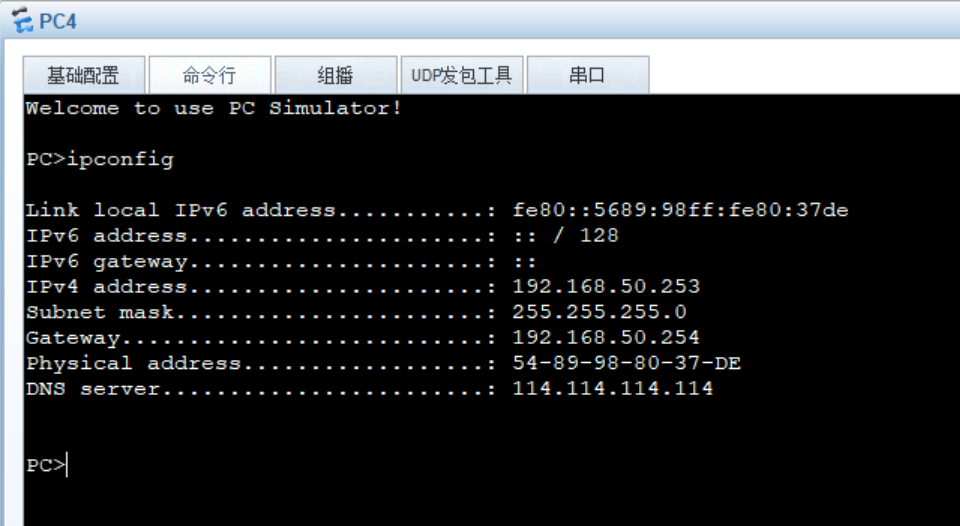
(1).DHCP以PC4为例:
(2)NAPT测试: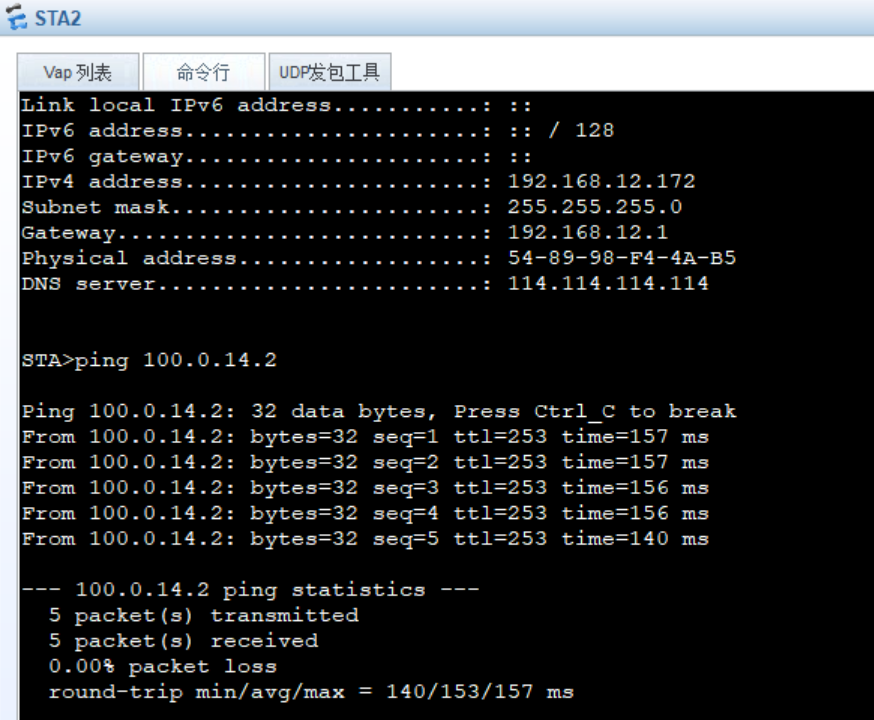

wireshark抓包:NAPT将192.168.12.172转换为100.0.14.3。
(3)DNS-MAP配置查看: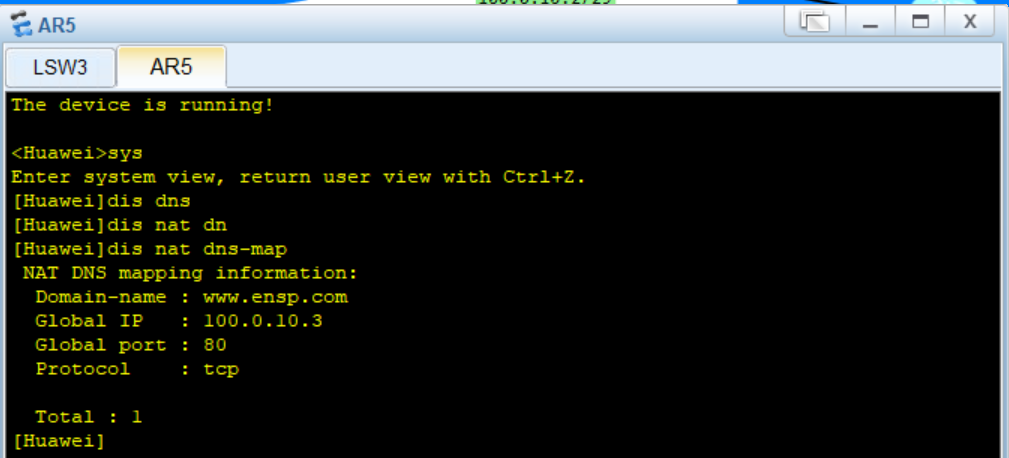
(4)Easy ip测试: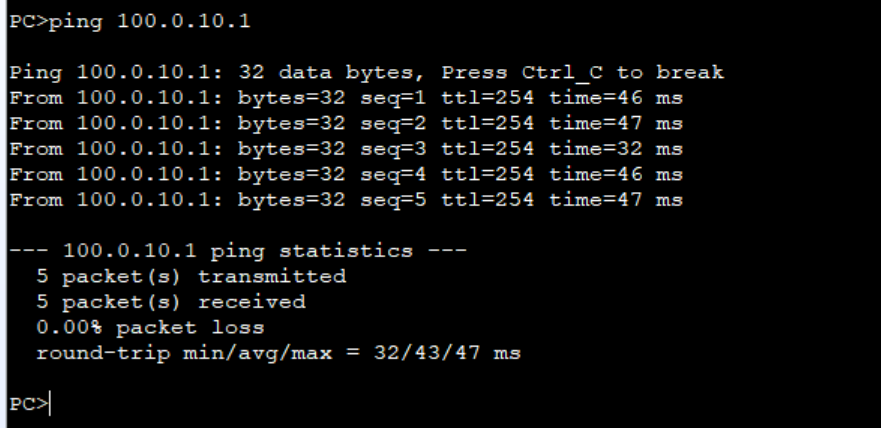
wireshark抓包查看Easy ip地址转换:
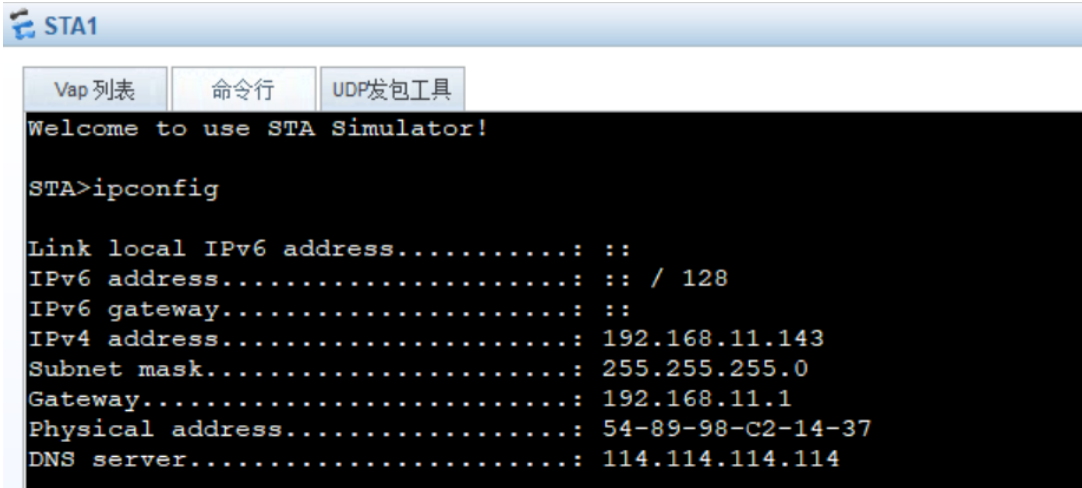
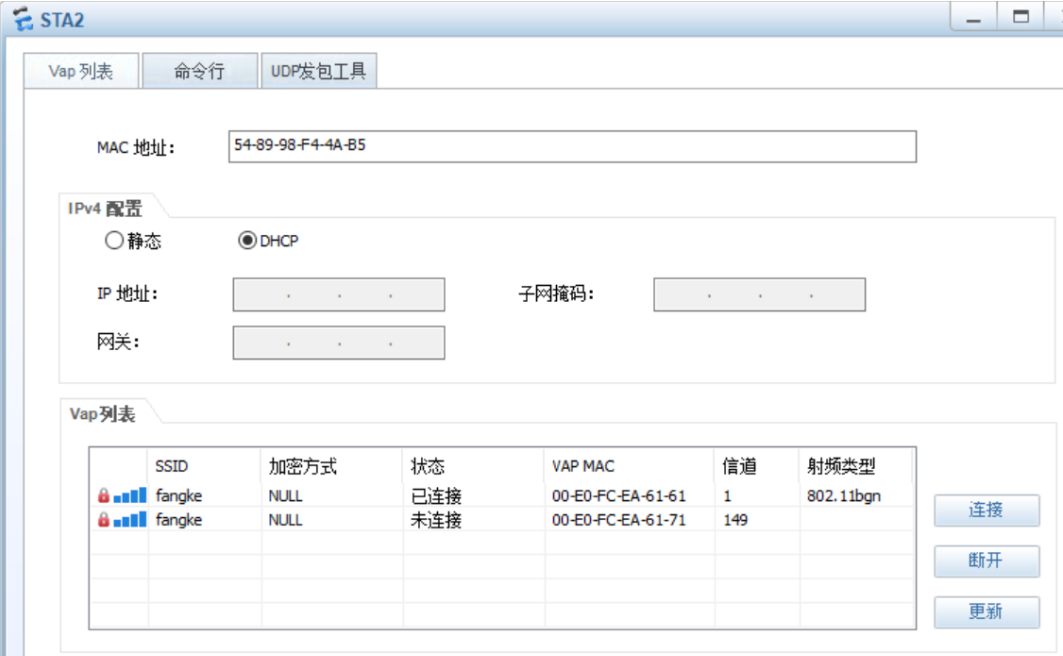
(5)WLAN无线设备连接测试: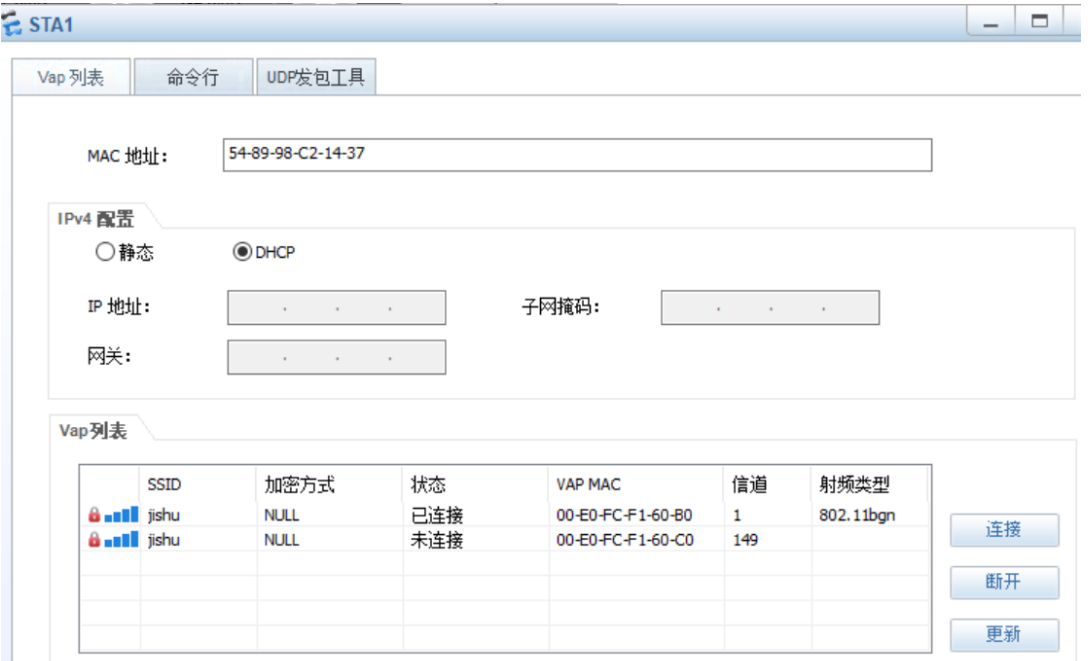
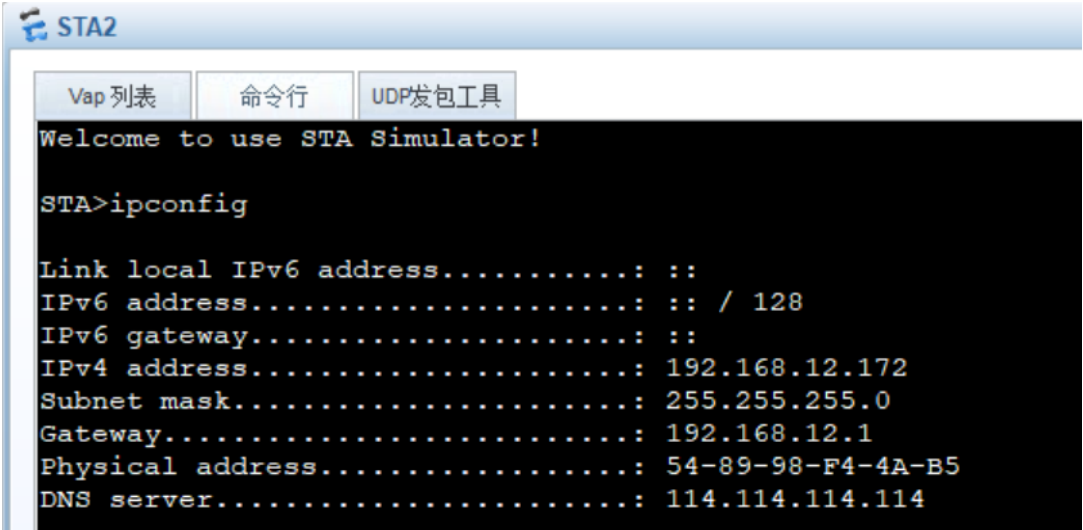
(6)二层漫游测试
将STA1从一个ap无线网覆盖范围移动到另一个ap: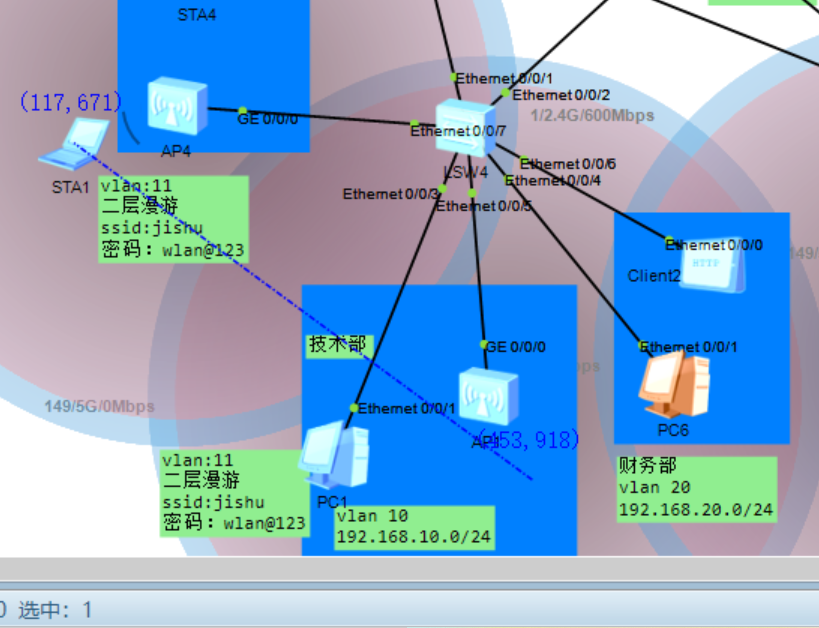
Sta1从AP1移动到AP4丢一个包后无缝连接AP4: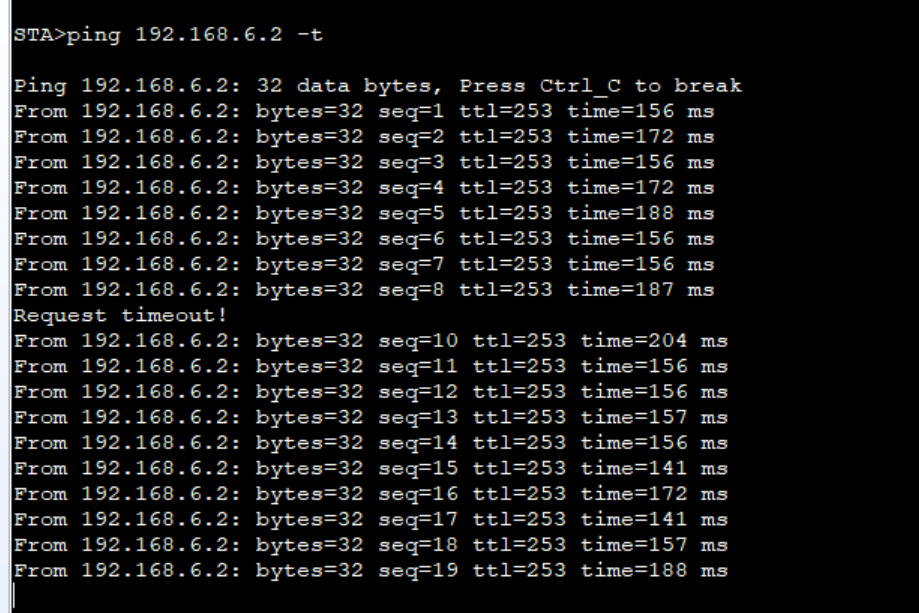
(7)三层漫游测试:
将STA2从一个ap无线网覆盖范围移动到另一个ap: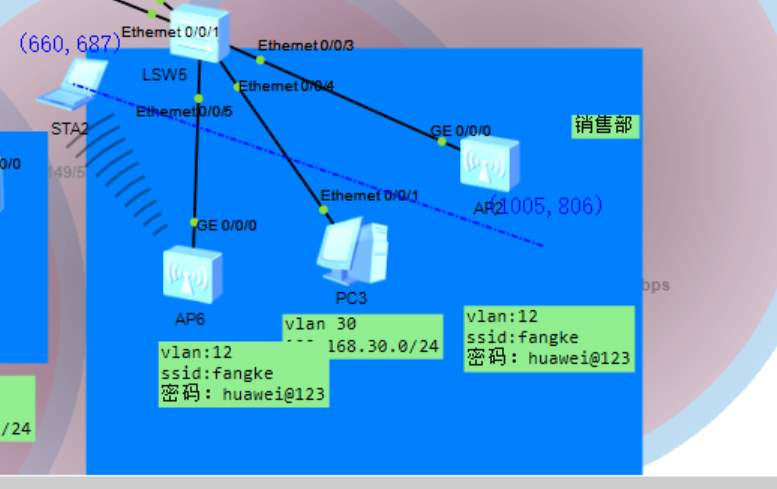
Sta2从AP2移动到AP6无缝连接AP6: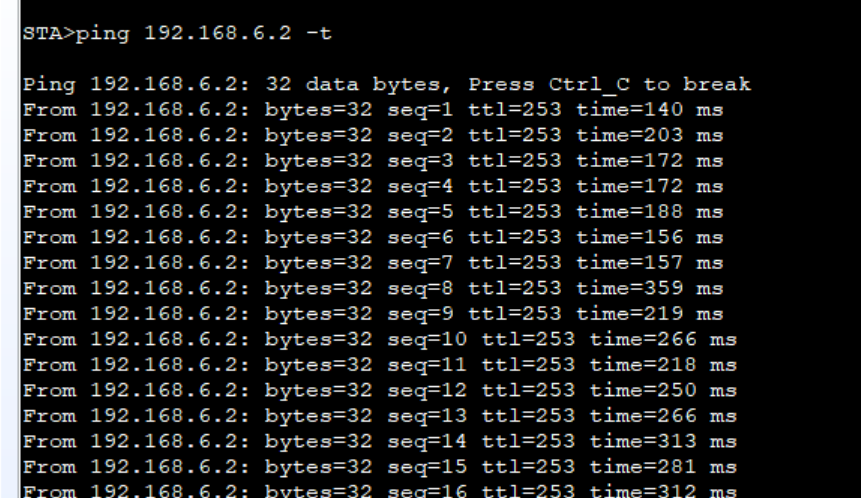
(8)OSPF和BGP路由以AR3为例: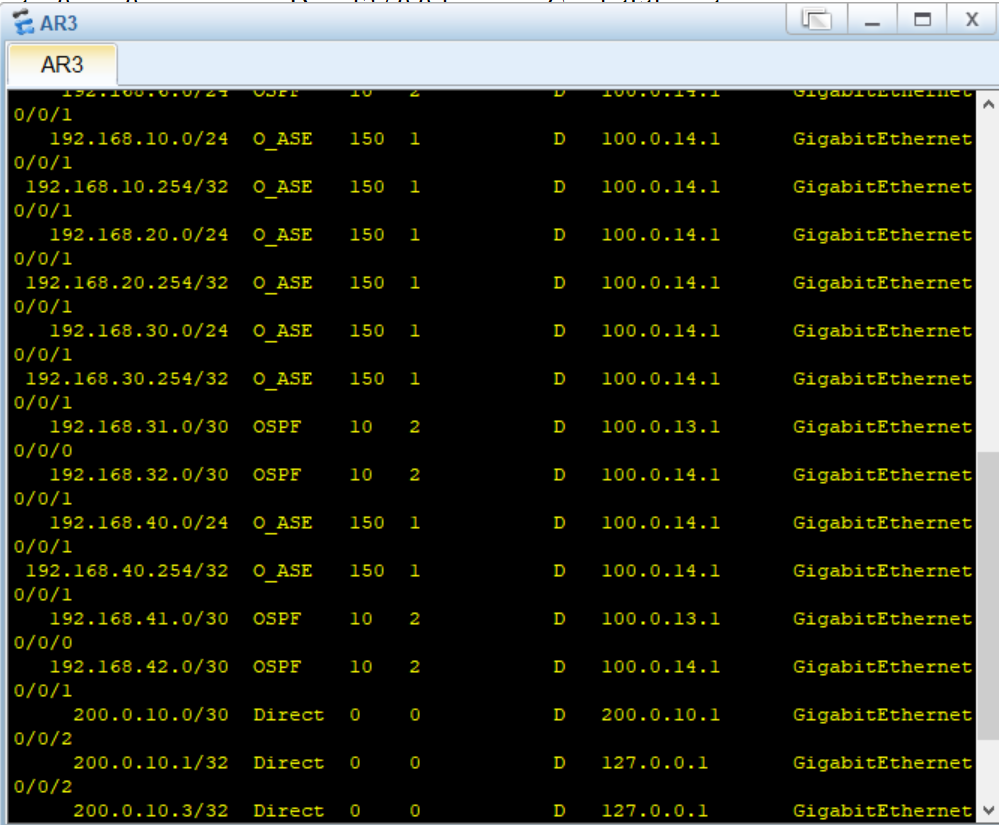
(9)MSTP以LSW3为例: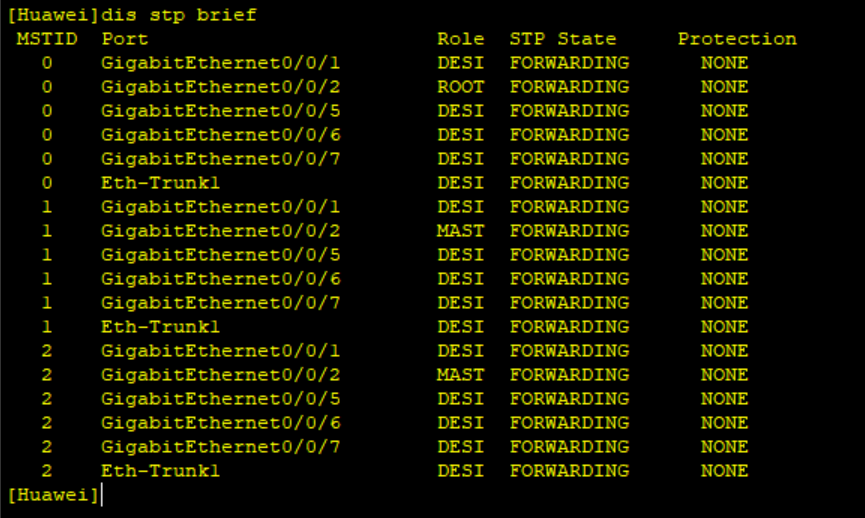
(10)VRRP以LSW3为例: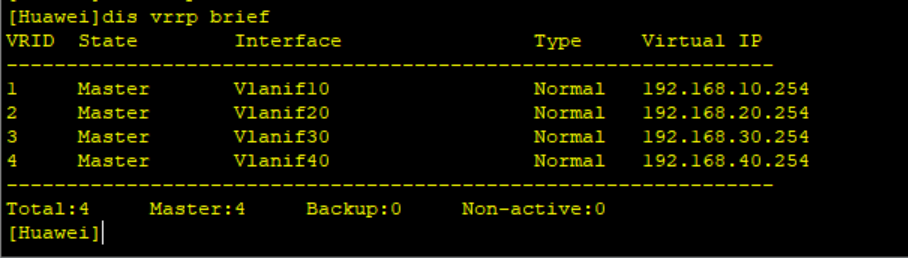
(11)链路聚合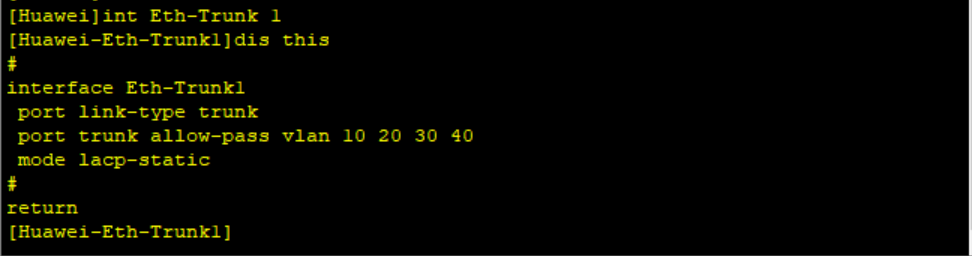
(12)IPSec VPN测试,以AR6抓包为例:
通过PC4 ping DNS server: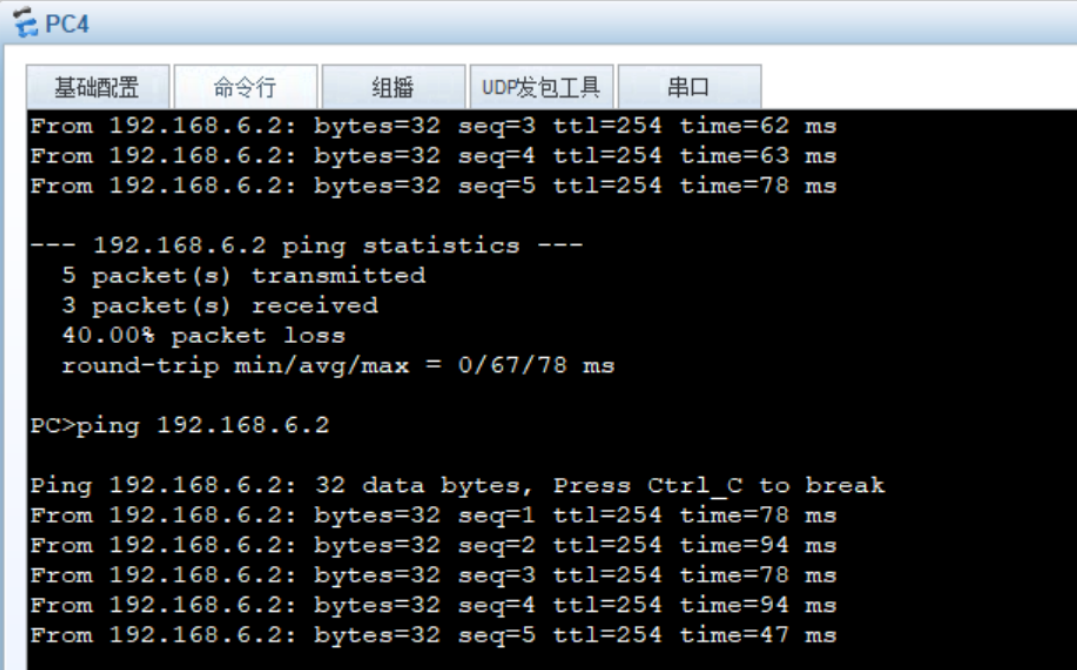
wireshark抓包显示:通信两端ip数据包被IPSec封装: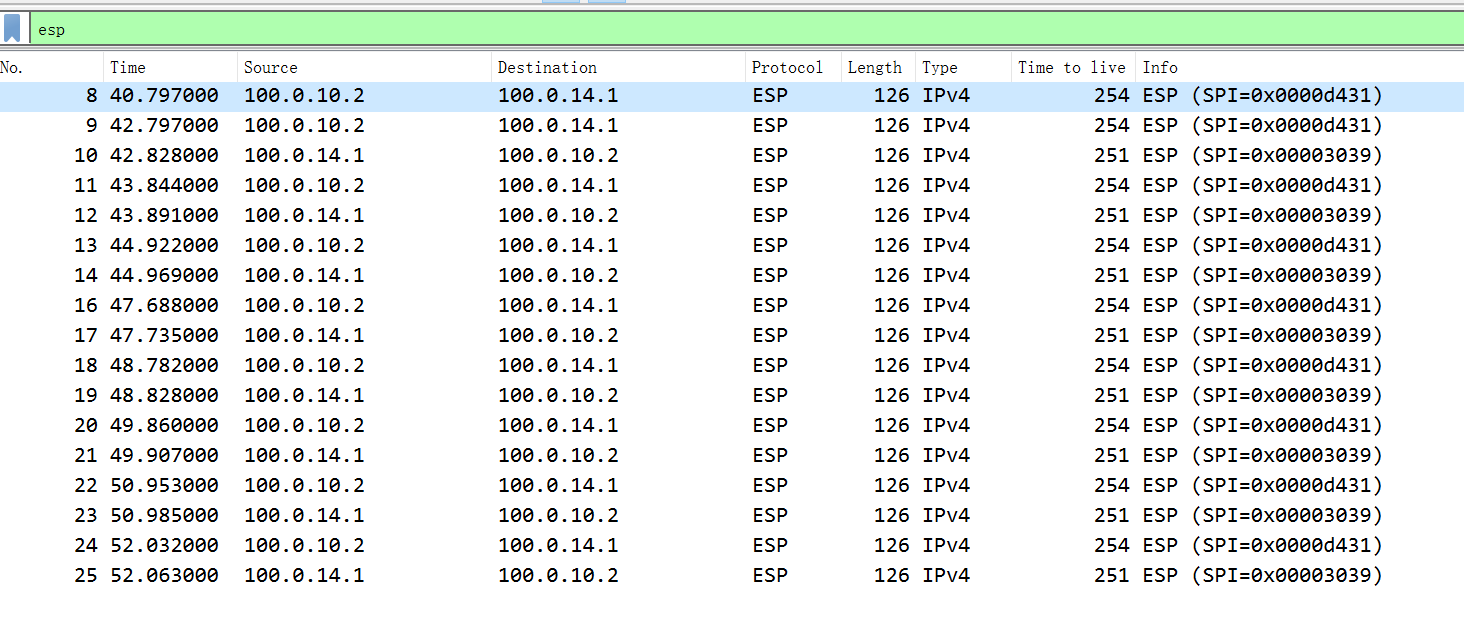

openEuler 是由开放原子开源基金会孵化的全场景开源操作系统项目,面向数字基础设施四大核心场景(服务器、云计算、边缘计算、嵌入式),全面支持 ARM、x86、RISC-V、loongArch、PowerPC、SW-64 等多样性计算架构
更多推荐

 39
39 0
0- 0


 已为社区贡献1条内容

所有评论(0)