嵌入式Web服务器事先,控制开发板硬件(流程概述)
·
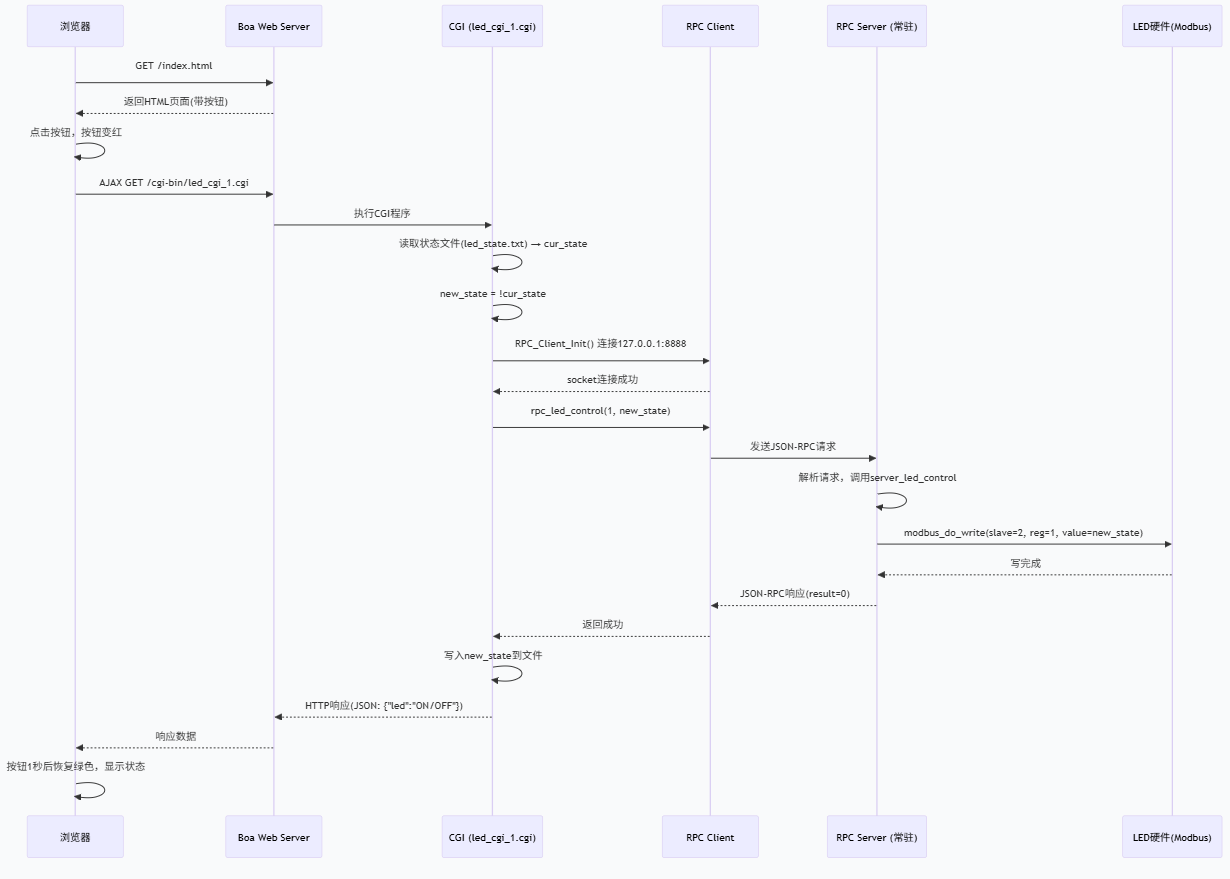
嵌入式 Web 控制硬件:Boa + CGI + JSON-RPC 完整实现
一、系统架构
开发板(i.MX6ULL)运行:
-
Boa Web 服务器:提供静态页面和 CGI 支持。
-
RPC 服务端(常驻后台):基于 JSON‑RPC 接收调用,通过 Modbus 控制 LED 等硬件。
-
CGI 程序:被 Boa 调用,作为中间层连接前端与 RPC 服务端。
用户通过浏览器访问开发板 IP → 点击按钮 → 异步 CGI 请求 → RPC 控制硬件 → 返回状态 → 页面无刷新,按钮变色。
二、配置文件与代码
1. Boa 配置文件 /boa/boa.conf
text
Port 80
User 0
Group 0
ErrorLog /boa/log/error_log
DocumentRoot /boa/www
UserDir public_html
DirectoryIndex index.html
DirectoryMaker /boa/boa_indexer
KeepAliveMax 1000
KeepAliveTimeout 10
MimeTypes /boa/mime.types
DefaultType text/plain
CGIPath /bin:/usr/bin:/usr/local/bin
Alias /doc /usr/doc
ScriptAlias /cgi-bin/ /boa/cgi-bin/
2. 前端页面 /boa/www/index.html
html
<!DOCTYPE html>
<html>
<head>
    <meta charset="UTF-8">
    <title>嵌入式硬件控制</title>
    <style>
        button {
            padding: 10px 20px;
            font-size: 16px;
            cursor: pointer;
            background-color: #4CAF50;
            color: white;
            border: none;
            border-radius: 5px;
        }
        button.red {
            background-color: #f44336;
        }
    </style>
</head>
<body>
    <h3>LED 远程控制</h3>
    <button id="myBtn">驱动硬件</button>
    <p id="status"></p>

    <script>
        const btn = document.getElementById('myBtn');
        const statusP = document.getElementById('status');

        btn.onclick = function() {
            this.classList.add('red');
            fetch('/cgi-bin/led_cgi_1.cgi')
                .then(response => response.json())
                .then(data => {
                    console.log('CGI返回:', data);
                    statusP.innerText = 'LED 状态: ' + data.led;
                    setTimeout(() => {
                        btn.classList.remove('red');
                    }, 1000);
                })
                .catch(err => {
                    console.error('请求失败:', err);
                    btn.style.backgroundColor = 'orange';
                    statusP.innerText = '请求失败';
                });
        };
    </script>
</body>
</html>
3. CGI 程序 /boa/cgi-bin/led_cgi_1.cgi
c
#include <stdio.h>
#include <stdlib.h>
#include "rpc_client.h"

#define PATH "/tmp/led_state.txt"

int main()
{
    int cur_stat = 0;
    FILE *fp = fopen(PATH, "r");
    if (fp) {
        fscanf(fp, "%d", &cur_stat);
        fclose(fp);
    }
    int new_stat = cur_stat ? 0 : 1;

    if (RPC_Client_Init() < 0) {
        printf("Content-Type: text/plain\n\nERROR: RPC init failed");
        return 1;
    }
    if (rpc_led_control(1, new_stat) < 0) {
        printf("Content-Type: text/plain\n\nERROR: rpc led control failed");
        return 1;
    }

    fp = fopen(PATH, "w");
    if (fp) {
        fprintf(fp, "%d", new_stat);
        fclose(fp);
    }

    printf("Content-Type: application/json\n\n");
    printf("{\"led\":\"%s\"}", new_stat ? "ON" : "OFF");
    return 0;
}
4. RPC 客户端 (rpc_client.c 核心)
c
#include <stdio.h>
#include <stdlib.h>
#include <string.h>
#include <unistd.h>
#include <sys/socket.h>
#include <netinet/in.h>
#include <arpa/inet.h>
#include <errno.h>
#include "cJSON.h"
#include "rpc.h"

#define PORT 8888

static int g_SocketClient;

int RPC_Client_Init(void)
{
    int sock = socket(AF_INET, SOCK_STREAM, 0);
    if (sock < 0) return -1;
    struct sockaddr_in addr;
    addr.sin_family = AF_INET;
    addr.sin_port = htons(PORT);
    addr.sin_addr.s_addr = inet_addr("127.0.0.1");
    if (connect(sock, (struct sockaddr*)&addr, sizeof(addr)) < 0) {
        close(sock);
        return -1;
    }
    g_SocketClient = sock;
    return sock;
}

int rpc_led_control(int num, int status)
{
    char buf[200];
    sprintf(buf, "{\"method\":\"led_control\",\"params\":[%d,%d],\"id\":\"2\"}", num, status);
    send(g_SocketClient, buf, strlen(buf), 0);
    int len = read(g_SocketClient, buf, sizeof(buf)-1);
    if (len <= 0) return -1;
    buf[len] = 0;
    cJSON *root = cJSON_Parse(buf);
    cJSON *result = cJSON_GetObjectItem(root, "result");
    int ret = result ? result->valueint : -1;
    cJSON_Delete(root);
    return ret;
}
5. RPC 服务端 (rpc_server.c 核心)
c
#include <jsonrpc-c.h>
#include <stdio.h>
#include <stdlib.h>
#include <unistd.h>
#include "rpc.h"
#include "modbus.h"   // 包含 modbus_do_write 等

#define PORT 8888

static struct jrpc_server my_server;
static int serial_fd;

cJSON * server_led_control(jrpc_context *ctx, cJSON *params, cJSON *id)
{
    cJSON *num = cJSON_GetArrayItem(params, 0);
    cJSON *status = cJSON_GetArrayItem(params, 1);
    modbus_do_write(serial_fd, 2, num->valueint, status->valueint);
    return cJSON_CreateNumber(0);
}

int main()
{
    // 初始化串口、Modbus RS485 等
    serial_fd = open_serial("/dev/ttymxc2");
    set_opt(serial_fd, 115200, 8, 'N', 1);
    // ... 其他初始化

    jrpc_server_init(&my_server, PORT);
    jrpc_register_procedure(&my_server, server_led_control, "led_control", NULL);
    // 可注册更多方法如 dht11_read, EEPROM_write 等
    jrpc_server_run(&my_server);
    jrpc_server_destroy(&my_server);
    return 0;
}
三、运行步骤
-
编译 RPC 服务端,放到开发板并后台运行
bash
./rpc_server &
-
编译 CGI 程序(交叉编译)
bash
arm-buildroot-gcc -o led_cgi_1.cgi led_cgi_1.c rpc_client.c cJSON.c -lpthread
复制到
/boa/cgi-bin/ -
启动 Boa Web 服务器
bash
boa
-
浏览器访问
http://开发板IP,点击按钮即可控制 LED,页面无刷新,按钮变红并恢复,显示当前 LED 状态。
四、注意事项
-
状态文件
/tmp/led_state.txt在重启后会丢失(tmpfs),如需持久化可改为/root/led_state.txt等。 -
RPC 服务端和 CGI 程序编译时需链接
cjson和jsonrpc-c库。 -
确保 CGI 程序有可执行权限:
chmod +x /boa/cgi-bin/led_cgi_1.cgi -
如果使用
fetch请求,浏览器可能因同源策略限制,但开发板上访问同 IP 和端口,不存在跨域问题。

openEuler 是由开放原子开源基金会孵化的全场景开源操作系统项目,面向数字基础设施四大核心场景(服务器、云计算、边缘计算、嵌入式),全面支持 ARM、x86、RISC-V、loongArch、PowerPC、SW-64 等多样性计算架构
更多推荐
 13
13 0
0- 0


 已为社区贡献5条内容

所有评论(0)