Android Safety 系列专题【篇七:Android AVF机制】
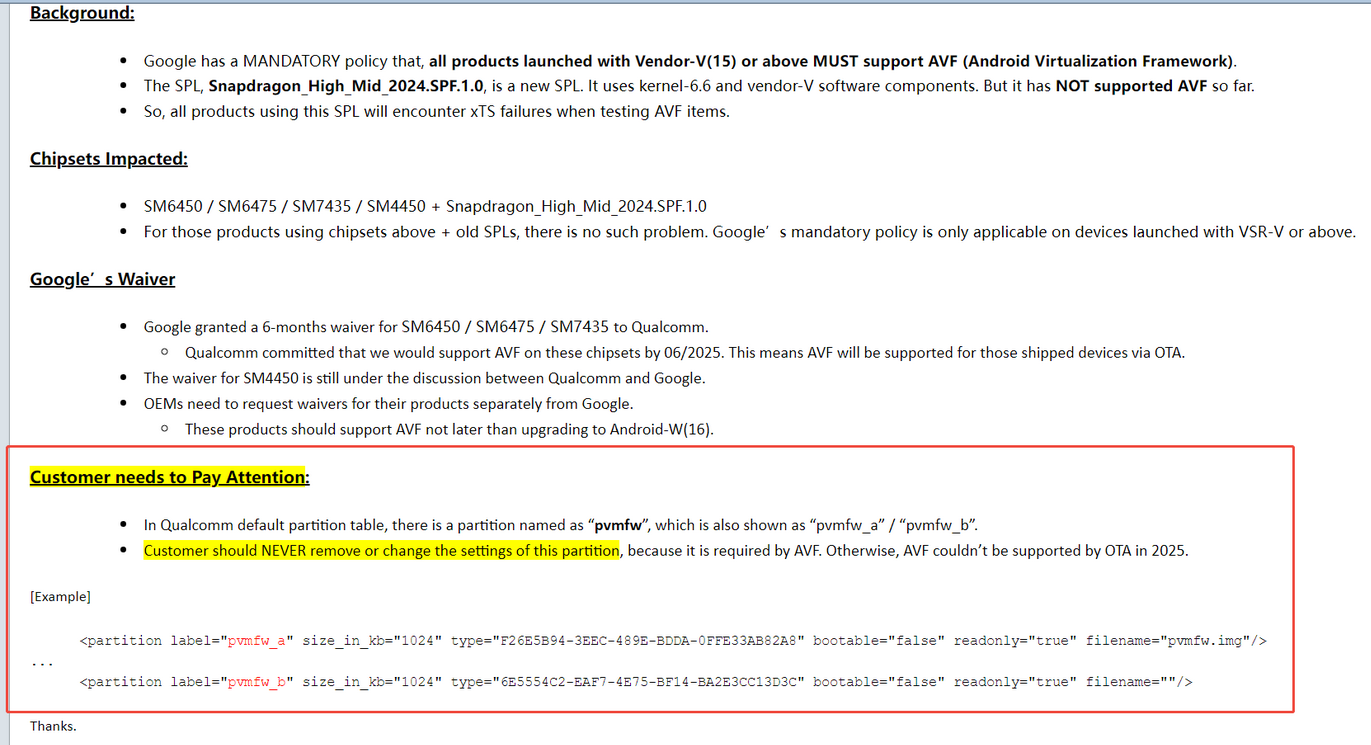
如上邮件,google要求所有A15以上的设备都必须支持AVF,并且AOSP在A15的分区表中新增了pvmfw,并且在XTS中引入了对AVF的一些列兼容性测试。
因此本篇就是关于这一政策引起的几个问题进行解读。
一、AVF概念理解
1、什么是AVF?
| AVF | Android Virtualization Framework,Android虚拟化框架,Android 13引入的系统级框架,允许在Android设备上创建和运行隔离的虚拟机 |
| Virtual Machine | 虚拟机,通过软件模拟的完整计算机系统,拥有独立的操作系统和资源 |
| Hypervisor | 虚拟机管理器,负责创建、管理和调度虚拟机的软件层 |
| Protected VM | 受保护虚拟机,内存被硬件隔离,宿主系统无法访问,用于安全敏感场景 |
| Microdroid | AVF提供的轻量级Android虚拟机镜像,专为虚拟化场景优化 |
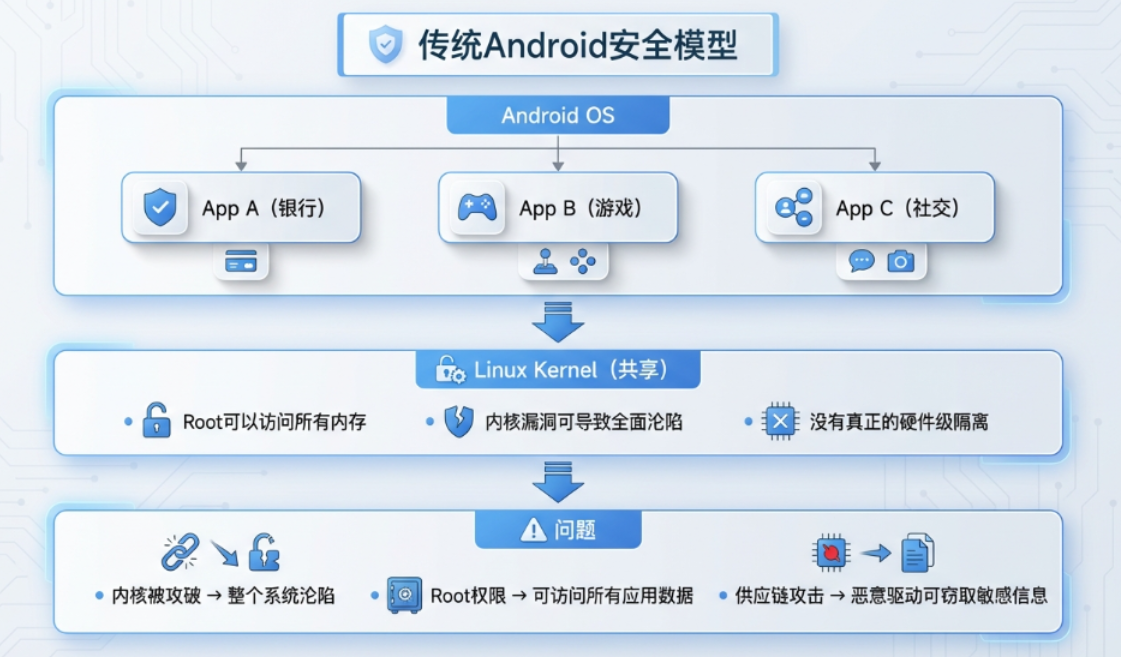
AVF全称Android Virtualization Framework,翻译过来就是Android虚拟化框架。那么google为什么要推行AVF呢?
- 在引进AVF之前:
- 在引进AVF之后:
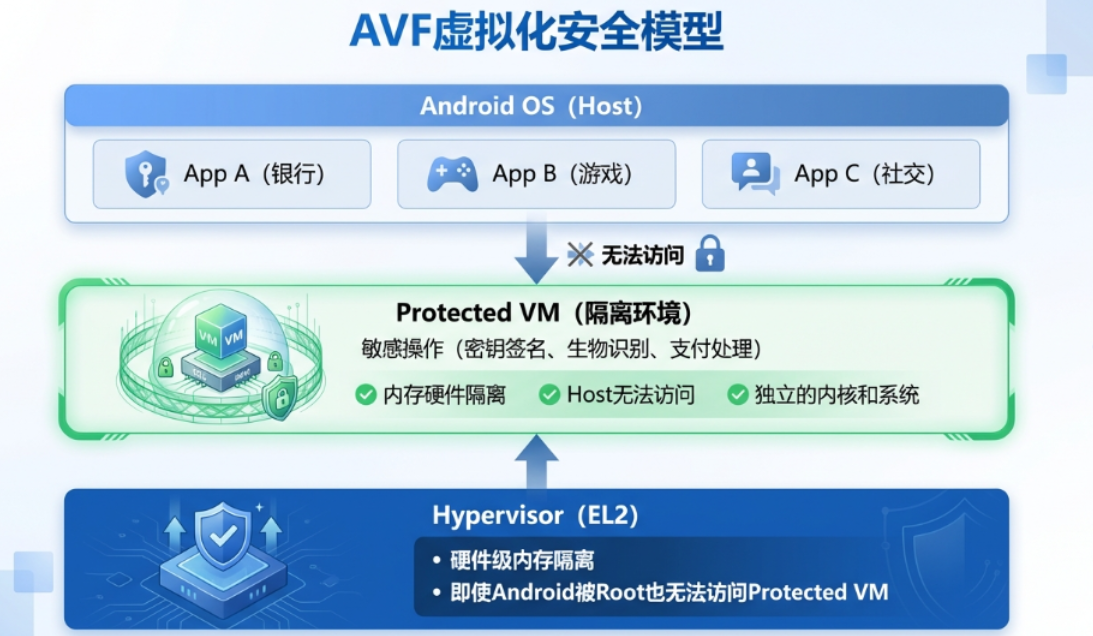
AVF就是如上接受保护的Protected VM,因为AVF具有隔离环境的作用,因此当即使android是root的,至少VM也是安全的。
Protected VM依赖多层硬件机制实现隔离,相比传统式Non-protected VM有如下优势:
| 内存隔离 | 软件隔离(Stage-2页表) | 硬件隔离 + 加密 |
| Host可访问性 | ⚠️ 可以访问 | ✅ 无法访问 |
| 安全级别 | 功能隔离级别 | 安全隔离级别 |
| 性能开销 | 较低 | 较高 |
| 用途 | 兼容性测试、功能隔离 | 密钥管理、支付处理 |
| 硬件要求 | KVM即可 | 需要TEE/内存加密支持 |
2、AVF技术架构
AVF技术还是非常复杂的,设计到上下底层,这里就提供一张AI画的图:
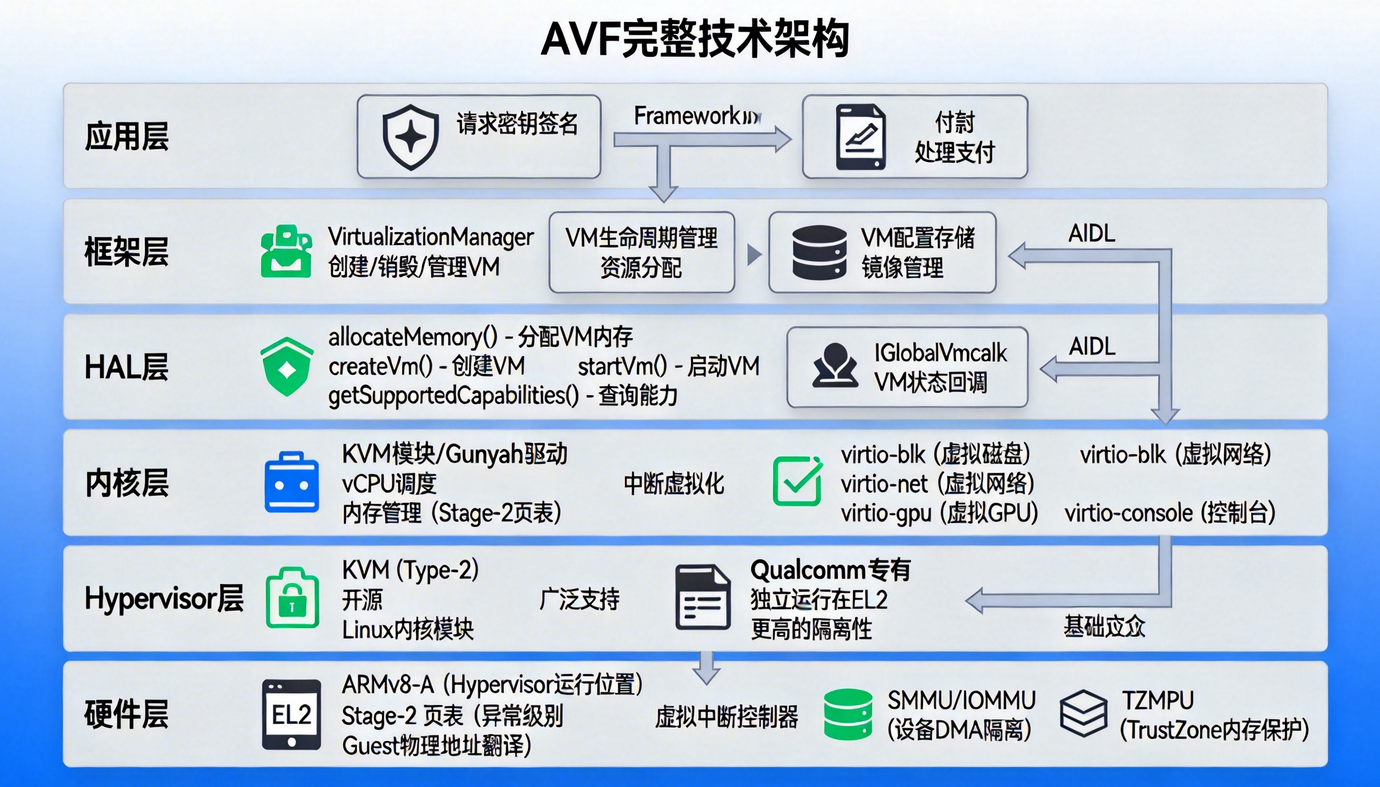
整个架构设计到如下模块:
系统Feature声明
android.software.virtualization.framework
android.hardware.virtualization.vcpu
android.hardware.virtualization.protected_vm
HAL接口 (AIDL)
│  │  ┌─────────────────────────────────────────────────┐    │   │
│  │  │  hardware/interfaces/virtualization/             │    │   │
│  │  │  ├── IVirtualizationService.aidl                │    │   │
│  │  │  ├── IVirtualMachine.aidl                       │    │   │
│  │  │  ├── IGlobalVmCallback.aidl                     │    │   │
│  │  │  └── types.aidl (Capability枚举)                │    │   │
│  │  └─────────────────────────────────────────────────┘    │   │
框架API
│  │  ┌─────────────────────────────────────────────────┐    │   │
│  │  │  android.os.VirtualizationManager               │    │   │
│  │  │  • createVirtualMachine()                       │    │   │
│  │  │  • getVirtualMachine()                          │    │   │
│  │  │  • getSupportedCapabilities()                   │    │   │
│  │  │                                                 │    │   │
│  │  │  android.system.virtualmachine.VirtualMachine   │    │   │
│  │  │  • start() / stop()                             │    │   │
│  │  │  • connect()                                    │    │   │
│  │  └─────────────────────────────────────────────────┘    │   │
Microdroid镜像
│  │  ┌─────────────────────────────────────────────────┐    │   │
│  │  │  /apex/com.android.virt/bin/microdroid          │    │   │
│  │  │  ├── microdroid.img (系统镜像)                  │    │   │
│  │  │  ├── microdroid_kernel (内核镜像)               │    │   │
│  │  │  └── microdroid_initrd.img (initrd)             │    │   │
│  │  └─────────────────────────────────────────────────┘    │   │
内核配置
CONFIG_KVM=y
CONFIG_KVM_ARM_HOST=y
CONFIG_VIRTUALIZATION=y
CONFIG_VHOST_VSOCK=y
设备节点
│  │  ┌─────────────────────────────────────────────────┐    │   │
│  │  │  /dev/kvm          (KVM方案)                    │    │   │
│  │  │  /dev/gunyah       (Gunyah方案)                 │    │   │
│  │  │  /dev/vhost-vsock  (VM通信)                     │    │   │
│  │  └─────────────────────────────────────────────────┘    │   │
3、AVF技术总结
- 定义:Android Virtualization Framework , Android官方虚拟化框架,让Android能创建和管理隔离虚拟机的系统级解决方案。
- 核心价值:硬件级安全隔离 → 即使Android被攻破,敏感数据仍安全 ; 独立执行环境 → 敏感操作在隔离VM中完成 ; 统一API → 开发者无需关心底层Hypervisor差异 。
- 技术栈: 应用API → Framework → HAL → Kernel → Hypervisor → Hardware
- 必要条件: CPU支持虚拟化扩展(ARMv8-A EL2); 内核启用KVM/Gunyah ;实现IVirtualizationService HAL ;系统Feature声明
二、XTS案例
1、MicrodroidTestApp.VTS
问题链接:https://jira.tinno.com/browse/PAAM-1344
失败日志:arm64-v8a MicrodroidTestApp.VTS com.android.microdroid.test.MicrodroidCapabilitiesTest#avfIsRequired fail
Device doesn't support AVF

用例分析:根据关键日志Device doesn't support AVF搜索如下代码
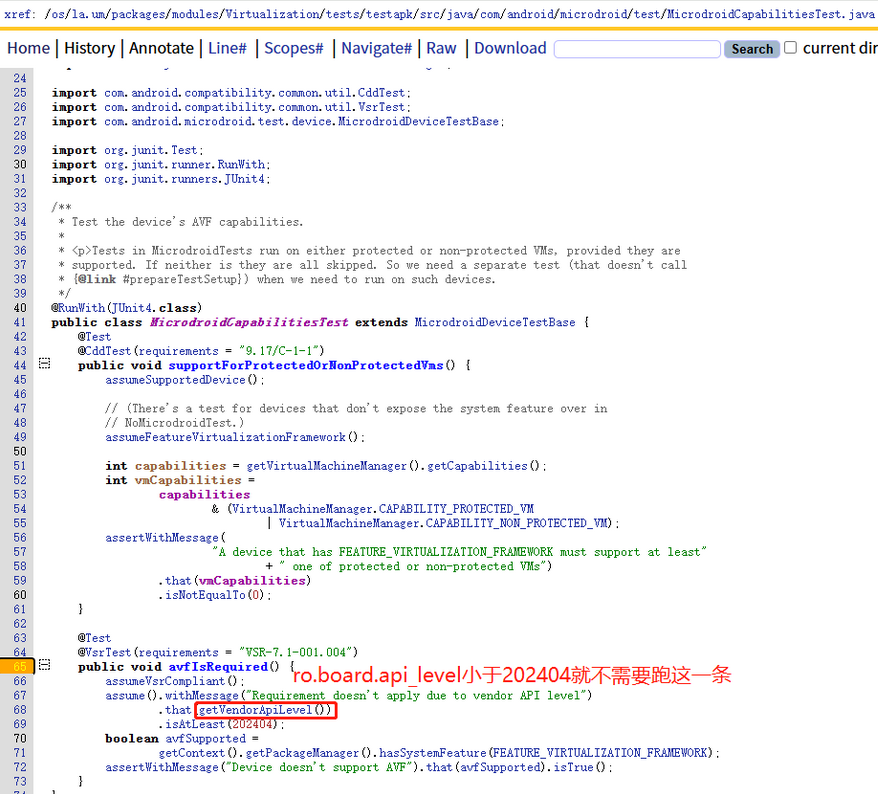
如上代码逻辑,如果ro.board.api_level小于202404,就不需要测试这一条,跳过下一步测试,此条PASS
如果大于202404,且没有配置FEATURE_VIRTUALIZATION_FRAMEWORK就直接报Device doesnt support AVF。因此此问题原因是我们没有配置如下feature:
在packages/modules/Virtualization/build/apex/product_packages.mk文件中有如下配置:
<permissions>
       <feature name="android.software.virtualization_framework" />
</permissions>
2、MicrodroidTestApp.CTS
问题链接:https://jira.tinno.com/browse/PAAM-1817
失败日志:arm64-v8a MicrodroidTestApp.CTS com.android.microdroid.test.MicrodroidCapabilitiesTest#supportForProtectedOrNonProtectedVms fail
A device that has FEATURE_VIRTUALIZATION_FRAMEWORK must support at least one of protected or non-protected VMs
测试用例:
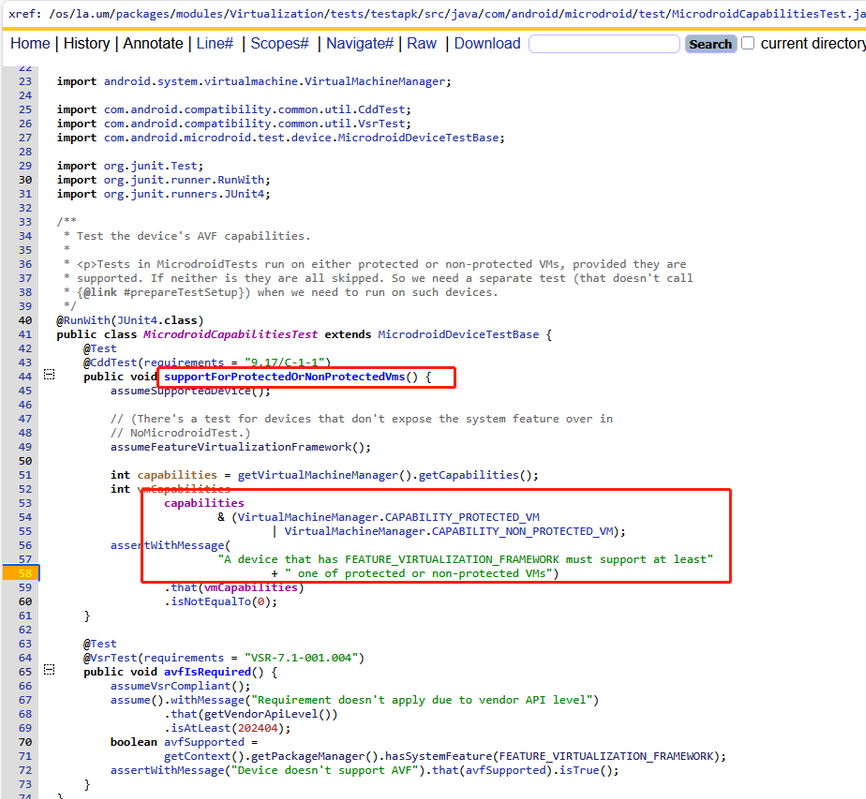
根据报告日志可以看出来这里的getVirtualMachineManager().getCapabilities()获取出来的结果是0,表示都不支持
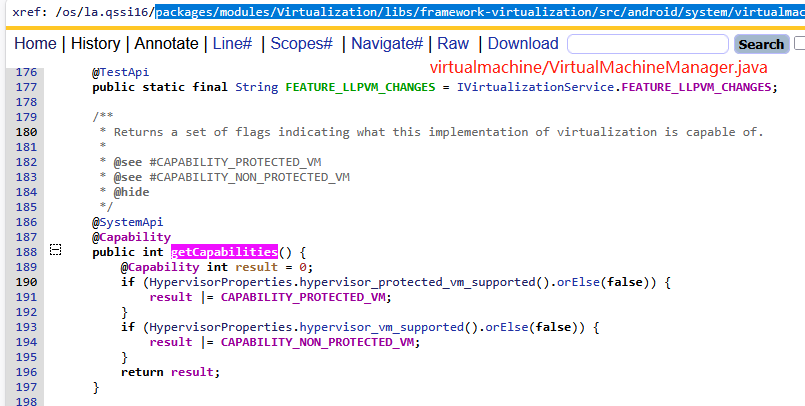
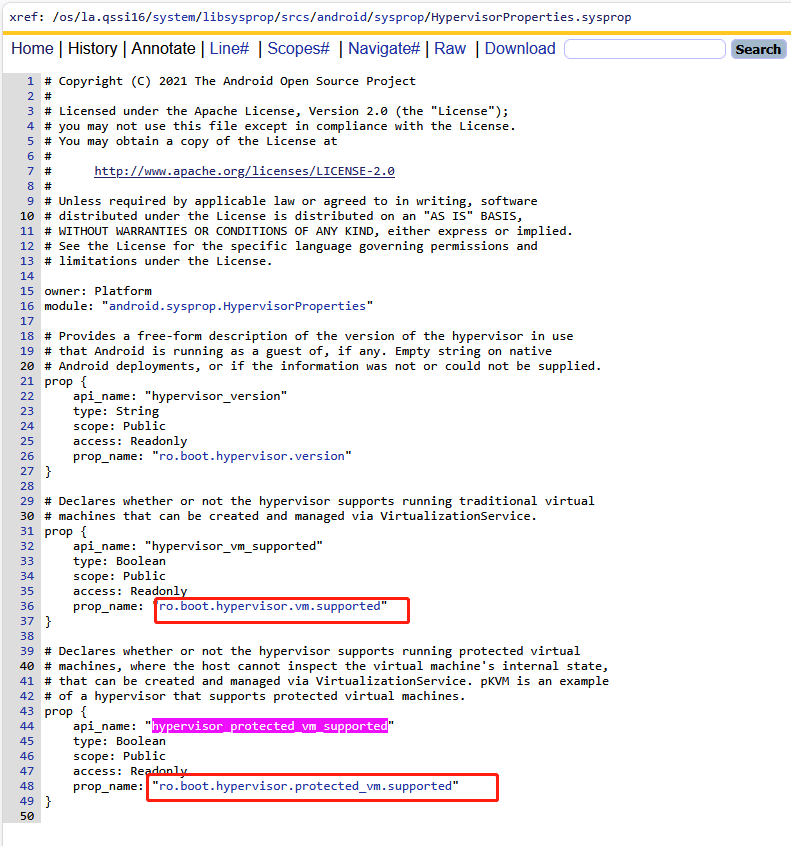
如上流程逻辑链表示当前基线根本就不支持AVF。因此最后此题需要提case到高通,因为这个芯片可能就不支持,我们是升级项目,因此最后向google申请豁免。
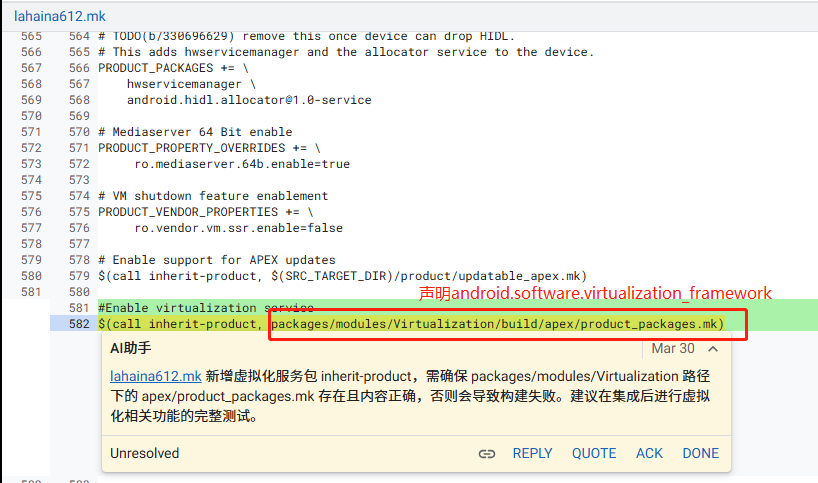
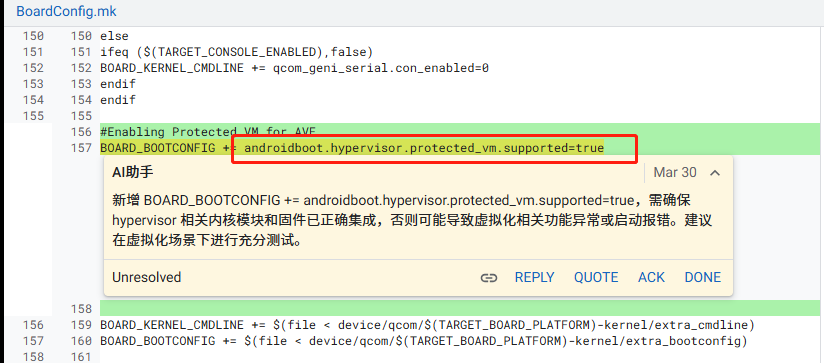
解决方案:最后意外之喜,正好遇上高通基线升级,升级patch有如下修改
- 声明android.software.virtualization_framework特征能力
- 配置hypervisor支持protected VM能力
3、Google pvmfw.img
报错日志:

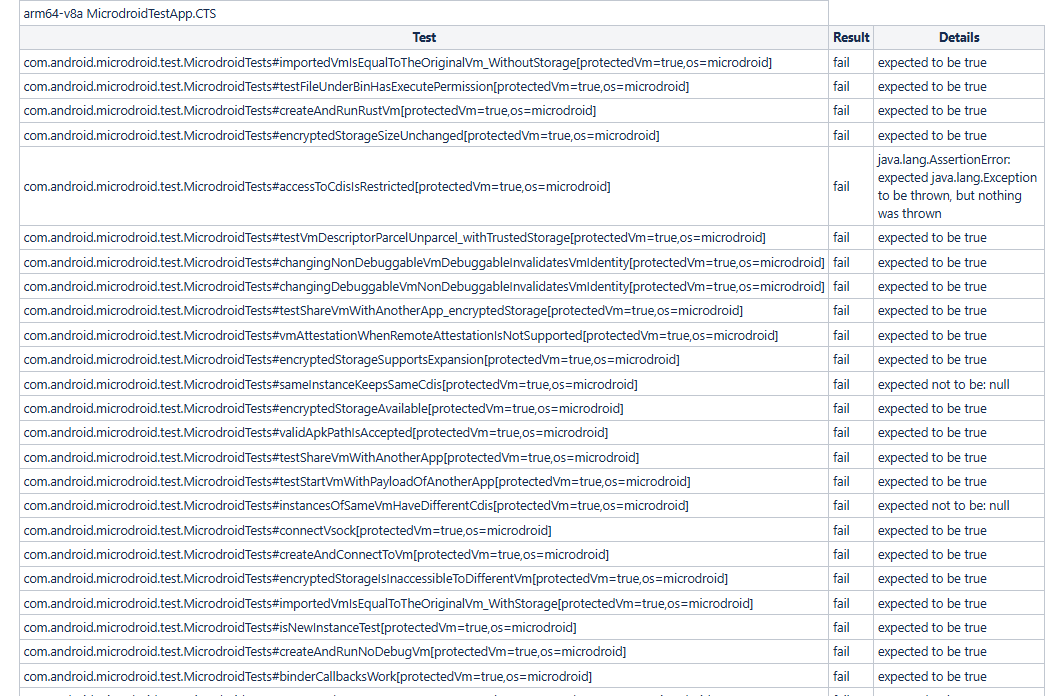
解决方案:如上两个问题最后解决方式在测试之前"fastboot flash pvmfw pvmfw.img"替换pvmfw镜像,由此证明此项还和pvmfw分区有关系
4、pvmfw引发的案例
问题背景:在ASCOM的一个升级项目中,此项目从A12开始升级,在A12中并不存在pvmfw分区,但是为了OTA升级到A16,需要保持分区一致,因此高通提供的一个升级方案,去掉了pvmfw分区。但是此项目不仅仅升级system这边,还把vendor也从A12升级到了A16,导致board_api等于202504,即按照google要求必须支持avf机制。
问题矛盾:为了保证OTA能够顺利升级,必须干掉pvmfw分区;但是干掉pvmfw分区之后XTS无法通过。最后向google提了case,希望能够豁免:
- 问题提交:
xTS Test Improvement Request Guide: https://docs.partner.android.com/gms/testing/overview/test-improvement-request-guide
Device Under Test: XXX
Build Fingerprint: Android/gsi_arm64/generic_arm64:16/BH1A.260106.001/14671002:user/release-keys
Test Suite Version: VTS 16_r4
== Validation on Pixel Device ==
Reference Device: N/A
Build Fingerprint: N/A
Result: N/A
==Preconditions==
e.g. additional steps, special setup or external factors
Device is a GSI (Generic System Image) running on ARM64 architecture
==Steps to Reproduce==
1.Flash image and preparation for VTS Test
2.Run VTS test: vts -m MicrodroidTestApp.VTS
3.Observe test failure for avfIsRequired test case
Test Command:
run vts -m MicrodroidTestApp.VTS
== Error ==
Comment here with relevant stack trace, tombstone or logcat
Test: com.android.microdroid.test.MicrodroidCapabilitiesTest#avfIsRequired
Result: FAIL
Error Message:
Device doesn't support AVF
Stack Trace:
Device doesn't support AVF
expected to be true
at com.android.microdroid.test.MicrodroidCapabilitiesTest.avfIsRequired(MicrodroidCapabilitiesTest.java:72)
== Analysis ==
Please confirm whether failure is due to test issue or not
1. From the logic of the test cases, there is no configuration for the feature: android.software.virtualization_framework"
2. The API information of the equipment is as follows:
[ro.board.api_level]: [202504]
[ro.board.first_api_level]: [30]
[ro.product.first_api_level]: [31]
[ro.vendor.api_level]: [31]
Because ro.board.api_level is greater than 202404, The VTS tool will then test the AVF test items.
3. However, this project was upgraded from A12 OTA, and ro.board.first_api_level is 30, and ro.product.first_api_level is 31
4. I believe that the upgrade project should not support AVF:
Because the upgrade project uses the A12 or A14 partitions, there is no pvmfw partition.
In order to perform OTA upgrade to A16, it is not possible to add pvmfw partition on A16.
So, the underlying system of this project is unable to support AVF.
Even, add config android.software.virtualization_framework feature, There will still be the MicrodroidTestApp.CTS problem.
== Mandatory Attachments ==
- Test report, log & bugreport on the DUT
attached: 2026.04.21_16.12.37-results.zip, 2026.04.21_16.12.37-log.zip
- Specific Test failure logs & bugreport on the DUT
attached: bugreport-gsi_arm64-BH1A.260106.001-2026-04-21-08-17-50.zip
- Test report, log & bugreport on the Reference Device
== Fix - test suites or framework or others ==
Select the correct category below:
Test fix [Y ]
Partner device/framework fix [ ]
Mainline module fix [ ]
None of the above [ ]
Add links to the Change Lists (test dev and aosp-main branches on https://android-review.googlesource.com/) uploaded in gerrit for review. (ref: bit.ly/submit_cls)
Test dev branch CL link:
aosp-main branch CL link:
@Test
@VsrTest(requirements = "VSR-7.1-001.004")
public void avfIsRequired() {
assumeVsrCompliant();
assume().withMessage("Requirement doesn't apply due to vendor API level")
.that(getVendorApiLevel())
.isAtLeast(202404);
boolean avfSupported =
getContext().getPackageManager().hasSystemFeature(FEATURE_VIRTUALIZATION_FRAMEWORK);
assertWithMessage("Device doesn't support AVF").that(avfSupported).isTrue();
}
Can the "getVendorApiLevel" in this code be replaced with "ro.board.first_api_level" or "ro.product.first_api_level"?
== Optional Attachments ==
Any relevant info, such as screenshots & Video can be helpful when an issue is difficult to be described.
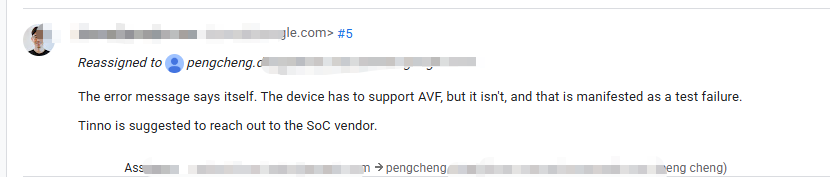
- 谷歌回复:
- 我的回复:
dear Google:
#Enable virtualization service
$(call inherit-product, packages/modules/Virtualization/build/apex/product_packages.mk)
#Enabling Protected VM for AVF
BOARD_BOOTCONFIG += androidboot.hypervisor.protected_vm.supported=true
After we configured the above code, this test item was successful. However, the following failure items have occurred:
arm64-v8a MicrodroidTestApp.CTS
com.android.microdroid.test.MicrodroidTests#createAndConnectToVm[protectedVm=true,os=microdroid]
expected to be true
at com.android.microdroid.test.device.MicrodroidDeviceTestBase.runVmTestService(MicrodroidDeviceTestBase.java:767)
at com.android.microdroid.test.MicrodroidTests.createAndConnectToVmHelper(MicrodroidTests.java:200)
at com.android.microdroid.test.MicrodroidTests.createAndConnectToVm(MicrodroidTests.java:223)
For details, please refer to the attachment.
reason for failure:
W libc : Access denied finding property "hypervisor.pvmfw.path"
I crosvm : Trying to attach block device: /proc/self/fd/45
I crosvm : Trying to attach block device: /proc/self/fd/50
I crosvm : Trying to attach block device: /proc/self/fd/58
E crosvm : exiting with error 1: the architecture failed to build the vm
E crosvm : Caused by:
E crosvm : failed to initialize virtual machine Invalid argument (os error 22)
This is because this project has removed the pvmfw partition. Unable to access the path, resulting in the failure of vm, and ultimately causing the test item to fail.
Why remove the pvmfw partition?
This project is an upgrade project for A12. In the A12 project, there was no pvmfw partition. To ensure a smooth upgrade to A14 and A16, we need to remove the pvmfw partition. The API information of the equipment is as follows:
[ro.board.api_level]: [202504]
[ro.board.first_api_level]: [30]
[ro.product.first_api_level]: [31]
[ro.vendor.api_level]: [31]
This plan originates from Section 4.1 of the document titled 《KBA-251020235153_REV_3_QCM6490_LA_5_0_to_QCM6490_LA_6_0_Migration_Steps.pdf》 or 《Disable pvmfw in QSSI.png》.
If the pvmfw partition is not removed, do you have any upgrade plans for this?
- 在此追问:
Dear Google Team,
I would like to emphasize the critical severity of this issue for our project:
1. This is an A12-to-A16 Upgrade Device
The device was originally launched with Android 12 and is being upgraded to Android 16 via OTA
ro.board.first_api_level = 30 (Android 11)
ro.product.first_api_level = 31 (Android 12)
2. No pvmfw Partition Support on Original A12 Build
When the device was initially released on Android 12, the pvmfw partition did not exist in the AOSP partition layout
The device's partition table from A12 does not include pvmfw, and this partition layout must be preserved for OTA upgrade compatibility
3. Adding pvmfw Partition Will Cause Project Cancellation
If we add the pvmfw partition to support AVF, the OTA upgrade from A12 to A16 will fail
This is due to the fundamental limitation that AOSP OTA design does not support adding new partitions during upgrade
Consequently, the entire project will be cancelled because we cannot complete the OTA upgrade path
4. Additional Concerns
Even if we managed to add the pvmfw partition, there are numerous other VM-related requirements in AVF tests
Our hardware platform (QCM6490 standard BSP) does not include Gunyah Hypervisor, which is required for Protected VM support
We anticipate additional test failures beyond the current AVF requirements
Request:
Given these constraints, we kindly request Google to consider granting an exemption for AVF-related test requirements on this A12-to-A16 upgrade project. The upgrade device has inherent limitations that cannot be addressed without breaking OTA compatibility.
- Google提供了VTS工具的patch:
From 0be065d8f82852d159376478e08e21341e045987 Mon Sep 17 00:00:00 2001
From: David Anderson <dvander@google.com>
Date: Mon, 04 May 2026 16:21:08 -0700
Subject: [PATCH] Use ro.board.first_api_level for VSR checks.

Using vendor API level doesn't account for SoC upgrades, eg an A12
launch device that refreshes to A16 vendor. For some features, meeting
the new vendor requirements is difficult or impossible, so it makes more
sense to check the first GRF level instead.

Bug: 504904826
Flag: EXEMPT TEST_ONLY
Test: builds
Change-Id: Iafc6090f1281e6b96dd64b82e863dca4a033d7fb
---

diff --git a/tests/libs/device/src/java/com/android/microdroid/test/device/MicrodroidDeviceTestBase.java b/tests/libs/device/src/java/com/android/microdroid/test/device/MicrodroidDeviceTestBase.java
index 1cfedc9..33d6f26 100644
--- a/tests/libs/device/src/java/com/android/microdroid/test/device/MicrodroidDeviceTestBase.java
+++ b/tests/libs/device/src/java/com/android/microdroid/test/device/MicrodroidDeviceTestBase.java
@@ -63,7 +63,6 @@

 import java.io.BufferedReader;
 import java.io.ByteArrayOutputStream;
-import java.security.cert.X509Certificate;
 import java.io.File;
 import java.io.IOException;
 import java.io.InputStream;
@@ -72,6 +71,7 @@
 import java.nio.file.Files;
 import java.nio.file.Path;
 import java.nio.file.Paths;
+import java.security.cert.X509Certificate;
 import java.util.ArrayList;
 import java.util.Collections;
 import java.util.HashSet;
@@ -336,6 +336,10 @@
         return SystemProperties.getInt("ro.board.api_level", 0);
     }

+    protected static int getBoardFirstApiLevel() {
+        return SystemProperties.getInt("ro.board.first_api_level", getVendorApiLevel());
+    }
+
     /**
      * @return The vendor API level that the device as a whole must conform to, this value should be
      *     available on both GRF and non-GRF devices.
diff --git a/tests/testapk/src/java/com/android/microdroid/test/MicrodroidCapabilitiesTest.java b/tests/testapk/src/java/com/android/microdroid/test/MicrodroidCapabilitiesTest.java
index 0031315..22928bc 100644
--- a/tests/testapk/src/java/com/android/microdroid/test/MicrodroidCapabilitiesTest.java
+++ b/tests/testapk/src/java/com/android/microdroid/test/MicrodroidCapabilitiesTest.java
@@ -68,8 +68,8 @@
     @VsrTest(requirements = "VSR-7.1-001.004")
     public void avfIsRequired() {
         assumeVsrCompliant();
-        assume().withMessage("Requirement doesn't apply due to vendor API level")
-                .that(getVendorApiLevel())
+        assume().withMessage("Requirement doesn't apply due to board first API level")
+                .that(getBoardFirstApiLevel())
                 .isAtLeast(202404);
         boolean avfSupported =
                 getContext().getPackageManager().hasSystemFeature(FEATURE_VIRTUALIZATION_FRAMEWORK);
diff --git a/tests/testapk/src/java/com/android/microdroid/test/MicrodroidTests.java b/tests/testapk/src/java/com/android/microdroid/test/MicrodroidTests.java
index 3751056..b89e7fc 100644
--- a/tests/testapk/src/java/com/android/microdroid/test/MicrodroidTests.java
+++ b/tests/testapk/src/java/com/android/microdroid/test/MicrodroidTests.java
@@ -1636,7 +1636,7 @@
         assumeSupportedDevice();
         assumeProtectedVM();
         assumeVsrCompliant();
-        assumeTrue("Vendor API must be newer than 202404", getVendorApiLevel() > 202404);
+        assumeTrue("Board first API must be newer than 202404", getBoardFirstApiLevel() > 202404);

         grantPermission(VirtualMachine.USE_CUSTOM_VIRTUAL_MACHINE_PERMISSION);
         VirtualMachineConfig config =
合入进去,编译了APK:
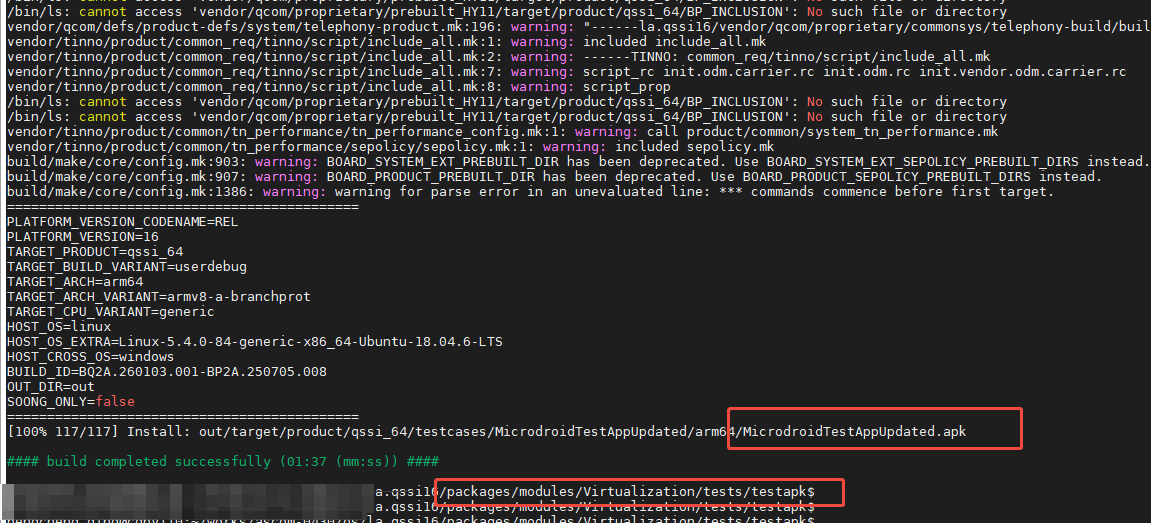
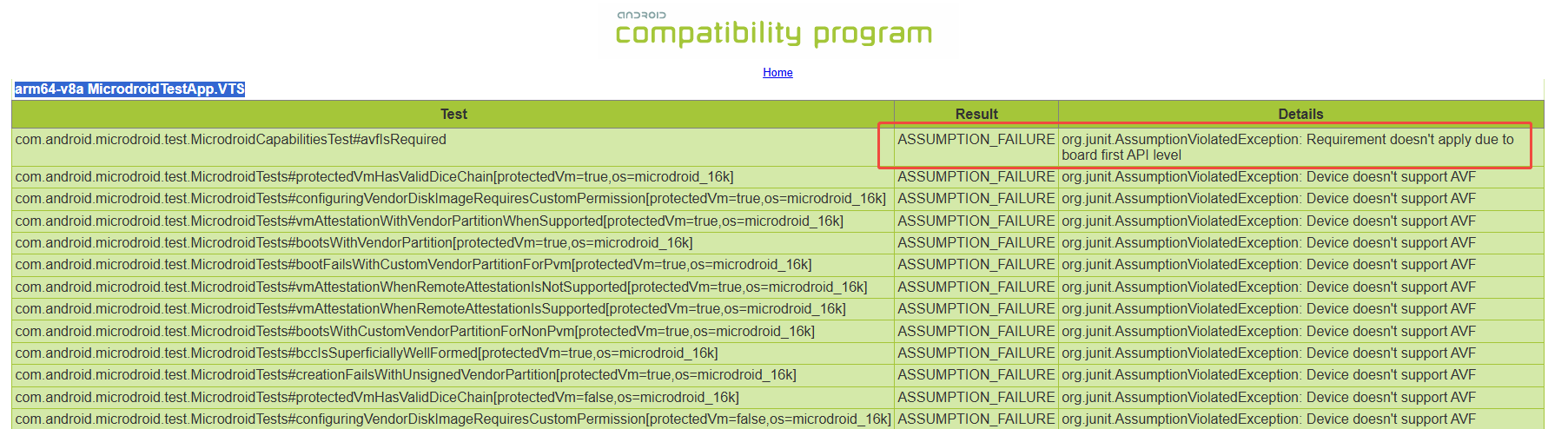
去掉AVF相关配置,然后复测VTS,在复测之前替换VTS工具里面的这个APK,就能pass

openEuler 是由开放原子开源基金会孵化的全场景开源操作系统项目,面向数字基础设施四大核心场景(服务器、云计算、边缘计算、嵌入式),全面支持 ARM、x86、RISC-V、loongArch、PowerPC、SW-64 等多样性计算架构
更多推荐
 5
5 0
0- 0


 已为社区贡献2条内容

所有评论(0)