JavaWeb核心技术之会话技术SessionAndCookie(图解版)
目录
3. 咖啡列表页面Servlet(CoffeeListServlet.java)
4. 购买处理Servlet(PurchaseServlet.java)
5. 购物车页面Servlet(CartServlet.java)
一,Session
假设咖啡店有两种记录信息的方式:
-
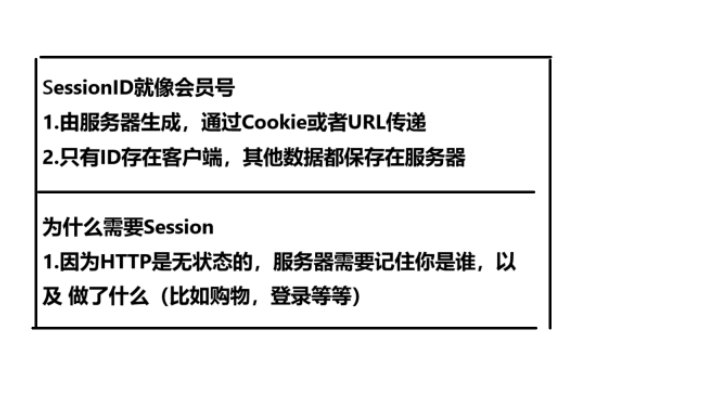
会员卡系统(Session):在店里存档你的完整消费记录(存在服务器)。
-
小纸条(Cookie):直接交给你保管的小便签(存在客户端浏览器)。
假设你常去一家咖啡店,这家店用「会员卡」记录你的消费习惯。我们把这个过程比作 Web 中的 Session。
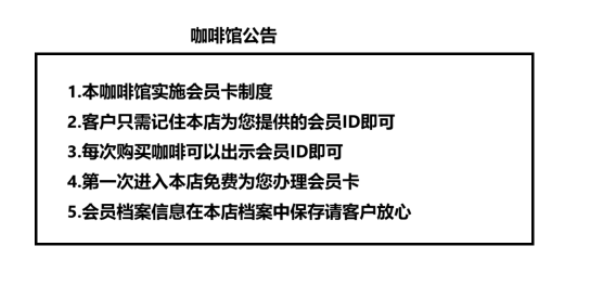
现在我们仔细阅读一下咖啡馆的公告,看似没有什么作用,但等学完Cookie和Session之后再看会发现十分有用。
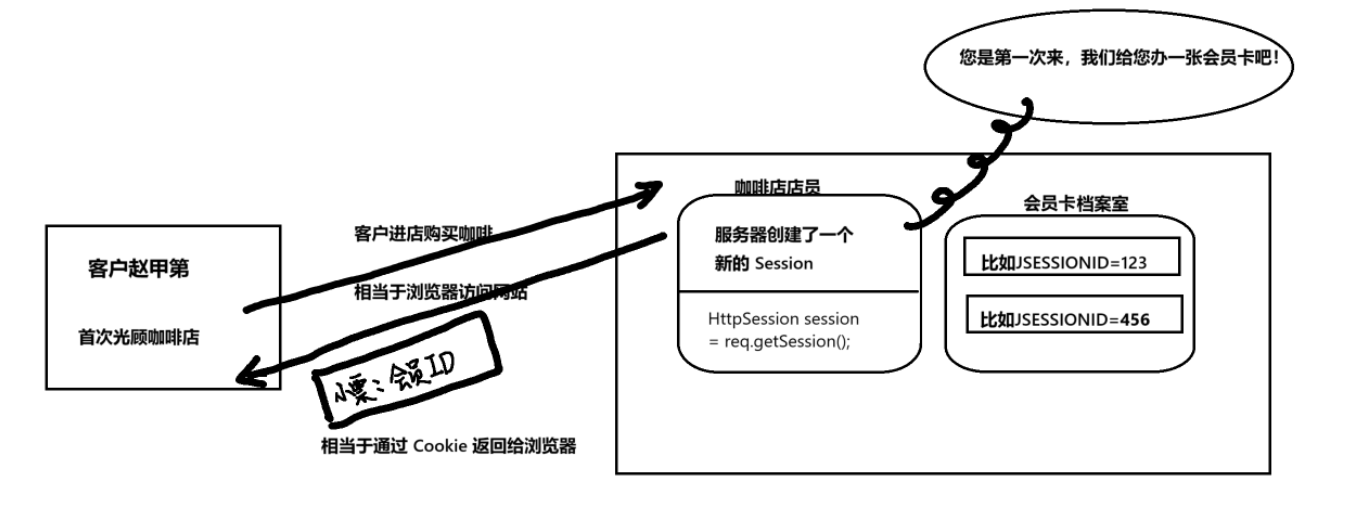
第一步:第一次光顾咖啡店(首次访问网站)
-
你进店点咖啡(相当于浏览器访问网站)。
-
店员说:“您是第一次来,我们给您办一张会员卡吧!”
这相当于 服务器创建了一个新的 Session。 -
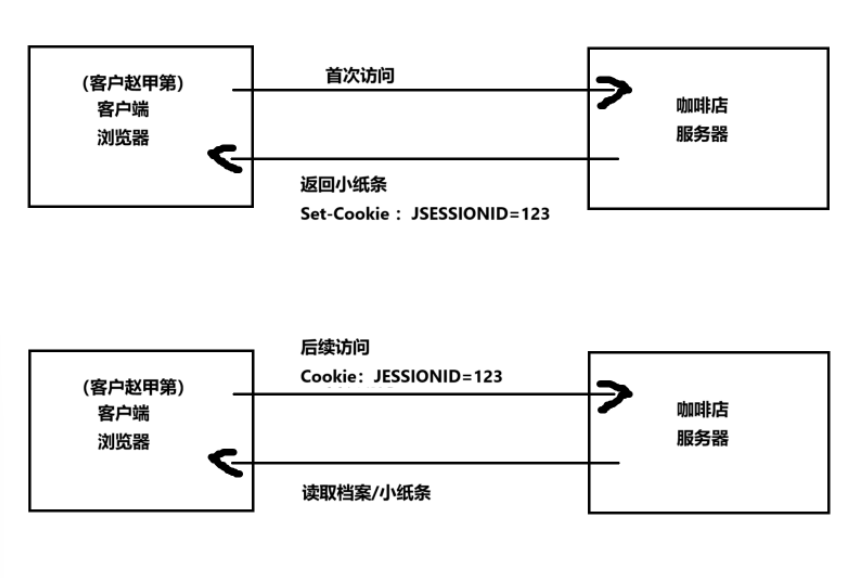
会员卡号(比如
会员卡号是唯一的,且只属于你。JSESSIONID=123)会写在你的小票上(相当于通过 Cookie 返回给浏览器)。
- 第一次请求(服务器 → 浏览器)
服务器是通过 HTTP 响应头中的
Set-Cookie字段把 Session ID 告诉浏览器的:HTTP/1.1 200 OK Set-Cookie: JSESSIONID=123; Path=/; HttpOnly浏览器收到这个响应头后,才把
JSESSIONID=ABC123存储为本地 Cookie。
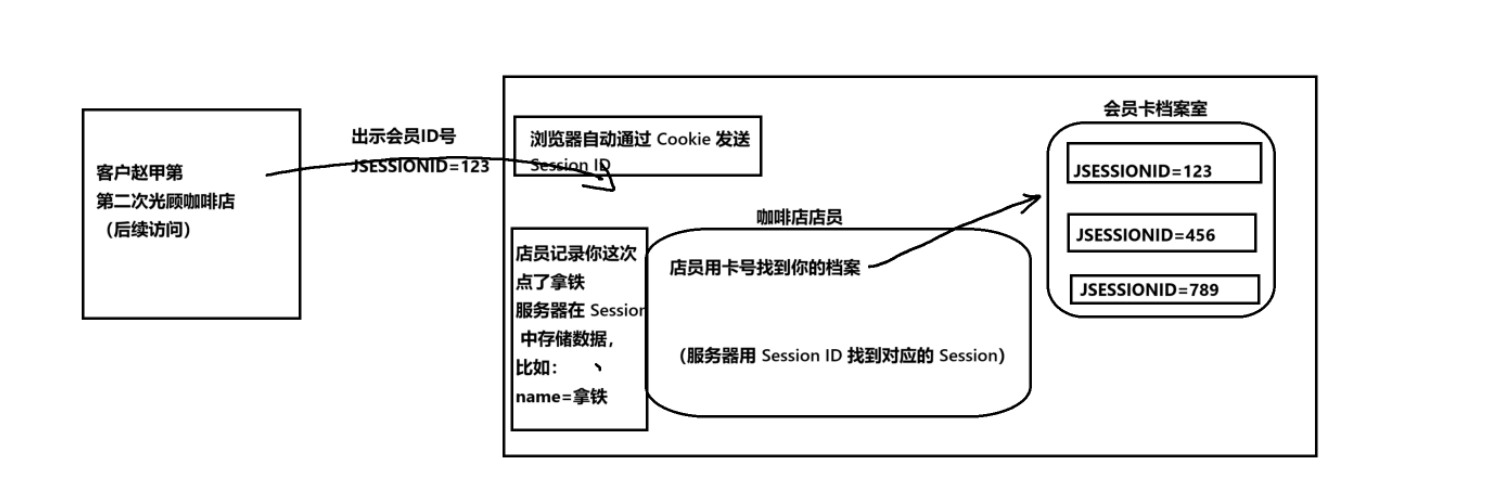
第二步:第二次光顾咖啡店(后续访问)
-
你再次进店,出示会员卡号
JSESSIONID=123(浏览器自动通过 Cookie 发送 Session ID)。 -
店员用卡号找到你的档案(服务器用 Session ID 找到对应的 Session)。
-
店员记录你这次点了拿铁(服务器在 Session 中存储数据,比如
order=拿铁)。
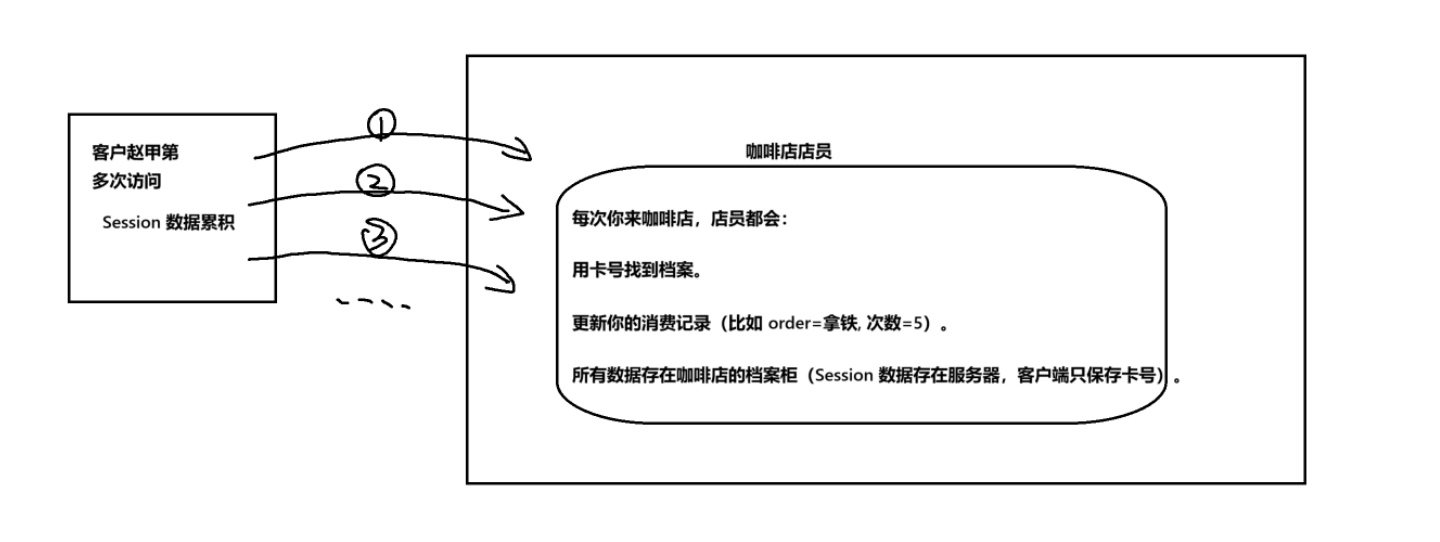
第三步:多次光顾后的效果(Session 数据累积)
-
每次你来咖啡店,店员都会:
-
用卡号找到档案。
-
更新你的消费记录(比如
order=拿铁, 次数=5)。
-
-
所有数据存在咖啡店的档案柜(Session 数据存在服务器,客户端只保存卡号)。
第四步:会员卡失效(Session 销毁)
-
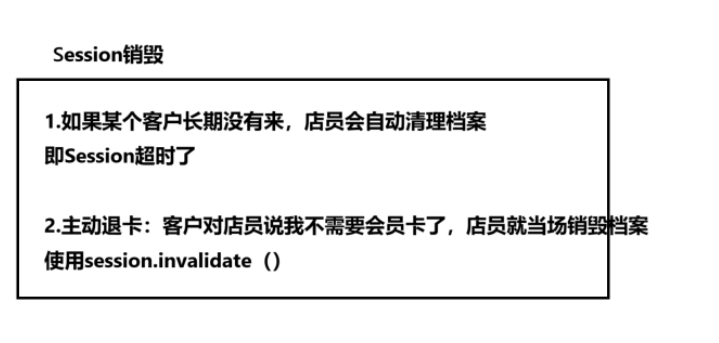
长时间不用卡:如果你1个月没来,店员会清理档案(Session 超时,默认30分钟)。
-
主动退卡:你说“我不需要会员卡了”,店员当场销毁档案(调用
session.invalidate())。
关键原理总结
二,Cookie
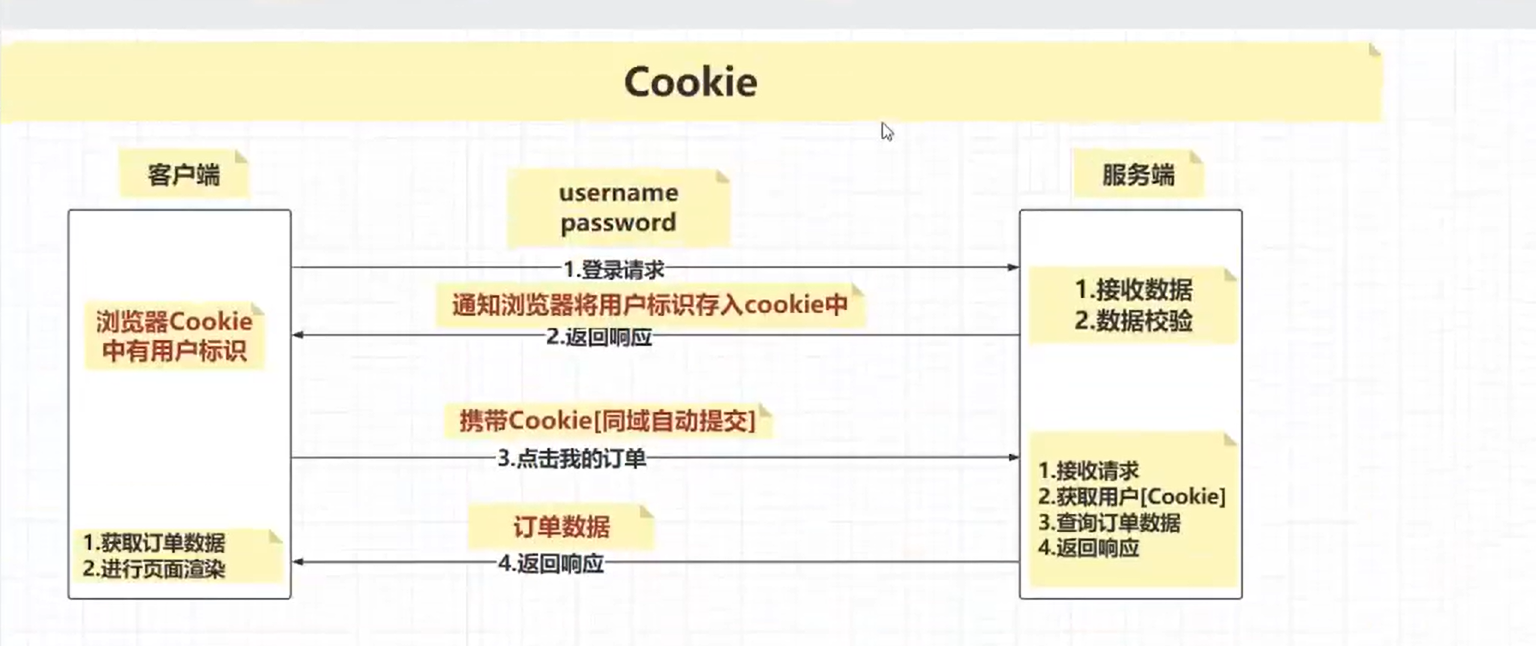
第一步:小纸条的作用(Cookie 的基本功能)
-
咖啡店送你一张小纸条:
-
上面写着你的会员卡号
JSESSIONID=123(这就是 Cookie)。 -
每次来店里,你都要出示这张小纸条,店员才能找到你的会员档案(Session)。
-
第二步:小纸条的其他用途(Cookie 存储简单信息)
除了会员卡号,咖啡店还可以在小纸条上记录其他信息:
-
例1:你喜欢的咖啡温度(
temperature=热)。 -
例2:你常坐的位置(
seat=窗边)。
每次你来店里:
-
你出示小纸条。
-
店员直接看纸条就知道你的喜好,无需查档案(服务器直接读取 Cookie)。
关键原理总结
-
Cookie 的本质:
-
是服务器交给浏览器的一张小纸条(键值对,如
name=value)。 -
浏览器每次访问网站时,自动出示小纸条(通过请求头
Cookie)。
-
-
Cookie vs Session:
Cookie(小纸条) Session(会员档案) 存储位置 存在你的口袋(浏览器) 存在咖啡店的档案柜(服务器) 安全性 容易被偷看(明文存储) 较安全(服务器控制) 容量 只能写几句话(4KB 左右) 可以存一本书(无严格限制)
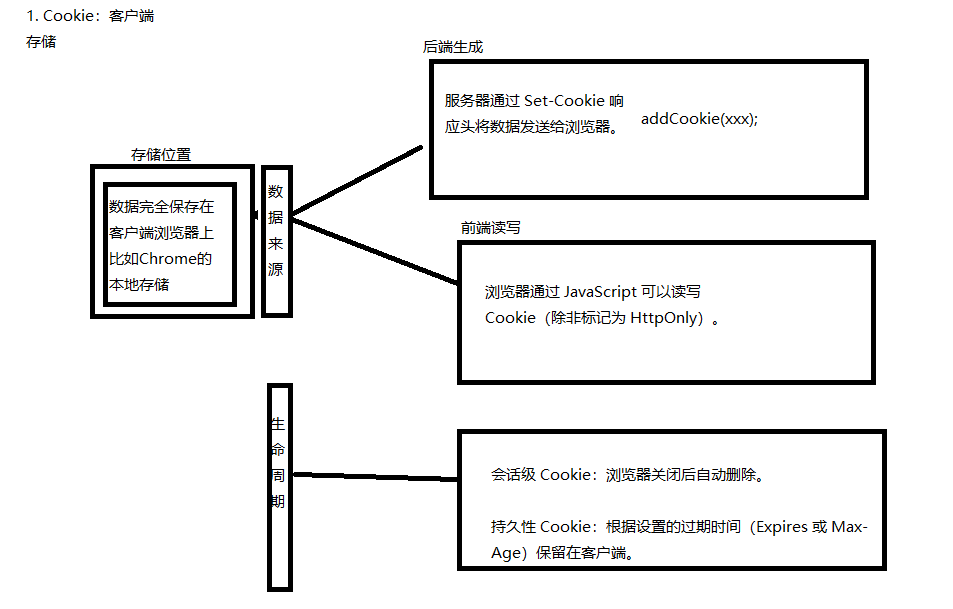
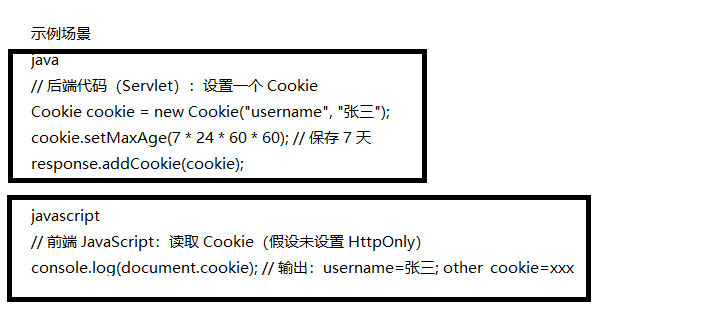
Cookie
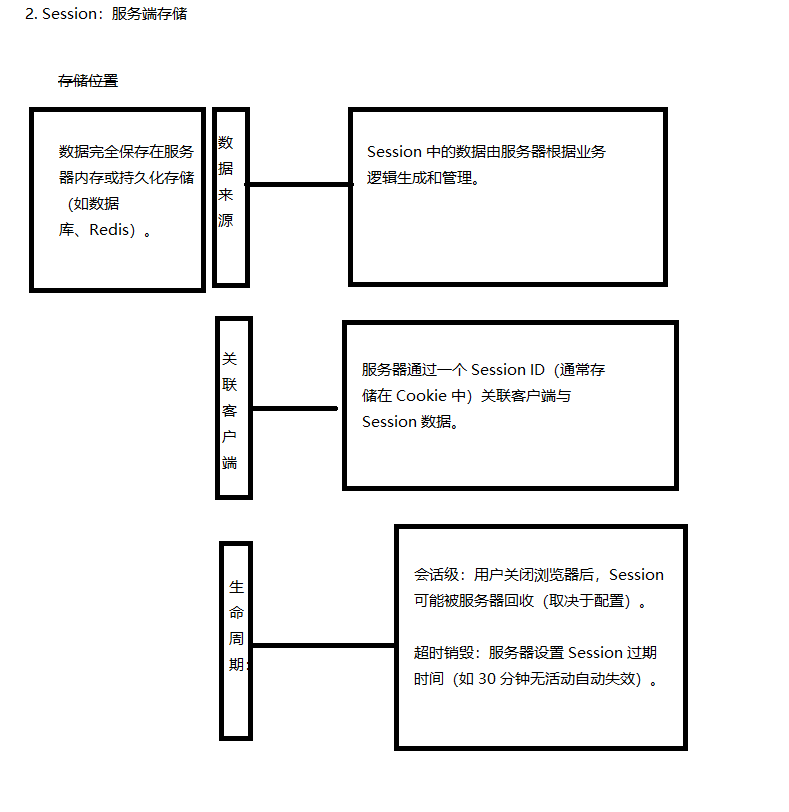
Session
三,Spring MVC支持
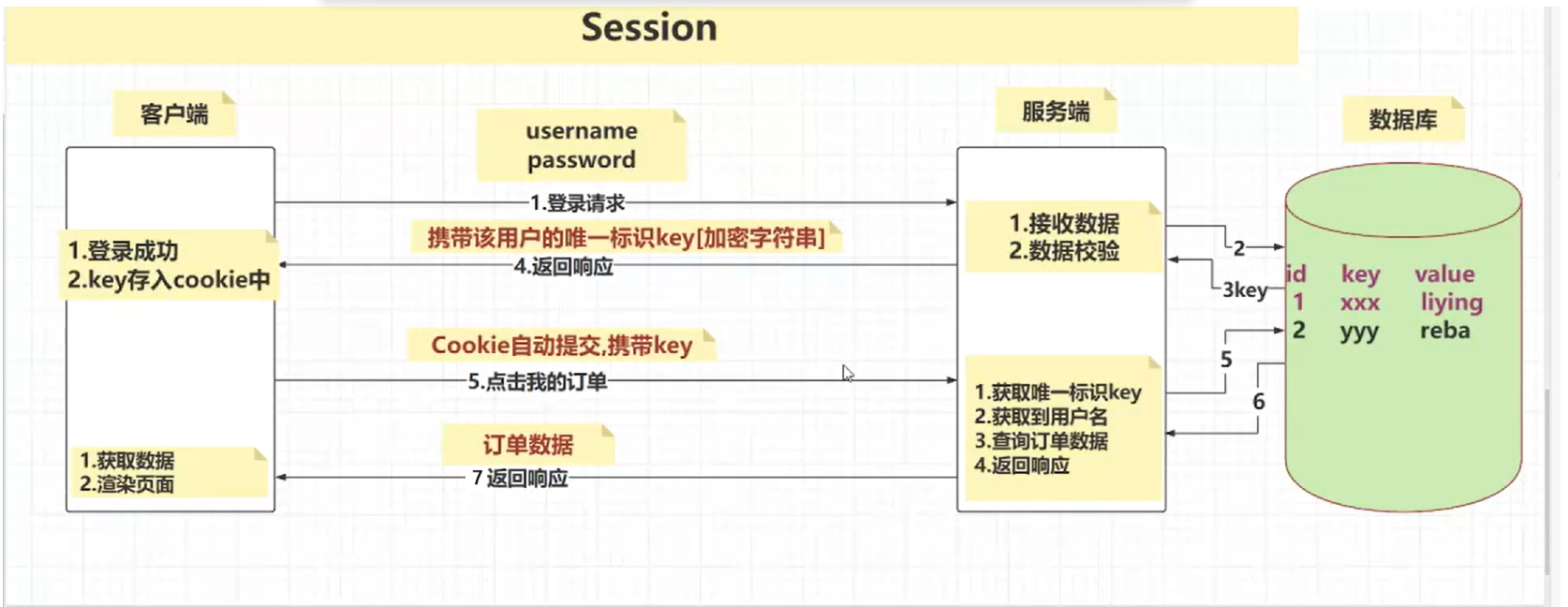
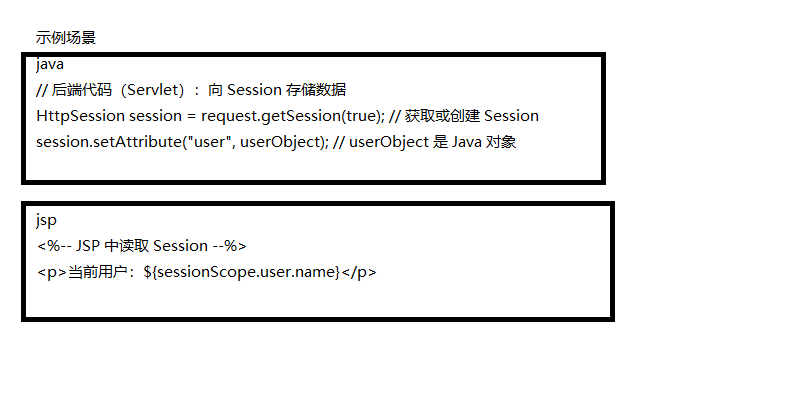
使用的是 HttpSession 参数;
public int login(HttpSession session){}
-
session常用方法
以下所有的操作均是在服务器内存中完成,一旦重启主机或者工程,所有会话全部消失;
-
设置唯一标识:session.setAttribute(key, value);
-
获取唯一标识:session.getAttribute(key);
-
删除唯一标识:session.removeAttribute(key);
-
四,咖啡购买系统代码
以下是完整的咖啡购买系统代码,严格遵循Session和Cookie的机制:
1. 咖啡实体类(Coffee.java)
package com.pdsu.coffee;
public class Coffee {
private String id;
private String name;
public Coffee() {}
public Coffee(String id, String name) {
this.id = id;
this.name = name;
}
// Getter和Setter
public String getId() { return id; }
public void setId(String id) { this.id = id; }
public String getName() { return name; }
public void setName(String name) { this.name = name; }
}
2. 模拟咖啡数据库(CoffeeDB.java)
package com.pdsu.coffee;
import java.util.LinkedHashMap;
import java.util.Map;
import java.util.Collection;
public class CoffeeDB {
private static Map<String, Coffee> coffees = new LinkedHashMap<>();
static {
coffees.put("1", new Coffee("1", "美式咖啡"));
coffees.put("2", new Coffee("2", "拿铁咖啡"));
coffees.put("3", new Coffee("3", "卡布奇诺"));
coffees.put("4", new Coffee("4", "摩卡咖啡"));
}
public static Collection<Coffee> getAllCoffees() {
return coffees.values();
}
public static Coffee getCoffeeById(String id) {
return coffees.get(id);
}
}
3. 咖啡列表页面Servlet(CoffeeListServlet.java)
package com.pdsu.coffee;
import jakarta.servlet.*;
import jakarta.servlet.annotation.WebServlet;
import jakarta.servlet.http.*;
import java.io.*;
@WebServlet("/CoffeeListServlet")
public class CoffeeListServlet extends HttpServlet {
@Override
protected void doGet(HttpServletRequest req, HttpServletResponse resp)
throws ServletException, IOException {
resp.setContentType("text/html;charset=UTF-8");
PrintWriter out = resp.getWriter();
out.println("<h1>欢迎来到咖啡店!</h1>");
out.println("<h3>请选择您要购买的咖啡:</h3>");
for (Coffee coffee : CoffeeDB.getAllCoffees()) {
String url = "PurchaseServlet?id=" + coffee.getId();
out.println(coffee.getName() + " <a href='" + url + "'>购买</a><br>");
}
}
}
4. 购买处理Servlet(PurchaseServlet.java)
package com.pdsu.coffee;
import jakarta.servlet.*;
import jakarta.servlet.annotation.WebServlet;
import jakarta.servlet.http.*;
import java.io.*;
@WebServlet("/PurchaseServlet")
public class PurchaseServlet extends HttpServlet {
@Override
protected void doGet(HttpServletRequest req, HttpServletResponse resp)
throws ServletException, IOException {
String id = req.getParameter("id");
if (id == null || CoffeeDB.getCoffeeById(id) == null) {
resp.sendRedirect("ErrorServlet?msg=无效的咖啡ID");
return;
}
Coffee coffee = CoffeeDB.getCoffeeById(id);
HttpSession session = req.getSession(); // 获取或创建Session
// 获取购物车(Session中的List)
List<Coffee> cart = (List<Coffee>) session.getAttribute("cart");
if (cart == null) {
cart = new ArrayList<>();
session.setAttribute("cart", cart);
}
cart.add(coffee);
// 设置Cookie保存Session ID(有效期7天)
Cookie sessionCookie = new Cookie("JSESSIONID", session.getId());
sessionCookie.setMaxAge(60 * 60 * 24 * 7);
sessionCookie.setPath("/");
resp.addCookie(sessionCookie);
resp.sendRedirect("CartServlet"); // 跳转到购物车页面
}
}
5. 购物车页面Servlet(CartServlet.java)
package com.pdsu.coffee;
import jakarta.servlet.*;
import jakarta.servlet.annotation.WebServlet;
import jakarta.servlet.http.*;
import java.io.*;
@WebServlet("/CartServlet")
public class CartServlet extends HttpServlet {
@Override
protected void doGet(HttpServletRequest req, HttpServletResponse resp)
throws ServletException, IOException {
resp.setContentType("text/html;charset=UTF-8");
PrintWriter out = resp.getWriter();
HttpSession session = req.getSession(false); // 不自动创建新Session
if (session == null) {
out.println("您还没有购买任何咖啡!");
return;
}
List<Coffee> cart = (List<Coffee>) session.getAttribute("cart");
if (cart == null || cart.isEmpty()) {
out.println("您的购物车是空的!");
} else {
out.println("<h3>您的购物车:</h3>");
for (Coffee coffee : cart) {
out.println(coffee.getName() + "<br>");
}
}
}
}

openEuler 是由开放原子开源基金会孵化的全场景开源操作系统项目,面向数字基础设施四大核心场景(服务器、云计算、边缘计算、嵌入式),全面支持 ARM、x86、RISC-V、loongArch、PowerPC、SW-64 等多样性计算架构
更多推荐

 3
3 0
0- 0


 已为社区贡献2条内容

所有评论(0)