园区网配置
SW2为vlan 20/30的主根及主网关。1、按照图示的VLAN及IP地址需求,完成相关配置。5、设置DHCP池塘获取地址(代理或者域内服务器)2、要求SW1为VLAN 2/3的主根及主网关。3、上层通过静态路由协议完成数据通信过程。SW1和SW2互为备份。4、AR1为企业出口路由器。
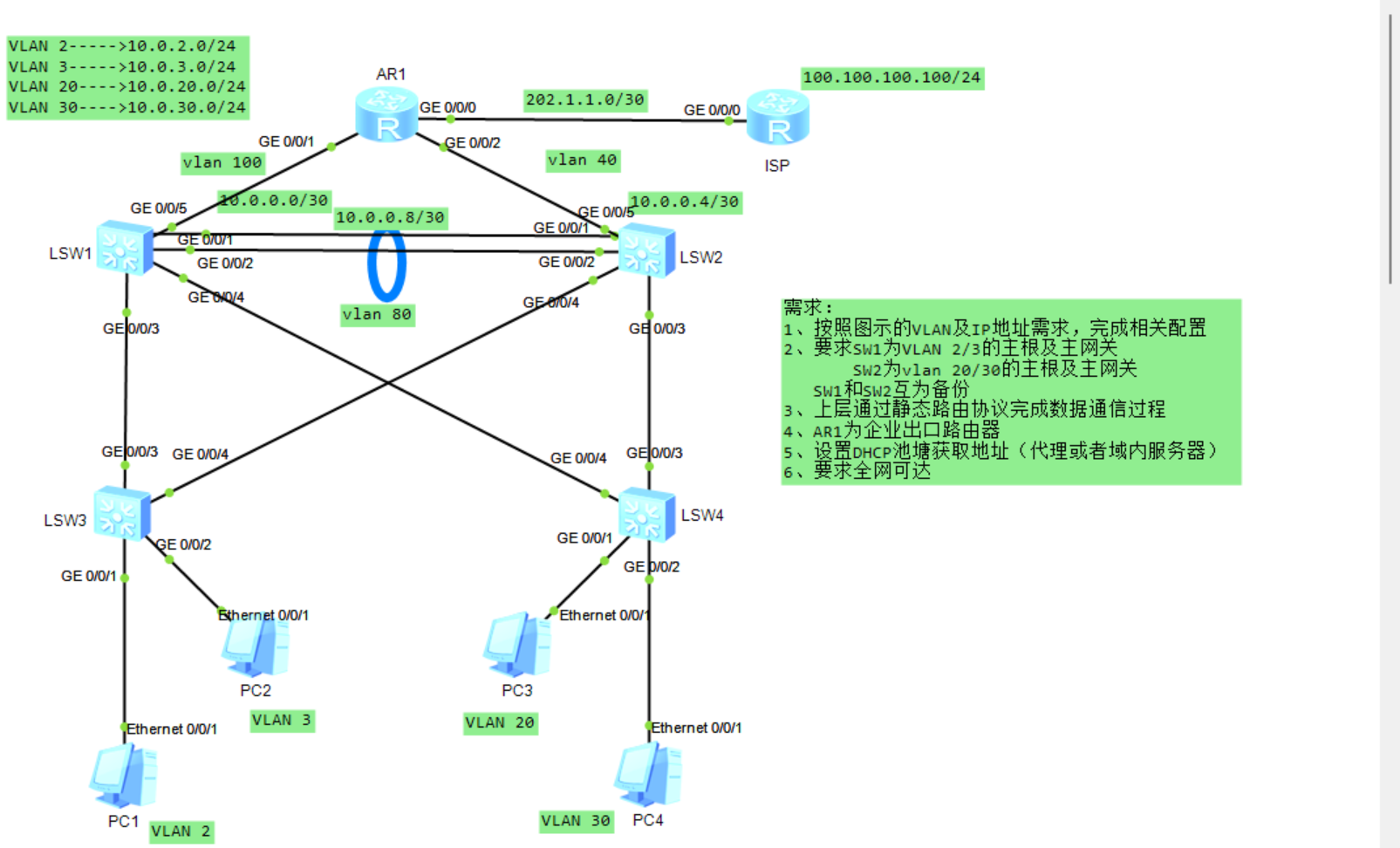
要求:
1、按照图示的VLAN及IP地址需求,完成相关配置
2、要求SW1为VLAN 2/3的主根及主网关
SW2为vlan 20/30的主根及主网关
SW1和SW2互为备份
3、上层通过静态路由协议完成数据通信过程
4、AR1为企业出口路由器
5、设置DHCP池塘获取地址(代理或者域内服务器)
6、要求全网可达
SW1:
system-view
sysname LSW1
vlan batch 2 3 20 30 40 80 100
stp mode rstp
stp vlan 2 priority 4096
stp vlan 3 priority 4096
stp vlan 20 priority 8192
stp vlan 30 priority 8192
interface GigabitEthernet 0/0/1
port link-type trunk
port trunk allow-pass vlan 2 3 20 30 80 100
interface GigabitEthernet 0/0/2
port link-type trunk
port trunk allow-pass vlan 2 3 20 30 80 100
interface GigabitEthernet 0/0/3
port link-type trunk
port trunk allow-pass vlan 2 3 20 30
interface GigabitEthernet 0/0/4
port link-type trunk
port trunk allow-pass vlan 2 3 20 30
interface GigabitEthernet 0/0/5
port link-type access
port default vlan 100
interface Vlanif 2
ip address 10.0.2.1 255.255.255.0
vrrp vrid 2 virtual-ip 10.0.2.254
vrrp vrid 2 priority 120
vrrp vrid 2 preempt-mode
dhcp select global
interface Vlanif 3
ip address 10.0.3.1 255.255.255.0
vrrp vrid 3 virtual-ip 10.0.3.254
vrrp vrid 3 priority 120
vrrp vrid 3 preempt-mode
dhcp select global
interface Vlanif 20
ip address 10.0.20.2 255.255.255.0
vrrp vrid 20 virtual-ip 10.0.20.254
vrrp vrid 20 priority 100
dhcp select relay
dhcp relay server-ip 10.0.20.1
interface Vlanif 30
ip address 10.0.30.2 255.255.255.0
vrrp vrid 30 virtual-ip 10.0.30.254
vrrp vrid 30 priority 100
dhcp select relay
dhcp relay server-ip 10.0.30.1
interface Vlanif 80
ip address 10.0.0.9 255.255.255.252
interface Vlanif 100
ip address 10.0.0.1 255.255.255.252
dhcp enable
ip pool VLAN2
gateway-list 10.0.2.254
network 10.0.2.0 mask 255.255.255.0
excluded-ip-address 10.0.2.1 10.0.2.10
lease day 8
ip pool VLAN3
gateway-list 10.0.3.254
network 10.0.3.0 mask 255.255.255.0
excluded-ip-address 10.0.3.1 10.0.3.10
lease day 8
ip route-static 0.0.0.0 0.0.0.0 10.0.0.2
ip route-static 10.0.20.0 255.255.255.0 10.0.0.10
ip route-static 10.0.30.0 255.255.255.0 10.0.0.10
ip route-static 10.0.0.4 255.255.255.252 10.0.0.10
return
save
SW2:
system-view
sysname LSW2
vlan batch 2 3 20 30 40 80 100
stp mode rstp
stp vlan 20 priority 4096
stp vlan 30 priority 4096
stp vlan 2 priority 8192
stp vlan 3 priority 8192
interface GigabitEthernet 0/0/1
port link-type trunk
port trunk allow-pass vlan 2 3 20 30 80 100
interface GigabitEthernet 0/0/2
port link-type trunk
port trunk allow-pass vlan 2 3 20 30 80 100
interface GigabitEthernet 0/0/3
port link-type trunk
port trunk allow-pass vlan 20 30
interface GigabitEthernet 0/0/4
port link-type trunk
port trunk allow-pass vlan 20 30
interface GigabitEthernet 0/0/5
port link-type access
port default vlan 40
interface Vlanif 2
ip address 10.0.2.2 255.255.255.0
vrrp vrid 2 virtual-ip 10.0.2.254
vrrp vrid 2 priority 100
dhcp select relay
dhcp relay server-ip 10.0.2.1
interface Vlanif 3
ip address 10.0.3.2 255.255.255.0
vrrp vrid 3 virtual-ip 10.0.3.254
vrrp vrid 3 priority 100
dhcp select relay
dhcp relay server-ip 10.0.3.1
interface Vlanif 20
ip address 10.0.20.1 255.255.255.0
vrrp vrid 20 virtual-ip 10.0.20.254
vrrp vrid 20 priority 120
vrrp vrid 20 preempt-mode
dhcp select global
interface Vlanif 30
ip address 10.0.30.1 255.255.255.0
vrrp vrid 30 virtual-ip 10.0.30.254
vrrp vrid 30 priority 120
vrrp vrid 30 preempt-mode
dhcp select global
interface Vlanif 40
ip address 10.0.0.5 255.255.255.252
interface Vlanif 80
ip address 10.0.0.10 255.255.255.252
dhcp enable
ip pool VLAN20
gateway-list 10.0.20.254
network 10.0.20.0 mask 255.255.255.0
excluded-ip-address 10.0.20.1 10.0.20.10
lease day 8
ip pool VLAN30
gateway-list 10.0.30.254
network 10.0.30.0 mask 255.255.255.0
excluded-ip-address 10.0.30.1 10.0.30.10
lease day 8
ip route-static 0.0.0.0 0.0.0.0 10.0.0.6
ip route-static 10.0.2.0 255.255.255.0 10.0.0.9
ip route-static 10.0.3.0 255.255.255.0 10.0.0.9
ip route-static 10.0.0.0 255.255.255.252 10.0.0.9
return
save
SW3:
system-view
sysname LSW3
vlan batch 2 3 20 30
stp mode rstp
interface GigabitEthernet 0/0/1
port link-type access
port default vlan 2
stp edged-port enable
interface GigabitEthernet 0/0/2
port link-type access
port default vlan 3
stp edged-port enable
interface GigabitEthernet 0/0/3
port link-type trunk
port trunk allow-pass vlan 2 3 20 30
interface GigabitEthernet 0/0/4
port link-type trunk
port trunk allow-pass vlan 2 3 20 30
return
save
SW4:
system-view
sysname LSW4
vlan batch 2 3 20 30
stp mode rstp
interface GigabitEthernet 0/0/1
port link-type access
port default vlan 20
stp edged-port enable
interface GigabitEthernet 0/0/2
port link-type access
port default vlan 30
stp edged-port enable
interface GigabitEthernet 0/0/3
port link-type trunk
port trunk allow-pass vlan 2 3 20 30
interface GigabitEthernet 0/0/4
port link-type trunk
port trunk allow-pass vlan 2 3 20 30
return
save
AR1:
# AR1
system-view
sysname AR1
interface GigabitEthernet 0/0/0
ip address 202.1.1.1 255.255.255.252
interface GigabitEthernet 0/0/1
ip address 10.0.0.2 255.255.255.252
interface GigabitEthernet 0/0/2
ip address 10.0.0.6 255.255.255.252
ip route-static 10.0.2.0 255.255.255.0 10.0.0.1
ip route-static 10.0.3.0 255.255.255.0 10.0.0.1
ip route-static 10.0.20.0 255.255.255.0 10.0.0.5
ip route-static 10.0.30.0 255.255.255.0 10.0.0.5
ip route-static 10.0.0.8 255.255.255.252 10.0.0.1
ip route-static 10.0.0.8 255.255.255.252 10.0.0.5 preference 100
ip route-static 0.0.0.0 0.0.0.0 202.1.1.2
acl number 2000
rule permit source 10.0.2.0 0.0.0.255
rule permit source 10.0.3.0 0.0.0.255
rule permit source 10.0.20.0 0.0.0.255
rule permit source 10.0.30.0 0.0.0.255
interface GigabitEthernet 0/0/0
nat outbound 2000
return
save
ISP:
system-view
sysname ISP
interface GigabitEthernet 0/0/0
ip address 202.1.1.2 255.255.255.252
interface LoopBack 0
ip address 100.100.100.1 255.255.255.0
ip route-static 10.0.0.0 255.255.0.0 202.1.1.1
return
save

openEuler 是由开放原子开源基金会孵化的全场景开源操作系统项目,面向数字基础设施四大核心场景(服务器、云计算、边缘计算、嵌入式),全面支持 ARM、x86、RISC-V、loongArch、PowerPC、SW-64 等多样性计算架构
更多推荐



 8
8 0
0- 0


 已为社区贡献1条内容

所有评论(0)