eas 热更新相关
几个问题:
eas 打包 和 eas 热更新
打包命令:eas build --profile [profile name] --platform all
热更新命令:eas update --channel [channel name] --message “测试版本1.0.1”
eas.json vs app.json(app.config.js)
The knowledge sources provided don’t contain the full content of the https://docs.expo.dev/eas-update/expo-dev-client/ page, so I’ll answer based on the available related documentation.
EAS 热更新完整流程
整体流程概览
安装依赖 → 配置项目 → 创建构建 → 发布更新 → 用户接收更新
第一步:安装依赖
npx expo install expo-updates
第二步:配置项目
eas update:configure
该命令会自动完成:
- 在
app.json中添加updates.url和runtimeVersion - 在
eas.json各构建 profile 中添加channel属性
配置完成后 app.json 示例:
{
  "expo": {
    "runtimeVersion": {
      "policy": "appVersion"
    },
    "updates": {
      "url": "https://u.expo.dev/your-project-id"
    }
  }
}
eas.json 示例:
{
  "build": {
    "preview": {
      "distribution": "internal",
      "channel": "preview"
    },
    "production": {
      "channel": "production"
    }
  }
}
[配置项目]
第三步:创建构建
Channel 信息会在构建时烧录进原生代码,所以必须先有构建才能接收更新:
eas build --profile production
第四步:发布更新
修改 JS 代码后,推送热更新:
eas update --channel production --message "修复登录页面 bug"
发布后 EAS 服务器会将更新分发给所有 channel=production 且 runtimeVersion 匹配的 App。[发布更新]
第五步:用户接收更新
| 方式 | 说明 |
|---|---|
| 自动后台下载 | App 启动时自动检查并下载,下次冷启动生效 |
| Development Build | 通过 Extensions 面板手动加载指定更新,适合测试 |
| Expo Orbit | 扫码直接安装并启动更新 |
| 编程控制 | 使用 expo-updates 的 useUpdates hook 主动检查并提示用户 |
[测试更新]
注意事项
- 热更新只能更新 JS 代码,涉及原生模块变更时必须重新构建
- 每次修改原生层后需同步更新
runtimeVersion,否则新旧版本 App 可能收到不兼容的更新 - 默认情况下 debug 构建不会启用
expo-updates,需要 release 或特殊配置的 debug 构建才能测试热更新效果 [调试说明]
Channel 与 Profile 的关系
Profile 是 eas.json 配置文件中环境的简称,用于构建时指定运行哪组环境配置。
Channel 代表当前应用环境的唯一标识。构建完成后,该标识会被记录在应用中。进行热更新时,系统只会拉取与该标识匹配的热更新资源包。
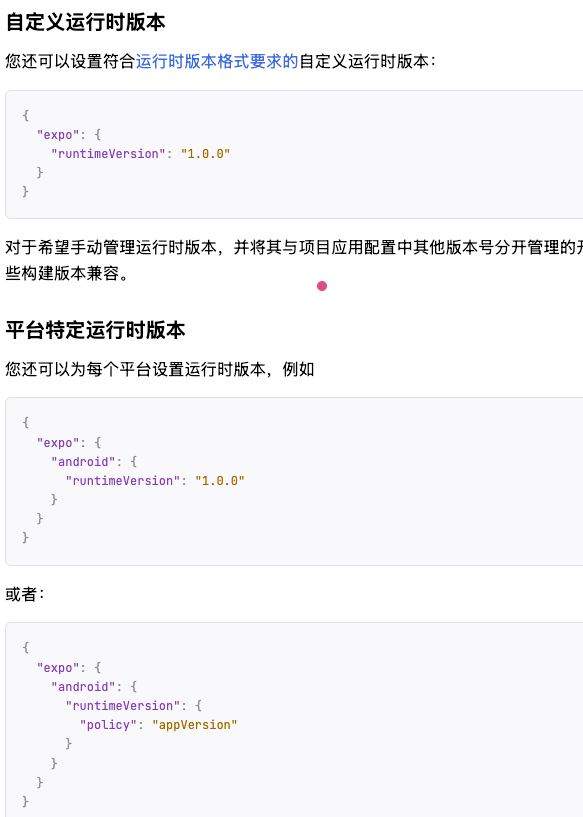
runtimeVersion的书写方式
参考这里:点击
备注:我理解应该使用平台特定运行版本。避免不兼容的更新

openEuler 是由开放原子开源基金会孵化的全场景开源操作系统项目,面向数字基础设施四大核心场景(服务器、云计算、边缘计算、嵌入式),全面支持 ARM、x86、RISC-V、loongArch、PowerPC、SW-64 等多样性计算架构
更多推荐

 8
8 0
0- 0


 已为社区贡献1条内容

所有评论(0)