JSP 服务器端表单验证实验
本次实验通过JSP + request 内置对象完成了服务器端表单验证,实现了非空校验、长度校验、前端体验优化等功能,已成功将项目部署到云端服务器,实现公网访问测试。JSP 三种脚本语法的使用场景request 对象获取参数与乱码处理服务器端表单验证流程前端与后端混合开发。
·
一、实验信息
- 实验名称:JSP 服务器端表单验证
- 云端访问地址:http://47.99.85.0:8080/05/shiyan05.jsp
- 开发环境:VS Code + Tomcat + 云端服务器
- 功能说明:验证用户输入内容必须为 5 个字符,不能为空,服务器端校验并返回提示,支持中文、字母、数字、符号。
二、实验核心知识点
1. JSP 基础语法
<%@ page %>:页面指令,设置语言、编码、内容类型。<%! %>:声明全局方法,本实验用于定义 HTML 转义函数。<% %>:Java 脚本片段,编写服务器端业务逻辑。<%= %>:表达式输出,将变量内容渲染到页面。
2. JSP 内置对象 request
request.getParameter("参数名"):获取表单提交的数据。request.setCharacterEncoding("UTF-8"):解决中文乱码。- 用于接收前端输入、做服务器端校验,是本次实验核心对象。
3. 表单验证逻辑
- 非空验证:输入不能为空。
- 长度验证:严格限制 5 个字符。
- 字符串处理:
trim()去除首尾空格。 - 状态标记:
isError标记验证结果,控制页面样式。
4. HTML 转义(安全防护)
- 对用户输入的特殊字符(
< > " ' &)进行转义。 - 防止 XSS 攻击、防止页面结构错乱。
5. 前端交互优化
- 页面加载自动聚焦输入框。
- 验证失败自动清空输入框。
- 错误 / 成功两种提示样式。
- 响应式卡片布局,美观兼容。
6. 云端部署
- 将 JSP 文件放入 Tomcat 的
webapps目录。 - 配置服务器端口、安全组,实现公网访问。
- 在线测试验证功能完整性。
三、实验运行效果(云端可测)
1.空输入 → 提示:输入不能为空!
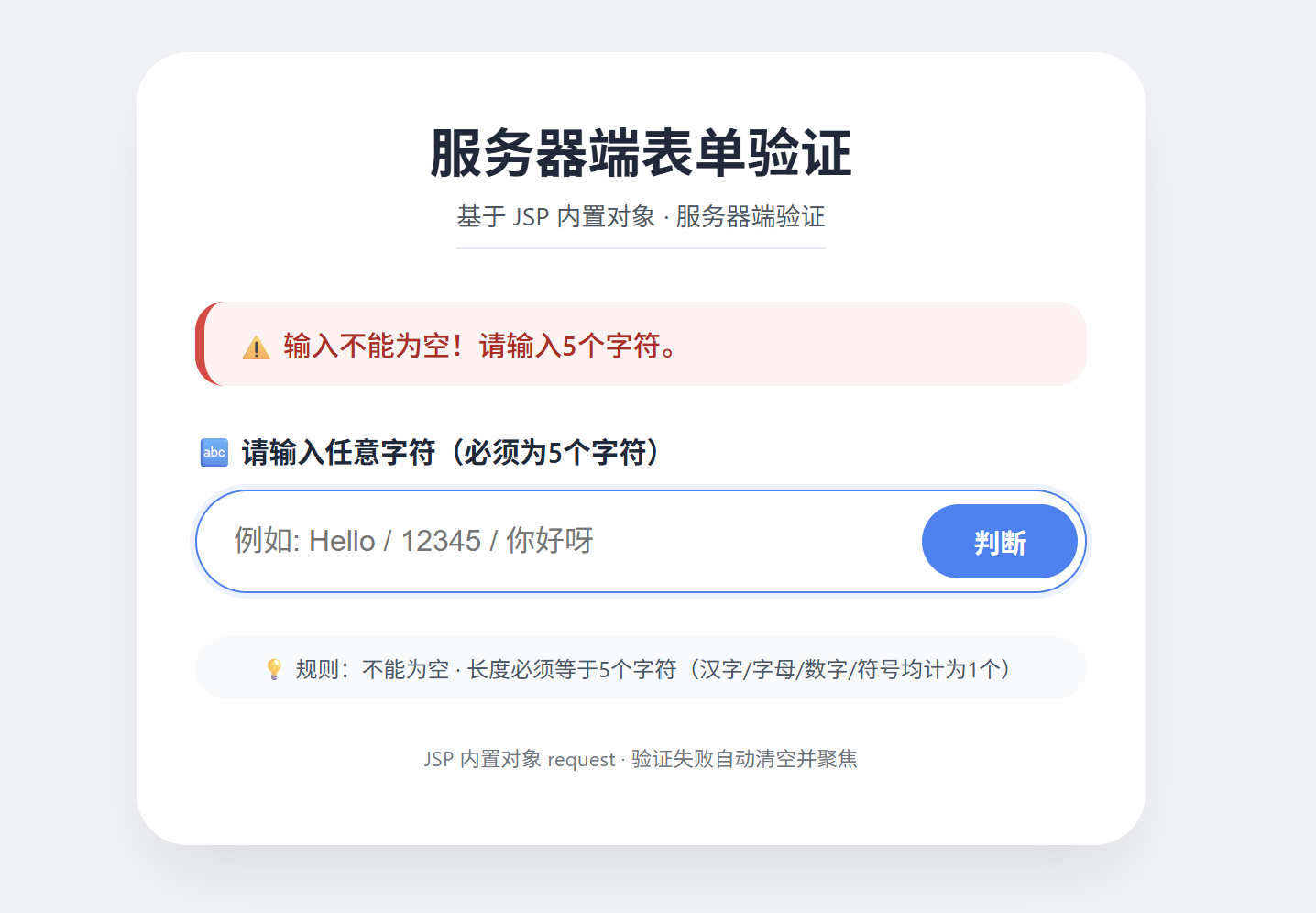
查看页面源代码部分如下:

2.输入长度不是 5 → 提示:字符长度必须为 5 个!
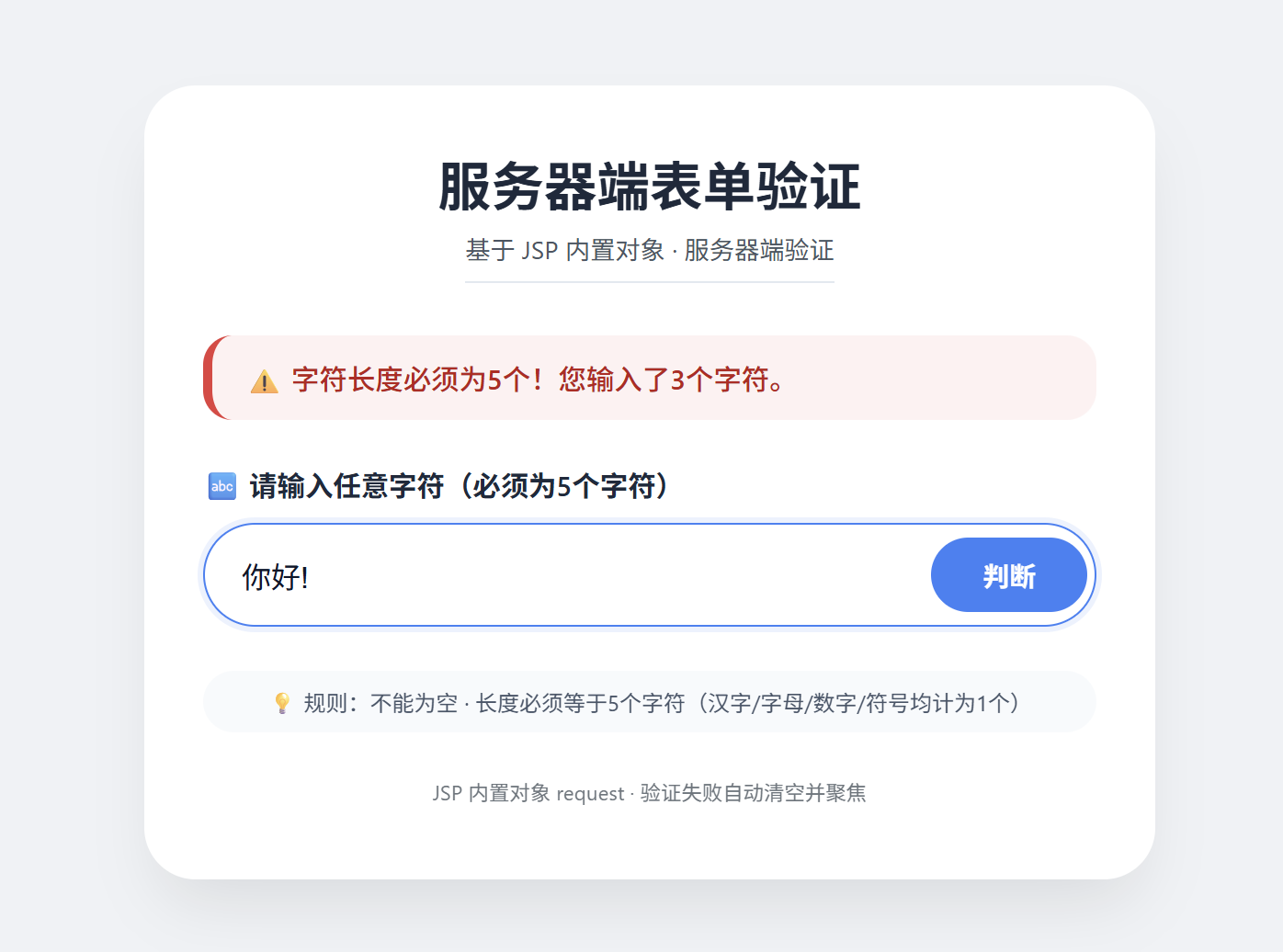
查看页面源代码部分如下:

其他类似验证例子:
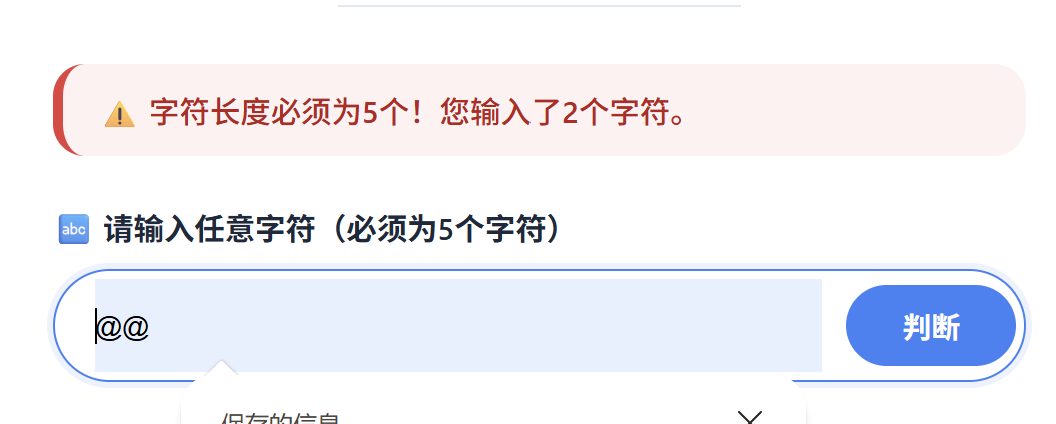
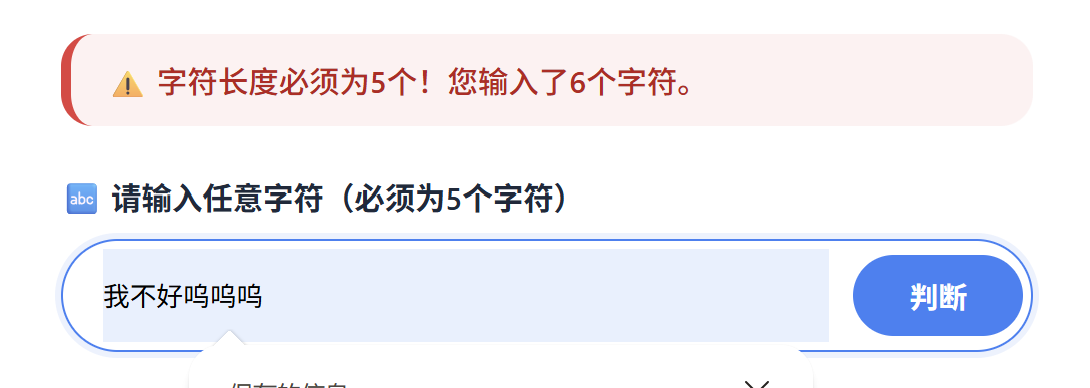
3.输入 5 个字符 → 提示:输入格式正确!
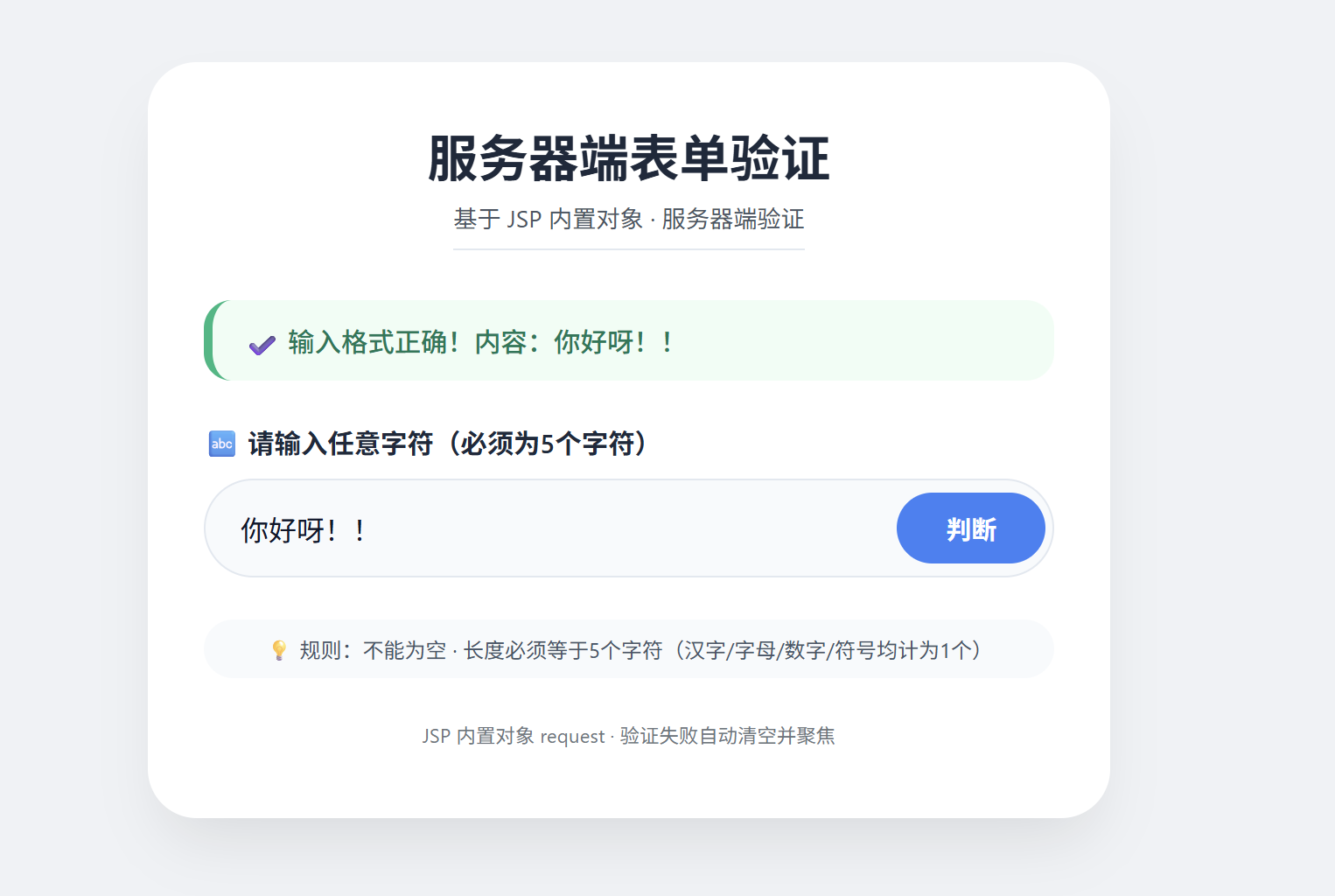
查看页面源代码部分如下:

其他类似验证例子: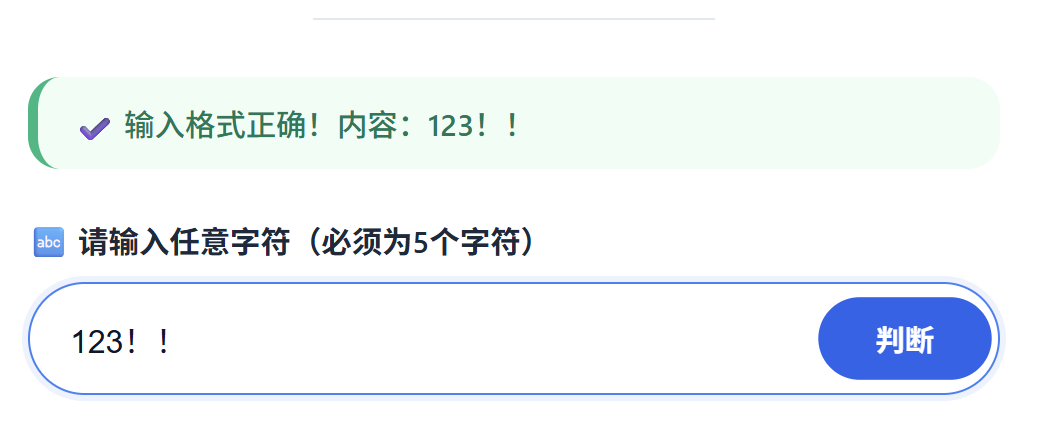
- 验证失败自动清空 + 聚焦,方便重新输入。
- 中文、符号、字母均正常识别,无乱码。
四、实验完整代码
<%@ page language="java" contentType="text/html; charset=UTF-8" pageEncoding="UTF-8"%>
<%!
private String escapeHtml(String s) {
if (s == null) return "";
return s.replace("&", "&").replace("<", "<").replace(">", ">").replace("\"", """).replace("'", "'");
}
%>
<%
request.setCharacterEncoding("UTF-8");
String input = request.getParameter("inputStr");
String message = null;
boolean isError = false;
if (input != null) {
String trimmed = input.trim();
if (trimmed.isEmpty()) {
message = "输入不能为空!请输入5个字符。";
isError = true;
} else if (trimmed.length() != 5) {
message = "字符长度必须为5个!您输入了" + trimmed.length() + "个字符。";
isError = true;
} else {
message = "输入格式正确!内容:" + escapeHtml(trimmed);
isError = false;
}
}
%>
<!DOCTYPE html>
<html>
<head>
<meta charset="UTF-8">
<title>服务器端表单验证</title>
<style>
* {
margin: 0;
padding: 0;
box-sizing: border-box;
}
body {
background: #f0f2f5;
font-family: 'Segoe UI', Roboto, 'Helvetica Neue', sans-serif;
min-height: 100vh;
display: flex;
justify-content: center;
align-items: center;
padding: 20px;
}
.card {
background: white;
border-radius: 28px;
box-shadow: 0 20px 35px -10px rgba(0, 0, 0, 0.1);
max-width: 550px;
width: 100%;
padding: 2rem 2rem 2.5rem;
transition: 0.2s;
}
h2 {
font-size: 1.8rem;
font-weight: 600;
color: #1e293b;
text-align: center;
margin-bottom: 0.2rem;
}
.sub {
text-align: center;
color: #4b5563;
font-size: 0.85rem;
margin-bottom: 1.8rem;
border-bottom: 1px solid #e2e8f0;
display: inline-block;
width: auto;
margin-left: auto;
margin-right: auto;
padding-bottom: 8px;
}
.msg {
padding: 12px 18px;
border-radius: 16px;
margin-bottom: 24px;
font-size: 0.95rem;
font-weight: 500;
background: #f8fafc;
border-left: 5px solid;
}
.msg.error {
background: #fef2f2;
border-left-color: #e53e3e;
color: #b91c1c;
}
.msg.success {
background: #f0fdf4;
border-left-color: #10b981;
color: #047857;
}
.form-group {
margin-bottom: 24px;
}
label {
display: block;
font-weight: 600;
margin-bottom: 10px;
color: #1e293b;
font-size: 0.95rem;
}
.input-wrapper {
display: flex;
gap: 12px;
align-items: center;
background: #f8fafc;
border: 1px solid #e2e8f0;
border-radius: 60px;
padding: 4px 4px 4px 20px;
transition: 0.2s;
}
.input-wrapper:focus-within {
border-color: #3b82f6;
background: white;
box-shadow: 0 0 0 3px rgba(59,130,246,0.1);
}
input[type="text"] {
flex: 1;
border: none;
background: transparent;
padding: 14px 0;
font-size: 1rem;
outline: none;
color: #0f172a;
}
button {
background: #3b82f6;
border: none;
color: white;
font-weight: 600;
padding: 10px 28px;
border-radius: 50px;
font-size: 0.9rem;
cursor: pointer;
transition: 0.2s;
}
button:hover {
background: #2563eb;
transform: scale(1.02);
}
button:active {
transform: scale(0.98);
}
.hint {
margin-top: 20px;
font-size: 0.75rem;
text-align: center;
color: #475569;
background: #f8fafc;
padding: 8px;
border-radius: 30px;
}
footer {
margin-top: 1.5rem;
text-align: center;
font-size: 0.7rem;
color: #6c757d;
}
</style>
</head>
<body>
<div class="card">
<h2>服务器端表单验证</h2>
<div style="text-align: center;"><div class="sub">基于 JSP 内置对象 · 服务器端验证</div></div>
<% if (message != null) { %>
<div class="msg <%= isError ? "error" : "success" %>">
<%= isError ? "⚠️ " : "✔️ " %><%= escapeHtml(message) %>
</div>
<% } %>
<form action="shiyan05.jsp" method="post">
<div class="form-group">
<label>🔤 请输入任意字符(必须为5个字符)</label>
<div class="input-wrapper">
<input type="text" name="inputStr" id="inputStr" placeholder="例如: Hello / 12345 / 你好呀"
<% if (!isError && input != null) { %>
value="<%= escapeHtml(input.trim()) %>"
<% } else { %>
value=""
<% } %>
/>
<button type="submit">判断</button>
</div>
</div>
</form>
<div class="hint">
💡 规则:不能为空 · 长度必须等于5个字符(汉字/字母/数字/符号均计为1个)
</div>
<footer>
JSP 内置对象 request · 验证失败自动清空并聚焦
</footer>
</div>
<script>
window.onload = function() {
var field = document.getElementById("inputStr");
if (field) {
/*<% if (isError) { %>*/
field.value = "";
/*<% } %>*/
field.focus();
}
};
</script>
</body>
</html>五、实验总结
本次实验通过 JSP + request 内置对象 完成了服务器端表单验证,实现了非空校验、长度校验、前端体验优化等功能,已成功将项目部署到云端服务器,实现公网访问测试。
通过实验掌握了:
- JSP 三种脚本语法的使用场景
- request 对象获取参数与乱码处理
- 服务器端表单验证流程
- 前端与后端混合开发

openEuler 是由开放原子开源基金会孵化的全场景开源操作系统项目,面向数字基础设施四大核心场景(服务器、云计算、边缘计算、嵌入式),全面支持 ARM、x86、RISC-V、loongArch、PowerPC、SW-64 等多样性计算架构
更多推荐

 8
8 0
0- 0


 已为社区贡献1条内容

所有评论(0)