基础IO(文件缓冲区)
可以理解为快递超市、菜鸟驿站,可以先带存。对于快递员来说只需要将快递送至指定的位置,用户也只需要去指定位置取包裹,大大提高了效率快递员就是操作系统,菜鸟驿站就是文件的内核缓冲区。
目录
1.什么是缓冲区 ---内存的一段空间
缓冲区是内存空间的⼀部分。也就是说,在内存空间中预留了⼀定的存储空间,这些存储空间用来缓冲输入或输出的数据,这部分预留的空间就叫做缓冲区。缓冲区根据其对应的是输入设备还是输出设备,分为输入缓冲区和输出缓冲区。
可以理解为快递超市、菜鸟驿站,可以先带存。
对于快递员来说只需要将快递送至指定的位置,用户也只需要去指定位置取包裹,大大提高了效率
快递员就是操作系统,菜鸟驿站就是文件的内核缓冲区
2.为什么要引入缓冲区?
减少磁盘的读写次数,
再加上计算机对缓冲区的操作⼤⼤快于对磁盘的操作,故应⽤缓冲区可⼤⼤提⾼计算机的运⾏速度。
提高使用者的效率!
缓冲区,究竟是什么?
    close(1);
    //fd=1;
    int fd = open("log.txt", O_CREAT | O_WRONLY | O_APPEND, 0666);
    //默认向显示器输出
    //库函数
    printf("fd:%d\n",fd);
    printf("hello world\n");
    printf("hello world\n");
    printf("hello world\n");
    //系统调用
    const char *msg = "hello write!\n";
    write(fd,msg,strlen(msg));

    //close(fd);
C标准库
printf/fprintf/fputs/fwrite
"aaaaaa"
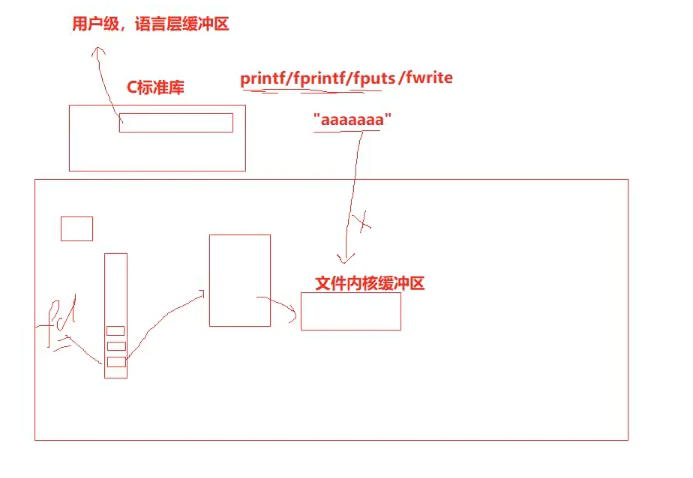
并不是直接写到文件内核缓冲区
在C标准库中会打开一个用户级,语言层缓冲区
当用户:(三个条件任一一个满足时)
1.强制刷新
2.刷新条件满足
1》立即刷新--无缓冲--写透模式 WT
2》满了---全缓冲 写满缓冲区,效率最高!普通文件,一般采用这种方式!
3》行刷新--行缓冲 显示器用
3.进程退出
系统调用---系统调用是有成本的!!
所以在C标准库里面有个缓冲区
为什么上面代码打开close之后就不会往文件里面写了?
C标准库会把数据通过文件描述符刷新到文件内核缓冲区交给操作系统
所以当调close时,进程还没结束、退出。数据一直在C缓冲区。后面关了fd,然后进程退出,要调fd,但是fd已经关了。
所以无法把数据从语言层交付到操作系统内,数据也不可能从文件缓冲区刷新到硬件上,从而看不到
如果就是想看到,需要加fflush(stdout);
    close(1);
    //fd=1;
    int fd = open("log.txt", O_CREAT | O_WRONLY | O_APPEND, 0666);
    //默认向显示器输出
    //库函数
    printf("fd:%d\n",fd);
    printf("hello world\n");
    printf("hello world\n");
    printf("hello world\n");
    fflush(stdout);
    //系统调用
    const char *msg = "hello write!\n";
    write(fd,msg,strlen(msg));

    close(fd);
[user1@iZ5waahoxw3q2bZ 26-5-13]$ make
gcc -o myfile myfile.c
[user1@iZ5waahoxw3q2bZ 26-5-13]$ rm log*
[user1@iZ5waahoxw3q2bZ 26-5-13]$ ./myfile
[user1@iZ5waahoxw3q2bZ 26-5-13]$ cat log.txt
fd:1
hello world
hello world
hello world
hello write!
C标准库缓冲区在哪里?
FILE *fopen(const char *pathname, const char *mode);
int fflush(FILE *stream);
fopen内部会malloc或者new申请一个file对象,然后把它们属性一填,缓冲区初始化。然后把这个file*给我们返回
stdout、stderr、stdin都是对应file*的,所以这些都会提供自己对应的缓冲区,都有带自己的文件缓冲区或者文件描述符。
所以一般是用接口直接打印到缓冲区,其实就是写在了stdout对应的缓冲区里。等需要时再使用write系统调用,从FILE*里面拿我们的文件描述符,把数据刷新到操作系统内。
C,一个文件,都要有自己的缓冲区
stdout->FILE*
FILE是什么?
C语言提供的一个struct,里面包含int fd 、缓冲区!
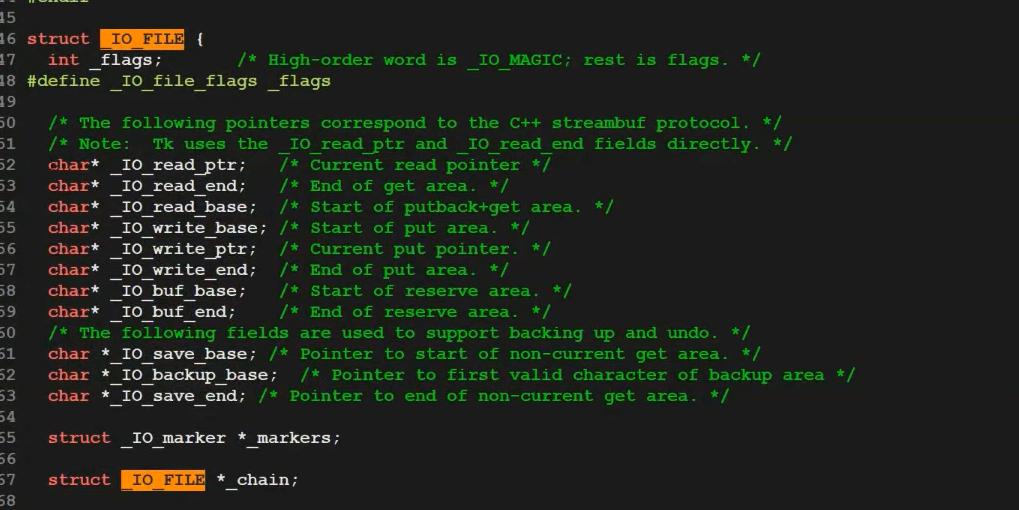
IO_FILE,这些指针就是语言层维护我们对应的缓冲区读写的相关字段。
我们可以把多次printf的数据一次地经过系统调用刷新到外设,减少调用次数,大大提高C标准库那些接口的运行效率。因为不需要过多的系统调用。
写满缓冲区,效率最高---普通文件,一般采用这种该方式!
只要把数据交给操作系统OS,就是把数据交给了硬件!
数据交给系统,交给缓冲--本质全是拷贝!
计算机数据流动的本质--一切皆拷贝
3.
[user1@iZ5waahoxw3q2bZ 26-5-13.2]$ cat stream.cc
#include<cstdio>
#include<iostream>
#include<cstring>
#include<unistd.h>

int main()
{
    //库函数
    printf("hello printf\n");
    fprintf(stdout,"hello fprintf\n");
    const char *s = "hello fwrite\n";
    fwrite(s,strlen(s),1,stdout);

    //系统调用
    const char *ss = "hello write\n";
    write(1,ss,strlen(ss));

    return 0;
}

[user1@iZ5waahoxw3q2bZ 26-5-13.2]$ g++ stream.cc
[user1@iZ5waahoxw3q2bZ 26-5-13.2]$ ll
total 20
-rwxrwxr-x 1 user1 user1 8968 May 12 19:22 a.out
-rw-rw-r-- 1 user1 user1   48 May 12 19:18 log.normal
-rw-rw-r-- 1 user1 user1  351 May 12 19:22 stream.cc
[user1@iZ5waahoxw3q2bZ 26-5-13.2]$ ./a.out
hello printf
hello fprintf
hello fwrite
hello write
[user1@iZ5waahoxw3q2bZ 26-5-13.2]$ ./a.out > log.txt
[user1@iZ5waahoxw3q2bZ 26-5-13.2]$ cat log.txt
hello write
hello printf
hello fprintf
hello fwrite
[user1@iZ5waahoxw3q2bZ 26-5-13.2]$ cat stream.cc
#include<cstdio>
#include<iostream>
#include<cstring>
#include<unistd.h>

int main()
{
    //库函数
    printf("hello printf\n");
    fprintf(stdout,"hello fprintf\n");
    const char *s = "hello fwrite\n";
    fwrite(s,strlen(s),1,stdout);

    //系统调用
    const char *ss = "hello write\n";
    write(1,ss,strlen(ss));

    fork();

    return 0;
}

[user1@iZ5waahoxw3q2bZ 26-5-13.2]$ vim stream.cc
[user1@iZ5waahoxw3q2bZ 26-5-13.2]$ g++ stream.cc
[user1@iZ5waahoxw3q2bZ 26-5-13.2]$ ./a.out
hello printf
hello fprintf
hello fwrite
hello write
[user1@iZ5waahoxw3q2bZ 26-5-13.2]$ ./a.out > log.txt
[user1@iZ5waahoxw3q2bZ 26-5-13.2]$ cat log.txt
hello write
hello printf
hello fprintf
hello fwrite
hello printf
hello fprintf
hello fwrite
系统调用还是只打了一条,库函数打印了两条。
库函数在fork执行的时候还在缓冲区里,fork结束后,父子各自退出各自刷新
往显示器上打印是行刷新,a.out是往显示器文件写入!
发生重定向,是往文件写入(磁盘),更改了文件的刷新方式
为什么要引入缓冲机制呢?
1.对于写入来讲,引入用户级缓冲区就可以通过缓冲区的存在大大减少,缓冲的次数
提高系统调用的效率。提高使用者的效率。
模拟实现一个简化的用户态文件流库
mystdio.h
[user1@iZ5waahoxw3q2bZ my_stdio]$ cat mystdio.h
#pragma once

#include<stdio.h>

#define MAX 1024
#define NODE_FLUSH (1<<0)
#define LINE_FLUSH (1<<1)
#define FULL_FLUSH (1<<2)

typedef struct IO_FILE
{
    int fileno;
    int flag;
    char outbuffer[MAX];
    int bufferlen;
    int flush_method;
}MyFile;

MyFile *MyFopen(const char *path,const char *mode);
void MyFclose(MyFile *);
int MyFwrite(MyFile *,void *str,int len);
void MyFFlush(MyFile *);
mystdio.c
[user1@iZ5waahoxw3q2bZ my_stdio]$ cat mystdio.c
#include "mystdio.h"
#include<sys/types.h>
#include<sys/stat.h>
#include<fcntl.h>
#include<string.h>
#include<stdlib.h>
#include<unistd.h>

static MyFile *BuyFile(int fd,int flag)
{
    MyFile *f =(MyFile*)malloc(sizeof(MyFile));
    if(f== NULL) return NULL;
    f->bufferlen = 0;
    f->fileno = fd;
    f->flag = flag;
    f->flush_method = LINE_FLUSH;
    memset(f->outbuffer, 0, sizeof(f->outbuffer));
    return f;
}

MyFile *MyFopen(const char *path,const char *mode)
{
    int fd= -1;
    int flag = 0;
    if(strcmp(mode,"w") == 0)
    {
        flag = O_CREAT | O_WRONLY | O_TRUNC;
        fd = open(path,flag,0666);
    }
    else if(strcmp(mode,"a")==0)
    {
        flag = O_CREAT | O_WRONLY | O_APPEND;
        fd = open(path,flag,0666);
    }
    else if(strcmp(mode,"r")==0)
    {
        flag = O_RDWR;
        fd = open(path,flag);
    }
    else
    {
        //TODO
    }
    if(fd<0) return NULL;
    return BuyFile(fd,flag);
}
void MyFclose(MyFile *file)
{
    if(file->fileno < 0) return;
    MyFFlush(file);//把文件内容进行刷新
    close(file->fileno);
    free(file);
}
int MyFwrite(MyFile *file,void *str,int len)
{
    //1.拷贝
    memcpy(file->outbuffer+file->bufferlen,str,len);
    file->bufferlen +=len;
    //2.尝试判断是否满足刷新条件
    if((file->flush_method & LINE_FLUSH) && file->outbuffer[file->bufferlen-1] == '\n')
    {
        MyFFlush(file);
    }
    return 0;
}
void MyFFlush(MyFile *file)
{
    if(file->bufferlen <= 0) return;
    int n = write(file->fileno,file->outbuffer,file->bufferlen);
    (void)n;
    file->bufferlen = 0;
}
usercode.c
[user1@iZ5waahoxw3q2bZ my_stdio]$ cat usercode.c
#include "mystdio.h"
#include <string.h>

int main()
{
    MyFile *filep = MyFopen("./log.txt","a");
    if(!filep)
    {
        printf("fopen error!\n");
        return 1;
    }

    char *msg = (char*)"hello myfile!\n";
    MyFwrite(filep,msg,strlen(msg));

    MyFclose(filep);// FILE *fp
    return 0;
}
[user1@iZ5waahoxw3q2bZ my_stdio]$ ./code
[user1@iZ5waahoxw3q2bZ my_stdio]$ ll
total 32
-rwxrwxr-x 1 user1 user1 9160 May 16 13:18 code
-rw-rw-r-- 1 user1 user1   14 May 16 13:18 log.txt
-rw-rw-r-- 1 user1 user1   72 May 16 13:07 Makefile
-rw-rw-r-- 1 user1 user1 1604 May 16 13:17 mystdio.c
-rw-rw-r-- 1 user1 user1  404 May 16 13:15 mystdio.h
-rw-rw-r-- 1 user1 user1  302 May 16 13:18 usercode.c
[user1@iZ5waahoxw3q2bZ my_stdio]$ cat log.txt
hello myfile!
之后甚至可以把这些代码打包成库,只提供给用户头文件,用户就可以使用了。
今天没有库,我们认为自己就是C语言设计者。把源文件和自己的源文件链接同样可以实行可执行,变相使用了自己所写的库。
缓冲区存在意义---减少系统调用次数
usercode.c
[user1@iZ5waahoxw3q2bZ my_stdio]$ cat usercode.c
#include "mystdio.h"
#include <string.h>
#include<unistd.h>

int main()
{
    MyFile *filep = MyFopen("./log.txt","a");
    if(!filep)
    {
        printf("fopen error!\n");
        return 1;
    }

    int cnt = 10;
    while(cnt--)
    {
        char *msg = (char*)"hello myfile!!!";
        MyFwrite(filep,msg,strlen(msg));

        printf("buffer:%s\n",filep->outbuffer);
        sleep(1);
    }
    MyFclose(filep);// FILE *fp
    return 0;
}
再打开一个终端
[user1@iZ5waahoxw3q2bZ my_stdio]$ make
g++ -o code mystdio.c usercode.c
[user1@iZ5waahoxw3q2bZ my_stdio]$ ./code
buffer:hello myfile!!!
buffer:hello myfile!!!hello myfile!!!
buffer:hello myfile!!!hello myfile!!!hello myfile!!!
buffer:hello myfile!!!hello myfile!!!hello myfile!!!hello myfile!!!
buffer:hello myfile!!!hello myfile!!!hello myfile!!!hello myfile!!!hello myfile!!!
buffer:hello myfile!!!hello myfile!!!hello myfile!!!hello myfile!!!hello myfile!!!hello myfile!!!
buffer:hello myfile!!!hello myfile!!!hello myfile!!!hello myfile!!!hello myfile!!!hello myfile!!!hello m
buffer:hello myfile!!!hello myfile!!!hello myfile!!!hello myfile!!!hello myfile!!!hello myfile!!!hello m
buffer:hello myfile!!!hello myfile!!!hello myfile!!!hello myfile!!!hello myfile!!!hello myfile!!!hello m
buffer:hello myfile!!!hello myfile!!!hello myfile!!!hello myfile!!!hello myfile!!!hello myfile!!!hello m
[user1@iZ5waahoxw3q2bZ my_stdio]$ while :; do cat log.txt; sleep 1;echo "#################"; done
cat: log.txt: No such file or directory
#################
#################
#################
#################
#################
#################
#################
#################
#################
#################
#################
hello myfile!!!hello myfile!!!hello myfile!!!hello myfile!!!hello myfile!!!hello myfile!!!hello myfile!!
如果想每次强制刷新呢?
usercode.c
[user1@iZ5waahoxw3q2bZ my_stdio]$ cat usercode.c
#include "mystdio.h"
#include <string.h>
#include<unistd.h>

int main()
{
    MyFile *filep = MyFopen("./log.txt","a");
    if(!filep)
    {
        printf("fopen error!\n");
        return 1;
    }

    int cnt = 10;
    while(cnt--)
    {
        char *msg = (char*)"hello myfile!!!";
        MyFwrite(filep,msg,strlen(msg));
        MyFFlush(filep);
        printf("buffer:%s\n",filep->outbuffer);
        sleep(1);
    }
    MyFclose(filep);// FILE *fp
    return 0;
}
[user1@iZ5waahoxw3q2bZ my_stdio]$ make
g++ -o code mystdio.c usercode.c
[user1@iZ5waahoxw3q2bZ my_stdio]$ ./code
buffer:hello myfile!!!
buffer:hello myfile!!!
buffer:hello myfile!!!
buffer:hello myfile!!!
buffer:hello myfile!!!
buffer:hello myfile!!!
buffer:hello myfile!!!
buffer:hello myfile!!!
buffer:hello myfile!!!
buffer:hello myfile!!!
[user1@iZ5waahoxw3q2bZ my_stdio]$ while :; do cat log.txt; sleep 1;echo "#################"; done
cat: log.txt: No such file or directory
#################
hello myfile!!!#################
hello myfile!!!hello myfile!!!#################
hello myfile!!!hello myfile!!!hello myfile!!!#################
hello myfile!!!hello myfile!!!hello myfile!!!hello myfile!!!#################
hello myfile!!!hello myfile!!!hello myfile!!!hello myfile!!!hello myfile!!!#################
hello myfile!!!hello myfile!!!hello myfile!!!hello myfile!!!hello myfile!!!hello myfile!!!#################
hello myfile!!!hello myfile!!!hello myfile!!!hello myfile!!!hello myfile!!!hello myfile!!!hello myfile!!!#################
hello myfile!!!hello myfile!!!hello myfile!!!hello myfile!!!hello myfile!!!hello myfile!!!hello myfile!!!hello myfile!!!#################
hello myfile!!!hello myfile!!!hello myfile!!!hello myfile!!!hello myfile!!!hello myfile!!!hello myfile!!!hello myfile!!!hello myfile!!!#################
hello myfile!!!hello myfile!!!hello myfile!!!hello myfile!!!hello myfile!!!hello myfile!!!hello myfile!!
fsync
把一个内核层面的数据直接刷新到外设里
NAME
fsync, fdatasync - synchronize a file's in-core state with storage deviceSYNOPSIS
#include <unistd.h>int fsync(int fd);
int fdatasync(int fd);
持久化(落盘)
感谢你的观看,期待我们下次再见!

openEuler 是由开放原子开源基金会孵化的全场景开源操作系统项目,面向数字基础设施四大核心场景(服务器、云计算、边缘计算、嵌入式),全面支持 ARM、x86、RISC-V、loongArch、PowerPC、SW-64 等多样性计算架构
更多推荐

 4
4 0
0- 0


 已为社区贡献8条内容

所有评论(0)