【Linux网络编程】5. 应用层协议 HTTP
一、HTTP 协议
- 应用层有现成标准协议可直接使用,HTTP 就是最常用的一种。
- HTTP 超文本传输协议,规定客户端(浏览器)和服务器之间如何通信、传输 HTML 等超文本数据。
- 通信流程: 客户端发 HTTP 请求 → 服务器处理 → 返回 HTTP 响应
- 核心特点:
- 无连接: 每次请求单独建连,用完断开
- 无状态: 服务器不记录客户端任何历史状态
1、认识 URL
平时我们俗称的 “网址” 其实就是 URL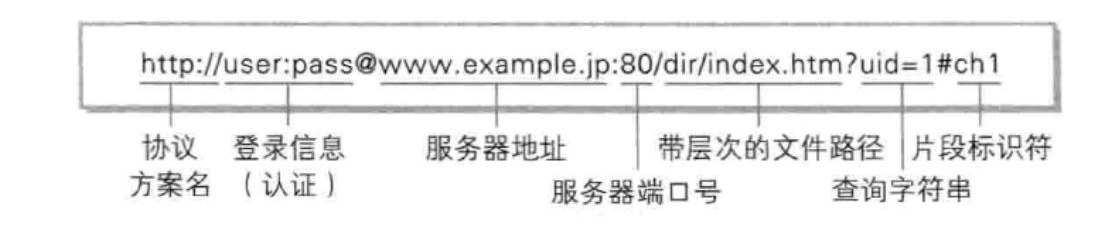
2、URL 编码 / 解码
URL 中很多字符(/ ? : & + 等)有特殊含义,不能直接用,需要先转义。
- URL 编码(urlencode)
- 把特殊字符转为 ASCII 16 进制
- 格式:
%+ 两位十六进制数 - 例:
+→%2B(C++->c%2B%2B)
- URL 解码(urldecode)
- 编码的逆过程,把
%XY还原成原始字符 - 例:
%2B→+(c%2B%2B→C++)
- 编码的逆过程,把

3、HTTP 协议请求与响应格式
1)HTTP 请求
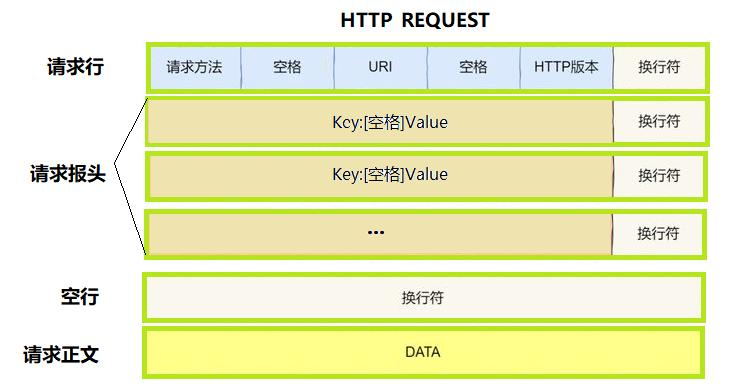
HTTP 请求由三部分组成
1. 请求行(首行)
- 格式:
[方法] + [URL] + [HTTP版本] - 示例:
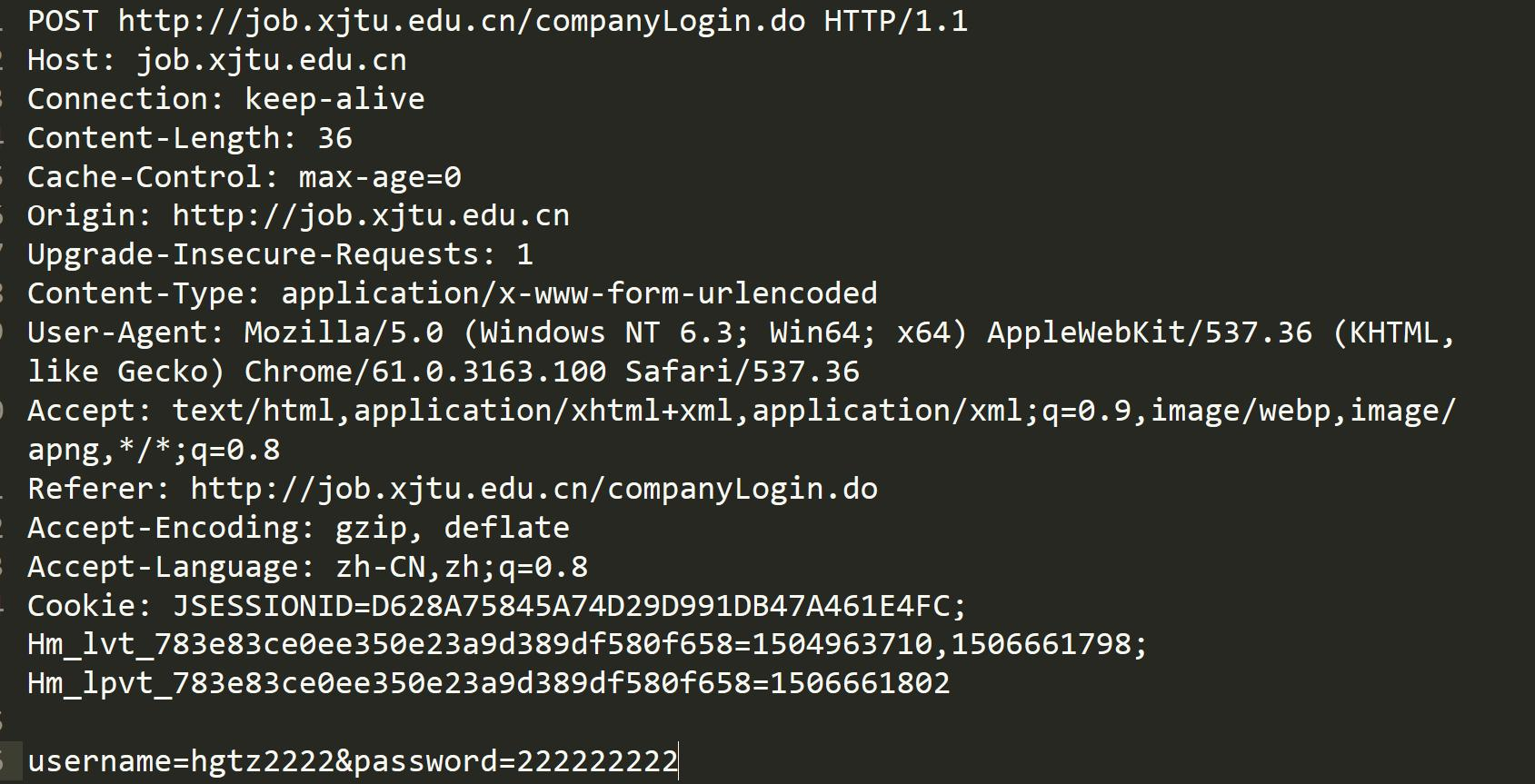
POST http://job.xjtu.edu.cn/companyLogin.do HTTP/1.1
2. 请求头(Header)
- 格式:
Key: Value的键值对,每行用\r\n分隔 - 结束标志:遇到一个空行(连续两个
\r\n),表示 Header 结束 - 示例:
Host: job.xjtu.edu.cn、Content-Type: application/x-www-form-urlencoded
3. 请求体(Body)
- 空行后面的所有内容,允许为空
- 如果有 Body,Header 里必须有
Content-Length标明长度 - 示例:
username=hgtz2222&password=222222222
2)HTTP 响应
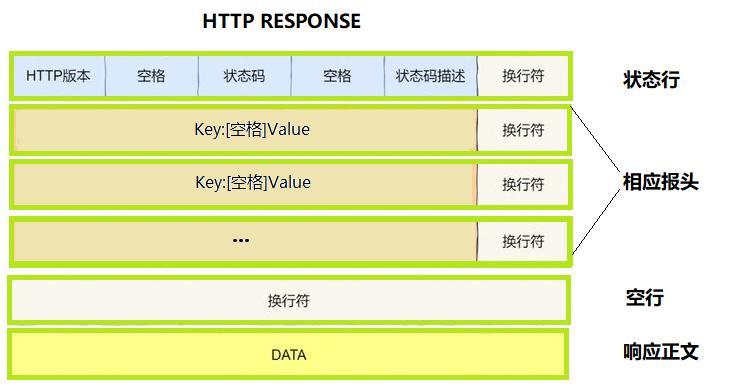
HTTP 响应和请求结构类似,分为三部分
1. 状态行(首行)
- 格式:
[HTTP版本] + [状态码] + [状态码描述] - 示例:
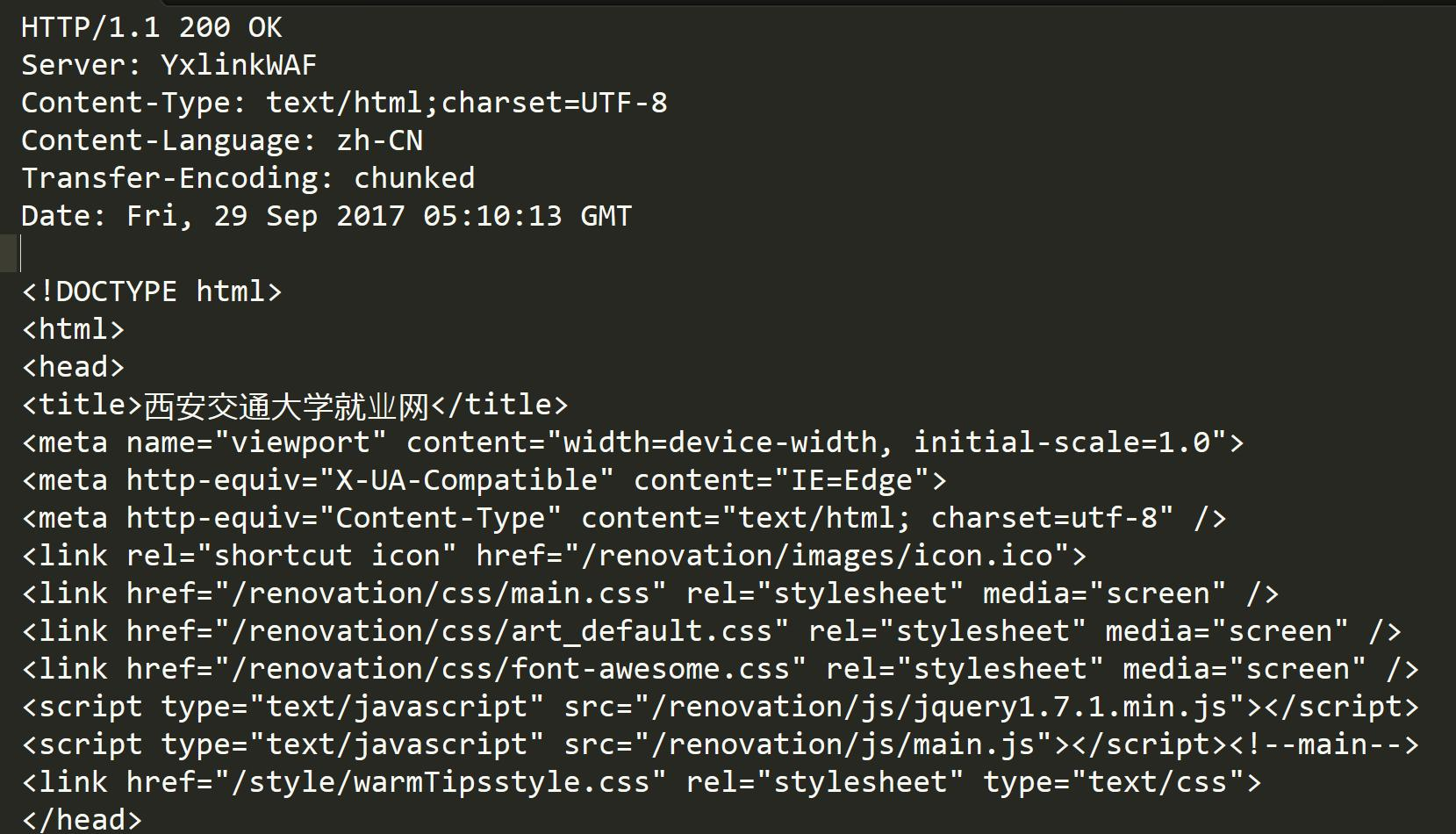
HTTP/1.1 200 OK
2. 响应头(Header)
- 格式:
Key: Value键值对,每行用\r\n分隔 - 结束标志:遇到空行(连续两个
\r\n),表示 Header 结束 - 示例:
Content-Type: text/html;charset=UTF-8、Server: YxlinkWAF
3. 响应体(Body)
- 空行后面的所有内容,允许为空
- 如果有 Body,Header 里必须有
Content-Length(或Transfer-Encoding: chunked)标明长度 / 传输方式 - 示例:图中的 HTML 页面代码,就是典型的响应体
3、HTTP 服务器(多进程)
代码结构:
Mutex.hpp
Log.hpp
Common.hpp
InetAddr.hpp
Util.hpp
Socket.hpp
TcpServer.hpp
Http.hpp
Main.cc

wwwroot
	404.html
	board1.html
	index.html
	Login.html
	Register.html
	test.html
	image
		1.png
		2.png
		3,png
		4.png
		5.jpg
1)Mutex.hpp
#pragma once
#include <iostream>
#include <pthread.h>

namespace MutexModule
{
    // 互斥锁封装类
    class Mutex
    {
    public:
        // 初始化锁
        Mutex()
        {
            pthread_mutex_init(&_mutex, nullptr);
        }

        // 加锁
        void Lock()
        {
            int n = pthread_mutex_lock(&_mutex);
        }

        // 解锁
        void Unlock()
        {
            int n = pthread_mutex_unlock(&_mutex);
        }

        // 获取锁指针
        pthread_mutex_t *Get()
        {
            return &_mutex;
        }

        // 销毁锁
        ~Mutex()
        {
            pthread_mutex_destroy(&_mutex);
        }

    private:
        pthread_mutex_t _mutex; // 原生互斥锁对象
    };

    // RAII 自动锁
    class LockGuard
    {
    public:
        LockGuard(Mutex &mutex)
            : _mutex(mutex)
        {
            _mutex.Lock();
        }

        ~LockGuard()
        {
            _mutex.Unlock();
        }

    private:
        Mutex &_mutex;
    };
}
2)Log.hpp
#pragma once
#include <iostream>
#include <cstdio>
#include <string>
#include <filesystem>
#include <fstream>
#include <sstream>
#include <memory>
#include <ctime>
#include <sys/types.h>
#include <unistd.h>
#include "Mutex.hpp"

namespace LogModule
{
    using namespace MutexModule;

    const std::string gsep = "\r\n";

    // 日志策略基类(接口)
    class LogStrategy
    {
    public:
        ~LogStrategy() = default;
        virtual void SyncLog(const std::string &message) = 0;
    };

    // 控制台日志输出(线程安全)
    class ConsoleLogStrategy : public LogStrategy
    {
    public:
        void SyncLog(const std::string &message) override
        {
            LockGuard lockguard(_mutex);
            std::cout << message << gsep;
        }

        ~ConsoleLogStrategy() {}

    private:
        Mutex _mutex;
    };

    const std::string defaultpath = "./log/"; //   /var/log
    const std::string defaultfile = "my.log";

    // 文件日志输出(自动建目录、线程安全)
    class FileLogStrategy : public LogStrategy
    {
    public:
        FileLogStrategy(const std::string &path = defaultpath, const std::string &file = defaultfile)
            : _path(path), _file(file)
        {
            LockGuard lockguard(_mutex);
            if (std::filesystem::exists(_path))
                return;

            try
            {
                std::filesystem::create_directories(_path);
            }
            catch (const std::filesystem::filesystem_error &e)
            {
                std::cerr << e.what() << std::endl;
            }
        }

        // 追加写入日志文件
        void SyncLog(const std::string &message) override
        {
            LockGuard lockguard(_mutex);
            std::string filename = _path + (_path.back() == '/' ? "" : "/") + _file;
            std::ofstream out(filename, std::ios::app);
            if (!out.is_open())
                return;

            out << message << gsep;
            out.close();
        }

    private:
        std::string _path;
        std::string _file;
        Mutex _mutex;
    };

    // 日志等级类
    enum class LogLevel
    {
        DEBUG,
        INFO,
        WARNING,
        ERROR,
        FATAL
    };

    // 日志等级转字符串
    std::string LevelStr(LogLevel level)
    {
        switch (level)
        {
        case LogLevel::DEBUG:
            return "DEBUG";
        case LogLevel::INFO:
            return "INFO";
        case LogLevel::WARNING:
            return "WARNING";
        case LogLevel::ERROR:
            return "ERROR";
        case LogLevel::FATAL:
            return "FATAL";
        default:
            return "UNKNOWN";
        }
    }

    // 获取格式化时间字符串(线程安全)
    std::string GetTimeStamp()
    {
        time_t curr = time(nullptr);
        struct tm curr_tm; // 出参
        localtime_r(&curr, &curr_tm);
        char buf[128]; // 出参
        snprintf(buf, sizeof(buf), "%4d-%02d-%02d %02d:%02d:%02d",
                 curr_tm.tm_year + 1900,
                 curr_tm.tm_mon + 1,
                 curr_tm.tm_mday,
                 curr_tm.tm_hour,
                 curr_tm.tm_min,
                 curr_tm.tm_sec);
        return buf;
    }

    // 日志核心管理类
    class Logger
    {
    public:
        Logger()
        {
            EnableConsoleLogStrategy();
        }

        // 切换为文件输出
        void EnableFileLogStrategy()
        {
            _fflush_strategy = std::make_unique<FileLogStrategy>();
        }

        // 切换为控制台输出
        void EnableConsoleLogStrategy()
        {
            _fflush_strategy = std::make_unique<ConsoleLogStrategy>();
        }

        // 日志消息构造: 负责拼接内容, 析构时自动输出
        class LogMessage
        {
        public:
            // 构造日志头部(时间、等级、进程ID、文件名、行号)
            LogMessage(LogLevel level, std::string src_name, int line_number, Logger &logger)
                :  _logger(logger)
            {
                std::stringstream ss;
                ss << "[" << GetTimeStamp() << "] "
                   << "[" << LevelStr(level) << "] "
                   << "[" << getpid() << "] "
                   << "[" << src_name << "] "
                   << "[" << line_number << "] - ";
                _loginfo = ss.str();
            }

            // 流方式拼接日志内容
            template <typename T>
            LogMessage &operator<<(const T &info)
            {
                std::stringstream ss;
                ss << info;
                _loginfo += ss.str();
                return *this;
            }

            // 析构自动输出日志
            ~LogMessage()
            {
                if (_logger._fflush_strategy)
                {
                    _logger._fflush_strategy->SyncLog(_loginfo);
                }
            }

        private:
            std::string _loginfo;
            Logger &_logger;
        };

        // 仿函数接口, 创建日志消息
        LogMessage operator()(LogLevel level, std::string name, int line)
        {
            return LogMessage(level, name, line, *this);
        }

    private:
        std::unique_ptr<LogStrategy> _fflush_strategy;
    };

    Logger logger;

// 简化调用宏
#define LOG(level) logger(level, __FILE__, __LINE__)
#define Enable_Console_Log_Strategy() logger.EnableConsoleLogStrategy()
#define Enable_File_Log_Strategy() logger.EnableFileLogStrategy()
}
3)Common.hpp
#pragma once

#include <iostream>
#include <string>
#include <cstring>
#include <functional>
#include <unistd.h>
#include <sys/types.h>
#include <sys/socket.h>
#include <arpa/inet.h>
#include <netinet/in.h>
#include <sys/wait.h>

// 程序退出状态码枚举
enum ExitCode
{
    OK = 0,      // 正常退出
    USAGE_ERR,   // 参数错误
    SOCKET_ERR,  // 创建socket失败
    BIND_ERR,    // 绑定失败
    LISTEN_ERR,  // 监听失败
    CONNECT_ERR, // 连接服务器失败
    FORK_ERR,    // 创建进程失败
    OPEN_ERR     // 打开文件失败
};


// 禁止拷贝基类: 继承后无法拷贝/赋值
class NoCopy
{
public:
    NoCopy() {}
    ~NoCopy() {}

    NoCopy(const NoCopy &) = delete;
    NoCopy &operator=(const NoCopy &) = delete;
};

// 地址类型转换宏: sockaddr_in → sockaddr*
#define CONV(addr) ((struct sockaddr *)&addr)
4)InetAddr.hpp
#pragma once
#include "Common.hpp"

// IPv4地址封装: 主机格式 <-> 网络格式
class InetAddr
{
public:
    // 构造: 网络地址 -> 主机格式
    InetAddr(struct sockaddr_in &addr)
        : _addr(addr)
    {
        _port = ntohs(_addr.sin_port); // port
        char ipbuffer[64];             // ip
        inet_ntop(AF_INET, &_addr.sin_addr, ipbuffer, sizeof(ipbuffer));
        _ip = ipbuffer;
    }

    // 构造:指定IP+端口 → 网络格式
    InetAddr(const std::string &ip, uint16_t port)
        : _ip(ip), _port(port)
    {
        memset(&_addr, 0, sizeof(_addr));
        _addr.sin_family = AF_INET;
        inet_pton(AF_INET, _ip.c_str(), &_addr.sin_addr); // ip
        _addr.sin_port = htons(_port);                    // port
    }

    // 构造:仅端口, 绑定本机所有IP
    InetAddr(uint16_t port)
        : _port(port), _ip()
    {
        memset(&_addr, 0, sizeof(_addr));
        _addr.sin_family = AF_INET;
        _addr.sin_addr.s_addr = INADDR_ANY; // ip
        _addr.sin_port = htons(_port);      // port
    }

	// 设置网络地址信息
    void SetAddr(struct sockaddr_in &addr)
    {
        _addr = addr;
        _port = ntohs(_addr.sin_port);

        char ipbuffer[64];
        inet_ntop(AF_INET, &_addr.sin_addr, ipbuffer, sizeof(ipbuffer));
        _ip = ipbuffer;
    }

    // 获取点分十进制IP
    std::string Ip() { return _ip; }

    // 获取主机字节序端口
    uint16_t Port() { return _port; }

    // 获取原生网络地址结构体
    const struct sockaddr_in &NetAddr() { return _addr; }

    // 获取通用地址指针(用于系统调用)
    const struct sockaddr *NetAddrPtr() { return CONV(_addr); }

    // 获取地址长度
    socklen_t NetAddrLen() { return sizeof(_addr); }

    // 比较两个地址是否相同
    bool operator==(const InetAddr &addr)
    {
        return addr._ip == _ip && addr._port == _port;
    }

    // 转为 ip:port 格式字符串
    std::string StringAddr()
    {
        return _ip + ":" + std::to_string(_port);
    }

    ~InetAddr() {}

private:
    struct sockaddr_in _addr; // 网络字节序地址
    std::string _ip;          // 点分十进制IP
    uint16_t _port;           // 主机字节序端口
};
5)Socket.hpp
#pragma once

#include <iostream>
#include <string>
#include <unistd.h>
#include <cstdlib>
#include <sys/socket.h>
#include <sys/types.h>
#include <netinet/in.h>
#include <arpa/inet.h>
#include "Common.hpp"
#include "Log.hpp"
#include "InetAddr.hpp"

namespace SocketModule
{
    using namespace LogModule;
    const static int gbacklog = 16; // 监听队列长度

    // 抽象Socket接口(模板方法)
    class Socket
    {
    public:
        virtual ~Socket() {}
        virtual void SocketOrDie() = 0;                                       // 创建socket
        virtual void BindOrDie(uint16_t port) = 0;                            // 绑定端口
        virtual void ListenOrDie(int backlog) = 0;                            // 监听
        virtual std::shared_ptr<Socket> Accept(InetAddr *client) = 0;         // 接收连接
        virtual void Close() = 0;                                             // 关闭socket
        virtual int Recv(std::string *out) = 0;                               // 接收数据
        virtual int Send(const std::string &message) = 0;                     // 发送数据
        virtual int Connect(const std::string &server_ip, uint16_t port) = 0; // 连接服务端

    public:
        // 构建TCP服务端
        void BuildTcpSocketMethod(uint16_t port, int backlog = gbacklog)
        {
            SocketOrDie();
            BindOrDie(port);
            ListenOrDie(backlog);
        }

        // 构建TCP客户端
        void BuildTcpClientSocketMethod()
        {
            SocketOrDie();
        }
    };

    const static int defaultfd = -1;

    // TCP套接字实现
    class TcpSocket : public Socket
    {
    public:
        TcpSocket() : _sockfd(defaultfd) {}

        TcpSocket(int fd) : _sockfd(fd) {}

        ~TcpSocket() {}

        // 创建socket
        void SocketOrDie() override
        {
            _sockfd = ::socket(AF_INET, SOCK_STREAM, 0);
            if (_sockfd < 0)
            {
                LOG(LogLevel::FATAL) << "socket error";
                exit(SOCKET_ERR);
            }
            LOG(LogLevel::INFO) << "socket success";
        }

        // 绑定端口
        void BindOrDie(uint16_t port) override
        {
            InetAddr localaddr(port);
            int n = ::bind(_sockfd, localaddr.NetAddrPtr(), localaddr.NetAddrLen());
            if (n < 0)
            {
                LOG(LogLevel::FATAL) << "bind error";
                exit(BIND_ERR);
            }
            LOG(LogLevel::INFO) << "bind success";
        }

        // 监听
        void ListenOrDie(int backlog) override
        {
            int n = ::listen(_sockfd, backlog);
            if (n < 0)
            {
                LOG(LogLevel::FATAL) << "listen error";
                exit(LISTEN_ERR);
            }
            LOG(LogLevel::INFO) << "listen success";
        }

        // 接收客户端连接
        std::shared_ptr<Socket> Accept(InetAddr *client) override
        {
            struct sockaddr_in peer;
            socklen_t len = sizeof(peer);

            // 阻塞等待客户端连接
            int fd = ::accept(_sockfd, CONV(peer), &len);
            if (fd < 0)
            {
                LOG(LogLevel::WARNING) << "accept warning ...";
                return nullptr;
            }

            // 保存客户端地址
            client->SetAddr(peer);

            // 返回新连接的socket对象
            return std::make_shared<TcpSocket>(fd);
        }

        // 接收数据  出参out
        int Recv(std::string *out) override
        {
            char buffer[1024];
            ssize_t n = ::recv(_sockfd, buffer, sizeof(buffer) - 1, 0);
            if (n > 0)
            {
                buffer[n] = 0;
                *out += buffer;
            }
            return n;
        }

        // 发送数据
        int Send(const std::string &message) override
        {
            return send(_sockfd, message.c_str(), message.size(), 0);
        }

        // 连接服务端
        int Connect(const std::string &server_ip, uint16_t port) override
        {
            InetAddr server(server_ip, port);
            return ::connect(_sockfd, server.NetAddrPtr(), server.NetAddrLen());
        }

        // 关闭套接字
        void Close() override
        {
            if (_sockfd >= 0)
                ::close(_sockfd);
        }

    private:
        int _sockfd; // socket文件描述符
    };
}
6)TcpServer.hpp(多进程)
#pragma once

#include <iostream>
#include <memory>
#include <sys/wait.h>
#include <functional>
#include "Log.hpp"
#include "Socket.hpp"

using namespace LogModule;
using namespace SocketModule;

// IO服务处理函数
using ioservice_t = std::function<void(std::shared_ptr<Socket> &sock, InetAddr &client)>;

// TCP服务端
class TcpServer
{
public:
    TcpServer(uint16_t port)
        : _port(port),
          _listensockptr(std::make_unique<TcpSocket>()),
          _isrunning(false)
    {
        _listensockptr->BuildTcpSocketMethod(_port);
    }

    // 启动服务器
    void Start(ioservice_t callback)
    {
        _isrunning = true;
        while (_isrunning)
        {
            InetAddr client; // 客户端
            auto sock = _listensockptr->Accept(&client);
            if (!sock)
                continue;

            LOG(LogLevel::DEBUG) << "accept success: "<<client.StringAddr();

            // 多进程处理连接
            pid_t id = fork();
            if (id < 0)
            {
                LOG(LogLevel::FATAL) << "fork error";
                exit(FORK_ERR);
            }
            else if (id == 0)
            {
                // 子进程关闭监听套接字
                _listensockptr->Close();

                // 孙子进程执行业务
                if (fork() > 0)
                    exit(OK);

                // 执行业务逻辑
                callback(sock, client);
                exit(OK);
            }
            else
            {
                // 父进程关闭通信套接字
                sock->Close();
                // 等待子进程
                pid_t rid = ::waitpid(id, nullptr, 0);
            }
        }
        _isrunning = false;
    }
    ~TcpServer() {}

private:
    uint16_t _port;
    std::unique_ptr<Socket> _listensockptr;
    bool _isrunning;
};
7)Util.hpp
#pragma once

#include <iostream>
#include <fstream>
#include <string>

// 通用工具类
class Util
{
public:
    // 获取文件大小
    static int FileSize(const std::string &filename)
    {
        std::ifstream in(filename, std::ios::binary);
        if (!in.is_open())
            return -1;

        // 跳到文件末尾
        in.seekg(0, std::ios::end);
        // 获取当前位置(即文件大小)
        int size = in.tellg();
        in.close();

        return size;
    }

    // 获取文件全部内容    出参out
    static bool ReadFileContent(const std::string &filename, std::string *out)
    {
        int size = FileSize(filename);
        if (size<=0)
            return false;

        std::ifstream in(filename);
        if (!in.is_open())
            return false;

        out->resize(size);
        in.read((char *)out->c_str(), size);
        in.close();

        return true;
    }

    // 按分隔符截取一行   出参out
    static bool ReadOneLine(std::string &bigstr, std::string *out, const std::string &sep)
    {
        size_t pos = bigstr.find(sep);
        if (pos == std::string::npos)
            return false;

        *out = bigstr.substr(0, pos);
        bigstr.erase(0, pos + sep.size());

        return true;
    }
};
8)Http.hpp
#pragma once

#include <unordered_map>
#include <vector>
#include "Log.hpp"
#include "Socket.hpp"
#include "TcpServer.hpp"
#include "Util.hpp"

using namespace LogModule;
using namespace SocketModule;

// HTTP协议常量定义
const std::string gspace = " ";        // 空格分隔符
const std::string glinespace = "\r\n"; // 行分隔符
const std::string glinesep = ": ";     // 头键值分隔符

// 网站路径配置
const std::string webroot = "./wwwroot";   // 网站根目录
const std::string homepage = "index.html"; // 默认首页
const std::string page_404 = "/404.html";  // 404页面

// HTTP请求类: 解析客户端请求
class HttpRequest
{
public:
    HttpRequest() : _is_interact(false) {}

    // 解析请求行: 提取请求方法、URL、HTTP版本
    void ParseReqLine(std::string &reqline)
    {
        std::stringstream ss(reqline);
        ss >> _method >> _uri >> _version;
    }

    // 反序列化: 解析完整HTTP请求字符串
    bool Deserialize(std::string &reqstr)
    {
        // 1. 读取并解析请求行
        std::string reqline;
        Util::ReadOneLine(reqstr, &reqline, glinespace);
        LOG(LogLevel::DEBUG) << reqline;
        ParseReqLine(reqline);

        // 2. 拼接实际资源文件路径
        if (_uri == "/")
            _uri = webroot + _uri + homepage;
        else
            _uri = webroot + _uri;

        LOG(LogLevel::DEBUG) << "_method: " << _method;
        LOG(LogLevel::DEBUG) << "_uri: " << _uri;
        LOG(LogLevel::DEBUG) << "_version: " << _version;

        // 3. 解析GET请求参数
        const std::string temp = "?";
        auto pos = _uri.find(temp);
        if (pos == std::string::npos)
        {
            return true;
        }

        // 分离URL和参数, 标记为动态请求
        _args = _uri.substr(pos + temp.size());
        _uri = _uri.substr(0, pos);
        _is_interact = true;

        return true;
    }

    // 获取请求资源路径
    std::string Uri() { return _uri; }
    // 判断是否为动态交互请求
    bool isInteract() { return _is_interact; }
    // 获取请求参数
    std::string Args() { return _args; }

    ~HttpRequest() {}

private:
    std::string _method;  // 请求方法(GET/POST)
    std::string _uri;     // 请求资源路径
    std::string _version; // HTTP版本

    std::unordered_map<std::string, std::string> _headers; // 请求头
    std::string _blankline;                                // 空行
    std::string _text;                                     // 请求体
    std::string _args;                                     // 请求参数
    bool _is_interact;                                     // 是否动态交互请求
};

// HTTP响应类: 构建服务端响应
class HttpResponse
{
public:
    HttpResponse()
        : _blankline(glinespace),
          _version("HTTP/1.0")
    {
    }

    // 序列化: 将响应拼接为HTTP协议字符串
    std::string Serialize()
    {
        // 1. 拼接状态行
        std::string status_line = _version + gspace + std::to_string(_code) + gspace + _desc + glinespace;
        // 2. 拼接响应头
        std::string resp_header;
        for (auto &header : _headers)
        {
            resp_header += header.first + glinesep + header.second + glinespace;
        }

        // 3. 组合完整响应报文
        return status_line + resp_header + _blankline + _text;
    }

    // 设置要访问的目标文件
    void SetTargetFile(const std::string &target)
    {
        _targetfile = target;
    }

    // 设置响应状态码及描述
    void SetCode(int code)
    {
        _code = code;
        switch (_code)
        {
        case 200:
            _desc = "OK";
            break;
        case 404:
            _desc = "Not Found";
            break;
        case 301:
            _desc = "Moved Permanently";
            break;
        case 302:
            _desc = "See Other";
            break;
        default:
            break;
        }
    }

    // 添加响应头
    void SetHeader(const std::string &key, const std::string &value)
    {
        if (_headers.find(key) == _headers.end())
            _headers.insert({key, value});
    }

    // 根据文件后缀获取Content-Type
    std::string Uri2Suffix(const std::string &targetfile)
    {
        auto pos = targetfile.rfind(".");
        if (pos == std::string::npos)
            return "text/html";

        std::string suffix = targetfile.substr(pos);
        if (suffix == ".html")
            return "text/html";
        else if (suffix == ".jpg")
            return "image/jpg";
        else
            return "";
    }

    // 构建响应: 读取文件、设置状态码、响应头
    bool MakeResponse()
    {
        // 1. 忽略浏览器图标请求
        if (_targetfile == "./wwwroot/favicon.ico")
        {
            LOG(LogLevel::DEBUG) << "用户请求: " << _targetfile << "忽略它";
            return false;
        }

        // 2. 测试重定向
        if (_targetfile == "./wwwroot/redir_test")
        {
            SetCode(302);
            SetHeader("Location", "http://www.qq.com/");
            return true;
        }

        // 3. 读取目标文件内容
        int filesize = 0;
        bool res = Util::ReadFileContent(_targetfile, &_text);
        if (!res)
        {
            // 文件不存在, 返回404页面
            _text = "";
            LOG(LogLevel::WARNING) << "client want get : " << _targetfile << " but not found";
            SetCode(404);
            _targetfile = webroot + page_404;
            filesize = Util::FileSize(_targetfile);
            Util::ReadFileContent(_targetfile, &_text);

            // 设置响应头
            std::string suffix = Uri2Suffix(_targetfile);
            SetHeader("Content-Type", suffix);
            SetHeader("Content-Length", std::to_string(filesize));
        }
        else
        {
            // 文件存在, 返回200
            LOG(LogLevel::DEBUG) << "读取文件: " << _targetfile;
            SetCode(200);
            filesize = Util::FileSize(_targetfile);
        }

        // 4. 统一设置响应头
        std::string suffix = Uri2Suffix(_targetfile);
        SetHeader("Content-Type", suffix);
        SetHeader("Content-Length", std::to_string(filesize));
        SetHeader("Set-Cookie", "username=zhangsan;");

        return true;
    }

    // 设置响应体内容
    void SetText(const std::string &t) { _text = t; }
    // 响应反序列化(预留)
    bool Deserialize(std::string &reqstr) { return true; }

    ~HttpResponse() {}

public:
    std::string _version;                                  // HTTP版本
    int _code;                                             // 响应状态码
    std::string _desc;                                     // 状态描述
    std::unordered_map<std::string, std::string> _headers; // 响应头
    std::vector<std::string> cookie;                       // Cookie信息
    std::string _blankline;                                // 空行
    std::string _text;                                     // 响应体
    std::string _targetfile;                               // 目标文件路径
};

// 动态请求处理函数类型
using http_func_t = std::function<void(HttpRequest &req, HttpResponse &resp)>;

// HTTP服务器类: 支持静态资源+动态服务
class Http
{
public:
    Http(uint16_t port)
        : tsvrp(std::make_unique<TcpServer>(port))
    {
    }

    // 处理单个HTTP请求
    void HandlerHttpRequest(std::shared_ptr<Socket> &sock, InetAddr &client)
    {
        // 1. 接收客户端请求数据
        std::string httpreqstr;
        int n = sock->Recv(&httpreqstr);
        if (n < 0)
            return;

        std::cout << "############################" << std::endl;
        std::cout << httpreqstr;
        std::cout << "############################" << std::endl;

        // 2. 解析请求
        HttpRequest req;
        HttpResponse resp;
        req.Deserialize(httpreqstr);

        // 3. 动态请求: 执行注册的服务函数
        if (req.isInteract())
        {
            if (_route.count(req.Uri()))
            {
                _route[req.Uri()](req, resp);
                sock->Send(resp.Serialize());
            }
        }
        // 4. 静态请求: 返回对应文件
        else
        {
            resp.SetTargetFile(req.Uri());
            if (resp.MakeResponse())
            {
                sock->Send(resp.Serialize());
            }
        }
    }

    // 启动HTTP服务器
    void Start()
    {
        // 绑定请求处理函数
        tsvrp->Start([this](std::shared_ptr<Socket> &sock, InetAddr &client)
        {
            this->HandlerHttpRequest(sock, client);
        });
    }

    // 注册动态服务路由
    void RegisterService(const std::string name, http_func_t h)
    {
        std::string key = webroot + name;
        if (_route.find(key) == _route.end())
        {
            _route.insert({key, h});
        }
    }

    ~Http()
    {
    }

private:
    std::unique_ptr<TcpServer> tsvrp;                    // TCP服务器实例
    std::unordered_map<std::string, http_func_t> _route; // 动态路由表
};
9)Main.cc
#include"Http.hpp"

// 登录业务处理
void Login(HttpRequest& req,HttpResponse& resp)
{
    // 打印请求参数
    LOG(LogLevel::DEBUG) << req.Args() << " 进入登录处理逻辑";
    std::string text = "hello: " + req.Args();

    // 构建响应
    resp.SetCode(200);
    resp.SetHeader("Content-Type", "text/plain");
    resp.SetHeader("Content-Length", std::to_string(text.size()));
    resp.SetText(text);
}

// ./myhttp port
int main(int argc,char* argv[])
{
    if(argc!=2)
    {
        std::cout << "Usage: " << argv[0] << " port" << std::endl;
        exit(USAGE_ERR);
    }

    uint16_t port = std::stoi(argv[1]);

    // 创建服务器
    std::unique_ptr<Http> httpsvr = std::make_unique<Http>(port);
    // 注册动态接口
    httpsvr->RegisterService("/login", Login);
    // 启动服务器
    httpsvr->Start();

    return 0;
}
客户端: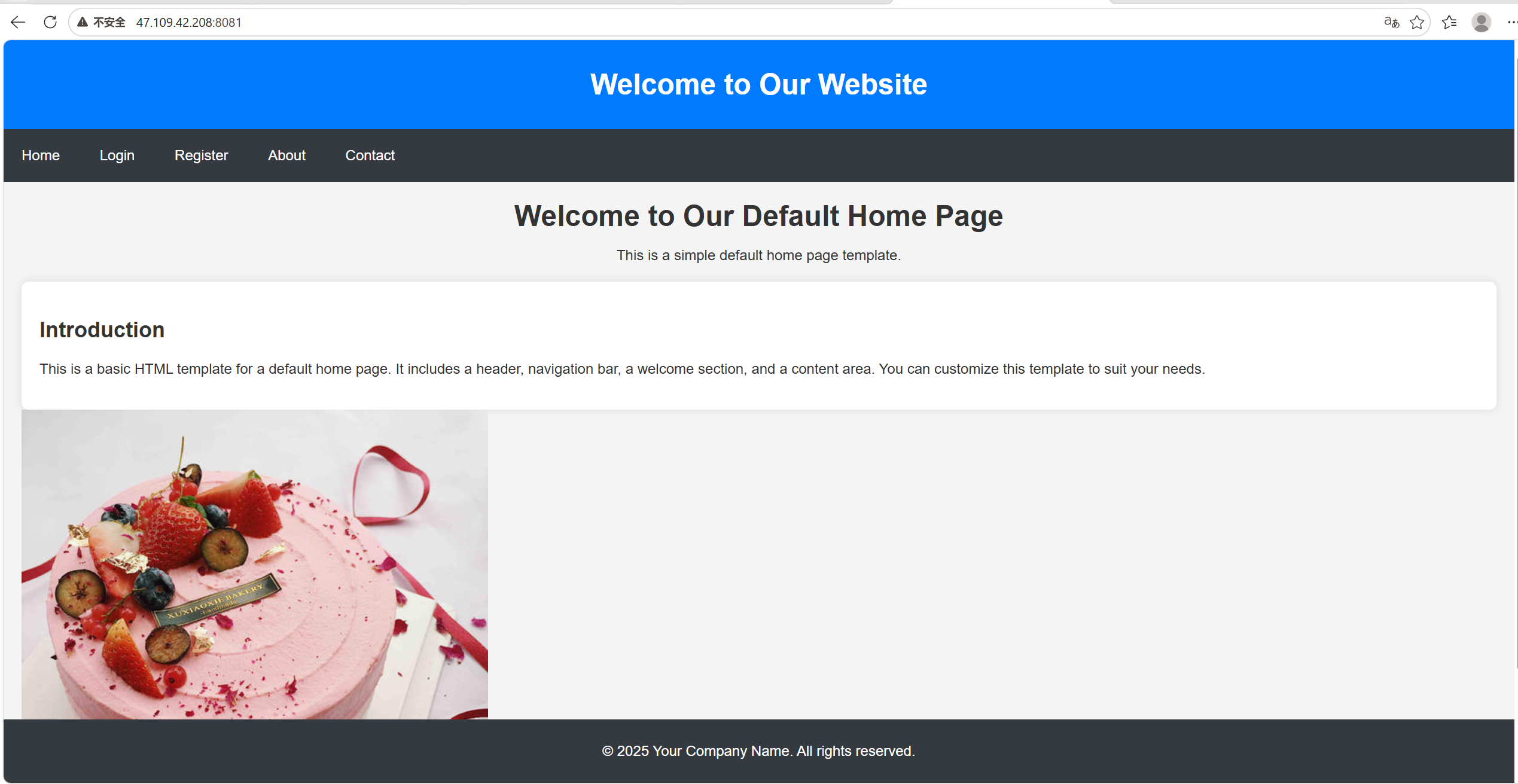
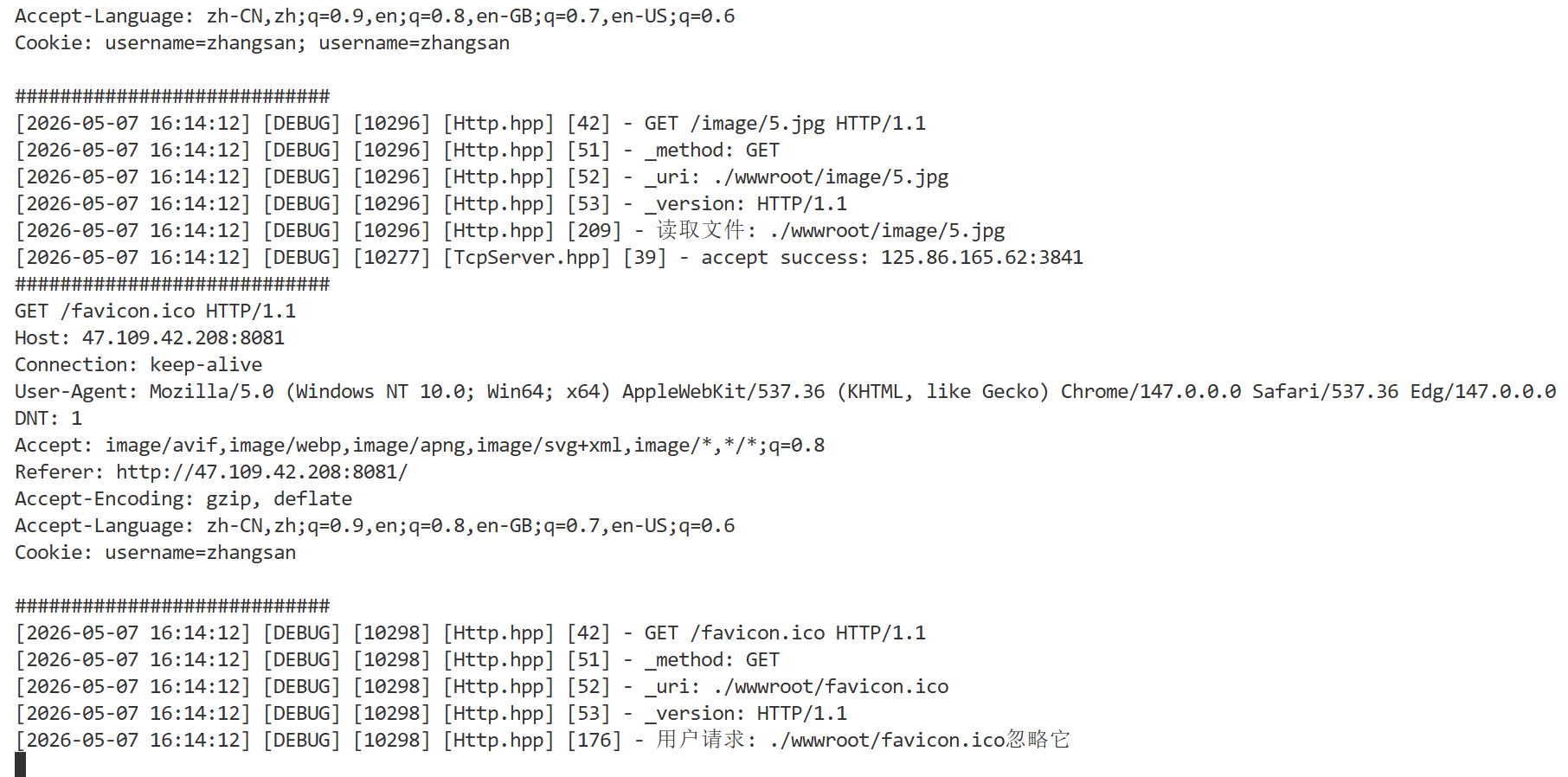
服务端: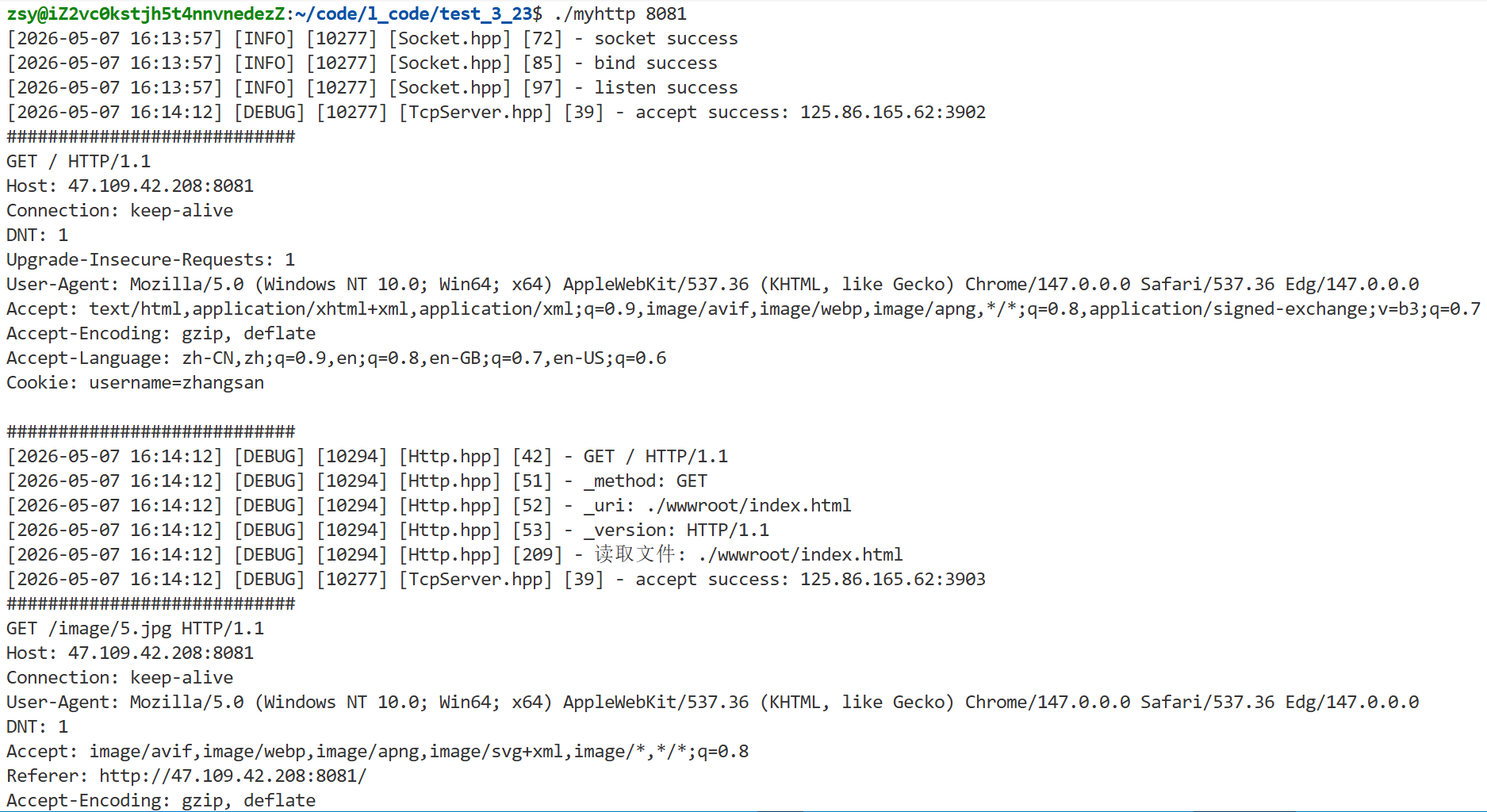
二、HTTP 协议基础
1、HTTP 常见方法
最常用的就是 GET 方法和 POST 方法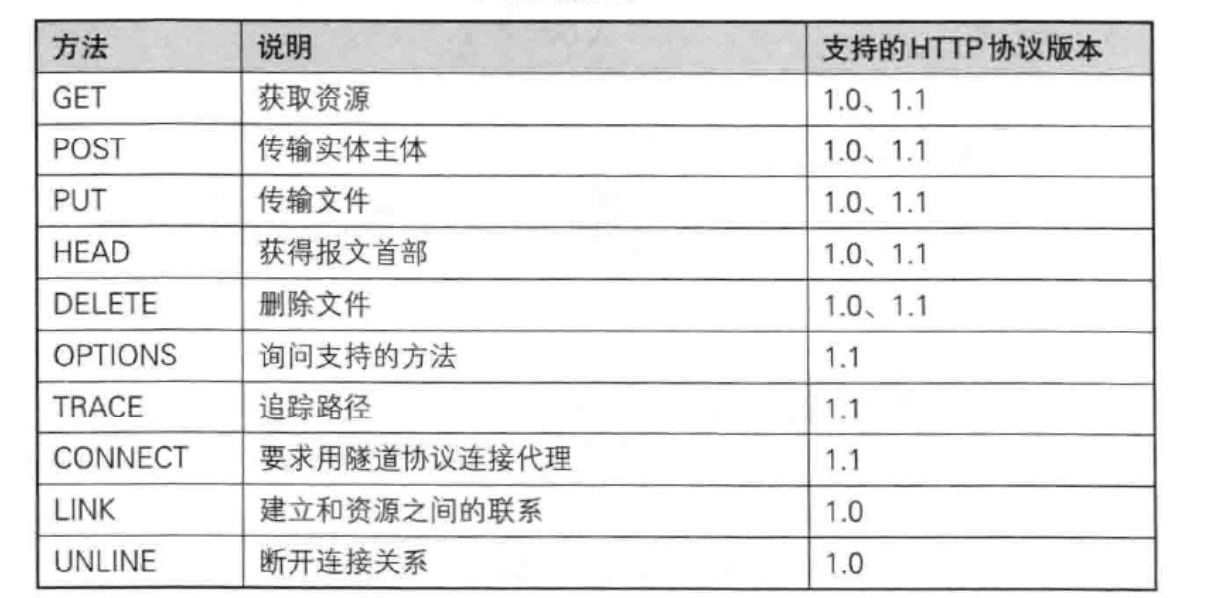
1)GET(重点)
- 用途:请求获取指定资源
- 特点:参数拼在 URL 后面、无请求体、可缓存、长度有限
- 场景:查询数据、访问页面、表单默认提交
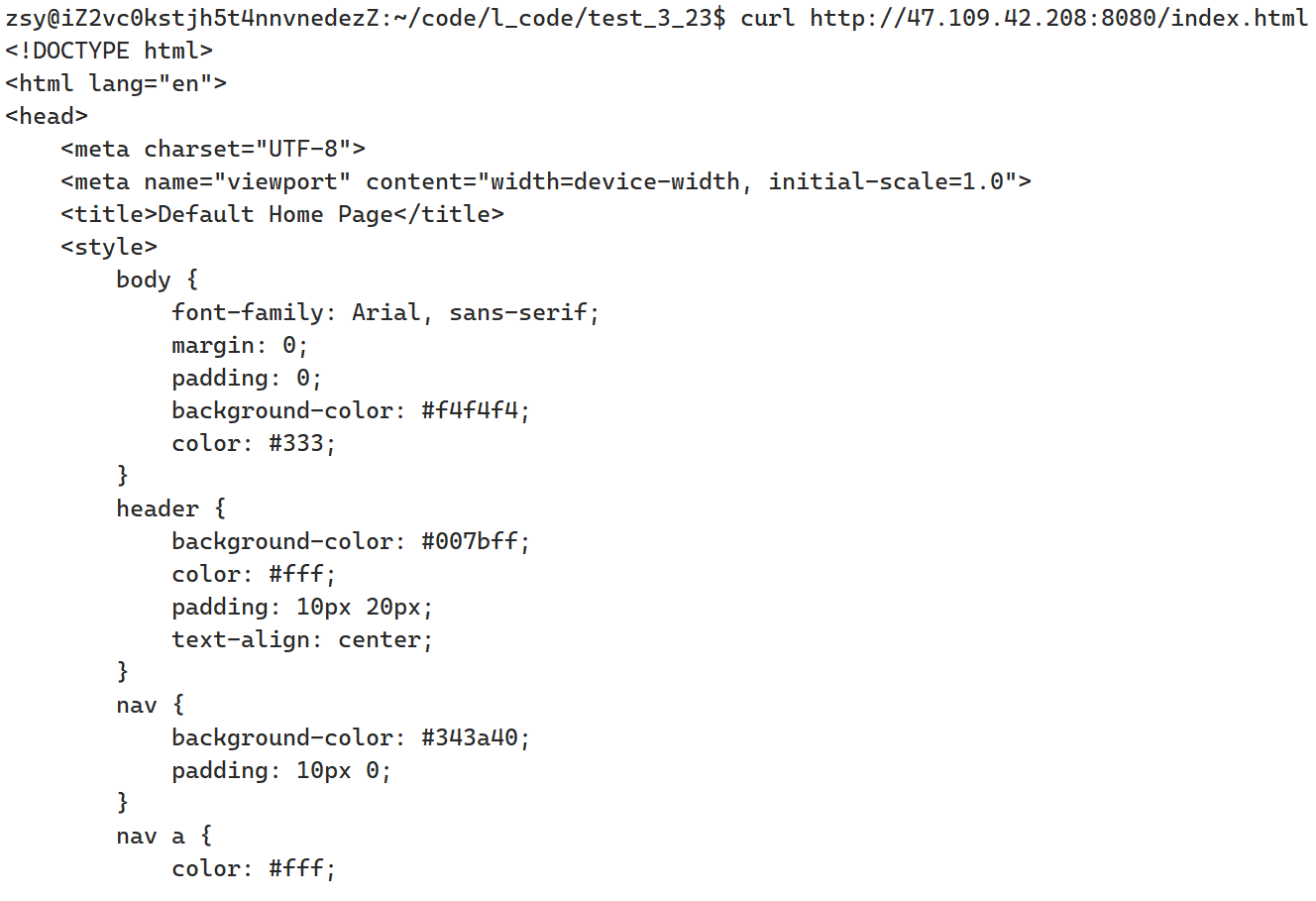
测试GET:
1. 浏览器地址: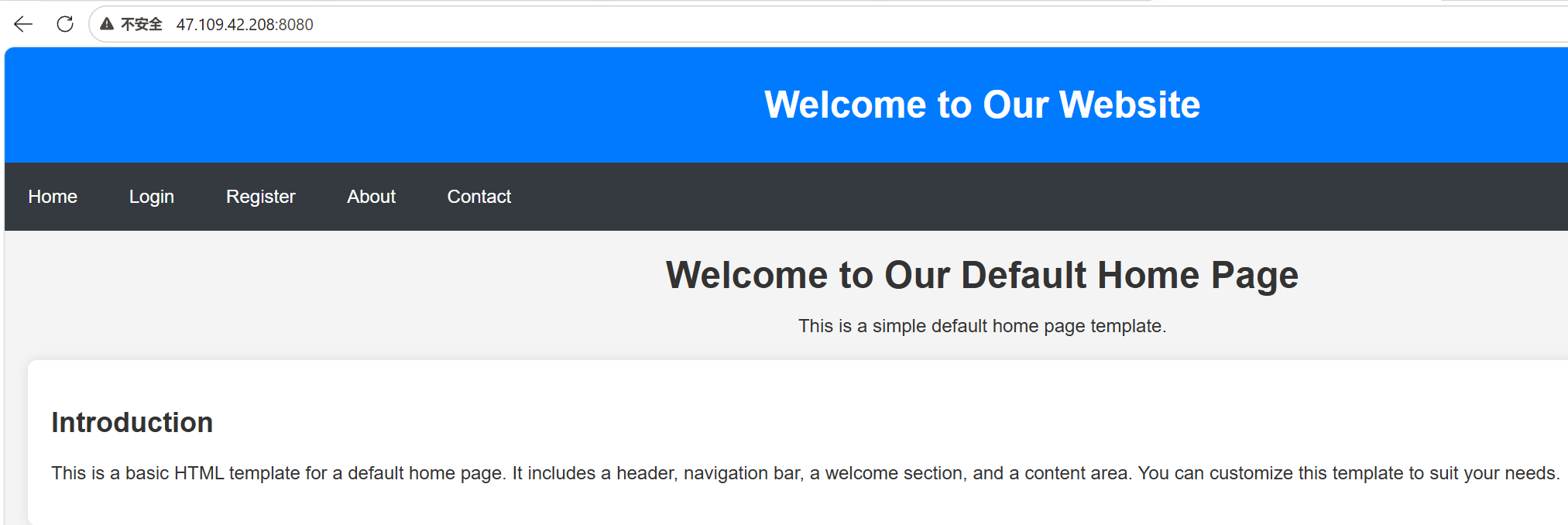
2. curl地址:curl http://47.109.42.208:8080/index.html
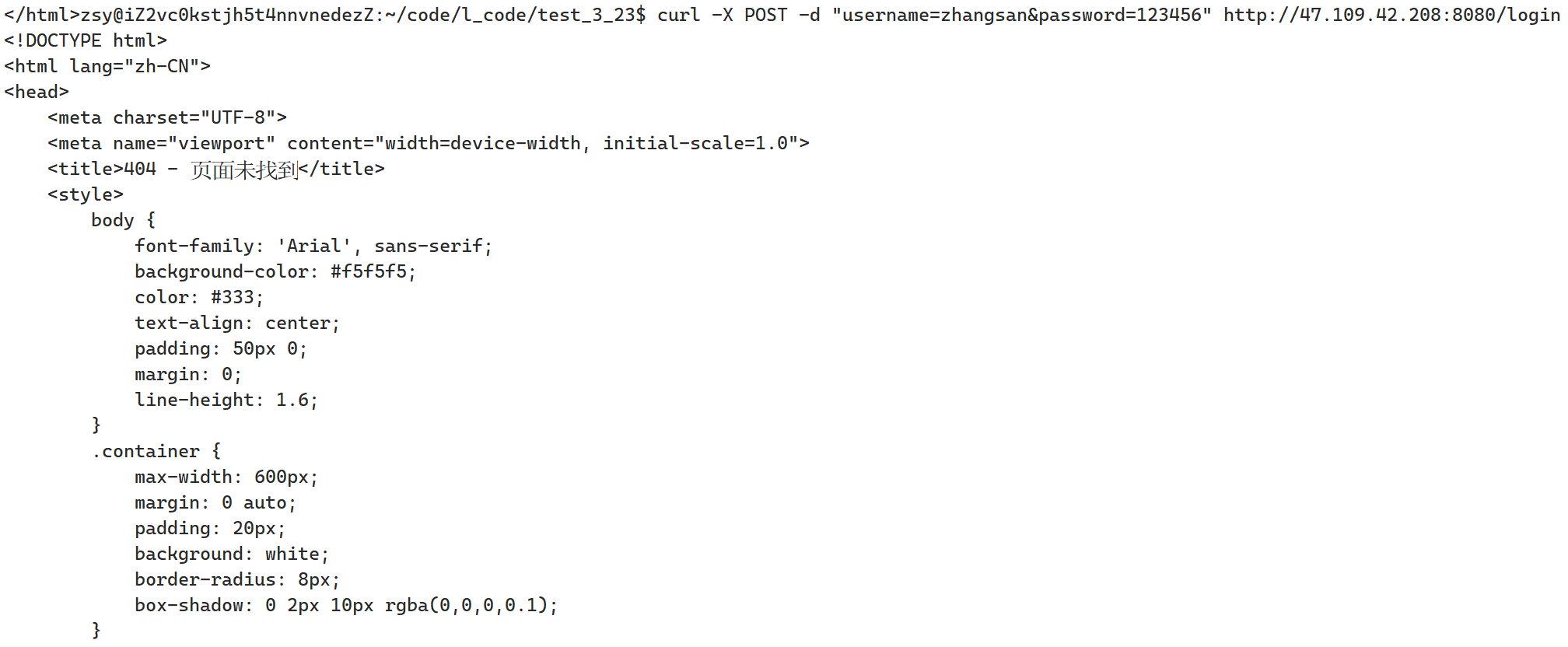
2)POST(重点)
- 用途:提交数据给服务器
- 特点:数据放请求体、无长度限制、不缓存、更适合传敏感 / 大量数据
- 场景:登录注册、提交表单、上传数据
测试POST:
1. 浏览器地址: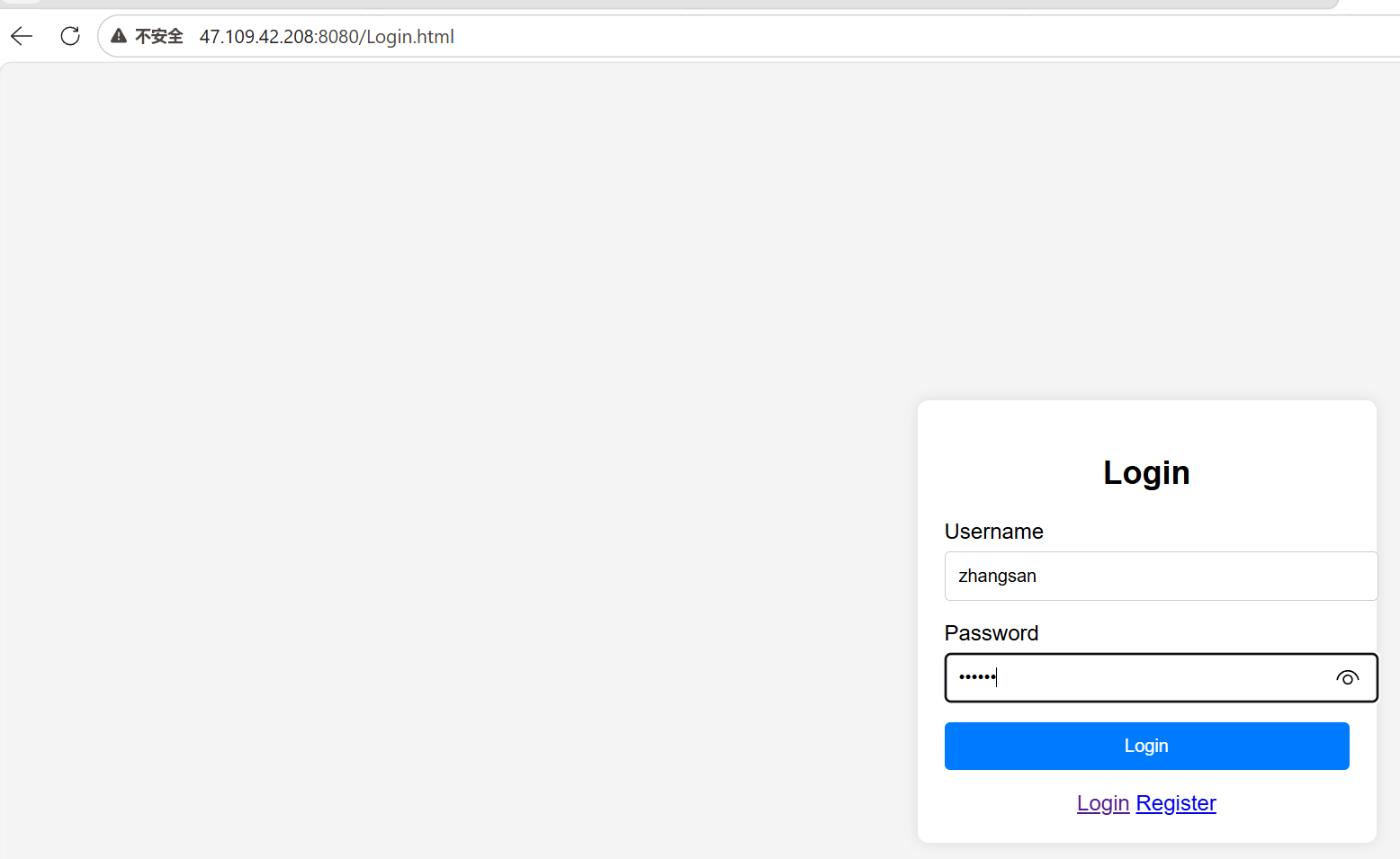

2. curl地址: curl -X POST -d "username=zs&password=123456" http://47.109.42.208:8080/login
3)PUT(不常用)
- 用途:上传 / 更新资源
- 场景:RESTful API 新增、修改资源
4)HEAD
- 用途:同 GET,但只返回响应头,不返回响应体
- 场景:检测链接是否有效、看文件更新时间
curl测试: curl -I http://127.0.0.1:8080/index.html

5)DELETE(不常用)
- 用途:删除服务器指定资源
- 场景:RESTful API 删除数据
6)OPTIONS
- 用途:查询服务器支持哪些 HTTP 请求方法
- 场景:跨域预检、查看接口允许请求方式
2、HTTP 状态码
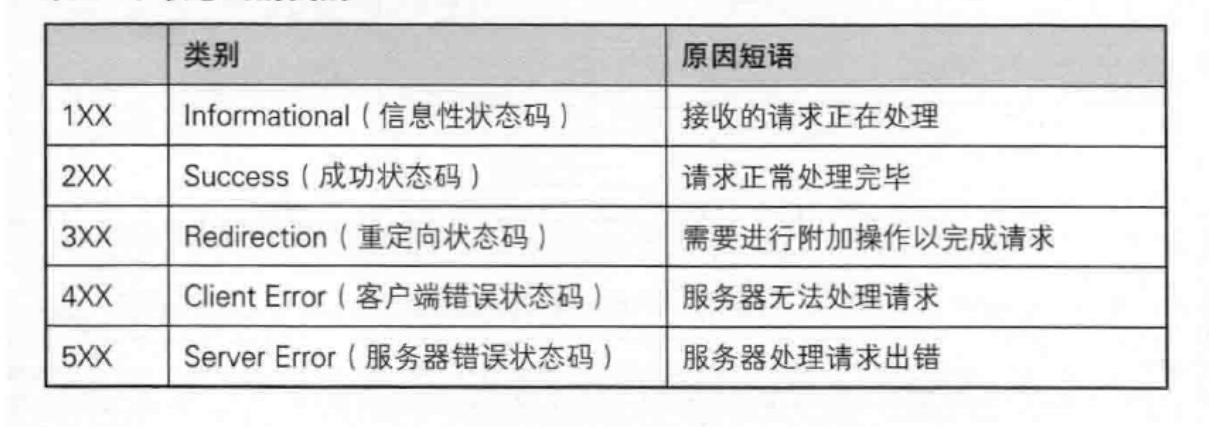
高频状态码
| 状态码 | 含义 | 常见场景 |
|---|---|---|
| 200 OK | 请求成功 | 正常访问网页、接口返回数据 |
| 201 Created | 资源创建成功 | 提交表单、新建用户 |
| 204 No Content | 无内容 | 删除操作成功,无返回内容 |
| 301 Moved Permanently | 永久重定向 | 网站域名更换,搜索引擎更新 |
| 302 Found | 临时重定向 | 登录后跳转首页 |
| 304 Not Modified | 资源未修改 | 浏览器走缓存,不返回文件 |
| 400 Bad Request | 请求格式错误 | 表单参数格式不对 |
| 401 Unauthorized | 未授权 | 未登录访问需登录页面 |
| 403 Forbidden | 禁止访问 | 无权限访问资源 |
| 404 Not Found | 资源不存在 | 访问的网页 / 接口不存在 |
| 500 Internal Server Error | 服务器内部错误 | 代码崩溃、数据库报错 |
| 502 Bad Gateway | 网关错误 | 代理服务器无法获取上游响应 |
| 503 Service Unavailable | 服务不可用 | 服务器维护 / 过载 |
重定向状态码对比
| 状态码 | 类型 | 特点 |
|---|---|---|
| 301 | 永久重定向 | 浏览器会缓存重定向地址,搜索引擎更新链接 |
| 302 | 临时重定向 | 不缓存,仅本次跳转 |
| 307 | 临时重定向 | 保留原请求方法(如 POST),较少用 |
| 308 | 永久重定向 | 保留原请求方法,较少用 |
所有 3XX 重定向都必须带 Location 响应头,指定目标 URL,浏览器才会自动跳转。
代码中的状态码
- 正常返回网页:
SetCode(200) - 文件不存在:
SetCode(404) - 登录跳转:
SetCode(302); SetHeader("Location", "目标地址") - 权限不足:
SetCode(403) - 服务器出错:
SetCode(500)
3、HTTP 常见 Header
| 字段名 | 含义 |
|---|---|
| Host | 目标主机名 + 端口 |
| User-Agent | 客户端系统 / 浏览器信息 |
| Referer | 请求从哪个页面跳转而来 |
| Content-Type | 数据类型(html/json/ 表单) |
| Content-Length | 数据体长度 |
| Location | 3xx 重定向目标地址 |
| Cookie | 客户端身份 / 会话标识 |
| Connection | keep-alive(长连接)/close(短连接) |
| Cache-Control | 缓存控制 |
| Authorization | 身份认证信息 |
| Server | 服务器软件信息 |
| Last-Modified | 文件最后修改时间 |
Connection 字段说明
- HTTP/1.1 默认:keep-alive(长连接,复用 TCP)
- HTTP/1.0 默认:close(短连接,一次请求就断开)
Connection: keep-alive:保持连接Connection: close:请求结束关闭连接
常见样例
Host: 127.0.0.1:8080
Content-Type: text/html
Content-Length: 1024
Location: http://www.qq.com
Cookie: username=zhangsan
Connection: keep-alive
4、最简单的 HTTP 服务器
1)myhttp.cc
#include <iostream>
#include <cstdio>
#include <cstdlib>
#include <cstring>
#include <unistd.h>
#include <sys/socket.h>
#include <netinet/in.h>
#include <arpa/inet.h>

// 使用说明
void Usage()
{
    std::cout << "usage: ./myhttp port" << std::endl;
}

int main(int argc, char *argv[])
{
    if (argc != 2)
    {
        Usage();
        return 1;
    }

    // 1. 创建套接字
    int fd = socket(AF_INET, SOCK_STREAM, 0);
    if (fd < 0)
    {
        perror("socket");
        return 1;
    }

    // 2. 绑定IP和端口
    struct sockaddr_in addr;
    addr.sin_family = AF_INET;
    addr.sin_addr.s_addr = htonl(INADDR_ANY); // 绑定所有地址
    addr.sin_port = htons(atoi(argv[1]));     // 只需要端口

    int ret = bind(fd, (struct sockaddr *)&addr, sizeof(addr));
    if (ret < 0)
    {
        perror("bind");
        return 1;
    }

    // 3. 监听端口
    ret = listen(fd, 10);
    if (ret < 0)
    {
        perror("listen");
        return 1;
    }

    // 4. 循环接受客户端连接
    while (true)
    {
        struct sockaddr_in client_addr;
        socklen_t len = sizeof(client_addr);

        // 接受连接
        int client_fd = accept(fd, (struct sockaddr *)&client_addr, &len);
        if (client_fd < 0)
        {
            perror("accept");
            continue;
        }

        // 读取HTTP请求
        char input_buf[1024 * 10] = {0};
        ssize_t read_size = read(client_fd, input_buf, sizeof(input_buf) - 1);
        if (read_size < 0)
        {
            close(client_fd);
            return 1;
        }

        // 打印请求
        std::cout << "Request: " << input_buf;

        // 构造HTTP响应
        char buf[1024] = {0};
        const char *hello = "<h1>hello world</h1>";
        sprintf(buf, "HTTP/1.0 200 OK\nContent-Length:%lu\n\n%s", strlen(hello), hello);

        // 发送给客户端
        write(client_fd, buf, strlen(buf));
        // 关闭连接
        close(client_fd);
    }

    return 0;
}
客户端: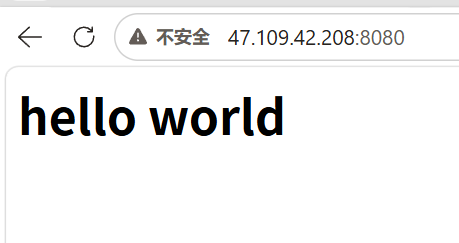
服务端: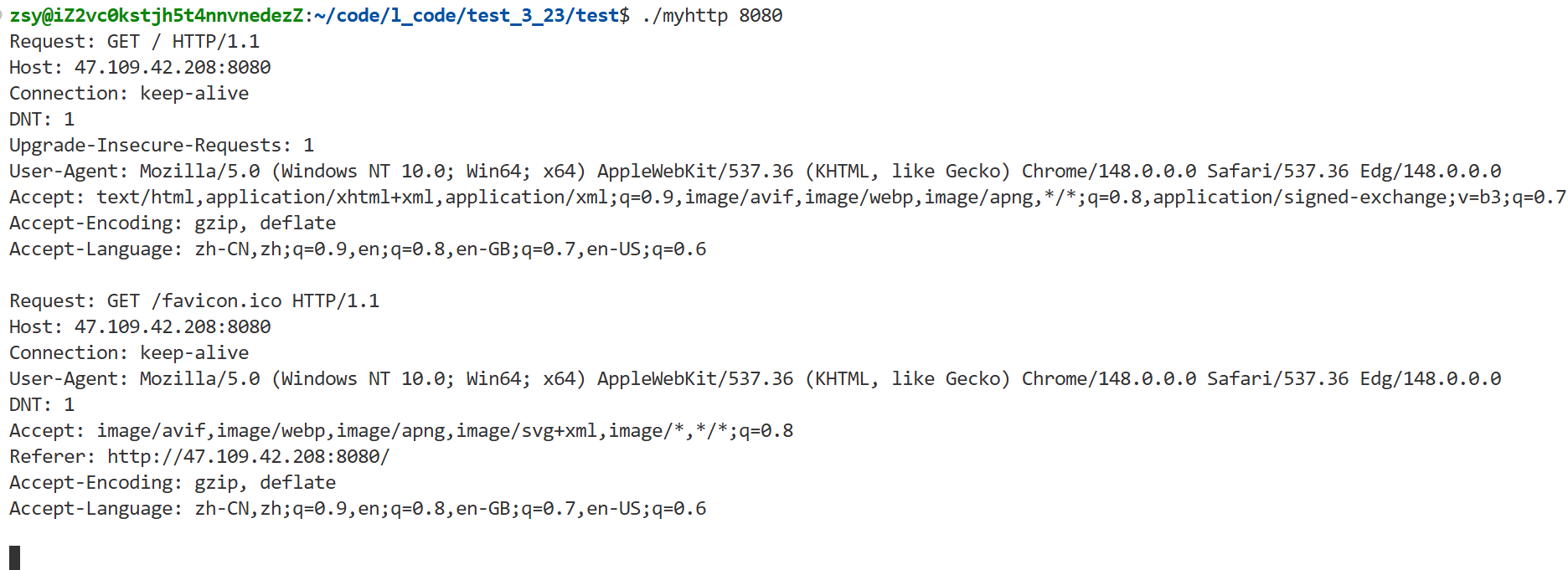
三、HTTP 版本发展史
HTTP/0.9(1991)
- 只有 GET,无请求头,只传纯文本
- 最简单的超文本传输协议
HTTP/1.0(1996)
- 新增 POST/HEAD、请求头、状态码、缓存
- 支持多种文件格式
- 短连接,一次请求一个 TCP 连接
HTTP/1.1(1999)
- 长连接(默认 keep-alive)
- 支持 Host 头(多域名共享一个 IP)
- 分块传输、管线化
- 目前最广泛使用
HTTP/2(2015)
- 多路复用: 一个连接并发多个请求
- 头部压缩、二进制传输、服务器推送
- 大幅提升网页加载速度
HTTP/3(2022)
- 基于 QUIC/UDP 替代 TCP
- 解决队头阻塞,握手更快,更安全
- 适合 5G、移动、物联网场景
总结:0.9 简单 → 1.0 扩展 → 1.1 长连接 → 2.0 多路复用 → 3.0 基于 QUIC

openEuler 是由开放原子开源基金会孵化的全场景开源操作系统项目,面向数字基础设施四大核心场景(服务器、云计算、边缘计算、嵌入式),全面支持 ARM、x86、RISC-V、loongArch、PowerPC、SW-64 等多样性计算架构
更多推荐

 6
6 0
0- 0


 已为社区贡献4条内容

所有评论(0)