Android手把手编写儿童手机远程监控App之SQLite详解3
本文介绍了嘟宝App的开发过程,重点讲解了SQLite数据库操作和MQTT通信的实现。嘟宝是一款远程监控应用,通过MQTT协议与服务器保持长连接,接收嘟妈发来的指令并传输音视频数据。文章详细说明了原生SQL语句的使用方法(包括rawQuery查询和execSQL非查询操作)以及事务处理机制(beginTransaction/setTransactionSuccessful/endTransacti
·
概述
上节讲解嘟宝使用原生SQL语句操作数据库以及SQLite事务的使用方法。
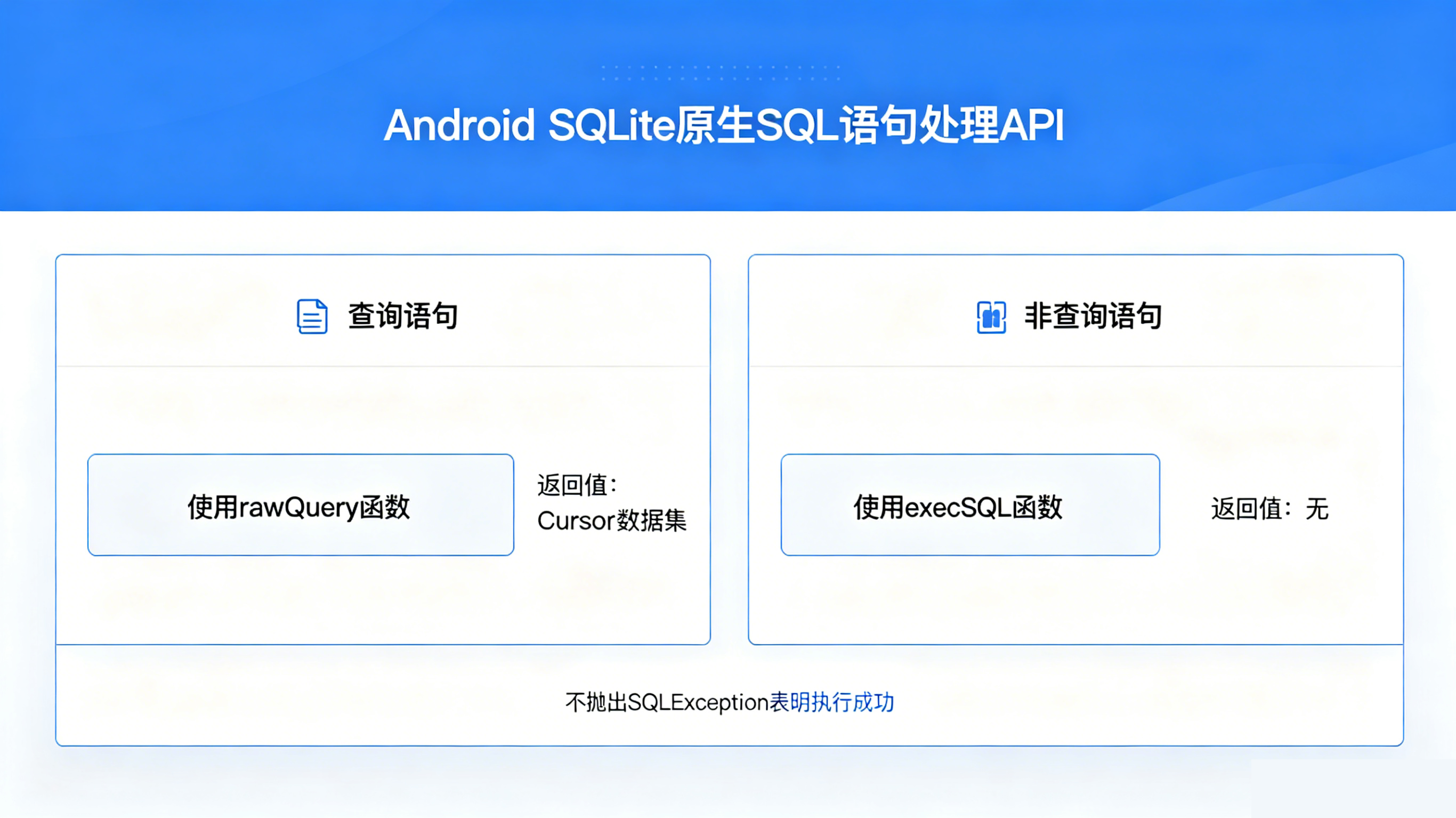
使用原生的SQL语句相比于Andorid 封装的API,能拥有完全的控制权、能够处理更加复杂的查询等优势。处理原生SQL语句的API,分两部分
- 所有查询语句使用rawQuery,该函数返回Cursor数据集
- 所有非查询语句使用execSQL,该函数不返回任何值,不抛出SQLException表明执行成功
事务是一组连续执行操作数据库的SQL语句,要么全部执行成功,要么全部失败回滚,确保数据的一致性和完整性。当有其中一条错误,所有数据都被取消;只有所有数据执行成功,才能成功。它的api有三个:
- beginTransaction开始事务
- setTransactionSuccessful设置事务执行成功
- endTransaction结束事务,
开始事务与结束事务必须为一对,否则数据库表被锁定。执行事务过程中,若不执行setTransactionSuccessful,则结束事务则任务执行失败,事务被回滚。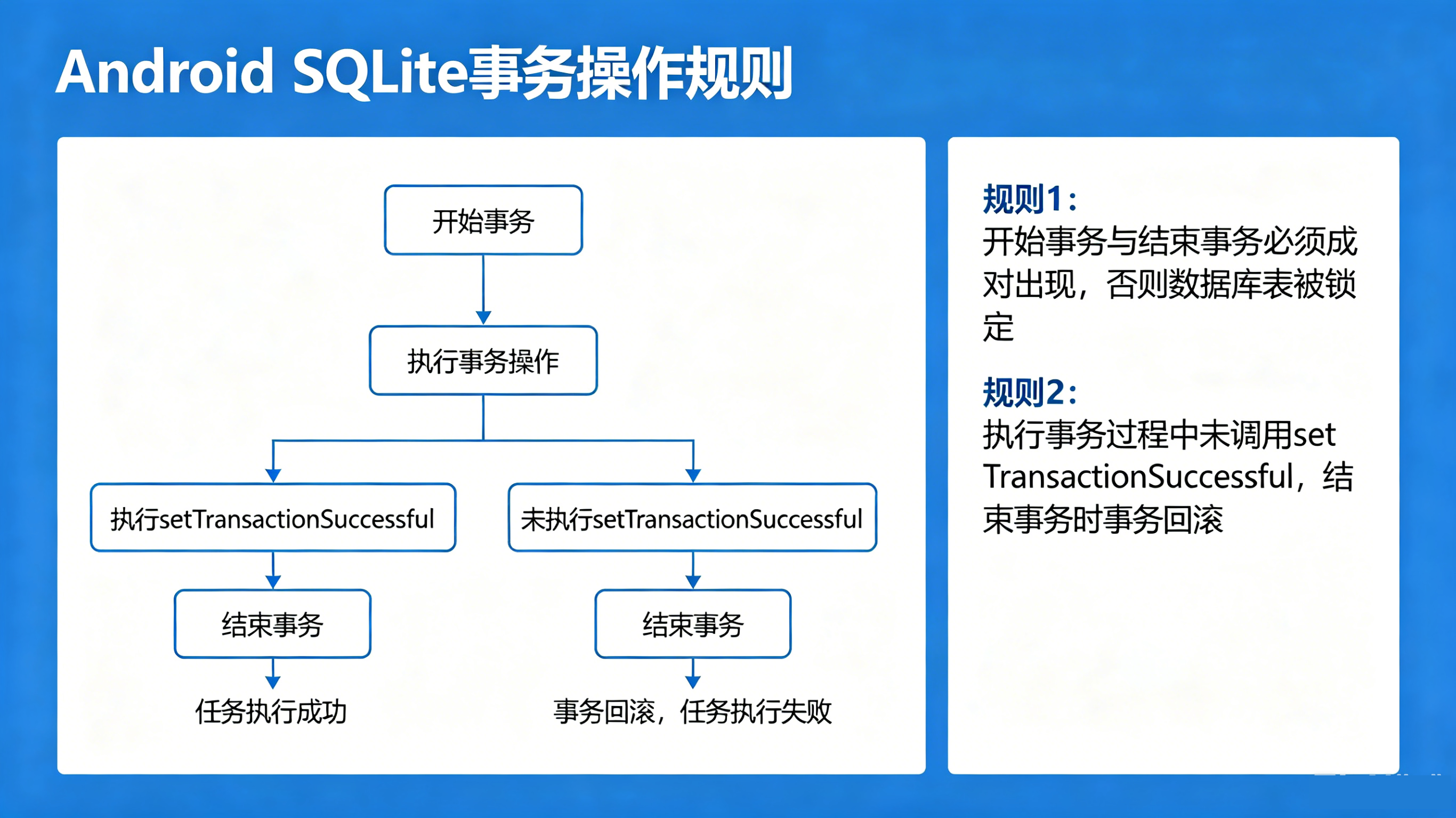
嘟宝是远程监控app,它负责在后台通过MQTT协议与服务器建立长久连接。监听嘟妈发来消息信令,将摄像头麦克风音视频发给嘟妈。目前已经完成的功能包括: - 开机自启,启动前台服务
- 全局Context
- Gson
- 前台服务建立MQTT唯一身份连接
- MQTT消息发布、订阅、医嘱
- 用二维码显示唯一身份识别码
- 发送消息通知栏
- SQLite数据库基础操作
嘟妈若想通过信令,查看嘟宝音视频,则必须先完成绑定,健全身份信息。嘟妈扫描二维码获取嘟宝身份识别码,通过MQTT发送绑定信息,嘟宝收到绑定信息,发送消息通知栏,引导用户确认,用户点击确认,将嘟妈信息存入SQLite数据库中。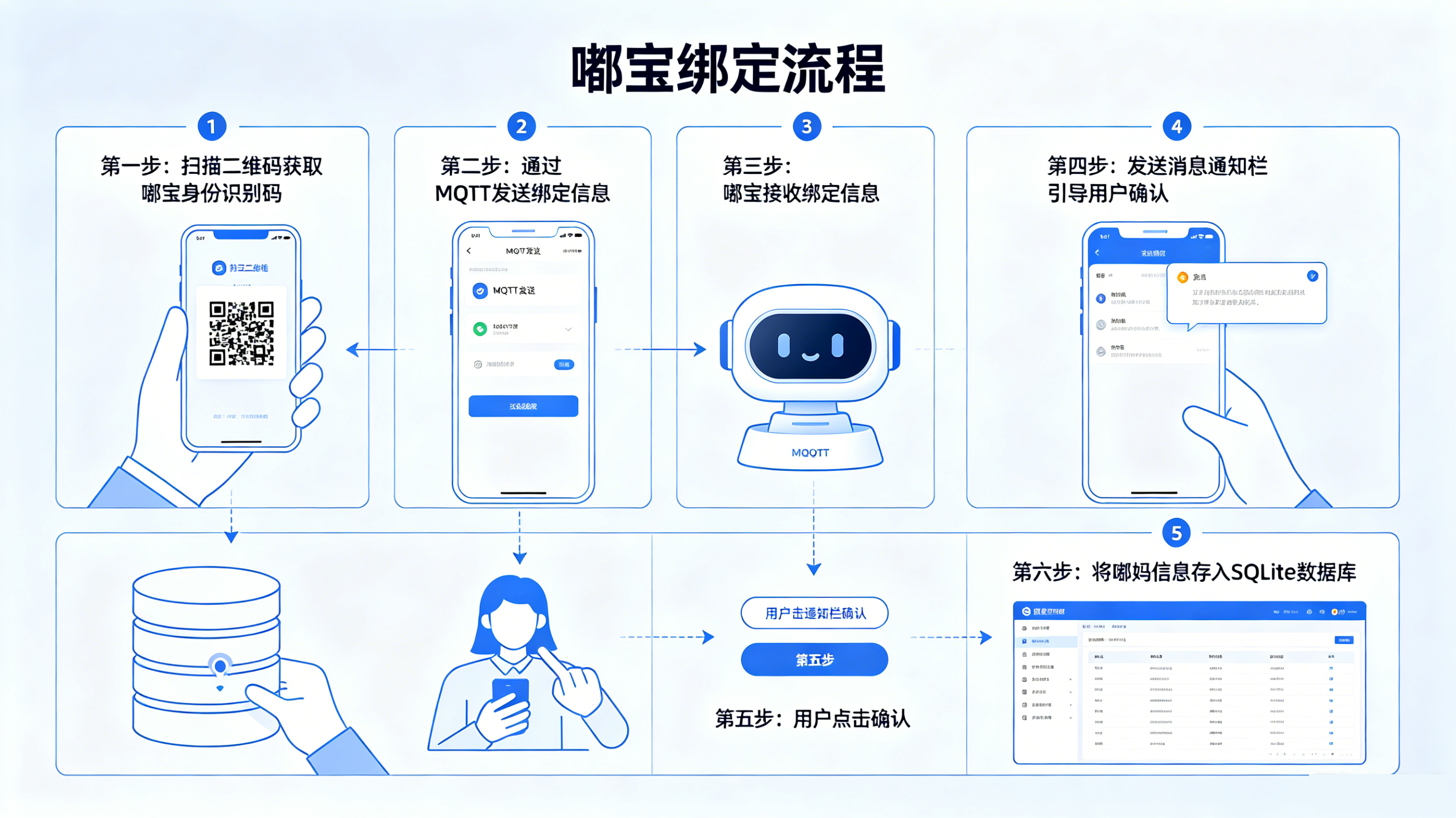
完成嘟宝绑定需求
- 前台服务创建mqtt实例对象,初始化mqtt连接
- mqtt订阅主题,监听消息,收到消息发送消息到任务栏
- 点击任务栏消息,跳转绑定页面
- MainActivity首页面显示嘟宝二维码
- 使用MQTT测试工具模拟嘟妈发送信令
MainActivity源码
package com.zilong.dubao;
import androidx.appcompat.app.AppCompatActivity;
import android.widget.ImageView;

public class MainActivity extends AppCompatActivity {

    @Override
    protected void onCreate(Bundle savedInstanceState) {
        super.onCreate(savedInstanceState);
        setContentView(R.layout.activity_main);
        initBtn();
        startService();
        ImageView qrCodeImageView = findViewById(R.id.qrCode);
        uuid u=new uuid();
        String dubaoId=u.getuuid();
        Bitmap logoBitmap = BitmapFactory.decodeResource(getResources(), R.drawable.logo);
        int foreground = Color.parseColor("#2196F3"); // 前景蓝
        int background = Color.WHITE; // 背景白
        Bitmap qrBitmap = QRCodeUtil.ShowQRCode(
                dubaoId, logoBitmap, 0.2f, foreground, background);
        qrCodeImageView.setImageBitmap(qrBitmap);
    }

    private void startService(){
        Intent i = new Intent(this, MyService.class);
        startForegroundService(i);
    }
}
MyService源码
package com.zilong.dubao;
import android.app.Notification;
import android.app.NotificationChannel;
import android.app.NotificationManager;
import android.app.PendingIntent;
import android.app.Service;
import android.content.Intent;
import android.os.IBinder;

import androidx.core.app.NotificationCompat;

public class MyService extends Service {
    public static MyMqttClient myMqttClient;
    public static String dubaoId;
    public MyService() {
    }


    @Override
    public void onCreate() {
        super.onCreate();
        createNotificationChannel();
        uuid u=new uuid();
        dubaoId= u.getuuid();
        myMqttClient=new MyMqttClient(dubaoId);
        myMqttClient.connect();

    }

    @Override
    public int onStartCommand(Intent intent, int flags, int startId) {
        return super.onStartCommand(intent, flags, startId);

    }

    @Override
    public void onDestroy() {

        myMqttClient.colse();
        super.onDestroy();
    }

    @Override
    public IBinder onBind(Intent intent) {
        // TODO: Return the communication channel to the service.
        throw new UnsupportedOperationException("Not yet implemented");
    }


    private void createNotificationChannel() {
        NotificationChannel channel = new NotificationChannel(
                "DUBAO",
                "嘟宝安心守护",
                NotificationManager.IMPORTANCE_LOW
        );
        NotificationManager manager = getSystemService(NotificationManager.class);
        manager.createNotificationChannel(channel);

        Intent intent = new Intent(this, MainActivity.class);
        PendingIntent pendingIntent = PendingIntent.getActivity(
                this, 0, intent,
                PendingIntent.FLAG_UPDATE_CURRENT | PendingIntent.FLAG_IMMUTABLE
        );

        Notification notification= new NotificationCompat.Builder(this, "DUBAO")
                .setContentTitle("嘟宝")
                .setContentText("嘟宝安心守护孩子安全...")
                .setSmallIcon(android.R.drawable.ic_menu_info_details)
                .setContentIntent(pendingIntent)
                .setOngoing(true)  // 不可滑动删除
                .build();
        startForeground(10001, notification);
    }
}
MyMqttClient源码
package com.zilong.dubao;

import android.content.Context;
import android.content.Intent;
import android.os.Handler;
import android.os.HandlerThread;
import android.util.Log;

import com.google.gson.Gson;

import org.eclipse.paho.client.mqttv3.IMqttDeliveryToken;
import org.eclipse.paho.client.mqttv3.MqttCallbackExtended;
import org.eclipse.paho.client.mqttv3.MqttClient;
import org.eclipse.paho.client.mqttv3.MqttConnectOptions;
import org.eclipse.paho.client.mqttv3.MqttException;
import org.eclipse.paho.client.mqttv3.MqttMessage;
import org.eclipse.paho.client.mqttv3.persist.MemoryPersistence;

import java.nio.charset.StandardCharsets;

public class MyMqttClient {
    private Handler mWorkHandler;
    private MqttClient client;
    private MqttConnectOptions connOpts;
    private String uuid;
    static public class Msg{
        Msg(String code,String dumaName,String dumaId,String dubaoId){
            this.code=code;
            this.dumaName=dumaName;
            this.dumaId=dumaId;
            this.dubaoId=dubaoId;
        }
        String code;
        String dumaName;
        String dumaId;
        String dubaoId;
    }

    private void HandleMsg(String json){
//        String json="{\"code\":\"bind\",\"dumaName\":\"嘟妈\",\"dumaId\":\"f1122aeb-f2b0-400d-9919-eddd2eaebaa2\",\"dubaoId\":\"cfb20ccc-8c53-4434-85bb-a171c3ca7c0c\"}";
        Gson gson = new Gson();
        Msg msg = gson.fromJson(json, Msg.class);
        if (msg.dubaoId.equals(uuid)){
            Intent intent = new Intent(app.getContext(), MessageActivity.class);
            intent.putExtra("dumaName",msg.dumaName);
            intent.putExtra("dumaId",msg.dumaId);
            intent.setFlags(Intent.FLAG_ACTIVITY_NEW_TASK | Intent.FLAG_ACTIVITY_CLEAR_TOP);
            NotificationMsg notificationMsg=new NotificationMsg();
            notificationMsg.sendNotification(msg.dumaName+"请求绑定",msg.dumaId,intent);

        }

    }


    MyMqttClient(String uuid){
        HandlerThread handlerThread = new HandlerThread("worker");
        handlerThread.start();
        mWorkHandler = new Handler(handlerThread.getLooper());
        this.uuid=uuid;
        Log.d("mqtt",uuid);
    }

    public void connect() {
        mWorkHandler.post(()->{
            _connect();

        });

    }
    private MqttCallbackExtended callbackExtendedallback =new MqttCallbackExtended() {
        @Override
        public void connectComplete(boolean reconnect, String serverURI) {
            Log.d("mqtt","connectComplete");
            try {
                client.subscribe("/dubao/"+uuid);
            } catch (MqttException e) {
                e.printStackTrace();
            }


        }

        @Override
        public void connectionLost(Throwable cause) {
            Log.d("mqtt","connectionLost");

        }

        @Override
        public void messageArrived(String topic, MqttMessage message) throws Exception {
            String s=new String(message.getPayload());
            HandleMsg(s);
        }

        @Override
        public void deliveryComplete(IMqttDeliveryToken token) {

        }
    };

    protected void _connect(){
        try {
            String url= "tcp://"+MyConfig.mqttip+":"+MyConfig.mqttport;
            String dubaoID=uuid;
            client=new MqttClient(url, "dubao_server"+dubaoID, new MemoryPersistence());
            connOpts=new MqttConnectOptions();
            connOpts.setCleanSession(true);// 重连接是否清理会话
            connOpts.setConnectionTimeout(10);
            connOpts.setKeepAliveInterval(60);//心跳间隔(秒)
            connOpts.setAutomaticReconnect(true);
            String s="嘟宝异常掉线了";
            connOpts.setWill("/dubao/will",s.getBytes(StandardCharsets.UTF_8),0,false);
            client.setCallback(callbackExtendedallback);
            _connectionMQTTServer();

        } catch (MqttException e) {
            e.printStackTrace();
        }

    }

    protected  void _connectionMQTTServer(){
        while (true){
            try {
                client.connect(connOpts);
                break;
            } catch (MqttException e) {
                Log.d("mqtt","连接失败");
                e.printStackTrace();
            }
            try {
                Thread.sleep(5*1000);
                Log.d("mqtt","准备重新连接");
            } catch (InterruptedException e) {
                e.printStackTrace();
            }
        }
    }

    public void publish(String topic,String msg){
        publish(topic,msg,0,false);
    }
    public void publish(String topic,String msg,int qos,boolean retained){
        mWorkHandler.post(()->{
            try {
                MqttMessage message=new MqttMessage(msg.getBytes(StandardCharsets.UTF_8));
                message.setQos(qos);
                message.setRetained(retained);
                client.publish(topic,message);
            } catch (MqttException e) {
                e.printStackTrace();
            }

        });
    }
    public void colse(){
        mWorkHandler.post(()->{
            try {
                client.disconnect();
                client.close();
            } catch (MqttException e) {
                e.printStackTrace();
            }

        });

    }

}
NotificationMsg消息通知栏源码
package com.zilong.dubao;
import android.app.NotificationChannel;
import android.app.NotificationManager;
import android.app.PendingIntent;
import android.content.Context;
import android.content.Intent;
import androidx.core.app.NotificationCompat;
public class NotificationMsg {
    private String channelID="DUBAO";
    private String channelName="嘟宝安心守护";
    private NotificationManager manager=null;
    static int id=0;
    private void createNotificationChannel() {
        manager =(NotificationManager) app.getContext().getSystemService(Context.NOTIFICATION_SERVICE);
        NotificationChannel channel = new NotificationChannel(channelID, channelName, NotificationManager.IMPORTANCE_HIGH);
        manager.createNotificationChannel(channel);
    }
    public void sendNotification(String title,String content) {
        if (manager==null){
            createNotificationChannel();
        }
        NotificationCompat.Builder builder = new NotificationCompat.Builder(app.getContext(), channelID)
                .setSmallIcon(R.drawable.logo)
                .setContentTitle(title)
                .setContentText(content);
        manager.notify(id, builder.build());
        id++;
    }
    public void sendNotification(String title, String content, Intent intent) {
        if (manager==null){
            createNotificationChannel();
        }
        PendingIntent pendingIntent = PendingIntent.getActivity(app.getContext(), id, intent, PendingIntent.FLAG_IMMUTABLE);

        NotificationCompat.Builder builder = new NotificationCompat.Builder(app.getContext(), channelID)
                .setSmallIcon(R.drawable.logo)
                .setContentIntent(pendingIntent)
                .setContentTitle(title)
                .setContentText(content).setPriority(NotificationCompat.PRIORITY_MAX);
        manager.notify(id, builder.build());
        id++;
    }
}
uuid类源码
package com.zilong.dubao;

import static android.content.Context.MODE_PRIVATE;
import android.content.Context;
import android.content.SharedPreferences;
import java.util.UUID;

public class uuid {
    private String createUUID(){
        String s="";
        s=UUID.randomUUID().toString();
        return s;
    }
    public String getuuid(){
        Context context=app.getContext();
        SharedPreferences  preferences=context.getSharedPreferences("uuid",MODE_PRIVATE);
        String uuid= preferences.getString("id","");
        if (uuid.equals("")){
            uuid=createUUID();
            SharedPreferences.Editor editor=context.getSharedPreferences("uuid",MODE_PRIVATE).edit();
            editor.putString("id",uuid);
            editor.apply();
            return uuid;
        }
        return uuid;
    }
}
MessageActivity页面源码
package com.zilong.dubao;

import androidx.appcompat.app.AppCompatActivity;

import android.annotation.SuppressLint;
import android.app.AlertDialog;
import android.content.DialogInterface;
import android.database.Cursor;
import android.database.sqlite.SQLiteDatabase;
import android.os.Bundle;
import android.util.Log;
import android.view.View;
import android.widget.Button;
import android.widget.TextView;
import android.widget.Toast;

import com.google.gson.Gson;

public class MessageActivity extends AppCompatActivity {
    String dumaName;
    String dumaId;
    @Override
    protected void onCreate(Bundle savedInstanceState) {
        super.onCreate(savedInstanceState);
        setContentView(R.layout.activity_message);
        dumaName=getIntent().getStringExtra("dumaName");
        dumaId=getIntent().getStringExtra("dumaId");
        ((TextView)findViewById(R.id.name)).setText(dumaName);
        ((TextView)findViewById(R.id.dumaId)).setText(dumaId);
        initbtn();
    }
    private void initbtn(){
        Button agree=findViewById(R.id.agree);
        Button refuse=findViewById(R.id.refuse);
        agree.setOnClickListener(new View.OnClickListener() {
            @Override
            public void onClick(View v) {
                showdlg();

            }
        });
        refuse.setOnClickListener(new View.OnClickListener() {
            @Override
            public void onClick(View v) {

            }
        });
    }
    private void showdlg(){
        new AlertDialog.Builder(this)
                .setTitle("重要提示")          // 标题
                .setMessage("确定要执行此操作吗?")  // 消息内容
                .setIcon(R.drawable.logo)  // 图标(可选)
                .setPositiveButton("确定", new DialogInterface.OnClickListener() {
                    @Override
                    public void onClick(DialogInterface dialog, int which) {
                        bindDuMa();
                    }
                })
                .setNegativeButton("取消", new DialogInterface.OnClickListener() {
                    @Override
                    public void onClick(DialogInterface dialog, int which) {

                    }
                })
                .show();
    }
    private void bindDuMa(){
        MyDB myDB=new MyDB("dubao.db",null,12);

        SQLiteDatabase db =myDB.getWritableDatabase();
        Cursor cursor = db.rawQuery("SELECT * FROM duma where dumaId=?",new String[]{dumaId});
        if (cursor!=null&&cursor.moveToFirst()){
            do{
                // 已经绑定

                MyMqttClient.Msg msg=new MyMqttClient.Msg("binded",dumaName,dumaId,MyService.dubaoId);
                Gson gson = new Gson();
                String json = gson.toJson(msg);
                MyService.myMqttClient.publish("/duma/"+dumaId,json);
                cursor.close();
                db.close();
                return;
            }while (cursor.moveToNext());
        }

        String sql="";
        sql=String.format("INSERT INTO duma( \"dumaName\", \"dumaId\", \"bindDateTime\") VALUES ( '%s', '%s', '%d');",dumaName,dumaId ,System.currentTimeMillis());
        myDB.execSQL(sql);
        MyMqttClient.Msg msg=new MyMqttClient.Msg("bindok",dumaName,dumaId,MyService.dubaoId);
        Gson gson = new Gson();
        String json = gson.toJson(msg);
        MyService.myMqttClient.publish("/duma/"+dumaId,json);

    }
}
MyDB类源码
package com.zilong.dubao;

import android.database.Cursor;
import android.database.SQLException;
import android.database.sqlite.SQLiteDatabase;
import android.database.sqlite.SQLiteOpenHelper;
import android.widget.Toast;

public class MyDB extends SQLiteOpenHelper {
    public MyDB( String name, SQLiteDatabase.CursorFactory factory,
                int version){
        super(app.getContext(), name, factory, version);


    }
    @Override
    public void onCreate(SQLiteDatabase db) {
        Toast.makeText(app.getContext(),"数据库与表创建成功",Toast.LENGTH_SHORT).show();
        String dumaTabel="CREATE TABLE duma (id INTEGER NOT NULL PRIMARY KEY AUTOINCREMENT, dumaName text,dumaId text,bindDateTime INTEGER)";
        db.execSQL(dumaTabel);
    }

    @Override
    public void onUpgrade(SQLiteDatabase db, int oldVersion, int newVersion) {

    }

    public boolean execSQL(String sql){
        try {
            SQLiteDatabase db =getWritableDatabase();
            db.execSQL(sql);
            db.close();
        }catch (SQLException e){
            e.printStackTrace();

        }
        return  false;

    }
}
运行效果
- 模拟嘟妈扫描二维码发送绑定信息,点击MQTT工具,发送绑定信息。
- 嘟妈收到绑定消息,发送消息通知栏
- 用户点击消息通知栏,需手动确认绑定
- 确定绑定,数据存储SQLite,同时发送嘟妈以完成绑定信息

openEuler 是由开放原子开源基金会孵化的全场景开源操作系统项目,面向数字基础设施四大核心场景(服务器、云计算、边缘计算、嵌入式),全面支持 ARM、x86、RISC-V、loongArch、PowerPC、SW-64 等多样性计算架构
更多推荐


 0
0 0
0- 0


 已为社区贡献2条内容

所有评论(0)