基于 Netty 搭建高性能 WebSocket 服务器
·
基于 Netty 搭建高性能 WebSocket 服务器
本项目基于 Netty 搭建高性能 WebSocket 服务器,结合 Spring Boot 与 Thymeleaf 模板引擎,构建一个简洁的网页版实时聊天室。通过本文档,你可以快速了解项目结构、核心组件实现以及启动方式。
1. 项目概述
项目名称:Netty-Chat-SpringBoot
项目描述:基于 Netty 的 WebSocket 网页版聊天室
技术栈:
- Spring Boot:提供后端依赖注入、Web 层支持以及整体项目骨架
- Netty:构建高性能、事件驱动的 WebSocket 服务器
- Thymeleaf:服务端模板引擎,渲染聊天页面
- WebSocket:实现浏览器与服务器之间的全双工实时通信
选择 Netty 而非 Tomcat 自带的 WebSocket 实现,是因为 Netty 在高并发连接、内存管理以及协议扩展上表现更优,非常适合实时通信场景。
2. 项目结构
src/
├── main/
│   ├── java/com/weh/
│   │   ├── NettyChatSpringBootApplication.java    # 启动类
│   │   ├── controller/
│   │   │   └── ChatController.java               # 控制器(处理HTTP请求,返回页面)
│   │   ├── netty/
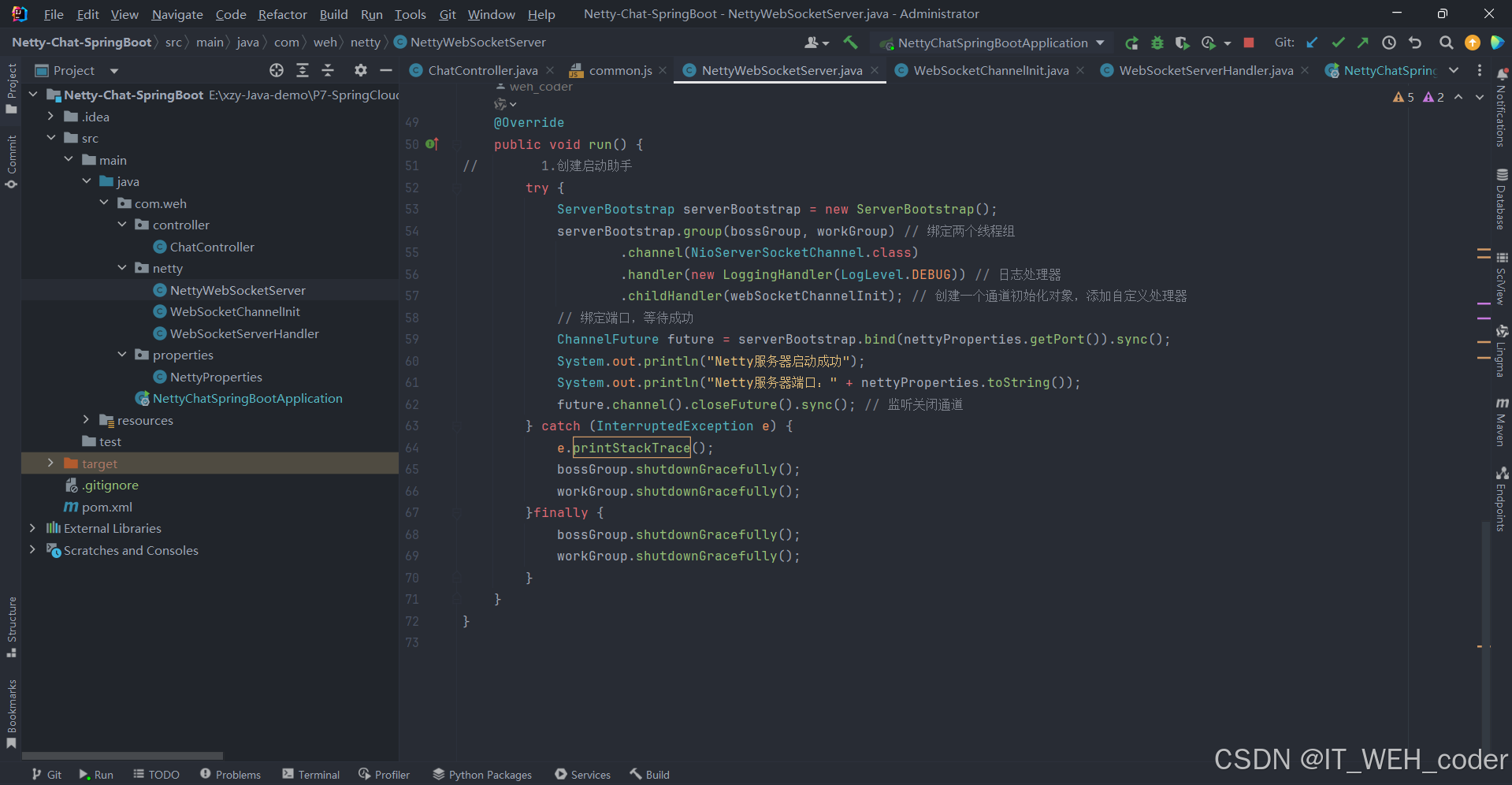
│   │   │   ├── NettyWebSocketServer.java        # Netty WebSocket 服务器
│   │   │   ├── WebSocketChannelInit.java        # 通道初始化器(配置pipeline)
│   │   │   └── WebSocketServerHandler.java      # 消息处理器(收发消息、连接事件)
│   │   └── properties/
│   │       └── NettyProperties.java             # Netty 配置属性类
│   └── resources/
│       ├── application.yml                      # 主配置文件
│       ├── static/                              # 静态资源(CSS/JS/图片)
│       └── templates/                           # Thymeleaf 模板(聊天页面)
整个项目遵循 Spring Boot 的标准分包,netty 包下集中管理 WebSocket 服务器相关逻辑,properties 包负责将 YAML 配置映射为 Java 对象。
3. 核心功能与实现
依赖:
<dependencies>
        <dependency>
            <groupId>org.springframework.boot</groupId>
            <artifactId>spring-boot-starter-web</artifactId>
        </dependency>
        <!--整合模板引擎 -->
        <dependency>
            <groupId>org.springframework.boot</groupId>
            <artifactId>spring-boot-starter-thymeleaf</artifactId>
        </dependency>
        <dependency>
            <groupId>org.projectlombok</groupId>
            <artifactId>lombok</artifactId>
        </dependency>
        <dependency>
            <groupId>io.netty</groupId>
            <artifactId>netty-all</artifactId>
            <version>4.1.68.Final</version>
        </dependency>
    </dependencies>
3.1 配置文件 application.yml
server:
  port: 8080

netty:
  port: 8081
  path: /chat

resources:
  static-locations:
    - classpath:/static/

spring:
  thymeleaf:
    cache: false
    check-template-location: true
    enabled: true
    encoding: UTF-8
    mode: HTML5
    prefix: classpath:/templates/
    suffix: .html
server.port:Spring Boot 内嵌 Tomcat 的端口,用于访问 Thymeleaf 页面。netty.port/netty.path:Netty WebSocket 服务器监听的端口和路径,客户端通过ws://localhost:8081/chat连接。spring.thymeleaf:开启 Thymeleaf 并关闭缓存,方便开发调试。
3.2 主要组件说明
| 组件 | 说明 |
|---|---|
NettyWebSocketServer | 实现 Runnable,在独立线程中启动 Netty 服务,监听配置的端口 |
WebSocketChannelInit | 继承 ChannelInitializer,向 ChannelPipeline 中添加 HTTP 编解码器、WebSocket 协议处理器及自定义业务 handler |
WebSocketServerHandler | 核心业务处理器,重写 channelRead 接收消息,重写 handlerAdded / handlerRemoved 管理连接 |
NettyProperties | 使用 @ConfigurationProperties(prefix = "netty") 将 port 与 path 注入 Spring 容器 |
配置属性类示例
@Data
@Component
@ConfigurationProperties(prefix = "netty")
public class NettyProperties {
    private int port;
    private String path;
}
通道初始化器
public class WebSocketChannelInit extends ChannelInitializer<SocketChannel> {
		@Autowired
	  private NettyProperties nettyProperties;
	  	@Autowired
	  private WebSocketServerHandler webSocketServerHandler;
    @Override
    protected void initChannel(SocketChannel ch) {
        ChannelPipeline pipeline = ch.pipeline();
        // HTTP 编解码器
        pipeline.addLast(new HttpServerCodec());
         // 支持大数据流
        pipeline.addLast(new ChunkedWriteHandler()); // 块写处理器, 用于大数据的分区传输
        // 聚合 HTTP 消息为 FullHttpRequest
        pipeline.addLast(new HttpObjectAggregator(65536));
        // WebSocket 协议处理器
        pipeline.addLast(new WebSocketServerProtocolHandler(nettyProperties.path));
        // 自定义业务处理器
        pipeline.addLast(webSocketServerHandler);
    }
}
消息处理器
WebSocketServerHandler 继承 SimpleChannelInboundHandler<TextWebSocketFrame>,简化文本消息处理:
@Component
@ChannelHandler.Sharable // 设置通道共享
public class WebSocketServerHandler extends SimpleChannelInboundHandler<TextWebSocketFrame> {

    // 保存所有已连接的通道
    private static final ChannelGroup channels = new DefaultChannelGroup(GlobalEventExecutor.INSTANCE);

    @Override
    public void handlerAdded(ChannelHandlerContext ctx) {
        channels.add(ctx.channel());
        // 广播新用户加入
    }

    @Override
    protected void channelRead0(ChannelHandlerContext ctx, TextWebSocketFrame msg) {
    	String msg = textWebSocketFrame.text();
        System.out.println("收到的消息:"+msg);

        Channel currentChannel = ctx.channel();
        // 读取客户端消息并广播给所有通道,除了自己
        channels.forEach(channel -> {
            if (channel != currentChannel) {
                channel.writeAndFlush(new TextWebSocketFrame(msg));
            }
        });
    }

    @Override
    public void handlerRemoved(ChannelHandlerContext ctx) {
        channels.remove(ctx.channel());
        // 广播用户离开
    }

    // 异常处理
    @Override
    public void exceptionCaught(ChannelHandlerContext ctx, Throwable cause) throws Exception {
        cause.printStackTrace();
        channels.remove(ctx.channel());
    }
}
通过 ChannelGroup 统一管理所有连接,实现消息广播,构建公共聊天室。
Netty WebSocket 服务器
package com.weh.netty;

import com.weh.properties.NettyProperties;
import io.netty.bootstrap.ServerBootstrap;
import io.netty.channel.ChannelFuture;
import io.netty.channel.EventLoopGroup;
import io.netty.channel.nio.NioEventLoopGroup;
import io.netty.channel.socket.nio.NioServerSocketChannel;
import io.netty.handler.logging.LogLevel;
import io.netty.handler.logging.LoggingHandler;
import org.springframework.beans.factory.annotation.Autowired;
import org.springframework.stereotype.Component;

import javax.annotation.PreDestroy;

/**
 * @author weh
 * @version 1.0
 * @description: netty服务器
 * @date 2026/5/16 20:06
 */
@Component
public class NettyWebSocketServer implements Runnable{

    @Autowired
    private NettyProperties nettyProperties;
    @Autowired
    private WebSocketChannelInit webSocketChannelInit;
    private EventLoopGroup bossGroup = new NioEventLoopGroup(1);
    private EventLoopGroup workGroup = new NioEventLoopGroup();

    @PreDestroy
    private void close() {
        bossGroup.shutdownGracefully();
        workGroup.shutdownGracefully();
    }

    @Override
    public void run() {
        try {
        		//创建启动助手
            ServerBootstrap serverBootstrap = new ServerBootstrap();
            serverBootstrap.group(bossGroup, workGroup) // 绑定两个线程组
                    .channel(NioServerSocketChannel.class)
                    .handler(new LoggingHandler(LogLevel.DEBUG)) // 日志处理器
                    .childHandler(webSocketChannelInit); // 创建一个通道初始化对象,添加自定义处理器
            // 绑定端口,等待成功
            ChannelFuture future = serverBootstrap.bind(nettyProperties.getPort()).sync();
            System.out.println("Netty服务器启动成功");
            System.out.println("Netty服务器端口:" + nettyProperties.toString());
            future.channel().closeFuture().sync(); // 监听关闭通道
        } catch (InterruptedException e) {
            e.printStackTrace();
            bossGroup.shutdownGracefully();
            workGroup.shutdownGracefully();
        }finally {
            bossGroup.shutdownGracefully();
            workGroup.shutdownGracefully();
        }
    }
}
4. 启动流程与说明
4.1 启动类设计
@SpringBootApplication
public class NettyChatSpringBootApplication implements CommandLineRunner {

    @Autowired
    private NettyWebSocketServer nettyWebSocketServer;

    public static void main(String[] args) {
        SpringApplication.run(NettyChatSpringBootApplication.class, args);
    }

    @Override
    public void run(String... args){
        // 在新线程中启动 Netty WebSocket 服务器
        new Thread(nettyWebSocketServer).start();
    }
}
- 实现
CommandLineRunner接口,在 Spring Boot 启动完成后执行run方法。 - 将
NettyWebSocketServer放入新线程启动,避免阻塞主线程。 - WebSocket 连接地址:
ws://localhost:8081/chat - 聊天页面通过 HTTP 访问:
http://localhost:8080
4.2 使用方式
- 克隆项目后,运行
NettyChatSpringBootApplication主类。 - 打开浏览器,访问
http://localhost:8080,进入聊天页面。 - 页面中的 JavaScript 会建立 WebSocket 连接到
ws://localhost:8081/chat。 - 多个浏览器窗口或不同设备连接后即可实时群聊。
5. 后续扩展方向
本项目搭建了最基本的一对多群聊框架,你可以基于此快速实现更多功能:
- 私聊:为通道绑定用户标识,根据目标用户定向发送消息。
- 心跳检测:通过
IdleStateHandler检测空闲连接并主动关闭。 - 消息持久化:集成数据库(如 MySQL、MongoDB)保存历史消息。
- 安全认证:在 WebSocket 握手阶段通过 token 校验用户身份。
- 界面优化:丰富聊天界面,添加表情、图片等富文本消息支持。
结语
Netty-Chat-SpringBoot 是一个学习 Netty 与 WebSocket 协议的实战入门项目,它展示了如何将 Netty 无缝集成到 Spring Boot 生态中,并快速构建一个实时聊天应用。

openEuler 是由开放原子开源基金会孵化的全场景开源操作系统项目,面向数字基础设施四大核心场景(服务器、云计算、边缘计算、嵌入式),全面支持 ARM、x86、RISC-V、loongArch、PowerPC、SW-64 等多样性计算架构
更多推荐

 7
7 0
0- 0


 已为社区贡献2条内容

所有评论(0)