J2EE实验
一、Thymeleaf 是什么Thymeleaf 是一种Java Web 模板引擎,主要用于在服务器端将数据渲染到 HTML 页面中。用于将后端数据动态渲染到 HTML 页面中的模板引擎,实现了页面与数据的解耦。Controller 负责数据Thymeleaf 负责把数据“填进 HTML”核心特点服务端渲染页面在服务器生成后再返回浏览器HTML友好页面本身仍然是合法HTML使用 th: 语法操作数
实验二: Thymeleaf的使用
实验过程
- 引入 Thymeleaf 模板引擎
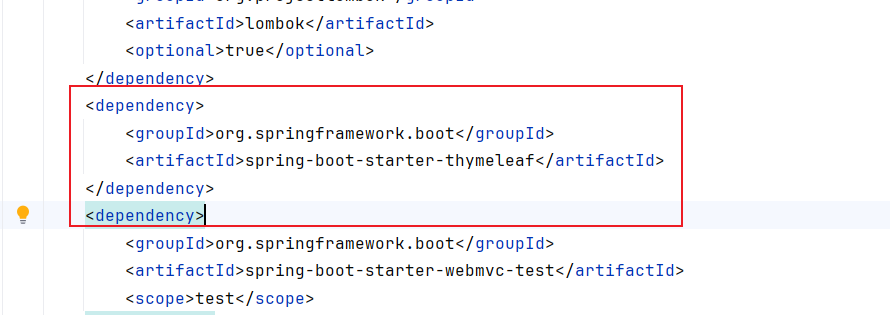
首先,在项目中引入 Thymeleaf 依赖,使 Spring Boot 支持模板渲染:
打开pom.xml文件
<dependency>
    <groupId>org.springframework.boot</groupId>
    <artifactId>spring-boot-starter-thymeleaf</artifactId>
</dependency>
- 使项目能够解析
templates目录下的 HTML 文件 - 支持
th:*语法
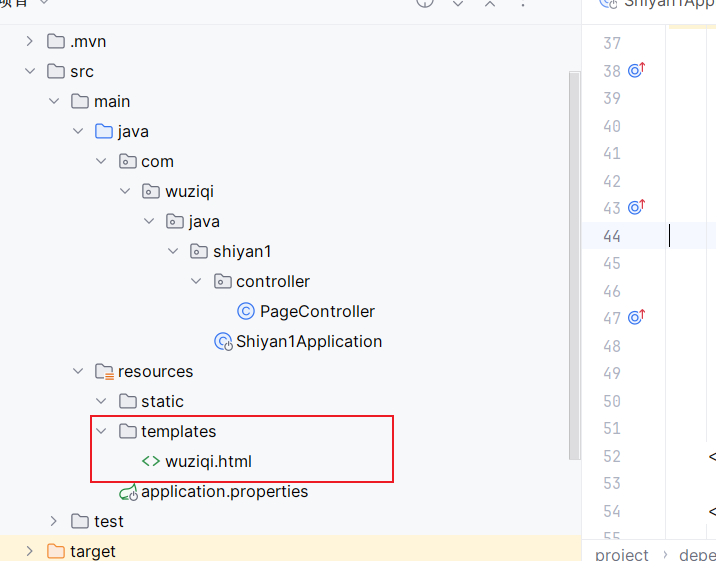
- 调整项目结构
将原有静态页面从 static 目录移动到:
src/main/resources/templates/
并将文件命名为:
wuziqi.html
static→ 纯静态页面(不会走 Thymeleaf)templates→ 模板页面(由 Thymeleaf解析)
- 编写 Controller(核心步骤)
创建控制器 PageController,用于:
- 初始化棋盘
- 接收用户点击坐标
- 更新棋盘状态
- 判断胜负
- 向前端传递数据
完整代码文件:
package com.wuziqi.java.shiyan1.controller;

import org.springframework.stereotype.Controller;
import org.springframework.ui.Model;
import org.springframework.web.bind.annotation.GetMapping;
import org.springframework.web.bind.annotation.RequestParam;

import java.util.ArrayList;
import java.util.List;

@Controller
public class PageController {

    private final List<List<Integer>> board = new ArrayList<>();
    private int currentPlayer = 1;
    private String winner = null;

    @GetMapping("/game")
    public String gamePage(
            @RequestParam(required = false) Integer x,
            @RequestParam(required = false) Integer y,
            Model model) {

        // 初始化
        if (board.isEmpty()) {
            for (int i = 0; i < 15; i++) {
                List<Integer> row = new ArrayList<>();
                for (int j = 0; j < 15; j++) {
                    row.add(0);
                }
                board.add(row);
            }
        }

        // 落子(+胜负判断)
        if (x != null && y != null && winner == null) {
            if (board.get(x).get(y) == 0) {

                board.get(x).set(y, currentPlayer);

                // 胜负判断
                if (win(x, y)) {
                    winner = currentPlayer == 1 ? "黑棋胜利!" : "白棋胜利!";
                } else {
                    currentPlayer = 3 - currentPlayer;
                }
            }
        }

        model.addAttribute("board", board);
        model.addAttribute("currentPlayer", currentPlayer == 1 ? "黑棋" : "白棋");
        model.addAttribute("message", "欢迎你");
        model.addAttribute("winner", winner);

        return "wuziqi";
    }

    // 极简胜负判断
    private boolean win(int x, int y) {
        int p = board.get(x).get(y);
        int[][] d = {{1,0},{0,1},{1,1},{1,-1}};

        for (int[] dir : d) {
            int count = 1;

            for (int k = 1; k < 5; k++) {
                int nx = x + dir[0]*k, ny = y + dir[1]*k;
                if (nx<0||ny<0||nx>=15||ny>=15||board.get(nx).get(ny)!=p) break;
                count++;
            }

            for (int k = 1; k < 5; k++) {
                int nx = x - dir[0]*k, ny = y - dir[1]*k;
                if (nx<0||ny<0||nx>=15||ny>=15||board.get(nx).get(ny)!=p) break;
                count++;
            }

            if (count >= 5) return true;
        }
        return false;
    }
}
核心代码逻辑
(1)初始化棋盘
if (board.isEmpty()) {
    for (int i = 0; i < 15; i++) {
        List<Integer> row = new ArrayList<>();
        for (int j = 0; j < 15; j++) {
            row.add(0);
        }
        board.add(row);
    }
}
生成 15×15 棋盘
(2)处理点击落子
if (x != null && y != null && winner == null) {
    if (board.get(x).get(y) == 0) {
        board.get(x).set(y, currentPlayer);
    }
}
根据点击坐标更新棋盘
(3)胜负判断
if (win(x, y)) {
    winner = currentPlayer == 1 ? "黑棋胜利!" : "白棋胜利!";
}
判断是否形成五子连珠
(4)切换玩家
currentPlayer = 3 - currentPlayer;
黑白轮流
(5)向页面传递数据
model.addAttribute("board", board);
model.addAttribute("currentPlayer", ...);
model.addAttribute("message", "欢迎你");
model.addAttribute("winner", winner);
供 Thymeleaf 使用
- 编写 Thymeleaf 页面
在 wuziqi.html 中使用 Thymeleaf 指令实现动态页面。
完整代码文件:
<!DOCTYPE html>
<html lang="zh" xmlns:th="http://www.thymeleaf.org">
<head>
    <meta charset="UTF-8">
    <title>五子棋</title>

    <style>
        body {
            text-align: center;
            font-family: "Microsoft YaHei";
            background: #f5e1b5;
        }

        .board {
            position: relative;
            width: 420px;
            height: 420px;
            margin: 30px auto;
            background: #deb887;
        }

        /* 横线 */
        .line-h {
            position: absolute;
            left: 0;
            width: 100%;
            height: 1px;
            background: #333;
        }

        /* 竖线 */
        .line-v {
            position: absolute;
            top: 0;
            height: 100%;
            width: 1px;
            background: #333;
        }

        /* 交叉点 */
        .point {
            position: absolute;
            width: 20px;
            height: 20px;
            transform: translate(-50%, -50%);
        }

        .point a {
            display: block;
            width: 100%;
            height: 100%;
        }

        .piece {
            width: 18px;
            height: 18px;
            border-radius: 50%;
            margin: auto;
        }

        .black {
            background: black;
        }

        .white {
            background: white;
            border: 1px solid #999;
        }
    </style>
</head>

<body>

<h1>五子棋</h1>
<h2 th:text="${message}"></h2>
<p>当前玩家:<span th:text="${currentPlayer}"></span></p>
<h2 th:if="${winner != null}"
    th:text="${winner}"
    style="color:red;"></h2>
<div class="board">

    <!-- 横线 -->
    <div th:each="i : ${#numbers.sequence(0,14)}"
         class="line-h"
         th:style="|top:${i * 30}px|"></div>

    <!-- 竖线 -->
    <div th:each="i : ${#numbers.sequence(0,14)}"
         class="line-v"
         th:style="|left:${i * 30}px|"></div>

    <!-- 所有交叉点 -->
    <div th:each="row,rowStat : ${board}">
        <div th:each="cell,colStat : ${row}"
             class="point"
             th:style="|top:${rowStat.index * 30}px; left:${colStat.index * 30}px|">

            <a th:href="@{/game(x=${rowStat.index}, y=${colStat.index})}">

                <div th:if="${cell == 1}" class="piece black"></div>
                <div th:if="${cell == 2}" class="piece white"></div>

            </a>

        </div>
    </div>

</div>

</body>
</html>
(1)显示文本信息
<h2 th:text="${message}"></h2>
<p>当前玩家:<span th:text="${currentPlayer}"></span></p>
显示后端数据
(2)胜负提示
<h2 th:if="${winner != null}" th:text="${winner}"></h2>
条件显示胜利信息
(3)生成棋盘(双层循环)
<div th:each="row,rowStat : ${board}">
    <div th:each="cell,colStat : ${row}">
根据二维数组动态生成棋盘
(4)棋子显示
<div th:if="${cell == 1}" class="black"></div>
<div th:if="${cell == 2}" class="white"></div>
判断显示黑棋或白棋
(5)点击落子(核心交互)
<a th:href="@{/game(x=${rowStat.index}, y=${colStat.index})}">
点击棋盘发送坐标到后端
(6)动态样式(定位棋盘)
th:style="|top:${rowStat.index * 30}px; left:${colStat.index * 30}px|"
计算每个交叉点位置
- 页面运行与测试
启动项目后,在浏览器访问:
http://localhost:8080/game
介绍这个实验
一、Thymeleaf 是什么
Thymeleaf 是一种 Java Web 模板引擎,主要用于在服务器端将数据渲染到 HTML 页面中。用于将后端数据动态渲染到 HTML 页面中的模板引擎,实现了页面与数据的解耦。
简单理解:
- Controller 负责数据
Thymeleaf 负责把数据“填进 HTML”
核心特点
- 服务端渲染
- 页面在服务器生成后再返回浏览器
- HTML友好
- 页面本身仍然是合法HTML
- 使用 th: 语法操作数据
- 如
th:text、th:each、th:if
- 如
二、本项目整体说明
本项目实现了一个基于 Spring Boot 的五子棋游戏,主要结构如下:
- Controller(后端逻辑)
负责:
- 初始化棋盘
- 处理落子
- 判断胜负
- 向页面传递数据
例如:
model.addAttribute("board", board);
model.addAttribute("currentPlayer", ...);
model.addAttribute("message", "欢迎你");
model.addAttribute("winner", winner);
这些数据会被 Thymeleaf 使用
- HTML(前端模板)
负责:
- 显示棋盘
- 显示棋子
- 显示当前玩家、胜负结果
但不是写死的,而是通过 Thymeleaf 动态生成
- 数据流
用户点击 → /game?x=..&y=..
→ Controller处理
→ Model传数据
→ Thymeleaf渲染HTML
→ 页面更新
三、项目中使用 Thymeleaf 的地方
- th:text(显示数据)
<h2 th:text="${message}"></h2>
<p>当前玩家:<span th:text="${currentPlayer}"></span></p>
- 把 Controller 传来的数据显示出来
举例
Controller:
model.addAttribute("message", "欢迎你");
页面:
<h2 th:text="${message}"></h2>
页面显示:欢迎你
- th:if(条件渲染)
<h2 th:if="${winner != null}" th:text="${winner}"></h2>
- 只有胜利时才显示文字
效果
| winner | 页面 |
|---|---|
| null | 不显示 |
| 黑棋胜利 | 显示 |
- th:each(循环渲染棋盘)
<div th:each="row,rowStat : ${board}">
    <div th:each="cell,colStat : ${row}">
- 遍历二维数组(棋盘)
对应后端
List<List<Integer>> board
通过循环生成 15×15 棋盘
- th:style(动态样式)
th:style="|top:${rowStat.index * 30}px; left:${colStat.index * 30}px|"
- 根据坐标计算位置
- 实现棋盘“交叉点布局”
- th:href(点击落子)
<a th:href="@{/game(x=${rowStat.index}, y=${colStat.index})}">
- 点击棋盘时发送请求
- 把坐标传给 Controller
实际效果----点击某个点:
/game?x=7&y=8
- th:if(棋子显示)
<div th:if="${cell == 1}" class="piece black"></div>
<div th:if="${cell == 2}" class="piece white"></div>
- 判断当前位置是什么棋子
- 决定显示黑棋还是白棋
总结:
本项目中使用了 Thymeleaf 模板引擎,实现了后端数据向前端页面的动态渲染。在控制器中通过 Model 传递棋盘数据、当前玩家和胜负信息,在 HTML 页面中通过 th:text、th:each、th:if、th:href 等指令实现数据展示、循环生成棋盘、条件渲染棋子以及点击交互。相比传统静态页面,Thymeleaf 能够实现页面与数据分离,提高代码的可维护性和动态性。
实验三:post使用和异步交互
先上代码
package com.wuziqi.java.shiyan1.controller;

import org.springframework.stereotype.Controller;
import org.springframework.ui.Model;
import org.springframework.web.bind.annotation.GetMapping;
import org.springframework.web.bind.annotation.PostMapping;
import org.springframework.web.bind.annotation.RequestMapping;
import org.springframework.web.bind.annotation.RequestParam;
import org.springframework.web.bind.annotation.ResponseBody;

import java.util.ArrayList;
import java.util.HashMap;
import java.util.List;
import java.util.Map;

@Controller
@RequestMapping("/game")
public class PageController {

    private final List<List<Integer>> board = new ArrayList<>();
    private int currentPlayer = 1;
    private String winner = null;

    @GetMapping
    public String gamePage(Model model) {
        initBoard();

        model.addAttribute("board", board);
        model.addAttribute("currentPlayer", currentPlayer == 1 ? "黑棋" : "白棋");
        model.addAttribute("message", "欢迎你");
        model.addAttribute("winner", winner);

        return "wuziqi";
    }

    @PostMapping("/move")
    @ResponseBody
    public Map<String, Object> move(
            @RequestParam int row,
            @RequestParam int col) {

        initBoard();

        if (winner == null) {
            if (row >= 0 && row < 15 && col >= 0 && col < 15 && board.get(row).get(col) == 0) {
                board.get(row).set(col, currentPlayer);

                if (win(row, col)) {
                    winner = currentPlayer == 1 ? "黑棋胜利!" : "白棋胜利!";
                } else {
                    currentPlayer = 3 - currentPlayer;
                }
            }
        }

        return buildGameState("欢迎你");
    }

    @PostMapping("/reset")
    @ResponseBody
    public Map<String, Object> reset() {
        board.clear();
        currentPlayer = 1;
        winner = null;
        initBoard();

        return buildGameState("游戏已重置");
    }

    private Map<String, Object> buildGameState(String message) {
        Map<String, Object> result = new HashMap<>();
        result.put("board", board);
        result.put("currentPlayer", currentPlayer == 1 ? "黑棋" : "白棋");
        result.put("message", message);
        result.put("winner", winner);
        return result;
    }

    private void initBoard() {
        if (board.isEmpty()) {
            for (int i = 0; i < 15; i++) {
                List<Integer> row = new ArrayList<>();
                for (int j = 0; j < 15; j++) {
                    row.add(0);
                }
                board.add(row);
            }
        }
    }

    private boolean win(int x, int y) {
        int p = board.get(x).get(y);
        int[][] d = {{1, 0}, {0, 1}, {1, 1}, {1, -1}};

        for (int[] dir : d) {
            int count = 1;

            for (int k = 1; k < 5; k++) {
                int nx = x + dir[0] * k;
                int ny = y + dir[1] * k;
                if (nx < 0 || ny < 0 || nx >= 15 || ny >= 15 || board.get(nx).get(ny) != p) {
                    break;
                }
                count++;
            }

            for (int k = 1; k < 5; k++) {
                int nx = x - dir[0] * k;
                int ny = y - dir[1] * k;
                if (nx < 0 || ny < 0 || nx >= 15 || ny >= 15 || board.get(nx).get(ny) != p) {
                    break;
                }
                count++;
            }

            if (count >= 5) {
                return true;
            }
        }
        return false;
    }
}
<!DOCTYPE html>
<html lang="zh" xmlns:th="http://www.thymeleaf.org">
<head>
    <meta charset="UTF-8">
    <title>五子棋</title>

    <style>
        body {
            text-align: center;
            font-family: "Microsoft YaHei";
            background: #f5e1b5;
        }

        .board {
            position: relative;
            width: 420px;
            height: 420px;
            margin: 30px auto;
            background: #deb887;
        }

        .line-h {
            position: absolute;
            left: 0;
            width: 100%;
            height: 1px;
            background: #333;
        }

        .line-v {
            position: absolute;
            top: 0;
            height: 100%;
            width: 1px;
            background: #333;
        }

        .point {
            position: absolute;
            width: 20px;
            height: 20px;
            transform: translate(-50%, -50%);
            cursor: pointer;
        }

        .piece {
            width: 18px;
            height: 18px;
            border-radius: 50%;
            margin: auto;
        }

        .black {
            background: black;
        }

        .white {
            background: white;
            border: 1px solid #999;
        }

        .btn-reset {
            padding: 8px 18px;
            font-size: 16px;
            border: none;
            background: #8b4513;
            color: white;
            border-radius: 4px;
            cursor: pointer;
            margin-top: 10px;
        }

        .btn-reset:hover {
            opacity: 0.9;
        }
    </style>
</head>

<body>

<h1>五子棋</h1>
<h2 id="message" th:text="${message}"></h2>
<p>当前玩家:<span id="currentPlayer" th:text="${currentPlayer}"></span></p>
<h2 id="winner"
    th:text="${winner}"
    style="color:red;"></h2>

<button class="btn-reset" onclick="resetGame()">重新开始</button>

<div class="board" id="board">

    <div th:each="i : ${#numbers.sequence(0,14)}"
         class="line-h"
         th:style="|top:${i * 30}px|"></div>

    <div th:each="i : ${#numbers.sequence(0,14)}"
         class="line-v"
         th:style="|left:${i * 30}px|"></div>

    <div th:each="row,rowStat : ${board}">
        <div th:each="cell,colStat : ${row}"
             class="point"
             th:attr="data-x=${rowStat.index},data-y=${colStat.index}"
             th:style="|top:${rowStat.index * 30}px; left:${colStat.index * 30}px|">

            <div th:if="${cell == 1}" class="piece black"></div>
            <div th:if="${cell == 2}" class="piece white"></div>

        </div>
    </div>

</div>

<script>
    function bindPointClick() {
        const points = document.querySelectorAll('.point');
        points.forEach(point => {
            point.onclick = async function () {
                const row = parseInt(this.dataset.x);
                const col = parseInt(this.dataset.y);

                try {
                    const response = await fetch(`/game/move?row=${row}&col=${col}`, {
                        method: 'POST'
                    });

                    const data = await response.json();
                    renderGame(data);
                } catch (e) {
                    console.error('落子请求失败:', e);
                }
            };
        });
    }

    async function resetGame() {
        try {
            const response = await fetch('/game/reset', {
                method: 'POST'
            });

            const data = await response.json();
            renderGame(data);
        } catch (e) {
            console.error('重置请求失败:', e);
        }
    }

    function renderGame(data) {
        updateBoard(data.board);
        document.getElementById('currentPlayer').innerText = data.currentPlayer;
        document.getElementById('message').innerText = data.message;
        document.getElementById('winner').innerText = data.winner ? data.winner : '';
    }

    function updateBoard(board) {
        const points = document.querySelectorAll('.point');
        points.forEach(point => {
            const x = parseInt(point.dataset.x);
            const y = parseInt(point.dataset.y);
            const cell = board[x][y];

            point.innerHTML = '';
            if (cell === 1) {
                point.innerHTML = '<div class="piece black"></div>';
            } else if (cell === 2) {
                point.innerHTML = '<div class="piece white"></div>';
            }
        });
    }

    bindPointClick();
</script>

</body>
</html>
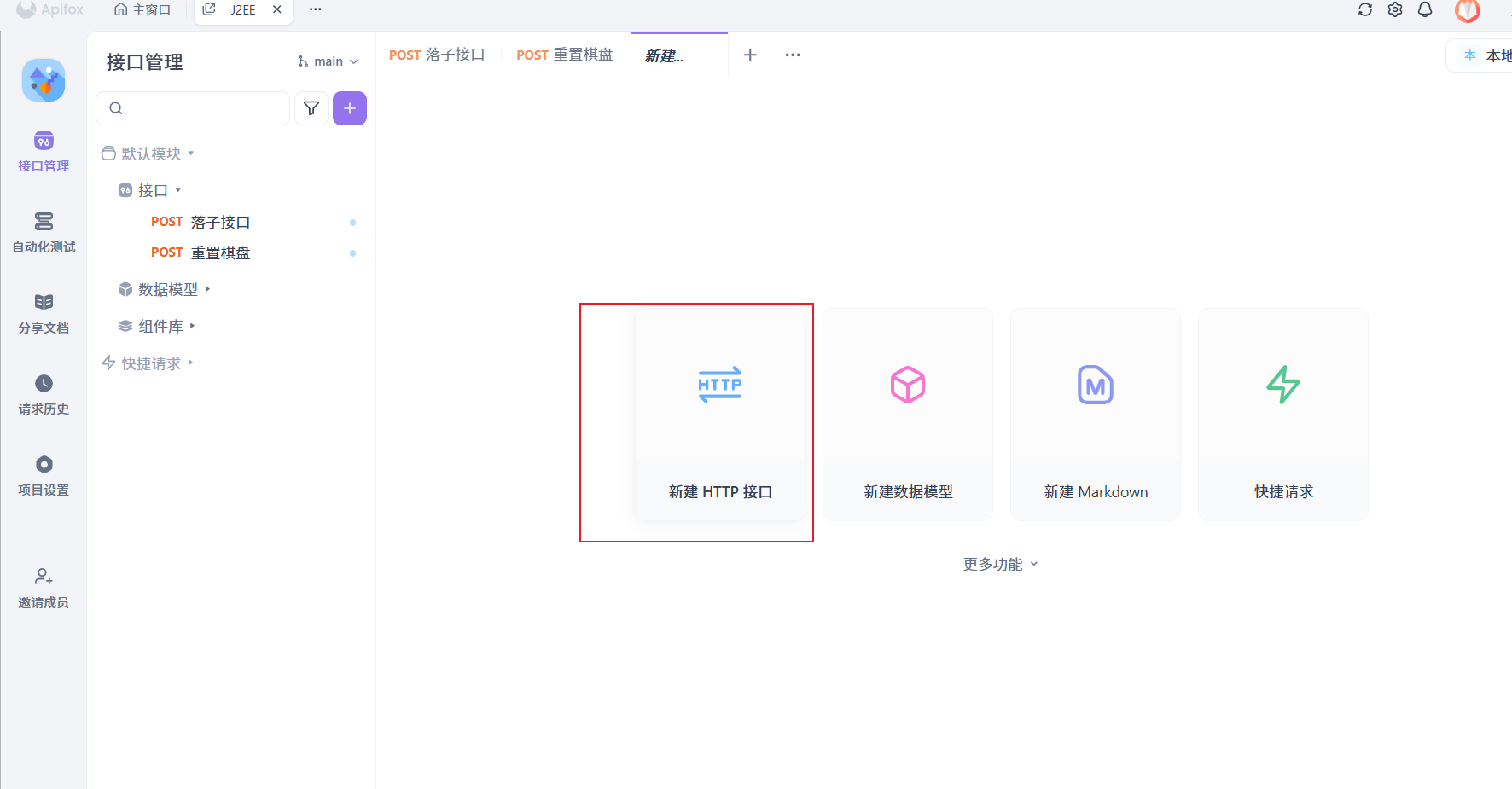
增加本地环境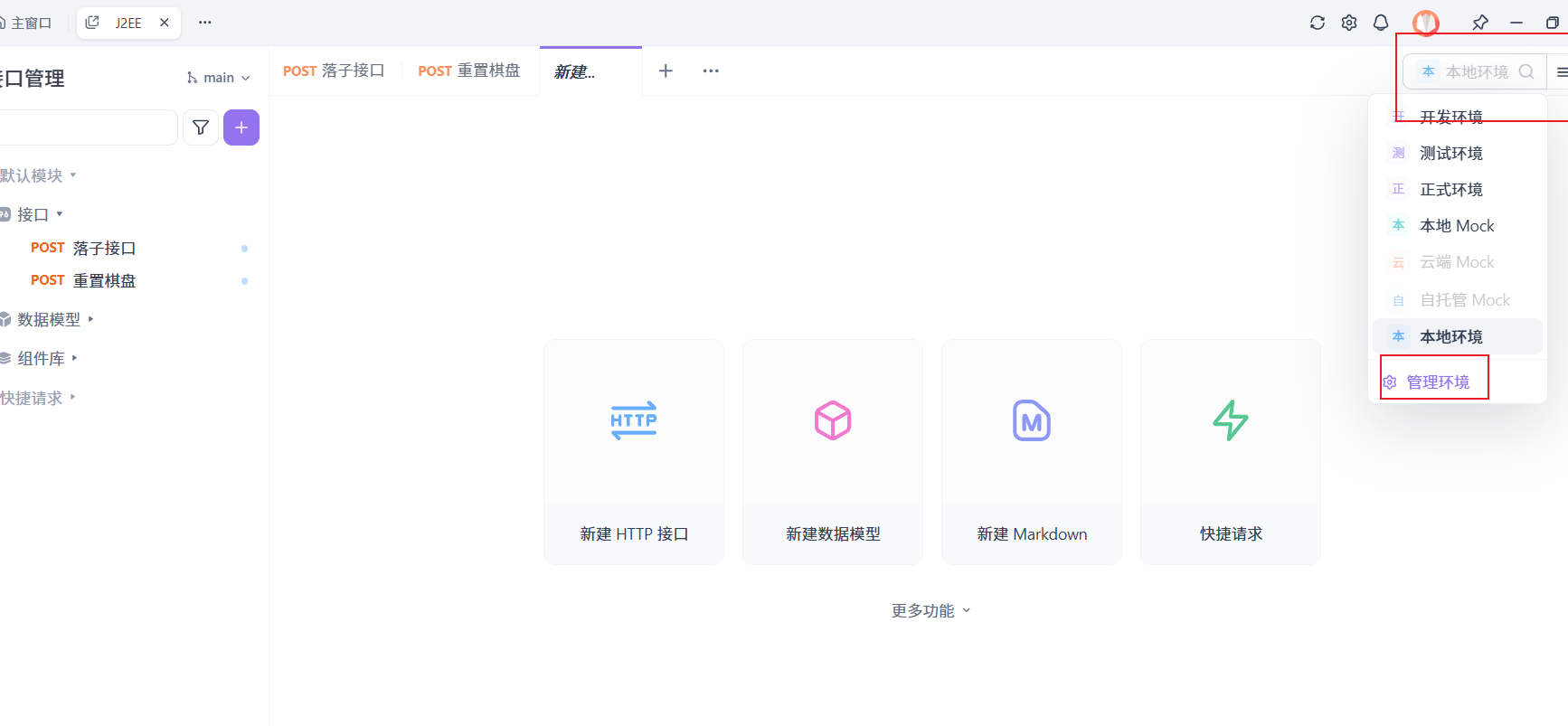
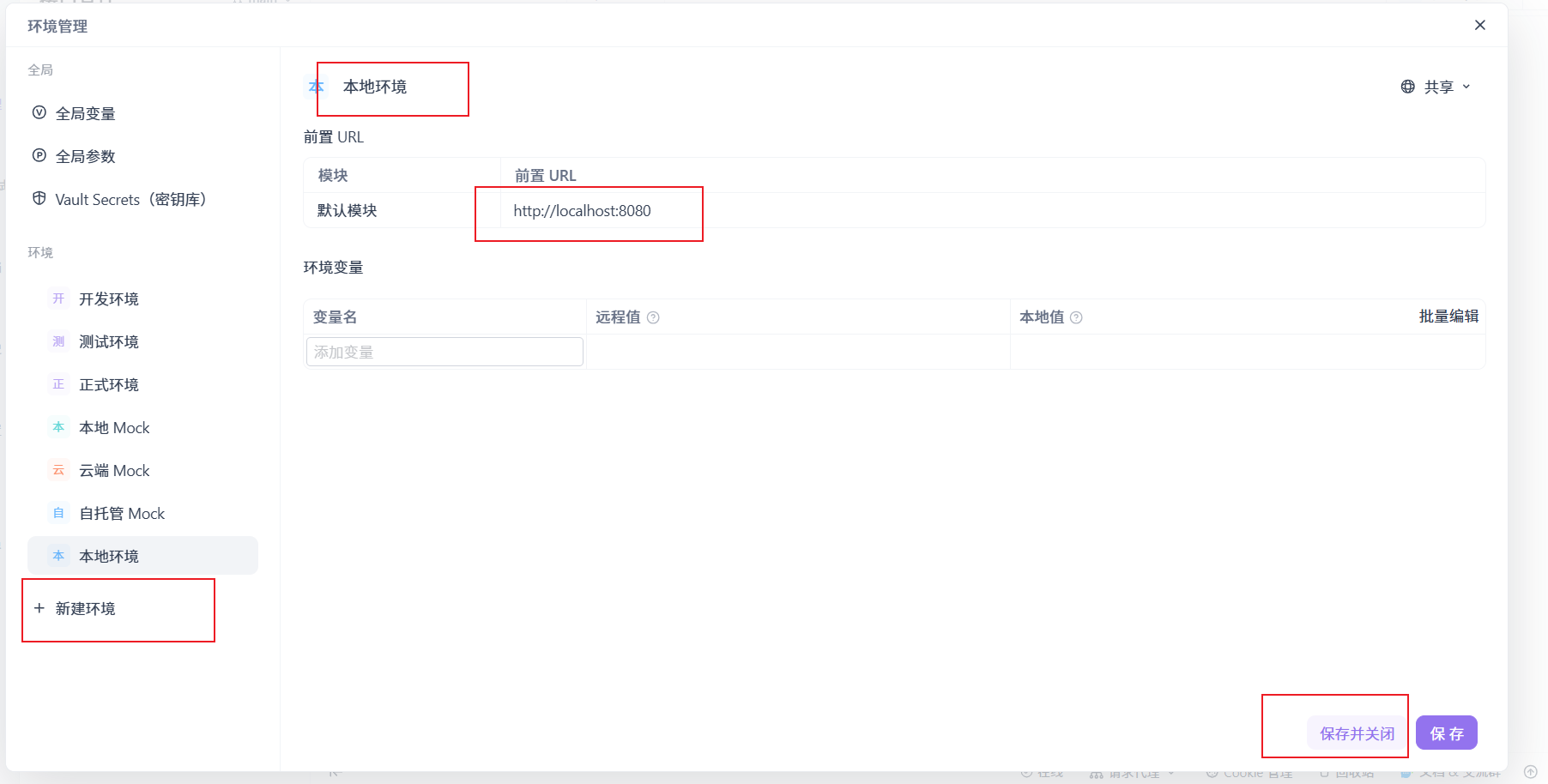
测试/game/move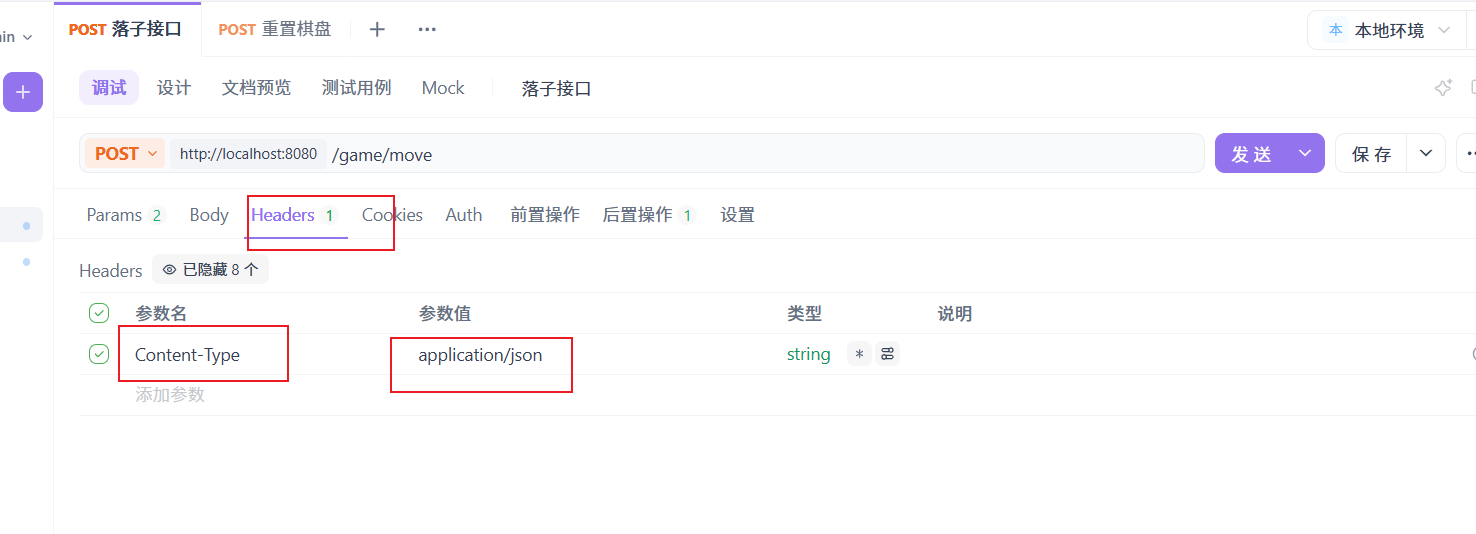
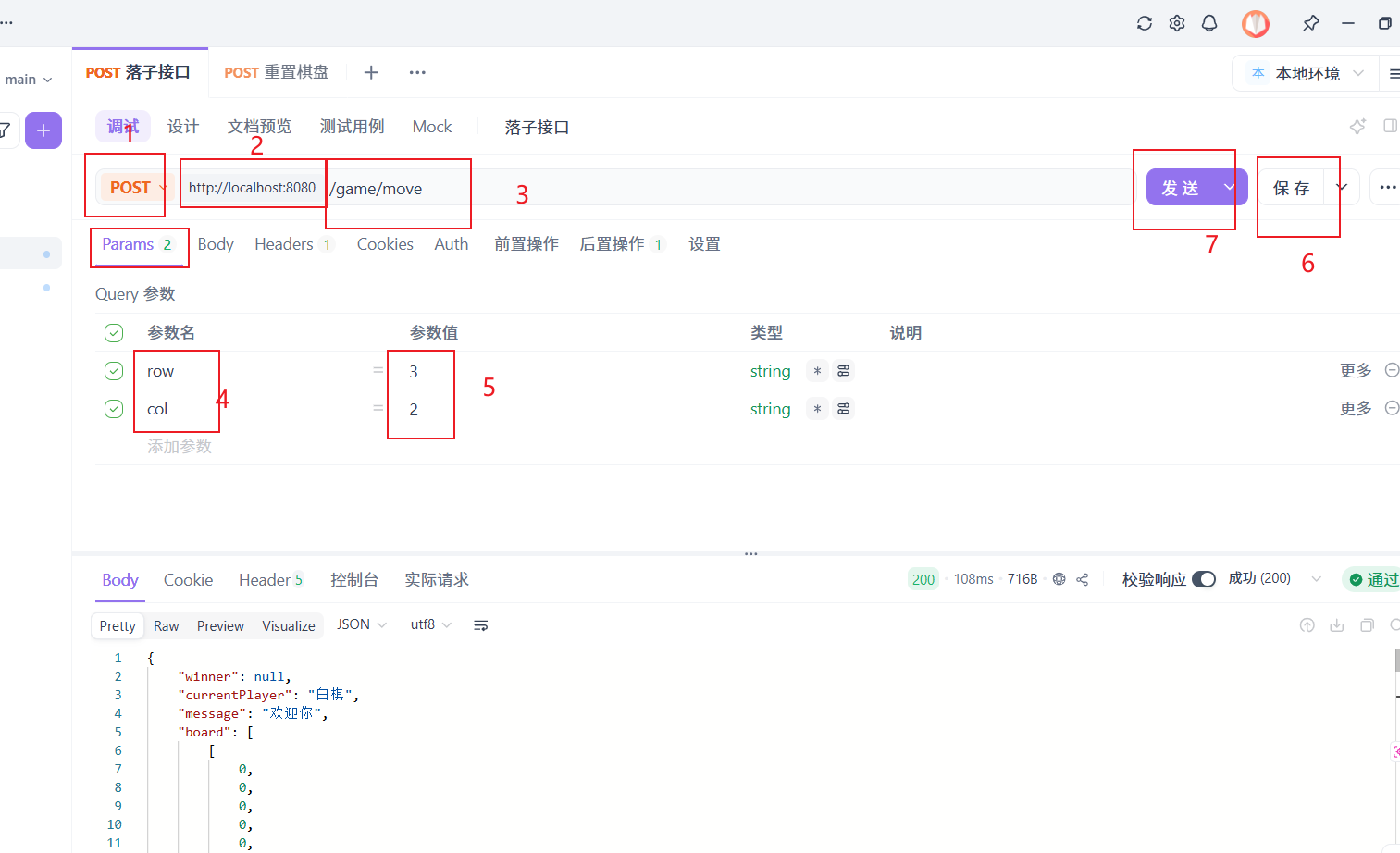
得到以下结果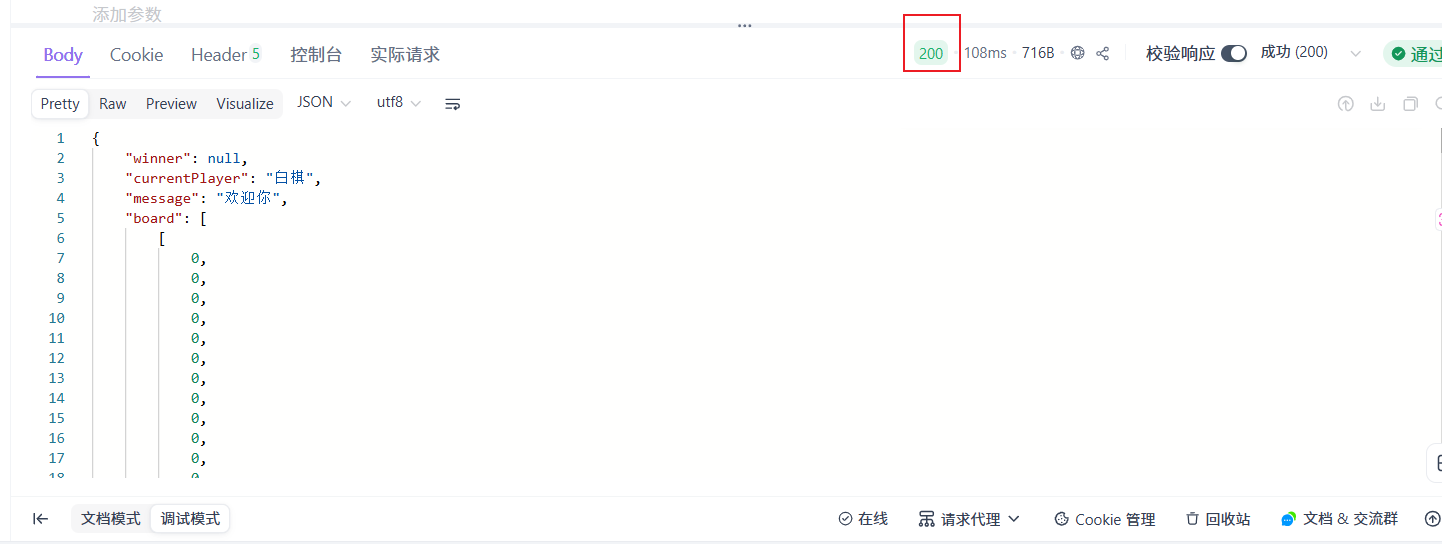
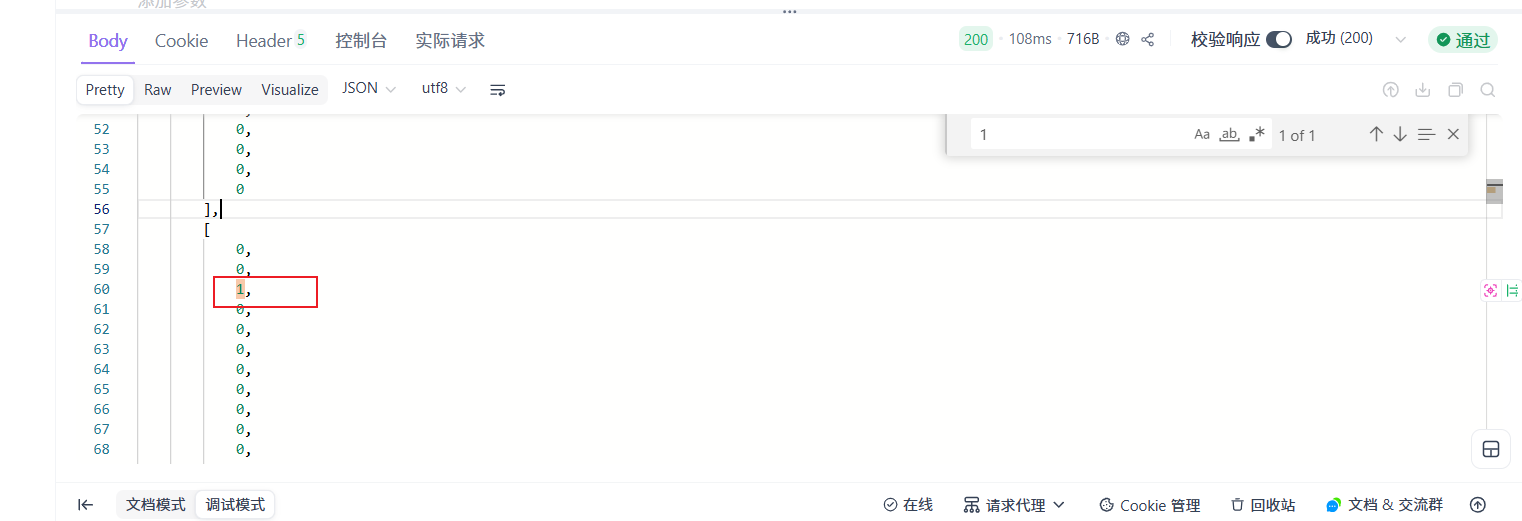
落子成功
测试棋盘重置接口/game/reset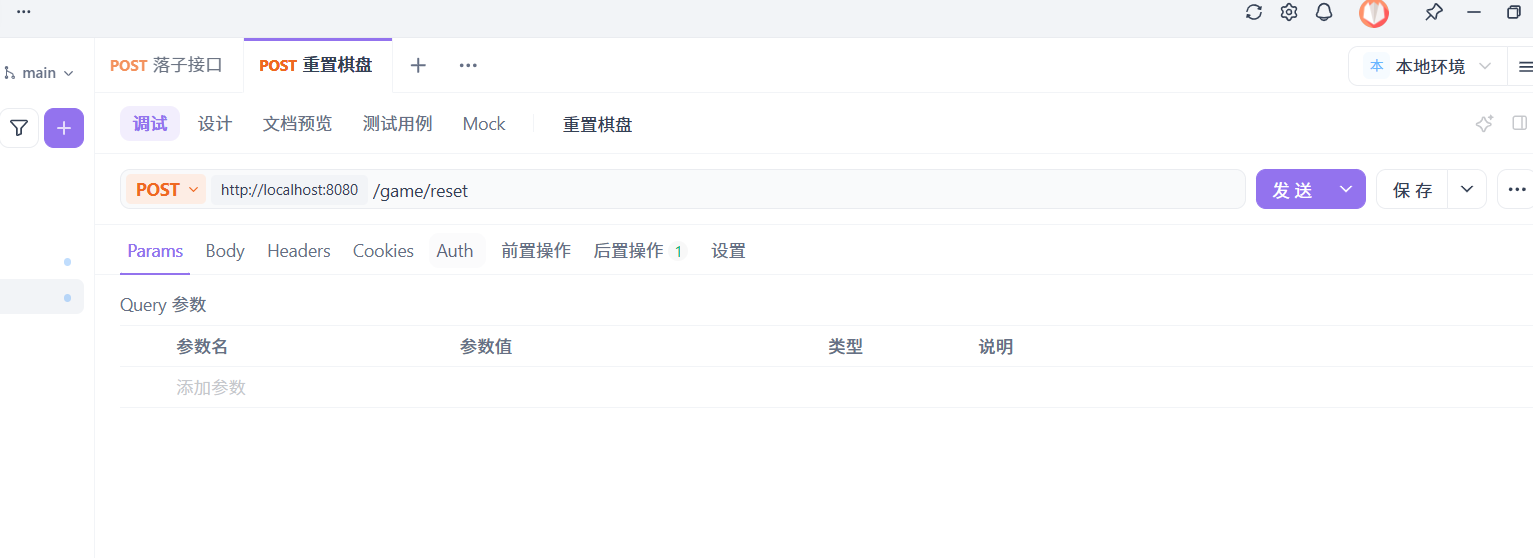
得到结果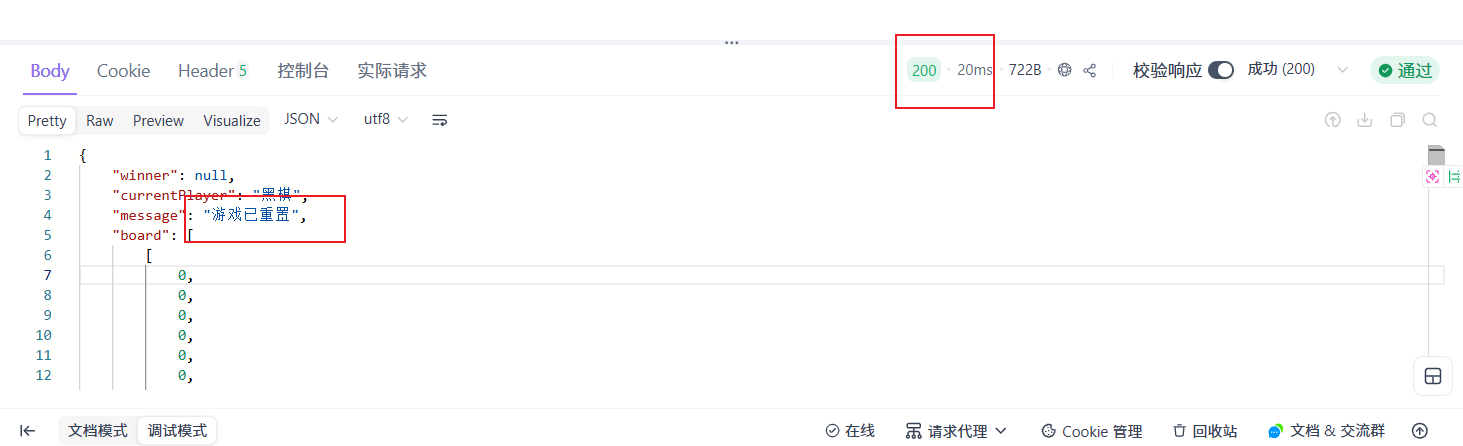
一、项目里的 Post 方法到底在做什么
后端 PageController 里有两个最关键的 Post 接口:
@PostMapping("/move")@PostMapping("/```reset")
它们都挂在类级别路径 /game 下面,所以完整地址分别是:
/game/move/game/reset
1)@PostMapping("/move"):处理“落子”
这一段代码的本质是:
前端点击棋盘某个点后,把坐标 row、col 发给后端,后端完成一次游戏状态更新,再把最新棋盘状态以 JSON 返回给前端。
代码结构上,它做了几件事:
第一层:接收参数
public Map<String, Object> move(
        @RequestParam int row,
        @RequestParam int col)
这里的 @RequestParam 表示从请求参数里取值。
前端发的是:
fetch(`/game/move?row=${row}&col=${col}`, {
    method: 'POST'
});
所以 row 和 col 是通过 URL 查询参数传进来的,不是放在请求体里。
也就是说,这里虽然用了 POST,但参数传递方式更像“带参数的 URL 请求”。
这是可以工作的,但从规范角度看,更常见的写法是把数据放进请求体 JSON 中。
第二层:确保棋盘已初始化
initBoard();
initBoard() 的作用是:如果 board 为空,就创建一个 15×15 的二维列表,并全部填充为 0。
0 表示空位,1 表示黑棋,2 表示白棋。
所以每次落子请求开始前,后端都会先保证棋盘存在。
第三层:判断游戏还能不能继续
if (winner == null) {
这个条件非常重要。
意思是:只有还没有赢家时,才允许继续落子。
一旦某次操作已经产生了 winner,之后再点击棋盘,后端不会继续处理新的落子。
第四层:校验当前点击是否合法
if (row >= 0 && row < 15 && col >= 0 && col < 15 && board.get(row).get(col) == 0)
这一句同时校验了三件事:
- 行坐标是否越界
- 列坐标是否越界
- 当前格子是不是空的
只有合法且为空的位置才能落子。
这说明后端并没有盲目相信前端,而是自己再次做了校验。这个思路是对的。
第五层:真正修改游戏状态
board.get(row).set(col, currentPlayer);
这里把当前位置设为当前玩家的棋子值:
1→ 黑棋2→ 白棋
所以 board 承担了整个游戏核心状态存储的作用。
第六层:判断是否胜利
if (win(row, col)) {
    winner = currentPlayer == 1 ? "黑棋胜利!" : "白棋胜利!";
} else {
    currentPlayer = 3 - currentPlayer;
}
这里逻辑非常经典:
- 如果当前这一步导致五子连珠,就设置赢家
- 否则切换玩家
其中:
currentPlayer = 3 - currentPlayer;
是个很巧妙的写法:
- 当前是 1,则
3 - 1 = 2 - 当前是 2,则
3 - 2 = 1
也就是在黑白之间切换。
第七层:返回 JSON 游戏状态
return buildGameState("欢迎你");
buildGameState() 会把以下内容打包成一个 Map<String, Object> 返回:
boardcurrentPlayermessagewinner
因为方法上加了 @ResponseBody,所以 Spring 不会把返回值当成页面名,而是直接序列化成 JSON 响应给前端。
这也是异步交互成立的关键之一。
2)@PostMapping("/reset"):处理“重置游戏”
这一段的职责比 move 更简单,目标就是把整局游戏恢复初始状态。
它依次做了:
board.clear();
currentPlayer = 1;
winner = null;
initBoard();
意思分别是:
- 清空棋盘数据
- 当前玩家恢复为黑棋先手
- 清空赢家
- 重新初始化 15×15 空棋盘
然后返回新的游戏状态 JSON:
return buildGameState("游戏已重置");
所以这个接口的本质是:
服务端状态重置 + 将重置后的完整状态同步给前端。
二、为什么这里要用 Post,而不是 Get
从 HTTP 语义上看,这两个请求都在修改服务器状态:
/move会修改棋盘、切换玩家、可能生成 winner/reset会清空当前对局状态
因此它们适合使用 POST,而不是 GET。
这是符合 REST 基本思想的:
- GET:获取资源,不应产生副作用
- POST:提交动作,修改服务端状态
你项目中也确实这样设计了:
@GetMapping用来加载页面@PostMapping用来执行动作
这点是比较规范的。
三、前端异步交互功能是怎么实现的
你这个项目的“异步交互”核心全部集中在 HTML 最下面那段 JavaScript。
所谓异步交互,简单说就是:
用户操作 → JS 发请求 → 等服务器返回 → 局部更新页面,不整页刷新。
1)bindPointClick():给每个棋盘点绑定点击事件
function bindPointClick() {
    const points = document.querySelectorAll('.point');
    points.forEach(point => {
        point.onclick = async function () {
            const row = parseInt(this.dataset.x);
            const col = parseInt(this.dataset.y);
            ...
        };
    });
}
这里做了几件事:
a. 先选中所有棋盘交点
页面中每个可点击位置都有 .point 类。
这些元素在 Thymeleaf 渲染棋盘时就已经生成好了。
b. 为每个点绑定点击函数
每个点点下去时,都会执行一个 async function。async 表示这是一个异步函数,可以在内部使用 await。
c. 从 data-x 和 data-y 取出坐标
const row = parseInt(this.dataset.x);
const col = parseInt(this.dataset.y);
这里的坐标来自 HTML 中的自定义属性:
th:attr="data-x=${rowStat.index},data-y=${colStat.index}"
所以前端并不需要自己计算坐标,模板渲染时就把每个点的逻辑位置写好了。
2)fetch + await:发起异步 POST 请求
const response = await fetch(`/game/move?row=${row}&col=${col}`, {
    method: 'POST'
});
这句是整个异步交互最核心的一步。
它的含义可以拆开讲:
fetch(...)
浏览器原生提供的网络请求 API,用来代替早期的 XMLHttpRequest。
method: 'POST'
指定本次请求是 POST。
await
表示“等这个 Promise 完成”。
也就是说,JS 不会阻塞整个页面,但会在当前异步函数中等待请求结果回来。
这就是“异步”的关键:
- 页面不会刷新
- 浏览器不会卡死
- 请求完成后再继续执行下面代码
3)await response.json():把响应解析成 JSON
const data = await response.json();
后端返回的是 Map<String, Object>,由于有 @ResponseBody,Spring 会自动转成 JSON。
前端这里再把它解析为 JavaScript 对象 data。
所以最终 data 结构会类似这样:
{
  board: [...],
  currentPlayer: "黑棋",
  message: "欢迎你",
  winner: null
}
或者如果有人赢了:
{
  board: [...],
  currentPlayer: "黑棋",
  message: "欢迎你",
  winner: "黑棋胜利!"
}
4)renderGame(data):局部刷新界面
renderGame(data);
这一步代表:
不用重新请求整个 HTML 页面,只根据后端最新状态把局部 DOM 改掉。
这就是异步交互最大的价值:
- 交互流畅
- 不闪屏
- 不丢失页面状态
- 用户体验更像“本地应用”
5)异常处理:try...catch
try {
   ...
} catch (e) {
    console.error('落子请求失败:', e);
}
这里说明前端已经考虑到请求失败的情况,比如:
- 后端没启动
- 网络异常
- 返回不是合法 JSON
- 接口 500 错误
当前处理方式只是打印到控制台,没有给用户提示。
这能保证程序不至于直接崩,但用户体验还不够完善。
四、重置按钮的异步交互原理
resetGame() 和落子逻辑是同一模式。
async function resetGame() {
    try {
        const response = await fetch('/game/reset', {
            method: 'POST'
        });

        const data = await response.json();
        renderGame(data);
    } catch (e) {
        console.error('重置请求失败:', e);
    }
}
这说明重置并不是“前端自己把棋子清掉”,而是:
- 发 POST
/game/reset - 后端真正重置状态
- 返回新的完整棋盘
- 前端根据返回数据重新渲染
这个设计是对的,因为游戏真实状态应该以后端为准。
五、renderGame() 和 updateBoard() 是如何完成“局部刷新”的
1)renderGame(data):更新页面文本 + 棋盘
function renderGame(data) {
    updateBoard(data.board);
    document.getElementById('currentPlayer').innerText = data.currentPlayer;
    document.getElementById('message').innerText = data.message;
    document.getElementById('winner').innerText = data.winner ? data.winner : '';
}
它相当于一个总控函数,负责把返回状态映射到页面上。
更新了三类信息:
- 棋盘格子内容
- 当前玩家文本
- 提示信息和赢家文本
注意这里不是整个 HTML 重绘,而是只更新变化的 DOM 元素。
2)updateBoard(board):根据二维数组重画棋子
function updateBoard(board) {
    const points = document.querySelectorAll('.point');
    points.forEach(point => {
        const x = parseInt(point.dataset.x);
        const y = parseInt(point.dataset.y);
        const cell = board[x][y];

        point.innerHTML = '';
        if (cell === 1) {
            point.innerHTML = '<div class="piece black"></div>';
        } else if (cell === 2) {
            point.innerHTML = '<div class="piece white"></div>';
        }
    });
}
这段逻辑是:
- 遍历所有棋盘点
- 根据
data-x / data-y找到对应坐标 - 去返回的二维数组
board[x][y]里取值 - 0:不显示棋子
- 1:渲染黑棋
- 2:渲染白棋
所以,前端页面本质上是把后端返回的 board 当成“渲染数据源”。
这说明你的项目采用的是一种简化版“状态驱动 UI”思想:
- 后端维护状态
- 前端拿状态渲染页面
虽然没有用 Vue、React,但思想上已经接近了。
六、整个异步交互链路完整流程
我用一次“点击落子”给你串起来:
第 1 步:页面初始加载
浏览器访问 /game,进入:
@GetMapping
public String gamePage(Model model)
后端初始化棋盘,把 board/currentPlayer/message/winner 放入 Model,返回 wuziqi 页面。
Thymeleaf 根据这些数据生成初始 HTML 棋盘。
第 2 步:前端绑定点击事件
bindPointClick();
页面加载后,给所有 .point 绑定 onclick。
第 3 步:用户点击一个交点
JS 拿到该点的 row/col。
第 4 步:前端异步 POST 到 /game/move
fetch(`/game/move?row=${row}&col=${col}`, { method: 'POST' })
浏览器发请求,但页面不刷新。
第 5 步:后端处理落子
move() 完成:
- 校验位置
- 落子
- 判赢
- 切换玩家
- 返回新状态 JSON
第 6 步:前端收到 JSON
const data = await response.json();
解析为 JS 对象。
第 7 步:前端局部更新页面
renderGame(data);
只更新棋盘和文本,不刷新整个网页。
七、这个项目里的异步交互有什么优点
1)用户体验更流畅
如果每下一步棋都整个页面刷新,会出现闪烁、等待、重渲染。
现在改成异步请求后,落子体验自然很多。
2)前后端职责分离比较清晰
- 后端负责业务规则:能不能下、谁赢了、轮到谁
- 前端负责界面交互:点击、发请求、更新页面
这是非常典型的 Web 应用结构。
3)避免前端自己维护复杂规则
比如胜负判断没有写在 JS,而是写在后端 win() 方法里。
这样前端不需要承担核心规则判断,减少了逻辑分散。
4)后端返回完整状态,前端只负责渲染
这种做法简单直接,调试起来也容易。
因为每次接口返回的就是“当前游戏全量状态”。
八、这个项目中 Post 和异步交互的关键技术点
1)@ResponseBody 是异步接口成立的关键
没有它,Spring 会把返回的 Map 误当成视图处理。
加上它之后,move() 和 reset() 变成“返回 JSON 数据的接口”。
2)fetch + await 是前端异步的关键
这使请求流程像同步代码一样易读,但底层仍然是异步 Promise。
3)data-* 属性让 DOM 和棋盘坐标绑定
data-x
data-y
这是前端非常实用的一种做法。
DOM 元素自己就带着业务坐标,不需要额外查表。
4)后端全量返回状态,简化前端逻辑
前端不用猜谁该下,也不用自己判断输赢,只要照着后端返回渲染。
一句话
POST 方法负责“改状态”,异步交互负责“无刷新地把状态变化同步到页面”。
更具体一点:
GET /game:负责首次打开页面POST /game/move:负责一次合法落子与胜负判断POST /game/reset:负责恢复初始对局fetch + await:负责把用户操作异步发送到后端renderGame():负责把后端返回的新状态立刻反映到页面上
所以这个项目虽然不大,但已经完整体现了 Web 项目里非常重要的一套思想:
“后端维护状态,前端异步提交动作,收到结果后局部刷新 UI。”
实验4:Spring Data JPA
先上代码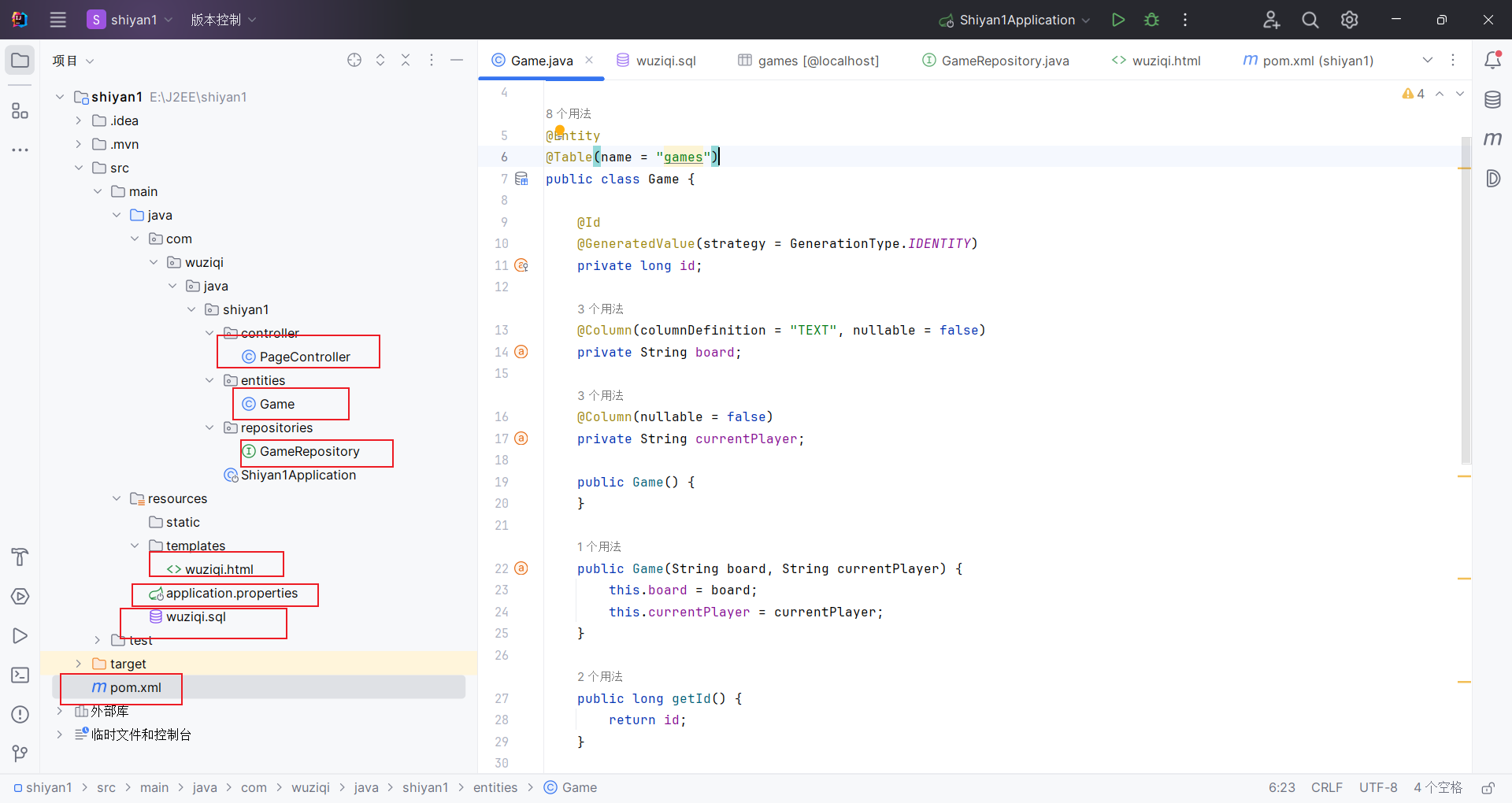
package com.wuziqi.java.shiyan1.controller;

import com.fasterxml.jackson.core.JsonProcessingException;
import com.fasterxml.jackson.core.type.TypeReference;
import com.fasterxml.jackson.databind.ObjectMapper;
import com.wuziqi.java.shiyan1.entities.Game;
import com.wuziqi.java.shiyan1.repositories.GameRepository;
import org.springframework.stereotype.Controller;
import org.springframework.ui.Model;
import org.springframework.web.bind.annotation.*;

import java.util.*;

@Controller
@RequestMapping("/game")
public class PageController {

    private final GameRepository gameRepository;
    private final ObjectMapper objectMapper;

    private final List<List<Integer>> board = new ArrayList<>();
    private int currentPlayer = 1;
    private String winner = null;
    private String gameMode = "PVP"; // PVP / PVE

    public PageController(GameRepository gameRepository, ObjectMapper objectMapper) {
        this.gameRepository = gameRepository;
        this.objectMapper = objectMapper;
    }

    @GetMapping
    public String gamePage(Model model) {
        initBoard();

        model.addAttribute("board", board);
        model.addAttribute("currentPlayer", currentPlayer == 1 ? "黑棋" : "白棋");
        model.addAttribute("message", "欢迎你");
        model.addAttribute("winner", winner);
        model.addAttribute("gameMode", gameMode);

        return "wuziqi";
    }

    @PostMapping("/move")
    @ResponseBody
    public Map<String, Object> move(@RequestParam int row,
                                    @RequestParam int col) {
        initBoard();

        if (winner == null) {
            if (isValidMove(row, col)) {
                board.get(row).set(col, currentPlayer);

                if (win(row, col)) {
                    winner = currentPlayer == 1 ? "黑棋胜利!" : "白棋胜利!";
                } else {
                    currentPlayer = 3 - currentPlayer;

                    // 玩家对AI模式:AI随机下一步
                    if ("PVE".equals(gameMode) && winner == null && currentPlayer == 2) {
                        aiMove();
                    }
                }
            }
        }

        return buildGameState("欢迎你");
    }

    @PostMapping("/reset")
    @ResponseBody
    public Map<String, Object> reset() {
        board.clear();
        currentPlayer = 1;
        winner = null;
        initBoard();
        return buildGameState("游戏已重置");
    }

    @PostMapping("/mode")
    @ResponseBody
    public Map<String, Object> changeMode(@RequestParam String mode) {
        if ("PVE".equalsIgnoreCase(mode)) {
            gameMode = "PVE";
        } else {
            gameMode = "PVP";
        }

        board.clear();
        currentPlayer = 1;
        winner = null;
        initBoard();

        return buildGameState("已切换为 " + ("PVE".equals(gameMode) ? "玩家对AI" : "玩家对玩家"));
    }

    @PostMapping("/save")
    @ResponseBody
    public Map<String, Object> saveGame() {
        Map<String, Object> result = new HashMap<>();
        try {
            String boardJson = objectMapper.writeValueAsString(board);
            String player = currentPlayer == 1 ? "黑棋" : "白棋";

            Game game = new Game(boardJson, player);
            Game savedGame = gameRepository.save(game);

            result.put("success", true);
            result.put("id", savedGame.getId());
            result.put("message", "保存成功,存档ID为:" + savedGame.getId());
        } catch (JsonProcessingException e) {
            result.put("success", false);
            result.put("message", "保存失败:" + e.getMessage());
        }
        return result;
    }

    @GetMapping("/load/{id}")
    @ResponseBody
    public Map<String, Object> loadGame(@PathVariable Long id) {
        Optional<Game> optionalGame = gameRepository.findById(id);

        if (optionalGame.isEmpty()) {
            Map<String, Object> result = new HashMap<>();
            result.put("success", false);
            result.put("message", "未找到ID为 " + id + " 的存档");
            return result;
        }

        Game game = optionalGame.get();

        try {
            List<List<Integer>> loadedBoard = objectMapper.readValue(
                    game.getBoard(),
                    new TypeReference<List<List<Integer>>>() {}
            );

            board.clear();
            board.addAll(loadedBoard);

            currentPlayer = "黑棋".equals(game.getCurrentPlayer()) ? 1 : 2;
            winner = null;

            Map<String, Object> result = buildGameState("加载成功,存档ID:" + id);
            result.put("success", true);
            result.put("id", id);
            return result;
        } catch (JsonProcessingException e) {
            Map<String, Object> result = new HashMap<>();
            result.put("success", false);
            result.put("message", "加载失败:" + e.getMessage());
            return result;
        }
    }

    private void aiMove() {
        List<int[]> emptyCells = new ArrayList<>();

        for (int i = 0; i < 15; i++) {
            for (int j = 0; j < 15; j++) {
                if (board.get(i).get(j) == 0) {
                    emptyCells.add(new int[]{i, j});
                }
            }
        }

        if (!emptyCells.isEmpty()) {
            int[] move = emptyCells.get(new Random().nextInt(emptyCells.size()));
            int row = move[0];
            int col = move[1];
            board.get(row).set(col, currentPlayer);

            if (win(row, col)) {
                winner = "白棋胜利!";
            } else {
                currentPlayer = 1;
            }
        }
    }

    private boolean isValidMove(int row, int col) {
        return row >= 0 && row < 15 && col >= 0 && col < 15 && board.get(row).get(col) == 0;
    }

    private Map<String, Object> buildGameState(String message) {
        Map<String, Object> result = new HashMap<>();
        result.put("board", board);
        result.put("currentPlayer", currentPlayer == 1 ? "黑棋" : "白棋");
        result.put("message", message);
        result.put("winner", winner);
        result.put("gameMode", gameMode);
        return result;
    }

    private void initBoard() {
        if (board.isEmpty()) {
            for (int i = 0; i < 15; i++) {
                List<Integer> row = new ArrayList<>();
                for (int j = 0; j < 15; j++) {
                    row.add(0);
                }
                board.add(row);
            }
        }
    }

    private boolean win(int x, int y) {
        int p = board.get(x).get(y);
        int[][] d = {{1, 0}, {0, 1}, {1, 1}, {1, -1}};

        for (int[] dir : d) {
            int count = 1;

            for (int k = 1; k < 5; k++) {
                int nx = x + dir[0] * k;
                int ny = y + dir[1] * k;
                if (nx < 0 || ny < 0 || nx >= 15 || ny >= 15 || board.get(nx).get(ny) != p) {
                    break;
                }
                count++;
            }

            for (int k = 1; k < 5; k++) {
                int nx = x - dir[0] * k;
                int ny = y - dir[1] * k;
                if (nx < 0 || ny < 0 || nx >= 15 || ny >= 15 || board.get(nx).get(ny) != p) {
                    break;
                }
                count++;
            }

            if (count >= 5) {
                return true;
            }
        }
        return false;
    }
}
package com.wuziqi.java.shiyan1.entities;

import jakarta.persistence.*;

@Entity
@Table(name = "games")
public class Game {

    @Id
    @GeneratedValue(strategy = GenerationType.IDENTITY)
    private long id;

    @Column(columnDefinition = "TEXT", nullable = false)
    private String board;

    @Column(nullable = false)
    private String currentPlayer;

    public Game() {
    }

    public Game(String board, String currentPlayer) {
        this.board = board;
        this.currentPlayer = currentPlayer;
    }

    public long getId() {
        return id;
    }

    public void setId(long id) {
        this.id = id;
    }

    public String getBoard() {
        return board;
    }

    public void setBoard(String board) {
        this.board = board;
    }

    public String getCurrentPlayer() {
        return currentPlayer;
    }

    public void setCurrentPlayer(String currentPlayer) {
        this.currentPlayer = currentPlayer;
    }
}
package com.wuziqi.java.shiyan1.repositories;

import com.wuziqi.java.shiyan1.entities.Game;
import org.springframework.data.jpa.repository.JpaRepository;
import org.springframework.stereotype.Repository;

@Repository
public interface GameRepository extends JpaRepository<Game, Long> {
}
<!DOCTYPE html>
<html lang="zh" xmlns:th="http://www.thymeleaf.org">
<head>
    <meta charset="UTF-8">
    <title>五子棋</title>

    <style>
        body {
            text-align: center;
            font-family: "Microsoft YaHei";
            background: #f5e1b5;
        }

        .toolbar {
            margin: 15px 0;
        }

        .toolbar button {
            padding: 8px 16px;
            font-size: 15px;
            border: none;
            background: #8b4513;
            color: white;
            border-radius: 4px;
            cursor: pointer;
            margin: 0 6px 8px 6px;
        }

        .toolbar button:hover {
            opacity: 0.9;
        }

        .board {
            position: relative;
            width: 420px;
            height: 420px;
            margin: 30px auto;
            background: #deb887;
        }

        .line-h {
            position: absolute;
            left: 0;
            width: 100%;
            height: 1px;
            background: #333;
        }

        .line-v {
            position: absolute;
            top: 0;
            height: 100%;
            width: 1px;
            background: #333;
        }

        .point {
            position: absolute;
            width: 20px;
            height: 20px;
            transform: translate(-50%, -50%);
            cursor: pointer;
        }

        .piece {
            width: 18px;
            height: 18px;
            border-radius: 50%;
            margin: auto;
        }

        .black {
            background: black;
        }

        .white {
            background: white;
            border: 1px solid #999;
        }
    </style>
</head>

<body>

<h1>五子棋</h1>
<h2 id="message" th:text="${message}"></h2>
<p>当前玩家:<span id="currentPlayer" th:text="${currentPlayer}"></span></p>
<p>当前模式:<span id="gameMode" th:text="${gameMode}"></span></p>
<h2 id="winner" th:text="${winner}" style="color:red;"></h2>

<div class="toolbar">
    <button onclick="changeMode('PVP')">玩家对玩家</button>
    <button onclick="changeMode('PVE')">玩家对AI</button>
    <button onclick="saveGame()">保存游戏</button>
    <button onclick="loadGame()">加载游戏</button>
    <button onclick="resetGame()">重新开始</button>
</div>

<div class="board" id="board">

    <div th:each="i : ${#numbers.sequence(0,14)}"
         class="line-h"
         th:style="|top:${i * 30}px|"></div>

    <div th:each="i : ${#numbers.sequence(0,14)}"
         class="line-v"
         th:style="|left:${i * 30}px|"></div>

    <div th:each="row,rowStat : ${board}">
        <div th:each="cell,colStat : ${row}"
             class="point"
             th:attr="data-x=${rowStat.index},data-y=${colStat.index}"
             th:style="|top:${rowStat.index * 30}px; left:${colStat.index * 30}px|">

            <div th:if="${cell == 1}" class="piece black"></div>
            <div th:if="${cell == 2}" class="piece white"></div>

        </div>
    </div>
</div>

<script>
    function bindPointClick() {
        const points = document.querySelectorAll('.point');
        points.forEach(point => {
            point.onclick = async function () {
                const row = parseInt(this.dataset.x);
                const col = parseInt(this.dataset.y);

                try {
                    const response = await fetch(`/game/move?row=${row}&col=${col}`, {
                        method: 'POST'
                    });

                    const data = await response.json();
                    renderGame(data);
                } catch (e) {
                    console.error('落子请求失败:', e);
                }
            };
        });
    }

    async function resetGame() {
        try {
            const response = await fetch('/game/reset', {
                method: 'POST'
            });

            const data = await response.json();
            renderGame(data);
        } catch (e) {
            console.error('重置请求失败:', e);
        }
    }

    async function changeMode(mode) {
        try {
            const response = await fetch(`/game/mode?mode=${mode}`, {
                method: 'POST'
            });

            const data = await response.json();
            renderGame(data);
        } catch (e) {
            console.error('切换模式失败:', e);
        }
    }

    async function saveGame() {
        try {
            const response = await fetch('/game/save', {
                method: 'POST'
            });

            const data = await response.json();
            alert(data.message);
        } catch (e) {
            console.error('保存失败:', e);
        }
    }

    async function loadGame() {
        const id = prompt("请输入要加载的存档ID:");
        if (!id) return;

        try {
            const response = await fetch(`/game/load/${id}`, {
                method: 'GET'
            });

            const data = await response.json();
            if (data.success) {
                renderGame(data);
            } else {
                alert(data.message);
            }
        } catch (e) {
            console.error('加载失败:', e);
        }
    }

    function renderGame(data) {
        if (data.board) {
            updateBoard(data.board);
        }
        document.getElementById('currentPlayer').innerText = data.currentPlayer || '';
        document.getElementById('message').innerText = data.message || '';
        document.getElementById('winner').innerText = data.winner ? data.winner : '';
        document.getElementById('gameMode').innerText = data.gameMode || '';
    }

    function updateBoard(board) {
        const points = document.querySelectorAll('.point');
        points.forEach(point => {
            const x = parseInt(point.dataset.x);
            const y = parseInt(point.dataset.y);
            const cell = board[x][y];

            point.innerHTML = '';
            if (cell === 1) {
                point.innerHTML = '<div class="piece black"></div>';
            } else if (cell === 2) {
                point.innerHTML = '<div class="piece white"></div>';
            }
        });
    }

    bindPointClick();
</script>

</body>
</html>
spring.datasource.url=jdbc:mysql://localhost:3306/wuziqi?useSSL=false&serverTimezone=Asia/Shanghai&characterEncoding=UTF-8
spring.datasource.username=root
spring.datasource.password=123456
spring.datasource.driver-class-name=com.mysql.cj.jdbc.Driver

spring.jpa.hibernate.ddl-auto=update
spring.jpa.show-sql=true
spring.jpa.properties.hibernate.format_sql=true
spring.jpa.database-platform=org.hibernate.dialect.MySQL8Dialect

spring.thymeleaf.cache=false
server.port=8080
-- 创建数据库
CREATE DATABASE IF NOT EXISTS wuziqi
    DEFAULT CHARACTER SET utf8mb4;

-- 使用数据库
USE wuziqi;

-- 创建表
CREATE TABLE IF NOT EXISTS games (
                                     id BIGINT PRIMARY KEY AUTO_INCREMENT,
                                     board TEXT NOT NULL,
                                     current_player VARCHAR(50) NOT NULL
);
在mysql里面运行sql文件创建数据库和表
加分:使用H2数据库
pom.xml
<?xml version="1.0" encoding="UTF-8"?>
<project xmlns="http://maven.apache.org/POM/4.0.0"
         xmlns:xsi="http://www.w3.org/2001/XMLSchema-instance"
         xsi:schemaLocation="http://maven.apache.org/POM/4.0.0 https://maven.apache.org/xsd/maven-4.0.0.xsd">
    <modelVersion>4.0.0</modelVersion>

    <parent>
        <groupId>org.springframework.boot</groupId>
        <artifactId>spring-boot-starter-parent</artifactId>
        <version>3.5.3</version>
        <relativePath/>
    </parent>

    <groupId>com.wuziqi.java</groupId>
    <artifactId>shiyan1</artifactId>
    <version>0.0.1-SNAPSHOT</version>
    <name>shiyan1</name>
    <description>shiyan1</description>


    <properties>
        <java.version>17</java.version>
        <maven.compiler.source>17</maven.compiler.source>
        <maven.compiler.target>17</maven.compiler.target>
    </properties>

    <dependencies>
        <dependency>
            <groupId>org.springframework.boot</groupId>
            <artifactId>spring-boot-starter-web</artifactId>
        </dependency>

        <dependency>
            <groupId>org.springframework.boot</groupId>
            <artifactId>spring-boot-starter-thymeleaf</artifactId>
        </dependency>

        <dependency>
            <groupId>org.springframework.boot</groupId>
            <artifactId>spring-boot-starter-data-jpa</artifactId>
            <version>3.5.3</version>
        </dependency>

<!--        <dependency>-->
<!--            <groupId>com.mysql</groupId>-->
<!--            <artifactId>mysql-connector-j</artifactId>-->
<!--            <scope>runtime</scope>-->
<!--        </dependency>-->
        <dependency>
            <groupId>com.h2database</groupId>
            <artifactId>h2</artifactId>
            <scope>runtime</scope>
        </dependency>

        <dependency>
            <groupId>org.springframework.boot</groupId>
            <artifactId>spring-boot-starter-test</artifactId>
            <scope>test</scope>
        </dependency>
    </dependencies>

    <build>
        <plugins>
            <plugin>
                <groupId>org.springframework.boot</groupId>
                <artifactId>spring-boot-maven-plugin</artifactId>
            </plugin>
        </plugins>
    </build>
</project>
application.properties
# H2 数据库配置:文件模式,数据会保存到项目目录下的 data/wuziqi.mv.db
spring.datasource.url=jdbc:h2:file:./data/wuziqi;MODE=MySQL;DATABASE_TO_UPPER=false
spring.datasource.username=sa
spring.datasource.password=
spring.datasource.driver-class-name=org.h2.Driver

# JPA 配置
spring.jpa.hibernate.ddl-auto=update
spring.jpa.show-sql=true
spring.jpa.properties.hibernate.format_sql=true
spring.jpa.database-platform=org.hibernate.dialect.H2Dialect

# 开启 H2 控制台
spring.h2.console.enabled=true
spring.h2.console.path=/h2-console

# Thymeleaf
spring.thymeleaf.cache=false

# 端口
server.port=8080
Game.java
package com.wuziqi.java.shiyan1.entities;

import jakarta.persistence.*;

@Entity
@Table(name = "games")
public class Game {

    @Id
    @GeneratedValue(strategy = GenerationType.IDENTITY)
    private Long id;

    /**
     * 棋盘数据(JSON字符串)
     * 使用 @Lob 适配 H2 / MySQL 等数据库的大文本存储
     */
    @Lob
    @Column(nullable = false)
    private String board;

    /**
     * 当前玩家(黑棋 / 白棋)
     */
    @Column(nullable = false)
    private String currentPlayer;

    // ===== 构造方法 =====
    public Game() {
    }

    public Game(String board, String currentPlayer) {
        this.board = board;
        this.currentPlayer = currentPlayer;
    }

    // ===== Getter / Setter =====
    public Long getId() {
        return id;
    }

    public void setId(Long id) {
        this.id = id;
    }

    public String getBoard() {
        return board;
    }

    public void setBoard(String board) {
        this.board = board;
    }

    public String getCurrentPlayer() {
        return currentPlayer;
    }

    public void setCurrentPlayer(String currentPlayer) {
        this.currentPlayer = currentPlayer;
    }

    // ===== 可选:方便调试 =====
    @Override
    public String toString() {
        return "Game{" +
                "id=" + id +
                ", currentPlayer='" + currentPlayer + '\'' +
                '}';
    }
}
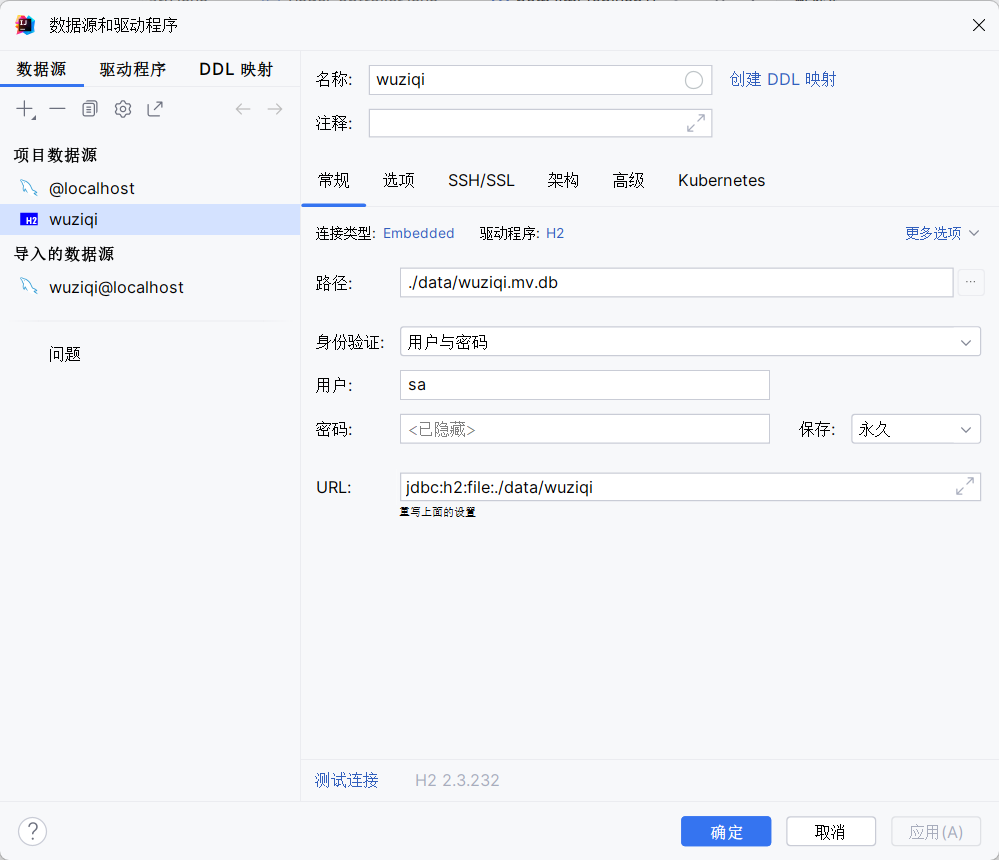
代码运行之后自动生成对应数据库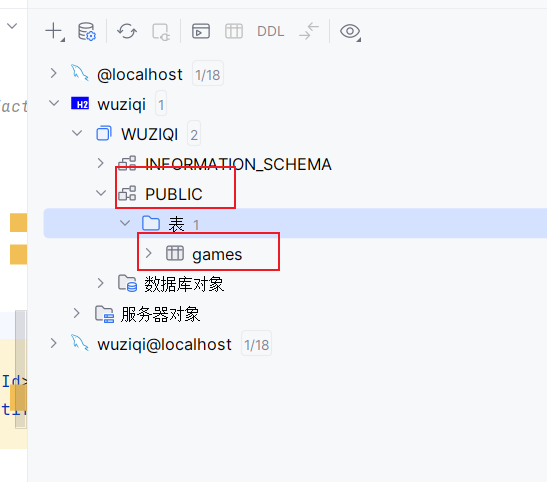
代码解析
五子棋游戏实验报告
一、项目概述
这是一个基于Spring Boot框架的五子棋Web应用,支持玩家对战(PVP)和玩家对战AI(PVE)两种模式,并提供游戏存档和加载功能。
二、完整实验过程
1. 项目结构
src/main/java/com/wuziqi/java/shiyan1/
├── controller/
│   └── PageController.java      # 控制器,处理HTTP请求
├── entities/
│   └── Game.java                 # 实体类,对应数据库表
└── repositories/
    └── GameRepository.java       # 数据访问层

src/main/resources/
├── templates/
│   └── wuziqi.html               # 前端页面
└── application.properties        # 配置文件
2. 数据库配置详解
application.properties - 数据库连接配置:
# 数据库连接配置
spring.datasource.url=jdbc:mysql://localhost:3306/wuziqi?useSSL=false&serverTimezone=Asia/Shanghai&characterEncoding=UTF-8
spring.datasource.username=root      # MySQL用户名
spring.datasource.password=123456    # MySQL密码
spring.datasource.driver-class-name=com.mysql.cj.jdbc.Driver

# JPA配置 - 自动管理数据库表结构
spring.jpa.hibernate.ddl-auto=update   # 自动创建/更新表结构
spring.jpa.show-sql=true                # 控制台显示SQL语句
spring.jpa.properties.hibernate.format_sql=true  # 格式化SQL输出
spring.jpa.database-platform=org.hibernate.dialect.MySQL8Dialect  # MySQL8方言

# Thymeleaf模板引擎配置
spring.thymeleaf.cache=false    # 关闭模板缓存,便于开发调试
server.port=8080                # 服务端口
3. 核心代码解释
(1) 实体类 Game.java - 数据库表映射
package com.wuziqi.java.shiyan1.entities;

import jakarta.persistence.*;

@Entity                           // 标记为JPA实体,与数据库表对应
@Table(name = "games")            // 指定数据库表名为"games"
public class Game {

    @Id                           // 主键标识
    @GeneratedValue(strategy = GenerationType.IDENTITY)  // 自增主键
    private long id;

    @Column(columnDefinition = "TEXT", nullable = false)  // TEXT类型,不能为空
    private String board;         // 存储棋盘状态(JSON格式)

    @Column(nullable = false)     // 不能为空
    private String currentPlayer;  // 存储当前轮到谁下棋

    // 无参构造器(JPA要求)
    public Game() {}

    // 有参构造器
    public Game(String board, String currentPlayer) {
        this.board = board;
        this.currentPlayer = currentPlayer;
    }

    // getter和setter方法...
}
关键点解释:
@Entity:告诉Spring这是一个需要持久化到数据库的Java类@Id:主键,每条记录的唯一标识@GeneratedValue:主键自动生成策略columnDefinition = "TEXT":MySQL中TEXT类型可存储最多65535字符,足够存储15x15棋盘
(2) 存储库接口 GameRepository.java - 数据访问层
package com.wuziqi.java.shiyan1.repositories;

import com.wuziqi.java.shiyan1.entities.Game;
import org.springframework.data.jpa.repository.JpaRepository;
import org.springframework.stereotype.Repository;

@Repository                    // 标记为数据访问组件
public interface GameRepository extends JpaRepository<Game, Long> {
    // 继承JpaRepository后,自动获得以下方法:
    // save()    - 保存/更新记录
    // findById() - 根据ID查询
    // findAll()  - 查询所有
    // deleteById() - 删除记录
    // 不需要写任何实现代码!
}
关键点解释:
JpaRepository<Game, Long>:泛型参数- 第一个:要操作的实体类类型
- 第二个:主键的类型
- Spring Data JPA会自动生成实现类,无需编写SQL语句
(3) 控制器中的载入和保存代码
保存游戏:
@PostMapping("/save")
@ResponseBody
public Map<String, Object> saveGame() {
    Map<String, Object> result = new HashMap<>();
    try {
        // 1. 将棋盘对象转为JSON字符串
        // board是一个 List<List<Integer>> 类型的15x15数组
        String boardJson = objectMapper.writeValueAsString(board);

        // 2. 获取当前玩家(1=黑棋,2=白棋,转成中文存储)
        String player = currentPlayer == 1 ? "黑棋" : "白棋";

        // 3. 创建Game实体对象
        Game game = new Game(boardJson, player);

        // 4. 调用Repository保存到数据库
        Game savedGame = gameRepository.save(game);

        // 5. 返回成功响应,包含自动生成的存档ID
        result.put("success", true);
        result.put("id", savedGame.getId());
        result.put("message", "保存成功,存档ID为:" + savedGame.getId());
    } catch (JsonProcessingException e) {
        result.put("success", false);
        result.put("message", "保存失败:" + e.getMessage());
    }
    return result;
}
加载游戏:
@GetMapping("/load/{id}")
@ResponseBody
public Map<String, Object> loadGame(@PathVariable Long id) {
    // 1. 根据ID查询存档
    Optional<Game> optionalGame = gameRepository.findById(id);

    // 2. 检查存档是否存在
    if (optionalGame.isEmpty()) {
        Map<String, Object> result = new HashMap<>();
        result.put("success", false);
        result.put("message", "未找到ID为 " + id + " 的存档");
        return result;
    }

    Game game = optionalGame.get();

    try {
        // 3. 将JSON字符串还原为棋盘对象
        List<List<Integer>> loadedBoard = objectMapper.readValue(
            game.getBoard(),
            new TypeReference<List<List<Integer>>>() {}
        );

        // 4. 更新当前棋盘状态
        board.clear();
        board.addAll(loadedBoard);

        // 5. 恢复当前玩家(中文转回数字)
        currentPlayer = "黑棋".equals(game.getCurrentPlayer()) ? 1 : 2;
        winner = null;  // 加载存档后清除胜利状态

        // 6. 返回成功响应
        Map<String, Object> result = buildGameState("加载成功,存档ID:" + id);
        result.put("success", true);
        result.put("id", id);
        return result;
    } catch (JsonProcessingException e) {
        Map<String, Object> result = new HashMap<>();
        result.put("success", false);
        result.put("message", "加载失败:" + e.getMessage());
        return result;
    }
}
4. 数据库SQL脚本
wuziqi.sql - 手动创建数据库和表:
-- 创建数据库(如果不存在)
CREATE DATABASE IF NOT EXISTS wuziqi
    DEFAULT CHARACTER SET utf8mb4;  -- utf8mb4支持emoji等特殊字符

-- 使用数据库
USE wuziqi;

-- 创建表
CREATE TABLE IF NOT EXISTS games (
    id BIGINT PRIMARY KEY AUTO_INCREMENT,  -- 自增主键
    board TEXT NOT NULL,                    -- 棋盘JSON数据
    current_player VARCHAR(50) NOT NULL    -- 当前玩家
);
5. 前端关键代码解释
// 保存游戏 - 发送POST请求到后端
async function saveGame() {
    try {
        const response = await fetch('/game/save', {
            method: 'POST'  // POST请求,用于保存数据
        });
        const data = await response.json();
        alert(data.message);  // 显示"保存成功,存档ID为:xxx"
    } catch (e) {
        console.error('保存失败:', e);
    }
}

// 加载游戏 - 用户输入ID后发送GET请求
async function loadGame() {
    const id = prompt("请输入要加载的存档ID:");  // 弹出输入框
    if (!id) return;

    try {
        // GET请求,通过URL路径传递ID
        const response = await fetch(`/game/load/${id}`, {
            method: 'GET'
        });
        const data = await response.json();
        if (data.success) {
            renderGame(data);  // 重新渲染棋盘
        } else {
            alert(data.message);
        }
    } catch (e) {
        console.error('加载失败:', e);
    }
}
三、数据流转图
【保存游戏流程】
前端棋盘状态(board) → JSON字符串 → Game实体 → Repository.save() → MySQL数据库

【加载游戏流程】
用户输入ID → Repository.findById() → Game实体 → JSON解析 → 恢复棋盘状态
四、运行步骤
- 创建数据库:执行
wuziqi.sql脚本 - 修改数据库密码:编辑
application.properties,修改spring.datasource.password=你的密码 - 启动MySQL服务
- 运行Spring Boot应用:执行主类
- 访问游戏:浏览器打开
http://localhost:8080/game
五、注意事项
- 确保MySQL服务已启动
- 数据库用户名/密码与配置文件一致
- 首次运行时会自动创建表(
ddl-auto=update) - 保存的JSON格式示例:
[[0,0,1,0,...],[...]](0空,1黑,2白)
实验五:mybatis的使用
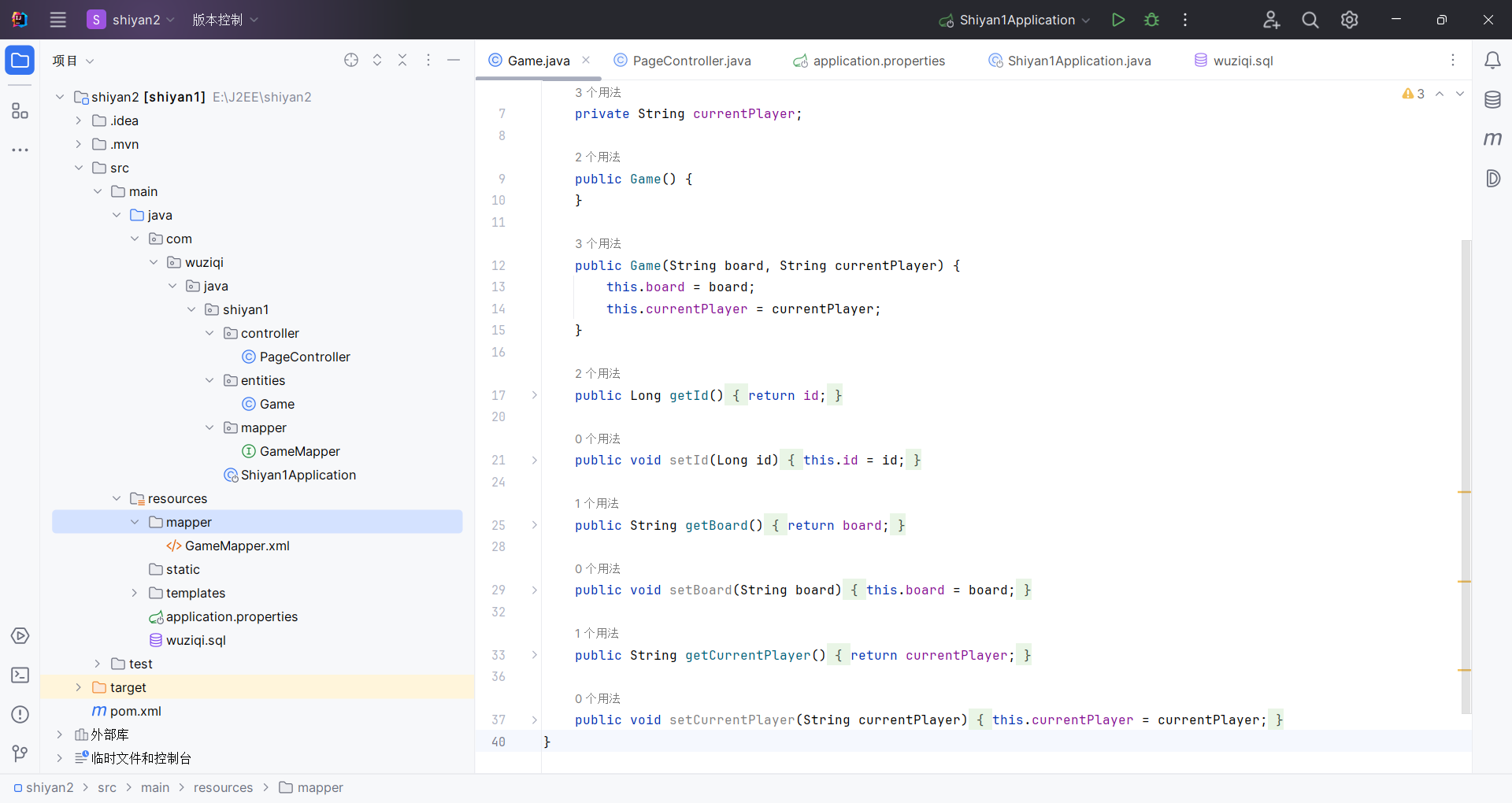
先上代码:
package com.wuziqi.java.shiyan1.controller;

import com.fasterxml.jackson.core.JsonProcessingException;
import com.fasterxml.jackson.core.type.TypeReference;
import com.fasterxml.jackson.databind.ObjectMapper;
import com.wuziqi.java.shiyan1.entities.Game;
import com.wuziqi.java.shiyan1.mapper.GameMapper;
import org.springframework.stereotype.Controller;
import org.springframework.ui.Model;
import org.springframework.web.bind.annotation.*;

import java.util.*;

@Controller
@RequestMapping("/game")
public class PageController {

    private final GameMapper gameMapper;
    private final ObjectMapper objectMapper;

    private final List<List<Integer>> board = new ArrayList<>();
    private int currentPlayer = 1;
    private String winner = null;
    private String gameMode = "PVP"; // PVP / PVE

    public PageController(GameMapper gameMapper, ObjectMapper objectMapper) {
        this.gameMapper = gameMapper;
        this.objectMapper = objectMapper;
    }

    @GetMapping
    public String gamePage(Model model) {
        initBoard();

        model.addAttribute("board", board);
        model.addAttribute("currentPlayer", currentPlayer == 1 ? "黑棋" : "白棋");
        model.addAttribute("message", "欢迎你");
        model.addAttribute("winner", winner);
        model.addAttribute("gameMode", gameMode);

        return "wuziqi";
    }

    @PostMapping("/move")
    @ResponseBody
    public Map<String, Object> move(@RequestParam int row,
                                    @RequestParam int col) {
        initBoard();

        if (winner == null) {
            if (isValidMove(row, col)) {
                board.get(row).set(col, currentPlayer);

                if (win(row, col)) {
                    winner = currentPlayer == 1 ? "黑棋胜利!" : "白棋胜利!";
                } else {
                    currentPlayer = 3 - currentPlayer;

                    // 玩家对AI模式:AI随机下一步
                    if ("PVE".equals(gameMode) && winner == null && currentPlayer == 2) {
                        aiMove();
                    }
                }
            }
        }

        return buildGameState("欢迎你");
    }

    @PostMapping("/reset")
    @ResponseBody
    public Map<String, Object> reset() {
        board.clear();
        currentPlayer = 1;
        winner = null;
        initBoard();
        return buildGameState("游戏已重置");
    }

    @PostMapping("/mode")
    @ResponseBody
    public Map<String, Object> changeMode(@RequestParam String mode) {
        if ("PVE".equalsIgnoreCase(mode)) {
            gameMode = "PVE";
        } else {
            gameMode = "PVP";
        }

        board.clear();
        currentPlayer = 1;
        winner = null;
        initBoard();

        return buildGameState("已切换为 " + ("PVE".equals(gameMode) ? "玩家对AI" : "玩家对玩家"));
    }

    @PostMapping("/save")
    @ResponseBody
    public Map<String, Object> saveGame() {
        Map<String, Object> result = new HashMap<>();
        try {
            String boardJson = objectMapper.writeValueAsString(board);
            String player = currentPlayer == 1 ? "黑棋" : "白棋";

            Game game = new Game(boardJson, player);

            // MyBatis 插入
            gameMapper.insert(game);

            result.put("success", true);
            result.put("id", game.getId());
            result.put("message", "保存成功,存档ID为:" + game.getId());
        } catch (JsonProcessingException e) {
            result.put("success", false);
            result.put("message", "保存失败:" + e.getMessage());
        }
        return result;
    }

    @GetMapping("/load/{id}")
    @ResponseBody
    public Map<String, Object> loadGame(@PathVariable Long id) {

        // MyBatis 查询
        Game game = gameMapper.findById(id);

        if (game == null) {
            Map<String, Object> result = new HashMap<>();
            result.put("success", false);
            result.put("message", "未找到ID为 " + id + " 的存档");
            return result;
        }

        try {
            List<List<Integer>> loadedBoard = objectMapper.readValue(
                    game.getBoard(),
                    new TypeReference<List<List<Integer>>>() {}
            );

            board.clear();
            board.addAll(loadedBoard);

            currentPlayer = "黑棋".equals(game.getCurrentPlayer()) ? 1 : 2;
            winner = null;

            Map<String, Object> result = buildGameState("加载成功,存档ID:" + id);
            result.put("success", true);
            result.put("id", id);
            return result;
        } catch (JsonProcessingException e) {
            Map<String, Object> result = new HashMap<>();
            result.put("success", false);
            result.put("message", "加载失败:" + e.getMessage());
            return result;
        }
    }

    private void aiMove() {
        List<int[]> emptyCells = new ArrayList<>();

        for (int i = 0; i < 15; i++) {
            for (int j = 0; j < 15; j++) {
                if (board.get(i).get(j) == 0) {
                    emptyCells.add(new int[]{i, j});
                }
            }
        }

        if (!emptyCells.isEmpty()) {
            int[] move = emptyCells.get(new Random().nextInt(emptyCells.size()));
            int row = move[0];
            int col = move[1];
            board.get(row).set(col, currentPlayer);

            if (win(row, col)) {
                winner = "白棋胜利!";
            } else {
                currentPlayer = 1;
            }
        }
    }

    private boolean isValidMove(int row, int col) {
        return row >= 0 && row < 15 && col >= 0 && col < 15 && board.get(row).get(col) == 0;
    }

    private Map<String, Object> buildGameState(String message) {
        Map<String, Object> result = new HashMap<>();
        result.put("board", board);
        result.put("currentPlayer", currentPlayer == 1 ? "黑棋" : "白棋");
        result.put("message", message);
        result.put("winner", winner);
        result.put("gameMode", gameMode);
        return result;
    }

    private void initBoard() {
        if (board.isEmpty()) {
            for (int i = 0; i < 15; i++) {
                List<Integer> row = new ArrayList<>();
                for (int j = 0; j < 15; j++) {
                    row.add(0);
                }
                board.add(row);
            }
        }
    }

    private boolean win(int x, int y) {
        int p = board.get(x).get(y);
        int[][] d = {{1, 0}, {0, 1}, {1, 1}, {1, -1}};

        for (int[] dir : d) {
            int count = 1;

            for (int k = 1; k < 5; k++) {
                int nx = x + dir[0] * k;
                int ny = y + dir[1] * k;
                if (nx < 0 || ny < 0 || nx >= 15 || ny >= 15 || board.get(nx).get(ny) != p) {
                    break;
                }
                count++;
            }

            for (int k = 1; k < 5; k++) {
                int nx = x - dir[0] * k;
                int ny = y - dir[1] * k;
                if (nx < 0 || ny < 0 || nx >= 15 || ny >= 15 || board.get(nx).get(ny) != p) {
                    break;
                }
                count++;
            }

            if (count >= 5) {
                return true;
            }
        }
        return false;
    }
}
package com.wuziqi.java.shiyan1.entities;

public class Game {

    private Long id;
    private String board;
    private String currentPlayer;

    public Game() {
    }

    public Game(String board, String currentPlayer) {
        this.board = board;
        this.currentPlayer = currentPlayer;
    }

    public Long getId() {
        return id;
    }

    public void setId(Long id) {
        this.id = id;
    }

    public String getBoard() {
        return board;
    }

    public void setBoard(String board) {
        this.board = board;
    }

    public String getCurrentPlayer() {
        return currentPlayer;
    }

    public void setCurrentPlayer(String currentPlayer) {
        this.currentPlayer = currentPlayer;
    }
}
package com.wuziqi.java.shiyan1.mapper;

import com.wuziqi.java.shiyan1.entities.Game;

public interface GameMapper {

    int insert(Game game);

    Game findById(Long id);
}
package com.wuziqi.java.shiyan1;

import org.mybatis.spring.annotation.MapperScan;
import org.springframework.boot.SpringApplication;
import org.springframework.boot.autoconfigure.SpringBootApplication;

@SpringBootApplication
@MapperScan("com.wuziqi.java.shiyan1.mapper")
public class Shiyan1Application {

    public static void main(String[] args) {
        SpringApplication.run(Shiyan1Application.class, args);
    }

}
GameMapper.xml
<?xml version="1.0" encoding="UTF-8" ?>
<!DOCTYPE mapper
        PUBLIC "-//mybatis.org//DTD Mapper 3.0//EN"
        "http://mybatis.org/dtd/mybatis-3-mapper.dtd">

<mapper namespace="com.wuziqi.java.shiyan1.mapper.GameMapper">

    <!-- 插入 -->
    <insert id="insert" parameterType="Game" useGeneratedKeys="true" keyProperty="id">
        INSERT INTO games (board, current_player)
        VALUES (#{board}, #{currentPlayer})
    </insert>

    <!-- 查询 -->
    <select id="findById" parameterType="long" resultType="Game">
        SELECT
            id,
            board,
            current_player AS currentPlayer
        FROM games
        WHERE id = #{id}
    </select>

</mapper>
application.properties:
spring.datasource.url=jdbc:mysql://localhost:3306/wuziqi?useSSL=false&serverTimezone=Asia/Shanghai&characterEncoding=UTF-8
spring.datasource.username=root
spring.datasource.password=123456
spring.datasource.driver-class-name=com.mysql.cj.jdbc.Driver

mybatis.mapper-locations=classpath:mapper/*.xml
mybatis.type-aliases-package=com.wuziqi.java.shiyan1.entities
mybatis.configuration.map-underscore-to-camel-case=true

spring.thymeleaf.cache=false
server.port=8080
pom.xml:
<?xml version="1.0" encoding="UTF-8"?>
<project xmlns="http://maven.apache.org/POM/4.0.0"
         xmlns:xsi="http://www.w3.org/2001/XMLSchema-instance"
         xsi:schemaLocation="http://maven.apache.org/POM/4.0.0 https://maven.apache.org/xsd/maven-4.0.0.xsd">
    <modelVersion>4.0.0</modelVersion>

    <parent>
        <groupId>org.springframework.boot</groupId>
        <artifactId>spring-boot-starter-parent</artifactId>
        <version>3.5.3</version>
        <relativePath/>
    </parent>

    <groupId>com.wuziqi.java</groupId>
    <artifactId>shiyan1</artifactId>
    <version>0.0.1-SNAPSHOT</version>
    <name>shiyan1</name>
    <description>shiyan1</description>


    <properties>
        <java.version>17</java.version>
        <maven.compiler.source>17</maven.compiler.source>
        <maven.compiler.target>17</maven.compiler.target>
    </properties>

    <dependencies>
        <dependency>
            <groupId>org.springframework.boot</groupId>
            <artifactId>spring-boot-starter-web</artifactId>
        </dependency>

        <dependency>
            <groupId>org.springframework.boot</groupId>
            <artifactId>spring-boot-starter-thymeleaf</artifactId>
        </dependency>

<!--        <dependency>-->
<!--            <groupId>org.springframework.boot</groupId>-->
<!--            <artifactId>spring-boot-starter-data-jpa</artifactId>-->
<!--            <version>3.5.3</version>-->
<!--        </dependency>-->
        <dependency>
            <groupId>org.mybatis.spring.boot</groupId>
            <artifactId>mybatis-spring-boot-starter</artifactId>
            <version>3.0.4</version>
        </dependency>

        <dependency>
            <groupId>com.mysql</groupId>
            <artifactId>mysql-connector-j</artifactId>
            <scope>runtime</scope>
        </dependency>

        <dependency>
            <groupId>org.springframework.boot</groupId>
            <artifactId>spring-boot-starter-test</artifactId>
            <scope>test</scope>
        </dependency>
    </dependencies>

    <build>
        <plugins>
            <plugin>
                <groupId>org.springframework.boot</groupId>
                <artifactId>spring-boot-maven-plugin</artifactId>
            </plugin>
        </plugins>
    </build>
</project>
加分:mybatisplus
先删除mapper目录下的xml文件
pom.xml
<?xml version="1.0" encoding="UTF-8"?>
<project xmlns="http://maven.apache.org/POM/4.0.0"
         xmlns:xsi="http://www.w3.org/2001/XMLSchema-instance"
         xsi:schemaLocation="http://maven.apache.org/POM/4.0.0 https://maven.apache.org/xsd/maven-4.0.0.xsd">
    <modelVersion>4.0.0</modelVersion>

    <parent>
        <groupId>org.springframework.boot</groupId>
        <artifactId>spring-boot-starter-parent</artifactId>
        <version>3.5.3</version>
        <relativePath/>
    </parent>

    <groupId>com.wuziqi.java</groupId>
    <artifactId>shiyan1</artifactId>
    <version>0.0.1-SNAPSHOT</version>
    <name>shiyan1</name>
    <description>shiyan1</description>


    <properties>
        <java.version>17</java.version>
        <maven.compiler.source>17</maven.compiler.source>
        <maven.compiler.target>17</maven.compiler.target>
    </properties>

    <dependencies>
        <dependency>
            <groupId>org.springframework.boot</groupId>
            <artifactId>spring-boot-starter-web</artifactId>
        </dependency>

        <dependency>
            <groupId>org.springframework.boot</groupId>
            <artifactId>spring-boot-starter-thymeleaf</artifactId>
        </dependency>

<!--        <dependency>-->
<!--            <groupId>org.springframework.boot</groupId>-->
<!--            <artifactId>spring-boot-starter-data-jpa</artifactId>-->
<!--            <version>3.5.3</version>-->
<!--        </dependency>-->
<!--        <dependency>-->
<!--            <groupId>org.mybatis.spring.boot</groupId>-->
<!--            <artifactId>mybatis-spring-boot-starter</artifactId>-->
<!--            <version>3.0.4</version>-->
<!--        </dependency>-->


        <dependency>
            <groupId>com.baomidou</groupId>
            <artifactId>mybatis-plus-spring-boot3-starter</artifactId>
            <version>3.5.9</version>
        </dependency>
        <dependency>
            <groupId>com.mysql</groupId>
            <artifactId>mysql-connector-j</artifactId>
            <scope>runtime</scope>
        </dependency>

        <dependency>
            <groupId>org.springframework.boot</groupId>
            <artifactId>spring-boot-starter-test</artifactId>
            <scope>test</scope>
        </dependency>
    </dependencies>

    <build>
        <plugins>
            <plugin>
                <groupId>org.springframework.boot</groupId>
                <artifactId>spring-boot-maven-plugin</artifactId>
            </plugin>
        </plugins>
    </build>
</project>
application.properties
spring.datasource.url=jdbc:mysql://localhost:3306/wuziqi?useSSL=false&serverTimezone=Asia/Shanghai&characterEncoding=UTF-8
spring.datasource.username=root
spring.datasource.password=123456
spring.datasource.driver-class-name=com.mysql.cj.jdbc.Driver

# MyBatis-Plus 配置
mybatis-plus.configuration.map-underscore-to-camel-case=true

spring.thymeleaf.cache=false
server.port=8080
GameMapper.java
package com.wuziqi.java.shiyan1.mapper;

import com.baomidou.mybatisplus.core.mapper.BaseMapper;
import com.wuziqi.java.shiyan1.entities.Game;
import org.apache.ibatis.annotations.Mapper;

@Mapper
public interface GameMapper extends BaseMapper<Game> {

}
PageController.java
package com.wuziqi.java.shiyan1.controller;

import com.fasterxml.jackson.core.JsonProcessingException;
import com.fasterxml.jackson.core.type.TypeReference;
import com.fasterxml.jackson.databind.ObjectMapper;
import com.wuziqi.java.shiyan1.entities.Game;
import com.wuziqi.java.shiyan1.mapper.GameMapper;
import org.springframework.stereotype.Controller;
import org.springframework.ui.Model;
import org.springframework.web.bind.annotation.*;

import java.util.*;

@Controller
@RequestMapping("/game")
public class PageController {

    private final GameMapper gameMapper;
    private final ObjectMapper objectMapper;

    private final List<List<Integer>> board = new ArrayList<>();
    private int currentPlayer = 1;
    private String winner = null;
    private String gameMode = "PVP";

    public PageController(GameMapper gameMapper, ObjectMapper objectMapper) {
        this.gameMapper = gameMapper;
        this.objectMapper = objectMapper;
    }

    @GetMapping
    public String gamePage(Model model) {
        initBoard();

        model.addAttribute("board", board);
        model.addAttribute("currentPlayer", currentPlayer == 1 ? "黑棋" : "白棋");
        model.addAttribute("message", "欢迎你");
        model.addAttribute("winner", winner);
        model.addAttribute("gameMode", gameMode);

        return "wuziqi";
    }

    @PostMapping("/move")
    @ResponseBody
    public Map<String, Object> move(@RequestParam int row,
                                    @RequestParam int col) {
        initBoard();

        if (winner == null) {
            if (isValidMove(row, col)) {
                board.get(row).set(col, currentPlayer);

                if (win(row, col)) {
                    winner = currentPlayer == 1 ? "黑棋胜利!" : "白棋胜利!";
                } else {
                    currentPlayer = 3 - currentPlayer;

                    if ("PVE".equals(gameMode) && currentPlayer == 2) {
                        aiMove();
                    }
                }
            }
        }

        return buildGameState("欢迎你");
    }

    @PostMapping("/reset")
    @ResponseBody
    public Map<String, Object> reset() {
        board.clear();
        currentPlayer = 1;
        winner = null;
        initBoard();
        return buildGameState("游戏已重置");
    }

    @PostMapping("/mode")
    @ResponseBody
    public Map<String, Object> changeMode(@RequestParam String mode) {
        gameMode = "PVE".equalsIgnoreCase(mode) ? "PVE" : "PVP";

        board.clear();
        currentPlayer = 1;
        winner = null;
        initBoard();

        return buildGameState("已切换模式");
    }

    @PostMapping("/save")
    @ResponseBody
    public Map<String, Object> saveGame() {
        Map<String, Object> result = new HashMap<>();
        try {
            String boardJson = objectMapper.writeValueAsString(board);
            String player = currentPlayer == 1 ? "黑棋" : "白棋";

            Game game = new Game(boardJson, player);

            // MyBatis-Plus 插入
            gameMapper.insert(game);

            result.put("success", true);
            result.put("id", game.getId());
            result.put("message", "保存成功,ID:" + game.getId());
        } catch (JsonProcessingException e) {
            result.put("success", false);
            result.put("message", "保存失败:" + e.getMessage());
        }
        return result;
    }

    @GetMapping("/load/{id}")
    @ResponseBody
    public Map<String, Object> loadGame(@PathVariable Long id) {

        // MyBatis-Plus 查询
        Game game = gameMapper.selectById(id);

        if (game == null) {
            Map<String, Object> result = new HashMap<>();
            result.put("success", false);
            result.put("message", "未找到存档");
            return result;
        }

        try {
            List<List<Integer>> loadedBoard = objectMapper.readValue(
                    game.getBoard(),
                    new TypeReference<List<List<Integer>>>() {}
            );

            board.clear();
            board.addAll(loadedBoard);

            currentPlayer = "黑棋".equals(game.getCurrentPlayer()) ? 1 : 2;
            winner = null;

            Map<String, Object> result = buildGameState("加载成功");
            result.put("success", true);
            return result;
        } catch (JsonProcessingException e) {
            Map<String, Object> result = new HashMap<>();
            result.put("success", false);
            result.put("message", "加载失败:" + e.getMessage());
            return result;
        }
    }

    private void aiMove() {
        List<int[]> emptyCells = new ArrayList<>();

        for (int i = 0; i < 15; i++) {
            for (int j = 0; j < 15; j++) {
                if (board.get(i).get(j) == 0) {
                    emptyCells.add(new int[]{i, j});
                }
            }
        }

        if (!emptyCells.isEmpty()) {
            int[] move = emptyCells.get(new Random().nextInt(emptyCells.size()));
            board.get(move[0]).set(move[1], currentPlayer);

            if (win(move[0], move[1])) {
                winner = "白棋胜利!";
            } else {
                currentPlayer = 1;
            }
        }
    }

    private boolean isValidMove(int row, int col) {
        return row >= 0 && col >= 0 && row < 15 && col < 15 && board.get(row).get(col) == 0;
    }

    private Map<String, Object> buildGameState(String message) {
        Map<String, Object> result = new HashMap<>();
        result.put("board", board);
        result.put("currentPlayer", currentPlayer == 1 ? "黑棋" : "白棋");
        result.put("message", message);
        result.put("winner", winner);
        result.put("gameMode", gameMode);
        return result;
    }

    private void initBoard() {
        if (board.isEmpty()) {
            for (int i = 0; i < 15; i++) {
                List<Integer> row = new ArrayList<>();
                for (int j = 0; j < 15; j++) {
                    row.add(0);
                }
                board.add(row);
            }
        }
    }

    private boolean win(int x, int y) {
        int p = board.get(x).get(y);
        int[][] d = {{1,0},{0,1},{1,1},{1,-1}};

        for (int[] dir : d) {
            int count = 1;

            for (int k = 1; k < 5; k++) {
                int nx = x + dir[0] * k;
                int ny = y + dir[1] * k;
                if (nx < 0 || ny < 0 || nx >= 15 || ny >= 15 || board.get(nx).get(ny) != p) break;
                count++;
            }

            for (int k = 1; k < 5; k++) {
                int nx = x - dir[0] * k;
                int ny = y - dir[1] * k;
                if (nx < 0 || ny < 0 || nx >= 15 || ny >= 15 || board.get(nx).get(ny) != p) break;
                count++;
            }

            if (count >= 5) return true;
        }
        return false;
    }
}
Game.java
package com.wuziqi.java.shiyan1.entities;

import com.baomidou.mybatisplus.annotation.IdType;
import com.baomidou.mybatisplus.annotation.TableId;
import com.baomidou.mybatisplus.annotation.TableName;

@TableName("games")
public class Game {

    @TableId(type = IdType.AUTO)
    private Long id;

    private String board;

    private String currentPlayer;

    public Game() {
    }

    public Game(String board, String currentPlayer) {
        this.board = board;
        this.currentPlayer = currentPlayer;
    }

    public Long getId() {
        return id;
    }

    public void setId(Long id) {
        this.id = id;
    }

    public String getBoard() {
        return board;
    }

    public void setBoard(String board) {
        this.board = board;
    }

    public String getCurrentPlayer() {
        return currentPlayer;
    }

    public void setCurrentPlayer(String currentPlayer) {
        this.currentPlayer = currentPlayer;
    }
}
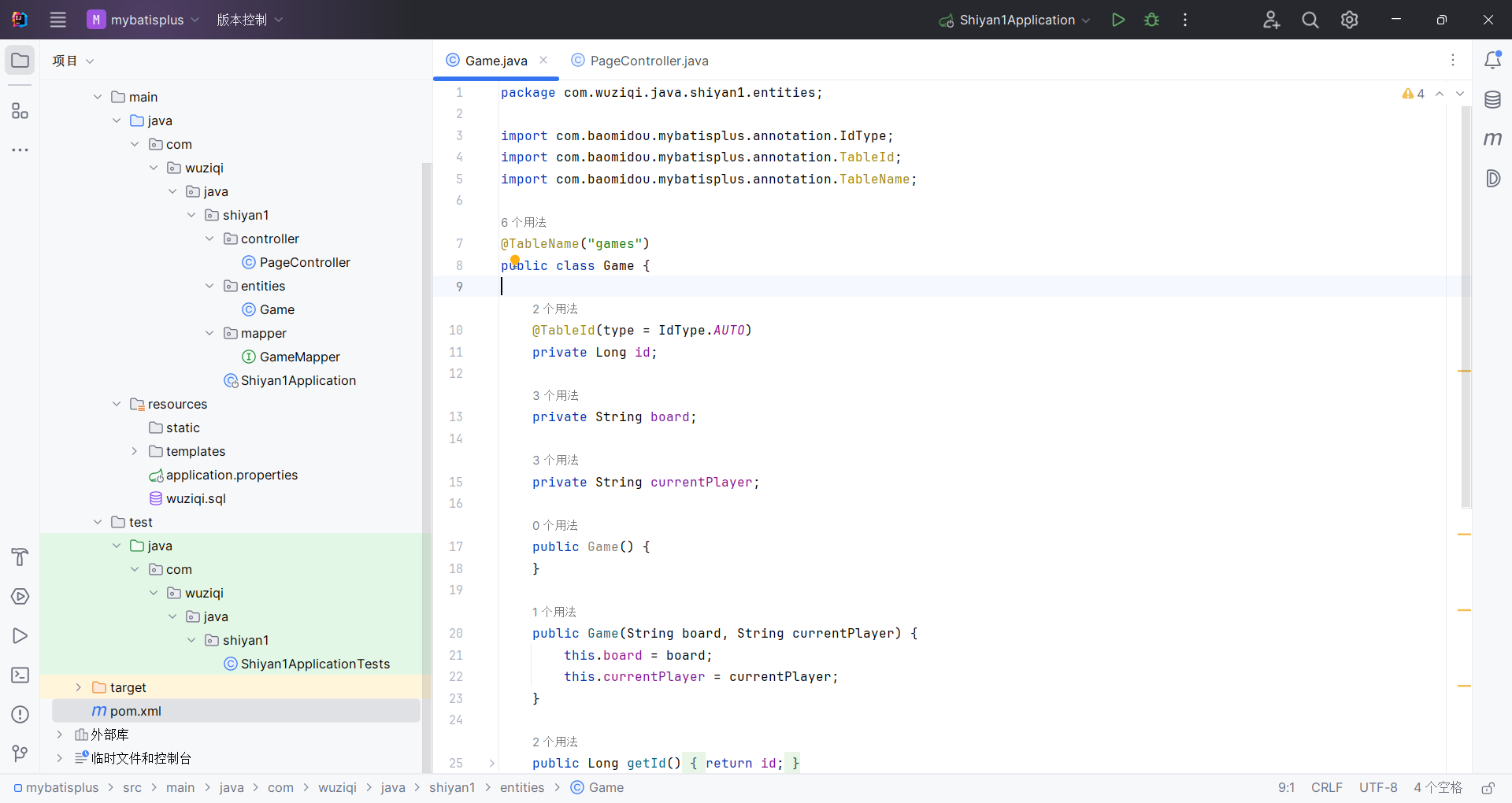
一、这个实验整体在做什么
项目是一个 Spring Boot 五子棋项目。
页面负责下棋、切换模式、保存游戏、加载游戏;后端 Controller 负责处理这些请求;数据库负责保存棋盘状态。
其中和数据库有关的功能主要有两个:
gameMapper.insert(game);
用于保存当前棋局。
gameMapper.findById(id);
用于根据存档 ID 读取棋局。
也就是说,MyBatis 在这个实验中只负责数据库持久化部分:把当前棋盘保存到 MySQL,再从 MySQL 查出来恢复游戏。
二、项目中的数据流
以“保存游戏”为例:
前端点击:
fetch('/game/save', {
    method: 'POST'
});
进入后端:
@PostMapping("/save")
@ResponseBody
public Map<String, Object> saveGame()
后端把当前棋盘 board 转成 JSON 字符串:
String boardJson = objectMapper.writeValueAsString(board);
然后封装成实体对象:
Game game = new Game(boardJson, player);
再调用 MyBatis Mapper:
gameMapper.insert(game);
最后 MyBatis 执行 XML 中的 SQL:
INSERT INTO games (board, current_player)
VALUES (#{board}, #{currentPlayer})
保存到数据库。
三、MyBatis 是什么
MyBatis 是一个半自动 ORM 框架。
ORM 的意思是:对象关系映射。
简单说,就是:
Java 对象 <——> 数据库表
在你的项目里:
Game
对应数据库中的:
games
Java 字段:
private Long id;
private String board;
private String currentPlayer;
对应数据库字段:
id
board
current_player
四、为什么说 MyBatis 是“半自动”
因为 MyBatis 不像 JPA 那样完全自动生成 SQL。
JPA 中你之前这样写:
gameRepository.save(game);
gameRepository.findById(id);
SQL 基本由框架自动生成。
但 MyBatis 中,你需要自己写 SQL:
<insert id="insert">
    INSERT INTO games (board, current_player)
    VALUES (#{board}, #{currentPlayer})
</insert>
<select id="findById">
    SELECT id, board, current_player AS currentPlayer
    FROM games
    WHERE id = #{id}
</select>
所以 MyBatis 的特点是:
SQL 自己写,执行过程交给框架。
这也是它常用于企业项目的原因:SQL 更清楚、更可控、更适合复杂查询。
五、MyBatis 的核心原理
MyBatis 的核心可以理解成 4 件事:
1. Mapper 接口
你写了一个接口:
public interface GameMapper {

    int insert(Game game);

    Game findById(Long id);
}
这个接口没有实现类。
但程序运行时,MyBatis 会自动帮你生成一个代理对象。
也就是说,你虽然没有写:
class GameMapperImpl implements GameMapper
但 MyBatis 会在运行时动态生成类似的实现。
2. XML 映射文件
你的 XML 文件:
<mapper namespace="com.wuziqi.java.shiyan1.mapper.GameMapper">
这行非常关键。
它告诉 MyBatis:
这个 XML 对应的是 GameMapper 接口。
然后:
<insert id="insert">
对应接口中的:
int insert(Game game);
<select id="findById">
对应接口中的:
Game findById(Long id);
所以 MyBatis 靠的是:
namespace + id
来找到接口方法对应的 SQL。
3. 参数绑定
例如:
gameMapper.insert(game);
传进去的是一个 Game 对象。
XML 里写:
VALUES (#{board}, #{currentPlayer})
MyBatis 会自动调用:
game.getBoard()
game.getCurrentPlayer()
把值填进 SQL。
也就是说:
#{board}
对应:
game.getBoard()
#{currentPlayer}
对应:
game.getCurrentPlayer()
这就是参数绑定。
4. 结果映射
查询时 XML 写的是:
<select id="findById" resultType="Game">
    SELECT
        id,
        board,
        current_player AS currentPlayer
    FROM games
    WHERE id = #{id}
</select>
查询结果是数据库的一行记录。
MyBatis 会把这行记录封装成一个 Game 对象。
数据库字段:
id
board
current_player
映射到 Java 属性:
id
board
currentPlayer
因为数据库字段 current_player 和 Java 属性 currentPlayer 名字不完全一样,所以你在 SQL 中写了:
current_player AS currentPlayer
这样 MyBatis 就能正确赋值给:
setCurrentPlayer(...)
六、这个实验中 MyBatis 的完整工作流程
以加载游戏为例:
前端请求:
fetch(`/game/load/${id}`)
后端接收:
@GetMapping("/load/{id}")
@ResponseBody
public Map<String, Object> loadGame(@PathVariable Long id)
调用 Mapper:
Game game = gameMapper.findById(id);
MyBatis 做了这些事情:
1. 找到 GameMapper 接口
2. 根据方法名 findById 找到 XML 中 id="findById" 的 SQL
3. 把 id 参数绑定到 #{id}
4. 执行 SQL:
   SELECT id, board, current_player AS currentPlayer
   FROM games
   WHERE id = ?
5. 把查询结果封装成 Game 对象
6. 返回给 Controller
然后 Controller 取出棋盘 JSON:
game.getBoard()
再转回二维数组:
List<List<Integer>> loadedBoard = objectMapper.readValue(
        game.getBoard(),
        new TypeReference<List<List<Integer>>>() {}
);
最后恢复页面上的棋盘状态。
七、每个文件在实验中的作用
1. Game.java
它是实体类,也叫 POJO。
public class Game {
    private Long id;
    private String board;
    private String currentPlayer;
}
作用是:封装数据库中的一条游戏存档记录。
它不再需要:
@Entity
@Table
@Id
@Column
因为这些是 JPA 的注解,MyBatis 不依赖它们。
2. GameMapper.java
它是 Mapper 接口:
public interface GameMapper {

    int insert(Game game);

    Game findById(Long id);
}
作用是:声明数据库操作方法。
它相当于以前的:
GameRepository
但不同的是,GameRepository 是 JPA 自动生成 SQL,而 GameMapper 是和 XML 里的 SQL 对应。
3. GameMapper.xml
这是 MyBatis XML 映射文件。
作用是:真正写 SQL 的地方。
<insert id="insert">
    INSERT INTO games (board, current_player)
    VALUES (#{board}, #{currentPlayer})
</insert>
<select id="findById">
    SELECT id, board, current_player AS currentPlayer
    FROM games
    WHERE id = #{id}
</select>
XML 中的 id 必须和接口方法名一致。
4. Shiyan1Application.java
启动类中加了:
@MapperScan("com.wuziqi.java.shiyan1.mapper")
作用是:告诉 Spring Boot 去哪里扫描 MyBatis 的 Mapper 接口。
如果不写这个,Spring 可能找不到 GameMapper,Controller 注入时会报错:
No qualifying bean of type 'GameMapper'
5. application.properties
这里配置数据库和 MyBatis。
spring.datasource.url=jdbc:mysql://localhost:3306/wuziqi
spring.datasource.username=root
spring.datasource.password=123456
这是数据库连接信息。
mybatis.mapper-locations=classpath:mapper/*.xml
这表示 MyBatis 去:
src/main/resources/mapper/
下面找 XML 文件。
mybatis.type-aliases-package=com.wuziqi.java.shiyan1.entities
这表示 XML 里可以写:
parameterType="Game"
resultType="Game"
而不用写完整类名:
parameterType="com.wuziqi.java.shiyan1.entities.Game"
mybatis.configuration.map-underscore-to-camel-case=true
表示开启下划线转驼峰。
例如:
current_player -> currentPlayer
虽然你 XML 里已经写了:
current_player AS currentPlayer
但保留这个配置是好习惯。
本实验在 Spring Boot 五子棋项目中集成 MyBatis,实现游戏存档的保存与读取功能。项目通过 Mapper 接口定义数据库操作方法,通过 XML 映射文件编写 SQL 语句,并利用 MyBatis 完成 Java 对象与数据库记录之间的映射。

在保存游戏时,Controller 将当前棋盘状态转换为 JSON 字符串,封装到 Game 对象中,并调用 GameMapper 的 insert 方法。MyBatis 根据 Mapper 接口方法找到 XML 中对应的 insert 语句,将对象属性绑定到 SQL 参数中,最终将棋局数据保存到 games 表。

在加载游戏时,Controller 根据用户输入的存档 ID 调用 GameMapper 的 findById 方法。MyBatis 执行 XML 中配置的 select 语句,将查询结果封装为 Game 对象,再由 Controller 将棋盘 JSON 字符串反序列化为二维集合,从而恢复棋盘状态。

通过本实验,可以理解 MyBatis 的核心思想:Mapper 接口负责定义操作,XML 文件负责编写 SQL,MyBatis 在运行时为接口生成代理对象,完成参数绑定、SQL 执行和结果映射。相比 Spring Data JPA,MyBatis 需要手写 SQL,但SQL更加直观、灵活,适合复杂查询场景。
实验七
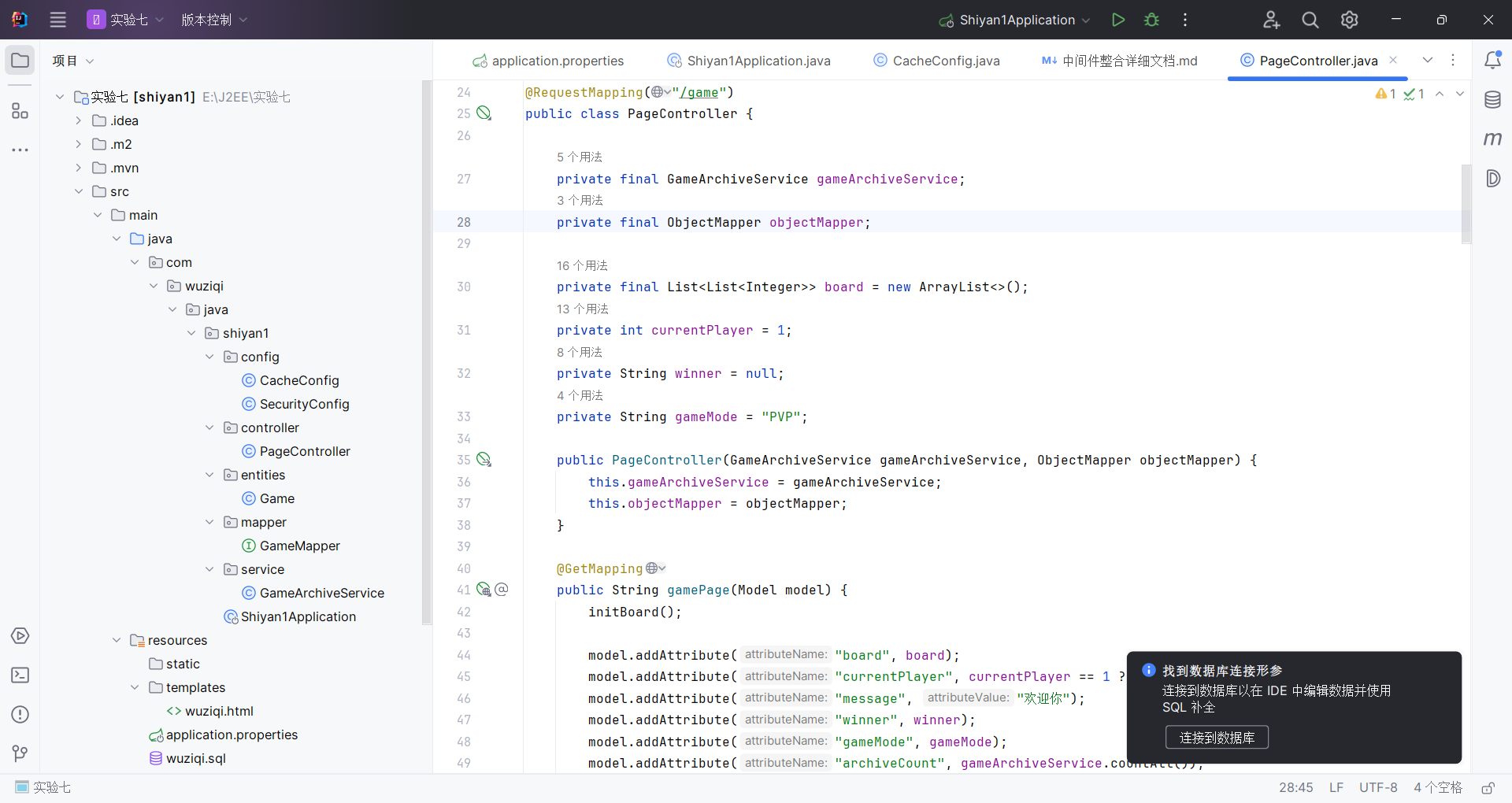
先上代码:
CacheConfig.java
package com.wuziqi.java.shiyan1.config;

import org.springframework.context.annotation.Bean;
import org.springframework.context.annotation.Configuration;
import org.springframework.data.redis.cache.RedisCacheConfiguration;
import org.springframework.data.redis.serializer.GenericJackson2JsonRedisSerializer;
import org.springframework.data.redis.serializer.RedisSerializationContext;

import java.time.Duration;

@Configuration
public class CacheConfig {

    @Bean
    public RedisCacheConfiguration redisCacheConfiguration() {
        return RedisCacheConfiguration.defaultCacheConfig()
                // Cache TTL = 10 minutes.
                .entryTtl(Duration.ofMinutes(10))

                // Do not cache null values.
                .disableCachingNullValues()

                // Serialize cache values as JSON.
                .serializeValuesWith(
                        RedisSerializationContext.SerializationPair.fromSerializer(
                                new GenericJackson2JsonRedisSerializer()
                        )
                );
    }
}
SecurityConfig.java
package com.wuziqi.java.shiyan1.config;

import org.springframework.context.annotation.Bean;
import org.springframework.context.annotation.Configuration;
import org.springframework.http.HttpMethod;
import org.springframework.security.config.annotation.web.builders.HttpSecurity;
import org.springframework.security.config.annotation.web.configuration.EnableWebSecurity;
import org.springframework.security.web.SecurityFilterChain;

@Configuration
@EnableWebSecurity
public class SecurityConfig {

    @Bean
    public SecurityFilterChain securityFilterChain(HttpSecurity http) throws Exception {
        http
                // Frontend uses fetch POST without CSRF token, so disable CSRF for now.
                .csrf(csrf -> csrf.disable())
                .authorizeHttpRequests(auth -> auth
                        // Public pages.
                        .requestMatchers("/", "/game", "/error").permitAll()

                        // Public API for archive count display.
                        .requestMatchers(HttpMethod.GET, "/game/archive/count").permitAll()

                        // Public game actions.
                        .requestMatchers(HttpMethod.POST, "/game/move", "/game/reset", "/game/mode").permitAll()

                        // Login required for archive read/write.
                        .requestMatchers(HttpMethod.POST, "/game/save").authenticated()
                        .requestMatchers(HttpMethod.GET, "/game/load/**").authenticated()

                        // Any other request requires login.
                        .anyRequest().authenticated()
                )
                // Use default login page and redirect to /game after successful login.
                .formLogin(form -> form.defaultSuccessUrl("/game", true))
                .logout(logout -> logout.logoutSuccessUrl("/game"));

        return http.build();
    }
}
PageController.java
package com.wuziqi.java.shiyan1.controller;

import com.fasterxml.jackson.core.JsonProcessingException;
import com.fasterxml.jackson.core.type.TypeReference;
import com.fasterxml.jackson.databind.ObjectMapper;
import com.wuziqi.java.shiyan1.entities.Game;
import com.wuziqi.java.shiyan1.service.GameArchiveService;
import org.springframework.stereotype.Controller;
import org.springframework.ui.Model;
import org.springframework.web.bind.annotation.GetMapping;
import org.springframework.web.bind.annotation.PathVariable;
import org.springframework.web.bind.annotation.PostMapping;
import org.springframework.web.bind.annotation.RequestMapping;
import org.springframework.web.bind.annotation.RequestParam;
import org.springframework.web.bind.annotation.ResponseBody;

import java.util.ArrayList;
import java.util.HashMap;
import java.util.List;
import java.util.Map;
import java.util.Random;

@Controller
@RequestMapping("/game")
public class PageController {

    private final GameArchiveService gameArchiveService;
    private final ObjectMapper objectMapper;

    private final List<List<Integer>> board = new ArrayList<>();
    private int currentPlayer = 1;
    private String winner = null;
    private String gameMode = "PVP";

    public PageController(GameArchiveService gameArchiveService, ObjectMapper objectMapper) {
        this.gameArchiveService = gameArchiveService;
        this.objectMapper = objectMapper;
    }

    @GetMapping
    public String gamePage(Model model) {
        initBoard();

        model.addAttribute("board", board);
        model.addAttribute("currentPlayer", currentPlayer == 1 ? "黑棋" : "白棋");
        model.addAttribute("message", "欢迎你");
        model.addAttribute("winner", winner);
        model.addAttribute("gameMode", gameMode);
        model.addAttribute("archiveCount", gameArchiveService.countAll());

        return "wuziqi";
    }

    @PostMapping("/move")
    @ResponseBody
    public Map<String, Object> move(@RequestParam int row,
                                    @RequestParam int col) {
        initBoard();

        if (winner == null) {
            if (isValidMove(row, col)) {
                board.get(row).set(col, currentPlayer);

                if (win(row, col)) {
                    winner = currentPlayer == 1 ? "黑棋胜利!" : "白棋胜利!";
                } else {
                    currentPlayer = 3 - currentPlayer;

                    if ("PVE".equals(gameMode) && currentPlayer == 2) {
                        aiMove();
                    }
                }
            }
        }

        return buildGameState("欢迎你");
    }

    @PostMapping("/reset")
    @ResponseBody
    public Map<String, Object> reset() {
        board.clear();
        currentPlayer = 1;
        winner = null;
        initBoard();
        return buildGameState("游戏已重置");
    }

    @PostMapping("/mode")
    @ResponseBody
    public Map<String, Object> changeMode(@RequestParam String mode) {
        gameMode = "PVE".equalsIgnoreCase(mode) ? "PVE" : "PVP";

        board.clear();
        currentPlayer = 1;
        winner = null;
        initBoard();

        return buildGameState("已切换模式");
    }

    @PostMapping("/save")
    @ResponseBody
    public Map<String, Object> saveGame() {
        Map<String, Object> result = new HashMap<>();
        try {
            String boardJson = objectMapper.writeValueAsString(board);
            String player = currentPlayer == 1 ? "黑棋" : "白棋";

            Game game = new Game(boardJson, player);
            // Save through service layer so DB write and cache update are handled together.
            gameArchiveService.save(game);

            result.put("success", true);
            result.put("id", game.getId());
            result.put("message", "保存成功,ID:" + game.getId());
        } catch (JsonProcessingException e) {
            result.put("success", false);
            result.put("message", "保存失败:" + e.getMessage());
        }
        return result;
    }

    @GetMapping("/load/{id}")
    @ResponseBody
    public Map<String, Object> loadGame(@PathVariable Long id) {

        // Load through service layer: cache first, database on miss.
        Game game = gameArchiveService.findById(id);

        if (game == null) {
            Map<String, Object> result = new HashMap<>();
            result.put("success", false);
            result.put("message", "未找到存档");
            return result;
        }

        try {
            List<List<Integer>> loadedBoard = objectMapper.readValue(
                    game.getBoard(),
                    new TypeReference<List<List<Integer>>>() {}
            );

            board.clear();
            board.addAll(loadedBoard);

            currentPlayer = "黑棋".equals(game.getCurrentPlayer()) ? 1 : 2;
            winner = null;

            Map<String, Object> result = buildGameState("加载成功");
            result.put("success", true);
            return result;
        } catch (JsonProcessingException e) {
            Map<String, Object> result = new HashMap<>();
            result.put("success", false);
            result.put("message", "加载失败:" + e.getMessage());
            return result;
        }
    }

    @GetMapping("/archive/count")
    @ResponseBody
    public Map<String, Object> archiveCount() {
        Map<String, Object> result = new HashMap<>();
        // Count is cached to reduce repeated count SQL.
        result.put("total", gameArchiveService.countAll());
        return result;
    }

    private void aiMove() {
        List<int[]> emptyCells = new ArrayList<>();

        for (int i = 0; i < 15; i++) {
            for (int j = 0; j < 15; j++) {
                if (board.get(i).get(j) == 0) {
                    emptyCells.add(new int[]{i, j});
                }
            }
        }

        if (!emptyCells.isEmpty()) {
            int[] move = emptyCells.get(new Random().nextInt(emptyCells.size()));
            board.get(move[0]).set(move[1], currentPlayer);

            if (win(move[0], move[1])) {
                winner = "白棋胜利!";
            } else {
                currentPlayer = 1;
            }
        }
    }

    private boolean isValidMove(int row, int col) {
        return row >= 0 && col >= 0 && row < 15 && col < 15 && board.get(row).get(col) == 0;
    }

    private Map<String, Object> buildGameState(String message) {
        Map<String, Object> result = new HashMap<>();
        result.put("board", board);
        result.put("currentPlayer", currentPlayer == 1 ? "黑棋" : "白棋");
        result.put("message", message);
        result.put("winner", winner);
        result.put("gameMode", gameMode);
        return result;
    }

    private void initBoard() {
        if (board.isEmpty()) {
            for (int i = 0; i < 15; i++) {
                List<Integer> row = new ArrayList<>();
                for (int j = 0; j < 15; j++) {
                    row.add(0);
                }
                board.add(row);
            }
        }
    }

    private boolean win(int x, int y) {
        int p = board.get(x).get(y);
        int[][] d = {{1, 0}, {0, 1}, {1, 1}, {1, -1}};

        for (int[] dir : d) {
            int count = 1;

            for (int k = 1; k < 5; k++) {
                int nx = x + dir[0] * k;
                int ny = y + dir[1] * k;
                if (nx < 0 || ny < 0 || nx >= 15 || ny >= 15 || board.get(nx).get(ny) != p) {
                    break;
                }
                count++;
            }

            for (int k = 1; k < 5; k++) {
                int nx = x - dir[0] * k;
                int ny = y - dir[1] * k;
                if (nx < 0 || ny < 0 || nx >= 15 || ny >= 15 || board.get(nx).get(ny) != p) {
                    break;
                }
                count++;
            }

            if (count >= 5) {
                return true;
            }
        }
        return false;
    }
}
Game.java
package com.wuziqi.java.shiyan1.entities;

import com.baomidou.mybatisplus.annotation.IdType;
import com.baomidou.mybatisplus.annotation.TableId;
import com.baomidou.mybatisplus.annotation.TableName;

@TableName("games")
public class Game {

    @TableId(type = IdType.AUTO)
    private Long id;

    private String board;

    private String currentPlayer;

    public Game() {
    }

    public Game(String board, String currentPlayer) {
        this.board = board;
        this.currentPlayer = currentPlayer;
    }

    public Long getId() {
        return id;
    }

    public void setId(Long id) {
        this.id = id;
    }

    public String getBoard() {
        return board;
    }

    public void setBoard(String board) {
        this.board = board;
    }

    public String getCurrentPlayer() {
        return currentPlayer;
    }

    public void setCurrentPlayer(String currentPlayer) {
        this.currentPlayer = currentPlayer;
    }
}
GameMapper.java
package com.wuziqi.java.shiyan1.mapper;

import com.baomidou.mybatisplus.core.mapper.BaseMapper;
import com.wuziqi.java.shiyan1.entities.Game;
import org.apache.ibatis.annotations.Mapper;

@Mapper
public interface GameMapper extends BaseMapper<Game> {

}
GameArchiveService.java
package com.wuziqi.java.shiyan1.service;

import com.wuziqi.java.shiyan1.entities.Game;
import com.wuziqi.java.shiyan1.mapper.GameMapper;
import org.springframework.cache.annotation.CacheEvict;
import org.springframework.cache.annotation.CachePut;
import org.springframework.cache.annotation.Cacheable;
import org.springframework.cache.annotation.Caching;
import org.springframework.stereotype.Service;

@Service
public class GameArchiveService {

    private final GameMapper gameMapper;

    public GameArchiveService(GameMapper gameMapper) {
        this.gameMapper = gameMapper;
    }

    @Caching(
            // After DB insert, write this archive into cache by archive id.
            put = @CachePut(cacheNames = "gameArchive", key = "#result.id", unless = "#result == null || #result.id == null"),

            // Archive count changes after save, so evict total-count cache.
            evict = @CacheEvict(cacheNames = "gameArchiveCount", key = "'total'")
    )
    public Game save(Game game) {
        gameMapper.insert(game);
        return game;
    }

    @Cacheable(cacheNames = "gameArchive", key = "#id", unless = "#result == null")
    public Game findById(Long id) {
        // Read from cache first; if miss, query database.
        return gameMapper.selectById(id);
    }

    @Cacheable(cacheNames = "gameArchiveCount", key = "'total'")
    public long countAll() {
        // Cache total archive count to reduce repeated count SQL.
        Long count = gameMapper.selectCount(null);
        return count == null ? 0L : count;
    }
}
application.properties
# MySQL datasource
spring.datasource.url=jdbc:mysql://localhost:3306/wuziqi?useSSL=false&serverTimezone=Asia/Shanghai&characterEncoding=UTF-8
spring.datasource.username=root
spring.datasource.password=123456
spring.datasource.driver-class-name=com.mysql.cj.jdbc.Driver

# MyBatis-Plus config
mybatis-plus.configuration.map-underscore-to-camel-case=true

# Web config
spring.thymeleaf.cache=false
server.port=8080

# Redis cache config
spring.cache.type=redis
spring.cache.redis.time-to-live=10m
spring.cache.redis.cache-null-values=false
spring.data.redis.host=localhost
spring.data.redis.port=6379

# Spring Security demo user
spring.security.user.name=student
spring.security.user.password=123456
2. 本次新增能力总览
2.1 安全管理(Spring Security)
新增规则:
- 所有人都可以访问和游玩:
GET /gamePOST /game/movePOST /game/resetPOST /game/modeGET /game/archive/count
- 必须登录才可以访问:
POST /game/saveGET /game/load/{id}
系统表现:
- 未登录点击“保存游戏/加载游戏”时,不会直接成功。
- 会进入登录流程(登录账号密码见下文配置)。
- 登录后可正常保存/加载。
2.2 缓存管理(Redis Cache)
新增缓存点:
- 存档详情缓存(按存档
id):- 缓存名:
gameArchive
- 缓存名:
- 总存档数缓存:
- 缓存名:
gameArchiveCount - key:
total
- 缓存名:
缓存策略:
- 默认 TTL:10 分钟
- 不缓存
null - Redis 序列化器:
GenericJackson2JsonRedisSerializer - 每次成功保存新存档时,自动清掉“总存档数缓存”,让页面下次拿到最新数量
系统表现:
- 同一个存档 ID 多次加载时,响应更快(优先从 Redis 取)。
- “总存档数”展示会随着新存档保存而更新。
3. 深入说明:安全管理(Spring Security)
3.1 为什么要加安全管理
当前项目是网页游戏,原始版本里保存/加载接口是开放的,任何人都能调用。实际场景中,存档属于“用户数据”,至少要做到“先登录再操作”。
这次采用了“最小改造”方案:
- 保留你原来的五子棋玩法流程不变。
- 只对“保存/加载”加登录门槛。
- 游玩接口继续保持匿名可用,演示和体验不受影响。
3.2 代码里怎么实现
实现文件:
E:\J2EE\实验七\src\main\java\com\wuziqi\java\shiyan1\config\SecurityConfig.javaE:\J2EE\实验七\src\main\resources\application.propertiesE:\J2EE\实验七\src\main\resources\templates\wuziqi.html
核心机制:
- 通过
SecurityFilterChain配置请求授权规则。 - 使用
.requestMatchers(...).permitAll()定义匿名可访问接口。 - 使用
.requestMatchers(...).authenticated()定义必须登录接口。 - 使用
.formLogin(...)启用默认登录页。 - 在前端统一处理“被重定向到登录页”的情况,给用户明确提示。
3.3 请求流程(未登录保存存档)
- 用户在页面点击“保存游戏”。
- 前端发起
POST /game/save。 - Spring Security 判断该接口需要登录。
- 若未登录,返回登录页重定向。
- 前端
fetchJsonOrGoLogin()检测到重定向后提示用户,并跳转/login。 - 用户登录成功后回到
/game,再次保存即可成功。
3.4 请求流程(已登录保存存档)
- 用户已登录,点击“保存游戏”。
- 请求通过安全过滤器。
- 控制器执行保存逻辑。
- 返回 JSON:
success/id/message。 - 页面弹出提示并刷新总存档数。
3.5 配置项解释
application.properties 中:
spring.security.user.name=studentspring.security.user.password=123456
说明:
- 这是 Spring Security 的演示账号(内存用户)。
- 优点:配置简单、快速可跑。
- 后续若要上线,建议改成数据库用户体系。
3.6 为什么关闭 CSRF
当前前端是用 fetch 直接发 POST,未携带 CSRF Token。若立刻开启 CSRF,/game/save 等 POST 很可能返回 403。
因此本次先关闭 CSRF,目标是:
- 先把“权限控制 + 业务可用”稳定跑通。
- 下一步再做“开启 CSRF + 前端携带 Token”的增强。
3.7 风险与边界
- 现在是“单账号演示登录”,不是完整多用户系统。
- 关闭 CSRF 适合学习与内网演示,不适合直接生产。
- 页面是服务端模板 + fetch,登录态依赖 session/cookie。
4. 深入说明:缓存管理(Redis Cache)
4.1 为什么要加缓存
项目里有两类“重复读取”非常适合缓存:
- 按存档 ID 的加载(
load/{id}) - 总存档数查询(页面加载和保存后都会查)
没有缓存时:
- 每次都打数据库。
- 在频繁操作下,数据库压力会持续累积。
加缓存后:
- 热点数据直接走 Redis。
- 数据库只在缓存未命中时查询。
4.2 代码里怎么实现
实现文件:
E:\J2EE\实验七\src\main\java\com\wuziqi\java\shiyan1\config\CacheConfig.javaE:\J2EE\实验七\src\main\java\com\wuziqi\java\shiyan1\service\GameArchiveService.javaE:\J2EE\实验七\src\main\java\com\wuziqi\java\shiyan1\Shiyan1Application.javaE:\J2EE\实验七\src\main\resources\application.properties
核心机制:
- 启动类加
@EnableCaching,开启注解缓存能力。 @Cacheable:查缓存,未命中再查数据库。@CachePut:数据库写入成功后,主动更新缓存。@CacheEvict:数据库变更后,删除相关缓存,避免脏数据。
4.3 缓存键设计
- 存档详情缓存:
- 缓存名
gameArchive - key = 存档 id
- 缓存名
- 总存档数缓存:
- 缓存名
gameArchiveCount - key =
total
- 缓存名
这样设计的原因:
- 简单直观,便于排查。
- 和接口语义强对应,维护成本低。
4.4 失效策略
- TTL:统一 10 分钟,防止缓存长期过期不更新。
- 保存新存档后:
- 总数必然变化,因此立即删除
gameArchiveCount::total。
- 总数必然变化,因此立即删除
- 下次查询总数时会自动回源数据库并重建缓存。
4.5 数据序列化策略
采用 GenericJackson2JsonRedisSerializer:
- 缓存值以 JSON 方式序列化。
- 相比 JDK 序列化更通用。
- 对后续跨语言或调试查看更友好。
4.6 读写流程示例
示例 A:加载存档
- 前端请求
GET /game/load/12 GameArchiveService.findById(12)先查gameArchive::12- 命中则直接返回
- 未命中则查 MySQL,再写回缓存
示例 B:保存存档
- 前端请求
POST /game/save GameArchiveService.save(game)写数据库- 同时
@CachePut把新存档写入gameArchive::<id> - 同时
@CacheEvict清理gameArchiveCount::total
4.7 风险与边界
- Redis 未启动时,项目可能在缓存初始化阶段报错或退化(视环境而定)。
- 当前是单节点 Redis,无高可用配置。
- TTL 10 分钟是演示值,可按业务压测结果调整。
5. 代码层实现说明(按文件)
5.1 依赖层(Maven)
文件:
E:\J2EE\实验七\pom.xml
关键改动:
- 引入安全依赖:
spring-boot-starter-securityspring-security-core
- 引入 Redis 依赖:
spring-boot-starter-data-redis
5.2 基础配置层
5.2.1 启用缓存注解
文件:
E:\J2EE\实验七\src\main\java\com\wuziqi\java\shiyan1\Shiyan1Application.java
实现:
- 在启动类增加
@EnableCaching
5.2.2 Redis 与安全账号配置
文件:
E:\J2EE\实验七\src\main\resources\application.properties
实现:
- Redis 配置:host、port、TTL、null 缓存策略
- 安全配置:默认演示账号密码
5.3 安全控制层
文件:
E:\J2EE\实验七\src\main\java\com\wuziqi\java\shiyan1\config\SecurityConfig.java
说明:
- 控制“放行接口”和“必须登录接口”
- 登录成功回跳游戏页
- 配合前端完成未登录提示与跳转
5.4 缓存业务层
文件:
E:\J2EE\实验七\src\main\java\com\wuziqi\java\shiyan1\service\GameArchiveService.java
说明:
save:写库 + 回填单条缓存 + 清理总数缓存findById:优先查缓存countAll:总数缓存
5.5 控制器层
文件:
E:\J2EE\实验七\src\main\java\com\wuziqi\java\shiyan1\controller\PageController.java
说明:
- 保存/加载改为走
GameArchiveService - 首页模型新增
archiveCount - 新增接口
GET /game/archive/count
5.6 前端页面层
文件:
E:\J2EE\实验七\src\main\resources\templates\wuziqi.html
说明:
- 增加总数展示区域
- 增加
refreshArchiveCount() - 增加
fetchJsonOrGoLogin(),处理未登录重定向
6. 启动与验证步骤
- 启动 MySQL,并确认
wuziqi库和games表存在。 - 启动 Redis(默认
localhost:6379)。 - 在项目根目录运行:
mvn spring-boot:run - 打开:
http://localhost:8080/game - 验证:
- 页面显示总存档数
- 未登录点击保存/加载会提示并跳登录
- 登录
student/123456后可保存/加载 - 保存后总存档数自动刷新

openEuler 是由开放原子开源基金会孵化的全场景开源操作系统项目,面向数字基础设施四大核心场景(服务器、云计算、边缘计算、嵌入式),全面支持 ARM、x86、RISC-V、loongArch、PowerPC、SW-64 等多样性计算架构
更多推荐

 10
10 0
0- 0


 已为社区贡献1条内容

所有评论(0)