arch linux从0搭建一个网站及其反向代理
(php 进程来处理来自Web服务器的请求,对于Nginx这类无法原生执行PHP代码的Web服务器,php-fpm 是其与PHP脚本沟通的必要桥梁。php-fpm 包依赖于 php 包,这意味着当你安装 php-fpm 时,php 包会自动作为依赖项安装)rocky不需要执行(mariadb-install-db --user=mysql --basedir=/usr --datadir=/var
vim的小技巧
vim保存(大写模式下ZZ)

vim查找(输入/内容,回车)
1.寻找源码的两个平台
工作台 - Gitee.com(需要注册账号)<国内开源平台>
GitHub(需要注册账号)<国外开源平台>
2.什么是静态资源,什么是动态资源。
| 判断依据 | 静态资源 | 动态资源 |
|---|---|---|
| 内容何时确定 | 文件写入磁盘时已完全确定 | 收到请求后实时确定 |
| 是否需要服务器端程序介入 | 不需要(Web 服务器直接读取文件) | 需要(PHP/Python/Node.js 等程序处理) |
| 是否依赖数据库 | 可能依赖(静态化场景) | 可能依赖(常见),也可能不依赖 |
| 典型例子 | HTML、CSS、JS、图片、静态化后的页面 | PHP/ASP/JSP 页面、API 接口、SSR 页面 |
3.下载git
pacman -S git
如果不使用git,使用其他软件(如wget)下载的无法进行解析
4.克隆项目
https://gitee.com/helloz/mblog.git(git,上传下载)
5.下载nginx
pacman -S nginx
6.下载mariadb
pacman -S mariadb
arch没有初始化无法打开,报错(必须初始化)
systemctl start mariadb
Job for mariadb.service failed because the control process exited with error code.
See "systemctl status mariadb.service" and "journalctl -xeu mariadb.service" for details.
ubuntu数据库包是mariadb-server
rocky数据包时mariadb-server(systemctl start mariadb开启之后直接初始化)
rocky不需要执行(mariadb-install-db --user=mysql --basedir=/usr --datadir=/var/lib/mysql)
(server,可以使用mariadb-install-db进行初始化)
进行初始化
mariadb-install-db --user=mysql --basedir=/usr --datadir=/var/lib/mysql
(成功的标志)
###[root@archlinux ~]# mariadb-install-db --user=mysql --basedir=/usr --###datadir=/var/lib/mysql
###Installing MariaDB/MySQL system tables in '/var/lib/mysql' ...
###OK

#创建mysql的授权表和系统表,一般用于初始化数据库
#指定运行进程的操作系统用户名
systemctl enable --now mariadb
#现在打开mariadb并开机自启动
#--basedir,mariadb的安装根目录,--datadir,myriadb的存储目录
mysql_secure_installation(安全加固起到修改密码,)
#安全加固
systemctl restart mariadb


《mysql_secure_installation》下面是进行安全加固的解析
Enter current password for root (enter for none):
#当前root密码,按回车确认
OK, successfully used password, moving on...

Setting the root password or using the unix_socket ensures that nobody
can log into the MariaDB root user without the proper authorisation.

You already have your root account protected, so you can safely answer 'n'.

Switch to unix_socket authentication [Y/n] n
#为root用户启动unix_socket认证,如果登录的是root用户,无需密码直接登录
 ... skipping.

You already have your root account protected, so you can safely answer 'n'.

Change the root password? [Y/n] y
#修改root密码
New password:
Re-enter new password:
Password updated successfully!
Reloading privilege tables..
 ... Success!


By default, a MariaDB installation has an anonymous user, allowing anyone
to log into MariaDB without having to have a user account created for
them.  This is intended only for testing, and to make the installation
go a bit smoother.  You should remove them before moving into a
production environment.

Remove anonymous users? [Y/n] y
##删除匿名用户
 ... Success!

Normally, root should only be allowed to connect from 'localhost'.  This
ensures that someone cannot guess at the root password from the network.

Disallow root login remotely? [Y/n] n
###是否禁止root用户从远程登录数据库

 ... skipping.

By default, MariaDB comes with a database named 'test' that anyone can
access.  This is also intended only for testing, and should be removed
before moving into a production environment.

Remove test database and access to it? [Y/n] n
###删除测试数据库(test database)以及允许任何人访问它的权限

Reloading the privilege tables will ensure that all changes made so far
will take effect immediately.

Reload privilege tables now? [Y/n] y
是否重新加载权限表
 ... Success!
7.下载php-fpm,php及其扩展
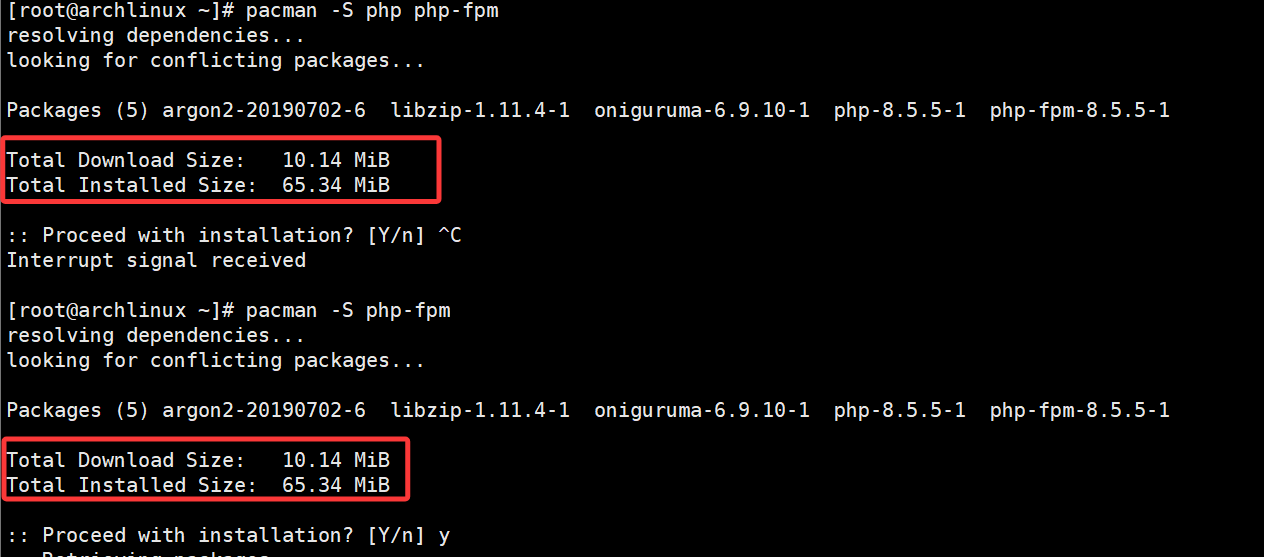
(php 进程来处理来自Web服务器的请求,对于Nginx这类无法原生执行PHP代码的Web服务器,php-fpm 是其与PHP脚本沟通的必要桥梁。php-fpm 包依赖于 php 包,这意味着当你安装 php-fpm 时,php 包会自动作为依赖项安装)
pacman -S php-fpm(可以看到两个相同)
pacman -S php-gd #后面虽然是警告,但是会影响后面的操作,还是需要进行安装。
8.添加扩展,修改扩展文件
vim /etc/php/php.ini
取消下面几行的注释
#extension=pdo_mysql
#extension=mysqli
#extension=curl
#extension=gd
[root@archlinux php]# systemctl restart php-fpm  #安装php-fpm
[root@archlinux php]# php -m |grep -E "mysql|pdo|curl|gd"  #查找扩展是否已经安装。
PHP Warning:  PHP Startup: Unable to load dynamic library 'gd' (tried: /usr/lib/php/modules/gd (/usr/lib/php/modules/gd: cannot open shared object file: No such file or directory), /usr/lib/php/modules/gd.so (/usr/lib/php/modules/gd.so: cannot open shared object file: No such file or directory)) in Unknown on line 0
curl
mysqli
mysqlnd
pdo_mysql


安装php-gd后解除警告warn
[root@archlinux php]# php -m |grep -E "mysql|pdo|curl|gd"
curl
gd
mysqli
mysqlnd
pdo_mysql

gd是php-gd的一个依赖库。php-gd包含gd
9.mv mblog/ /usr/share/nginx/html/
cd /usr/share/nginx/html/
[root@archlinux html]# cat /etc/passwd
(安装软件后自己创建的用户)
#http:x:33:33::/srv/http:/usr/bin/nologin
(http 用户是 Arch Linux 系统默认创建的,用于运行 Web 服务器)
(#nobody:x:65534:65534:Kernel Overflow User:/:/usr/bin/nologin)
nobody自带的用户,最小权限原则)
#git:x:969:969:git daemon user:/:/usr/bin/git-shell
#mysql:x:968:968:MariaDB:/var/lib/mysql:/usr/bin/nologin
10.配置nginx的配置文件
cp /etc/nginx/nginx.conf /etc/nginx/nginx.conf.bak #备份nginx.conf文件
vim /etc/nginx/nginx.conf
AI写配置文件语法

帮我写一个nginx的配置文件,root路径为/usr/share/nginx/html/xxx,正确日志在/var/log/nginx/xxx_access.log,错误日志在/var/log/nginx/xxx_error.log,
然后将下载下来的包内内容截图交给AI
在 Nginx 中,access_log 指令后可以跟一个格式名称,combined 只是其中一种。其实,combined 和 common 是 Nginx 预置的两种格式
配置文件示例:
user http;
worker_processes auto;
error_log /var/log/nginx/mblog_error.log;
pid /run/nginx.pid;

events {
    worker_connections 1024;
}

http {
    include /etc/nginx/mime.types;
    default_type application/octet-stream;

    # 注意:这里不再定义 log_format combined,直接使用主配置的

    server {
        listen 80;
        server_name _;

        root /usr/share/nginx/html/mblog;
        index index.php index.html;

        access_log /var/log/nginx/mblog_access.log combined;
        error_log  /var/log/nginx/mblog_error.log;

        location / {
            try_files $uri $uri/ /index.php?$args;
        }

        location ~ \.php$ {
            include fastcgi_params;
            fastcgi_pass unix:/run/php-fpm/php-fpm.sock;
            fastcgi_index index.php;
            fastcgi_param SCRIPT_FILENAME $document_root$fastcgi_script_name;
        }

        location ~ /(config|blog\.sql|README\.md) {
            deny all;
            return 404;
        }

        location ~ /\. {
            deny all;
        }
    }
}
nginx -t #查看语法格式是否正确
systemctl restart nginx #重启服务
如果是github上下载的代码,如果没有操作流程的话必然会出现问题,当出现问题时,使用下面的方法进行解决
使用tail -f /var/log/nginx/error.log
然后刷新你的页面将报错丢给AI
openEuler 是由开放原子开源基金会孵化的全场景开源操作系统项目,面向数字基础设施四大核心场景(服务器、云计算、边缘计算、嵌入式),全面支持 ARM、x86、RISC-V、loongArch、PowerPC、SW-64 等多样性计算架构
更多推荐

 2
2 0
0- 0


 已为社区贡献1条内容

所有评论(0)