排错刚需|Linux日志管理+时间同步完整实战教程
本文围绕Linux运维两大核心技能展开实战讲解,详解 rsyslog 与 systemd-journald 两类日志服务: rsyslog 按设施、优先级将日志分类归档至 /var/log 目录,结合SSH配置异常案例演示日志排错思路;依托 journalctl 实现结构化日志筛选查询。同时梳理系统时间管控方案,通过 date 、 timedatectl 手动调校时间,基于 chronyd 完成客
一、日志管理
摘要: 本文详细介绍了 Linux 系统中的日志管理机制,重点讲解了 rsyslog 和 systemd-journald 两大日志服务。rsyslog 负责将系统日志按 facility 和 priority 分类存储到 /var/log/ 下的不同文件(如 messages、secure、cron 等),并通过实际故障案例(如 sshd_config 文件丢失、配置错误)演示了如何利用日志进行故障排查。systemd-journald 则提供了结构化的日志索引,可通过 journalctl 命令灵活查看、过滤日志。文章还涵盖了时间管理,包括使用 date、timedatectl 命令设置系统时间,以及通过 chronyd 服务实现时间同步和时间服务器部署。
操作系统内核和程序记录了发生的事件日志,这些日志用于审核系统并解决问题。日志以文本方式保存在/var/log目录中。可以使用普通文本实用程序(如less和tail)检查这些日志。
Linux 内置了基于Syslog协议的标准日志记录系统。许多程序使用此系统记录事件并将其组织到日志文件中。CentOS 7 中systemd-journald和rsyslog服务负责处理syslog消息。
systemd-journald 服务,是操作系统事件记录体系结构的核心,收集系统各方面事件消息,包括内核、引导过程早期阶段的输出、守护程序启动和运行时的输出、syslog事件,然后将它们重组为标准格式,并写入结构化的索引系统日志中。
rsyslog 服务,读取systemd-journald日志,然后记录到日志文件,或根据自己的配置将日志保存到不同的文件中,以及转发给其他程序。
(一)rsyslog 日志配置
1.rsyslog 服务配置
(1)配置文件位置
- 主配置: /etc/rsyslog.conf。主配置文件中以下配置作用是引入从配置目录中配置文件。
bash # Include all config files in /etc/rsyslog.d/ include(file="/etc/rsyslog.d/*.conf" mode="optional")
- 从配置:/etc/rsyslog.d/*.conf。
(2)日志记录规则
每一条日志消息都可以通过消息类型facility和priority分类,参考rsyslog.conf(5)。
日志记录规则格式:
facility+连接符号+priority 处理方式
例如 cron.info
- facility(设备类型)
| facility | 说明 |
|---|---|
| auth | pam产生的日志 |
| authpriv | ssh,ftp等登录信息的验证信息 |
| cron | 周期性任务计划相关 |
| kern | 内核 |
| Ipr | 打印 |
| 邮件 | |
| news | 新闻组 |
| user | 用户程序产生的相关信息 |
| local 0~7 | 自定义的日志设备,本地使用 |
- priority(优先级)
| 优先级 | 优先级名称 | 严重性 |
|---|---|---|
| 0 | emerg | 系统不可用 |
| 1 | alert | 必须立即采取措施 |
| 2 | crit | 临界情况 |
| 3 | err | 非验证错误状况 |
| 4 | warning | 警告情況 |
| 5 | notice | 正常但重要的事件 |
| 6 | info | 信息性事件 |
| 7 | debug | 调式级别消息 |
| 8 | none | 代表什么都不存储 |
- 连接符号
| 连接符号 | 作用 |
|---|---|
| . | 表示大于等于xxx级别的信息 |
| .= | 表示等于xXx级别的信息 |
| .! | 表示在xXx之外的等级的信息 |
- 处理方式
- 记录到文件
- 发送到终端
- 转发给其他服务器
(3)配置文件内容
/etc/rsyslog.conf 中部分内容如下:
#### RULES ####

# Log all kernel messages to the console.
# Logging much else clutters up the screen.
#kern.*                                                 /dev/console

# Log anything (except mail) of level info or higher.
# Don't log private authentication messages!
*.info;mail.none;authpriv.none;cron.none                /var/log/messages

# The authpriv file has restricted access.
authpriv.*                                              /var/log/secure

# Log all the mail messages in one place.
mail.*                                                  -/var/log/maillog


# Log cron stuff
cron.*                                                  /var/log/cron

# Everybody gets emergency messages
*.emerg                                                 :omusrmsg:*

# Save news errors of level crit and higher in a special file.
uucp,news.crit                                          /var/log/spooler

# Save boot messages also to boot.log
local7.*                                                /var/log/boot.log
日志存储位置:
- /var/log/messages,大多数系统日志消息记录在此处,不包括与身份验证、电子邮件处理和调度作业执行相关的消息以及纯碎与调试相关的消息。
- /var/log/secure,与安全性和身份验证事件相关的syslog消息。
- /var/log/maillog,与邮件服务器相关的syslog消息。
- /var/log/cron,与调度作业执行相关的syslog消息。
- /var/log/boot.log,与系统启动相关的非syslog控制台消息。
2.查看日志内容
[root@server ~ 19:27:59]# tail -f /var/log/messages
......
May 24 19:25:45 server systemd: Created slice User Slice of root.
May 24 19:25:45 server systemd: Started Session 1 of user root.
May 24 19:25:45 server systemd-logind: New session 1 of user root.
......
日志内容说明:
• May 24 19:25:45,代表日志产生时间。
• server,产生日志的主机名。
• systemd-logind,产生日志的进程。
• 最后一个区域是日志内容,例如,“New session 1 of user root.”。
[root@server ~ 19:41:18]# tail -f /var/log/secure
May 23 13:00:59 server sshd[1237]: Accepted password for root from 10.1.8.1 port 4247 ssh2
May 23 13:00:59 server sshd[1237]: pam_unix(sshd:session): session opened for user root by (uid=0)
......
3.最佳实践
故障1:sshd_config文件丢失
模拟:
[root@server ~ 19:42:10]# mv /etc/ssh/sshd_config .
[root@server ~ 19:43:15]# systemctl restart sshd
监控日志:
[root@server ~ 19:43:25]# tail -f /var/log/messages
......
May 24 19:43:25 server systemd: Stopping OpenSSH server daemon...
May 24 19:43:25 server systemd: Stopped OpenSSH server daemon.
May 24 19:43:25 server systemd: Starting OpenSSH server daemon...
May 24 19:43:25 server sshd: /etc/ssh/sshd_config: No such file or directory
May 24 19:43:25 server systemd: sshd.service: main process exited, code=exited, status=1/FAILURE
May 24 19:43:25 server systemd: Failed to start OpenSSH server daemon.
May 24 19:43:25 server systemd: Unit sshd.service entered failed state.
May 24 19:43:25 server systemd: sshd.service failed.
......
根据提示恢复文件。
[root@server ~ 19:44:12]# mv sshd_config /etc/ssh/
[root@server ~ 19:46:12]# systemctl restart sshd
故障2:sshd_config配置错误
模拟:
[root@server ~ 19:46:16]# echo hello world >> /etc/ssh/sshd_config
[root@server ~ 19:47:33]# systemctl restart sshd
[root@server ~ 19:47:08]# tail -f /var/log/messages
......
May 24 19:48:02 server systemd: Stopping OpenSSH server daemon...
May 24 19:48:02 server systemd: Stopped OpenSSH server daemon.
May 24 19:48:02 server systemd: Starting OpenSSH server daemon...
May 24 19:48:02 server sshd: /etc/ssh/sshd_config: line 141: Bad configuration option: hello
May 24 19:48:02 server sshd: /etc/ssh/sshd_config: terminating, 1 bad configuration options
May 24 19:48:02 server systemd: sshd.service: main process exited, code=exited, status=255/n/a
May 24 19:48:02 server systemd: Failed to start OpenSSH server daemon.
May 24 19:48:02 server systemd: Unit sshd.service entered failed state.
May 24 19:48:02 server systemd: sshd.service failed.
......
根据提示修复配置文件错误。
4.补充
虽然系统提供了日志服务,但并不会记录所有内容。
系统中的应用程序是否使用 rsyslog 服务记录日志,取决于应用程序设计。
httpd 服务使用自己的日志记录。
sshd 服务使用 rsyslog 服务记录登录和退出日志。
[root@server ~ 19:50:53]# grep AUTHPRIV /etc/ssh/sshd_config
SyslogFacility AUTHPRIV

[root@server ~ 19:51:17]# grep ^authpri /etc/rsyslog.conf
authpriv.*                                              /var/log/secure

[root@server ~ 20:00:33]# tail -1 /var/log/secure
May 24 20:03:41 server sshd[1597]: pam_unix(sshd:session): session opened for user root by (uid=0)
(二)systemd-journald 日志
1.journalctl 查看日志
# 动态查看所有日志条目
[root@server ~ 19:57:05]# journalctl -f

# 查看error级别日志
[root@server ~ 20:19:23]# journalctl -p err
[root@server ~ 20:19:49]# journalctl -p err | cat

# 模拟发送一条err级别消息
[root@server ~ 20:20:17]# logger -p err "test err"

# 根据时间查看日志
[root@server ~ 20:03:46]# journalctl --since today
[root@server ~ 20:22:01]# journalctl --since "2026-05-24 20:20:00" --until "2026-05-25 12:00:00"
[root@server ~ 20:24:22]# journalctl --since "-1 hour"

# 查看特定unit日志
[root@server ~ 20:24:40]# journalctl -u sshd.service
2.最佳实践
故障1:配置文件丢失
[root@server ~ 20:21:36]# mv /etc/ssh/sshd_config .
[root@server ~ 20:32:57]# systemctl restart sshd
处理过程:通过日志发现 /etc/ssh/sshd_config: No such file or directory,文件丢失。
[root@server ~ 20:24:40]#  journalctl -f
5月 24 20:33:51 server.lz.cloud systemd[1]: Starting OpenSSH server daemon...
5月 24 20:33:51 server.lz.cloud sshd[1655]: /etc/ssh/sshd_config: No such file or directory
5月 24 20:33:51 server.lz.cloud systemd[1]: sshd.service: main process exited, code=exited, status=1/FAILURE
......

# 移动回来,并重启服务
[root@server ~ 20:33:09]# mv sshd_config /etc/ssh/sshd_config
[root@server ~ 20:38:12]# systemctl restart sshd
故障2:配置文件参数错误
[root@server ~ 20:38:14]# echo 'PermitRootLogin hahaha' >> /etc/ssh/sshd_config
[root@server ~ 20:39:31]# systemctl restart sshd
处理过程:通过日志发现/etc/ssh/sshd_config line 141: unsupported option “hahaha”.
# 重启服务时,动态监控日志
[root@server ~ 20:33:54]#  journalctl -f
-- Logs begin at 日 2026-05-24 19:25:23 CST. --
5月 24 20:39:35 server.lz.cloud sshd[1677]: Received signal 15; terminating.
5月 24 20:39:35 server.lz.cloud systemd[1]: Stopping OpenSSH server daemon...
5月 24 20:39:35 server.lz.cloud systemd[1]: Stopped OpenSSH server daemon.
5月 24 20:39:35 server.lz.cloud systemd[1]: Starting OpenSSH server daemon...
5月 24 20:39:35 server.lz.cloud sshd[11594]: /etc/ssh/sshd_config line 141: unsupported option "hahaha".
5月 24 20:39:35 server.lz.cloud systemd[1]: sshd.service: main process exited, code=exited, status=255/n/a

# 清理对应无效记录,并重启服务
[root@server ~ 20:39:35]# sed -i '/hahaha/d' /etc/ssh/sshd_config
[root@server ~ 20:41:13]# systemctl restart sshd
故障3:配置文件参数错误
[root@server ~ 20:41:14]# yum install -y httpd
[root@server ~ 20:44:11]# sed -i 's/Listen 80/Listen 80000/g' /etc/httpd/conf/httpd.conf
[root@server ~ 20:44:35]# systemctl restart httpd
处理过程:通过日志发现 AH00526: Syntax error on line 42 of /etc/httpd/conf/httpd.conf
# 重启服务时,动态监控日志
[root@server ~ 20:40:26]#  journalctl -f
5月 24 20:44:46 server.lz.cloud systemd[1]: Starting The Apache HTTP Server...
5月 24 20:44:46 server.lz.cloud httpd[11666]: AH00526: Syntax error on line 42 of /etc/httpd/conf/httpd.conf:
5月 24 20:44:46 server.lz.cloud httpd[11666]: Invalid address or port
5月 24 20:44:46 server.lz.cloud systemd[1]: httpd.service: main process exited, code=exited, status=1/FAILURE
5月 24 20:44:46 server.lz.cloud systemd[1]: Failed to start The Apache HTTP Server.
5月 24 20:44:46 server.lz.cloud systemd[1]: Unit httpd.service entered failed state.

# 修改回来,并重启服务
[root@server ~ 20:44:46]# sed -i 's/Listen 80000/Listen 80/g' /etc/httpd/conf/httpd.conf
[root@server ~ 20:46:56]# systemctl restart httpd
二、时间管理
(一)系统时间设置
1.date 命令
# 设置语言为英语
[root@server ~ 20:47:00]# LANG=en_US.utf8 date
Sun May 24 20:52:02 CST 2026

# 中文语言代码为zh_CN.utf-8
[root@server ~ 20:52:02]# LANG=zh_CN.utf8 date
2026年 05月 24日 星期日 20:52:17 CST

# 设置为特定时间,时间字符串必须是英文格式
[root@server ~ 20:52:17]# date -s '2022年 11月 11日 星期四 11:30:10 CST'
date: 无效的日期"2022年 11月 11日 星期四 11:30:10 CST"

[root@server ~ 20:53:23]# date -s 'Thu Nov 11 11:30:59 CST 2022'
2022年 11月 11日 星期五 11:30:59 CST
2.tzselect 命令
查询时区名称。
[root@server ~ 11:30:59]# tzselect
Please identify a location so that time zone rules can be set correctly.
Please select a continent or ocean.
 1) Africa
 2) Americas
 3) Antarctica
 4) Arctic Ocean
 5) Asia
 6) Atlantic Ocean
 7) Australia
 8) Europe
 9) Indian Ocean
10) Pacific Ocean
11) none - I want to specify the time zone using the Posix TZ format.
#? 5
Please select a country.
 1) Afghanistan		  18) Israel		    35) Palestine
 2) Armenia		  19) Japan		    36) Philippines
 3) Azerbaijan		  20) Jordan		    37) Qatar
 4) Bahrain		  21) Kazakhstan	    38) Russia
 5) Bangladesh		  22) Korea (North)	    39) Saudi Arabia
 6) Bhutan		  23) Korea (South)	    40) Singapore
 7) Brunei		  24) Kuwait		    41) Sri Lanka
 8) Cambodia		  25) Kyrgyzstan	    42) Syria
 9) China		  26) Laos		    43) Taiwan
10) Cyprus		  27) Lebanon		    44) Tajikistan
11) East Timor		  28) Macau		    45) Thailand
12) Georgia		  29) Malaysia		    46) Turkmenistan
13) Hong Kong		  30) Mongolia		    47) United Arab Emirates
14) India		  31) Myanmar (Burma)	    48) Uzbekistan
15) Indonesia		  32) Nepal		    49) Vietnam
16) Iran		  33) Oman		    50) Yemen
17) Iraq		  34) Pakistan
#? 9
Please select one of the following time zone regions.
1) Beijing Time
2) Xinjiang Time
#? 1

The following information has been given:

	China
	Beijing Time

Therefore TZ='Asia/Shanghai' will be used.
Local time is now:	Fri Nov 11 11:32:32 CST 2022.
Universal Time is now:	Fri Nov 11 03:32:32 UTC 2022.
Is the above information OK?
1) Yes
2) No
#? 1

You can make this change permanent for yourself by appending the line
	TZ='Asia/Shanghai'; export TZ
to the file '.profile' in your home directory; then log out and log in again.

Here is that TZ value again, this time on standard output so that you
can use the /usr/bin/tzselect command in shell scripts:
Asia/Shanghai
3.timedatectl 命令
[root@server ~ 11:32:36]# timedatectl
      Local time: 五 2022-11-11 11:33:18 CST
  Universal time: 五 2022-11-11 03:33:18 UTC
        RTC time: 日 2026-05-24 12:56:42
       Time zone: Asia/Shanghai (CST, +0800)
     NTP enabled: yes
NTP synchronized: no
 RTC in local TZ: no
      DST active: n/a

[root@server ~ 11:33:18]# timedatectl set-time '2022-11-10 11:42:54'

# 如果自动对时未关闭,显示如下
[root@server ~ 11:33:18]# timedatectl set-time '2022-11-10 11:42:54'
Failed to set time: Automatic time synchronization is enabled

# 设置时区
[root@server ~ 11:33:50]# timedatectl set-timezone Asia/Shanghai
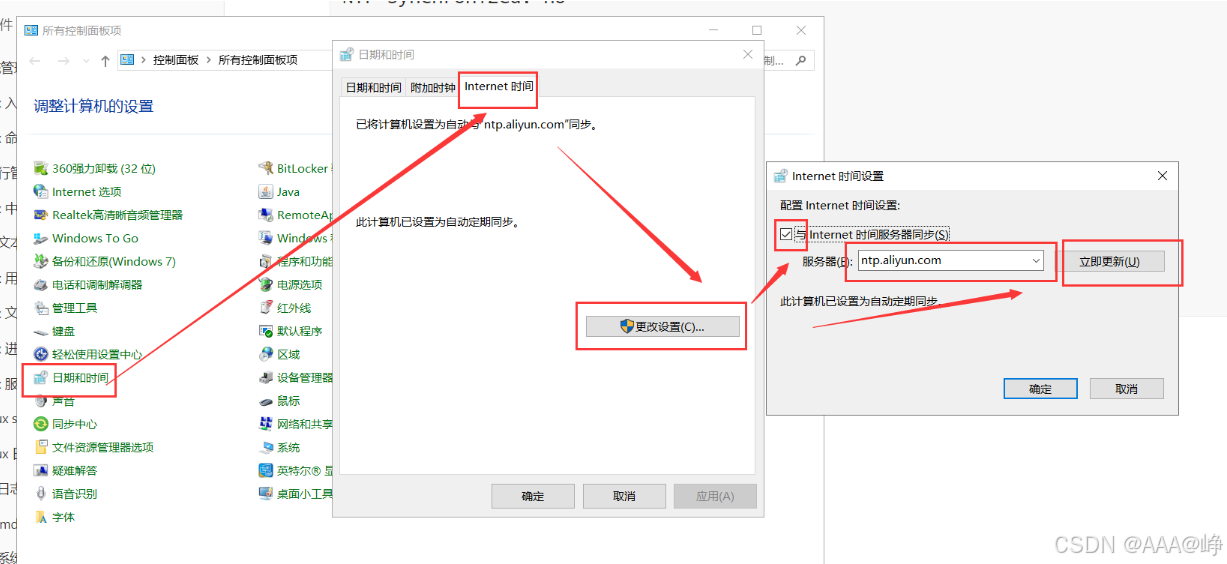
4.windows 自动对时
5.自动对时-chronyd 服务
# 安装软件包
[root@server ~ 11:37:28]# yum install chrony

# 修改对时服务器
[root@server ~ 11:39:47]# vim /etc/chrony.conf
# 与时间池对时
# 时间池是包含多个时间服务器的服务器组
pool 2.rocky.pool.ntp.org iburst

# 与单个服务器 ntp.aliyun.com 对时
server ntp.aliyun.com iburst

# 启用并启动chronyd服务
[root@server ~ 11:41:15]# systemctl enable chronyd --now

# 如果之前已经启动,需要重启
[root@server ~ 11:42:07]# systemctl restart chronyd

# 验证对时情况
[root@server ~ 11:42:19]# chronyc sources -v
210 Number of sources = 8

  .-- Source mode  '^' = server, '=' = peer, '#' = local clock.
 / .- Source state '*' = current synced, '+' = combined , '-' = not combined,
| /   '?' = unreachable, 'x' = time may be in error, '~' = time too variable.
||                                                 .- xxxx [ yyyy ] +/- zzzz
||      Reachability register (octal) -.           |  xxxx = adjusted offset,
||      Log2(Polling interval) --.      |          |  yyyy = measured offset,
||                                \     |          |  zzzz = estimated error.
||                                 |    |           \
MS Name/IP address         Stratum Poll Reach LastRx Last sample
===============================================================================
^* 111.230.189.174               2   6    17    31  -2230us[-30969h] +/-   43ms
^+ ntp5.flashdance.cx            2   6    17    28  +1329us[+1329us] +/-  129ms
^- time.cloudflare.com           3   6    17    29    +15ms[  +15ms] +/-  100ms
^+ time.nju.edu.cn               1   6    17    30  +5297us[+5297us] +/-   25ms
^- 119.28.183.184                2   6    17    31  -9234us[-9234us] +/-   69ms
^- stratum2-1.ntp.mow01.ru.>     2   6   221    22    +33ms[  +33ms] +/-  109ms
^- 139.199.215.251               2   6    17    30  -2927us[-2927us] +/-   59ms
^+ 139.199.214.202               2   6    35    28  -1174us[-1174us] +/-   49ms
快速注释多行:
server 0.centos.pool.ntp.org iburst
server 1.centos.pool.ntp.org iburst
server 2.centos.pool.ntp.org iburst
server 3.centos.pool.ntp.org iburst
1.定位光标到需要注释的多行内容中的第一行第一个字符。
2.ctrl+v,移动光标到多行内容中的最后一行第一个字符。
3.I(i的大写),插入#,按esc。
(二)部署时间服务器
chrony 既可以作为客户端,也可以作为服务端(为客户端提供对时服务)。
1.服务端
[root@server ~ 21:07:55]# vim /etc/chrony.conf
# 最后添加两条记录

# 配置监听地址
bindaddress 10.1.8.10

# 配置允许哪些网段主机同步
allow 10.1.8.0/24

[root@server ~ 21:11:04]# systemctl restart chronyd

# 停止防火墙服务
[root@server ~ 21:11:33]# systemctl stop firewalld.service
2.客户端
# 修改对时服务器
[root@client ~ 21:12:47]# vim /etc/chrony.conf
# 与单个服务器 10.1.8.10 对时
server 10.1.8.10 iburst

[root@client ~ 21:13:39]# systemctl restart chronyd
[root@client ~ 21:13:47]# chronyc sources -v
210 Number of sources = 5

  .-- Source mode  '^' = server, '=' = peer, '#' = local clock.
 / .- Source state '*' = current synced, '+' = combined , '-' = not combined,
| /   '?' = unreachable, 'x' = time may be in error, '~' = time too variable.
||                                                 .- xxxx [ yyyy ] +/- zzzz
||      Reachability register (octal) -.           |  xxxx = adjusted offset,
||      Log2(Polling interval) --.      |          |  yyyy = measured offset,
||                                \     |          |  zzzz = estimated error.
||                                 |    |           \
MS Name/IP address         Stratum Poll Reach LastRx Last sample
===============================================================================
^- server.lz.cloud               3   6    17    17  +4413us[+4413us] +/-  117ms
^- ntp5.flashdance.cx            2   6   113    10   +480us[ +480us] +/-  128ms
^- 139.199.215.251               2   6    17    17  -2524us[-2524us] +/-   60ms
^- tick.ntp.infomaniak.ch        1   6    27    15  +8808us[+8808us] +/-  101ms
^* 139.199.214.202               2   6    17    18   +587us[+4444us] +/-   47ms

openEuler 是由开放原子开源基金会孵化的全场景开源操作系统项目,面向数字基础设施四大核心场景(服务器、云计算、边缘计算、嵌入式),全面支持 ARM、x86、RISC-V、loongArch、PowerPC、SW-64 等多样性计算架构
更多推荐

 15
15 0
0- 0


 已为社区贡献3条内容

所有评论(0)