Windows本地Nginx服务器部署SSL证书(OpenSSL自签名证书)
下载地址。
一、下载安装OpenSSL
下载地址 https://slproweb.com/products/Win32OpenSSL.html 百度网盘
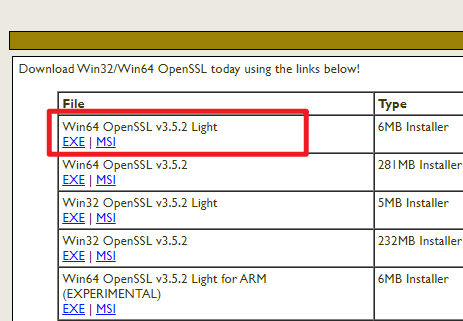
注意安装目录不要有空格
二、创建根CA证书
1. 在 openssl.exe 所在目录下,路径条中输入cmd,打开命令提示符
2. 依次输入以下指令:
# 生成私密的根CA密钥:
openssl genrsa -out my-root-ca.key 2048
# 使用密钥生成自签名的根CA证书(这就是你要导入到系统信任库的证书):
openssl req -x509 -new -nodes -key my-root-ca.key -sha256 -days 1825 -out my-root-ca.crt -subj "/CN=My-Local-Root-CA"
三、用你的根 CA 为你的服务器签发一个证书
以IP地址192.168.2.44为例,cmd继续输入以下指令:
# 创建服务器私钥:
openssl genrsa -out 192.168.2.44.key 2048
# 创建证书签名请求 (CSR):
openssl req -new -key 192.168.2.44.key -out 192.168.2.44.csr -subj "/CN=192.168.2.44"
四、创建一个配置文件 v3.ext
以IP地址192.168.2.44为例,
在 openssl.exe 所在目录下,新建文本文件,命名为 “v3.ext”,粘贴以下内容:
authorityKeyIdentifier=keyid,issuer
basicConstraints=CA:FALSE
keyUsage = digitalSignature, nonRepudiation, keyEncipherment, dataEncipherment
subjectAltName = @alt_names
[alt_names]
IP.1 = 192.168.2.44
此步骤用于指明该证书用于服务器身份验证,并包含IP地址。
五、使用你的根 CA 签署 CSR,生成最终的服务器证书:
以IP地址192.168.2.44为例,cmd继续输入以下指令:
openssl x509 -req -in 192.168.2.44.csr -CA my-root-ca.crt -CAkey my-root-ca.key -CAcreateserial -out 192.168.2.44.crt -days 825 -sha256 -extfile v3.ext
现在,你就有了:
-
服务器证书文件:
192.168.2.44.crt -
服务器私钥文件:
192.168.2.44.key -
CA 证书文件(用于构建链):
my-root-ca.crt
六、编辑Nginx配置文件:
编辑您的 nginx.conf 文件:
server {
listen 443 ssl;
server_name 192.168.2.44;
# 示例路径,请根据您实际的目录修改
ssl_certificate C:/Users/YourPath/192.168.2.44.crt;
ssl_certificate_key C:/Users/YourPath/192.168.2.44.key;
... 其他配置 ...
}
注意目录路径不能包含 像 Program Files 这种带空格的文件夹
PS:将 my-root-ca.crt 证书安装到 受信任的根证书颁发机构 ,Firefox设置 security.enterprise_roots.enabled 为 true(在 about:config 中设置)可解决Firefox本地测试WebSockets不可用问题
PS:将 CRT 证书和 KEY 私钥合并成一个 PKCS#12 (.pfx) 文件 CMD指令:
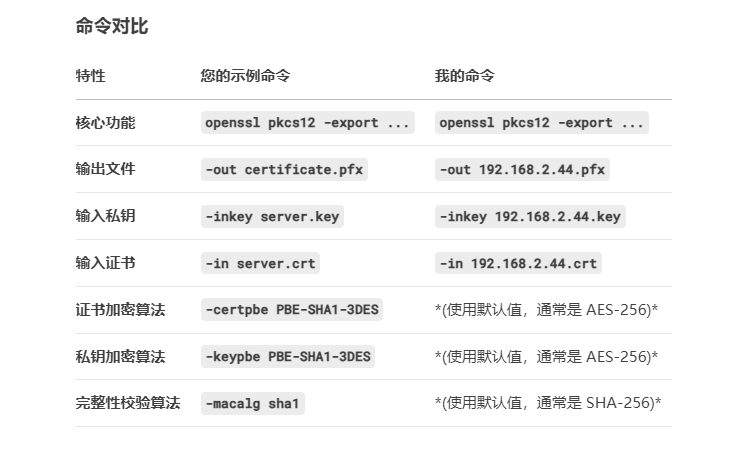
openssl pkcs12 -export -out 192.168.2.44.pfx -inkey 192.168.2.44.key -in 192.168.2.44.crt
或 (Unity Mirror插件 使用SimpleWebTransport的Ceil.json指定pfx后,运行报错,用下面指令生成pfx无报错)
openssl pkcs12 -export -out certificate.pfx -inkey server.key -in server.crt -certpbe PBE-SHA1-3DES -keypbe PBE-SHA1-3DES -macalg sha1

openEuler 是由开放原子开源基金会孵化的全场景开源操作系统项目,面向数字基础设施四大核心场景(服务器、云计算、边缘计算、嵌入式),全面支持 ARM、x86、RISC-V、loongArch、PowerPC、SW-64 等多样性计算架构
更多推荐
 26
26 0
0- 0


 已为社区贡献1条内容

所有评论(0)