吃透Ansible:架构+Ad Hoc+Playbook全流程实操指南
本文围绕Ansible自动化运维工具展开全维度讲解。先梳理工具无代理、跨平台的核心特性与控制节点、受控主机、Playbook组成的整体架构;接着详解实验环境搭建、SSH免密等部署配置要点;实操演示Ad Hoc指令与command、shell高频模块用法,结合YAML语法拆解Playbook编写逻辑,搭配Web服务部署落地案例。由理论到实操层层递进,帮助读者快速掌握Ansible基础,具备服务器批量
吃透Ansible:架构+Ad Hoc+Playbook全流程实操指南
01-Ansible 自动化介绍
**摘要:**本文围绕Ansible自动化运维工具展开全维度讲解。先梳理工具无代理、跨平台的核心特性与控制节点、受控主机、Playbook组成的整体架构;接着详解实验环境搭建、SSH免密等部署配置要点;实操演示Ad Hoc指令与command、shell高频模块用法,结合YAML语法拆解Playbook编写逻辑,搭配Web服务部署落地案例。由理论到实操层层递进,帮助读者快速掌握Ansible基础,具备服务器批量自动化运维实操能力。
1.Ansible 自动化介绍
(1)自动化执行任务
手动执行任务缺点:
• 很容易遗漏某个步骤或错误地执行某个步骤。步骤是否正确执行或产生预期的结果的验证通常有限。
• 管理大量服务器很容易会出现差异,加大维护的难度,并给IT环境带来错误或不稳定性。
自动化执行任务优点:
• 通过标准化,确保快速、正确地部署和配置所有系统。
• 自动执行日常计划重复性任务,从而空出时间并专注于更重要的事情。
• 更快速的交付应用。
(2)什么是 ANSIBLE?
Ansible is a simple automation language,通过Playbooks描述和配置IT基础架构。
Ansible可以管理强大的自动化任务,适用于不同的生产环境。同时,Ansible对于新用户来说,也可以很快的上手运用到生产环境。
使用案例:
• OpenStack 搭建和维护
• OpenShift 搭建和维护
• ceph 搭建和维护
(3)Ansible 特点
• 简单:Ansible Playbooks 是一个人们非常容易查阅,理解和更改的文本文件,用户不需要具备特定的代码编写技能。
• 功能强大:可以使用Ansible部署应用,例如配置管理,工作流自动化,网络自动化。还可用于编排整个应用生命周期。
• 无代理:Ansible 是一个无代理的架构,通过OpenSSH或者WinRM连接到hosts,并执行任务,推送小的程序(Ansible modules)到这些主机上。这些程序用于设置系统到预期状态。在Ansible执行完成后,任何之前推送的模块,都会被删除。Ansible可以随时使用,因为被管理主机上不需要配置特定代理。正是因为这点,Ansible 才更加高效和安全。
• 跨平台支持:可以管理Linux、UNIX、windows 和网络设备。
• 非常准确地描述应用:Ansible Playbook使用YAML格式描述生产环境。
• 可以通过版本控制管理:Ansible Playbooks和projects是纯文本格式,可以当作源码存放在版本控制系统中。
• 非常容易与其他系统集成: HP SA,Puppet,Jenkins,红帽卫星服务器等。
(4)Ansible 概念和架构
•NODES:Ansible架构中有两种计算机类型:
• 控制节点,安装有ansible软件的节点。
• 受管节点,被ansible管理的Linux系统、Windows系统、网络设备等。
• INVENTORY:受管主机清单。
• PLAYBOOK:Ansible用户只需要编写playbook,确保主机是预期状态。
• 每个playbook可以包含多个play。
• 每个play会在一组hosts上按顺序执行一系列tasks。
• 每个task都执行一个模块,模块是一个小的代码段(Python,PowerShell,或者其他语言)。Ansible自带几百个模块,执行不同类型自动化任务,例如操作系统文件,安装软件,API调用。Tasks,plays和Playbooks是 idempotent(幂等的),在相同的主机上多次安全地执行Playbooks,让主机是正确的状态。如果主机已经是预期状态,则Playbook不会做任何改变。
• PLUGINS,添加到Ansible中的代码段,用于扩展Ansible平台。
(5)Ansible 用例
• 配置管理:集中化配置文件管理和部署是Ansible的常见用例,很多高级用户也是通过这种方式了解Ansible自动化平台。
• 应用部署:通过Ansible定义应用,以及使用红帽Ansible Tower管理部署时,各团队可以更加有效地管理从开发到生产的整个应用生命周期。
• 工作流管理:Ansible 和红帽Ansible Tower有助于简化调配系统的流程,不论您是要PXE引导和kickstart安装裸机恢复服务器或虚拟机,还是从模板创建虚拟机或云实例。
• 持续交付:创建CI/CD管道需要多个团队的协调和参与。如果没有组织内人人可用的简单自动化平台,就无法实现这个目标。Ansible Playbook让您的应用可以在整个生命周期内得到正确部署(和管理)
• 安全性和合规性:当您在Ansible Playbook中定义安全策略时,也可以将扫描和修复整站安全策略集成到其他自动化流程中。确保安全应该是您所有部署中不可或缺的组成部分,而不是事后才去考虑的部分。
• 编排:仅配置本身不足以定义您的环境,您还需定义多个配置间就应如何交互,并确保以整体的方式管理各类分散资源。
2.Ansible 部署
(1)准备实验环境
创建虚拟机模板
[lz@controller ~ 19:23:34]$ cat sethost
#!/bin/bash

usage () {
  echo "Usage: $0 10-14"
}

((UID!=0)) && echo "Please run as root." && exit 1

host_id=$1

con_name=ens32
DOMAIN=laoma.cloud

if [[ ! "${host_id}" =~ ^[0-9]+$ ]] ;then
   echo "请提供一个纯数字的主机ID。"
   usage && exit 2
fi

case $host_id in
  10)
    HOSTNAME=controller.$DOMAIN
    ;;
  1[1-4])
    HOSTNAME=node$((host_id-10)).$DOMAIN
    ;;
  *)
    echo "提供数字的主机ID范围必须是10-14。"
    usage && exit 3
esac

hostnamectl set-hostname $HOSTNAME
nmcli connection modify ${con_name} ipv4.address 10.1.8.${host_id}/24
nmcli connection up ${con_name} &>/dev/null

clear
echo "Hostname: $(hostname)"
echo "IP Address: $(ip -br a | tr '/' ' ' |awk '/ens/ {print $3}')"

[root@controller ~ 19:24:58]# bash sethost 10
Hostname: controller.lz.cloud
IP Address: 10.1.8.10
[root@controller ~ 19:24:58]#
用模板克隆4台,分别执行上面shell脚本。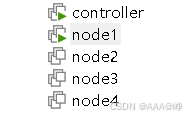
实验环境 /etc/hosts
#查看本机 /etc/hosts 主机名解析文件
#初始状态只有本地回环地址,没有集群节点映射
[lz@controller ~ 10:41:11]$ cat /etc/hosts
127.0.0.1   localhost localhost.localdomain localhost4 localhost4.localdomain4
::1         localhost localhost.localdomain localhost6 localhost6.localdomain6

#创建并编辑 SSH 免密批量分发脚本
#用于一键生成密钥 + 批量推送密钥到所有节点
[lz@controller ~ 11:02:53]$ vim keygen.sh
#!/bin/bash
ssh-keygen -t rsa -f ~/.ssh/id_rsa -N ''
for host in 10.1.8.1{0..4}
do
  sshpass -p123 ssh-copy-id root@$host
done

#给脚本添加执行权限
[lz@controller ~ 11:12:36]$ chmod +x keygen.sh

#执行密钥生成 + 批量分发脚本
[lz@controller ~ 11:18:27]$ bash keygen.sh
Generating public/private rsa key pair.
/home/lz/.ssh/id_rsa already exists.
Overwrite (y/n)? y
Your identification has been saved in /home/lz/.ssh/id_rsa.
Your public key has been saved in /home/lz/.ssh/id_rsa.pub.
The key fingerprint is:
SHA256:SDv+2D9dMlgBoUi8C1HfSapczAsabLch7G1j8UuGJ3I lz@controller.lz.cloud
The key's randomart image is:
+---[RSA 2048]----+
|     oo   +o     |
|   o...= = ..    |
|    *.B.B o  .   |
|   o.O.% .  .    |
|    +.E.S  o     |
|     *.B .. o .  |
|      . .  . +   |
|       +  . .    |
|      . o...     |
+----[SHA256]-----+
/usr/bin/ssh-copy-id: INFO: Source of key(s) to be installed: "/home/lz/.ssh/id_rsa.pub"
/usr/bin/ssh-copy-id: INFO: attempting to log in with the new key(s), to filter out any that are already installed
/usr/bin/ssh-copy-id: INFO: 1 key(s) remain to be installed -- if you are prompted now it is to install the new keys

Number of key(s) added: 1

Now try logging into the machine, with:   "ssh 'root@10.1.8.10'"
and check to make sure that only the key(s) you wanted were added.

/usr/bin/ssh-copy-id: INFO: Source of key(s) to be installed: "/home/lz/.ssh/id_rsa.pub"
/usr/bin/ssh-copy-id: INFO: attempting to log in with the new key(s), to filter out any that are already installed
/usr/bin/ssh-copy-id: INFO: 1 key(s) remain to be installed -- if you are prompted now it is to install the new keys

Number of key(s) added: 1

Now try logging into the machine, with:   "ssh 'root@10.1.8.11'"
and check to make sure that only the key(s) you wanted were added.

/usr/bin/ssh-copy-id: INFO: Source of key(s) to be installed: "/home/lz/.ssh/id_rsa.pub"
/usr/bin/ssh-copy-id: INFO: attempting to log in with the new key(s), to filter out any that are already installed
/usr/bin/ssh-copy-id: INFO: 1 key(s) remain to be installed -- if you are prompted now it is to install the new keys

Number of key(s) added: 1

Now try logging into the machine, with:   "ssh 'root@10.1.8.12'"
and check to make sure that only the key(s) you wanted were added.

/usr/bin/ssh-copy-id: INFO: Source of key(s) to be installed: "/home/lz/.ssh/id_rsa.pub"
/usr/bin/ssh-copy-id: INFO: attempting to log in with the new key(s), to filter out any that are already installed
/usr/bin/ssh-copy-id: INFO: 1 key(s) remain to be installed -- if you are prompted now it is to install the new keys

Number of key(s) added: 1

Now try logging into the machine, with:   "ssh 'root@10.1.8.13'"
and check to make sure that only the key(s) you wanted were added.

/usr/bin/ssh-copy-id: INFO: Source of key(s) to be installed: "/home/lz/.ssh/id_rsa.pub"
/usr/bin/ssh-copy-id: INFO: attempting to log in with the new key(s), to filter out any that are already installed
/usr/bin/ssh-copy-id: INFO: 1 key(s) remain to be installed -- if you are prompted now it is to install the new keys

Number of key(s) added: 1

Now try logging into the machine, with:   "ssh 'root@10.1.8.14'"
and check to make sure that only the key(s) you wanted were added.

#创建weihu 脚本可以实现:weihu cmd 命令、weihu copy 文件 目标 一键批量操作
[lz@controller ~ 11:45:03]$ cat weihu
#!/bin/bash

# 主机清单
HOSTS=("10.1.8.10" "10.1.8.11" "10.1.8.12" "10.1.8.13" "10.1.8.14")
# 默认使用 root 用户维护主机
SSH_USER="root"

# ===================== 功能函数 =====================
# 检查SSH免密登录(成功不显示,失败才显示)
check_ssh_key() {
    for host in "${HOSTS[@]}"; do
        ssh -o BatchMode=yes -o ConnectTimeout=3 "${SSH_USER}@${host}" "echo ok" &>/dev/null
        if [ $? -ne 0 ]; then
            echo -e "\n【错误】主机 $host 未配置 root 免密登录!"
            echo "请先配置 SSH 密钥免密登录后再执行脚本!"
            exit 1
        fi
    done
}

# 批量执行命令
exec_cmd() {
    local cmd="$*"
    echo -e "\n===== 批量执行命令:$cmd ====="
    for host in "${HOSTS[@]}"; do
        ssh -o ConnectTimeout=3 "${SSH_USER}@${host}" "$cmd"
    done
}

# 批量复制文件(支持多文件:src1 src2 ... dest)
copy_file() {
    # 最后一个参数是目标地址,前面全部是源文件/目录
    local dest="${@: -1}"
    local srcs=("${@:1:$#-1}")

    # 校验源文件是否存在
    for src in "${srcs[@]}"; do
        if [ ! -e "$src" ]; then
            echo "【错误】本地文件 $src 不存在!"
            exit 1
        fi
    done

    echo -e "\n===== 批量推送文件 ====="
    for host in "${HOSTS[@]}"; do
        scp -o ConnectTimeout=3 -r "${srcs[@]}" "${SSH_USER}@${host}:${dest}"
    done
}

# 帮助信息
show_help() {
    cat << EOF
===== 批量主机管理脚本 weihu =====
作用:批量管理 10.1.8.10-14 主机(默认 root)
规则:参数数量 **少于2个** 时显示帮助

使用方法:
  1. 批量执行命令
     weihu cmd "需要执行的命令"

  2. 批量复制文件/目录(支持多个源文件)
     weihu copy 源文件1 源文件2 ... 目标路径

  3. 查看帮助
     weihu help
EOF
}

# ===================== 主逻辑 =====================
# 参数少于2个,直接显示帮助
if [ $# -lt 2 ]; then
    show_help
    exit 1
fi

# 帮助命令
if [ "$1" = "help" ]; then
    show_help
    exit 0
fi

# 执行前检查免密(成功静默)
check_ssh_key

# 执行功能
case "$1" in
    cmd)
        shift
        exec_cmd "$*"
        ;;
    copy)
        shift
        copy_file "$@"
        ;;
    *)
        echo "【错误】不支持的命令:$1"
        show_help
        exit 1
        ;;
esac

#查看当前目录,确认批量管理脚本 weihu 已创建
[lz@controller ~ 11:19:52]$ ls
keygen.sh  weihu

#切换到 root 管理员用户
[lz@controller ~ 11:24:48]$ su -
密码:
上一次登录:三 6月  3 10:48:42 CST 2026pts/0 上

#编辑 sudo 权限文件,给 lz 用户配置管理员权限
#lz执行sudo 任意命令,有权限提升到 root 权限,受 root 同等管理员能力。
[root@controller ~ 11:24:56]# vi /etc/sudoers
## Allow root to run any commands anywhere
root    ALL=(ALL)       ALL
lz      ALL=(ALL)       ALL
#用户    所有主机=(可切换所有用户)  所有命令

#退出 root,回到普通用户 lz
[root@controller ~ 11:26:12]# exit
登出

#把脚本复制到系统 PATH 路径 /usr/local/bin
[lz@controller ~ 11:26:16]$ sudo cp weihu /usr/local/bin/weihu
[sudo] lz 的密码:

#编辑本地 hosts 集群映射文件
[lz@controller ~ 11:28:08]$ vi hosts
127.0.0.1   localhost localhost.localdomain localhost4 localhost4.localdomain4
::1         localhost localhost.localdomain localhost6 localhost6.localdomain6

10.1.8.10 controller.lz.cloud controller
10.1.8.11 node1.lz.cloud node1
10.1.8.12 node2.lz.cloud node2
10.1.8.13 node3.lz.cloud node3
10.1.8.14 node4.lz.cloud node4

#给 hosts 文件加执行权限(其实这里不需要,不影响功能)
[lz@controller ~ 11:28:37]$ chmod +x hosts

#调用批量脚本,把本地 hosts 文件推送到所有节点的 /etc/hosts
#所有机器统一主机名映射
[lz@controller ~ 11:28:42]$ weihu copy hosts /etc/hosts

===== 批量推送文件 =====
hosts                                                                   100%  325   181.7KB/s   00:00
hosts                                                                   100%  325   505.8KB/s   00:00
hosts                                                                   100%  325   204.1KB/s   00:00
hosts                                                                   100%  325   340.5KB/s   00:00
hosts                                                                   100%  325   587.5KB/s   00:00

#批量在所有节点执行 cat /etc/hosts
#确认所有节点主机名配置成功
[lz@controller ~ 11:28:54]$ weihu cmd cat /etc/hosts

===== 批量执行命令:cat /etc/hosts =====
127.0.0.1   localhost localhost.localdomain localhost4 localhost4.localdomain4
::1         localhost localhost.localdomain localhost6 localhost6.localdomain6

10.1.8.10 controller.lz.cloud controller
10.1.8.11 node1.lz.cloud node1
10.1.8.12 node2.lz.cloud node2
10.1.8.13 node3.lz.cloud node3
10.1.8.14 node4.lz.cloud node4

127.0.0.1   localhost localhost.localdomain localhost4 localhost4.localdomain4
::1         localhost localhost.localdomain localhost6 localhost6.localdomain6

10.1.8.10 controller.lz.cloud controller
10.1.8.11 node1.lz.cloud node1
10.1.8.12 node2.lz.cloud node2
10.1.8.13 node3.lz.cloud node3
10.1.8.14 node4.lz.cloud node4

127.0.0.1   localhost localhost.localdomain localhost4 localhost4.localdomain4
::1         localhost localhost.localdomain localhost6 localhost6.localdomain6

10.1.8.10 controller.lz.cloud controller
10.1.8.11 node1.lz.cloud node1
10.1.8.12 node2.lz.cloud node2
10.1.8.13 node3.lz.cloud node3
10.1.8.14 node4.lz.cloud node4

127.0.0.1   localhost localhost.localdomain localhost4 localhost4.localdomain4
::1         localhost localhost.localdomain localhost6 localhost6.localdomain6

10.1.8.10 controller.lz.cloud controller
10.1.8.11 node1.lz.cloud node1
10.1.8.12 node2.lz.cloud node2
10.1.8.13 node3.lz.cloud node3
10.1.8.14 node4.lz.cloud node4

127.0.0.1   localhost localhost.localdomain localhost4 localhost4.localdomain4
::1         localhost localhost.localdomain localhost6 localhost6.localdomain6

10.1.8.10 controller.lz.cloud controller
10.1.8.11 node1.lz.cloud node1
10.1.8.12 node2.lz.cloud node2
10.1.8.13 node3.lz.cloud node3
10.1.8.14 node4.lz.cloud node4

[lz@controller ~ 13:35:05]$ weihu cmd id

===== 批量执行命令:id =====
uid=0(root) gid=0(root) 组=0(root)
uid=0(root) gid=0(root) 组=0(root)
uid=0(root) gid=0(root) 组=0(root)
uid=0(root) gid=0(root) 组=0(root)
uid=0(root) gid=0(root) 组=0(root)

#创建授权文件,内容为:
#lz执行sudo 任意命令,有权限提升到 root 权限,受 root 同等管理员能力免密 ,并且sudo,不用输密码就能 sudo 提权。。
[lz@controller ~ 13:37:19]$ echo 'lz ALL=(ALL) NOPASSWD:ALL' > lz

#把授权文件批量推送到所有节点
[lz@controller ~ 13:39:51]$ weihu copy lz /etc/sudoers.d/

===== 批量推送文件 =====
lz                                                                      100%   26     9.3KB/s   00:00
lz                                                                      100%   26    25.6KB/s   00:00
lz                                                                      100%   26    12.6KB/s   00:00
lz                                                                      100%   26    14.0KB/s   00:00
lz                                                                      100%   26    13.2KB/s   00:00

#验证
[lz@controller ~ 13:40:22]$ sudo -i
[root@controller ~ 13:40:30]# vim /usr/local/bin/weihu
SSH_USER="lz"
[root@controller ~ 13:42:46]# exit
登出

#重新批量分发密钥
#这次是给远程 lz 用户配置免密
#实现:本机 lz → 所有节点 lz 免密登录
[lz@controller ~ 13:43:21]$ for host in 10.1.8.{10..14}; do sshpass -p 123 ssh-copy-id lz@$host;
> done
/usr/bin/ssh-copy-id: INFO: Source of key(s) to be installed: "/home/lz/.ssh/id_rsa.pub"
/usr/bin/ssh-copy-id: INFO: attempting to log in with the new key(s), to filter out any that are already installed
/usr/bin/ssh-copy-id: INFO: 1 key(s) remain to be installed -- if you are prompted now it is to install the new keys

Number of key(s) added: 1

Now try logging into the machine, with:   "ssh 'lz@10.1.8.10'"
and check to make sure that only the key(s) you wanted were added.

/usr/bin/ssh-copy-id: INFO: Source of key(s) to be installed: "/home/lz/.ssh/id_rsa.pub"
/usr/bin/ssh-copy-id: INFO: attempting to log in with the new key(s), to filter out any that are already installed
/usr/bin/ssh-copy-id: INFO: 1 key(s) remain to be installed -- if you are prompted now it is to install the new keys

Number of key(s) added: 1

Now try logging into the machine, with:   "ssh 'lz@10.1.8.11'"
and check to make sure that only the key(s) you wanted were added.

/usr/bin/ssh-copy-id: INFO: Source of key(s) to be installed: "/home/lz/.ssh/id_rsa.pub"
/usr/bin/ssh-copy-id: INFO: attempting to log in with the new key(s), to filter out any that are already installed
/usr/bin/ssh-copy-id: INFO: 1 key(s) remain to be installed -- if you are prompted now it is to install the new keys

Number of key(s) added: 1

Now try logging into the machine, with:   "ssh 'lz@10.1.8.12'"
and check to make sure that only the key(s) you wanted were added.

/usr/bin/ssh-copy-id: INFO: Source of key(s) to be installed: "/home/lz/.ssh/id_rsa.pub"
/usr/bin/ssh-copy-id: INFO: attempting to log in with the new key(s), to filter out any that are already installed
/usr/bin/ssh-copy-id: INFO: 1 key(s) remain to be installed -- if you are prompted now it is to install the new keys

Number of key(s) added: 1

Now try logging into the machine, with:   "ssh 'lz@10.1.8.13'"
and check to make sure that only the key(s) you wanted were added.

/usr/bin/ssh-copy-id: INFO: Source of key(s) to be installed: "/home/lz/.ssh/id_rsa.pub"
/usr/bin/ssh-copy-id: INFO: attempting to log in with the new key(s), to filter out any that are already installed
/usr/bin/ssh-copy-id: INFO: 1 key(s) remain to be installed -- if you are prompted now it is to install the new keys

Number of key(s) added: 1

Now try logging into the machine, with:   "ssh 'lz@10.1.8.14'"
and check to make sure that only the key(s) you wanted were added.

#验证
[lz@controller ~ 13:43:36]$ weihu cmd id

===== 批量执行命令:id =====
uid=1000(lz) gid=1000(lz) 组=1000(lz)
uid=1000(lz) gid=1000(lz) 组=1000(lz)
uid=1000(lz) gid=1000(lz) 组=1000(lz)
uid=1000(lz) gid=1000(lz) 组=1000(lz)
uid=1000(lz) gid=1000(lz) 组=1000(lz)
(2)控制节点
控制节点用来安装 Ansible 软件的主机节点。控制节点可以是一个或多个,由 ansible 管理的主机不用安装 Ansible。
提示:控制节点是Linux或UNIX系统,不支持 Windows 作为控制节点。
安装 ansible
[lz@controller ~ 13:43:50]$ sudo yum install -y ansible
[lz@controller ~ 13:52:28]$ ansible --version
ansible 2.9.27
  config file = /etc/ansible/ansible.cfg
  configured module search path = [u'/home/lz/.ansible/plugins/modules', u'/usr/share/ansible/plugins/modules']
  ansible python module location = /usr/lib/python2.7/site-packages/ansible
  executable location = /usr/bin/ansible
  python version = 2.7.5 (default, Jun 28 2022, 15:30:04) [GCC 4.8.5 20150623 (Red Hat 4.8.5-44)]
(3)受管节点
Linux
受管节点满足的要求取决于控制节点连接它们的方式以及它们要运行的模块:
• Python 版本:Linux和UNIX受管节点需要安装Python才能运行大部分的模块。
• 一些模块不需要Python。例如,raw模块的参数直接通过配置的远程shell运行,在没
02-Ansible 基本使用
1.Ansible 清单
(1)Ansible 软件包中文件
[lz@controller ~ 13:57:45]$ rpm -ql ansible
配置文件目录 /etc/ansible
• 执行文件目录 /usr/bin
• lib依赖库目录 /usr/lib/python2.7/site-packages/ansible
• 插件 /usr/share/ansible/plugins
• Help文档目录 /usr/share/doc/ansible
• Man文档目录 /usr/share/man/
(2)主机清单
Inventory 定义Ansible将要管理的一批主机。这些主机也可以分配到组中,以进行集中管理 组可以包含子组,主机也可以是多个组的成员。清单还可以设置应用到它所定义的主机和组的变量。
通过以下方式定义主机清单:
• 静态主机清单:以文本文件的方式来定义。
• 动态主机清单:使用外部信息提供程序通过脚本或其他程序来自动生成。目的是从启动环境中获取主机清单,例如openstack、kubernetes、zabbix等。
(3)静态主机清单
主机清单支持多种格式,例如ini、yaml、脚本等。
本次课程使用 ini 格式。
1.3.1最简单的静态清单
受管节点的主机名或IP地址的列表,每行一个。
示例:
[lz@controller ~ 13:57:45]$ vim inventory
[lz@controller ~ 14:10:57]$ cat inventory
web1.example.com
web2.example.com
db1.example.com
db2.example.com
192.0.2.42

#验证主机是否在inventory文件中
[lz@controller ~ 14:11:01]$ ansible --list-hosts -i inventory web1.example.com
  hosts (1):
    web1.example.com
[lz@controller ~ 14:11:14]$ ansible --list-hosts -i inventory 192.0.2.42
  hosts (1):
    192.0.2.42
#创建 Ansible 主机清单文件 inventory
[lz@controller ~ 14:19:07]$ vim inventory
[controllers]
controller

[webservers]
node1
node3

[dbservers]
node2
node4

#测试 Ansible 连通性(执行查看主机名)
[lz@controller ~ 14:38:49]$ ansible -i inventory -m command -a 'cat /etc/hostname' -o all
node4 | CHANGED | rc=0 | (stdout) node4.lz.cloud
node3 | CHANGED | rc=0 | (stdout) node3.lz.cloud
node1 | CHANGED | rc=0 | (stdout) node1.lz.cloud
node2 | CHANGED | rc=0 | (stdout) node2.lz.cloud
controller | CHANGED | rc=0 | (stdout) controller.lz.cloud

#useradd 是 root 权限命令,普通用户 lz 无权执行
[lz@controller ~ 14:39:43]$ ansible -i inventory -m command -a 'useradd zhangsan' -o all
node4 | FAILED! => {"ansible_facts": {"discovered_interpreter_python": "/usr/bin/python"}, "changed": false, "cmd": "useradd zhangsan", "msg": "[Errno 2] 没有那个文件或目录", "rc": 2}
node1 | FAILED! => {"ansible_facts": {"discovered_interpreter_python": "/usr/bin/python"}, "changed": false, "cmd": "useradd zhangsan", "msg": "[Errno 2] 没有那个文件或目录", "rc": 2}
node3 | FAILED! => {"ansible_facts": {"discovered_interpreter_python": "/usr/bin/python"}, "changed": false, "cmd": "useradd zhangsan", "msg": "[Errno 2] 没有那个文件或目录", "rc": 2}
node2 | FAILED! => {"ansible_facts": {"discovered_interpreter_python": "/usr/bin/python"}, "changed": false, "cmd": "useradd zhangsan", "msg": "[Errno 2] 没有那个文件或目录", "rc": 2}
controller | FAILED! => {"ansible_facts": {"discovered_interpreter_python": "/usr/bin/python"}, "changed": false, "cmd": "useradd zhangsan", "msg": "[Errno 2] 没有那个文件或目录", "rc": 2}

#-u root:指定远程使用 root 用户 执行命令
[lz@controller ~ 14:40:21]$ ansible -i inventory -m command -a 'useradd zhangsan' -u root -o all
node1 | CHANGED | rc=0 | (stdout)
node2 | CHANGED | rc=0 | (stdout)
node4 | CHANGED | rc=0 | (stdout)
node3 | CHANGED | rc=0 | (stdout)
controller | CHANGED | rc=0 | (stdout)

#验证
[lz@controller ~ 14:40:54]$ ansible -i inventory -m command -a 'id zhangsan' -u root -o all
node2 | CHANGED | rc=0 | (stdout) uid=1001(zhangsan) gid=1001(zhangsan) 组=1001(zhangsan)
node4 | CHANGED | rc=0 | (stdout) uid=1001(zhangsan) gid=1001(zhangsan) 组=1001(zhangsan)
node1 | CHANGED | rc=0 | (stdout) uid=1001(zhangsan) gid=1001(zhangsan) 组=1001(zhangsan)
node3 | CHANGED | rc=0 | (stdout) uid=1001(zhangsan) gid=1001(zhangsan) 组=1001(zhangsan)
controller | CHANGED | rc=0 | (stdout) uid=1001(zhangsan) gid=1001(zhangsan) 组=1001(zhangsan)
ansible命令通过–inventory PATHNAME或-i PATHNAME选项在命令行中指定清单文件的位置,其中PATHNAME是所需清单文件的路径。
1.3.2主机组
还可以将受管节点组织为主机组。通过主机组,更加有效地对一系列系统运行Ansible。
格式:
[groupname]
hostname
hostip
示例:
app1.example.com

[webservers]
web1.example.com
web2.example.com

[dbservers]
db1.example.com
db2.example.com
192.0.2.42

192.0.2.43
验证:
[lz@controller ~ 14:11:26]$ vim inventory
[lz@controller ~ 14:12:14]$ cat inventory
app1.example.com

[webservers]
web1.example.com
web2.example.com

[dbservers]
db1.example.com
db2.example.com
192.0.2.42

192.0.2.43
[lz@controller ~ 14:12:18]$ ansible --list-hosts -i inventory webservers
  hosts (2):
    web1.example.com
    web2.example.com

# 注意:192.0.2.43属于dbservers组
[lz@controller ~ 14:12:31]$ ansible --list-hosts -i inventory dbservers
  hosts (4):
    db1.example.com
    db2.example.com
    192.0.2.42
    192.0.2.43
有两个组总是存在的:
• all:包含inventory中所有主机。
• ungrouped:inventory中列出的,但不属于任何组的主机。
验证:
[lz@controller ~ 14:14:24]$ ansible --list-hosts -i inventory all
  hosts (7):
    app1.example.com
    web1.example.com
    web2.example.com
    db1.example.com
    db2.example.com
    192.0.2.42
    192.0.2.43
[lz@controller ~ 14:14:45]$ ansible --list-hosts -i inventory ungrouped
  hosts (1):
    app1.example.com
根据需要,将主机分配在多个组中,例如根据主机的角色、其物理位置以及是否在生产环境中等因素。
[lz@controller ~ 14:15:00]$ vim inventory
[webservers]
web1.example.com
web2.example.com
192.168.3.7

[dbservers]
db1.example.com
db2.example.com
192.0.2.42

[eastdc]
web1.example.com
db1.example.com

[westdc]
web2.example.com
db2.example.com

#验证:
[lz@controller ~ 14:16:15]$ ansible --list-hosts -i inventory webservers
  hosts (3):
    web1.example.com
    web2.example.com
    192.168.3.7
[lz@controller ~ 14:16:41]$ ansible --list-hosts -i inventory eastdc
  hosts (2):
    web1.example.com
    db1.example.com
1.3.3主机组嵌套
一个主机组还可以属于另外一个主机组。
示例:
[lz@controller ~ 14:16:57]$ vim inventory
[eastdc]
web1.example.com
db1.example.com

[westdc]
web2.example.com
db2.example.com

[dc:children]
eastdc
westdc

#验证:
[lz@controller ~ 14:17:53]$ ansible --list-hosts -i inventory dc
  hosts (4):
    web1.example.com
    db1.example.com
    web2.example.com
    db2.example.com
子组中的主机组必须定义,否则会出现语法上的报错。
示例:
[root@controller webapp 18:26:40]# vim inventory.example
[eastdc]
web1.example.com
db1.example.com

[westdc]
web2.example.com
db2.example.com

[dc:children]
eastdc
westdc
node1

#验证
[root@controller webapp 18:27:30]# ansible --list-hosts -i inventory.example dc
[WARNING]:  * Failed to parse /home/lz/webapp/inventory.example with ini plugin:
/home/lz/webapp/inventory.example:12: Section [dc:children] includes undefined group: node1
[WARNING]: Unable to parse /home/lz/webapp/inventory.example as an inventory source
[WARNING]: No inventory was parsed, only implicit localhost is available
[WARNING]: provided hosts list is empty, only localhost is available. Note that the implicit localhost
does not match 'all'
  hosts (4):
    web1.example.com
    db1.example.com
    web2.example.com
    db2.example.com
1.3.4范围简写
通过指定主机名称或IP地址的范围来简化Ansible主机清单。您可以指定数字或字母范围。
语法:[start:end]
示例:
[root@controller webapp 18:27:52]# vim inventory1
# 代表192.168.4.0-192.168.7.255
[priv]
192.168.[4:7].[0:255]

#代表01,02...20
[hosts]
host[01:20].example.com

# 代表a b c
[servers]
server[a:c].example.com

#验证
[root@controller webapp 18:32:23]# ansible --list-hosts -i inventory1 servers
  hosts (3):
    servera.example.com
    serverb.example.com
    serverc.example.com
[root@controller webapp 18:32:33]# ansible --list-hosts -i inventory1 hosts
  hosts (20):
    host01.example.com
    host02.example.com
......
    host19.example.com
    host20.example.com
[root@controller webapp 18:32:41]# ansible --list-hosts -i inventory1 priv
  hosts (1024):
    192.168.4.0
    192.168.4.1
    192.168.4.2
......
    192.168.7.252
    192.168.7.253
    192.168.7.254
    192.168.7.255
以下是错误的范围示例:
[servers]
server[0a:2c].example.com

#验证
[root@controller webapp 18:35:52]# ansible --list-hosts -i inventory1 servers
[WARNING]:  * Failed to parse /home/lz/webapp/inventory1 with yaml plugin: We were unable to read either
as JSON nor YAML, these are the errors we got from each: JSON: No JSON object could be decoded  Syntax
Error while loading YAML.   did not find expected <document start>  The error appears to be in
'/home/lz/webapp/inventory1': line 3, column 1, but may be elsewhere in the file depending on the exact
syntax problem.  The offending line appears to be:  [priv] 192.168.[4:7].[0:255] ^ here
[WARNING]:  * Failed to parse /home/lz/webapp/inventory1 with ini plugin: invalid literal for int() with
base 10: '0a'
[WARNING]: Unable to parse /home/lz/webapp/inventory1 as an inventory source
[WARNING]: No inventory was parsed, only implicit localhost is available
[WARNING]: provided hosts list is empty, only localhost is available. Note that the implicit localhost
does not match 'all'
  hosts (0):
(4)ansible-inventory 命令
通过不同的格式查看清单文件。
[root@controller webapp 18:35:57]# ansible-inventory --help
usage: ansible-inventory [-h] [--version] [-v] [-i INVENTORY]
                         [--vault-id VAULT_IDS]
                         [--ask-vault-pass | --vault-password-file VAULT_PASSWORD_FILES]
                         [--playbook-dir BASEDIR] [--list] [--host HOST]
                         [--graph] [-y] [--toml] [--vars] [--export]
                         [--output OUTPUT_FILE]
                         [host|group]

positional arguments:
  host|group

optional arguments:
  --ask-vault-pass      ask for vault password
  --export              When doing an --list, represent in a way that is
                        optimized for export,not as an accurate representation
                        of how Ansible has processed it
  --output OUTPUT_FILE  When doing --list, send the inventory to a file
                        instead of to the screen
  --playbook-dir BASEDIR
                        Since this tool does not use playbooks, use this as a
                        substitute playbook directory.This sets the relative
                        path for many features including roles/ group_vars/
                        etc.
  --toml                Use TOML format instead of default JSON, ignored for
                        --graph
  --vars                Add vars to graph display, ignored unless used with
                        --graph
  --vault-id VAULT_IDS  the vault identity to use
  --vault-password-file VAULT_PASSWORD_FILES
                        vault password file
  --version             show program's version number, config file location,
                        configured module search path, module location,
                        executable location and exit
  -h, --help            show this help message and exit
  -i INVENTORY, --inventory INVENTORY, --inventory-file INVENTORY
                        specify inventory host path or comma separated host
                        list. --inventory-file is deprecated
  -v, --verbose         verbose mode (-vvv for more, -vvvv to enable
                        connection debugging)
  -y, --yaml            Use YAML format instead of default JSON, ignored for
                        --graph

Actions:
  One of following must be used on invocation, ONLY ONE!

  --graph               create inventory graph, if supplying pattern it must
                        be a valid group name
  --host HOST           Output specific host info, works as inventory script
  --list                Output all hosts info, works as inventory script

Show Ansible inventory information, by default it uses the inventory script
JSON format
示例清单:
# 树形结构显示
[root@controller webapp 18:38:50]# ansible-inventory -i example --graph
@all:
  |--@dbservers:
  |  |--192.0.2.42
  |  |--db1.example.com
  |  |--db2.example.com
  |--@dc:
  |  |--@eastdc:
  |  |  |--db1.example.com
  |  |  |--web1.example.com
  |  |--@westdc:
  |  |  |--db2.example.com
  |  |  |--web2.example.com
  |--@ungrouped:
  |  |--app1.example.com
  |--@webservers:
  |  |--192.168.3.7
  |  |--web1.example.com
  |  |--web2.example.com

# yaml格式显示
[root@controller webapp 18:39:09]# ansible-inventory -i example --list -y
all:
  children:
    dbservers:
      hosts:
        192.0.2.42: {}
        db1.example.com: {}
        db2.example.com: {}
    dc:
      children:
        eastdc:
          hosts:
            db1.example.com: {}
            web1.example.com: {}
        westdc:
          hosts:
            db2.example.com: {}
            web2.example.com: {}
    ungrouped:
      hosts:
        app1.example.com: {}
    webservers:
      hosts:
        192.168.3.7: {}
        web1.example.com: {}
        web2.example.com: {}
2.管理 ANSIBLE 配置文件
(1)配置文件位置和优先级
- 环境变量 ANSIBLE_CONFIG
- ./ansible.cfg,当前位置中的 ansible.cfg,当前位置一般是项目目录。
- ~/.ansible.cfg
- /etc/ansible/ansible.cfg
从上到下,优先级越来越低。
建议:在当前目录下定义ansible.cfg文件。
验证优先级:
#刚安装 Ansible,无任何自定义配置
#加载 系统默认配置 /etc/ansible/ansible.cfg
[lz@controller ~ 14:56:46]$ ansible --version
ansible 2.9.27
  config file = /etc/ansible/ansible.cfg
  configured module search path = [u'/home/lz/.ansible/plugins/modules', u'/usr/share/ansible/plugins/modules']
  ansible python module location = /usr/lib/python2.7/site-packages/ansible
  executable location = /usr/bin/ansible
  python version = 2.7.5 (default, Jun 28 2022, 15:30:04) [GCC 4.8.5 20150623 (Red Hat 4.8.5-44)]

#在当前用户家目录创建 .ansible.cfg
#优先级 > 系统默认配置
#现在自动加载 家目录配置,不再用系统默认
[lz@controller ~ 15:37:02]$ touch ~/.ansible.cfg
[lz@controller ~ 15:37:43]$ ansible --version
ansible 2.9.27
  config file = /home/lz/.ansible.cfg
  configured module search path = [u'/home/lz/.ansible/plugins/modules', u'/usr/share/ansible/plugins/modules']
  ansible python module location = /usr/lib/python2.7/site-packages/ansible
  executable location = /usr/bin/ansible
  python version = 2.7.5 (default, Jun 28 2022, 15:30:04) [GCC 4.8.5 20150623 (Red Hat 4.8.5-44)]

#创建并进入新目录 webapp
[lz@controller ~ 15:37:52]$ mkdir webapp
[lz@controller ~ 15:38:25]$ cd webapp/

#在 ** 当前目录(webapp)** 创建 ansible.cfg
#优先级 > 家目录配置,现在加载 当前目录配置,家目录配置被覆盖
[lz@controller webapp 15:38:28]$ touch ansible.cfg
[lz@controller webapp 15:38:45]$ ansible --version
ansible 2.9.27
  config file = /home/lz/webapp/ansible.cfg
  configured module search path = [u'/home/lz/.ansible/plugins/modules', u'/usr/share/ansible/plugins/modules']
  ansible python module location = /usr/lib/python2.7/site-packages/ansible
  executable location = /usr/bin/ansible
  python version = 2.7.5 (default, Jun 28 2022, 15:30:04) [GCC 4.8.5 20150623 (Red Hat 4.8.5-44)]

#在 /tmp 目录创建测试配置文件
[lz@controller webapp 15:38:54]$ touch /tmp/ansible.cfg

#临时设置环境变量(只在当前 shell 临时生效,不是永久)
#为什么没变?因为你只写了 ANSIBLE_CONFIG=/tmp/ansible.cfg,没有 export → 不生效!
[lz@controller webapp 15:39:49]$ ANSIBLE_CONFIG=/tmp/ansible.cfg
[lz@controller webapp 15:40:11]$ ansible --version
ansible 2.9.27
  config file = /home/lz/webapp/ansible.cfg
  configured module search path = [u'/home/lz/.ansible/plugins/modules', u'/usr/share/ansible/plugins/modules']
  ansible python module location = /usr/lib/python2.7/site-packages/ansible
  executable location = /usr/bin/ansible
  python version = 2.7.5 (default, Jun 28 2022, 15:30:04) [GCC 4.8.5 20150623 (Red Hat 4.8.5-44)]

#export = 让环境变量全局生效
#加载 环境变量指定的 /tmp/ansible.cfg,环境变量优先级 最高,无视当前目录配置
[lz@controller webapp 15:40:21]$ export ANSIBLE_CONFIG=/tmp/ansible.cfg
[lz@controller webapp 15:40:59]$ ansible --version
ansible 2.9.27
  config file = /tmp/ansible.cfg
  configured module search path = [u'/home/lz/.ansible/plugins/modules', u'/usr/share/ansible/plugins/modules']
  ansible python module location = /usr/lib/python2.7/site-packages/ansible
  executable location = /usr/bin/ansible
  python version = 2.7.5 (default, Jun 28 2022, 15:30:04) [GCC 4.8.5 20150623 (Red Hat 4.8.5-44)]

#回到家目录,依然加载 /tmp/ansible.cfg,因为 环境变量一旦设置,切换目录不影响
[lz@controller webapp 15:41:07]$ cd
[lz@controller ~ 15:41:36]$ ansible --version
ansible 2.9.27
  config file = /tmp/ansible.cfg
  configured module search path = [u'/home/lz/.ansible/plugins/modules', u'/usr/share/ansible/plugins/modules']
  ansible python module location = /usr/lib/python2.7/site-packages/ansible
  executable location = /usr/bin/ansible
  python version = 2.7.5 (default, Jun 28 2022, 15:30:04) [GCC 4.8.5 20150623 (Red Hat 4.8.5-44)]

#回到 webapp 目录,还是加载 /tmp/ansible.cfg,环境变量优先级最高,永远第一!
[lz@controller ~ 15:41:41]$ cd -
/home/lz/webapp
[lz@controller webapp 15:41:51]$ ansible --version
ansible 2.9.27
  config file = /tmp/ansible.cfg
  configured module search path = [u'/home/lz/.ansible/plugins/modules', u'/usr/share/ansible/plugins/modules']
  ansible python module location = /usr/lib/python2.7/site-packages/ansible
  executable location = /usr/bin/ansible
  python version = 2.7.5 (default, Jun 28 2022, 15:30:04) [GCC 4.8.5 20150623 (Red Hat 4.8.5-44)]
(2)配置文件解析
ansible 默认配置文件 /etc/ansible/ansible.cfg。
Ansible 配置文件包括以下部分:
[root@controller webapp 18:40:24]# grep "^\[" /etc/ansible/ansible.cfg
[defaults]
[inventory]
[privilege_escalation]
[paramiko_connection]
[ssh_connection]
[persistent_connection]
[accelerate]
[selinux]
[colors]
[diff]
常用参数解析如下:
[defaults]
# inventory 指定清单文件路径
inventory = /etc/ansible/hosts

# 并发执行同一个任务的主机数量
forks          = 5

# ansible检查任务是否执行完成的时间间隔
poll_interval  = 15

# 连接登录到受管主机时是否提示输入密码
ask_pass = True

# 控制facts如何收集
# smart - 如果facts已经收集过了,就不收集了。
# implicit - facts收集,剧本中使用gather_facts: False关闭facts收集。
# explicit - facts不收集,剧本中使用gather_facts: True关闭facts收集。
gathering = implicit

# 收集facts范围
# all - gather all subsets
# network - gather min and network facts
# hardware - gather hardware facts (longest facts to retrieve)
# virtual - gather min and virtual facts
# facter - import facts from facter
# ohai - import facts from ohai
# You can combine them using comma (ex: network,virtual)
# You can negate them using ! (ex: !hardware,!facter,!ohai)
# A minimal set of facts is always gathered.
gather_subset = all

# 收集facts超时时间
gather_timeout = 10

# 变量注入,通过ansible_facts引用
inject_facts_as_vars = True

# 定义角色路径,以冒号分隔
roles_path = /etc/ansible/roles

# SSH是否检验 host key
host_key_checking = False

# 连接登录到受管主机时使用的用户身份
remote_user = root

# ansible 命令和ansible-playbook 命令输出内容存放位置
log_path = /var/log/ansible.log

# ansible 命令默认模块
module_name = command

# ssh 私钥文件位置
private_key_file = /path/to/file

# 默认ansible-vault命令的密码文件
vault_password_file = /path/to/vault_password_file

# 定义ansible_managed变量值
ansible_managed = Ansible managed

# 剧本执行过程中,遇到未定义的变量不报错
error_on_undefined_vars = False

# 系统告警启用
system_warnings = True

# 下架告警启用
deprecation_warnings = True

# 使用command和shell模块时,是否提示告警
command_warnings = False

# facts保存在哪里,例如redis
fact_caching = memory

[inventory]
# 启用的清单插件, 默认为: 'host_list', 'script', 'auto', 'yaml', 'ini', 'toml'
#enable_plugins = host_list, virtualbox, yaml, constructed

# 当清单源是一个目录的时候,忽略这些后缀的清单文件
#ignore_extensions = .pyc, .pyo, .swp, .bak, ~, .rpm, .md, .txt, ~, .orig, .ini, .cfg, .retry

[privilege_escalation]
# 连接到受管主机后是否需要进行权限提升或切换用户
become=True

# 使用何种方式进行用户切换或提权
become_method=sudo

# 用户切换或提权后的对应用户
become_user=root

# 进行用户切换或提权时是否提示输入密码
become_ask_pass=False
说明:“#” 和 ";"开头的行,作为注释。
(3)配置文件示例
对于基本操作, 使用 [defaults] 和 [privilege_escalation] 即可。
配置文件示例
[lz@controller webapp 15:49:50]$ vim ansible.cfg
[lz@controller webapp 16:09:42]$ cat ansible.cfg
[defaults]
inventory   = ./inventory
remote_user = lz

[privilege_escalation]
become=True
become_method=sudo
become_user=root
become_ask_pass=False
最终效果:
[lz@controller webapp 16:11:24]$ ansible webservers -a id
node3 | CHANGED | rc=0 >>
uid=0(root) gid=0(root) 组=0(root)
node1 | CHANGED | rc=0 >>
uid=0(root) gid=0(root) 组=0(root)
(4)ansible-config 命令
用于分析ansible命令的配置。
[root@controller webapp 19:00:51]# ansible-config -h
usage: ansible-config [-h] [--version] [-v] {list,dump,view} ...

View ansible configuration.

positional arguments:
  {list,dump,view}
    list            Print all config options
    dump            Dump configuration
    view            View configuration file

optional arguments:
  --version         show program's version number, config file location,
                    configured module search path, module location, executable
                    location and exit
  -h, --help        show this help message and exit
  -v, --verbose     verbose mode (-vvv for more, -vvvv to enable connection
                    debugging)
ansible-config view
查看当前ansible配合文件内容。
[root@controller webapp 19:05:57]# ansible --version|grep file
  config file = /home/lz/webapp/ansible.cfg

[root@controller webapp 19:06:31]# ansible-config view
[defaults]
inventory   = ./inventory
remote_user = lz

[privilege_escalation]
become=True
become_method=sudo
become_user=root
become_ask_pass=False
ansible-config dump
当前ansible生效的所有配置,包括所有默认值。
[root@controller webapp 19:07:03]# ansible-config dump
ACTION_WARNINGS(default) = True
AGNOSTIC_BECOME_PROMPT(default) = True
ALLOW_WORLD_READABLE_TMPFILES(default) = False
......
ansible-config list
查看所有配置参数用途,配置位置等。
[lz@controller webapp 19:09:54]$ ansible-config list
ACTION_WARNINGS:
  default: true
  description: [By default Ansible will issue a warning when received from a task
      action (module or action plugin), These warnings can be silenced by adjusting
      this setting to False.]
  env:
  - {name: ANSIBLE_ACTION_WARNINGS}
  ini:
  - {key: action_warnings, section: defaults}
......
3.运行 AD HOC 命令
实验环境
[root@controller webapp 19:06:31]# ansible-config view
[defaults]
inventory   = ./inventory
remote_user = lz

[privilege_escalation]
become=True
become_method=sudo
become_user=root
become_ask_pass=False
ansible AD HOC 命令
命令作用:
• 快速执行单个Ansible任务,而不需要将它保存下来供以后再次运行。它们是简单的在线操作,无需编写playbook即可运行。
• 快速测试和更改很有用。例如,您可以使用临时命令确保一组服务器上的/ etc/hosts文件中存在某一特定的行。您可以使用另一个临时命令在许多不同的计算机上高效重启一项服务,或者确保特定的软件包为最新版本。
命令语法:
ansible host-pattern -m module [-a 'module arguments'] [-i inventory]
•host-pattern,是inventory中定义的主机或主机组,可以为ip、hostname、inventory中的group组名、具有“,”或“*”或“:”等特殊字符的匹配型字符串,是必选项。
• -m module,module是一个小程序,用于实现具体任务。
• -a ‘module arguments’,是模块的参数。
• -i inventory,指定inventory文件。
命令执行结果颜色说明:
Ansible的返回结果都非常友好,用3种颜色来表示执行结果:
• 红色:表示执行过程有异常,一般会中止剩余所有的任务。
• 绿色:表示目标主机已经是预期状态,不需要更改 。
• 黄色:表示命令执行结束后目标有状态变化,并设置为预期状态,所有任务均正常执行
Ansible 部分模块
Ansible 模块存放位置:/usr/lib/python*/site-packages/ansible
官网:模块清单。
• 文件模块
• copy: 将控制主机上的文件复制到受管节点,类似于scp
• file: 设置文件的权限和其他属性
• lineinfile: 确保特定行是否在文件中
• synchronize: 使用 rsync 将控制主机上的文件同步到受管节点
• 软件包模块
• package: 自动检测操作系统软件包管理器
• yum: 使用 YUM 软件包管理器管理软件包
• apt: 使用 APT 软件包管理器管理软件包
• gem: 管理 Rubygem
• pip: 从 PyPI 管理 Python 软件包
• 系统模块
• firewalld: 使用firewalld管理任意端口和服务
• reboot: 重新启动计算机
• service: 管理服务
• user、group: 管理用户和组帐户
• NetTools模块
• get_url: 通过HTTP、HTTPS或FTP下载文件
• nmcli: 管理网络
• uri: 与 Web 服务交互
ansible-doc 命令
[lz@controller ~ 19:14:29]$ ansible-doc -h
usage: ansible-doc [-h] [--version] [-v] [-M MODULE_PATH]
                   [--playbook-dir BASEDIR]
                   [-t {become,cache,callback,cliconf,connection,httpapi,inventory,lookup,netconf,shell,module,strategy,vars}]
                   [-j] [-F | -l | -s | --metadata-dump]
                   [plugin [plugin ...]]

plugin documentation tool

positional arguments:
  plugin                Plugin

optional arguments:
  --metadata-dump       **For internal testing only** Dump json metadata for
                        all plugins.
  --playbook-dir BASEDIR
                        Since this tool does not use playbooks, use this as a
                        substitute playbook directory.This sets the relative
                        path for many features including roles/ group_vars/
                        etc.
  --version             show program's version number, config file location,
                        configured module search path, module location,
                        executable location and exit
  -F, --list_files      Show plugin names and their source files without
                        summaries (implies --list)
  -M MODULE_PATH, --module-path MODULE_PATH
                        prepend colon-separated path(s) to module library (def
                        ault=~/.ansible/plugins/modules:/usr/share/ansible/plu
                        gins/modules)
  -h, --help            show this help message and exit
  -j, --json            Change output into json format.
  -l, --list            List available plugins
  -s, --snippet         Show playbook snippet for specified plugin(s)
  -t {become,cache,callback,cliconf,connection,httpapi,inventory,lookup,netconf,shell,module,strategy,vars}, --type {become,cache,callback,cliconf,connection,httpapi,inventory,lookup,netconf,shell,module,strategy,vars}
                        Choose which plugin type (defaults to "module").
                        Available plugin types are : ('become', 'cache',
                        'callback', 'cliconf', 'connection', 'httpapi',
                        'inventory', 'lookup', 'netconf', 'shell', 'module',
                        'strategy', 'vars')
  -v, --verbose         verbose mode (-vvv for more, -vvvv to enable
                        connection debugging)

See man pages for Ansible CLI options or website for tutorials
https://docs.ansible.com
示例:
# 查看模块清单及说明
[lz@controller ~ 19:14:37]$ ansible-doc -l
fortios_router_community_list                                 Configure community lists in Fortinet's...
azure_rm_devtestlab_info                                      Get Azure DevTest Lab facts
......

# 查看模块清单及位置
[lz@controller ~ 19:15:17]$ ansible-doc -F
fortios_router_community_list                                 /usr/lib/python2.7/site-packages/ansible/mod
azure_rm_devtestlab_info                                      /usr/lib/python2.7/site-packages/ansible/mod
......

# 查看特定模块说明文档
[lz@controller ~ 19:16:04]$ ansible-doc user
> USER    (/usr/lib/python2.7/site-packages/ansible/modules/system/user.py)

        Manage user accounts and user attributes. For Windows targets, use the
        [win_user] module instead.

  * This module is maintained by The Ansible Core Team

# 模块选项,=开头是必选选项
OPTIONS (= is mandatory):
......

# 提示信息
NOTES:
......

# 参考信息
SEE ALSO:
......

# 作者
AUTHOR: Stephen Fromm (@sfromm)

# METADATA描述了谁在维护该模块。
# status记录了模块开发状态。
#    stableinterface: 模块的关键字稳定,将尽力确保不删除关键字或更改其含义。
#    preview: 模块处于技术预览阶段,可能不稳定,其关键字可能会更改,或者它可能需要本身会受到不兼容更改的库或Web服务。
#    deprecated: 未来某一发行版中将不再提供。
#    removed: 模块已从发行版中移除,但因文档需要存在存根,以帮助之前的用户迁移到新的模块。
        METADATA:
          status:
          - stableinterface

# supported_by记录了哪些社区在维护该模块:
#    core:Ansible核心开发人员维护,始终随Ansible提供。
#    curated:模块由社区中的合作伙伴或公司提交并维护。这些模块的维护者必须留意报告的任何问题,或者调取针对该模块提出的请求。在社区维护人员批准了更改后,上游 “core” 开发人员审核对策划模块提出的更改。核心提交者也确保因为Ansible引擎中的变化而对这些模块造成的任何问题得到修正。这些模块目前随Ansible提供,但是可能会在未来某个时候另外打包。
#    community:模块不受到core上游开发人员、合作伙伴或公司的支持,完全由一般开源社区维护。此类别中的模块仍然完全可用,但对问题的响应速度完全取决于社区。这些模块目前也随Ansible提供,但是可能会在未来某个时候另外打包。
          supported_by: core
... ...

# 模块使用示例
EXAMPLES:

- name: Add the user 'johnd' with a specific uid and a primary group of 'admin'
  user:
    name: johnd
    comment: John Doe
    uid: 1040
    group: admin
... ...

# 模块返回值说明
RETURN VALUES:

append:
  description: Whether or not to append the user to groups
  returned: When state is 'present' and the user exists
  type: bool
  sample: True
... ...
如果现有的模块无法实现现有需求,用户也可以自行编写模块:
• Ansible会从变量ANSIBLE_LIBRARY中查找模块
• 如果该变量未设置,将会从ansible.cfg配置文件library设置的位置查找模块
command 模块
command 模块允许管理员在受管节点的命令行中运行任意命令。要运行的命令通过-a选项指定为该模块的参数。
[lz@controller webapp 19:18:53]$ ansible node1 -m command -a 'hostname'
node1 | CHANGED | rc=0 >>
node1.lz.cloud
[lz@controller webapp 19:19:01]$ ansible node1 -m command -a 'hostname' -o
node1 | CHANGED | rc=0 | (stdout) node1.lz.cloud
说明:
• command 模块执行的远程命令不受受管节点上的shell处理,无法访问shell环境变量,也不能执行重定向和传送等shell操作。
• 如果临时命令没有指定模块,Ansible默认使用command模块。
shell 模块
shell模块允许您将要执行的命令作为参数传递给该模块。 Ansible随后对受管节点远程执行该命令。与command模块不同的是, 这些命令将通过受管节点上的shell进行处理。因此,可以访问shell环境变量,也可使用重定向和管道等shell操作。
[lz@controller webapp 19:19:09]$ ansible node1 -m command -a set
node1 | FAILED | rc=2 >>
[Errno 2] 没有那个文件或目录
[lz@controller webapp 19:19:55]$ ansible node1 -m shell -a set
node1 | CHANGED | rc=0 >>
BASH=/bin/sh
BASHOPTS=cmdhist:extquote:force_fignore:hostcomplete:interactive_comments:progcomp:promptvars:sourcepath
BASH_ALIASES=()
BASH_ARGC=()
BASH_ARGV=()
注意:command和shell模块要求被管理主机安装Python。
ansible AD HOC 命令选项
临时命令选项优先级高于配置文件中配置。
| 配置文件指令 | 命令行选项 |
|---|---|
| inventory | -i |
| remote_user | -u |
| ask_pass | -k, --ask-pass |
| become | –become, -b |
| become_method | –become_method |
| become_user | –become-user |
| become_ask_pass | –ask-become-pass, -K |
03-Playbook 编写和运行
1.实验环境
[lz@controller ~ 09:36:53]$ cd webapp/
[lz@controller webapp 09:38:15]$ cat ansible.cfg
[defaults]
inventory   = ./inventory
remote_user = lz

[privilege_escalation]
become=True
become_method=sudo
become_user=root
become_ask_pass=False

[lz@controller webapp 10:40:46]$ cat inventory
[controllers]
controller

[webs]
node1
node2

[dbs]
node3
node4
2.Playbook 介绍
adhoc 命令可以作为一次性命令对一组主机运行一项简单的任务。不过,若要真正发挥Ansible的能力,需要使用功能 playbook。
playbook 是一个文本文件,其中包含由一个或多个按特定顺序运行的play组成的列表。play是针对清单中选定的主机运行的一组有序任务。play可以让您将一系列冗长而复杂的手动管理任务转变为可轻松重复的例程,并且具有可预测性。
在 playbook 中,您可以将play内的任务序列保存为人类可读并可立即运行的形式。根据任务的编写方式,任务本身记录了部署应用或基础架构所需的步骤。
ad hoc 命令示例:
ansible -m user -a "name=newbie uid=4000 state=present" node1
Playbooks以yaml格式编写,通常以 yaml 和 yml 扩展名保存。
改写成playbook:
[lz@controller webapp 09:39:08]$ vim playbook.yaml
---
- name: Configure important user consistently
  hosts: node1
  tasks:
    - name: newbie exists with UID 4000
      user:
        name: newbie
        uid: 4000
        state: present
...
yaml格式只使用空格缩进,对于空格的数量没有强制要求,正常使用2个空格。
基本规则:
• 同一级别的元素,使用相同的缩进。
• 对于子项目,使用比父项目更多的缩进。
• 增加空白行,提高可读性。
3.Vim 编辑器设置
如果使用vim编辑器,设置vim环境便于编辑Playbooks。
在$HOME/.vimrc文件中添加以下内容:
set ai ts=2 number
#或者
autocmd FileType yaml set ai ts=2
效果:
• “ai”,即 “autoindex”,表示自动缩进。
• “ts”,即 “tabstop”,表示tab键使用2个空格代替。
• “number”,显示行号。
• autocmd FileType yam,代表文件类型是yaml时,自动执行“set ai ts=2”。
4.Playbook 编写
(1)Playbook 示例
playbook.yaml 内容如下:
# yaml格式起始行,一般不省略
---

# Playbook中第一个play
# play具有属性:name,hosts,become,tasks,缩进一致
# name属性,用于简要描述play
- name: debploy WebSite

  # hosts属性,用于定义要在哪个受管理节点执行
  hosts: webs

  # tasks属性,用于描述play中任务,属性是列表格式
  tasks:

    # 第一个任务
    # 任务具有属性:涵name和模块名等。
    # name属性,用于简要描述任务
    - name: latest version of httpd and firewalld installed
      # 指明模块名,也就是要执行的任务
      yum:
        # 指定要操作的rpm包名称
        name:
          # rpm包名称是-开头的列表格式,或者逗号分隔的列表格式
          - httpd
          - firewalld

        # 定义软件包的状态,lastet代表升级为最新版本
        state: latest

    # 第二个任务
    - name: prepare index.html
      # copy 模块,用于将content属性值写入到目标文件
      copy:
        content: "Welcome to {{ansible_hostname}} WebSite!\n"
        dest: /var/www/html/index.html

    # 第三个任务
    - name: enable and start httpd
      # service模块,用于启用并启动httpd服务
      service:
        name: httpd
        enabled: true
        state: started

    # 第四个任务
    - name: enable and start firewalld
      # service模块,用于启用并启动firewalld服务
      service:
        name: firewalld
        enabled: true
        state: started

    # 第五个任务
    - name: firewalld permits access to httpd service
      # firewalld,用于放行http服务
      firewalld:
        service: http
        permanent: true
        state: enabled
        immediate: yes

# Playbook中第二个play,-开头表示列表
- name: Test WebSite
  hosts: localhost
  become: no
  tasks:
    - name: connect to intranet web server
      # uri模块,用于测试网站是否可以访问
      uri:
        url: http://{{item}}
      loop:
        - node1
        - node2

# yaml格式结束行,一般省略
...
(2)YAML 注释
在 YAML中, 编号或井号符号(#)右侧的所有内容都是注释。如果注释的左侧有内容, 请在该编号符号的前面加一个空格。注释可用于提高可读性。
示例:
# This is YAML comment
Some data  # This is also a YAML comment
(3)YAML 单行字符串
YAML中的字符串通常不需要放在引号里,即使字符串中包含空格。
字符串也可以用双引号或单引号括起。
this is a string
'this is another string'
"this is yet another a string"
(4)YAML 多行字符串
• 可以使用竖线(I)字符表示,保留字符串中的换行字符。
示例:

• name: test string hosts: node1 tasks:
◦ name: test string # 用户显示变量值或者字符串 debug: msg: | Example Company 123 Main Street Atlanta, GA 30303 ```
• 也可以使用大于号(>)字符表示换行字符。执行时换行符使用空格代替,并且行内的引导空白将被删除。
示例:
```yaml

• name: test string hosts: node1 tasks:
◦ name: test string # 用户显示变量值或者字符串 debug: msg: > This is an example of a long string, that will become a single sentence once folded. ```
这种方法通常用于将很长的字符串在空格字符处断行,使它们跨占多行来提高可读性。
(5)YAML 字典
一组键值对的集合,又称为映射(mapping)和哈希(hashes)。
以缩进块的形式编写键值对集合,如下方所示:user属性是字典格式,是多个键值对集合。
user:
  name: lz
  uid: 1088
  state: absent
字典也可以使用以花括号括起的内联块格式编写,如下方所示:
user: {name: lz, uid: 1088, state: absent}
大多数情形中应避免内联块格式,其可读性较差。不过,当playbook中包含角色列表时,使用这种语法,更加容易区分play中包含的角色和传递给角色的变量。
某些 playbook 可能使用较旧的简写(shorthand)格式,通过将模块的键值对放在与模块名称相同的行上来定义任务。
示例:
- name: shorhand form
  user: name=lz uid=1088 state=absent
普通格式:
- name: shorhand form
  user:
    name: lz
    uid: 1088
    state: absent
两者格式总结:
• 通常您应避免简写格式,而使用普通格式。
• 普通格式的行数较多,更容易操作。任务的关键字垂直堆叠,更容易区分。 阅读play时,您的眼睛直接向下扫视,左右运动较少。
• 普通格式是原生的YAML,现代文本编辑器中的语法突出显示工具可以识别,简写形式则不支持。
• 可能会在文档和他人提供的旧playbook中看到这种语法,而且这种语法仍然可以发挥作用。
(6)YAML 列表
一组按次序排列的值,又称为序列(sequence)和数组(array)。
以缩进块的形式编写的键值对集合,如下方所示:
- name: latest version of httpd and firewalld installed
  yum:
    name:
      - httpd
      - firewalld
    state: latest
- name: test html page is installed
  copy:
    content: "Welcome to the example.com intranet!\n"
    dest: /var/www/html/index.html
以上有两个任务,每个任务都是多个键值对描述。其中yum模块操作的软件包是一个简单的名称列表。
内联格式:
name: [httpd, firewalld]
尽量避免内联格式。
5.Playbook 运行
(1)运行
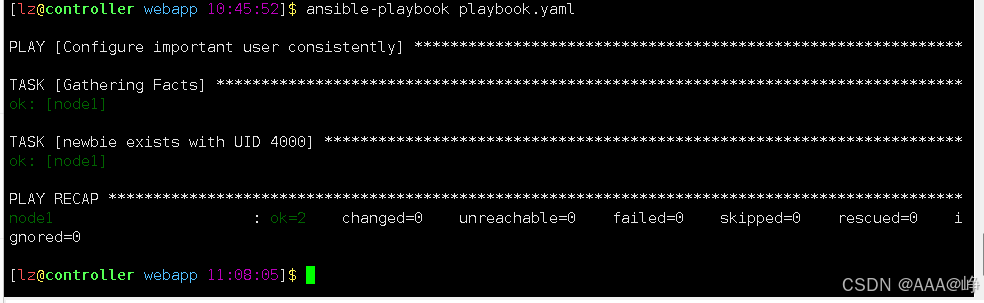
[lz@controller webapp 10:45:52]$ ansible-playbook playbook.yaml
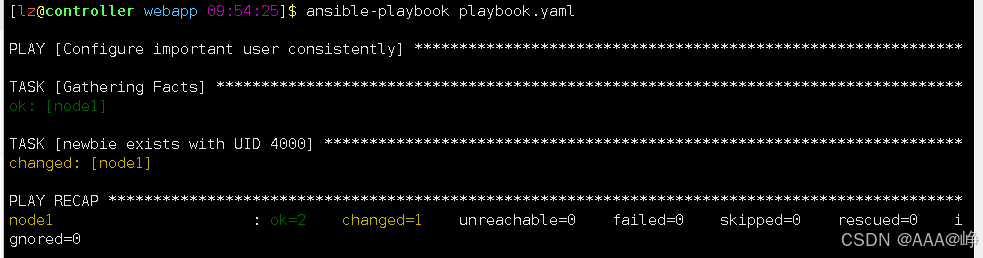
第二次执行剧本,任务状态全是绿色。
(2)语法检查
#选项--syntax-check,只检查剧本语法,不执行剧本。
#ansible-playbook playbook.yaml --syntax-check
(3)空运行
#空运行,是指模拟运行,并不是真正执行。
#ansible-playbook playbook.yaml -C
(4)提高输出详细程度
• -v,显示任务结果。一般情况使用 -v 即可。
• -vv,任务结果和任务配置都会显示。
• -vvv,包含关于与受管主机连接的信息。

openEuler 是由开放原子开源基金会孵化的全场景开源操作系统项目,面向数字基础设施四大核心场景(服务器、云计算、边缘计算、嵌入式),全面支持 ARM、x86、RISC-V、loongArch、PowerPC、SW-64 等多样性计算架构
更多推荐


 9
9 0
0- 0


 已为社区贡献4条内容

所有评论(0)