高可用集群一体化监控平台
项目描述:基于 5 台服务器划分功能集群,搭建涵盖业务承载、负载均衡、自动化运维、安全审计、监控告警的一体化游戏运维架构。借助高可用架构规避单点故障,搭配全套运维工具实现集群标准化管理、权限管控与故障预警,全方位保障游戏业务平稳运行
技术栈:CentOS 7、LVS、Keepalived、Nginx、Ansible、JumpServer、Prometheus、Grafana、AlertManager
职责与实现:
- 在 web1、web2 节点部署 Nginx,部署多款开源游戏并配置独立监听端口,负责处理前端用户访问请求
- 采用 LVS+Keepalived 构建主备负载均衡集群,配置统一对外 VIP,实现流量分发与节点故障自动切换,保障业务入口高可用
- 在 control 管控节点部署 Ansible,完成主机清单与 SSH 免密互通,实现集群批量配置、服务运维、文件同步等操作,大幅提升运维效率
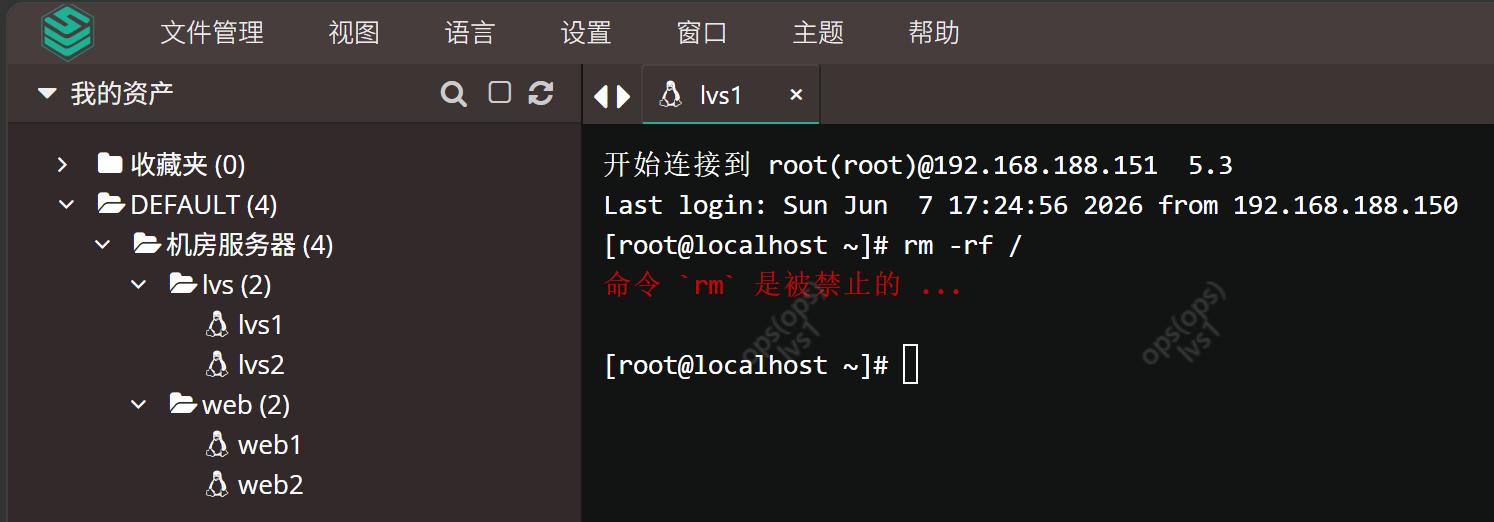
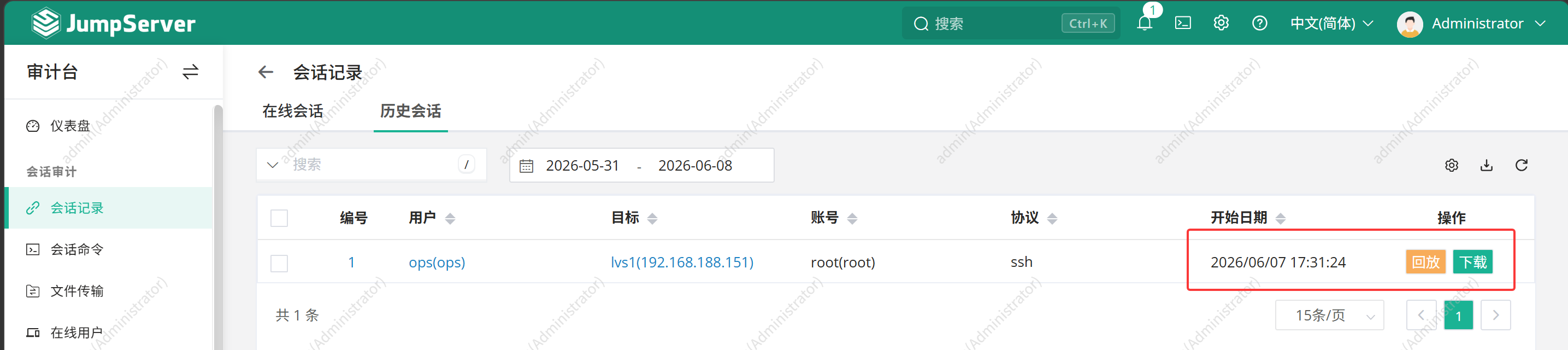
- 部署 JumpServer 堡垒机,完成人员、资产分组与精细化授权,配置 Linux 禁用命令组,拦截高危命令,实现运维行为可审计、操作风险可防控
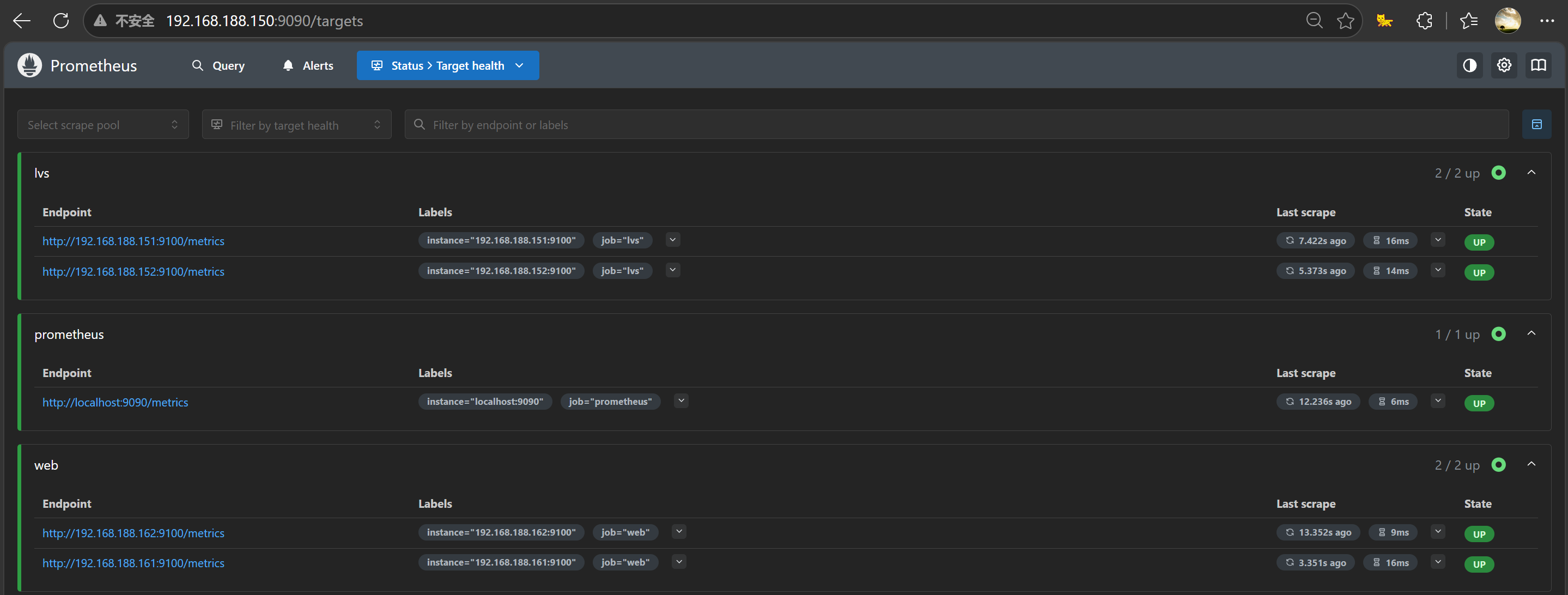
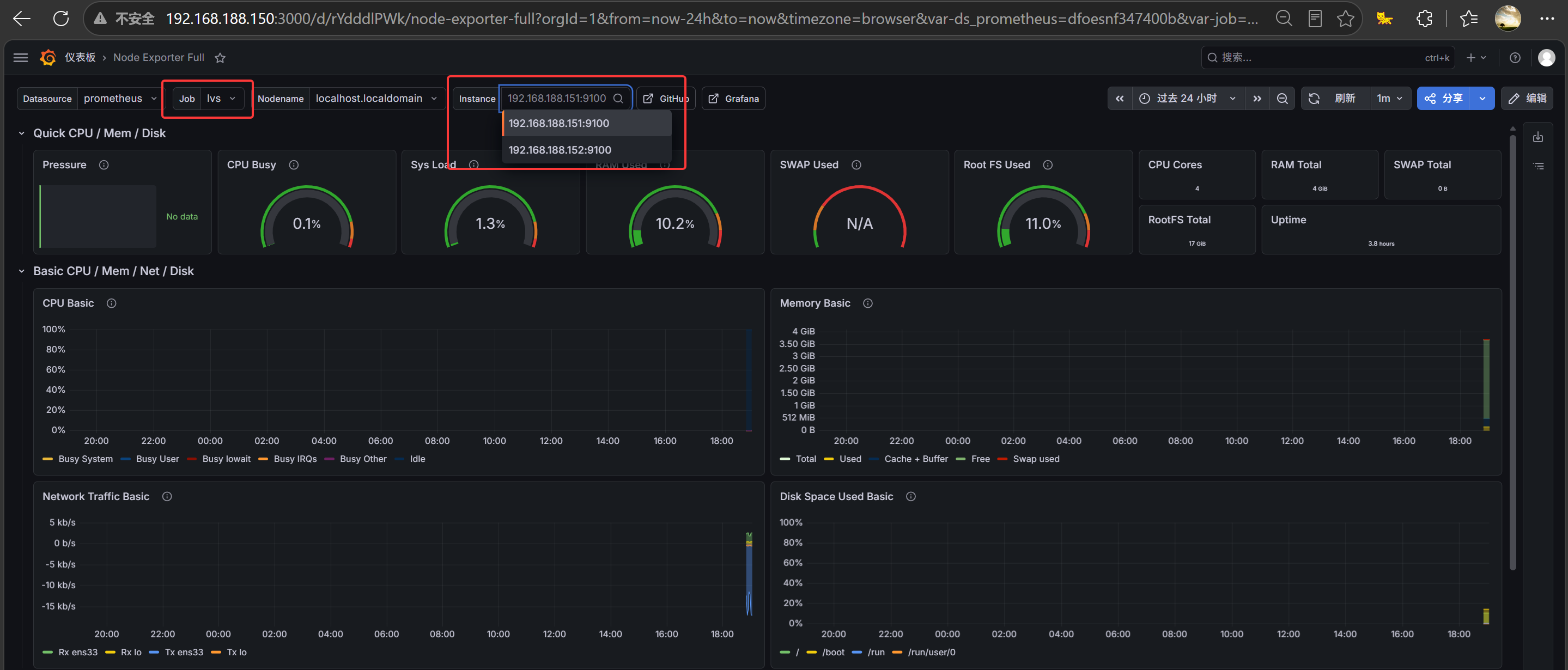
- 搭建 Prometheus+Grafana+AlertManager 监控告警体系,采集主机与业务运行指标,通过可视化大屏直观展示集群状态,并配置告警策略,异常问题及时触达
| 名称 | IP地址 | 内存容量 |
|---|---|---|
| control | 192.168.188.150 | 8G |
| lvs1 | 192.168.188.151 | 4G |
| lvs2 | 192.168.188.152 | 4G |
| web1 | 192.168.188.161 | 4G |
| web2 | 192.168.188.162 | 4G |
cotrol 添加一个 20G 的硬盘后再启动
control 所需的包:
- jumpserver-ce-v4.10.14-x86_64.tar.gz
- alertmanager-0.32.1.linux-amd64.tar.gz
- prometheus-3.11.3.linux-amd64.tar.gz
- grafana-enterprise_13.0.1_24542347077_linux_amd64.tar.gz
- node_exporter-1.11.1.linux-amd64.tar.gz
web1-2 所需的包:web.zip
所有机子执行
wget -O /etc/yum.repos.d/CentOS-Base.repo https://mirrors.aliyun.com/repo/Centos-7.repo # 阿里源
yum clean all && yum makecache
systemctl disable firewalld --now # 关闭防火墙
setenforce 0 # 关闭 selinux
sed -i 's/enforcing/disabled/' /etc/selinux/config # 永久关闭 selinux
yum -y install ntp net-tools
ntpdate time1.aliyun.com # 校准时间
hwclock -w # 将当前系统时间写入硬件时钟
一键部署 ansible
# control 执行
cat > ansible.sh << 'EOF'
#!/bin/bash
set -e

read -s -p "请输入所有节点的 root 密码: " PASSWORD
echo -e "\n"

echo "地址映射"
cat >> /etc/hosts << INNER
192.168.188.150 control
192.168.188.151 lvs1
192.168.188.152 lvs2
192.168.188.161 web1
192.168.188.162 web2
INNER

echo "安装 wget sshpass 工具"
yum install -y wget sshpass

echo "生成密钥"
if [ ! -f ~/.ssh/id_rsa ]; then
    ssh-keygen -t rsa -P "" -f ~/.ssh/id_rsa
    echo "SSH 密钥生成完成"
else
    echo "SSH 密钥已存在,跳过生成"
fi

echo "配置免密"
NODES="lvs1 lvs2 web1 web2"
for node in $NODES; do
    echo "正在配置 $node 免密"
    sshpass -p "$PASSWORD" ssh-copy-id -o StrictHostKeyChecking=no root@$node
    echo "$node 免密配置成功"
done

echo "配置阿里云 epel 源"
wget -O /etc/yum.repos.d/epel.repo https://mirrors.aliyun.com/repo/epel-7.repo
yum clean all && yum makecache

echo "安装 Ansible"
yum -y install ansible --nogpgcheck


echo "创建目录结构"
mkdir -p ~/ansible/{playbook,variable,template}

echo "生成 ansible 配置文件"
cat > ~/ansible/ansible.cfg << 'INNER'
[defaults]
inventory = ~/ansible/inventory
host_key_checking = False
gathering = explicit
INNER

echo "生成主机清单"
cat > ~/ansible/inventory << 'INNER'
[lvs]
lvs1
lvs2

[web]
web1
web2

[cluster:children]
lvs
web
INNER

echo "配置环境变量"
grep -q "ANSIBLE_CONFIG" /etc/profile || echo "export ANSIBLE_CONFIG=~/ansible/ansible.cfg" >> /etc/profile
source /etc/profile

echo "查看主机列表"
ansible all --list-hosts
EOF


chmod +x ansible.sh
./ansible.sh
source /etc/profile
ansible all -m ping
web
# web1-2 执行
echo 1 > /proc/sys/net/ipv4/conf/all/arp_ignore
echo 1 > /proc/sys/net/ipv4/conf/lo/arp_ignore
echo 2 > /proc/sys/net/ipv4/conf/all/arp_announce
echo 2 > /proc/sys/net/ipv4/conf/lo/arp_announce

# 回环绑定 VIP
ip addr add 192.168.188.160/32 dev lo
ip link set lo up

yum -y install gcc gcc-c++ make ncurses ncurses-devel pcre \
pcre-devel openssl openssl-devel zlib zlib-devel wget unzip

mkdir /game
unzip -q web.zip && cd web
mv adarkroom-main/ game* win12-main/ /game
useradd nginx
cd nginx-1.30.0
chmod +x configure

# 编译参数
./configure --prefix=/usr/local/nginx --user=nginx --group=nginx \
--sbin-path=/usr/local/nginx/sbin/nginx --conf-path=/etc/nginx/nginx.conf \
--pid-path=/run/nginx.pid --error-log-path=/var/log/nginx/error.log \
--http-log-path=/var/log/nginx/access.log --with-http_ssl_module \
--with-http_v2_module --with-http_gzip_static_module --with-stream \
--with-stream_ssl_module --with-http_stub_status_module

make && make install
echo "export PATH=\$PATH:/usr/local/nginx/sbin" >> ~/.bash_profile # 环境变量
source ~/.bash_profile # 刷新
nginx -v # 查看版本
cp -p /etc/nginx/nginx.conf /etc/nginx/nginx.conf.bak # 备份


# 创建 systemd 服务
cat > /usr/lib/systemd/system/nginx.service << 'EOF'
[Unit]
Description=nginx - web server
After=network.target remote-fs.target nss-lookup.target
[Service]
Type=forking
PIDFile=/run/nginx.pid
ExecStartPre=/usr/local/nginx/sbin/nginx -t
ExecStart=/usr/local/nginx/sbin/nginx
ExecReload=/usr/local/nginx/sbin/nginx -s reload
ExecStop=/usr/local/nginx/sbin/nginx -s stop
ExecQuit=/usr/local/nginx/sbin/nginx -s quit
PrivateTmp=true
[Install]
WantedBy=multi-user.target
EOF


systemctl disable firewalld --now
systemctl daemon-reload
systemctl start nginx
systemctl status nginx
netstat -tunlp | grep :80 # 查看端口
# web1-2 执行
cat > /etc/nginx/nginx.conf << 'EOF'
worker_processes  auto;
events {
    worker_connections  1024;
}
http {
    include       mime.types;
    default_type  application/octet-stream;
    sendfile        on;
    keepalive_timeout  65;

    # 全局日志设置
    access_log /var/log/nginx/access.log combined; # 访问日志
    error_log /var/log/nginx/error.log warn; # 错误信息

    # 端口 1231 → /game/game1
    server {
        listen       1231;
        server_name  localhost;
        root /game/game1;
        index  index.html index.htm;

        location / {
            try_files $uri $uri/ =404;
        }

        error_page   500 502 503 504  /50x.html;
        location = /50x.html {
            root   html;
        }
    }

    # 端口 1232 → /game/game2
    server {
        listen       1232;
        server_name  localhost;
        root /game/game2;
        index  index.html index.htm;

        location / {
            try_files $uri $uri/ =404;
        }

        error_page   500 502 503 504  /50x.html;
        location = /50x.html {
            root   html;
        }
    }

    # 端口 1233 → /game/adarkroom-main
    server {
        listen       1233;
        server_name  localhost;
        root /game/adarkroom-main;
        index  index.html index.htm;

        location / {
            try_files $uri $uri/ =404;
        }

        error_page   500 502 503 504  /50x.html;
        location = /50x.html {
            root   html;
        }
    }

    # 端口 1234 → /game/win12-main
    server {
        listen       1234;
        server_name  localhost;
        root /game/win12-main;
        index  index.html index.htm;

        location / {
            try_files $uri $uri/ =404;
        }

        error_page   500 502 503 504  /50x.html;
        location = /50x.html {
            root   html;
        }
    }
}
EOF
# web1-2 执行
nginx -t # 检查配置文件是否有误
systemctl restart nginx
lvs
# lvs1 执行
ip addr add 192.168.188.160/32 dev lo
ip link set lo up
yum -y install ipvsadm keepalived
cp /etc/keepalived/keepalived.conf /etc/keepalived/keepalived.conf.bak


cat > /etc/keepalived/keepalived.conf << 'EOF'
! Configuration File for keepalived

global_defs {
   router_id lvs-keepalived-master # 路由器标识
}

vrrp_instance VI_1 {
    state MASTER # 当前为主节点
    interface ens33 # 心跳网卡
    virtual_router_id 80 # 虚拟路由ip,主备必须一致
    priority 100 # 优先级
    advert_int 1 # 心跳间隔
    unicast_src_ip 192.168.188.151 # 本机真实 IP
    unicast_peer {
        192.168.188.153 # 备节点 IP
    }
    authentication {
        auth_type PASS
        auth_pass 1111 # 认证密码,主备必须一致
    }
    virtual_ipaddress {
        192.168.188.160 # VIP,主备必须一致
    }
}

virtual_server 192.168.188.160 80 {
    delay_loop 3
    lb_algo rr
    lb_kind DR
    net_mask 255.255.255.255
    protocol TCP

    real_server 192.168.188.161 80 {
        weight 1
        TCP_CHECK {
            connect_timeout 3
            connect_port 80
        }
    }

    real_server 192.168.188.162 80 {
        weight 1
        TCP_CHECK {
            connect_timeout 3
            connect_port 80
        }
    }
}

virtual_server 192.168.188.160 1231 {
    delay_loop 3
    lb_algo rr
    lb_kind DR
    net_mask 255.255.255.255
    protocol TCP

    real_server 192.168.188.161 1231 {
        weight 1
        TCP_CHECK {
            connect_timeout 3
            connect_port 1231
        }
    }

    real_server 192.168.188.162 1231 {
        weight 1
        TCP_CHECK {
            connect_timeout 3
            connect_port 1231
        }
    }
}

virtual_server 192.168.188.160 1232 {
    delay_loop 3
    lb_algo rr
    lb_kind DR
    net_mask 255.255.255.255
    protocol TCP

    real_server 192.168.188.161 1232 {
        weight 1
        TCP_CHECK {
            connect_timeout 3
            connect_port 1232
        }
    }

    real_server 192.168.188.162 1232 {
        weight 1
        TCP_CHECK {
            connect_timeout 3
            connect_port 1232
        }
    }
}

virtual_server 192.168.188.160 1233 {
    delay_loop 3
    lb_algo rr
    lb_kind DR
    net_mask 255.255.255.255
    protocol TCP

    real_server 192.168.188.161 1233 {
        weight 1
        TCP_CHECK {
            connect_timeout 3
            connect_port 1233
        }
    }

    real_server 192.168.188.162 1233 {
        weight 1
        TCP_CHECK {
            connect_timeout 3
            connect_port 1233
        }
    }
}

virtual_server 192.168.188.160 1234 {
    delay_loop 3
    lb_algo rr
    lb_kind DR
    net_mask 255.255.255.255
    protocol TCP

    real_server 192.168.188.161 1234 {
        weight 1
        TCP_CHECK {
            connect_timeout 3
            connect_port 1234
        }
    }

    real_server 192.168.188.162 1234 {
        weight 1
        TCP_CHECK {
            connect_timeout 3
            connect_port 1234
        }
    }
}
EOF


systemctl disable firewalld --now
systemctl enable keepalived --now
# lvs2 执行
ip addr add 192.168.188.160/32 dev lo
ip link set lo up
yum -y install ipvsadm keepalived
cp /etc/keepalived/keepalived.conf /etc/keepalived/keepalived.conf.bak


cat > /etc/keepalived/keepalived.conf << 'EOF'
! Configuration File for keepalived

global_defs {
   router_id lvs-keepalived-backup # 路由器标识
}

vrrp_instance VI_1 {
    state BACKUP # 当前为备节点
    interface ens33 # 心跳网卡
    virtual_router_id 80 # 虚拟路由ip,主备必须一致
    priority 90 # 优先级
    advert_int 1 # 心跳间隔
    unicast_src_ip 192.168.188.152 # 本机真实 IP
    unicast_peer {
        192.168.188.150 # 主节点 IP
    }
    authentication {
        auth_type PASS
        auth_pass 1111 # 认证密码,主备必须一致
    }
    virtual_ipaddress {
        192.168.188.160 # VIP,主备必须一致
    }
}

virtual_server 192.168.188.160 80 {
    delay_loop 3
    lb_algo rr
    lb_kind DR
    net_mask 255.255.255.255
    protocol TCP

    real_server 192.168.188.161 80 {
        weight 1
        TCP_CHECK {
            connect_timeout 3
            connect_port 80
        }
    }

    real_server 192.168.188.162 80 {
        weight 1
        TCP_CHECK {
            connect_timeout 3
            connect_port 80
        }
    }
}

virtual_server 192.168.188.160 1231 {
    delay_loop 3
    lb_algo rr
    lb_kind DR
    net_mask 255.255.255.255
    protocol TCP

    real_server 192.168.188.161 1231 {
        weight 1
        TCP_CHECK {
            connect_timeout 3
            connect_port 1231
        }
    }

    real_server 192.168.188.162 1231 {
        weight 1
        TCP_CHECK {
            connect_timeout 3
            connect_port 1231
        }
    }
}

virtual_server 192.168.188.160 1232 {
    delay_loop 3
    lb_algo rr
    lb_kind DR
    net_mask 255.255.255.255
    protocol TCP

    real_server 192.168.188.161 1232 {
        weight 1
        TCP_CHECK {
            connect_timeout 3
            connect_port 1232
        }
    }

    real_server 192.168.188.162 1232 {
        weight 1
        TCP_CHECK {
            connect_timeout 3
            connect_port 1232
        }
    }
}

virtual_server 192.168.188.160 1233 {
    delay_loop 3
    lb_algo rr
    lb_kind DR
    net_mask 255.255.255.255
    protocol TCP

    real_server 192.168.188.161 1233 {
        weight 1
        TCP_CHECK {
            connect_timeout 3
            connect_port 1233
        }
    }

    real_server 192.168.188.162 1233 {
        weight 1
        TCP_CHECK {
            connect_timeout 3
            connect_port 1233
        }
    }
}

virtual_server 192.168.188.160 1234 {
    delay_loop 3
    lb_algo rr
    lb_kind DR
    net_mask 255.255.255.255
    protocol TCP

    real_server 192.168.188.161 1234 {
        weight 1
        TCP_CHECK {
            connect_timeout 3
            connect_port 1234
        }
    }

    real_server 192.168.188.162 1234 {
        weight 1
        TCP_CHECK {
            connect_timeout 3
            connect_port 1234
        }
    }
}
EOF

systemctl disable firewalld --now
systemctl enable keepalived --now




jumpserver
上传 jumpserver-ce-v4.10.14-x86_64.tar.gz 进行部署
# control 执行
# 添加一个 20G 的硬盘后再启动
fdisk -l # /dev/sdb 是新增的硬盘
fdisk /dev/sdb # # 分区:n e 回车 回车 回车 w
partprobe /dev/sdb # 写入内核
mkfs.xfs -f /dev/sdb # 格式化分区
mkdir /jumpserver
mount /dev/sdb /jumpserver/ # 挂载
echo "/dev/sdb /jumpserver xfs defaults 0 0" >> /etc/fstab # 开机自启
tar -zxf jumpserver-ce-v4.10.14-x86_64.tar.gz -C /jumpserver/ # 解压
/jumpserver/jumpserver-ce-v4.10.14-x86_64/jmsctl.sh install # 安装,直接一路回车
/jumpserver/jumpserver-ce-v4.10.14-x86_64/jmsctl.sh start # 启动
# 访问:http://192.168.188.150:80
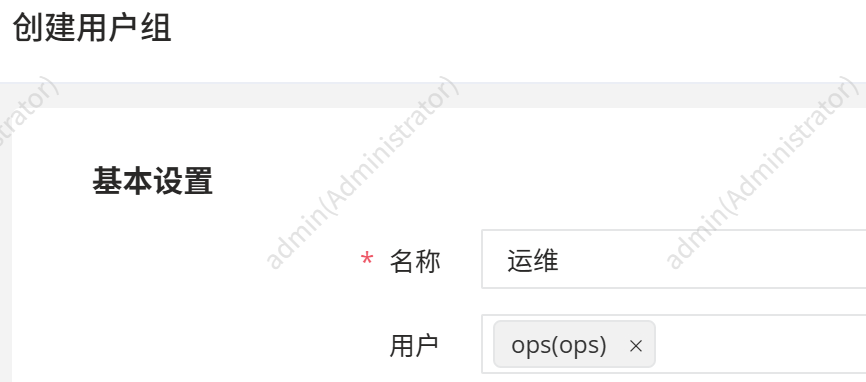
创建用户和用户组
控制台 --> 用户列表 --> 创建

控制台 --> 用户组 --> 创建
创建模板
控制台 --> 账号模板 --> 创建
# control 执行
cat /root/.ssh/id_rsa # 获取密钥,复制结果

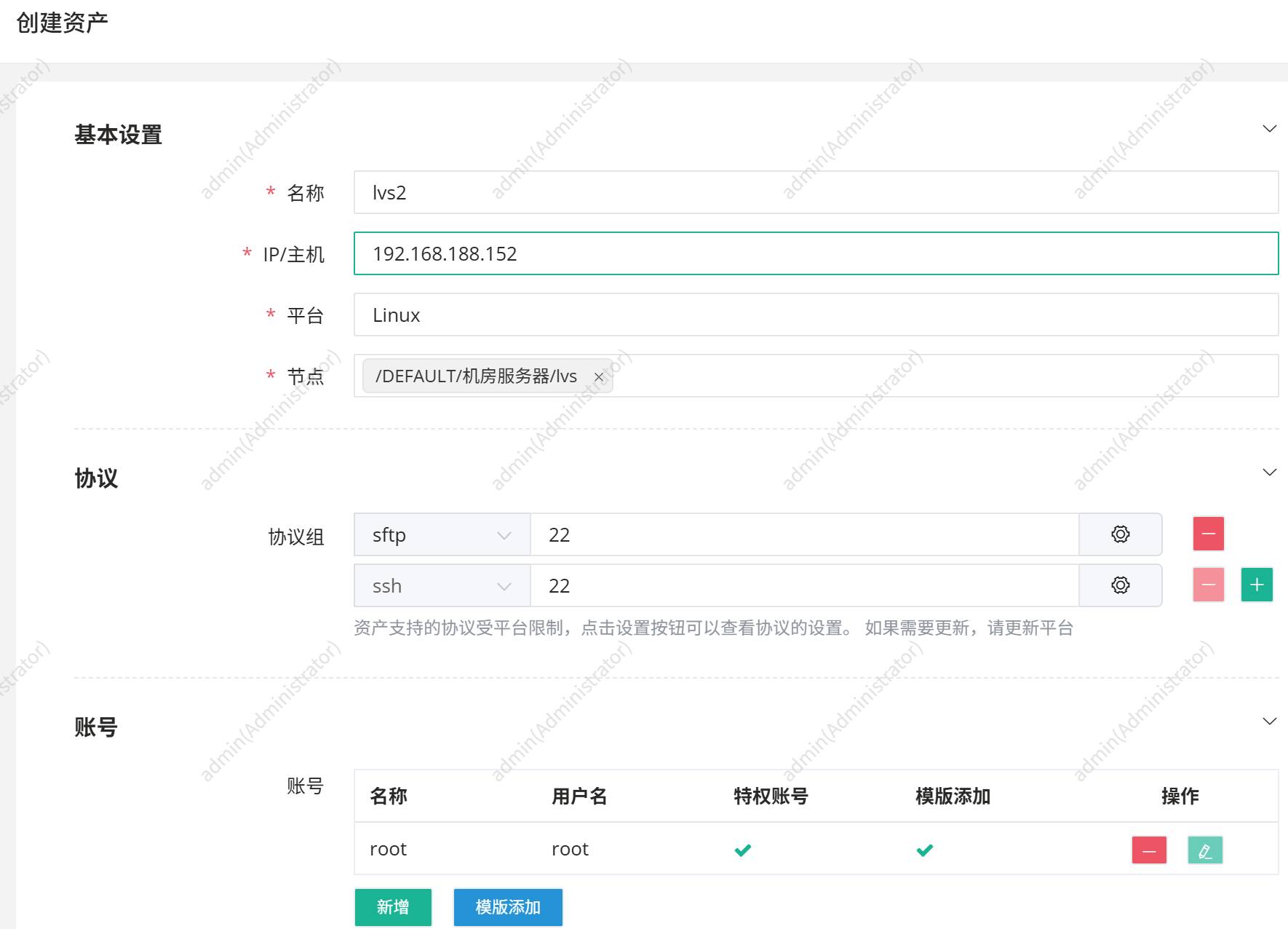
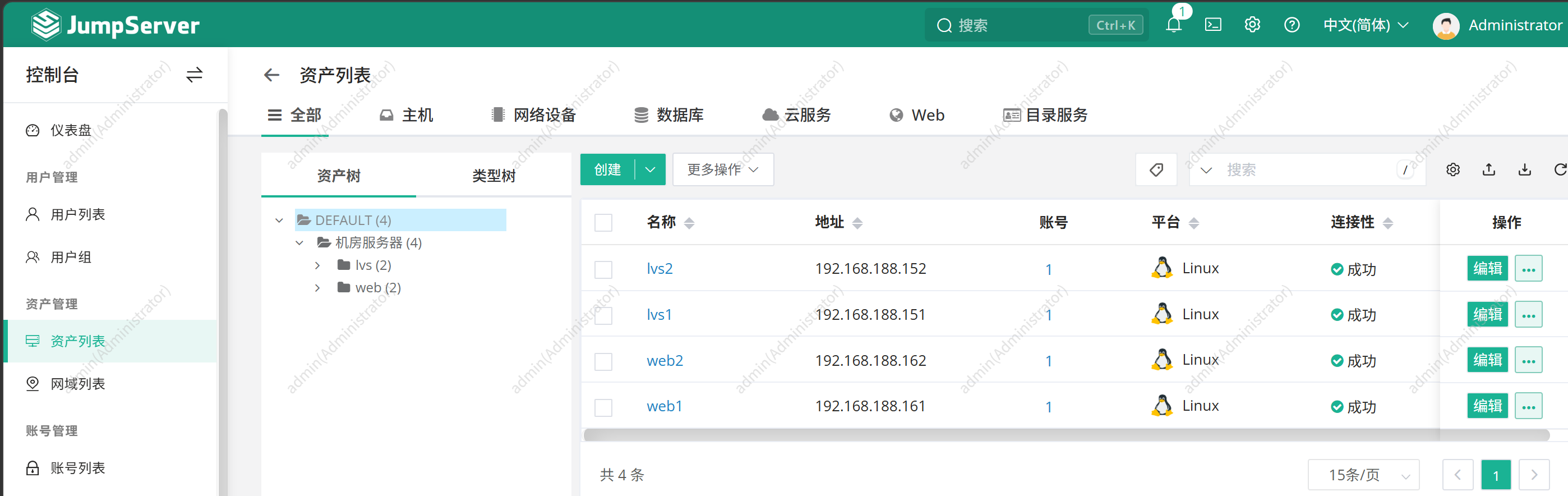
创建资产
控制台 --> 资产列表 --> 创建
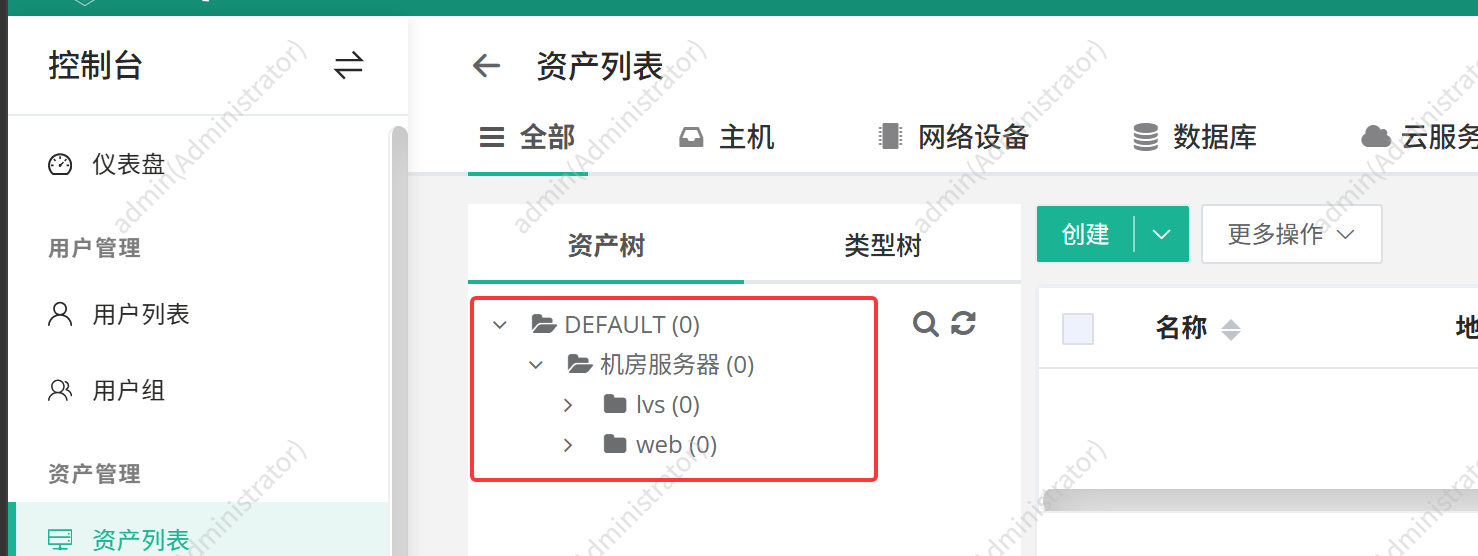
控制台 --> 资产列表 --> 创建 --> 主机 --> linux
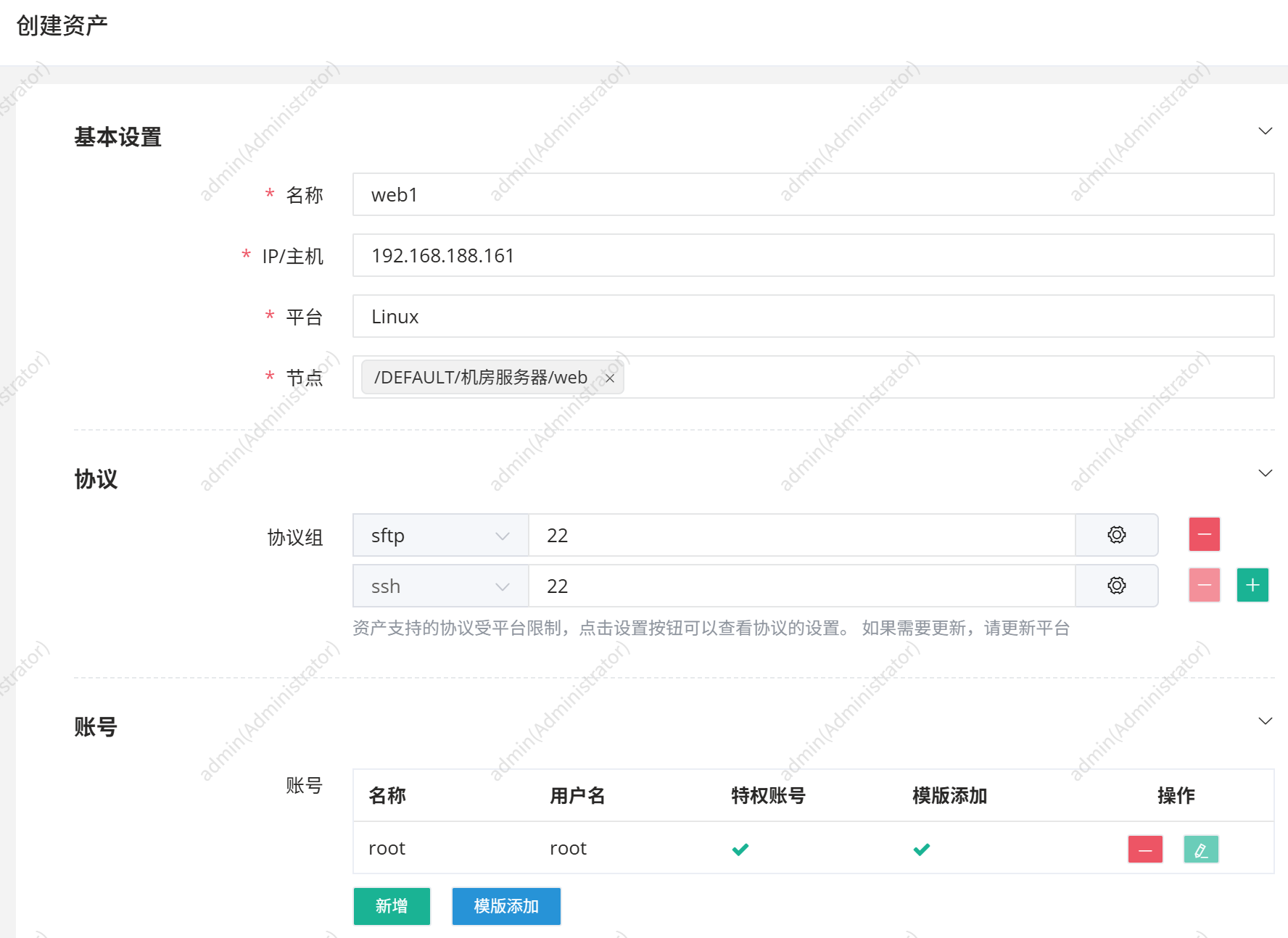

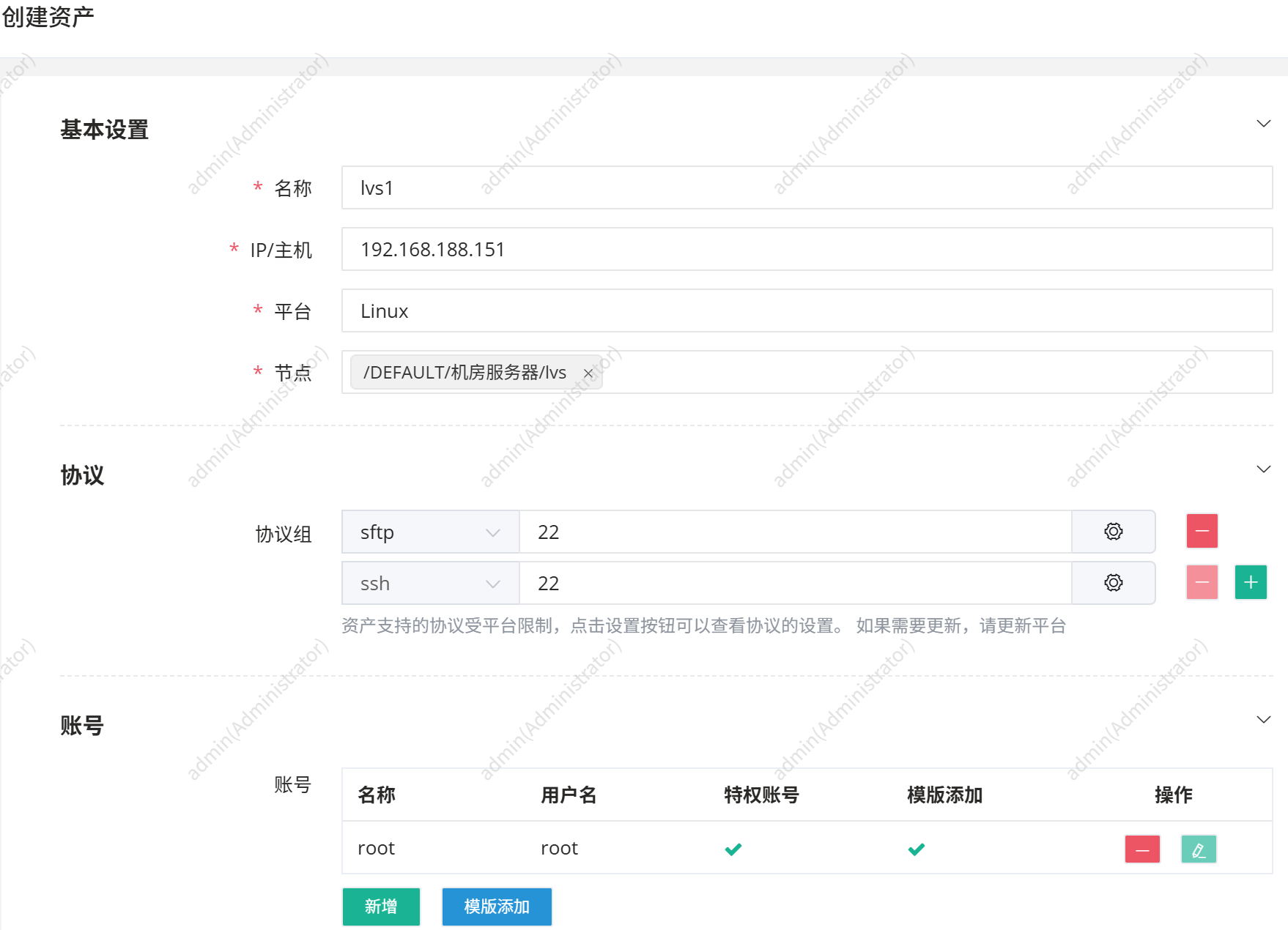
资产授权
控制台 --> 资产授权 --> 创建

配置禁用命令组
控制台 --> 访问控制 --> 命令过滤 --> 命令组 --> 创建
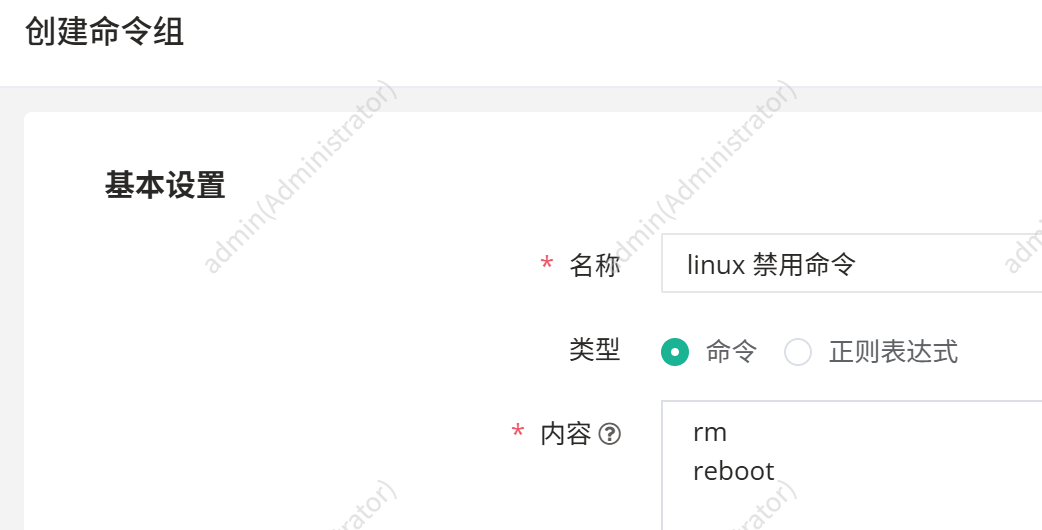
控制台 --> 访问控制 --> 命令过滤 --> 命令过滤 --> 创建

测试
登录 ops 用户
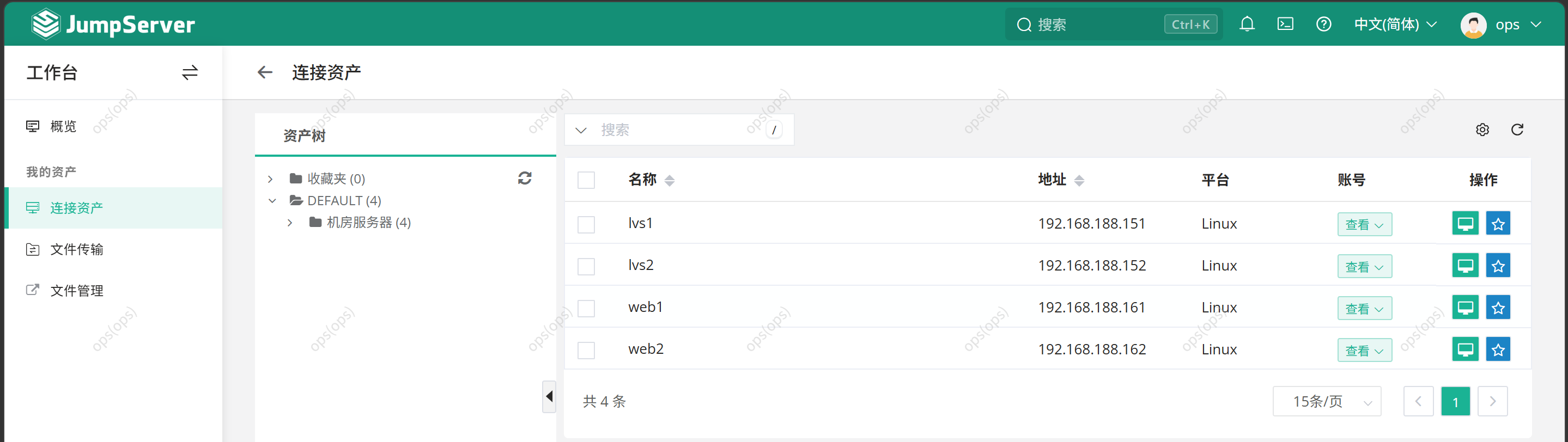
登录 admin 用户

prometheus
prometheus 负责抓取、存放指标数据
grafana 会将 prometheus 采集的数据进行页面的展示
alertmanager 处理 prometheus 触发的告警
node_exporter 采集设备的 CPU、内存、磁盘、网络等基础指标,暴露给 Prometheus 抓取
部署
# control 执行
cat > /root/ansible/playbook/deploy_node_exporter.yml << 'EOF'
- name: 批量部署 node_exporter
  hosts: all
  remote_user: root

  tasks:
    - name: 传输 node_exporter 安装包到远程节点
      copy:
        src: /root/node_exporter-1.11.1.linux-amd64.tar.gz
        dest: /root/
        mode: '0644'

    - name: 解压安装包
      unarchive:
        src: /root/node_exporter-1.11.1.linux-amd64.tar.gz
        dest: /root/
        remote_src: yes

    - name: 移动到 /usr/local
      command: mv /root/node_exporter-1.11.1.linux-amd64 /usr/local/node_exporter

    - name: 配置 systemd 服务
      copy:
        content: |
          [Unit]
          Description=Node_Exporter Daemon

          [Service]
          Restart=on-failure
          ExecStart=/usr/local/node_exporter/node_exporter

          [Install]
          WantedBy=default.target
        dest: /usr/lib/systemd/system/node_exporter.service
        mode: '0644'

    - name: 重载 systemd
      systemd:
        daemon_reload: yes

    - name: 启动并开机自启
      systemd:
        name: node_exporter
        enabled: yes
        state: started

    - name: 查看运行状态
      command: systemctl is-active node_exporter
      register: status

    - name: 状态结果
      debug:
        msg: "node_exporter 状态: {{ status.stdout }}"
EOF
# control 执行
ansible-playbook ~/ansible/playbook/deploy_node_exporter.yml
# 此时可以访问被监控端的9100端口相关的网页

tar -zxf alertmanager-0.32.1.linux-amd64.tar.gz
mv alertmanager-0.32.1.linux-amd64 /usr/local/alertmanager
ls /usr/local/alertmanager/ # alertmanager.yml 为配置文件


# 配置 alertmanager 启停相关文件
cat > /usr/lib/systemd/system/alertmanager.service << EOF
[Unit]
Description=Alertmanager Daemon
After=network.target
[Service]
Restart=on-failure
ExecStart=/usr/local/alertmanager/alertmanager --config.file=/usr/local/alertmanager/alertmanager.yml
[Install]
WantedBy=multi-user.target
EOF


systemctl daemon-reload
systemctl enable alertmanager.service --now
systemctl status alertmanager.service
# 此时可访问 http://192.168.188.150:9093/ 页面

tar -zxf prometheus-3.11.3.linux-amd64.tar.gz
mv prometheus-3.11.3.linux-amd64 /usr/local/prometheus
ls /usr/local/prometheus/ # prometheus.yml 为配置文件


# 配置 prometheus 启停相关文件
cat > /usr/lib/systemd/system/prometheus.service << EOF
[Unit]
Description=Prometheus Daemon
[Service]
Restart=on-failure
ExecStart=/usr/local/prometheus/prometheus --config.file=/usr/local/prometheus/prometheus.yml
[Install]
WantedBy=multi-user.target
EOF


systemctl daemon-reload
systemctl enable prometheus.service --now
systemctl status prometheus
# 此时可访问 http://192.168.188.150:9090/ 页面


tar -zxf grafana-enterprise_13.0.1_24542347077_linux_amd64.tar.gz
mv grafana-13.0.1/ /usr/local/grafana


# 配置 grafana 启停相关文件
cat > /usr/lib/systemd/system/grafana.service << EOF
[Unit]
Description=Grafana Daemon
[Service]
ExecStart=/usr/local/grafana/bin/grafana server --homepath=/usr/local/grafana
Restart=on-failure
[Install]
WantedBy=multi-user.target
EOF


systemctl daemon-reload
systemctl enable grafana.service --now
systemctl status grafana
# 此时可访问 http://192.168.188.150:3000/ 页面,账号、密码都是 admin


cd /usr/local/prometheus/
mkdir rules # 存储告警规则
cp -p prometheus.yml prometheus.yml.bak # 备份配置文件


cat > prometheus.yml << EOF
global:
  scrape_interval: 15s # 采集数据的时间间隔
  evaluation_interval: 15s # 评估告警规则的时间间隔,每间隔指定时间评估一次告警规则
alerting:
  alertmanagers:
    - static_configs:
        - targets:
            - 192.168.188.150:9093 # 告警推送地址(Alertmanager 的 IP 和端口)
rule_files: # 告警规则配置文件列表
  - "rules/*.yml" # 在 prometheus 安装目录下创建 rules 目录存放告警规则
scrape_configs: # 被监控端相关配置
  - job_name: "prometheus" # 作业名称:监控 Prometheus 自身
    static_configs:
      - targets: ["localhost:9090"] # 默认监控自己
  - job_name: "lvs" # 作业名称
    static_configs:
      - targets: # 被监控端的地址和端口(node_exporter 默认端口 9100)
          - "192.168.188.151:9100"
          - "192.168.188.152:9100"
  - job_name: "web" # 作业名称
    static_configs:
      - targets: # 被监控端的地址和端口(node_exporter 默认端口 9100)
          - "192.168.188.161:9100"
          - "192.168.188.162:9100"
EOF
# control 执行
cat > rules/node.yml << EOF
groups:
  - name: node_instance_rules
    rules:
      - alert: InstanceDown
        expr: up == 0
        for: 1m
        labels:
          severity: error
        annotations:
          summary: "Instance {{ .Labels.instance }} 停止工作"
          description: "{{ .Labels.instance }} (job={{ .Labels.job }}) 已经停止工作超过 1 分钟"

  - name: node_disk_rules
    rules:
      - alert: NodeFilesystemUsage
        expr: |
          100 - (node_filesystem_free_bytes{fstype=~"ext4|xfs"} / node_filesystem_size_bytes{fstype=~"ext4|xfs"} * 100) > 80
        for: 2m
        labels:
          severity: warning
        annotations:
          summary: "{{ .Labels.instance }}: {{ .Labels.mountpoint }} 分区使用过高"
          description: "{{ .Labels.instance }}: {{ .Labels.mountpoint }} 分区使用大于 80% (当前值: {{ .Value }}%)"

      - alert: NodeOutOfInodes
        expr: |
          node_filesystem_files_free{fstype=~"ext4|xfs", mountpoint!~".*tmp|.*boot"} /
          node_filesystem_files{fstype=~"ext4|xfs", mountpoint!~".*tmp|.*boot"} * 100 < 10
        for: 1m
        labels:
          severity: warning
        annotations:
          summary: "主机分区 Inode 节点不足"
          description: "主机 {{ .Labels.instance }} {{ .Labels.mountpoint }} 分区 Inode 可用 < 10% (当前值: {{ .Value }}%)"

      - alert: HostUnusualDiskReadLatency
        expr: |
          rate(node_disk_read_time_seconds_total{device=~"sd.*|vd.*"}[1m]) /
          rate(node_disk_reads_completed_total{device=~"sd.*|vd.*"}[1m]) > 0.1
          and rate(node_disk_reads_completed_total{device=~"sd.*|vd.*"}[1m]) > 0
        for: 2m
        labels:
          severity: warning
        annotations:
          summary: "主机磁盘读延迟过高"
          description: "主机 {{ .Labels.instance }}, 磁盘 {{ .Labels.device }} 读延迟 > 100ms (当前值: {{ .Value }}ms)"

      - alert: HostUnusualDiskWriteLatency
        expr: |
          rate(node_disk_write_time_seconds_total{device=~"sd.*|vd.*"}[1m]) /
          rate(node_disk_writes_completed_total{device=~"sd.*|vd.*"}[1m]) > 0.1
          and rate(node_disk_writes_completed_total{device=~"sd.*|vd.*"}[1m]) > 0
        for: 2m
        labels:
          severity: warning
        annotations:
          summary: "主机磁盘写延迟过高"
          description: "主机 {{ .Labels.instance }}, 磁盘 {{ .Labels.device }} 写延迟 > 100ms (当前值: {{ .Value }}ms)"

      - alert: NodeDiskReadRate
        expr: |
          sum by (instance, device) (rate(node_disk_read_bytes_total{device=~"sd.*|vd.*"}[2m])) / 1024 / 1024 > 50
        for: 1m
        labels:
          severity: warning
        annotations:
          summary: "主机磁盘读取速率过高"
          description: "主机 {{ .Labels.instance }}, 磁盘 {{ .Labels.device }} 读取速度 > 50 MB/s (当前值: {{ .Value }} MB/s)"

      - alert: NodeDiskWriteRate
        expr: |
          sum by (instance, device) (rate(node_disk_written_bytes_total{device=~"sd.*|vd.*"}[2m])) / 1024 / 1024 > 50
        for: 1m
        labels:
          severity: warning
        annotations:
          summary: "主机磁盘写入速率过高"
          description: "主机 {{ .Labels.instance }}, 磁盘 {{ .Labels.device }} 写入速度 > 50 MB/s (当前值: {{ .Value }} MB/s)"

  - name: node_memory_cpu_rules
    rules:
      - alert: NodeMemoryUsage
        expr: |
          (1 - (node_memory_MemFree_bytes + node_memory_Cached_bytes + node_memory_Buffers_bytes) / node_memory_MemTotal_bytes) * 100 > 80
        for: 2m
        labels:
          severity: warning
        annotations:
          summary: "{{ .Labels.instance }}: 内存使用过高"
          description: "{{ .Labels.instance }}: 内存使用大于 80% (当前值: {{ .Value }}%)"

      - alert: NodeCPUUsage
        expr: |
          100 - (avg(rate(node_cpu_seconds_total{mode="idle"}[5m])) by (instance) * 100) > 80
        for: 2m
        labels:
          severity: warning
        annotations:
          summary: "{{ .Labels.instance }}: CPU 使用过高"
          description: "{{ .Labels.instance }}: CPU 使用大于 80% (当前值: {{ .Value }}%)"

      - alert: NodeCpuLoadHigh
        expr: sum(node_load5) by (instance) > 10
        for: 1m
        labels:
          severity: warning
        annotations:
          summary: "5分钟内 CPU 负载过高"
          description: "{{ .Labels.instance }}: 5分钟内 CPU 负载超过 10 (当前值: {{ .Value }})"

      - alert: NodeIoWait
        expr: |
          (sum(increase(node_cpu_seconds_total{mode="iowait"}[5m])) by (instance) /
           sum(increase(node_cpu_seconds_total[5m])) by (instance)) * 100 > 10
        for: 2m
        labels:
          severity: warning
        annotations:
          summary: "5分钟内磁盘 I/O Wait 负载过高"
          description: "{{ .Labels.instance }}: 5分钟内磁盘 I/O Wait 超过 10% (当前值: {{ .Value }}%)"

  - name: node_network_rules
    rules:
      - alert: NodeNetworkConnectionEstablished
        expr: sum(node_netstat_Tcp_CurrEstab) by (instance) > 1000
        for: 1m
        labels:
          severity: warning
        annotations:
          summary: "主机 ESTABLISHED 连接数过高"
          description: "主机 {{ .Labels.instance }}: TCP 连接数超过 1000 (当前值: {{ .Value }})"

      - alert: NodeNetworkThroughputIn
        expr: |
          sum by (instance, device) (rate(node_network_receive_bytes_total{device=~"ens.*|eth.*"}[2m])) / 1024 / 1024 > 100
        for: 1m
        labels:
          severity: warning
        annotations:
          summary: "主机网卡入口流量过高"
          description: "主机 {{ .Labels.instance }}, 网卡 {{ .Labels.device }} 入口流量 > 100 MB/s (当前值: {{ .Value }} MB/s)"

      - alert: NodeNetworkThroughputTransmit
        expr: |
          sum by (instance, device) (rate(node_network_transmit_bytes_total{device=~"ens.*|eth.*"}[2m])) / 1024 / 1024 > 100
        for: 1m
        labels:
          severity: warning
        annotations:
          summary: "主机网卡出口流量过高"
          description: "主机 {{ .Labels.instance }}, 网卡 {{ .Labels.device }} 出口流量 > 100 MB/s (当前值: {{ .Value }} MB/s)"
EOF
 
./promtool check config prometheus.yml # 检测配置是否有误
systemctl restart prometheus.service
systemctl status prometheus.service
# 此时访问 192.168.188.150:9090 可以获取到被监控端的数据
grafana 配置
设置中文:右上角头像 --> Profile --> Preferences --> Language --> 中文 --> Save preferences
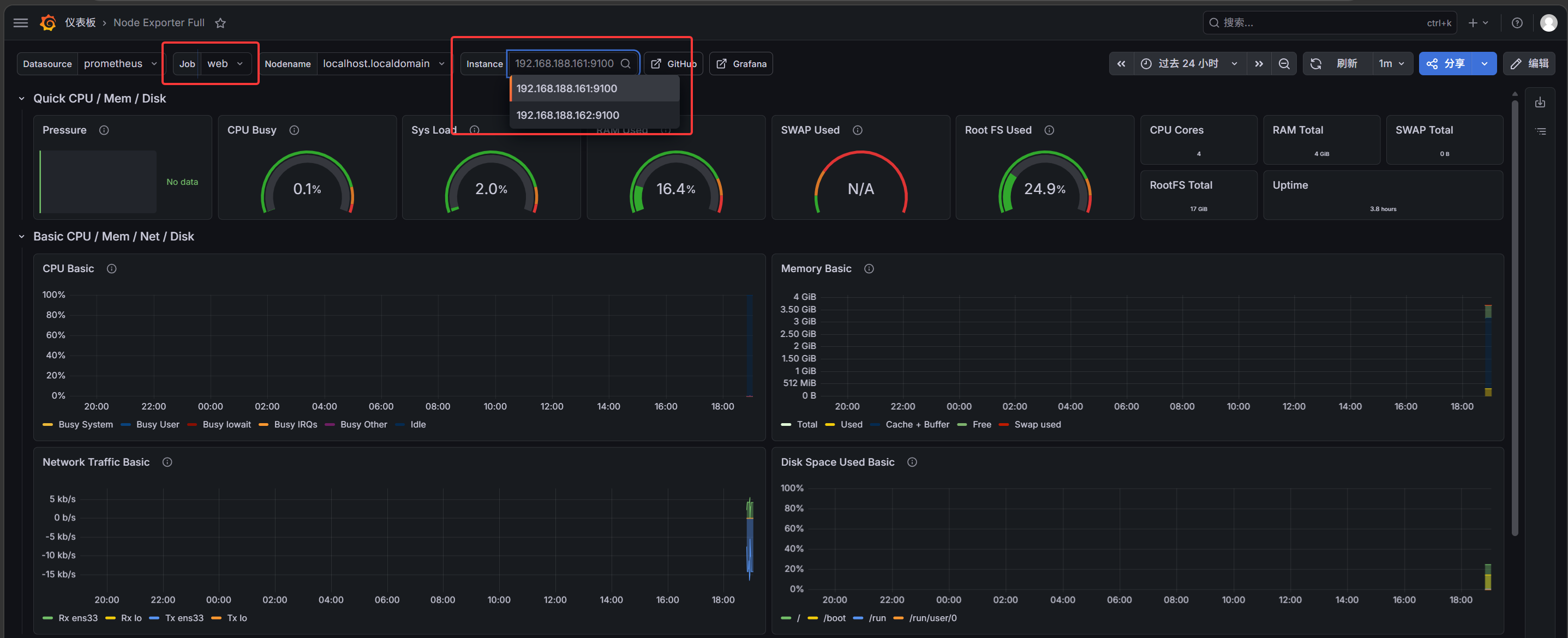
添加数据源: 连接 -->数据源 --> 添加新数据源 --> Promethues --> 输入IP地址、端口 --> 保存并测试

仪表盘 --> 新建 --> 导入 --> 选择下载好的仪表盘 --> 导入 --> 1860 --> 加载 --> import

告警配置
注意,输入自己的邮箱和邮箱授权码
# control 执行
cd /usr/local/alertmanager/
mkdir templates
cp alertmanager.yml alertmanager.yml.bak


cat > alertmanager.yml << EOF
global: # 邮箱配置
  resolve_timeout: 1m # 告警解除后等待 1 分钟才标记为已解决
  smtp_smarthost: 'smtp.qq.com:465' # QQ 邮箱 SMTP 服务器地址和端口
  smtp_from: 'xxx@qq.com' # 发件人邮箱地址
  smtp_auth_username: 'xxx@qq.com' # SMTP 认证用户名(发件人邮箱)
  smtp_auth_password: 'xxx' # QQ 邮箱授权码(不是登录密码)
  smtp_require_tls: false # 是否启用 TLS 加密(25 端口通常不需要)
templates: # 告警模板配置
  - '/usr/local/alertmanager/templates/*.tmpl'   # 模板文件存放路径
route: # 告警路由配置
  group_by: ['alertname'] # 按告警名称分组
  group_wait: 10s # 分组内第一个告警等待时间(秒)
  group_interval: 10s # 同一分组告警发送间隔(秒)
  repeat_interval: 1h # 相同告警重复发送间隔(小时)
  receiver: 'mail' # 默认接收器名称
receivers: # 接收人配置
- name: 'mail' # 接收器名称
  email_configs:
  - to: 'xxx@qq.com' # 收件人邮箱地址
    send_resolved: true # 告警恢复时也发送通知
    html: '{{ template "email.template.tmpl" . }}'
EOF


# 告警模版
cat > templates/email.template.tmpl << EOF
{{ define "email.template.tmpl" }}
{{- if gt (len .Alerts.Firing) 0 -}}{{ range .Alerts }}

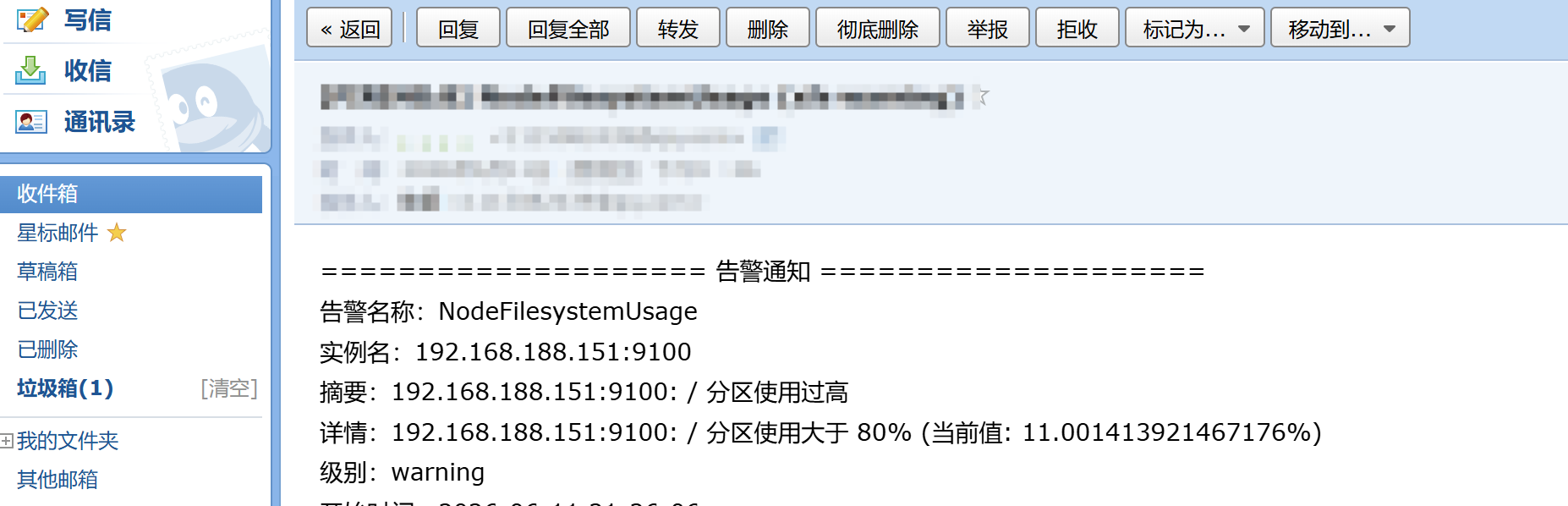
==================== 告警通知 ====================<br>
告警名称:{{ .Labels.alertname }}<br>
实例名:{{ .Labels.instance }}<br>
摘要:{{ .Annotations.summary }}<br>
详情:{{ .Annotations.description }}<br>
级别:{{ .Labels.severity }}<br>
开始时间:{{ (.StartsAt.Add 28800e9).Format "2006-01-02 15:04:05" }}<br>

{{ end }}{{- end }}
{{- if gt (len .Alerts.Resolved) 0 -}}
{{ range .Alerts }}

==================== 告警恢复 ====================<br>
告警名称:{{ .Labels.alertname }}<br>
实例名:{{ .Labels.instance }}<br>
摘要:{{ .Annotations.summary }}<br>
详情:{{ .Annotations.description }}<br>
级别:{{ .Labels.severity }}<br>
开始时间:{{ (.StartsAt.Add 28800e9).Format "2006-01-02 15:04:05" }}<br>
恢复时间:{{ (.EndsAt.Add 28800e9).Format "2006-01-02 15:04:05" }}<br>

{{ end }}{{- end }}
{{- end }}
EOF


/usr/local/alertmanager/amtool check-config /usr/local/alertmanager/alertmanager.yml
systemctl restart alertmanager
systemctl status alertmanager

# 模拟告警
vim +17 /usr/local/prometheus/rules/node.yml
# 将 17 行的大于改为小于,手动触发告警

systemctl restart prometheus.service
systemctl status prometheus.service
# control 执行
vim +17 /usr/local/prometheus/rules/node.yml
# 恢复,将 17 行的小于改为大于

systemctl restart prometheus.service
systemctl status prometheus.service


openEuler 是由开放原子开源基金会孵化的全场景开源操作系统项目,面向数字基础设施四大核心场景(服务器、云计算、边缘计算、嵌入式),全面支持 ARM、x86、RISC-V、loongArch、PowerPC、SW-64 等多样性计算架构
更多推荐


 9
9 0
0- 0


 已为社区贡献1条内容

所有评论(0)