Linux系统篇(五):Linux 进程控制全解:fork、exec、wait 核心原理与实战

进程是 Linux 操作系统调度资源的基本单位,而进程控制则是 Linux 编程中最核心的知识点之一。无论是日常开发、底层学习还是面试考察,
fork创建子进程、exec系列函数实现程序替换、wait/waitpid完成进程等待与资源回收,都是绕不开的重点。本文将从原理入手,结合代码案例,完整梳理进程从创建、运行、替换到退出、回收的全流程,带你彻底掌握 Linux 进程控制的核心逻辑。
目录
1.代码运行完毕,结果正确(如main函数return 0)
2.代码运行完毕,结果不正确(如main函数返回非 0 值)
3.代码异常终止(如收到信号被杀死,段错误、Ctrl+C中断等)

一、进程创建:fork() 函数详解
1. fork() 初识:一个调用,两个返回值
在 Linux 中,fork()是创建新进程的核心系统调用,定义在<unistd.h>头文件中:
pid_t fork(void);返回值规则:
1.父进程:返回新创建子进程的 PID(正数)
2.子进程:返回 0
3.调用失败:返回 - 1
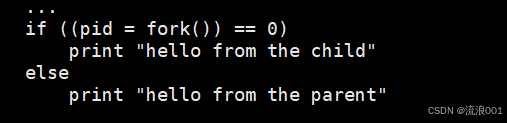
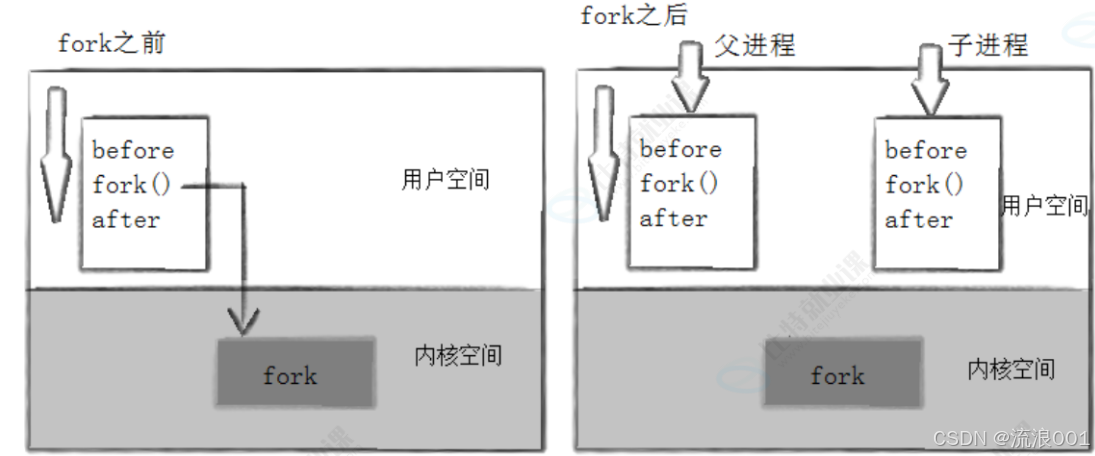
这也是fork()最特殊的地方:一个函数调用,会在两个进程中分别返回两次。
2. fork() 的内核工作流程
当进程调用fork()时,内核会完成以下关键操作:
1.为子进程分配新的内存块和内核数据结构(PCB)
2.将父进程的部分数据结构内容拷贝至子进程
3.将子进程添加到系统进程列表中
4.调度器开始调度子进程
因此,fork()之后,系统中会出现两个二进制代码完全相同的进程,它们都会从fork()调用之后的位置开始执行。
因此,fork()之后,系统中会出现两个二进制代码完全相同的进程,它们都会从fork()调用之后的位置开始执行。
3. 代码实例:理解父子进程的执行流程
#include <stdio.h>
#include <unistd.h>
#include <stdlib.h>
#include <sys/types.h>
int main(void) {
pid_t pid;
printf("Before: pid is %d\n", getpid());
if ((pid = fork()) == -1) {
perror("fork()");
exit(1);
}
printf("After: pid is %d, fork return %d\n", getpid(), pid);
sleep(1);
return 0;
}

4. 写时拷贝(Copy-On-Write, COW)
默认情况下,父子进程的代码段是共享的,数据段在子进程未写入时也会共享。当任意一方尝试修改数据时,内核会以写时拷贝的方式为修改方生成一份数据副本,从而保证进程的独立性。
写时拷贝是一种延时申请技术,它避免了fork()时直接拷贝整个进程地址空间,大幅提升了内存使用效率和进程创建速度。
5. fork() 的常规用法与失败原因
常见用法:
父进程创建子进程,让父子进程同时执行不同的代码段(如父进程等待客户端请求,子进程处理请求)
子进程调用exec()系列函数,执行一个全新的程序
失败原因:
系统中进程数量过多,达到系统上限
实际用户的进程数超过了系统限制
关于进程创建,在前面的文章中也有讲解,大家不理解可以在前面的文章中看一下。
二、进程终止:程序结束的 3 种方式
进程终止的本质是释放系统资源,包括进程申请的内核数据结构、代码和数据。
1. 进程退出的场景
1.代码运行完毕,结果正确(如main函数return 0)
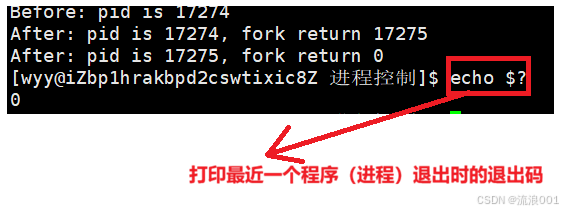
2.代码运行完毕,结果不正确(如main函数返回非 0 值)
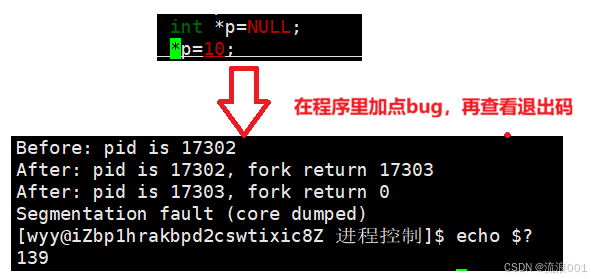 而是提供了一个 “信号终止状态码”,用来告诉你进程是怎么死的
3.代码异常终止(如收到信号被杀死,段错误、Ctrl+C中断等)
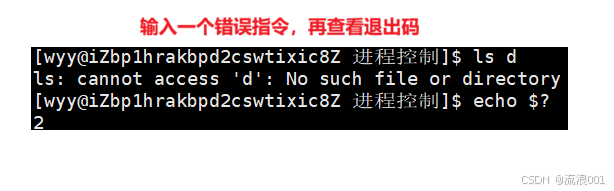
一旦出现异常,退出码将无意义(操作系统将提供一个 “信号终止状态码”,用来告诉你进程是怎么死的)
#include <unistd.h>
#include <signal.h>

int main(void)
{
    kill(getpid(), SIGKILL);
    return 0;
}
2.进程退出的常见退出方法
1.正常终止
- 从
main函数return返回:return n等价于调用exit(n)- 调用
exit()函数:C 标准库函数,会执行清理函数、刷新缓冲区,再调用_exit()- 调用
_exit()函数:系统调用,直接终止进程,不刷新缓冲区
1.exit()与_exit()的区别
1.exit()是C语言标准库里面提供的函数调用,_exit()是系统提供的接口
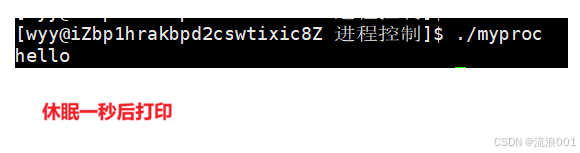
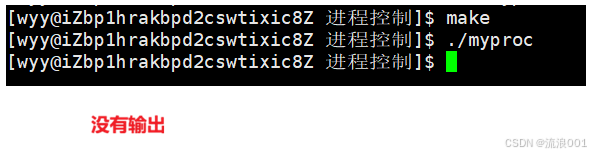
2.exit()会对缓冲区进行刷新,_exit()不会对缓冲器进行刷新
2.通过代码直观体现
1.exit()
#include <stdio.h>
#include <stdlib.h>
#include <unistd.h>
int main() {
printf("hello"); // 未加\n,数据存在缓冲区
sleep(1);
printf("\n");
exit(0); // 会刷新缓冲区,输出hello
}
2._exit()
#include <stdio.h>
#include <unistd.h>

int main() {
    printf("hello");
    _exit(0);       // 不刷新缓冲区,无输出
}
2.异常退出
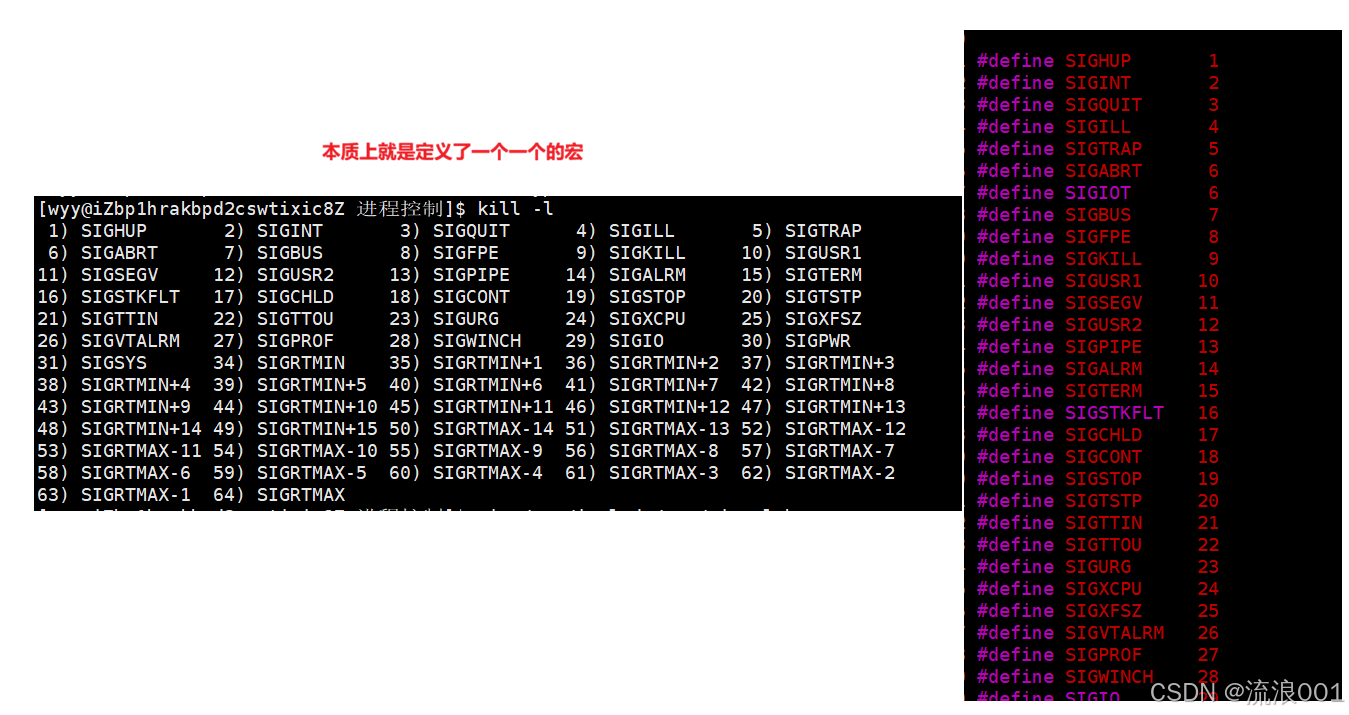
通过信号终止进程,如Ctrl+C发送SIGINT信号,或程序触发段错误信号

3. 退出码:程序状态的反馈
退出码可以告诉我们命令执行的结果,Linux 中约定:
退出码0:表示命令成功执行
非 0 值:表示执行失败,不同值对应不同错误原因
| 退出码 | 解释 |
| 0 | 命令成功执行 |
| 1 | 通用错误代码 |
| 2 | 命令(或参数)使用不当 |
| 126 | 权限被拒绝,无法执行 |
| 127 | 未找到命令或PATH错误 |
| 130 | 通过Ctrl+C(SIGINT)终止 |
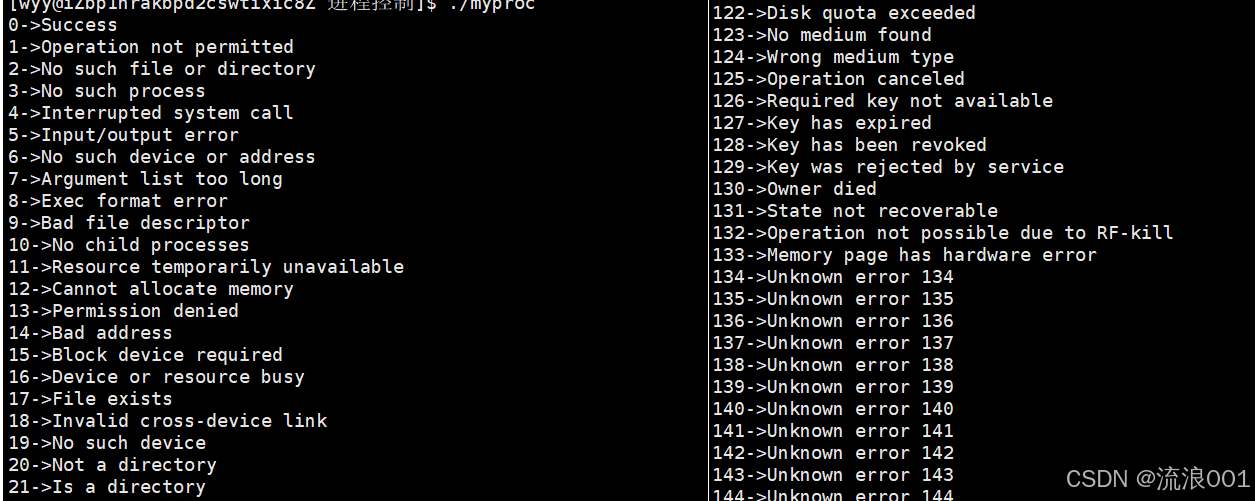
1.查看进程退出码对应的原因(共134个)
#include <stdio.h>
#include <string.h>
#include <unistd.h>

int main()
{
    int i = 0;
    for(; i < 130; i++)
    {
        char *msg = strerror(i);
        if (msg != NULL) {
            printf("%d->%s\n", i, msg);
        }
    }
    return 0;
}
三、进程等待:回收子进程,避免僵尸进程
1. 进程等待的必要性
如果子进程退出后,父进程没有回收它的资源,子进程就会变成僵尸进程,占用系统资源,且无法被kill -9杀死。
进程等待的核心目的就是:
回收子进程资源,避免内存泄漏
获取子进程的退出状态,判断任务是否正常完成
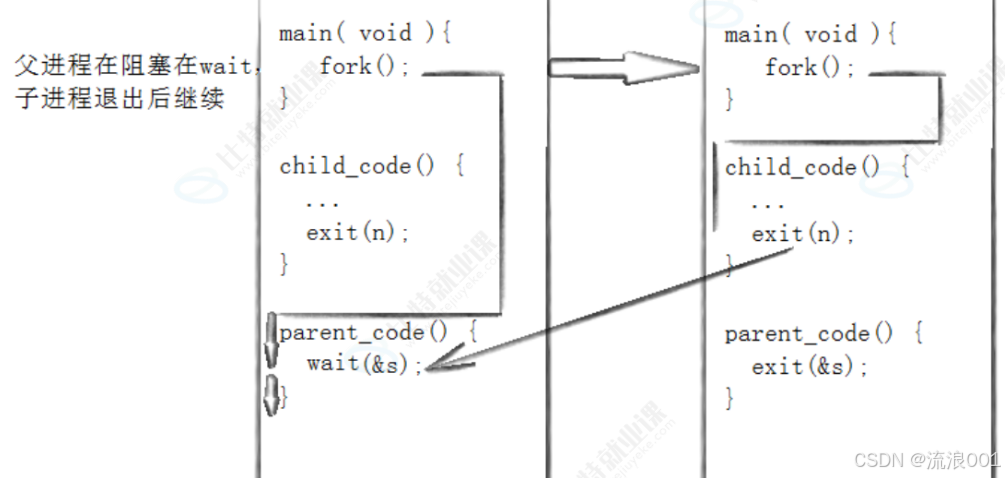
2. 进程等待的两种方式
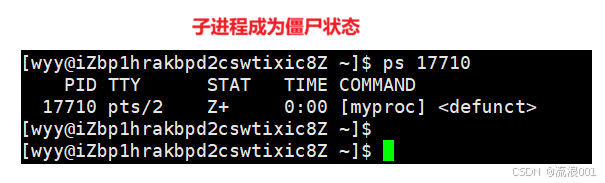
在我们之前写的程序中,创建一个子进程之后,父进程没有等待,在子进程结束后就会变成僵尸状态
#include <stdio.h>
#include <unistd.h>
#include <sys/types.h>

//没有wait,子进程变成僵尸状态

int main()
{
    pid_t t = fork();
    if(t == 0)
    {
        printf("我是一个子进程:%d\n", getpid());
        sleep(5);
    }
    else
        while(1)
        {
            sleep(1);
            printf("我是一个父进程%d\n", getpid());
        }
    return 0;
}
1.wait() 函数:等待任意子进程
pid_t wait(int *wstatus);
返回值:成功返回被等待进程的 PID,失败返回 - 1
参数wstatus:输出型参数,用于获取子进程的退出状态,不关心可设为NULL
#include <stdio.h>
#include <unistd.h>
#include <sys/wait.h>

int main() {
    pid_t pid = fork();

    if (pid == 0) {
        // 子进程:你可以改成 exit(42) 或者段错误代码测试
        printf("我是子进程,pid=%d\n", getpid());
        sleep(2);
        // 测试1:正常退出
        exit(42);
        // 测试2:段错误
        // int *p = NULL; *p = 1;
    } else {
        int status;
        wait(&status); // 等子进程,同时把状态存在 status 里

        if (WIFEXITED(status)) {
            printf("✅ 子进程正常退出,退出码:%d\n", WEXITSTATUS(status));
        } else if (WIFSIGNALED(status)) {
            printf("❌ 子进程被信号杀死,信号号:%d\n", WTERMSIG(status));
        }
    }
    return 0;
}
2.waitpid() 函数:更灵活的等待
pid_t waitpid(pid_t pid, int *wstatus, int options);
1.参数pid:指定要等待的进程
pid > 0:等待 PID 等于pid的子进程
pid = -1:等待任意子进程,与wait()等价
2.参数options:等待方式控制
0:阻塞等待,子进程未退出时父进程一直阻塞(一直等待子进程)
WNOHANG:非阻塞等待,子进程未退出时直接返回 0,父进程可继续执行其他任务
3. 解析子进程的退出状态
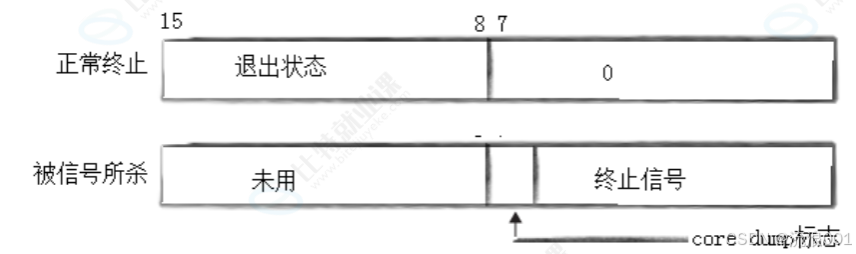
status参数是一个位图,仅低 16 位有效:
正常终止:高 8 位为退出码,低 7 位为 0
异常终止:低 7 位为终止信号,第 8 位为core dump标志
可以通过宏来解析status:
WIFEXITED(status):判断进程是否正常退出
WEXITSTATUS(status):提取进程的退出码(仅正常退出时有效)
1.查看所有信号
4. 阻塞与非阻塞等待示例
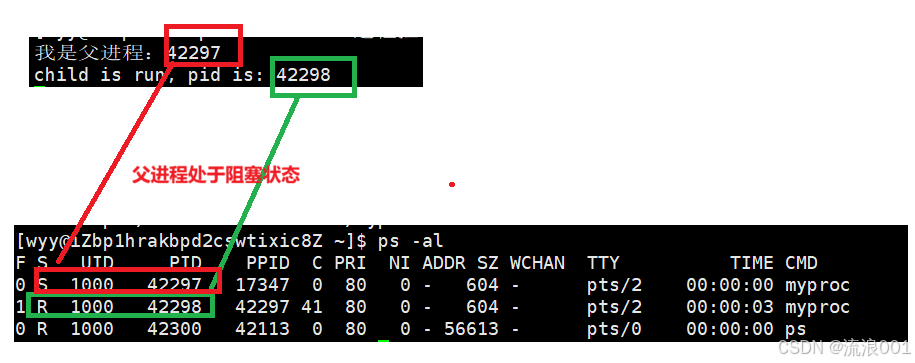
1.阻塞状态
#include <stdio.h>
#include <unistd.h>
#include <sys/wait.h>

int main() {
    pid_t pid = fork();
    if (pid == 0) {
        printf("child is run, pid is: %d\n", getpid());
        sleep(5);

        while(1)
        {}
        exit(257);
    } else {
        printf("我是父进程:%d\n", getpid());
        int status = 0;
        pid_t ret = waitpid(pid, &status, 0); // 阻塞等待
        if (ret > 0 && WIFEXITED(status)) {
            printf("wait success, child return code is: %d\n", WEXITSTATUS(status));
        }
    }
    return 0;
}
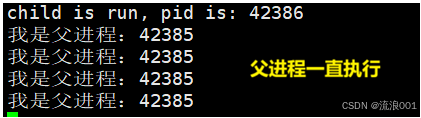
2.非阻塞状态
#include <stdio.h>
#include <sys/wait.h>
#include <unistd.h>
#include <stdlib.h>

int main() {
    pid_t pid = fork();
    if (pid == 0) {
        printf("child is run, pid is: %d\n", getpid());
        sleep(5);

        while(1)
        {}
        exit(257);
    } else {
        int status = 0;
        pid_t ret = waitpid(pid, &status, WNOHANG); // 非阻塞等待
        while(1)
        {
            sleep(1);
            printf("我是父进程:%d\n", getpid());
        }
        if (ret > 0 && WIFEXITED(status)) {
            printf("wait success, child return code is: %d\n", WEXITSTATUS(status));
        }
    }
    return 0;
}
四、进程程序替换:让子进程执行全新程序
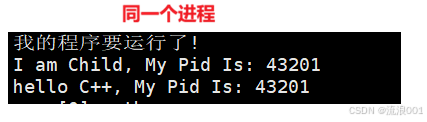
fork()创建的子进程会和父进程执行相同的代码,而程序替换可以让子进程加载并执行一个全新的程序,且不改变进程的 PID。
1. 替换原理
当进程调用exec()系列函数时,内核会将新程序的代码和数据加载到进程的地址空间中,覆盖原有的代码段和数据段,进程从新程序的启动例程开始执行。调用exec()前后,进程的 PID 保持不变。
首先创建一个other.cc的C++文件,编译形成other可执行文件
//other.cc
#include <iostream>
#include <cstdio>
#include <unistd.h>
int main(int argc, char *argv[], char *env[])
{
std::cout << "hello C++, My Pid Is: " << getpid() << std::endl;
return 0;
}#include <stdio.h>
#include <unistd.h>
#include <sys/wait.h>
int main()
{
printf("我的程序要运行了!\n");
if(fork() == 0)
{
printf("I am Child, My Pid Is: %d\n", getpid());
sleep(1);
// 用 execl 调用当前目录下的 other 程序
execl("./other", "other", NULL);
exit(1);
}
waitpid(-1, NULL, 0);
printf("我的程序运行完毕了\n");
return 0;
}
2. exec() 系列函数详解
1.Linux 提供了 6 个以exec开头的函数,统称为exec函数族:
#include <unistd.h>

int execl(const char *path, const char *arg, ...);
int execlp(const char *file, const char *arg, ...);
int execle(const char *path, const char *arg, ..., char *const envp[]);
int execv(const char *path, char *const argv[]);
int execvp(const char *file, char *const argv[]);
int execve(const char *path, char *const argv[], char *const envp[]);
1.命名规律
l(list):参数以列表形式传递,必须以NULL结尾v(vector):参数以字符串数组形式传递,数组末尾必须为NULLp(path):自动搜索PATH环境变量,无需写全路径e(env):自定义传入环境变量数组
2.函数对比表
| 函数名 | 参数格式 | 是否自动用PATH | 是否自定义环境变量 |
| execl | 列表 | 否 | 否(使用当前环境) |
| execlp | 列表 | 是 | 否(使用当前环境) |
| execle | 列表 | 否 | 是 |
| execv | 数组 | 否 | 否(使用当前环境) |
| execvp | 数组 | 是 | 否(使用当前环境) |
| execve | 数组 | 否 | 是(真正的系统调用) |
3. 代码实例:exec() 函数的使用
1. execl
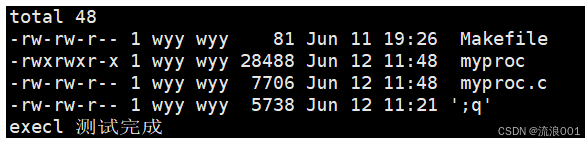
int execl(const char *path, const char *arg, ...);特点:需要完整路径,参数以列表形式传递,继承父进程环境变量
#include <stdio.h>
#include <stdlib.h>
#include <unistd.h>
#include <sys/wait.h>

int main() {
    pid_t pid = fork();
    if (pid == -1) {
        perror("fork");
        exit(EXIT_FAILURE);
    }

    if (pid == 0) {
        // 子进程:用 execl 执行 /bin/ls -l
        // 参数列表必须以 NULL 结尾
        execl("/bin/ls", "ls", "-l", NULL);

        // 如果 execl 成功,下面的代码不会执行
        perror("execl failed");
        exit(EXIT_FAILURE);
    } else {
        // 父进程等待子进程结束
        wait(NULL);
        printf("execl 测试完成\n");
    }

    return 0;
}
2. execlp
int execlp(const char *file, const char *arg, ...);特点:自动在 PATH 中搜索程序,参数以列表形式传递,继承父进程环境变量。
#include <stdio.h>
#include <stdlib.h>
#include <unistd.h>
#include <sys/wait.h>

int main() {
    pid_t pid = fork();
    if (pid == -1) {
        perror("fork");
        exit(EXIT_FAILURE);
    }

    if (pid == 0) {
        // 子进程:用 execlp 执行 ls -a
        // 不用写 /bin/ls,会自动从 PATH 找
        execlp("ls", "ls", "-a", NULL);

        perror("execlp failed");
        exit(EXIT_FAILURE);
    } else {
        wait(NULL);
        printf("execlp 测试完成\n");
    }

    return 0;
}
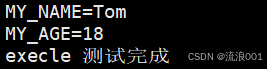
3. execle
int execle(const char *path, const char *arg, ..., char *const envp[]);
特点:需要完整路径,参数以列表形式传递,可以自定义环境变量
#include <stdio.h>
#include <stdlib.h>
#include <unistd.h>
#include <sys/wait.h>

int main() {
    // 自定义环境变量列表,必须以 NULL 结尾
    char *const env[] = {
        "MY_NAME=Tom",
        "MY_AGE=18",
        NULL
    };

    pid_t pid = fork();
    if (pid == -1) {
        perror("fork");
        exit(EXIT_FAILURE);
    }

    if (pid == 0) {
        // 子进程:用 execle 执行 /usr/bin/env,查看环境变量
        execle("/usr/bin/env", "env", NULL, env);

        perror("execle failed");
        exit(EXIT_FAILURE);
    } else {
        wait(NULL);
        printf("execle 测试完成\n");
    }

    return 0;
}
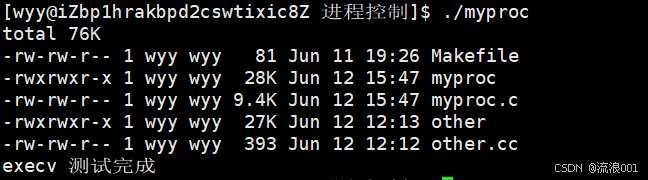
4. execv
int execv(const char *path, char *const argv[]);特点:需要完整路径,参数以数组形式传递,继承父进程环境变量。
#include <stdio.h>
#include <stdlib.h>
#include <unistd.h>
#include <sys/wait.h>

int main() {
    pid_t pid = fork();
    if (pid == -1) {
        perror("fork");
        exit(EXIT_FAILURE);
    }

    if (pid == 0) {
        // 子进程:用 execv 执行 /bin/ls -lh
        // 参数数组必须以 NULL 结尾
        char *const argv[] = {"ls", "-lh", NULL};
        execv("/bin/ls", argv);

        perror("execv failed");
        exit(EXIT_FAILURE);
    } else {
        wait(NULL);
        printf("execv 测试完成\n");
    }

    return 0;
}
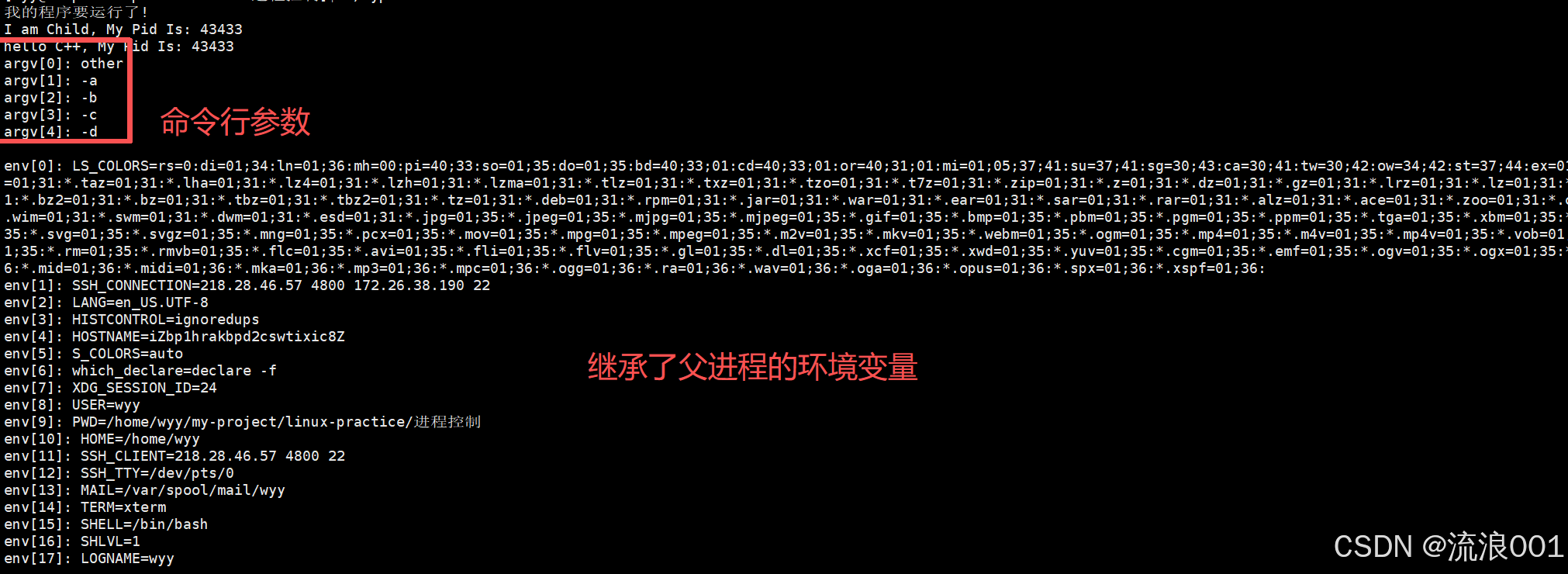
5. execvp
int execvp(const char *file, char *const argv[]);特点:自动在 PATH 中搜索程序,参数以数组形式传递,继承父进程环境变量
#include <stdio.h>
#include <unistd.h>
#include <sys/wait.h>

int main()
{
    printf("我的程序要运行了!\n");

    if (fork() == 0)
    {
        printf("I am Child, My Pid Is: %d\n", getpid());
        sleep(1);

        char *const argv[] = {
            (char *const)"other",
            (char *const)"-a",
            (char *const)"-b",
            (char *const)"-c",
            (char *const)"-d",
            NULL
        };

        execvp("./other", argv);
        exit(1);
    }

    waitpid(-1, NULL, 0);
    printf("我的程序运行完毕了\n");
}
6. execve
int execve(const char *path, char *const argv[], char *const envp[]);特点:需要完整路径,参数和环境变量都以数组形式传递,是所有 exec 函数的底层实现。
#include <stdio.h>
#include <unistd.h>
#include <sys/wait.h>

int main()
{
    printf("我的程序要运行了!\n");

    if (fork() == 0)
    {
        printf("I am Child, My Pid Is: %d\n", getpid());
        sleep(1);

        char *const argv[] = {
            (char *const)"other",
            (char *const)"-a",
            (char *const)"-b",
            (char *const)"-c",
            (char *const)"-d",
            NULL
        };

        extern char **environ;
        execve("/home/wyy/my-project/linux-practice/进程控制/other", argv, environ);

        exit(1);
    }

    waitpid(-1, NULL, 0);
    printf("我的程序运行完毕了\n");
}
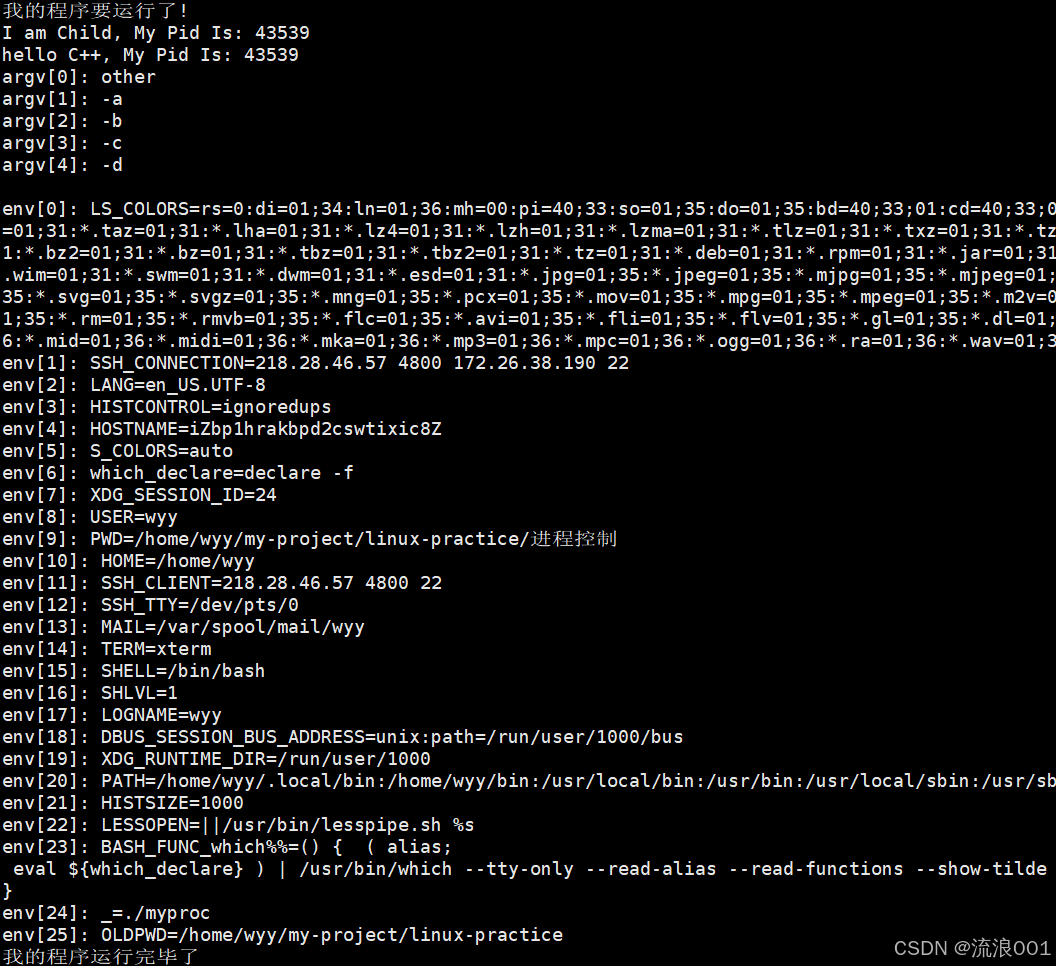
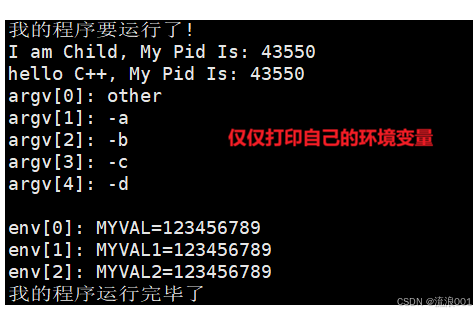
再次观察新的代码,我们发现,如果传入自己的环境变量,那么就不会继承父进程的环境变量了,而是自己新的环境变量,也就是说:进程替换会覆盖之前进程的环境变量
char *const addenv[] = {
    (char *const)"MYVAL=123456789",
    (char *const)"MYVAL1=123456789",
    (char *const)"MYVAL2=123456789",
    NULL
};

int main()
{
    printf("我的程序要运行了!\n");

    if(fork() == 0)
    {
        printf("I am Child, My Pid Is: %d\n", getpid());
        sleep(1);

        char *const argv[] = {
            (char *const)"other",
            (char *const)"-a",
            (char *const)"-b",
            (char *const)"-c",
            (char *const)"-d",
            NULL
        };

        execve("/home/wyy/my-project/linux-practice/进程控制/other", argv, addenv);

        exit(1);
    }

    waitpid(-1, NULL, 0);
    printf("我的程序运行完毕了\n");
}
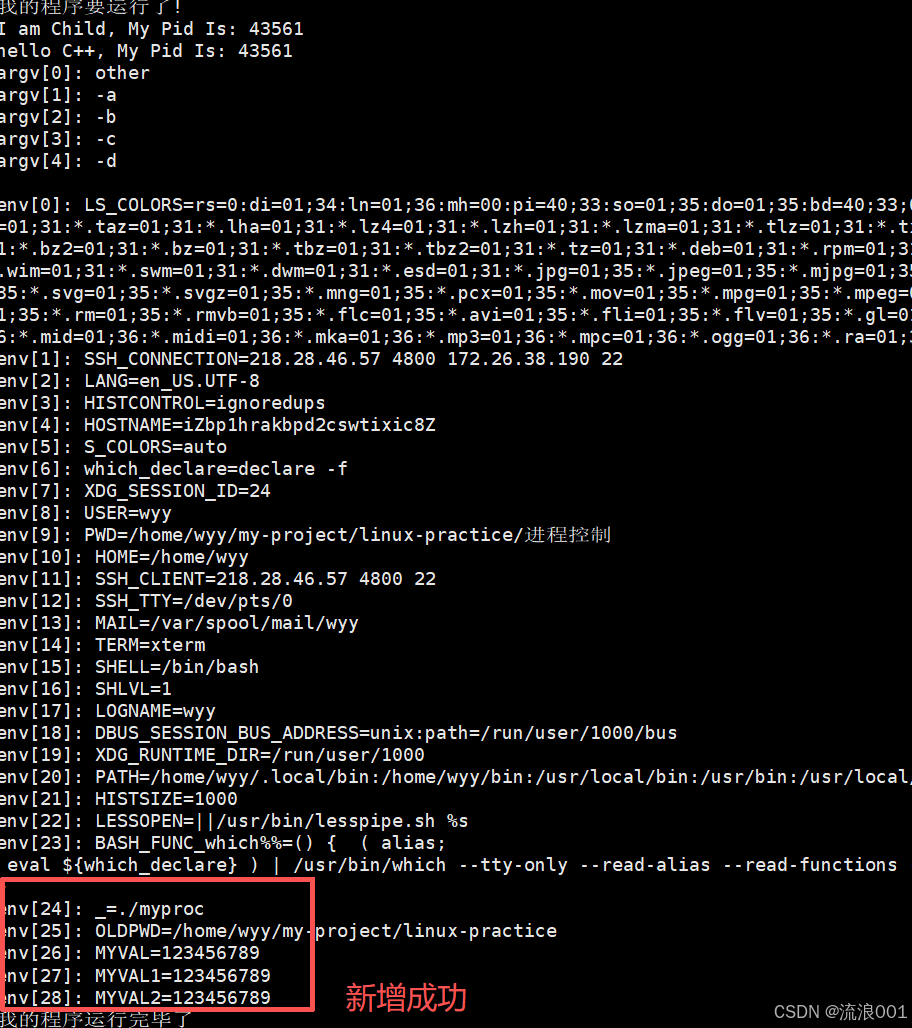
4.以新增的方式给子进程添加环境变量
1.putenv()(针对的是非e结尾的函数)
#include <stdio.h>
#include <unistd.h>
#include <sys/wait.h>
#include <stdlib.h>

char *const addenv[] = {
    (char *const)"MYVAL=123456789",
    (char *const)"MYVAL1=123456789",
    (char *const)"MYVAL2=123456789",
    NULL
};

int main()
{
    printf("我的程序要运行了!\n");

    if(fork() == 0)
    {
        printf("I am Child, My Pid Is: %d\n", getpid());
        sleep(1);

        char *const argv[] = {
            (char*const)"other",
            (char*const)"-a",
            (char*const)"-b",
            (char*const)"-c",
            (char*const)"-d",
            NULL
        };

        for(int i = 0; addenv[i]; i++)
        {
            putenv(addenv[i]);
        }

        execvp("./other", argv);
        exit(1);
    }

    waitpid(-1, NULL, 0);
    printf("我的程序运行完毕了\n");
}
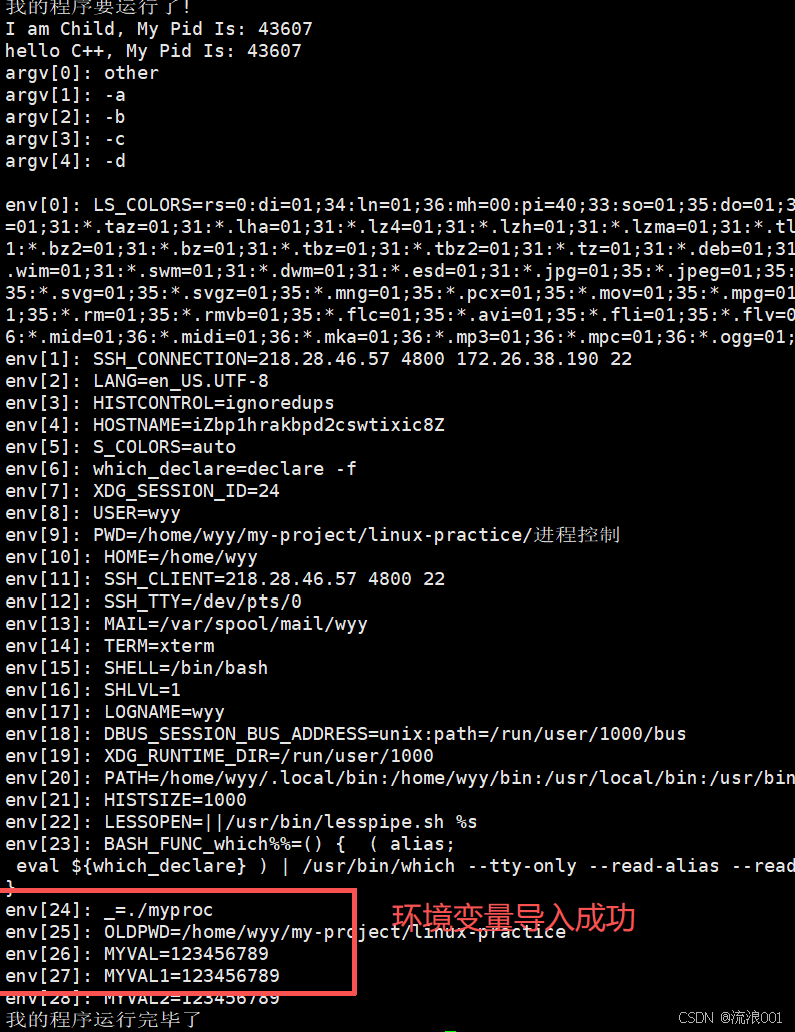
2.继承原环境 + 追加新变量
#include <stdio.h>
#include <unistd.h>
#include <sys/wait.h>
#include <stdlib.h>

char *newnew = (char *)"myVAL=66666666";
char *const addenv[] = {
    (char *const)"MYVAL=123456789",
    (char *const)"MYVAL1=123456789",
    (char *const)"MYVAL2=123456789",
    NULL
};

int main()
{
    printf("我的程序要运行了!\n");

    if (fork() == 0)
    {
        printf("I am Child, My Pid Is: %d\n", getpid());
        sleep(1);

        char *const argv[] = {
            (char *const)"other",
            (char *const)"-a",
            (char *const)"-b",
            (char *const)"-c",
            (char *const)"-d",
            NULL
        };

        for (int i = 0; addenv[i]; i++)
        {
            putenv(addenv[i]);
        }

        extern char **environ;
        execvpe("./other", argv, environ);

        exit(1);
    }

    waitpid(-1, NULL, 0);
    printf("我的程序运行完毕了\n");
}
掌握了这四大核心,你就真正握住了 Linux 系统编程的骨架。无论是以后深入研究 Shell 解释器的模拟实现、多进程网络服务器(如早期的 Apache),还是理解 Container(容器)底层的隔离机制,今天筑起的这堵进程控制的高墙,都将是你最坚实的底座。
保持这种死磕底层原理的劲头,继续在代码的世界里纵横驰骋吧!

openEuler 是由开放原子开源基金会孵化的全场景开源操作系统项目,面向数字基础设施四大核心场景(服务器、云计算、边缘计算、嵌入式),全面支持 ARM、x86、RISC-V、loongArch、PowerPC、SW-64 等多样性计算架构
更多推荐

 23
23 0
0- 0


 已为社区贡献6条内容

所有评论(0)