微信接口的ip是动态的,服务器ping微信接口的部分ip ping不通
·
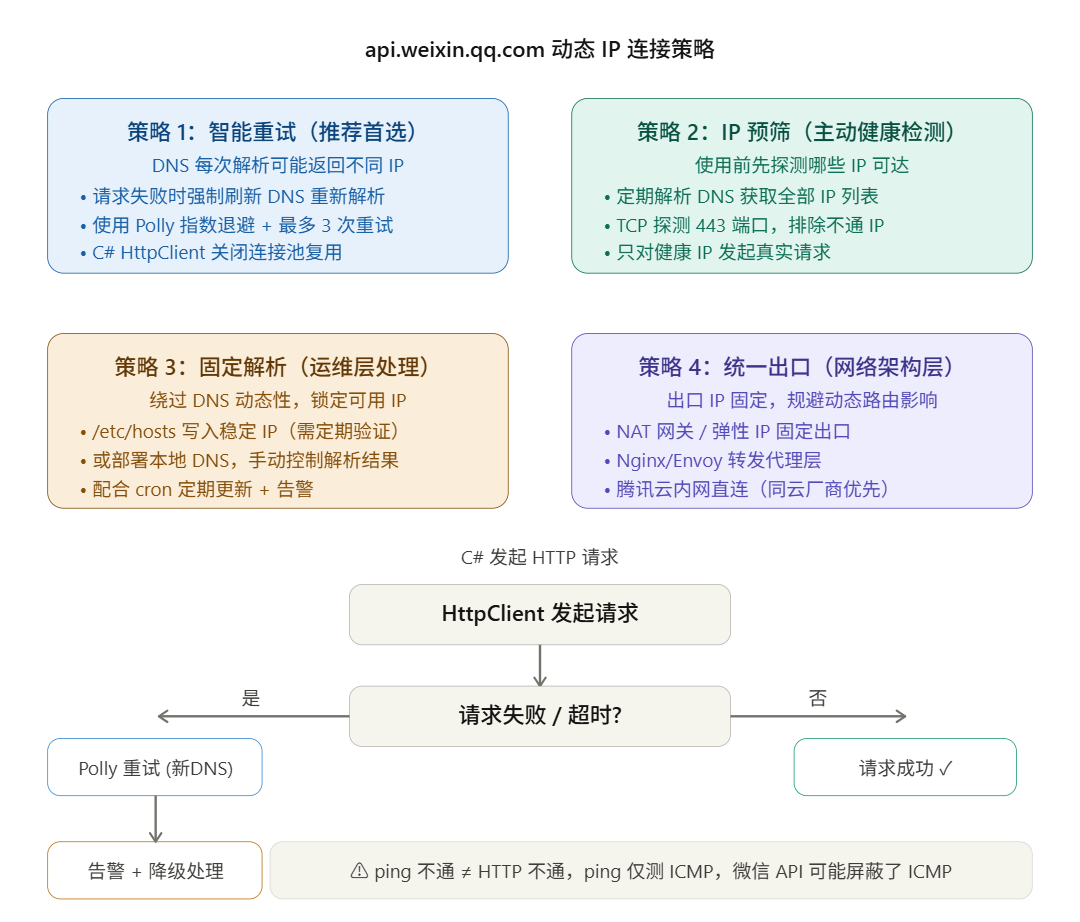
策略1
- 第一步:查出微信 API 当前所有 IP
dig +short api.weixin.qq.com
输出类似:
183.47.101.204
183.47.101.205
111.30.137.168
用 TCP 探测哪个 IP 真正可达(443端口):
for ip in $(dig +short api.weixin.qq.com); do
    if timeout 2 bash -c "echo >/dev/tcp/$ip/443" 2>/dev/null; then
        echo "✅ 可达: $ip"
    else
        echo "❌ 不通: $ip"
    fi
done
类似输出
? 不通: 120.232.65.161
? 不通: 112.60.20.154
? 不通: 112.53.42.235
? 可达: 120.233.18.202
找到可达 IP 了:120.233.18.202,直接写入 hosts:
# 写入 hosts
sudo sed -i '/api\.weixin\.qq\.com/d' /etc/hosts
echo "120.233.18.202  api.weixin.qq.com" | sudo tee -a /etc/hosts
验证是否生效:
grep "api.weixin.qq.com" /etc/hosts
应该输出:120.233.18.202 api.weixin.qq.com
再验证 HTTPS 是否真正通
curl -v --connect-timeout 5 https://api.weixin.qq.com/sns/oauth2/access_token 2>&1 | head -20
类似输出
[root@localhost ~]# curl -v --connect-timeout 5 https://api.weixin.qq.com/sns/oauth2/access_token 2>&1 | head -20
  % Total    % Received % Xferd  Average Speed   Time    Time     Time  Current
                                 Dload  Upload   Total   Spent    Left  Speed
  0     0    0     0    0     0      0      0 --:--:-- --:--:-- --:--:--     0* About to connect() to api.weixin.qq.com port 443 (#0)
*   Trying 120.233.18.202...
* Connected to api.weixin.qq.com (120.233.18.202) port 443 (#0)
* Initializing NSS with certpath: sql:/etc/pki/nssdb
*   CAfile: /etc/pki/tls/certs/ca-bundle.crt
  CApath: none
* SSL connection using TLS_ECDHE_RSA_WITH_AES_128_GCM_SHA256
* Server certificate:
* 	subject: CN=mp.weixin.qq.com,O=Tencent Technology (Shenzhen) Company Limited,L=Shenzhen,ST=Guangdong Province,C=CN
* 	start date: 10月 23 00:00:00 2025 GMT
* 	expire date: 11月 23 23:59:59 2026 GMT
* 	common name: mp.weixin.qq.com
* 	issuer: CN=DigiCert Secure Site OV G2 TLS CN RSA4096 SHA256 2022 CA1,O="DigiCert, Inc.",C=US
> GET /sns/oauth2/access_token HTTP/1.1
> User-Agent: curl/7.29.0
> Host: api.weixin.qq.com
> Accept: */*
>
解读
- Trying 120.233.18.202… ← 用的就是 hosts 里绑定的 IP
- Connected to … port 443 ← TCP 连接成功
- SSL connection using TLS_ECDHE… ← HTTPS 握手成功
- subject: CN=mp.weixin.qq.com ← 证书正常(腾讯统一证书)
- expire date: 11月 23 23:59:59 2026 ← 证书有效期到明年11月,没问题
自动更新脚本装上,避免这个 IP 将来失效:
curl -v --connect-timeout 5 # 创建脚本目录
sudo mkdir -p /opt/scripts

# 写入脚本
sudo tee /opt/scripts/update_wechat_host.sh > /dev/null << 'EOF'
#!/bin/bash
HOST="api.weixin.qq.com"
LOG="/var/log/wechat_dns.log"
TIMESTAMP=$(date '+%Y-%m-%d %H:%M:%S')

IPS=$(dig +short $HOST 2>/dev/null)
if [ -z "$IPS" ]; then
    echo "[$TIMESTAMP] ERROR: DNS 解析失败" >> $LOG
    exit 1
fi

BEST_IP=""
for IP in $IPS; do
    if timeout 2 bash -c "echo >/dev/tcp/$IP/443" 2>/dev/null; then
        BEST_IP=$IP
        echo "[$TIMESTAMP] OK 可达: $IP" >> $LOG
        break
    else
        echo "[$TIMESTAMP] FAIL 不通: $IP" >> $LOG
    fi
done

if [ -z "$BEST_IP" ]; then
    echo "[$TIMESTAMP] ALERT: 所有IP均不可达,保留现有hosts" >> $LOG
    exit 1
fi

CURRENT=$(grep "$HOST" /etc/hosts | awk '{print $1}')
if [ "$CURRENT" = "$BEST_IP" ]; then
    echo "[$TIMESTAMP] 无需更新,当前IP已是 $BEST_IP" >> $LOG
    exit 0
fi

sed -i "/$HOST/d" /etc/hosts
echo "$BEST_IP  $HOST" >> /etc/hosts
echo "[$TIMESTAMP] 已更新: $CURRENT -> $BEST_IP" >> $LOG
EOF

# 赋权
sudo chmod +x /opt/scripts/update_wechat_host.sh
加入 cron:
(crontab -l 2>/dev/null; echo "*/5 * * * * /opt/scripts/update_wechat_host.sh") | crontab -
确认 cron 已加入:
crontab -l
手动跑一次测试脚本是否正常:
sudo /opt/scripts/update_wechat_host.sh && cat /var/log/wechat_dns.log
查看状态
# 实时跟踪日志
tail -f /var/log/wechat_dns.log

# 看最近20条记录
tail -20 /var/log/wechat_dns.log

# 看今天的记录
grep "$(date '+%Y-%m-%d')" /var/log/wechat_dns.log

# 查看 cron 服务状态
systemctl status crond

# 查看 cron 执行历史(系统日志里)
grep "update_wechat_host" /var/log/cron
# 看当前 hosts 是否是最新的
grep "api.weixin.qq.com" /etc/hosts
停止脚本
crontab -e
找到这一行删除掉(:eq保存并退出,:q! 不保存退出)
*/5 * * * * /opt/scripts/update_wechat_host.sh
确认已删除:
bashcrontab -l
应该看不到 update_wechat_host 这行了

openEuler 是由开放原子开源基金会孵化的全场景开源操作系统项目,面向数字基础设施四大核心场景(服务器、云计算、边缘计算、嵌入式),全面支持 ARM、x86、RISC-V、loongArch、PowerPC、SW-64 等多样性计算架构
更多推荐

 7
7 0
0- 0


 已为社区贡献1条内容

所有评论(0)