华三同一接口下主从地址DHCP分配地址案例
一 组网与需求
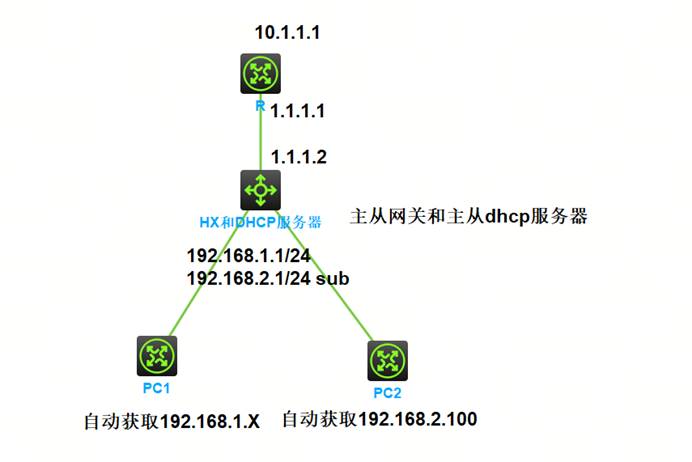
如上图组网,核心交换机作为网关配置主从地址,并且配置dhcp下主从地址池
二 设备配置
2.1 R设备配置
sysname R
#
interface LoopBack0
ip address 10.1.1.1 255.255.255.255
#
interface GigabitEthernet0/0
port link-mode route
combo enable copper
ip address 1.1.1.1 255.255.255.252
#
ip route-static 192.168.0.0 16 1.1.1.2
#
2.2 HX&DHCP-Server配置
sysname HX&DHCP-Server
#
dhcp enable
#
dhcp server ip-pool vlan1
gateway-list 192.168.1.1
network 192.168.1.0 mask 255.255.255.0
static-bind ip-address 192.168.2.100 mask 255.255.255.0 hardware-address 64d1-1010-0405
network 192.168.2.0 mask 255.255.255.0 secondary
gateway-list 192.168.2.1
#
interface Vlan-interface1
ip address 192.168.1.1 255.255.255.0
ip address 192.168.2.1 255.255.255.0 sub
#
interface GigabitEthernet1/0/1
port link-mode route
combo enable fiber
ip address 1.1.1.2 255.255.255.252
#
ip route-static 10.1.1.1 32 1.1.1.1
#
2.3 PC1设备配置
sysname PC1
#
interface GigabitEthernet0/0
port link-mode route
combo enable copper
ip address dhcp-alloc
#
2.4 PC2设备配置
sysname PC2
#
interface GigabitEthernet0/0
port link-mode route
combo enable copper
ip address dhcp-alloc
#
三 状态查看与业务测试
3.1 HX-DHCP-Server状态查看
<HX&DHCP-Server>dis dhcp server ip-in-use
IP address Client identifier/ Lease expiration Type
Hardware address
192.168.1.2 0036-3464-312e-3063- Jun 18 22:17:23 2026 Auto(C)
3835-2e30-3330-352d-
4745-302f-30
192.168.1.3 0036-3464-312e-3130- Jun 18 22:18:10 2026 Auto(C)
3130-2e30-3430-352d-
4745-302f-30
192.168.2.100 64d1-1010-0405 Jun 18 22:19:36 2026 Static(C)
<HX&DHCP-Server>dis dhcp server statistics
Pool number: 1
Pool utilization: 0.98%
Bindings:
Automatic: 2
Manual: 1
Expired: 0
Conflict: 0
Messages received: 6
DHCPDISCOVER: 3
DHCPREQUEST: 3
DHCPDECLINE: 0
DHCPRELEASE: 0
DHCPINFORM: 0
BOOTPREQUEST: 0
Messages sent: 6
DHCPOFFER: 3
DHCPACK: 3
DHCPNAK: 0
BOOTPREPLY: 0
Bad Messages: 0
<HX&DHCP-Server>dis dhcp server free-ip
Pool name: vlan1
Network: 192.168.1.0 mask 255.255.255.0
IP ranges from 192.168.1.4 to 192.168.1.254
Secondary networks:
192.168.2.0 mask 255.255.255.0
IP ranges from 192.168.2.2 to 192.168.2.99
IP ranges from 192.168.2.101 to 192.168.2.254
3.2 PC1状态查看
<PC1>dis ip in b
*down: administratively down
(s): spoofing (l): loopback
Interface Physical Protocol IP address/Mask VPN instance Description
GE0/0 up up 192.168.1.2/24 -- --
<PC1>dis ip routing-table
Destinations : 11 Routes : 11
Destination/Mask Proto Pre Cost NextHop Interface
0.0.0.0/0 Static 70 0 192.168.1.1 GE0/0
<PC1>ping 10.1.1.1
Ping 10.1.1.1 (10.1.1.1): 56 data bytes, press CTRL+C to break
56 bytes from 10.1.1.1: icmp_seq=0 ttl=254 time=0.792 ms
56 bytes from 10.1.1.1: icmp_seq=1 ttl=254 time=0.621 ms
<PC1>tracert 10.1.1.1
traceroute to 10.1.1.1 (10.1.1.1), 30 hops at most, 40 bytes each packet, press CTRL+C to break
1 192.168.1.1 (192.168.1.1) 0.866 ms 0.653 ms 0.368 ms
2 1.1.1.1 (1.1.1.1) 1.735 ms 1.118 ms 0.703 ms
<PC1>
3.3 PC2状态查看
<PC2>dis ip in b
*down: administratively down
(s): spoofing (l): loopback
Interface Physical Protocol IP address/Mask VPN instance Description
GE0/0 up up 192.168.2.100/24 -- --
<PC2>dis ip routing-table
Destinations : 11 Routes : 11
Destination/Mask Proto Pre Cost NextHop Interface
0.0.0.0/0 Static 70 0 192.168.2.1 GE0/0
<PC2>ping 10.1.1.1
Ping 10.1.1.1 (10.1.1.1): 56 data bytes, press CTRL+C to break
56 bytes from 10.1.1.1: icmp_seq=0 ttl=254 time=0.784 ms
56 bytes from 10.1.1.1: icmp_seq=1 ttl=254 time=0.891 ms
56 bytes from 10.1.1.1: icmp_seq=2 ttl=254 time=1.004 ms
<PC2>tracert 10.1.1.1
traceroute to 10.1.1.1 (10.1.1.1), 30 hops at most, 40 bytes each packet, press CTRL+C to break
1 192.168.2.1 (192.168.2.1) 0.817 ms 0.686 ms 0.633 ms
2 1.1.1.1 (1.1.1.1) 1.743 ms 1.148 ms 1.389 ms
<PC2>

openEuler 是由开放原子开源基金会孵化的全场景开源操作系统项目,面向数字基础设施四大核心场景(服务器、云计算、边缘计算、嵌入式),全面支持 ARM、x86、RISC-V、loongArch、PowerPC、SW-64 等多样性计算架构
更多推荐

 6
6 0
0- 0


 已为社区贡献10条内容

所有评论(0)