老爷级超微6049GP-TRT 服务器多 GPU跨代架构 NVIDIA 驱动、CUDA 与 NCCL 的环境搭建测试
服务器硬件
-
主板:Supermicro X11DPG-OT-CPU(双路 Intel Xeon,NUMA 架构)
-
GPU:
-
2 × NVIDIA GeForce RTX 3090 24GB (Bus ID: 1b, 40)
-
1 × NVIDIA RTX A4000 16GB (Bus ID: 8c)
-
1 × Tesla V100-PCIE-32GB (Bus ID: b2)
-
操作系统
-
Ubuntu 24.04 Server
最终软件环境
| 组件 | 版本 | 备注 |
|---|---|---|
| NVIDIA 驱动 | 570.211.01 (闭源,非 open) | 通过 nvidia-driver-570 安装 |
| CUDA 工具包 | 12.8 | /usr/local/cuda-12.8 |
| NCCL 库 | 2.26.2-1+cuda12.8 | 与 CUDA 12.8 严格匹配 |
| NCCL 测试工具 | nccl-tests 2.18.5(重新编译) | 链接 NCCL 2.26.2 |
一、安装 NVIDIA 驱动 570
-
屏蔽开源驱动 nouveau
bash
echo "blacklist nouveau" | sudo tee /etc/modprobe.d/blacklist-nvidia-nouveau.conf
echo "options nouveau modeset=0" | sudo tee -a /etc/modprobe.d/blacklist-nvidia-nouveau.conf
sudo update-initramfs -u
sudo reboot
-
卸载所有旧驱动/残余
bash
sudo apt purge nvidia-driver-* nvidia-*
sudo apt autoremove
-
安装闭源 570 驱动
bash
sudo apt update
sudo apt install nvidia-driver-570
sudo reboot
-
验证
bash
nvidia-smi
应显示所有 4 张 GPU,驱动版本 570.211.01,CUDA 版本 12.8。
二、安装 CUDA Toolkit 12.8
-
添加 NVIDIA 仓库(如未添加)
bash
wget https://developer.download.nvidia.com/compute/cuda/repos/ubuntu2404/x86_64/cuda-keyring_1.1-1_all.deb
sudo dpkg -i cuda-keyring_1.1-1_all.deb
sudo apt update
-
安装 CUDA 12.8
bash
sudo apt install cuda-toolkit-12-8
-
环境变量(追加到
~/.bashrc)bash
export PATH=/usr/local/cuda-12.8/bin:$PATH
export LD_LIBRARY_PATH=/usr/local/cuda-12.8/lib64:$LD_LIBRARY_PATH
执行
source ~/.bashrc生效。 -
验证
bash
nvcc --version
输出应为 Cuda compilation tools, release 12.8, V12.8.93。
三、安装匹配的 NCCL 库
关键教训:仓库默认安装的 NCCL 可能对应更高 CUDA 版本(如 13.x),必须手动指定与 CUDA 12.8 匹配的版本。
-
查看可用 NCCL 版本
bash
apt-cache policy libnccl-dev
找到带
cuda12.8后缀的最高版本(本部署时为 2.26.2)。 -
安装指定版本
bash
sudo apt install libnccl-dev=2.26.2-1+cuda12.8 libnccl2=2.26.2-1+cuda12.8
-
锁定版本(防止自动升级)
bash
sudo apt-mark hold libnccl-dev libnccl2
-
验证
bash
dpkg -l | grep libnccl
应显示
2.26.2-1+cuda12.8。
四、编译并测试 NCCL 通信
-
获取 nccl-tests
bash
git clone https://github.com/NVIDIA/nccl-tests.git
cd nccl-tests
-
编译(指定 CUDA 路径)
bash
make clean
make CUDA_HOME=/usr/local/cuda-12.8
-
运行双 3090 测试
bash
./build/all_reduce_perf -b 8 -e 128M -f 2 -g 2
./build/all_reduce_perf -b 8 -e 128M -f 2 -g 2
# nccl-tests version 2.18.5 nccl-headers=22602 nccl-library=22602
# Collective test starting: all_reduce_perf
# nThread 1 nGpus 2 minBytes 8 maxBytes 134217728 step: 2(factor) warmup iters: 1 iters: 20 agg iters: 1 validation: 1 graph: 0 unalign: 0
#
# Using devices
#  Rank  0 Group  0 Pid 197783 on      aillm device  0 [0000:1b:00] NVIDIA GeForce RTX 3090
#  Rank  1 Group  0 Pid 197783 on      aillm device  1 [0000:40:00] NVIDIA GeForce RTX 3090
#
#                                                              out-of-place                       in-place
#       size         count      type   redop    root     time   algbw   busbw  #wrong     time   algbw   busbw  #wrong
#        (B)    (elements)                               (us)  (GB/s)  (GB/s)             (us)  (GB/s)  (GB/s)
           8             2     float     sum      -1    10.51    0.00    0.00       0    11.12    0.00    0.00       0
          16             4     float     sum      -1    10.51    0.00    0.00       0     9.95    0.00    0.00       0
          32             8     float     sum      -1    10.35    0.00    0.00       0    10.96    0.00    0.00       0
          64            16     float     sum      -1    10.42    0.01    0.01       0    10.74    0.01    0.01       0
         128            32     float     sum      -1    11.14    0.01    0.01       0    11.11    0.01    0.01       0
         256            64     float     sum      -1    11.89    0.02    0.02       0    11.06    0.02    0.02       0
         512           128     float     sum      -1    11.64    0.04    0.04       0    11.01    0.05    0.05       0
        1024           256     float     sum      -1    11.47    0.09    0.09       0    10.69    0.10    0.10       0
        2048           512     float     sum      -1    11.66    0.18    0.18       0    11.21    0.18    0.18       0
        4096          1024     float     sum      -1    12.24    0.33    0.33       0    11.71    0.35    0.35       0
        8192          2048     float     sum      -1    14.12    0.58    0.58       0    13.50    0.61    0.61       0
       16384          4096     float     sum      -1    16.78    0.98    0.98       0    16.46    1.00    1.00       0
       32768          8192     float     sum      -1    22.12    1.48    1.48       0    21.51    1.52    1.52       0
       65536         16384     float     sum      -1    31.71    2.07    2.07       0    30.46    2.15    2.15       0
      131072         32768     float     sum      -1    54.81    2.39    2.39       0    54.31    2.41    2.41       0
      262144         65536     float     sum      -1    80.20    3.27    3.27       0    78.03    3.36    3.36       0
      524288        131072     float     sum      -1   125.62    4.17    4.17       0   124.84    4.20    4.20       0
     1048576        262144     float     sum      -1   221.27    4.74    4.74       0   219.86    4.77    4.77       0
     2097152        524288     float     sum      -1   411.61    5.09    5.09       0   410.55    5.11    5.11       0
     4194304       1048576     float     sum      -1   802.92    5.22    5.22       0   800.73    5.24    5.24       0
     8388608       2097152     float     sum      -1  1574.22    5.33    5.33       0  1577.21    5.32    5.32       0
    16777216       4194304     float     sum      -1  3142.67    5.34    5.34       0  3133.92    5.35    5.35       0
    33554432       8388608     float     sum      -1  6254.66    5.36    5.36       0  6264.99    5.36    5.36       0
    67108864      16777216     float     sum      -1  12516.3    5.36    5.36       0  12503.8    5.37    5.37       0
   134217728      33554432     float     sum      -1  25027.0    5.36    5.36       0  25060.4    5.36    5.36       0
# Out of bounds values : 0 OK
# Avg bus bandwidth    : 2.30553
#
# Collective test concluded: all_reduce_perf
#

shande@aillm:~/nccl-tests$
预期:无错误,带宽约 5.36 GB/s(单卡双向)。
-
运行 4 卡混合测试
bash
./build/all_reduce_perf -b 8 -e 128M -f 2 -g 4
./build/all_reduce_perf -b 8 -e 128M -f 2 -g 4
# nccl-tests version 2.18.5 nccl-headers=22602 nccl-library=22602
# Collective test starting: all_reduce_perf
# nThread 1 nGpus 4 minBytes 8 maxBytes 134217728 step: 2(factor) warmup iters: 1 iters: 20 agg iters: 1 validation: 1 graph: 0 unalign: 0
#
# Using devices
#  Rank  0 Group  0 Pid   8800 on      aillm device  0 [0000:1b:00] NVIDIA GeForce RTX 3090
#  Rank  1 Group  0 Pid   8800 on      aillm device  1 [0000:40:00] NVIDIA GeForce RTX 3090
#  Rank  2 Group  0 Pid   8800 on      aillm device  2 [0000:8c:00] NVIDIA RTX A4000
#  Rank  3 Group  0 Pid   8800 on      aillm device  3 [0000:b2:00] Tesla V100-PCIE-32GB
#
#                                                              out-of-place                       in-place
#       size         count      type   redop    root     time   algbw   busbw  #wrong     time   algbw   busbw  #wrong
#        (B)    (elements)                               (us)  (GB/s)  (GB/s)             (us)  (GB/s)  (GB/s)
           8             2     float     sum      -1    26.31    0.00    0.00       0    26.26    0.00    0.00       0
          16             4     float     sum      -1    25.87    0.00    0.00       0    26.25    0.00    0.00       0
          32             8     float     sum      -1    26.08    0.00    0.00       0    25.95    0.00    0.00       0
          64            16     float     sum      -1    26.58    0.00    0.00       0    26.81    0.00    0.00       0
         128            32     float     sum      -1    26.56    0.00    0.01       0    26.91    0.00    0.01       0
         256            64     float     sum      -1    27.65    0.01    0.01       0    26.70    0.01    0.01       0
         512           128     float     sum      -1    26.85    0.02    0.03       0    26.59    0.02    0.03       0
        1024           256     float     sum      -1    26.97    0.04    0.06       0    26.84    0.04    0.06       0
        2048           512     float     sum      -1    26.90    0.08    0.11       0    27.03    0.08    0.11       0
        4096          1024     float     sum      -1    28.12    0.15    0.22       0    27.57    0.15    0.22       0
        8192          2048     float     sum      -1    27.34    0.30    0.45       0    27.25    0.30    0.45       0
       16384          4096     float     sum      -1    28.32    0.58    0.87       0    27.51    0.60    0.89       0
       32768          8192     float     sum      -1    30.04    1.09    1.64       0    29.11    1.13    1.69       0
       65536         16384     float     sum      -1    45.55    1.44    2.16       0    44.71    1.47    2.20       0
      131072         32768     float     sum      -1    75.77    1.73    2.59       0    76.09    1.72    2.58       0
      262144         65536     float     sum      -1   106.91    2.45    3.68       0   106.87    2.45    3.68       0
      524288        131072     float     sum      -1   153.19    3.42    5.13       0   152.51    3.44    5.16       0
     1048576        262144     float     sum      -1   234.71    4.47    6.70       0   233.43    4.49    6.74       0
     2097152        524288     float     sum      -1   416.33    5.04    7.56       0   415.16    5.05    7.58       0
     4194304       1048576     float     sum      -1   792.03    5.30    7.94       0   791.27    5.30    7.95       0
     8388608       2097152     float     sum      -1  1546.38    5.42    8.14       0  1549.41    5.41    8.12       0
    16777216       4194304     float     sum      -1  3058.40    5.49    8.23       0  3060.84    5.48    8.22       0
    33554432       8388608     float     sum      -1  6111.74    5.49    8.24       0  6108.65    5.49    8.24       0
    67108864      16777216     float     sum      -1  12204.5    5.50    8.25       0  12193.6    5.50    8.26       0
   134217728      33554432     float     sum      -1  24344.5    5.51    8.27       0  24385.7    5.50    8.26       0
# Out of bounds values : 0 OK
# Avg bus bandwidth    : 3.21492
#
# Collective test concluded: all_reduce_perf
#

shande@aillm:~/nccl-tests$
预期:无错误,总线带宽约 8.26 GB/s。
五、P2P 与通信带宽说明
-
拓扑检查
bash
nvidia-smi topo -m
输出显示 GPU0↔GPU1 为
NODE,所有跨卡连接均非PIX或NV。 -
P2P 状态
运行 CUDA 自带p2pBandwidthLatencyTest,所有 GPU 间均显示CANNOT Access Peer,P2P 矩阵全 0。 -
shande@aillm:~/nvdrv/cuda-samples-12.8/build/Samples/5_Domain_Specific/p2pBandwidthLatencyTest$ ./p2pBandwidthLatencyTest [P2P (Peer-to-Peer) GPU Bandwidth Latency Test] Device: 0, NVIDIA GeForce RTX 3090, pciBusID: 1b, pciDeviceID: 0, pciDomainID:0 Device: 1, NVIDIA GeForce RTX 3090, pciBusID: 40, pciDeviceID: 0, pciDomainID:0 Device: 2, NVIDIA RTX A4000, pciBusID: 8c, pciDeviceID: 0, pciDomainID:0 Device: 3, Tesla V100-PCIE-32GB, pciBusID: b2, pciDeviceID: 0, pciDomainID:0 Device=0 CANNOT Access Peer Device=1 Device=0 CANNOT Access Peer Device=2 Device=0 CANNOT Access Peer Device=3 Device=1 CANNOT Access Peer Device=0 Device=1 CANNOT Access Peer Device=2 Device=1 CANNOT Access Peer Device=3 Device=2 CANNOT Access Peer Device=0 Device=2 CANNOT Access Peer Device=1 Device=2 CANNOT Access Peer Device=3 Device=3 CANNOT Access Peer Device=0 Device=3 CANNOT Access Peer Device=1 Device=3 CANNOT Access Peer Device=2 ***NOTE: In case a device doesn't have P2P access to other one, it falls back to normal memcopy procedure. So you can see lesser Bandwidth (GB/s) and unstable Latency (us) in those cases. P2P Connectivity Matrix D\D 0 1 2 3 0 1 0 0 0 1 0 1 0 0 2 0 0 1 0 3 0 0 0 1 Unidirectional P2P=Disabled Bandwidth Matrix (GB/s) D\D 0 1 2 3 0 853.36 5.84 5.82 5.79 1 5.84 854.29 5.82 5.82 2 5.83 5.84 417.78 11.43 3 5.73 5.74 11.40 811.27 Unidirectional P2P=Enabled Bandwidth (P2P Writes) Matrix (GB/s) D\D 0 1 2 3 0 856.63 5.83 5.84 5.86 1 5.87 857.57 5.83 5.82 2 5.83 5.83 417.67 11.44 3 5.73 5.72 11.38 811.69 Bidirectional P2P=Disabled Bandwidth Matrix (GB/s) D\D 0 1 2 3 0 862.78 8.61 8.58 8.43 1 8.62 863.02 8.62 8.51 2 8.57 8.59 419.18 14.81 3 8.54 8.56 14.75 812.11 Bidirectional P2P=Enabled Bandwidth Matrix (GB/s) D\D 0 1 2 3 0 862.78 8.61 8.54 8.48 1 8.63 863.02 8.61 8.39 2 8.58 8.59 419.07 14.79 3 8.48 8.36 14.74 812.32 P2P=Disabled Latency Matrix (us) GPU 0 1 2 3 0 1.57 11.77 12.38 17.38 1 15.35 1.56 12.44 17.48 2 12.38 16.94 1.44 18.83 3 19.57 19.87 17.43 1.88 CPU 0 1 2 3 0 2.66 7.80 7.99 7.90 1 7.74 2.55 7.99 7.72 2 7.90 7.88 2.79 8.05 3 7.78 7.71 8.16 2.49 P2P=Enabled Latency (P2P Writes) Matrix (us) GPU 0 1 2 3 0 1.57 13.54 16.90 17.21 1 11.93 1.53 13.41 17.37 2 17.23 12.44 1.44 18.86 3 20.88 20.80 18.16 1.85 CPU 0 1 2 3 0 2.61 7.67 8.02 7.79 1 7.66 2.50 7.95 7.79 2 7.89 7.75 2.73 7.99 3 7.67 7.67 8.10 2.50 NOTE: The CUDA Samples are not meant for performance measurements. Results may vary when GPU Boost is enabled. shande@aillm:~/nvdrv/cuda-samples-12.8/build/Sam -
原因
主板每个 GPU 挂载在不同的 PCIe 交换机下,硬件上无法支持直接 GPU 显存访问(P2P)。社区nvidia-p2p-patch仅对PIX拓扑有效,因此本机打补丁无效
这里有个疑虑:在驱动595.71.05下使用社区的open-gpu-kernel-modules-595.71.05-p2p补丁,貌似可以同NUMA下速度能跑满PCI3gen3,目前没有深入测试,测试如下:
shande@aillm:~$ Nvidia_Drv/cuda-samples/build/cpp/5_Domain_Specific/p2pBandwidthLatencyTest/p2pBandwidthLatencyTest
[P2P (Peer-to-Peer) GPU Bandwidth Latency Test]
Device: 0, NVIDIA GeForce RTX 3090, pciBusID: 1b, pciDeviceID: 0, pciDomainID:0
Device: 1, NVIDIA GeForce RTX 3090, pciBusID: 40, pciDeviceID: 0, pciDomainID:0
Device: 2, NVIDIA RTX A4000, pciBusID: b2, pciDeviceID: 0, pciDomainID:0
Device=0 CAN Access Peer Device=1
Device=0 CANNOT Access Peer Device=2
Device=1 CAN Access Peer Device=0
Device=1 CANNOT Access Peer Device=2
Device=2 CANNOT Access Peer Device=0
Device=2 CANNOT Access Peer Device=1

***NOTE: In case a device doesn't have P2P access to other one, it falls back to normal memcopy procedure.
So you can see lesser Bandwidth (GB/s) and unstable Latency (us) in those cases.

P2P Connectivity Matrix
     D\D     0     1     2
     0       1     1     0
     1       1     1     0
     2       0     0     1
Unidirectional P2P=Disabled Bandwidth Matrix (GB/s)
   D\D     0      1      2
     0 831.12   5.84   5.81
     1   5.81 832.89   5.82
     2   5.81   5.84 388.01
Unidirectional P2P=Enabled Bandwidth (P2P Writes) Matrix (GB/s)
   D\D     0      1      2
     0 833.33  13.17   5.84
     1  13.17 834.22   5.84
     2   5.83   5.84 388.20
Bidirectional P2P=Disabled Bandwidth Matrix (GB/s)
   D\D     0      1      2
     0 839.83   8.60   8.56
     1   8.61 839.15   8.54
     2   8.56   8.60 389.07
Bidirectional P2P=Enabled Bandwidth Matrix (GB/s)
   D\D     0      1      2
     0 839.15  26.34   8.55
     1  26.34 839.83   8.59
     2   8.55   8.60 389.85
P2P=Disabled Latency Matrix (us)
   GPU     0      1      2
     0   1.55  18.38  15.87
     1  18.45   1.56  13.69
     2  13.87  13.29   1.50

   CPU     0      1      2
     0   3.01   8.75   8.27
     1   8.88   2.78   8.23
     2   8.54   8.40   2.60
P2P=Enabled Latency (P2P Writes) Matrix (us)
   GPU     0      1      2
     0   1.54   1.38  18.12
     1   1.33   1.55  14.34
     2  15.00  13.31   1.44

   CPU     0      1      2
     0   2.88   2.52   8.45
     1   2.50   2.94   8.40
     2   8.47   8.37   2.62

NOTE: The CUDA Samples are not meant for performance measurements. Results may vary when GPU Boost is enabled.
shande@aillm:~$
以上测试GPU0 3090和GPU1 3090 (GPU2是A4000,在另一CPU节点)和4卡3种显卡中的3090位置是一样的,GPU扩展板也是同一块。但是在CUDA13下,同一CPU不同PCIE根也到了26G。
-
最终通信性能
-
双 3090 allreduce 总线带宽:~5.36 GB/s
-
4 卡 allreduce 总线带宽:~8.26 GB/s
-
受限原因:跨 NUMA 内存拷贝开销。
-
六、后续折腾的方向
-
软件层面:使用梯度累积、调整 NCCL 算法(
export NCCL_ALGO=Ring)减少通信频率。 -
硬件层面:如需更高带宽,需更换主板或重新布局,使关键 GPU 共享 PCIe 交换机(PIX 拓扑)或添加 NVLink 桥接器。
-
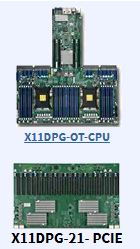
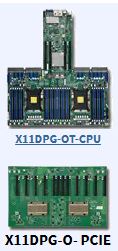
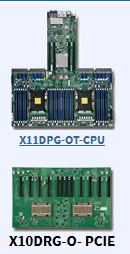
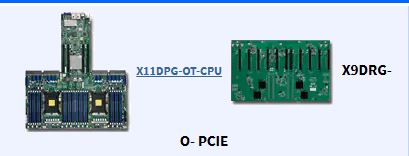
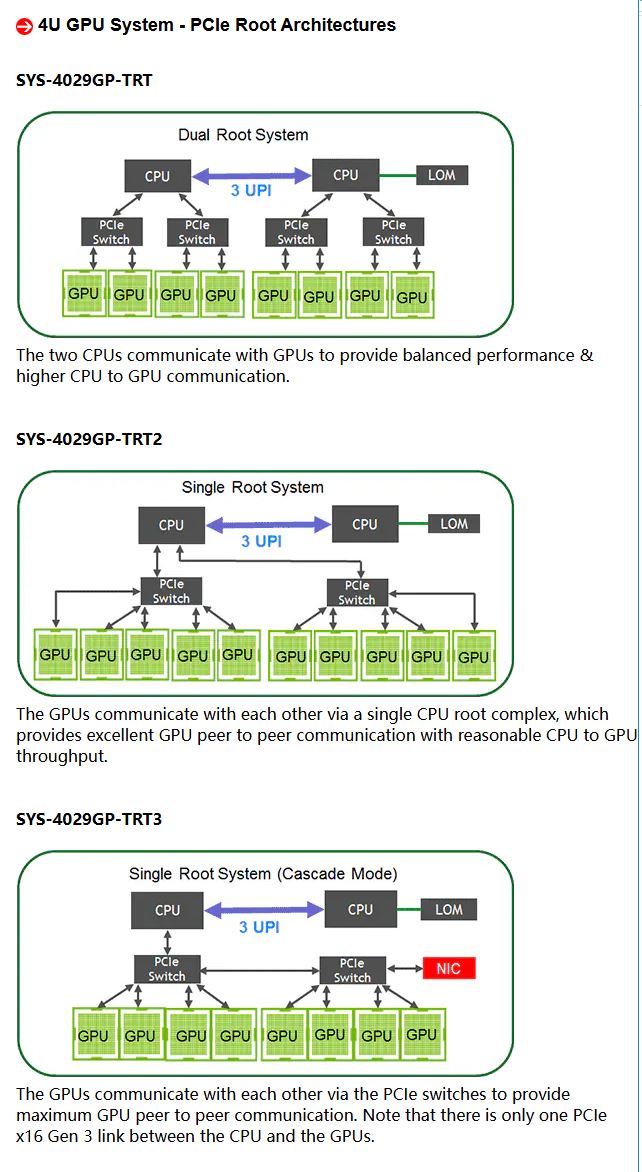
后续更换X10DRG-O-PCIE,这个扩展版厂家宣传是单根,但是实际是左右两个9797交换分别连接CPU1,没有跨NUMA,但是貌似Intel的1-2代可扩展至强CPU是多PCIE根。真正的单根架构PCIE交换扩展X11DPG-O- PCIE目前手里没有,目前没有条件。
-
附图:测试用到的老爷级别PCIE扩展板 ,一时兴起,翻出来玩玩。纯找乐子,主要是想测试老卡在过时的PCIE3.0下还有没有发光发热的价值,哈哈。
遇到的坑
-
nvidia-smi 报 “couldn't communicate with driver”
-
确认 nouveau 已屏蔽:
lsmod | grep nouveau无输出。 -
确认 Secure Boot 已关闭:
mokutil --sb-state显示SecureBoot disabled。 -
若安装 open 版驱动失败,改用闭源驱动(
nvidia-driver-570不带-open)。
-
-
NCCL 报 “CUDA driver version is insufficient”
-
检查 NCCL 库版本是否与 CUDA Toolkit 匹配(如 CUDA 12.8 必须用带
cuda12.8的 NCCL)。 -
确认
LD_LIBRARY_PATH未指向旧版 CUDA。
-
-
编译 nccl-tests 后仍显示旧 NCCL 头信息
-
确认
ldd ./build/all_reduce_perf | grep nccl指向正确库。 -
必要时卸载所有旧 libnccl 后重装匹配版本。
-

openEuler 是由开放原子开源基金会孵化的全场景开源操作系统项目,面向数字基础设施四大核心场景(服务器、云计算、边缘计算、嵌入式),全面支持 ARM、x86、RISC-V、loongArch、PowerPC、SW-64 等多样性计算架构
更多推荐
 4
4 0
0- 0


 已为社区贡献2条内容

所有评论(0)