FileInputStream的源码分析和使用方法详细分析
FileInputStream 是 Java IO 体系中文件读取的基础类,通过封装操作系统的文件操作,提供了简单易用的字节流读取接口。其设计融合了模板方法模式(统一接口)、适配器模式(屏蔽系统差异)和代理模式(资源生命周期管理),是面向对象设计原则的典型实践
FileInputStream 适用于二进制文件读取:如图片、音频、视频等非文本文件(字符文件建议使用 FileReader)。FileInputStream 的在操作文件时,需要与FileDescriptor(文件操作符)相关联,关于FileDescriptor(文件操作符),可以查看我的另一篇博客:5、FileDescriptor的源码和使用注意事项(windows操作系统,JDK8)
FileInputStream.class::getChannel() 函数可以将当前的FileInputStream对象与NIO中的FileChannel相关联,从而获得更高效的文件操作(如内存映射、分散/聚集读取)。
使用完FileInputStream之后,必须显式调用 close() 函数释放文件句柄(或使用 try-with-resources 自动关闭),避免资源泄漏。FileInputStream不是线程安全的,在多线程下使用FileInputStream时,需要注意线程安全的问题。
FileInputStream的UML关系图,如下所示:
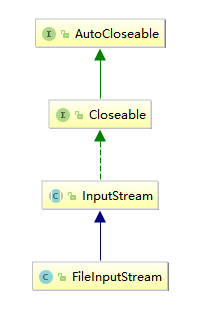
FileInputStream.class的源码如下
import java.nio.channels.FileChannel;
import sun.nio.ch.FileChannelImpl;
public
class FileInputStream extends InputStream
{
    //文件描述符
    private final FileDescriptor fd;
    //在构造函数中,通过File对象获取文件的路径
    private final String path;
    //NIO中的FileChannel,可以更高效的对文件进行操作,在getChannel() 函数中将当前的FileInputStream对象与FileChannel相关联
    private FileChannel channel = null;
    //在close()函数中(关闭当前这个FileInputStream的函数),用于线程同步的锁对象
    private final Object closeLock = new Object();
    private volatile boolean closed = false;//当前这个FileInputStream是否关闭的标记

    //构造函数,入参是文件的路径名,比如要传入windows操作系统中D盘下的nio_data.txt文件路径时,入参为"D:\nio_data.txt"
    public FileInputStream(String name) throws FileNotFoundException {
        this(name != null ? new File(name) : null);//通过文件的路径名构造的FileInputStream对象时,最终都要将文件的路径名构造为File对象
    }

    //构造函数,通过File对象构造FileInputStream对象
    public FileInputStream(File file) throws FileNotFoundException {
        String name = (file != null ? file.getPath() : null);
        SecurityManager security = System.getSecurityManager();
        if (security != null) {
            security.checkRead(name);  // 读权限检查(防止当前线程读取未授权的文件)
        }
        if (name == null) {
            throw new NullPointerException();//文件的路径名==null时,抛出一个NullPointerException
        }
        if (file.isInvalid()) {
            throw new FileNotFoundException("Invalid file path");//File对象的isInvalid()函数返回true时,抛出一个FileNotFoundException
        }
        fd = new FileDescriptor();
        fd.attach(this);// 将当前这个FileInputStream与文件描述符绑定(用于资源回收)
        path = name;
        open(name);// 最终调用本地函数(native修饰)open0()打开文件
    }
    //构造函数,通过FileDescriptor对象构造FileInputStream对象
    public FileInputStream(FileDescriptor fdObj) {
        SecurityManager security = System.getSecurityManager();
        if (fdObj == null) {
            throw new NullPointerException();
        }
        if (security != null) {
            security.checkRead(fdObj);// 读权限检查(防止当前线程读取未授权的文件)
        }
        fd = fdObj;
        path = null;

        /*
         * FileDescriptor is being shared by streams.
         * Register this stream with FileDescriptor tracker.
         */
        fd.attach(this);// 将当前这个FileInputStream与文件描述符绑定(用于资源回收)
    }
    //native修饰的本地函数,当前这个FileInputStream对象打开1个指定文件并为了之后的read()函数、readBytes()函数、skip()函数做准备
    private native void open0(String name) throws FileNotFoundException;

    private void open(String name) throws FileNotFoundException {
        open0(name);
    }

    public int read() throws IOException {
        return read0();
    }
    //native修饰的本地函数,当前这个FileInputStream对象从1个指定文件中每次读取1个字节;
    //如果没有读取到这个文件的末尾,则返回读取到的这1个字节的ASCII编码,如果已经读取到了这个文件的末尾,则返回-1
    private native int read0() throws IOException;
    //native修饰的本地函数,当前这个FileInputStream对象从1个指定文件中每次读取len个字节到byte b[]数组的[off,off+len)索引位置;
    //如果没有读取到这个文件的末尾,则返回已经读取到的byte b[]数组中的累计字节数量(所有累计读取到的字节都是通过ASCII编码的),如果已经读取到了这个文件的末尾,则返回-1
    private native int readBytes(byte b[], int off, int len) throws IOException;

    public int read(byte b[]) throws IOException {
        return readBytes(b, 0, b.length);
    }

    public int read(byte b[], int off, int len) throws IOException {
        return readBytes(b, off, len);
    }

    public long skip(long n) throws IOException {
        return skip0(n);
    }
    //native修饰的本地函数,通过这个函数,当前这个FileInputStream对象可以从1个指定文件跳过n个字节再进行后续操作(比如通过read()函数读取)
    private native long skip0(long n) throws IOException;

    public int available() throws IOException {
        return available0();
    }
    //native修饰的本地函数,返回与当前这个FileInputStream对象关联的1个指定文件还可以进行后续操作(比如read()函数和skip()函数)的字节数量
    private native int available0() throws IOException;

    public void close() throws IOException {
        synchronized (closeLock) {// 通过synchronized 防止多线程重复关闭
            if (closed) {
                return;
            }
            closed = true;//第一个执行到这里的线程先设置boolean closed = true,防止后面执行close() 函数的线程还要继续执行后续的代码片段
        }
        //如果NIO中的FileChannel对象与这个FileInputStream对象相关联,同时关闭NIO中FileChannel对象
        if (channel != null) {
           channel.close();
        }
        // 释放文件描述符FileDescriptor对象关联的所有资源
        fd.closeAll(new Closeable() {
            public void close() throws IOException {
               close0();//调用本地函数关闭文件
           }
        });
    }
    //获取文件描述符FileDescriptor对象
    public final FileDescriptor getFD() throws IOException {
        if (fd != null) {
            return fd;
        }
        throw new IOException();
    }
    //将当前这个FileInputStream对象与NIO中的FileChannel相关联
    public FileChannel getChannel() {
        synchronized (this) {
            if (channel == null) {
                channel = FileChannelImpl.open(fd, path, true, false, this);
            }
            return channel;
        }
    }

    private static native void initIDs();

    private native void close0() throws IOException;

    static {
        initIDs();
    }
    //重写了Object.class的finalize()函数,这个函数会在对象销毁时由JVM自动调用
    //不建议当前这个FileInputStream对象销毁时通过finalize()函数调用close()函数来关闭当前这个FileInputStream对象,建议在使用完FileInputStream对象时手动调用close()函数
    protected void finalize() throws IOException {
        if ((fd != null) &&  (fd != FileDescriptor.in)) {
            /* if fd is shared, the references in FileDescriptor
             * will ensure that finalizer is only called when
             * safe to do so. All references using the fd have
             * become unreachable. We can call close()
             */
            close();
        }
    }
}
1.1、FileInputStream.class的skip()函数和available()函数
关于read()函数和read(byte b[])函数的使用方式,可以查看我的另一篇博客:1、Java的IO概览(一)
我的windows操作系统的D盘根目录下有nio-data.txt文件,如下所示:
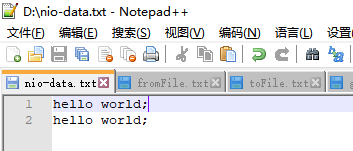
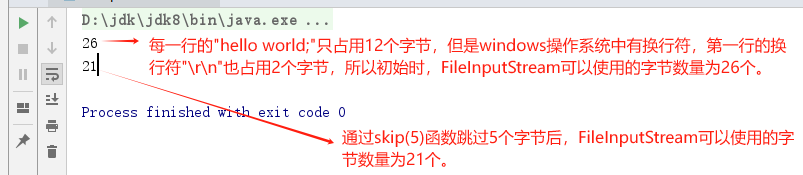
通过skip()函数可以从这个nio-data.txt文件跳过n个字节再进行后续操作,通过available()函数可以返回与这个FileInputStream对象关联的nio-data.txt文件还可以进行后续操作的字节数量,如下所示:
package com.xxx.bio;
import java.io.FileInputStream;
import java.io.IOException;
import java.io.InputStream;
public class FileInputStreamTest {
   public static void main(String[] args) throws IOException {
      InputStream is = new FileInputStream("D:\\nio-data.txt");
      System.out.println(is.available());
      is.skip(5);
      System.out.println(is.available());
   }
}
程序运行结果,如下所示:
1.2、模板方法模式
InputStream 作为抽象基类,定义了 read()、skip()、available() 等抽象方法, FileInputStream、需实现这些方法以提供具体功能。例如:
// InputStream 中的抽象方法
public abstract int read() throws IOException;

// FileInputStream 中的具体实现
public int read() throws IOException {
    return read0();  // 调用本地方法实现
}
通过模板方法模式,统一了字节流读取的接口,子类只需关注具体读取逻辑,提高了代码的可扩展性。
1.3、适配器模式(Adapter Pattern)
文件读取的底层操作依赖操作系统(如 Linux 的 read() 系统调用),FileInputStream 通过 native 方法将这些系统调用封装为 Java 接口(如 read()、close()),使得上层代码无需关心具体操作系统的差异。
private native int read0() throws IOException;  // 适配系统级读取操作
private native void close0() throws IOException;  // 适配系统级关闭操作
通过适配器模式,屏蔽了底层系统的复杂性,提供了跨平台的统一文件读取接口。
1.4、代理模式(Proxy Pattern)
FileDescriptor 是系统级文件句柄的代理对象,FileInputStream 通过 fd.attach(this) 将自身与描述符绑定。当流关闭时,描述符会触发资源释放(如 close0())。这种设计使得多个流可以共享同一个描述符(如通过 getFD() 获取),但最终由最后一个关联的流负责关闭。
fd.attach(this);  // 将流与描述符绑定
fd.closeAll(/* 关闭回调 */);  // 所有关联的流关闭后释放资源
通过代理模式,实现了文件句柄的生命周期管理,避免资源泄漏。
二、RandomAccessFile的源码分析和使用方法详细分析
RandomAccessFile 是 Java IO 体系中文件读取的基础类,用于在文件中的任何位置进行读写操作。RandomAccessFile实现了DataOutput.interface和DataInput.interface两个接口,拥有读取和写入java基本数据类型(byte,short,int,long,double,float,boolean,char) 和UTF-8字符串方法,有效地与IO流继承体系中其他部分实现了分离,由于不支持装饰者设计模式,所以不能与OutputStream和InputStream的子类结合起来使用。RandomAccessFile之所以说对文件随机访问,其原理是将文件看成是一个大型的字节数组,然后通过游标(cursor)或者移动文件指针(可以理解为数组中索引对数组中任意位置字节读取或者写入),从而做到对文件的随机访问,RandomAccessFile构造方法中会传入对应的读写模式,共有4种。如下所示:
| 读写模式 | 解释 |
|---|---|
| "r" | 以只读方式打开。调用结果对象的任何 write 方法都将导致抛出 IOException。 |
| "rw" | 打开以便读取和写入。 |
| "rws" | 打开以便读取和写入。相对于 "rw","rws" 还要求对“文件的内容”或“元数据”的每个更新都同步写入到基础存储设备。 |
| "rwd" | 打开以便读取和写入,相对于 "rw","rwd" 还要求对“文件的内容”的每个更新都同步写入到基础存储设备。 |
当操作的文件是存储在本地的基础存储设备上时(如硬盘, NandFlash等),"rw" 、"rws" 、"rwd"之间才有区别,区别如下:
①、当模式是 "rws" 并且 操作的是基础存储设备上的文件;那么,每次“更改文件内容(如执行write()函数)” 或 “修改文件元数据(如文件的mtime)”时,都会将这些改变同步到基础存储设备上;
②、当模式是 "rwd" 并且操作的是基础存储设备上的文件;那么,每次“更改文件内容(如执行write()函数)”时,都会将这些改变同步到基础存储设备上;
③、当模式是 "rw" 并且 操作的是基础存储设备上的文件;那么,关闭文件时,会将“文件内容的修改”同步到基础存储设备上。至于,“更改文件内容”时,是否会立即同步,取决于系统底层实现。
RandomAccessFile的UML关系图,如下所示:
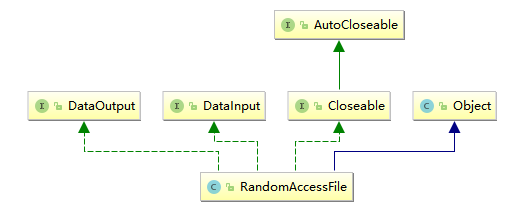
RandomAccessFile.class的源码如下
package java.io;
import java.nio.channels.FileChannel;
import sun.nio.ch.FileChannelImpl;
public class RandomAccessFile implements DataOutput, DataInput, Closeable {
    //文件描述符
    private FileDescriptor fd;
    //NIO中的FileChannel,可以更高效的对文件进行操作,在getChannel() 函数中将当前的FileInputStream对象与FileChannel相关联
    private FileChannel channel = null;
    private boolean rw;
    //在构造函数中,通过File对象获取的文件路径保存在该变量中
    private final String path;
    //在close()函数中(关闭当前这个RandomAccessFile 对象的函数),用于线程同步的锁对象
    private Object closeLock = new Object();
    private volatile boolean closed = false;//当前这个RandomAccessFile 是否关闭的标记

    //只读模式,不具备写权限,如果文件不存在不会创建文件。
    private static final int O_RDONLY = 1;
    //读写模式,具备读写权限,如果文件不存在会创建文件,该模式下数据改变时不会立马写入底层存储设备。
    private static final int O_RDWR =   2;
    //同步的读写模式,具备读写模式的所有特性,当文件内容或元数据改变时,会立马同步写入到底层存储设备中。
    private static final int O_SYNC =   4;
    //同步的读写模式,具备读写模式的所有特性,当文件内容改变时,会立马同步写入到底层存储设备中。
    private static final int O_DSYNC =  8;

    public RandomAccessFile(String name, String mode)
        throws FileNotFoundException
    {
        this(name != null ? new File(name) : null, mode);
    }

    public RandomAccessFile(File file, String mode)
        throws FileNotFoundException
    {
        // 定义了一个String类型变量name用于接收操作文件的路径名,如果文件为null,则name赋值为null。
        String name = (file != null ? file.getPath() : null);
        int imode = -1;
        if (mode.equals("r"))
            imode = O_RDONLY;//情况1:字符串model=r时imode=1
        else if (mode.startsWith("rw")) {
            imode = O_RDWR;//情况2:字符串model以rw开头时(可以为rws或者rwd,也可以为rw+任何字符串),imode=2
            rw = true;
            if (mode.length() > 2) {
                if (mode.equals("rws"))
                    imode |= O_SYNC;//情况3:字符串model=rws时imode=6
                else if (mode.equals("rwd"))
                    imode |= O_DSYNC;//情况4:字符串model=rwd时imode=10
                else
                    imode = -1;//model不属于情况1、2、3、4的其余情况,imode=-1
            }
        }
        if (imode < 0)//model不属于情况1、2、3、4的其余情况时,抛出一个IllegalArgumentException
            throw new IllegalArgumentException("Illegal mode \"" + mode
                                               + "\" must be one of "
                                               + "\"r\", \"rw\", \"rws\","
                                               + " or \"rwd\"");
        //获得java的安全管理器,根据rw的状态监测文件的读写权限。
        SecurityManager security = System.getSecurityManager();
        if (security != null) {
            security.checkRead(name);
            if (rw) {
                security.checkWrite(name);
            }
        }
        if (name == null) {
            throw new NullPointerException();//文件的路径名==null时,抛出一个NullPointerException
        }
        if (file.isInvalid()) {
            //File对象的isInvalid()函数返回true时,抛出一个FileNotFoundException
            throw new FileNotFoundException("Invalid file path");
        }
        fd = new FileDescriptor();
        fd.attach(this);// 将当前这个RandomAccessFile与文件描述符绑定(用于资源回收)
        path = name;
        open(name, imode);// 最终调用本地函数(native修饰)open0()打开文件
    }
    //获取文件描述符FileDescriptor对象
    public final FileDescriptor getFD() throws IOException {
        if (fd != null) {
            return fd;
        }
        throw new IOException();
    }
    //将当前这个RandomAccessFile对象与NIO中的FileChannel相关联
    public final FileChannel getChannel() {
        synchronized (this) {
            if (channel == null) {
                channel = FileChannelImpl.open(fd, path, true, rw, this);
            }
            return channel;
        }
    }
     //native修饰的本地函数,当前这个RandomAccessFile对象用指定的读写模式打开1个指定文件并为了之后的read()函数、readBytes()函数、seek()函数做准备
    private native void open0(String name, int mode)
        throws FileNotFoundException;

    private void open(String name, int mode)
        throws FileNotFoundException {
        open0(name, mode);
    }

    public int read() throws IOException {
        return read0();
    }
     //native修饰的本地函数,当前这个RandomAccessFile对象从1个指定文件中每次读取1个字节;
    //如果没有读取到这个文件的末尾,则返回读取到的这1个字节的ASCII编码,如果已经读取到了这个文件的末尾,则返回-1
    private native int read0() throws IOException;
    //native修饰的本地函数,当前这个RandomAccessFile对象从1个指定文件中每次读取len个字节到byte b[]数组的[off,off+len)索引位置;
    //如果没有读取到这个文件的末尾,则返回已经读取到的byte b[]数组中的累计字节数量(所有累计读取到的字节都是通过ASCII编码的),如果已经读取到了这个文件的末尾,则返回-1
    private native int readBytes(byte b[], int off, int len) throws IOException;

    public int read(byte b[], int off, int len) throws IOException {
        return readBytes(b, off, len);
    }

    public int read(byte b[]) throws IOException {
        return readBytes(b, 0, b.length);
    }

    public final void readFully(byte b[]) throws IOException {
        readFully(b, 0, b.length);
    }
    //从打开的文件中读取len个字节到指定的byte[]数组b中,这len个字节被放到byte[]数组b的[off,off+len)索引位置。
    public final void readFully(byte b[], int off, int len) throws IOException {
        int n = 0;//累计读取到byte[]数组b中的字节数量
        do {
            //count=-1时,表示读取到了文件的末尾。
            //count>0时,表示从本次打开的文件中读取了(len - n)个字节到byte[]数组b的[off + n,off + len)索引位置。
            int count = this.read(b, off + n, len - n);
            if (count < 0)
                throw new EOFException();
            n += count;//累加读到的字节总数量
        } while (n < len);//当累计读到的字节总数量>=len时,跳出循环
    }
    //当前这个RandomAccessFile对象可以从1个指定文件(大型的字节数组)中跳过n个字节(n<文件的字节总数量)再进行后续操作(比如通过read()函数读取)
    public int skipBytes(int n) throws IOException {
        long pos;//将文件看成是一个大型的字节数组时,pos表示当前操作该数组时,所处的索引位置
        long len;//将文件看成是一个大型的字节数组时,len表示数组的长度
        long newpos;//将文件看成是一个大型的字节数组时,newpos表示要跳跃(重新指向)到的索引位置

        if (n <= 0) {
            return 0;
        }
        pos = getFilePointer();//获取RandomAccessFile对象正在操作的文件(大型的字节数组)的索引位置
        len = length();//获取文件(大型的字节数组)的长度
        newpos = pos + n;//计算要跳跃(重新指向)到的索引位置
        if (newpos > len) {
            newpos = len;//如果索引越界了,将索引置为文件(大型的字节数组)的最后一个索引位置
        }
        seek(newpos);//通过native修饰的函数,将文件(大型的字节数组)的的索引置为newpos

        /* return the actual number of bytes skipped */
        return (int) (newpos - pos);//返回实际跳跃的字节数量
    }

    public void write(int b) throws IOException {
        write0(b);
    }
    //native修饰的本地函数,当前这个RandomAccessFile对象向1个指定文件中写入1个字节
openEuler 是由开放原子开源基金会孵化的全场景开源操作系统项目,面向数字基础设施四大核心场景(服务器、云计算、边缘计算、嵌入式),全面支持 ARM、x86、RISC-V、loongArch、PowerPC、SW-64 等多样性计算架构
更多推荐


 6
6 0
0- 0


 已为社区贡献1条内容

所有评论(0)