FileDescriptor的源码和使用注意事项(windows操作系统,JDK8)
操作系统使用文件描述符来指代一个打开的文件,对文件的读写操作,都需要文件描述符指向存储设备的不透明标识符。Java虽然在设计上使用了抽象程度更高的流来作为文件操作的模型,但是底层依然要使用文件描述符与操作系统交互,而Java世界里文件描述符的对应类就是FileDescriptor。同时,Java规定了FileDescriptor只能由JDK的其它类来创建(比如FileInputStream、FileOutputStream、RandomAccessFile等),不能由应用程序自己创建。
操作系统中的文件描述符本质上是一个非负整数,其中0,1,2固定为标准输入,标准输出,标准错误输出,如下所示(POSIX标准):
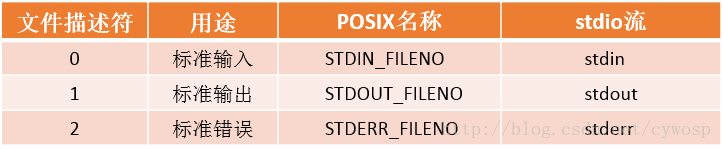
Java程序接打开的文件使用当前进程可用的文件描述符就被保存在了FileDescriptor中的int fd变量,因此FileDescriptor的核心功能都是围绕着int fd变量来运行的
package java.io;
import java.util.ArrayList;
import java.util.List;
public final class FileDescriptor {

    private int fd;

    private long handle;

    private Closeable parent;
    private List<Closeable> otherParents;
    private boolean closed;

    //FileDescriptor只有无参的构造函数,保证了fd不能被应用程序设置
    public /**/ FileDescriptor() {
        fd = -1;
        handle = -1;
    }

    static {
        initIDs();
    }

    static {
        sun.misc.SharedSecrets.setJavaIOFileDescriptorAccess(
            new sun.misc.JavaIOFileDescriptorAccess() {
                public void set(FileDescriptor obj, int fd) {
                    obj.fd = fd;
                }

                public int get(FileDescriptor obj) {
                    return obj.fd;
                }

                public void setHandle(FileDescriptor obj, long handle) {
                    obj.handle = handle;
                }

                public long getHandle(FileDescriptor obj) {
                    return obj.handle;
                }
            }
        );
    }
    //POSIX标准中的标准输入,和System.class有关
    public static final FileDescriptor in = standardStream(0);
    //POSIX标准中的标准输出,和System.class有关
    public static final FileDescriptor out = standardStream(1);
    //POSIX标准中的标准错误输出,和System.class有关
    public static final FileDescriptor err = standardStream(2);

    public boolean valid() {
        return ((handle != -1) || (fd != -1));
    }

    public native void sync() throws SyncFailedException;

    private static native void initIDs();

    private static native long set(int d);

    private static FileDescriptor standardStream(int fd) {
        FileDescriptor desc = new FileDescriptor();
        desc.handle = set(fd);
        return desc;
    }

    synchronized void attach(Closeable c) {
        if (parent == null) {
            // first caller gets to do this
            parent = c;
        } else if (otherParents == null) {
            otherParents = new ArrayList<>();
            otherParents.add(parent);
            otherParents.add(c);
        } else {
            otherParents.add(c);
        }
    }

    @SuppressWarnings("try")
    synchronized void closeAll(Closeable releaser) throws IOException {
        if (!closed) {
            closed = true;
            IOException ioe = null;
            try (Closeable c = releaser) {
                if (otherParents != null) {
                    for (Closeable referent : otherParents) {
                        try {
                            referent.close();
                        } catch(IOException x) {
                            if (ioe == null) {
                                ioe = x;
                            } else {
                                ioe.addSuppressed(x);
                            }
                        }
                    }
                }
            } catch(IOException ex) {
                /*
                 * If releaser close() throws IOException
                 * add other exceptions as suppressed.
                 */
                if (ioe != null)
                    ex.addSuppressed(ioe);
                ioe = ex;
            } finally {
                if (ioe != null)
                    throw ioe;
            }
        }
    }
}
一、设置int fd变量的值
FileDescriptor.class 的构造函数将int fd的值设置为了-1,但是操作系统中的文件描述符本质上是一个非负整数,因此FileDescriptor.class中表示文件描述符的int fd变量是在FileInputStream.class、FileOutputStream.class、RandomAccessFile.class等这些使用FileDescriptor.class的类中来设置的,比如FileInputStream.class
public
class FileInputStream extends InputStream
{
    /* File Descriptor - handle to the open file */
    private final FileDescriptor fd;

    //在FileInputStream实例化时,会新建FileDescriptor实例,并使用fd.attach(this)关联FileInputStream实例与FileDescriptor实例,这是为了之后在程序中关闭文件描述符做准备。
    public FileInputStream(File file) throws FileNotFoundException {
        String name = (file != null ? file.getPath() : null);
        ...省略代码...
        fd = new FileDescriptor();
        fd.attach(this);
        path = name;
        open(name);
    }

    private void open(String name) throws FileNotFoundException {
        open0(name);
    }
    //真正对FileDescriptor.class中int fd赋值的逻辑是JNI调用的FileInputStream#open0这个native函数中
    private native void open0(String name) throws FileNotFoundException;
}
// /jdk/src/share/native/java/io/FileInputStream.c
JNIEXPORT void JNICALL
Java_java_io_FileInputStream_open(JNIEnv *env, jobject this, jstring path) {
    fileOpen(env, this, path, fis_fd, O_RDONLY);
}

// /jdk/src/solaris/native/java/io/io_util_md.c
void
fileOpen(JNIEnv *env, jobject this, jstring path, jfieldID fid, int flags)
{
    WITH_PLATFORM_STRING(env, path, ps) {
        FD fd;

#if defined(__linux__) || defined(_ALLBSD_SOURCE)
        /* Remove trailing slashes, since the kernel won't */
        char *p = (char *)ps + strlen(ps) - 1;
        while ((p > ps) && (*p == '/'))
            *p-- = '\0';
#endif
        fd = JVM_Open(ps, flags, 0666); // 打开文件拿到文件描述符
        if (fd >= 0) {
            SET_FD(this, fd, fid); // 非负整数认为是正确的文件描述符,设置到fd变量
        } else {
            throwFileNotFoundException(env, path);  // 负数认为是不正确文件描述符,抛出FileNotFoundException异常
        }
    } END_PLATFORM_STRING(env, ps);
}
到了JDK的JNI代码中,使用JVM_Open打开文件,得到文件描述符,而JVM_Open已经不是JDK的方法了,而是JVM提供的方法,所以需要继续查看hotspot中的实现:
// /hotspot/src/share/vm/prims/jvm.cpp
JVM_LEAF(jint, JVM_Open(const char *fname, jint flags, jint mode))
  JVMWrapper2("JVM_Open (%s)", fname);

  //%note jvm_r6
  int result = os::open(fname, flags, mode);  // 调用os::open打开文件
  if (result >= 0) {
    return result;
  } else {
    switch(errno) {
      case EEXIST:
        return JVM_EEXIST;
      default:
        return -1;
    }
  }
JVM_END

// /hotspot/src/os/linux/vm/os_linux.cpp
int os::open(const char *path, int oflag, int mode) {

  if (strlen(path) > MAX_PATH - 1) {
    errno = ENAMETOOLONG;
    return -1;
  }
  int fd;
  int o_delete = (oflag & O_DELETE);
  oflag = oflag & ~O_DELETE;

  fd = ::open64(path, oflag, mode);  // 调用open64打开文件
  if (fd == -1) return -1;

  // 问打开成功也可能是目录,这里还需要判断是否打开的是普通文件
  {
    struct stat64 buf64;
    int ret = ::fstat64(fd, &buf64);
    int st_mode = buf64.st_mode;

    if (ret != -1) {
      if ((st_mode & S_IFMT) == S_IFDIR) {
        errno = EISDIR;
        ::close(fd);
        return -1;
      }
    } else {
      ::close(fd);
      return -1;
    }
  }

#ifdef FD_CLOEXEC
    {
        int flags = ::fcntl(fd, F_GETFD);
        if (flags != -1)
            ::fcntl(fd, F_SETFD, flags | FD_CLOEXEC);
    }
#endif

  if (o_delete != 0) {
    ::unlink(path);
  }
  return fd;
}
可以看到JVM最后使用open64这个函数打开文件,网上对于open64这个资料还是很少的,我找到的是man page for open64 (all section 2) - Unix & Linux Commands,从中可以看出,open64是为了在32位环境打开大文件的系统调用,但是不是标准的一部分。(这一部分不是很确定,因为没有明确的资料)
这里的open()函数不是我们以前学C语言时打开文件用的fopen()函数,fopen是C标准库里的函数,而open()不是,open()是POSIX规范中的函数,是不带缓冲的I/O,不带缓冲的I/O相关的函数还有read(),write(),lseek(),close(),不带缓冲指的是这些函数都调用内核中的一个系统调用,而C标准库为了减少系统调用,使用了缓存来减少read,write的内存调用。(参考《UNIX环境高级编程》)
因此,我们知道了FileInputStream#open是使用open()系统调用来打开文件,得到文件句柄,现在我们的问题要回到这个文件句柄是如何最终设置到FileDescriptor#fd,我们来看/jdk/src/solaris/native/java/io/io_util_md.c:fileOpen的关键代码:
fd = handleOpen(ps, flags, 0666);
if (fd != -1) {
    SET_FD(this, fd, fid);
} else {
    throwFileNotFoundException(env, path);
}
如果文件描述符fd正确,通过SET_FD这个红设置到fid对应的成员变量上,如下宏所示:
#define SET_FD(this, fd, fid) \
    if ((*env)->GetObjectField(env, (this), (fid)) != NULL) \
        (*env)->SetIntField(env, (*env)->GetObjectField(env, (this), (fid)),IO_fd_fdID, (fd))
SET_FD宏比较简单,获取FileInputStream上的fid这个变量ID对应的变量,然后设置这个变量的IO_fd_fdID对应的变量(FileDescriptor#fd)为文件描述符。
这个fid和IO_fd_fdID的来历可以参照/jdk/src/share/native/java/io/FileInputStream.c文件的开头,可以看到这样的代码:
// jdk/src/share/native/java/io/FileInputStream.c
jfieldID fis_fd; /* id for jobject 'fd' in java.io.FileInputStream */

/**************************************************************
 * static methods to store field ID's in initializers
 */

JNIEXPORT void JNICALL
Java_java_io_FileInputStream_initIDs(JNIEnv *env, jclass fdClass) {
    fis_fd = (*env)->GetFieldID(env, fdClass, "fd", "Ljava/io/FileDescriptor;");
}
Java_java_io_FileInputStream_initIDs对应JAVA中FileInputStream.class源码中的static块调用的initIDs函数:
public
class FileInputStream extends InputStream
{
    /* File Descriptor - handle to the open file */
    private final FileDescriptor fd;
    static {
        initIDs();
    }
    private static native void initIDs();
}
还有jdk/src/solaris/native/java/io/FileDescriptor_md.c开头:
// jdk/src/solaris/native/java/io/FileDescriptor_md.c
/* field id for jint 'fd' in java.io.FileDescriptor */
jfieldID IO_fd_fdID;

/**************************************************************
 * static methods to store field ID's in initializers
 */

JNIEXPORT void JNICALL
Java_java_io_FileDescriptor_initIDs(JNIEnv *env, jclass fdClass) {
    IO_fd_fdID = (*env)->GetFieldID(env, fdClass, "fd", "I");
}
openEuler 是由开放原子开源基金会孵化的全场景开源操作系统项目,面向数字基础设施四大核心场景(服务器、云计算、边缘计算、嵌入式),全面支持 ARM、x86、RISC-V、loongArch、PowerPC、SW-64 等多样性计算架构
更多推荐

 5
5 0
0- 0


 已为社区贡献2条内容

所有评论(0)