使用 UEFI 图形输出协议 GOP 在屏幕上显示图像的方法
。下面是我们本次的工程目录。
MyPkg |
|
├── Application |
|
│ └── GopDrawApp |
|
│ ├── GopDrawApp.c |
|
│ └── GopDrawApp.inf |
|
├── MyPkg.dec |
|
└── MyPkg.dsc |
什么是图形输出协议(GOP)
GOP(Graphics Output Protocol,图形输出协议) 是 UEFI 规范中的一个核心接口,用来在操作系统启动前接管显卡并显示图形界面。接下来我们分两部分来介绍,首先用最简单的语言来说明 GOP 控制显示的原理,然后分析一下 UEFI 中 GOP 的源码定义。
我们在屏幕上看到的一幅完整图片是由有限的特定像素点组成的,比如常见的 1920*1080 分辨率。每个像素点通过红绿蓝三原色的不同强弱组合便能够显示特定的色彩。显存中有一块专门用于存储当前画面像素颜色信息的区域,称为 FrameBuffer(帧缓冲区)。屏幕显示控制器会不断从 FrameBuffer 中读取数据,并将其转换为屏幕上的图像。GOP 的作用就是为操作系统启动前的软件(如 BootLoader、UEFI 应用)提供访问 FrameBuffer 的标准接口。通过 GOP,我们可以获取 FrameBuffer 的地址、分辨率、像素格式,并直接向其中写入数据,从而在屏幕上显示想要的图像。
以下是 GOP 在 UEFI 中的 Protocol 定义。
struct _EFI_GRAPHICS_OUTPUT_PROTOCOL { |
|
EFI_GRAPHICS_OUTPUT_PROTOCOL_QUERY_MODE QueryMode; |
|
EFI_GRAPHICS_OUTPUT_PROTOCOL_SET_MODE SetMode; |
|
EFI_GRAPHICS_OUTPUT_PROTOCOL_BLT Blt; |
|
EFI_GRAPHICS_OUTPUT_PROTOCOL_MODE *Mode; |
|
}; |
-
QueryMode— 查询模式。用于枚举显卡所支持的所有显示模式。在设置分辨率之前,你需要先调用它来查询有哪些模式可用。你需要传入一个ModeNumber(从 0 开始),它会返回该模式对应的具体信息(分辨率、刷新率等)。 -
SetMode— 设置模式。将显示设备切换到你指定的某个模式。调用成功后,帧缓冲区的分辨率、像素格式等会随之改变。你需要传入一个ModeNumber,这个编号必须是通过QueryMode查询得到的有效编号。 -
Blt— 像素块传输。这是一个高效的图形绘制函数。它可以在帧缓冲区内部、或是在帧缓冲区和内存缓冲区之间,复制、填充或转换矩形像素块。 -
Mode— 当前模式信息。这是一个只读的状态信息。它包含了当前显示模式的具体参数,方便你随时查询。-
MaxMode:QueryMode 支持的最大模式数量。
-
Mode:当前激活的模式编号。
-
Info:指向 EFI_GRAPHICS_OUTPUT_MODE_INFORMATION 的指针,包含当前模式的详细信息(分辨率、像素格式等)。
-
SizeOfInfo:上述 Info 结构体的大小。
-
FrameBufferBase:帧缓冲区的基地址(显存中的物理地址)。你向屏幕写入数据,就是向这个地址开始的内存写入。
-
FrameBufferSize:帧缓冲区的大小(字节)。
-
一个典型的 GOP 使用流程如下:
- 枚举:调用
Gop->QueryMode()获取所有支持的分辨率。 - 设置:调用
Gop->SetMode()切换到你需要的分辨率(比如 1920x1080)。 - 获取信息:访问
Gop->Mode->FrameBufferBase和Gop->Mode->Info->PixelFormat,知道往哪里写数据,以及以什么格式写。 - 绘制:向
FrameBufferBase写入像素数据,或调用Gop->Blt()来高效绘制图形。
源码示例
此代码大致逻辑如下:
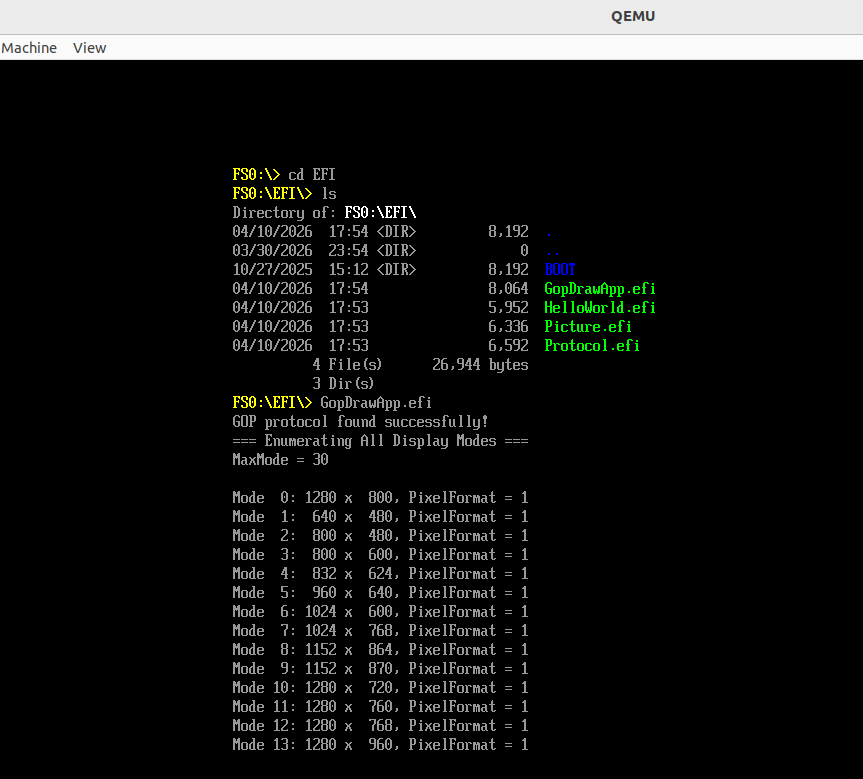
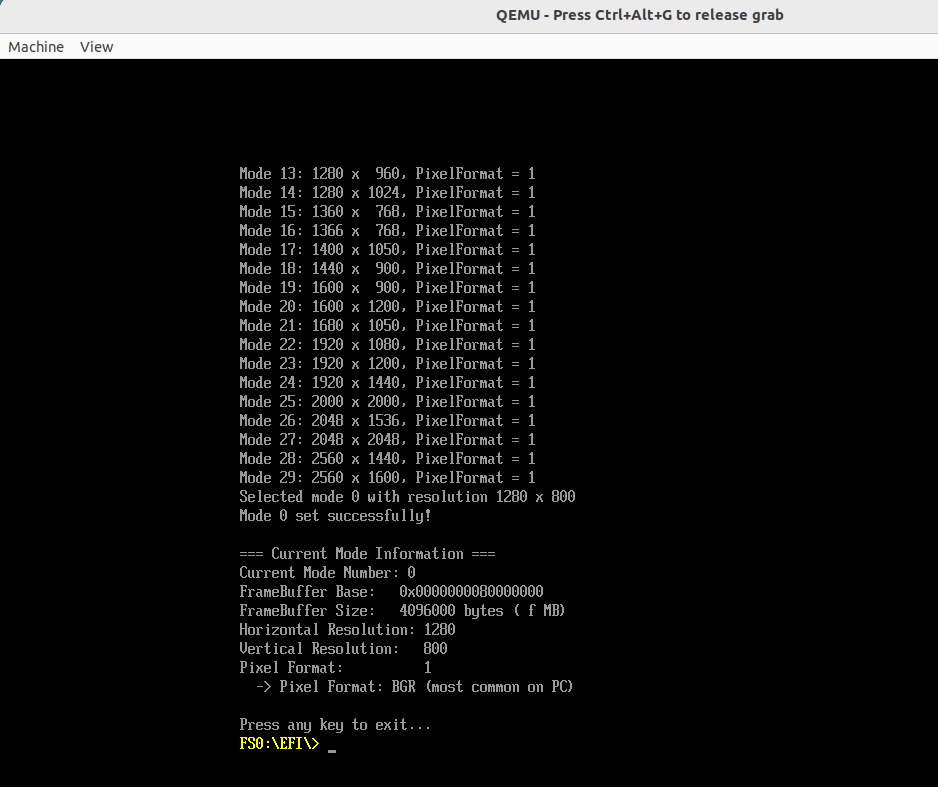
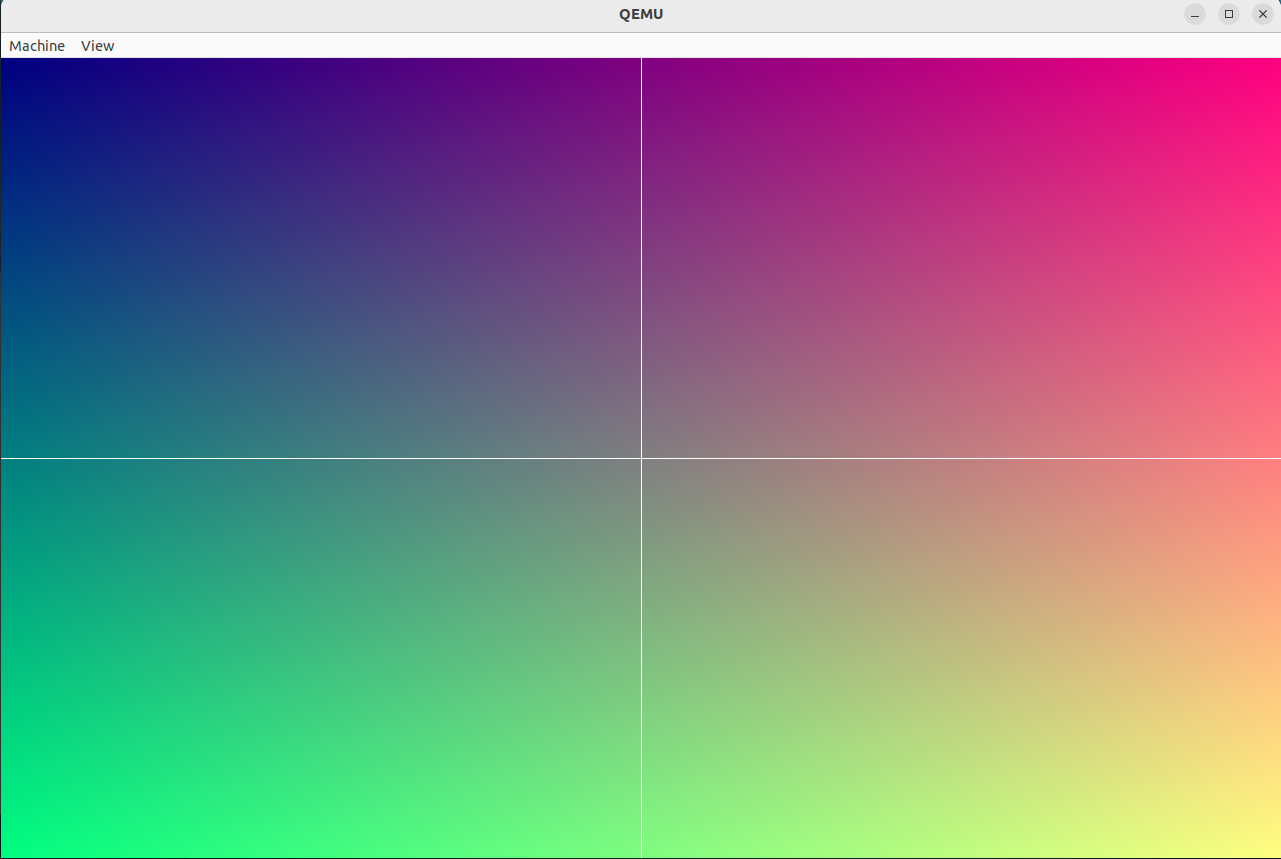
首先需要获取 GOP 的 Protocol 指针。随后即可使用 GOP 的功能。使用Gop->Mode->MaxMode获取显卡支持的显示格式数量,然后调用 Gop->QueryMode()枚举这些格式信息。调用Gop->SetMode()设置其中一个格式。最后通过写入 FrameBuffer 来显示一幅图像示例。
GopDrawApp.c 源码如下:
#include <Uefi.h> |
|
#include <Library/UefiLib.h> |
|
#include <Library/UefiApplicationEntryPoint.h> |
|
#include <Library/UefiBootServicesTableLib.h> |
|
#include <Protocol/GraphicsOutput.h> |
|
#define DRAW |
|
EFI_STATUS |
|
EFIAPI |
|
UefiMain ( |
|
IN EFI_HANDLE ImageHandle, |
|
IN EFI_SYSTEM_TABLE *SystemTable |
|
) |
|
{ |
|
EFI_STATUS Status; |
|
EFI_GRAPHICS_OUTPUT_PROTOCOL *Gop; |
|
UINT32 MaxMode; |
|
UINT32 ModeNumber; |
|
UINTN SizeOfInfo; |
|
UINT32 SelectedMode = 0; |
|
UINT32 Horizontal = 0; |
|
UINT32 Vertical = 0; |
|
UINTN Index; |
|
EFI_GRAPHICS_OUTPUT_MODE_INFORMATION *ModeInfo = NULL; |
|
// 1. 获取 GOP Protocol |
|
Status = gBS->LocateProtocol( |
|
&gEfiGraphicsOutputProtocolGuid, |
|
NULL, |
|
(VOID**)&Gop |
|
); |
|
if (EFI_ERROR(Status)) { |
|
Print(L"Failed to locate GOP\n"); |
|
return Status; |
|
} |
|
Print(L"GOP protocol found successfully!\n"); |
|
// 2. 枚举所有显示模式 |
|
Print(L"=== Enumerating All Display Modes ===\n"); |
|
Print(L"MaxMode = %d\n\n", Gop->Mode->MaxMode); // 支持的显示模式个数 |
|
MaxMode = Gop->Mode->MaxMode; |
|
for (ModeNumber = 0; ModeNumber < MaxMode; ModeNumber++) { |
|
Status = Gop->QueryMode(Gop, ModeNumber, &SizeOfInfo, &ModeInfo); |
|
if (EFI_ERROR(Status)) { |
|
Print(L"QueryMode failed for mode %d: %r\n", ModeNumber, Status); |
|
continue; |
|
} |
|
Print(L"Mode %2d: %4d x %4d, PixelFormat = %d\n", |
|
ModeNumber, |
|
ModeInfo->HorizontalResolution, |
|
ModeInfo->VerticalResolution, |
|
ModeInfo->PixelFormat |
|
); |
|
// 注意:ModeInfo 是由 GOP 内部分配的内存,不需要我们手动释放 |
|
} |
|
// 3. 设置显示模式 |
|
Status = Gop->SetMode(Gop, SelectedMode); |
|
if (EFI_ERROR(Status)) { |
|
Print(L"Failed to set mode %d: %r\n", SelectedMode, Status); |
|
return Status; |
|
} |
|
Horizontal = Gop->Mode->Info->HorizontalResolution; |
|
Vertical = Gop->Mode->Info->VerticalResolution; |
|
Print(L"Selected mode %d with resolution %d x %d\n", SelectedMode, Horizontal, Vertical); |
|
Print(L"Mode %d set successfully!\n", SelectedMode); |
|
// 3. 当前显示模式信息 |
|
Print(L"\n=== Current Mode Information ===\n"); |
|
Print(L"Current Mode Number: %d\n", Gop->Mode->Mode); |
|
Print(L"FrameBuffer Base: 0x%016lx\n", Gop->Mode->FrameBufferBase); |
|
Print(L"FrameBuffer Size: %d bytes (%.2f MB)\n", |
|
Gop->Mode->FrameBufferSize, |
|
(double)Gop->Mode->FrameBufferSize / (1024 * 1024)); |
|
Print(L"Horizontal Resolution: %d\n", Gop->Mode->Info->HorizontalResolution); |
|
Print(L"Vertical Resolution: %d\n", Gop->Mode->Info->VerticalResolution); |
|
Print(L"Pixel Format: %d\n", Gop->Mode->Info->PixelFormat); |
|
// 解释像素格式 |
|
switch (Gop->Mode->Info->PixelFormat) { |
|
case PixelRedGreenBlueReserved8BitPerColor: |
|
Print(L" -> Pixel Format: RGB (8:8:8, with reserved byte)\n"); |
|
break; |
|
case PixelBlueGreenRedReserved8BitPerColor: |
|
Print(L" -> Pixel Format: BGR (most common on PC)\n"); |
|
break; |
|
case PixelBitMask: |
|
Print(L" -> Pixel Format: Custom bitmask\n"); |
|
break; |
|
case PixelBltOnly: |
|
Print(L" -> Pixel Format: Blt only (no direct framebuffer access)\n"); |
|
break; |
|
default: |
|
Print(L" -> Pixel Format: Unknown\n"); |
|
} |
|
Print(L"\nPress any key to exit...\n"); |
|
SystemTable->ConIn->Reset(SystemTable->ConIn, FALSE); |
|
// 让程序暂停,等待用户按下一个键 |
|
// 要等待的事件数量;等待什么事件;输出参数,哪个事件被触发。 |
|
SystemTable->BootServices->WaitForEvent(1, &SystemTable->ConIn->WaitForKey, &Index); |
|
#ifdef DRAW |
|
// 4. 帧缓冲地址(直接写像素) |
|
UINT32 *FrameBuffer = (UINT32*)Gop->Mode->FrameBufferBase; |
|
UINT32 PixelsPerScanLine = Gop->Mode->Info->PixelsPerScanLine; |
|
UINT32 x, y; |
|
// 5. 画渐变背景 |
|
for (y = 0; y < Vertical; y++) { |
|
for (x = 0; x < Horizontal; x++) { |
|
UINT8 r = (UINT8)(x * 255 / Horizontal); |
|
UINT8 g = (UINT8)(y * 255 / Vertical); |
|
UINT8 b = 0x80; |
|
UINT32 color = (r << 16) | (g << 8) | b; |
|
FrameBuffer[y * PixelsPerScanLine + x] = color; |
|
} |
|
} |
|
// 5. 画中心十字 |
|
UINT32 cx = Horizontal / 2; |
|
UINT32 cy = Vertical / 2; |
|
for (x = 0; x < Horizontal; x++) { |
|
FrameBuffer[cy * PixelsPerScanLine + x] = 0xFFFFFF; // 横线(白) |
|
} |
|
for (y = 0; y < Vertical; y++) { |
|
FrameBuffer[y * PixelsPerScanLine + cx] = 0xFFFFFF; // 竖线 |
|
} |
|
#endif // DRAW |
|
while(1); |
|
return EFI_SUCCESS; |
|
} |
- 显卡支持的显示格式:
- 程序显示效果如下:
附:
- INF 文件
[Defines] |
|
INF_VERSION = 0x00010006 |
|
BASE_NAME = GopDrawApp |
|
FILE_GUID = 4e397097-665f-4745-88c3-6305ac8623aa |
|
MODULE_TYPE = UEFI_APPLICATION |
|
VERSION_STRING = 1.0 |
|
ENTRY_POINT = UefiMain |
|
[Sources] |
|
GopDrawApp.c |
|
[Packages] |
|
MdePkg/MdePkg.dec |
|
[LibraryClasses] |
|
UefiApplicationEntryPoint |
|
UefiLib |
|
UefiBootServicesTableLib |
- DEC 文件
[Defines] |
|
DEC_SPECIFICATION = 0x00010005 |
|
PACKAGE_NAME = MyPkg |
|
PACKAGE_GUID = a2ab400d-c171-43ec-a0cc-582527a93887 |
|
PACKAGE_VERSION = 1.0 |
- DSC 文件
[Defines] |
|
PLATFORM_NAME = MyPkg |
|
PLATFORM_GUID = 87654321-4321-4321-4321-CBA987654321 |
|
PLATFORM_VERSION = 1.0 |
|
DSC_SPECIFICATION = 0x00010005 |
|
OUTPUT_DIRECTORY = Build/MyPkg |
|
SUPPORTED_ARCHITECTURES = X64 |
|
BUILD_TARGETS = DEBUG|RELEASE |
|
[LibraryClasses] |
|
UefiLib|MdePkg/Library/UefiLib/UefiLib.inf |
|
UefiApplicationEntryPoint|MdePkg/Library/UefiApplicationEntryPoint/UefiApplicationEntryPoint.inf |
|
PrintLib|MdePkg/Library/BasePrintLib/BasePrintLib.inf |
|
PcdLib|MdePkg/Library/BasePcdLibNull/BasePcdLibNull.inf |
|
MemoryAllocationLib|MdePkg/Library/UefiMemoryAllocationLib/UefiMemoryAllocationLib.inf |
|
DebugLib|MdePkg/Library/UefiDebugLibConOut/UefiDebugLibConOut.inf |
|
BaseMemoryLib|MdePkg/Library/BaseMemoryLib/BaseMemoryLib.inf |
|
BaseLib|MdePkg/Library/BaseLib/BaseLib.inf |
|
UefiBootServicesTableLib|MdePkg/Library/UefiBootServicesTableLib/UefiBootServicesTableLib.inf |
|
DevicePathLib|MdePkg/Library/UefiDevicePathLib/UefiDevicePathLib.inf |
|
UefiRuntimeServicesTableLib|MdePkg/Library/UefiRuntimeServicesTableLib/UefiRuntimeServicesTableLib.inf |
|
RegisterFilterLib|MdePkg/Library/RegisterFilterLibNull/RegisterFilterLibNull.inf |
|
DebugPrintErrorLevelLib|MdePkg/Library/BaseDebugPrintErrorLevelLib/BaseDebugPrintErrorLevelLib.inf |
|
[Components] |
|
MyPkg/Application/GopDrawApp/GopDrawApp.inf |

openEuler 是由开放原子开源基金会孵化的全场景开源操作系统项目,面向数字基础设施四大核心场景(服务器、云计算、边缘计算、嵌入式),全面支持 ARM、x86、RISC-V、loongArch、PowerPC、SW-64 等多样性计算架构
更多推荐

 8
8 0
0- 0


 已为社区贡献1条内容

所有评论(0)