一文终结 SpringBoot 国际化!从 0 到 1 完整案例(中英日)

01 引言
国际化从入行之初了解过以后,再也没有碰到过应用场景。近期,公司扩展国际业务,网站需要支持多语言切换,刚好可以试一试Spring框架的国际化I18N。
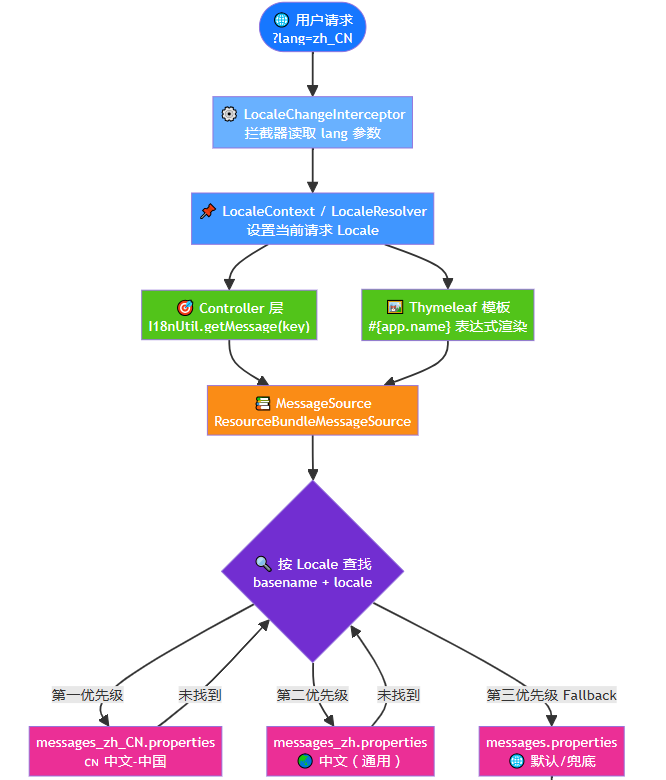
02 整体的设计
基于Spring Boot 3.5.16 + Thymeleaf + Java 17的技术架构,实现多语言国际化(I18N)。
- 后端: 通过
MessageSource+LocaleResolver实现消息的国际化,支持在 Controller/Service/工具类中按当前语言获取消息 - 前端: 通过 Thymeleaf 模板引擎的
#{...}表达式,在页面中直接渲染多语言文本 - 切换方式: 通过 URL 参数
?lang=zh_CN切换语言,语言偏好保存在 Session 中
当前支持语言
| 语言标签 | 语言 | 地区 | 资源文件 |
|---|---|---|---|
zh_CN |
简体中文 | 中国 | messages_zh_CN.properties |
en_US |
English | United States | messages_en_US.properties |
ja_JP |
日本語 | 日本 | messages_ja_JP.properties |
03 项目搭建
3.1 依赖引入
<dependency>
    <groupId>org.springframework.boot</groupId>
    <artifactId>spring-boot-starter-thymeleaf</artifactId>
</dependency>
<dependency>
    <groupId>org.springframework.boot</groupId>
    <artifactId>spring-boot-starter-web</artifactId>
</dependency>
3.2 配置
/**
 * I18N 国际化配置
 * <p>
 * 自动根据 {@link SupportedLocale} 枚举构建 LocaleResolver,
 * 添加新语言时无需修改本类。
 */
@Slf4j
@Configuration
public class I18nConfig implements WebMvcConfigurer {

    @Value("${app.i18n.default-locale:zh_CN}")
    private String defaultLocaleTag;

    @Value("${app.i18n.param-name:lang}")
    private String paramName;

    /**
     * Session 存储用户选择的语言
     */
    @Bean
    public LocaleResolver localeResolver() {
        SessionLocaleResolver resolver = new SessionLocaleResolver();
        resolver.setDefaultLocale(SupportedLocale.fromLanguageTag(defaultLocaleTag).toLocale());
        log.info("I18N initialized: default-locale={}, supported-locales={}",
                defaultLocaleTag, SupportedLocale.values().length);
        return resolver;
    }

    /**
     * URL 参数切换语言: ?lang=zh_CN / ?lang=en_US / ?lang=ja_JP
     */
    @Bean
    public LocaleChangeInterceptor localeChangeInterceptor() {
        LocaleChangeInterceptor interceptor = new LocaleChangeInterceptor();
        interceptor.setParamName(paramName);
        return interceptor;
    }

    @Override
    public void addInterceptors(InterceptorRegistry registry) {
        registry.addInterceptor(localeChangeInterceptor())
                .addPathPatterns("/**");
    }
}
这里要说明的是:我们一定要配置LocaleResolver
LocaleResolver这个是国际化解析的关键类,可以设置默认的地区。可以使用框架自带的解析器,也可以自定义。
LocaleChangeInterceptor拦截器不是必须的,全局使用可以配置拦截器。框架自带LocaleChangeInterceptor我们可以使用,通过参数修改地区的信息。这里的参数默认使用lang。
有了拦截器,拦截的配置也必须有,用来拦截需要的国际化的请求。
下面是自定义的国际化参数配置:
# 国际化自定义配置
app:
  i18n:
    # 默认语言
    default-locale: zh_CN
    # 语言参数名(URL参数 ?lang=xxx)
    param-name: lang
3.3 定义语言配置文件
我们将语言文件定义到resources下面的i18n下。
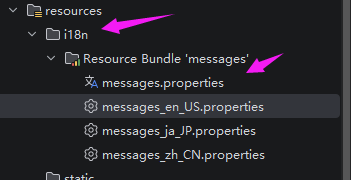
messages.properities是默认配置,其他messages_XX.properities属于语言配置文件。
配置国际化参数:
spring:
  application:
    name: boot-i18n
  # 国际化配置
  messages:
    # 指定语言文件的目录
    basename: i18n/messages
    encoding: UTF-8
    # 设为 false 可避免找不到资源时回退到操作系统语言
    fallback-to-system-locale: false
    # 找不到消息 key 时返回 key 本身而非抛异常
    use-code-as-default-message: true
语言文件合集:
# ==========================================
# messages_zh_CN.properities:中文-中国 国际化资源
# ==========================================
app.name=国际化示例应用
app.description=基于Spring Boot的多语言国际化方案

# 通用
common.success=操作成功
common.fail=操作失败
common.not_found=资源不存在

# 用户模块
user.welcome=欢迎您,{0}!
user.login.success=登录成功
user.login.fail=登录失败,账号或密码错误

# 区别其他文件的特殊配置,验证use-code-as-default-message=true的配置
test.ws=i18n


# ==========================================
# messages_en_US.properities:English (United States) i18n resources
# ==========================================
app.name=I18N Demo Application
app.description=Multi-language internationalization solution based on Spring Boot

# Common
common.success=Operation successful
common.fail=Operation failed
common.not_found=Resource not found

# User Module
user.welcome=Welcome, {0}!
user.login.success=Login successful
user.login.fail=Login failed, incorrect username or password

# ==========================================
# messages_ja_JP.properities:日本語 (日本) 国際化リソース
# ==========================================
app.name=国際化デモアプリケーション
app.description=Spring Bootに基づく多言語国際化ソリューション

# 共通
common.success=操作が成功しました
common.fail=操作が失敗しました
common.not_found=リソースが見つかりません

# ユーザーモジュール
user.welcome=ようこそ、{0}!
user.login.success=ログイン成功
user.login.fail=ログイン失敗、アカウントまたはパスワードが間違っています
3.4 页面以及服务
<!DOCTYPE html>
<html xmlns:th="http://www.thymeleaf.org">
<head>
    <meta charset="UTF-8">
    <title th:text="#{app.name}">国际化示例应用</title>
    <style>
        * { margin: 0; padding: 0; box-sizing: border-box; }
        body { font-family: -apple-system, BlinkMacSystemFont, 'Segoe UI', Roboto, sans-serif;
               background: linear-gradient(135deg, #667eea 0%, #764ba2 100%);
               min-height: 100vh; display: flex; align-items: center; justify-content: center; }
        .card { background: #fff; border-radius: 16px; padding: 40px; box-shadow: 0 20px 60px rgba(0,0,0,0.3);
                max-width: 520px; width: 90%; }
        h1 { color: #333; margin-bottom: 8px; font-size: 24px; }
        .desc { color: #666; margin-bottom: 24px; }
        .section { margin-bottom: 20px; }
        .section h3 { color: #764ba2; margin-bottom: 8px; font-size: 16px; border-bottom: 2px solid #eee;
                      padding-bottom: 4px; }
        .lang-switch { display: flex; gap: 10px; margin-bottom: 24px; flex-wrap: wrap; }
        .lang-switch a { text-decoration: none; padding: 8px 20px; border-radius: 8px;
                         font-size: 14px; transition: all 0.2s; border: 2px solid #ddd; color: #555; }
        .lang-switch a:hover { border-color: #667eea; color: #667eea; }
        .lang-switch a.active { background: #667eea; color: #fff; border-color: #667eea; }
        .msg { background: #f5f7fa; border-radius: 8px; padding: 12px 16px; margin: 6px 0;
               font-size: 14px; color: #333; }
    </style>
</head>
<body>
<div class="card">
    <h1 th:text="#{app.name}">国际化示例应用</h1>
    <p class="desc" th:text="#{app.description}">描述</p>

    <!-- 语言切换 -->
    <div class="lang-switch">
        <a th:classappend="${#locale.language == 'zh'} ? 'active'"
           th:href="@{/(lang='zh_CN')}">🇨🇳 简体中文</a>
        <a th:classappend="${#locale.language == 'en'} ? 'active'"
           th:href="@{/(lang='en_US')}">🇺🇸 English</a>
        <a th:classappend="${#locale.language == 'ja'} ? 'active'"
           th:href="@{/(lang='ja_JP')}">🇯🇵 日本語</a>
    </div>

    <!-- 通用消息 -->
    <div class="section">
        <h3 th:text="|${#messages.msg('lang.current', #locale)}|">当前语言</h3>
        <div class="msg" th:text="#{common.success}">操作成功</div>
        <div class="msg" th:text="#{common.fail}">操作失败</div>
        <div class="msg" th:text="#{common.not_found}">资源不存在</div>
    </div>

    <!-- 用户消息 -->
    <div class="section">
        <h3>用户模块演示</h3>
        <div class="msg" th:text="#{user.welcome('Jack')}">欢迎您</div>
        <div class="msg" th:text="#{user.login.success}">登录成功</div>
        <div class="msg" th:text="#{user.login.fail}">登录失败</div>
    </div>
</div>
</body>
</html>
页面的调用需要注意。通过#{}获取语言文件的参数,通过${}服务参数。
服务就比较简单了,直接找打页面即可。
@Controller
public class PageController {

    @GetMapping("/")
    public String index() {
        return "index";
    }
}
3.5 测试
访问:http://localhost:8080/
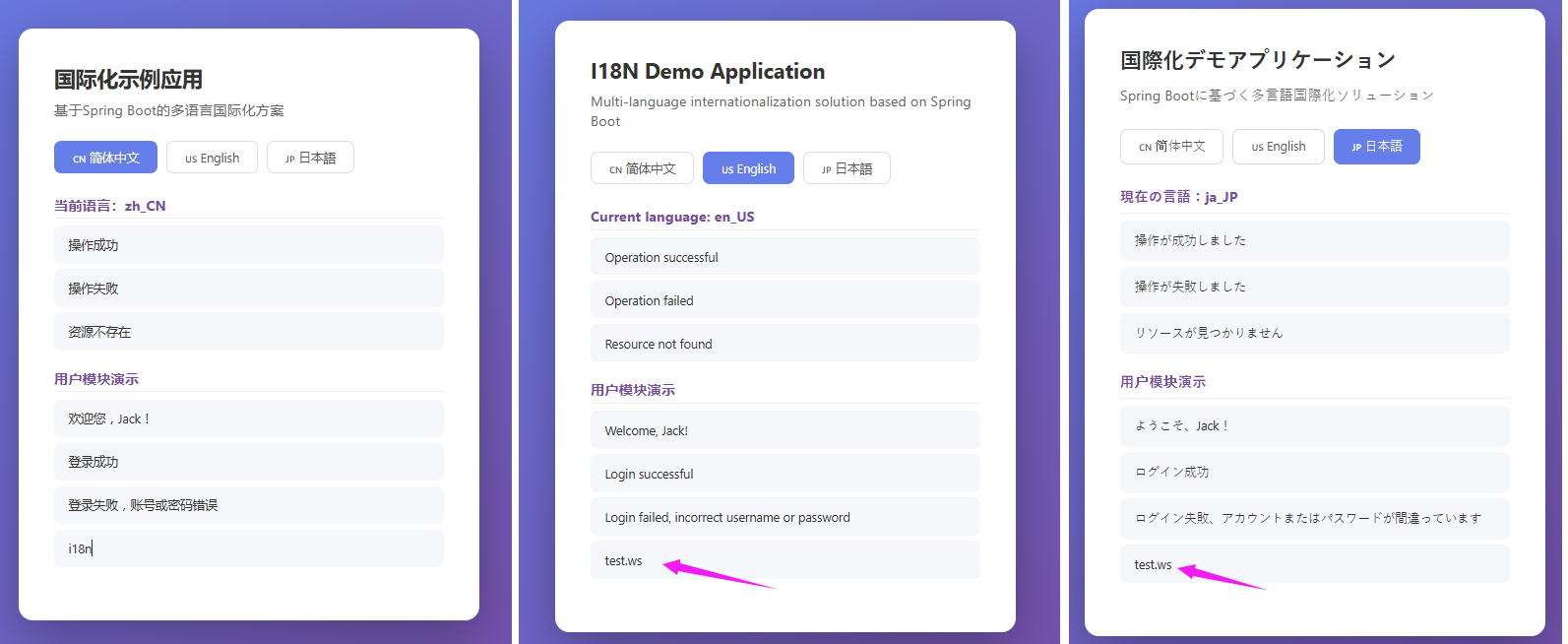
对比图切换之后,会发现use-code-as-default-message=true参数是有效的,没有配置的Key,默认显示Key。
04 扩展
上面介绍了三种语言,如果还要增加起亚语言,着急有需要增加枚举的类型和语言文件即可。枚举上面的案例没有说明,这里补充一下:
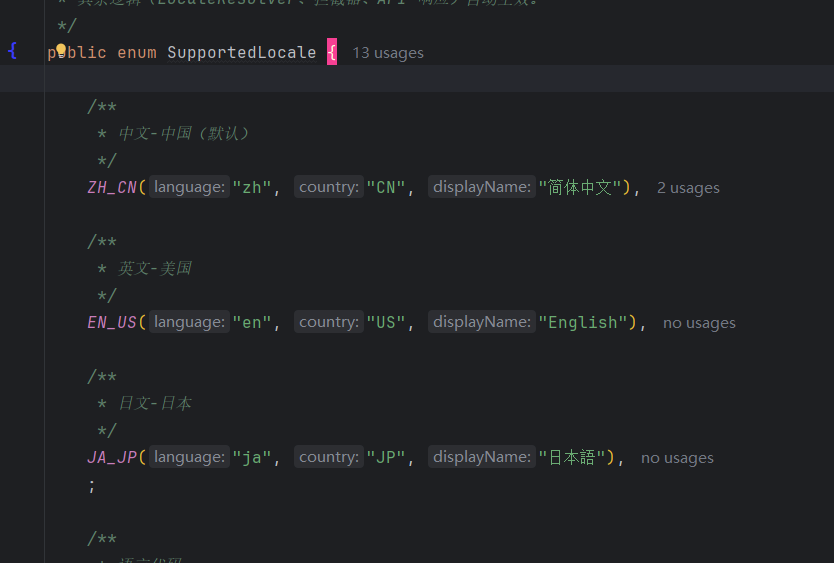
我们已增加韩语为例.
4.1 增加条目
// SupportedLocale.java
public enum SupportedLocale {
    ZH_CN("zh", "CN", "简体中文"),
    EN_US("en", "US", "English"),
    JA_JP("ja", "JP", "日本語"),
    // 新增韩语
    KO_KR("ko", "KR", "한국어");
    // ...
}
4.2 创建语言文件
在 src/main/resources/i18n/ 下创建 messages_ko_KR.properties:
# 한국어 (대한민국) 국제화 리소스
app.name=국제화 데모 애플리케이션
app.description=Spring Boot 기반 다국어 국제화 솔루션

common.success=작업 성공
common.fail=작업 실패
common.not_found=리소스를 찾을 수 없습니다

user.welcome=환영합니다, {0}!
user.login.success=로그인 성공
user.login.fail=로그인 실패, 계정 또는 비밀번호가 잘못되었습니다
参数只要传递lang=ko_KR即可。

openEuler 是由开放原子开源基金会孵化的全场景开源操作系统项目,面向数字基础设施四大核心场景(服务器、云计算、边缘计算、嵌入式),全面支持 ARM、x86、RISC-V、loongArch、PowerPC、SW-64 等多样性计算架构
更多推荐


 5
5 0
0- 0


 已为社区贡献1条内容

所有评论(0)