Veeam Agent for Linux 恢复统信服务器操作系统V20(1070) 后第一次启动报错问题处理
Veeam Agent for Linux 恢复统信服务器操作系统V20(1070) 后第一次启动报错问题处理
For RHEL/CentOS/SUSE systems, during the boot process, they will drop into the dracut emergency shell and display errors similar to:
dracut-initqueue timeout - starting timeout scripts
/dev/vgroot/root does not exist
Cause
Faulty initramfs
This issue occurs because the initial ramdisk image does not contain the necessary block device kernel modules (drivers).
The initial ramdisk image (initramfs/initrd) is an image of an initial root filesystem used as a part of the Linux boot process.
The most common scenario for this is when restoring a virtual machine that was backed up using Veeam Agent for Linux to completely new hardware. For example, a virtual machine was backed up in VMware and restored to a Hyper-V environment.
Solution
Scenario 1: Faulty initramfs
使用UOS Server 20 1070a 光盘启动到救援模式
救援模式(Rescue Mode)
救援模式是一个从光盘介质启动独立的环境,它会以只读或读写的方式挂载原有根文件系统,并提供一系列工具进行故障排查。通常用于系统数据恢复,修复根文件系统,或者重建GRUB引导程序等。
安装镜像启动盘引导进入救援模式,选择"Rescue U0S Server20"
救援模式(Rescue Mode)
救援模式是一个从光盘介质启动独立的环境,它会以只读或读写的方式挂载原有根文件系统,并提供一系列工具进行故障排查。通常用于系统数据恢复,修复根文件系统,或者重建GRUB引导程序等。
安装镜像启动盘引导进入救援模式,选择"Rescue U0S Server20"
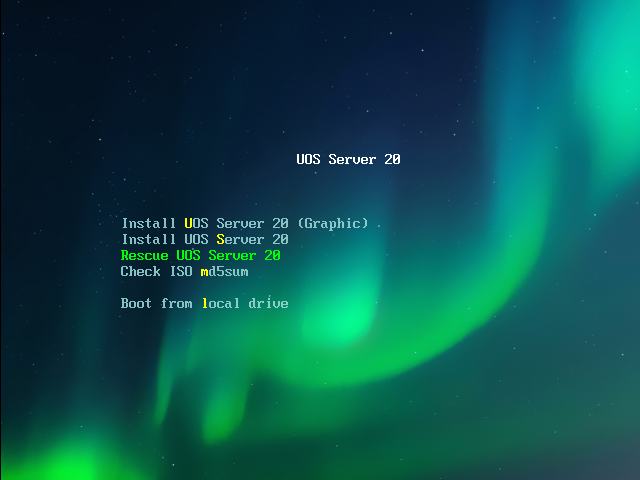
Install UOS Server 20 (Graphic):使用图形用户界面模式安装。
Install UOS Server 20:字符界面安装,无用户界面交互模式。
Rescue U0S Server20: 救援模式。
Check ISO md5sum:校验 ISO 镜像的完整性。
选择"(1)Continue":继续正常的系统引导过程
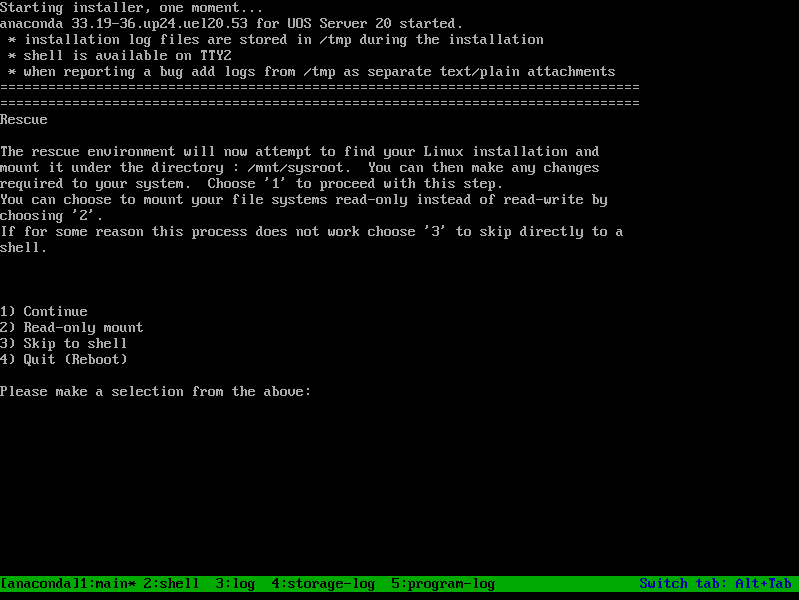
(1)Continue:继续正常的系统引导过程。
(2)Read-only mount:将根文件系统挂载为只读,以便进行文件系统的检查或修复。
(3)Skip to shell:跳过其他所有启动相关的脚本,直接进入一个简单的shell界面。
(4)Quit (Reboot):退出引导过程,并重新启动计算机。
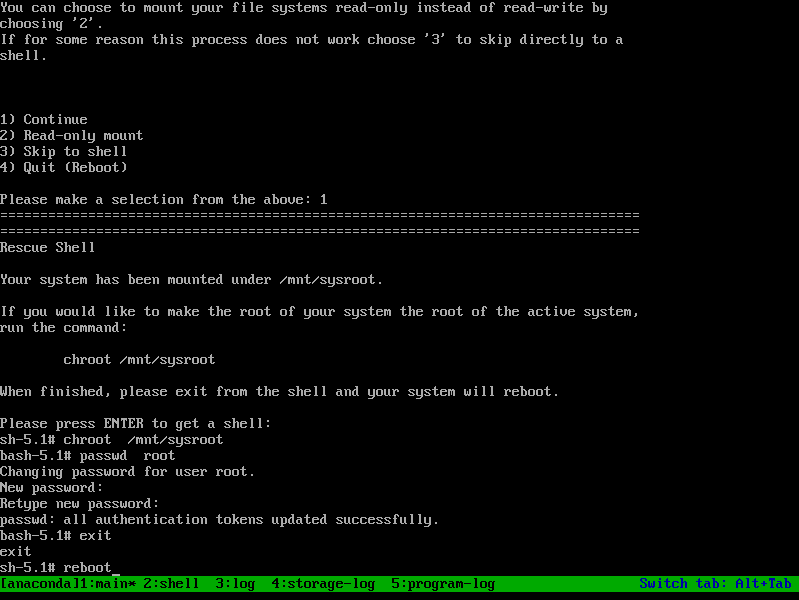
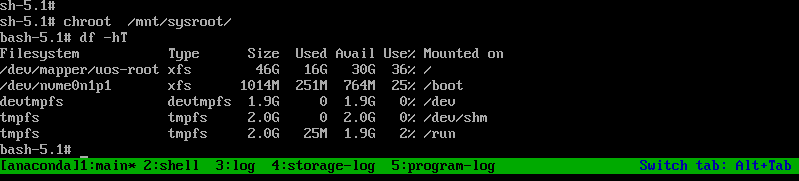
默认系统根分区路径为/mnt/sysroot目录,根据提示按“ENTER”键进入shell
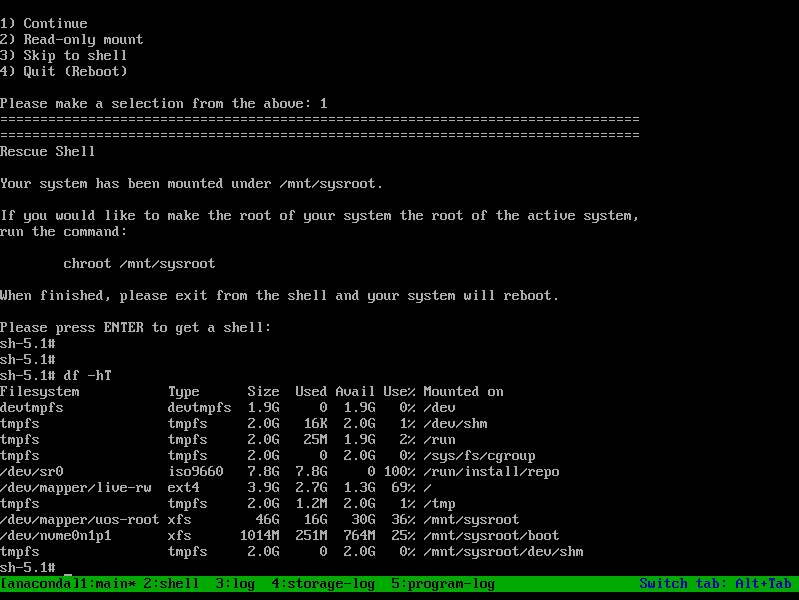
通过"chroot /mnt/sysroot"命令切换系统根分区为当前活动的根分区
Distro Specific Initramfs Rebuild Instructions
Now that you have identified the initramfs that needs to be rebuilt, expand the section below matching the distro for information about rebuilding it.
RHEL/CentOS/Oracle Linux
These distributions use dracut to manage initramfs images. The general syntax to rebuild initramfs image is:
dracut -f -v /boot/initramfs-<kernel version>.img <kernel version>
Here, <kernel version> has to be replaced with the kernel version for which the initramfs is being rebuilt.
Example:
# ls -la /boot/initramfs-*
-rw-------. 1 root root 65698610 Aug 8 2019 /boot/initramfs-0-rescue-b15a66f034f840ecb6a1205c983df822.img
-rw-------. 1 root root 19683576 Sep 13 2020 /boot/initramfs-4.18.0-193.19.1.el8_2.x86_64kdump.img
-rw-------. 1 root root 27783687 Nov 8 2020 /boot/initramfs-4.18.0-193.28.1.el8_2.x86_64.img
-rw-------. 1 root root 22324786 Nov 8 2020 /boot/initramfs-4.18.0-193.28.1.el8_2.x86_64kdump.img
-rw-------. 1 root root 27989970 Dec 6 13:17 /boot/initramfs-4.18.0-240.10.1.el8_3.x86_64.img
-rw-------. 1 root root 22485564 Jan 17 2021 /boot/initramfs-4.18.0-240.10.1.el8_3.x86_64kdump.img
-rw-------. 1 root root 27943270 Jan 17 2021 /boot/initramfs-4.18.0-240.1.1.el8_3.x86_64.img
-rw-------. 1 root root 22485474 Jan 17 2021 /boot/initramfs-4.18.0-240.1.1.el8_3.x86_64kdump.img
Here, /boot/initramfs-4.18.0-240.1.1.el8_3.x86_64.img image corresponds to 4.18.0-240.1.1.el8_3.x86_64 kernel.
To rebuild it with dracut, run:
dracut -f -v /boot/initramfs-4.18.0-240.1.1.el8_3.x86_64.img 4.18.0-240.1.1.el8_3.x86_64
More information:
How to rebuild the initial ramdisk image in Red Hat Enterprise Linux
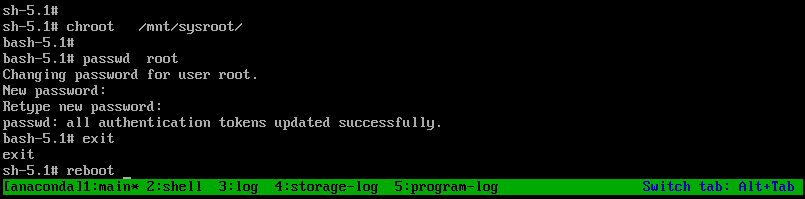
passwd 修改用户密码,exit退出当前bash,reboot重启系统

openEuler 是由开放原子开源基金会孵化的全场景开源操作系统项目,面向数字基础设施四大核心场景(服务器、云计算、边缘计算、嵌入式),全面支持 ARM、x86、RISC-V、loongArch、PowerPC、SW-64 等多样性计算架构
更多推荐

 1
1 0
0- 0


 已为社区贡献29条内容

所有评论(0)