银河麒麟v10 sp3 2403 二进制安装包 安装mysql 5.7.29
银河麒麟v10 sp3 2403 二进制安装包 安装mysql 5.7.29
1、卸载mariadb 和 删除麒麟系统自带的mysql用户和mysql用户组
1.1、卸载mariadb
由于银河麒麟v10系统默认安装了mariadb 会与Mysql相冲突,因此首先需要卸载系统自带的mariadb
查看系统上默认安装的Mariadb软件包
使用yum查看已经安装的mariadb软件包
yum list --installed mariadb*

rpm -qa|grep mariadb*
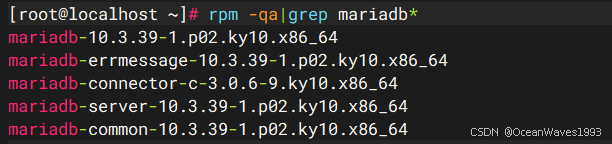
查看默认的mariadb配置文件,默认的配置文件是 /etc/my.cnf
find / -name my.cnf

查看默认的mariadb配置目录,默认的配置目录是 /etc/my.cnf.d
find / -type d -name my.cnf*

使用yum卸载 mariadb
yum remove mariadb.x86_64 mariadb-common.x86_64 mariadb-connector-c.x86_64 mariadb-errmessage.x86_64 mariadb-server.x86_64
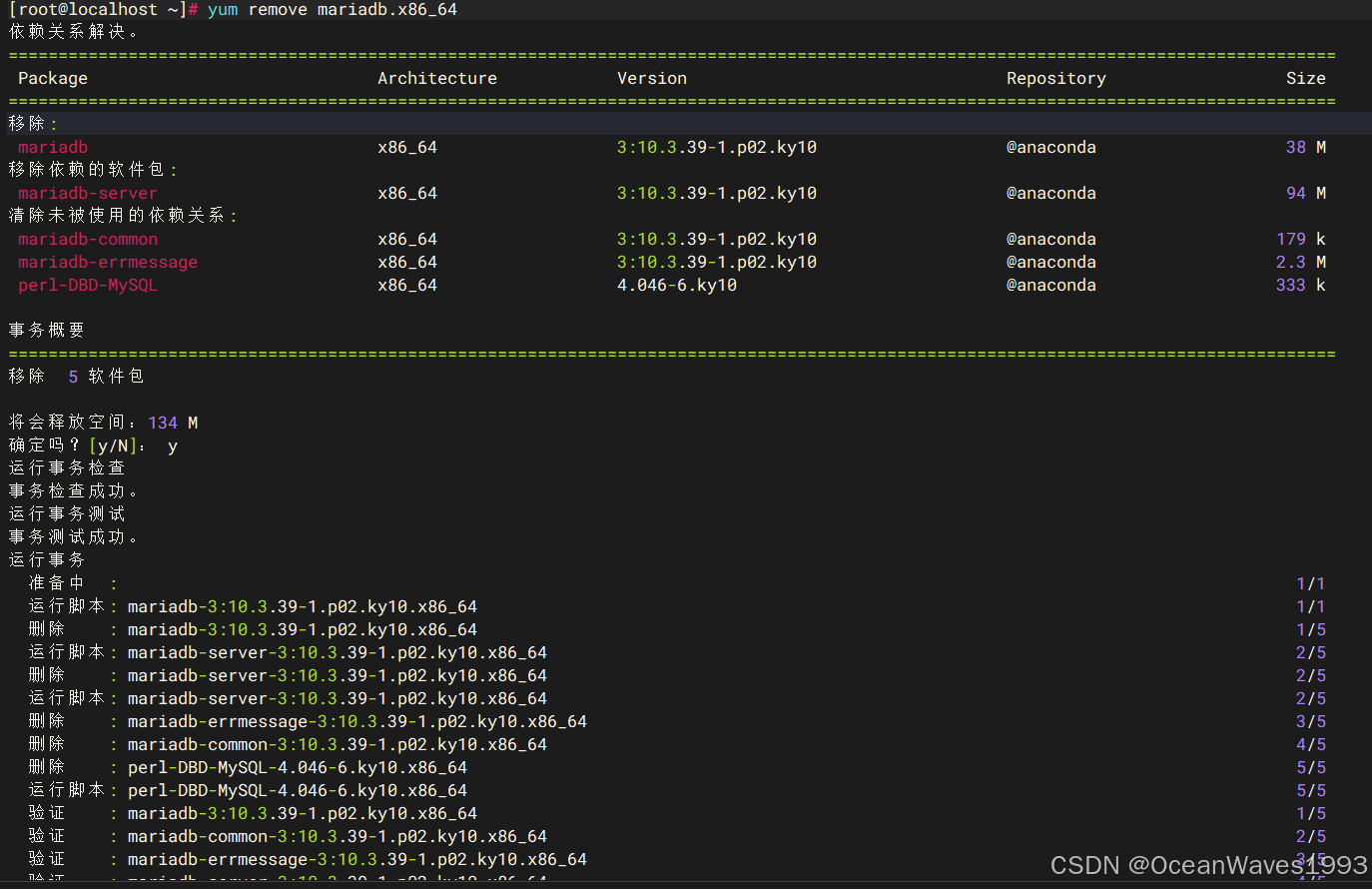
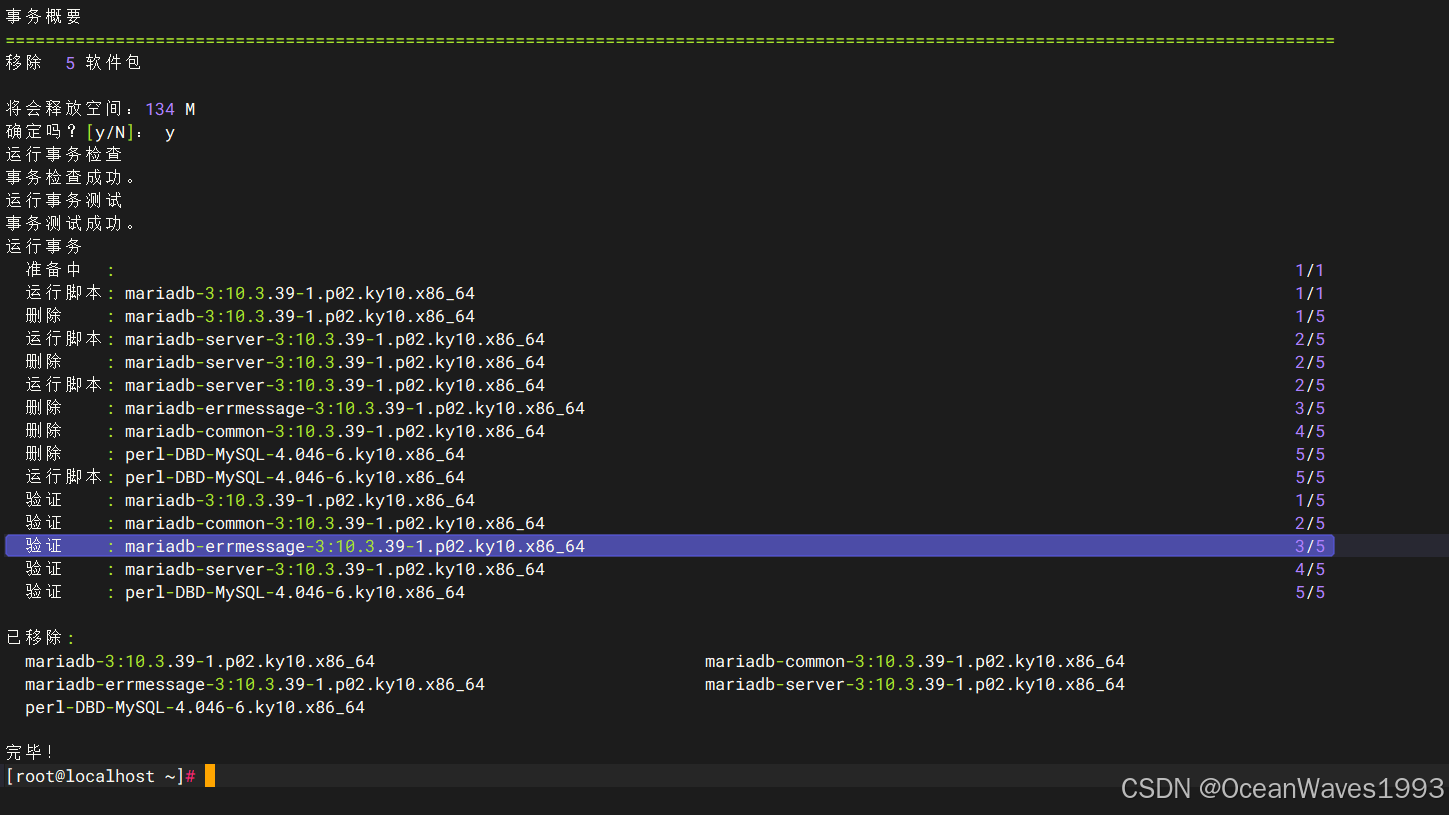
验证卸载Mariadb成功
yum list --installed mariadb*
rpm -qa|grep mariadb*

查看Mariadb配置文件和目录是否还存在 已经不存在了
ls -l /etc/my.cnf
ls -l /etc/my.cnf.d
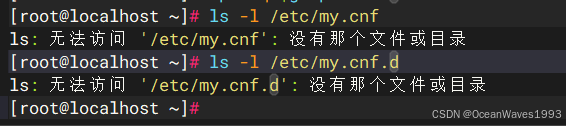
至此mariadb卸载完成
1.2、删除麒麟系统自带的mysql用户和mysql用户组
麒麟系统自带的mysql用户和mysql用户组如下
cat /etc/passwd|grep mysql
cat /etc/group|grep mysql

删除麒麟系统自带的mysql用户和mysql用户组
userdel -r mysql

确认已经删除了麒麟系统自带的mysql用户和mysql用户组
cat /etc/passwd|grep mysql
cat /etc/group|grep mysql

2、下载Mysql安装包
访问官网下载链接 链接: https://dev.mysql.com/downloads/mysql/
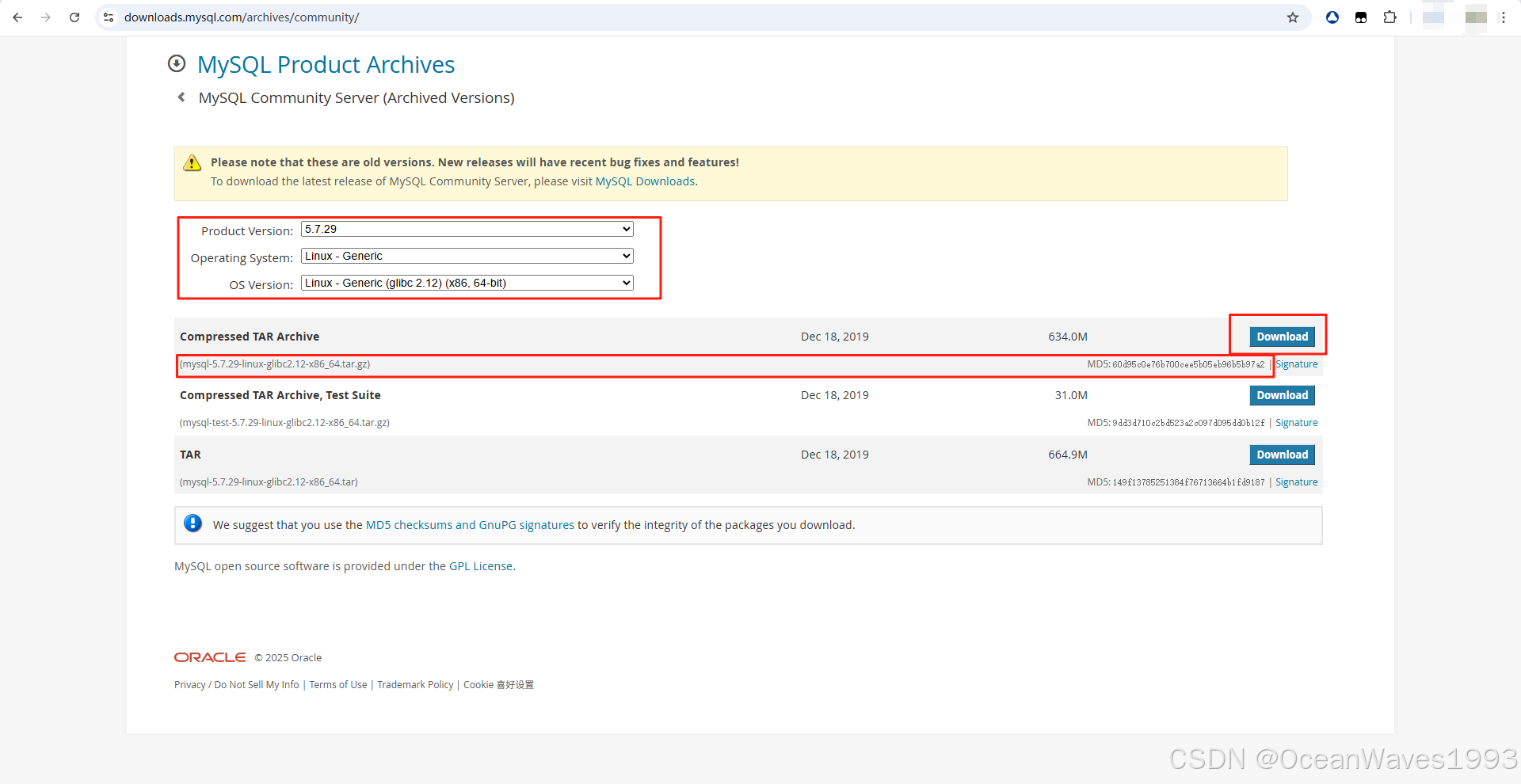
选择如下 点击下载按钮 下载安装包,选和你操作系统一样的glibc版本即可。
注意:mysql-5.7.29-linux-glibc2.12-x86_64.tar.gz只有glibc 2.12版本的,只要操作系统glibc版本高于或等于2.12就可以安装mysql-5.7.29-linux-glibc2.12-x86_64.tar.gz,银河麒麟银河麒麟v10 sp3 2403 的glibc版本是2.28,因此银河麒麟v10 sp3 2403可以安装mysql-5.7.29-linux-glibc2.12-x86_64.tar.gz。
文件名:mysql-5.7.29-linux-glibc2.12-x86_64.tar.gz
MD5: 60d95c0e76b700cee5b05eb96b5b97a2
3、安装Mysql 5.7.29
官方安装文档 链接: https://dev.mysql.com/doc/mysql-installation-excerpt/5.7/en/binary-installation.html
3.1、安装依赖包
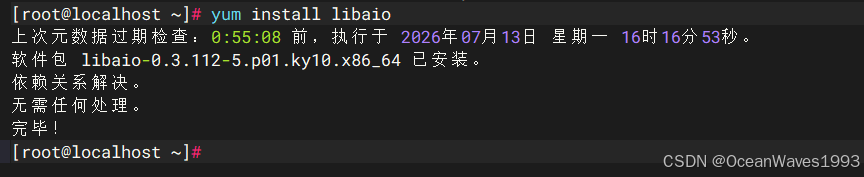
yum search libaio

yum install libaio
3.2、安装Mysql
命令顺序如下 安装包放在/data/package/mysql/mysql-5.7.29-linux-glibc2.12-x86_64.tar.gz 【此为直接执行的命令,后续有命令解释。】
groupadd mysql
useradd -r -g mysql -s /bin/false mysql
tar -xzvf /data/package/mysql/mysql-5.7.29-linux-glibc2.12-x86_64.tar.gz -C /usr/local
ln -s /usr/local/mysql-5.7.29-linux-glibc2.12-x86_64/ /usr/local/mysql
cd /usr/local/mysql
mkdir mysql-files
chown -R mysql:mysql mysql-files
chmod -R 750 mysql-files
vi /etc/my.cnf
[client]
socket=/data/mysql/mysql.sock

[mysqld]
datadir=/data/mysql/
socket=/data/mysql/mysql.sock
sql-mode=NO_AUTO_CREATE_USER,NO_ENGINE_SUBSTITUTION
# Disable name resolve
skip-name-resolve
max_connections=100000


[mysqld_safe]
log-error=/var/log/mysqld.log
pid-file=/data/mysql/mysqld.pid
chown mysql:mysql /etc/my.cnf

mkdir -p /data/mysql
chown -R mysql:mysql /data/mysql

bin/mysqld --defaults-file=/etc/my.cnf --initialize --user=mysql

bin/mysql_ssl_rsa_setup

bin/mysqld_safe  --defaults-file=/etc/my.cnf  --user=mysql &
其中执行bin/mysqld --defaults-file=/etc/my.cnf --initialize --user=mysql 会打印出Mysql的默认密码
最后一句:A temporary password is generated for root@localhost: <jtrewp3QEDp
[root@localhost mysql]# bin/mysqld --defaults-file=/etc/my.cnf --initialize --user=mysql
2026-07-13T10:05:09.941262Z 0 [Warning] TIMESTAMP with implicit DEFAULT value is deprecated. Please use --explicit_defaults_for_timestamp server option (see documentation for more details).
2026-07-13T10:05:10.427174Z 0 [Warning] InnoDB: New log files created, LSN=45790
2026-07-13T10:05:10.476046Z 0 [Warning] InnoDB: Creating foreign key constraint system tables.
2026-07-13T10:05:10.537476Z 0 [Warning] No existing UUID has been found, so we assume that this is the first time that this server has been started. Generating a new UUID: 5541d1ed-7ea2-11f1-af4f-000c29eae43f.
2026-07-13T10:05:10.538371Z 0 [Warning] Gtid table is not ready to be used. Table 'mysql.gtid_executed' cannot be opened.
2026-07-13T10:05:10.968481Z 0 [Warning] CA certificate ca.pem is self signed.
2026-07-13T10:05:11.192517Z 1 [Note] A temporary password is generated for root@localhost: c=ZgWkocY7qm
[root@localhost mysql]#
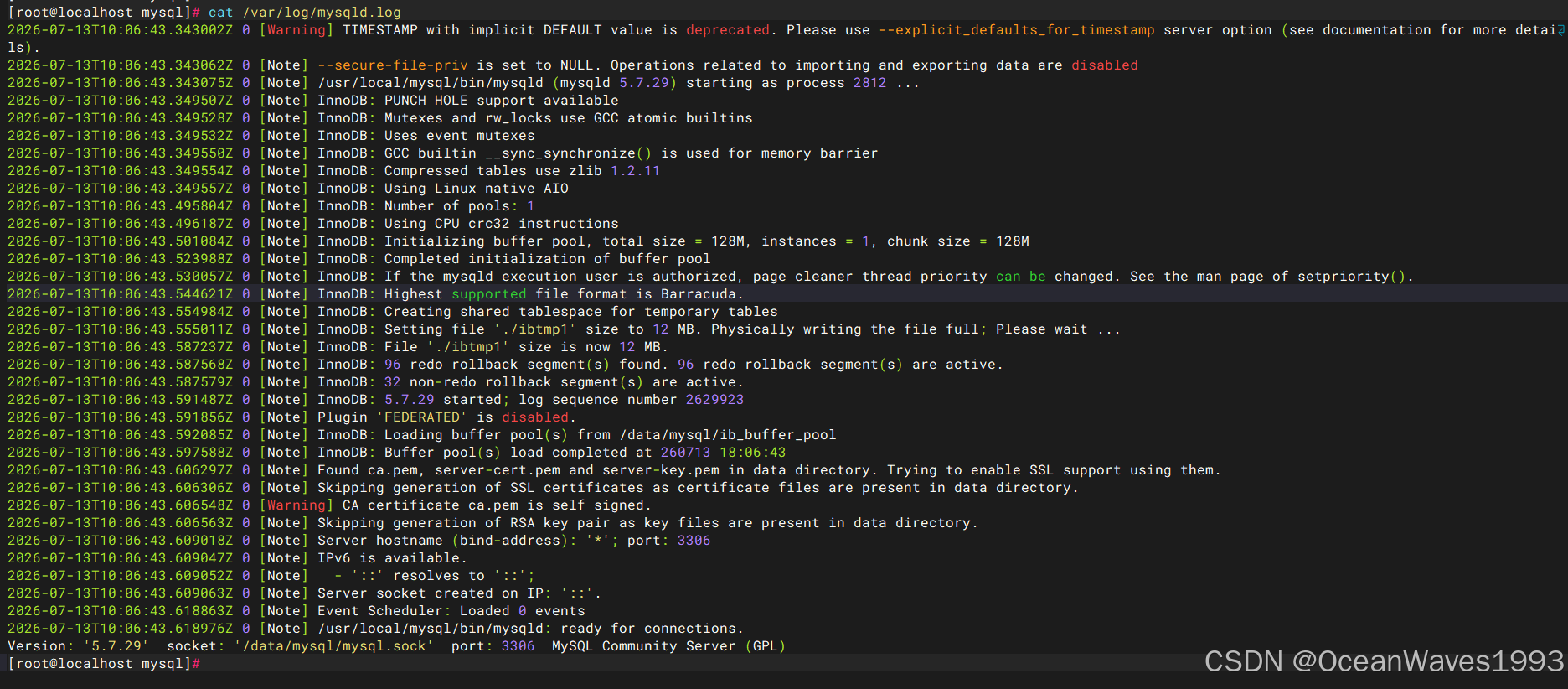
其中执行bin/mysqld_safe --defaults-file=/etc/my.cnf --user=mysql & 是启动Mysql服务 日志如下

[root@localhost mysql]# cat /var/log/mysqld.log
2026-07-13T10:06:43.343002Z 0 [Warning] TIMESTAMP with implicit DEFAULT value is deprecated. Please use --explicit_defaults_for_timestamp server option (see documentation for more details).
2026-07-13T10:06:43.343062Z 0 [Note] --secure-file-priv is set to NULL. Operations related to importing and exporting data are disabled
2026-07-13T10:06:43.343075Z 0 [Note] /usr/local/mysql/bin/mysqld (mysqld 5.7.29) starting as process 2812 ...
2026-07-13T10:06:43.349507Z 0 [Note] InnoDB: PUNCH HOLE support available
2026-07-13T10:06:43.349528Z 0 [Note] InnoDB: Mutexes and rw_locks use GCC atomic builtins
2026-07-13T10:06:43.349532Z 0 [Note] InnoDB: Uses event mutexes
2026-07-13T10:06:43.349550Z 0 [Note] InnoDB: GCC builtin __sync_synchronize() is used for memory barrier
2026-07-13T10:06:43.349554Z 0 [Note] InnoDB: Compressed tables use zlib 1.2.11
2026-07-13T10:06:43.349557Z 0 [Note] InnoDB: Using Linux native AIO
2026-07-13T10:06:43.495804Z 0 [Note] InnoDB: Number of pools: 1
2026-07-13T10:06:43.496187Z 0 [Note] InnoDB: Using CPU crc32 instructions
2026-07-13T10:06:43.501084Z 0 [Note] InnoDB: Initializing buffer pool, total size = 128M, instances = 1, chunk size = 128M
2026-07-13T10:06:43.523988Z 0 [Note] InnoDB: Completed initialization of buffer pool
2026-07-13T10:06:43.530057Z 0 [Note] InnoDB: If the mysqld execution user is authorized, page cleaner thread priority can be changed. See the man page of setpriority().
2026-07-13T10:06:43.544621Z 0 [Note] InnoDB: Highest supported file format is Barracuda.
2026-07-13T10:06:43.554984Z 0 [Note] InnoDB: Creating shared tablespace for temporary tables
2026-07-13T10:06:43.555011Z 0 [Note] InnoDB: Setting file './ibtmp1' size to 12 MB. Physically writing the file full; Please wait ...
2026-07-13T10:06:43.587237Z 0 [Note] InnoDB: File './ibtmp1' size is now 12 MB.
2026-07-13T10:06:43.587568Z 0 [Note] InnoDB: 96 redo rollback segment(s) found. 96 redo rollback segment(s) are active.
2026-07-13T10:06:43.587579Z 0 [Note] InnoDB: 32 non-redo rollback segment(s) are active.
2026-07-13T10:06:43.591487Z 0 [Note] InnoDB: 5.7.29 started; log sequence number 2629923
2026-07-13T10:06:43.591856Z 0 [Note] Plugin 'FEDERATED' is disabled.
2026-07-13T10:06:43.592085Z 0 [Note] InnoDB: Loading buffer pool(s) from /data/mysql/ib_buffer_pool
2026-07-13T10:06:43.597588Z 0 [Note] InnoDB: Buffer pool(s) load completed at 260713 18:06:43
2026-07-13T10:06:43.606297Z 0 [Note] Found ca.pem, server-cert.pem and server-key.pem in data directory. Trying to enable SSL support using them.
2026-07-13T10:06:43.606306Z 0 [Note] Skipping generation of SSL certificates as certificate files are present in data directory.
2026-07-13T10:06:43.606548Z 0 [Warning] CA certificate ca.pem is self signed.
2026-07-13T10:06:43.606563Z 0 [Note] Skipping generation of RSA key pair as key files are present in data directory.
2026-07-13T10:06:43.609018Z 0 [Note] Server hostname (bind-address): '*'; port: 3306
2026-07-13T10:06:43.609047Z 0 [Note] IPv6 is available.
2026-07-13T10:06:43.609052Z 0 [Note]   - '::' resolves to '::';
2026-07-13T10:06:43.609063Z 0 [Note] Server socket created on IP: '::'.
2026-07-13T10:06:43.618863Z 0 [Note] Event Scheduler: Loaded 0 events
2026-07-13T10:06:43.618976Z 0 [Note] /usr/local/mysql/bin/mysqld: ready for connections.
Version: '5.7.29'  socket: '/data/mysql/mysql.sock'  port: 3306  MySQL Community Server (GPL)
[root@localhost mysql]#
添加mysql的环境变量
vi /etc/profile 最后面添加2行
export MYSQL_HOME=/usr/local/mysql
export PATH=$PATH:$MYSQL_HOME/bin

使得mysql环境变量生效
source /etc/profile
命令解释 注释版本
# 建立mysql用户组
groupadd mysql

# 建立一个系统用户名为mysql 这个用户属于mysql用户组,-g后面跟的是用户组名称,最后的mysql是用户名[可以任意指定用户名随你喜欢]。
useradd -r -g mysql -s /bin/false mysql

# 解压安装包到/usr/local目录下
tar -xzvf /root/package/mysql/ysql-5.7.29-linux-glibc2.12-x86_64.tar.gz -C /usr/local

# 建立解压后目录的软连接名为mysql
ln -s /usr/local//mysql-5.7.29-linux-glibc2.12-x86_64 /usr/local/mysql

# 进入解压后的目录
cd /usr/local/mysql

# 在解压后的目录下建立目录:mysql-files,更改mysql目录的属主和属组为mysql:mysql【之前建立的mysql用户组名和用户名】,并chmod 750
mkdir mysql-files
chown -R mysql:mysql mysql-files
chmod -R 750 mysql-files

# 建立后的配置文件内容如下
[root@localhost ~]# cat /etc/my.cnf
[client]
socket=/data/mysql/mysql.sock

[mysqld]
datadir=/data/mysql/
socket=/data/mysql/mysql.sock
sql-mode=NO_AUTO_CREATE_USER,NO_ENGINE_SUBSTITUTION
# Disable name resolve
skip-name-resolve
max_connections=100000


[mysqld_safe]
log-error=/var/log/mysqld.log
pid-file=/data/mysql/mysqld.pid
[root@localhost ~]#

# 配置文件解释
[root@centos ~]# cat /etc/my.cnf
[client]
socket=/data/mysql/mysql.sock

[mysqld]
# mysql数据目录
datadir=/data/mysql/
# mysql socket文件路径
socket=/data/mysql/mysql.sock
sql-mode=NO_AUTO_CREATE_USER,NO_ENGINE_SUBSTITUTION
# Disable name resolve
skip-name-resolve
max_connections=100000

[mysqld_safe]
# mysql日志文件路径
log-error=/var/log/mysqld.log
# mysql pid文件路径
pid-file=/data/mysql/mysqld.pid
# 配置文件解释结束


# 更改mysql配置文件的属主和属组为mysql:mysql【之前建立的mysql用户组名和用户名】
chown mysql:mysql /etc/my.cnf

# 建立mysql数据目录/data/mysql/, 根据需要自定义数据目录,并更改/data/mysql/的属主和属组为mysql:mysql【之前建立的mysql用户组名和用户名】
mkdir -p /data/mysql/
chown -R mysql:mysql /var/lib/mysql

# 初始化mysql数据库,--defaults-file=/etc/my.cnf 指定mysql配置文件路径,--user=mysql指定mysql进程的用户是mysql【前面建立的mysql用户名】
bin/mysqld --defaults-file=/etc/my.cnf --initialize --user=mysql

# ssl等配置
bin/mysql_ssl_rsa_setup

# 启动mysql数据库
bin/mysqld_safe --defaults-file=/etc/my.cnf --user=mysql &
3.3、安装后配置
3.3.1、查看mysql版本
mysql --version
mysql版本是5.7.29
mysql --version

各部分含义解析
mysql
这是您执行的命令行工具名称,即 MySQL 客户端
Ver 14.14
客户端工具的版本号,这是 MySQL 特定的内部版本标识
Distrib 5.7.29
✅ 最重要的信息:您安装的 MySQL 发行版是 5.7.29 版本
5.7 表示主版本系列,29 是发布号
for linux-glibc2.12 (x86_64)
✅ 平台信息:这个版本是为 Linux 系统编译的
使用 glibc 2.12 库(C 标准库)
架构为 x86_64(64位系统)
using EditLine wrapper
✅ 命令行编辑库:客户端使用的是 EditLine 库
提供命令行编辑功能(如上下箭头历史记录、左右移动光标等)
相比 readline,EditLine 更轻量级
3.3.2、更改mysql密码
链接: https://dev.mysql.com/doc/mysql-installation-excerpt/5.7/en/postinstallation.html
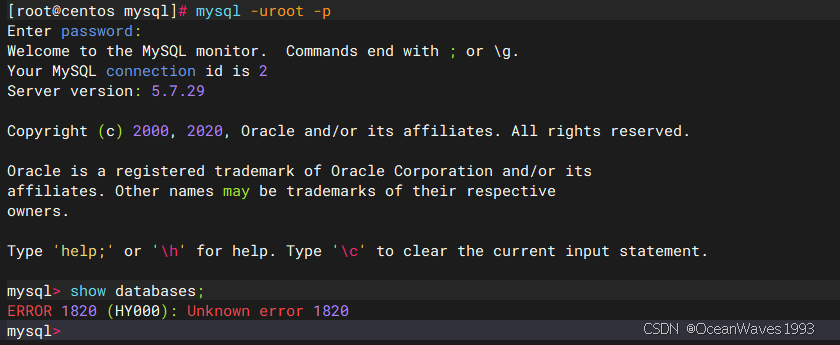
使用安装Mysql数据库时生成的默认密码登录mysql数据库
mysql -uroot -p
没修改默认密码前不能进行数据库sql操作
修改Mysql默认密码为Mysql@123
mysql>  ALTER USER 'root'@'localhost' IDENTIFIED BY 'Mysql@123' PASSWORD EXPIRE NEVER;
Query OK, 0 rows affected (0.00 sec)

mysql> flush privileges;
Query OK, 0 rows affected (0.00 sec)

mysql>  use mysql
Reading table information for completion of table and column names
You can turn off this feature to get a quicker startup with -A

Database changed
mysql> update user set host = "%" where user = "root";
Query OK, 1 row affected (0.00 sec)

mysql> flush privileges;
Query OK, 0 rows affected (0.00 sec)

mysql> ALTER USER 'root'@'%' IDENTIFIED WITH mysql_native_password BY 'Mysql@123';
Query OK, 0 rows affected (0.00 sec)

mysql> flush privileges;
Query OK, 0 rows affected (0.00 sec)

mysql>
使用新密码登录mysql数据库
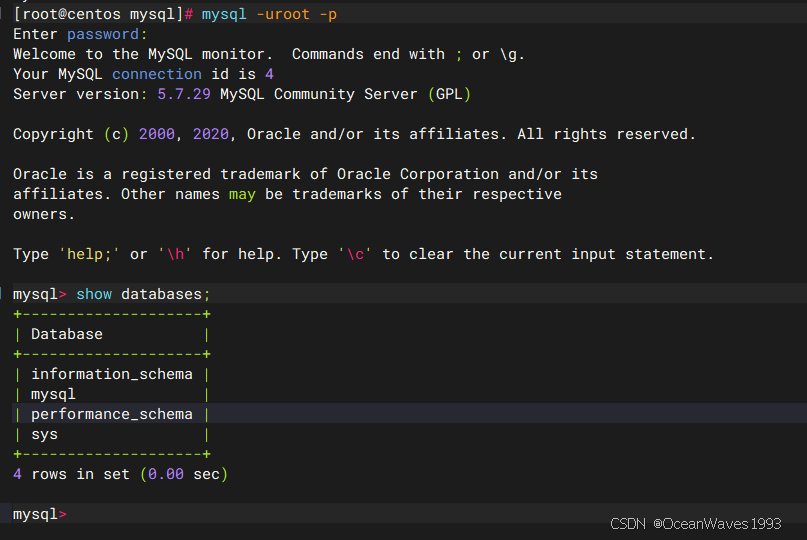
3.4、停止mysql数据库服务
进入MySQL安装包解压后的目录
cd /usr/local/mysql
执行停止mysql命令
bin/mysqladmin --defaults-file=/etc/my.cnf -p shutdown
执行停止MySQL命令后 输入mysql root用户的登录密码

[root@centos ~]# cat  /var/log/mysqld/mysqld.log
2025-08-22T07:07:45.037414Z 0 [Note] Giving 0 client threads a chance to die gracefully
2025-08-22T07:07:45.037429Z 0 [Note] Shutting down slave threads
2025-08-22T07:07:45.037433Z 0 [Note] Forcefully disconnecting 0 remaining clients
2025-08-22T07:07:45.037442Z 0 [Note] Event Scheduler: Purging the queue. 0 events
2025-08-22T07:07:45.037487Z 0 [Note] Binlog end
2025-08-22T07:07:45.038681Z 0 [Note] Shutting down plugin 'ngram'
2025-08-22T07:07:45.038688Z 0 [Note] Shutting down plugin 'partition'
2025-08-22T07:07:45.038690Z 0 [Note] Shutting down plugin 'BLACKHOLE'
2025-08-22T07:07:45.038692Z 0 [Note] Shutting down plugin 'ARCHIVE'
2025-08-22T07:07:45.038694Z 0 [Note] Shutting down plugin 'INNODB_SYS_VIRTUAL'
2025-08-22T07:07:45.038695Z 0 [Note] Shutting down plugin 'INNODB_SYS_DATAFILES'
2025-08-22T07:07:45.038696Z 0 [Note] Shutting down plugin 'INNODB_SYS_TABLESPACES'
2025-08-22T07:07:45.038697Z 0 [Note] Shutting down plugin 'INNODB_SYS_FOREIGN_COLS'
2025-08-22T07:07:45.038698Z 0 [Note] Shutting down plugin 'INNODB_SYS_FOREIGN'
2025-08-22T07:07:45.038699Z 0 [Note] Shutting down plugin 'INNODB_SYS_FIELDS'
2025-08-22T07:07:45.038700Z 0 [Note] Shutting down plugin 'INNODB_SYS_COLUMNS'
2025-08-22T07:07:45.038701Z 0 [Note] Shutting down plugin 'INNODB_SYS_INDEXES'
2025-08-22T07:07:45.038702Z 0 [Note] Shutting down plugin 'INNODB_SYS_TABLESTATS'
2025-08-22T07:07:45.038703Z 0 [Note] Shutting down plugin 'INNODB_SYS_TABLES'
2025-08-22T07:07:45.038704Z 0 [Note] Shutting down plugin 'INNODB_FT_INDEX_TABLE'
2025-08-22T07:07:45.038705Z 0 [Note] Shutting down plugin 'INNODB_FT_INDEX_CACHE'
2025-08-22T07:07:45.038706Z 0 [Note] Shutting down plugin 'INNODB_FT_CONFIG'
2025-08-22T07:07:45.038707Z 0 [Note] Shutting down plugin 'INNODB_FT_BEING_DELETED'
2025-08-22T07:07:45.038708Z 0 [Note] Shutting down plugin 'INNODB_FT_DELETED'
2025-08-22T07:07:45.038709Z 0 [Note] Shutting down plugin 'INNODB_FT_DEFAULT_STOPWORD'
2025-08-22T07:07:45.038710Z 0 [Note] Shutting down plugin 'INNODB_METRICS'
2025-08-22T07:07:45.038711Z 0 [Note] Shutting down plugin 'INNODB_TEMP_TABLE_INFO'
2025-08-22T07:07:45.038712Z 0 [Note] Shutting down plugin 'INNODB_BUFFER_POOL_STATS'
2025-08-22T07:07:45.038713Z 0 [Note] Shutting down plugin 'INNODB_BUFFER_PAGE_LRU'
2025-08-22T07:07:45.038714Z 0 [Note] Shutting down plugin 'INNODB_BUFFER_PAGE'
2025-08-22T07:07:45.038715Z 0 [Note] Shutting down plugin 'INNODB_CMP_PER_INDEX_RESET'
2025-08-22T07:07:45.038716Z 0 [Note] Shutting down plugin 'INNODB_CMP_PER_INDEX'
2025-08-22T07:07:45.038717Z 0 [Note] Shutting down plugin 'INNODB_CMPMEM_RESET'
2025-08-22T07:07:45.038718Z 0 [Note] Shutting down plugin 'INNODB_CMPMEM'
2025-08-22T07:07:45.038719Z 0 [Note] Shutting down plugin 'INNODB_CMP_RESET'
2025-08-22T07:07:45.038720Z 0 [Note] Shutting down plugin 'INNODB_CMP'
2025-08-22T07:07:45.038721Z 0 [Note] Shutting down plugin 'INNODB_LOCK_WAITS'
2025-08-22T07:07:45.038722Z 0 [Note] Shutting down plugin 'INNODB_LOCKS'
2025-08-22T07:07:45.038723Z 0 [Note] Shutting down plugin 'INNODB_TRX'
2025-08-22T07:07:45.038724Z 0 [Note] Shutting down plugin 'InnoDB'
2025-08-22T07:07:45.038782Z 0 [Note] InnoDB: FTS optimize thread exiting.
2025-08-22T07:07:45.038917Z 0 [Note] InnoDB: Starting shutdown...
2025-08-22T07:07:45.139488Z 0 [Note] InnoDB: Dumping buffer pool(s) to /var/lib/mysql/data/ib_buffer_pool
2025-08-22T07:07:45.140958Z 0 [Note] InnoDB: Buffer pool(s) dump completed at 250822 15:07:45
2025-08-22T07:07:46.753016Z 0 [Note] InnoDB: Shutdown completed; log sequence number 2629951
2025-08-22T07:07:46.753858Z 0 [Note] InnoDB: Removed temporary tablespace data file: "ibtmp1"
2025-08-22T07:07:46.753867Z 0 [Note] Shutting down plugin 'MRG_MYISAM'
2025-08-22T07:07:46.753870Z 0 [Note] Shutting down plugin 'MEMORY'
2025-08-22T07:07:46.753872Z 0 [Note] Shutting down plugin 'PERFORMANCE_SCHEMA'
2025-08-22T07:07:46.753887Z 0 [Note] Shutting down plugin 'CSV'
2025-08-22T07:07:46.753889Z 0 [Note] Shutting down plugin 'MyISAM'
2025-08-22T07:07:46.753896Z 0 [Note] Shutting down plugin 'sha256_password'
2025-08-22T07:07:46.753897Z 0 [Note] Shutting down plugin 'mysql_native_password'
2025-08-22T07:07:46.753966Z 0 [Note] Shutting down plugin 'binlog'
2025-08-22T07:07:46.754199Z 0 [Note]
[root@centos ~]#
3.5、启动mysql数据库服务
# 进入MySQL安装包解压后的目录
cd /usr/local/mysql
# 启动mysql服务
bin/mysqld_safe --defaults-file=/etc/my.cnf --user=mysql &

[root@centos ~]# cat  /var/log/mysqld/mysqld.log
2025-08-22T07:10:31.269022Z 0 [Warning] TIMESTAMP with implicit DEFAULT value is deprecated. Please use --explicit_defaults_for_timestamp server option (see documentation for more details).
2025-08-22T07:10:31.269056Z 0 [Warning] 'NO_ZERO_DATE', 'NO_ZERO_IN_DATE' and 'ERROR_FOR_DIVISION_BY_ZERO' sql modes should be used with strict mode. They will be merged with strict mode in a future release.
2025-08-22T07:10:31.269058Z 0 [Warning] 'NO_AUTO_CREATE_USER' sql mode was not set.
2025-08-22T07:10:31.269072Z 0 [Note] --secure-file-priv is set to NULL. Operations related to importing and exporting data are disabled
2025-08-22T07:10:31.269085Z 0 [Note] /usr/local/mysql/bin/mysqld (mysqld 5.7.29) starting as process 3529 ...
2025-08-22T07:10:31.269103Z 0 [ERROR] Can't find error-message file '/var/lib/mysql/share/errmsg.sys'. Check error-message file location and 'lc-messages-dir' configuration directive.
2025-08-22T07:10:31.271122Z 0 [Note] InnoDB: PUNCH HOLE support available
2025-08-22T07:10:31.271136Z 0 [Note] InnoDB: Mutexes and rw_locks use GCC atomic builtins
2025-08-22T07:10:31.271138Z 0 [Note] InnoDB: Uses event mutexes
2025-08-22T07:10:31.271139Z 0 [Note] InnoDB: GCC builtin __sync_synchronize() is used for memory barrier
2025-08-22T07:10:31.271141Z 0 [Note] InnoDB: Compressed tables use zlib 1.2.11
2025-08-22T07:10:31.271142Z 0 [Note] InnoDB: Using Linux native AIO
2025-08-22T07:10:31.282071Z 0 [Note] InnoDB: Number of pools: 1
2025-08-22T07:10:31.282166Z 0 [Note] InnoDB: Using CPU crc32 instructions
2025-08-22T07:10:31.282743Z 0 [Note] InnoDB: Initializing buffer pool, total size = 128M, instances = 1, chunk size = 128M
2025-08-22T07:10:31.285686Z 0 [Note] InnoDB: Completed initialization of buffer pool
2025-08-22T07:10:31.287109Z 0 [Note] InnoDB: If the mysqld execution user is authorized, page cleaner thread priority can be changed. See the man page of setpriority().
2025-08-22T07:10:31.298078Z 0 [Note] InnoDB: Highest supported file format is Barracuda.
2025-08-22T07:10:31.319500Z 0 [Note] InnoDB: Creating shared tablespace for temporary tables
2025-08-22T07:10:31.319523Z 0 [Note] InnoDB: Setting file './ibtmp1' size to 12 MB. Physically writing the file full; Please wait ...
2025-08-22T07:10:31.361227Z 0 [Note] InnoDB: File './ibtmp1' size is now 12 MB.
2025-08-22T07:10:31.361519Z 0 [Note] InnoDB: 96 redo rollback segment(s) found. 96 redo rollback segment(s) are active.
2025-08-22T07:10:31.361523Z 0 [Note] InnoDB: 32 non-redo rollback segment(s) are active.
2025-08-22T07:10:31.369024Z 0 [Note] InnoDB: 5.7.29 started; log sequence number 2629951
2025-08-22T07:10:31.369147Z 0 [Note] InnoDB: Loading buffer pool(s) from /var/lib/mysql/data/ib_buffer_pool
2025-08-22T07:10:31.369460Z 0 [Note] Plugin 'FEDERATED' is disabled.
2025-08-22T07:10:31.373351Z 0 [Note] InnoDB: Buffer pool(s) load completed at 250822 15:10:31
2025-08-22T07:10:31.386008Z 0 [Note] Found ca.pem, server-cert.pem and server-key.pem in data directory. Trying to enable SSL support using them.
2025-08-22T07:10:31.386016Z 0 [Note] Skipping generation of SSL certificates as certificate files are present in data directory.
2025-08-22T07:10:31.386344Z 0 [Warning] CA certificate ca.pem is self signed.
2025-08-22T07:10:31.386362Z 0 [Note] Skipping generation of RSA key pair as key files are present in data directory.
2025-08-22T07:10:31.386408Z 0 [Note] Server hostname (bind-address): '*'; port: 3306
2025-08-22T07:10:31.386428Z 0 [Note] IPv6 is available.
2025-08-22T07:10:31.386432Z 0 [Note]   - '::' resolves to '::';
2025-08-22T07:10:31.386440Z 0 [Note] Server socket created on IP: '::'.
2025-08-22T07:10:31.387001Z 0 [Warning] Insecure configuration for --pid-file: Location '/var/run/mysqld' in the path is accessible to all OS users. Consider choosing a different directory.
2025-08-22T07:10:31.392874Z 0 [Note] Event Scheduler: Loaded 0 events
2025-08-22T07:10:31.393054Z 0 [Note]
[root@centos ~]#

openEuler 是由开放原子开源基金会孵化的全场景开源操作系统项目,面向数字基础设施四大核心场景(服务器、云计算、边缘计算、嵌入式),全面支持 ARM、x86、RISC-V、loongArch、PowerPC、SW-64 等多样性计算架构
更多推荐

 1
1 0
0- 0


 已为社区贡献1条内容

所有评论(0)