线程概念与控制(中)
目录
3.Linux线程控制
1.验证之前的理论
Linux创建一个进程
pthread_create 创建多线程(第三方库)
NAME
pthread_create - create a new thread
SYNOPSIS
#include <pthread.h>
线程id 线程属性
int pthread_create(pthread_t *thread, const pthread_attr_t *attr,
void *(*start_routine) (void *), void *arg);
执行方法 参数
pthread_create(&tid,nullptr,threadrun,(void*)"thread-1");
一旦pthread成功了,这个函数调完时,内部就创建了多线程了,而我们的新线程就转而去执行threadrun了,主线程继续向下运行。
所以threadrun函数不就是新线程的入口函数吗,最终编译出来不就是一组虚拟地址吗
原来的main函数执行时,就是另一组虚拟地址表示的代码和数据
TestThread.cc
#include<iostream>
#include<string>
#include<unistd.h>
#include<pthread.h>

void *threadrun(void *args)
{
    std::string name = (const char*)args;
    while(true)
    {
        std::cout<< "我是新线程:name:"<<name<<std::endl;
        sleep(1);
    }
    return nullptr;
}

int main()
{
    pthread_t tid;
    pthread_create(&tid,nullptr,threadrun,(void*)"thread-1");

    while(true)
    {
        std::cout<<"我是主线程..."<<std::endl;
        sleep(1);
    }
    return 0;
}
Makefile
test_thread:TestThread.cc
	g++ -o $@ $^
.PHONY:clean
clean:
	rm test_thread
root@iZ5waahoxw3q2bZ:~/linux-learning/linux/26-6-26# make g++ -o test_thread TestThread.cc /usr/bin/ld: /tmp/ccmnv5d5.o: in function `main': TestThread.cc:(.text+0x107): undefined reference to `pthread_create' collect2: error: ld returned 1 exit status make: *** [Makefile:2: test_thread] Error 1undefined reference to `pthread_create'属于链接时报错,这个并不属于系统调用
引用第三方库要加l
改Makefile
test_thread:TestThread.cc
	g++ -o $@ $^ -lpthread
.PHONY:clean
clean:
	rm test_thread
root@iZ5waahoxw3q2bZ:~/linux-learning/linux/26-6-26# make g++ -o test_thread TestThread.cc -lpthread root@iZ5waahoxw3q2bZ:~/linux-learning/linux/26-6-26# ldd test_thread linux-vdso.so.1 (0x00007ffdb5bd9000) libpthread.so.0 => /lib/x86_64-linux-gnu/libpthread.so.0 (0x00007f5aa2640000) libstdc++.so.6 => /lib/x86_64-linux-gnu/libstdc++.so.6 (0x00007f5aa245e000) libgcc_s.so.1 => /lib/x86_64-linux-gnu/libgcc_s.so.1 (0x00007f5aa2443000) libc.so.6 => /lib/x86_64-linux-gnu/libc.so.6 (0x00007f5aa2251000) /lib64/ld-linux-x86-64.so.2 (0x00007f5aa2671000) libm.so.6 => /lib/x86_64-linux-gnu/libm.so.6 (0x00007f5aa2102000)root@iZ5waahoxw3q2bZ:~/linux-learning/linux/26-6-26# ./test_thread 我是主线程... 我是新线程:name:thread-1 我是主线程... 我是新线程:name:thread-1 我是主线程...我是新线程:name: thread-1 我是主线程... 我是新线程:name:thread-1 我是主线程... 我是新线程:name:thread-1 我是主线程... 我是新线程:name:thread-1 我是主线程... 我是新线程:name:thread-1 ^C可以看到是同一进程,杀掉这个进程两个线程同时kill
终端1
root@iZ5waahoxw3q2bZ:~/linux-learning/linux/26-6-26# ./test_thread
我是主线程...我是新线程:name:thread-1

我是新线程:name:thread-1
我是主线程...
我是新线程:name:thread-1
我是主线程...
我是新线程:name:thread-1
我是主线程...
我是新线程:name:我是主线程...
thread-1
我是主线程...
我是新线程:name:thread-1
我是主线程...
我是新线程:name:thread-1
我是主线程...
我是新线程:name:thread-1
我是新线程:name:thread-1我是主线程...

我是新线程:name:thread-1
我是主线程...
我是新线程:name:thread-1
我是主线程...
我是新线程:name:我是主线程...thread-1

我是主线程...
我是新线程:name:thread-1
我是主线程...我是新线程:name:thread-1

我是新线程:name:thread-1
我是主线程...
我是新线程:name:thread-1
我是主线程...
我是新线程:name:thread-1
我是主线程...
我是新线程:name:thread-1
我是主线程...
我是主线程...我是新线程:name:
thread-1
我是主线程...
我是新线程:name:thread-1
我是主线程...我是新线程:name:
thread-1
我是主线程...
我是新线程:name:thread-1
我是主线程...我是新线程:name:
thread-1
我是新线程:name:我是主线程...thread-1

我是主线程...我是新线程:name:
thread-1
我是新线程:name:我是主线程...thread-1

我是主线程...我是新线程:name:
thread-1
我是主线程...
我是新线程:name:thread-1
Killed
终端2
root@iZ5waahoxw3q2bZ:~# ps ajx | head -1 && ps ajx | grep test_thread
   PPID     PID    PGID     SID TTY        TPGID STAT   UID   TIME COMMAND
 222040  222079  222078  222040 pts/2     222078 S+       0   0:00 grep --color=auto test_thread
root@iZ5waahoxw3q2bZ:~# ps ajx | head -1 && ps ajx | grep test_thread
   PPID     PID    PGID     SID TTY        TPGID STAT   UID   TIME COMMAND
 220740  222080  222080  220740 pts/0     222080 Sl+      0   0:00 ./test_thread
 222040  222085  222084  222040 pts/2     222084 S+       0   0:00 grep --color=auto test_thread
root@iZ5waahoxw3q2bZ:~# ps ajx | head -1 && ps ajx | grep test_thread
   PPID     PID    PGID     SID TTY        TPGID STAT   UID   TIME COMMAND
 220740  222080  222080  220740 pts/0     222080 Sl+      0   0:00 ./test_thread
 222040  222091  222090  222040 pts/2     222090 S+       0   0:00 grep --color=auto test_thread
root@iZ5waahoxw3q2bZ:~# kill -9 222080
怎么看到确定是两个线程呢?
终端1
root@iZ5waahoxw3q2bZ:~/linux-learning/linux/26-6-26# ./test_thread
我是主线程...
我是新线程:name:thread-1
我是主线程...
我是新线程:name:thread-1
我是主线程...
我是新线程:name:thread-1
我是主线程...我是新线程:name:
thread-1
我是主线程...
我是新线程:name:thread-1
我是新线程:name:我是主线程...thread-1

我是新线程:name:thread-1
我是主线程...
我是主线程...我是新线程:name:
thread-1
我是主线程...
我是新线程:name:thread-1
^C
终端2
root@iZ5waahoxw3q2bZ:~# ps -aL
    PID     LWP TTY          TIME CMD
 222105  222105 pts/2    00:00:00 ps
root@iZ5waahoxw3q2bZ:~# ps -aL
    PID     LWP TTY          TIME CMD
 222106  222106 pts/0    00:00:00 test_thread
 222106  222107 pts/0    00:00:00 test_thread
 222108  222108 pts/2    00:00:00 ps
root@iZ5waahoxw3q2bZ:~# ps -aL
    PID     LWP TTY          TIME CMD
 222106  222106 pts/0    00:00:00 test_thread
 222106  222107 pts/0    00:00:00 test_thread
 222110  222110 pts/2    00:00:00 ps
两个PID一样属于同一个进程
LWP:light weight preocess:轻量级进程!
所以CPU调度的时候,看pid还是lwp?---轻量级进程:lwp
TestThread.cc
#include<iostream>
#include<string>
#include<unistd.h>
#include<pthread.h>

void *threadrun(void *args)
{
    std::string name = (const char*)args;
    while(true)
    {
        sleep(1);
        std::cout<< "我是新线程:name:"<<name<<",pid:"<<getpid()<<std::endl;
    }
    return nullptr;
}

int main()
{
    pthread_t tid;
    pthread_create(&tid,nullptr,threadrun,(void*)"thread-1");

    while(true)
    {
        std::cout<<"我是主线程..."<<",pid:"<<getpid()<<std::endl;
        sleep(1);
    }
    return 0;
}
Makefile
test_thread:TestThread.cc
	g++ -o $@ $^ -lpthread
.PHONY:clean
clean:
	rm -f test_thread
root@iZ5waahoxw3q2bZ:~/linux-learning/linux/26-6-26# make g++ -o test_thread TestThread.cc -lpthread root@iZ5waahoxw3q2bZ:~/linux-learning/linux/26-6-26# ./test_thread 我是主线程...,pid:222326 我是新线程:name:thread-1,pid:我是主线程...,pid:222326222326 我是新线程:name:我是主线程...,pid:thread-1,pid:222326222326 我是主线程...,pid:222326 我是新线程:name:thread-1,pid:222326 我是主线程...,pid:222326 我是新线程:name:thread-1,pid:222326 我是主线程...,pid:222326 我是新线程:name:thread-1,pid:222326 我是主线程...,pid:222326 我是新线程:name:thread-1,pid:222326 我是主线程...,pid:222326 我是新线程:name:thread-1,pid:222326 ^C
1.关于调度的时间片问题:等分给不同的线程的。
2.异常之后?
任何一个线程崩溃,都会导致进程崩溃!
TestThread.cc
#include<iostream>
#include<string>
#include<unistd.h>
#include<pthread.h>

void *threadrun(void *args)
{
    std::string name = (const char*)args;
    while(true)
    {
        sleep(1);
        std::cout<< "我是新线程:name:"<<name<<",pid:"<<getpid()<<std::endl;
        int a = 10;
        a /= 0;
    }
    return nullptr;
}

int main()
{
    pthread_t tid;
    pthread_create(&tid,nullptr,threadrun,(void*)"thread-1");

    while(true)
    {
        std::cout<<"我是主线程..."<<",pid:"<<getpid()<<std::endl;
        sleep(1);
    }
    return 0;
}
Makefile
test_thread:TestThread.cc
	g++ -o $@ $^ -lpthread
.PHONY:clean
clean:
	rm -f test_thread
终端1
root@iZ5waahoxw3q2bZ:~/linux-learning/linux/26-6-26# ./test_thread
我是主线程...,pid:222470
我是新线程:name:thread-1,pid:222470
我是主线程...,pid:222470
Floating point exception
终端2
root@iZ5waahoxw3q2bZ:~# while :; do ps -aL; sleep 1;done
    PID     LWP TTY          TIME CMD
 222468  222468 pts/2    00:00:00 ps
    PID     LWP TTY          TIME CMD
 222470  222470 pts/0    00:00:00 test_thread
 222470  222471 pts/0    00:00:00 test_thread
 222472  222472 pts/2    00:00:00 ps
    PID     LWP TTY          TIME CMD
 222474  222474 pts/2    00:00:00 ps
    PID     LWP TTY          TIME CMD
 222476  222476 pts/2    00:00:00 ps
    PID     LWP TTY          TIME CMD
 222478  222478 pts/2    00:00:00 ps
    PID     LWP TTY          TIME CMD
 222481  222481 pts/2    00:00:00 ps
    PID     LWP TTY          TIME CMD
 222483  222483 pts/2    00:00:00 ps
    PID     LWP TTY          TIME CMD
 222487  222487 pts/2    00:00:00 ps
^C
3.消息杂在一起?
往同一个显示器上打
2.引入pthread线程库
为什么会有一个库?这个库是什么东西?
Linux系统,不存在真正意义上的线程
它所谓的概念,使用轻量级进程模拟的
但,OS中,只有轻量级进程。
所谓模拟线程,是我们的说法!
---所以,Linux只会给你提供创建轻量级进程的系统调用!
比如 pid_t vfrok(void); 和父进程共享地址空间--定义一个全局变量,全局修改打印一下
作为用户,只认线程---所有的操作系统教材,只会讲线程!
所以Linux设计者为了解决用户的问题,也为了把轻量级进程封装起来。
给用户提供一层软件层,称之为pthread库,把创建轻量级进程封装起来,给用户提供一批创建线程的接口!
Linux的线程实现,是在用户层实现的
我们称之为:用户级线程!
pthread:原生线程库!
C++11也引入了多线程---thread
TestThread.cc
#include<iostream>
#include<string>
#include<unistd.h>
#include<thread>

void hello()
{
    while(true)
    {
        std::cout<<"新线程:hello world,pid:"<<getpid()<<std::endl;
        sleep(1);
    }
}

int main()
{
    std::thread t(hello);

    while(true)
    {
        std::cout<<"我是主线程..."<<",pid:"<<getpid()<<std::endl;
        sleep(1);
    }

    t.join();
    return 0;
}
Makefile
test_thread:TestThread.cc
	g++ -o $@ $^ -lpthread
.PHONY:clean
clean:
	rm -f test_thread
root@iZ5waahoxw3q2bZ:~/linux-learning/linux/26-6-26# ./test_thread 我是主线程...,pid:新线程:hello world,pid:223297223297 我是主线程...,pid:223297 新线程:hello world,pid:223297 我是主线程...,pid:223297 新线程:hello world,pid:223297 我是主线程...,pid:新线程:hello world,pid:223297223297 新线程:hello world,pid:223297 我是主线程...,pid:223297 新线程:hello world,pid:223297 我是主线程...,pid:223297 新线程:hello world,pid:223297 我是主线程...,pid:223297 新线程:hello world,pid:223297 我是主线程...,pid:223297 ^C如果Makefile
test_thread:TestThread.cc
	g++ -o $@ $^ #-lpthread
.PHONY:clean
clean:
	rm -f test_thread
root@iZ5waahoxw3q2bZ:~/linux-learning/linux/26-6-26# make g++ -o test_thread TestThread.cc #-lpthread /usr/bin/ld: /tmp/ccYcpiQz.o: in function `std::thread::thread<void(&)(), , void>(void (&)())': TestThread.cc:(.text._ZNSt6threadC2IRFvvEJEvEEOT_DpOT0_[_ZNSt6threadC5IRFvvEJEvEEOT_DpOT0_]+0x33): undefined reference to `pthread_create' collect2: error: ld returned 1 exit status make: *** [Makefile:2: test_thread] Error 1
C++11的多线程,在linux下,本质是封装了pthread库!
在Windows下呢?---封装Windows创建线程的接口
C++为了保证语言的跨平台可移植性!
---语言的跨平台或者可移植性,一般是怎么实现的?
---大力出奇迹,所有平台全部干一遍,然后条件编译,形成库!
3.Linux线程控制的接口
POSIX线程库
• 与线程有关的函数构成了⼀个完整的系列,绝⼤多数函数的名字都是以“pthread_”打头的
• 要使用这些函数库,要通过引⼊头文件<pthread.h>
• 链接这些线程函数库时要使⽤编译器命令的“-lpthread”选项
pthread_create
#include <pthread.h>
int pthread_create(pthread_t *thread, const pthread_attr_t *attr,void *(*start routine)(void *),void *arg); 线程ID 线程属性 新线程要执行的函数入口
输出型参数 一般设为nullptr就可 一个函数指针RETURN VALUE
On success, pthread_create() returns 0; on error, it returns an error number, and the con‐tents of *thread are undefined.
线程创建好之后,新线程要被主线程等待!---不等待会有类似僵尸进程的问题,内存泄漏
pthread_join
NAME
pthread_join - join with a terminated thread
SYNOPSIS
#include <pthread.h>
int pthread_join(pthread_t thread, void **retval);
线程的tid:不要直接暴露lwp概念!
创建一个新线程、让新线程执行特定任务,并等待它结束。
TestThread.cc
#include<iostream>
#include<string>
#include<unistd.h>
#include<pthread.h>

void *routine(void *args)
{
    std::string name = static_cast<const char*>(args);
    int cnt = 5;
    while(cnt)
    {
        std::cout<<"我是一个新线程:我的名字是:"<<name<<std::endl;
        sleep(1);
        cnt--;
    }
    return nullptr;
}

int main()
{
    pthread_t tid;
    int n = pthread_create(&tid,nullptr,routine,(void*)"thread-1");
    (void)n;

    pthread_join(tid,nullptr);

    return 0;
}
Makefile
test_thread:TestThread.cc
	g++ -o $@ $^ -lpthread
.PHONY:clean
clean:
	rm -f test_thread
终端1
root@iZ5waahoxw3q2bZ:~/linux-learning/linux/26-6-26# make
g++ -o test_thread TestThread.cc -lpthread
root@iZ5waahoxw3q2bZ:~/linux-learning/linux/26-6-26# ./test_thread
我是一个新线程:我的名字是:thread-1
我是一个新线程:我的名字是:thread-1
我是一个新线程:我的名字是:thread-1
我是一个新线程:我的名字是:thread-1
我是一个新线程:我的名字是:thread-1
终端2
root@iZ5waahoxw3q2bZ:~/linux-learning/linux/26-6-26# while :;do ps -aL | head -1 &&ps -aL |grep test_thread;sleep 1;done
    PID     LWP TTY          TIME CMD
    PID     LWP TTY          TIME CMD
    PID     LWP TTY          TIME CMD
 223913  223913 pts/4    00:00:00 test_thread
 223913  223914 pts/4    00:00:00 test_thread
    PID     LWP TTY          TIME CMD
 223913  223913 pts/4    00:00:00 test_thread
 223913  223914 pts/4    00:00:00 test_thread
    PID     LWP TTY          TIME CMD
 223913  223913 pts/4    00:00:00 test_thread
 223913  223914 pts/4    00:00:00 test_thread
    PID     LWP TTY          TIME CMD
 223913  223913 pts/4    00:00:00 test_thread
 223913  223914 pts/4    00:00:00 test_thread
    PID     LWP TTY          TIME CMD
 223913  223913 pts/4    00:00:00 test_thread
 223913  223914 pts/4    00:00:00 test_thread
    PID     LWP TTY          TIME CMD
    PID     LWP TTY          TIME CMD
    PID     LWP TTY          TIME CMD
^C
TestThread.cc
#include<iostream>
#include<cstdio>
#include<string>
#include<unistd.h>
#include<pthread.h>

void showtid(pthread_t &tid)
{
    printf("tid:0x%lx\n",tid);
}

void *routine(void *args)
{
    std::string name = static_cast<const char*>(args);
    int cnt = 5;
    while(cnt)
    {
        std::cout<<"我是一个新线程:我的名字是:"<<name<<std::endl;
        sleep(1);
        cnt--;
    }
    return nullptr;
}

int main()
{
    pthread_t tid;
    int n = pthread_create(&tid,nullptr,routine,(void*)"thread-1");
    (void)n;

    showtid(tid);

    pthread_join(tid,nullptr);

    return 0;
}
root@iZ5waahoxw3q2bZ:~/linux-learning/linux/26-6-26# make
g++ -o test_thread TestThread.cc -lpthread
root@iZ5waahoxw3q2bZ:~/linux-learning/linux/26-6-26# ./test_thread
tid:0x7faf7d3ea700
我是一个新线程:我的名字是:thread-1
我是一个新线程:我的名字是:thread-1
我是一个新线程:我的名字是:thread-1
我是一个新线程:我的名字是:thread-1
我是一个新线程:我的名字是:thread-1
为什么打出来线程tid这么大,不是lwp。
那这个tid是什么?
那怎么知道获得的tid就是对的呢?
pthread_self 返回获得线程的id
NAME
pthread_self - obtain ID of the calling thread
SYNOPSIS
#include <pthread.h>
pthread_t pthread_self(void);
#include<iostream>
#include<cstdio>
#include<string>
#include<unistd.h>
#include<pthread.h>

void showtid(pthread_t &tid)
{
    printf("tid:0x%lx\n",tid);
}

std::string FormatId(pthread_t &tid)
{
    char id[64];
    snprintf(id,sizeof(id),"0x%lx",tid);
    return id;
}

void *routine(void *args)
{
    std::string name = static_cast<const char*>(args);
    pthread_t tid = pthread_self();
    int cnt = 5;
    while(cnt)
    {
        std::cout<<"我是一个新线程:我的名字是:"<<name<<"我的Id是:"<<FormatId(tid)<<std::endl;
        sleep(1);
        cnt--;
    }
    return nullptr;
}

int main()
{
    pthread_t tid;
    int n = pthread_create(&tid,nullptr,routine,(void*)"thread-1");
    (void)n;

    showtid(tid);

    pthread_join(tid,nullptr);

    return 0;
}
root@iZ5waahoxw3q2bZ:~/linux-learning/linux/26-6-26# make
g++ -o test_thread TestThread.cc -lpthread
^[[Aroot@iZ5waahoxw3q2bZ:~/linux-learning/linux/26-6-26# ./test_thread
tid:0x7f36661dc700
我是一个新线程:我的名字是:thread-1我的Id是:0x7f36661dc700
我是一个新线程:我的名字是:thread-1我的Id是:0x7f36661dc700
我是一个新线程:我的名字是:thread-1我的Id是:0x7f36661dc700
我是一个新线程:我的名字是:thread-1我的Id是:0x7f36661dc700
我是一个新线程:我的名字是:thread-1我的Id是:0x7f36661dc700
#include<iostream>
#include<cstdio>
#include<string>
#include<unistd.h>
#include<pthread.h>

void showtid(pthread_t &tid)
{
    printf("tid:0x%lx\n",tid);
}

std::string FormatId(const pthread_t &tid)
{
    char id[64];
    snprintf(id,sizeof(id),"0x%lx",tid);
    return id;
}

void *routine(void *args)
{
    std::string name = static_cast<const char*>(args);
    pthread_t tid = pthread_self();
    int cnt = 5;
    while(cnt)
    {
        std::cout<<"我是一个新线程:我的名字是:"<<name<<"我的Id是:"<<FormatId(tid)<<std::endl;
        sleep(1);
        cnt--;
    }
    return nullptr;
}

int main()
{
    pthread_t tid;
    int n = pthread_create(&tid,nullptr,routine,(void*)"thread-1");
    (void)n;

    showtid(tid);

    int cnt = 5;
    while(cnt)
    {
        std::cout<<"我是main线程:我的名字是:main thread"<<"我的Id是:"<<FormatId(pthread_self())<<std::endl;
        sleep(1);
        cnt--;
    }

    pthread_join(tid,nullptr);

    return 0;
}
root@iZ5waahoxw3q2bZ:~/linux-learning/linux/26-6-26# make g++ -o test_thread TestThread.cc -lpthread root@iZ5waahoxw3q2bZ:~/linux-learning/linux/26-6-26# ./test_thread tid:0x7fa1c29a2700 我是main线程:我的名字是:main thread我的Id是:我是一个新线程:我的名字是:thread-1我的Id是:0x7fa1c29a37400x7fa1c29a2700 我是一个新线程:我的名字是:thread-1我的Id是:0x7fa1c29a2700 我是main线程:我的名字是:main thread我的Id是:0x7fa1c29a3740 我是一个新线程:我的名字是:thread-1我的Id是:0x7fa1c29a2700 我是main线程:我的名字是:main thread我的Id是:0x7fa1c29a3740 我是一个新线程:我的名字是:thread-1我的Id是:我是main线程:我的名字是:main thread我的Id是:0x7fa1c29a27000x7fa1c29a3740 我是main线程:我的名字是:main thread我的Id是:0x7fa1c29a3740 我是一个新线程:我的名字是:thread-1我的Id是:0x7fa1c29a2700
线程传参和返回值:
在线程领域,全局变量或者函数是可以在线程里面共享的,因为地址空间是共享的
所以说可能有一个函数被两个同时访问,这就叫被重入了
可重入函数
pthread_join
int pthread_join(pthread_t thread, void **retval);
#include <iostream>
#include <cstdio>
#include <string>
#include <unistd.h>
#include <pthread.h>

int flag = 100;

void showtid(pthread_t &tid)
{
    printf("tid: 0x%lx\n", tid);
}

std::string FormatId(const pthread_t &tid)
{
    char id[64];
    snprintf(id, sizeof(id), "0x%lx", tid);
    return id;
}
// code done, result ok
// code done, result not ok
// code no finish
void *routine(void *args)
{
    std::string name = static_cast<const char *>(args);
    pthread_t tid = pthread_self();
    int cnt = 5;
    while (cnt)
    {
        std::cout << "我是一个新线程: 我的名字是: " << name << " 我的Id是: " << FormatId(tid) << std::endl;
        sleep(1);
        cnt--;
        flag++;
    }
    return (void*)123;// 暂时:线程退出的时候的退出码
}

int main()
{
    pthread_t tid;
    int n = pthread_create(&tid, nullptr, routine, (void *)"thread-1");

    showtid(tid);

    int cnt = 5;
    while (cnt)
    {
        std::cout << "我是main线程: 我的名字是: main thread" << " 我的Id是: "
            << FormatId(pthread_self()) << ", flag: " << flag << std::endl;
        sleep(1);
        cnt--;
    }

    void *ret = nullptr; // ret也是一个变量!!也有空间哦!

    // 等待的目标线程,如果异常了,整个进程都退出了,包括main线程,所以,join异常,没有意义,看也看不到!
    // jion都是基于:线程健康跑完的情况,不需要处理异常信号,异常信号,是进程要处理的话题!!!
    pthread_join(tid, &ret); // 为什么在join的时候,没有见到异常相关的字段呢??

    std::cout << "ret is : " << (long long int)ret << std::endl;

    return 0;
}
root@iZ5waahoxw3q2bZ:~/linux-learning/linux/26-6-26# make
g++ -o test_thread TestThread.cc -lpthread
root@iZ5waahoxw3q2bZ:~/linux-learning/linux/26-6-26# ./test_thread
tid: 0x7f22baa15700
我是main线程: 我的名字是: main thread 我的Id是: 0x7f22baa16740, flag: 我是一个新线程: 我的名字是: thread-1 我的Id是: 0x7f22baa15700100

我是main线程: 我的名字是: main thread我是一个新线程: 我的名字是:  我的Id是: thread-1 我的Id是: 0x7f22baa15700
0x7f22baa16740, flag: 101
我是一个新线程: 我的名字是: thread-1 我的Id是: 0x7f22baa15700
我是main线程: 我的名字是: main thread 我的Id是: 0x7f22baa16740, flag: 102
我是一个新线程: 我的名字是: thread-1 我的Id是: 0x7f22baa15700
我是main线程: 我的名字是: main thread 我的Id是: 0x7f22baa16740, flag: 103
我是main线程: 我的名字是: main thread我是一个新线程: 我的名字是:  我的Id是: thread-1 我的Id是: 0x7f22baa157000x7f22baa16740, flag:
104
ret is : 123
页表中十二个标记位
testThread.cpp
#include<iostream>
#include<string>
#include<unistd.h>
#include<pthread.h>

//void* p:开辟空间的
void *routine(void *args)
{
    std::string name = static_cast<const char*>(args);
    int cnt = 10;
    while(cnt--)
    {
        std::cout<<"线程名字:"<<name<<std::endl;
        sleep(1);
    }

    return (void*)10;
}

int main()
{
    pthread_t tid;
    pthread_create(&tid,nullptr,routine,(void*)"thread-1");

    int cnt = 5;
    while(cnt--)
    {
        std::cout<<"main线程名字:"<<std::endl;
        sleep(1);
    }

    void *ret = nullptr;
    pthread_join(tid,&ret);

    std::cout<<"新线程结束,退出码:"<<(long long)ret<<std::endl;
    return 0;
}
root@iZ5waahoxw3q2bZ:~/linux-learning/linux/26-6-26.1# g++ -o thread testThread.cpp -lpthread
root@iZ5waahoxw3q2bZ:~/linux-learning/linux/26-6-26.1# ./thread
main线程名字:
线程名字:thread-1
main线程名字:
线程名字:thread-1
main线程名字:
线程名字:thread-1
main线程名字:
线程名字:thread-1
main线程名字:
线程名字:thread-1
线程名字:thread-1
线程名字:thread-1
线程名字:thread-1
线程名字:thread-1
线程名字:thread-1
新线程结束,退出码:10void *ret = nullptr;
pthread_join(tid,&ret);
一旦取地址ret了,上面就是ret**
主线程获得了新线程的退出信息
第一步:子线程退出时(“存包裹”)
当子线程执行
return (void*)10;时,这个返回值并不会直接飞向主线程,而是:
子线程把返回值(
10,也就是地址值0x0000000A)交给 pthread 库的运行时。库将这个值暂时保存在子线程对应的内核控制结构(
task_struct中的退出码字段)里。此时,子线程进入“僵尸(Zombie)”状态,等待它的“父线程”来收尸。
第二步:主线程调用
join时(“给地址”)当主线程执行
pthread_join(tid, &ret);时,它做了一件极其关键的事:
它把自己栈上的变量ret的物理内存地址(即&ret),通过系统调用传递给了内核。注意:
&ret是一个void**类型的指针,它指向了主线程内存空间里的一个位置。第三步:内核完成写入(“派送包裹”)
内核拿到主线程提供的
&ret(目标地址)后,开始工作:
内核检查子线程的“僵尸状态”,找到了之前保存的返回值
(void*)10。内核执行一个简单的赋值操作:
*(主线程提供的地址) = 子线程的返回值。由于主线程提供的地址就是
ret变量本身的地址,这个赋值等价于在 C/C++ 中执行:ret = (void*)10;赋值完成后,内核回收子线程资源,唤醒阻塞中的主线程。
调用时写的是:
pthread_join(tid, &ret);所以形参
retval里的值,就是ret的地址(比如0x1000)。当执行
*retval = thread_exit_code;时,等价于往地址0x1000这块内存里写入10。而地址
0x1000恰好就是你定义的ret变量在内存中的位置。所以,底层执行了
*retval = ...,等价于在你的主线程栈上执行了ret = 10。
1.main函数结束,代表主进程结束,一般也代码进程结束
2.新线程对应的入口函数,运行结束,代表当前线程运行结束
3.一个问题:给线程传递的参数和返回值,可以是任意类型(包括对象)
当创建线程的时候,给线程传参不止是能传整数、字符串,还可以给它派发一个任务
比如
testThread.cpp
#include <iostream>
#include <string>
#include <unistd.h>
#include <pthread.h>

class Task
{
public:
    Task(int a, int b) : _a(a), _b(b) {}
    int Execute()
    {
        return _a + _b;
    }
    ~Task() {}

private:
    int _a;
    int _b;
};

class Result
{
public:
    Result(int result) : _result(result)
    {
    }
    int GetResult() { return _result; }
    ~Result() {}

private:
    int _result;
};

// void* p:开辟空间的
void *routine(void *args)
{
    Task *t = static_cast<Task *>(args);
    sleep(1);
    Result *res = new Result(t->Execute());
    sleep(1);
    return res;
}

int main()
{
    pthread_t tid;
    Task *t = new Task(10, 20);
    pthread_create(&tid, nullptr, routine, t);

    Result *ret = nullptr;
    pthread_join(tid, (void **)&ret);
    int n = ret->GetResult();
    std::cout << "新线程结束,运行结果:" << n << std::endl;

    delete t;
    delete ret;
    return 0;
}
root@iZ5waahoxw3q2bZ:~/linux-learning/linux/26-6-26.1# g++ -o thread testThread.cpp -lpthread root@iZ5waahoxw3q2bZ:~/linux-learning/linux/26-6-26.1# ./thread 新线程结束,运行结果:30
线程终止的问题
1.线程的入口函数,进行return就是线程终止
注意:线程不能用exit()终止,因为exit是终止进程的!
2.pthread_exit终止调用线程
NAME
pthread_exit - terminate calling thread
SYNOPSIS
#include <pthread.h>
void pthread_exit(void *retval);
return void*
#include <iostream>
#include <string>
#include <unistd.h>
#include <pthread.h>

class Task
{
public:
    Task(int a, int b) : _a(a), _b(b) {}
    int Execute()
    {
        return _a + _b;
    }
    ~Task() {}

private:
    int _a;
    int _b;
};

class Result
{
public:
    Result(int result) : _result(result)
    {
    }
    int GetResult() { return _result; }
    ~Result() {}

private:
    int _result;
};

// void* p:开辟空间的
void *routine(void *args)
{
    Task *t = static_cast<Task *>(args);
    sleep(1);
    Result *res = new Result(t->Execute());
    sleep(1);
    // return res;
    //exit(13);
    pthread_exit(res);
    std::cout<<"haha,新线程不应该看到这里"<<std::endl;
}

int main()
{
    pthread_t tid;
    Task *t = new Task(10, 20);
    pthread_create(&tid, nullptr, routine, t);

    Result *ret = nullptr;
    pthread_join(tid, (void **)&ret);
    int n = ret->GetResult();
    std::cout << "新线程结束,运行结果:" << n << std::endl;

    delete t;
    delete ret;
    return 0;
}
root@iZ5waahoxw3q2bZ:~/linux-learning/linux/26-6-26.1# g++ -o thread testThread.cpp -lpthread root@iZ5waahoxw3q2bZ:~/linux-learning/linux/26-6-26.1# ./thread 新线程结束,运行结果:30
3.线程如果被取消,退出结果是-1【PTHREAD_CANCELED】
pthread_cancel 线程取消,取消一个线程
NAME
pthread_cancel - send a cancellation request to a thread
SYNOPSIS
#include <pthread.h>
int pthread_cancel(pthread_t thread);
做法:main thread cancel thread(主线程取消新线程)
取消的时候,一定要保证,新线程已经启动!
主线程和新线程谁先运行?不确定
#include <iostream>
#include <string>
#include <unistd.h>
#include <pthread.h>

class Task
{
public:
    Task(int a, int b) : _a(a), _b(b) {}
    int Execute()
    {
        return _a + _b;
    }
    ~Task() {}

private:
    int _a;
    int _b;
};

class Result
{
public:
    Result(int result) : _result(result)
    {
    }
    int GetResult() { return _result; }
    ~Result() {}

private:
    int _result;
};

// void* p:开辟空间的
void *routine(void *args)
{
    Task *t = static_cast<Task *>(args);
    sleep(1);
    Result *res = new Result(t->Execute());
    sleep(1);
    // return res;
    //exit(13);
    pthread_exit(res);
    std::cout<<"haha,新线程不应该看到这里"<<std::endl;
}

int main()
{
    pthread_t tid;
    Task *t = new Task(10, 20);
    pthread_create(&tid, nullptr, routine, t);

    sleep(1);
    pthread_cancel(tid);
    std::cout<<"新线程被取消"<<std::endl;

    void *ret = nullptr;
    pthread_join(tid,&ret);
    std::cout << "新线程结束,运行结果:" << (long long)ret << std::endl;

    return 0;
}
root@iZ5waahoxw3q2bZ:~/linux-learning/linux/26-6-26.1# g++ -o thread testThread.cpp -lpthread root@iZ5waahoxw3q2bZ:~/linux-learning/linux/26-6-26.1# ./thread 新线程被取消 新线程结束,运行结果:-1
pthread_join:拿到的返回值,就是线程退出设定的返回值
默认线程无异常
分离
如果主线程不想再关心新线程,而是当新线程结束的时候,让它自己释放?
可以设置新线程为分离状态
技术层面:线程默认是需要被等待的,joinable;
如果不想让主线程等待新线程,想让新线程结束之后,自己退出,设置为分离状态(!joinable or detach)
理解层面:线程分离,主分离新,新把自己分离。
在Linux中,分离的线程,依旧在进程的地址空间中,进程的所有资源,被分离的线程,依旧可以访问,可以操作,
主线程不等待新线程。
pthread_detach
NAME
pthread_detach - detach a thread
SYNOPSIS
#include <pthread.h>
int pthread_detach(pthread_t thread);
分离操作
如果线程被设置为分离状态,不需要进行join,join会失败!
testThread.cpp
#include <iostream>
#include <string>
#include <unistd.h>
#include <pthread.h>
#include<cstdio>
#include<cstring>

class Task
{
public:
    Task(int a, int b) : _a(a), _b(b) {}
    int Execute()
    {
        return _a + _b;
    }
    ~Task() {}

private:
    int _a;
    int _b;
};

class Result
{
public:
    Result(int result) : _result(result)
    {
    }
    int GetResult() { return _result; }
    ~Result() {}

private:
    int _result;
};

// void* p:开辟空间的
void *routine(void *args)
{
    pthread_detach(pthread_self());
    std::cout<<"新线程被分离"<<std::endl;
    int cnt = 5;
    while(cnt--)
    {
        std::cout << "new线程名字:" << std::endl;
        sleep(1);
    }


    return nullptr;
}

int main()
{
    pthread_t tid;
    //Task *t = new Task(10, 20);
    pthread_create(&tid, nullptr, routine, (void*)"thread-1");

    pthread_detach(tid);
    std::cout<<"新线程被分离"<<std::endl;

    int cnt = 5;
    while (cnt--)
    {
        std::cout << "main线程名字:" << std::endl;
        sleep(1);
    }

    int n = pthread_join(tid,nullptr);
    if(n!=0)
    {
        std::cout<<"pthread_join error:"<<strerror(n)<<std::endl;
    }
    else
    {
        std::cout<<"pthread_join success:"<<strerror(n)<<std::endl;
    }

    return 0;
}
root@iZ5waahoxw3q2bZ:~/linux-learning/linux/26-6-26.1# g++ -o thread testThread.cpp -lpthread
root@iZ5waahoxw3q2bZ:~/linux-learning/linux/26-6-26.1# ./thread
新线程被分离
main线程名字:
新线程被分离
new线程名字:
main线程名字:
new线程名字:
new线程名字:main线程名字:
new线程名字:
main线程名字:
new线程名字:main线程名字:
pthread_join error:Invalid argumentPOSIX线程库
• 与线程有关的函数构成了一个完整的系列,绝大多数函数的名字都是以“pthread_”打头的
• 要使用这些函数库,要通过引入头文
• 链接这些线程函数库时要使用编译器命令的“-lpthread”选项
功能:创建⼀个新的线程
原型:
int pthread_create(pthread_t *thread, const pthread_attr_t *attr, void *
(*start_routine)(void*), void *arg);
参数:
thread:返回线程
IDattr:设置线程的属性,attr为NULL表⽰使⽤默认属性
start_routine:是个函数地址,线程启动后要执⾏的函数
arg:传给线程启动函数的参数
返回值:成功返回0;失败返回错误码
错误检查:
• 传统的⼀些函数是,成功返回0,失败返回-1,并且对全局变量errno赋值以指⽰错误。
• pthreads函数出错时不会设置全局变量errno(而⼤部分其他POSIX函数会这样做)。而是将错误代码通过返回值返回
• pthreads同样也提供了线程内的errno变量,以支持其它使用errno的代码。对于pthreads函数的错误,建议通过返回值业判定,因为读取返回值要比读取线程内的errno变量的开销更小
打印出来的tid是通过pthread库中有函数pthread_self得到的,它返回⼀个pthread_t类型的变量,指代的是调⽤pthread_self函数的线程的“ID”。
怎么理解这个“ID”呢?这个“ID”是pthread库给每个线程定义的进程内唯⼀标识,是pthread库维持的。
由于每个进程有⾃⼰独⽴的内存空间,故此“ID”的作⽤域是进程级⽽⾮系统级(内核不认识)。
其实pthread库也是通过内核提供的系统调⽤(例如clone)来创建线程的,⽽内核会为每个线程创建系统全局唯⼀的“ID”来唯⼀标识这个线程。
LWP是什么呢?LWP得到的是真正的线程ID。
之前使用pthread_self得到的这个数实际上是⼀个地址,在虚拟地址空间上的⼀个地址,通过这个地址,可以找到关于这个线程的基本信息,包括线程ID,线程栈,寄存器等属性。
在ps-aL得到的线程ID,有⼀个线程ID和进程ID相同,这个线程就是主线程,主线程的栈在虚拟地址空间的栈上,而其他线程的栈在是在共享区(堆栈之间),因为pthread系列函数都是pthread库提供给我们的。而pthread库是在共享区的。所以除了主线程之外的其他线程的栈都在共享区。
分离线程
• 默认情况下,新创建的线程是joinable的,线程退出后,需要对其进⾏pthread_join操作,否则无法释放资源,从而造成系统泄漏。
• 如果不关心线程的返回值,join是⼀种负担,这个时候,我们可以告诉系统,当线程退出时,自动释放线程资源。
testThread.cpp
#include<iostream>
#include<string>
#include<vector>
#include<unistd.h>
#include<pthread.h>
#include<cstdio>
#include<cstring>

//创建多线程

const int num = 10;

void *routine(void *args)
{
    std::string name = static_cast<const char*>(args);
    int cnt = 5;
    while(cnt--)
    {
        std::cout<<"new线程名字:"<<name<<std::endl;
        sleep(1);
    }

    return nullptr;
}

int main()
{
    std::vector<pthread_t> tids;
    //pthread_t就是一个无符号的长整数
    //创建多线程
    for(int i = 0 ;i< num;i++)
    {
        pthread_t tid;
        //bug??
        char id[64];
        snprintf(id,sizeof(id),"thread-%d",i);
        int n = pthread_create(&tid,nullptr,routine,id);
        if(n==0)
            tids.push_back(tid);
        else
            continue;

        sleep(1);
    }

    //对所有线程进行等待
    for(int i = 0;i<num;i++)
    {
        //一个一个的等待
        int n = pthread_join(tids[i],nullptr);
        if(n==0)
        {
            std::cout<<"等待新线程成功"<<std::endl;
        }
    }

    return 0;
}
终端1
root@iZ5waahoxw3q2bZ:~/linux-learning/linux/26-6-26.2# g++ testThread.cpp -o thread -lpthread
root@iZ5waahoxw3q2bZ:~/linux-learning/linux/26-6-26.2# ./thread
new线程名字:thread-0
new线程名字:thread-0
new线程名字:thread-1
new线程名字:thread-0
new线程名字:thread-1new线程名字:thread-2

new线程名字:thread-0
new线程名字:thread-1
new线程名字:thread-2
new线程名字:thread-3
new线程名字:thread-0
new线程名字:thread-1
new线程名字:thread-2
new线程名字:thread-3
new线程名字:thread-4
new线程名字:new线程名字:thread-3thread-2

new线程名字:thread-1
new线程名字:thread-4
new线程名字:thread-5
new线程名字:thread-2
new线程名字:thread-3
new线程名字:thread-4
new线程名字:thread-5
new线程名字:thread-6
new线程名字:thread-3
new线程名字:thread-4
new线程名字:thread-5
new线程名字:thread-6
new线程名字:thread-7
new线程名字:thread-4
new线程名字:thread-5
new线程名字:thread-6
new线程名字:thread-8
new线程名字:thread-7
new线程名字:thread-5
new线程名字:thread-6
new线程名字:thread-8
new线程名字:thread-7
new线程名字:thread-9
new线程名字:thread-8new线程名字:thread-6

等待新线程成功
等待新线程成功
等待新线程成功
等待新线程成功
new线程名字:thread-9
等待新线程成功
等待新线程成功
new线程名字:thread-7
new线程名字:thread-8
等待新线程成功
new线程名字:thread-7
new线程名字:thread-9
new线程名字:thread-8
等待新线程成功
new线程名字:thread-9
等待新线程成功
new线程名字:thread-9
等待新线程成功
终端2
root@iZ5waahoxw3q2bZ:~/linux-learning/linux/26-6-26.1# while :;do ps -aL | head -1 &&ps -aL |grep thread;sleep 1;done
    PID     LWP TTY          TIME CMD
    PID     LWP TTY          TIME CMD
 230321  230321 pts/4    00:00:00 thread
 230321  230322 pts/4    00:00:00 thread
    PID     LWP TTY          TIME CMD
 230321  230321 pts/4    00:00:00 thread
 230321  230322 pts/4    00:00:00 thread
 230321  230328 pts/4    00:00:00 thread
    PID     LWP TTY          TIME CMD
 230321  230321 pts/4    00:00:00 thread
 230321  230322 pts/4    00:00:00 thread
 230321  230328 pts/4    00:00:00 thread
 230321  230334 pts/4    00:00:00 thread
    PID     LWP TTY          TIME CMD
 230321  230321 pts/4    00:00:00 thread
 230321  230322 pts/4    00:00:00 thread
 230321  230328 pts/4    00:00:00 thread
 230321  230334 pts/4    00:00:00 thread
 230321  230340 pts/4    00:00:00 thread
    PID     LWP TTY          TIME CMD
 230321  230321 pts/4    00:00:00 thread
 230321  230322 pts/4    00:00:00 thread
 230321  230328 pts/4    00:00:00 thread
 230321  230334 pts/4    00:00:00 thread
 230321  230340 pts/4    00:00:00 thread
 230321  230346 pts/4    00:00:00 thread
    PID     LWP TTY          TIME CMD
 230321  230321 pts/4    00:00:00 thread
 230321  230328 pts/4    00:00:00 thread
 230321  230334 pts/4    00:00:00 thread
 230321  230340 pts/4    00:00:00 thread
 230321  230346 pts/4    00:00:00 thread
 230321  230354 pts/4    00:00:00 thread
    PID     LWP TTY          TIME CMD
 230321  230321 pts/4    00:00:00 thread
 230321  230334 pts/4    00:00:00 thread
 230321  230340 pts/4    00:00:00 thread
 230321  230346 pts/4    00:00:00 thread
 230321  230354 pts/4    00:00:00 thread
 230321  230360 pts/4    00:00:00 thread
    PID     LWP TTY          TIME CMD
 230321  230321 pts/4    00:00:00 thread
 230321  230340 pts/4    00:00:00 thread
 230321  230346 pts/4    00:00:00 thread
 230321  230354 pts/4    00:00:00 thread
 230321  230360 pts/4    00:00:00 thread
 230321  230368 pts/4    00:00:00 thread
    PID     LWP TTY          TIME CMD
 230321  230321 pts/4    00:00:00 thread
 230321  230346 pts/4    00:00:00 thread
 230321  230354 pts/4    00:00:00 thread
 230321  230360 pts/4    00:00:00 thread
 230321  230368 pts/4    00:00:00 thread
 230321  230374 pts/4    00:00:00 thread
    PID     LWP TTY          TIME CMD
 230321  230321 pts/4    00:00:00 thread
 230321  230354 pts/4    00:00:00 thread
 230321  230360 pts/4    00:00:00 thread
 230321  230368 pts/4    00:00:00 thread
 230321  230374 pts/4    00:00:00 thread
 230321  230380 pts/4    00:00:00 thread
    PID     LWP TTY          TIME CMD
 230321  230321 pts/4    00:00:00 thread
 230321  230360 pts/4    00:00:00 thread
 230321  230368 pts/4    00:00:00 thread
 230321  230374 pts/4    00:00:00 thread
 230321  230380 pts/4    00:00:00 thread
    PID     LWP TTY          TIME CMD
 230321  230321 pts/4    00:00:00 thread
 230321  230368 pts/4    00:00:00 thread
 230321  230374 pts/4    00:00:00 thread
 230321  230380 pts/4    00:00:00 thread
    PID     LWP TTY          TIME CMD
 230321  230321 pts/4    00:00:00 thread
 230321  230374 pts/4    00:00:00 thread
 230321  230380 pts/4    00:00:00 thread
    PID     LWP TTY          TIME CMD
 230321  230321 pts/4    00:00:00 thread
 230321  230380 pts/4    00:00:00 thread
    PID     LWP TTY          TIME CMD
    PID     LWP TTY          TIME CMD
^C
如果将testThread.cpp
sleep(1)位置改一下
#include<iostream>
#include<string>
#include<vector>
#include<unistd.h>
#include<pthread.h>
#include<cstdio>
#include<cstring>

//创建多线程

const int num = 10;

void *routine(void *args)
{
    sleep(1);
    std::string name = static_cast<const char*>(args);
    int cnt = 5;
    while(cnt--)
    {
        std::cout<<"new线程名字:"<<name<<std::endl;
        sleep(1);
    }

    return nullptr;
}

int main()
{
    std::vector<pthread_t> tids;
    //pthread_t就是一个无符号的长整数
    //创建多线程
    for(int i = 0 ;i< num;i++)
    {
        pthread_t tid;
        //bug??
        char id[64];
        snprintf(id,sizeof(id),"thread-%d",i);
        int n = pthread_create(&tid,nullptr,routine,id);
        if(n==0)
            tids.push_back(tid);
        else
            continue;

        //sleep(1);
    }

    //对所有线程进行等待
    for(int i = 0;i<num;i++)
    {
        //一个一个的等待
        int n = pthread_join(tids[i],nullptr);
        if(n==0)
        {
            std::cout<<"等待新线程成功"<<std::endl;
        }
    }

    return 0;
}
root@iZ5waahoxw3q2bZ:~/linux-learning/linux/26-6-26.2# g++ testThread.cpp -o thread -lpthread root@iZ5waahoxw3q2bZ:~/linux-learning/linux/26-6-26.2# ./thread new线程名字:thread-9new线程名字: new线程名字:thread-9 new线程名字:thread-9 new线程名字:thread-9 new线程名字:thread-9 new线程名字:thread-9 new线程名字:thread-9 new线程名字:thread-9 new线程名字:thread-9 thread-9 new线程名字:thread-9 new线程名字:thread-9 new线程名字:thread-9 new线程名字:thread-9 new线程名字:thread-9 new线程名字:thread-9 new线程名字:thread-9 new线程名字:thread-9 new线程名字:thread-9 new线程名字:thread-9 new线程名字:thread-9 new线程名字:thread-9 new线程名字:thread-9 new线程名字:new线程名字:thread-9 new线程名字:thread-9 thread-9 new线程名字:thread-9 new线程名字:thread-9 new线程名字:thread-9 new线程名字:thread-9 new线程名字:thread-9 new线程名字:thread-9new线程名字:thread-9 new线程名字:thread-9 new线程名字:thread-9 new线程名字:thread-9 new线程名字:thread-9 new线程名字:thread-9 new线程名字:thread-9 new线程名字:thread-9 new线程名字:new线程名字:thread-9thread-9 new线程名字:thread-9 new线程名字:new线程名字:thread-9 new线程名字:new线程名字:thread-9 thread-9thread-9 new线程名字:thread-9 new线程名字:thread-9 new线程名字:thread-9 等待新线程成功 等待新线程成功 等待新线程成功 等待新线程成功 等待新线程成功 等待新线程成功 等待新线程成功 等待新线程成功 等待新线程成功 等待新线程成功为什么所有的线程都是thread-9呢?
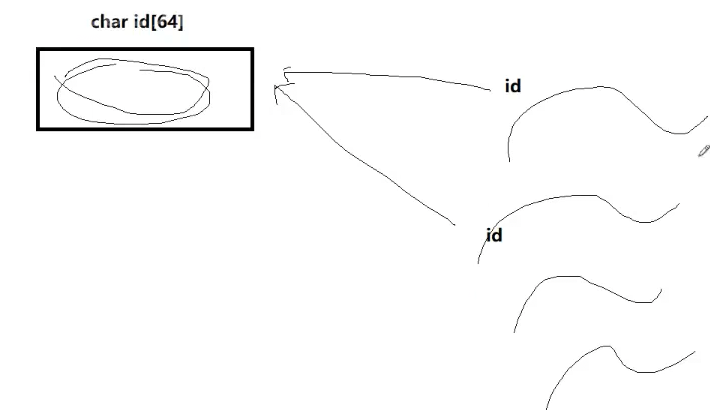
因为传的id属于for循环内的临时数组,而且创建线程的时候,传递id属于该数组的起始地址。拿进来之后sleep(1)才改变这个值,就有可能新线程先创建出来,指针拿着了,但是指针中的内容在下一次的时候id被清空释放。指针指向没变,但是指针指向的内容一直在被改变。所以看到的线程名就不是期望的线程名
这样就导致了一个线程安全问题,线程指向的回调指针是同一份空间。
所以要给每一个资源都申请一份堆空间
testThread.cpp
#include<iostream>
#include<string>
#include<vector>
#include<unistd.h>
#include<pthread.h>
#include<cstdio>
#include<cstring>

//创建多线程

const int num = 10;

void *routine(void *args)
{
    sleep(1);
    std::string name = static_cast<const char*>(args);
    delete (char*)args;
    int cnt = 5;
    while(cnt--)
    {
        std::cout<<"new线程名字:"<<name<<std::endl;
        sleep(1);
    }
    return nullptr;
}

int main()
{
    char id[64];
    std::vector<pthread_t> tids;
    //pthread_t就是一个无符号的长整数
    //创建多线程
    for(int i = 0 ;i< num;i++)
    {
        pthread_t tid;
        //bug??
        char *id = new char[64];
        snprintf(id,64,"thread-%d",i);
        int n = pthread_create(&tid,nullptr,routine,id);
        if(n==0)
            tids.push_back(tid);
        else
            continue;

        //sleep(1);
    }

    //对所有线程进行等待
    for(int i = 0;i<num;i++)
    {
        //一个一个的等待
        int n = pthread_join(tids[i],nullptr);
        if(n==0)
        {
            std::cout<<"等待新线程成功"<<std::endl;
        }
    }

    return 0;
}
root@iZ5waahoxw3q2bZ:~/linux-learning/linux/26-6-26.2# g++ testThread.cpp -o thread -lpthread root@iZ5waahoxw3q2bZ:~/linux-learning/linux/26-6-26.2# ./thread new线程名字:thread-1 new线程名字:thread-0 new线程名字:thread-3 new线程名字:thread-5 new线程名字:thread-6 new线程名字:thread-8 new线程名字:new线程名字:thread-4 thread-9 new线程名字:thread-7 new线程名字:thread-2 new线程名字:thread-1 new线程名字:thread-0 new线程名字:thread-5 new线程名字:thread-6 new线程名字:thread-8 new线程名字:thread-3 new线程名字:thread-4 new线程名字:thread-2 new线程名字:thread-9 new线程名字:thread-7 new线程名字:thread-1 new线程名字:thread-5 new线程名字:thread-6 new线程名字:thread-0 new线程名字:thread-4 new线程名字:thread-3 new线程名字:thread-2 new线程名字:thread-8 new线程名字:thread-7 new线程名字:thread-9 new线程名字:thread-1 new线程名字:thread-5 new线程名字:thread-6 new线程名字:thread-0 new线程名字:thread-2 new线程名字:thread-4 new线程名字:thread-3 new线程名字:thread-7 new线程名字:thread-8 new线程名字:thread-9 new线程名字:thread-1 new线程名字:thread-6 new线程名字:thread-5 new线程名字:thread-0 new线程名字:thread-3 new线程名字:thread-2 new线程名字:thread-4 new线程名字:thread-7 new线程名字:thread-8 new线程名字:thread-9 等待新线程成功 等待新线程成功 等待新线程成功 等待新线程成功 等待新线程成功 等待新线程成功 等待新线程成功 等待新线程成功 等待新线程成功 等待新线程成功
4.进程ID及进程地址空间布局
Linux没有真正的线程,他是用轻量级进程模拟的---看见了
OS提供的接口,不会直接提供线程接口
在用户层,封装轻量级进程,形成原生线程库---访问用户级别的库
libpthread.so.0 =>/lib/x8664-linux-gnu/libpthread.so.0(0x00007f03d9e0b000)
是不是可执行程序?是 ELF可执行程序 动态库->ELF的库
我的可执行程序加载,形成进程,动态链接和动态地址重定向
要将动态库,加载到内存&&映射到当前进程的地址空间中
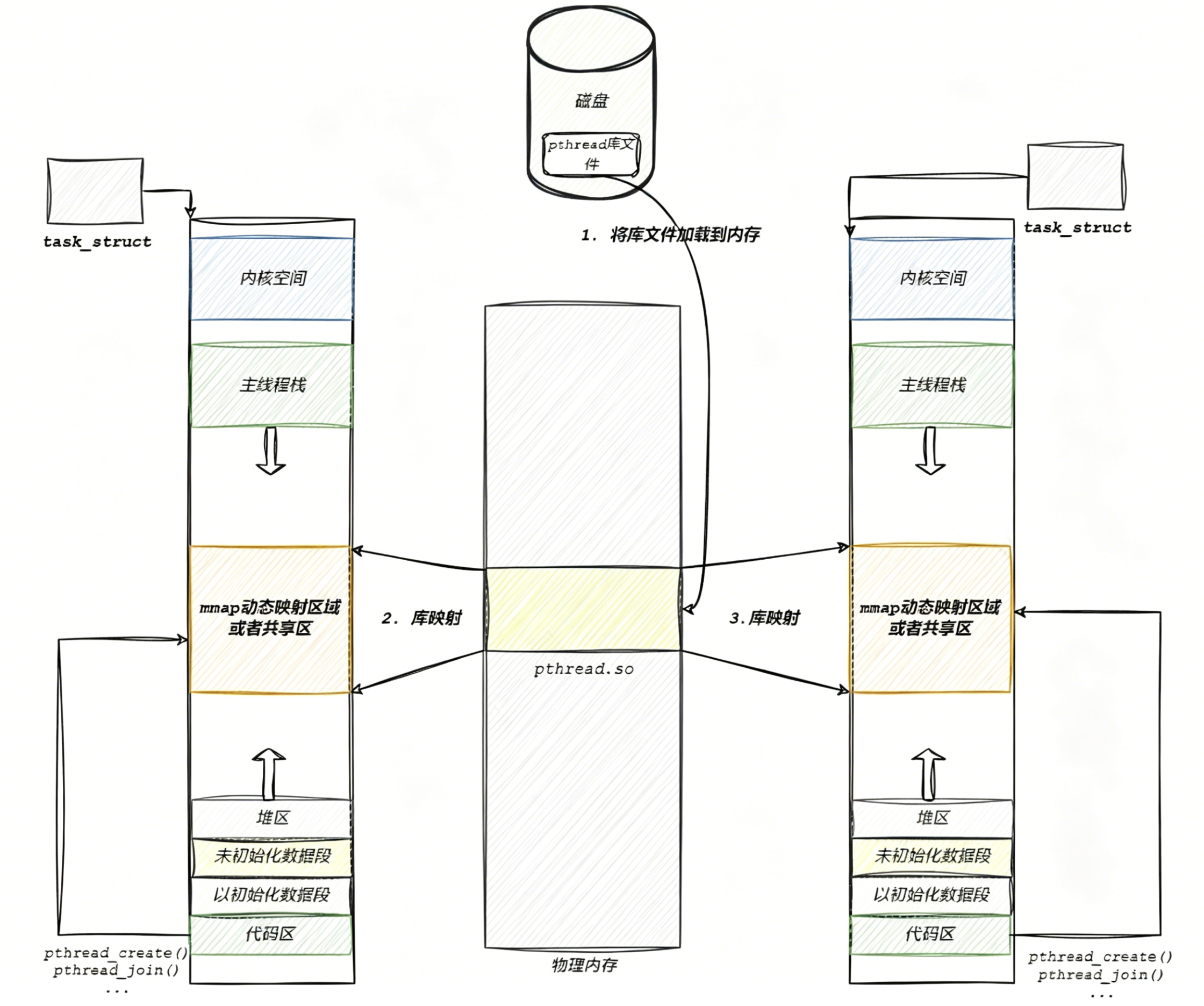
进程自己的代码区可以访问到pthread库内部的函数或者数据!
线程的概念是在库里维护的,在库内部就一定会存在多个被创建好的进程,库,要不要管理线程呢?要--先描述,再组织!
struct tcb 调pthread_create();就会在系统内部申请对应的tcb
{
//线程应该有的属性
线程状态
线程id
线程独立的栈结构
线程栈大小
...
}
用户层实现
优先级、时间片、上下位---LWP->PCB 内核中实现
整个线程的概念一部分在内核中实现,一部分在用户层实现
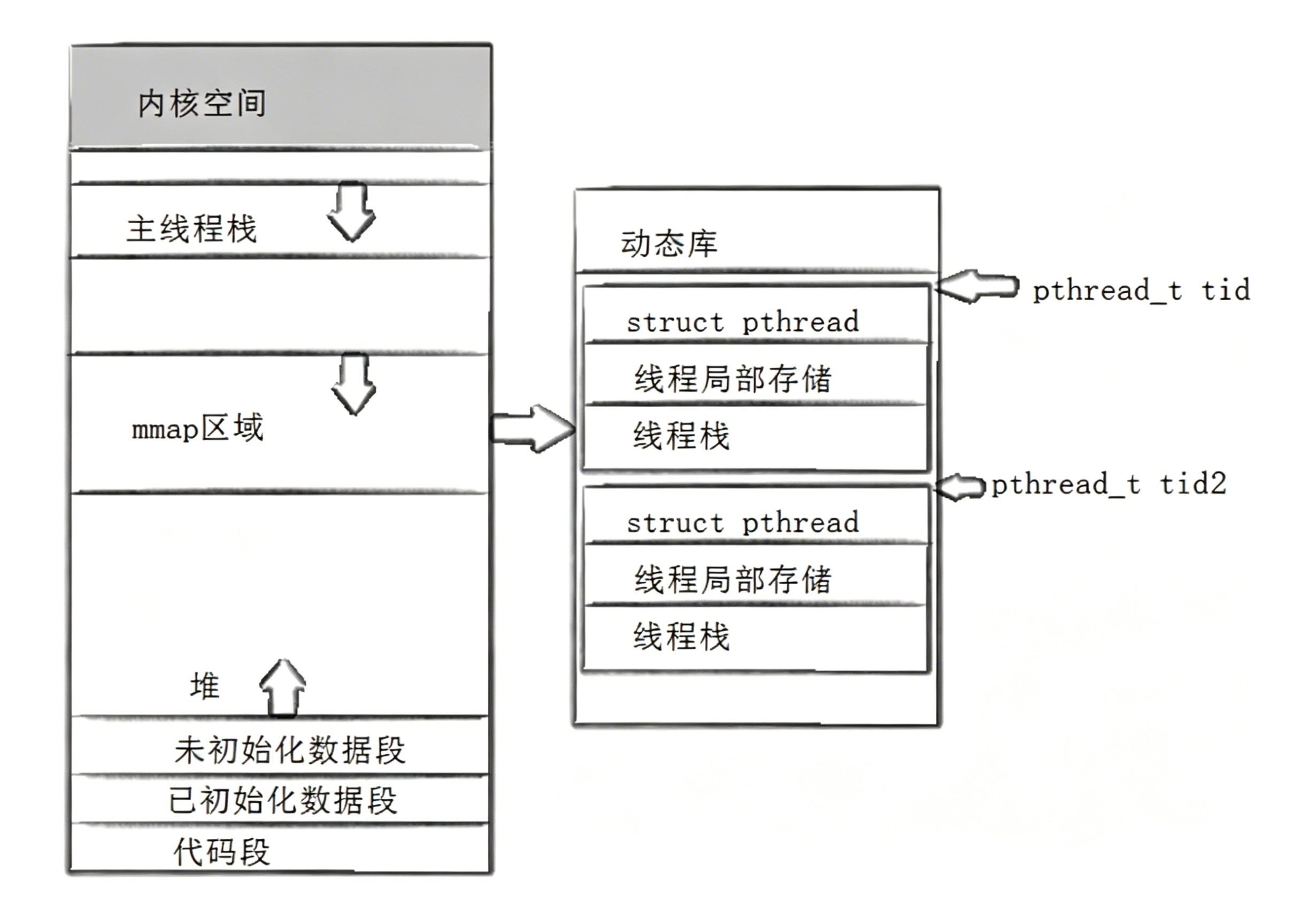
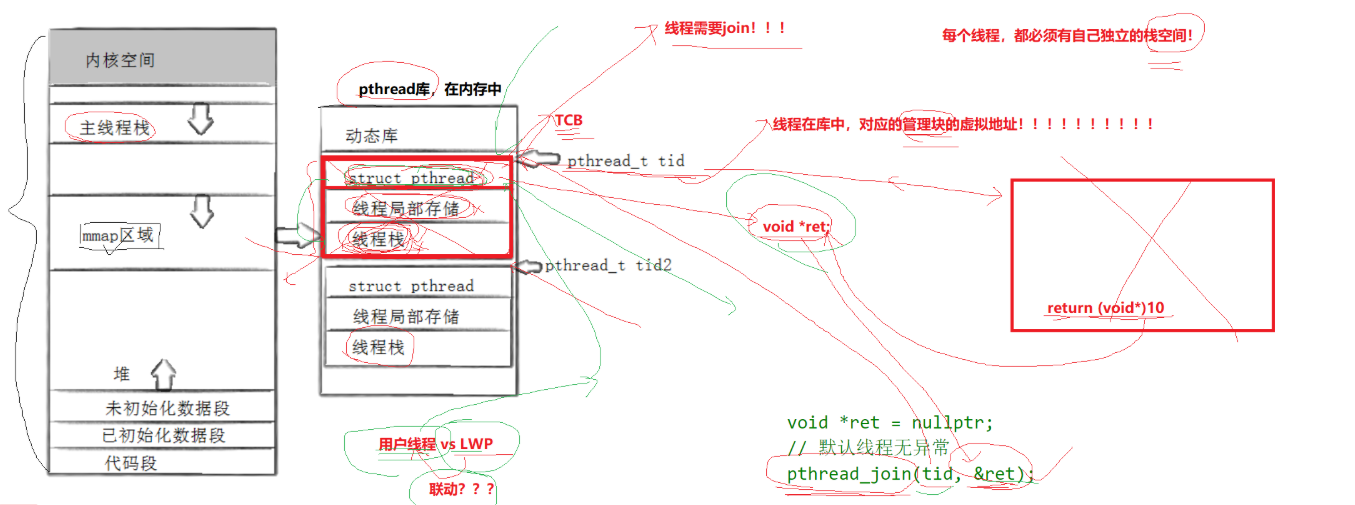
当pthread_create的时候,这个函数会在动态库中为我们创建出来一个描述线程的控制块/管理块
返回的就是该块的起始地址
在struct pthread中有个属性void *ret
之后这个控制块对应的线程它的代码执行完,
当执行完return 的时候会把当前返回值写到该线程的struct_pthread结构体void*ret
所以这个线程结束了,但是对应的数据块没有被释放,所以线程需要join
void *ret = nullptr;
//默认线程无异常
pthread_join(tid,&ret);
主线程join,join时要传入tid,tid是上一个退出线程的管理快的起始地址,再通过ret带出来就拿到了整个线程退出时的退出信息了
然后再把该线程对应的管理块全部删掉,得到返回结果,并且解决内存泄漏问题
那这个用户进程怎么跟LWP(轻量级进程)进行联动的呢?
每个线程,都必须要有自己独立的栈空间!那么其所对应的栈空间在哪里?在动态库内部自己申请的管理块中
主线程用地址空间中的栈,新创建的线程用对应的线程栈。每个线程都有自己独立的栈结构
当调用pthread_create转而会在库中给我们创建一个线程的管理块,创建好这个线程的管理块后,会将该线程的起始地址写入到对应的id里面。
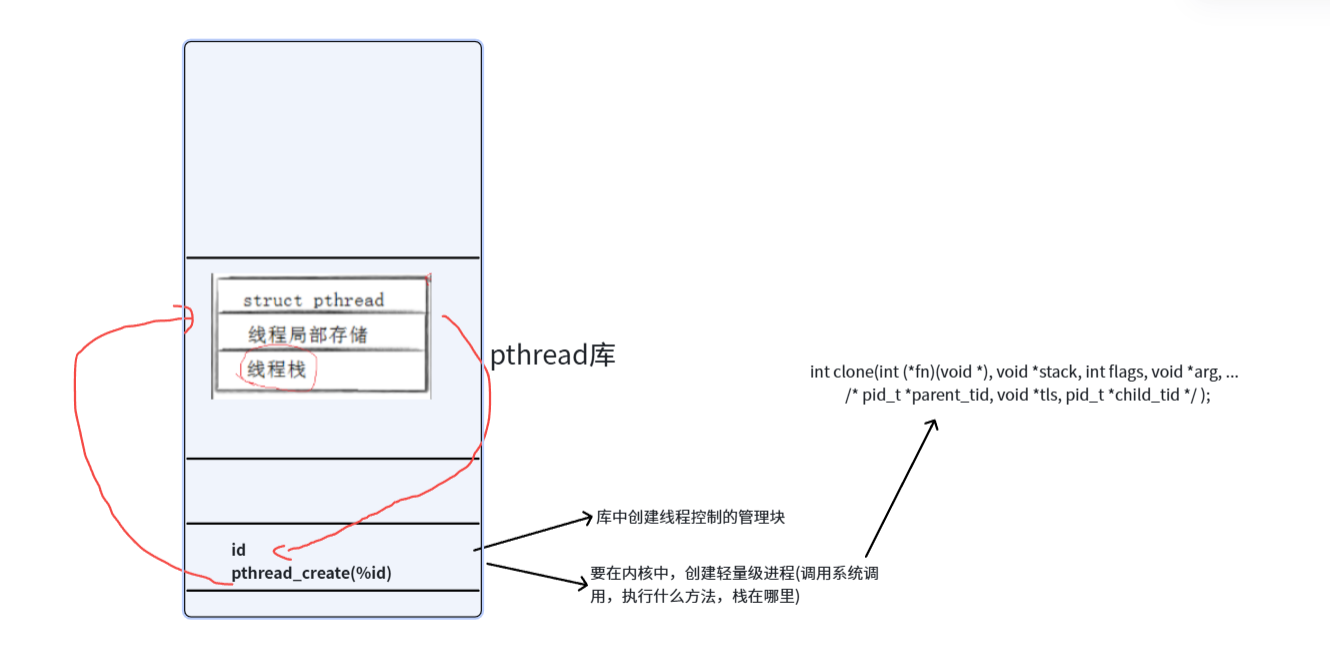
pthread_create(&id)
1.库中创建进程控制的管理块
2.要在内核中,创建轻量级进程(调用系统调用,告诉系统调用执行什么方法,栈在哪里)
int clone(int (*fn)(void *), void *stack, int flags, void *arg, ...
/* pid_t *parent_tid, void *tls, pid_t *child_tid */ );
CPU在调度的时候,如果调度执行当前线程,它就会转而去执行用户自定义的方法,同时形成的数据会自动入到我们用户传进来的栈结构里
所以内核数据和用户数据就联动起来了
唯一要做的就是当线程执行完毕,把结果写回到用户
这就是用户线程和LWP联动
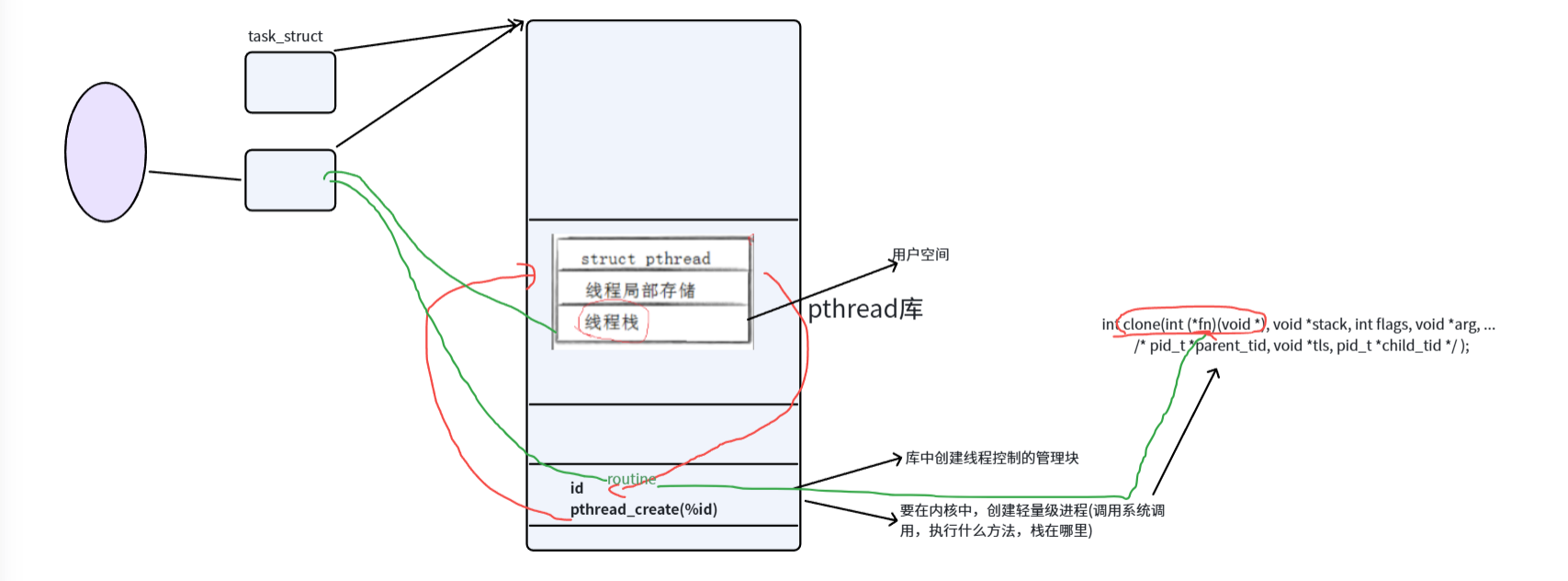
所以用户线程只要在库里创建好对应描述线程的相关属性,剩下的给底层指明什么方法,临时数据保存到栈里面,指明好用户空间的属性就不用变了
在用户看来就有线程,但实际执行的是内核的轻量级进程
Linux的线程叫做用户级线程
Linux的线程实现在库里面,而库是被映射到0-3GB属于用户的可以访问的
Linux用户级线程:内核LWp=1:1
线程ID及进程地址空间布局
• pthread_create函数会产生⼀个线程ID,存放在第⼀个参数指向的地址中。该线程ID和前⾯说的线程ID不是⼀回事。
• 前面讲的线程ID属于进程调度的范畴。因为线程是轻量级进程,是操作系统调度器的最小单位,所以需要⼀个数值来唯⼀表示该线程。
• pthread_create函数第⼀个参数指向⼀个虚拟内存单元,该内存单元的地址即为新创建线程的线程ID,属于NPTL线程库的范畴。线程库的后续操作,就是根据该线程ID来操作线程的。
• 线程库NPTL提供了pthread_self函数,可以获得线程自身的ID:
1.线程ID
是pthread_create的时候我们在库当中创建的描述线程的线程控制块的起始虚拟地址
2.线程传参和返回值“
线程返回值,是线程执行完它把线程的退出结果写入到线程控制块的对应的void*变量里,然后通过pthread_join回收它
3.线程分离
在我们对应的线程的控制块里有一个线程状态,可以把它叫做int joinable,默认情况下joinable等于1,表明这个线程是否分离,如果为1线程结束时必须join,没有join这个数据块不释放。
设置线程分离,就是将joinable设为0,识别到线程在底层退出了,看到这个为0,线程库会自动把我们的数据块释放
所以joinable本质就是线程分离的标志位
join需要我们提供整个线程数据库的起始地址
Linux所有线程,都在库中!
mmap可以申请空间
感谢你的观看,期待我们下次再见!

openEuler 是由开放原子开源基金会孵化的全场景开源操作系统项目,面向数字基础设施四大核心场景(服务器、云计算、边缘计算、嵌入式),全面支持 ARM、x86、RISC-V、loongArch、PowerPC、SW-64 等多样性计算架构
更多推荐
 5
5 0
0- 0


 已为社区贡献10条内容

所有评论(0)