彭于晏一个月带你玩转Linux操作系统9
Linux 软件包管理
Windows 中软件包管理
- 控制面板中程序和功能。通过安装,将信息注册到系统中。
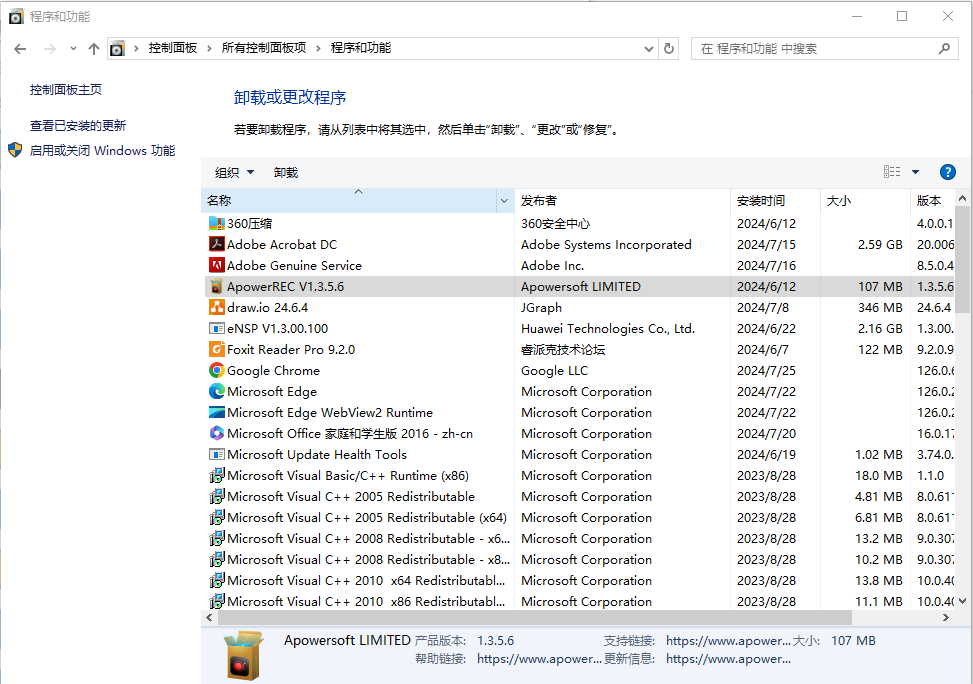
- 用户下载的绿色软件。例如U盘启动盘工具rufus。
软件包来源:应用商城,第三方官方网站(qq、微信)。
分析 RPM 包
Linux 发行版本
-
以 RHEL 为代表的发行版本,使用rpm包管理系统:
- RHEL (Red Hat Enterprise Linux)
- Fedora(由原来的RedHat桌面版本发展而来,免费版本)
- CentOS(RHEL的社区克隆版本,免费)
- CentOS Stream(RHEL的社区克隆版本,免费)
- Rocky(RHEL的社区克隆版本,免费)
- OEL(Oralce Enterprise Linux)
-
以 Debian 为代表的发行版本,使用deb包管理系统:
-
Debian,社区Linux的典范,迄今为止最遵循GNU规范的Linux系统。
-
Ubuntu,Debian衍生版,是一个以桌面应用为主的Linux操作系统。
-
Kali Linux,Debian衍生版,旨在渗透测试和数字取证。
-
-
其他版本:ArchLinux Gentoo 等等…

RPM 包文件名格式
redhat 开发了 rpm 包管理,提供一个标准的软件版本管理方法,比从归档包解压文件到系统简单多了。CentOS 提供的所有软件都是rpm格式。
RPM软件包文件名格式:name-version-release.architecture.rpm
示例:lrzsz-0.12.20-36.el7.x86_64.rpm
- name,是描述其内容的一个或多个词语(lrzsz)。
- version,是原始软件的版本号(0.12.20)。
- release,是基于该版本的发行版号,由软件打包商设置,后者不一定是原始软件开发商(36.el7)。
- architecture,是编译的软件包运行的处理器架构。
- noarch,表示此软件包不限定架构。
- x86_64,表示此软件包限定x86 64位。
- aarch64,表示此软件包限定ARM 64位。
RPM 包组成
每个rpm包涵三个部分:
- 需要安装的文件。
- 包的元数据信息,包括包的名称、版本、架构等;软件包说明;软件包依赖关系;许可证;更变日志;其他信息。
- 脚本:软件包安装,更新,卸载需要执行的脚本。
通常,软件提供商使用GPG密钥对RPM软件包进行数字签名(Red Hat会对其发布的所有软件包进行数字签名)。 RPM系统通过确认包由相应的GPG密钥签名来验证包的完整性。 如果GPG签名不匹配,RPM系统拒绝安装包。
复习:非对称加密
非对称加密:有一对公钥和私钥。
- 公钥:分享给别人,用来加密数据。
- 私钥:自己保留,用来解密公钥加密的数据。
Linux中rpm包会被私钥签名,客户端使用公钥验证签名,确保文件的完整性。
RPM 包安装和更新
- 如果同一个软件有多个版本,只需安装最高版本。
- 在大多数情况下,一个软件只能安装一个版本。 **kernel是个例外。**如果构建包的文件名没有冲突,则可以安装多个版本。 由于只能通过引导到该内核来测试新内核,因此特定设计了包,以便可以一次安装多个版本。如果内核无法启动,则旧内核仍然可用且可引导。
- 软件包升级只需要安装最新版本,不需要逐步升级。
- 升级RPM包将删除旧版本的软件包并安装新版本,通常会保留配置文件。
rpm 命令
作用:是 Linux(Red Hat 系)中用于管理 .rpm 软件包的命令,它支持包的安装、卸载、升级和查询
查询(重点)
基本语法:rpm -q [select-options] [query-options]
- select-options:选择条件——指定要查哪个包(选一个或多个)
| 常用写法 | 含义 | 示例 |
|---|---|---|
| 包名 | 查指定的包 | rpm -q httpd |
| -a | 查所有已安装的包 | rpm -qa |
| -f 文件路径 | 查这个文件属于哪个包 | rpm -qf /etc/passwd |
| -p 文件名.rpm | 查一个还没安装的 .rpm文件 | rpm -qp httpd.rpm2 |
| -g, --group GROUP | 查询某个组里的包 | rpm -qg “System Environment/Daemons” |
- query-options:查询内容——指定要查包的什么信息(选一个或多个)
| 常用写法 | 含义 | 示例 |
|---|---|---|
| -i | 基本信息(版本、描述等) | rpm -qi httpd |
| -l | 这个包安装了什么文件 | rpm -ql httpd |
| -c | 只看配置文件 | rpm -qc httpd |
| -R | 这个包依赖什么 | rpm -qR httpd |
| –provides | 列出包提供的功能 | rpm -q --provides httpd |
| –changelog | 查看包的更新日志 | rpm -q --changelog httpd |
| –scripts | 查看包中的安装/卸载脚本 | rpm -q --scripts httpd |
| –conflicts | 查看包的冲突关系 | rpm -q --conflicts httpd |
常见命令:
| 命令 | 用途 |
|---|---|
| rpm -qa | 看所有装了哪些包 |
| rpm -ql 包名 | 看包装了哪些文件 |
| rpm -qi 包名 | 看包的详细信息 |
| rpm -qf 文件路径 | 看文件属于哪个包 |
| rpm -q 包名 | 看包有没有装 |
示例:
# 查询系统中安装了哪些软件包
[root@centos7 ~]# rpm -qa
libqmi-utils-1.18.0-2.el7.x86_64
libmpcdec-1.2.6-12.el7.x86_64
gtkmm30-3.22.2-1.el7.x86_64
nss-sysinit-3.67.0-4.el7_9.x86_64
......

# 查询系统中某个软件包是否安装
[root@centos7 ~]# rpm -q httpd
未安装软件包 httpd
[root@centos7 ~]# rpm -q kernel
kernel-3.10.0-1160.71.1.el7.x86_64

# 查询系统中某个已安装的软件包元数据信息
[root@centos7 ~]# rpm -q coreutils -i
Name        : coreutils
Version     : 8.22
Release     : 24.el7_9.2
Architecture: x86_64
Install Date: 2025年07月18日 星期五 10时29分40秒
Group       : System Environment/Base
Size        : 14594210
License     : GPLv3+
Signature   : RSA/SHA256, 2020年11月18日 星期三 22时16分51秒, Key ID 24c6a8a7f4a80eb5
Source RPM  : coreutils-8.22-24.el7_9.2.src.rpm
Build Date  : 2020年11月17日 星期二 06时24分59秒
Build Host  : x86-01.bsys.centos.org
Relocations : (not relocatable)
Packager    : CentOS BuildSystem <http://bugs.centos.org>
Vendor      : CentOS
URL         : http://www.gnu.org/software/coreutils/
Summary     : A set of basic GNU tools commonly used in shell scripts
Description :
These are the GNU core utilities.  This package is the combination of
the old GNU fileutils, sh-utils, and textutils packages.

# 查询系统中某个已安装的软件包包涵哪些文件
[root@centos7 ~]# rpm -q openssh-server -l
/etc/pam.d/sshd
/etc/ssh/sshd_config
/etc/sysconfig/sshd
/usr/lib/systemd/system/sshd-keygen.service
/usr/lib/systemd/system/sshd.service
/usr/lib/systemd/system/sshd.socket
/usr/lib/systemd/system/sshd@.service
/usr/lib64/fipscheck/sshd.hmac
/usr/libexec/openssh/sftp-server
/usr/sbin/sshd
/usr/sbin/sshd-keygen
/usr/share/man/man5/moduli.5.gz
/usr/share/man/man5/sshd_config.5.gz
/usr/share/man/man8/sftp-server.8.gz
/usr/share/man/man8/sshd.8.gz
/var/empty/sshd

# 查询系统中某个已安装的软件包包涵哪些配置文件
[root@centos7 ~]# rpm -q openssh-server -c
/etc/pam.d/sshd
/etc/ssh/sshd_config
/etc/sysconfig/sshd

# 查询系统中某个已安装的软件包包涵哪些文档文件
[root@centos7 ~]# rpm -q openssh-server -d
/usr/share/man/man5/moduli.5.gz
/usr/share/man/man5/sshd_config.5.gz
/usr/share/man/man8/sftp-server.8.gz
/usr/share/man/man8/sshd.8.gz

# 查询系统中某个某个文件属于哪个已安装的软件包
[root@centos7 ~]# rpm -q -f /etc/ssh/sshd_config
openssh-server-7.4p1-22.el7_9.x86_64

# 查询系统中某个已安装的软件包包涵的脚本
[root@centos7 ~]# rpm -q openssh-server --scripts
preinstall scriptlet (using /bin/sh):
......
postinstall scriptlet (using /bin/sh):
......
preuninstall scriptlet (using /bin/sh):
......
postuninstall scriptlet (using /bin/sh):
......

# 查询系统中某个已安装的软件包变更日志
[root@centos7 ~]# rpm -q openssh-server --changelog
* 四 9月 30 2021 Dmitry Belyavskiy <dbelyavs@redhat.com> - 7.4p1-22 + 0.10.3-2
- avoid segfault in Kerberos cache cleanup (#1999263)
- fix CVE-2021-41617 (#2008884)
......

# 下载 httpd 软件包,以及依赖的其他软件包
[root@centos7 ~]# yum install -y yum-utils
[root@centos7 ~]# yumdownloader httpd
[root@centos7 ~]# ls httpd-*
httpd-2.4.6-99.el7.centos.1.x86_64.rpm

# 查询系统中某个软件包(package)文件包涵哪些配置文件
[root@centos7 ~]# rpm -q -p httpd-2.4.6-99.el7.centos.1.x86_64.rpm -c
/etc/httpd/conf.d/autoindex.conf
/etc/httpd/conf.d/userdir.conf
/etc/httpd/conf.d/welcome.conf
......
# 同样-l -d -i也可以配合-p使用

# 查询系统中某个软件包组中包涵哪些软件包
[root@centos7 ~]# rpm -qg 'System Environment/Base'
grub2-common-2.02-0.87.0.1.el7.centos.9.noarch
centos-release-7-9.2009.1.el7.centos.x86_64
setup-2.8.71-11.el7.noarch
filesystem-3.2-25.el7.x86_64
......
扩展
# 查看软件包所在仓库精确位置
[root@centos7 ~]# repoquery --location httpd
http://mirrors.aliyun.com/centos/7/updates/x86_64/Packages/httpd-2.4.6-99.el7.centos.1.x86_64.rpm

# 此时可以通过 wget 下载特定文件
[root@centos7 ~]# wget \
http://mirrors.aliyun.com/centos/7/updates/x86_64/Packages/httpd-2.4.6-99.el7.centos.1.x86_64.rpm
验证
作用:用于检查已安装的软件包中的文件是否被修改过
语法:rpm -V [选项] 包名
常见选项:
| 选项 | 含义 |
|---|---|
| -V 或 --verify | 验证指定的包 |
| -Va | 验证所有已安装的包 |
| -Vf 文件路径 | 验证包含该文件的包 |
| -Vp 包名.rpm | 验证一个未安装的 rpm 包文件 |
| -Vg 组名 | 验证某个组的所有包 |
示例:
# 查看openssh-server软件安装是否有问题
[root@centos7 ~]# rpm -V openssh-server

# 修改(change)
[root@centos7 ~]# sed -i 's/PermitRootLogin yes/PermitRootLogin no/g' /etc/ssh/sshd_config
[root@centos7 ~]# rpm -V openssh-server
S.5....T.  c /etc/ssh/sshd_config
[root@centos7 ~]# sed -i 's/PermitRootLogin no/PermitRootLogin yes/g' /etc/ssh/sshd_config

# 移走 /etc/ssh/sshd_config 文件,再次查看
[root@centos7 ~]# mv /etc/ssh/sshd_config .
[root@centos7 ~]# rpm -V openssh-server
遗漏   c /etc/ssh/sshd_config

# 恢复该文件到原来位置
[root@centos7 ~]# mv sshd_config /etc/ssh/sshd_config
安装和卸载
-
安装:
基本语法:rpm -i [安装选项] 包名.rpm
常用选项:
选项 含义 -v 显示详细信息 -h, --hash 显示进度条( #号)–force 强制安装(覆盖冲突文件) –nodeps 忽略依赖关系(不检查依赖) –test 模拟安装(只检查,不真装) –replacepkgs 包已存在时重新安装 –excludedocs 不安装文档文件 -
卸载:
基本语法:rpm -e [安装选项] 包名
注意:卸载时用的是包名,不是文件名(不带
.rpm后缀)常见选项:
选项 含义 -e 卸载(erase) –nodeps 忽略依赖强制卸载(危险!) –test 模拟卸载(不实际执行)
示例:
# 下载软件包
[root@centos7 ~]# repoquery --location lrzsz
http://mirrors.aliyun.com/centos/7/os/x86_64/Packages/lrzsz-0.12.20-36.el7.x86_64.rpm
[root@centos7 ~]# wget http://mirrors.aliyun.com/centos/7/os/x86_64/Packages/lrzsz-0.12.20-36.el7.x86_64.rpm
lrzsz-0.12.20-36.el7.x86_64.rpm

# 安装
[root@centos7 ~]# rpm -i lrzsz-0.12.20-36.el7.x86_64.rpm
[root@centos7 ~]# rpm -q lrzsz
lrzsz-0.12.20-36.el7.x86_64

# 卸载
[root@centos7 ~]# rpm -e lrzsz
[root@centos7 ~]# rpm -q lrzsz
未安装软件包 lrzsz

# 友好方式安装
[root@centos7 ~]# rpm -ivh lrzsz-0.12.20-36.el7.x86_64.rpm
Verifying...                          ################################ [100%]
准备中...                          ################################ [100%]
正在升级/安装...
   1:lrzsz-0.12.20-36.el7             ################################ [100%]

# 友好方式卸载
[root@centos7 ~]# rpm -evh lrzsz
准备中...                          ################################ [100%]
正在清理/删除...
   1:lrzsz-0.12.20-36.el7             ################################ [100%]

# 安装 httpd,报错如下,下一节讲解如下解决
# 安装准备:确保系统中没有提供httpd需要的依赖包
[root@centos7 ~]# rpm -e apr apr-util httpd-tools mailcap
[root@centos7 ~]# rpm -ivh httpd-2.4.6-99.el7.centos.1.x86_64.rpm
错误:依赖检测失败:
	/etc/mime.types 被 httpd-2.4.6-99.el7.centos.1.x86_64 需要
	httpd-tools = 2.4.6-99.el7.centos.1 被 httpd-2.4.6-99.el7.centos.1.x86_64 需要
	libapr-1.so.0()(64bit) 被 httpd-2.4.6-99.el7.centos.1.x86_64 需要
	libaprutil-1.so.0()(64bit) 被 httpd-2.4.6-99.el7.centos.1.x86_64 需要
重新安装
rpm {--reinstall} [install-options] PACKAGE_FILE ...
示例:
[root@centos7 ~]# rpm --reinstall -vh lrzsz*
Verifying...                          ################################ [100%]
准备中...                              ################################ [100%]
正在升级/安装...
   1:lrzsz-0.12.20-36.el7             ################################ [100%]
提取 RPM 包中文件
Windows 提取
使用压缩工具(例如360压缩)打开rpm包,浏览和提取。
Linux 提取
-
方法一:分步骤提取
rpm2cpio : 是一个将 RPM 包转换成 CPIO 格式归档的工具。它不会安装软件包,只是把 RPM 包里的文件内容“解包”出来
cpio命令
作用: 是 Linux 中一个归档工具,用于打包和解包文件,常与
rpm2cpio配合使用语法:cpio [选项] < 归档文件
特点:从标准输入读数据,输出到标准输出,所以通常用
<或|给它喂数据常见选项:
选项 含义 -i 提取文件(extract) -o 创建归档(create) -p 复制到指定目录(pass-through) -t 查看归档内容列表(list) -d 创建目录结构(directory) -v 显示详细信息(verbose) -u 无条件覆盖已有文件 -m 保留文件修改时间 -R 用户:组 修改文件所有者和组 -B 大块模式(提高 I/O 效率) –quiet 不显示块数量 # 将文件转换为cpio格式 [root@centos7 ~]# rpm2cpio httpd-2.4.6-99.el7.centos.1.x86_64.rpm > httpd-2.4.6-99.el7.centos.1.x86_64.cpio # 查询 cpio 格式(一种打包格式)文件中有哪些文件 [root@centos7 ~]# cpio -t < httpd-2.4.6-99.el7.centos.1.x86_64.cpio ./etc/httpd ./etc/httpd/conf ./etc/httpd/conf.d ./etc/httpd/conf.d/README ./etc/httpd/conf.d/autoindex.conf ...... # 配置管道查询特定文件 [root@centos7 ~]# cpio -t < httpd-2.4.6-99.el7.centos.1.x86_64.cpio |grep 'httpd\.conf' ./etc/httpd/conf/httpd.conf ./usr/lib/tmpfiles.d/httpd.conf 19331 blocks # 提取所有文件,-d选项指明提取过程中创建对应的目录分层结构 [root@centos7 ~]# cpio -id '*' < httpd-2.4.6-99.el7.centos.1.x86_64.cpio # 提取特定文件 [root@centos7 ~]# cpio -id ./etc/httpd/conf/httpd.conf < httpd-2.4.6-99.el7.centos.1.x86_64.cpio -
方法二:一步提取所有文件
[root@centos7 ~]# rpm2cpio httpd-2.4.6-99.el7.centos.1.x86_64.rpm | cpio -id '*'
使用 yum 管理软件包
yum 介绍
- rpm 命令是一个管理软件包的工具,不适用于软件包存储库或自动解决来自多个源的依赖项。
- Yum(Yellowdog Updater Modified)旨在成为管理基于RPM的软件安装和更新的更好系统。yum命令允许安装,更新,删除和获取有关软件包及其依赖项的信息。
yum 命令
作用:是Linux中包管理工具,它的核心优势是自动解决依赖关系
语法:yum [选项] [子命令] [包名]
常见选项:
| 选项 | 作用 | 示例 |
|---|---|---|
| -y | 所有确认都自动回答 yes | yum install -y httpd |
| -q | 安静模式(不显示输出) | yum -q install httpd |
| -v | 显示详细信息 | yum -v install httpd |
| –nogpgcheck | 跳过 GPG 签名检查 | yum install --nogpgcheck package.rpm |
| –disablerepo=仓库 | 禁用指定仓库 | yum install --disablerepo=epel httpd |
| –enablerepo=仓库 | 启用指定仓库 | yum install --enablerepo=epel nginx |
info
作用:查看仓库中某个软件包信息
# 查看仓库中httpd包信息
[root@centos7 ~]# yum info httpd
已加载插件:fastestmirror, langpacks
Loading mirror speeds from cached hostfile
 * base: mirrors.aliyun.com
 * extras: mirrors.aliyun.com
 * updates: mirrors.aliyun.com
已安装的软件包
名称    :httpd
架构    :x86_64
版本    :2.4.6
发布    :99.el7.centos.1
大小    :9.4 M
源    :installed
来自源:updates
简介    : Apache HTTP Server
网址    :http://httpd.apache.org/
协议    : ASL 2.0
描述    : The Apache HTTP Server is a powerful, efficient, and extensible
         : web server.
list
作用:查询软件包清单
# 查看仓库中http开头的包有哪些
[root@centos7 ~]# yum list 'http*'
已加载插件:fastestmirror, langpacks
Loading mirror speeds from cached hostfile
 * base: mirrors.aliyun.com
 * extras: mirrors.aliyun.com
 * updates: mirrors.aliyun.com
已安装的软件包
httpd.x86_64                           2.4.6-99.el7.centos.1           @updates
httpd-tools.x86_64                     2.4.6-99.el7.centos.1           @updates
可安装的软件包
http-parser.i686                       2.7.1-9.el7                     base
http-parser.x86_64                     2.7.1-9.el7                     base
http-parser-devel.i686                 2.7.1-9.el7                     base
......

# 查看仓库中httpd包有哪些版本
[root@centos7 ~]# yum list httpd --showduplicates
已加载插件:fastestmirror, langpacks
Loading mirror speeds from cached hostfile
 * base: mirrors.aliyun.com
 * extras: mirrors.aliyun.com
 * updates: mirrors.aliyun.com
已安装的软件包
httpd.x86_64               2.4.6-99.el7.centos.1                       @updates
可安装的软件包
httpd.x86_64               2.4.6-95.el7.centos                         base
httpd.x86_64               2.4.6-97.el7.centos                         updates
httpd.x86_64               2.4.6-97.el7.centos.1                       updates
httpd.x86_64               2.4.6-97.el7.centos.2                       updates
httpd.x86_64               2.4.6-97.el7.centos.4                       updates
httpd.x86_64               2.4.6-97.el7.centos.5                       updates
httpd.x86_64               2.4.6-98.el7.centos.6                       updates
httpd.x86_64               2.4.6-98.el7.centos.7                       updates
httpd.x86_64               2.4.6-99.el7.centos.1                       updates
search
作用:根据关键字搜索软件包
# 查看简介包含关键字的软件包
[root@centos7 ~]# yum search 'web server'

# 查看描述和简介包含关键字的软件包
[root@centos7 ~]# yum search all 'web server'
provides
作用:查看仓库中哪个包可以提供相应文件
# 查看仓库中哪个包可以提供文件sar程序
[root@centos7 ~]# yum provides sar
已加载插件:fastestmirror, langpacks
Loading mirror speeds from cached hostfile
 * base: mirrors.aliyun.com
 * extras: mirrors.aliyun.com
 * updates: mirrors.aliyun.com
sysstat-10.1.5-19.el7.x86_64 : Collection of performance monitoring tools for Linux
源    :base
匹配来源:
文件名    :/usr/bin/sar

sysstat-10.1.5-20.el7_9.x86_64 : Collection of performance monitoring tools for Linux
源    :updates
匹配来源:
文件名    :/usr/bin/sar

# 备用查询命令
[root@centos7 ~]# yum provides '*bin/sar'

# 安装sar工具对应的软件包
[root@centos7 ~]# yum install -y sysstat
install
作用:安装软件包
# 安装软件包
[root@centos7 ~]# yum install vsftpd

# 只下载不安装,将依赖软件包一并下载
# 前提是系统中没安装对应软件包,才会下载
[root@centos7 ~]# yum install vsftpd --downloadonly --downloaddir=/root/
[root@centos7 ~]# ls vsftpd-*
vsftpd-3.0.2-29.el7_9.x86_64.rpm
localinstall
作用:安装本地文件系统中软件包
# 安装本地文件系统中vsftpd包
[root@centos7 ~]# yum localinstall ./vsftpd-3.0.2-29.el7_9.x86_64.rpm
downgrade
作用:软件包降级
# 降级 vsftpd 版本为 3.0.2-28.el7
[root@centos7 ~]# yum downgrade -y vsftpd-3.0.2-28.el7
# 降级的时候,要一并降级依赖软件包
依赖降级示例:
# 环境准备:安装最新版httpd
[root@centos7 ~]# yum install -y httpd

# 降级到特定版本:降级失败,因为已安装的 httpd-tools 无法满足当前httpd版本
[root@centos7 ~]# yum downgrade -y httpd-2.4.6-97.el7.centos
已加载插件:fastestmirror, langpacks
Loading mirror speeds from cached hostfile
 * base: mirrors.aliyun.com
 * extras: mirrors.aliyun.com
 * updates: mirrors.aliyun.com
正在解决依赖关系
--> 正在检查事务
---> 软件包 httpd.x86_64.0.2.4.6-97.el7.centos 将被 降级
--> 正在处理依赖关系 httpd-tools = 2.4.6-97.el7.centos,它被软件包 httpd-2.4.6-97.el7.centos.x86_64 需要
---> 软件包 httpd.x86_64.0.2.4.6-99.el7.centos.1 将被 删除
--> 解决依赖关系完成
错误:软件包:httpd-2.4.6-97.el7.centos.x86_64 (updates)
          需要:httpd-tools = 2.4.6-97.el7.centos
          已安装: httpd-tools-2.4.6-99.el7.centos.1.x86_64 (@updates)
              httpd-tools = 2.4.6-99.el7.centos.1
          可用: httpd-tools-2.4.6-95.el7.centos.x86_64 (base)
              httpd-tools = 2.4.6-95.el7.centos
          ......
          可用: httpd-tools-2.4.6-98.el7.centos.7.x86_64 (updates)
              httpd-tools = 2.4.6-98.el7.centos.7
 您可以尝试添加 --skip-broken 选项来解决该问题
 您可以尝试执行:rpm -Va --nofiles --nodigest

 # 解决方法:httpd-tools与httpd一起降级到相同版本
[root@centos7 ~]# yum downgrade -y httpd-tools-2.4.6-97.el7.centos httpd-2.4.6-97.el7.centos
update
作用:软件包升级
# 升级 vsftpd 版本为 3.0.2-29.el7_9
[root@centos7 ~]# yum update vsftpd-3.0.2-29.el7_9

# 升级系统中所有软件为最新版本
[root@centos7 ~]# yum update
remove
作用:软件包卸载
# 卸载软件包
[root@centos7 ~]# yum remove -y vsftpd
history 子命令
list
作用:查询yum事务历史记录
[root@centos7 ~]# yum history list
Loaded plugins: fastestmirror
ID     | Login user               | Date and time    | Action(s)      | Altered
-------------------------------------------------------------------------------
     2 | root <root>              | 2025-12-26 13:47 | I, U           |   37
     1 | System <unset>           | 2025-12-26 11:50 | Install        |  310
history list

[root@centos7 ~]# yum install -y vsftpd
[root@centos7 ~]# yum downgrade -y vsftpd

# list 可以省略
[root@centos7 ~]# yum history
Loaded plugins: fastestmirror
ID     | Login user               | Date and time    | Action(s)      | Altered
-------------------------------------------------------------------------------
     4 | root <root>              | 2026-01-04 09:37 | Downgrade      |    1
     3 | root <root>              | 2026-01-04 09:36 | Install        |    1
     2 | root <root>              | 2025-12-26 13:47 | I, U           |   37
     1 | System <unset>           | 2025-12-26 11:50 | Install        |  310
history list
info
作用:特定yum事务详情
[root@centos7 ~]# yum history info 2
Loaded plugins: fastestmirror
Transaction ID : 2
Begin time     : Fri Dec 26 13:47:43 2025
Begin rpmdb    : 310:e90f758c7a3328cccdf3787ccd8eb1c9db26dde0
End time       :            13:47:49 2025 (6 seconds)
End rpmdb      : 346:0938012bcb4642f9accea53c54ff5d2ef7be9e15
User           : root <root>
Return-Code    : Success
`Command Line`   : install -y bash-completion vim open-vm-tools lrzsz unzip rsync sshpass
Transaction performed with:
    Installed     rpm-4.11.3-48.el7_9.x86_64                      @anaconda
    Installed     yum-3.4.3-168.el7.centos.noarch                 @anaconda
    Installed     yum-plugin-fastestmirror-1.1.31-54.el7_8.noarch @anaconda
Packages Altered:
    Install     bash-completion-1:2.1-8.el7.noarch         @base
    Dep-Install gpm-libs-1.20.7-6.el7.x86_64               @base
......
undo
作用:反向操作第4个事务
[root@centos7 ~]# yum history undo 4
redo
作用:重做操作第4个事务
[root@centos7 ~]# yum history redo 4
软件包组管理
# 查看仓库中软件包组清单
[root@centos7 ~]# yum grouplist
......
可用的环境分组:
   最小安装
   基础设施服务器
   ......
   带 GUI 的服务器
   GNOME 桌面
   KDE Plasma Workspaces
   开发及生成工作站
可用组:
   Cinnamon
   Fedora Packager
   Haskell
   ......
   通用桌面
完成

[root@centos7 ~]# yum grouplist -v
......
可用的环境分组:
   最小安装 (minimal)
   基础设施服务器 (infrastructure-server-environment)
   ......
   带 GUI 的服务器 (graphical-server-environment)
   GNOME 桌面 (gnome-desktop-environment)
   KDE Plasma Workspaces (kde-desktop-environment)
   开发及生成工作站 (developer-workstation-environment)
可用组:
   Cinnamon (cinnamon-desktop)
   Fedora Packager (fedora-packager)
   Haskell (haskell)
   ......
   通用桌面 (general-desktop)
完成

[root@centos7 ~]# unset LANG
[root@centos7 ~]# yum group list -v
......
Available Environment Groups:
   Minimal Install (minimal)
   Compute Node (compute-node-environment)
   ......
   Server with GUI (graphical-server-environment)
   GNOME Desktop (gnome-desktop-environment)
   KDE Plasma Workspaces (kde-desktop-environment)
   Development and Creative Workstation (developer-workstation-environment)
Available Groups:
   Cinnamon (cinnamon-desktop)
   Compatibility Libraries (compat-libraries)
   Console Internet Tools (console-internet)
   ......
   Xfce (xfce-desktop)
Done

# 查看仓库中软件包组信息
[root@centos7 ~]# yum groupinfo <tab><tab>
[root@centos7 ~]# yum groupinfo 'Server with GUI'

# 安装仓库中软件包组
[root@centos7 ~]# yum groupinstall 'Server with GUI'

# 卸载仓库中软件包组
[root@centos7 ~]# yum groupremove mariadb-client
配置 yum 仓库
yum 仓库配置
yum 工具的配置文件是 /etc/yum.conf,该文件包括两部分:
- 全局配置:main 块,提供每个仓库默认配置。
- 每个仓库的独立配置。
[root@centos7 ~]# cat /etc/yum.conf
[main]
cachedir=/var/cache/yum/$basearch/$releasever
keepcache=0
debuglevel=2
logfile=/var/log/yum.log
exactarch=1
obsoletes=1
gpgcheck=1
plugins=1
installonly_limit=5
bugtracker_url=http://bugs.centos.org/set_project.php?project_id=23&ref=http://bugs.centos.org/bug_report_page.php?category=yum
distroverpkg=centos-release


#  This is the default, if you make this bigger yum won't see if the metadata
# is newer on the remote and so you'll "gain" the bandwidth of not having to
# download the new metadata and "pay" for it by yum not having correct
# information.
#  It is esp. important, to have correct metadata, for distributions like
# Fedora which don't keep old packages around. If you don't like this checking
# interupting your command line usage, it's much better to have something
# manually check the metadata once an hour (yum-updatesd will do this).
# metadata_expire=90m

# PUT YOUR REPOS HERE OR IN separate files named file.repo
# in /etc/yum.repos.d
使用如下命令查看完整的配置内容:
[root@centos7 ~]# yum install -y yum-utils

# 导出 yum 完整配置
[root@centos7 ~]# yum-config-manager
Loaded plugins: fastestmirror, langpacks
=================================== main =====================================
[main]
alwaysprompt = True
assumeno = False
assumeyes = False
......
================================== repo: base ==================================
[base]
async = True
bandwidth = 0
base_persistdir = /var/lib/yum/repos/x86_64/7
......
main 部分设置全局配置:
- enabled = 1,仓库默认启用。
- gpgcheck = 1,仓库默认启用gpg校验。
- keepcache = 0,不保存缓存。
- cachedir = /var/cache/yum,缓存文件保存的位置。
- reposdir = /etc/yum.repos.d, /etc/yum/repos.d,yum仓库配置文件。
yum 管理的软件包存放在yum仓库,yum仓库配置文件存放在/etc/yum.repos.d目录。
[root@centos7 ~]# ls /etc/yum.repos.d/
CentOS-Base.repo       CentOS-fasttrack.repo  CentOS-Vault.repo
CentOS-CR.repo         CentOS-Media.repo      CentOS-x86_64-kernel.repo
CentOS-Debuginfo.repo  CentOS-Sources.repo    epel.repo

[root@centos7 ~]# ls /etc/yum/repos.d /etc/distro.repos.d
ls: 无法访问/etc/yum/repos.d: 没有那个文件或目录
ls: 无法访问/etc/distro.repos.d: 没有那个文件或目录
yum 仓库管理
查看 yum 仓库
# 查看启用的yum仓库
[root@server ~]# yum repolist
源标识               源名称                                                  状态
base/7/x86_64       CentOS-7 - Base - mirrors.aliyun.com                   10,072
epel/x86_64         Extra Packages for Enterprise Linux 7 - x86_64         13,791
extras/7/x86_64     CentOS-7 - Extras - mirrors.aliyun.com                    526
updates/7/x86_64    CentOS-7 - Updates - mirrors.aliyun.com                 6,173
repolist: 30,562

# 查看 yum 所有仓库,包括未启用的仓库
[root@centos7 ~]# yum repolist all
启用和禁用仓库
# 启用
[root@centos7 ~]# yum-config-manager --enable epel-debuginfo

# 禁用
[root@centos7 ~]# yum-config-manager --disable epel-debuginfo
也可以编辑仓库配置文件,将仓库中enabled值设置为1启用,设置为0禁用。
# 查看禁用的仓库清单
[root@centos7 ~]# vim /etc/yum.repos.d/epel.repo
[epel]
name=Extra Packages for Enterprise Linux 7 - $basearch
baseurl=http://mirrors.aliyun.com/epel/7/$basearch
failovermethod=priority
enabled=1
gpgcheck=0
gpgkey=file:///etc/pki/rpm-gpg/RPM-GPG-KEY-EPEL-7

[epel-debuginfo]
name=Extra Packages for Enterprise Linux 7 - $basearch - Debug
baseurl=http://mirrors.aliyun.com/epel/7/$basearch/debug
failovermethod=priority
# 将enabled设置为1启用,设置为0禁用
enabled=1
gpgkey=file:///etc/pki/rpm-gpg/RPM-GPG-KEY-EPEL-7
gpgcheck=0

[epel-source]
name=Extra Packages for Enterprise Linux 7 - $basearch - Source
baseurl=http://mirrors.aliyun.com/epel/7/SRPMS
failovermethod=priority
enabled=0
gpgkey=file:///etc/pki/rpm-gpg/RPM-GPG-KEY-EPEL-7
gpgcheck=0
仓库缓存管理
更新缓存后,yum install命令可补全软件包名称。
# 清理缓存数据
[root@centos7 ~]# yum clean <tab><tab>
all           dbcache       headers       packages
cache         expire-cache  metadata

# 清理所有缓存数据
[root@centos7 ~]# yum clean all

# 创建缓存数据
[root@server ~]# yum makecache
base                                                        | 3.6 kB  00:00:00
epel                                                        | 4.3 kB  00:00:00
epel-debuginfo                                              | 3.0 kB  00:00:00
extras                                                      | 2.9 kB  00:00:00
updates                                                     | 2.9 kB  00:00:00
元数据缓存已建立
添加 kubernetes 仓库
[root@centos7 ~]# yum-config-manager --add-repo=https://mirrors.aliyun.com/kubernetes/yum/repos/kubernetes-el7-x86_64/

[root@centos7 ~]# cat /etc/yum.repos.d/mirrors.aliyun.com_kubernetes_yum_repos_kubernetes-el7-x86_64_.repo
[mirrors.aliyun.com_kubernetes_yum_repos_kubernetes-el7-x86_64_]
name=added from: https://mirrors.aliyun.com/kubernetes/yum/repos/kubernetes-el7-x86_64/
baseurl=https://mirrors.aliyun.com/kubernetes/yum/repos/kubernetes-el7-x86_64/
enabled=1

# 安装 kubectl 包
[root@centos7 ~]# yum install kubectl --nogpgcheck
添加 docker-ce 仓库
[root@centos7 ~]# cat << 'EOF' > /etc/yum.repos.d/docker-ce.repo
[docker-ce-stable]
name=Docker CE Stable - $basearch
baseurl=https://mirrors.aliyun.com/docker-ce/linux/centos/$releasever/$basearch/stable
enabled=1
gpgcheck=0
EOF

# 查看docker版本
[root@centos7 ~]# yum list docker-ce
Loaded plugins: fastestmirror, langpacks
Loading mirror speeds from cached hostfile
 * base: mirrors.ustc.edu.cn
 * extras: mirrors.ustc.edu.cn
 * updates: mirrors.ustc.edu.cn
Available Packages
docker-ce.x86_64                   3:20.10.22-3.el7                    docker-ce-stabl
epel 仓库
EPEL(Extra Packages for Enterprise Linux),是由Fedora Special Interest Group维护的Enterprise Linux(RHEL、CentOS)中经常用到的包。
# 直接使用aliyun的源
[root@centos7 ~]# curl -s -o /etc/yum.repos.d/epel.repo http://mirrors.aliyun.com/repo/epel-7.repo
源码安装软件
源码安装 nginx
介绍
Nginx是一个高性能的HTTP和反向代理web服务器。
官方地址:https://nginx.org
安装
# 安装依赖
[root@centos7 ~]# yum install gcc make pcre-devel zlib-devel

# 下载
[root@centos7 ~]# wget https://nginx.org/download/nginx-1.24.0.tar.gz

# 解压
[root@centos7 ~]# tar -xf nginx-1.24.0.tar.gz

# 配置
[root@centos7 ~]# cd nginx-1.24.0/
[root@centos7 ~]# ./configure --prefix=/usr/local/nginx
# 将所有的nginx相关文件存放在/usr/local/nginx

# 编译安装
[root@centos7 nginx-1.24.0]# make && make install
[root@centos7 ~]# ls /usr/local/nginx/
conf  html  logs  sbin

# 配置环境变量
[root@centos7 nginx-1.24.0]# export PATH=$PATH:/usr/local/nginx/sbin/
[root@centos7 nginx-1.24.0]# echo 'export PATH=$PATH:/usr/local/nginx/sbin/' >> ~/.bashrc
使用
# 启动服务
[root@centos7 ~]# nginx

# 验证
[root@centos7 ~]# curl -s http://localhost | grep Thank
<p><em>Thank you for using nginx.</em></p>

# 退出服务
[root@centos7 ~]# nginx -s quit
命令总结:
- nginx,启动服务
- nginx -s quit,待nginx进程处理任务完毕进行停止。
- nginx -s stop,查出nginx进程id再使用kill命令强制杀掉进程。
- nginx -s reload,重新加载服务。
配置nginx服务
[root@centos7 ~]# cp /usr/lib/systemd/system/sshd.service /etc/systemd/system/nginx.service
[root@centos7 ~]# vim /etc/systemd/system/nginx.service
[Unit]
Description=Nginx server daemon

[Service]
Type=forking
ExecStart=/usr/local/nginx/sbin/nginx -c /usr/local/nginx/conf/nginx.conf
ExecReload=/usr/local/nginx/sbin/nginx -s reload
ExecStop=/usr/local/nginx/sbin/nginx -s quit

[Install]
WantedBy=multi-user.target
[root@centos7 ~]# systemctl daemon-reload
[root@centos7 ~]# systemctl enable nginx.service --now
源码安装 cmatrix
介绍
Cmatrix 是一款 Linux 环境下的炫酷屏保软件其效果类似于黑客帝国电影中的代码雨。

项目地址:https://github.com/abishekvashok/cmatrix
安装
# 安装依赖包
[root@centos7 ~]# yum -y install gcc make autoconf ncurses-devel

# 下载
[root@centos7 ~]# wget http://192.168.50.200/class/course-materials/softwares/stage01/cmatrix-1.2.tar.gz

# 解压
[root@centos7 ~]# tar -xf cmatrix-1.2.tar.gz

# 配置软件
[root@centos7 ~]# cd cmatrix-1.2/
[root@centos7 cmatrix-1.2]# ./configure --prefix=/usr/local/cmatrix

# 编译并安装
[root@centos7 cmatrix-1.2]# make && make install
使用
# 配置环境变量
[root@centos7 ~]# export PATH=$PATH:/usr/local/cmatrix/bin

# 帮助信息
[root@centos7 ~]# cmatrix --help
 Usage: cmatrix -[abBfhlsVx] [-u delay] [-C color]
 -a: Asynchronous scroll
 -b: Bold characters on
 -B: All bold characters (overrides -b)
 -f: Force the linux $TERM type to be on
 -l: Linux mode (uses matrix console font)
 -o: Use old-style scrolling
 -h: Print usage and exit
 -n: No bold characters (overrides -b and -B, default)
 -s: "Screensaver" mode, exits on first keystroke
 -x: X window mode, use if your xterm is using mtx.pcf
 -V: Print version information and exit
 -u delay (0 - 10, default 4): Screen update delay
 -C [color]: Use this color for matrix (default green)

# 执行
[root@centos7 ~]# cmatrix
# 效果如下:
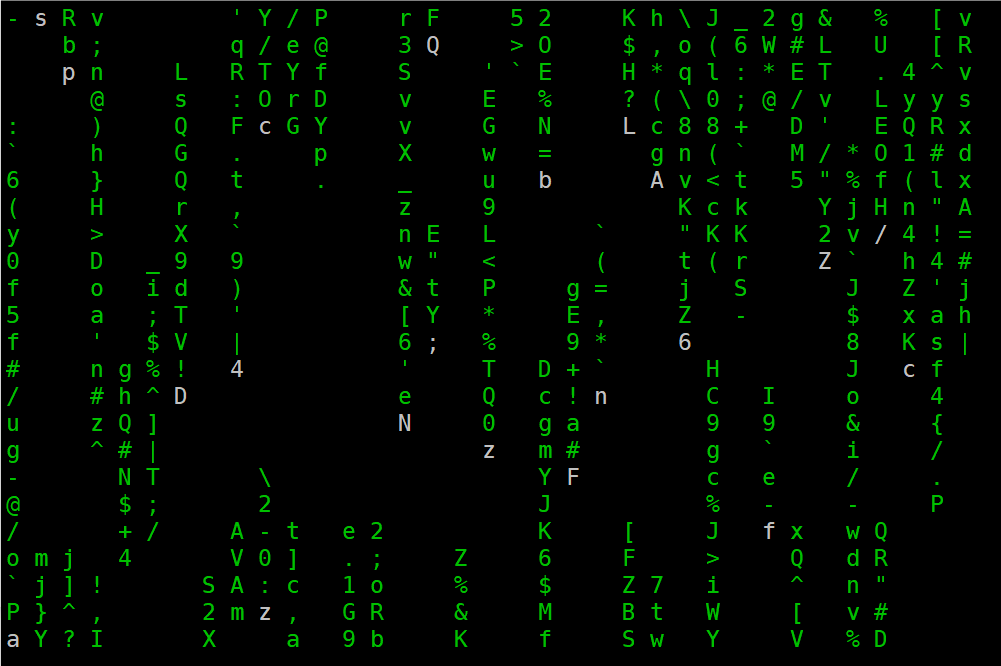
[root@centos7 ~]# cmatrix -b -u 3 -C red
# -b 加粗字体
# -u 滚动速度
# -C 字体颜色 绿色(green)、红色(red)、蓝色(blue)、白色(white)、黄色(yellow)、青色(cyan)、洋红色(magenta)以及黑色(black)这些颜色。
在这里插入图片描述
随时改变颜色
当然,你无需重新启动程序,就可以随时改变显示的颜色。但需要记住,不同的键位对应着不同的颜色。在 Cmatrix 未关闭的情况下,如果你按下了存储在键位上的指令,显示的颜色将会直接变更。
| 颜色 | 相应键位 | 对应数字键 |
|---|---|---|
| 红色 | ! | shift+1 |
| 绿色 | @ | shift+2 |
| 黄色 | # | shift+3 |
| 蓝色 | $ | shift+4 |
| 洋红色 | % | shift+5 |
| 青色 | ^ | shift+6 |
| 白色 | & | shift+7 |
| 黑色 | ) | shift+8 |
自由调整速度
在 Cmatrix 运行的过程中,你可以按 0 到 9 的任何一位数字键来随意改变当前的更新速度。
自建仓库
自建仓库流程
- 准备软件包
- 创建仓库索引信息
- 发布仓库
- 客户端配置验证
详细操作步骤
- 准备软件包
[root@server ~]# mkdir rpms
[root@server ~]# cd rpms
# 下载软件包,以及依赖的软件包
[root@server rpms]# yum install --downloadonly --downloaddir . vim open-vm-tools vsftpd lrzsz bash-completion nginx httpd mariadb-server

# 移动软件包到发布目录
[root@server ~]# mkdir /usr/local/nginx/html/tools
[root@server ~]# mv rpms /usr/local/nginx/html/tools/Packages
- 创建仓库
createrepo : 是一个用于创建和更新 YUM/DNF 软件包仓库元数据的命令
# 安装创建仓库软件包
[root@server ~]# yum install -y createrepo

# 创建仓库索引信息
[root@server ~]# createrepo /usr/local/nginx/html/tools/
- 使用上一步源码安装的nginx服务器
[root@server ~]# vim /usr/local/nginx/conf/nginx.conf
# 在http块中新增一行autoindex on
# 作用:提供文件清单
http {
    autoindex on;
.....

# 重启nginx服务
[root@server ~]# systemctl reload nginx
- 客户端配置验证
# 备份原有仓库
[root@client ~]# mkdir /etc/yum.repos.d/old
[root@client ~]# mv /etc/yum.repos.d/*repo /etc/yum.repos.d/old

# 添加新仓库
[root@client ~]# cat << 'EOF' > /etc/yum.repos.d/tools.repo
[tools]
name=centos7 tools from server.laoma.cloud
baseurl=http://server.laoma.cloud/tools/
enabled=1
gpgcheck=0
EOF
[root@client ~]# ls /etc/yum.repos.d/
old  tools.repo

# 安装软件包
[root@client ~]# yum install -y httpd
同步仓库
# 将仓库中软件包和元数据全部同步到本地
[root@client ~]# reposync --repoid=tools --download-metadata
[root@client ~]# createrepo tools
[root@client ~]# ls tools/
Packages  repodata
参考:yum-REPOSYNC(8)。
NAT 访问内部服务器
允许别人登录到自己的server虚拟机:通过vmware nat 功能实现。
-server
移动软件包到发布目录
[root@server ~]# mkdir /usr/local/nginx/html/tools
[root@server ~]# mv rpms /usr/local/nginx/html/tools/Packages
2. 创建仓库

> createrepo : 是一个用于**创建和更新 YUM/DNF 软件包仓库元数据**的命令

```bash
# 安装创建仓库软件包
[root@server ~]# yum install -y createrepo

# 创建仓库索引信息
[root@server ~]# createrepo /usr/local/nginx/html/tools/
- 使用上一步源码安装的nginx服务器
[root@server ~]# vim /usr/local/nginx/conf/nginx.conf
# 在http块中新增一行autoindex on
# 作用:提供文件清单
http {
    autoindex on;
.....

# 重启nginx服务
[root@server ~]# systemctl reload nginx
- 客户端配置验证
# 备份原有仓库
[root@client ~]# mkdir /etc/yum.repos.d/old
[root@client ~]# mv /etc/yum.repos.d/*repo /etc/yum.repos.d/old

# 添加新仓库
[root@client ~]# cat << 'EOF' > /etc/yum.repos.d/tools.repo
[tools]
name=centos7 tools from server.laoma.cloud
baseurl=http://server.laoma.cloud/tools/
enabled=1
gpgcheck=0
EOF
[root@client ~]# ls /etc/yum.repos.d/
old  tools.repo

# 安装软件包
[root@client ~]# yum install -y httpd
同步仓库
# 将仓库中软件包和元数据全部同步到本地
[root@client ~]# reposync --repoid=tools --download-metadata
[root@client ~]# createrepo tools
[root@client ~]# ls tools/
Packages  repodata
参考:yum-REPOSYNC(8)。
NAT 访问内部服务器
允许别人登录到自己的server虚拟机:通过vmware nat 功能实现。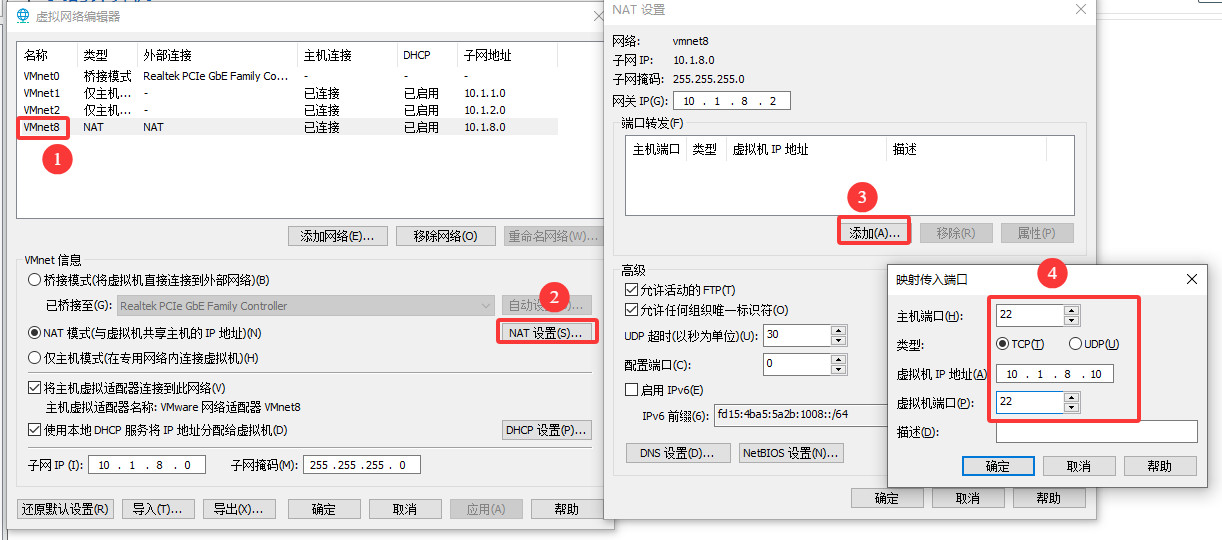

openEuler 是由开放原子开源基金会孵化的全场景开源操作系统项目,面向数字基础设施四大核心场景(服务器、云计算、边缘计算、嵌入式),全面支持 ARM、x86、RISC-V、loongArch、PowerPC、SW-64 等多样性计算架构
更多推荐


 2
2 0
0- 0


 已为社区贡献9条内容

所有评论(0)