docker复习1
·
docker镜像搭建原理:
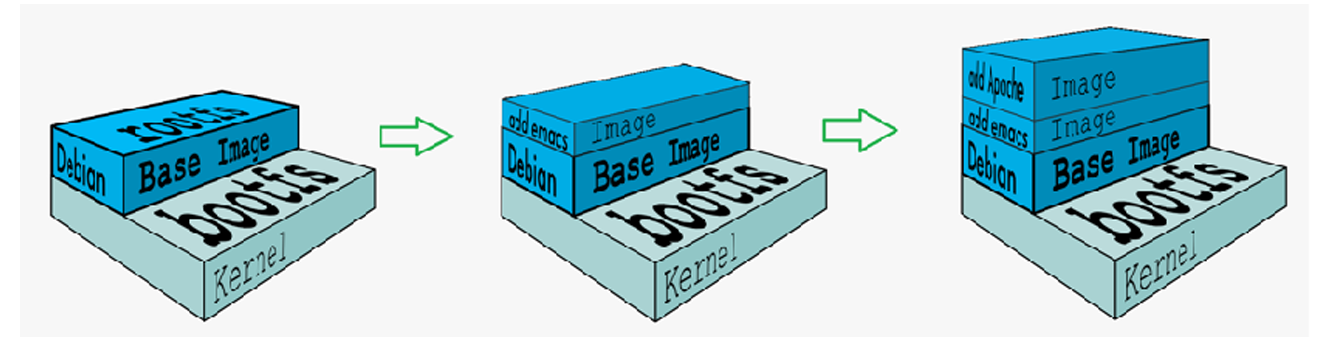
最底层是操作系统底层文件,往上一层一层加自己需要的镜像构建自己需要的镜像。
镜像构建企业示例
1.解决镜像安装源问题
镜像安装问题
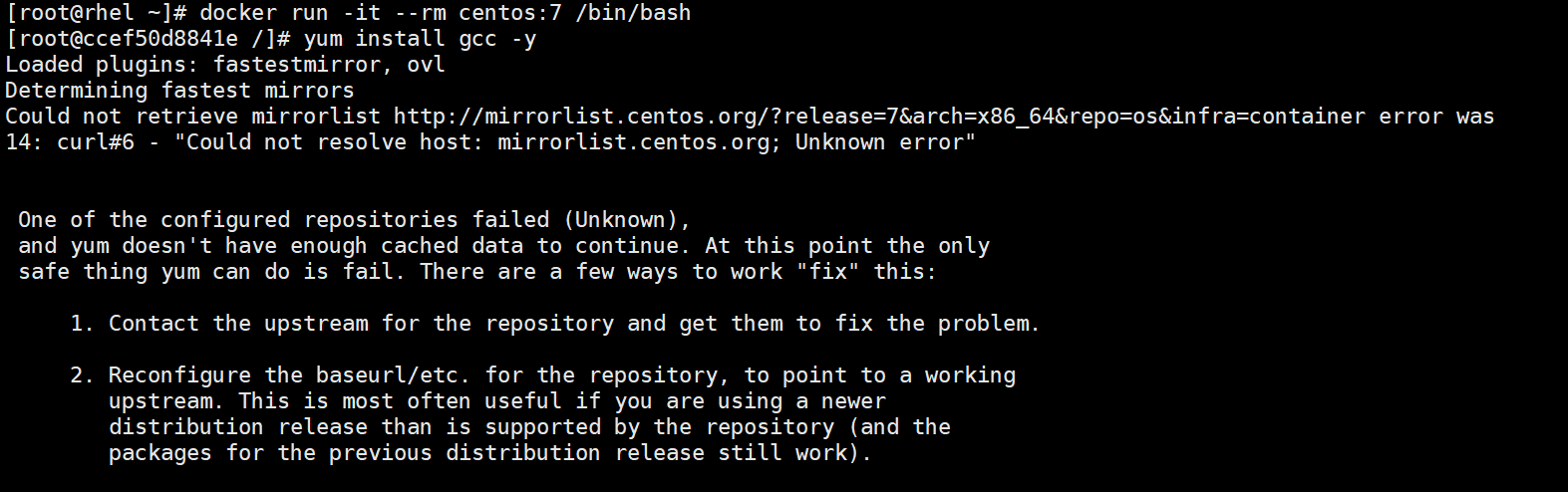
解决镜像问题
[root@rhel ~]# mkdir /dockerbuild
[root@rhel ~]# ls
anaconda-ks.cfg  centos-7.tar.gz
[root@rhel ~]# cd /dockerbuild/
[root@rhel dockerbuild]# vim centos.rep0
[root@rhel dockerbuild]# vim Dockerfile
[root@rhel dockerbuild]# cat centos.repo
[centos]
name = centos7.9
baseurl = https://mirrors.aliyun.com/centos-vault/7.9.2009/os/x86_64
gpgcheck = 0
[root@rhel dockerbuild]# cat Dockerfile
FROM centos:7
RUN rm -rf /etc/yum.repos.d/*
COPY centos.repo  /etc/yum.repos.d/
RUN yum makecache

[root@rhel dockerbuild]# docker build -t centos-7.9:repo .
[+] Building 0.1s (7/8)                                                                                                                                                            docker:default
 => [internal] load build definition from Dockerfile                                                                                                                                         0.0s
 => => transferring dockerfile: 135B                                                                                                                                                         0.0s
 => [internal] load metadata for docker.io/library/centos:7                                                                                                                                  0.0s
 => [internal] load .dockerignore                                                                                                                                                            0.0s
 => => transferring context: 2B                                                                                                                                                              0.0s
 => [1/4] FROM docker.io/library/centos:7@sha256:e6dba3b9654d5ddd7b10848643c6971ec932bdb83801babc8773c190a6c24378                                                                            0.0s
 => => resolve docker.io/library/centos:7@sha256:e6dba3b9654d5ddd7b10848643c6971ec932bdb83801babc8773c190a6c24378                                                                            0.0s
 => [internal] load build context                                                                                                                                                            0.0s
 => => transferring context: 2B                                                                                                                                                              0.0s
 => CANCELED [2/4] RUN rm -rf /etc/yum.repos.d/*                                                                                                                                             0.1s
 => ERROR [3/4] COPY centos.repo  /etc/yum.repos.d/                                                                                                                                          0.0s
------
 > [3/4] COPY centos.repo  /etc/yum.repos.d/:
------
Dockerfile:3
--------------------
   1 |     FROM centos:7
   2 |     RUN rm -rf /etc/yum.repos.d/*
   3 | >>> COPY centos.repo  /etc/yum.repos.d/
   4 |     RUN yum makecache
   5 |
--------------------
ERROR: failed to build: failed to solve: failed to compute cache key: failed to calculate checksum of ref acomavcgi09inobaamj12yt3x::mh55zhur4fqq6tf62ec3lo2s4: "/centos.repo": not found
[root@rhel dockerbuild]# mv centos.reop centos.repo
docker build -t centos-7.9:repo .
[+] Building 12.7s (9/9) FINISHED                                                                                                                                                  docker:default
 => [internal] load build definition from Dockerfile                                                                                                                                         0.0s
 => => transferring dockerfile: 135B                                                                                                                                                         0.0s
 => [internal] load metadata for docker.io/library/centos:7                                                                                                                                  0.0s
 => [internal] load .dockerignore                                                                                                                                                            0.0s
 => => transferring context: 2B                                                                                                                                                              0.0s
 => CACHED [1/4] FROM docker.io/library/centos:7@sha256:e6dba3b9654d5ddd7b10848643c6971ec932bdb83801babc8773c190a6c24378                                                                     0.0s
 => => resolve docker.io/library/centos:7@sha256:e6dba3b9654d5ddd7b10848643c6971ec932bdb83801babc8773c190a6c24378                                                                            0.0s
 => [internal] load build context                                                                                                                                                            0.0s
 => => transferring context: 146B                                                                                                                                                            0.0s
 => [2/4] RUN rm -rf /etc/yum.repos.d/*                                                                                                                                                      0.2s
 => [3/4] COPY centos.repo  /etc/yum.repos.d/                                                                                                                                                0.0s
 => [4/4] RUN yum makecache                                                                                                                                                                  9.6s
 => exporting to image                                                                                                                                                                       2.8s
 => => exporting layers                                                                                                                                                                      2.3s
 => => exporting manifest sha256:56cde605014fc839d38fe5bf21d849257a3279d95f74d39f29d4524392cec6db                                                                                            0.0s
 => => exporting config sha256:a80f434d0520d97498027ea4b5a45ca56c6c1971724cb7d6dba5a6347dd6b9a5                                                                                              0.0s
 => => exporting attestation manifest sha256:34b8044bf5568ec3ba25ae0bd0811818528f5254ec9ca7c86871cfa7f18a7a13                                                                                0.0s
 => => exporting manifest list sha256:45a0f8ccd2233ccfeffeb8de0cfb11457f7e180cca42f79f86efee4b91d7fd40                                                                                       0.0s
 => => naming to docker.io/library/centos-7.9:repo                                                                                                                                           0.0s
 => => unpacking to docker.io/library/centos-7.9:repo
测试:

2.利用现有镜像构建企业所需业务
[root@rhel dockerbuild]# wget https://nginx.org/download/nginx-1.30.4.tar.gz
--2026-08-13 20:11:27--  https://nginx.org/download/nginx-1.30.4.tar.gz
正在解析主机 nginx.org (nginx.org)... 3.125.197.172, 2a05:d014:5c0:2601::6, 2a05:d014:5c0:2600::6
正在连接 nginx.org (nginx.org)|3.125.197.172|:443... 已连接。
已发出 HTTP 请求,正在等待回应... 200 OK
长度:1328314 (1.3M) [application/octet-stream]
正在保存至: “nginx-1.30.4.tar.gz”

nginx-1.30.4.tar.gz                                  100%[====================================================================================================================>]   1.27M  45.6KB/s  用时 36s

2026-08-13 20:12:05 (35.7 KB/s) - 已保存 “nginx-1.30.4.tar.gz” [1328314/1328314])

[root@rhel dockerbuild]# vim Dockerfile
[root@rhel dockerbuild]# cat Dockerfile
FROM centos-7.9:repo
ADD nginx-1.30.4.tar.gz /mnt
WORKDIR /mnt/nginx-1.30.4
RUN sed -i 's/CFLAGS="$CFLAGS -g"/#CFLAGS="$CFLAGS -g"/g' auto/cc/gcc
RUN yum install gcc make pcre-devel openssl-devel -y
RUN ./configure --with-http_ssl_module --with-http_stub_status_module
RUN make && make install
EXPOSE 80
VOLUME ["/usr/local/nginx/html"]
CMD ["/usr/local/nginx/sbin/nginx", "-g", "daemon off;"]

[root@rhel dockerbuild]# docker build -t nginx-lee:v1 .
[root@rhel dockerbuild]# docker images
                                                                                                                                                                                             i Info →   U  In Use
IMAGE             ID             DISK USAGE   CONTENT SIZE   EXTRA
centos-7.9:repo   45a0f8ccd223        591MB          250MB
centos:7          e6dba3b9654d        434MB          212MB
nginx-lee:v1      2017cd7974c0        715MB          282MB
[root@rhel dockerbuild]#
测试:
[root@rhel dockerbuild]# docker run  -d --rm -p 80:80 nginx-lee:v1
89502d2726dedff795065033ec79c744db90fa0cca8769ce9e52a2bf0456da63

[root@rhel dockerbuild]# curl  172.25.254.100
<!DOCTYPE html>
<html>
<head>
<title>Welcome to nginx!</title>
<style>
html { color-scheme: light dark; }
body { width: 35em; margin: 0 auto;
font-family: Tahoma, Verdana, Arial, sans-serif; }
</style>
</head>
<body>
<h1>Welcome to nginx!</h1>
<p>If you see this page, nginx is successfully installed and working.
Further configuration is required for the web server, reverse proxy,
API gateway, load balancer, content cache, or other features.</p>

<p>For online documentation and support please refer to
<a href="https://nginx.org/">nginx.org</a>.<br/>
To engage with the community please visit
<a href="https://community.nginx.org/">community.nginx.org</a>.<br/>
For enterprise grade support, professional services, additional
security features and capabilities please refer to
<a href="https://f5.com/nginx">f5.com/nginx</a>.</p>

<p><em>Thank you for using nginx.</em></p>
</body>
</html>
[root@rhel dockerbuild]#  docker exec  89502d2726de /usr/local/nginx/sbin/nginx -v
nginx version: nginx/1.30.4
[root@rhel dockerbuild]#

3.构建镜像优化方案
a.缩减镜像层
[root@docker-node1 dockerbuild]# vim Dockerfile
FROM centos-7.9:localrepo
ADD nginx-1.30.4.tar.gz /mnt
WORKDIR /mnt/nginx-1.30.4
RUN sed -i 's/CFLAGS="$CFLAGS -g"/#CFLAGS="$CFLAGS -g"/g' auto/cc/gcc && yum install gcc make pcre-devel openssl-devel -y && ./configure --with-http_ssl_module --with-http_stub_status_module &&  make && make install
EXPOSE 80
VOLUME ["/usr/local/nginx/html"]
CMD ["/usr/local/nginx/sbin/nginx", "-g", "daemon off;"]
b.删除构建过程中需要的临时文件
[root@docker-node1 dockerbuild]# vim Dockerfile
FROM centos-7.9:localrepo
ADD nginx-1.30.4.tar.gz /mnt
WORKDIR /mnt/nginx-1.30.4
RUN sed -i 's/CFLAGS="$CFLAGS -g"/#CFLAGS="$CFLAGS -g"/g' auto/cc/gcc && yum install gcc make pcre-devel openssl-devel -y && ./configure --with-http_ssl_module --with-http_stub_status_module &&  make && make install && rm -fr /mnt/* && yum clean all
EXPOSE 80
VOLUME ["/usr/local/nginx/html"]
CMD ["/usr/local/nginx/sbin/nginx", "-g", "daemon off;"]
c.多阶构建
[root@docker-node1 dockerbuild]# vim Dockerfile
FROM centos-7.9:localrepo AS build
ADD nginx-1.30.4.tar.gz /mnt
WORKDIR /mnt/nginx-1.30.4
RUN sed -i 's/CFLAGS="$CFLAGS -g"/#CFLAGS="$CFLAGS -g"/g' auto/cc/gcc && yum install gcc make pcre-devel openssl-devel -y && ./configure --with-http_ssl_module --with-http_stub_status_module && make && make install && rm -fr /mnt/* && yum clean all
FROM centos:7
COPY --from=build /usr/local/nginx /usr/local/nginx
EXPOSE 80
VOLUME ["/usr/local/nginx/html"]
CMD ["/usr/local/nginx/sbin/nginx", "-g", "daemon off;"]

openEuler 是由开放原子开源基金会孵化的全场景开源操作系统项目,面向数字基础设施四大核心场景(服务器、云计算、边缘计算、嵌入式),全面支持 ARM、x86、RISC-V、loongArch、PowerPC、SW-64 等多样性计算架构
更多推荐


 1
1 0
0- 0


 已为社区贡献2条内容

所有评论(0)