python-协程
进程是操作系统分配资源的最小单位,线程是CPU调度执行的最小单位,而协程是运行在线程之上的用户态轻量级线程,通过主动让出执行权来实现高效的并发调度。
结尾写一个简单的端口扫描的小项目。
1.基本概念
每一个协程函数都会返回一个协程对象,而协程对象主要依赖于事件循环(EventLoop)之中运行。每一个线程有且仅有一个事件循环。
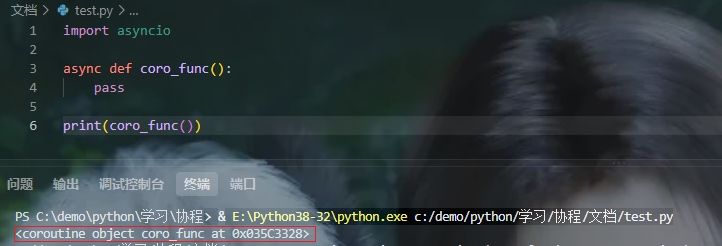
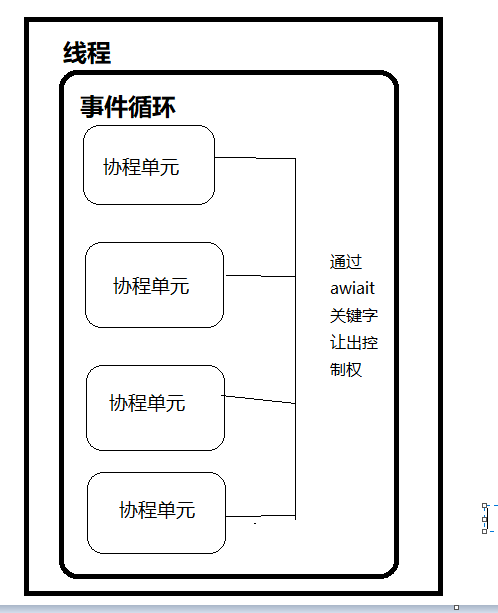
await打错了懒得改了
2.最简单的协程任务
python里面通过async关键字创建一个协程函数,通过await释放控制权交还给事件循环。先看一个简单示例,用asyncio.sleep()模拟工作时间。

在使用asyncio.run() 调用协程对象时会自动创建事件循环来维持协程单元的运行。这里可以看到好像是同步执行的,不是说会让出控制权异步执行吗?
因为刚开始都是图片,写到一半感觉贴代码好点所以代码都是后面重新补的与图片可能有点小差别
import time
import asyncio

start_time = time.time()

async def coro_func():
    await asyncio.sleep(2)

async def main():
    await coro_func()
    await coro_func()

asyncio.run(main())
end_time = time.time()
print(f"{end_time - start_time}s")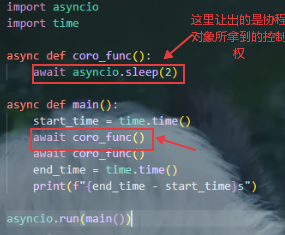
await会让出协程对象的控制权给事件循环,而这里并没有与main协程对象同级别的协程,所以控制权再次回到main任务当中,此时的main任务还在等待协程对象返回结果。所以导致其阻塞在了main函数内部。
这种情况我们可以调用create_task()方法将协程对象作为后台任务的方式执行
import time
import asyncio

start_time = time.time()

async def coro_func():
    await asyncio.sleep(2)

async def main():
    task1 = asyncio.create_task(coro_func())
    task2 = asyncio.create_task(coro_func())

    await task1
    await task2

asyncio.run(main())
end_time = time.time()
print(f"{end_time - start_time}s")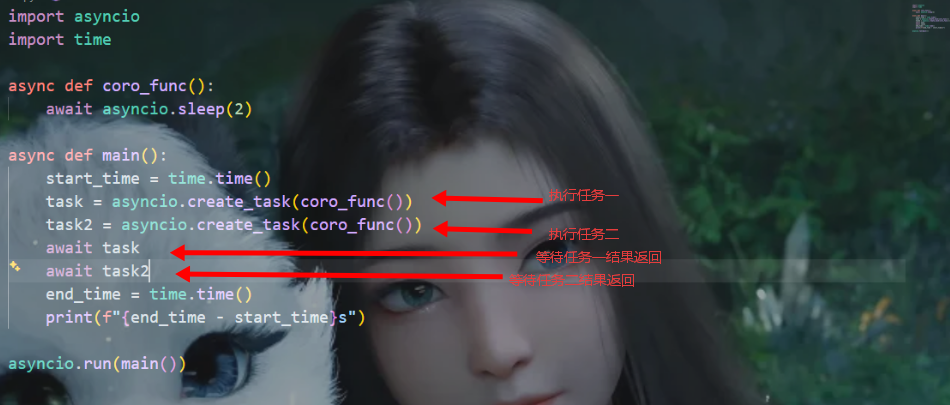

await 直接调用和create_task调用的区别
- await: 从开始调用等待到任务执行结束
- create_task: 创建任务后台执行,只需要使用await等待任务结果返回
注意:必须使用 await 等待任务执行结果返回,否则程序不会等待任务完成就直接退出。
在实际的使用过程中我们是不需要手动的去管理每一个任务的,asyncio库支持使用asyncio.gather()批量调用任务列表
import time
import asyncio

start_time = time.time()

async def coro_func():
    await asyncio.sleep(2)

async def main():
    tasks = []
    [tasks.append(coro_func()) for i in range(10)]
    await asyncio.gather(*tasks)

asyncio.run(main())
end_time = time.time()
print(f"{end_time - start_time}s")
2. 与线程的联合使用
协程依赖于事件循环运行,而每个线程中都可以有独立的事件循环,所以我们便可以将协程和线程结合起来使用。
import time
import asyncio
import threading

start_time = time.time()

async def coro_func():
    await asyncio.sleep(2)

async def main():
    tasks = []
    [tasks.append(coro_func()) for i in range(10)]
    await asyncio.gather(*tasks)

class MyThread(threading.Thread):
    def run(self):
        asyncio.run(main())

thread = MyThread()
thread.start()
thread.join()
end_time = time.time()
print(f"{end_time - start_time}s")
3. 协程队列
协程队列的使用方式和普通队列的使用方式基本一样
import asyncio

queue = asyncio.Queue(maxsize=20) # maxsize设置队列最大容纳数量
worker_number = 20 # 生产任务数

async def worker():
    while True:
        # 携程工作单元
        try:
            data = await queue.get()
            if data is None:
                break
            print(data)
        except Exception:
            pass

async def produce():
    [await queue.put(i) for i in range(100)] # 加入处理的数据
    [await queue.put(None) for i in range(worker_number)] # 加入哨兵

async def main():
    tasks = [asyncio.create_task(worker()) for i in range(worker_number)]
    await produce()
    await asyncio.gather(*tasks)

asyncio.run(main())使用asyncio.wait_for()设置最大等待时间
import asyncio

queue = asyncio.Queue(maxsize=20) # maxsize设置队列最大容纳数量
worker_number = 20 # 生产任务数

async def worker():
    while True:
        # 携程工作单元
        try:
            data = await asyncio.wait_for(
                queue.get(),
                timeout=1   # 设置超时时间
            )
            if data is None:
                break
            print(data)
        except Exception:
            pass

async def produce():
    [await queue.put(i) for i in range(100)] # 加入处理的数据
    [await queue.put(None) for i in range(worker_number)] # 加入哨兵

async def main():
    tasks = [asyncio.create_task(worker()) for i in range(worker_number)]
    await produce()
    await asyncio.gather(*tasks)

asyncio.run(main())
4. 一些常用的协程库
aiohttp 网络请求
import aiohttp
import asyncio

async def req():
    async with aiohttp.ClientSession() as session:
        async with session.get("https://baidu.com") as r:
            data = await r.text()
            print(data)

asyncio.run(req())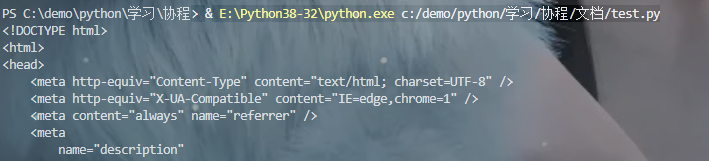
aiofile 文件操作

import aiofile
import asyncio

async def req():
    async with aiofile.async_open("test.txt") as f:
        data = await f.read()
        print(data)

asyncio.run(req())
socket 连接
server.py
import asyncio

async def reader_message(reader, writer):
    """
        reader: 接收器
        writer: 发送器
    """

    data = await reader.read(1024)
    print(data)

    writer.write("Hello, i am server.".encode())
    await writer.drain()
    writer.close()

async def main():
    # 开启服务器
    server = await asyncio.start_server(reader_message, "0.0.0.0", 8080)

    # 开启服务器事件循环
    await server.serve_forever()

    # 关闭服务器
    await server.close()

asyncio.run(main())
client.py
import asyncio

async def send_message(message: str):
    reader, writer = await asyncio.open_connection("127.0.0.1", 8080)
    writer.write(message.encode())
    await writer.drain()
    writer.write_eof()
    server_message = await reader.read(1024)
    print(server_message)

    writer.close()

asyncio.run(send_message("test data"))

5. 简单项目: 端口扫描
端口扫描主要需要两部分: 准备端口,消费端口。为了涵盖线程与线程交互的部分,这里加入多线程分组
准备端口
async def put_port_list(self):
    [await self.port_queue.put(port) for port in self.port_list]
    [await self.port_queue.put(None) for i in range(self.worker_number)] # 设置哨兵
消费端口
async def connect_port(self):
    while True:
        try:
            port = await asyncio.wait_for(
                self.port_queue.get(),
                timeout=3
            )
            if port is None: break
            await asyncio.open_connection(address, port)
            print(f"端口{port}状态: 开放")
        except (OSError, ConnectionRefusedError):
            print(f"端口{port}状态: 关闭")
线程启动
对端口列表进行分组传入
thread_pools = [] # 需要阻塞线程使用线程池

for i in range(0, 5):
    thread = PortScan([j for j in range(int((len(port_list)/5) * i), int((len(port_list)/5) * (i+1)))])
    thread_pools.append(thread)
    thread.start()

for thread in thread_pools:
    thread.join()
完整线程代码
class PortScan(threading.Thread):
    def __init__(self, port_list = []):
        super().__init__()
        self.port_queue = asyncio.Queue() # 端口生产队列
        self.worker_number = 1000 # 控制单个线程中的携程任务数
        self.port_list = port_list # 端口列表

    def run(self):
        asyncio.run(self.start_scan())

    async def put_port_list(self):
        [await self.port_queue.put(port) for port in self.port_list]
        [await self.port_queue.put(None) for i in range(self.worker_number)] # 设置哨兵

    async def connect_port(self):
        while True:
            try:
                port = await asyncio.wait_for(
                    self.port_queue.get(),
                    timeout=3
                )
                if port is None: break
                await asyncio.open_connection(address, port)
                print(f"端口{port}状态: 开放")
            except (OSError, ConnectionRefusedError):
                print(f"端口{port}状态: 关闭")

    async def start_scan(self):
        tasks = [asyncio.create_task(self.connect_port()) for i in range(self.worker_number)]
        await self.put_port_list()
        await asyncio.gather(*tasks)
完整代码
import asyncio
import threading

address = "" # 需要请求的地址
port_list = []
if len(port_list) == 0:
    """如果端口列表里面数据量为0, 那就默认全端口扫描"""
    [port_list.append(i) for i in range(1, 65535)]


class PortScan(threading.Thread):
    def __init__(self, port_list = []):
        super().__init__()
        self.port_queue = asyncio.Queue() # 端口生产队列
        self.worker_number = 1000 # 控制单个线程中的携程任务数
        self.port_list = port_list # 端口列表

    def run(self):
        asyncio.run(self.start_scan())

    async def put_port_list(self):
        [await self.port_queue.put(port) for port in self.port_list]
        [await self.port_queue.put(None) for i in range(self.worker_number)] # 设置哨兵

    async def connect_port(self):
        while True:
            try:
                port = await asyncio.wait_for(
                    self.port_queue.get(),
                    timeout=3
                )
                if port is None: break
                await asyncio.open_connection(address, port)
                print(f"端口{port}状态: 开放")
            except (OSError, ConnectionRefusedError):
                print(f"端口{port}状态: 关闭")

    async def start_scan(self):
        tasks = [asyncio.create_task(self.connect_port()) for i in range(self.worker_number)]
        await self.put_port_list()
        await asyncio.gather(*tasks)

thread_pools = [] # 需要阻塞线程使用线程池

for i in range(0, 5):
    thread = PortScan([j for j in range(int((len(port_list)/5) * i), int((len(port_list)/5) * (i+1)))])
    thread_pools.append(thread)
    thread.start()

for thread in thread_pools:
    thread.join()
结果示例


openEuler 是由开放原子开源基金会孵化的全场景开源操作系统项目,面向数字基础设施四大核心场景(服务器、云计算、边缘计算、嵌入式),全面支持 ARM、x86、RISC-V、loongArch、PowerPC、SW-64 等多样性计算架构
更多推荐


 4
4 0
0- 0


 已为社区贡献1条内容

所有评论(0)