【无标题】
BingSpotAny:一款轻量、纯净、跨平台的每日壁纸工具
文章目录
什么是 BingSpotAny?
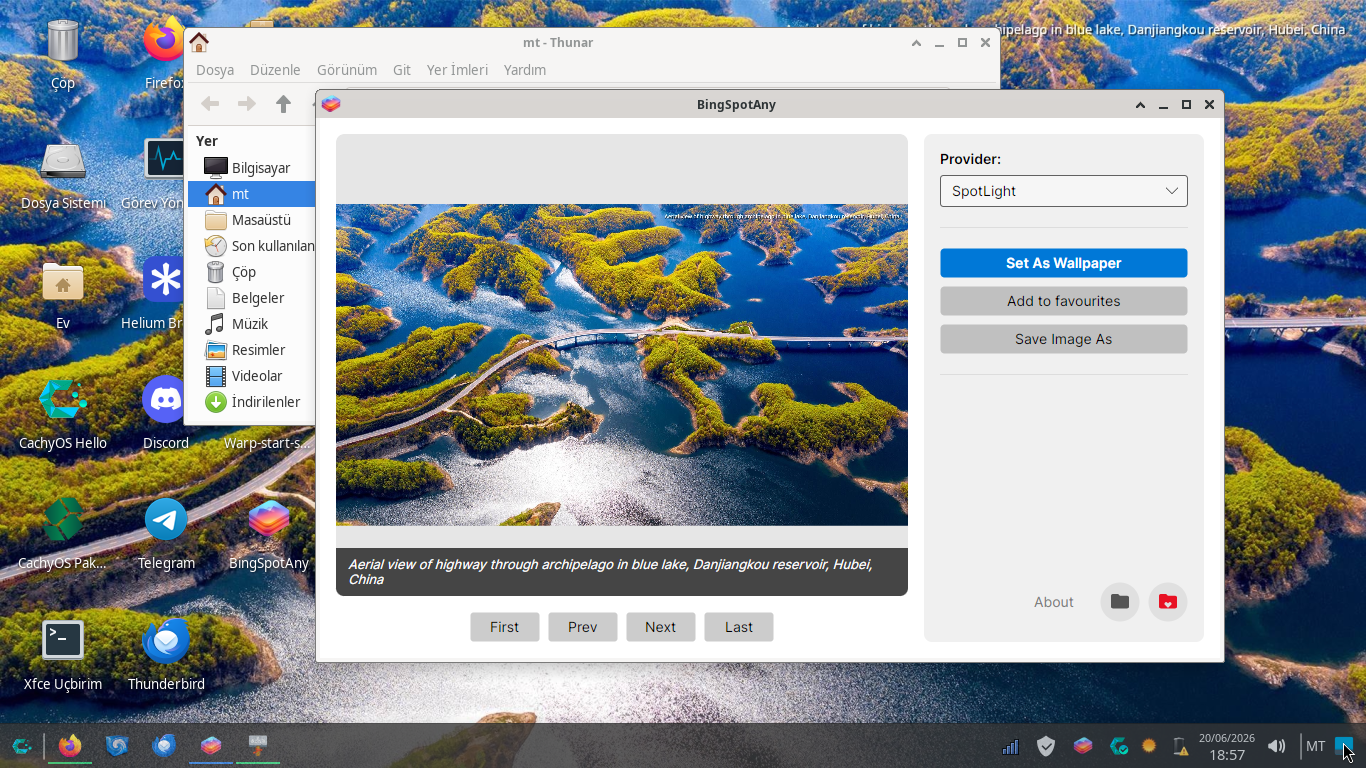
BingSpotAny 是一款开源、跨平台的壁纸管理工具,支持 Windows、macOS 和 Linux 三大桌面操作系统。它每天自动从 Bing 每日图片和 Windows Spotlight(Windows 聚焦)两个来源获取高清壁纸,并自动设置为桌面背景,让你的桌面每天都有新鲜感。
这款工具由开发者 darkinsun 出于“个人 frustration”而构建——他在 Linux 和 macOS 上找不到可靠的方式获取每日 Spotlight 和 Bing 壁纸,现有方案要么过时,要么绑定特定桌面环境,要么充斥着不必要的跟踪。于是,BingSpotAny 诞生了。
为什么要用 BingSpotAny 替代官方 Bing Wallpaper?
官方 Bing Wallpaper 虽然壁纸质量高,但近年来暴露出一系列令人头疼的问题:
硬盘空间占用大:软件会在本地缓存历史壁纸图片,长期使用后体积可能膨胀到 1GB 甚至更多。
广告侵扰:有用户反映新版本 Bing Wallpaper 不仅常驻后台,还会劫持点击行为——点击鼠标时自动打开浏览器进行 Bing 搜索。甚至有开发人员将其定义为“不受欢迎的广告软件”。
隐私担忧:据报道,该应用会安装 Bing Visual Search、嗅探浏览器 cookies,甚至能在非 Edge 浏览器中推送广告。
登录体验差:有用户吐槽“登录也太折磨人了,十次有八次连不上服务器”。
相比之下,BingSpotAny 的优势非常明显:
| 对比维度 | 官方 Bing Wallpaper | BingSpotAny |
|---|---|---|
| 跨平台支持 | 仅 Windows | Windows / macOS / Linux |
| 开源透明 | 闭源 | GPL-3.0 开源,代码可审查 |
| 隐私保护 | 含遥测、跟踪、cookie 嗅探 | 100% 零遥测、零跟踪 |
| 资源占用 | 缓存膨胀至 1GB+ | 极低内存和 CPU 占用 |
| 广告干扰 | 推送广告、劫持浏览器 | 完全无广告 |
| 壁纸来源 | 仅 Bing | Bing + Windows Spotlight 双源 |
| 桌面环境兼容 | 仅 Windows | 支持 GNOME、KDE、XFCE、Cinnamon、COSMIC 等,兼容 X11/Wayland |
BingSpotAny 被多家媒体和社区推荐为“跨平台首选”的 Bing Wallpaper 替代方案。
如何安装 BingSpotAny?
BingSpotAny 是自包含(self-contained)应用,无需安装 .NET 或其他运行环境。
🪟 Windows 用户
从 GitHub Releases 页面下载最新的 .exe 安装包,双击运行即可。
🍎 macOS 用户
下载 .dmg 或 .pkg 文件,将 BingSpotAny.app 拖入 Applications 文件夹。
🐧 Linux 用户(推荐通过包管理器安装)
Ubuntu / Debian / Linux Mint(添加 APT 仓库):
echo "deb [trusted=yes] https://darkinsun.github.io/BingSpotAny/debian /" | sudo tee /etc/apt/sources.list.d/bingspotany.list
sudo apt update && sudo apt install bingspotany
Arch Linux / Manjaro / EndeavourOS(通过 AUR):
paru -S bingspotany-bin
# 或
yay -S bingspotany-bin
Fedora(启用 Copr 仓库):
sudo dnf copr enable darkinsun/bingspotany
sudo dnf install bingspotany-bin
openSUSE(添加仓库):
sudo zypper addrepo https://copr.fedorainfracloud.org/coprs/darkinsun/bingspotany/repo/opensuse-tumbleweed/darkinsun-bingspotany-opensuse-tumbleweed.repo
sudo zypper install bingspotany-bin
如何设置每天自动更新壁纸?
BingSpotAny 内置了 “自动化与定时器”(Automation & Timers) 功能,可以设定每日固定时间自动刷新壁纸。
设置步骤:
- 在系统托盘中找到 BingSpotAny 图标,右键点击进入 设置(Settings)。
- 找到 “自动化”(Automation) 或 “定时器”(Timers) 选项。
- 开启自动更新功能,选择你希望的每日更新时间(例如每天早上 9:00)。
- 保存设置即可。
软件还支持开机自启动——在 Windows 上利用注册表、Linux 上利用 .desktop 文件、macOS 上利用 launchd 实现静默启动——确保定时任务稳定执行。
总结
BingSpotAny 是一款为追求桌面美观、注重隐私、跨平台使用的用户打造的壁纸工具。它解决了官方 Bing Wallpaper 的广告侵扰、隐私担忧、资源膨胀和平台局限等问题,以开源透明、零遥测、轻量高效、跨平台统一体验为核心优势。
无论你是 Windows、macOS 还是 Linux 用户,BingSpotAny 都能让你的桌面每天焕然一新——纯净、自由、无打扰。

openEuler 是由开放原子开源基金会孵化的全场景开源操作系统项目,面向数字基础设施四大核心场景(服务器、云计算、边缘计算、嵌入式),全面支持 ARM、x86、RISC-V、loongArch、PowerPC、SW-64 等多样性计算架构
更多推荐

 4
4 0
0- 0


 已为社区贡献10条内容

所有评论(0)