基于HarmonyOS ArkTS API 24的收纳师上门服务社区应用架构深度解析——断舍离管家全栈组件体系与动效系统详解
HarmonyOS作为华为面向全场景智慧化生活打造的分布式操作系统,自诞生以来便以一次开发、多端部署为核心设计理念,极大地降低了跨设备应用的开发门槛。在HarmonyOS 6.1.1版本持续演进的背景下,ArkTS作为官方推荐的声明式应用开发语言,已经从最初的实验性框架发展为功能完善、性能优越的现代UI开发范式。ArkTS在TypeScript语言基础上进行了深度定制化扩展,保留了静态类型检查的安全性的同时,引入了@State、@Prop、@Link、@Observed等一系列响应式状态管理装饰器,使得开发者能够以极低的认知成本构建出具备复杂交互逻辑的企业级应用界面。本文将以一个收纳师上门服务社区应用——断舍离管家——为案例,全面剖析其在HarmonyOS ArkTS API 24平台下的架构设计思路。
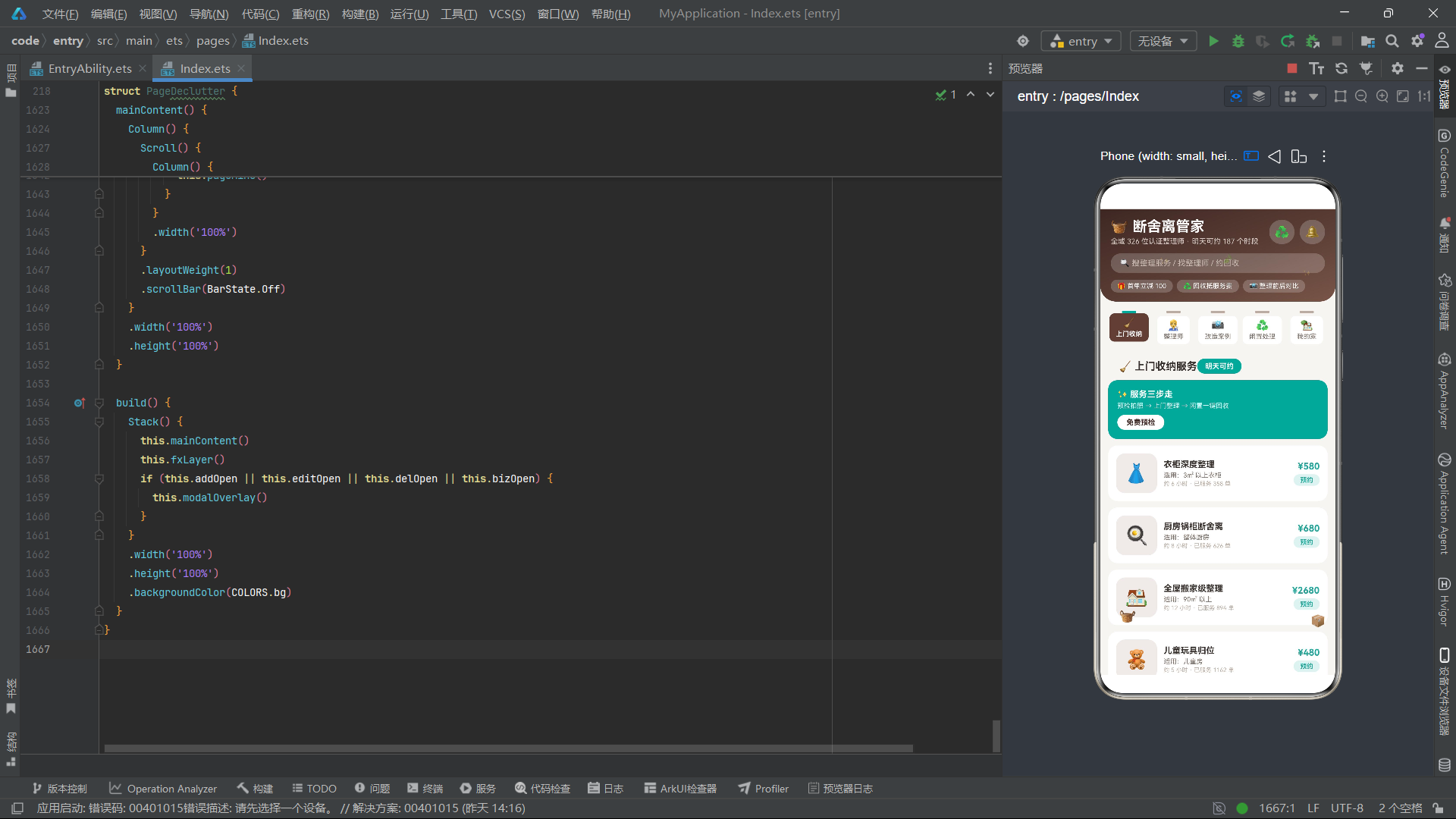
断舍离管家是一个面向城市家庭整理收纳与断舍离服务需求的垂直社区应用,其业务模式参考了美团等本地生活服务平台的经典交互范式,但在垂直领域深度上做了大量定制化创新。从业务价值角度来看,该应用涵盖了上门收纳服务预约、认证整理师选聘、改造案例展示、闲置物品回收处理以及家庭空间档案管理五大核心业务线,构建了从服务发现到服务履约再到服务追溯的完整闭环。这种垂直服务社区的设计理念,充分体现了ArkTS在处理复杂业务场景时的高内聚低耦合优势,通过@Builder装饰器将界面拆分为可复用的构建单元,再通过@State状态变量在组件间建立响应式数据流,最终实现了视图与业务逻辑的干净分离。
在技术架构层面,HarmonyOS ArkTS API 24提供了丰富的原生UI组件与动画能力。本应用大量使用了Column、Row、Stack、Scroll等容器组件进行布局编排,配合ForEach实现列表数据的高效渲染,利用linearGradient实现渐变视觉效果,并通过translate、scale、rotate、opacity等变换属性构建了收纳篮跳动、灰尘闪光、纸箱摇摆等多层次动效系统。尤为值得注意的是,本应用采用了120毫秒间隔的setInterval定时器驱动fxTick状态变量自增,再通过fxTick值参与各动画元素的位移、缩放、旋转计算,从而以极低的性能开销实现了持续性的场景氛围动效。这种轻量级定时器驱动的动画方案在HarmonyOS平台上表现优异,既避免了重动画框架的性能负担,又能保证动画效果的流畅性与可维护性。
从工程实践的角度来看,断舍离管家应用的设计充分体现了ArkTS状态驱动UI的核心哲学。整个应用通过ColorPalette接口统一管理15个色彩语义常量,以木棕色(#5D4037)为主色调传递温暖、质朴的收纳服务调性,以青瓷绿(#26A69A)为强调色传递清爽、有序的整理理念,通过primaryLight、primaryDark、accentLight等层次色构建出完整的视觉层级体系。六个@Observed数据模型类(SvcItem、ProItem、CaseItem、IdleItem、RoomFileItem、MonthItem)分别承载不同业务域的数据结构,通过构造函数注入初始值,配合@State状态变量实现数据的响应式更新。四个弹框组件(VISIT ORDER上门单、SPACE FILE空间档案、REMOVE FILE删除警示、RECYCLE SLIP回收单)通过统一的modalOverlay覆盖层管理开关状态,实现了优雅的模态交互体验。本文将逐一深入分析这些核心代码段,揭示其背后的设计逻辑与工程细节。
一、色彩体系与ColorPalette接口定义
在任何优秀的移动应用架构中,色彩管理都是视觉一致性的基石。断舍离管家应用通过定义一个ColorPalette接口来约束全局色彩常量的结构,确保所有颜色值都有明确的语义命名,避免了在代码中散落的魔法色值字符串。这种做法在HarmonyOS ArkTS开发中是一种被广泛推荐的最佳实践。
interface ColorPalette {
  primary: string;
  primaryLight: string;
  primaryDark: string;
  accent: string;
  accentLight: string;
  bg: string;
  cardBg: string;
  textPrimary: string;
  textSecondary: string;
  textHint: string;
  border: string;
  success: string;
  warning: string;
  danger: string;
  white: string;
  gold: string;
}
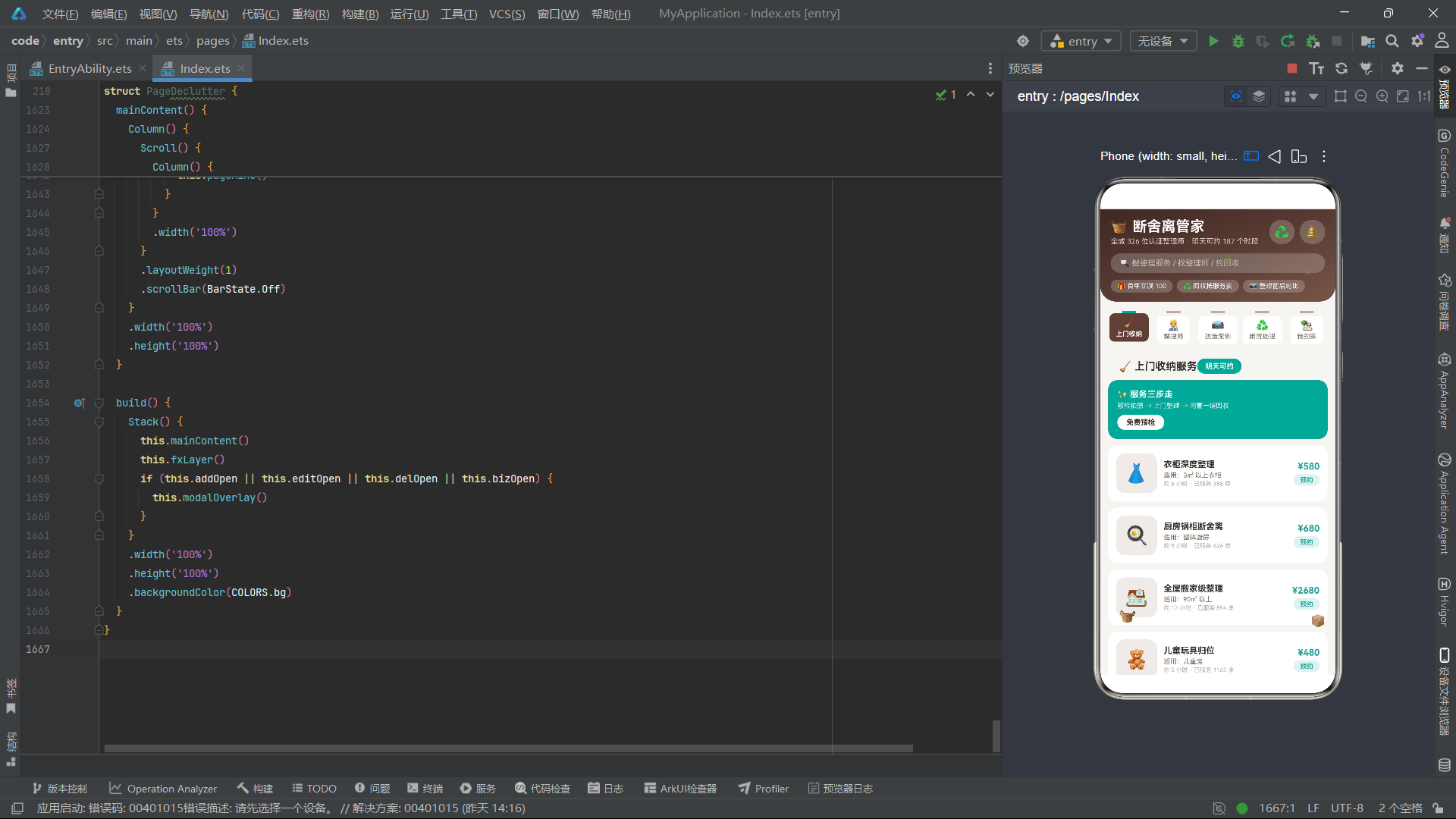
上述ColorPalette接口定义了15个颜色字段,涵盖了主色、辅色、背景色、文本色、边框色以及功能语义色(成功、警告、危险)等全部维度。primary字段代表木棕色#5D4037,传递温暖质朴的收纳空间氛围感;accent字段代表青瓷绿#26A69A,象征清爽有序的整理成果;gold字段代表金色#D4A24E,用于强调促销信息与价格亮点。通过接口约束,所有颜色字段必须在COLORS常量中完整实现,TypeScript编译器会在编译阶段进行完整性检查,任何遗漏或拼写错误都会立即被捕获,这大大提升了代码的健壮性。
在COLORS常量的实例化中,每个色值都经过精心调配。primaryDark(#3E2723)作为primary的深色变体用于头部渐变终点与按下态背景,primaryLight(#EFEBE9)作为浅色变体用于卡片图标背景区域。textPrimary(#37302C)、textSecondary(#7A6E66)、textHint(#B8ACA2)三个文本色构成清晰的层级关系,分别对应正文、辅助说明与占位提示文字。border(#E7DFD8)作为极浅的暖灰边框色,在不干扰视觉的前提下提供了内容边界的柔化分隔。success(#43A047)、warning(#FB8C00)、danger(#E53935)三个功能色则遵循Material Design色彩规范,保证了用户对操作结果的直觉理解。
const COLORS: ColorPalette = {
  primary: '#5D4037',
  primaryLight: '#EFEBE9',
  primaryDark: '#3E2723',
  accent: '#26A69A',
  accentLight: '#E0F2F1',
  bg: '#F7F5F2',
  cardBg: '#FFFFFF',
  textPrimary: '#37302C',
  textSecondary: '#7A6E66',
  textHint: '#B8ACA2',
  border: '#E7DFD8',
  success: '#43A047',
  warning: '#FB8C00',
  danger: '#E53935',
  white: '#FFFFFF',
  gold: '#D4A24E'
};
这一COLORS常量在整个应用的所有@Builder函数中被高频引用。每当需要设置文字颜色时,开发者只需引用COLORS.textPrimary或COLORS.accent等语义化常量,而非直接书写十六进制色值字符串。这种做法的最大优势在于:当需要调整全局色彩主题时,只需修改COLORS常量中的对应字段,整个应用的色彩表现便会同步更新,实现了主题切换的零成本维护。在HarmonyOS ArkTS的声明式UI框架中,由于UI是状态的函数式映射,颜色常量的变更会自动触发依赖该常量的所有UI组件重新渲染,无需额外的命令式刷新操作。
二、@Observed数据模型类体系
断舍离管家应用的数据层由六个@Observed装饰的数据模型类构成,它们分别对应六大业务域:服务项目(SvcItem)、整理师(ProItem)、改造案例(CaseItem)、闲置物品(IdleItem)、空间档案(RoomFileItem)以及月度统计(MonthItem)。@Observed装饰器是ArkTS响应式系统的核心,它使得被装饰的类实例在其属性发生变化时能够自动通知所有引用了该实例的UI组件进行刷新。
2.1 服务项目模型 SvcItem
SvcItem是上门收纳服务条目的数据模型,包含id、name、icon、area、price、hours、booked共7个字段。其中booked字段是一个状态标记,取值0或1,分别代表未预约与已预约,该字段的变更直接驱动列表项按钮文案与样式的切换。
@Observed
class SvcItem {
  id: number = 0;
  name: string = '';
  icon: string = '';
  area: string = '';
  price: number = 0;
  hours: number = 0;
  booked: number = 0;
  constructor(id: number, name: string, icon: string, area: string,
             price: number, hours: number, booked: number) {
    this.id = id; this.name = name; this.icon = icon; this.area = area;
    this.price = price; this.hours = hours; this.booked = booked;
  }
}
构造函数接收全部7个参数并逐一赋值给实例属性。这种全参构造函数的设计虽然略显冗长,但保证了对象创建时所有字段的完整性初始化,避免了因字段遗漏而产生的未定义行为。在ArkTS中,@Observed类需要在字段声明时提供默认值(如id: number = 0),这是为了确保在序列化反序列化等场景下对象的类型安全。
2.2 整理师模型 ProItem
ProItem模型描述认证整理师的完整信息,包含id、name、avatar、badge、cases、rate、price、followed共8个字段。其中badge字段存储资质标签文本(如"JALO 一级整理师"),cases字段存储已完成案例数量,rate字段存储评分,followed字段(0/1)记录用户的收藏状态。
@Observed
class ProItem {
  id: number = 0;
  name: string = '';
  avatar: string = '';
  badge: string = '';
  cases: number = 0;
  rate: number = 0;
  price: number = 0;
  followed: number = 0;
  constructor(id: number, name: string, avatar: string, badge: string,
             cases: number, rate: number, price: number, followed: number) {
    this.id = id; this.name = name; this.avatar = avatar; this.badge = badge;
    this.cases = cases; this.rate = rate; this.price = price; this.followed = followed;
  }
}
2.3 空间档案模型 RoomFileItem 与月度统计 MonthItem
RoomFileItem是家庭空间档案的核心模型,记录每个空间的整理状态。tidy字段为整洁度评分(0-100),boxes字段为收纳盒数量,last字段为最近整理日期文本。MonthItem则用于月度断舍离战果统计,bags字段记录当月清出的闲置袋数,earned字段记录回收变现金额。
@Observed
class RoomFileItem {
  id: number = 0;
  name: string = '';
  icon: string = '';
  tidy: number = 0;
  boxes: number = 0;
  last: string = '';
  constructor(id: number, name: string, icon: string, tidy: number,
             boxes: number, last: string) {
    this.id = id; this.name = name; this.icon = icon; this.tidy = tidy;
    this.boxes = boxes; this.last = last;
  }
}

@Observed
class MonthItem {
  id: number = 0;
  month: string = '';
  bags: number = 0;
  earned: number = 0;
  constructor(id: number, month: string, bags: number, earned: number) {
    this.id = id; this.month = month; this.bags = bags; this.earned = earned;
  }
}
整洁度评分是一个关键的业务数据,应用通过tidyWord函数将其映射为用户友好的文字标签:85分以上显示"井井有条",65分以上显示"尚可维持",低于65分则显示"急需整理"。同时该评分还驱动色彩逻辑——绿色、橙色、红色三档视觉反馈,让用户一目了然地掌握每个空间的整理状态。
三、静态数据数组与业务常量
应用在模块顶层定义了六组静态数据数组作为初始数据源,这些数组在组件初始化时被赋值给@State状态变量,作为列表渲染的数据底座。
3.1 服务列表 SVC_LIST
const SVC_LIST: SvcItem[] = [
  new SvcItem(1, '衣柜深度整理', '👗', '3㎡ 以上衣柜', 580, 6, 0),
  new SvcItem(2, '厨房锅柜断舍离', '🍳', '整体厨房', 680, 8, 0),
  new SvcItem(3, '全屋搬家级整理', '🏠', '90㎡ 以上', 2680, 12, 0),
  new SvcItem(4, '儿童玩具归位', '🧸', '儿童房', 480, 5, 0),
  new SvcItem(5, '书柜文件归档', '📚', '书房', 520, 6, 0),
  new SvcItem(6, '冰箱食品管理', '🧊', '冰箱', 380, 3, 0),
  new SvcItem(7, '玄关鞋帽动线', '👟', '玄关', 420, 4, 0),
  new SvcItem(8, '浴室洗漱收纳', '🛁', '卫生间', 460, 4, 0),
  new SvcItem(9, '换季衣物收纳', '🍂', '全屋衣物', 780, 8, 0),
  new SvcItem(10, '纪念物取舍陪聊', '📦', '全屋', 880, 10, 0),
  new SvcItem(11, '搬家打包一条龙', '🚚', '不限', 1280, 10, 0),
  new SvcItem(12, '办公桌急救整理', '🗂️', '工位', 180, 2, 0)
];
SVC_LIST包含了12个细分服务项目,从衣柜深度整理到办公桌急救整理,覆盖了家庭收纳的全场景需求。每个条目都包含了icon emoji图标、适用区域描述、价格、预估时长与预约状态。这种细粒度的服务分类设计使得用户能够精准匹配自己的收纳需求,体现了断舍离管家在垂直服务领域的深度理解。价格区间从180元到2680元,从2小时到12小时,梯度设置合理,既满足了轻度整理的入门需求,也支撑了全屋搬家级整理的高端场景。
3.2 辅助函数与业务常量
function bagBar(n: number): number {
  return n * 9 + 10;
}

function tidyWord(t: number): string {
  if (t >= 85) {
    return '井井有条';
  }
  if (t >= 65) {
    return '尚可维持';
  }
  return '急需整理';
}
bagBar函数将月度闲置袋数映射为柱状图高度像素值,通过乘以9再加10的线性变换确保最小高度不低于10像素。tidyWord函数则实现了整洁度评分到文字标签的三级映射。这两个工具函数在UI构建过程中被频繁调用,体现了ArkTS函数式辅助与声明式UI的有机融合。
四、组件状态与生命周期管理
PageDeclutter组件作为应用的入口页面,通过@Entry和@Component装饰器声明为页面级组件。其内部定义了丰富的@State状态变量,覆盖了当前标签页、底部标签、各业务列表、四个弹框开关、表单临时状态以及动画驱动力。
@Entry
@Component
struct PageDeclutter {
  @State currentTab: number = 0;
  @State bottomTab: number = 0;
  @State svcList: SvcItem[] = SVC_LIST;
  @State proList: ProItem[] = PRO_LIST;
  @State caseList: CaseItem[] = CASE_LIST;
  @State idleList: IdleItem[] = IDLE_LIST;
  @State roomList: RoomFileItem[] = ROOM_LIST;
  @State addOpen: boolean = false;
  @State editOpen: boolean = false;
  @State delOpen: boolean = false;
  @State bizOpen: boolean = false;
  @State addSpace: number = 0;
  @State addArea: number = 90;
  @State editTidy: number = 86;
  @State editStyle: number = 0;
  @State delIndex: number = 0;
  @State bizChannel: number = 0;
  @State bizNum: number = 5;
  @State fxTick: number = 0;
  private timer: number = -1;
currentTab控制内容区5个页签的切换(0-4分别对应上门收纳、整理师、改造案例、闲置处理、我的家),bottomTab控制底部5个主tab的选中态。svcList、proList、caseList、idleList、roomList五个列表状态分别承载对应业务域的动态数据。addOpen、editOpen、delOpen、bizOpen四个布尔状态控制四类弹框的显示与隐藏。addSpace、addArea、editTidy、editStyle、delIndex、bizChannel、bizNum等状态变量用于弹框内的表单交互。fxTick是动画驱动状态,配合timer定时器实现持续递增。
4.1 生命周期钩子
aboutToAppear(): void {
  this.timer = setInterval(() => {
    this.fxTick += 1;
  }, 120);
}

aboutToDisappear(): void {
  if (this.timer >= 0) {
    clearInterval(this.timer);
  }
}
aboutToAppear在组件即将出现时被调用,在此启动120毫秒间隔的定时器递增fxTick。aboutToDisappear在组件即将消失时被调用,执行clearInterval清除定时器,防止内存泄漏。这种在生命周期中精确管理定时器的做法是HarmonyOS ArkTS开发中的标准模式,确保了资源的及时释放。
五、fxLayer动效系统详解
fxLayer是应用最富有创意的@Builder之一,它通过5个emoji文本元素构建了一个覆盖全屏的动效装饰层。该层使用hitTestBehavior(HitTestMode.None)设置事件穿透,确保不影响下层UI的交互响应。
@Builder
fxLayer() {
  Column() {
    Text('🧺')
      .fontSize(22)
      .translate({ y: this.fxTick % 4 < 2 ? 0 : -10 })
      .scale({ x: this.fxTick % 2 === 0 ? 1.08 : 0.95,
              y: this.fxTick % 2 === 0 ? 1.08 : 0.95 })
      .position({ x: 28, y: 610 })
    Text('✨')
      .fontSize(13)
      .fontColor(COLORS.gold)
      .opacity(this.fxTick % 2 === 0 ? 1 : 0.15)
      .position({ x: 90, y: 72 })
    Text('✨')
      .fontSize(10)
      .fontColor(COLORS.gold)
      .opacity(this.fxTick % 3 === 1 ? 1 : 0.2)
      .position({ x: 310, y: 92 })
    Text('📦')
      .fontSize(18)
      .rotate({ angle: (this.fxTick % 5) * 8 - 16,
               centerX: '50%', centerY: '80%' })
      .position({ x: 322, y: 620 })
    Text('🍃')
      .fontSize(14)
      .translate({ x: this.fxTick % 4 * 6, y: this.fxTick % 3 * 4 })
      .opacity(this.fxTick % 2 === 0 ? 1 : 0.4)
      .position({ x: 180, y: 60 })
  }
  .width('100%')
  .height('100%')
  .hitTestBehavior(HitTestMode.None)
  .position({ x: 0, y: 0 })
}
收纳篮emoji通过translate实现上下跳动(fxTick对4取模小于2时位移为0,否则上移10像素),同时通过scale实现呼吸式缩放(fxTick对2取模为0时放大1.08倍,否则缩小0.95倍),模拟收纳篮被整理师反复拿起放下的动态过程。两颗闪光emoji通过opacity交替闪烁(fxTick对2取模或对3取模的结果驱动透明度变化),模拟整理过程中灰尘在阳光下反射的闪光效果。纸箱emoji通过rotate实现摇摆旋转,旋转角度按(fxTick % 5) * 8 - 16计算,在-16度到+16度之间循环,模拟纸箱在搬运过程中的晃动感。落叶emoji通过translate实现漂移位移,x方向按fxTick % 4 * 6递增、y方向按fxTick % 3 * 4递增,配合opacity交替呈现,模拟整理时从高处飘落的碎屑。
这种基于取模运算的周期性动画设计有几个显著优点:首先,取模运算保证了动画在有限状态空间内循环,不会出现数值溢出;其次,不同元素采用不同的取模基数(2、3、4、5),使得各动画元素的运动节奏相互错位,避免了同步感带来的机械感;最后,所有动画属性的计算仅依赖单一状态变量fxTick,降低了状态管理的复杂度,同时也保证了定时器仅需以120ms的间隔驱动一个状态变量的递增即可实现全部动效,性能开销极低。
六、头部渐变与抽屉式标签栏
6.1 header头部组件
头部组件是应用视觉风格的核心表达区域,采用木棕色三段渐变背景,从深木色(#3E2723)过渡到主色(#5D4037)再过渡到浅木色(#795548),模拟实木纹理的视觉质感。
@Builder
header() {
  Column() {
    Row() {
      Column() {
        Text('🧺 断舍离管家')
          .fontSize(22)
          .fontWeight(FontWeight.Bold)
          .fontColor(COLORS.white)
        Text('全城 326 位认证整理师 · 明天可约 187 个时段')
          .fontSize(11)
          .fontColor('#D7CCC8')
          .margin({ top: 3 })
      }
      .alignItems(HorizontalAlign.Start)

      Row() {
        Text('♻️')
          .fontSize(18)
          .padding(8)
          .backgroundColor('#33FFFFFF')
          .borderRadius(18)
          .onClick(() => { this.bizOpen = true; })
        Text('🔔')
          .fontSize(18)
          .padding(8)
          .backgroundColor('#33FFFFFF')
          .borderRadius(18)
          .margin({ left: 8 })
      }
    }
    .width('100%')
    .justifyContent(FlexAlign.SpaceBetween)
    .padding({ left: 16, right: 16, top: 14 })
  }
  .width('100%')
  .linearGradient({
    angle: 160,
    colors: [['#3E2723', 0], ['#5D4037', 0.6], ['#795548', 1]]
  })
  .borderRadius({ bottomLeft: 24, bottomRight: 24 })
  .padding({ bottom: 14 })
}
头部区域包含品牌名称与统计信息、搜索框、促销标签三个层级的布局。品牌名称"断舍离管家"配合收纳篮emoji,副标题"全城326位认证整理师 · 明天可约187个时段"传递了平台的供给规模与时效承诺。搜索框使用半透明白色背景(#33FFFFFF)营造悬浮感。三个促销标签(首单立减100、回收抵服务费、整理前后对比)以药丸形标签的方式排列,每个标签都使用相同的半透明白色背景与圆角设计,保持视觉一致性。linearGradient的angle设为160度,使得渐变方向从左上到右下,配合底部圆角24的设置,头部组件呈现出柔和的弧形底边,与下方内容区域形成优雅的过渡。
6.2 抽屉式标签栏 drawerTab
drawerTab是本应用在标签栏交互设计上的核心创新,它以抽屉柜为隐喻,将每个标签可视化为一个带把手的抽屉面板。选中态的抽屉通过offset上移4像素模拟"拉出"效果,同时配色从浅色背景切换为主色背景,文字从次要色切换为白色,实现了清晰的选中态视觉反馈。
@Builder
drawerTab(name: string, icon: string, idx: number) {
  Column() {
    Row()
      .width(22)
      .height(4)
      .backgroundColor(idx === this.currentTab ? COLORS.accent : COLORS.textHint)
      .borderRadius(2)
      .margin({ top: 4 })

    Column() {
      Text(icon)
        .fontSize(16)
      Text(name)
        .fontSize(10)
        .fontWeight(idx === this.currentTab ? FontWeight.Bold : FontWeight.Normal)
        .fontColor(idx === this.currentTab ? COLORS.white : COLORS.textSecondary)
        .margin({ top: 2 })
    }
    .padding({ left: 10, right: 10, top: 5, bottom: 6 })
    .backgroundColor(idx === this.currentTab ? COLORS.primary : COLORS.cardBg)
    .borderRadius(8)
    .margin({ top: 4 })
    .offset({ y: idx === this.currentTab ? -4 : 0 })
  }
  .layoutWeight(1)
  .alignItems(HorizontalAlign.Center)
  .onClick(() => { this.currentTab = idx; })
}
标签栏的顶部把手是一个22x4像素的圆角矩形,选中时变为青瓷绿色(COLORS.accent),未选中时为提示色灰(COLORS.textHint),模拟抽屉柜的金属拉手。下方的抽屉面板在选中时背景色变为木棕色(COLORS.primary),文字变为白色与粗体,并通过offset上移4像素模拟抽屉被拉出的物理效果。这种将物理世界收纳家具的交互隐喻引入标签栏设计的做法,不仅增强了应用的主题沉浸感,也让用户在操作时获得了直觉化的视觉反馈。
subNav构建器通过横向排列5个drawerTab实例构建了完整的内容标签栏,对应5个内容页面:上门收纳、整理师、改造案例、闲置处理、我的家。
七、业务页面构建器体系
7.1 上门收纳服务页 pageSvc
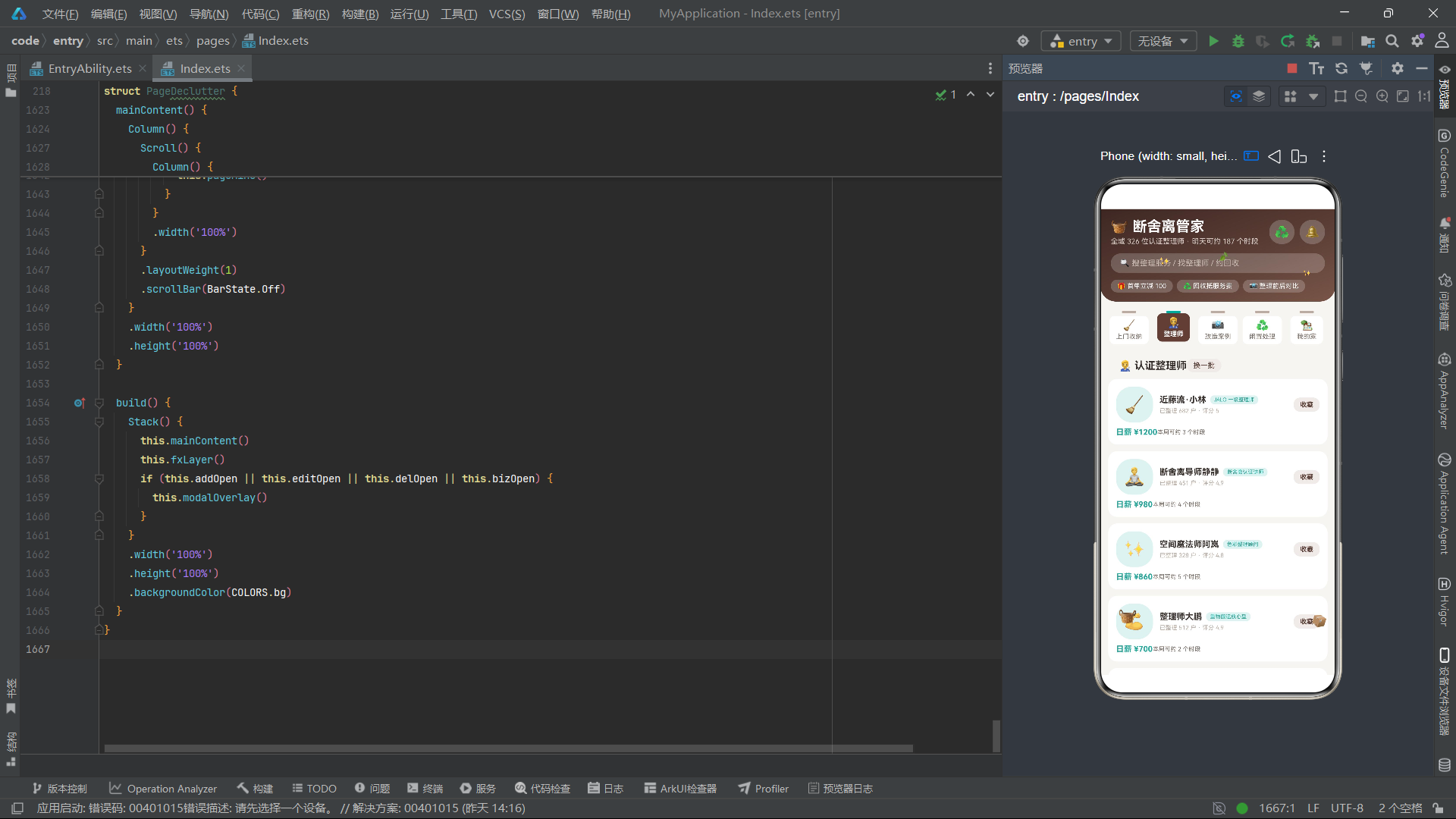
pageSvc是应用的核心业务页面,展示12个收纳服务项目。页面顶部是一个青瓷绿色引导卡片,介绍"服务三步走"流程(预检拍照→上门整理→闲置一键回收),并设置了免费预检入口按钮。下方通过ForEach遍历svcList渲染服务条目列表。
ForEach(this.svcList, (s: SvcItem) => {
  Row() {
    Text(s.icon)
      .fontSize(28)
      .padding(14)
      .backgroundColor(COLORS.primaryLight)
      .borderRadius(14)
    Column() {
      Text(s.name)
        .fontSize(13)
        .fontWeight(FontWeight.Bold)
        .fontColor(COLORS.textPrimary)
        .maxLines(1)
      Text('适用:' + s.area)
        .fontSize(10)
        .fontColor(COLORS.textSecondary)
        .margin({ top: 3 })
      Text('约 ' + s.hours.toString() + ' 小时 · 已服务 ' +
           (s.id * 268 + 90).toString() + ' 单')
        .fontSize(9)
        .fontColor(COLORS.textHint)
        .margin({ top: 2 })
    }
    .alignItems(HorizontalAlign.Start)
    .layoutWeight(1)
    .margin({ left: 10 })

    Column() {
      Text('¥' + s.price.toString())
        .fontSize(14)
        .fontWeight(FontWeight.Bold)
        .fontColor(COLORS.accent)
      Text(s.booked === 1 ? '已预约' : '预约')
        .fontSize(10)
        .fontWeight(FontWeight.Bold)
        .fontColor(s.booked === 1 ? COLORS.white : COLORS.accent)
        .padding({ left: 10, right: 10, top: 3, bottom: 3 })
        .backgroundColor(s.booked === 1 ? COLORS.primaryDark : COLORS.accentLight)
        .borderRadius(10)
        .margin({ top: 4 })
        .onClick(() => {
          s.booked = s.booked === 1 ? 0 : 1;
          this.svcList.splice(s.id - 1, 1, s);
        })
    }
    .alignItems(HorizontalAlign.End)
  }
  .width('100%')
  .padding(12)
  .backgroundColor(COLORS.cardBg)
  .borderRadius(14)
  .margin({ top: 10 })
}, (s: SvcItem) => 'sv' + s.id.toString() + '_' + s.booked.toString())
每个服务条目采用Row横向布局,左侧是emoji图标(放在浅色圆角背景中),中间是服务名称、适用区域、时长与历史订单数信息列,右侧是价格与预约按钮。预约按钮的文案与样式随booked状态动态切换:未预约时显示青瓷绿色"预约"文案配浅青色背景,已预约时显示白色"已预约"文案配深木色背景。onClick回调通过反转booked值并调用splice触发列表更新。ForEach的键值生成器返回'sv' + id + '_' + booked,将booked状态纳入键值,确保预约状态变化时该条目能正确触发重新渲染。
7.2 改造案例页 pageCase
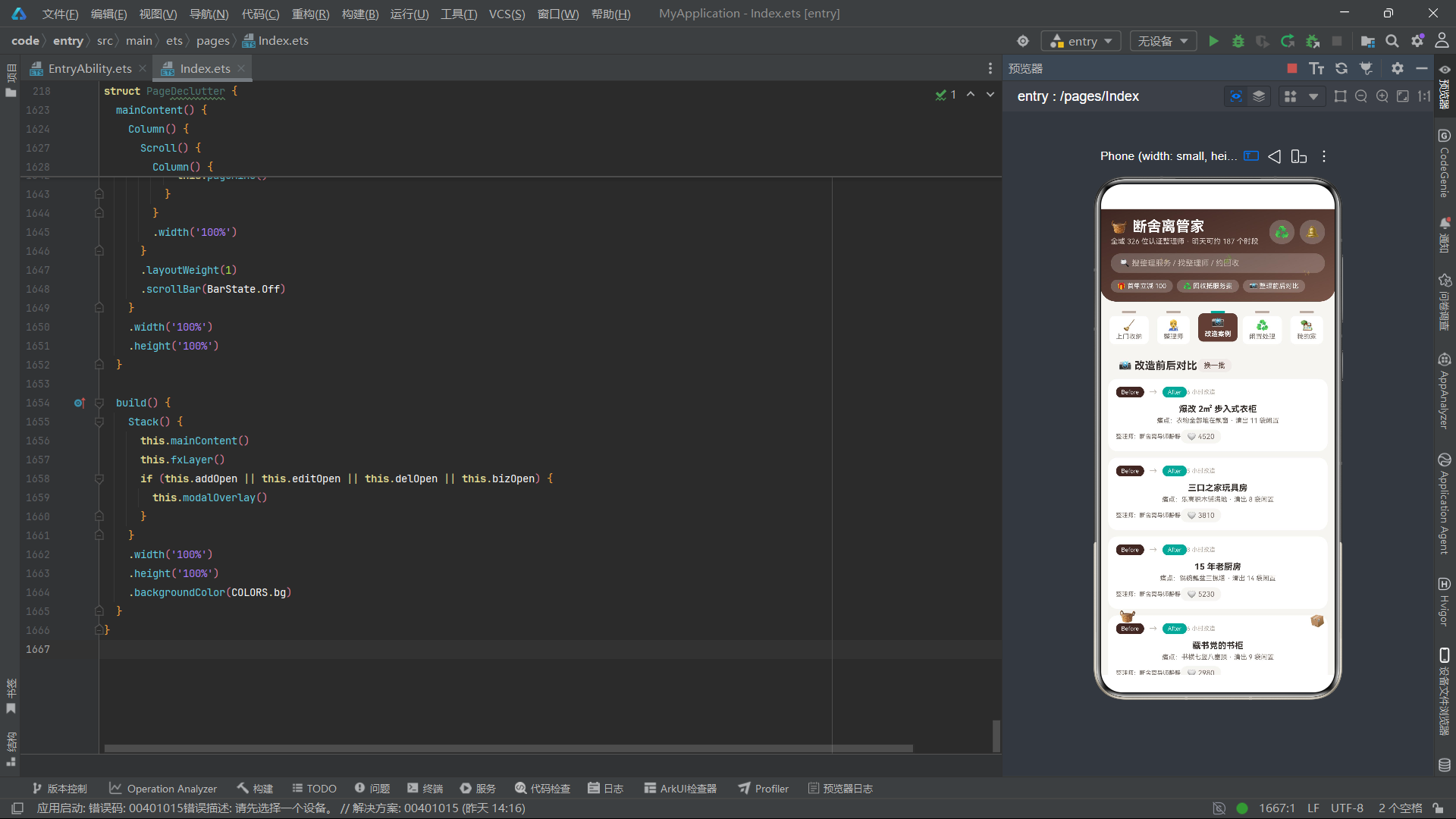
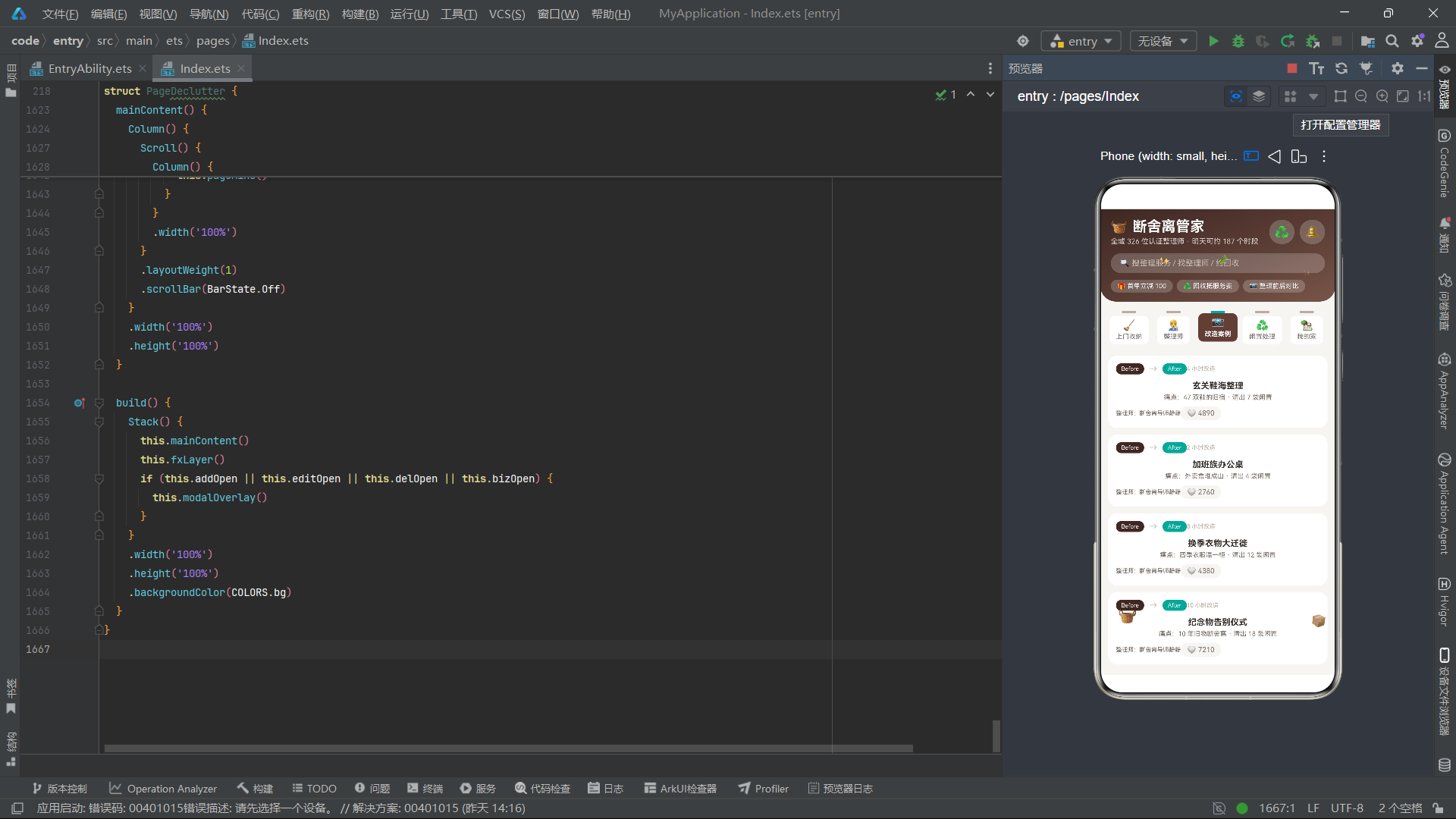
pageCase展示整理前后的对比案例,每个案例条目顶部有一个Before→After的状态标签栏,分别使用深木色和青瓷绿色背景,模拟改造前后的视觉差异。
ForEach(this.caseList, (c: CaseItem) => {
  Column() {
    Row() {
      Text('Before')
        .fontSize(9)
        .fontColor(COLORS.white)
        .padding({ left: 8, right: 8, top: 3, bottom: 3 })
        .backgroundColor(COLORS.primaryDark)
        .borderRadius(8)
      Text('→')
        .fontSize(12)
        .fontColor(COLORS.textHint)
        .margin({ left: 8 })
      Text('After')
        .fontSize(9)
        .fontColor(COLORS.white)
        .padding({ left: 8, right: 8, top: 3, bottom: 3 })
        .backgroundColor(COLORS.accent)
        .borderRadius(8)
        .margin({ left: 8 })
      Text(c.hours.toString() + ' 小时改造')
        .fontSize(9)
        .fontColor(COLORS.textHint)
        .margin({ left: 'auto' })
    }
    .width('100%')

    Text(c.room)
      .fontSize(13)
      .fontWeight(FontWeight.Bold)
      .fontColor(COLORS.textPrimary)
      .margin({ top: 10 })

    Text('痛点:' + c.issue + ' · 清出 ' + c.bags.toString() + ' 袋闲置')
      .fontSize(10)
      .fontColor(COLORS.textSecondary)
      .margin({ top: 4 })
案例的痛点描述(如"衣物全部堆在飘窗")和清出闲置袋数是该页面的核心信息点,直击用户在收纳过程中的真实困扰,展示了整理服务的实际价值。点赞按钮通过liked状态切换心形emoji(❤️/🤍)与背景色,liked为1时显示红心并加1个赞数。
7.3 我的家页面 pageMine 与月度统计柱状图
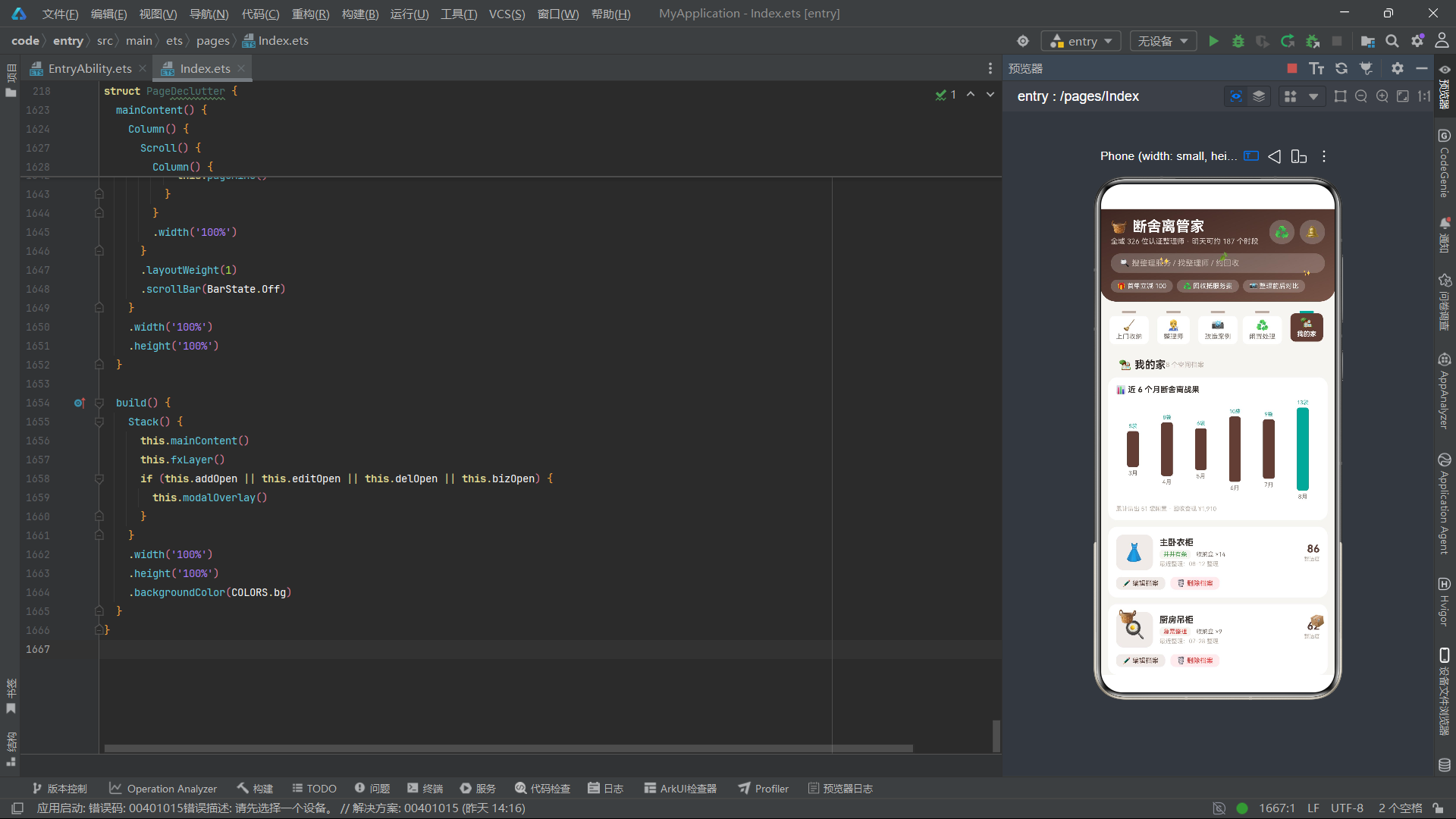
pageMine是用户的空间档案管理页面,顶部展示近6个月的断舍离战果柱状图。该柱状图通过ForEach遍历MONTH_LIST数组,为每个月份生成一个柱状条。
ForEach(MONTH_LIST, (m: MonthItem) => {
  Column() {
    Text(m.bags.toString() + '袋')
      .fontSize(8)
      .fontColor(COLORS.accent)
    Column()
      .width(18)
      .height(bagBar(m.bags))
      .backgroundColor(m.month === '8月' ? COLORS.accent : COLORS.primary)
      .borderRadius(4)
      .margin({ top: 3 })
    Text(m.month)
      .fontSize(9)
      .fontColor(COLORS.textSecondary)
      .margin({ top: 4 })
  }
  .layoutWeight(1)
  .alignItems(HorizontalAlign.Center)
}, (m: MonthItem) => 'mo' + m.id.toString())
柱状图通过bagBar函数将袋数映射为像素高度,当月(8月)的柱体使用青瓷绿色高亮,其他月份使用木棕色,形成视觉对比,突出当前月份的整理成果。每个柱体上方显示袋数标签,下方显示月份名称,构成了一个简洁而信息丰富的迷你柱状图组件。
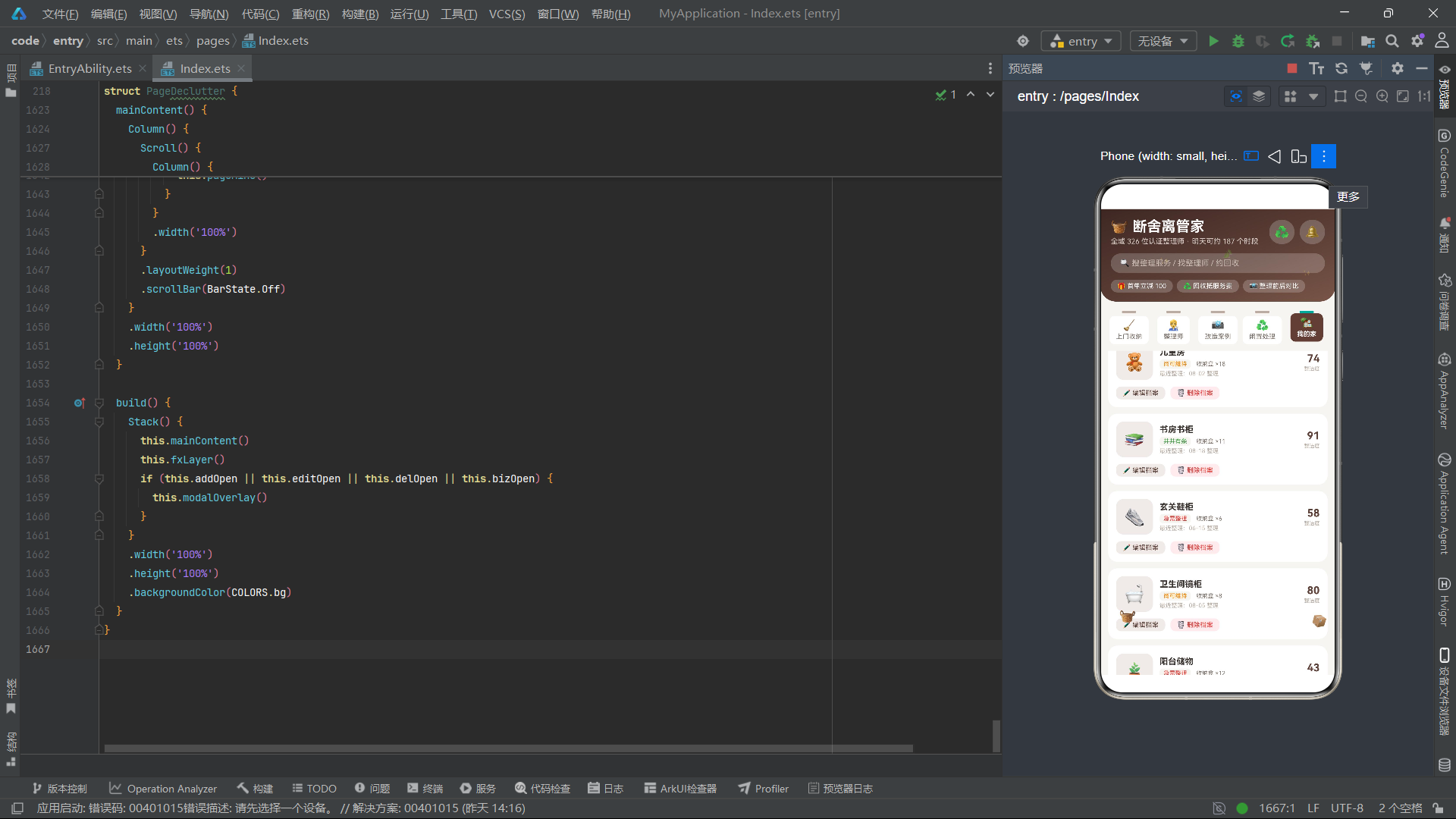
空间档案列表通过ForEach遍历roomList,每个档案展示空间名称、整洁度文字标签(通过tidyWord函数生成)、收纳盒数量、最近整理日期以及整洁度数字评分。整洁度评分使用16号粗体木棕色字体强调显示,使其成为视觉焦点。底部提供"编辑档案"和"删除档案"两个操作按钮,分别触发编辑弹框和删除警示弹框。
八、弹框组件体系
8.1 预约上门收纳弹框 modalBodyAdd (VISIT ORDER)
modalBodyAdd是预约上门收纳服务的表单弹框,标题区使用青瓷绿色背景展示英文标识"VISIT ORDER"与中文标题"预约上门收纳"。表单包含空间类型选择(衣柜/厨房/全屋/儿童房四个选项)、房屋面积步进器(30-200平方米范围),以及动态计算的费用展示。
@Builder
modalBodyAdd() {
  Column() {
    Column() {
      Text('VISIT ORDER · 上门单')
        .fontSize(9)
        .letterSpacing(2)
        .fontColor(COLORS.accent)
      Text('🧹 预约上门收纳')
        .fontSize(13)
        .fontWeight(FontWeight.Bold)
        .fontColor(COLORS.textPrimary)
        .margin({ top: 4 })
      Text('免费预检 · 不满意首小时免费')
        .fontSize(10)
        .fontColor(COLORS.textSecondary)
        .margin({ top: 3 })
    }
    .width('100%')
    .padding(12)
    .backgroundColor(COLORS.accentLight)
    .borderRadius(12)
空间类型选项使用ForEach遍历ADD_SPACES常量数组渲染,选中项使用青瓷绿背景配白色文字,未选项使用浅色背景配次要色文字。面积步进器通过incArea和decArea方法实现加减操作,范围限制在30到200之间。费用按(addSpace + 3) * 180公式动态计算,随着空间类型选择的变化自动更新。弹框底部提供取消和提交预约两个操作按钮,提交时调用doAdd方法将新预约插入svcList列表头部。
8.2 编辑空间档案弹框 modalBodyEdit (SPACE FILE)
@Builder
modalBodyEdit() {
  Column() {
    Column() {
      Text('SPACE FILE · 空间档案')
        .fontSize(9)
        .letterSpacing(2)
        .fontColor(COLORS.primary)
      Text('✏️ 编辑空间档案')
        .fontSize(13)
        .fontWeight(FontWeight.Bold)
        .fontColor(COLORS.textPrimary)
        .margin({ top: 4 })
      Text('当前编辑:主卧衣柜 · 上次整理 08-12')
        .fontSize(10)
        .fontColor(COLORS.textSecondary)
        .margin({ top: 3 })
    }
    .width('100%')
    .padding(12)
    .backgroundColor(COLORS.primaryLight)
    .borderRadius(12)
编辑弹框的标题区使用木棕色浅色背景,与预约弹框的青瓷绿色标题区形成视觉区分。表单包含整洁度自评步进器(40-98分范围,步进2分)和常用收纳风格选择(日式极简/奶油风/标签控/隐藏收纳四选一)。整洁度步进器下方通过tidyWord函数实时显示当前评分对应的文字判定,让用户直观理解评分的含义。提交时调用doEdit方法更新roomList中第一条记录的tidy和boxes属性。
8.3 删除空间档案警示弹框 modalBodyDel (REMOVE FILE)
删除弹框采用警示色设计,标题区使用深木色背景配红色标题"⚠️ REMOVE FILE · 删除空间档案",并展示三个统计指标:14个收纳盒记录将被清空、6份整理报告将被归档、前后对比照片将被保留。这种设计让用户在执行删除操作前充分了解其影响范围,体现了良好的用户保护设计。
@Builder
modalBodyDel() {
  Column() {
    Column() {
      Text('⚠️ REMOVE FILE · 删除空间档案')
        .fontSize(9)
        .letterSpacing(2)
        .fontColor(COLORS.danger)
      Text('确认删除这个空间档案吗?')
        .fontSize(14)
        .fontWeight(FontWeight.Bold)
        .fontColor(COLORS.textPrimary)
        .margin({ top: 6 })
    }
    .width('100%')
    .padding(14)
    .backgroundColor(COLORS.primaryDark)
    .borderRadius(12)

    Row() {
      Column() {
        Text('14')
          .fontSize(20)
          .fontWeight(FontWeight.Bold)
          .fontColor(COLORS.danger)
        Text('收纳盒记录清空')
          .fontSize(9)
          .fontColor(COLORS.textSecondary)
          .margin({ top: 3 })
      }
      .layoutWeight(1)
      .alignItems(HorizontalAlign.Center)
底部说明文字"删除后整洁度历史将一并清除,重新建档需重新自评;对比照片会保留在相册"进一步补充了删除影响的细节信息。确认删除按钮使用红色背景配白色文字,与取消按钮形成明确的视觉对比,引导用户谨慎操作。doDel方法通过splice从roomList中删除指定索引的记录。
8.4 闲置上门回收弹框 modalBodyBiz (RECYCLE SLIP)
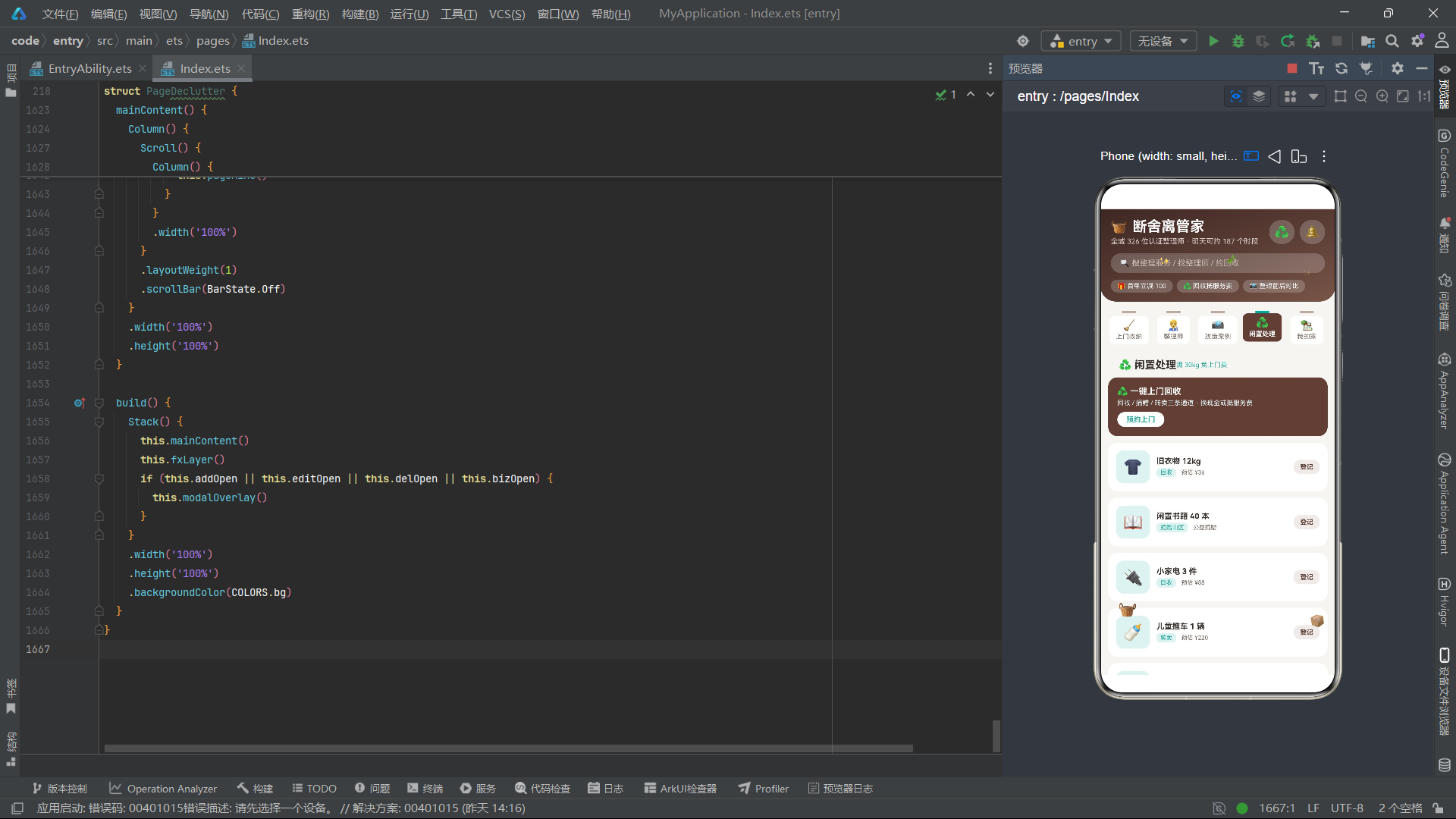
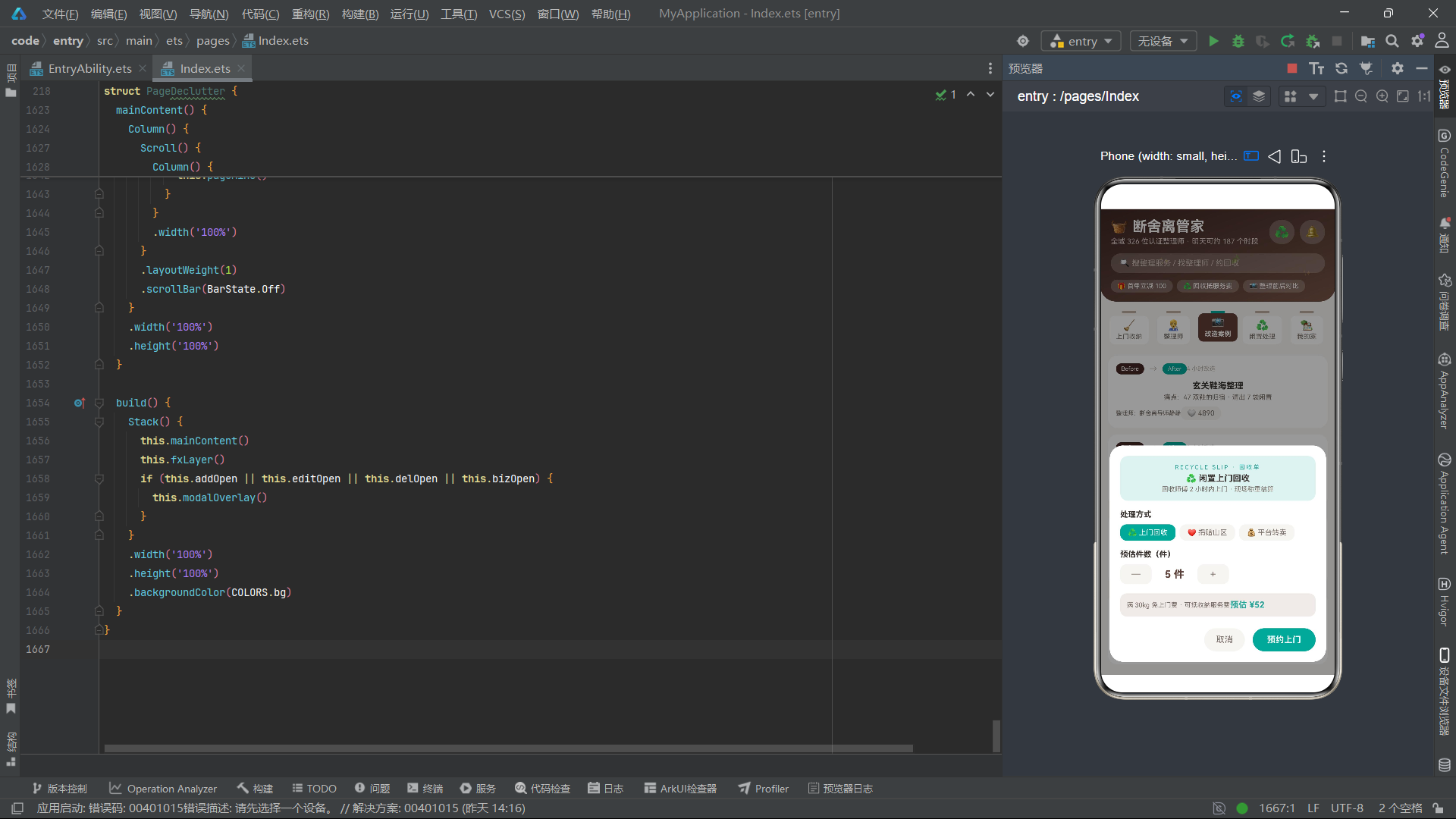
回收弹框的标题区使用青瓷绿色背景,展示"RECYCLE SLIP · 回收单"标识。表单包含处理方式选择(上门回收/捐赠山区/平台转卖三选一)和预估件数步进器(1-30件范围)。费用按bizNum * 8 + 12公式动态计算,并提示"满30kg免上门费 · 可抵收纳服务费"的优惠规则。
九、模态覆盖层与底部导航栏
9.1 modalOverlay模态覆盖层
modalOverlay通过Stack底部对齐布局实现模态弹框的覆盖层管理。底层是一个半透明黑色遮罩Column,点击时关闭所有弹框。上层是一个Column容器,根据四个弹框开关状态条件渲染对应的弹框内容。
@Builder
modalOverlay() {
  Stack({ alignContent: Alignment.Bottom }) {
    Column()
      .width('100%')
      .height('100%')
      .backgroundColor('#66000000')
      .onClick(() => {
        this.addOpen = false;
        this.editOpen = false;
        this.delOpen = false;
        this.bizOpen = false;
      })

    Column() {
      if (this.addOpen) { this.modalBodyAdd() }
      if (this.editOpen) { this.modalBodyEdit() }
      if (this.delOpen) { this.modalBodyDel() }
      if (this.bizOpen) { this.modalBodyBiz() }
    }
    .width('92%')
    .margin({ bottom: 20 })
  }
  .width('100%')
  .height('100%')
}
遮罩层使用#66000000半透明黑色(40%透明度),通过onClick关闭所有弹框状态,实现了点击遮罩关闭弹框的交互模式。弹框内容容器宽度设为92%,底部留20像素边距,确保弹框在屏幕底部呈现时不会贴边。
9.2 底部导航栏 bottomBar
底部导航栏采用5个等宽tab的布局,中间tab为突出的圆形加号按钮,通过offset上移14像素形成浮起效果,背景为青瓷绿色圆形。
Column() {
  Column() {
    Text('➕')
      .fontSize(22)
      .fontWeight(FontWeight.Bold)
      .fontColor(COLORS.white)
  }
  .width(48)
  .height(48)
  .justifyContent(FlexAlign.Center)
  .backgroundColor(COLORS.accent)
  .borderRadius(24)
  .offset({ y: -14 })
  .onClick(() => { this.addOpen = true; })
}
.layoutWeight(1)
中间的加号按钮触发预约上门弹框,是应用最核心的转化入口。两侧的四个tab分别对应收纳、整理师、案例、我的家,选中态文字使用木棕色高亮。底部栏整体使用白色背景配顶部圆角20像素,与内容区域形成清晰的视觉分隔。
十、build主架构方法
build方法是整个组件的渲染入口,通过Stack堆叠三层内容:主内容层、动效装饰层、模态弹框层。
build() {
  Stack() {
    this.mainContent()
    this.fxLayer()
    if (this.addOpen || this.editOpen || this.delOpen || this.bizOpen) {
      this.modalOverlay()
    }
  }
  .width('100%')
  .height('100%')
  .backgroundColor(COLORS.bg)
}
最底层是mainContent(包含头部、标签栏、滚动内容区),中间层是fxLayer动效装饰层(事件穿透),最上层是条件渲染的modalOverlay模态弹框层。mainContent内部通过if条件判断currentTab的值来决定渲染哪个页面构建器。这种三层堆叠架构保证了动效始终可见、弹框始终在最上层,同时各层之间互不干扰事件传递。
十一、架构流程图
上图展示了断舍离管家应用从入口组件build方法开始的完整组件树结构。Stack三层堆叠是整个架构的骨架,mainContent承载所有业务页面内容,fxLayer提供持续性的动效氛围,modalOverlay在需要时覆盖在顶层展示弹框交互。五个drawerTab标签对应五个业务页面构建器,四个modalBody弹框由各自的布尔状态变量控制显隐。底部导航栏的五个tab与内容标签形成联动关系,点击底部tab同时更新bottomTab和currentTab两个状态。
十二、数据模型与组件对比表
| 维度 | SvcItem 服务项目 | ProItem 整理师 | CaseItem 案例 | IdleItem 闲置 | RoomFileItem 空间档案 | MonthItem 月度统计 |
|---|---|---|---|---|---|---|
| 字段数量 | 7 | 8 | 7 | 6 | 6 | 4 |
| 核心状态字段 | booked (0/1) | followed (0/1) | liked (0/1) | applied (0/1) | tidy (0-100) | - |
| 装饰器 | @Observed | @Observed | @Observed | @Observed | @Observed | @Observed |
| 初始数据量 | 12条 | 10条 | 10条 | 10条 | 8条 | 6条 |
| 对应页面 | pageSvc | pagePro | pageCase | pageIdle | pageMine | pageMine |
| 弹框关联 | modalBodyAdd | - | - | modalBodyBiz | modalBodyEdit/Del | - |
| 状态更新方式 | splice替换 | splice替换 | splice替换 | splice替换 | splice替换 | 静态只读 |
| ForEach键值 | sv+id+booked | pr+id+followed | cs+id+liked | id+id+applied | rf+id+tidy | mo+id |
| 弹框组件 | 英文标识 | 标题色背景 | 功能定位 | 表单元素 | 提交方法 |
|---|---|---|---|---|---|
| modalBodyAdd | VISIT ORDER | accentLight青色 | 预约上门收纳 | 空间类型/面积步进 | doAdd |
| modalBodyEdit | SPACE FILE | primaryLight棕色 | 编辑空间档案 | 整洁度步进/风格选择 | doEdit |
| modalBodyDel | REMOVE FILE | primaryDark深棕 | 删除空间档案 | 影响统计展示 | doDel |
| modalBodyBiz | RECYCLE SLIP | accentLight青色 | 闲置上门回收 | 渠道选择/件数步进 | doBiz |
安装DevEco Studio程序

选择目标安装目录:

设置环境变量,但是需要重启一下:

新建一个空白模板:

设置API为24的模板项目:
初始化项目,自动下载相关依赖:

完整代码:
// 风格:木棕+青瓷绿;内容tab:5个单排抽屉柜式(顶部抽屉把手+抽屉面板,选中抽屉拉出上浮);底部5主tab
// 弹框:预约上门收纳(上门单VISIT ORDER)/ 编辑空间档案(空间卡SPACE FILE)/ 删除空间档案(棕青警示卡)/ 闲置上门回收(回收单RECYCLE SLIP)
// 特效:收纳篮跳动 + 灰尘闪光 + 纸箱摇摆
interface ColorPalette {
primary: string;
primaryLight: string;
primaryDark: string;
accent: string;
accentLight: string;
bg: string;
cardBg: string;
textPrimary: string;
textSecondary: string;
textHint: string;
border: string;
success: string;
warning: string;
danger: string;
white: string;
gold: string;
}
const COLORS: ColorPalette = {
primary: '#5D4037',
primaryLight: '#EFEBE9',
primaryDark: '#3E2723',
accent: '#26A69A',
accentLight: '#E0F2F1',
bg: '#F7F5F2',
cardBg: '#FFFFFF',
textPrimary: '#37302C',
textSecondary: '#7A6E66',
textHint: '#B8ACA2',
border: '#E7DFD8',
success: '#43A047',
warning: '#FB8C00',
danger: '#E53935',
white: '#FFFFFF',
gold: '#D4A24E'
};
@Observed
class SvcItem {
id: number = 0;
name: string = '';
icon: string = '';
area: string = '';
price: number = 0;
hours: number = 0;
booked: number = 0;
constructor(id: number, name: string, icon: string, area: string, price: number, hours: number, booked: number) {
this.id = id; this.name = name; this.icon = icon; this.area = area; this.price = price; this.hours = hours; this.booked = booked;
}
}
@Observed
class ProItem {
id: number = 0;
name: string = '';
avatar: string = '';
badge: string = '';
cases: number = 0;
rate: number = 0;
price: number = 0;
followed: number = 0;
constructor(id: number, name: string, avatar: string, badge: string, cases: number, rate: number, price: number, followed: number) {
this.id = id; this.name = name; this.avatar = avatar; this.badge = badge; this.cases = cases;
this.rate = rate; this.price = price; this.followed = followed;
}
}
@Observed
class CaseItem {
id: number = 0;
room: string = '';
issue: string = '';
hours: number = 0;
bags: number = 0;
likes: number = 0;
liked: number = 0;
constructor(id: number, room: string, issue: string, hours: number, bags: number, likes: number, liked: number) {
this.id = id; this.room = room; this.issue = issue; this.hours = hours; this.bags = bags; this.likes = likes; this.liked = liked;
}
}
@Observed
class IdleItem {
id: number = 0;
name: string = '';
icon: string = '';
channel: string = '';
price: number = 0;
applied: number = 0;
constructor(id: number, name: string, icon: string, channel: string, price: number, applied: number) {
this.id = id; this.name = name; this.icon = icon; this.channel = channel; this.price = price; this.applied = applied;
}
}
@Observed
class RoomFileItem {
id: number = 0;
name: string = '';
icon: string = '';
tidy: number = 0;
boxes: number = 0;
last: string = '';
constructor(id: number, name: string, icon: string, tidy: number, boxes: number, last: string) {
this.id = id; this.name = name; this.icon = icon; this.tidy = tidy; this.boxes = boxes; this.last = last;
}
}
@Observed
class MonthItem {
id: number = 0;
month: string = '';
bags: number = 0;
earned: number = 0;
constructor(id: number, month: string, bags: number, earned: number) {
this.id = id; this.month = month; this.bags = bags; this.earned = earned;
}
}
const SVC_LIST: SvcItem[] = [
new SvcItem(1, '衣柜深度整理', '👗', '3㎡ 以上衣柜', 580, 6, 0),
new SvcItem(2, '厨房锅柜断舍离', '🍳', '整体厨房', 680, 8, 0),
new SvcItem(3, '全屋搬家级整理', '🏠', '90㎡ 以上', 2680, 12, 0),
new SvcItem(4, '儿童玩具归位', '🧸', '儿童房', 480, 5, 0),
new SvcItem(5, '书柜文件归档', '📚', '书房', 520, 6, 0),
new SvcItem(6, '冰箱食品管理', '🧊', '冰箱', 380, 3, 0),
new SvcItem(7, '玄关鞋帽动线', '👟', '玄关', 420, 4, 0),
new SvcItem(8, '浴室洗漱收纳', '🛁', '卫生间', 460, 4, 0),
new SvcItem(9, '换季衣物收纳', '🍂', '全屋衣物', 780, 8, 0),
new SvcItem(10, '纪念物取舍陪聊', '📦', '全屋', 880, 10, 0),
new SvcItem(11, '搬家打包一条龙', '🚚', '不限', 1280, 10, 0),
new SvcItem(12, '办公桌急救整理', '🗂️', '工位', 180, 2, 0)
];
const PRO_LIST: ProItem[] = [
new ProItem(1, '近藤流·小林', '🧹', 'JALO 一级整理师', 682, 5.0, 1200, 0),
new ProItem(2, '断舍离导师静静', '🧘', '断舍离认证讲师', 451, 4.9, 980, 0),
new ProItem(3, '空间魔法师阿岚', '✨', '色彩整理顾问', 328, 4.8, 860, 0),
new ProItem(4, '整理师大鹏', '💪', '重物搬运放心型', 512, 4.9, 700, 0),
new ProItem(5, '亲子收纳·桃子', '👶', '儿童空间规划师', 289, 5.0, 1080, 0),
new ProItem(6, '极简主义老周', '🍃', '极简生活博主', 376, 4.7, 620, 0),
new ProItem(7, '衣橱管家Cindy', '👗', '服饰搭配+整理', 405, 4.9, 1180, 0),
new ProItem(8, '书虫档案员小蔡', '📚', '文档归档专员', 198, 4.8, 540, 0),
new ProItem(9, '搬家规划师强子', '🚚', '搬家动线设计', 623, 4.9, 880, 0),
new ProItem(10, '厨房哲学家阿慧', '🍳', '食品管理师', 265, 4.8, 760, 0)
];
const CASE_LIST: CaseItem[] = [
new CaseItem(1, '爆改 2㎡ 步入式衣柜', '衣物全部堆在飘窗', 6, 11, 4520, 0),
new CaseItem(2, '三口之家玩具房', '乐高积木铺满地', 5, 8, 3810, 0),
new CaseItem(3, '15 年老厨房', '锅碗瓢盆三摞塔', 8, 14, 5230, 0),
new CaseItem(4, '藏书党的书柜', '书横七竖八塞顶', 6, 9, 2980, 0),
new CaseItem(5, '出租屋焕新', '行李箱当床头柜', 4, 6, 6120, 0),
new CaseItem(6, '宝妈的冰箱革命', '过期调料 23 瓶', 3, 5, 3450, 0),
new CaseItem(7, '玄关鞋海整理', '47 双鞋的归宿', 4, 7, 4890, 0),
new CaseItem(8, '加班族办公桌', '外卖盒堆成山', 2, 4, 2760, 0),
new CaseItem(9, '换季衣物大迁徙', '四季衣服混一柜', 8, 12, 4380, 0),
new CaseItem(10, '纪念物告别仪式', '10 年旧物断舍离', 10, 18, 7210, 0)
];
const IDLE_LIST: IdleItem[] = [
new IdleItem(1, '旧衣物 12kg', '👕', '回收', 36, 0),
new IdleItem(2, '闲置书籍 40 本', '📖', '捐赠山区', 0, 0),
new IdleItem(3, '小家电 3 件', '🔌', '回收', 88, 0),
new IdleItem(4, '儿童推车 1 辆', '🍼', '转卖', 220, 0),
new IdleItem(5, '过季被褥 5 床', '🛏️', '回收', 45, 0),
new IdleItem(6, '旧手机 2 台', '📱', '回收', 310, 0),
new IdleItem(7, '乐器电子琴', '🎹', '转卖', 480, 0),
new IdleItem(8, '健身器材哑铃', '🏋️', '转卖', 150, 0),
new IdleItem(9, '毛绒玩具一堆', '🧸', '捐赠', 0, 0),
new IdleItem(10, '旧杂志纸箱 6 箱', '📰', '回收', 28, 0)
];
const ROOM_LIST: RoomFileItem[] = [
new RoomFileItem(1, '主卧衣柜', '👗', 86, 14, '08-12 整理'),
new RoomFileItem(2, '厨房吊柜', '🍳', 62, 9, '07-28 整理'),
new RoomFileItem(3, '儿童房', '🧸', 74, 18, '08-02 整理'),
new RoomFileItem(4, '书房书柜', '📚', 91, 11, '08-18 整理'),
new RoomFileItem(5, '玄关鞋柜', '👟', 58, 6, '06-15 整理'),
new RoomFileItem(6, '卫生间镜柜', '🛁', 80, 8, '08-05 整理'),
new RoomFileItem(7, '阳台储物', '🪴', 43, 12, '05-20 整理'),
new RoomFileItem(8, '客厅电视柜', '📺', 70, 7, '07-09 整理')
];
const MONTH_LIST: MonthItem[] = [
new MonthItem(1, '3月', 5, 120),
new MonthItem(2, '4月', 8, 260),
new MonthItem(3, '5月', 6, 180),
new MonthItem(4, '6月', 10, 420),
new MonthItem(5, '7月', 9, 350),
new MonthItem(6, '8月', 13, 580)
];
const ADD_SPACES: string[] = ['👗 衣柜', '🍳 厨房', '🏠 全屋', '🧸 儿童房'];
const EDIT_STYLES: string[] = ['日式极简', '奶油风', '标签控', '隐藏收纳'];
const BIZ_CHANNELS: string[] = ['♻️ 上门回收', '❤️ 捐赠山区', '💰 平台转卖'];
function bagBar(n: number): number {
return n * 9 + 10;
}
function tidyWord(t: number): string {
if (t >= 85) {
return '井井有条';
}
if (t >= 65) {
return '尚可维持';
}
return '急需整理';
}
@Entry
@Component
struct PageDeclutter {
@State currentTab: number = 0;
@State bottomTab: number = 0;
@State svcList: SvcItem[] = SVC_LIST;
@State proList: ProItem[] = PRO_LIST;
@State caseList: CaseItem[] = CASE_LIST;
@State idleList: IdleItem[] = IDLE_LIST;
@State roomList: RoomFileItem[] = ROOM_LIST;
@State addOpen: boolean = false;
@State editOpen: boolean = false;
@State delOpen: boolean = false;
@State bizOpen: boolean = false;
@State addSpace: number = 0;
@State addArea: number = 90;
@State editTidy: number = 86;
@State editStyle: number = 0;
@State delIndex: number = 0;
@State bizChannel: number = 0;
@State bizNum: number = 5;
@State fxTick: number = 0;
private timer: number = -1;
aboutToAppear(): void {
this.timer = setInterval(() => {
this.fxTick += 1;
}, 120);
}
aboutToDisappear(): void {
if (this.timer >= 0) {
clearInterval(this.timer);
}
}
doAdd(): void {
this.svcList.unshift(new SvcItem(995, ADD_SPACES[this.addSpace] + '整理 · 新预约', '🧹', this.addArea.toString() + '㎡ 户型', (this.addSpace + 3) * 180, 6, 1));
this.addOpen = false;
}
doEdit(): void {
if (this.roomList.length > 0) {
this.roomList[0].tidy = this.editTidy;
this.roomList[0].boxes = 10 + this.editStyle * 2;
this.roomList.splice(0, 1, this.roomList[0]);
}
this.editOpen = false;
}
doDel(): void {
if (this.delIndex >= 0 && this.delIndex < this.roomList.length) {
this.roomList.splice(this.delIndex, 1);
}
this.delOpen = false;
}
doBiz(): void {
if (this.idleList.length > 0) {
this.idleList[0].applied = 1;
this.idleList.splice(0, 1, this.idleList[0]);
}
this.bizOpen = false;
}
doChangeCase(): void {
if (this.caseList.length > 2) {
this.caseList.unshift(this.caseList[this.caseList.length - 1]);
this.caseList.splice(this.caseList.length - 1, 1);
}
}
doChangePro(): void {
if (this.proList.length > 2) {
this.proList.unshift(this.proList[this.proList.length - 1]);
this.proList.splice(this.proList.length - 1, 1);
}
}
incArea(): void {
if (this.addArea < 200) {
this.addArea += 10;
}
}
decArea(): void {
if (this.addArea > 30) {
this.addArea -= 10;
}
}
incTidy(): void {
if (this.editTidy < 98) {
this.editTidy += 2;
}
}
decTidy(): void {
if (this.editTidy > 40) {
this.editTidy -= 2;
}
}
@Builder
fxLayer() {
Column() {
Text('🧺')
.fontSize(22)
.translate({ y: this.fxTick % 4 < 2 ? 0 : -10 })
.scale({ x: this.fxTick % 2 === 0 ? 1.08 : 0.95, y: this.fxTick % 2 === 0 ? 1.08 : 0.95 })
.position({ x: 28, y: 610 })
Text('✨')
.fontSize(13)
.fontColor(COLORS.gold)
.opacity(this.fxTick % 2 === 0 ? 1 : 0.15)
.position({ x: 90, y: 72 })
Text('✨')
.fontSize(10)
.fontColor(COLORS.gold)
.opacity(this.fxTick % 3 === 1 ? 1 : 0.2)
.position({ x: 310, y: 92 })
Text('📦')
.fontSize(18)
.rotate({ angle: (this.fxTick % 5) * 8 - 16, centerX: '50%', centerY: '80%' })
.position({ x: 322, y: 620 })
Text('🍃')
.fontSize(14)
.translate({ x: this.fxTick % 4 * 6, y: this.fxTick % 3 * 4 })
.opacity(this.fxTick % 2 === 0 ? 1 : 0.4)
.position({ x: 180, y: 60 })
}
.width('100%')
.height('100%')
.hitTestBehavior(HitTestMode.None)
.position({ x: 0, y: 0 })
}
@Builder
header() {
Column() {
Row() {
Column() {
Text('🧺 断舍离管家')
.fontSize(22)
.fontWeight(FontWeight.Bold)
.fontColor(COLORS.white)
Text('全城 326 位认证整理师 · 明天可约 187 个时段')
.fontSize(11)
.fontColor('#D7CCC8')
.margin({ top: 3 })
}
.alignItems(HorizontalAlign.Start)
Row() {
Text('♻️')
.fontSize(18)
.padding(8)
.backgroundColor('#33FFFFFF')
.borderRadius(18)
.onClick(() => {
this.bizOpen = true;
})
Text('🔔')
.fontSize(18)
.padding(8)
.backgroundColor('#33FFFFFF')
.borderRadius(18)
.margin({ left: 8 })
}
}
.width('100%')
.justifyContent(FlexAlign.SpaceBetween)
.padding({ left: 16, right: 16, top: 14 })
Row() {
Text('🔍 搜整理服务 / 找整理师 / 约回收')
.fontSize(12)
.fontColor('#C9BCB4')
.padding({ left: 14, right: 14, top: 8, bottom: 8 })
.backgroundColor('#33FFFFFF')
.borderRadius(18)
.layoutWeight(1)
}
.width('100%')
.padding({ left: 16, right: 16, top: 12 })
Row() {
Text('🎁 首单立减 100')
.fontSize(10)
.fontColor(COLORS.white)
.padding({ left: 10, right: 10, top: 4, bottom: 4 })
.backgroundColor('#33FFFFFF')
.borderRadius(12)
Text('♻️ 回收抵服务费')
.fontSize(10)
.fontColor(COLORS.white)
.padding({ left: 10, right: 10, top: 4, bottom: 4 })
.backgroundColor('#33FFFFFF')
.borderRadius(12)
.margin({ left: 6 })
Text('📸 整理前后对比')
.fontSize(10)
.fontColor(COLORS.white)
.padding({ left: 10, right: 10, top: 4, bottom: 4 })
.backgroundColor('#33FFFFFF')
.borderRadius(12)
.margin({ left: 6 })
}
.width('100%')
.padding({ left: 16, right: 16, top: 10 })
}
.width('100%')
.linearGradient({
angle: 160,
colors: [['#3E2723', 0], ['#5D4037', 0.6], ['#795548', 1]]
})
.borderRadius({ bottomLeft: 24, bottomRight: 24 })
.padding({ bottom: 14 })
}
@Builder
drawerTab(name: string, icon: string, idx: number) {
Column() {
Row()
.width(22)
.height(4)
.backgroundColor(idx === this.currentTab ? COLORS.accent : COLORS.textHint)
.borderRadius(2)
.margin({ top: 4 })
Column() {
Text(icon)
.fontSize(16)
Text(name)
.fontSize(10)
.fontWeight(idx === this.currentTab ? FontWeight.Bold : FontWeight.Normal)
.fontColor(idx === this.currentTab ? COLORS.white : COLORS.textSecondary)
.margin({ top: 2 })
}
.padding({ left: 10, right: 10, top: 5, bottom: 6 })
.backgroundColor(idx === this.currentTab ? COLORS.primary : COLORS.cardBg)
.borderRadius(8)
.margin({ top: 4 })
.offset({ y: idx === this.currentTab ? -4 : 0 })
}
.layoutWeight(1)
.alignItems(HorizontalAlign.Center)
.onClick(() => {
this.currentTab = idx;
})
}
@Builder
subNav() {
Row() {
this.drawerTab('上门收纳', '🧹', 0)
this.drawerTab('整理师', '🧑🔧', 1)
this.drawerTab('改造案例', '📸', 2)
this.drawerTab('闲置处理', '♻️', 3)
this.drawerTab('我的家', '🏡', 4)
}
.width('100%')
.padding({ left: 10, right: 10, top: 10, bottom: 10 })
.backgroundColor(COLORS.bg)
}
@Builder
pageSvc() {
Column() {
Row() {
Text('🧹 上门收纳服务')
.fontSize(16)
.fontWeight(FontWeight.Bold)
.fontColor(COLORS.textPrimary)
Text('明天可约')
.fontSize(11)
.fontWeight(FontWeight.Bold)
.fontColor(COLORS.white)
.padding({ left: 12, right: 12, top: 5, bottom: 5 })
.backgroundColor(COLORS.accent)
.borderRadius(12)
.margin({ left: 'auto' })
.onClick(() => {
this.addOpen = true;
})
}
.width('100%')
.padding({ left: 16, right: 16, top: 12 })
Column() {
Text('✨ 服务三步走')
.fontSize(13)
.fontWeight(FontWeight.Bold)
.fontColor(COLORS.white)
Text('预检拍照 → 上门整理 → 闲置一键回收')
.fontSize(10)
.fontColor('#E0F2F1')
.margin({ top: 4 })
Text('免费预检')
.fontSize(11)
.fontWeight(FontWeight.Bold)
.fontColor(COLORS.primaryDark)
.padding({ left: 14, right: 14, top: 5, bottom: 5 })
.backgroundColor(COLORS.white)
.borderRadius(12)
.margin({ top: 8 })
.onClick(() => {
this.addOpen = true;
})
}
.width('100%')
.padding(14)
.alignItems(HorizontalAlign.Start)
.backgroundColor(COLORS.accent)
.borderRadius(14)
.margin({ top: 10 })
ForEach(this.svcList, (s: SvcItem) => {
Row() {
Text(s.icon)
.fontSize(28)
.padding(14)
.backgroundColor(COLORS.primaryLight)
.borderRadius(14)
Column() {
Text(s.name)
.fontSize(13)
.fontWeight(FontWeight.Bold)
.fontColor(COLORS.textPrimary)
.maxLines(1)
Text('适用:' + s.area)
.fontSize(10)
.fontColor(COLORS.textSecondary)
.margin({ top: 3 })
Text('约 ' + s.hours.toString() + ' 小时 · 已服务 ' + (s.id * 268 + 90).toString() + ' 单')
.fontSize(9)
.fontColor(COLORS.textHint)
.margin({ top: 2 })
}
.alignItems(HorizontalAlign.Start)
.layoutWeight(1)
.margin({ left: 10 })
Column() {
Text('¥' + s.price.toString())
.fontSize(14)
.fontWeight(FontWeight.Bold)
.fontColor(COLORS.accent)
Text(s.booked === 1 ? '已预约' : '预约')
.fontSize(10)
.fontWeight(FontWeight.Bold)
.fontColor(s.booked === 1 ? COLORS.white : COLORS.accent)
.padding({ left: 10, right: 10, top: 3, bottom: 3 })
.backgroundColor(s.booked === 1 ? COLORS.primaryDark : COLORS.accentLight)
.borderRadius(10)
.margin({ top: 4 })
.onClick(() => {
s.booked = s.booked === 1 ? 0 : 1;
this.svcList.splice(s.id - 1, 1, s);
})
}
.alignItems(HorizontalAlign.End)
}
.width('100%')
.padding(12)
.backgroundColor(COLORS.cardBg)
.borderRadius(14)
.margin({ top: 10 })
}, (s: SvcItem) => 'sv' + s.id.toString() + '_' + s.booked.toString())
}
.width('100%')
.padding({ left: 12, right: 12, bottom: 16 })
}
@Builder
pagePro() {
Column() {
Row() {
Text('🧑🔧 认证整理师')
.fontSize(16)
.fontWeight(FontWeight.Bold)
.fontColor(COLORS.textPrimary)
Text('换一批')
.fontSize(11)
.fontColor(COLORS.primary)
.padding({ left: 10, right: 10, top: 4, bottom: 4 })
.backgroundColor(COLORS.primaryLight)
.borderRadius(12)
.margin({ left: 'auto' })
.onClick(() => {
this.doChangePro();
})
}
.width('100%')
.padding({ left: 16, right: 16, top: 12 })
ForEach(this.proList, (p: ProItem) => {
Column() {
Row() {
Text(p.avatar)
.fontSize(26)
.padding(12)
.backgroundColor(COLORS.accentLight)
.borderRadius(24)
Column() {
Row() {
Text(p.name)
.fontSize(13)
.fontWeight(FontWeight.Bold)
.fontColor(COLORS.textPrimary)
Text(p.badge)
.fontSize(8)
.fontColor(COLORS.accent)
.padding({ left: 6, right: 6, top: 2, bottom: 2 })
.backgroundColor(COLORS.accentLight)
.borderRadius(6)
.margin({ left: 6 })
.maxLines(1)
}
Text('已整理 ' + p.cases.toString() + ' 户 · 评分 ' + p.rate.toString())
.fontSize(9)
.fontColor(COLORS.textHint)
.margin({ top: 4 })
}
.alignItems(HorizontalAlign.Start)
.layoutWeight(1)
.margin({ left: 10 })
Text(p.followed === 1 ? '已收藏' : '收藏')
.fontSize(10)
.fontWeight(FontWeight.Bold)
.fontColor(p.followed === 1 ? COLORS.white : COLORS.primary)
.padding({ left: 10, right: 10, top: 5, bottom: 5 })
.backgroundColor(p.followed === 1 ? COLORS.primaryDark : COLORS.primaryLight)
.borderRadius(10)
.onClick(() => {
p.followed = p.followed === 1 ? 0 : 1;
this.proList.splice(p.id - 1, 1, p);
})
}
.width('100%')
Row() {
Text('日薪 ¥' + p.price.toString())
.fontSize(12)
.fontWeight(FontWeight.Bold)
.fontColor(COLORS.accent)
Text('本周可约 ' + (p.id % 4 + 2).toString() + ' 个时段')
.fontSize(9)
.fontColor(COLORS.textSecondary)
.margin({ left: 'auto' })
}
.width('100%')
.margin({ top: 8 })
}
.width('100%')
.padding(12)
.backgroundColor(COLORS.cardBg)
.borderRadius(14)
.margin({ top: 10 })
}, (p: ProItem) => 'pr' + p.id.toString() + '_' + p.followed.toString())
}
.width('100%')
.padding({ left: 12, right: 12, bottom: 16 })
}
@Builder
pageCase() {
Column() {
Row() {
Text('📸 改造前后对比')
.fontSize(16)
.fontWeight(FontWeight.Bold)
.fontColor(COLORS.textPrimary)
Text('换一批')
.fontSize(11)
.fontColor(COLORS.primary)
.padding({ left: 10, right: 10, top: 4, bottom: 4 })
.backgroundColor(COLORS.primaryLight)
.borderRadius(12)
.margin({ left: 'auto' })
.onClick(() => {
this.doChangeCase();
})
}
.width('100%')
.padding({ left: 16, right: 16, top: 12 })
ForEach(this.caseList, (c: CaseItem) => {
Column() {
Row() {
Text('Before')
.fontSize(9)
.fontColor(COLORS.white)
.padding({ left: 8, right: 8, top: 3, bottom: 3 })
.backgroundColor(COLORS.primaryDark)
.borderRadius(8)
Text('→')
.fontSize(12)
.fontColor(COLORS.textHint)
.margin({ left: 8 })
Text('After')
.fontSize(9)
.fontColor(COLORS.white)
.padding({ left: 8, right: 8, top: 3, bottom: 3 })
.backgroundColor(COLORS.accent)
.borderRadius(8)
.margin({ left: 8 })
Text(c.hours.toString() + ' 小时改造')
.fontSize(9)
.fontColor(COLORS.textHint)
.margin({ left: 'auto' })
}
.width('100%')
Text(c.room)
.fontSize(13)
.fontWeight(FontWeight.Bold)
.fontColor(COLORS.textPrimary)
.margin({ top: 10 })
Text('痛点:' + c.issue + ' · 清出 ' + c.bags.toString() + ' 袋闲置')
.fontSize(10)
.fontColor(COLORS.textSecondary)
.margin({ top: 4 })
Row() {
Text('整理师:断舍离导师静静')
.fontSize(9)
.fontColor(COLORS.textSecondary)
Text(c.liked === 1 ? '❤️ ' + (c.likes + 1).toString() : '🤍 ' + c.likes.toString())
.fontSize(11)
.fontColor(c.liked === 1 ? COLORS.accent : COLORS.textSecondary)
.padding({ left: 10, right: 10, top: 4, bottom: 4 })
.backgroundColor(c.liked === 1 ? COLORS.accentLight : COLORS.bg)
.borderRadius(10)
.margin({ left: 'auto' })
.onClick(() => {
c.liked = c.liked === 1 ? 0 : 1;
this.caseList.splice(c.id - 1, 1, c);
})
}
.width('100%')
.margin({ top: 8 })
}
.width('100%')
.padding(12)
.backgroundColor(COLORS.cardBg)
.borderRadius(14)
.margin({ top: 10 })
}, (c: CaseItem) => 'cs' + c.id.toString() + '_' + c.liked.toString())
}
.width('100%')
.padding({ left: 12, right: 12, bottom: 16 })
}
@Builder
pageIdle() {
Column() {
Row() {
Text('♻️ 闲置处理')
.fontSize(16)
.fontWeight(FontWeight.Bold)
.fontColor(COLORS.textPrimary)
Text('满 30kg 免上门费')
.fontSize(10)
.fontColor(COLORS.accent)
.margin({ left: 'auto' })
}
.width('100%')
.padding({ left: 16, right: 16, top: 12 })
Column() {
Text('♻️ 一键上门回收')
.fontSize(13)
.fontWeight(FontWeight.Bold)
.fontColor(COLORS.white)
Text('回收 / 捐赠 / 转卖三条通道 · 换现金或抵服务费')
.fontSize(10)
.fontColor('#E0F2F1')
.margin({ top: 4 })
Text('预约上门')
.fontSize(11)
.fontWeight(FontWeight.Bold)
.fontColor(COLORS.accent)
.padding({ left: 14, right: 14, top: 5, bottom: 5 })
.backgroundColor(COLORS.white)
.borderRadius(12)
.margin({ top: 8 })
.onClick(() => {
this.bizOpen = true;
})
}
.width('100%')
.padding(14)
.alignItems(HorizontalAlign.Start)
.backgroundColor(COLORS.primary)
.borderRadius(14)
.margin({ top: 10 })
ForEach(this.idleList, (i: IdleItem) => {
Row() {
Text(i.icon)
.fontSize(24)
.padding(11)
.backgroundColor(COLORS.accentLight)
.borderRadius(12)
Column() {
Text(i.name)
.fontSize(12)
.fontWeight(FontWeight.Bold)
.fontColor(COLORS.textPrimary)
Row() {
Text(i.channel)
.fontSize(9)
.fontColor(COLORS.accent)
.padding({ left: 6, right: 6, top: 2, bottom: 2 })
.backgroundColor(COLORS.accentLight)
.borderRadius(6)
Text(i.price > 0 ? '预估 ¥' + i.price.toString() : '公益捐赠')
.fontSize(9)
.fontColor(COLORS.textSecondary)
.margin({ left: 8 })
}
.margin({ top: 3 })
}
.alignItems(HorizontalAlign.Start)
.layoutWeight(1)
.margin({ left: 10 })
Text(i.applied === 1 ? '已登记' : '登记')
.fontSize(10)
.fontWeight(FontWeight.Bold)
.fontColor(i.applied === 1 ? COLORS.white : COLORS.primary)
.padding({ left: 10, right: 10, top: 5, bottom: 5 })
.backgroundColor(i.applied === 1 ? COLORS.primaryDark : COLORS.primaryLight)
.borderRadius(10)
.onClick(() => {
i.applied = i.applied === 1 ? 0 : 1;
this.idleList.splice(i.id - 1, 1, i);
})
}
.width('100%')
.padding(12)
.backgroundColor(COLORS.cardBg)
.borderRadius(14)
.margin({ top: 10 })
}, (i: IdleItem) => 'id' + i.id.toString() + '_' + i.applied.toString())
}
.width('100%')
.padding({ left: 12, right: 12, bottom: 16 })
}
@Builder
pageMine() {
Column() {
Row() {
Text('🏡 我的家')
.fontSize(16)
.fontWeight(FontWeight.Bold)
.fontColor(COLORS.textPrimary)
Text('8 个空间档案')
.fontSize(10)
.fontColor(COLORS.textHint)
.margin({ left: 'auto' })
}
.width('100%')
.padding({ left: 16, right: 16, top: 12 })
Column() {
Text('📊 近 6 个月断舍离战果')
.fontSize(12)
.fontWeight(FontWeight.Bold)
.fontColor(COLORS.textPrimary)
Row() {
ForEach(MONTH_LIST, (m: MonthItem) => {
Column() {
Text(m.bags.toString() + '袋')
.fontSize(8)
.fontColor(COLORS.accent)
Column()
.width(18)
.height(bagBar(m.bags))
.backgroundColor(m.month === '8月' ? COLORS.accent : COLORS.primary)
.borderRadius(4)
.margin({ top: 3 })
Text(m.month)
.fontSize(9)
.fontColor(COLORS.textSecondary)
.margin({ top: 4 })
}
.layoutWeight(1)
.alignItems(HorizontalAlign.Center)
}, (m: MonthItem) => 'mo' + m.id.toString())
}
.margin({ top: 8 })
Text('累计清出 51 袋闲置 · 回收变现 ¥1,910')
.fontSize(9)
.fontColor(COLORS.textHint)
.margin({ top: 8 })
}
.width('100%')
.padding(12)
.alignItems(HorizontalAlign.Start)
.backgroundColor(COLORS.cardBg)
.borderRadius(14)
.margin({ top: 10 })
ForEach(this.roomList, (r: RoomFileItem, ri: number) => {
Column() {
Row() {
Text(r.icon)
.fontSize(26)
.padding(12)
.backgroundColor(COLORS.primaryLight)
.borderRadius(12)
Column() {
Text(r.name)
.fontSize(13)
.fontWeight(FontWeight.Bold)
.fontColor(COLORS.textPrimary)
Row() {
Text(tidyWord(r.tidy))
.fontSize(9)
.fontColor(r.tidy >= 85 ? COLORS.success : (r.tidy >= 65 ? COLORS.warning : COLORS.danger))
.padding({ left: 6, right: 6, top: 2, bottom: 2 })
.backgroundColor(COLORS.bg)
.borderRadius(6)
Text('收纳盒 ×' + r.boxes.toString())
.fontSize(9)
.fontColor(COLORS.textSecondary)
.margin({ left: 8 })
}
.margin({ top: 3 })
Text('最近整理:' + r.last)
.fontSize(9)
.fontColor(COLORS.textHint)
.margin({ top: 2 })
}
.alignItems(HorizontalAlign.Start)
.layoutWeight(1)
.margin({ left: 10 })
Column() {
Text(r.tidy.toString())
.fontSize(16)
.fontWeight(FontWeight.Bold)
.fontColor(COLORS.primary)
Text('整洁度')
.fontSize(8)
.fontColor(COLORS.textHint)
.margin({ top: 2 })
}
.alignItems(HorizontalAlign.End)
}
.width('100%')
Row() {
Text('✏️ 编辑档案')
.fontSize(10)
.fontColor(COLORS.primary)
.padding({ left: 10, right: 10, top: 4, bottom: 4 })
.backgroundColor(COLORS.primaryLight)
.borderRadius(8)
.onClick(() => {
this.editOpen = true;
})
Text('🗑️ 删除档案')
.fontSize(10)
.fontColor(COLORS.danger)
.padding({ left: 10, right: 10, top: 4, bottom: 4 })
.backgroundColor('#FFEBEE')
.borderRadius(8)
.margin({ left: 8 })
.onClick(() => {
this.delIndex = ri;
this.delOpen = true;
})
}
.width('100%')
.margin({ top: 10 })
}
.width('100%')
.padding(12)
.backgroundColor(COLORS.cardBg)
.borderRadius(14)
.margin({ top: 10 })
}, (r: RoomFileItem) => 'rf' + r.id.toString() + '_' + r.tidy.toString())
}
.width('100%')
.padding({ left: 12, right: 12, bottom: 16 })
}
@Builder
modalBodyAdd() {
Column() {
Column() {
Text('VISIT ORDER · 上门单')
.fontSize(9)
.letterSpacing(2)
.fontColor(COLORS.accent)
Text('🧹 预约上门收纳')
.fontSize(13)
.fontWeight(FontWeight.Bold)
.fontColor(COLORS.textPrimary)
.margin({ top: 4 })
Text('免费预检 · 不满意首小时免费')
.fontSize(10)
.fontColor(COLORS.textSecondary)
.margin({ top: 3 })
}
.width('100%')
.padding(12)
.backgroundColor(COLORS.accentLight)
.borderRadius(12)
Column() {
Text('空间类型')
.fontSize(12)
.fontWeight(FontWeight.Bold)
.fontColor(COLORS.textPrimary)
Row() {
ForEach(ADD_SPACES, (sp: string, si: number) => {
Text(sp)
.fontSize(11)
.fontColor(this.addSpace === si ? COLORS.white : COLORS.textSecondary)
.padding({ left: 10, right: 10, top: 6, bottom: 6 })
.backgroundColor(this.addSpace === si ? COLORS.accent : COLORS.bg)
.borderRadius(10)
.margin({ right: 6 })
.onClick(() => {
this.addSpace = si;
})
}, (sp: string) => 'sp' + sp)
}
.margin({ top: 8 })
}
.width('100%')
.alignItems(HorizontalAlign.Start)
.margin({ top: 14 })
Column() {
Text('房屋面积(㎡)')
.fontSize(12)
.fontWeight(FontWeight.Bold)
.fontColor(COLORS.textPrimary)
Row() {
Text('-')
.fontSize(16)
.fontColor(COLORS.textSecondary)
.padding({ left: 16, right: 16, top: 6, bottom: 6 })
.backgroundColor(COLORS.bg)
.borderRadius(10)
.onClick(() => {
this.decArea();
})
Text(this.addArea.toString() + ' ㎡')
.fontSize(16)
.fontWeight(FontWeight.Bold)
.fontColor(COLORS.primary)
.padding({ left: 20, right: 20 })
Text('+')
.fontSize(16)
.fontColor(COLORS.textSecondary)
.padding({ left: 16, right: 16, top: 6, bottom: 6 })
.backgroundColor(COLORS.bg)
.borderRadius(10)
.onClick(() => {
this.incArea();
})
}
.margin({ top: 8 })
}
.width('100%')
.alignItems(HorizontalAlign.Start)
.margin({ top: 14 })
Row() {
Text('含收纳盒 10 个 · 整理师上门交通')
.fontSize(10)
.fontColor(COLORS.textSecondary)
Text('¥' + ((this.addSpace + 3) * 180).toString())
.fontSize(13)
.fontWeight(FontWeight.Bold)
.fontColor(COLORS.accent)
.margin({ left: 'auto' })
}
.width('100%')
.padding(10)
.backgroundColor(COLORS.primaryLight)
.borderRadius(10)
.margin({ top: 14 })
Row() {
Text('取消')
.fontSize(13)
.fontColor(COLORS.textSecondary)
.padding({ left: 18, right: 18, top: 10, bottom: 10 })
.backgroundColor(COLORS.bg)
.borderRadius(20)
.onClick(() => {
this.addOpen = false;
})
Text('提交预约')
.fontSize(13)
.fontWeight(FontWeight.Bold)
.fontColor(COLORS.white)
.padding({ left: 22, right: 22, top: 10, bottom: 10 })
.backgroundColor(COLORS.accent)
.borderRadius(20)
.margin({ left: 12 })
.onClick(() => {
this.doAdd();
})
}
.width('100%')
.justifyContent(FlexAlign.End)
.margin({ top: 18 })
}
.width('100%')
.padding(16)
.backgroundColor(COLORS.cardBg)
.borderRadius(20)
.constraintSize({ maxHeight: '80%' })
}
@Builder
modalBodyEdit() {
Column() {
Column() {
Text('SPACE FILE · 空间档案')
.fontSize(9)
.letterSpacing(2)
.fontColor(COLORS.primary)
Text('✏️ 编辑空间档案')
.fontSize(13)
.fontWeight(FontWeight.Bold)
.fontColor(COLORS.textPrimary)
.margin({ top: 4 })
Text('当前编辑:主卧衣柜 · 上次整理 08-12')
.fontSize(10)
.fontColor(COLORS.textSecondary)
.margin({ top: 3 })
}
.width('100%')
.padding(12)
.backgroundColor(COLORS.primaryLight)
.borderRadius(12)
Column() {
Text('整洁度自评(40-98)')
.fontSize(12)
.fontWeight(FontWeight.Bold)
.fontColor(COLORS.textPrimary)
Row() {
Text('-')
.fontSize(16)
.fontColor(COLORS.textSecondary)
.padding({ left: 16, right: 16, top: 6, bottom: 6 })
.backgroundColor(COLORS.bg)
.borderRadius(10)
.onClick(() => {
this.decTidy();
})
Text(this.editTidy.toString() + ' 分')
.fontSize(16)
.fontWeight(FontWeight.Bold)
.fontColor(COLORS.primary)
.padding({ left: 20, right: 20 })
Text('+')
.fontSize(16)
.fontColor(COLORS.textSecondary)
.padding({ left: 16, right: 16, top: 6, bottom: 6 })
.backgroundColor(COLORS.bg)
.borderRadius(10)
.onClick(() => {
this.incTidy();
})
}
.margin({ top: 8 })
Text('当前判定:' + tidyWord(this.editTidy))
.fontSize(10)
.fontColor(COLORS.textSecondary)
.margin({ top: 6 })
}
.width('100%')
.alignItems(HorizontalAlign.Start)
.margin({ top: 14 })
Column() {
Text('常用收纳风格')
.fontSize(12)
.fontWeight(FontWeight.Bold)
.fontColor(COLORS.textPrimary)
Row() {
ForEach(EDIT_STYLES, (st: string, si: number) => {
Text(st)
.fontSize(11)
.fontColor(this.editStyle === si ? COLORS.white : COLORS.textSecondary)
.padding({ left: 10, right: 10, top: 6, bottom: 6 })
.backgroundColor(this.editStyle === si ? COLORS.accent : COLORS.bg)
.borderRadius(10)
.margin({ right: 6 })
.onClick(() => {
this.editStyle = si;
})
}, (st: string) => 'st' + st)
}
.margin({ top: 8 })
}
.width('100%')
.alignItems(HorizontalAlign.Start)
.margin({ top: 14 })
Row() {
Text('取消')
.fontSize(13)
.fontColor(COLORS.textSecondary)
.padding({ left: 18, right: 18, top: 10, bottom: 10 })
.backgroundColor(COLORS.bg)
.borderRadius(20)
.onClick(() => {
this.editOpen = false;
})
Text('保存档案')
.fontSize(13)
.fontWeight(FontWeight.Bold)
.fontColor(COLORS.white)
.padding({ left: 22, right: 22, top: 10, bottom: 10 })
.backgroundColor(COLORS.primary)
.borderRadius(20)
.margin({ left: 12 })
.onClick(() => {
this.doEdit();
})
}
.width('100%')
.justifyContent(FlexAlign.End)
.margin({ top: 18 })
}
.width('100%')
.padding(16)
.backgroundColor(COLORS.cardBg)
.borderRadius(20)
.constraintSize({ maxHeight: '80%' })
}
@Builder
modalBodyDel() {
Column() {
Column() {
Text('⚠️ REMOVE FILE · 删除空间档案')
.fontSize(9)
.letterSpacing(2)
.fontColor(COLORS.danger)
Text('确认删除这个空间档案吗?')
.fontSize(14)
.fontWeight(FontWeight.Bold)
.fontColor(COLORS.textPrimary)
.margin({ top: 6 })
}
.width('100%')
.padding(14)
.backgroundColor(COLORS.primaryDark)
.borderRadius(12)
Row() {
Column() {
Text('14')
.fontSize(20)
.fontWeight(FontWeight.Bold)
.fontColor(COLORS.danger)
Text('收纳盒记录清空')
.fontSize(9)
.fontColor(COLORS.textSecondary)
.margin({ top: 3 })
}
.layoutWeight(1)
.alignItems(HorizontalAlign.Center)
Column() {
Text('6')
.fontSize(20)
.fontWeight(FontWeight.Bold)
.fontColor(COLORS.danger)
Text('整理报告归档')
.fontSize(9)
.fontColor(COLORS.textSecondary)
.margin({ top: 3 })
}
.layoutWeight(1)
.alignItems(HorizontalAlign.Center)
Column() {
Text('保留')
.fontSize(20)
.fontWeight(FontWeight.Bold)
.fontColor(COLORS.accent)
Text('前后对比照片')
.fontSize(9)
.fontColor(COLORS.textSecondary)
.margin({ top: 3 })
}
.layoutWeight(1)
.alignItems(HorizontalAlign.Center)
}
.width('100%')
.padding(12)
.backgroundColor(COLORS.cardBg)
.borderRadius(12)
.margin({ top: 14 })
Text('删除后整洁度历史将一并清除,重新建档需重新自评;对比照片会保留在相册。')
.fontSize(10)
.fontColor(COLORS.textSecondary)
.margin({ top: 12 })
Row() {
Text('取消')
.fontSize(13)
.fontColor(COLORS.textSecondary)
.padding({ left: 18, right: 18, top: 10, bottom: 10 })
.backgroundColor(COLORS.bg)
.borderRadius(20)
.onClick(() => {
this.delOpen = false;
})
Text('确认删除')
.fontSize(13)
.fontWeight(FontWeight.Bold)
.fontColor(COLORS.white)
.padding({ left: 22, right: 22, top: 10, bottom: 10 })
.backgroundColor(COLORS.danger)
.borderRadius(20)
.margin({ left: 12 })
.onClick(() => {
this.doDel();
})
}
.width('100%')
.justifyContent(FlexAlign.End)
.margin({ top: 18 })
}
.width('100%')
.padding(16)
.backgroundColor(COLORS.cardBg)
.borderRadius(20)
.constraintSize({ maxHeight: '80%' })
}
@Builder
modalBodyBiz() {
Column() {
Column() {
Text('RECYCLE SLIP · 回收单')
.fontSize(9)
.letterSpacing(2)
.fontColor(COLORS.accent)
Text('♻️ 闲置上门回收')
.fontSize(13)
.fontWeight(FontWeight.Bold)
.fontColor(COLORS.textPrimary)
.margin({ top: 4 })
Text('回收师傅 2 小时内上门 · 现场称重结算')
.fontSize(10)
.fontColor(COLORS.textSecondary)
.margin({ top: 3 })
}
.width('100%')
.padding(12)
.backgroundColor(COLORS.accentLight)
.borderRadius(12)
Column() {
Text('处理方式')
.fontSize(12)
.fontWeight(FontWeight.Bold)
.fontColor(COLORS.textPrimary)
Row() {
ForEach(BIZ_CHANNELS, (ch: string, ci: number) => {
Text(ch)
.fontSize(11)
.fontColor(this.bizChannel === ci ? COLORS.white : COLORS.textSecondary)
.padding({ left: 12, right: 12, top: 6, bottom: 6 })
.backgroundColor(this.bizChannel === ci ? COLORS.accent : COLORS.bg)
.borderRadius(10)
.margin({ right: 6 })
.onClick(() => {
this.bizChannel = ci;
})
}, (ch: string) => 'ch' + ch)
}
.margin({ top: 8 })
}
.width('100%')
.alignItems(HorizontalAlign.Start)
.margin({ top: 14 })
Column() {
Text('预估件数(件)')
.fontSize(12)
.fontWeight(FontWeight.Bold)
.fontColor(COLORS.textPrimary)
Row() {
Text('-')
.fontSize(16)
.fontColor(COLORS.textSecondary)
.padding({ left: 16, right: 16, top: 6, bottom: 6 })
.backgroundColor(COLORS.bg)
.borderRadius(10)
.onClick(() => {
if (this.bizNum > 1) {
this.bizNum -= 1;
}
})
Text(this.bizNum.toString() + ' 件')
.fontSize(16)
.fontWeight(FontWeight.Bold)
.fontColor(COLORS.primary)
.padding({ left: 20, right: 20 })
Text('+')
.fontSize(16)
.fontColor(COLORS.textSecondary)
.padding({ left: 16, right: 16, top: 6, bottom: 6 })
.backgroundColor(COLORS.bg)
.borderRadius(10)
.onClick(() => {
if (this.bizNum < 30) {
this.bizNum += 1;
}
})
}
.margin({ top: 8 })
}
.width('100%')
.alignItems(HorizontalAlign.Start)
.margin({ top: 14 })
Row() {
Text('满 30kg 免上门费 · 可抵收纳服务费')
.fontSize(10)
.fontColor(COLORS.textSecondary)
Text('预估 ¥' + (this.bizNum * 8 + 12).toString())
.fontSize(13)
.fontWeight(FontWeight.Bold)
.fontColor(COLORS.accent)
.margin({ left: 'auto' })
}
.width('100%')
.padding(10)
.backgroundColor(COLORS.primaryLight)
.borderRadius(10)
.margin({ top: 14 })
Row() {
Text('取消')
.fontSize(13)
.fontColor(COLORS.textSecondary)
.padding({ left: 18, right: 18, top: 10, bottom: 10 })
.backgroundColor(COLORS.bg)
.borderRadius(20)
.onClick(() => {
this.bizOpen = false;
})
Text('预约上门')
.fontSize(13)
.fontWeight(FontWeight.Bold)
.fontColor(COLORS.white)
.padding({ left: 22, right: 22, top: 10, bottom: 10 })
.backgroundColor(COLORS.accent)
.borderRadius(20)
.margin({ left: 12 })
.onClick(() => {
this.doBiz();
})
}
.width('100%')
.justifyContent(FlexAlign.End)
.margin({ top: 18 })
}
.width('100%')
.padding(16)
.backgroundColor(COLORS.cardBg)
.borderRadius(20)
.constraintSize({ maxHeight: '80%' })
}
@Builder
modalOverlay() {
Stack({ alignContent: Alignment.Bottom }) {
Column()
.width('100%')
.height('100%')
.backgroundColor('#66000000')
.onClick(() => {
this.addOpen = false;
this.editOpen = false;
this.delOpen = false;
this.bizOpen = false;
})
Column() {
if (this.addOpen) {
this.modalBodyAdd()
}
if (this.editOpen) {
this.modalBodyEdit()
}
if (this.delOpen) {
this.modalBodyDel()
}
if (this.bizOpen) {
this.modalBodyBiz()
}
}
.width('92%')
.margin({ bottom: 20 })
}
.width('100%')
.height('100%')
}
@Builder
bottomBar() {
Row() {
Column() {
Text('🧹')
.fontSize(20)
Text('收纳')
.fontSize(10)
.fontColor(this.bottomTab === 0 ? COLORS.primary : COLORS.textHint)
.margin({ top: 2 })
}
.layoutWeight(1)
.onClick(() => {
this.bottomTab = 0;
this.currentTab = 0;
})
Column() {
Text('🧑🔧')
.fontSize(20)
Text('整理师')
.fontSize(10)
.fontColor(this.bottomTab === 1 ? COLORS.primary : COLORS.textHint)
.margin({ top: 2 })
}
.layoutWeight(1)
.onClick(() => {
this.bottomTab = 1;
this.currentTab = 1;
})
Column() {
Column() {
Text('➕')
.fontSize(22)
.fontWeight(FontWeight.Bold)
.fontColor(COLORS.white)
}
.width(48)
.height(48)
.justifyContent(FlexAlign.Center)
.backgroundColor(COLORS.accent)
.borderRadius(24)
.offset({ y: -14 })
.onClick(() => {
this.addOpen = true;
})
}
.layoutWeight(1)
Column() {
Text('📸')
.fontSize(20)
Text('案例')
.fontSize(10)
.fontColor(this.bottomTab === 3 ? COLORS.primary : COLORS.textHint)
.margin({ top: 2 })
}
.layoutWeight(1)
.onClick(() => {
this.bottomTab = 3;
this.currentTab = 2;
})
Column() {
Text('🏡')
.fontSize(20)
Text('我的家')
.fontSize(10)
.fontColor(this.bottomTab === 4 ? COLORS.primary : COLORS.textHint)
.margin({ top: 2 })
}
.layoutWeight(1)
.onClick(() => {
this.bottomTab = 4;
this.currentTab = 4;
})
}
.width('100%')
.padding({ top: 8, bottom: 8 })
.backgroundColor(COLORS.cardBg)
.borderRadius({ topLeft: 20, topRight: 20 })
}
@Builder
mainContent() {
Column() {
this.header()
this.subNav()
Scroll() {
Column() {
if (this.currentTab === 0) {
this.pageSvc()
}
if (this.currentTab === 1) {
this.pagePro()
}
if (this.currentTab === 2) {
this.pageCase()
}
if (this.currentTab === 3) {
this.pageIdle()
}
if (this.currentTab === 4) {
this.pageMine()
}
}
.width('100%')
}
.layoutWeight(1)
.scrollBar(BarState.Off)
}
.width('100%')
.height('100%')
}
build() {
Stack() {
this.mainContent()
this.fxLayer()
if (this.addOpen || this.editOpen || this.delOpen || this.bizOpen) {
this.modalOverlay()
}
}
.width('100%')
.height('100%')
.backgroundColor(COLORS.bg)
}
}
十三、总结
通过对断舍离管家应用源代码的逐段深入分析,我们可以清晰地看到HarmonyOS ArkTS API 24在构建垂直服务社区应用时的强大表达能力。该应用以收纳师上门服务为核心业务场景,通过六个@Observed数据模型类构建了完整的数据层,通过@State状态变量与@Builder构建器实现了视图与逻辑的响应式绑定,通过定时器驱动的fxTick变量配合translate/scale/rotate/opacity变换属性构建了低开销的持续性动效系统。木棕与青瓷绿的色彩体系不仅传递了温暖与清爽并存的收纳理念,也通过ColorPalette接口实现了全局色彩管理的类型安全。
在交互设计层面,抽屉柜式标签栏将物理世界收纳家具的隐喻引入数字界面,通过offset上移和背景色切换模拟抽屉拉出的物理效果,增强了主题沉浸感。四个弹框组件通过统一的modalOverlay覆盖层管理模式,实现了预约、编辑、删除、回收四类核心操作的模态交互,每个弹框都拥有独立的英文标识(VISIT ORDER、SPACE FILE、REMOVE FILE、RECYCLE SLIP)与中英文双语标题,体现了品牌识别的一致性设计。底部导航栏的中间加号按钮通过offset上移和圆形背景色形成了浮起式设计,作为核心转化入口引导用户发起新预约。
在数据流管理方面,应用通过splice方法触发@Observed数组的响应式更新,ForEach的键值生成器将状态字段(booked、followed、liked、applied、tidy)纳入键值计算,确保了状态变化时对应条目的精确重新渲染。doAdd、doEdit、doDel、doBiz四个业务方法分别处理四类弹框的提交逻辑,doChangeCase和doChangePro通过unshift+splice末尾删除的方式实现了列表轮转刷新效果。所有方法都遵循先修改数据再关闭弹框的顺序,保证了UI状态与数据的一致性。
在性能优化方面,120毫秒间隔的setInterval定时器是整个动效系统唯一的定时驱动源,fxTick通过取模运算将无限递增的整数映射为有限的周期状态空间,不同元素采用不同的取模基数(2、3、4、5)实现了动画节奏的错位效果。hitTestBehavior(HitTestMode.None)确保了动效层不拦截下层交互事件。constraintSize({ maxHeight: ‘80%’ })限制了弹框的最大高度,scrollBar(BarState.Off)隐藏了滚动条,这些细节处理共同营造了沉浸式的用户体验。

openEuler 是由开放原子开源基金会孵化的全场景开源操作系统项目,面向数字基础设施四大核心场景(服务器、云计算、边缘计算、嵌入式),全面支持 ARM、x86、RISC-V、loongArch、PowerPC、SW-64 等多样性计算架构
更多推荐

 1
1 0
0- 0


 已为社区贡献2条内容

所有评论(0)