HarmonyOS 6.1.1与ArkTS API 24开发全解析——拾光机上门宠物摄影应用中相机机身式Tab架构与美团类服务场景的深度技术剖析
HarmonyOS 6.1.1代表了华为在全场景分布式操作系统领域的又一次技术飞跃。在这个版本中,ArkTS作为核心开发语言已经发展到API 24阶段,形成了完整的声明式UI编程体系、响应式状态管理框架和跨设备分布式能力集。ArkTS以TypeScript为语言基座,在保留静态类型系统优势的同时,通过@Component、@State、@Observed、@Builder等装饰器系统,将声明式UI的理念深度融入语言层面。开发者编写的每一行ArkTS代码都会被编译器优化为高效的声明式渲染指令,由框架的渲染引擎执行最小化的DOM更新,确保应用在各种设备上都能保持60fps的流畅体验。
在HarmonyOS ArkTS API 24的生态中,声明式UI的核心价值在于"状态即视图"的设计哲学。开发者无需手动操作DOM节点、无需调用appendChild或removeChild、无需管理视图更新队列,只需要定义好数据模型与状态变量,描述界面在任意状态下的呈现效果,框架便会自动建立从状态到视图的响应式映射链路。在构建上门宠物摄影这类需要展示套系列表、摄影师档期、样片画廊、道具库存和订单状态等多维度信息的场景中,这种开发范式极大地简化了代码复杂度。用户的每一次收藏样片、切换风格标签、调整精修张数操作,都会通过@State装饰器触发对应UI组件的精准更新,无需开发者手动刷新整个列表。
美团类场景在本地生活服务领域的商业模式已经相当成熟。其核心在于将垂直服务(如上门宠物摄影)通过平台化运营,实现"搜索发现-查看套系-选摄影师-预约下单-上门拍摄-出片交付"的完整闭环。在上门宠物摄影这一细分赛道中,应用需要展示不同风格的拍摄套系(日系清新/户外跟拍/古风汉服/胶片质感)、签约摄影师档期、样片画廊、道具借用情况和订单全流程状态。这类应用对视觉沉浸感、信息层级和操作引导有特殊要求——用户通常是宠物主人,情感驱动较强,需要通过样片画廊和摄影师风格快速建立信任并完成预约决策。
在视觉交互层面,本应用创新性地采用了"相机机身式内容Tab"的设计模式。每个Tab项被设计为相机的物理形态——闪光灯(顶部矩形)、机身(矩形主体+圆形镜头)和标签名称,模拟真实相机的结构特征。这种设计不仅强化了"拾光机·宠物摄影"的品牌主题,也通过物理隐喻增强了用户对功能导航的认知。当选中某个Tab时,闪光灯变为强调色、机身变为主色调、镜头变为强调色,配合文字加粗和背景色切换,形成清晰的多层级选中态反馈。配合静态渐变头部和相机/宠物主题的浮动emoji粒子动画层,整个应用呈现出温暖柔和的摄影工作室氛围。
在数据架构层面,本应用同样采用interface定义数据契约、@Observed class implements实现可观测数据模型的架构模式。通过Pack、Snapper、Sample、PropInface、Order五个接口定义拍摄套系、摄影师、样片、道具和订单的数据结构,再通过对应的PackItem、SnapperItem、SampleItem、PropItem、OrderItem可观测类实现响应式更新。特别值得注意的是PropInface接口的命名——使用"Inface"后缀避免了与ArkTS保留字interface的冲突,体现了开发中对语言特性的细致考量。
一、色彩系统与摄影主题配色
在HarmonyOS ArkTS应用开发中,色彩系统是构建品牌情感连接的第一步。本应用通过ColorPalette接口和COLORS常量构建了一套棕色调暖色系摄影主题色彩体系。
interface ColorPalette {
  bg: string
  card: string
  white: string
  primary: string
  primaryDeep: string
  accent: string
  accentSoft: string
  gold: string
  textPrimary: string
  textSecond: string
  textThird: string
  line: string
  tagBg: string
  warn: string
  danger: string
  ok: string
}

const COLORS: ColorPalette = {
  bg: '#FAF6F2',
  card: '#FFFFFF',
  white: '#FFFFFF',
  primary: '#8D6E63',
  primaryDeep: '#5D4037',
  accent: '#FF8A80',
  accentSoft: '#FDEBE7',
  gold: '#E8A33D',
  textPrimary: '#4A342C',
  textSecond: '#8C7A70',
  textThird: '#BFAEA4',
  line: '#EEE5DD',
  tagBg: '#F4EDE6',
  warn: '#E65100',
  danger: '#C62828',
  ok: '#2E7D32'
}
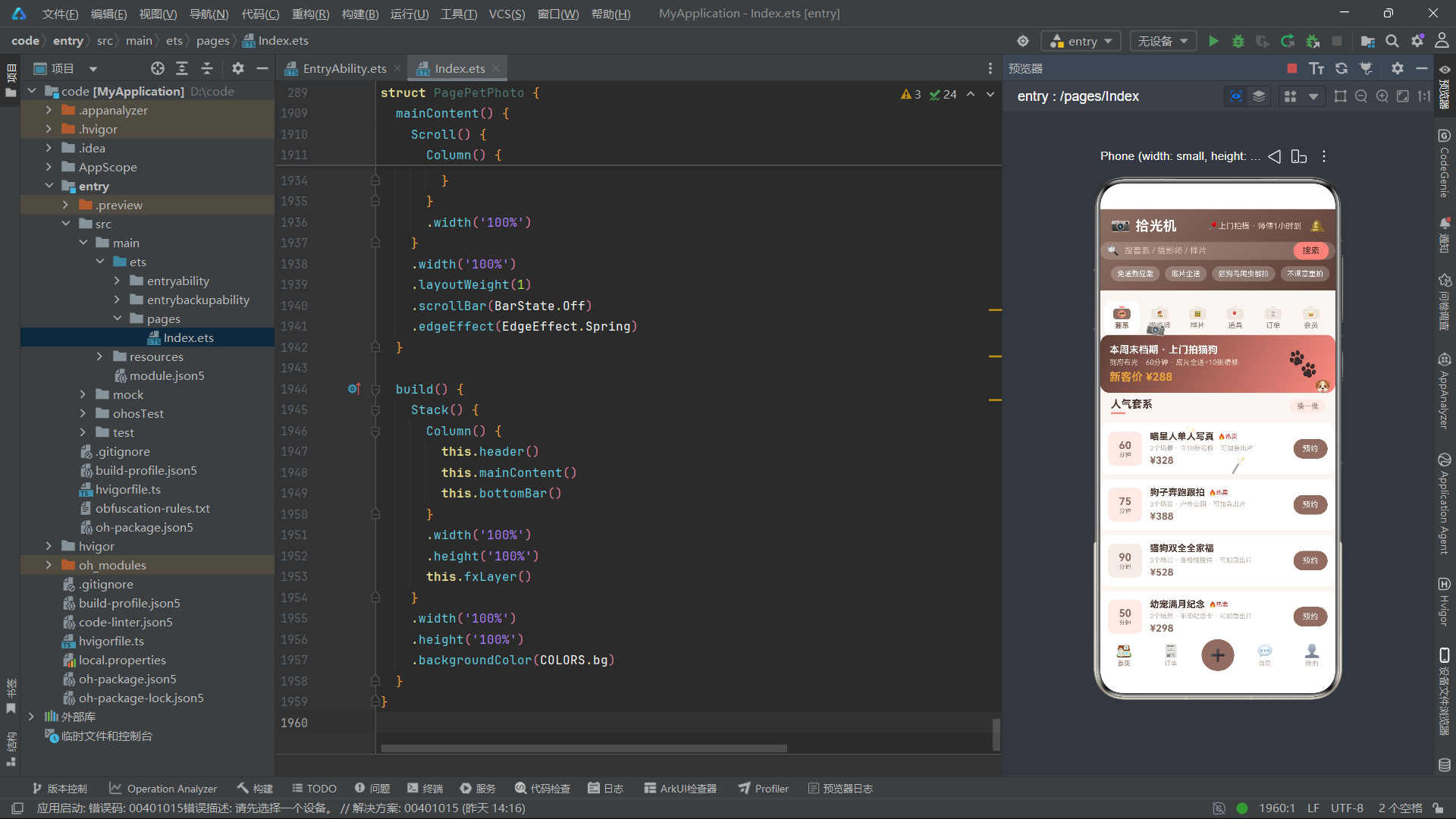
COLORS常量中,主色调#8D6E63是经典棕褐色,呼应复古相机的皮革机身色彩;深色#5D4037为深棕,模拟相机深色部分;强调色#FF8A80为珊瑚粉,代表温暖和宠物友好的品牌调性;金色#E8A33D用于价格和评分高亮;背景色#FAF6F2为暖白色,营造摄影棚的柔和光照感。三级文本色系从#4A342C(深棕黑)到#BFAEA4(浅棕灰),形成温馨的视觉层级。这种"棕+珊瑚粉"的配色方案,让应用在第一眼就传达出"温暖·专业·宠物友好"的品牌氛围。
二、interface接口定义与@Observed类implements模式
2.1 拍摄套系数据模型
interface Pack {
  id: number
  name: string
  price: number
  mins: number
  scenes: number
  tag: string
  hot: boolean
}

@Observed
class PackItem implements Pack {
  id: number = 0
  name: string = ''
  price: number = 0
  mins: number = 0
  scenes: number = 0
  tag: string = ''
  hot: boolean = false

  constructor(o: Pack) {
    this.id = o.id
    this.name = o.name
    this.price = o.price
    this.mins = o.mins
    this.scenes = o.scenes
    this.tag = o.tag
    this.hot = o.hot ? o.hot : false
  }
}
Pack接口定义了拍摄套系的核心数据结构。mins字段为拍摄时长(分钟),在UI中以大号数字展示在卡片左侧;scenes字段为拍摄场景数量;tag字段标识套系标签(含10张精修/户外公园/含相框摆件等)。hot标记用于展示"🔥热卖"标签。套系列表通过ForEach渲染,每个卡片左侧展示时长数字块,右侧展示名称、标签、场景数和价格。
2.2 摄影师数据模型
interface Snapper {
  id: number
  name: string
  style: string
  score: number
  orders: number
  city: string
  fav: boolean
}

@Observed
class SnapperItem implements Snapper {
  id: number = 0
  name: string = ''
  style: string = ''
  score: number = 0
  orders: number = 0
  city: string = ''
  fav: boolean = false

  constructor(o: Snapper) {
    this.id = o.id
    this.name = o.name
    this.style = o.style
    this.score = o.score
    this.orders = o.orders
    this.city = o.city
    this.fav = o.fav ? o.fav : false
  }
}
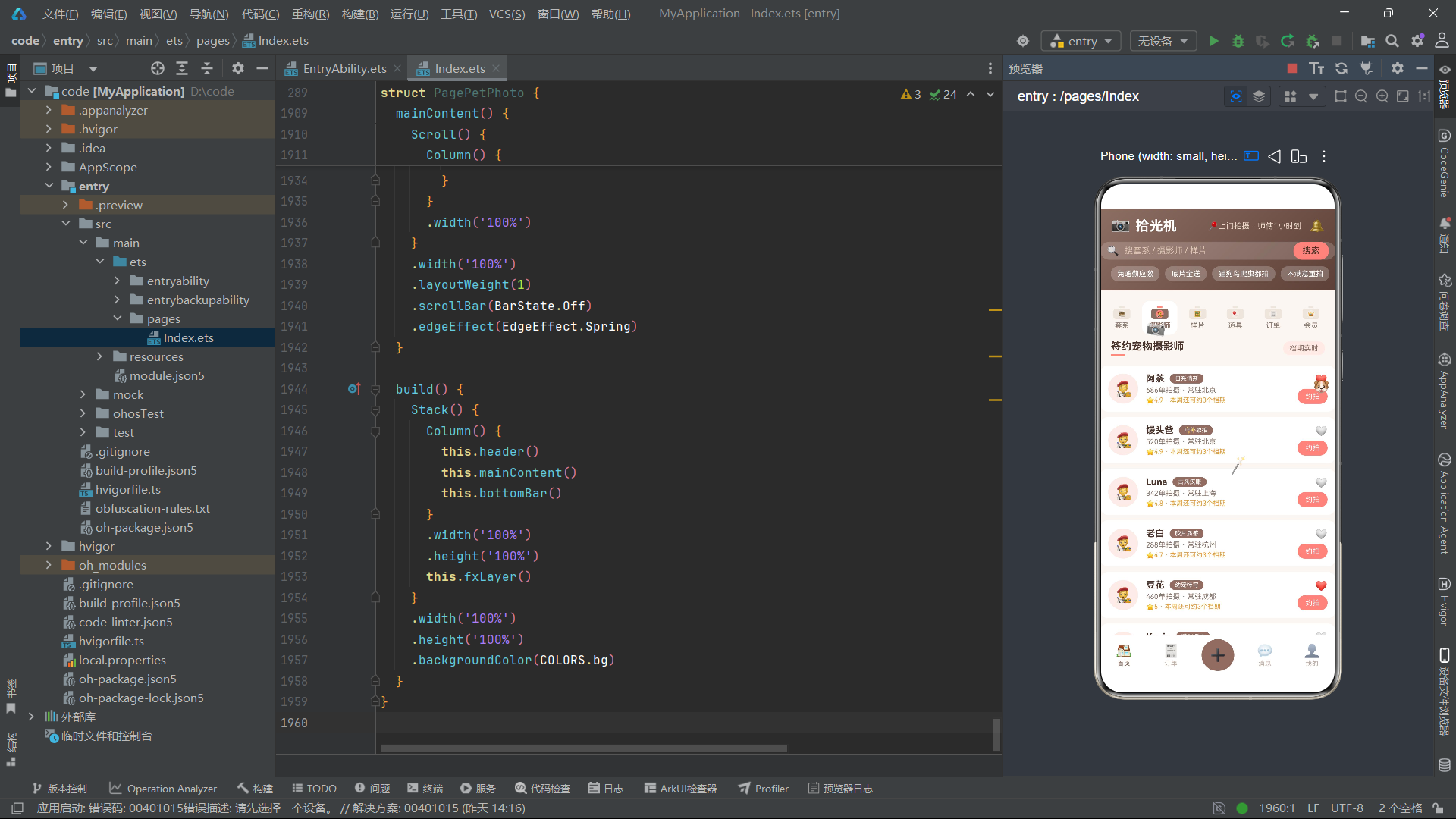
Snapper接口定义了签约宠物摄影师信息,包含姓名、风格(日系清新/户外跟拍/古风汉服等)、评分、累计订单数、常驻城市和收藏标记。摄影师列表在卡片中展示评分星级、订单数和城市信息,以及"本周还可约3个档期"的实时档期提示。用户可以通过点击爱心图标收藏摄影师,fav状态的变更通过@Observed机制即时反映到UI。
2.3 样片数据模型
interface Sample {
  id: number
  title: string
  pet: string
  style: string
  likes: number
  liked: boolean
}

@Observed
class SampleItem implements Sample {
  id: number = 0
  title: string = ''
  pet: string = ''
  style: string = ''
  likes: number = 0
  liked: boolean = false

  constructor(o: Sample) {
    this.id = o.id
    this.title = o.title
    this.pet = o.pet
    this.style = o.style
    this.likes = o.likes
    this.liked = o.liked ? o.liked : false
  }
}
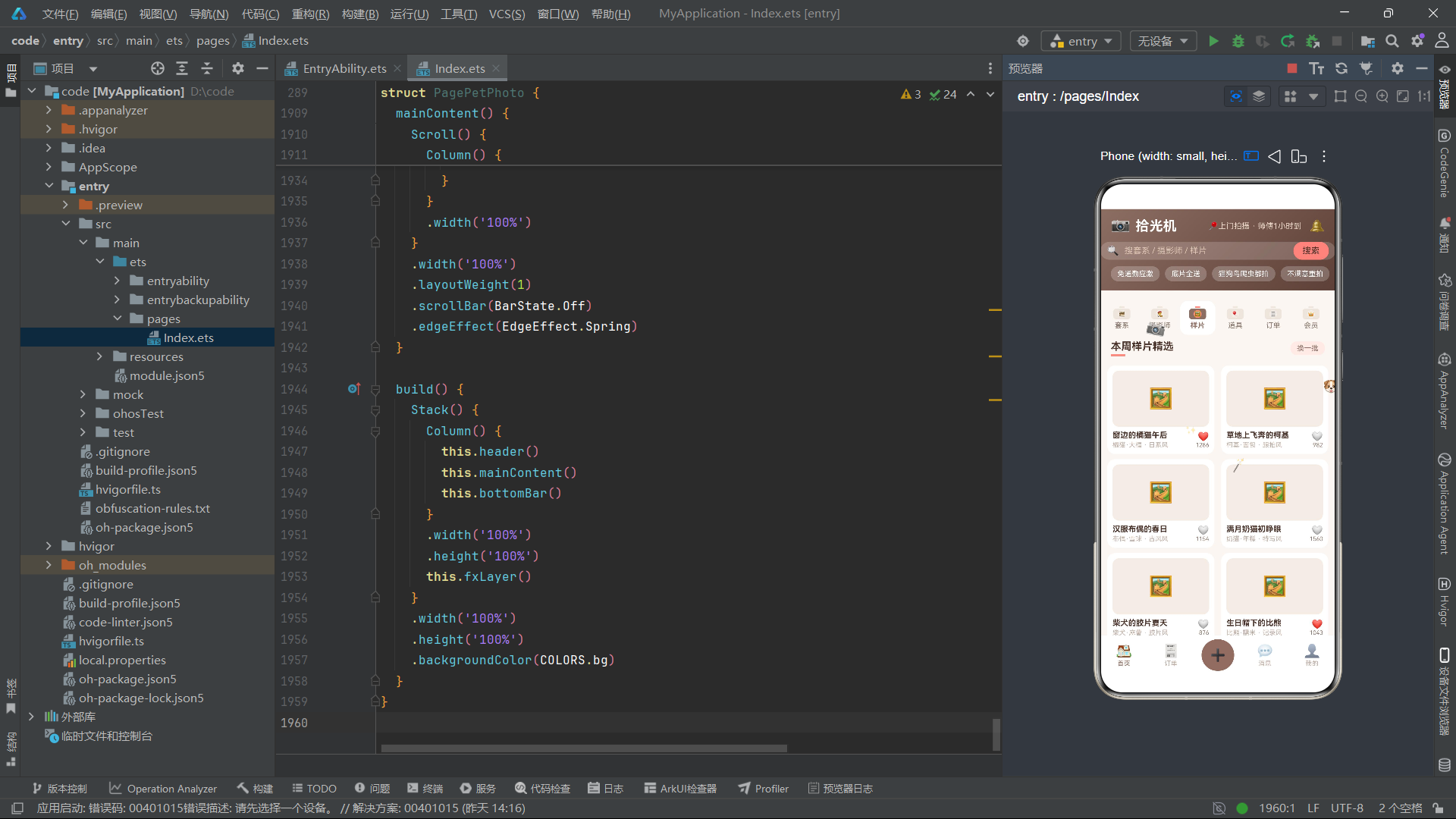
Sample接口定义了样片作品信息,包含标题、宠物名称、风格、点赞数和点赞状态。样片画廊采用Flex布局双列展示,每张卡片宽度48.5%,形成两列瀑布流效果。likes字段是动态的——用户点击爱心图标时,toggleLike方法会增减likes数值并切换liked状态,这种"点赞交互"在样片展示中是提升用户参与度的关键设计。
2.4 道具与订单数据模型
interface PropInface {
  id: number
  name: string
  kind: string
  stock: number
  price: number
}

@Observed
class PropItem implements PropInface {
  id: number = 0
  name: string = ''
  kind: string = ''
  stock: number = 0
  price: number = 0

  constructor(o: PropInface) {
    this.id = o.id
    this.name = o.name
    this.kind = o.kind
    this.stock = o.stock
    this.price = o.price
  }
}
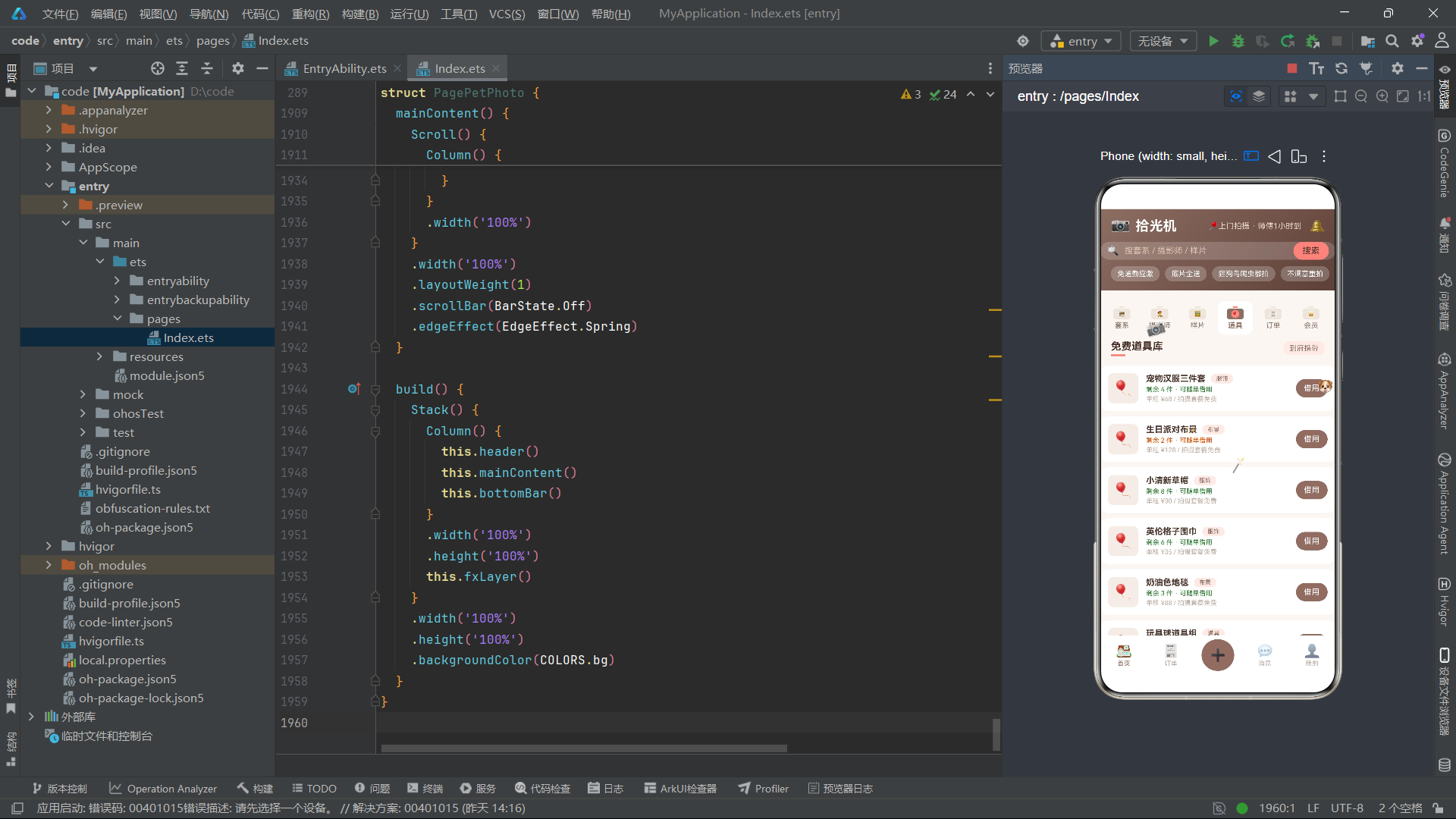
PropInface接口定义了道具库信息。注意这里使用"PropInface"而非"PropInterface"作为接口名,是因为ArkTS中interface是保留字,直接以"Prop"开头的接口名可能与关键字产生歧义。kind字段标识道具类型(服饰/布景/道具),stock字段标识库存数量。当stock为0时,按钮显示"缺货"灰色不可点击,并提示"本周借完·下周补货";当有库存时,按钮显示"借用"并可触发道具借用弹框。
interface Order {
  id: number
  pack: string
  pet: string
  date: string
  status: string
  price: number
}

@Observed
class OrderItem implements Order {
  id: number = 0
  pack: string = ''
  pet: string = ''
  date: string = ''
  status: string = ''
  price: number = 0

  constructor(o: Order) {
    this.id = o.id
    this.pack = o.pack
    this.pet = o.pet
    this.date = o.date
    this.status = o.status
    this.price = o.price
  }
}
Order接口定义了拍摄订单信息。订单状态有"待拍摄"、“修图中”、“已完成"和"已取消"四种,每种状态关联不同的操作按钮——待拍摄显示"改期”(打开拍摄计划弹框)、修图中显示"加急"(打开加急出片弹框)、已完成显示"相册"、已取消显示"删除"(打开取消弹框)。这种基于状态的多分支操作设计,让用户能够根据订单当前阶段执行最合适的操作。
三、静态数据数组与业务常量
3.1 套系列表数据
const PACKS: PackItem[] = [
  new PackItem({ id: 1, name: '喵星人单人写真', price: 328, mins: 60, scenes: 2, tag: '含10张精修', hot: true }),
  new PackItem({ id: 2, name: '狗子奔跑跟拍', price: 388, mins: 75, scenes: 3, tag: '户外公园', hot: true }),
  new PackItem({ id: 3, name: '猫狗双全全家福', price: 528, mins: 90, scenes: 3, tag: '含相框摆件', hot: false }),
  new PackItem({ id: 4, name: '幼宠满月纪念', price: 298, mins: 50, scenes: 2, tag: '手印纪念卡', hot: true }),
  new PackItem({ id: 5, name: '上门到家随拍', price: 268, mins: 45, scenes: 1, tag: '免通勤应激', hot: false }),
  new PackItem({ id: 6, name: '宠物生日派对记录', price: 458, mins: 80, scenes: 3, tag: '含布景布置', hot: false }),
  new PackItem({ id: 7, name: '萌宠日历12宫格', price: 598, mins: 120, scenes: 4, tag: '年历成品册', hot: false }),
  new PackItem({ id: 8, name: '宠物告别纪念册', price: 666, mins: 90, scenes: 3, tag: '温情陪护', hot: false }),
  new PackItem({ id: 9, name: '异宠微距特写', price: 358, mins: 60, scenes: 2, tag: '爬宠鸟类', hot: false }),
  new PackItem({ id: 10, name: '遛狗跟拍月卡', price: 888, mins: 240, scenes: 6, tag: '4次上门', hot: false }),
  new PackItem({ id: 11, name: '古风宠物汉服', price: 488, mins: 85, scenes: 3, tag: '含3套服饰', hot: true }),
  new PackItem({ id: 12, name: '胶片质感套系', price: 428, mins: 70, scenes: 2, tag: '富士sp3000', hot: false })
]
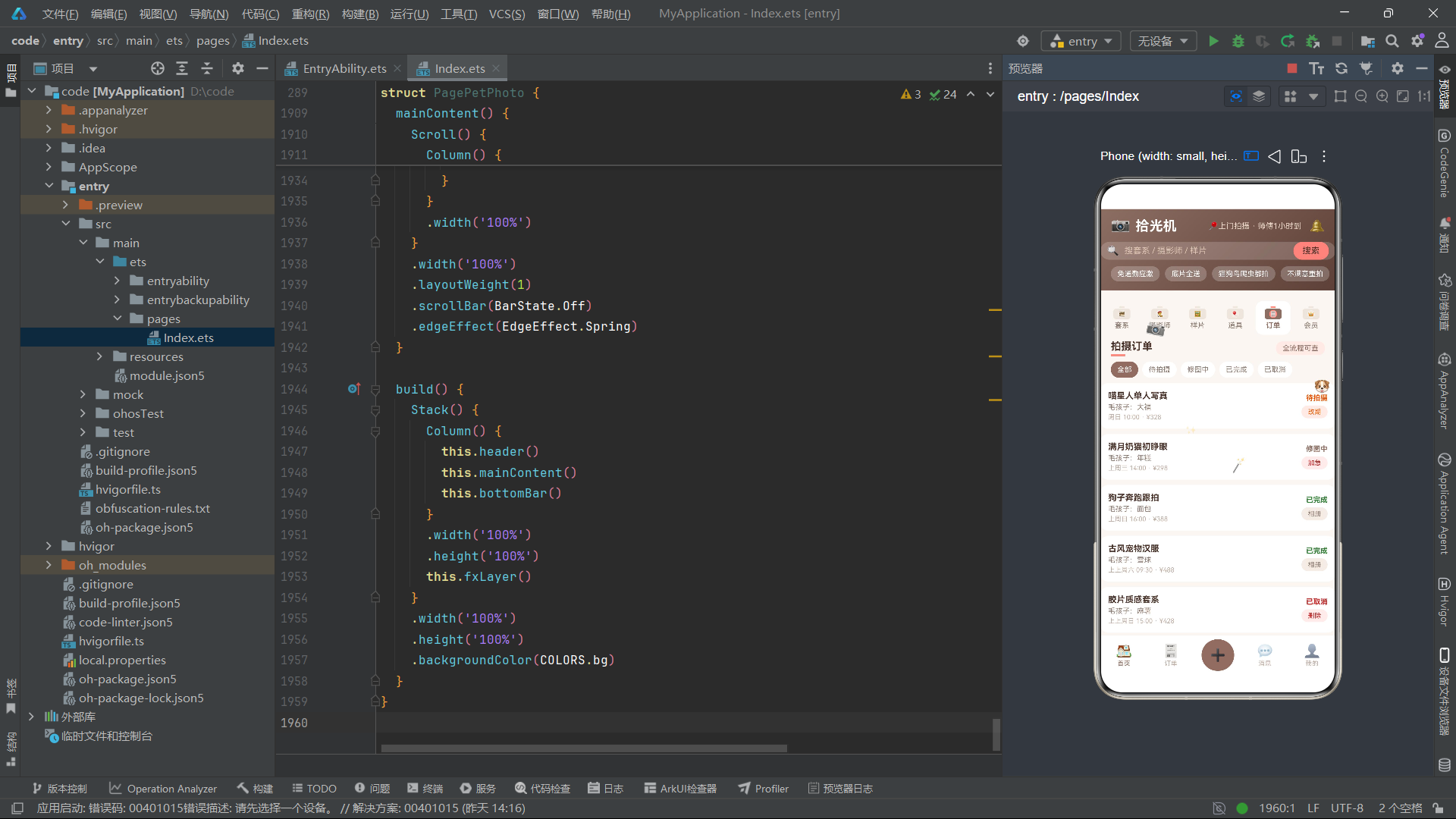
PACKS数组涵盖了12种不同风格和价位的拍摄套系,从268元的上门随拍到888元的月卡跟拍,覆盖了从入门到深度用户的全价位段。tag标签丰富多样——含10张精修、户外公园、手印纪念卡、免通勤应激、含布景布置、年历成品册、温情陪护等,每个标签都传达了套系的独特卖点。hot标记的套系在卡片中显示"🔥热卖"红色标签,引导用户关注热门选择。
3.2 摄影师与样片数据
const SNAPPERS: SnapperItem[] = [
  new SnapperItem({ id: 1, name: '阿茶', style: '日系清新', score: 4.9, orders: 686, city: '北京', fav: true }),
  new SnapperItem({ id: 2, name: '馒头爸', style: '户外跟拍', score: 4.9, orders: 520, city: '北京', fav: false }),
  new SnapperItem({ id: 3, name: 'Luna', style: '古风汉服', score: 4.8, orders: 342, city: '上海', fav: false }),
  new SnapperItem({ id: 4, name: '老白', style: '胶片质感', score: 4.7, orders: 288, city: '杭州', fav: false }),
  new SnapperItem({ id: 5, name: '豆花', style: '幼宠特写', score: 5.0, orders: 460, city: '成都', fav: true }),
  new SnapperItem({ id: 6, name: 'Kevin', style: '猫咪棚拍', score: 4.8, orders: 375, city: '深圳', fav: false }),
  new SnapperItem({ id: 7, name: '小满', style: '生日记录', score: 4.9, orders: 298, city: '北京', fav: false }),
  new SnapperItem({ id: 8, name: '叶子', style: '异宠微距', score: 4.6, orders: 156, city: '广州', fav: false }),
  new SnapperItem({ id: 9, name: '桃子', style: '全家福', score: 4.9, orders: 412, city: '北京', fav: false }),
  new SnapperItem({ id: 10, name: '阿岁', style: '告别纪念', score: 5.0, orders: 132, city: '上海', fav: false })
]
const SAMPLES: SampleItem[] = [
  new SampleItem({ id: 1, title: '窗边的橘猫午后', pet: '橘猫·大福', style: '日系', likes: 1286, liked: true }),
  new SampleItem({ id: 2, title: '草地上飞奔的柯基', pet: '柯基·面包', style: '跟拍', likes: 982, liked: false }),
  new SampleItem({ id: 3, title: '汉服布偶的春日', pet: '布偶·雪球', style: '古风', likes: 1154, liked: false }),
  new SampleItem({ id: 4, title: '满月奶猫初睁眼', pet: '奶猫·年糕', style: '特写', likes: 1560, liked: false }),
  new SampleItem({ id: 5, title: '柴犬的胶片夏天', pet: '柴犬·麻薯', style: '胶片', likes: 876, liked: false }),
  new SampleItem({ id: 6, title: '生日帽下的比熊', pet: '比熊·糯米', style: '记录', likes: 1043, liked: true }),
  new SampleItem({ id: 7, title: '守在门边的金毛', pet: '金毛·向阳', style: '纪实', likes: 1392, liked: false }),
  new SampleItem({ id: 8, title: '缸里的小乌龟', pet: '草龟·石头', style: '微距', likes: 542, liked: false })
]
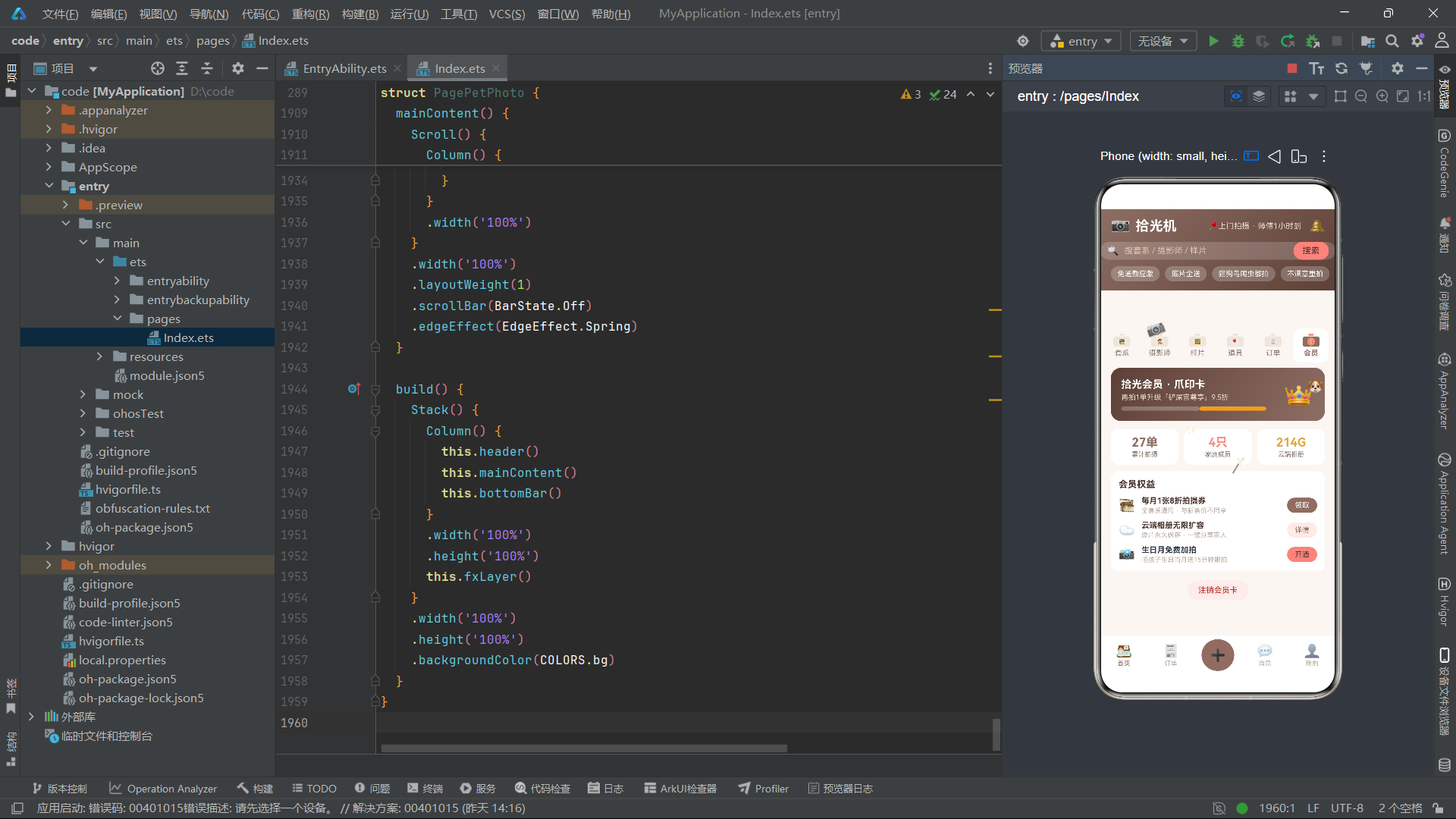
样片数据SAMPLES数组的每条记录都包含感性的标题(如"窗边的橘猫午后"、“满月奶猫初睁眼”)、宠物名称和品种、风格分类和点赞数。这些标题不是简单的套系名称,而是富有画面感的情感文案,直接触达宠物主人的情感需求。likes字段模拟社交媒体的点赞机制,用户点击爱心图标可以点赞/取消点赞,liked状态和likes数值同步更新。
3.3 道具数据与图表常量
const PROPS: PropItem[] = [
  new PropItem({ id: 1, name: '宠物汉服三件套', kind: '服饰', stock: 4, price: 68 }),
  new PropItem({ id: 2, name: '生日派对布景', kind: '布景', stock: 2, price: 128 }),
  new PropItem({ id: 3, name: '小清新草帽', kind: '服饰', stock: 8, price: 30 }),
  new PropItem({ id: 4, name: '英伦格子围巾', kind: '服饰', stock: 6, price: 35 }),
  new PropItem({ id: 5, name: '奶油色地毯', kind: '布景', stock: 3, price: 88 }),
  new PropItem({ id: 6, name: '玩具球道具组', kind: '道具', stock: 12, price: 25 }),
  new PropItem({ id: 7, name: '干花手捧花束', kind: '道具', stock: 0, price: 45 }),
  new PropItem({ id: 8, name: '复古皮质行李箱', kind: '布景', stock: 1, price: 158 })
]
const MONTH_LABELS: string[] = ['3月', '4月', '5月', '6月', '7月', '8月']
const MONTH_SHOTS: number[] = [2, 4, 3, 6, 5, 7]
const STYLE_LABELS: string[] = ['日系清新', '户外跟拍', '古风汉服', '胶片质感']
const STYLE_PCTS: number[] = [34, 28, 22, 16]
const STYLE_COLORS: string[] = ['#8D6E63', '#FF8A80', '#5D4037', '#E8A33D']
const STYLE_TAGS: string[] = ['日系', '古风', '胶片', '纪实']
const DAY_TAGS: string[] = ['工作日晚间', '周末白天', '周末晚间']
const SPEED_TAGS: string[] = ['24小时', '48小时', '72小时']
const ORDER_STATUS: string[] = ['全部', '待拍摄', '修图中', '已完成', '已取消']
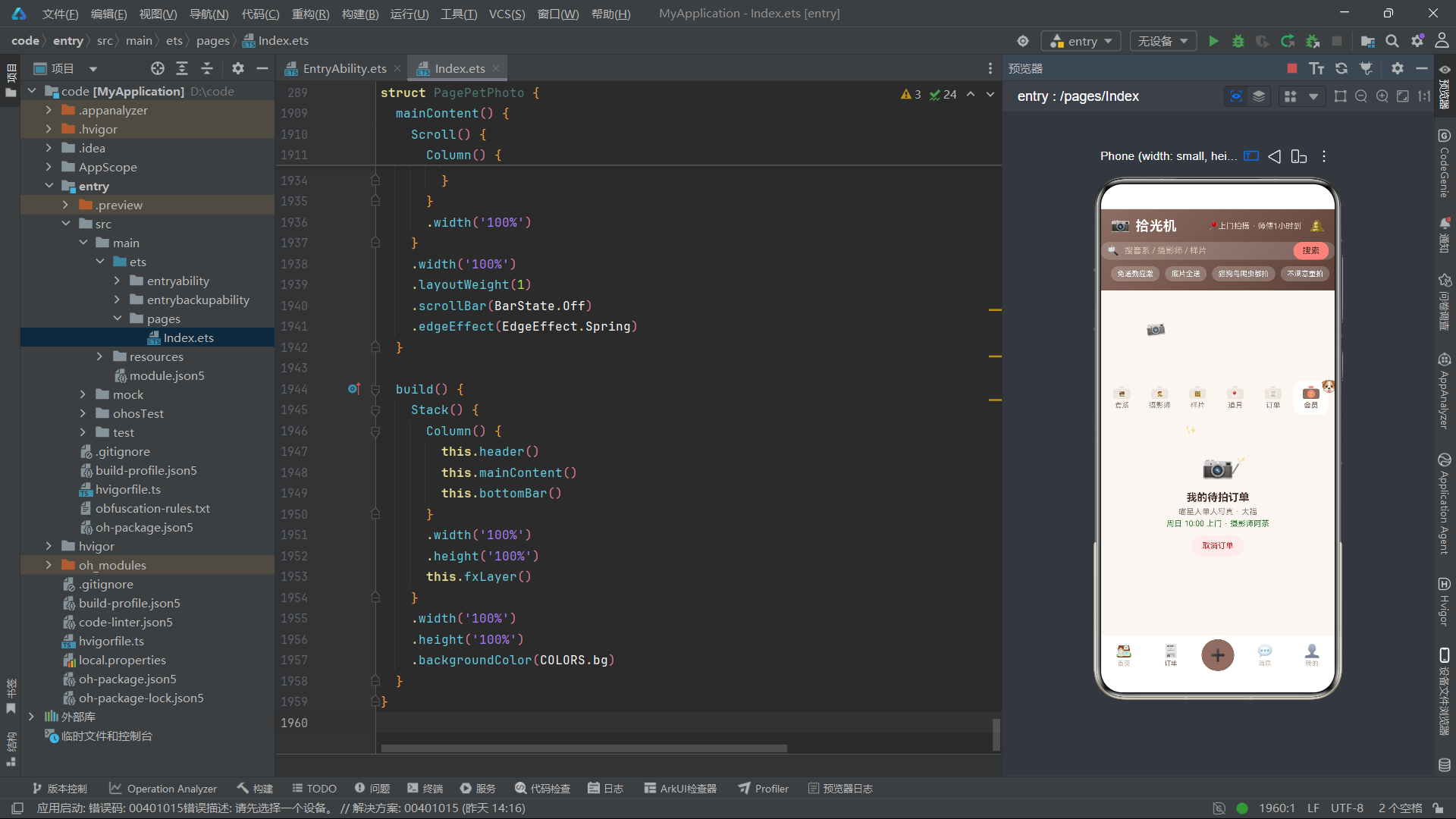
道具数据中stock为0的"干花手捧花束"会显示"缺货"按钮和"本周借完·下周补货"提示,stock为1的"复古皮质行李箱"属于稀缺道具。STYLE_PCTS和STYLE_COLORS配合绘制风格占比堆叠条形图——日系清新34%(棕色)、户外跟拍28%(珊瑚粉)、古风汉服22%(深棕)、胶片质感16%(金色)。ORDER_STATUS比前两个应用多一个"修图中"状态,反映了摄影服务特有的后期处理环节。
四、辅助函数与色彩动态映射
function shotBar(i: number): number {
  return MONTH_SHOTS[i] * 10
}

function stockColor(n: number): string {
  if (n <= 0) {
    return COLORS.danger
  }
  if (n < 3) {
    return COLORS.warn
  }
  return COLORS.ok
}

function statusColor(s: string): string {
  if (s === '待拍摄') {
    return COLORS.warn
  }
  if (s === '修图中') {
    return COLORS.primary
  }
  if (s === '已完成') {
    return COLORS.ok
  }
  return COLORS.danger
}
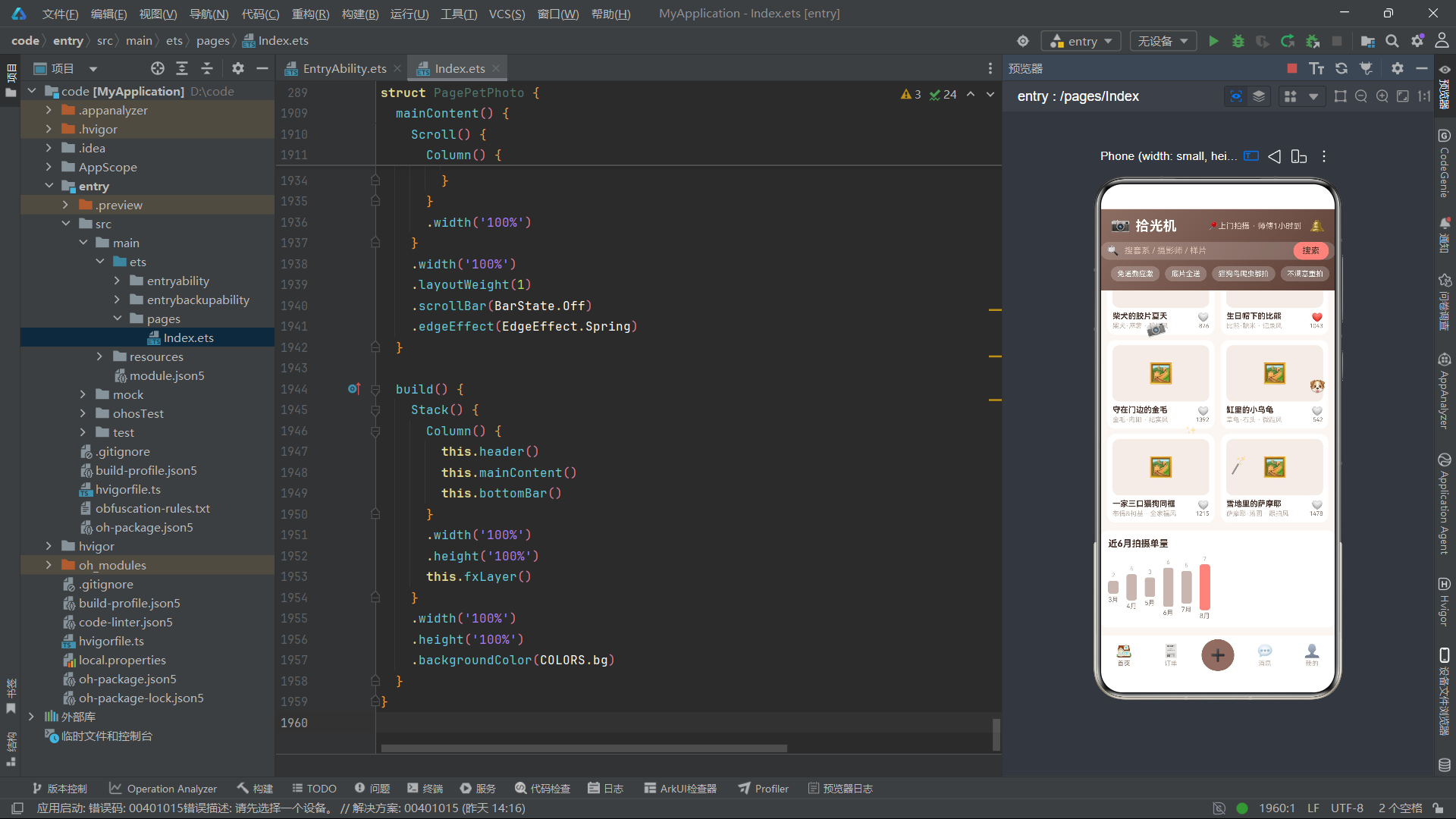
shotBar函数将月度拍摄单数乘以10转为柱状图高度。stockColor根据道具库存数量返回三种颜色——0件为危险红、3件以下为警告橙、3件以上为成功绿。statusColor函数是三个应用中分支最多的——待拍摄为橙色(提醒前往拍摄)、修图中为棕色主色调(处理中的品牌色)、已完成为绿色(交易完成)、已取消为红色(操作警示)。这种"修图中=主色调"的设计选择,使得处于后期处理状态的订单在视觉上与品牌色调一致,强化了"正在进行中"的认知。
五、组件状态管理与生命周期
@Entry
@Component
struct PagePetPhoto {
  @State curTab: number = 0
  @State mainTab: number = 0
  @State addOpen: boolean = false
  @State editOpen: boolean = false
  @State delOpen: boolean = false
  @State bizOpen: boolean = false
  @State packList: PackItem[] = PACKS
  @State sampleList: SampleItem[] = SAMPLES
  @State snapperList: SnapperItem[] = SNAPPERS
  @State orderFilter: number = 0
  @State rev: number = 0
  @State tick: number = 0
  @State styleTags: number[] = [0]
  @State dayTags: number[] = [0]
  @State speedTags: number[] = [0]
  @State retouchStep: number = 10
  @State petStep: number = 2
  @State homeFlag: boolean = true
  @State fastFlag: boolean = false
  private timer: number = -1
状态变量在导航、弹框和数据三类的基础上增加了摄影特有的交互状态:retouchStep精修张数步进器(5-40张,步进为5)、petStep出镜宠物数步进器(1-5只)、homeFlag到府拍摄模式开关、fastFlag优先插队开关。orderFilter控制订单筛选状态(5个选项比其他应用多一个"修图中")。tick的定时器间隔为106ms,略快于其他两个应用的111ms和113ms。
  aboutToAppear(): void {
    this.timer = setInterval(() => {
      this.tick = this.tick + 1
    }, 106)
  }

  aboutToDisappear(): void {
    if (this.timer >= 0) {
      clearInterval(this.timer)
    }
  }

  refreshPacks(): void {
    this.packList.unshift(this.packList[this.packList.length - 1])
    this.packList.splice(this.packList.length - 1, 1)
    this.rev = this.rev + 1
  }

  toggleLike(i: number): void {
    if (this.sampleList[i].liked) {
      this.sampleList[i].liked = false
      this.sampleList[i].likes = this.sampleList[i].likes - 1
    } else {
      this.sampleList[i].liked = true
      this.sampleList[i].likes = this.sampleList[i].likes + 1
    }
    this.rev = this.rev + 1
  }

  toggleSnapperFav(i: number): void {
    this.snapperList[i].fav = !this.snapperList[i].fav
    this.rev = this.rev + 1
  }

  photoTotal(): number {
    return 328 + this.retouchStep * 8
  }
toggleLike方法是本应用独有的交互逻辑——同时修改liked布尔状态和likes数值。这种"状态+数值"双更新的模式比简单的布尔切换更复杂,需要确保两个属性的变更在同一帧内完成,得益于@Observed的批量更新机制,这种双属性更新不会导致界面闪烁。photoTotal方法计算预约总价:328 + retouchStep * 8,即基础价328元加上每张精修8元的增量价格。
六、fxLayer浮动动画特效层
  @Builder
  fxLayer() {
    Stack() {
      Text('📷')
        .fontSize(24)
        .rotate({ angle: (this.tick % 10) * 4 - 20 })
        .position({ x: 70, y: 170 })
        .opacity(0.8)
      Text('🐶')
        .fontSize(20)
        .translate({ x: this.tick % 26 - 13 })
        .position({ x: 330, y: 260 })
      Text('🐾')
        .fontSize(18)
        .opacity((this.tick % 6) / 6 + 0.2)
        .position({ x: 540, y: 150 })
      Text('🪄')
        .fontSize(20)
        .scale({ x: 1 + (this.tick % 8) * 0.04, y: 1 + (this.tick % 8) * 0.04 })
        .position({ x: 200, y: 380 })
        .opacity(0.6)
      Text('✨')
        .fontSize(14)
        .position({ x: 130, y: 330 })
        .opacity((this.tick % 7) / 7 + 0.15)
    }
    .width('100%')
    .height('100%')
    .hitTestBehavior(HitTestMode.None)
  }
五个emoji粒子与宠物摄影主题紧密关联:📷相机使用rotate实现左右摇摆动画(模拟手持拍摄的微抖动),角度范围为-20到+20度;🐶小狗使用translate实现水平往返位移(模拟宠物奔跑的活泼感);🐾爪印通过opacity脉冲实现闪烁(模拟宠物走过的足迹显现/消失);🪄魔法棒通过scale实现缩放呼吸(模拟修图的魔法变换效果);✨闪光通过opacity实现渐变闪烁。hitTestBehavior(HitTestMode.None)确保该层不拦截触摸事件。
七、静态渐变头部构建
  @Builder
  header() {
    Column() {
      Row() {
        Text('📷')
          .fontSize(24)
        Text('拾光机')
          .fontSize(21)
          .fontWeight(FontWeight.Bold)
          .fontColor(COLORS.white)
          .margin({ left: 8 })
        Column()
          .layoutWeight(1)
        Text('📍上门拍摄 · 师傅1小时到')
          .fontSize(12)
          .fontColor('#EBD9C8')
        Text('🔔')
          .fontSize(19)
          .margin({ left: 12 })
          .onClick(() => {
            this.mainTab = 3
          })
      }
      .width('100%')
      .padding({ left: 16, right: 16, top: 12 })

      Row() {
        Text('🔍')
          .fontSize(15)
        Text('搜套系 / 摄影师 / 样片')
          .fontSize(13)
          .fontColor('#D9C3B0')
          .margin({ left: 8 })
        Column()
          .layoutWeight(1)
        Text('搜索')
          .fontSize(13)
          .fontColor(COLORS.textPrimary)
          .padding({ left: 14, right: 14, top: 6, bottom: 6 })
          .backgroundColor(COLORS.accent)
          .borderRadius(14)
          .onClick(() => {
            this.curTab = 0
          })
      }
      .width('100%')
      .padding({ left: 10, right: 10 })
      .margin({ top: 10 })
      .backgroundColor('rgba(255,255,255,0.18)')
      .borderRadius(20)

      Row({ space: 8 }) {
        Text('免通勤应激')
          .fontSize(11)
          .fontColor(COLORS.white)
          .padding({ left: 10, right: 10, top: 5, bottom: 5 })
          .backgroundColor('rgba(255,255,255,0.22)')
          .borderRadius(12)
        Text('底片全送')
          .fontSize(11)
          .fontColor(COLORS.white)
          .padding({ left: 10, right: 10, top: 5, bottom: 5 })
          .backgroundColor('rgba(255,255,255,0.22)')
          .borderRadius(12)
        Text('猫狗鸟爬虫都拍')
          .fontSize(11)
          .fontColor(COLORS.white)
          .padding({ left: 10, right: 10, top: 5, bottom: 5 })
          .backgroundColor('rgba(255,255,255,0.22)')
          .borderRadius(12)
        Text('不满意重拍')
          .fontSize(11)
          .fontColor(COLORS.white)
          .padding({ left: 10, right: 10, top: 5, bottom: 5 })
          .backgroundColor('rgba(255,255,255,0.22)')
          .borderRadius(12)
      }
      .width('100%')
      .padding({ left: 16, right: 16 })
      .margin({ top: 10, bottom: 14 })
    }
    .width('100%')
    .alignItems(HorizontalAlign.Start)
    .linearGradient({ angle: 135, colors: [[COLORS.primary, 0], [COLORS.primaryDeep, 1]] })
  }
头部品牌行展示"📷 拾光机"和"上门拍摄·师傅1小时到"的服务承诺,搜索栏文案为"搜套系/摄影师/样片"。促销标签聚焦宠物摄影的核心卖点——免通勤应激(无需带宠物外出)、底片全送(无隐形消费)、猫狗鸟爬虫都拍(全品类覆盖)、不满意重拍(质量保障)。搜索按钮使用COLORS.accent珊瑚粉色背景,在棕色渐变头部上形成温暖而不刺眼的对比。整个头部通过linearGradient设置135度渐变,从#8D6E63到#5D4037,模拟复古相机从浅棕到深棕的色彩过渡。
八、相机机身式内容Tab构建
lensTab构建器是本应用视觉设计的核心创新。每个Tab项被设计为相机的物理形态——闪光灯(顶部矩形)、机身(矩形主体+圆形镜头)和标签名称。
  @Builder
  lensTab(name: string, icon: string, idx: number) {
    Column() {
      Rect({ width: 8, height: 3 })
        .fill(this.curTab === idx ? COLORS.accent : COLORS.line)
        .radius(2)
        .margin({ bottom: 1 })
      Stack() {
        Rect({ width: 26, height: 16 })
          .fill(this.curTab === idx ? COLORS.primary : COLORS.line)
          .radius(4)
        Circle({ width: 12, height: 12 })
          .fill(this.curTab === idx ? COLORS.accent : COLORS.tagBg)
        Text(icon)
          .fontSize(8)
      }
      Text(name)
        .fontSize(11)
        .fontWeight(this.curTab === idx ? FontWeight.Bold : FontWeight.Normal)
        .fontColor(this.curTab === idx ? COLORS.primary : COLORS.textSecond)
        .margin({ top: 3 })
    }
    .width('15.5%')
    .alignItems(HorizontalAlign.Center)
    .padding({ top: 8, bottom: 8 })
    .backgroundColor(this.curTab === idx ? COLORS.card : COLORS.bg)
    .borderRadius(12)
    .margin({ top: 6 })
    .onClick(() => {
      this.switchTab(idx)
    })
  }
lensTab组件结构从上到下依次为:Rect(宽8高3,radius 2模拟闪光灯条),Stack中嵌套Rect(宽26高16,radius 4模拟机身主体)、Circle(宽12高12模拟镜头)和Text(emoji图标),Text(标签名称)。宽度为15.5%,配合4vp间距,六个Tab刚好填满屏幕宽度。
选中态的视觉变化:闪光灯从line灰色变为accent珊瑚粉、机身从灰色变为primary棕色、镜头从tagBg浅色变为accent珊瑚粉、文字从Normal变为Bold、文字色从textSecond变为primary、容器背景从bg变为card。这种"棕+珊瑚粉"的选中态配色方案,让相机Tab在选中时呈现出完整的双色彩结构——机身棕色代表相机本体,闪光灯和镜头珊瑚粉代表相机的工作状态,视觉辨识度温暖而专业。
@Builder
tabBar() {
Row({ space: 4 }) {
this.lensTab('套系', '🎞', 0)
this.lensTab('摄影师', '🧑🎨', 1)
this.lensTab('样片', '🖼', 2)
this.lensTab('道具', '🎈', 3)
this.lensTab('订单', '🧾', 4)
this.lensTab('会员', '👑', 5)
}
.width('100%')
.padding({ left: 6, right: 6, top: 10 })
}
六个相机Tab分别对应套系、摄影师、样片、道具、订单和会员六个功能页面。与前两个应用的Tab结构对比:脱口秀应用的麦克风Tab为6个(话筒头+手柄+底座),风洞应用的降落伞Tab为5个(伞盖+伞绳+吊篮),本应用的相机Tab为6个(闪光灯+机身+镜头),三种Tab各具特色,但都遵循"物理隐喻+多段式结构+多属性选中态切换"的设计原则。
九、套系列表页面构建
  @Builder
  pagePack() {
    Column() {
      Row() {
        Column() {
          Text('本周末档期 · 上门拍猫狗')
            .fontSize(15)
            .fontWeight(FontWeight.Bold)
            .fontColor(COLORS.white)
          Text('到府布光 · 60分钟 · 底片全送+10张精修')
            .fontSize(11)
            .fontColor('#EBD9C8')
            .margin({ top: 4 })
          Text('新客价 ¥288')
            .fontSize(17)
            .fontWeight(FontWeight.Bold)
            .fontColor(COLORS.gold)
            .margin({ top: 6 })
        }
        .alignItems(HorizontalAlign.Start)
        .layoutWeight(1)
        Text('🐾')
          .fontSize(38)
          .margin({ right: 12 })
      }
      .width('100%')
      .padding(14)
      .borderRadius(14)
      .linearGradient({ angle: 120, colors: [[COLORS.primaryDeep, 0], [COLORS.accent, 1]] })
      .onClick(() => {
        this.addOpen = true
      })
顶部推荐卡片使用120度渐变,从primaryDeep深棕到accent珊瑚粉,营造从暗到亮的摄影布光效果。卡片内容包含档期标题、服务详情(到府布光·60分钟·底片全送+10张精修)和新客价格。价格文字使用COLORS.gold金色,在深色渐变背景上形成高光效果。
      this.sectionTitle('人气套系', '换一批', 0)
      ForEach(this.packList, (it: PackItem, i: number) => {
        Row() {
          Stack() {
            Column()
              .width(52)
              .height(52)
              .backgroundColor(it.hot ? COLORS.accentSoft : COLORS.tagBg)
              .borderRadius(10)
            Column() {
              Text(it.mins.toString())
                .fontSize(16)
                .fontWeight(FontWeight.Bold)
                .fontColor(COLORS.primary)
              Text('分钟')
                .fontSize(9)
                .fontColor(COLORS.textSecond)
            }
          }
          Column() {
            Row() {
              Text(it.name)
                .fontSize(14)
                .fontWeight(FontWeight.Bold)
                .fontColor(COLORS.textPrimary)
              Text(it.hot ? '🔥热卖' : '')
                .fontSize(9)
                .fontColor(COLORS.danger)
                .margin({ left: 6 })
            }
            Text(it.scenes.toString() + '个场景 · ' + it.tag + ' · 可加急出片')
              .fontSize(10)
              .fontColor(COLORS.textThird)
              .margin({ top: 4 })
            Text('¥' + it.price)
              .fontSize(15)
              .fontWeight(FontWeight.Bold)
              .fontColor(COLORS.primary)
              .margin({ top: 4 })
          }
          .alignItems(HorizontalAlign.Start)
          .layoutWeight(1)
          .margin({ left: 12 })
          Text('预约')
            .fontSize(12)
            .fontColor(COLORS.white)
            .padding({ left: 14, right: 14, top: 8, bottom: 8 })
            .backgroundColor(COLORS.primary)
            .borderRadius(16)
            .onClick(() => {
              this.addOpen = true
            })
        }
        .width('100%')
        .padding(12)
        .backgroundColor(COLORS.card)
        .borderRadius(12)
        .margin({ left: 16, right: 16, top: 8 })
      }, (it: PackItem) => 'pa' + it.id.toString() + '_' + this.rev.toString())
    }
    .width('100%')
    .padding({ bottom: 12 })
  }
套系列表的左侧数字块背景色会根据hot标记变化——热卖套系使用COLORS.accentSoft浅粉色背景,普通套系使用COLORS.tagBg米色背景。这种细微的色彩差异在视觉上帮助用户快速识别热门选择。右侧信息区展示了场景数、标签和"可加急出片"提示,价格使用primary棕色加粗显示。
十、弹框组件体系构建
10.1 预约拍摄弹框
  @Builder
  modalBodyAdd() {
    Column() {
      Row() {
        Text('📷 预约拍摄 PHOTO ORDER')
          .fontSize(17)
          .fontWeight(FontWeight.Bold)
          .fontColor(COLORS.textPrimary)
        Column()
          .layoutWeight(1)
        Text('✕')
          .fontSize(16)
          .fontColor(COLORS.textThird)
          .onClick(() => {
            this.addOpen = false
          })
      }
      .width('100%')

      Text('拍摄风格(可多选)')
        .fontSize(13)
        .fontColor(COLORS.textSecond)
        .margin({ top: 14 })
      Flex({ wrap: FlexWrap.Wrap }) {
        ForEach(STYLE_TAGS, (s: string, i: number) => {
          Text(s)
            .fontSize(12)
            .fontColor(this.styleTags.indexOf(i) >= 0 ? COLORS.white : COLORS.primary)
            .padding({ left: 12, right: 12, top: 6, bottom: 6 })
            .backgroundColor(this.styleTags.indexOf(i) >= 0 ? COLORS.primary : COLORS.accentSoft)
            .borderRadius(14)
            .margin({ right: 8, top: 8 })
            .onClick(() => {
              this.toggleTag(this.styleTags, i)
            })
        }, (s: string) => 'stt' + s)
      }
      .width('100%')
      .margin({ top: 4 })

      Text('精修张数')
        .fontSize(13)
        .fontColor(COLORS.textSecond)
        .margin({ top: 16 })
      Row() {
        Text('-')
          .fontSize(16)
          .fontColor(COLORS.textSecond)
          .padding(10)
          .backgroundColor(COLORS.tagBg)
          .borderRadius(10)
          .onClick(() => {
            if (this.retouchStep > 5) {
              this.retouchStep = this.retouchStep - 5
            }
          })
        Column() {
          Text(this.retouchStep.toString() + ' 张')
            .fontSize(15)
            .fontWeight(FontWeight.Bold)
            .fontColor(COLORS.primary)
        }
        .layoutWeight(1)
        .alignItems(HorizontalAlign.Center)
        Text('+')
          .fontSize(16)
          .fontColor(COLORS.white)
          .padding(10)
          .backgroundColor(COLORS.primary)
          .borderRadius(10)
          .onClick(() => {
            if (this.retouchStep < 40) {
              this.retouchStep = this.retouchStep + 5
            }
          })
      }
      .width('100%')
      .margin({ top: 8 })

      Text('底片全送 · 拍摄不满意免费重拍一次')
        .fontSize(11)
        .fontColor(COLORS.textThird)
        .margin({ top: 8 })

      Row() {
        Text('去支付')
          .fontSize(14)
          .fontWeight(FontWeight.Bold)
          .fontColor(COLORS.white)
          .padding({ left: 20, right: 20, top: 10, bottom: 10 })
          .backgroundColor(COLORS.primary)
          .borderRadius(20)
          .onClick(() => {
            this.addOpen = false
          })
        Column()
          .layoutWeight(1)
        Text('合计 ¥' + this.photoTotal())
          .fontSize(13)
          .fontColor(COLORS.gold)
      }
      .width('100%')
      .margin({ top: 20, bottom: 20 })
    }
    .width('100%')
    .padding({ left: 20, right: 20, top: 16 })
    .backgroundColor(COLORS.card)
    .borderRadius(20)
    .constraintSize({ maxHeight: '80%' })
  }
预约弹框标题为"📷 预约拍摄 PHOTO ORDER",包含拍摄风格多选标签(日系/古风/胶片/纪实)、精修张数步进器(5-40张,步进为5)和支付按钮。精修张数步进器以5为步进单位,photoTotal()方法计算总价为328 + retouchStep * 8元,即基础价328元加上每张精修8元。弹框底部展示"底片全送·拍摄不满意免费重拍一次"的服务承诺,增强用户下单信心。
10.2 拍摄计划弹框
  @Builder
  modalBodyEdit() {
    Column() {
      Row() {
        Text('🗓 拍摄计划 SHOT PLAN')
          .fontSize(17)
          .fontWeight(FontWeight.Bold)
          .fontColor(COLORS.textPrimary)
        Column()
          .layoutWeight(1)
        Text('✕')
          .fontSize(16)
          .fontColor(COLORS.textThird)
          .onClick(() => {
            this.editOpen = false
          })
      }
      .width('100%')

      Text('拍摄时段(可多选)')
        .fontSize(13)
        .fontColor(COLORS.textSecond)
        .margin({ top: 14 })
      Flex({ wrap: FlexWrap.Wrap }) {
        ForEach(DAY_TAGS, (t: string, i: number) => {
          Text(t)
            .fontSize(12)
            .fontColor(this.dayTags.indexOf(i) >= 0 ? COLORS.white : COLORS.accent)
            .padding({ left: 12, right: 12, top: 6, bottom: 6 })
            .backgroundColor(this.dayTags.indexOf(i) >= 0 ? COLORS.accent : COLORS.accentSoft)
            .borderRadius(14)
            .margin({ right: 8, top: 8 })
            .onClick(() => {
              this.toggleTag(this.dayTags, i)
            })
        }, (t: string) => 'dt' + t)
      }
      .width('100%')
      .margin({ top: 4 })

      Text('出镜宠物数')
        .fontSize(13)
        .fontColor(COLORS.textSecond)
        .margin({ top: 16 })
      Row() {
        Text('-')
          .fontSize(16)
          .fontColor(COLORS.textSecond)
          .padding(10)
          .backgroundColor(COLORS.tagBg)
          .borderRadius(10)
          .onClick(() => {
            if (this.petStep > 1) {
              this.petStep = this.petStep - 1
            }
          })
        Column() {
          Text(this.petStep.toString() + ' 只')
            .fontSize(15)
            .fontWeight(FontWeight.Bold)
            .fontColor(COLORS.primary)
        }
        .layoutWeight(1)
        .alignItems(HorizontalAlign.Center)
        Text('+')
          .fontSize(16)
          .fontColor(COLORS.white)
          .padding(10)
          .backgroundColor(COLORS.accent)
          .borderRadius(10)
          .onClick(() => {
            if (this.petStep < 5) {
              this.petStep = this.petStep + 1
            }
          })
      }
      .width('100%')
      .margin({ top: 8 })

      Row() {
        Column() {
          Text('到府拍摄模式')
            .fontSize(14)
            .fontColor(COLORS.textPrimary)
          Text('免通勤应激 · 自有灯光布景上门')
            .fontSize(11)
            .fontColor(COLORS.textThird)
            .margin({ top: 3 })
        }
        .alignItems(HorizontalAlign.Start)
        .layoutWeight(1)
        Text(this.homeFlag ? '已开启' : '已关闭')
          .fontSize(12)
          .fontColor(this.homeFlag ? COLORS.white : COLORS.textSecond)
          .padding({ left: 12, right: 12, top: 6, bottom: 6 })
          .backgroundColor(this.homeFlag ? COLORS.primary : COLORS.tagBg)
          .borderRadius(14)
          .onClick(() => {
            this.homeFlag = !this.homeFlag
          })
      }
      .width('100%')
      .margin({ top: 16 })
      .padding(12)
      .backgroundColor(COLORS.tagBg)
      .borderRadius(12)
拍摄计划弹框标题为"🗓 拍摄计划 SHOT PLAN",包含拍摄时段多选标签(工作日晚间/周末白天/周末晚间)、出镜宠物数步进器(1-5只)和到府拍摄模式开关。homeFlag布尔变量控制到府拍摄模式的开关状态,开启时按钮为primary棕色底白字"已开启",关闭时为tagBg米色底灰字"已关闭"。到府拍摄模式是本应用的核心卖点——“免通勤应激·自有灯光布景上门”,即摄影师携带设备上门拍摄,避免宠物因外出而产生应激反应。
10.3 取消订单弹框与加急出片弹框
  @Builder
  modalBodyDel() {
    Column() {
      Row() {
        Text('⚠️ 取消订单确认')
          .fontSize(17)
          .fontWeight(FontWeight.Bold)
          .fontColor(COLORS.danger)
        Column()
          .layoutWeight(1)
        Text('✕')
          .fontSize(16)
          .fontColor(COLORS.textThird)
          .onClick(() => {
            this.delOpen = false
          })
      }
      .width('100%')

      Column() {
        Text('📷')
          .fontSize(34)
        Text('周日10点上门拍摄即将取消')
          .fontSize(13)
          .fontColor(COLORS.textPrimary)
          .margin({ top: 8 })
        Text('开拍前24小时外取消免收损失费')
          .fontSize(11)
          .fontColor(COLORS.warn)
          .margin({ top: 6 })
      }
      .width('100%')
      .alignItems(HorizontalAlign.Center)
      .padding({ top: 18, bottom: 18 })
      .backgroundColor('#FDECEA')
      .borderRadius(14)
      .margin({ top: 14 })
取消弹框展示取消订单、已付金额和取消费用三个数据卡片。退款策略为"开拍前24小时外取消免收损失费",取消费用显示为"¥0"绿色文字,给用户安心的取消保障。底部提供"再想想"和"确认取消"两个操作按钮。
  @Builder
  modalBodyBiz() {
    Column() {
      Row() {
        Text('⚡ 加急出片 RUSH RETOUCH')
          .fontSize(17)
          .fontWeight(FontWeight.Bold)
          .fontColor(COLORS.textPrimary)
        Column()
          .layoutWeight(1)
        Text('✕')
          .fontSize(16)
          .fontColor(COLORS.textThird)
          .onClick(() => {
            this.bizOpen = false
          })
      }
      .width('100%')

      Row() {
        Column() {
          Text('修图加急 · 朋友圈先发')
            .fontSize(15)
            .fontWeight(FontWeight.Bold)
            .fontColor(COLORS.white)
          Text('排队中第3位 · 预计明日出图')
            .fontSize(11)
            .fontColor('#EBD9C8')
            .margin({ top: 4 })
          Text('加急 ¥49起')
            .fontSize(16)
            .fontWeight(FontWeight.Bold)
            .fontColor(COLORS.gold)
            .margin({ top: 6 })
        }
        .alignItems(HorizontalAlign.Start)
        .layoutWeight(1)
        Text('⚡')
          .fontSize(36)
      }
      .width('100%')
      .padding(14)
      .borderRadius(14)
      .linearGradient({ angle: 120, colors: [[COLORS.primaryDeep, 0], [COLORS.accent, 1]] })
      .margin({ top: 14 })

      Text('期望出片时限')
        .fontSize(13)
        .fontColor(COLORS.textSecond)
        .margin({ top: 14 })
      Flex({ wrap: FlexWrap.Wrap }) {
        ForEach(SPEED_TAGS, (s: string, i: number) => {
          Text(s)
            .fontSize(12)
            .fontColor(this.speedTags.indexOf(i) >= 0 ? COLORS.white : COLORS.primary)
            .padding({ left: 12, right: 12, top: 6, bottom: 6 })
            .backgroundColor(this.speedTags.indexOf(i) >= 0 ? COLORS.primary : COLORS.accentSoft)
            .borderRadius(14)
            .margin({ right: 8, top: 8 })
            .onClick(() => {
              this.toggleTag(this.speedTags, i)
            })
        }, (s: string) => 'spt' + s)
      }
      .width('100%')
      .margin({ top: 4 })

      Row() {
        Column() {
          Text('优先插队排期')
            .fontSize(14)
            .fontColor(COLORS.textPrimary)
          Text('资深修图师优先处理您的订单')
            .fontSize(11)
            .fontColor(COLORS.textThird)
            .margin({ top: 3 })
        }
        .alignItems(HorizontalAlign.Start)
        .layoutWeight(1)
        Text(this.fastFlag ? '已开启' : '已关闭')
          .fontSize(12)
          .fontColor(this.fastFlag ? COLORS.white : COLORS.textSecond)
          .padding({ left: 12, right: 12, top: 6, bottom: 6 })
          .backgroundColor(this.fastFlag ? COLORS.primary : COLORS.tagBg)
          .borderRadius(14)
          .onClick(() => {
            this.fastFlag = !this.fastFlag
          })
      }
      .width('100%')
      .margin({ top: 16 })
      .padding(12)
      .backgroundColor(COLORS.tagBg)
      .borderRadius(12)
加急出片弹框是本应用独有的特色弹框——当订单状态为"修图中"时,用户可以点击"加急"按钮触发该弹框。弹框展示当前排队位置(第3位)、预计出图时间(明日出图)和加急费用(¥49起)。用户可以选择期望出片时限(24小时/48小时/72小时多选标签)和是否开启优先插队排期(fastFlag开关)。加急按钮使用COLORS.primary棕色背景,加急费显示为COLORS.gold金色。
10.4 弹框覆盖层
  @Builder
  modalOverlay() {
    Stack({ alignContent: Alignment.Bottom }) {
      Column()
        .width('100%')
        .height('100%')
        .backgroundColor('rgba(62,42,32,0.5)')
        .onClick(() => {
          this.closeAll()
        })
      if (this.addOpen) {
        this.modalBodyAdd()
      }
      if (this.editOpen) {
        this.modalBodyEdit()
      }
      if (this.delOpen) {
        this.modalBodyDel()
      }
      if (this.bizOpen) {
        this.modalBodyBiz()
      }
    }
    .width('100%')
    .height('100%')
  }
遮罩层使用半透明棕色背景rgba(62,42,32,0.5),与品牌棕色调一致。四个弹框通过条件判断渲染,同一时间只显示一个。点击遮罩层调用closeAll()方法关闭所有弹框。
十一、build方法主架构与页面路由
  @Builder
  mainContent() {
    Scroll() {
      Column() {
        this.tabBar()
        if (this.mainTab === 0) {
          if (this.curTab === 0) {
            this.pagePack()
          }
          if (this.curTab === 1) {
            this.pageSnapper()
          }
          if (this.curTab === 2) {
            this.pageSample()
          }
          if (this.curTab === 3) {
            this.pageProp()
          }
          if (this.curTab === 4) {
            this.pageOrder()
          }
          if (this.curTab === 5) {
            this.pageMember()
          }
        } else {
          this.pageMainOther()
        }
      }
      .width('100%')
    }
    .width('100%')
    .layoutWeight(1)
    .scrollBar(BarState.Off)
    .edgeEffect(EdgeEffect.Spring)
  }

  build() {
    Stack() {
      Column() {
        this.header()
        this.mainContent()
        this.bottomBar()
      }
      .width('100%')
      .height('100%')
      this.fxLayer()
    }
    .width('100%')
    .height('100%')
    .backgroundColor(COLORS.bg)
  }
mainContent通过mainTab和curTab的双重索引路由到六个子页面:套系列表(pagePack)、摄影师列表(pageSnapper)、样片画廊(pageSample)、道具库(pageProp)、订单管理(pageOrder)和会员中心(pageMember)。build方法通过Stack将内容层(header+mainContent+bottomBar)和动画层(fxLayer)叠加,背景色为COLORS.bg暖白色。
十二、Mermaid架构流程图
上图展示了拾光机宠物摄影应用从build入口到各子页面的完整组件树结构。订单管理页面(pageOrder)的弹框路由最为复杂——根据订单状态的不同,分别关联拍摄计划弹框(待拍摄)、加急出片弹框(修图中)和取消订单弹框(已取消),只有已完成状态不触发弹框而是直接查看相册。这种基于订单状态的多分支弹框路由,是本应用交互设计的核心亮点。
十三、数据模型对比表
| 数据模型 | 接口名 | 可观测类名 | 核心字段 | 用途场景 | 弹框关联 |
|---|---|---|---|---|---|
| 拍摄套系 | Pack | PackItem | name/price/mins/scenes/tag/hot | 套系列表展示与预约 | modalBodyAdd 预约拍摄 |
| 摄影师 | Snapper | SnapperItem | name/style/score/orders/city/fav | 摄影师列表与收藏 | modalBodyEdit 拍摄计划 |
| 样片作品 | Sample | SampleItem | title/pet/style/likes/liked | 样片画廊与点赞 | modalBodyAdd 预约拍摄 |
| 道具库 | PropInface | PropItem | name/kind/stock/price | 道具借用与库存 | modalBodyBiz 加急出片 |
| 拍摄订单 | Order | OrderItem | pack/pet/date/status/price | 订单全流程管理 | 按状态分流弹框 |
| 组件名称 | 类型 | 参数 | 功能描述 | 选中态视觉变化 |
|---|---|---|---|---|
| lensTab | @Builder | name/icon/idx | 相机机身式内容Tab项 | 闪光灯变accent、机身变primary、镜头变accent |
| header | @Builder | 无 | 静态渐变头部(棕色调) | 固定135度渐变,无选中态 |
| fxLayer | @Builder | 无 | 宠物摄影主题emoji粒子动画 | 相机摇摆/小狗位移/爪印闪烁/魔法棒缩放 |
| sectionTitle | @Builder | title/sub/act | 分区标题与操作按钮 | 按钮accentSoft底色 |
| modalOverlay | @Builder | 无 | 弹框统一覆盖层 | 底部对齐,半透明棕色调遮罩 |
| bottomBar | @Builder | 无 | 底部五项导航栏 | 选中项文字变primary色 |
| 辅助函数 | 输入参数 | 返回值 | 业务逻辑 | 关联色彩 |
|---|---|---|---|---|
| shotBar | i: number | number | MONTH_SHOTS[i]*10 | 无 |
| stockColor | n: number | string | 0=danger, <3=warn, >=3=ok | danger/warn/ok |
| statusColor | s: string | string | 待拍摄=warn, 修图中=primary, 已完成=ok, 已取消=danger | warn/primary/ok/danger |
| 状态变量 | 类型 | 默认值 | 作用 | 关联弹框 |
|---|---|---|---|---|
| retouchStep | number | 10 | 精修张数步进器(5-40,步进5) | modalBodyAdd |
| petStep | number | 2 | 出镜宠物数步进器(1-5) | modalBodyEdit |
| homeFlag | boolean | true | 到府拍摄模式开关 | modalBodyEdit |
| fastFlag | boolean | false | 优先插队排期开关 | modalBodyBiz |
| styleTags | number[] | [0] | 拍摄风格多选标签 | modalBodyAdd |
| dayTags | number[] | [0] | 拍摄时段多选标签 | modalBodyEdit |
| speedTags | number[] | [0] | 出片时限多选标签 | modalBodyBiz |
安装DevEco Studio程序

选择目标安装目录:

设置环境变量,但是需要重启一下:

新建一个空白模板:

设置API为24的模板项目:
初始化项目,自动下载相关依赖:

完整代码:
// ============================================================
// 布局风格:相机机身式内容tab(单排6个,闪光灯+机身+镜头)+ 静态渐变头部
// 弹框:预约拍摄 / 拍摄计划 / 取消警示 / 加急出片
// ============================================================
interface ColorPalette {
bg: string
card: string
white: string
primary: string
primaryDeep: string
accent: string
accentSoft: string
gold: string
textPrimary: string
textSecond: string
textThird: string
line: string
tagBg: string
warn: string
danger: string
ok: string
}
const COLORS: ColorPalette = {
bg: '#FAF6F2',
card: '#FFFFFF',
white: '#FFFFFF',
primary: '#8D6E63',
primaryDeep: '#5D4037',
accent: '#FF8A80',
accentSoft: '#FDEBE7',
gold: '#E8A33D',
textPrimary: '#4A342C',
textSecond: '#8C7A70',
textThird: '#BFAEA4',
line: '#EEE5DD',
tagBg: '#F4EDE6',
warn: '#E65100',
danger: '#C62828',
ok: '#2E7D32'
}
interface Pack {
id: number
name: string
price: number
mins: number
scenes: number
tag: string
hot: boolean
}
@Observed
class PackItem implements Pack {
id: number = 0
name: string = ''
price: number = 0
mins: number = 0
scenes: number = 0
tag: string = ''
hot: boolean = false
constructor(o: Pack) {
this.id = o.id
this.name = o.name
this.price = o.price
this.mins = o.mins
this.scenes = o.scenes
this.tag = o.tag
this.hot = o.hot ? o.hot : false
}
}
interface Snapper {
id: number
name: string
style: string
score: number
orders: number
city: string
fav: boolean
}
@Observed
class SnapperItem implements Snapper {
id: number = 0
name: string = ''
style: string = ''
score: number = 0
orders: number = 0
city: string = ''
fav: boolean = false
constructor(o: Snapper) {
this.id = o.id
this.name = o.name
this.style = o.style
this.score = o.score
this.orders = o.orders
this.city = o.city
this.fav = o.fav ? o.fav : false
}
}
interface Sample {
id: number
title: string
pet: string
style: string
likes: number
liked: boolean
}
@Observed
class SampleItem implements Sample {
id: number = 0
title: string = ''
pet: string = ''
style: string = ''
likes: number = 0
liked: boolean = false
constructor(o: Sample) {
this.id = o.id
this.title = o.title
this.pet = o.pet
this.style = o.style
this.likes = o.likes
this.liked = o.liked ? o.liked : false
}
}
interface PropInface {
id: number
name: string
kind: string
stock: number
price: number
}
@Observed
class PropItem implements PropInface {
id: number = 0
name: string = ''
kind: string = ''
stock: number = 0
price: number = 0
constructor(o: PropInface) {
this.id = o.id
this.name = o.name
this.kind = o.kind
this.stock = o.stock
this.price = o.price
}
}
interface Order {
id: number
pack: string
pet: string
date: string
status: string
price: number
}
@Observed
class OrderItem implements Order {
id: number = 0
pack: string = ''
pet: string = ''
date: string = ''
status: string = ''
price: number = 0
constructor(o: Order) {
this.id = o.id
this.pack = o.pack
this.pet = o.pet
this.date = o.date
this.status = o.status
this.price = o.price
}
}
const PACKS: PackItem[] = [
new PackItem({ id: 1, name: '喵星人单人写真', price: 328, mins: 60, scenes: 2, tag: '含10张精修', hot: true }),
new PackItem({ id: 2, name: '狗子奔跑跟拍', price: 388, mins: 75, scenes: 3, tag: '户外公园', hot: true }),
new PackItem({ id: 3, name: '猫狗双全全家福', price: 528, mins: 90, scenes: 3, tag: '含相框摆件', hot: false }),
new PackItem({ id: 4, name: '幼宠满月纪念', price: 298, mins: 50, scenes: 2, tag: '手印纪念卡', hot: true }),
new PackItem({ id: 5, name: '上门到家随拍', price: 268, mins: 45, scenes: 1, tag: '免通勤应激', hot: false }),
new PackItem({ id: 6, name: '宠物生日派对记录', price: 458, mins: 80, scenes: 3, tag: '含布景布置', hot: false }),
new PackItem({ id: 7, name: '萌宠日历12宫格', price: 598, mins: 120, scenes: 4, tag: '年历成品册', hot: false }),
new PackItem({ id: 8, name: '宠物告别纪念册', price: 666, mins: 90, scenes: 3, tag: '温情陪护', hot: false }),
new PackItem({ id: 9, name: '异宠微距特写', price: 358, mins: 60, scenes: 2, tag: '爬宠鸟类', hot: false }),
new PackItem({ id: 10, name: '遛狗跟拍月卡', price: 888, mins: 240, scenes: 6, tag: '4次上门', hot: false }),
new PackItem({ id: 11, name: '古风宠物汉服', price: 488, mins: 85, scenes: 3, tag: '含3套服饰', hot: true }),
new PackItem({ id: 12, name: '胶片质感套系', price: 428, mins: 70, scenes: 2, tag: '富士sp3000', hot: false })
]
const SNAPPERS: SnapperItem[] = [
new SnapperItem({ id: 1, name: '阿茶', style: '日系清新', score: 4.9, orders: 686, city: '北京', fav: true }),
new SnapperItem({ id: 2, name: '馒头爸', style: '户外跟拍', score: 4.9, orders: 520, city: '北京', fav: false }),
new SnapperItem({ id: 3, name: 'Luna', style: '古风汉服', score: 4.8, orders: 342, city: '上海', fav: false }),
new SnapperItem({ id: 4, name: '老白', style: '胶片质感', score: 4.7, orders: 288, city: '杭州', fav: false }),
new SnapperItem({ id: 5, name: '豆花', style: '幼宠特写', score: 5.0, orders: 460, city: '成都', fav: true }),
new SnapperItem({ id: 6, name: 'Kevin', style: '猫咪棚拍', score: 4.8, orders: 375, city: '深圳', fav: false }),
new SnapperItem({ id: 7, name: '小满', style: '生日记录', score: 4.9, orders: 298, city: '北京', fav: false }),
new SnapperItem({ id: 8, name: '叶子', style: '异宠微距', score: 4.6, orders: 156, city: '广州', fav: false }),
new SnapperItem({ id: 9, name: '桃子', style: '全家福', score: 4.9, orders: 412, city: '北京', fav: false }),
new SnapperItem({ id: 10, name: '阿岁', style: '告别纪念', score: 5.0, orders: 132, city: '上海', fav: false })
]
const SAMPLES: SampleItem[] = [
new SampleItem({ id: 1, title: '窗边的橘猫午后', pet: '橘猫·大福', style: '日系', likes: 1286, liked: true }),
new SampleItem({ id: 2, title: '草地上飞奔的柯基', pet: '柯基·面包', style: '跟拍', likes: 982, liked: false }),
new SampleItem({ id: 3, title: '汉服布偶的春日', pet: '布偶·雪球', style: '古风', likes: 1154, liked: false }),
new SampleItem({ id: 4, title: '满月奶猫初睁眼', pet: '奶猫·年糕', style: '特写', likes: 1560, liked: false }),
new SampleItem({ id: 5, title: '柴犬的胶片夏天', pet: '柴犬·麻薯', style: '胶片', likes: 876, liked: false }),
new SampleItem({ id: 6, title: '生日帽下的比熊', pet: '比熊·糯米', style: '记录', likes: 1043, liked: true }),
new SampleItem({ id: 7, title: '守在门边的金毛', pet: '金毛·向阳', style: '纪实', likes: 1392, liked: false }),
new SampleItem({ id: 8, title: '缸里的小乌龟', pet: '草龟·石头', style: '微距', likes: 542, liked: false }),
new SampleItem({ id: 9, title: '一家三口猫狗同框', pet: '布偶&柯基', style: '全家福', likes: 1215, liked: false }),
new SampleItem({ id: 10, title: '雪地里的萨摩耶', pet: '萨摩耶·汤圆', style: '跟拍', likes: 1478, liked: false })
]
const PROPS: PropItem[] = [
new PropItem({ id: 1, name: '宠物汉服三件套', kind: '服饰', stock: 4, price: 68 }),
new PropItem({ id: 2, name: '生日派对布景', kind: '布景', stock: 2, price: 128 }),
new PropItem({ id: 3, name: '小清新草帽', kind: '服饰', stock: 8, price: 30 }),
new PropItem({ id: 4, name: '英伦格子围巾', kind: '服饰', stock: 6, price: 35 }),
new PropItem({ id: 5, name: '奶油色地毯', kind: '布景', stock: 3, price: 88 }),
new PropItem({ id: 6, name: '玩具球道具组', kind: '道具', stock: 12, price: 25 }),
new PropItem({ id: 7, name: '干花手捧花束', kind: '道具', stock: 0, price: 45 }),
new PropItem({ id: 8, name: '复古皮质行李箱', kind: '布景', stock: 1, price: 158 })
]
const ORDERS: OrderItem[] = [
new OrderItem({ id: 1, pack: '喵星人单人写真', pet: '大福', date: '周日 10:00', status: '待拍摄', price: 328 }),
new OrderItem({ id: 2, pack: '满月奶猫初睁眼', pet: '年糕', date: '上周三 14:00', status: '修图中', price: 298 }),
new OrderItem({ id: 3, pack: '狗子奔跑跟拍', pet: '面包', date: '上周日 16:00', status: '已完成', price: 388 }),
new OrderItem({ id: 4, pack: '古风宠物汉服', pet: '雪球', date: '上上周六 09:30', status: '已完成', price: 488 }),
new OrderItem({ id: 5, pack: '胶片质感套系', pet: '麻薯', date: '上上周日 15:00', status: '已取消', price: 428 }),
new OrderItem({ id: 6, pack: '宠物生日派对记录', pet: '糯米', date: '下周六 11:00', status: '待拍摄', price: 458 }),
new OrderItem({ id: 7, pack: '上门到家随拍', pet: '向阳', date: '上周五 10:00', status: '已完成', price: 268 }),
new OrderItem({ id: 8, pack: '萌宠日历12宫格', pet: '汤圆', date: '7月20 13:00', status: '已完成', price: 598 })
]
const MONTH_LABELS: string[] = ['3月', '4月', '5月', '6月', '7月', '8月']
const MONTH_SHOTS: number[] = [2, 4, 3, 6, 5, 7]
const STYLE_LABELS: string[] = ['日系清新', '户外跟拍', '古风汉服', '胶片质感']
const STYLE_PCTS: number[] = [34, 28, 22, 16]
const STYLE_COLORS: string[] = ['#8D6E63', '#FF8A80', '#5D4037', '#E8A33D']
const STYLE_TAGS: string[] = ['日系', '古风', '胶片', '纪实']
const DAY_TAGS: string[] = ['工作日晚间', '周末白天', '周末晚间']
const SPEED_TAGS: string[] = ['24小时', '48小时', '72小时']
const ORDER_STATUS: string[] = ['全部', '待拍摄', '修图中', '已完成', '已取消']
function shotBar(i: number): number {
return MONTH_SHOTS[i] * 10
}
function stockColor(n: number): string {
if (n <= 0) {
return COLORS.danger
}
if (n < 3) {
return COLORS.warn
}
return COLORS.ok
}
function statusColor(s: string): string {
if (s === '待拍摄') {
return COLORS.warn
}
if (s === '修图中') {
return COLORS.primary
}
if (s === '已完成') {
return COLORS.ok
}
return COLORS.danger
}
@Entry
@Component
struct PagePetPhoto {
@State curTab: number = 0
@State mainTab: number = 0
@State addOpen: boolean = false
@State editOpen: boolean = false
@State delOpen: boolean = false
@State bizOpen: boolean = false
@State packList: PackItem[] = PACKS
@State sampleList: SampleItem[] = SAMPLES
@State snapperList: SnapperItem[] = SNAPPERS
@State orderFilter: number = 0
@State rev: number = 0
@State tick: number = 0
@State styleTags: number[] = [0]
@State dayTags: number[] = [0]
@State speedTags: number[] = [0]
@State retouchStep: number = 10
@State petStep: number = 2
@State homeFlag: boolean = true
@State fastFlag: boolean = false
private timer: number = -1
aboutToAppear(): void {
this.timer = setInterval(() => {
this.tick = this.tick + 1
}, 106)
}
aboutToDisappear(): void {
if (this.timer >= 0) {
clearInterval(this.timer)
}
}
switchTab(i: number): void {
this.curTab = i
}
switchMain(i: number): void {
this.mainTab = i
}
refreshPacks(): void {
this.packList.unshift(this.packList[this.packList.length - 1])
this.packList.splice(this.packList.length - 1, 1)
this.rev = this.rev + 1
}
refreshSamples(): void {
this.sampleList.unshift(this.sampleList[this.sampleList.length - 1])
this.sampleList.splice(this.sampleList.length - 1, 1)
this.rev = this.rev + 1
}
toggleLike(i: number): void {
if (this.sampleList[i].liked) {
this.sampleList[i].liked = false
this.sampleList[i].likes = this.sampleList[i].likes - 1
} else {
this.sampleList[i].liked = true
this.sampleList[i].likes = this.sampleList[i].likes + 1
}
this.rev = this.rev + 1
}
toggleSnapperFav(i: number): void {
this.snapperList[i].fav = !this.snapperList[i].fav
this.rev = this.rev + 1
}
toggleTag(list: number[], i: number): void {
if (list.indexOf(i) >= 0) {
list.splice(list.indexOf(i), 1)
} else {
list.push(i)
}
}
orderShown(i: number): boolean {
if (this.orderFilter === 0) {
return true
}
return ORDERS[i].status === ORDER_STATUS[this.orderFilter]
}
closeAll(): void {
this.addOpen = false
this.editOpen = false
this.delOpen = false
this.bizOpen = false
}
photoTotal(): number {
return 328 + this.retouchStep * 8
}
@Builder
fxLayer() {
Stack() {
Text('📷')
.fontSize(24)
.rotate({ angle: (this.tick % 10) * 4 - 20 })
.position({ x: 70, y: 170 })
.opacity(0.8)
Text('🐶')
.fontSize(20)
.translate({ x: this.tick % 26 - 13 })
.position({ x: 330, y: 260 })
Text('🐾')
.fontSize(18)
.opacity((this.tick % 6) / 6 + 0.2)
.position({ x: 540, y: 150 })
Text('🪄')
.fontSize(20)
.scale({ x: 1 + (this.tick % 8) * 0.04, y: 1 + (this.tick % 8) * 0.04 })
.position({ x: 200, y: 380 })
.opacity(0.6)
Text('✨')
.fontSize(14)
.position({ x: 130, y: 330 })
.opacity((this.tick % 7) / 7 + 0.15)
}
.width('100%')
.height('100%')
.hitTestBehavior(HitTestMode.None)
}
@Builder
header() {
Column() {
Row() {
Text('📷')
.fontSize(24)
Text('拾光机')
.fontSize(21)
.fontWeight(FontWeight.Bold)
.fontColor(COLORS.white)
.margin({ left: 8 })
Column()
.layoutWeight(1)
Text('📍上门拍摄 · 师傅1小时到')
.fontSize(12)
.fontColor('#EBD9C8')
Text('🔔')
.fontSize(19)
.margin({ left: 12 })
.onClick(() => {
this.mainTab = 3
})
}
.width('100%')
.padding({ left: 16, right: 16, top: 12 })
Row() {
Text('🔍')
.fontSize(15)
Text('搜套系 / 摄影师 / 样片')
.fontSize(13)
.fontColor('#D9C3B0')
.margin({ left: 8 })
Column()
.layoutWeight(1)
Text('搜索')
.fontSize(13)
.fontColor(COLORS.textPrimary)
.padding({ left: 14, right: 14, top: 6, bottom: 6 })
.backgroundColor(COLORS.accent)
.borderRadius(14)
.onClick(() => {
this.curTab = 0
})
}
.width('100%')
.padding({ left: 10, right: 10 })
.margin({ top: 10 })
.backgroundColor('rgba(255,255,255,0.18)')
.borderRadius(20)
Row({ space: 8 }) {
Text('免通勤应激')
.fontSize(11)
.fontColor(COLORS.white)
.padding({ left: 10, right: 10, top: 5, bottom: 5 })
.backgroundColor('rgba(255,255,255,0.22)')
.borderRadius(12)
Text('底片全送')
.fontSize(11)
.fontColor(COLORS.white)
.padding({ left: 10, right: 10, top: 5, bottom: 5 })
.backgroundColor('rgba(255,255,255,0.22)')
.borderRadius(12)
Text('猫狗鸟爬虫都拍')
.fontSize(11)
.fontColor(COLORS.white)
.padding({ left: 10, right: 10, top: 5, bottom: 5 })
.backgroundColor('rgba(255,255,255,0.22)')
.borderRadius(12)
Text('不满意重拍')
.fontSize(11)
.fontColor(COLORS.white)
.padding({ left: 10, right: 10, top: 5, bottom: 5 })
.backgroundColor('rgba(255,255,255,0.22)')
.borderRadius(12)
}
.width('100%')
.padding({ left: 16, right: 16 })
.margin({ top: 10, bottom: 14 })
}
.width('100%')
.alignItems(HorizontalAlign.Start)
.linearGradient({ angle: 135, colors: [[COLORS.primary, 0], [COLORS.primaryDeep, 1]] })
}
@Builder
lensTab(name: string, icon: string, idx: number) {
Column() {
Rect({ width: 8, height: 3 })
.fill(this.curTab === idx ? COLORS.accent : COLORS.line)
.radius(2)
.margin({ bottom: 1 })
Stack() {
Rect({ width: 26, height: 16 })
.fill(this.curTab === idx ? COLORS.primary : COLORS.line)
.radius(4)
Circle({ width: 12, height: 12 })
.fill(this.curTab === idx ? COLORS.accent : COLORS.tagBg)
Text(icon)
.fontSize(8)
}
Text(name)
.fontSize(11)
.fontWeight(this.curTab === idx ? FontWeight.Bold : FontWeight.Normal)
.fontColor(this.curTab === idx ? COLORS.primary : COLORS.textSecond)
.margin({ top: 3 })
}
.width('15.5%')
.alignItems(HorizontalAlign.Center)
.padding({ top: 8, bottom: 8 })
.backgroundColor(this.curTab === idx ? COLORS.card : COLORS.bg)
.borderRadius(12)
.margin({ top: 6 })
.onClick(() => {
this.switchTab(idx)
})
}
@Builder
tabBar() {
Row({ space: 4 }) {
this.lensTab('套系', '🎞', 0)
this.lensTab('摄影师', '🧑🎨', 1)
this.lensTab('样片', '🖼', 2)
this.lensTab('道具', '🎈', 3)
this.lensTab('订单', '🧾', 4)
this.lensTab('会员', '👑', 5)
}
.width('100%')
.padding({ left: 6, right: 6, top: 10 })
}
@Builder
sectionTitle(title: string, sub: string, act: number) {
Row() {
Column() {
Text(title)
.fontSize(16)
.fontWeight(FontWeight.Bold)
.fontColor(COLORS.textPrimary)
Rect({ width: 22, height: 3 })
.fill(COLORS.accent)
.margin({ top: 3 })
}
.alignItems(HorizontalAlign.Start)
Column()
.layoutWeight(1)
Text(sub)
.fontSize(11)
.fontColor(COLORS.primary)
.padding({ left: 10, right: 10, top: 4, bottom: 4 })
.backgroundColor(COLORS.accentSoft)
.borderRadius(10)
.onClick(() => {
if (act === 0) {
this.refreshPacks()
} else if (act === 1) {
this.refreshSamples()
} else {
this.addOpen = true
}
})
}
.width('100%')
.padding({ left: 16, right: 16, top: 8, bottom: 6 })
}
@Builder
pagePack() {
Column() {
Row() {
Column() {
Text('本周末档期 · 上门拍猫狗')
.fontSize(15)
.fontWeight(FontWeight.Bold)
.fontColor(COLORS.white)
Text('到府布光 · 60分钟 · 底片全送+10张精修')
.fontSize(11)
.fontColor('#EBD9C8')
.margin({ top: 4 })
Text('新客价 ¥288')
.fontSize(17)
.fontWeight(FontWeight.Bold)
.fontColor(COLORS.gold)
.margin({ top: 6 })
}
.alignItems(HorizontalAlign.Start)
.layoutWeight(1)
Text('🐾')
.fontSize(38)
.margin({ right: 12 })
}
.width('100%')
.padding(14)
.borderRadius(14)
.linearGradient({ angle: 120, colors: [[COLORS.primaryDeep, 0], [COLORS.accent, 1]] })
.onClick(() => {
this.addOpen = true
})
this.sectionTitle('人气套系', '换一批', 0)
ForEach(this.packList, (it: PackItem, i: number) => {
Row() {
Stack() {
Column()
.width(52)
.height(52)
.backgroundColor(it.hot ? COLORS.accentSoft : COLORS.tagBg)
.borderRadius(10)
Column() {
Text(it.mins.toString())
.fontSize(16)
.fontWeight(FontWeight.Bold)
.fontColor(COLORS.primary)
Text('分钟')
.fontSize(9)
.fontColor(COLORS.textSecond)
}
}
Column() {
Row() {
Text(it.name)
.fontSize(14)
.fontWeight(FontWeight.Bold)
.fontColor(COLORS.textPrimary)
Text(it.hot ? '🔥热卖' : '')
.fontSize(9)
.fontColor(COLORS.danger)
.margin({ left: 6 })
}
Text(it.scenes.toString() + '个场景 · ' + it.tag + ' · 可加急出片')
.fontSize(10)
.fontColor(COLORS.textThird)
.margin({ top: 4 })
Text('¥' + it.price)
.fontSize(15)
.fontWeight(FontWeight.Bold)
.fontColor(COLORS.primary)
.margin({ top: 4 })
}
.alignItems(HorizontalAlign.Start)
.layoutWeight(1)
.margin({ left: 12 })
Text('预约')
.fontSize(12)
.fontColor(COLORS.white)
.padding({ left: 14, right: 14, top: 8, bottom: 8 })
.backgroundColor(COLORS.primary)
.borderRadius(16)
.onClick(() => {
this.addOpen = true
})
}
.width('100%')
.padding(12)
.backgroundColor(COLORS.card)
.borderRadius(12)
.margin({ left: 16, right: 16, top: 8 })
}, (it: PackItem) => 'pa' + it.id.toString() + '_' + this.rev.toString())
}
.width('100%')
.padding({ bottom: 12 })
}
@Builder
pageSnapper() {
Column() {
this.sectionTitle('签约宠物摄影师', '档期实时', 2)
ForEach(this.snapperList, (it: SnapperItem, i: number) => {
Row() {
Stack() {
Circle({ width: 46, height: 46 })
.fill(COLORS.accentSoft)
Text('🧑🎨')
.fontSize(22)
}
Column() {
Row() {
Text(it.name)
.fontSize(14)
.fontWeight(FontWeight.Bold)
.fontColor(COLORS.textPrimary)
Text(it.style)
.fontSize(9)
.fontColor(COLORS.white)
.padding({ left: 8, right: 8, top: 2, bottom: 2 })
.backgroundColor(COLORS.primary)
.borderRadius(8)
.margin({ left: 8 })
}
Text(it.orders + '单拍摄 · 常驻' + it.city)
.fontSize(11)
.fontColor(COLORS.textSecond)
.margin({ top: 3 })
Text('⭐' + it.score + ' · 本周还可约3个档期')
.fontSize(10)
.fontColor(COLORS.gold)
.margin({ top: 3 })
}
.alignItems(HorizontalAlign.Start)
.layoutWeight(1)
.margin({ left: 12 })
Column() {
Text(it.fav ? '❤️' : '🤍')
.fontSize(15)
.onClick(() => {
this.toggleSnapperFav(i)
})
Text('约拍')
.fontSize(11)
.fontColor(COLORS.white)
.padding({ left: 12, right: 12, top: 5, bottom: 5 })
.backgroundColor(COLORS.accent)
.borderRadius(12)
.margin({ top: 6 })
.onClick(() => {
this.editOpen = true
})
}
.alignItems(HorizontalAlign.End)
}
.width('100%')
.padding(12)
.backgroundColor(COLORS.card)
.borderRadius(12)
.margin({ left: 16, right: 16, top: 8 })
.onClick(() => {
this.editOpen = true
})
}, (it: SnapperItem) => 'sn' + it.id.toString() + '_' + this.rev.toString())
Column() {
Text('风格占比')
.fontSize(14)
.fontWeight(FontWeight.Bold)
.fontColor(COLORS.textPrimary)
Row() {
ForEach(STYLE_PCTS, (p: number, i: number) => {
Column()
.layoutWeight(p)
.height(12)
.backgroundColor(STYLE_COLORS[i])
}, (p: number, i: number) => 'spc' + i.toString())
}
.width('100%')
.borderRadius(6)
.clip(true)
.margin({ top: 10 })
Flex({ wrap: FlexWrap.Wrap }) {
ForEach(STYLE_LABELS, (l: string, i: number) => {
Row() {
Circle({ width: 7, height: 7 })
.fill(STYLE_COLORS[i])
Text(l + ' ' + STYLE_PCTS[i] + '%')
.fontSize(10)
.fontColor(COLORS.textSecond)
.margin({ left: 4 })
}
.margin({ right: 12, top: 8 })
}, (l: string) => 'sll' + l)
}
.margin({ top: 2 })
}
.width('100%')
.padding(12)
.backgroundColor(COLORS.card)
.borderRadius(12)
.margin({ left: 16, right: 16, top: 12 })
.alignItems(HorizontalAlign.Start)
}
.width('100%')
.padding({ bottom: 12 })
}
@Builder
pageSample() {
Column() {
this.sectionTitle('本周样片精选', '换一批', 1)
Flex({ wrap: FlexWrap.Wrap, justifyContent: FlexAlign.SpaceBetween }) {
ForEach(this.sampleList, (it: SampleItem, i: number) => {
Column() {
Stack() {
Column()
.width('100%')
.height(86)
.backgroundColor(COLORS.tagBg)
.borderRadius(10)
Text('🖼')
.fontSize(30)
}
.width('100%')
Row() {
Column() {
Text(it.title)
.fontSize(12)
.fontWeight(FontWeight.Bold)
.fontColor(COLORS.textPrimary)
Text(it.pet + ' · ' + it.style + '风')
.fontSize(10)
.fontColor(COLORS.textThird)
.margin({ top: 2 })
}
.alignItems(HorizontalAlign.Start)
.layoutWeight(1)
Column() {
Text(it.liked ? '❤️' : '🤍')
.fontSize(14)
.onClick(() => {
this.toggleLike(i)
})
Text(it.likes.toString())
.fontSize(9)
.fontColor(COLORS.textSecond)
}
.alignItems(HorizontalAlign.End)
.margin({ left: 4 })
}
.width('100%')
.margin({ top: 6 })
}
.width('48.5%')
.alignItems(HorizontalAlign.Start)
.padding(8)
.backgroundColor(COLORS.card)
.borderRadius(12)
.margin({ top: 8 })
.onClick(() => {
this.addOpen = true
})
}, (it: SampleItem) => 'sm' + it.id.toString() + '_' + this.rev.toString())
}
.width('94%')
Column() {
Text('近6月拍摄单量')
.fontSize(14)
.fontWeight(FontWeight.Bold)
.fontColor(COLORS.textPrimary)
Row({ space: 12 }) {
ForEach(MONTH_LABELS, (m: string, i: number) => {
Column() {
Text(MONTH_SHOTS[i].toString())
.fontSize(9)
.fontColor(COLORS.textThird)
Column()
.width(16)
.height(shotBar(i))
.backgroundColor(i === 5 ? COLORS.accent : COLORS.primary)
.borderRadius(4)
.opacity(i === 5 ? 1 : 0.5)
.margin({ top: 3 })
Text(m)
.fontSize(10)
.fontColor(COLORS.textSecond)
.margin({ top: 3 })
}
.alignItems(HorizontalAlign.Center)
}, (m: string) => 'shom' + m)
}
.margin({ top: 10 })
}
.width('100%')
.padding(12)
.backgroundColor(COLORS.card)
.borderRadius(12)
.margin({ left: 16, right: 16, top: 12 })
.alignItems(HorizontalAlign.Start)
}
.width('100%')
.padding({ bottom: 12 })
}
@Builder
pageProp() {
Column() {
this.sectionTitle('免费道具库', '到府携带', 2)
ForEach(PROPS, (it: PropItem, i: number) => {
Row() {
Stack() {
Column()
.width(46)
.height(46)
.backgroundColor(COLORS.tagBg)
.borderRadius(8)
Text('🎈')
.fontSize(22)
}
Column() {
Row() {
Text(it.name)
.fontSize(13)
.fontWeight(FontWeight.Bold)
.fontColor(COLORS.textPrimary)
Text(it.kind)
.fontSize(9)
.fontColor(COLORS.primary)
.padding({ left: 8, right: 8, top: 2, bottom: 2 })
.backgroundColor(COLORS.accentSoft)
.borderRadius(8)
.margin({ left: 8 })
}
Text(it.stock > 0 ? '剩余 ' + it.stock + ' 件 · 可随单借用' : '本周借完 · 下周补货')
.fontSize(10)
.fontColor(stockColor(it.stock))
.margin({ top: 3 })
Text('单租 ¥' + it.price + ' / 拍摄套餐免费')
.fontSize(10)
.fontColor(COLORS.textThird)
.margin({ top: 3 })
}
.alignItems(HorizontalAlign.Start)
.layoutWeight(1)
.margin({ left: 12 })
Text(it.stock > 0 ? '借用' : '缺货')
.fontSize(12)
.fontColor(COLORS.white)
.padding({ left: 12, right: 12, top: 7, bottom: 7 })
.backgroundColor(it.stock > 0 ? COLORS.primary : COLORS.textThird)
.borderRadius(14)
.onClick(() => {
if (it.stock > 0) {
this.bizOpen = true
}
})
}
.width('100%')
.padding(12)
.backgroundColor(COLORS.card)
.borderRadius(12)
.margin({ left: 16, right: 16, top: 8 })
}, (it: PropItem) => 'pr' + it.id.toString())
Column() {
Text('道具借用须知')
.fontSize(14)
.fontWeight(FontWeight.Bold)
.fontColor(COLORS.textPrimary)
Text('① 汉服类需提前1天预约量体尺寸')
.fontSize(11)
.fontColor(COLORS.textSecond)
.margin({ top: 6 })
Text('② 布景道具由摄影师上门安装并回收')
.fontSize(11)
.fontColor(COLORS.textSecond)
.margin({ top: 4 })
Text('③ 宠物应激可随时撤除道具,不加收费用')
.fontSize(11)
.fontColor(COLORS.textSecond)
.margin({ top: 4 })
}
.width('100%')
.padding(12)
.backgroundColor(COLORS.card)
.borderRadius(12)
.margin({ left: 16, right: 16, top: 12 })
.alignItems(HorizontalAlign.Start)
}
.width('100%')
.padding({ bottom: 12 })
}
@Builder
pageOrder() {
Column() {
this.sectionTitle('拍摄订单', '全流程可查', 2)
Row({ space: 6 }) {
ForEach(ORDER_STATUS, (f: string, i: number) => {
Text(f)
.fontSize(11)
.fontColor(this.orderFilter === i ? COLORS.white : COLORS.textSecond)
.padding({ left: 10, right: 10, top: 6, bottom: 6 })
.backgroundColor(this.orderFilter === i ? COLORS.primary : COLORS.card)
.borderRadius(14)
.onClick(() => {
this.orderFilter = i
this.rev = this.rev + 1
})
}, (f: string) => 'os' + f)
}
.width('100%')
.padding({ left: 16, right: 16 })
.margin({ top: 2 })
ForEach(ORDERS, (it: OrderItem, i: number) => {
if (this.orderShown(i)) {
Row() {
Column() {
Text(it.pack)
.fontSize(13)
.fontWeight(FontWeight.Bold)
.fontColor(COLORS.textPrimary)
Text('毛孩子:' + it.pet)
.fontSize(11)
.fontColor(COLORS.textSecond)
.margin({ top: 3 })
Text(it.date + ' · ¥' + it.price)
.fontSize(10)
.fontColor(COLORS.textThird)
.margin({ top: 3 })
}
.alignItems(HorizontalAlign.Start)
.layoutWeight(1)
Column() {
Text(it.status)
.fontSize(11)
.fontWeight(FontWeight.Bold)
.fontColor(statusColor(it.status))
if (it.status === '待拍摄') {
Text('改期')
.fontSize(10)
.fontColor(COLORS.warn)
.padding({ left: 10, right: 10, top: 4, bottom: 4 })
.backgroundColor(COLORS.accentSoft)
.borderRadius(10)
.margin({ top: 5 })
.onClick(() => {
this.editOpen = true
})
} else if (it.status === '修图中') {
Text('加急')
.fontSize(10)
.fontColor(COLORS.danger)
.padding({ left: 10, right: 10, top: 4, bottom: 4 })
.backgroundColor('#FDECEA')
.borderRadius(10)
.margin({ top: 5 })
.onClick(() => {
this.bizOpen = true
})
} else if (it.status === '已取消') {
Text('删除')
.fontSize(10)
.fontColor(COLORS.danger)
.padding({ left: 10, right: 10, top: 4, bottom: 4 })
.backgroundColor('#FDECEA')
.borderRadius(10)
.margin({ top: 5 })
.onClick(() => {
this.delOpen = true
})
} else {
Text('相册')
.fontSize(10)
.fontColor(COLORS.textSecond)
.padding({ left: 10, right: 10, top: 4, bottom: 4 })
.backgroundColor(COLORS.tagBg)
.borderRadius(10)
.margin({ top: 5 })
}
}
.alignItems(HorizontalAlign.End)
}
.width('100%')
.padding(12)
.backgroundColor(COLORS.card)
.borderRadius(12)
.margin({ left: 16, right: 16, top: 8 })
.onClick(() => {
if (it.status === '待拍摄') {
this.delOpen = true
}
})
}
}, (it: OrderItem) => 'od' + it.id.toString() + '_' + this.orderFilter.toString() + '_' + this.rev.toString())
}
.width('100%')
.padding({ bottom: 12 })
}
@Builder
pageMember() {
Column() {
Row() {
Column() {
Text('拾光会员 · 爪印卡')
.fontSize(16)
.fontWeight(FontWeight.Bold)
.fontColor(COLORS.white)
Text('再拍1单升级「铲屎官尊享」9.5折')
.fontSize(11)
.fontColor('#EBD9C8')
.margin({ top: 4 })
Row() {
Column()
.width(120)
.height(6)
.backgroundColor('rgba(255,255,255,0.24)')
.borderRadius(3)
Column()
.width(102)
.height(6)
.backgroundColor(COLORS.gold)
.borderRadius(3)
}
.margin({ top: 8 })
}
.alignItems(HorizontalAlign.Start)
.layoutWeight(1)
Text('👑')
.fontSize(38)
}
.width('100%')
.padding(16)
.borderRadius(16)
.linearGradient({ angle: 120, colors: [[COLORS.primaryDeep, 0], [COLORS.primary, 1]] })
.margin({ top: 8 })
Row({ space: 8 }) {
Column() {
Text('27单')
.fontSize(18)
.fontWeight(FontWeight.Bold)
.fontColor(COLORS.primary)
Text('累计拍摄')
.fontSize(10)
.fontColor(COLORS.textSecond)
.margin({ top: 2 })
}
.layoutWeight(1)
.alignItems(HorizontalAlign.Center)
.padding(10)
.backgroundColor(COLORS.card)
.borderRadius(12)
Column() {
Text('4只')
.fontSize(18)
.fontWeight(FontWeight.Bold)
.fontColor(COLORS.accent)
Text('家庭成员')
.fontSize(10)
.fontColor(COLORS.textSecond)
.margin({ top: 2 })
}
.layoutWeight(1)
.alignItems(HorizontalAlign.Center)
.padding(10)
.backgroundColor(COLORS.card)
.borderRadius(12)
Column() {
Text('214G')
.fontSize(18)
.fontWeight(FontWeight.Bold)
.fontColor(COLORS.gold)
Text('云端相册')
.fontSize(10)
.fontColor(COLORS.textSecond)
.margin({ top: 2 })
}
.layoutWeight(1)
.alignItems(HorizontalAlign.Center)
.padding(10)
.backgroundColor(COLORS.card)
.borderRadius(12)
}
.width('100%')
.margin({ top: 12 })
Column() {
Text('会员权益')
.fontSize(14)
.fontWeight(FontWeight.Bold)
.fontColor(COLORS.textPrimary)
Row() {
Text('🎞')
.fontSize(20)
Column() {
Text('每月1张8折拍摄券')
.fontSize(12)
.fontWeight(FontWeight.Bold)
.fontColor(COLORS.textPrimary)
Text('全套系通用 · 与新客价不同享')
.fontSize(10)
.fontColor(COLORS.textThird)
.margin({ top: 2 })
}
.alignItems(HorizontalAlign.Start)
.layoutWeight(1)
.margin({ left: 10 })
Text('领取')
.fontSize(11)
.fontColor(COLORS.white)
.padding({ left: 12, right: 12, top: 5, bottom: 5 })
.backgroundColor(COLORS.primary)
.borderRadius(12)
.onClick(() => {
this.addOpen = true
})
}
.width('100%')
.margin({ top: 10 })
Row() {
Text('☁️')
.fontSize(20)
Column() {
Text('云端相册无限扩容')
.fontSize(12)
.fontWeight(FontWeight.Bold)
.fontColor(COLORS.textPrimary)
Text('原片永久保存 · 一键分享家人')
.fontSize(10)
.fontColor(COLORS.textThird)
.margin({ top: 2 })
}
.alignItems(HorizontalAlign.Start)
.layoutWeight(1)
.margin({ left: 10 })
Text('详情')
.fontSize(11)
.fontColor(COLORS.primary)
.padding({ left: 12, right: 12, top: 5, bottom: 5 })
.backgroundColor(COLORS.accentSoft)
.borderRadius(12)
.onClick(() => {
this.editOpen = true
})
}
.width('100%')
.margin({ top: 10 })
Row() {
Text('📸')
.fontSize(20)
Column() {
Text('生日月免费加拍')
.fontSize(12)
.fontWeight(FontWeight.Bold)
Text('毛孩子生日当月送15分钟跟拍')
.fontSize(10)
.fontColor(COLORS.textThird)
.margin({ top: 2 })
}
.alignItems(HorizontalAlign.Start)
.layoutWeight(1)
.margin({ left: 10 })
Text('开通')
.fontSize(11)
.fontColor(COLORS.textPrimary)
.padding({ left: 12, right: 12, top: 5, bottom: 5 })
.backgroundColor(COLORS.accent)
.borderRadius(12)
.onClick(() => {
this.bizOpen = true
})
}
.width('100%')
.margin({ top: 10 })
}
.width('100%')
.padding(12)
.backgroundColor(COLORS.card)
.borderRadius(12)
.margin({ top: 10 })
.alignItems(HorizontalAlign.Start)
Text('注销会员卡')
.fontSize(12)
.fontColor(COLORS.danger)
.padding({ left: 16, right: 16, top: 8, bottom: 8 })
.backgroundColor('#FDECEA')
.borderRadius(16)
.margin({ top: 14 })
.onClick(() => {
this.delOpen = true
})
}
.width('100%')
.padding({ left: 16, right: 16, bottom: 12 })
}
@Builder
pageMainOther() {
Column() {
Text('📷')
.fontSize(40)
.margin({ top: 60 })
Text('我的待拍订单')
.fontSize(16)
.fontWeight(FontWeight.Bold)
.fontColor(COLORS.textPrimary)
.margin({ top: 10 })
Text('喵星人单人写真 · 大福')
.fontSize(12)
.fontColor(COLORS.textSecond)
.margin({ top: 6 })
Text('周日 10:00 上门 · 摄影师阿茶')
.fontSize(12)
.fontColor(COLORS.ok)
.margin({ top: 4 })
Text('取消订单')
.fontSize(12)
.fontColor(COLORS.danger)
.padding({ left: 16, right: 16, top: 8, bottom: 8 })
.backgroundColor('#FDECEA')
.borderRadius(16)
.margin({ top: 12 })
.onClick(() => {
this.delOpen = true
})
}
.width('100%')
.alignItems(HorizontalAlign.Center)
}
@Builder
modalBodyAdd() {
Column() {
Row() {
Text('📷 预约拍摄 PHOTO ORDER')
.fontSize(17)
.fontWeight(FontWeight.Bold)
.fontColor(COLORS.textPrimary)
Column()
.layoutWeight(1)
Text('✕')
.fontSize(16)
.fontColor(COLORS.textThird)
.onClick(() => {
this.addOpen = false
})
}
.width('100%')
Text('拍摄风格(可多选)')
.fontSize(13)
.fontColor(COLORS.textSecond)
.margin({ top: 14 })
Flex({ wrap: FlexWrap.Wrap }) {
ForEach(STYLE_TAGS, (s: string, i: number) => {
Text(s)
.fontSize(12)
.fontColor(this.styleTags.indexOf(i) >= 0 ? COLORS.white : COLORS.primary)
.padding({ left: 12, right: 12, top: 6, bottom: 6 })
.backgroundColor(this.styleTags.indexOf(i) >= 0 ? COLORS.primary : COLORS.accentSoft)
.borderRadius(14)
.margin({ right: 8, top: 8 })
.onClick(() => {
this.toggleTag(this.styleTags, i)
})
}, (s: string) => 'stt' + s)
}
.width('100%')
.margin({ top: 4 })
Text('精修张数')
.fontSize(13)
.fontColor(COLORS.textSecond)
.margin({ top: 16 })
Row() {
Text('-')
.fontSize(16)
.fontColor(COLORS.textSecond)
.padding(10)
.backgroundColor(COLORS.tagBg)
.borderRadius(10)
.onClick(() => {
if (this.retouchStep > 5) {
this.retouchStep = this.retouchStep - 5
}
})
Column() {
Text(this.retouchStep.toString() + ' 张')
.fontSize(15)
.fontWeight(FontWeight.Bold)
.fontColor(COLORS.primary)
}
.layoutWeight(1)
.alignItems(HorizontalAlign.Center)
Text('+')
.fontSize(16)
.fontColor(COLORS.white)
.padding(10)
.backgroundColor(COLORS.primary)
.borderRadius(10)
.onClick(() => {
if (this.retouchStep < 40) {
this.retouchStep = this.retouchStep + 5
}
})
}
.width('100%')
.margin({ top: 8 })
Text('底片全送 · 拍摄不满意免费重拍一次')
.fontSize(11)
.fontColor(COLORS.textThird)
.margin({ top: 8 })
Row() {
Text('去支付')
.fontSize(14)
.fontWeight(FontWeight.Bold)
.fontColor(COLORS.white)
.padding({ left: 20, right: 20, top: 10, bottom: 10 })
.backgroundColor(COLORS.primary)
.borderRadius(20)
.onClick(() => {
this.addOpen = false
})
Column()
.layoutWeight(1)
Text('合计 ¥' + this.photoTotal())
.fontSize(13)
.fontColor(COLORS.gold)
}
.width('100%')
.margin({ top: 20, bottom: 20 })
}
.width('100%')
.padding({ left: 20, right: 20, top: 16 })
.backgroundColor(COLORS.card)
.borderRadius(20)
.constraintSize({ maxHeight: '80%' })
}
@Builder
modalBodyEdit() {
Column() {
Row() {
Text('🗓 拍摄计划 SHOT PLAN')
.fontSize(17)
.fontWeight(FontWeight.Bold)
.fontColor(COLORS.textPrimary)
Column()
.layoutWeight(1)
Text('✕')
.fontSize(16)
.fontColor(COLORS.textThird)
.onClick(() => {
this.editOpen = false
})
}
.width('100%')
Text('拍摄时段(可多选)')
.fontSize(13)
.fontColor(COLORS.textSecond)
.margin({ top: 14 })
Flex({ wrap: FlexWrap.Wrap }) {
ForEach(DAY_TAGS, (t: string, i: number) => {
Text(t)
.fontSize(12)
.fontColor(this.dayTags.indexOf(i) >= 0 ? COLORS.white : COLORS.accent)
.padding({ left: 12, right: 12, top: 6, bottom: 6 })
.backgroundColor(this.dayTags.indexOf(i) >= 0 ? COLORS.accent : COLORS.accentSoft)
.borderRadius(14)
.margin({ right: 8, top: 8 })
.onClick(() => {
this.toggleTag(this.dayTags, i)
})
}, (t: string) => 'dt' + t)
}
.width('100%')
.margin({ top: 4 })
Text('出镜宠物数')
.fontSize(13)
.fontColor(COLORS.textSecond)
.margin({ top: 16 })
Row() {
Text('-')
.fontSize(16)
.fontColor(COLORS.textSecond)
.padding(10)
.backgroundColor(COLORS.tagBg)
.borderRadius(10)
.onClick(() => {
if (this.petStep > 1) {
this.petStep = this.petStep - 1
}
})
Column() {
Text(this.petStep.toString() + ' 只')
.fontSize(15)
.fontWeight(FontWeight.Bold)
.fontColor(COLORS.primary)
}
.layoutWeight(1)
.alignItems(HorizontalAlign.Center)
Text('+')
.fontSize(16)
.fontColor(COLORS.white)
.padding(10)
.backgroundColor(COLORS.accent)
.borderRadius(10)
.onClick(() => {
if (this.petStep < 5) {
this.petStep = this.petStep + 1
}
})
}
.width('100%')
.margin({ top: 8 })
Row() {
Column() {
Text('到府拍摄模式')
.fontSize(14)
.fontColor(COLORS.textPrimary)
Text('免通勤应激 · 自有灯光布景上门')
.fontSize(11)
.fontColor(COLORS.textThird)
.margin({ top: 3 })
}
.alignItems(HorizontalAlign.Start)
.layoutWeight(1)
Text(this.homeFlag ? '已开启' : '已关闭')
.fontSize(12)
.fontColor(this.homeFlag ? COLORS.white : COLORS.textSecond)
.padding({ left: 12, right: 12, top: 6, bottom: 6 })
.backgroundColor(this.homeFlag ? COLORS.primary : COLORS.tagBg)
.borderRadius(14)
.onClick(() => {
this.homeFlag = !this.homeFlag
})
}
.width('100%')
.margin({ top: 16 })
.padding(12)
.backgroundColor(COLORS.tagBg)
.borderRadius(12)
Row() {
Text('保存计划')
.fontSize(14)
.fontWeight(FontWeight.Bold)
.fontColor(COLORS.white)
.padding({ left: 20, right: 20, top: 10, bottom: 10 })
.backgroundColor(COLORS.primary)
.borderRadius(20)
.onClick(() => {
this.editOpen = false
})
Column()
.layoutWeight(1)
Text('已选 ' + this.dayTags.length + ' 个时段')
.fontSize(11)
.fontColor(COLORS.textThird)
}
.width('100%')
.margin({ top: 20, bottom: 20 })
}
.width('100%')
.padding({ left: 20, right: 20, top: 16 })
.backgroundColor(COLORS.card)
.borderRadius(20)
.constraintSize({ maxHeight: '80%' })
}
@Builder
modalBodyDel() {
Column() {
Row() {
Text('⚠️ 取消订单确认')
.fontSize(17)
.fontWeight(FontWeight.Bold)
.fontColor(COLORS.danger)
Column()
.layoutWeight(1)
Text('✕')
.fontSize(16)
.fontColor(COLORS.textThird)
.onClick(() => {
this.delOpen = false
})
}
.width('100%')
Column() {
Text('📷')
.fontSize(34)
Text('周日10点上门拍摄即将取消')
.fontSize(13)
.fontColor(COLORS.textPrimary)
.margin({ top: 8 })
Text('开拍前24小时外取消免收损失费')
.fontSize(11)
.fontColor(COLORS.warn)
.margin({ top: 6 })
}
.width('100%')
.alignItems(HorizontalAlign.Center)
.padding({ top: 18, bottom: 18 })
.backgroundColor('#FDECEA')
.borderRadius(14)
.margin({ top: 14 })
Row({ space: 8 }) {
Column() {
Text('1单')
.fontSize(16)
.fontWeight(FontWeight.Bold)
.fontColor(COLORS.primary)
Text('取消订单')
.fontSize(10)
.fontColor(COLORS.textSecond)
.margin({ top: 2 })
}
.layoutWeight(1)
.alignItems(HorizontalAlign.Center)
.padding(8)
.backgroundColor(COLORS.tagBg)
.borderRadius(10)
Column() {
Text('¥328')
.fontSize(16)
.fontWeight(FontWeight.Bold)
.fontColor(COLORS.warn)
Text('已付金额')
.fontSize(10)
.fontColor(COLORS.textSecond)
.margin({ top: 2 })
}
.layoutWeight(1)
.alignItems(HorizontalAlign.Center)
.padding(8)
.backgroundColor(COLORS.tagBg)
.borderRadius(10)
Column() {
Text('¥0')
.fontSize(16)
.fontWeight(FontWeight.Bold)
.fontColor(COLORS.ok)
Text('取消费用')
.fontSize(10)
.fontColor(COLORS.textSecond)
.margin({ top: 2 })
}
.layoutWeight(1)
.alignItems(HorizontalAlign.Center)
.padding(8)
.backgroundColor(COLORS.tagBg)
.borderRadius(10)
}
.width('100%')
.margin({ top: 12 })
Row() {
Text('再想想')
.fontSize(14)
.fontColor(COLORS.textSecond)
.padding({ left: 20, right: 20, top: 10, bottom: 10 })
.backgroundColor(COLORS.tagBg)
.borderRadius(20)
.onClick(() => {
this.delOpen = false
})
Column()
.layoutWeight(1)
Text('确认取消')
.fontSize(14)
.fontWeight(FontWeight.Bold)
.fontColor(COLORS.white)
.padding({ left: 20, right: 20, top: 10, bottom: 10 })
.backgroundColor(COLORS.danger)
.borderRadius(20)
.onClick(() => {
this.delOpen = false
})
}
.width('100%')
.margin({ top: 18, bottom: 20 })
}
.width('100%')
.padding({ left: 20, right: 20, top: 16 })
.backgroundColor(COLORS.card)
.borderRadius(20)
.constraintSize({ maxHeight: '80%' })
}
@Builder
modalBodyBiz() {
Column() {
Row() {
Text('⚡ 加急出片 RUSH RETOUCH')
.fontSize(17)
.fontWeight(FontWeight.Bold)
.fontColor(COLORS.textPrimary)
Column()
.layoutWeight(1)
Text('✕')
.fontSize(16)
.fontColor(COLORS.textThird)
.onClick(() => {
this.bizOpen = false
})
}
.width('100%')
Row() {
Column() {
Text('修图加急 · 朋友圈先发')
.fontSize(15)
.fontWeight(FontWeight.Bold)
.fontColor(COLORS.white)
Text('排队中第3位 · 预计明日出图')
.fontSize(11)
.fontColor('#EBD9C8')
.margin({ top: 4 })
Text('加急 ¥49起')
.fontSize(16)
.fontWeight(FontWeight.Bold)
.fontColor(COLORS.gold)
.margin({ top: 6 })
}
.alignItems(HorizontalAlign.Start)
.layoutWeight(1)
Text('⚡')
.fontSize(36)
}
.width('100%')
.padding(14)
.borderRadius(14)
.linearGradient({ angle: 120, colors: [[COLORS.primaryDeep, 0], [COLORS.accent, 1]] })
.margin({ top: 14 })
Text('期望出片时限')
.fontSize(13)
.fontColor(COLORS.textSecond)
.margin({ top: 14 })
Flex({ wrap: FlexWrap.Wrap }) {
ForEach(SPEED_TAGS, (s: string, i: number) => {
Text(s)
.fontSize(12)
.fontColor(this.speedTags.indexOf(i) >= 0 ? COLORS.white : COLORS.primary)
.padding({ left: 12, right: 12, top: 6, bottom: 6 })
.backgroundColor(this.speedTags.indexOf(i) >= 0 ? COLORS.primary : COLORS.accentSoft)
.borderRadius(14)
.margin({ right: 8, top: 8 })
.onClick(() => {
this.toggleTag(this.speedTags, i)
})
}, (s: string) => 'spt' + s)
}
.width('100%')
.margin({ top: 4 })
Row() {
Column() {
Text('优先插队排期')
.fontSize(14)
.fontColor(COLORS.textPrimary)
Text('资深修图师优先处理您的订单')
.fontSize(11)
.fontColor(COLORS.textThird)
.margin({ top: 3 })
}
.alignItems(HorizontalAlign.Start)
.layoutWeight(1)
Text(this.fastFlag ? '已开启' : '已关闭')
.fontSize(12)
.fontColor(this.fastFlag ? COLORS.white : COLORS.textSecond)
.padding({ left: 12, right: 12, top: 6, bottom: 6 })
.backgroundColor(this.fastFlag ? COLORS.primary : COLORS.tagBg)
.borderRadius(14)
.onClick(() => {
this.fastFlag = !this.fastFlag
})
}
.width('100%')
.margin({ top: 16 })
.padding(12)
.backgroundColor(COLORS.tagBg)
.borderRadius(12)
Row() {
Text('支付加急')
.fontSize(14)
.fontWeight(FontWeight.Bold)
.fontColor(COLORS.white)
.padding({ left: 20, right: 20, top: 10, bottom: 10 })
.backgroundColor(COLORS.primary)
.borderRadius(20)
.onClick(() => {
this.bizOpen = false
})
Column()
.layoutWeight(1)
Text('加急费 ¥49')
.fontSize(13)
.fontColor(COLORS.gold)
}
.width('100%')
.margin({ top: 20, bottom: 20 })
}
.width('100%')
.padding({ left: 20, right: 20, top: 16 })
.backgroundColor(COLORS.card)
.borderRadius(20)
.constraintSize({ maxHeight: '80%' })
}
@Builder
modalOverlay() {
Stack({ alignContent: Alignment.Bottom }) {
Column()
.width('100%')
.height('100%')
.backgroundColor('rgba(62,42,32,0.5)')
.onClick(() => {
this.closeAll()
})
if (this.addOpen) {
this.modalBodyAdd()
}
if (this.editOpen) {
this.modalBodyEdit()
}
if (this.delOpen) {
this.modalBodyDel()
}
if (this.bizOpen) {
this.modalBodyBiz()
}
}
.width('100%')
.height('100%')
}
@Builder
bottomBar() {
Row() {
Column() {
Text('🏠')
.fontSize(20)
Text('首页')
.fontSize(10)
.fontColor(this.mainTab === 0 ? COLORS.primary : COLORS.textThird)
.margin({ top: 2 })
}
.layoutWeight(1)
.alignItems(HorizontalAlign.Center)
.onClick(() => {
this.switchMain(0)
})
Column() {
Text('🧾')
.fontSize(20)
Text('订单')
.fontSize(10)
.fontColor(this.mainTab === 1 ? COLORS.primary : COLORS.textThird)
.margin({ top: 2 })
}
.layoutWeight(1)
.alignItems(HorizontalAlign.Center)
.onClick(() => {
this.switchMain(1)
})
Column() {
Text('➕')
.fontSize(24)
.fontColor(COLORS.white)
.padding(10)
.backgroundColor(COLORS.primary)
.borderRadius(26)
}
.layoutWeight(1)
.alignItems(HorizontalAlign.Center)
.onClick(() => {
this.addOpen = true
})
Column() {
Text('💬')
.fontSize(20)
Text('消息')
.fontSize(10)
.fontColor(this.mainTab === 3 ? COLORS.primary : COLORS.textThird)
.margin({ top: 2 })
}
.layoutWeight(1)
.alignItems(HorizontalAlign.Center)
.onClick(() => {
this.switchMain(3)
})
Column() {
Text('👤')
.fontSize(20)
Text('我的')
.fontSize(10)
.fontColor(this.mainTab === 4 ? COLORS.primary : COLORS.textThird)
.margin({ top: 2 })
}
.layoutWeight(1)
.alignItems(HorizontalAlign.Center)
.onClick(() => {
this.switchMain(4)
})
}
.width('100%')
.padding({ top: 6, bottom: 6 })
.backgroundColor(COLORS.card)
}
@Builder
mainContent() {
Scroll() {
Column() {
this.tabBar()
if (this.mainTab === 0) {
if (this.curTab === 0) {
this.pagePack()
}
if (this.curTab === 1) {
this.pageSnapper()
}
if (this.curTab === 2) {
this.pageSample()
}
if (this.curTab === 3) {
this.pageProp()
}
if (this.curTab === 4) {
this.pageOrder()
}
if (this.curTab === 5) {
this.pageMember()
}
} else {
this.pageMainOther()
}
}
.width('100%')
}
.width('100%')
.layoutWeight(1)
.scrollBar(BarState.Off)
.edgeEffect(EdgeEffect.Spring)
}
build() {
Stack() {
Column() {
this.header()
this.mainContent()
this.bottomBar()
}
.width('100%')
.height('100%')
this.fxLayer()
}
.width('100%')
.height('100%')
.backgroundColor(COLORS.bg)
}
}
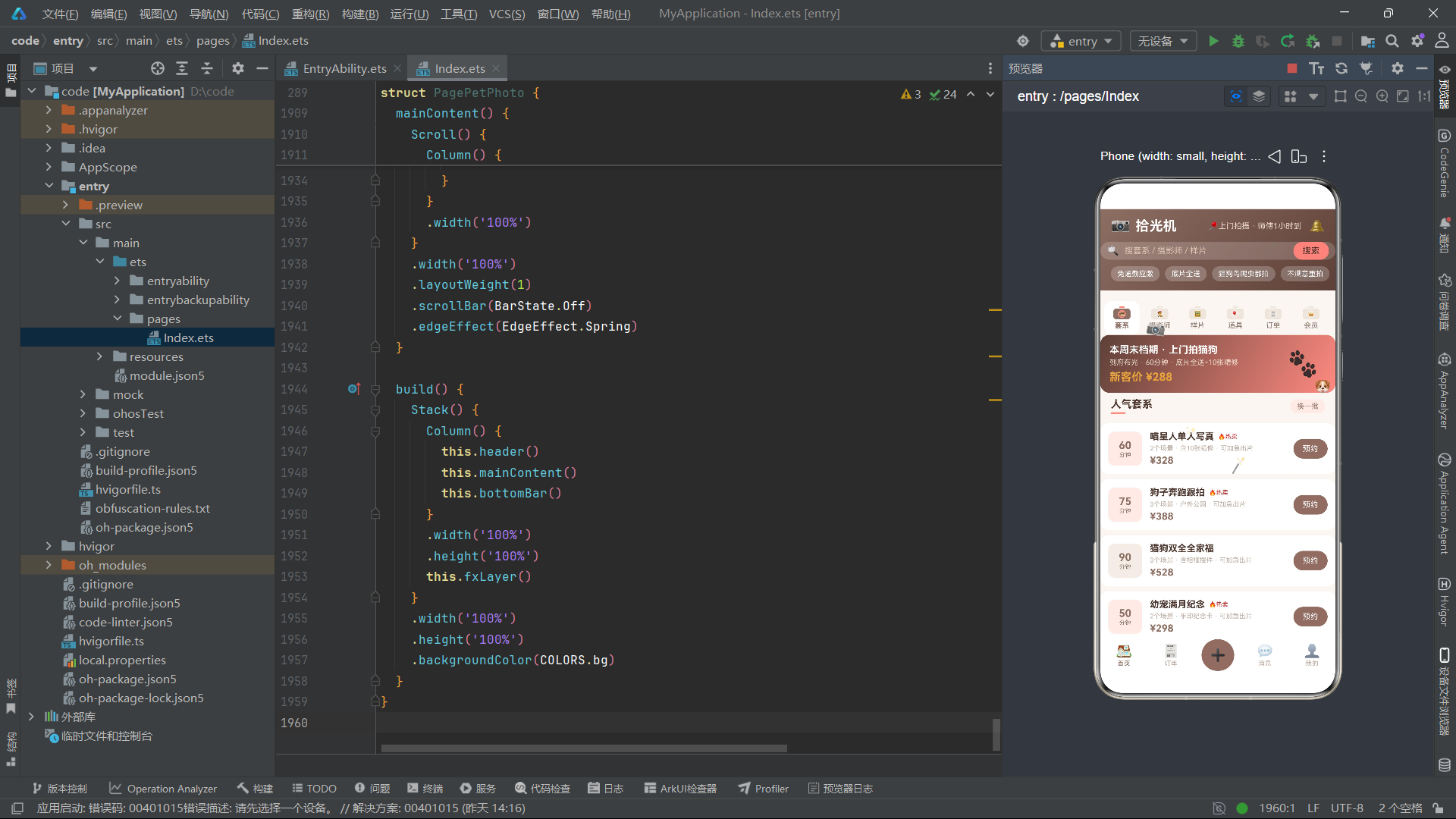
结语
通过对拾光机上门宠物摄影与写真应用的全面深度解析,我们可以清晰地看到HarmonyOS 6.1.1 ArkTS API 24在构建情感驱动型本地生活服务场景中的技术优势和应用价值。从ColorPalette棕色暖调配色体系到@Observed可观测数据模型的响应式更新,从相机机身式内容Tab的创意交互到四种弹框的完整预约-拍摄-出片闭环,整个应用展现了ArkTS声明式UI编程在宠物摄影垂直领域的系统化实现方案。
在数据架构层面,Pack、Snapper、Sample、PropInface、Order五个接口与对应的PackItem等可观测类构成的"接口契约+可观测实现"模式,为拍摄套系、摄影师、样片、道具和订单提供了类型安全且响应式的数据管理方案。特别值得关注的是Sample接口的toggleLike方法——同时修改liked布尔状态和likes数值,这种"状态+数值"双更新模式在社交媒体类应用中极为常见,而@Observed的批量更新机制确保了双属性变更的原子性,避免了界面闪烁。PropInface接口的命名也体现了开发中对ArkTS语言保留字的细致规避。
在视觉设计层面,相机机身式内容Tab的三段式结构——闪光灯(Rect+radius)、机身(Rect+radius+Circle镜头)、标签(Text)——通过基础组件的精确组合实现了相机物理隐喻的视觉化表达。选中态的"棕+珊瑚粉"双色同步切换,使得选中Tab呈现出完整的相机工作状态——闪光灯亮起(珊瑚粉)、机身激活(棕色)、镜头聚焦(珊瑚粉),视觉辨识度温暖而专业。fxLayer中的五个emoji粒子——相机摇摆、小狗位移、爪印闪烁、魔法棒缩放、闪光渐变——与宠物摄影主题紧密关联,营造出温暖的拍摄工作室氛围感。
在状态管理层面,orderFilter变量配合orderShown方法实现了订单的多状态筛选——全部/待拍摄/修图中/已完成/已取消,其中"修图中"状态是摄影服务特有的后期处理阶段。订单页面根据状态的不同,展示不同的操作按钮——待拍摄显示"改期"、修图中显示"加急"、已取消显示"删除"、已完成显示"相册"——每种操作关联不同的弹框组件。这种基于订单状态的多分支操作路由,使得用户能够根据订单当前阶段执行最合适的操作,是本应用交互设计的核心亮点。homeFlag到府拍摄模式开关和fastFlag优先插队开关分别控制拍摄计划和加急出片弹框中的高级选项,体现了摄影服务场景的业务深度。
在弹框体系层面,四种弹框(预约拍摄/拍摄计划/取消订单/加急出片)各自承担不同的服务环节。预约弹框处理正常的套系预约,包含风格多选和精修张数步进;拍摄计划弹框管理拍摄时段和宠物数量,包含到府拍摄模式开关;取消弹框展示退款策略和费用明细,以红色警示色为主调;加急出片弹框是修图中订单的特色功能,通过加急费用和优先插队排期缩短出片周期。这四种弹框通过modalOverlay统一管理,使用半透明棕色遮罩层,底部对齐方式弹出。

openEuler 是由开放原子开源基金会孵化的全场景开源操作系统项目,面向数字基础设施四大核心场景(服务器、云计算、边缘计算、嵌入式),全面支持 ARM、x86、RISC-V、loongArch、PowerPC、SW-64 等多样性计算架构
更多推荐
 2
2 0
0- 0


 已为社区贡献12条内容

所有评论(0)