基于HarmonyOS 6.1.1 ArkTS API 24开发的潮玩盲盒社区应用:瀑布流双列卡片网格与多Tab差异化布局的完整架构解析
HarmonyOS作为华为自主研发的分布式操作系统,其应用开发框架ArkTS在API 24版本中提供了更加完善的声明式UI编程范式。ArkTS在TypeScript的基础上进行了深度定制,引入了@Entry、@Component、@State、@Builder、@Observed等装饰器,使开发者能够以更直观、更高效的方式构建复杂的应用界面。在HarmonyOS 6.1.1的开发环境中,ArkTS语言不仅保留了TypeScript的静态类型检查优势,还通过编译时优化和运行时增强,大幅提升了应用的启动速度和渲染性能。本文将深入剖析一个潮玩盲盒社区应用的完整源码架构,该应用采用了小红书风格的社区设计理念,融合了瀑布流布局、多Tab差异化页面、弹框交互系统等丰富的UI模式。
潮玩盲盒作为近年来快速崛起的潮流文化消费品类,其社区化运营需求日益增长。用户不仅需要分享开盒的惊喜瞬间,还需要管理个人收藏、参与盲盒交易、查看排行榜等。在这样的业务背景下,一个功能完善的盲盒社区应用需要同时兼顾内容展示的丰富性、交互的流畅性以及数据的可维护性。ArkTS的声明式UI范式恰好能够满足这一需求,通过状态驱动的渲染机制,开发者可以轻松实现复杂的数据绑定和视图更新逻辑。本应用采用了紫色与粉色的渐变色彩体系,主色调为#7C4DFF(深紫)与#FF4081(玫红),辅以#E040FB(品红)的渐变过渡,营造出活泼而富有潮玩气息的视觉氛围。
在架构设计层面,本应用采用了单文件单组件的工程组织方式,将所有数据模型、配置常量、工具函数和UI构建器统一封装在一个入口组件中。这种设计虽然看似简单,但在HarmonyOS ArkTS的编译模型下具有独特的优势:编译器能够进行全局优化,减少跨文件引用的开销,同时状态管理的上下文更加清晰。应用的核心数据模型采用interface定义结构契约,通过@Observed装饰的class实现可观察的数据包装器,从而在状态变更时自动触发UI重渲染。这一设计模式是ArkTS状态管理的精髓所在,也是构建高性能HarmonyOS应用的关键技巧。
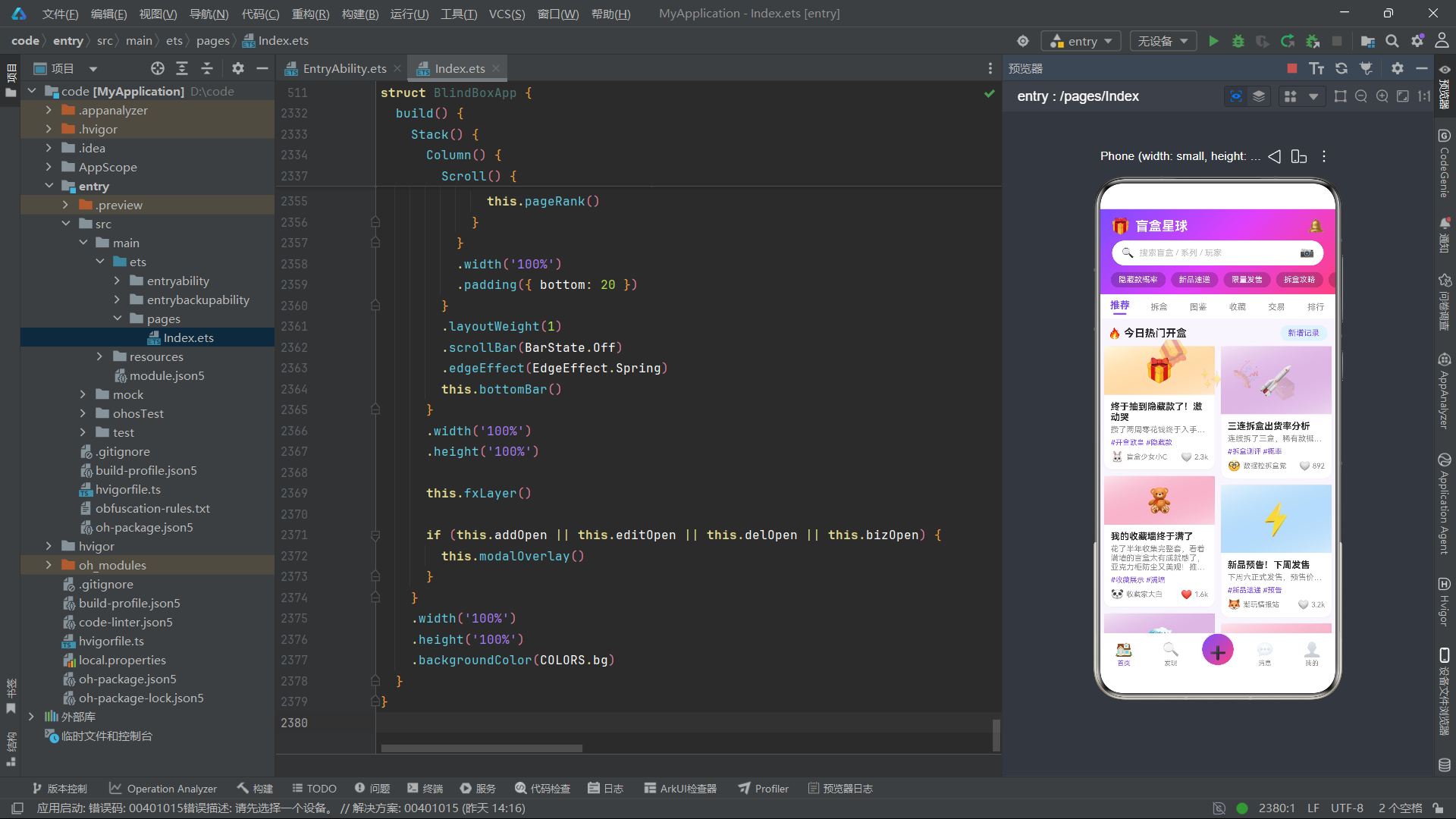
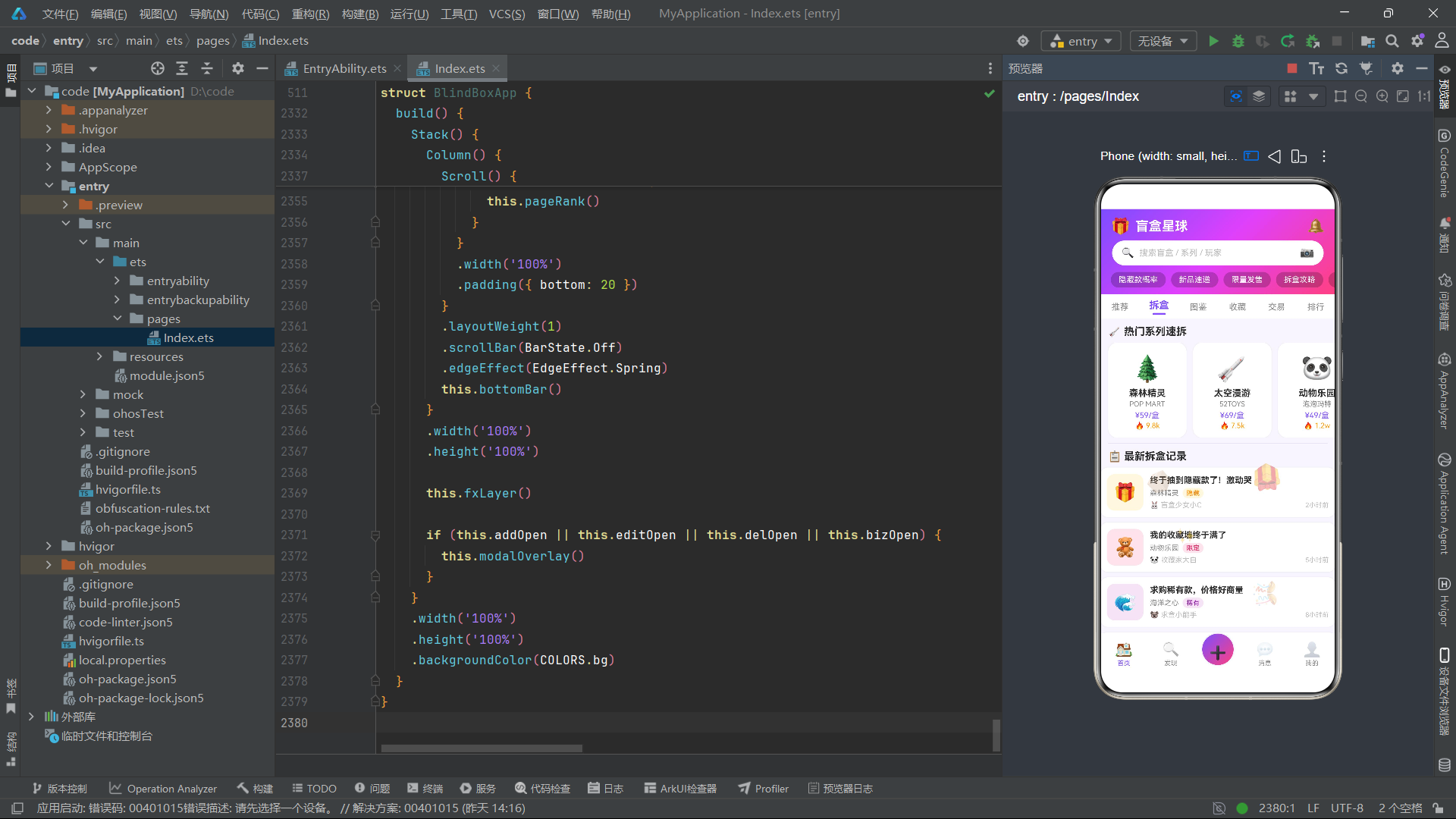
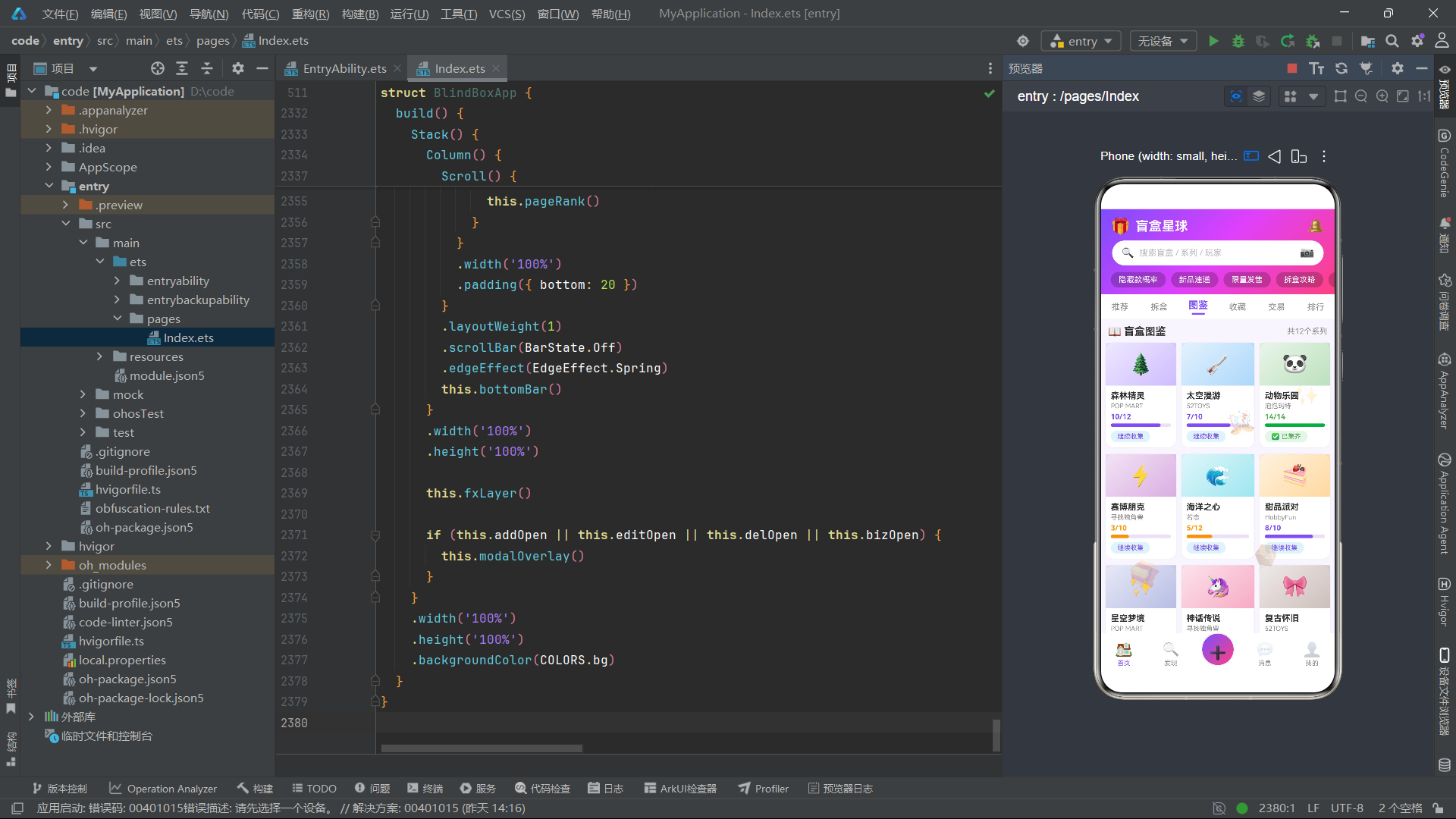
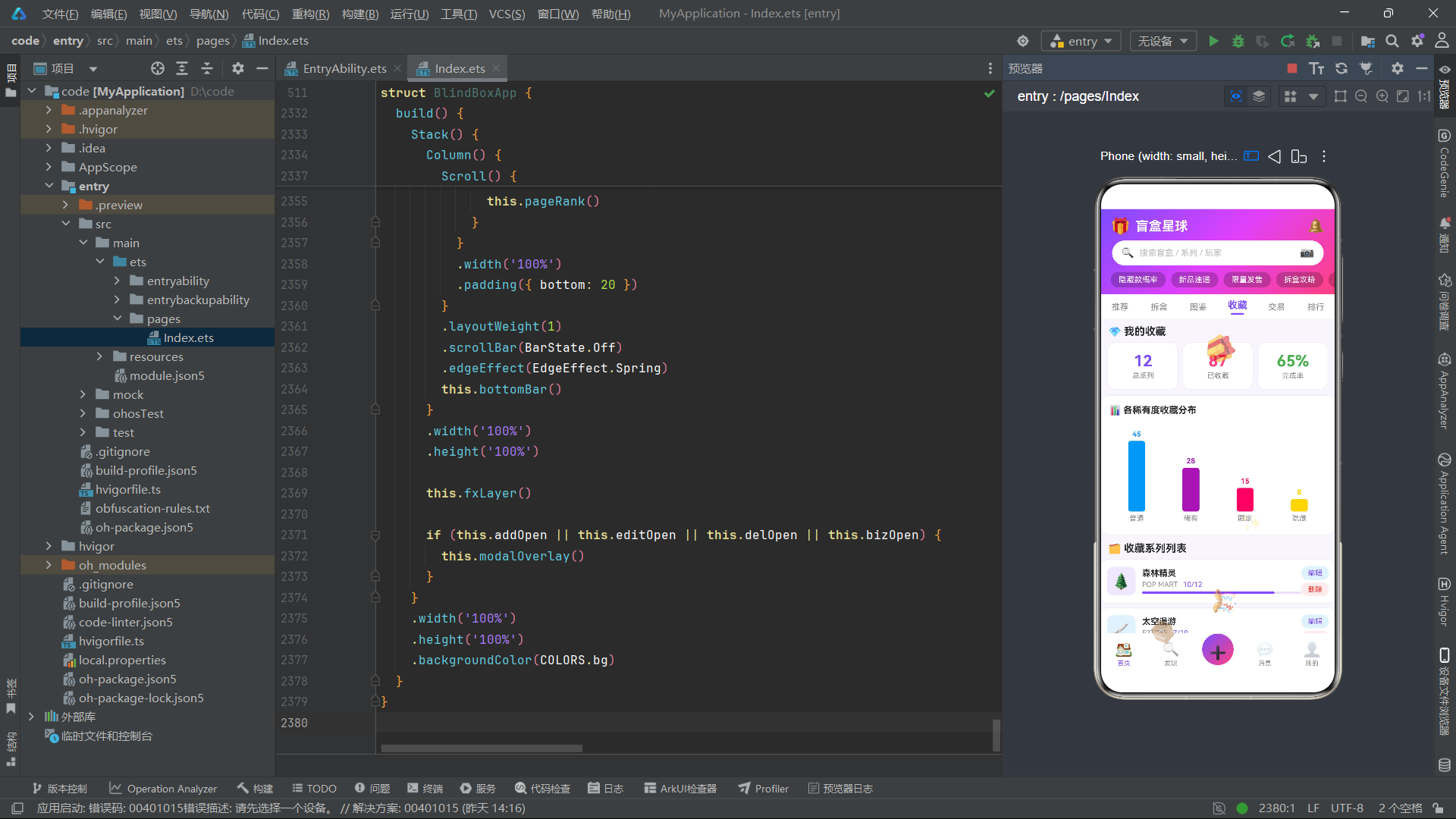
本应用共包含六个内容Tab页面(推荐、拆盒、图鉴、收藏、交易、排行)和四个弹框组件(新增笔记、编辑配方、删除确认、采购清单),涵盖了内容分享、收藏管理、商品交易、社区排行等完整的社区功能链路。每个Tab页面采用了差异化的布局策略:推荐页使用瀑布流双列卡片网格,拆盒页采用横向滚动加纵向列表的混合布局,图鉴页呈现三列网格,收藏页集成统计卡片与柱状图,交易页提供筛选标签与交易列表,排行页展示前三名特殊卡片与排名列表。这种多布局策略的统一管理,充分体现了ArkTS @Builder装饰器在UI复用方面的强大能力。
此外,应用还实现了一套基于定时器的特效动画系统,通过setInterval驱动的tick计数器,结合一系列纯函数计算emoji的浮动位置、透明度、旋转角度和缩放比例,在页面上层叠加了浮动礼盒、包裹、星光等装饰元素。这一动画方案虽然简洁,但通过数学函数的巧妙运用,实现了类似粒子系统的视觉效果,为应用增添了活泼灵动的潮玩氛围。接下来,我们将逐段深入解析源码的核心实现细节。
一、颜色配置体系与ColorPalette接口设计
在任何HarmonyOS应用中,颜色管理都是视觉设计的基础。本应用通过定义ColorPalette接口和COLORS常量,构建了一套完整的色彩配置体系,将所有颜色值集中管理,便于全局调整和主题切换。
interface ColorPalette {
  primary: string;
  primaryDark: string;
  secondary: string;
  accent: string;
  bg: string;
  card: string;
  text: string;
  textSub: string;
  textLight: string;
  border: string;
  grad1: string;
  grad2: string;
  grad3: string;
  gold: string;
  purple: string;
  pink: string;
  orange: string;
  green: string;
  blue: string;
  red: string;
  white: string;
  overlay: string;
  shadow: string;
}

const COLORS: ColorPalette = {
  primary: '#7C4DFF',
  primaryDark: '#651FFF',
  secondary: '#FF4081',
  accent: '#FFD740',
  bg: '#F8F5FF',
  card: '#FFFFFF',
  text: '#2D2D2D',
  textSub: '#888888',
  textLight: '#BBBBBB',
  border: '#E8E0F7',
  grad1: '#7C4DFF',
  grad2: '#E040FB',
  grad3: '#FF4081',
  gold: '#FFD700',
  purple: '#9C27B0',
  pink: '#E91E63',
  orange: '#FF9800',
  green: '#4CAF50',
  blue: '#2196F3',
  red: '#F44336',
  white: '#FFFFFF',
  overlay: '#80000000',
  shadow: '#15000000'
};
ColorPalette接口定义了23个颜色字段,涵盖了主色、渐变色、功能色、文本色、边框色等完整的色彩谱系。其中grad1、grad2、grad3三个字段专门用于渐变效果,分别对应紫色#7C4DFF、品红#E040FB和玫红#FF4081,这三个颜色构成了应用最具辨识度的三段渐变色系。overlay字段使用#80000000表示半透明黑色遮罩,用于弹框背景。shadow字段使用#15000000表示极淡的阴影色,为卡片提供柔和的立体感。通过interface定义颜色契约,开发者可以在编码阶段获得完整的类型提示和错误检查,避免拼写错误导致的颜色引用失败问题。
二、稀有度配置与静态数据常量
盲盒应用的核心业务逻辑围绕稀有度展开。本应用通过RarityOption接口和RARITY_OPTIONS数组定义了四级稀有度体系,同时配置了热度标签、Tab名称、交易筛选器和图表数据等静态常量。
interface RarityOption {
  name: string;
  color: string;
  bg: string;
}

const RARITY_OPTIONS: RarityOption[] = [
  { name: '普通', color: '#2196F3', bg: '#E3F2FD' },
  { name: '稀有', color: '#9C27B0', bg: '#F3E5F5' },
  { name: '限定', color: '#E91E63', bg: '#FCE4EC' },
  { name: '隐藏', color: '#FF8F00', bg: '#FFF8E1' }
];

const CONDITION_NAMES: string[] = ['全新未拆', '已拆证完', '近全新', '轻微使用'];

const HOT_TAGS: string[] = ['隐藏款概率', '新品速递', '限量发售', '拆盒攻略', '收藏展示', '交易市场', '换盒专区'];

const TAB_NAMES: string[] = ['推荐', '拆盒', '图鉴', '收藏', '交易', '排行'];

const TRADE_FILTERS: string[] = ['全部', '隐藏款', '稀有款', '限定款', '全新未拆', '近全新'];
RARITY_OPTIONS数组将稀有度名称、文字颜色和背景色三元组化,使得在UI渲染时可以直接通过索引获取匹配的配色方案。普通级使用蓝色系,稀有级使用紫色系,限定级使用玫红系,隐藏级使用琥珀色系,这种颜色编码体系不仅视觉上层次分明,而且与用户的直觉认知高度吻合。CONDITION_NAMES定义了商品的四种新旧状态,HOT_TAGS提供了七个热门话题标签,TAB_NAMES确定了六个内容页面的名称,TRADE_FILTERS则为交易市场提供了六种筛选条件。这些静态常量的集中定义,使得应用的配置数据与业务逻辑完全解耦,便于后期维护和功能扩展。
图表配置部分通过ChartBar接口定义了收藏页柱状图的数据结构:
interface ChartBar {
  label: string;
  value: number;
  color: string;
}

const CHART_BARS: ChartBar[] = [
  { label: '普通', value: 45, color: '#2196F3' },
  { label: '稀有', value: 28, color: '#9C27B0' },
  { label: '限定', value: 15, color: '#E91E63' },
  { label: '隐藏', value: 8, color: '#FFD700' }
];
这组数据直接驱动了收藏页面的稀有度分布柱状图渲染,每个柱子的标签、高度和颜色都由配置项决定。柱状图通过barHeight函数将数值映射为像素高度(value * 2.4),实现了简洁而有效的数据可视化效果。
三、数据模型定义与@Observed可观察类
ArkTS的状态管理系统要求所有需要在UI中响应变化的数据必须通过@State或@Observed进行装饰。本应用采用了一种"interface定义结构契约 + @Observed class实现可观察包装器"的双层设计模式。
interface Post {
  id: number;
  title: string;
  author: string;
  avatar: string;
  series: string;
  rarity: string;
  likes: number;
  liked: boolean;
  tags: string;
  content: string;
  pics: string;
  time: string;
}

interface Series {
  id: number;
  name: string;
  brand: string;
  total: number;
  collected: number;
  price: number;
  hot: number;
  color: string;
  emoji: string;
}

interface Trade {
  id: number;
  name: string;
  series: string;
  rarity: string;
  price: number;
  seller: string;
  status: string;
  condition: string;
}

interface Rank {
  id: number;
  name: string;
  score: number;
  avatar: string;
  collection: number;
  badge: string;
}
四个interface分别定义了帖子、系列、交易和排名的数据结构。Post接口包含了帖子标题、作者、头像emoji、所属系列、稀有度、点赞数、点赞状态、标签、内容、配图emoji和发布时间等12个字段。Series接口定义了盲盒系列的基本信息,包括品牌、总数、已收藏数、价格、热度和主题色。Trade接口描述了交易商品的信息,包括价格、卖家、状态和成色。Rank接口则定义了排行榜用户的积分、收藏数和徽章信息。
接下来是通过@Observed装饰的可观察类实现:
@Observed
class PostItem implements Post {
  id: number = 0;
  title: string = '';
  author: string = '';
  avatar: string = '';
  series: string = '';
  rarity: string = '';
  likes: number = 0;
  liked: boolean = false;
  tags: string = '';
  content: string = '';
  pics: string = '';
  time: string = '';

  constructor(o: Post) {
    this.id = o.id;
    this.title = o.title;
    this.author = o.author;
    this.avatar = o.avatar;
    this.series = o.series;
    this.rarity = o.rarity;
    this.likes = o.likes;
    this.liked = o.liked;
    this.tags = o.tags;
    this.content = o.content;
    this.pics = o.pics;
    this.time = o.time;
  }
}
@Observed装饰器使PostItem类成为可观察对象,当其属性发生变化时,绑定了该对象的UI组件将自动重新渲染。构造函数接收一个Post接口类型的参数,将所有属性逐一拷贝到实例中。这种"接口 + 可观察类"的模式在ArkTS中非常常见,其优势在于:interface可以用于定义静态Mock数据的类型约束,而@Observed class则用于运行时的可变状态管理。SeriesItem、TradeItem和RankItem均采用相同的模式实现,分别对应Series、Trade和Rank接口的可观察包装器。
四、Mock数据与全局纯函数
应用的数据初始化依赖于Mock数据数组和一系列纯函数。这些函数负责将静态interface数组转换为@Observed class实例数组,并提供了丰富的工具函数用于颜色映射、数据格式化和特效动画计算。
const POSTS: Post[] = [
  { id: 1, title: '终于抽到隐藏款了!激动哭', author: '盲盒少女小C', avatar: '🐰', series: '森林精灵', rarity: '隐藏', likes: 2341, liked: false, tags: '#开盒欧皇 #隐藏款', content: '攒了两周零花钱终于入手!拆开看到配色直接尖叫,隐藏款真的太美了,这个渐变紫绝了!', pics: '🎁', time: '2小时前' },
  { id: 2, title: '三连拆盒出货率分析', author: '数据控拆盒党', avatar: '🤓', series: '太空漫游', rarity: '稀有', likes: 892, liked: false, tags: '#拆盒测评 #概率', content: '连续拆了三盒,稀有款概率约12.5%,隐藏款3.1%', pics: '🚀', time: '3小时前' },
  { id: 3, title: '我的收藏墙终于满了', author: '收藏家大白', avatar: '🐼', series: '动物乐园', rarity: '限定', likes: 1567, liked: true, tags: '#收藏展示 #满墙', content: '花了半年收集完整套,看着满墙的盲盒太有成就感了,亚克力柜防尘又美观!推荐大家用展示柜收纳', pics: '🧸', time: '5小时前' },
  // ... 更多帖子数据
];
POSTS数组包含了12条帖子数据,每条数据都包含了完整的帖子信息。值得注意的是,avatar和pics字段使用emoji字符代替了图片URL,这是一种在Mock环境中常用的轻量级视觉占位方案。rarity字段的值与RARITY_OPTIONS中的name字段对应,便于在渲染时查找配色方案。
全局纯函数承担了数据处理和工具计算的核心职责:
function getLeftPosts(): PostItem[] {
  let result: PostItem[] = [];
  for (let i = 0; i < POSTS.length; i = i + 2) {
    result.push(new PostItem(POSTS[i]));
  }
  return result;
}

function getRightPosts(): PostItem[] {
  let result: PostItem[] = [];
  for (let i = 1; i < POSTS.length; i = i + 2) {
    result.push(new PostItem(POSTS[i]));
  }
  return result;
}

function rarityColor(name: string): string {
  if (name === '隐藏') return '#FF8F00';
  if (name === '稀有') return '#9C27B0';
  if (name === '限定') return '#E91E63';
  return '#2196F3';
}

function withAlpha(color: string, alpha: string): string {
  if (color.length === 7) {
    return '#' + alpha + color.slice(1);
  }
  return color;
}

function formatLikes(n: number): string {
  if (n >= 10000) return (n / 10000).toFixed(1).replace(/\.0$/, '') + 'w';
  if (n >= 1000) return (n / 1000).toFixed(1).replace(/\.0$/, '') + 'k';
  return n.toString();
}
getLeftPosts和getRightPosts两个函数分别从POSTS数组中提取偶数索引和奇数索引的元素,将其转换为PostItem实例,从而实现了瀑布流的双列数据分割。rarityColor和rarityBg函数根据稀有度名称返回对应的文字色和背景色。withAlpha函数是一个颜色处理工具,它将7位十六进制颜色值(如#7C4DFF)转换为带有透明度的9位格式(如#307C4DFF),用于卡片渐变背景的半透明叠加效果。formatLikes函数将数字格式化为带"k"或"w"后缀的简写形式,如2341显示为"2.3k",8901显示为"8.9k",提升了界面的信息密度和可读性。
五、特效动画函数与浮动emoji系统
应用最富特色的视觉元素之一是覆盖在页面上的浮动emoji特效层。这套系统通过一系列基于tick计数器的纯函数,计算每个emoji的位置、透明度、旋转角度和缩放比例,实现了类似粒子动画的效果。
function fxOpacity1(tick: number): number {
  return 0.2 + (tick % 8) * 0.06;
}

function fxOpacity2(tick: number): number {
  return 0.15 + (tick % 6) * 0.08;
}

function fxOpacity3(tick: number): number {
  return 0.1 + (tick % 10) * 0.05;
}

function fxScale(tick: number): number {
  return 0.7 + (tick % 5) * 0.12;
}

function fxX1(tick: number): number {
  return 30 + (tick * 3) % 300;
}

function fxY1(tick: number): number {
  return 120 + (tick * 4) % 500;
}
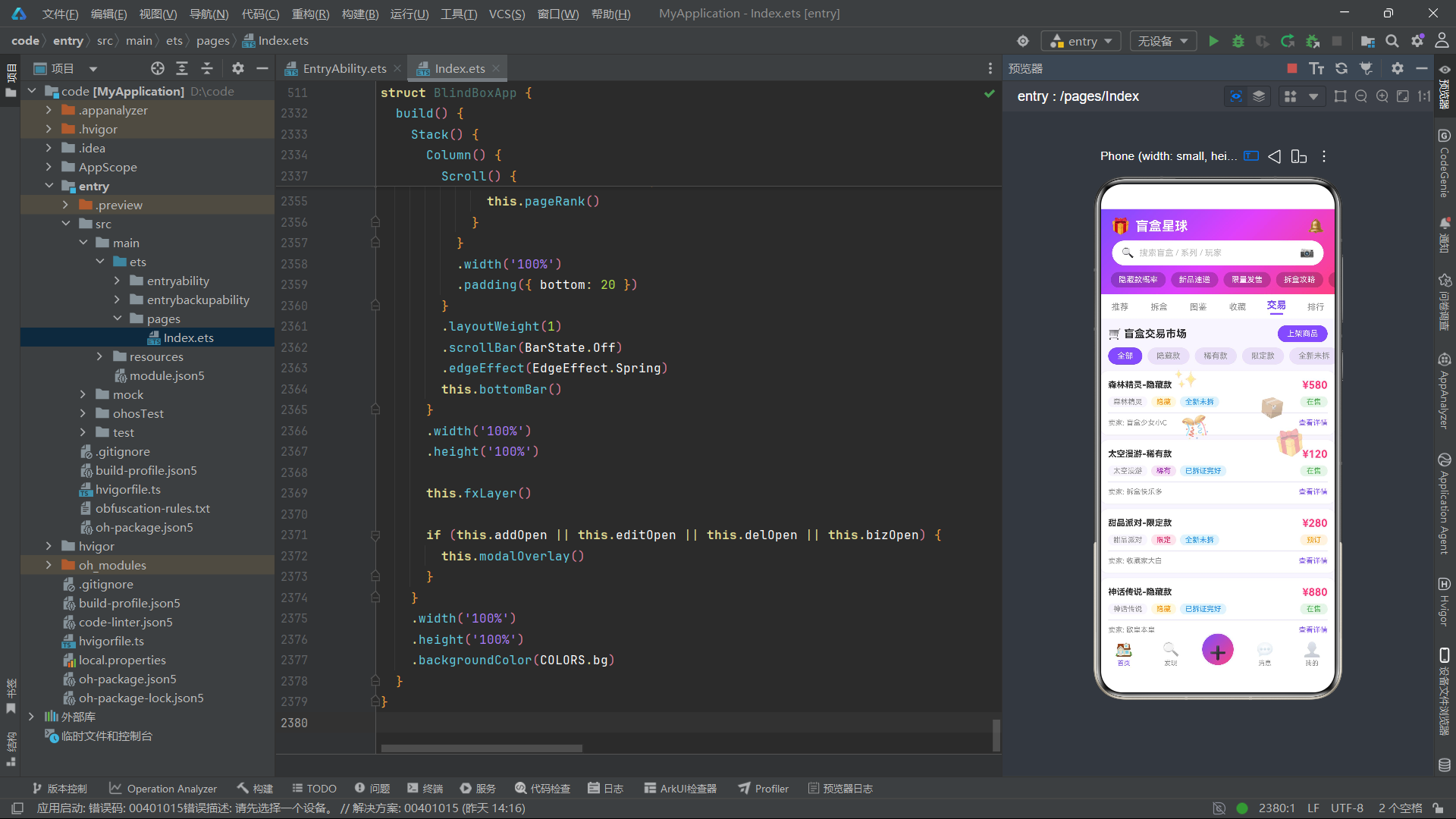
这些函数的核心设计思路是利用取模运算(%)创建循环动画效果。fxOpacity1通过tick % 8将透明度限制在0.2到0.62之间循环变化,fxScale通过tick % 5使缩放比例在0.7到1.18之间波动。位置函数fxX1和fxY1分别使用tick * 3和tick * 4的乘法因子,使水平和垂直方向的运动速度不同,从而产生不规则的飘动轨迹。四个emoji元素分别使用不同的位置函数(fxX1-fxX4, fxY1-fxY4),确保它们的运动路径互不相同,避免了视觉上的单调感。
这套动画系统的驱动机制在组件的aboutToAppear生命周期中初始化:
aboutToAppear(): void {
  this.leftPosts = getLeftPosts();
  this.rightPosts = getRightPosts();
  this.seriesList = getSeriesList();
  this.tradeList = getTradeList();
  this.rankList = getRankList();
  this.timer = setInterval(() => {
    this.tick = this.tick + 1;
  }, 120);
}

aboutToDisappear(): void {
  if (this.timer >= 0) {
    clearInterval(this.timer);
  }
}
aboutToAppear在组件创建时被调用,负责初始化所有数据列表和启动定时器。定时器每120毫秒将tick值递增1,由于tick是@State装饰的状态变量,每次变化都会触发UI重渲染,从而使所有依赖tick的特效函数重新计算,驱动emoji位置的更新。aboutToDisappear在组件销毁时清除定时器,防止内存泄漏。这种基于定时器的动画方案虽然不如ArkTS的animateTo动画系统流畅,但胜在实现简单、可控性强,适合Mock原型的快速验证。
六、入口组件状态管理与生命周期
BlindBoxApp是应用的入口组件,通过@Entry和@Component装饰器标记。该组件管理着应用的所有状态变量,包括当前Tab索引、弹框开关、表单数据、列表数据和动画状态。
@Entry
@Component
struct BlindBoxApp {
  @State curTab: number = 0;
  @State mainTab: number = 0;
  @State addOpen: boolean = false;
  @State editOpen: boolean = false;
  @State delOpen: boolean = false;
  @State bizOpen: boolean = false;

  // 新增开盒记录表单
  @State addTitle: string = '';
  @State addSeriesIdx: number = 0;
  @State addRarityIdx: number = 0;
  @State addContent: string = '';
  @State addTags: string = '';

  // 编辑收藏表单
  @State editName: string = '';
  @State editCollected: number = 0;
  @State editNote: string = '';

  // 删除确认
  @State delName: string = '森林精灵';

  // 交易上架表单
  @State bizName: string = '';
  @State bizSeriesIdx: number = 0;
  @State bizRarityIdx: number = 0;
  @State bizPrice: string = '';
  @State bizConditionIdx: number = 0;
  @State bizContact: string = '';

  // 数据
  @State leftPosts: PostItem[] = [];
  @State rightPosts: PostItem[] = [];
  @State seriesList: SeriesItem[] = [];
  @State tradeList: TradeItem[] = [];
  @State rankList: RankItem[] = [];

  // 交易筛选
  @State tradeFilterIdx: number = 0;

  // 特效动画
  @State tick: number = 0;
  private timer: number = -1;
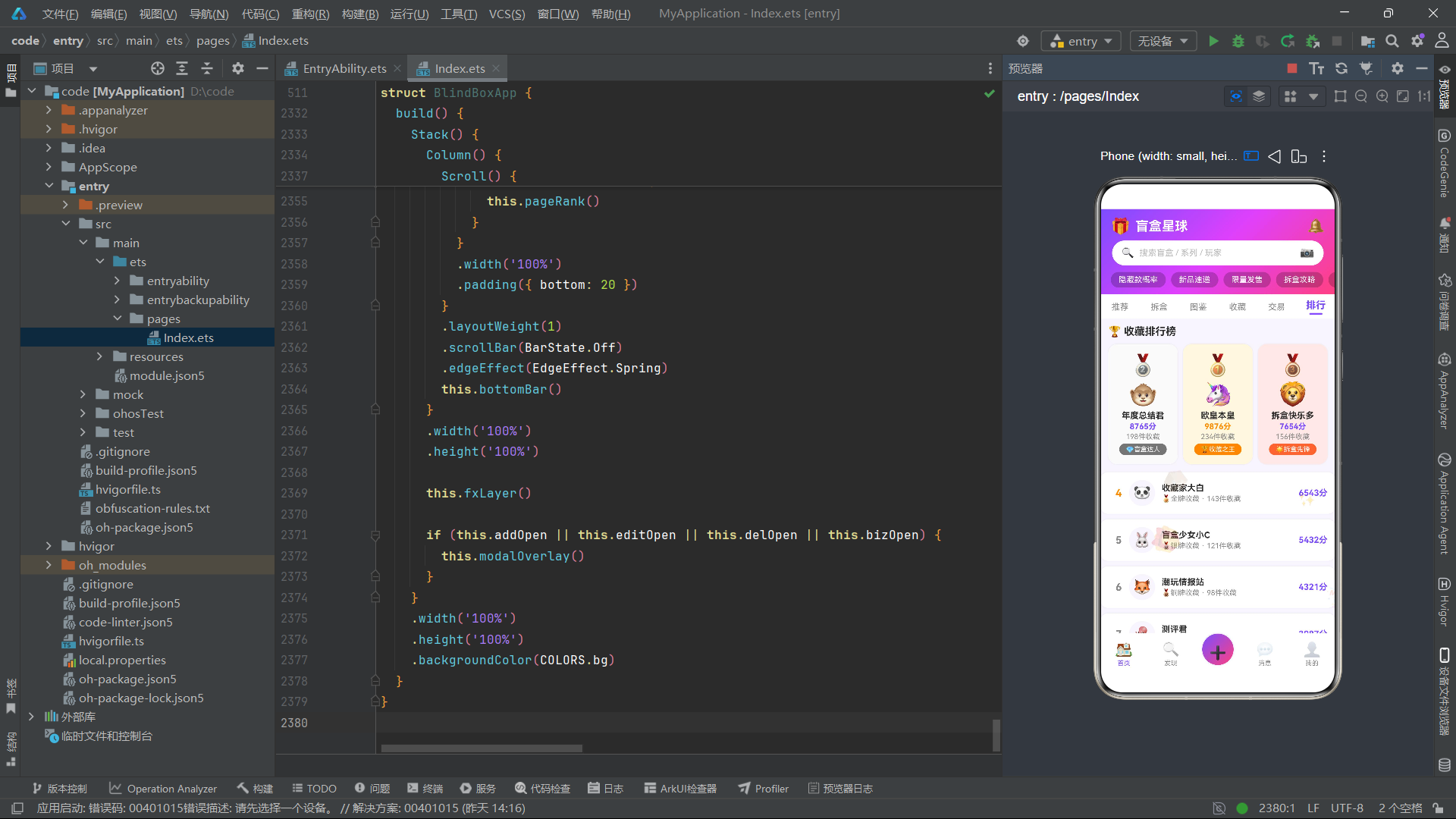
状态变量分为五组:页面导航状态(curTab、mainTab)、弹框开关状态(四个布尔值)、表单数据状态(各弹框对应的输入字段)、列表数据状态(五个数组)和动画状态(tick和timer)。timer使用private关键字声明,表示它不需要参与UI渲染,仅用于定时器ID的内部管理。这种分组式的状态管理方式使得组件的状态结构清晰可辨,便于开发者快速定位和修改特定的状态变量。
弹框管理方法提供了统一的开闭接口:
closeAll(): void {
  this.addOpen = false;
  this.editOpen = false;
  this.delOpen = false;
  this.bizOpen = false;
}

openAdd(): void {
  this.addTitle = '';
  this.addSeriesIdx = 0;
  this.addRarityIdx = 0;
  this.addContent = '';
  this.addTags = '';
  this.addOpen = true;
}

openEdit(name: string, collected: number): void {
  this.editName = name;
  this.editCollected = collected;
  this.editNote = '';
  this.editOpen = true;
}

openDel(name: string): void {
  this.delName = name;
  this.delOpen = true;
}

openBiz(): void {
  this.bizName = '';
  this.bizSeriesIdx = 0;
  this.bizRarityIdx = 0;
  this.bizPrice = '';
  this.bizConditionIdx = 0;
  this.bizContact = '';
  this.bizOpen = true;
}
closeAll方法一次性关闭所有弹框,简化了弹框间的切换逻辑。每个open方法在打开弹框前先重置对应的表单字段,确保每次打开时表单都是干净的初始状态。openEdit和openDel方法接收参数,将目标数据注入表单,实现了数据传递与弹框打开的原子性操作。点赞交互的toggleLike方法通过修改PostItem实例的liked和likes属性,并使用slice()方法创建数组的新引用,从而触发ArkTS的数组变化检测机制。
七、特效层fxLayer的@Builder实现
fxLayer是一个使用@Builder装饰的UI构建器,它负责渲染覆盖在整个页面之上的浮动emoji特效层。
@Builder
fxLayer() {
  Stack() {
    Text('🎁')
      .fontSize(38)
      .position({ x: fxX1(this.tick), y: fxY1(this.tick) })
      .opacity(fxOpacity1(this.tick))
      .rotate({ angle: this.tick * 8 })
      .hitTestBehavior(HitTestMode.None)
    Text('📦')
      .fontSize(30)
      .position({ x: fxX2(this.tick), y: fxY2(this.tick) })
      .opacity(fxOpacity2(this.tick))
      .rotate({ angle: -this.tick * 6 })
      .hitTestBehavior(HitTestMode.None)
    Text('✨')
      .fontSize(26)
      .position({ x: fxX3(this.tick), y: fxY3(this.tick) })
      .opacity(fxOpacity3(this.tick))
      .scale({ x: fxScale(this.tick), y: fxScale(this.tick) })
      .hitTestBehavior(HitTestMode.None)
    Text('🎊')
      .fontSize(34)
      .position({ x: fxX4(this.tick), y: fxY4(this.tick) })
      .opacity(fxOpacity2(this.tick))
      .rotate({ angle: this.tick * 12 })
      .hitTestBehavior(HitTestMode.None)
  }
  .width('100%')
  .height('100%')
  .hitTestBehavior(HitTestMode.None)
}
四个Text组件分别渲染了礼盒、包裹、星光和庆祝彩带emoji,每个emoji通过position属性绝对定位,其x/y坐标由对应的特效函数实时计算。opacity属性控制透明度的循环变化,rotate属性使emoji产生旋转效果(角度可以是负值,实现反向旋转),scale属性实现了星光emoji的呼吸缩放效果。最关键的是hitTestBehavior(HitTestMode.None)属性,它使整个特效层及其子元素不响应任何触摸事件,确保浮动emoji不会干扰底层页面的正常交互。外层Stack容器同样设置了HitTestMode.None,形成了一个完全透明的事件穿透层。
八、头部header组件与渐变背景
header构建器渲染了应用的顶部区域,包含品牌标识、搜索栏和热门标签滚动条,整体覆盖在紫色到粉色的三段渐变背景之上。
@Builder
header() {
  Column() {
    Row() {
      Text('🎁')
        .fontSize(24)
      Text('盲盒星球')
        .fontSize(20)
        .fontWeight(FontWeight.Bold)
        .fontColor(COLORS.white)
        .margin({ left: 8 })
      Row()
        .layoutWeight(1)
      Text('🔔')
        .fontSize(22)
        .onClick(() => {
          this.switchTab(0);
        })
    }
    .width('100%')
    .padding({ left: 16, right: 16, top: 12, bottom: 8 })
    .alignItems(VerticalAlign.Center)

    Row() {
      Text('🔍')
        .fontSize(16)
        .margin({ right: 8 })
      Text('搜索盲盒 / 系列 / 玩家')
        .fontSize(13)
        .fontColor(COLORS.textLight)
        .layoutWeight(1)
      Text('📷')
        .fontSize(18)
        .onClick(() => {
          this.openAdd();
        })
    }
    .width('90%')
    .height(38)
    .backgroundColor('#FFFFFF')
    .borderRadius(19)
    .padding({ left: 14, right: 14 })
    .alignItems(VerticalAlign.Center)
    .margin({ bottom: 10 })
  }
  .width('100%')
  .linearGradient({
    angle: 135,
    colors: [[COLORS.grad1, 0], [COLORS.grad2, 0.5], [COLORS.grad3, 1]]
  })
  .padding({ bottom: 10 })
}
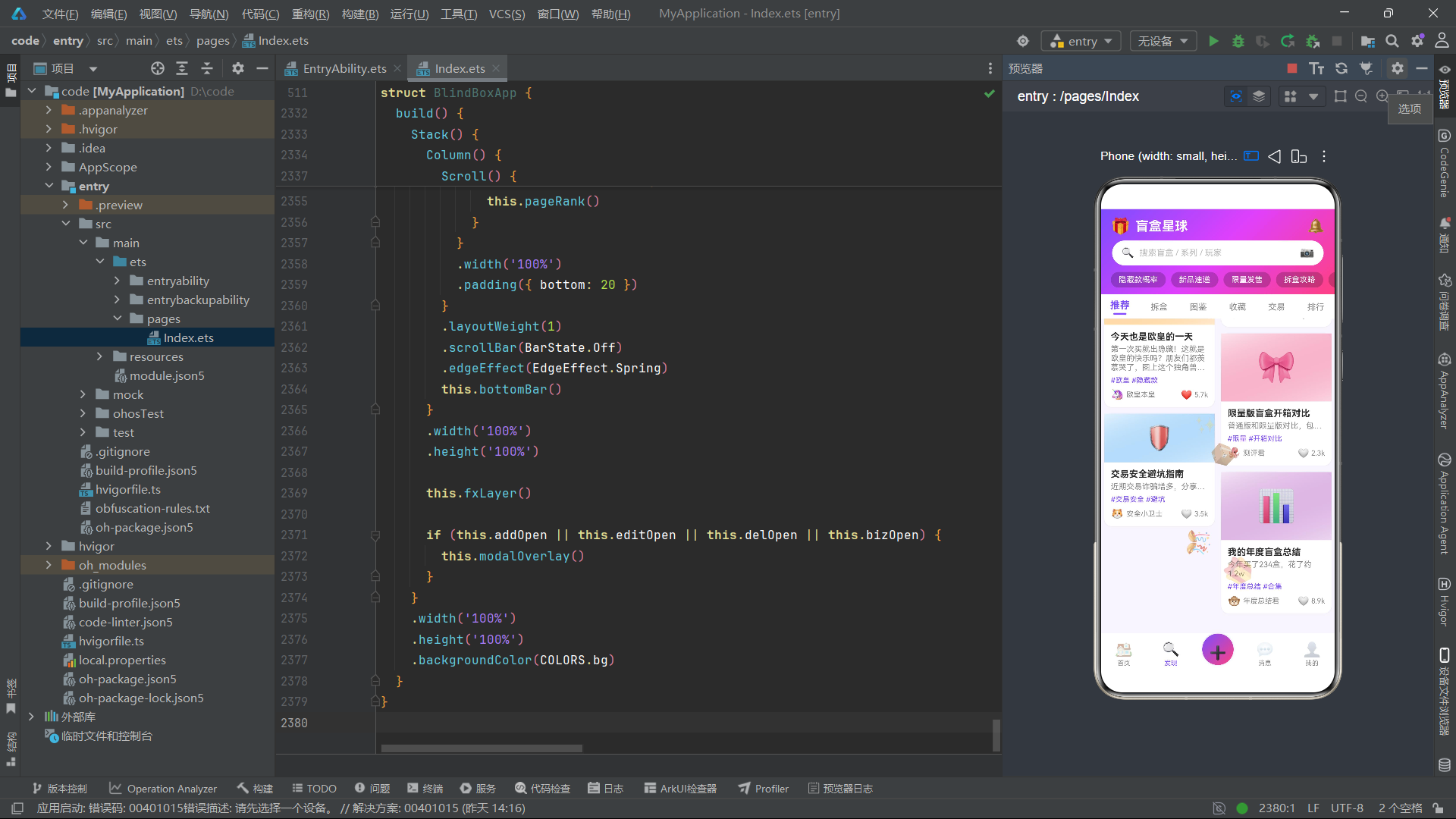
头部的渐变背景通过linearGradient属性实现,angle: 135指定了从左上到右下的渐变方向,colors数组定义了三个渐变色锚点:起始为#7C4DFF(深紫),中间为#E040FB(品红),终点为#FF4081(玫红),三个锚点分别在0%、50%和100%位置。搜索栏使用白色圆角背景(borderRadius: 19),在紫色渐变背景上形成了显著的视觉对比。搜索栏右侧的相机图标绑定了openAdd方法,点击即可打新增开盒记录弹框。热门标签区域使用Scroll容器实现横向滚动,每个标签是半透明白色背景(#35000000)的圆角胶囊按钮。
九、tabBar内容切换栏与tab0推荐页瀑布流
tabBar构建器渲染了六个内容Tab的切换栏,当前选中的Tab使用主色高亮并显示下划线指示器。
@Builder
tabBar() {
  Row() {
    ForEach(TAB_NAMES, (name: string, i: number) => {
      Column() {
        Text(name)
          .fontSize(this.curTab === i ? 15 : 13)
          .fontColor(this.curTab === i ? COLORS.primary : COLORS.textSub)
          .fontWeight(this.curTab === i ? FontWeight.Bold : FontWeight.Normal)
        if (this.curTab === i) {
          Column()
            .width(20)
            .height(3)
            .backgroundColor(COLORS.primary)
            .borderRadius(2)
            .margin({ top: 3 })
        }
      }
      .alignItems(HorizontalAlign.Center)
      .justifyContent(FlexAlign.Center)
      .padding({ top: 8, bottom: 6 })
      .layoutWeight(1)
      .onClick(() => {
        this.switchTab(i);
      })
    }, (name: string) => name)
  }
  .width('100%')
  .backgroundColor(COLORS.card)
}
Tab栏使用ForEach遍历TAB_NAMES数组生成六个Tab项,每个项的字体大小、颜色和粗细根据curTab === i条件进行差异化设置。选中状态下还会渲染一个20px宽、3px高的圆角下划线指示器。layoutWeight(1)确保六个Tab均匀分布。推荐页的瀑布流布局通过feedCard和pageFeed两个构建器实现:
@Builder
feedCard(p: PostItem) {
  Column() {
    Column() {
      Text(p.pics)
        .fontSize(p.id % 2 === 0 ? 48 : 36)
    }
    .width('100%')
    .padding({ top: p.id % 2 === 0 ? 24 : 16, bottom: p.id % 2 === 0 ? 24 : 16 })
    .linearGradient({
      angle: 160,
      colors: [[rarityBg(p.rarity), 0], [withAlpha(rarityColor(p.rarity), '30'), 1]]
    })
    .alignItems(HorizontalAlign.Center)

    Column() {
      Text(p.title)
        .fontSize(14)
        .fontWeight(FontWeight.Bold)
        .fontColor(COLORS.text)
        .maxLines(2)
        .textOverflow({ overflow: TextOverflow.Ellipsis })
        .margin({ bottom: 4 })

      Text(p.content)
        .fontSize(12)
        .fontColor(COLORS.textSub)
        .maxLines(p.id % 3 === 0 ? 3 : 1)
        .textOverflow({ overflow: TextOverflow.Ellipsis })
        .margin({ bottom: 6 })

      Row() {
        Text(p.avatar)
          .fontSize(16)
          .margin({ right: 4 })
        Text(p.author)
          .fontSize(11)
          .fontColor(COLORS.textSub)
          .layoutWeight(1)
        Text(p.liked ? '❤️' : '🤍')
          .fontSize(14)
          .onClick(() => {
            this.toggleLike(p);
          })
        Text(formatLikes(p.likes))
          .fontSize(11)
          .fontColor(COLORS.textSub)
          .margin({ left: 3 })
      }
      .width('100%')
      .alignItems(VerticalAlign.Center)
    }
    .padding(10)
    .alignItems(HorizontalAlign.Start)
  }
  .width('100%')
  .backgroundColor(COLORS.card)
  .borderRadius(12)
  .shadow({ radius: 4, color: COLORS.shadow })
  .margin({ bottom: 10 })
}
feedCard是单个帖子卡片的构建器,卡片顶部是根据稀有度配色的渐变区域,中间是标题、内容和标签,底部是作者信息和点赞按钮。卡片通过p.id % 2 === 0条件判断实现了偶数ID卡片使用更大的emoji字号(48 vs 36)和更大的内边距,模拟了真实瀑布流中卡片高度不一致的效果。内容区域的maxLines也根据p.id % 3 === 0条件动态设置为3行或1行,进一步增加了瀑布流的参差错落感。点赞按钮通过p.liked状态切换心形emoji,并调用toggleLike方法更新点赞数。
pageFeed构建器使用双列布局组织卡片:
@Builder
pageFeed() {
  Column() {
    Row() {
      Text('🔥 今日热门开盒')
        .fontSize(16)
        .fontWeight(FontWeight.Bold)
        .fontColor(COLORS.text)
        .layoutWeight(1)
      Text('新增记录')
        .fontSize(12)
        .fontColor(COLORS.primary)
        .padding({ left: 12, right: 12, top: 5, bottom: 5 })
        .borderRadius(12)
        .backgroundColor(rarityBg('普通'))
        .onClick(() => {
          this.openAdd();
        })
    }
    .width('100%')
    .padding({ left: 12, right: 12, top: 10, bottom: 8 })

    Row() {
      Column() {
        ForEach(this.leftPosts, (p: PostItem) => {
          this.feedCard(p)
        }, (p: PostItem) => p.id.toString())
      }
      .layoutWeight(1)
      .padding({ left: 6, right: 5 })

      Column() {
        ForEach(this.rightPosts, (p: PostItem) => {
          this.feedCard(p)
        }, (p: PostItem) => p.id.toString())
      }
      .layoutWeight(1)
      .padding({ left: 5, right: 6 })
    }
    .width('100%')
    .alignItems(VerticalAlign.Top)
  }
  .width('100%')
}
两列各自使用layoutWeight(1)平分宽度,左列内边距为left:6, right:5,右列为left:5, right:6,使两列之间的间距为10px(5+5),与两侧边距6px接近,视觉上保持均匀。alignItems(VerticalAlign.Top)确保两列从顶部对齐,模拟了瀑布流从上到下流动的视觉效果。
十、tab2图鉴页三列网格与收藏进度条
图鉴页使用三列网格布局展示所有盲盒系列,每个系列卡片包含emoji图标、名称、品牌、收藏进度和操作按钮。
@Builder
atlasCard(s: SeriesItem) {
  Column() {
    Column() {
      Text(s.emoji)
        .fontSize(32)
    }
    .width('100%')
    .padding({ top: 14, bottom: 14 })
    .linearGradient({
      angle: 140,
      colors: [[withAlpha(s.color, '20'), 0], [withAlpha(s.color, '60'), 1]]
    })
    .alignItems(HorizontalAlign.Center)

    Column() {
      Text(s.name)
        .fontSize(13)
        .fontWeight(FontWeight.Bold)
        .fontColor(COLORS.text)
        .maxLines(1)
        .textOverflow({ overflow: TextOverflow.Ellipsis })
      Text(s.brand)
        .fontSize(10)
        .fontColor(COLORS.textSub)
        .margin({ top: 2 })
      Text(s.collected + '/' + s.total)
        .fontSize(11)
        .fontColor(seriesProgressColor(s.collected, s.total))
        .fontWeight(FontWeight.Bold)
        .margin({ top: 4 })

      Row() {
        Column()
          .width(progressPercent(s.collected, s.total) + '%')
          .height(5)
          .backgroundColor(seriesProgressColor(s.collected, s.total))
          .borderRadius(3)
      }
      .width('100%')
      .height(5)
      .backgroundColor(COLORS.border)
      .borderRadius(3)
      .margin({ top: 4, bottom: 6 })

      Text(s.collected >= s.total ? '✅ 已集齐' : '继续收集')
        .fontSize(10)
        .fontColor(s.collected >= s.total ? COLORS.green : COLORS.primary)
        .padding({ left: 10, right: 10, top: 3, bottom: 3 })
        .borderRadius(10)
        .backgroundColor(s.collected >= s.total ? '#E8F5E9' : rarityBg('普通'))
        .onClick(() => {
          this.openEdit(s.name, s.collected);
        })
    }
    .padding(8)
    .alignItems(HorizontalAlign.Start)
    .width('100%')
  }
  .width('100%')
  .backgroundColor(COLORS.card)
  .borderRadius(12)
  .shadow({ radius: 3, color: COLORS.shadow })
  .margin({ bottom: 10 })
}
卡片的顶部区域使用系列主题色(s.color)生成半透明渐变背景,通过withAlpha函数将颜色转换为20%和60%透明度的变体。进度条使用progressPercent函数计算百分比,将其作为Column的宽度(如"75%"),放置在灰色背景的Row容器中,形成进度条效果。seriesProgressColor函数根据完成度返回不同颜色:100%为绿色、50%以上为紫色、25%以上为橙色、不足25%为红色,直观地传达了收藏进度状态。
三列网格通过i % 3取模判断将系列分配到三列:
Row() {
  Column() {
    ForEach(this.seriesList, (s: SeriesItem, i: number) => {
      if (i % 3 === 0) {
        this.atlasCard(s)
      }
    }, (s: SeriesItem) => 'col0_' + s.id.toString())
  }
  .layoutWeight(1)

  Column() {
    ForEach(this.seriesList, (s: SeriesItem, i: number) => {
      if (i % 3 === 1) {
        this.atlasCard(s)
      }
    }, (s: SeriesItem) => 'col1_' + s.id.toString())
  }
  .layoutWeight(1)

  Column() {
    ForEach(this.seriesList, (s: SeriesItem, i: number) => {
      if (i % 3 === 2) {
        this.atlasCard(s)
      }
    }, (s: SeriesItem) => 'col2_' + s.id.toString())
  }
  .layoutWeight(1)
}
这种通过取模实现多列网格的方式是ArkTS中常见的布局技巧,因为ArkTS的Grid组件在复杂场景下的灵活性有限,使用多个Column配合条件渲染可以更精确地控制每列的内容和样式。
十一、tab3收藏页统计卡片与柱状图
收藏页集成了统计卡片、柱状图和收藏列表三个区域,是应用中信息密度最高的页面。
@Builder
collectStatCard(label: string, value: string, color: string) {
  Column() {
    Text(value)
      .fontSize(24)
      .fontWeight(FontWeight.Bold)
      .fontColor(color)
    Text(label)
      .fontSize(11)
      .fontColor(COLORS.textSub)
      .margin({ top: 2 })
  }
  .layoutWeight(1)
  .alignItems(HorizontalAlign.Center)
  .padding({ top: 14, bottom: 14 })
  .backgroundColor(COLORS.card)
  .borderRadius(12)
  .margin({ left: 4, right: 4 })
  .shadow({ radius: 3, color: COLORS.shadow })
}
collectStatCard是一个可复用的统计卡片构建器,接收标签、数值和颜色三个参数。在收藏页中使用三次调用,分别展示总系列数、已收藏数和完成率。柱状图区域使用CHART_BARS配置数据驱动渲染:
Row() {
  ForEach(CHART_BARS, (bar: ChartBar) => {
    Column() {
      Text(bar.value.toString())
        .fontSize(11)
        .fontColor(bar.color)
        .fontWeight(FontWeight.Bold)
        .margin({ bottom: 4 })
      Column()
        .width(26)
        .height(barHeight(bar.value))
        .backgroundColor(bar.color)
        .borderRadius(4)
      Text(bar.label)
        .fontSize(11)
        .fontColor(COLORS.textSub)
        .margin({ top: 4 })
    }
    .layoutWeight(1)
    .alignItems(HorizontalAlign.Center)
    .justifyContent(FlexAlign.End)
  }, (bar: ChartBar) => bar.label)
}
.width('100%')
.height(160)
.alignItems(VerticalAlign.Bottom)
.justifyContent(FlexAlign.End)
柱状图的每个柱子是一个Column组件,其高度通过barHeight(bar.value)函数计算(value * 2.4),数值标签在柱子上方,类别标签在柱子下方。外层Row设置了height(160)和alignItems(VerticalAlign.Bottom),使所有柱子从底部对齐,形成标准的柱状图视觉效果。
十二、tab4交易页筛选标签与交易列表
交易页提供了横向滚动的筛选标签栏和纵向排列的交易卡片列表,是应用中交互逻辑最丰富的页面之一。
Scroll() {
  Row() {
    ForEach(TRADE_FILTERS, (f: string, i: number) => {
      Text(f)
        .fontSize(12)
        .fontColor(this.tradeFilterIdx === i ? COLORS.white : COLORS.textSub)
        .padding({ left: 14, right: 14, top: 6, bottom: 6 })
        .borderRadius(16)
        .backgroundColor(this.tradeFilterIdx === i ? COLORS.primary : COLORS.border)
        .margin({ right: 8 })
        .onClick(() => {
          this.tradeFilterIdx = i;
        })
    }, (f: string) => f)
  }
  .padding({ left: 12, right: 12 })
}
.scrollable(ScrollDirection.Horizontal)
.scrollBar(BarState.Off)
筛选标签通过tradeFilterIdx状态变量跟踪当前选中的筛选条件,选中标签使用主色背景和白色文字,未选中标签使用边框色背景和灰色文字。交易卡片中使用了statusColor和statusBg函数根据交易状态(在售/预订/已售)动态设置颜色:
function statusColor(status: string): string {
  if (status === '在售') return '#4CAF50';
  if (status === '预订') return '#FF9800';
  if (status === '已售') return '#9E9E9E';
  return '#2196F3';
}
在售状态使用绿色表示可交易,预订状态使用橙色表示待确认,已售状态使用灰色表示不可用。已售商品的价格标签还通过TextDecorationType.LineThrough添加了删除线效果,进一步强化了不可购买的视觉信号。
十三、tab5排行榜页与前三名特殊卡片
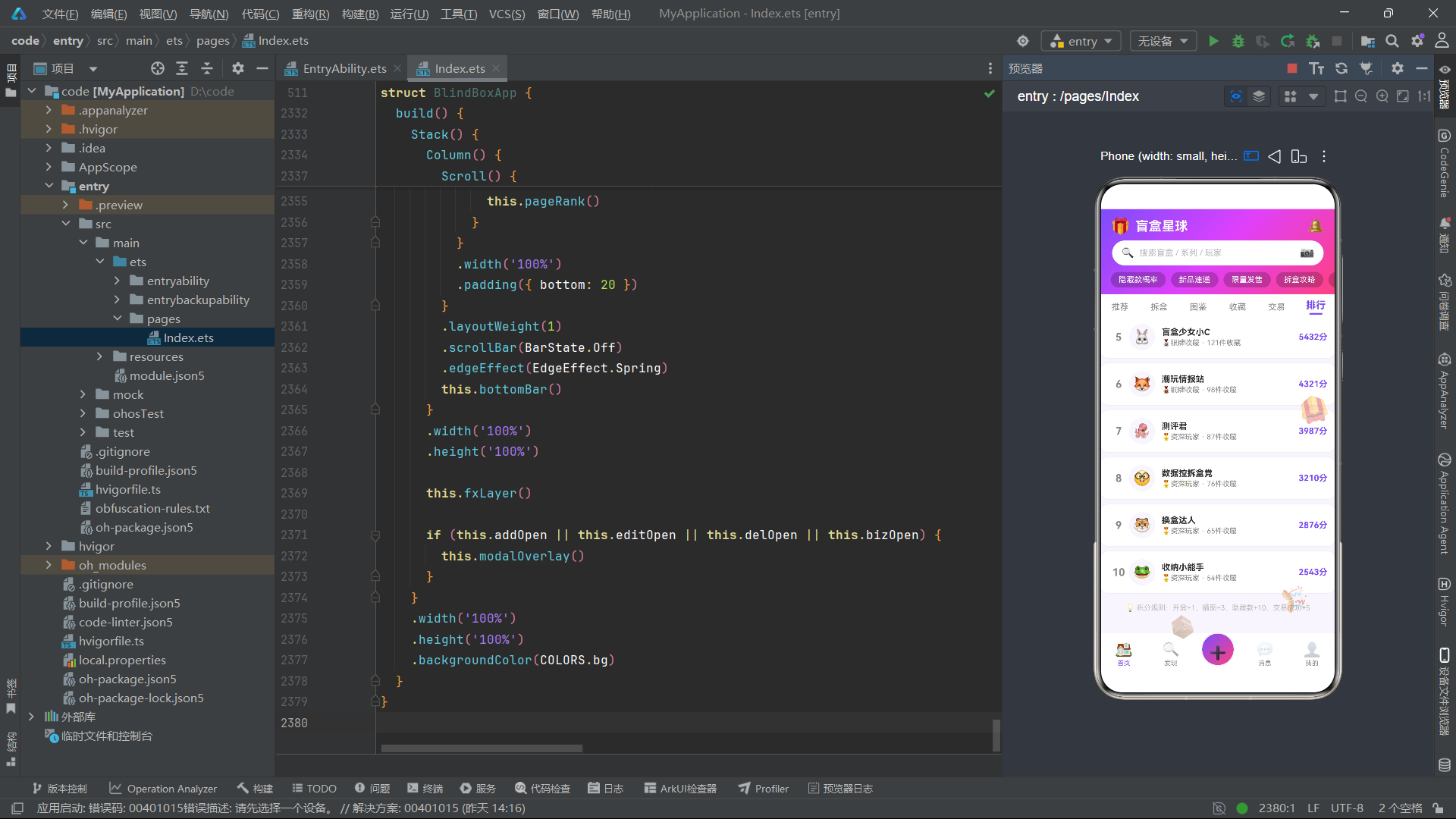
排行榜页对前三名用户使用特殊的大卡片展示,第四名及以后使用紧凑的列表行布局。
@Builder
rankTopCard(r: RankItem) {
  Column() {
    Text(medalEmoji(r.id))
      .fontSize(32)
    Text(r.avatar)
      .fontSize(36)
      .margin({ top: 4 })
    Text(r.name)
      .fontSize(13)
      .fontWeight(FontWeight.Bold)
      .fontColor(COLORS.text)
      .margin({ top: 4 })
    Text(r.score.toString() + '分')
      .fontSize(12)
      .fontColor(r.id === 1 ? '#FF8F00' : COLORS.primary)
      .fontWeight(FontWeight.Bold)
      .margin({ top: 2 })
    Text(r.collection.toString() + '件收藏')
      .fontSize(11)
      .fontColor(COLORS.textSub)
      .margin({ top: 2 })
    Text(r.badge)
      .fontSize(10)
      .fontColor(COLORS.white)
      .padding({ left: 10, right: 10, top: 3, bottom: 3 })
      .borderRadius(10)
      .backgroundColor(r.id === 1 ? '#FF8F00' : r.id === 2 ? '#757575' : '#FF7043')
      .margin({ top: 4 })
  }
  .layoutWeight(1)
  .padding({ top: 14, bottom: 14, left: 6, right: 6 })
  .backgroundColor(rankBgColor(r.id))
  .borderRadius(14)
  .alignItems(HorizontalAlign.Center)
  .shadow({ radius: 4, color: COLORS.shadow })
}
前三名卡片的排列顺序是第二名、第一名、第三名(2-1-3),使第一名居中且最高,形成经典的领奖台视觉效果。第一名使用金色(#FF8F00)文字和金色徽章背景,第二名使用灰色,第三名使用橙色。medalEmoji函数根据排名返回对应的奖牌emoji(金、银、铜),rankBgColor函数为前三名分别设置不同的卡片背景色。
十四、弹框系统与modalOverlay遮罩层
应用的四个弹框通过统一的modalOverlay构建器管理,使用Stack容器叠加遮罩层和弹框内容。
@Builder
modalOverlay() {
  Stack() {
    Column()
      .width('100%')
      .height('100%')
      .backgroundColor(COLORS.overlay)
      .onClick(() => {
        this.closeAll();
      })

    if (this.addOpen) {
      this.modalBodyAdd()
    }
    if (this.editOpen) {
      this.modalBodyEdit()
    }
    if (this.delOpen) {
      this.modalBodyDel()
    }
    if (this.bizOpen) {
      this.modalBodyBiz()
    }
  }
  .width('100%')
  .height('100%')
}
遮罩层使用COLORS.overlay(#80000000,50%透明黑色)作为背景色,点击遮罩层调用closeAll关闭所有弹框。四个弹框通过条件渲染(if (this.xxxOpen))决定是否显示,由于同一时刻只有一个弹框处于打开状态,这种设计确保了不会有多个弹框叠加。新增开盒记录弹框(modalBodyAdd)从底部弹出,包含标题输入、系列选择、稀有度选择、内容编辑和标签输入五个表单项。编辑收藏弹框(modalBodyEdit)居中显示,提供系列名称编辑和已收集数量的加减按钮。删除确认弹框(modalBodyDel)是一个简洁的居中小弹框,使用红色警告色。交易上架弹框(modalBodyBiz)从底部弹出,包含商品名称、系列选择、稀有度、新旧程度、价格和联系方式等完整的交易信息表单。
十五、底部导航栏bottomBar与主构建build方法
底部导航栏包含五个入口:首页、发现、发布(中央凸起按钮)、消息和我的。主构建方法build将所有组件组装为最终的应用界面。
@Builder
bottomBar() {
  Row() {
    Column() {
      Text('🏠')
        .fontSize(22)
        .opacity(this.mainTab === 0 ? 1 : 0.4)
      Text('首页')
        .fontSize(10)
        .fontColor(this.mainTab === 0 ? COLORS.primary : COLORS.textSub)
        .margin({ top: 2 })
    }
    .layoutWeight(1)
    .alignItems(HorizontalAlign.Center)
    .onClick(() => {
      this.switchMain(0);
    })

    Column() {
      Text('➕')
        .fontSize(26)
        .fontColor(COLORS.white)
        .textAlign(TextAlign.Center)
        .width(48)
        .height(48)
        .lineHeight(48)
        .linearGradient({
          angle: 135,
          colors: [[COLORS.grad1, 0], [COLORS.grad3, 1]]
        })
        .borderRadius(24)
        .shadow({ radius: 8, color: '#407C4DFF' })
        .margin({ top: -14 })
    }
    .layoutWeight(1)
    .alignItems(HorizontalAlign.Center)
    .onClick(() => {
      this.openAdd();
    })
  }
  .width('100%')
  .height(64)
  .backgroundColor(COLORS.card)
}
中央发布按钮使用紫粉渐变背景(grad1到grad3),通过margin({ top: -14 })向上凸出,配合shadow产生悬浮效果,是整个底部栏的视觉焦点。未选中状态的Tab使用opacity: 0.4降低不透明度,与选中状态形成对比。
build() {
  Stack() {
    Column() {
      this.header()
      this.tabBar()
      Scroll() {
        Column() {
          if (this.curTab === 0) {
            this.pageFeed()
          }
          if (this.curTab === 1) {
            this.pageUnbox()
          }
          if (this.curTab === 2) {
            this.pageAtlas()
          }
          if (this.curTab === 3) {
            this.pageCollect()
          }
          if (this.curTab === 4) {
            this.pageTrade()
          }
          if (this.curTab === 5) {
            this.pageRank()
          }
        }
        .width('100%')
        .padding({ bottom: 20 })
      }
      .layoutWeight(1)
      .scrollBar(BarState.Off)
      .edgeEffect(EdgeEffect.Spring)
      this.bottomBar()
    }
    .width('100%')
    .height('100%')

    this.fxLayer()

    if (this.addOpen || this.editOpen || this.delOpen || this.bizOpen) {
      this.modalOverlay()
    }
  }
  .width('100%')
  .height('100%')
  .backgroundColor(COLORS.bg)
}
build方法使用三层Stack结构:底层是Column容器(包含header、tabBar、Scroll内容区和bottomBar),中间层是fxLayer特效层(事件穿透),最上层是条件渲染的modalOverlay弹框层。内容区使用Scroll容器包裹,设置了scrollBar(BarState.Off)隐藏滚动条和edgeEffect(EdgeEffect.Spring)启用弹性回弹效果,使滚动体验更加自然流畅。
组件架构与数据流Mermaid流程图
数据模型与组件对比表
| 维度 | PostItem | SeriesItem | TradeItem | RankItem |
|---|---|---|---|---|
| 对应接口 | Post | Series | Trade | Rank |
| 核心字段 | title, author, rarity, likes | name, brand, collected, total | name, price, seller, status | name, score, collection, badge |
| 使用页面 | 推荐(瀑布流)、拆盒(列表) | 拆盒(横滑)、图鉴(网格)、收藏(列表) | 交易(列表) | 排行(前3卡片+列表) |
| 颜色映射函数 | rarityColor, rarityBg | seriesProgressColor | statusColor, statusBg | rankBgColor, medalEmoji |
| 格式化函数 | formatLikes | progressPercent | 无 | 无 |
| 弹框交互 | 新增开盒记录 | 编辑收藏信息 | 交易上架 | 无 |
| 布局方式 | 双列瀑布流卡片 | 三列网格/横向滚动/纵向列表 | 纵向列表 | 前三名卡片+列表行 |
| 数据来源 | POSTS常量(12条) | SERIES_DATA常量(12条) | TRADES常量(10条) | RANKS常量(10条) |
| Mock数据特征 | emoji头像+配图 | emoji图标+主题色 | 价格+状态+成色 | 积分+收藏数+徽章 |
| 弹框组件 | 弹出方式 | 宽度占比 | 最大高度 | 核心表单字段 | 触发来源 |
|---|---|---|---|---|---|
| modalBodyAdd | 底部弹出(FlexAlign.End) | 90% | 75% | 标题/系列/稀有度/内容/标签 | header相机/推荐页新增/底部发布 |
| modalBodyEdit | 居中弹出 | 85% | 无限制 | 名称/已收集数量/备注 | 图鉴页/收藏页编辑按钮 |
| modalBodyDel | 居中小弹框 | 70% | 无限制 | 确认/取消 | 收藏页删除按钮 |
| modalBodyBiz | 底部弹出(FlexAlign.End) | 95% | 80% | 商品名/系列/稀有度/新旧/价格/联系方式 | 交易页上架按钮/查看详情 |
安装DevEco Studio程序

选择目标安装目录:

设置环境变量,但是需要重启一下:

新建一个空白模板:

设置API为24的模板项目:
初始化项目,自动下载相关依赖:

完整代码:
/**
* 场景:潮玩盲盒社区(小红书风格)
* 布局风格:瀑布流双列卡片网格 + 多tab差异化布局
* 主题色:紫色/粉色渐变系,活泼鲜艳
* 功能:开盒记录分享、收藏管理、盲盒交易、排行榜
*/
// ============================================================
// 颜色配置
// ============================================================
interface ColorPalette {
primary: string;
primaryDark: string;
secondary: string;
accent: string;
bg: string;
card: string;
text: string;
textSub: string;
textLight: string;
border: string;
grad1: string;
grad2: string;
grad3: string;
gold: string;
purple: string;
pink: string;
orange: string;
green: string;
blue: string;
red: string;
white: string;
overlay: string;
shadow: string;
}
const COLORS: ColorPalette = {
primary: '#7C4DFF',
primaryDark: '#651FFF',
secondary: '#FF4081',
accent: '#FFD740',
bg: '#F8F5FF',
card: '#FFFFFF',
text: '#2D2D2D',
textSub: '#888888',
textLight: '#BBBBBB',
border: '#E8E0F7',
grad1: '#7C4DFF',
grad2: '#E040FB',
grad3: '#FF4081',
gold: '#FFD700',
purple: '#9C27B0',
pink: '#E91E63',
orange: '#FF9800',
green: '#4CAF50',
blue: '#2196F3',
red: '#F44336',
white: '#FFFFFF',
overlay: '#80000000',
shadow: '#15000000'
};
// ============================================================
// 稀有度配置
// ============================================================
interface RarityOption {
name: string;
color: string;
bg: string;
}
const RARITY_OPTIONS: RarityOption[] = [
{ name: '普通', color: '#2196F3', bg: '#E3F2FD' },
{ name: '稀有', color: '#9C27B0', bg: '#F3E5F5' },
{ name: '限定', color: '#E91E63', bg: '#FCE4EC' },
{ name: '隐藏', color: '#FF8F00', bg: '#FFF8E1' }
];
const CONDITION_NAMES: string[] = ['全新未拆', '已拆证完', '近全新', '轻微使用'];
const HOT_TAGS: string[] = ['隐藏款概率', '新品速递', '限量发售', '拆盒攻略', '收藏展示', '交易市场', '换盒专区'];
const TAB_NAMES: string[] = ['推荐', '拆盒', '图鉴', '收藏', '交易', '排行'];
const TRADE_FILTERS: string[] = ['全部', '隐藏款', '稀有款', '限定款', '全新未拆', '近全新'];
// ============================================================
// 图表配置(收藏tab柱状图)
// ============================================================
interface ChartBar {
label: string;
value: number;
color: string;
}
const CHART_BARS: ChartBar[] = [
{ label: '普通', value: 45, color: '#2196F3' },
{ label: '稀有', value: 28, color: '#9C27B0' },
{ label: '限定', value: 15, color: '#E91E63' },
{ label: '隐藏', value: 8, color: '#FFD700' }
];
// ============================================================
// 数据模型
// ============================================================
interface Post {
id: number;
title: string;
author: string;
avatar: string;
series: string;
rarity: string;
likes: number;
liked: boolean;
tags: string;
content: string;
pics: string;
time: string;
}
interface Series {
id: number;
name: string;
brand: string;
total: number;
collected: number;
price: number;
hot: number;
color: string;
emoji: string;
}
interface Trade {
id: number;
name: string;
series: string;
rarity: string;
price: number;
seller: string;
status: string;
condition: string;
}
interface Rank {
id: number;
name: string;
score: number;
avatar: string;
collection: number;
badge: string;
}
@Observed
class PostItem implements Post {
id: number = 0;
title: string = '';
author: string = '';
avatar: string = '';
series: string = '';
rarity: string = '';
likes: number = 0;
liked: boolean = false;
tags: string = '';
content: string = '';
pics: string = '';
time: string = '';
constructor(o: Post) {
this.id = o.id;
this.title = o.title;
this.author = o.author;
this.avatar = o.avatar;
this.series = o.series;
this.rarity = o.rarity;
this.likes = o.likes;
this.liked = o.liked;
this.tags = o.tags;
this.content = o.content;
this.pics = o.pics;
this.time = o.time;
}
}
@Observed
class SeriesItem implements Series {
id: number = 0;
name: string = '';
brand: string = '';
total: number = 0;
collected: number = 0;
price: number = 0;
hot: number = 0;
color: string = '';
emoji: string = '';
constructor(o: Series) {
this.id = o.id;
this.name = o.name;
this.brand = o.brand;
this.total = o.total;
this.collected = o.collected;
this.price = o.price;
this.hot = o.hot;
this.color = o.color;
this.emoji = o.emoji;
}
}
@Observed
class TradeItem implements Trade {
id: number = 0;
name: string = '';
series: string = '';
rarity: string = '';
price: number = 0;
seller: string = '';
status: string = '';
condition: string = '';
constructor(o: Trade) {
this.id = o.id;
this.name = o.name;
this.series = o.series;
this.rarity = o.rarity;
this.price = o.price;
this.seller = o.seller;
this.status = o.status;
this.condition = o.condition;
}
}
@Observed
class RankItem implements Rank {
id: number = 0;
name: string = '';
score: number = 0;
avatar: string = '';
collection: number = 0;
badge: string = '';
constructor(o: Rank) {
this.id = o.id;
this.name = o.name;
this.score = o.score;
this.avatar = o.avatar;
this.collection = o.collection;
this.badge = o.badge;
}
}
// ============================================================
// Mock 数据
// ============================================================
const POSTS: Post[] = [
{ id: 1, title: '终于抽到隐藏款了!激动哭', author: '盲盒少女小C', avatar: '🐰', series: '森林精灵', rarity: '隐藏', likes: 2341, liked: false, tags: '#开盒欧皇 #隐藏款', content: '攒了两周零花钱终于入手!拆开看到配色直接尖叫,隐藏款真的太美了,这个渐变紫绝了!', pics: '🎁', time: '2小时前' },
{ id: 2, title: '三连拆盒出货率分析', author: '数据控拆盒党', avatar: '🤓', series: '太空漫游', rarity: '稀有', likes: 892, liked: false, tags: '#拆盒测评 #概率', content: '连续拆了三盒,稀有款概率约12.5%,隐藏款3.1%', pics: '🚀', time: '3小时前' },
{ id: 3, title: '我的收藏墙终于满了', author: '收藏家大白', avatar: '🐼', series: '动物乐园', rarity: '限定', likes: 1567, liked: true, tags: '#收藏展示 #满墙', content: '花了半年收集完整套,看着满墙的盲盒太有成就感了,亚克力柜防尘又美观!推荐大家用展示柜收纳', pics: '🧸', time: '5小时前' },
{ id: 4, title: '新品预告!下周发售', author: '潮玩情报站', avatar: '🦊', series: '赛博朋克', rarity: '普通', likes: 3201, liked: false, tags: '#新品速递 #预告', content: '下周六正式发售,预售价59元/盒', pics: '⚡', time: '6小时前' },
{ id: 5, title: '求购稀有款,价格好商量', author: '求盒小能手', avatar: '🐨', series: '海洋之心', rarity: '稀有', likes: 234, liked: false, tags: '#求购 #稀有款', content: '差一只就齐了,有的姐妹私信我', pics: '🌊', time: '8小时前' },
{ id: 6, title: '十连拆全程高能', author: '拆盒快乐多', avatar: '🦁', series: '甜品派对', rarity: '限定', likes: 4521, liked: false, tags: '#十连拆 #视频', content: '一口气拆了十盒,出了两个限定一个隐藏,运气爆炸!每一盒都拍了下来,最后那个隐藏款拆出来的瞬间我直接跳起来了!', pics: '🍰', time: '12小时前' },
{ id: 7, title: '交换!我有重复隐藏款', author: '换盒达人', avatar: '🐯', series: '森林精灵', rarity: '隐藏', likes: 678, liked: false, tags: '#交换 #隐藏款', content: '抽到重复隐藏款,想换其他系列的隐藏', pics: '🎁', time: '1天前' },
{ id: 8, title: '盲盒收纳攻略分享', author: '收纳小能手', avatar: '🐸', series: '星空梦境', rarity: '普通', likes: 1234, liked: false, tags: '#收纳 #攻略', content: '用亚克力展示柜收纳,防尘又美观', pics: '✨', time: '1天前' },
{ id: 9, title: '今天也是欧皇的一天', author: '欧皇本皇', avatar: '🦄', series: '神话传说', rarity: '隐藏', likes: 5678, liked: true, tags: '#欧皇 #隐藏款', content: '第一次买就出隐藏!这就是欧皇的快乐吗?朋友们都羡慕哭了,图上这个独角兽造型简直精致到发光!', pics: '🦄', time: '1天前' },
{ id: 10, title: '限量版盲盒开箱对比', author: '测评君', avatar: '🐙', series: '复古怀旧', rarity: '限定', likes: 2345, liked: false, tags: '#限量 #开箱对比', content: '普通版和限量版对比,包装和涂装差别还挺大的', pics: '🎀', time: '2天前' },
{ id: 11, title: '交易安全避坑指南', author: '安全小卫士', avatar: '🐱', series: '通用', rarity: '普通', likes: 3456, liked: false, tags: '#交易安全 #避坑', content: '近期交易诈骗增多,分享几个避坑技巧:1.务必走平台担保交易 2.查看卖家历史评价 3.警惕远低于市价的商品 4.收货及时验货拍照', pics: '🛡️', time: '2天前' },
{ id: 12, title: '我的年度盲盒总结', author: '年度总结君', avatar: '🐵', series: '年度合集', rarity: '稀有', likes: 8901, liked: false, tags: '#年度总结 #合集', content: '今年买了234盒,花了约1.2w', pics: '📊', time: '3天前' }
];
const SERIES_DATA: Series[] = [
{ id: 1, name: '森林精灵', brand: 'POP MART', total: 12, collected: 10, price: 59, hot: 9800, color: '#7C4DFF', emoji: '🌲' },
{ id: 2, name: '太空漫游', brand: '52TOYS', total: 10, collected: 7, price: 69, hot: 7500, color: '#2196F3', emoji: '🚀' },
{ id: 3, name: '动物乐园', brand: '泡泡玛特', total: 14, collected: 14, price: 49, hot: 12000, color: '#4CAF50', emoji: '🐼' },
{ id: 4, name: '赛博朋克', brand: '寻找独角兽', total: 10, collected: 3, price: 79, hot: 15000, color: '#9C27B0', emoji: '⚡' },
{ id: 5, name: '海洋之心', brand: '若态', total: 12, collected: 5, price: 59, hot: 5600, color: '#00BCD4', emoji: '🌊' },
{ id: 6, name: '甜品派对', brand: 'HobbyFun', total: 10, collected: 8, price: 55, hot: 8900, color: '#FF9800', emoji: '🍰' },
{ id: 7, name: '星空梦境', brand: 'POP MART', total: 12, collected: 12, price: 65, hot: 11000, color: '#3F51B5', emoji: '✨' },
{ id: 8, name: '神话传说', brand: '寻找独角兽', total: 10, collected: 4, price: 89, hot: 18000, color: '#E91E63', emoji: '🦄' },
{ id: 9, name: '复古怀旧', brand: '52TOYS', total: 12, collected: 6, price: 62, hot: 4300, color: '#795548', emoji: '🎀' },
{ id: 10, name: '萌宠日记', brand: '若态', total: 10, collected: 9, price: 52, hot: 6700, color: '#FF5722', emoji: '🐱' },
{ id: 11, name: '节日限定', brand: 'POP MART', total: 8, collected: 2, price: 99, hot: 21000, color: '#FFD700', emoji: '🎃' },
{ id: 12, name: '校园时光', brand: 'HobbyFun', total: 12, collected: 7, price: 58, hot: 3400, color: '#009688', emoji: '📚' }
];
const TRADES: Trade[] = [
{ id: 1, name: '森林精灵-隐藏款', series: '森林精灵', rarity: '隐藏', price: 580, seller: '盲盒少女小C', status: '在售', condition: '全新未拆' },
{ id: 2, name: '太空漫游-稀有款', series: '太空漫游', rarity: '稀有', price: 120, seller: '拆盒快乐多', status: '在售', condition: '已拆证完好' },
{ id: 3, name: '甜品派对-限定款', series: '甜品派对', rarity: '限定', price: 280, seller: '收藏家大白', status: '预订', condition: '全新未拆' },
{ id: 4, name: '神话传说-隐藏款', series: '神话传说', rarity: '隐藏', price: 880, seller: '欧皇本皇', status: '在售', condition: '已拆证完好' },
{ id: 5, name: '星空梦境-全套12只', series: '星空梦境', rarity: '限定', price: 780, seller: '换盒达人', status: '已售', condition: '已拆证完好' },
{ id: 6, name: '海洋之心-稀有款', series: '海洋之心', rarity: '稀有', price: 150, seller: '求盒小能手', status: '在售', condition: '轻微使用' },
{ id: 7, name: '复古怀旧-限定款', series: '复古怀旧', rarity: '限定', price: 320, seller: '测评君', status: '在售', condition: '全新未拆' },
{ id: 8, name: '萌宠日记-稀有款', series: '萌宠日记', rarity: '稀有', price: 95, seller: '收纳小能手', status: '预订', condition: '近全新' },
{ id: 9, name: '节日限定-隐藏款', series: '节日限定', rarity: '隐藏', price: 1280, seller: '年度总结君', status: '在售', condition: '全新未拆' },
{ id: 10, name: '校园时光-全套12只', series: '校园时光', rarity: '限定', price: 680, seller: '安全小卫士', status: '已售', condition: '已拆证完好' }
];
const RANKS: Rank[] = [
{ id: 1, name: '欧皇本皇', score: 9876, avatar: '🦄', collection: 234, badge: '🏆收藏之王' },
{ id: 2, name: '年度总结君', score: 8765, avatar: '🐵', collection: 198, badge: '💎盲盒达人' },
{ id: 3, name: '拆盒快乐多', score: 7654, avatar: '🦁', collection: 156, badge: '🌟拆盒先锋' },
{ id: 4, name: '收藏家大白', score: 6543, avatar: '🐼', collection: 143, badge: '🥇金牌收藏' },
{ id: 5, name: '盲盒少女小C', score: 5432, avatar: '🐰', collection: 121, badge: '🥈银牌收藏' },
{ id: 6, name: '潮玩情报站', score: 4321, avatar: '🦊', collection: 98, badge: '🥉铜牌收藏' },
{ id: 7, name: '测评君', score: 3987, avatar: '🐙', collection: 87, badge: '🎖️资深玩家' },
{ id: 8, name: '数据控拆盒党', score: 3210, avatar: '🤓', collection: 76, badge: '🎖️资深玩家' },
{ id: 9, name: '换盒达人', score: 2876, avatar: '🐯', collection: 65, badge: '🎖️资深玩家' },
{ id: 10, name: '收纳小能手', score: 2543, avatar: '🐸', collection: 54, badge: '🎖️资深玩家' }
];
// ============================================================
// 全局纯函数
// ============================================================
function getLeftPosts(): PostItem[] {
let result: PostItem[] = [];
for (let i = 0; i < POSTS.length; i = i + 2) {
result.push(new PostItem(POSTS[i]));
}
return result;
}
function getRightPosts(): PostItem[] {
let result: PostItem[] = [];
for (let i = 1; i < POSTS.length; i = i + 2) {
result.push(new PostItem(POSTS[i]));
}
return result;
}
function getSeriesList(): SeriesItem[] {
let result: SeriesItem[] = [];
for (let i = 0; i < SERIES_DATA.length; i++) {
result.push(new SeriesItem(SERIES_DATA[i]));
}
return result;
}
function getTradeList(): TradeItem[] {
let result: TradeItem[] = [];
for (let i = 0; i < TRADES.length; i++) {
result.push(new TradeItem(TRADES[i]));
}
return result;
}
function getRankList(): RankItem[] {
let result: RankItem[] = [];
for (let i = 0; i < RANKS.length; i++) {
result.push(new RankItem(RANKS[i]));
}
return result;
}
function rarityColor(name: string): string {
if (name === '隐藏') return '#FF8F00';
if (name === '稀有') return '#9C27B0';
if (name === '限定') return '#E91E63';
return '#2196F3';
}
function withAlpha(color: string, alpha: string): string {
if (color.length === 7) {
return '#' + alpha + color.slice(1);
}
return color;
}
function rarityBg(name: string): string {
if (name === '隐藏') return '#FFF8E1';
if (name === '稀有') return '#F3E5F5';
if (name === '限定') return '#FCE4EC';
return '#E3F2FD';
}
function statusColor(status: string): string {
if (status === '在售') return '#4CAF50';
if (status === '预订') return '#FF9800';
if (status === '已售') return '#9E9E9E';
return '#2196F3';
}
function statusBg(status: string): string {
if (status === '在售') return '#E8F5E9';
if (status === '预订') return '#FFF3E0';
if (status === '已售') return '#F5F5F5';
return '#E3F2FD';
}
function progressPercent(collected: number, total: number): number {
if (total <= 0) return 0;
let p: number = Math.floor(collected / total * 100);
if (p > 100) p = 100;
return p;
}
function barHeight(value: number): number {
return Math.floor(value * 2.4);
}
function formatLikes(n: number): string {
if (n >= 10000) return (n / 10000).toFixed(1).replace(/\.0$/, '') + 'w';
if (n >= 1000) return (n / 1000).toFixed(1).replace(/\.0$/, '') + 'k';
return n.toString();
}
function totalSeriesCount(): number {
return SERIES_DATA.length;
}
function totalCollectedCount(): number {
let sum: number = 0;
for (let i = 0; i < SERIES_DATA.length; i++) {
sum = sum + SERIES_DATA[i].collected;
}
return sum;
}
function totalBoxCount(): number {
let sum: number = 0;
for (let i = 0; i < SERIES_DATA.length; i++) {
sum = sum + SERIES_DATA[i].total;
}
return sum;
}
function collectionRate(): number {
return progressPercent(totalCollectedCount(), totalBoxCount());
}
function seriesProgressColor(collected: number, total: number): string {
let p: number = progressPercent(collected, total);
if (p >= 100) return '#4CAF50';
if (p >= 50) return '#7C4DFF';
if (p >= 25) return '#FF9800';
return '#F44336';
}
function medalEmoji(rank: number): string {
if (rank === 1) return '🥇';
if (rank === 2) return '🥈';
if (rank === 3) return '🥉';
return '';
}
function rankBgColor(rank: number): string {
if (rank === 1) return '#FFF8E1';
if (rank === 2) return '#FAFAFA';
if (rank === 3) return '#FBE9E7';
return '#FFFFFF';
}
function fxOpacity1(tick: number): number {
return 0.2 + (tick % 8) * 0.06;
}
function fxOpacity2(tick: number): number {
return 0.15 + (tick % 6) * 0.08;
}
function fxOpacity3(tick: number): number {
return 0.1 + (tick % 10) * 0.05;
}
function fxScale(tick: number): number {
return 0.7 + (tick % 5) * 0.12;
}
function fxX1(tick: number): number {
return 30 + (tick * 3) % 300;
}
function fxY1(tick: number): number {
return 120 + (tick * 4) % 500;
}
function fxX2(tick: number): number {
return 340 - (tick * 4) % 310;
}
function fxY2(tick: number): number {
return 200 + (tick * 3) % 450;
}
function fxX3(tick: number): number {
return 60 + (tick * 5) % 280;
}
function fxY3(tick: number): number {
return 150 + (tick * 5) % 400;
}
function fxX4(tick: number): number {
return 90 + (tick * 6) % 260;
}
function fxY4(tick: number): number {
return 100 + (tick * 7) % 520;
}
// ============================================================
// 入口组件
// ============================================================
@Entry
@Component
struct BlindBoxApp {
@State curTab: number = 0;
@State mainTab: number = 0;
@State addOpen: boolean = false;
@State editOpen: boolean = false;
@State delOpen: boolean = false;
@State bizOpen: boolean = false;
// 新增开盒记录表单
@State addTitle: string = '';
@State addSeriesIdx: number = 0;
@State addRarityIdx: number = 0;
@State addContent: string = '';
@State addTags: string = '';
// 编辑收藏表单
@State editName: string = '';
@State editCollected: number = 0;
@State editNote: string = '';
// 删除确认
@State delName: string = '森林精灵';
// 交易上架表单
@State bizName: string = '';
@State bizSeriesIdx: number = 0;
@State bizRarityIdx: number = 0;
@State bizPrice: string = '';
@State bizConditionIdx: number = 0;
@State bizContact: string = '';
// 数据
@State leftPosts: PostItem[] = [];
@State rightPosts: PostItem[] = [];
@State seriesList: SeriesItem[] = [];
@State tradeList: TradeItem[] = [];
@State rankList: RankItem[] = [];
// 交易筛选
@State tradeFilterIdx: number = 0;
// 特效动画
@State tick: number = 0;
private timer: number = -1;
aboutToAppear(): void {
this.leftPosts = getLeftPosts();
this.rightPosts = getRightPosts();
this.seriesList = getSeriesList();
this.tradeList = getTradeList();
this.rankList = getRankList();
this.timer = setInterval(() => {
this.tick = this.tick + 1;
}, 120);
}
aboutToDisappear(): void {
if (this.timer >= 0) {
clearInterval(this.timer);
}
}
switchTab(i: number): void {
this.curTab = i;
}
switchMain(i: number): void {
this.mainTab = i;
}
closeAll(): void {
this.addOpen = false;
this.editOpen = false;
this.delOpen = false;
this.bizOpen = false;
}
openAdd(): void {
this.addTitle = '';
this.addSeriesIdx = 0;
this.addRarityIdx = 0;
this.addContent = '';
this.addTags = '';
this.addOpen = true;
}
openEdit(name: string, collected: number): void {
this.editName = name;
this.editCollected = collected;
this.editNote = '';
this.editOpen = true;
}
openDel(name: string): void {
this.delName = name;
this.delOpen = true;
}
openBiz(): void {
this.bizName = '';
this.bizSeriesIdx = 0;
this.bizRarityIdx = 0;
this.bizPrice = '';
this.bizConditionIdx = 0;
this.bizContact = '';
this.bizOpen = true;
}
toggleLike(p: PostItem): void {
p.liked = !p.liked;
if (p.liked) {
p.likes = p.likes + 1;
} else {
p.likes = p.likes - 1;
}
this.leftPosts = this.leftPosts.slice();
this.rightPosts = this.rightPosts.slice();
}
decCollected(): void {
if (this.editCollected > 0) {
this.editCollected = this.editCollected - 1;
}
}
incCollected(): void {
this.editCollected = this.editCollected + 1;
}
// ============================================================
// 特效层:浮动emoji
// ============================================================
@Builder
fxLayer() {
Stack() {
Text('🎁')
.fontSize(38)
.position({ x: fxX1(this.tick), y: fxY1(this.tick) })
.opacity(fxOpacity1(this.tick))
.rotate({ angle: this.tick * 8 })
.hitTestBehavior(HitTestMode.None)
Text('📦')
.fontSize(30)
.position({ x: fxX2(this.tick), y: fxY2(this.tick) })
.opacity(fxOpacity2(this.tick))
.rotate({ angle: -this.tick * 6 })
.hitTestBehavior(HitTestMode.None)
Text('✨')
.fontSize(26)
.position({ x: fxX3(this.tick), y: fxY3(this.tick) })
.opacity(fxOpacity3(this.tick))
.scale({ x: fxScale(this.tick), y: fxScale(this.tick) })
.hitTestBehavior(HitTestMode.None)
Text('🎊')
.fontSize(34)
.position({ x: fxX4(this.tick), y: fxY4(this.tick) })
.opacity(fxOpacity2(this.tick))
.rotate({ angle: this.tick * 12 })
.hitTestBehavior(HitTestMode.None)
}
.width('100%')
.height('100%')
.hitTestBehavior(HitTestMode.None)
}
// ============================================================
// 头部:静态渐变背景 + 搜索栏 + 热门标签
// ============================================================
@Builder
header() {
Column() {
Row() {
Text('🎁')
.fontSize(24)
Text('盲盒星球')
.fontSize(20)
.fontWeight(FontWeight.Bold)
.fontColor(COLORS.white)
.margin({ left: 8 })
Row()
.layoutWeight(1)
Text('🔔')
.fontSize(22)
.onClick(() => {
this.switchTab(0);
})
}
.width('100%')
.padding({ left: 16, right: 16, top: 12, bottom: 8 })
.alignItems(VerticalAlign.Center)
Row() {
Text('🔍')
.fontSize(16)
.margin({ right: 8 })
Text('搜索盲盒 / 系列 / 玩家')
.fontSize(13)
.fontColor(COLORS.textLight)
.layoutWeight(1)
Text('📷')
.fontSize(18)
.onClick(() => {
this.openAdd();
})
}
.width('90%')
.height(38)
.backgroundColor('#FFFFFF')
.borderRadius(19)
.padding({ left: 14, right: 14 })
.alignItems(VerticalAlign.Center)
.margin({ bottom: 10 })
Scroll() {
Row() {
ForEach(HOT_TAGS, (tag: string) => {
Text(tag)
.fontSize(12)
.fontColor(COLORS.white)
.padding({ left: 12, right: 12, top: 5, bottom: 5 })
.borderRadius(14)
.backgroundColor('#35000000')
.margin({ right: 8 })
.onClick(() => {
this.switchTab(0);
})
}, (tag: string) => tag)
}
.padding({ left: 16, right: 16 })
}
.scrollable(ScrollDirection.Horizontal)
.scrollBar(BarState.Off)
.constraintSize({ maxHeight: 40 })
}
.width('100%')
.linearGradient({
angle: 135,
colors: [[COLORS.grad1, 0], [COLORS.grad2, 0.5], [COLORS.grad3, 1]]
})
.padding({ bottom: 10 })
}
// ============================================================
// 内容tab栏(6个tab)
// ============================================================
@Builder
tabBar() {
Row() {
ForEach(TAB_NAMES, (name: string, i: number) => {
Column() {
Text(name)
.fontSize(this.curTab === i ? 15 : 13)
.fontColor(this.curTab === i ? COLORS.primary : COLORS.textSub)
.fontWeight(this.curTab === i ? FontWeight.Bold : FontWeight.Normal)
if (this.curTab === i) {
Column()
.width(20)
.height(3)
.backgroundColor(COLORS.primary)
.borderRadius(2)
.margin({ top: 3 })
}
}
.alignItems(HorizontalAlign.Center)
.justifyContent(FlexAlign.Center)
.padding({ top: 8, bottom: 6 })
.layoutWeight(1)
.onClick(() => {
this.switchTab(i);
})
}, (name: string) => name)
}
.width('100%')
.backgroundColor(COLORS.card)
}
// ============================================================
// tab0 推荐:瀑布流双列卡片
// ============================================================
@Builder
feedCard(p: PostItem) {
Column() {
Column() {
Text(p.pics)
.fontSize(p.id % 2 === 0 ? 48 : 36)
}
.width('100%')
.padding({ top: p.id % 2 === 0 ? 24 : 16, bottom: p.id % 2 === 0 ? 24 : 16 })
.linearGradient({
angle: 160,
colors: [[rarityBg(p.rarity), 0], [withAlpha(rarityColor(p.rarity), '30'), 1]]
})
.alignItems(HorizontalAlign.Center)
Column() {
Text(p.title)
.fontSize(14)
.fontWeight(FontWeight.Bold)
.fontColor(COLORS.text)
.maxLines(2)
.textOverflow({ overflow: TextOverflow.Ellipsis })
.margin({ bottom: 4 })
Text(p.content)
.fontSize(12)
.fontColor(COLORS.textSub)
.maxLines(p.id % 3 === 0 ? 3 : 1)
.textOverflow({ overflow: TextOverflow.Ellipsis })
.margin({ bottom: 6 })
Text(p.tags)
.fontSize(11)
.fontColor(COLORS.primary)
.margin({ bottom: 6 })
Row() {
Text(p.avatar)
.fontSize(16)
.margin({ right: 4 })
Text(p.author)
.fontSize(11)
.fontColor(COLORS.textSub)
.layoutWeight(1)
Text(p.liked ? '❤️' : '🤍')
.fontSize(14)
.onClick(() => {
this.toggleLike(p);
})
Text(formatLikes(p.likes))
.fontSize(11)
.fontColor(COLORS.textSub)
.margin({ left: 3 })
}
.width('100%')
.alignItems(VerticalAlign.Center)
}
.padding(10)
.alignItems(HorizontalAlign.Start)
}
.width('100%')
.backgroundColor(COLORS.card)
.borderRadius(12)
.shadow({ radius: 4, color: COLORS.shadow })
.margin({ bottom: 10 })
}
@Builder
pageFeed() {
Column() {
Row() {
Text('🔥 今日热门开盒')
.fontSize(16)
.fontWeight(FontWeight.Bold)
.fontColor(COLORS.text)
.layoutWeight(1)
Text('新增记录')
.fontSize(12)
.fontColor(COLORS.primary)
.padding({ left: 12, right: 12, top: 5, bottom: 5 })
.borderRadius(12)
.backgroundColor(rarityBg('普通'))
.onClick(() => {
this.openAdd();
})
}
.width('100%')
.padding({ left: 12, right: 12, top: 10, bottom: 8 })
.alignItems(VerticalAlign.Center)
Row() {
Column() {
ForEach(this.leftPosts, (p: PostItem) => {
this.feedCard(p)
}, (p: PostItem) => p.id.toString())
}
.layoutWeight(1)
.padding({ left: 6, right: 5 })
Column() {
ForEach(this.rightPosts, (p: PostItem) => {
this.feedCard(p)
}, (p: PostItem) => p.id.toString())
}
.layoutWeight(1)
.padding({ left: 5, right: 6 })
}
.width('100%')
.alignItems(VerticalAlign.Top)
}
.width('100%')
}
// ============================================================
// tab1 拆盒:横向滚动卡片 + 下方列表
// ============================================================
@Builder
unboxSeriesCard(s: SeriesItem) {
Column() {
Text(s.emoji)
.fontSize(40)
Text(s.name)
.fontSize(14)
.fontWeight(FontWeight.Bold)
.fontColor(COLORS.text)
.margin({ top: 6 })
Text(s.brand)
.fontSize(11)
.fontColor(COLORS.textSub)
.margin({ top: 2 })
Text('¥' + s.price + '/盒')
.fontSize(12)
.fontColor(COLORS.primary)
.margin({ top: 4 })
Text('🔥 ' + formatLikes(s.hot))
.fontSize(11)
.fontColor(COLORS.orange)
.margin({ top: 2 })
}
.width(120)
.padding({ top: 16, bottom: 12, left: 10, right: 10 })
.backgroundColor(COLORS.card)
.borderRadius(14)
.alignItems(HorizontalAlign.Center)
.margin({ right: 10 })
.shadow({ radius: 4, color: COLORS.shadow })
.onClick(() => {
this.switchTab(2);
})
}
@Builder
pageUnbox() {
Column() {
Text('🚀 热门系列速拆')
.fontSize(16)
.fontWeight(FontWeight.Bold)
.fontColor(COLORS.text)
.width('100%')
.padding({ left: 12, top: 10, bottom: 8 })
Scroll() {
Row() {
ForEach(this.seriesList, (s: SeriesItem) => {
this.unboxSeriesCard(s)
}, (s: SeriesItem) => s.id.toString())
}
.padding({ left: 12, right: 12 })
}
.scrollable(ScrollDirection.Horizontal)
.scrollBar(BarState.Off)
.width('100%')
.margin({ bottom: 8 })
Divider()
.strokeWidth(1)
.color(COLORS.border)
.margin({ left: 12, right: 12 })
Text('📋 最新拆盒记录')
.fontSize(16)
.fontWeight(FontWeight.Bold)
.fontColor(COLORS.text)
.width('100%')
.padding({ left: 12, top: 10, bottom: 8 })
Column() {
ForEach(this.leftPosts.concat(this.rightPosts), (p: PostItem) => {
Row() {
Text(p.pics)
.fontSize(28)
.width(56)
.height(56)
.textAlign(TextAlign.Center)
.backgroundColor(rarityBg(p.rarity))
.borderRadius(12)
.margin({ right: 10 })
Column() {
Text(p.title)
.fontSize(13)
.fontWeight(FontWeight.Bold)
.fontColor(COLORS.text)
.maxLines(1)
.textOverflow({ overflow: TextOverflow.Ellipsis })
Row() {
Text(p.series)
.fontSize(11)
.fontColor(COLORS.textSub)
Text(p.rarity)
.fontSize(10)
.fontColor(rarityColor(p.rarity))
.padding({ left: 6, right: 6, top: 2, bottom: 2 })
.borderRadius(8)
.backgroundColor(rarityBg(p.rarity))
.margin({ left: 6 })
}
.margin({ top: 4 })
Row() {
Text(p.avatar + ' ' + p.author)
.fontSize(11)
.fontColor(COLORS.textLight)
.layoutWeight(1)
Text(p.time)
.fontSize(10)
.fontColor(COLORS.textLight)
}
.width('100%')
.margin({ top: 4 })
}
.layoutWeight(1)
.alignItems(HorizontalAlign.Start)
}
.width('100%')
.padding(10)
.backgroundColor(COLORS.card)
.borderRadius(12)
.margin({ left: 12, right: 12, bottom: 8 })
.alignItems(VerticalAlign.Center)
.shadow({ radius: 3, color: COLORS.shadow })
.onClick(() => {
this.toggleLike(p);
})
}, (p: PostItem) => 'unbox_' + p.id.toString())
}
.width('100%')
}
.width('100%')
}
// ============================================================
// tab2 图鉴:3列网格
// ============================================================
@Builder
atlasCard(s: SeriesItem) {
Column() {
Column() {
Text(s.emoji)
.fontSize(32)
}
.width('100%')
.padding({ top: 14, bottom: 14 })
.linearGradient({
angle: 140,
colors: [[withAlpha(s.color, '20'), 0], [withAlpha(s.color, '60'), 1]]
})
.alignItems(HorizontalAlign.Center)
Column() {
Text(s.name)
.fontSize(13)
.fontWeight(FontWeight.Bold)
.fontColor(COLORS.text)
.maxLines(1)
.textOverflow({ overflow: TextOverflow.Ellipsis })
Text(s.brand)
.fontSize(10)
.fontColor(COLORS.textSub)
.margin({ top: 2 })
Text(s.collected + '/' + s.total)
.fontSize(11)
.fontColor(seriesProgressColor(s.collected, s.total))
.fontWeight(FontWeight.Bold)
.margin({ top: 4 })
Row() {
Column()
.width(progressPercent(s.collected, s.total) + '%')
.height(5)
.backgroundColor(seriesProgressColor(s.collected, s.total))
.borderRadius(3)
}
.width('100%')
.height(5)
.backgroundColor(COLORS.border)
.borderRadius(3)
.margin({ top: 4, bottom: 6 })
Text(s.collected >= s.total ? '✅ 已集齐' : '继续收集')
.fontSize(10)
.fontColor(s.collected >= s.total ? COLORS.green : COLORS.primary)
.padding({ left: 10, right: 10, top: 3, bottom: 3 })
.borderRadius(10)
.backgroundColor(s.collected >= s.total ? '#E8F5E9' : rarityBg('普通'))
.onClick(() => {
this.openEdit(s.name, s.collected);
})
}
.padding(8)
.alignItems(HorizontalAlign.Start)
.width('100%')
}
.width('100%')
.backgroundColor(COLORS.card)
.borderRadius(12)
.shadow({ radius: 3, color: COLORS.shadow })
.margin({ bottom: 10 })
}
@Builder
pageAtlas() {
Column() {
Row() {
Text('📖 盲盒图鉴')
.fontSize(16)
.fontWeight(FontWeight.Bold)
.fontColor(COLORS.text)
.layoutWeight(1)
Text('共' + totalSeriesCount() + '个系列')
.fontSize(12)
.fontColor(COLORS.textSub)
}
.width('100%')
.padding({ left: 12, right: 12, top: 10, bottom: 8 })
.alignItems(VerticalAlign.Center)
Row() {
Column() {
ForEach(this.seriesList, (s: SeriesItem, i: number) => {
if (i % 3 === 0) {
this.atlasCard(s)
}
}, (s: SeriesItem) => 'col0_' + s.id.toString())
}
.layoutWeight(1)
.padding({ left: 8, right: 4 })
Column() {
ForEach(this.seriesList, (s: SeriesItem, i: number) => {
if (i % 3 === 1) {
this.atlasCard(s)
}
}, (s: SeriesItem) => 'col1_' + s.id.toString())
}
.layoutWeight(1)
.padding({ left: 4, right: 4 })
Column() {
ForEach(this.seriesList, (s: SeriesItem, i: number) => {
if (i % 3 === 2) {
this.atlasCard(s)
}
}, (s: SeriesItem) => 'col2_' + s.id.toString())
}
.layoutWeight(1)
.padding({ left: 4, right: 8 })
}
.width('100%')
.alignItems(VerticalAlign.Top)
}
.width('100%')
}
// ============================================================
// tab3 收藏:统计 + 柱状图 + 收藏列表
// ============================================================
@Builder
collectStatCard(label: string, value: string, color: string) {
Column() {
Text(value)
.fontSize(24)
.fontWeight(FontWeight.Bold)
.fontColor(color)
Text(label)
.fontSize(11)
.fontColor(COLORS.textSub)
.margin({ top: 2 })
}
.layoutWeight(1)
.alignItems(HorizontalAlign.Center)
.padding({ top: 14, bottom: 14 })
.backgroundColor(COLORS.card)
.borderRadius(12)
.margin({ left: 4, right: 4 })
.shadow({ radius: 3, color: COLORS.shadow })
}
@Builder
pageCollect() {
Column() {
Text('💎 我的收藏')
.fontSize(16)
.fontWeight(FontWeight.Bold)
.fontColor(COLORS.text)
.width('100%')
.padding({ left: 12, top: 10, bottom: 8 })
Row() {
this.collectStatCard('总系列', totalSeriesCount().toString(), COLORS.primary)
this.collectStatCard('已收藏', totalCollectedCount().toString(), COLORS.secondary)
this.collectStatCard('完成率', collectionRate().toString() + '%', COLORS.green)
}
.width('100%')
.padding({ left: 8, right: 8, bottom: 10 })
.alignItems(VerticalAlign.Center)
Column() {
Text('📊 各稀有度收藏分布')
.fontSize(14)
.fontWeight(FontWeight.Bold)
.fontColor(COLORS.text)
.width('100%')
.margin({ bottom: 8 })
Row() {
ForEach(CHART_BARS, (bar: ChartBar) => {
Column() {
Text(bar.value.toString())
.fontSize(11)
.fontColor(bar.color)
.fontWeight(FontWeight.Bold)
.margin({ bottom: 4 })
Column()
.width(26)
.height(barHeight(bar.value))
.backgroundColor(bar.color)
.borderRadius(4)
Text(bar.label)
.fontSize(11)
.fontColor(COLORS.textSub)
.margin({ top: 4 })
}
.layoutWeight(1)
.alignItems(HorizontalAlign.Center)
.justifyContent(FlexAlign.End)
}, (bar: ChartBar) => bar.label)
}
.width('100%')
.height(160)
.alignItems(VerticalAlign.Bottom)
.justifyContent(FlexAlign.End)
.padding({ bottom: 4 })
}
.width('100%')
.padding(14)
.backgroundColor(COLORS.card)
.borderRadius(14)
.margin({ left: 12, right: 12, bottom: 12 })
.shadow({ radius: 3, color: COLORS.shadow })
.alignItems(HorizontalAlign.Start)
Text('🗂️ 收藏系列列表')
.fontSize(16)
.fontWeight(FontWeight.Bold)
.fontColor(COLORS.text)
.width('100%')
.padding({ left: 12, bottom: 8 })
Column() {
ForEach(this.seriesList, (s: SeriesItem) => {
Row() {
Text(s.emoji)
.fontSize(24)
.width(44)
.height(44)
.textAlign(TextAlign.Center)
.backgroundColor(withAlpha(s.color, '20'))
.borderRadius(10)
.margin({ right: 10 })
Column() {
Text(s.name)
.fontSize(13)
.fontWeight(FontWeight.Bold)
.fontColor(COLORS.text)
Row() {
Text(s.brand)
.fontSize(11)
.fontColor(COLORS.textSub)
Text(s.collected + '/' + s.total)
.fontSize(11)
.fontColor(seriesProgressColor(s.collected, s.total))
.margin({ left: 8 })
}
.margin({ top: 3 })
Row() {
Column()
.width(progressPercent(s.collected, s.total) + '%')
.height(4)
.backgroundColor(seriesProgressColor(s.collected, s.total))
.borderRadius(2)
}
.width('100%')
.height(4)
.backgroundColor(COLORS.border)
.borderRadius(2)
.margin({ top: 4 })
}
.layoutWeight(1)
.alignItems(HorizontalAlign.Start)
Column() {
Text('编辑')
.fontSize(11)
.fontColor(COLORS.primary)
.padding({ left: 10, right: 10, top: 4, bottom: 4 })
.borderRadius(10)
.backgroundColor(rarityBg('普通'))
.margin({ bottom: 4 })
.onClick(() => {
this.openEdit(s.name, s.collected);
})
Text('删除')
.fontSize(11)
.fontColor(COLORS.red)
.padding({ left: 10, right: 10, top: 4, bottom: 4 })
.borderRadius(10)
.backgroundColor('#FFEBEE')
.onClick(() => {
this.openDel(s.name);
})
}
.alignItems(HorizontalAlign.Center)
}
.width('100%')
.padding(10)
.backgroundColor(COLORS.card)
.borderRadius(12)
.margin({ left: 12, right: 12, bottom: 8 })
.alignItems(VerticalAlign.Center)
.shadow({ radius: 3, color: COLORS.shadow })
}, (s: SeriesItem) => 'collect_' + s.id.toString())
}
.width('100%')
}
.width('100%')
}
// ============================================================
// tab4 交易:筛选标签 + 买卖列表
// ============================================================
@Builder
pageTrade() {
Column() {
Row() {
Text('🛒 盲盒交易市场')
.fontSize(16)
.fontWeight(FontWeight.Bold)
.fontColor(COLORS.text)
.layoutWeight(1)
Text('上架商品')
.fontSize(12)
.fontColor(COLORS.white)
.padding({ left: 14, right: 14, top: 6, bottom: 6 })
.borderRadius(14)
.backgroundColor(COLORS.primary)
.onClick(() => {
this.openBiz();
})
}
.width('100%')
.padding({ left: 12, right: 12, top: 10, bottom: 8 })
.alignItems(VerticalAlign.Center)
Scroll() {
Row() {
ForEach(TRADE_FILTERS, (f: string, i: number) => {
Text(f)
.fontSize(12)
.fontColor(this.tradeFilterIdx === i ? COLORS.white : COLORS.textSub)
.padding({ left: 14, right: 14, top: 6, bottom: 6 })
.borderRadius(16)
.backgroundColor(this.tradeFilterIdx === i ? COLORS.primary : COLORS.border)
.margin({ right: 8 })
.onClick(() => {
this.tradeFilterIdx = i;
})
}, (f: string) => f)
}
.padding({ left: 12, right: 12 })
}
.scrollable(ScrollDirection.Horizontal)
.scrollBar(BarState.Off)
.width('100%')
.margin({ bottom: 10 })
Column() {
ForEach(this.tradeList, (t: TradeItem) => {
Column() {
Row() {
Text(t.name)
.fontSize(13)
.fontWeight(FontWeight.Bold)
.fontColor(COLORS.text)
.layoutWeight(1)
.maxLines(1)
.textOverflow({ overflow: TextOverflow.Ellipsis })
Text('¥' + t.price.toString())
.fontSize(16)
.fontWeight(FontWeight.Bold)
.fontColor(COLORS.secondary)
.decoration({ type: t.status === '已售' ? TextDecorationType.LineThrough : TextDecorationType.None })
}
.width('100%')
.alignItems(VerticalAlign.Center)
Row() {
Text(t.series)
.fontSize(11)
.fontColor(COLORS.textSub)
.padding({ left: 8, right: 8, top: 2, bottom: 2 })
.borderRadius(8)
.backgroundColor(COLORS.bg)
Text(t.rarity)
.fontSize(11)
.fontColor(rarityColor(t.rarity))
.padding({ left: 8, right: 8, top: 2, bottom: 2 })
.borderRadius(8)
.backgroundColor(rarityBg(t.rarity))
.margin({ left: 6 })
Text(t.condition)
.fontSize(11)
.fontColor(COLORS.blue)
.padding({ left: 8, right: 8, top: 2, bottom: 2 })
.borderRadius(8)
.backgroundColor('#E3F2FD')
.margin({ left: 6 })
Row()
.layoutWeight(1)
Text(t.status)
.fontSize(11)
.fontColor(statusColor(t.status))
.padding({ left: 10, right: 10, top: 2, bottom: 2 })
.borderRadius(8)
.backgroundColor(statusBg(t.status))
}
.width('100%')
.margin({ top: 8 })
.alignItems(VerticalAlign.Center)
Divider()
.strokeWidth(1)
.color(COLORS.border)
.margin({ top: 8, bottom: 8 })
Row() {
Text('卖家: ' + t.seller)
.fontSize(11)
.fontColor(COLORS.textSub)
.layoutWeight(1)
Text('查看详情')
.fontSize(11)
.fontColor(COLORS.primary)
.onClick(() => {
this.openBiz();
})
}
.width('100%')
.alignItems(VerticalAlign.Center)
}
.width('100%')
.padding(12)
.backgroundColor(COLORS.card)
.borderRadius(12)
.margin({ left: 12, right: 12, bottom: 8 })
.shadow({ radius: 3, color: COLORS.shadow })
.alignItems(HorizontalAlign.Start)
}, (t: TradeItem) => t.id.toString())
}
.width('100%')
}
.width('100%')
}
// ============================================================
// tab5 排行:排行榜
// ============================================================
@Builder
rankTopCard(r: RankItem) {
Column() {
Text(medalEmoji(r.id))
.fontSize(32)
Text(r.avatar)
.fontSize(36)
.margin({ top: 4 })
Text(r.name)
.fontSize(13)
.fontWeight(FontWeight.Bold)
.fontColor(COLORS.text)
.margin({ top: 4 })
Text(r.score.toString() + '分')
.fontSize(12)
.fontColor(r.id === 1 ? '#FF8F00' : COLORS.primary)
.fontWeight(FontWeight.Bold)
.margin({ top: 2 })
Text(r.collection.toString() + '件收藏')
.fontSize(11)
.fontColor(COLORS.textSub)
.margin({ top: 2 })
Text(r.badge)
.fontSize(10)
.fontColor(COLORS.white)
.padding({ left: 10, right: 10, top: 3, bottom: 3 })
.borderRadius(10)
.backgroundColor(r.id === 1 ? '#FF8F00' : r.id === 2 ? '#757575' : '#FF7043')
.margin({ top: 4 })
}
.layoutWeight(1)
.padding({ top: 14, bottom: 14, left: 6, right: 6 })
.backgroundColor(rankBgColor(r.id))
.borderRadius(14)
.alignItems(HorizontalAlign.Center)
.shadow({ radius: 4, color: COLORS.shadow })
.margin({ left: 4, right: 4 })
.onClick(() => {
this.switchTab(0);
})
}
@Builder
pageRank() {
Column() {
Text('🏆 收藏排行榜')
.fontSize(16)
.fontWeight(FontWeight.Bold)
.fontColor(COLORS.text)
.width('100%')
.padding({ left: 12, top: 10, bottom: 10 })
if (this.rankList.length >= 3) {
Row() {
this.rankTopCard(this.rankList[1])
this.rankTopCard(this.rankList[0])
this.rankTopCard(this.rankList[2])
}
.width('100%')
.padding({ left: 8, right: 8, bottom: 12 })
.alignItems(VerticalAlign.Bottom)
}
Column() {
ForEach(this.rankList, (r: RankItem, i: number) => {
if (i >= 3) {
Row() {
Text((i + 1).toString())
.fontSize(16)
.fontWeight(FontWeight.Bold)
.fontColor(i === 3 ? '#FF8F00' : COLORS.textSub)
.width(32)
.textAlign(TextAlign.Center)
Text(r.avatar)
.fontSize(22)
.width(40)
.height(40)
.textAlign(TextAlign.Center)
.backgroundColor(COLORS.bg)
.borderRadius(20)
.margin({ right: 10 })
Column() {
Text(r.name)
.fontSize(13)
.fontWeight(FontWeight.Bold)
.fontColor(COLORS.text)
Text(r.badge + ' · ' + r.collection.toString() + '件收藏')
.fontSize(11)
.fontColor(COLORS.textSub)
.margin({ top: 2 })
}
.layoutWeight(1)
.alignItems(HorizontalAlign.Start)
Text(r.score.toString() + '分')
.fontSize(13)
.fontWeight(FontWeight.Bold)
.fontColor(COLORS.primary)
}
.width('100%')
.padding(12)
.backgroundColor(COLORS.card)
.borderRadius(12)
.margin({ left: 12, right: 12, bottom: 8 })
.alignItems(VerticalAlign.Center)
.shadow({ radius: 3, color: COLORS.shadow })
.onClick(() => {
this.switchTab(0);
})
}
}, (r: RankItem) => 'rank_' + r.id.toString())
}
.width('100%')
Text('💡 积分规则:开盒+1、晒图+3、隐藏款+10、交易成功+5')
.fontSize(11)
.fontColor(COLORS.textLight)
.width('100%')
.textAlign(TextAlign.Center)
.padding({ top: 8, bottom: 12 })
}
.width('100%')
}
// ============================================================
// 弹框遮罩层
// ============================================================
@Builder
modalOverlay() {
Stack() {
Column()
.width('100%')
.height('100%')
.backgroundColor(COLORS.overlay)
.onClick(() => {
this.closeAll();
})
if (this.addOpen) {
this.modalBodyAdd()
}
if (this.editOpen) {
this.modalBodyEdit()
}
if (this.delOpen) {
this.modalBodyDel()
}
if (this.bizOpen) {
this.modalBodyBiz()
}
}
.width('100%')
.height('100%')
}
// ============================================================
// 弹框1:新增开盒记录(底部弹出)
// ============================================================
@Builder
modalBodyAdd() {
Column() {
Column()
.width('100%')
.layoutWeight(1)
.onClick(() => {
this.closeAll();
})
Column() {
Row() {
Text('记录开盒时刻')
.fontSize(17)
.fontWeight(FontWeight.Bold)
.fontColor(COLORS.text)
.layoutWeight(1)
Text('✕')
.fontSize(18)
.fontColor(COLORS.textSub)
.padding(8)
.onClick(() => {
this.closeAll();
})
}
.width('100%')
.margin({ bottom: 14 })
.alignItems(VerticalAlign.Center)
Text('帖子标题')
.fontSize(13)
.fontColor(COLORS.textSub)
.width('100%')
.margin({ bottom: 6 })
TextInput({ placeholder: '给你的开盒起个响亮的标题' })
.height(42)
.backgroundColor(COLORS.bg)
.borderRadius(10)
.fontSize(13)
.margin({ bottom: 12 })
.onChange((v: string) => {
this.addTitle = v;
})
Text('选择系列')
.fontSize(13)
.fontColor(COLORS.textSub)
.width('100%')
.margin({ bottom: 6 })
Scroll() {
Row() {
ForEach(SERIES_DATA, (s: Series, i: number) => {
Text(s.name)
.fontSize(12)
.fontColor(this.addSeriesIdx === i ? COLORS.white : COLORS.textSub)
.padding({ left: 12, right: 12, top: 6, bottom: 6 })
.borderRadius(14)
.backgroundColor(this.addSeriesIdx === i ? COLORS.primary : COLORS.border)
.margin({ right: 8 })
.onClick(() => {
this.addSeriesIdx = i;
})
}, (s: Series) => 'add_' + s.id.toString())
}
}
.scrollable(ScrollDirection.Horizontal)
.scrollBar(BarState.Off)
.width('100%')
.margin({ bottom: 12 })
Text('稀有度')
.fontSize(13)
.fontColor(COLORS.textSub)
.width('100%')
.margin({ bottom: 6 })
Row() {
ForEach(RARITY_OPTIONS, (r: RarityOption, i: number) => {
Text(r.name)
.fontSize(12)
.fontColor(this.addRarityIdx === i ? COLORS.white : r.color)
.padding({ left: 16, right: 16, top: 6, bottom: 6 })
.borderRadius(14)
.backgroundColor(this.addRarityIdx === i ? r.color : r.bg)
.margin({ right: 8 })
.onClick(() => {
this.addRarityIdx = i;
})
}, (r: RarityOption) => r.name)
}
.width('100%')
.margin({ bottom: 12 })
Text('内容')
.fontSize(13)
.fontColor(COLORS.textSub)
.width('100%')
.margin({ bottom: 6 })
TextArea({ placeholder: '分享你的开盒心情和体验...' })
.height(80)
.backgroundColor(COLORS.bg)
.borderRadius(10)
.fontSize(13)
.margin({ bottom: 12 })
.onChange((v: string) => {
this.addContent = v;
})
Text('标签')
.fontSize(13)
.fontColor(COLORS.textSub)
.width('100%')
.margin({ bottom: 6 })
TextInput({ placeholder: '如: #开盒欧皇 #隐藏款' })
.height(42)
.backgroundColor(COLORS.bg)
.borderRadius(10)
.fontSize(13)
.margin({ bottom: 16 })
.onChange((v: string) => {
this.addTags = v;
})
Row() {
Text('取消')
.fontSize(14)
.fontColor(COLORS.textSub)
.layoutWeight(1)
.height(44)
.textAlign(TextAlign.Center)
.backgroundColor(COLORS.border)
.borderRadius(22)
.margin({ right: 8 })
.onClick(() => {
this.closeAll();
})
Text('发布记录')
.fontSize(14)
.fontColor(COLORS.white)
.fontWeight(FontWeight.Bold)
.layoutWeight(1)
.height(44)
.textAlign(TextAlign.Center)
.linearGradient({
angle: 90,
colors: [[COLORS.grad1, 0], [COLORS.grad3, 1]]
})
.borderRadius(22)
.margin({ left: 8 })
.onClick(() => {
this.addOpen = false;
this.switchTab(0);
})
}
.width('100%')
.alignItems(VerticalAlign.Center)
}
.width('90%')
.padding(20)
.backgroundColor(COLORS.card)
.borderRadius(22)
.constraintSize({ maxHeight: '75%' })
.alignItems(HorizontalAlign.Start)
}
.width('100%')
.height('100%')
.justifyContent(FlexAlign.End)
.alignItems(HorizontalAlign.Center)
}
// ============================================================
// 弹框2:编辑收藏信息(居中弹出)
// ============================================================
@Builder
modalBodyEdit() {
Column() {
Text('✏️')
.fontSize(36)
.margin({ bottom: 10 })
Text('编辑收藏信息')
.fontSize(18)
.fontWeight(FontWeight.Bold)
.fontColor(COLORS.text)
.margin({ bottom: 16 })
Text('系列名称')
.fontSize(13)
.fontColor(COLORS.textSub)
.width('100%')
.margin({ bottom: 6 })
TextInput({ text: this.editName, placeholder: '输入系列名称' })
.height(42)
.backgroundColor(COLORS.bg)
.borderRadius(10)
.fontSize(13)
.margin({ bottom: 14 })
.onChange((v: string) => {
this.editName = v;
})
Text('已收集数量')
.fontSize(13)
.fontColor(COLORS.textSub)
.width('100%')
.margin({ bottom: 6 })
Row() {
Text('−')
.fontSize(22)
.fontColor(COLORS.primary)
.width(44)
.height(44)
.textAlign(TextAlign.Center)
.backgroundColor(rarityBg('普通'))
.borderRadius(22)
.onClick(() => {
this.decCollected();
})
Text(this.editCollected.toString())
.fontSize(20)
.fontWeight(FontWeight.Bold)
.fontColor(COLORS.text)
.layoutWeight(1)
.textAlign(TextAlign.Center)
Text('+')
.fontSize(22)
.fontColor(COLORS.primary)
.width(44)
.height(44)
.textAlign(TextAlign.Center)
.backgroundColor(rarityBg('普通'))
.borderRadius(22)
.onClick(() => {
this.incCollected();
})
}
.width('100%')
.alignItems(VerticalAlign.Center)
.margin({ bottom: 14 })
Text('备注')
.fontSize(13)
.fontColor(COLORS.textSub)
.width('100%')
.margin({ bottom: 6 })
TextInput({ placeholder: '收藏备注信息(可留空)' })
.height(42)
.backgroundColor(COLORS.bg)
.borderRadius(10)
.fontSize(13)
.margin({ bottom: 18 })
.onChange((v: string) => {
this.editNote = v;
})
Row() {
Text('取消')
.fontSize(14)
.fontColor(COLORS.textSub)
.layoutWeight(1)
.height(42)
.textAlign(TextAlign.Center)
.borderRadius(21)
.border({ width: 1, color: COLORS.border })
.margin({ right: 6 })
.onClick(() => {
this.closeAll();
})
Text('保存修改')
.fontSize(14)
.fontColor(COLORS.white)
.fontWeight(FontWeight.Bold)
.layoutWeight(1)
.height(42)
.textAlign(TextAlign.Center)
.backgroundColor(COLORS.primary)
.borderRadius(21)
.margin({ left: 6 })
.onClick(() => {
this.editOpen = false;
})
}
.width('100%')
.alignItems(VerticalAlign.Center)
}
.width('85%')
.padding(22)
.backgroundColor(COLORS.card)
.borderRadius(20)
.alignItems(HorizontalAlign.Start)
.shadow({ radius: 12, color: '#30000000' })
}
// ============================================================
// 弹框3:删除确认(居中小弹框)
// ============================================================
@Builder
modalBodyDel() {
Column() {
Text('⚠️')
.fontSize(44)
.margin({ bottom: 12 })
Text('确认删除?')
.fontSize(18)
.fontWeight(FontWeight.Bold)
.fontColor(COLORS.red)
.margin({ bottom: 8 })
Text('即将删除「' + this.delName + '」的收藏记录,删除后不可恢复,请谨慎操作!')
.fontSize(13)
.fontColor(COLORS.textSub)
.textAlign(TextAlign.Center)
.margin({ bottom: 20 })
Column() {
Text('取消')
.fontSize(15)
.fontColor(COLORS.textSub)
.width('100%')
.height(44)
.textAlign(TextAlign.Center)
.onClick(() => {
this.closeAll();
})
Divider()
.strokeWidth(1)
.color(COLORS.border)
Text('确认删除')
.fontSize(15)
.fontWeight(FontWeight.Bold)
.fontColor(COLORS.red)
.width('100%')
.height(44)
.textAlign(TextAlign.Center)
.onClick(() => {
this.delOpen = false;
this.switchTab(2);
})
}
.width('100%')
.backgroundColor(COLORS.bg)
.borderRadius(14)
.clip(true)
}
.width('70%')
.padding(24)
.backgroundColor(COLORS.card)
.borderRadius(20)
.alignItems(HorizontalAlign.Center)
.shadow({ radius: 12, color: '#30000000' })
}
// ============================================================
// 弹框4:交易上架(底部弹出)
// ============================================================
@Builder
modalBodyBiz() {
Column() {
Column()
.width('100%')
.layoutWeight(1)
.onClick(() => {
this.closeAll();
})
Column() {
Row() {
Column() {
Text('🏪')
.fontSize(22)
Text('商品上架')
.fontSize(17)
.fontWeight(FontWeight.Bold)
.fontColor(COLORS.text)
.margin({ top: 4 })
}
.alignItems(HorizontalAlign.Center)
.layoutWeight(1)
Text('✕')
.fontSize(18)
.fontColor(COLORS.textSub)
.padding(8)
.onClick(() => {
this.closeAll();
})
}
.width('100%')
.margin({ bottom: 14 })
.alignItems(VerticalAlign.Center)
Text('商品名称')
.fontSize(13)
.fontColor(COLORS.textSub)
.width('100%')
.margin({ bottom: 6 })
TextInput({ placeholder: '如: 森林精灵-隐藏款' })
.height(42)
.backgroundColor(COLORS.bg)
.borderRadius(10)
.fontSize(13)
.margin({ bottom: 12 })
.onChange((v: string) => {
this.bizName = v;
})
Text('所属系列')
.fontSize(13)
.fontColor(COLORS.textSub)
.width('100%')
.margin({ bottom: 6 })
Scroll() {
Row() {
ForEach(SERIES_DATA, (s: Series, i: number) => {
Text(s.name)
.fontSize(12)
.fontColor(this.bizSeriesIdx === i ? COLORS.white : COLORS.textSub)
.padding({ left: 12, right: 12, top: 6, bottom: 6 })
.borderRadius(14)
.backgroundColor(this.bizSeriesIdx === i ? COLORS.secondary : COLORS.border)
.margin({ right: 8 })
.onClick(() => {
this.bizSeriesIdx = i;
})
}, (s: Series) => 'biz_s_' + s.id.toString())
}
}
.scrollable(ScrollDirection.Horizontal)
.scrollBar(BarState.Off)
.width('100%')
.margin({ bottom: 12 })
Row() {
Column() {
Text('稀有度')
.fontSize(13)
.fontColor(COLORS.textSub)
.width('100%')
.margin({ bottom: 6 })
Column() {
ForEach(RARITY_OPTIONS, (r: RarityOption, i: number) => {
Text(r.name)
.fontSize(12)
.fontColor(this.bizRarityIdx === i ? COLORS.white : r.color)
.padding({ left: 14, right: 14, top: 6, bottom: 6 })
.borderRadius(12)
.backgroundColor(this.bizRarityIdx === i ? r.color : r.bg)
.margin({ bottom: 6 })
.onClick(() => {
this.bizRarityIdx = i;
})
}, (r: RarityOption) => 'biz_r_' + r.name)
}
.width('100%')
.alignItems(HorizontalAlign.Start)
}
.layoutWeight(1)
.alignItems(HorizontalAlign.Start)
Column() {
Text('新旧程度')
.fontSize(13)
.fontColor(COLORS.textSub)
.width('100%')
.margin({ bottom: 6 })
Column() {
ForEach(CONDITION_NAMES, (c: string, i: number) => {
Text(c)
.fontSize(12)
.fontColor(this.bizConditionIdx === i ? COLORS.white : COLORS.textSub)
.padding({ left: 14, right: 14, top: 6, bottom: 6 })
.borderRadius(12)
.backgroundColor(this.bizConditionIdx === i ? COLORS.blue : '#E3F2FD')
.margin({ bottom: 6 })
.onClick(() => {
this.bizConditionIdx = i;
})
}, (c: string) => 'biz_c_' + c)
}
.width('100%')
.alignItems(HorizontalAlign.Start)
}
.layoutWeight(1)
.alignItems(HorizontalAlign.Start)
.margin({ left: 10 })
}
.width('100%')
.margin({ bottom: 12 })
.alignItems(VerticalAlign.Top)
Row() {
Column() {
Text('价格(元)')
.fontSize(13)
.fontColor(COLORS.textSub)
.margin({ bottom: 6 })
TextInput({ placeholder: '0' })
.height(42)
.backgroundColor(COLORS.bg)
.borderRadius(10)
.fontSize(13)
.onChange((v: string) => {
this.bizPrice = v;
})
}
.layoutWeight(1)
.alignItems(HorizontalAlign.Start)
Column() {
Text('联系方式')
.fontSize(13)
.fontColor(COLORS.textSub)
.margin({ bottom: 6 })
TextInput({ placeholder: '微信/手机号' })
.height(42)
.backgroundColor(COLORS.bg)
.borderRadius(10)
.fontSize(13)
.onChange((v: string) => {
this.bizContact = v;
})
}
.layoutWeight(1)
.alignItems(HorizontalAlign.Start)
.margin({ left: 10 })
}
.width('100%')
.margin({ bottom: 16 })
.alignItems(VerticalAlign.Top)
Row() {
Text('存草稿')
.fontSize(14)
.fontColor(COLORS.textSub)
.layoutWeight(1)
.height(44)
.textAlign(TextAlign.Center)
.border({ width: 1, color: COLORS.border })
.borderRadius(22)
.margin({ right: 8 })
.onClick(() => {
this.bizOpen = false;
})
Text('立即上架')
.fontSize(14)
.fontColor(COLORS.white)
.fontWeight(FontWeight.Bold)
.layoutWeight(1)
.height(44)
.textAlign(TextAlign.Center)
.linearGradient({
angle: 90,
colors: [[COLORS.secondary, 0], [COLORS.grad3, 1]]
})
.borderRadius(22)
.margin({ left: 8 })
.onClick(() => {
this.bizOpen = false;
this.switchTab(4);
})
}
.width('100%')
.alignItems(VerticalAlign.Center)
}
.width('95%')
.padding(20)
.backgroundColor(COLORS.card)
.borderRadius(22)
.constraintSize({ maxHeight: '80%' })
.alignItems(HorizontalAlign.Start)
}
.width('100%')
.height('100%')
.justifyContent(FlexAlign.End)
.alignItems(HorizontalAlign.Center)
}
// ============================================================
// 底部tab栏
// ============================================================
@Builder
bottomBar() {
Row() {
Column() {
Text('🏠')
.fontSize(22)
.opacity(this.mainTab === 0 ? 1 : 0.4)
Text('首页')
.fontSize(10)
.fontColor(this.mainTab === 0 ? COLORS.primary : COLORS.textSub)
.margin({ top: 2 })
}
.layoutWeight(1)
.alignItems(HorizontalAlign.Center)
.onClick(() => {
this.switchMain(0);
})
Column() {
Text('🔍')
.fontSize(22)
.opacity(this.mainTab === 1 ? 1 : 0.4)
Text('发现')
.fontSize(10)
.fontColor(this.mainTab === 1 ? COLORS.primary : COLORS.textSub)
.margin({ top: 2 })
}
.layoutWeight(1)
.alignItems(HorizontalAlign.Center)
.onClick(() => {
this.switchMain(1);
this.switchTab(0);
})
Column() {
Text('➕')
.fontSize(26)
.fontColor(COLORS.white)
.textAlign(TextAlign.Center)
.width(48)
.height(48)
.lineHeight(48)
.linearGradient({
angle: 135,
colors: [[COLORS.grad1, 0], [COLORS.grad3, 1]]
})
.borderRadius(24)
.shadow({ radius: 8, color: '#407C4DFF' })
.margin({ top: -14 })
}
.layoutWeight(1)
.alignItems(HorizontalAlign.Center)
.onClick(() => {
this.openAdd();
})
Column() {
Text('💬')
.fontSize(22)
.opacity(this.mainTab === 3 ? 1 : 0.4)
Text('消息')
.fontSize(10)
.fontColor(this.mainTab === 3 ? COLORS.primary : COLORS.textSub)
.margin({ top: 2 })
}
.layoutWeight(1)
.alignItems(HorizontalAlign.Center)
.onClick(() => {
this.switchMain(3);
})
Column() {
Text('👤')
.fontSize(22)
.opacity(this.mainTab === 4 ? 1 : 0.4)
Text('我的')
.fontSize(10)
.fontColor(this.mainTab === 4 ? COLORS.primary : COLORS.textSub)
.margin({ top: 2 })
}
.layoutWeight(1)
.alignItems(HorizontalAlign.Center)
.onClick(() => {
this.switchMain(4);
this.switchTab(3);
})
}
.width('100%')
.height(64)
.backgroundColor(COLORS.card)
.alignItems(VerticalAlign.Center)
}
// ============================================================
// 主构建
// ============================================================
build() {
Stack() {
Column() {
this.header()
this.tabBar()
Scroll() {
Column() {
if (this.curTab === 0) {
this.pageFeed()
}
if (this.curTab === 1) {
this.pageUnbox()
}
if (this.curTab === 2) {
this.pageAtlas()
}
if (this.curTab === 3) {
this.pageCollect()
}
if (this.curTab === 4) {
this.pageTrade()
}
if (this.curTab === 5) {
this.pageRank()
}
}
.width('100%')
.padding({ bottom: 20 })
}
.layoutWeight(1)
.scrollBar(BarState.Off)
.edgeEffect(EdgeEffect.Spring)
this.bottomBar()
}
.width('100%')
.height('100%')
this.fxLayer()
if (this.addOpen || this.editOpen || this.delOpen || this.bizOpen) {
this.modalOverlay()
}
}
.width('100%')
.height('100%')
.backgroundColor(COLORS.bg)
}
}
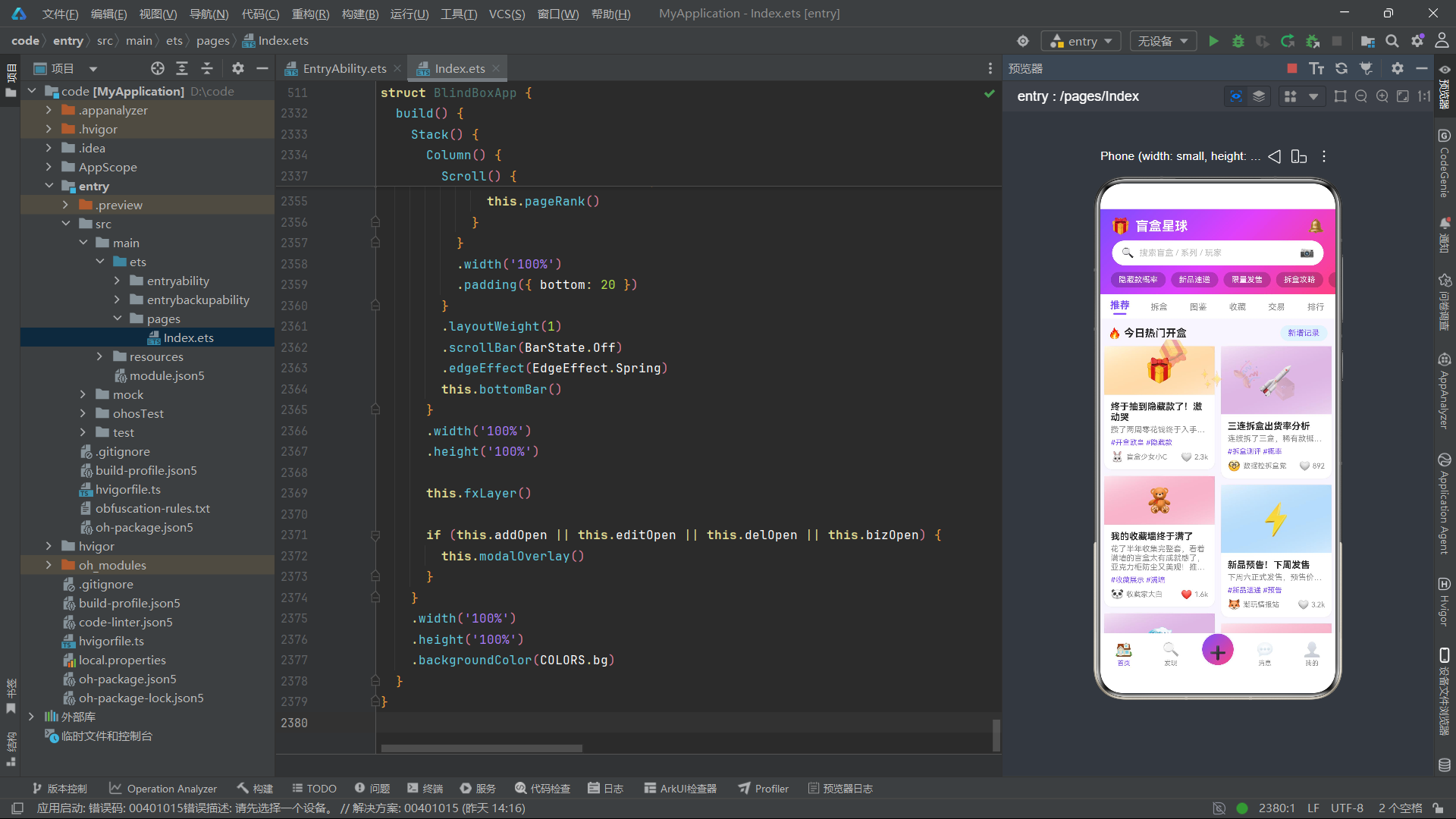
总结
通过对这款基于HarmonyOS 6.1.1 ArkTS API 24开发的潮玩盲盒社区应用的完整源码解析,我们可以清晰地看到ArkTS声明式UI编程范式在复杂社区应用中的强大表现力。应用采用了单文件单组件的工程组织方式,通过interface定义数据契约、@Observed class实现可观察状态、@Builder实现UI复用、@State驱动响应式渲染,构建了一套完整的从数据模型到视图呈现的技术链路。紫色与粉色渐变色彩体系的统一应用,配合emoji图标的大量使用,营造出符合潮玩文化定位的视觉风格。
应用的核心技术亮点在于多Tab差异化布局的统一管理。六个内容页面分别采用瀑布流双列、横向滚动+纵向列表、三列网格、统计+柱状图+列表、筛选+列表、前三名卡片+排名列表等不同的布局策略,但所有页面共享同一套颜色配置、数据模型和工具函数。这种"统一基础设施、差异化布局策略"的设计模式,使得应用在保持视觉一致性的同时,能够为不同功能场景提供最优的信息展示方式。特别是瀑布流双列卡片通过p.id % 2和p.id % 3取模判断实现了卡片高度差异化,模拟了真实瀑布流的参差错落效果,展现了ArkTS在细节控制方面的灵活性。
弹框系统是应用交互设计的另一个亮点。四个弹框通过统一的modalOverlay遮罩层管理,使用条件渲染决定显示哪个弹框,避免了多弹框叠加的复杂状态管理。底部弹框使用justifyContent(FlexAlign.End)实现从底部滑入的效果,居中弹框使用默认的居中对齐。表单状态与弹框开关状态分离管理,每个open方法在打开弹框前重置表单字段,确保了状态的一致性。这种"遮罩层统一管理 + 弹框独立渲染"的架构模式,在HarmonyOS ArkTS应用中具有广泛的适用性。
特效动画系统虽然实现简洁,但充分展示了基于定时器的状态驱动动画方案。通过setInterval每120毫秒递增tick计数器,结合一系列取模运算的纯函数,实现了四个emoji的浮动、旋转、缩放和透明度变化的复合动画效果。hitTestBehavior(HitTestMode.None)的运用确保了特效层不干扰底层页面的正常交互,这是ArkTS中实现装饰性覆盖层的标准做法。该方案的局限在于动画帧率受限于定时器间隔(120ms约等于8fps),在真实项目中可考虑替换为ArkTS的animateTo或AnimatorAPI以获得更流畅的60fps动画效果。

openEuler 是由开放原子开源基金会孵化的全场景开源操作系统项目,面向数字基础设施四大核心场景(服务器、云计算、边缘计算、嵌入式),全面支持 ARM、x86、RISC-V、loongArch、PowerPC、SW-64 等多样性计算架构
更多推荐


 0
0 0
0- 0


 已为社区贡献6条内容

所有评论(0)