基于 HarmonyOS API 24 的夜拼剧本杀拼场应用:ArkTS 深夜黑荧光紫主题与座位指示器二维码像素网格星级评价全维度深度解析
引言
鸿蒙操作系统在 HarmonyOS 6.1.1 版本中持续深化了 ArkUI 声明式开发框架的能力边界,为开发者提供了更加精细的组件粒度控制、更丰富的样式属性集合以及更完善的列表渲染机制。在 HarmonyOS ArkTS API 24 的技术基线上,开发者可以通过 @Component、@State、@Builder、export、@Entry 等装饰器语法体系,以高度声明式的方式描述复杂移动应用的界面结构与状态流转。ArkTS 的核心优势在于其数据驱动的渲染机制——当 @State 修饰的状态变量发生变化时,框架自动追踪依赖图并触发精确的局部重渲染,开发者无需关心 DOM 操作或命令式更新逻辑,这使得构建包含大量动态交互状态的应用变得简洁高效。
声明式 UI 范式在社交娱乐类应用中展现出了极强的适配能力。剧本杀拼场这类应用具有高频次的用户交互特征——从题材筛选、拼场上车、角色锁定到车友评价、战绩复盘、积分兑换,每个环节都涉及状态变量的频繁变更和 UI 的即时响应。ArkTS 的 @State 响应式机制使得这些状态变更能够自动反映到界面上,配合 ForEach 的高效列表 diff 算法和条件渲染的弹窗叠加模式,即使是包含六 Tab、十二接口、数十个交互状态变量的复杂应用,也能保持代码的清晰度和运行时的流畅性。
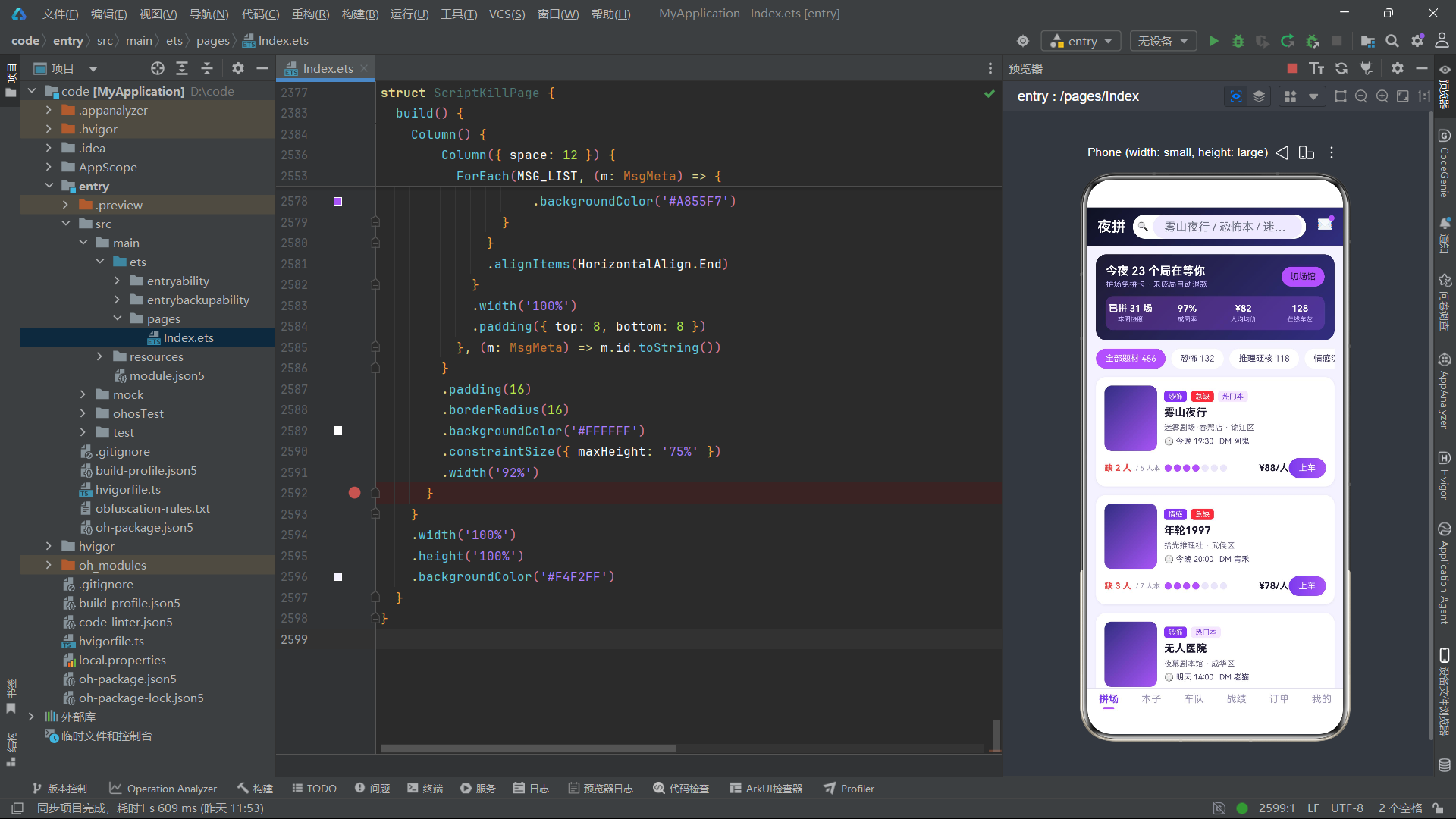
夜拼·剧本杀拼场是一个面向剧本杀玩家的社交拼场平台,集成了拼场大厅、本子库、车友车队、战绩复盘、订单管理和个人中心六大核心模块。在视觉设计上,该应用采用了深夜黑(#0F1222)与荧光紫(#A855F7)的双主色搭配方案,底色为淡紫色 #F4F2FF——深夜黑传达悬疑推理的暗黑氛围,荧光紫则作为科技感与夜间活力的视觉锚点,两者在淡紫底色上形成了强烈的明暗对比和冷暖呼应。该应用的特色视觉元素包括座位指示器(圆点矩阵可视化拼场进度)、题材热度柱状图(纵向条形图展示各题材热度值)、评分分布横向柱状图(展示用户历史评分分布)、二维码像素网格(25 格黑白矩阵模拟核销码)、星级评价组件和徽章墙(点亮/未点亮状态的视觉区分)。值得注意的是,订单 Tab 和我的 Tab 的组件命名使用了 J 前缀(JOrderTab、JMineTab),以避免与其他可能的同名组件冲突。
本文将从接口定义层、全局常量与数据配置、全局纯函数与全局构建器、各 Tab 组件的逐段源码深度解析、主入口页面架构、流程图绘制以及技术对比等维度,对该剧本杀拼场应用的完整源码进行全景式技术解读。
接口定义层分析
夜拼·剧本杀拼场共定义了十二个接口,覆盖了题材筛选、拼场房间、题材热度、剧本信息、车友成员、战绩记录、评分分布、订单行、徽章、兑换商品、Tab 配置和消息推送等全部业务领域。
题材筛选与拼场房间接口
interface GenreChip {
  name: string
  count: number
}

interface PlayRoom {
  id: number
  script: string
  genre: string
  store: string
  district: string
  time: string
  need: number
  total: number
  price: number
  dm: string
  hot: boolean
  urgent: boolean
}
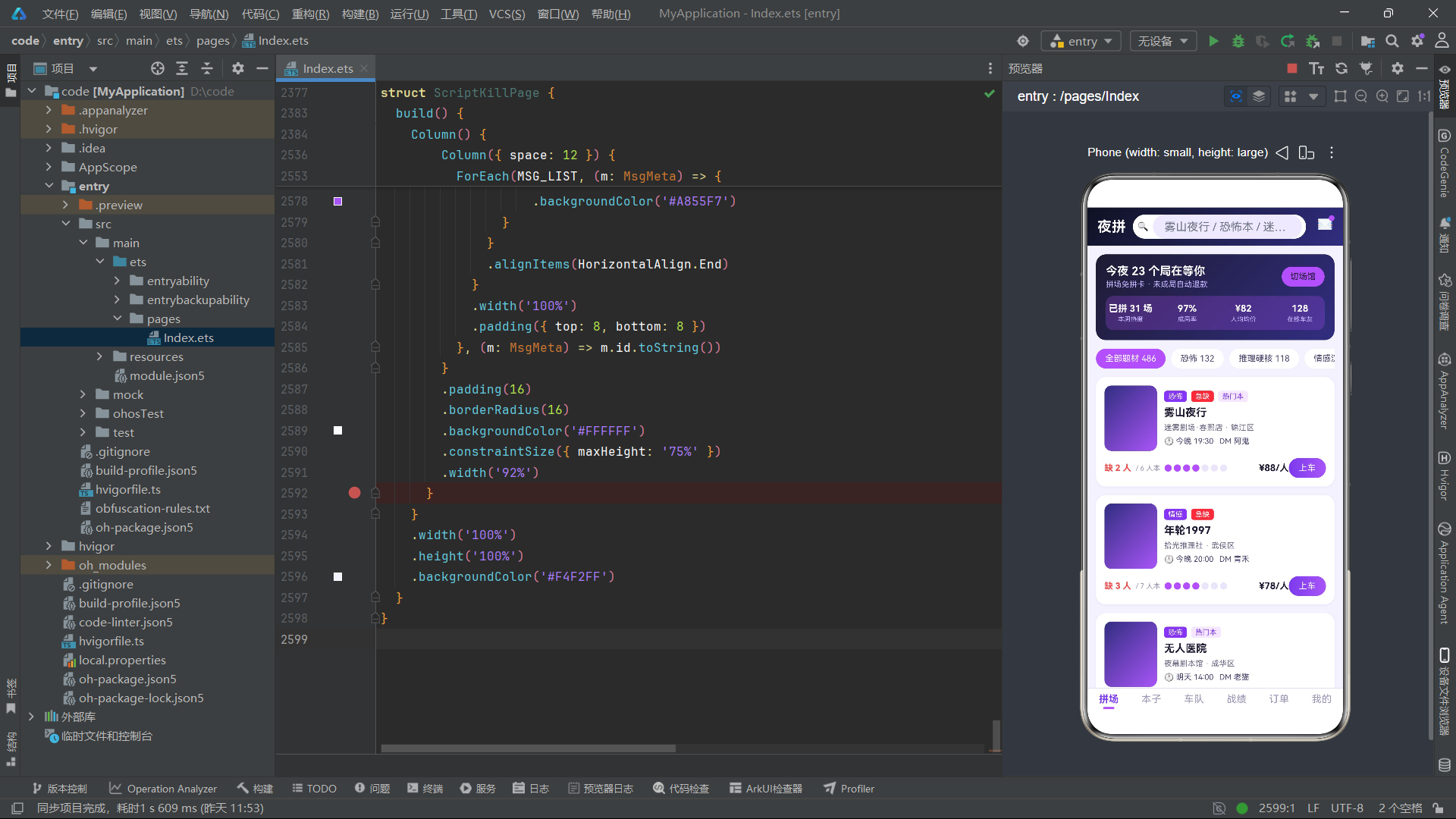
GenreChip 接口定义了题材筛选标签的结构,name 字段存储题材名称(全部题材、恐怖、推理硬核、情感沉浸、欢乐撕逼、机制阵营),count 字段存储该题材的在拼场次数量。
PlayRoom 接口是拼场房间的核心数据结构,字段最为丰富。script 字段存储剧本名称,store 和 district 分别标识门店和区域,time 字段以自然语言格式存储开局时间(如"今晚 19:30"、“明天 14:00”)。need 和 total 字段是座位指示器的核心数据——total 表示该剧本的总人数(如 6 人本、7 人本),need 表示当前还缺多少人成局。在 UI 上,通过 total - need 计算已拼人数,以彩色圆点矩阵可视化展示拼场进度。dm 字段标识主持人名称。hot 和 urgent 两个布尔值分别控制"热门本"和"急缺"标签的显示——urgent 为 true 时以红色标签突出展示,引导用户优先上车。
题材热度与剧本信息接口
interface GenreHeat {
  genre: string
  heat: number
}

interface ScriptItem {
  id: number
  name: string
  genre: string
  players: string
  duration: string
  difficulty: number
  score: number
  played: number
  dmCount: number
  tag: string
  color: string
}
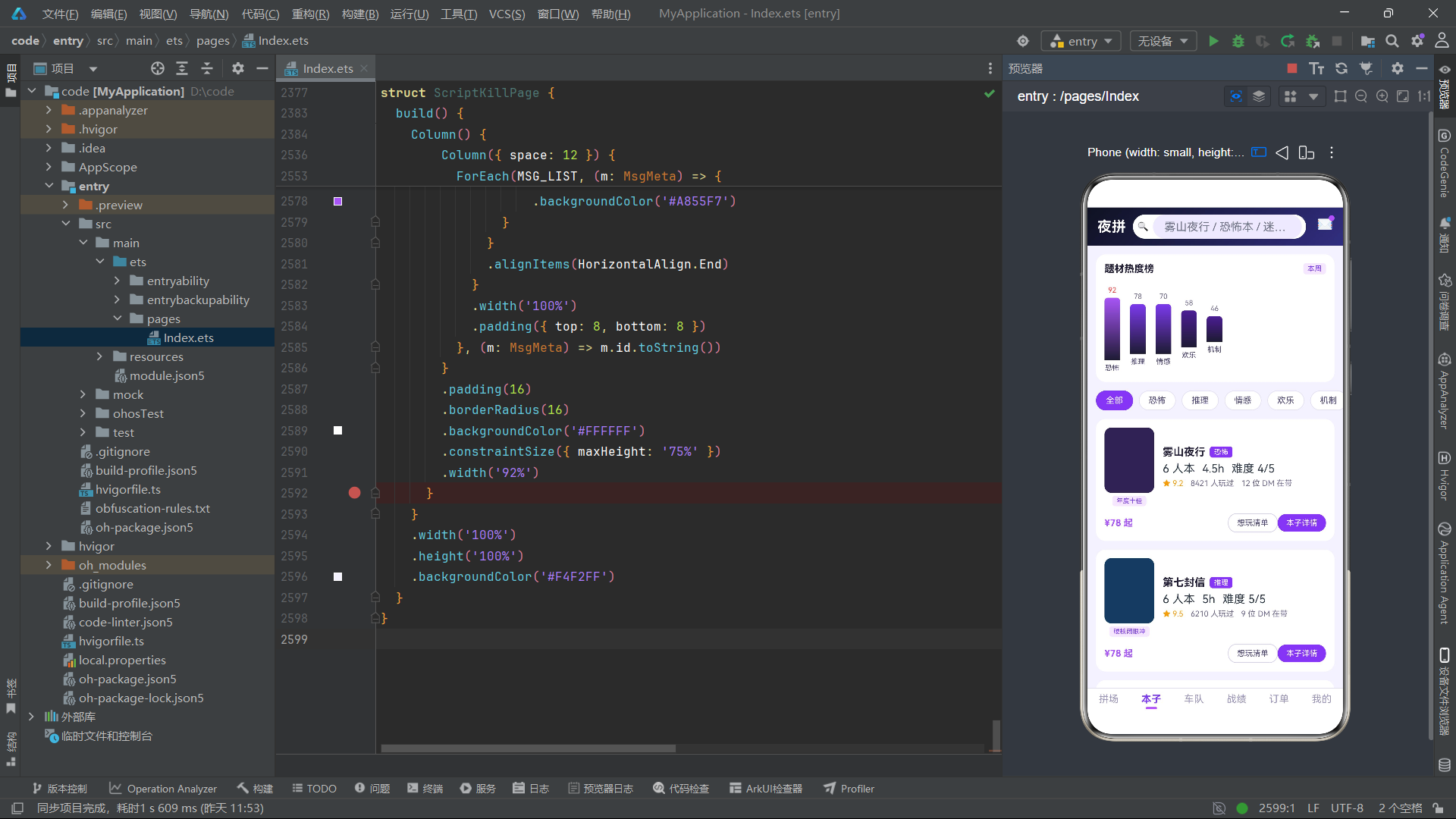
GenreHeat 接口定义了题材热度的数据结构,heat 字段为热度值(0-100),通过 heatBarH() 函数映射为柱状图高度,通过 heatBarColor() 函数映射为渐变色。热度值 92 的恐怖题材对应最高柱和荧光紫色,热度值 46 的机制题材对应最低柱和深紫色。
ScriptItem 接口定义了剧本库的信息结构。players 字段以"6 人"格式存储人数,duration 字段以"4.5h"格式存储时长,difficulty 字段为 1-5 的整数难度等级。played 字段表示该剧本已被多少玩家体验过,dmCount 字段表示有多少位 DM 在带这个本。tag 字段存储营销标签(年度十佳、硬核闭眼冲、哭到缺氧等),color 字段存储剧本的代表性深色调颜色(如恐怖本 #2E2350、推理本 #1F3A5F),作为封面色块背景。
车友与战绩接口
interface CrewMember {
  id: number
  name: string
  level: string
  plays: number
  tags: string[]
  credit: number
  online: boolean
}

interface RecordItem {
  id: number
  date: string
  script: string
  role: string
  result: string
  resultColor: string
  mood: number
}
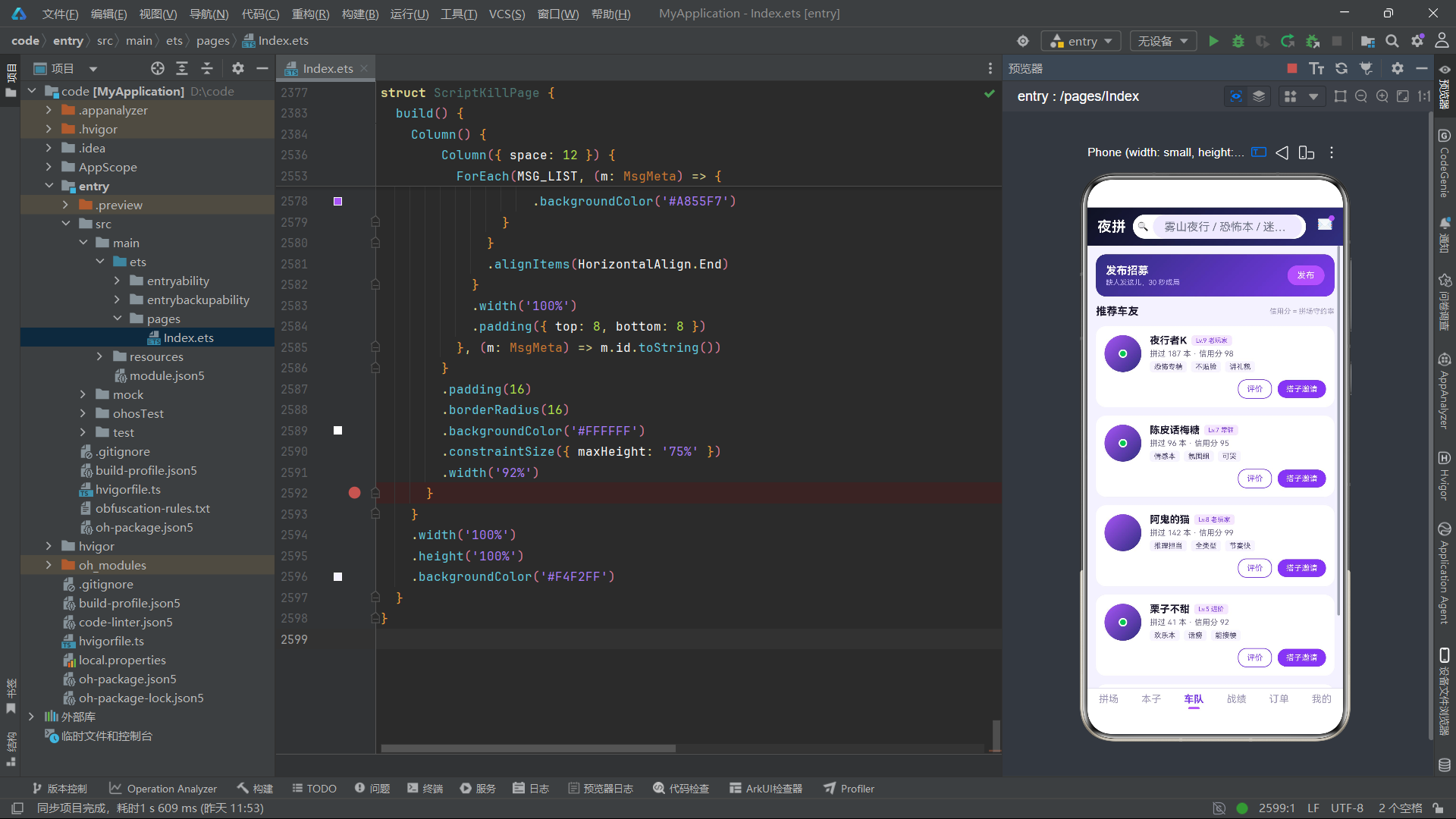
CrewMember 接口定义了车友成员的信息结构。level 字段以"Lv.9 老玩家"的格式存储等级和身份,plays 字段表示拼过的本数,tags 是字符串数组存储玩家标签(恐怖专精、不贴脸、讲礼貌等),credit 字段表示信用分(基于拼场守约率计算),online 布尔值控制在线状态绿点的显示。
RecordItem 接口定义了战绩记录的结构。role 字段存储所玩角色名(如"守夜人·陈九"),result 字段存储对局结果(凶手获胜、沉浸通关、投凶正确等),resultColor 字段直接存储结果对应的颜色值。mood 字段为 1-5 的整数心情评分,通过星级组件渲染为 1-5 颗星。
评分分布与订单接口
interface ScoreBucket {
  star: number
  count: number
}

interface OrderRow {
  id: string
  script: string
  store: string
  time: string
  status: string
  statusColor: string
  price: number
  seats: number
}
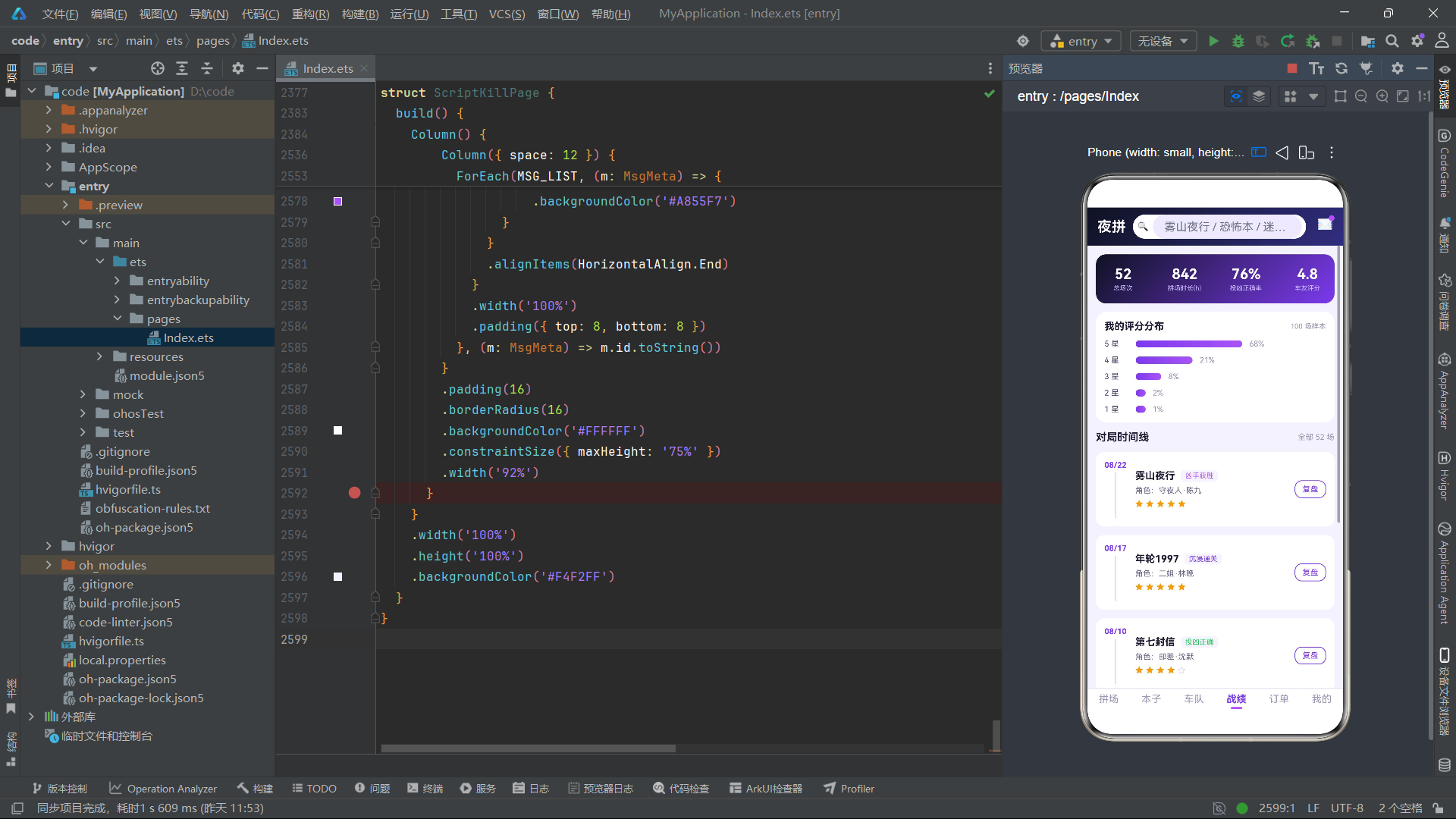
ScoreBucket 接口定义了评分分布的数据结构,star 字段为 1-5 的星级,count 字段为该星级所占百分比。通过 scoreBarW() 函数将百分比映射为横向柱状图的宽度,5 星占 68% 对应最宽柱,1 星占 1% 对应最窄柱。这种横向柱状图是评价分布可视化的经典形式。
OrderRow 接口定义了订单行的结构。id 字段为字符串格式的订单号(如"JP2026082401"),seats 字段表示占座数量,price 字段为人均价格,最终金额通过 price * seats 计算。status 和 statusColor 字段以数据冗余方式存储状态和对应颜色,避免了渲染时的条件映射。
徽章与兑换接口
interface BadgeItem {
  id: number
  name: string
  desc: string
  lit: boolean
}

interface ExchangeItem {
  id: number
  name: string
  cost: number
  color: string
}
BadgeItem 接口定义了成就徽章的结构。lit 布尔值是徽章视觉状态的核心——lit 为 true 时徽章以荧光紫色背景和深色文字展示(已点亮),lit 为 false 时以浅灰色背景和灰色文字展示(未点亮)。这种二态视觉切换是游戏化设计中成就系统的标准实现。
ExchangeItem 接口定义了积分兑换商品的结构,cost 字段为兑换所需的夜行积分,color 字段为商品色块的代表色。
配置与消息接口
interface TabMeta {
  name: string
  icon: string
}

interface MsgMeta {
  id: number
  title: string
  content: string
  time: string
  read: boolean
}
TabMeta 和 MsgMeta 接口与汉服体验馆的定义一致。MsgMeta 的 read 字段用于控制未读红点的显示,前两条消息标记为未读,对应主入口页面的 unRead 状态值 2。
全局常量与枚举分析
题材与拼场数据配置
const GENRE_CHIPS: GenreChip[] = [
  { name: '全部题材', count: 486 },
  { name: '恐怖', count: 132 },
  { name: '推理硬核', count: 118 },
  { name: '情感沉浸', count: 96 },
  { name: '欢乐撕逼', count: 74 },
  { name: '机制阵营', count: 66 }
]

const PLAY_ROOMS: PlayRoom[] = [
  { id: 1, script: '雾山夜行', genre: '恐怖', store: '迷雾剧场·春熙店', district: '锦江区', time: '今晚 19:30', need: 2, total: 6, price: 88, dm: '阿鬼', hot: true, urgent: true },
  { id: 2, script: '年轮1997', genre: '情感', store: '拾光推理社', district: '武侯区', time: '今晚 20:00', need: 3, total: 7, price: 78, dm: '青禾', hot: false, urgent: true },
  // ... 其余拼场数据
]
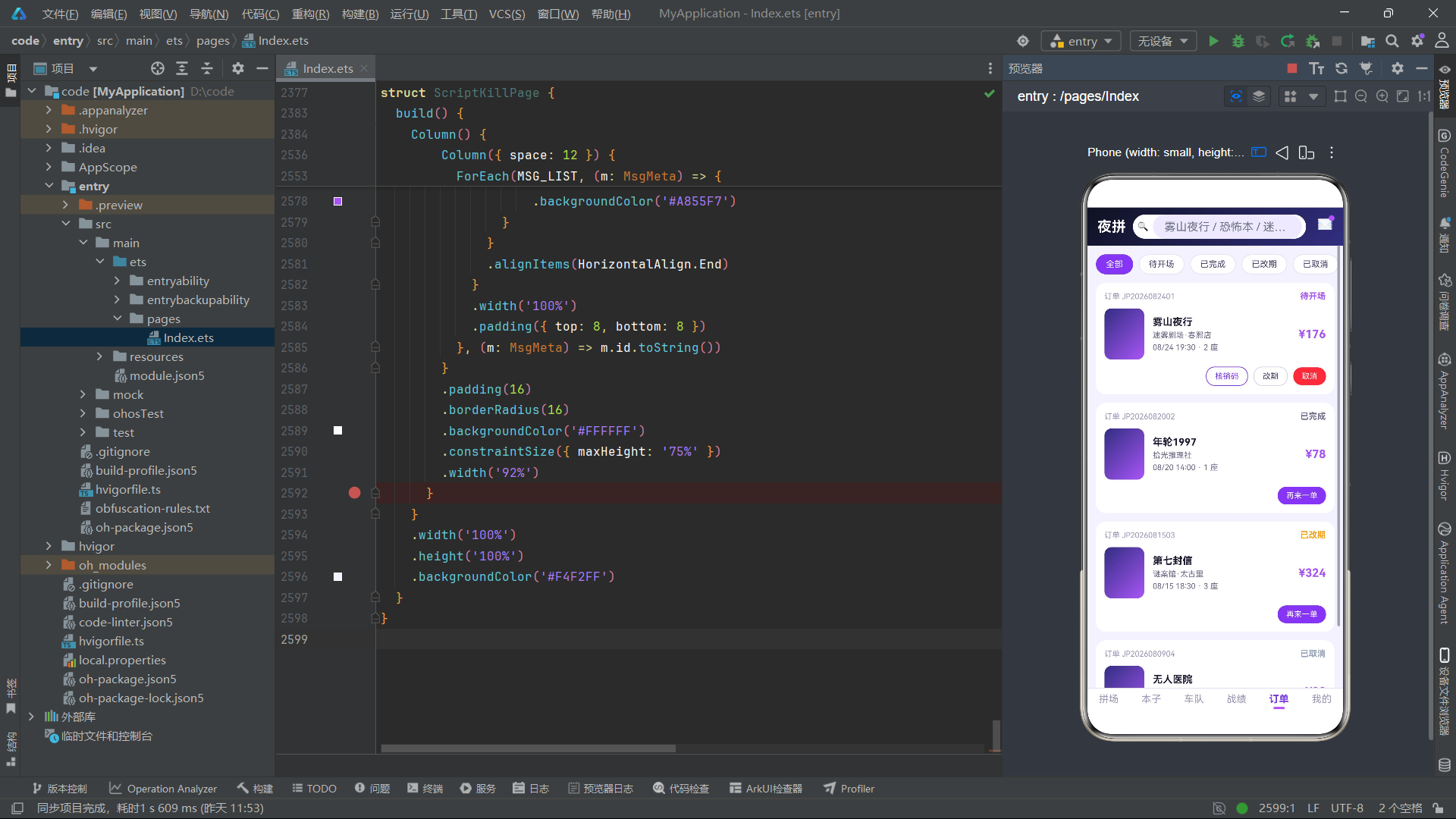
GENRE_CHIPS 定义了六个题材筛选标签,恐怖题材(132 场)和推理硬核(118 场)是最热门的品类,这与 GENRE_HEAT 数据中的热度排名一致。PLAY_ROOMS 定义了八个拼场房间,其中四个标记为 urgent: true(急缺人),以红色标签引导用户优先关注。三个房间标记为 hot: true(热门本),以浅紫色标签展示。房间覆盖了锦江区、武侯区、成华区、金牛区和高新区五个区域,门店涵盖迷雾剧场、拾光推理社、夜幕剧本馆、谜案馆、笑场剧本杀和凌云阁六家。
热度与剧本数据配置
const GENRE_HEAT: GenreHeat[] = [
  { genre: '恐怖', heat: 92 },
  { genre: '推理', heat: 78 },
  { genre: '情感', heat: 70 },
  { genre: '欢乐', heat: 58 },
  { genre: '机制', heat: 46 }
]

const SCRIPT_LIST: ScriptItem[] = [
  { id: 1, name: '雾山夜行', genre: '恐怖', players: '6 人', duration: '4.5h', difficulty: 4, score: 9.2, played: 8421, dmCount: 12, tag: '年度十佳', color: '#2E2350' },
  { id: 2, name: '第七封信', genre: '推理', players: '6 人', duration: '5h', difficulty: 5, score: 9.5, played: 6210, dmCount: 9, tag: '硬核闭眼冲', color: '#1F3A5F' },
  { id: 3, name: '年轮1997', genre: '情感', players: '7 人', duration: '4h', difficulty: 2, score: 9.0, played: 9833, dmCount: 21, tag: '哭到缺氧', color: '#5F2A4A' },
  { id: 4, name: '无人医院', genre: '恐怖', players: '5 人', duration: '4h', difficulty: 3, score: 8.8, played: 5320, dmCount: 15, tag: '单排友好', color: '#2F3B2F' },
  { id: 5, name: '拆迁办风云', genre: '欢乐', players: '8 人', duration: '3.5h', difficulty: 1, score: 8.6, played: 11207, dmCount: 18, tag: '团建神器', color: '#6B4A1F' },
  { id: 6, name: '长安十二辰', genre: '机制', players: '7 人', duration: '6h', difficulty: 5, score: 9.4, played: 4108, dmCount: 7, tag: '进阶必玩', color: '#3D2F5F' }
]
GENRE_HEAT 的热度值从 92(恐怖)递减到 46(机制),形成清晰的梯次分布。SCRIPT_LIST 中的六个剧本覆盖了五种题材,难度从 1(欢乐本拆迁办风云)到 5(推理本第七封信和机制本长安十二辰),时长从 3.5 小时到 6 小时不等。每个剧本的 color 字段都选择了与题材相关的深色调——恐怖本用暗紫色系、推理本用深蓝色系、情感本用暗红色系、欢乐本用棕色系、机制本用深紫色系,在无图片时通过纯色封面传达剧本的题材氛围。
车友与战绩数据配置
const CREW_MEMBERS: CrewMember[] = [
  { id: 1, name: '夜行者K', level: 'Lv.9 老玩家', plays: 187, tags: ['恐怖专精', '不贴脸', '讲礼貌'], credit: 98, online: true },
  { id: 2, name: '陈皮话梅糖', level: 'Lv.7 常驻', plays: 96, tags: ['情感本', '氛围组', '可哭'], credit: 95, online: true },
  { id: 3, name: '阿鬼的猫', level: 'Lv.8 老玩家', plays: 142, tags: ['推理担当', '全类型', '节奏快'], credit: 99, online: false },
  { id: 4, name: '栗子不甜', level: 'Lv.5 进阶', plays: 41, tags: ['欢乐本', '话痨', '能接梗'], credit: 92, online: true },
  { id: 5, name: 'ZERO', level: 'Lv.10 大神', plays: 268, tags: ['机制本', '算牌流', '带飞'], credit: 97, online: false }
]

const RECORD_LIST: RecordItem[] = [
  { id: 1, date: '08/22', script: '雾山夜行', role: '守夜人·陈九', result: '凶手获胜', resultColor: '#A855F7', mood: 5 },
  { id: 2, date: '08/17', script: '年轮1997', role: '二姐·林晚', result: '沉浸通关', resultColor: '#7C3AED', mood: 5 },
  { id: 3, date: '08/10', script: '第七封信', role: '邮差·沈默', result: '投凶正确', resultColor: '#22C55E', mood: 4 },
  { id: 4, date: '08/03', script: '拆迁办风云', role: '钉子户·王哥', result: '阵营胜利', resultColor: '#F59E0B', mood: 5 },
  { id: 5, date: '07/27', script: '无人医院', role: '实习医生·顾一', result: '投凶失误', resultColor: '#94A3B8', mood: 3 },
  { id: 6, date: '07/19', script: '长安十二辰', role: '不良帅·裴远', result: '个人第一', resultColor: '#A855F7', mood: 5 }
]
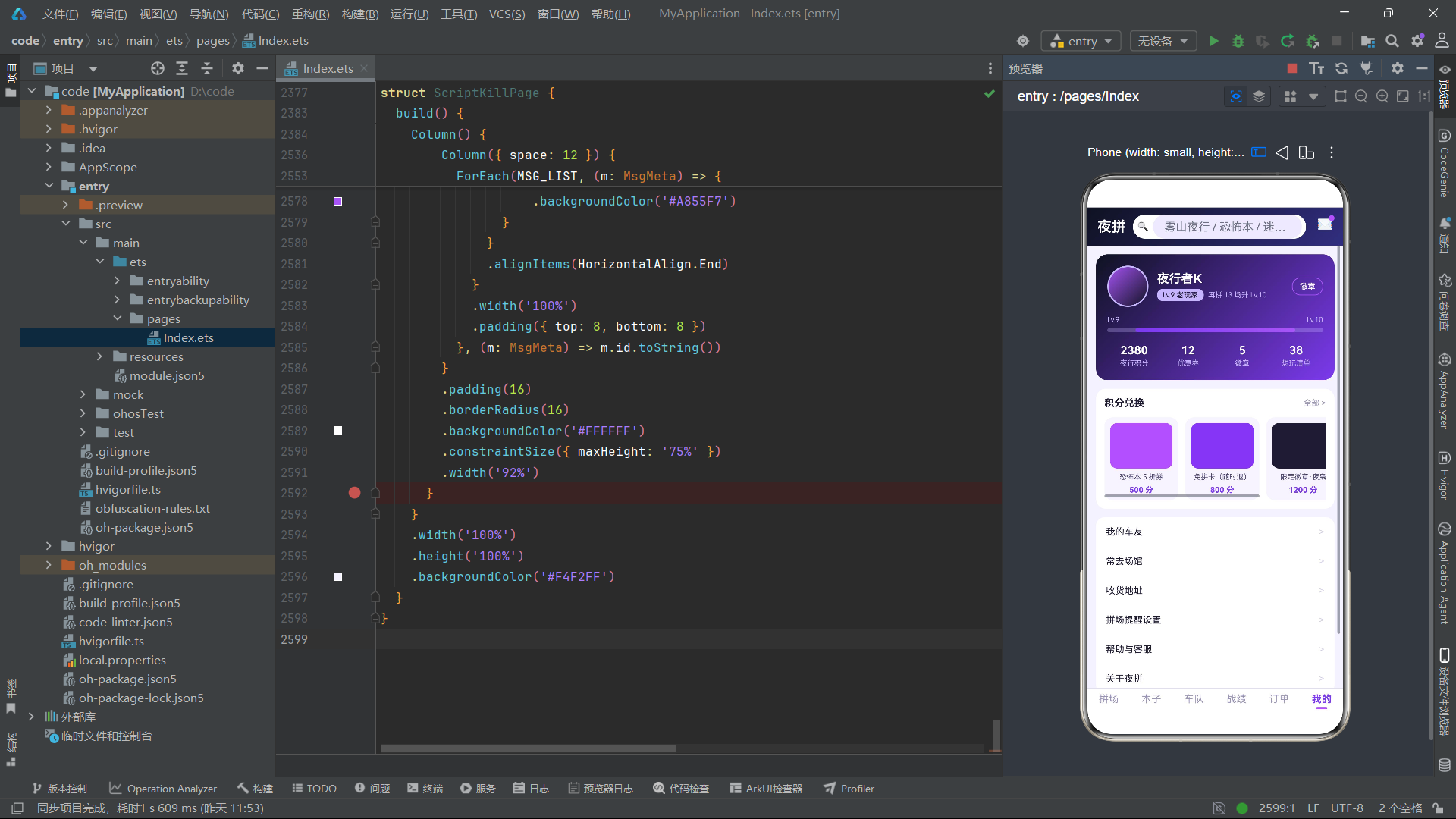
五位车友的等级从 Lv.5 到 Lv.10 不等,信用分从 92 到 99 不等,三位在线两位离线。六条战绩记录展示了不同的对局结果——"投凶正确"使用绿色(#22C55E)表示成功,"投凶失误"使用灰色(#94A3B8)表示遗憾,"凶手获胜"和"个人第一"使用荧光紫(#A855F7)表示高光时刻。
评分分布与订单数据配置
const SCORE_BUCKETS: ScoreBucket[] = [
  { star: 5, count: 68 },
  { star: 4, count: 21 },
  { star: 3, count: 8 },
  { star: 2, count: 2 },
  { star: 1, count: 1 }
]

const ORDER_ROWS: OrderRow[] = [
  { id: 'JP2026082401', script: '雾山夜行', store: '迷雾剧场·春熙店', time: '08/24 19:30', status: '待开场', statusColor: '#A855F7', price: 88, seats: 2 },
  { id: 'JP2026082002', script: '年轮1997', store: '拾光推理社', time: '08/20 14:00', status: '已完成', statusColor: '#6B6787', price: 78, seats: 1 },
  { id: 'JP2026081503', script: '第七封信', store: '谜案馆·太古里', time: '08/15 18:30', status: '已改期', statusColor: '#F59E0B', price: 108, seats: 3 },
  { id: 'JP2026080904', script: '无人医院', store: '夜幕剧本馆', time: '08/09 20:00', status: '已取消', statusColor: '#94A3B8', price: 98, seats: 1 }
]

const ORDER_FILTERS: string[] = ['全部', '待开场', '已完成', '已改期', '已取消']
SCORE_BUCKETS 的数据呈现典型的右偏分布——68% 的对局获得 5 星评价,说明该用户的拼场体验整体非常积极。四条订单记录覆盖了待开场、已完成、已改期和已取消四种状态,每种状态对应不同的颜色。
徽章与兑换数据配置
const BADGE_LIST: BadgeItem[] = [
  { id: 1, name: '百本斩', desc: '完成 100 本', lit: true },
  { id: 2, name: '恐怖免疫', desc: '恐怖本 20 场', lit: true },
  { id: 3, name: '泪失禁体质', desc: '情感本哭 10 次', lit: true },
  { id: 4, name: '名侦探', desc: '投凶正确率 80%', lit: true },
  { id: 5, name: '社交悍匪', desc: '拼场 50 次', lit: true },
  { id: 6, name: '千本斩', desc: '完成 1000 本', lit: false }
]

const EXCHANGE_LIST: ExchangeItem[] = [
  { id: 1, name: '恐怖本 5 折券', cost: 500, color: '#A855F7' },
  { id: 2, name: '免拼卡(随时退)', cost: 800, color: '#7C3AED' },
  { id: 3, name: '限定徽章·夜枭', cost: 1200, color: '#1E1B33' },
  { id: 4, name: 'DM 点评特权', cost: 300, color: '#F59E0B' }
]
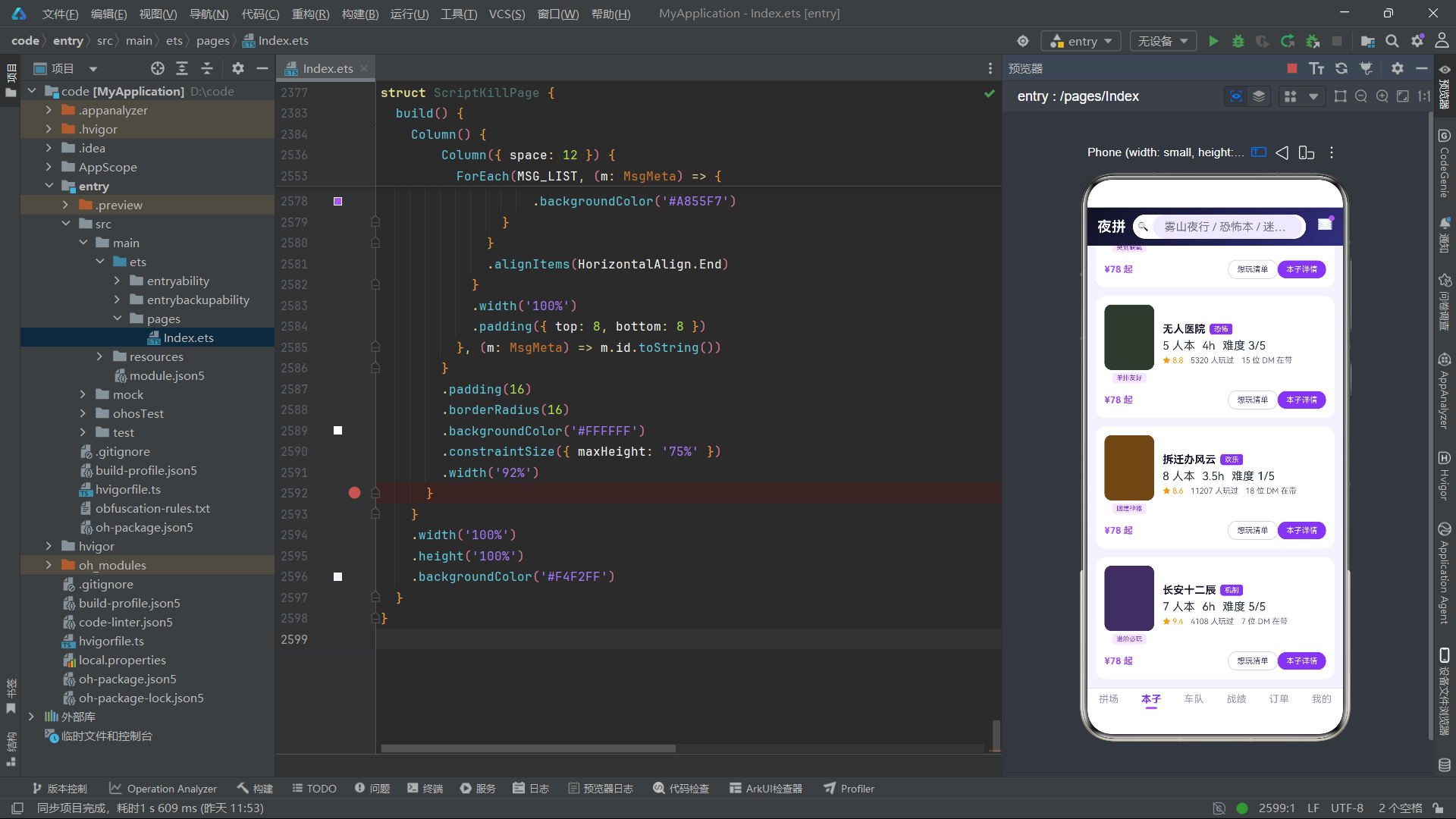
六个徽章中前五个已点亮(lit: true),最后一个"千本斩"未点亮,在徽章墙上以灰色样式展示,作为用户的下一个目标。四个兑换商品从 300 积分到 1200 积分不等,覆盖了折扣券、免拼卡、限定徽章和点评特权四种奖励类型。
导航与消息配置
const MAIN_TABS: TabMeta[] = [
  { name: '拼场', icon: '拼场' },
  { name: '本子库', icon: '本子' },
  { name: '车队', icon: '车队' },
  { name: '战绩', icon: '战绩' },
  { name: '订单', icon: '订单' },
  { name: '我的', icon: '我的' }
]

const MSG_LIST: MsgMeta[] = [
  { id: 1, title: '拼场成功', content: '「雾山夜行」今晚 19:30 已成局,请提前 15 分钟到场', time: '10:03', read: false },
  { id: 2, title: 'DM 已确认', content: '阿鬼 DM 已确认带本场,恐怖程度可调节', time: '09:45', read: false },
  // ... 其余消息数据
]
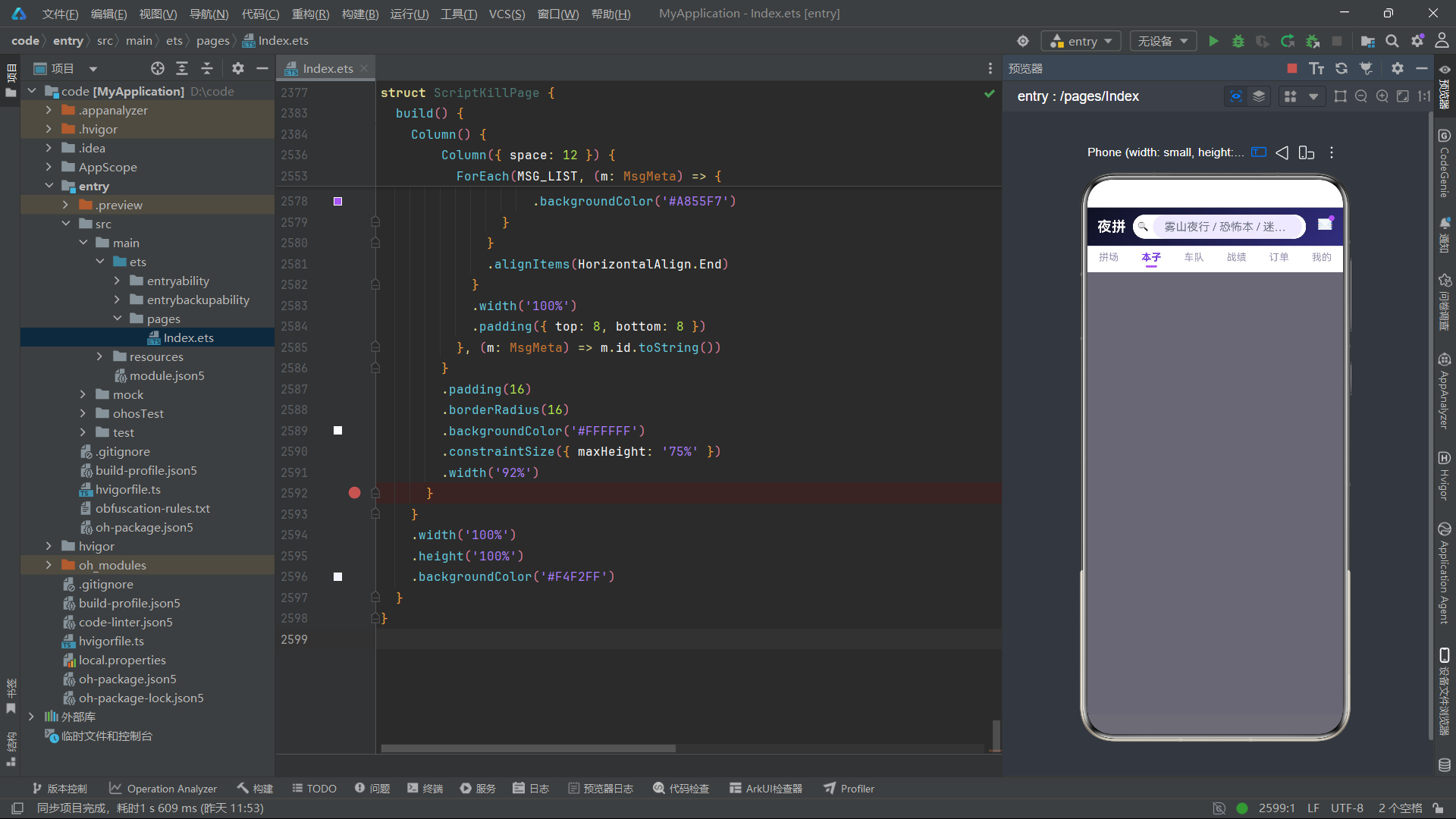
MAIN_TABS 同样使用中文文字作为图标,与汉服体验馆的设计理念一致。五条消息中前两条未读,对应 unRead 状态值 2。
全局纯函数与全局构建器分析
热度柱状图高度函数 heatBarH
function heatBarH(h: number): number {
  if (h >= 90) {
    return 88
  }
  if (h >= 70) {
    return 70
  }
  if (h >= 55) {
    return 52
  }
  return 36
}
heatBarH 函数采用四阶梯映射策略,将热度值映射为柱状图高度。90 以上映射为 88 像素最高柱,70-89 映射为 70 像素,55-69 映射为 52 像素,55 以下映射为 36 像素最低柱。四阶梯的设计使得五个题材的热度差异在视觉上呈现为明显的四个高度层级,比连续线性映射具有更强的视觉区分度。
热度柱状图颜色函数 heatBarColor
function heatBarColor(h: number): string {
  if (h >= 90) {
    return '#A855F7'
  }
  if (h >= 70) {
    return '#7C3AED'
  }
  return '#4C1D95'
}
heatBarColor 函数将热度值映射为三档渐变色。90 以上使用荧光紫(#A855F7),70-89 使用中紫(#7C3AED),70 以下使用深紫(#4C1D95)。三种紫色形成从亮到暗的渐变序列,热度越高的题材颜色越亮,在视觉上形成自然的视觉焦点引导。
评分分布柱状图宽度函数 scoreBarW
function scoreBarW(c: number): number {
  if (c >= 60) {
    return 150
  }
  if (c >= 20) {
    return 80
  }
  if (c >= 8) {
    return 36
  }
  return 14
}
scoreBarW 函数将评分占比映射为横向柱状图的像素宽度。60% 以上映射为 150 像素最宽柱,20-59% 映射为 80 像素,8-19% 映射为 36 像素,8% 以下映射为 14 像素最窄柱。与纵向柱状图不同,横向柱状图的宽度映射需要考虑容器的水平空间限制,因此最大值设为 150 像素以确保在移动端屏幕上不会溢出。
全局遮罩构建器 modalOverlay
@Builder
function modalOverlay(onClose: () => void) {
  Column()
    .width('100%')
    .height('100%')
    .backgroundColor('rgba(12,10,24,0.6)')
    .onClick(() => {
      onClose()
    })
}
全局 modalOverlay 构建器的遮罩背景色为 rgba(12,10,24,0.6)——深夜黑色调的半透明覆盖,与应用的深夜黑主题保持视觉一致性。该构建器被所有六个 Tab 组件和主入口页面共享,是跨组件复用的核心基础设施。
各 Tab 组件深度分析
拼场 Tab(PlayTab)
拼场 Tab 是应用的核心模块,展示当前可拼的场次列表,支持座位指示器可视化和上车确认流程。
@State 变量定义
@Component
export struct PlayTab {
  @State genreIdx: number = 0
  @State showJoin: boolean = false
  @State showVenue: boolean = false
  @State showRole: boolean = false
  @State selRoom: PlayRoom = PLAY_ROOMS[0]
  @State seatNum: number = 1
  @State roleIdx: number = -1
  @State joined: number = 0
genreIdx 管理题材筛选索引,showJoin、showVenue、showRole 分别控制上车弹窗、场馆切换弹窗和角色选择弹窗的显隐。selRoom 存储当前选中的房间对象,seatNum 管理占座人数(上限为 selRoom.need),roleIdx 管理角色选择索引(初始值 -1 表示未选择),joined 计数已上车的场次。
座位指示器实现
座位指示器是拼场 Tab 最具特色的视觉元素:
Row({ space: 6 }) {
  Text('缺 ' + room.need + ' 人')
    .fontColor('#EF4444')
  Text('/ ' + room.total + ' 人本')
    .fontColor('#9B96B8')
  Row({ space: 3 }) {
    ForEach([0, 1, 2, 3, 4, 5, 6], (i: number) => {
      Column()
        .width(10)
        .height(10)
        .borderRadius(5)
        .backgroundColor(i < (room.total - room.need) ? '#A855F7' : '#E9E5F8')
    }, (i: number) => ('s' + i).toString())
  }
}
座位指示器通过 ForEach 遍历 0-6 的数字数组,生成 7 个 10x10 像素的圆形色块。已拼座位(i < room.total - room.need)以荧光紫色显示,待拼座位以浅灰色显示。例如一个 6 人本缺 2 人时,前 4 个圆点为紫色、后 3 个为灰色。这种圆点矩阵的可视化方式,让用户一眼即可感知拼场进度,比纯文字"4/6 已拼"更直观。
上车确认弹窗
上车弹窗以内联方式实现,包含房间信息摘要、占座人数加减器、角色选择入口和退改说明:
if (this.showJoin) {
  modalOverlay(() => { this.showJoin = false })
  Column({ space: 14 }) {
    Row() {
      Text('上车确认')
      Row().layoutWeight(1)
      Text('×').onClick(() => { this.showJoin = false })
    }
    Column({ space: 6 }) {
      Text(this.selRoom.script + '(' + this.selRoom.genre + ')')
      Text(this.selRoom.store + ' · ' + this.selRoom.time + ' · DM ' + this.selRoom.dm)
      Text('还缺 ' + this.selRoom.need + ' 人成局').fontColor('#EF4444')
    }
    Row() {
      Text('占座人数')
      Row().layoutWeight(1)
      Row({ space: 0 }) {
        Text('−').fontColor(this.seatNum <= 1 ? '#D6D2EA' : '#7C3AED')
          .onClick(() => { if (this.seatNum > 1) this.seatNum-- })
        Text(this.seatNum + ' 人')
        Text('+').fontColor(this.seatNum >= this.selRoom.need ? '#D6D2EA' : '#7C3AED')
          .onClick(() => { if (this.seatNum < this.selRoom.need) this.seatNum++ })
      }
    }
    Row() {
      Text('提前选角色')
      Row().layoutWeight(1)
      Text('去挑选 >').onClick(() => { this.showRole = true })
    }
    Text('· 未成局自动全额退款\n· 开场前 4 小时可免费退改')
    Row() {
      Column({ space: 1 }) {
        Text('合计')
        Text('¥' + (this.selRoom.price * this.seatNum))
          .fontSize(20).fontColor('#A855F7')
      }
      Row().layoutWeight(1)
      Text('确认上车')
        .linearGradient({ angle: 90, colors: [['#7C3AED', 0.0], ['#A855F7', 1.0]] })
        .onClick(() => { this.joined++; this.showJoin = false })
    }
  }
}
占座人数加减器的上限动态绑定到 this.selRoom.need——当用户选择的占座人数达到缺口人数时,加号变为灰色禁用状态。总价计算 this.selRoom.price * this.seatNum 实时更新。确认上车后 this.joined 自增,触发顶部数据栏中"已拼 X 场"的自动更新。
角色选择弹窗提供五个角色选项,选中后通过 roleIdx 记录索引:
ForEach(['守夜人', '医师', '记者', '警察', '神秘的第七人'], (r: string) => {
  Text(r)
    .fontColor(this.roleIdx === [...].indexOf(r) ? '#FFFFFF' : '#4C4670')
    .backgroundColor(this.roleIdx === [...].indexOf(r) ? '#A855F7' : '#F6F3FE')
    .onClick(() => { this.roleIdx = [...].indexOf(r) })
})
本子库 Tab(ScriptTab)
本子库 Tab 展示了剧本库信息,包含题材热度柱状图和剧本详情弹窗。
@Component
export struct ScriptTab {
  @State catIdx: number = 0
  @State showDetail: boolean = false
  @State showWant: boolean = false
  @State selScript: ScriptItem = SCRIPT_LIST[0]
题材热度柱状图:
Row({ space: 14 }) {
  ForEach(GENRE_HEAT, (g: GenreHeat) => {
    Column({ space: 5 }) {
      Text(g.heat.toString())
        .fontColor(g.heat >= 90 ? '#EF4444' : '#6B6787')
      Column()
        .width(22)
        .height(heatBarH(g.heat))
        .borderRadius({ topLeft: 5, topRight: 5 })
        .linearGradient({
          angle: 180,
          colors: [[heatBarColor(g.heat), 0.0], ['#1E1B33', 1.0]]
        })
      Text(g.genre)
        .fontColor('#4C4670')
    }
  }, (g: GenreHeat) => g.genre)
}
热度柱状图的每根柱子从渐变色的主题色(heatBarColor 返回值)过渡到深夜黑(#1E1B33),形成从亮到暗的底部渐隐效果。热度值 92 的恐怖题材柱子上方显示红色数字,其他题材显示灰色数字。柱子顶部圆角(topLeft: 5, topRight: 5)使视觉更加柔和。
本子详情弹窗展示了剧本封面、基础信息、角色一览和操作按钮。角色一览使用 Flex({ wrap: FlexWrap.Wrap }) 展示六个角色名称标签,标注"无剧透"以消除用户的顾虑。底部提供"加入想玩"和"去拼场"两个操作入口。
车队 Tab(CrewTab)
车队 Tab 展示了推荐车友列表,支持车友评价(星级)、搭子邀请(聊天)和发布招募。
@Component
export struct CrewTab {
  @State showRate: boolean = false
  @State showChat: boolean = false
  @State showRecruit: boolean = false
  @State starNum: number = 5
  @State selCrew: CrewMember = CREW_MEMBERS[0]
  @State inputMsg: string = ''
  @State recruitScript: string = ''
starNum 管理评价弹窗中的星级选择,初始值为 5(最高评价)。车友卡片的头像区域使用 Stack 叠加在线状态绿点:
Stack({ }) {
  Column()
    .width(52)
    .height(52)
    .borderRadius(26)
    .linearGradient({ angle: 135, colors: [['#A855F7', 0.0], ['#312E81', 1.0]] })
  if (m.online) {
    Column()
      .width(12)
      .height(12)
      .borderRadius(6)
      .backgroundColor('#22C55E')
      .border({ width: 2, color: '#FFFFFF' })
  }
}
在线状态绿点是一个 12x12 像素的圆形,使用绿色(#22C55E)填充,白色 2px 边框,叠加在头像右下角。m.online 为 false 时绿点不渲染。
星级评价组件:
Row({ space: 10 }) {
  ForEach([1, 2, 3, 4, 5], (i: number) => {
    Text(i <= this.starNum ? '★' : '☆')
      .fontSize(28)
      .fontColor(i <= this.starNum ? '#F59E0B' : '#D6D2EA')
      .onClick(() => { this.starNum = i })
  }, (i: number) => i.toString())
}
Text(this.starNum >= 5 ? '神仙搭子,下次还约!' : (this.starNum >= 3 ? '体验不错,可以再约' : '体验一般,不太合适'))
星级评价使用 ★ 和 ☆ 字符模拟星星的填充和空心状态。点击星星时更新 starNum,触发 UI 重渲染。评价文案根据星级数量动态变化——5 星显示"神仙搭子,下次还约!“,3-4 星显示"体验不错,可以再约”,1-2 星显示"体验一般,不太合适"。这种条件文案增强了评价的语义表达力。
搭子邀请弹窗模拟了即时聊天界面,包含一条预设的邀请消息和输入框:
Column({ space: 6 }) {
  Text('你好!周六「长安十二辰」缺 2 人,\n看你是机制本大神,一起吗?')
    .padding(12)
    .borderRadius({ topLeft: 2, topRight: 12, bottomLeft: 12, bottomRight: 12 })
    .backgroundColor('#F6F3FE')
    .width('86%')
}
.alignItems(HorizontalAlign.Start)
聊天气泡使用非对称圆角(topLeft: 2 其他三角 12)模拟气泡指向效果,是聊天气泡的常见视觉模式。
战绩 Tab(RecordTab)
战绩 Tab 展示了对局时间线、评分分布横向柱状图和复盘笔记。
@Component
export struct RecordTab {
  @State showNote: boolean = false
  @State selRecord: RecordItem = RECORD_LIST[0]
  @State noteText: string = ''
评分分布横向柱状图:
ForEach(SCORE_BUCKETS, (b: ScoreBucket) => {
  Row({ space: 10 }) {
    Text(b.star + ' 星')
      .fontSize(11)
      .width(34)
    Column()
      .height(10)
      .borderRadius(5)
      .width(scoreBarW(b.count))
      .linearGradient({ angle: 90, colors: [['#7C3AED', 0.0], ['#A855F7', 1.0]] })
    Text(b.count + '%')
      .fontSize(11)
  }
}, (b: ScoreBucket) => b.star.toString())
横向柱状图的每根柱子高度为 10 像素,宽度由 scoreBarW() 函数计算。5 星柱宽 150 像素(68%),1 星柱宽 14 像素(1%),差异悬殊,直观展示了用户的高满意度分布。柱子使用从深紫到荧光紫的 90 度渐变填充。
对局时间线使用竖线 + 卡片的布局形式:
Row({ space: 12 }) {
  Column({ space: 4 }) {
    Text(r.date)
      .fontColor('#7C3AED')
      .fontWeight(FontWeight.Bold)
    Column()
      .width(2)
      .height(64)
      .backgroundColor('#E5E0F5')
  }
  .alignItems(HorizontalAlign.Center)

  Column({ space: 6 }) {
    Row({ space: 8 }) {
      Text(r.script)
      Text(r.result)
        .fontColor(r.resultColor)
        .backgroundColor('#F6F3FE')
    }
    Text('角色:' + r.role)
    Row({ space: 4 }) {
      ForEach([1, 2, 3, 4, 5], (i: number) => {
        Text(i <= r.mood ? '★' : '☆')
          .fontColor(i <= r.mood ? '#F59E0B' : '#D6D2EA')
      }, (i: number) => (r.id.toString() + '-' + i).toString())
    }
  }
  .layoutWeight(1)

  Text('复盘')
    .onClick(() => { this.selRecord = r; this.showNote = true })
}
时间线左侧的竖线(2px 宽、64px 高的淡紫色 Column)作为时间轴的视觉引导,日期标签在竖线上方。星级评价组件复用了车队 Tab 的实现模式,但 key 生成器使用了 r.id.toString() + '-' + i 以确保跨记录的唯一性。复盘弹窗包含剧本信息、DM 点评和用户笔记输入框,实现了对局后的回顾记录功能。
订单 Tab(JOrderTab)
订单 Tab 展示了拼场订单记录,支持核销码展示、改期和取消操作。
@Component
export struct JOrderTab {
  @State filterIdx: number = 0
  @State showCode: boolean = false
  @State showChange: boolean = false
  @State showCancel: boolean = false
  @State selOrder: OrderRow = ORDER_ROWS[0]
订单卡片的操作按钮根据状态动态展示——“待开场"状态显示"核销码”、"改期"和"取消"三个按钮,其他状态显示"再来一单"按钮。订单封面使用渐变色块:
Column()
  .width(56)
  .height(72)
  .borderRadius(10)
  .linearGradient({ angle: 135, colors: [['#312E81', 0.0], ['#A855F7', 1.0]] })
核销码弹窗是该 Tab 的特色功能,实现了二维码像素网格的可视化:
Column({ space: 10 }) {
  Flex({ wrap: FlexWrap.Wrap, justifyContent: FlexAlign.Center }) {
    ForEach([1, 0, 1, 1, 0, 1, 0, 0, 1, 0, 1, 1, 0, 1, 0, 1, 1, 0, 0, 1, 1, 0, 1, 0, 1], (b: number) => {
      Column()
        .width(16)
        .height(16)
        .backgroundColor(b === 1 ? '#1E1B33' : '#FFFFFF')
        .border({ width: 1, color: '#E5E0F5' })
        .margin(2)
    }, (b: number, i: number) => (b.toString() + i).toString())
  }
  Text('8826  1947')
    .fontSize(20)
    .fontWeight(FontWeight.Bold)
    .letterSpacing(3)
}
二维码像素网格由 25 个 16x16 像素的色块组成(5x5 矩阵),通过一个 0/1 数组控制每个色块的颜色——值为 1 的色块使用深夜黑色(#1E1B33),值为 0 的使用白色,配合 1px 的浅紫色边框形成网格分割。Flex({ wrap: FlexWrap.Wrap, justifyContent: FlexAlign.Center }) 自动将 25 个色块排列为 5x5 的方阵。key 生成器使用 (b.toString() + i).toString() 确保即使多个色块值相同也能保持唯一 key。下方显示数字核销码"8826 1947",使用 letterSpacing(3) 增加字符间距,模仿二维码下方的数字编号样式。
改期弹窗提供三个可选时段,取消弹窗展示退款规则(开场前 4 小时全额退款)和剩余时间计算(“当前订单距开场 5.2 小时,可免费取消”),增强了用户的决策信心。
我的 Tab(JMineTab)
我的 Tab 是个人中心,集成了等级进度条、积分兑换、徽章墙、夜间模式开关和设置。
@Component
export struct JMineTab {
  @State showExchange: boolean = false
  @State showSetting: boolean = false
  @State showBadge: boolean = false
  @State showLevel: boolean = false
  @State nightMode: boolean = true
nightMode 是该应用独有的状态变量,初始值为 true(已开启夜间模式)。夜间模式的开关通过简单的布尔切换实现:
Row() {
  Text('夜间模式(深夜局专用配色)')
  Row().layoutWeight(1)
  Text(this.nightMode ? '已开启' : '已关闭')
    .fontColor(this.nightMode ? '#7C3AED' : '#9B96B8')
    .backgroundColor('#F6F3FE')
    .onClick(() => { this.nightMode = !this.nightMode })
}
等级进度条使用嵌套 Column 实现:
Column({ space: 0 }) {
  Column()
    .width('74%')
    .height(6)
    .borderRadius(3)
    .linearGradient({ angle: 90, colors: [['#7C3AED', 0.0], ['#A855F7', 1.0]] })
}
.width('100%')
.height(6)
.borderRadius(3)
.backgroundColor('rgba(196,181,253,0.3)')
外层 Column 为半透明紫色轨道,内层 Column 宽度为 74%(对应当前等级进度),使用深紫到荧光紫的渐变填充,形成了进度条的视觉效果。
徽章墙弹窗使用 Flex 双列布局展示六个徽章:
Flex({ wrap: FlexWrap.Wrap, justifyContent: FlexAlign.SpaceBetween }) {
  ForEach(BADGE_LIST, (b: BadgeItem) => {
    Column({ space: 5 }) {
      Column()
        .width(52)
        .height(52)
        .borderRadius(26)
        .backgroundColor(b.lit ? '#7C3AED' : '#E5E0F5')
      Text(b.name)
        .fontColor(b.lit ? '#1E1B33' : '#9B96B8')
      Text(b.desc)
        .fontColor('#9B96B8')
    }
    .width('31%')
    .backgroundColor(b.lit ? '#F6F3FE' : '#FBFAFF')
  }, (b: BadgeItem) => b.id.toString())
}
徽章的点亮/未点亮状态通过 b.lit 布尔值控制——已点亮徽章使用荧光紫色圆形背景、深色文字和浅紫色卡片背景;未点亮徽章使用浅灰色圆形背景、灰色文字和极浅紫色卡片背景。这种二态视觉切换清晰传达了成就的已获/未获状态,是游戏化设计的经典模式。
积分兑换弹窗使用横向滚动列表展示四个兑换商品:
Scroll() {
  Row({ space: 10 }) {
    ForEach(EXCHANGE_LIST, (e: ExchangeItem) => {
      Column({ space: 6 }) {
        Column()
          .width(88)
          .height(64)
          .borderRadius(10)
          .backgroundColor(e.color)
        Text(e.name).maxLines(1)
        Text(e.cost + ' 分').fontColor('#7C3AED')
      }
      .width(104)
      .onClick(() => { this.showExchange = true })
    })
  }
}
.scrollable(ScrollDirection.Horizontal)
主入口页面分析
@Entry
@Component
struct ScriptKillPage {
  @State activeTab: number = 0
  @State showSearch: boolean = false
  @State showMsg: boolean = false
  @State unRead: number = 2

  build() {
    Column() {
      Column() {
        Row({ space: 10 }) {
          Text('夜拼')
            .fontSize(20)
            .fontWeight(FontWeight.Bold)
            .fontColor('#FFFFFF')
          Row({ space: 6 }) {
            Text('🔍').fontSize(13)
            TextInput({ placeholder: '雾山夜行 / 恐怖本 / 迷雾剧场' })
              .fontSize(12)
              .height(34)
              .layoutWeight(1)
              .backgroundColor('#EDE9FE')
              .borderRadius(17)
          }
          .layoutWeight(1)
          .backgroundColor('#FFFFFF')
          .borderRadius(17)

          Stack({ alignContent: Alignment.TopEnd }) {
            Text('✉').fontColor('#FFFFFF')
            if (this.unRead > 0) {
              Column()
                .width(8).height(8).borderRadius(4)
                .backgroundColor('#A855F7')
            }
          }
          .onClick(() => { this.showMsg = true })
        }
        .padding({ left: 14, right: 14, top: 10, bottom: 10 })
      }
      .linearGradient({ angle: 135, colors: [['#0F1222', 0.0], ['#312E81', 1.0]] })

      if (this.activeTab === 0) {
        PlayTab()
      } else if (this.activeTab === 1) {
        ScriptTab()
      } else if (this.activeTab === 2) {
        CrewTab()
      } else if (this.activeTab === 3) {
        RecordTab()
      } else if (this.activeTab === 4) {
        JOrderTab()
      } else {
        JMineTab()
      }

      Column()
        .width('100%')
        .height(1)
        .backgroundColor('#E5E0F5')

      Row({ space: 0 }) {
        ForEach(MAIN_TABS, (tab: TabMeta, idx: number) => {
          Column({ space: 3 }) {
            Text(tab.icon)
              .fontWeight(this.activeTab === idx ? FontWeight.Bold : FontWeight.Normal)
              .fontColor(this.activeTab === idx ? '#7C3AED' : '#9B96B8')
            if (this.activeTab === idx) {
              Column()
                .width(16).height(3).borderRadius(2)
                .backgroundColor('#A855F7')
            } else {
              Column()
                .width(16).height(3).borderRadius(2)
                .backgroundColor('rgba(0,0,0,0)')
            }
          }
          .layoutWeight(1)
          .onClick(() => { this.activeTab = idx })
        }, (tab: TabMeta, idx: number) => (tab.name + idx).toString())
      }
      .backgroundColor('#FFFFFF')

      if (this.showSearch) { /* 搜索弹窗 */ }
      if (this.showMsg) {
        modalOverlay(() => { this.showMsg = false; this.unRead = 0 })
        Column({ space: 12 }) {
          Row() {
            Text('消息中心')
            Row().layoutWeight(1)
            Text('全部已读').onClick(() => { this.unRead = 0 })
          }
          ForEach(MSG_LIST, (m: MsgMeta) => {
            Row({ space: 10 }) {
              Column({ space: 2 }) {
                Text(m.title)
                Text(m.content).maxLines(2).textOverflow({ overflow: TextOverflow.Ellipsis })
              }
              .layoutWeight(1)
              Column({ space: 4 }) {
                Text(m.time)
                if (!m.read) {
                  Column().width(7).height(7)
                    .backgroundColor('#A855F7')
                }
              }
            }
          }, (m: MsgMeta) => m.id.toString())
        }
        .backgroundColor('#FFFFFF').borderRadius(16).width('92%')
      }
    }
    .backgroundColor('#F4F2FF')
  }
}
主入口 ScriptKillPage 的结构与汉服体验馆类似,但有几个关键差异。第一,头部渐变从深夜黑(#0F1222)到深紫蓝(#312E81),营造夜晚的悬疑氛围。第二,搜索框背景色为 #EDE9FE 淡紫色,与白底搜索容器形成微妙的色彩层次。第三,内容区和底部导航之间添加了一个 1px 高的分隔线(#E5E0F5),增强了视觉分割感。第四,底部导航选中指示器使用荧光紫色(#A855F7),选中 Tab 的文字字重也变为 Bold。第五,消息弹窗使用纯白背景而非暖色背景,符合夜间应用的冷色调风格。未读红点使用荧光紫色而非红色,与整体配色保持一致。
流程图
应用架构流程图
弹框交互流程图
技术对比表格
| 技术维度 | 拼场 | 本子库 | 车队 | 战绩 | 订单 | 我的 |
|---|---|---|---|---|---|---|
| 核心交互 | 座位指示器+上车流程 | 热度图+详情弹窗 | 评价+聊天+招募 | 时间线+复盘 | 核销码+改期+取消 | 等级+兑换+徽章+夜间模式 |
| 状态变量数 | 8 | 4 | 7 | 3 | 5 | 5 |
| 弹窗数 | 3 (上车/角色/场馆) | 2 (详情/想玩) | 3 (评价/聊天/招募) | 1 (复盘) | 3 (核销码/改期/取消) | 5 (兑换/徽章/等级/设置/含内嵌) |
| 特色组件 | 圆点座位矩阵 | 纵向热度柱状图 | 星级评价+聊天气泡 | 横向评分柱+时间线 | 二维码像素网格 | 徽章二态+进度条+夜间开关 |
| 全局函数调用 | 无 | heatBarH/heatBarColor | 无 | scoreBarW | 无 | 无 |
| Stack 叠加用法 | 在线绿点 | 无 | 在线绿点 | 无 | 订单封面渐变 | 头像渐变 |
| ForEach key 策略 | (‘s’+i).toString() | g.genre | i.toString() | (r.id+‘-’+i).toString() | (b+i).toString() | b.id.toString() |
| export 修饰 | 是 | 是 | 是 | 是 | 是 | 是 |
| 组件命名前缀 | 无 | 无 | 无 | 无 | J | J |
安装DevEco Studio程序

选择目标安装目录:

设置环境变量,但是需要重启一下:

新建一个空白模板:

设置API为24的模板项目:
初始化项目,自动下载相关依赖:

完整代码:
// 主题:深夜黑 #0F1222 × 荧光紫 #A855F7,底色 #F4F2FF,深夜推理局风格
// 6 个底部 Tab:拼场 / 本子库 / 车队 / 战绩 / 订单 / 我的
interface GenreChip {
name: string
count: number
}
interface PlayRoom {
id: number
script: string
genre: string
store: string
district: string
time: string
need: number
total: number
price: number
dm: string
hot: boolean
urgent: boolean
}
interface GenreHeat {
genre: string
heat: number
}
interface ScriptItem {
id: number
name: string
genre: string
players: string
duration: string
difficulty: number
score: number
played: number
dmCount: number
tag: string
color: string
}
interface CrewMember {
id: number
name: string
level: string
plays: number
tags: string[]
credit: number
online: boolean
}
interface RecordItem {
id: number
date: string
script: string
role: string
result: string
resultColor: string
mood: number
}
interface ScoreBucket {
star: number
count: number
}
interface OrderRow {
id: string
script: string
store: string
time: string
status: string
statusColor: string
price: number
seats: number
}
interface BadgeItem {
id: number
name: string
desc: string
lit: boolean
}
interface ExchangeItem {
id: number
name: string
cost: number
color: string
}
interface TabMeta {
name: string
icon: string
}
interface MsgMeta {
id: number
title: string
content: string
time: string
read: boolean
}
const GENRE_CHIPS: GenreChip[] = [
{ name: '全部题材', count: 486 },
{ name: '恐怖', count: 132 },
{ name: '推理硬核', count: 118 },
{ name: '情感沉浸', count: 96 },
{ name: '欢乐撕逼', count: 74 },
{ name: '机制阵营', count: 66 }
]
const PLAY_ROOMS: PlayRoom[] = [
{ id: 1, script: '雾山夜行', genre: '恐怖', store: '迷雾剧场·春熙店', district: '锦江区', time: '今晚 19:30', need: 2, total: 6, price: 88, dm: '阿鬼', hot: true, urgent: true },
{ id: 2, script: '年轮1997', genre: '情感', store: '拾光推理社', district: '武侯区', time: '今晚 20:00', need: 3, total: 7, price: 78, dm: '青禾', hot: false, urgent: true },
{ id: 3, script: '无人医院', genre: '恐怖', store: '夜幕剧本馆', district: '成华区', time: '明天 14:00', need: 1, total: 5, price: 98, dm: '老猫', hot: true, urgent: false },
{ id: 4, script: '第七封信', genre: '推理', store: '谜案馆·太古里', district: '锦江区', time: '明天 18:30', need: 2, total: 6, price: 108, dm: '墨白', hot: false, urgent: false },
{ id: 5, script: '拆迁办风云', genre: '欢乐', store: '笑场剧本杀', district: '金牛区', time: '周六 15:00', need: 4, total: 8, price: 68, dm: '二喜', hot: true, urgent: false },
{ id: 6, script: '长安十二辰', genre: '机制', store: '凌云阁', district: '高新区', time: '周六 19:00', need: 2, total: 7, price: 128, dm: '谢必安', hot: false, urgent: false },
{ id: 7, script: '雾都孤影', genre: '恐怖', store: '迷雾剧场·春熙店', district: '锦江区', time: '周日 20:30', need: 1, total: 6, price: 92, dm: '阿鬼', hot: false, urgent: true },
{ id: 8, script: '月光奏鸣曲', genre: '情感', store: '拾光推理社', district: '武侯区', time: '周日 14:00', need: 3, total: 6, price: 82, dm: '青禾', hot: false, urgent: false }
]
const GENRE_HEAT: GenreHeat[] = [
{ genre: '恐怖', heat: 92 },
{ genre: '推理', heat: 78 },
{ genre: '情感', heat: 70 },
{ genre: '欢乐', heat: 58 },
{ genre: '机制', heat: 46 }
]
const SCRIPT_LIST: ScriptItem[] = [
{ id: 1, name: '雾山夜行', genre: '恐怖', players: '6 人', duration: '4.5h', difficulty: 4, score: 9.2, played: 8421, dmCount: 12, tag: '年度十佳', color: '#2E2350' },
{ id: 2, name: '第七封信', genre: '推理', players: '6 人', duration: '5h', difficulty: 5, score: 9.5, played: 6210, dmCount: 9, tag: '硬核闭眼冲', color: '#1F3A5F' },
{ id: 3, name: '年轮1997', genre: '情感', players: '7 人', duration: '4h', difficulty: 2, score: 9.0, played: 9833, dmCount: 21, tag: '哭到缺氧', color: '#5F2A4A' },
{ id: 4, name: '无人医院', genre: '恐怖', players: '5 人', duration: '4h', difficulty: 3, score: 8.8, played: 5320, dmCount: 15, tag: '单排友好', color: '#2F3B2F' },
{ id: 5, name: '拆迁办风云', genre: '欢乐', players: '8 人', duration: '3.5h', difficulty: 1, score: 8.6, played: 11207, dmCount: 18, tag: '团建神器', color: '#6B4A1F' },
{ id: 6, name: '长安十二辰', genre: '机制', players: '7 人', duration: '6h', difficulty: 5, score: 9.4, played: 4108, dmCount: 7, tag: '进阶必玩', color: '#3D2F5F' }
]
const CREW_MEMBERS: CrewMember[] = [
{ id: 1, name: '夜行者K', level: 'Lv.9 老玩家', plays: 187, tags: ['恐怖专精', '不贴脸', '讲礼貌'], credit: 98, online: true },
{ id: 2, name: '陈皮话梅糖', level: 'Lv.7 常驻', plays: 96, tags: ['情感本', '氛围组', '可哭'], credit: 95, online: true },
{ id: 3, name: '阿鬼的猫', level: 'Lv.8 老玩家', plays: 142, tags: ['推理担当', '全类型', '节奏快'], credit: 99, online: false },
{ id: 4, name: '栗子不甜', level: 'Lv.5 进阶', plays: 41, tags: ['欢乐本', '话痨', '能接梗'], credit: 92, online: true },
{ id: 5, name: 'ZERO', level: 'Lv.10 大神', plays: 268, tags: ['机制本', '算牌流', '带飞'], credit: 97, online: false }
]
const RECORD_LIST: RecordItem[] = [
{ id: 1, date: '08/22', script: '雾山夜行', role: '守夜人·陈九', result: '凶手获胜', resultColor: '#A855F7', mood: 5 },
{ id: 2, date: '08/17', script: '年轮1997', role: '二姐·林晚', result: '沉浸通关', resultColor: '#7C3AED', mood: 5 },
{ id: 3, date: '08/10', script: '第七封信', role: '邮差·沈默', result: '投凶正确', resultColor: '#22C55E', mood: 4 },
{ id: 4, date: '08/03', script: '拆迁办风云', role: '钉子户·王哥', result: '阵营胜利', resultColor: '#F59E0B', mood: 5 },
{ id: 5, date: '07/27', script: '无人医院', role: '实习医生·顾一', result: '投凶失误', resultColor: '#94A3B8', mood: 3 },
{ id: 6, date: '07/19', script: '长安十二辰', role: '不良帅·裴远', result: '个人第一', resultColor: '#A855F7', mood: 5 }
]
const SCORE_BUCKETS: ScoreBucket[] = [
{ star: 5, count: 68 },
{ star: 4, count: 21 },
{ star: 3, count: 8 },
{ star: 2, count: 2 },
{ star: 1, count: 1 }
]
const ORDER_ROWS: OrderRow[] = [
{ id: 'JP2026082401', script: '雾山夜行', store: '迷雾剧场·春熙店', time: '08/24 19:30', status: '待开场', statusColor: '#A855F7', price: 88, seats: 2 },
{ id: 'JP2026082002', script: '年轮1997', store: '拾光推理社', time: '08/20 14:00', status: '已完成', statusColor: '#6B6787', price: 78, seats: 1 },
{ id: 'JP2026081503', script: '第七封信', store: '谜案馆·太古里', time: '08/15 18:30', status: '已改期', statusColor: '#F59E0B', price: 108, seats: 3 },
{ id: 'JP2026080904', script: '无人医院', store: '夜幕剧本馆', time: '08/09 20:00', status: '已取消', statusColor: '#94A3B8', price: 98, seats: 1 }
]
const ORDER_FILTERS: string[] = ['全部', '待开场', '已完成', '已改期', '已取消']
const BADGE_LIST: BadgeItem[] = [
{ id: 1, name: '百本斩', desc: '完成 100 本', lit: true },
{ id: 2, name: '恐怖免疫', desc: '恐怖本 20 场', lit: true },
{ id: 3, name: '泪失禁体质', desc: '情感本哭 10 次', lit: true },
{ id: 4, name: '名侦探', desc: '投凶正确率 80%', lit: true },
{ id: 5, name: '社交悍匪', desc: '拼场 50 次', lit: true },
{ id: 6, name: '千本斩', desc: '完成 1000 本', lit: false }
]
const EXCHANGE_LIST: ExchangeItem[] = [
{ id: 1, name: '恐怖本 5 折券', cost: 500, color: '#A855F7' },
{ id: 2, name: '免拼卡(随时退)', cost: 800, color: '#7C3AED' },
{ id: 3, name: '限定徽章·夜枭', cost: 1200, color: '#1E1B33' },
{ id: 4, name: 'DM 点评特权', cost: 300, color: '#F59E0B' }
]
const MAIN_TABS: TabMeta[] = [
{ name: '拼场', icon: '拼场' },
{ name: '本子库', icon: '本子' },
{ name: '车队', icon: '车队' },
{ name: '战绩', icon: '战绩' },
{ name: '订单', icon: '订单' },
{ name: '我的', icon: '我的' }
]
const MSG_LIST: MsgMeta[] = [
{ id: 1, title: '拼场成功', content: '「雾山夜行」今晚 19:30 已成局,请提前 15 分钟到场', time: '10:03', read: false },
{ id: 2, title: 'DM 已确认', content: '阿鬼 DM 已确认带本场,恐怖程度可调节', time: '09:45', read: false },
{ id: 3, title: '车队邀请', content: '夜行者K 邀请你加入周六「长安十二辰」车队', time: '昨天', read: true },
{ id: 4, title: '复盘上线', content: '你 08/22 的「雾山夜行」复盘已生成', time: '昨天', read: true },
{ id: 5, title: '积分到账', content: '拼场返 88 积分,可兑换恐怖本 5 折券', time: '08/22', read: true }
]
function heatBarH(h: number): number {
if (h >= 90) {
return 88
}
if (h >= 70) {
return 70
}
if (h >= 55) {
return 52
}
return 36
}
function heatBarColor(h: number): string {
if (h >= 90) {
return '#A855F7'
}
if (h >= 70) {
return '#7C3AED'
}
return '#4C1D95'
}
function scoreBarW(c: number): number {
if (c >= 60) {
return 150
}
if (c >= 20) {
return 80
}
if (c >= 8) {
return 36
}
return 14
}
@Builder
function modalOverlay(onClose: () => void) {
Column()
.width('100%')
.height('100%')
.backgroundColor('rgba(12,10,24,0.6)')
.onClick(() => {
onClose()
})
}
// ==================== Tab 1 拼场 ====================
@Component
export struct PlayTab {
@State genreIdx: number = 0
@State showJoin: boolean = false
@State showVenue: boolean = false
@State showRole: boolean = false
@State selRoom: PlayRoom = PLAY_ROOMS[0]
@State seatNum: number = 1
@State roleIdx: number = -1
@State joined: number = 0
build() {
Scroll() {
Column({ space: 12 }) {
Column({ space: 10 }) {
Row({ space: 10 }) {
Column({ space: 3 }) {
Text('今夜 23 个局在等你')
.fontSize(16)
.fontWeight(FontWeight.Bold)
.fontColor('#FFFFFF')
Text('拼场免拼卡 · 未成局自动退款')
.fontSize(11)
.fontColor('#C4B5FD')
}
.alignItems(HorizontalAlign.Start)
.layoutWeight(1)
Text('切场馆')
.fontSize(12)
.fontColor('#1E1B33')
.padding({ left: 12, right: 12, top: 7, bottom: 7 })
.borderRadius(14)
.backgroundColor('#A855F7')
.onClick(() => {
this.showVenue = true
})
}
.width('100%')
Row({ space: 10 }) {
Column({ space: 2 }) {
Text('已拼 ' + (this.joined + 31) + ' 场')
.fontSize(13)
.fontWeight(FontWeight.Bold)
.fontColor('#FFFFFF')
Text('本周热度')
.fontSize(9)
.fontColor('#C4B5FD')
}
.layoutWeight(1)
.alignItems(HorizontalAlign.Center)
Column({ space: 2 }) {
Text('97%')
.fontSize(13)
.fontWeight(FontWeight.Bold)
.fontColor('#FFFFFF')
Text('成局率')
.fontSize(9)
.fontColor('#C4B5FD')
}
.layoutWeight(1)
.alignItems(HorizontalAlign.Center)
Column({ space: 2 }) {
Text('¥82')
.fontSize(13)
.fontWeight(FontWeight.Bold)
.fontColor('#FFFFFF')
Text('人均均价')
.fontSize(9)
.fontColor('#C4B5FD')
}
.layoutWeight(1)
.alignItems(HorizontalAlign.Center)
Column({ space: 2 }) {
Text('128')
.fontSize(13)
.fontWeight(FontWeight.Bold)
.fontColor('#FFFFFF')
Text('在线车友')
.fontSize(9)
.fontColor('#C4B5FD')
}
.layoutWeight(1)
.alignItems(HorizontalAlign.Center)
}
.width('100%')
.padding({ top: 10, bottom: 10 })
.borderRadius(10)
.backgroundColor('rgba(168,85,247,0.25)')
}
.padding(14)
.borderRadius(14)
.linearGradient({
angle: 135,
colors: [['#1E1B33', 0.0], ['#312E81', 1.0]]
})
.width('100%')
Scroll() {
Row({ space: 8 }) {
ForEach(GENRE_CHIPS, (chip: GenreChip) => {
Text(chip.name + ' ' + chip.count)
.fontSize(12)
.fontColor(this.genreIdx === GENRE_CHIPS.indexOf(chip) ? '#FFFFFF' : '#4C4670')
.padding({ left: 13, right: 13, top: 7, bottom: 7 })
.borderRadius(15)
.backgroundColor(this.genreIdx === GENRE_CHIPS.indexOf(chip) ? '#A855F7' : '#FFFFFF')
.onClick(() => {
this.genreIdx = GENRE_CHIPS.indexOf(chip)
})
}, (chip: GenreChip) => chip.name)
}
}
.scrollable(ScrollDirection.Horizontal)
.width('100%')
ForEach(PLAY_ROOMS, (room: PlayRoom) => {
Column({ space: 10 }) {
Row({ space: 10 }) {
Column()
.width(74)
.height(92)
.borderRadius(10)
.linearGradient({
angle: 135,
colors: [['#312E81', 0.0], ['#A855F7', 1.0]]
})
Column({ space: 6 }) {
Row({ space: 6 }) {
Text(room.genre)
.fontSize(10)
.fontColor('#FFFFFF')
.padding({ left: 6, right: 6, top: 2, bottom: 2 })
.borderRadius(4)
.backgroundColor('#7C3AED')
if (room.urgent) {
Text('急缺')
.fontSize(10)
.fontColor('#FFFFFF')
.padding({ left: 6, right: 6, top: 2, bottom: 2 })
.borderRadius(4)
.backgroundColor('#EF4444')
}
if (room.hot) {
Text('热门本')
.fontSize(10)
.fontColor('#7C3AED')
.padding({ left: 6, right: 6, top: 2, bottom: 2 })
.borderRadius(4)
.backgroundColor('#F3E8FF')
}
}
Text(room.script)
.fontSize(15)
.fontWeight(FontWeight.Bold)
.fontColor('#1E1B33')
Text(room.store + ' · ' + room.district)
.fontSize(11)
.fontColor('#6B6787')
.maxLines(1)
.textOverflow({ overflow: TextOverflow.Ellipsis })
Row({ space: 8 }) {
Text('🕐 ' + room.time)
.fontSize(11)
.fontColor('#4C4670')
Text('DM ' + room.dm)
.fontSize(11)
.fontColor('#4C4670')
}
}
.alignItems(HorizontalAlign.Start)
.layoutWeight(1)
}
.width('100%')
Row() {
Row({ space: 6 }) {
Text('缺 ' + room.need + ' 人')
.fontSize(12)
.fontWeight(FontWeight.Bold)
.fontColor('#EF4444')
Text('/ ' + room.total + ' 人本')
.fontSize(10)
.fontColor('#9B96B8')
Row({ space: 3 }) {
ForEach([0, 1, 2, 3, 4, 5, 6], (i: number) => {
Column()
.width(10)
.height(10)
.borderRadius(5)
.backgroundColor(i < (room.total - room.need) ? '#A855F7' : '#E9E5F8')
}, (i: number) => ('s' + i).toString())
}
}
Row()
.layoutWeight(1)
Text('¥' + room.price + '/人')
.fontSize(13)
.fontWeight(FontWeight.Bold)
.fontColor('#1E1B33')
Text('上车')
.fontSize(12)
.fontColor('#FFFFFF')
.padding({ left: 14, right: 14, top: 7, bottom: 7 })
.borderRadius(15)
.linearGradient({
angle: 90,
colors: [['#7C3AED', 0.0], ['#A855F7', 1.0]]
})
.onClick(() => {
this.selRoom = room
this.showJoin = true
})
}
.width('100%')
}
.padding(12)
.borderRadius(14)
.backgroundColor('#FFFFFF')
.shadow({ radius: 8, color: 'rgba(49,46,129,0.08)', offsetY: 2 })
}, (room: PlayRoom) => room.id.toString())
if (this.showJoin) {
modalOverlay(() => {
this.showJoin = false
})
Column({ space: 14 }) {
Row() {
Text('上车确认')
.fontSize(16)
.fontWeight(FontWeight.Bold)
.fontColor('#1E1B33')
Row()
.layoutWeight(1)
Text('×')
.fontSize(18)
.fontColor('#9B96B8')
.onClick(() => {
this.showJoin = false
})
}
.width('100%')
Column({ space: 6 }) {
Text(this.selRoom.script + '(' + this.selRoom.genre + ')')
.fontSize(15)
.fontWeight(FontWeight.Bold)
.fontColor('#1E1B33')
.width('100%')
Text(this.selRoom.store + ' · ' + this.selRoom.time + ' · DM ' + this.selRoom.dm)
.fontSize(11)
.fontColor('#6B6787')
.width('100%')
Text('还缺 ' + this.selRoom.need + ' 人成局')
.fontSize(11)
.fontColor('#EF4444')
.width('100%')
}
.padding(12)
.borderRadius(10)
.backgroundColor('#F6F3FE')
.width('100%')
Row() {
Text('占座人数')
.fontSize(13)
.fontColor('#4C4670')
Row()
.layoutWeight(1)
Row({ space: 0 }) {
Text('−')
.fontSize(16)
.fontColor(this.seatNum <= 1 ? '#D6D2EA' : '#7C3AED')
.padding(8)
.onClick(() => {
if (this.seatNum > 1) {
this.seatNum--
}
})
Text(this.seatNum + ' 人')
.fontSize(13)
.fontColor('#1E1B33')
.padding({ left: 10, right: 10 })
Text('+')
.fontSize(16)
.fontColor(this.seatNum >= this.selRoom.need ? '#D6D2EA' : '#7C3AED')
.padding(8)
.onClick(() => {
if (this.seatNum < this.selRoom.need) {
this.seatNum++
}
})
}
.borderRadius(8)
.backgroundColor('#F6F3FE')
}
.width('100%')
Row() {
Text('提前选角色')
.fontSize(13)
.fontColor('#4C4670')
Row()
.layoutWeight(1)
Text('去挑选 >')
.fontSize(12)
.fontColor('#7C3AED')
.onClick(() => {
this.showRole = true
})
}
.width('100%')
Text('· 未成局自动全额退款\n· 开场前 4 小时可免费退改')
.fontSize(11)
.fontColor('#9B96B8')
.lineHeight(18)
.width('100%')
Row() {
Column({ space: 1 }) {
Text('合计')
.fontSize(11)
.fontColor('#9B96B8')
Text('¥' + (this.selRoom.price * this.seatNum))
.fontSize(20)
.fontWeight(FontWeight.Bold)
.fontColor('#A855F7')
}
.alignItems(HorizontalAlign.Start)
Row()
.layoutWeight(1)
Text('确认上车')
.fontSize(13)
.fontColor('#FFFFFF')
.padding({ left: 22, right: 22, top: 9, bottom: 9 })
.borderRadius(18)
.linearGradient({
angle: 90,
colors: [['#7C3AED', 0.0], ['#A855F7', 1.0]]
})
.onClick(() => {
this.joined++
this.showJoin = false
})
}
.width('100%')
}
.padding(16)
.borderRadius(16)
.backgroundColor('#FFFFFF')
.constraintSize({ maxHeight: '80%' })
.width('92%')
}
if (this.showRole) {
modalOverlay(() => {
this.showRole = false
})
Column({ space: 12 }) {
Text('选择角色(仅本方可见)')
.fontSize(15)
.fontWeight(FontWeight.Bold)
.fontColor('#1E1B33')
.width('100%')
Flex({ wrap: FlexWrap.Wrap, justifyContent: FlexAlign.Start }) {
ForEach(['守夜人', '医师', '记者', '警察', '神秘的第七人'], (r: string) => {
Text(r)
.fontSize(12)
.fontColor(this.roleIdx === ['守夜人', '医师', '记者', '警察', '神秘的第七人'].indexOf(r) ? '#FFFFFF' : '#4C4670')
.padding({ left: 14, right: 14, top: 8, bottom: 8 })
.borderRadius(10)
.backgroundColor(this.roleIdx === ['守夜人', '医师', '记者', '警察', '神秘的第七人'].indexOf(r) ? '#A855F7' : '#F6F3FE')
.margin({ right: 8, bottom: 8 })
.onClick(() => {
this.roleIdx = ['守夜人', '医师', '记者', '警察', '神秘的第七人'].indexOf(r)
})
}, (r: string) => r)
}
.width('100%')
Text('锁定')
.fontSize(13)
.fontColor('#FFFFFF')
.padding({ left: 0, right: 0, top: 9, bottom: 9 })
.borderRadius(16)
.backgroundColor('#7C3AED')
.width('100%')
.textAlign(TextAlign.Center)
.onClick(() => {
this.showRole = false
})
}
.padding(16)
.borderRadius(16)
.backgroundColor('#FFFFFF')
.width('86%')
}
if (this.showVenue) {
modalOverlay(() => {
this.showVenue = false
})
Column({ space: 10 }) {
Text('切换场馆')
.fontSize(16)
.fontWeight(FontWeight.Bold)
.fontColor('#1E1B33')
.width('100%')
ForEach(['迷雾剧场·春熙店', '拾光推理社', '夜幕剧本馆', '谜案馆·太古里', '笑场剧本杀', '凌云阁'], (v: string) => {
Row() {
Column({ space: 2 }) {
Text(v)
.fontSize(13)
.fontColor('#1E1B33')
Text('本周 12 场 · 人均 ¥86')
.fontSize(10)
.fontColor('#9B96B8')
}
.alignItems(HorizontalAlign.Start)
.layoutWeight(1)
Text('查看')
.fontSize(11)
.fontColor('#7C3AED')
.padding({ left: 10, right: 10, top: 4, bottom: 4 })
.borderRadius(8)
.backgroundColor('#F6F3FE')
.onClick(() => {
this.showVenue = false
})
}
.width('100%')
.padding({ top: 10, bottom: 10 })
}, (v: string) => v)
}
.padding(18)
.borderRadius(16)
.backgroundColor('#FFFFFF')
.constraintSize({ maxHeight: '72%' })
.width('88%')
}
}
.padding(12)
}
.backgroundColor('#F4F2FF')
.layoutWeight(1)
}
}
// ==================== Tab 2 本子库 ====================
@Component
export struct ScriptTab {
@State catIdx: number = 0
@State showDetail: boolean = false
@State showWant: boolean = false
@State selScript: ScriptItem = SCRIPT_LIST[0]
build() {
Scroll() {
Column({ space: 12 }) {
Column({ space: 12 }) {
Row() {
Text('题材热度榜')
.fontSize(14)
.fontWeight(FontWeight.Bold)
.fontColor('#1E1B33')
Row()
.layoutWeight(1)
Text('本周')
.fontSize(10)
.fontColor('#7C3AED')
.padding({ left: 6, right: 6, top: 2, bottom: 2 })
.borderRadius(4)
.backgroundColor('#F3E8FF')
}
.width('100%')
Row({ space: 14 }) {
ForEach(GENRE_HEAT, (g: GenreHeat) => {
Column({ space: 5 }) {
Text(g.heat.toString())
.fontSize(10)
.fontColor(g.heat >= 90 ? '#EF4444' : '#6B6787')
Column()
.width(22)
.height(heatBarH(g.heat))
.borderRadius({ topLeft: 5, topRight: 5 })
.linearGradient({
angle: 180,
colors: [[heatBarColor(g.heat), 0.0], ['#1E1B33', 1.0]]
})
Text(g.genre)
.fontSize(10)
.fontColor('#4C4670')
}
.alignItems(HorizontalAlign.Center)
}, (g: GenreHeat) => g.genre)
}
.width('100%')
.padding({ top: 4, bottom: 2 })
}
.padding(12)
.borderRadius(14)
.backgroundColor('#FFFFFF')
.width('100%')
Row({ space: 8 }) {
ForEach(['全部', '恐怖', '推理', '情感', '欢乐', '机制'], (cat: string) => {
Text(cat)
.fontSize(12)
.fontColor(this.catIdx === ['全部', '恐怖', '推理', '情感', '欢乐', '机制'].indexOf(cat) ? '#FFFFFF' : '#4C4670')
.padding({ left: 13, right: 13, top: 6, bottom: 6 })
.borderRadius(14)
.backgroundColor(this.catIdx === ['全部', '恐怖', '推理', '情感', '欢乐', '机制'].indexOf(cat) ? '#7C3AED' : '#FFFFFF')
.border({ width: 1, color: this.catIdx === ['全部', '恐怖', '推理', '情感', '欢乐', '机制'].indexOf(cat) ? '#7C3AED' : '#E5E0F5' })
.onClick(() => {
this.catIdx = ['全部', '恐怖', '推理', '情感', '欢乐', '机制'].indexOf(cat)
})
}, (cat: string) => cat)
}
.width('100%')
ForEach(SCRIPT_LIST, (s: ScriptItem) => {
Column({ space: 10 }) {
Row({ space: 12 }) {
Column({ space: 4 }) {
Column()
.width(70)
.height(92)
.borderRadius(10)
.backgroundColor(s.color)
Text(s.tag)
.fontSize(9)
.fontColor('#7C3AED')
.padding({ left: 6, right: 6, top: 2, bottom: 2 })
.borderRadius(4)
.backgroundColor('#F3E8FF')
}
.alignItems(HorizontalAlign.Center)
Column({ space: 5 }) {
Row({ space: 6 }) {
Text(s.name)
.fontSize(15)
.fontWeight(FontWeight.Bold)
.fontColor('#1E1B33')
Text(s.genre)
.fontSize(10)
.fontColor('#FFFFFF')
.padding({ left: 6, right: 6, top: 2, bottom: 2 })
.borderRadius(4)
.backgroundColor('#7C3AED')
}
Row({ space: 10 }) {
Text(s.players + '本')
Text(s.duration)
Text('难度 ' + s.difficulty + '/5')
}
Row({ space: 10 }) {
Text('★ ' + s.score.toFixed(1))
.fontSize(11)
.fontColor('#F59E0B')
Text(s.played + ' 人玩过')
.fontSize(11)
.fontColor('#6B6787')
Text(s.dmCount + ' 位 DM 在带')
.fontSize(11)
.fontColor('#6B6787')
}
}
.alignItems(HorizontalAlign.Start)
.layoutWeight(1)
}
.width('100%')
Row() {
Text('¥78 起')
.fontSize(13)
.fontWeight(FontWeight.Bold)
.fontColor('#A855F7')
Row()
.layoutWeight(1)
Text('想玩清单')
.fontSize(11)
.fontColor('#4C4670')
.padding({ left: 12, right: 12, top: 6, bottom: 6 })
.borderRadius(12)
.border({ width: 1, color: '#D6D2EA' })
.onClick(() => {
this.selScript = s
this.showWant = true
})
Text('本子详情')
.fontSize(11)
.fontColor('#FFFFFF')
.padding({ left: 12, right: 12, top: 6, bottom: 6 })
.borderRadius(12)
.backgroundColor('#7C3AED')
.onClick(() => {
this.selScript = s
this.showDetail = true
})
}
.width('100%')
}
.padding(12)
.borderRadius(14)
.backgroundColor('#FFFFFF')
}, (s: ScriptItem) => s.id.toString())
if (this.showDetail) {
modalOverlay(() => {
this.showDetail = false
})
Column({ space: 12 }) {
Row() {
Text('本子详情')
.fontSize(16)
.fontWeight(FontWeight.Bold)
.fontColor('#1E1B33')
Row()
.layoutWeight(1)
Text('×')
.fontSize(18)
.fontColor('#9B96B8')
.onClick(() => {
this.showDetail = false
})
}
.width('100%')
Row({ space: 12 }) {
Column()
.width(80)
.height(104)
.borderRadius(10)
.backgroundColor(this.selScript.color)
Column({ space: 5 }) {
Text(this.selScript.name)
.fontSize(16)
.fontWeight(FontWeight.Bold)
.fontColor('#1E1B33')
Text(this.selScript.genre + ' · ' + this.selScript.tag)
.fontSize(11)
.fontColor('#7C3AED')
Text('人数 ' + this.selScript.players + ' · 时长 ' + this.selScript.duration + ' · 难度 ' + this.selScript.difficulty + '/5')
.fontSize(11)
.fontColor('#6B6787')
Text('★ ' + this.selScript.score.toFixed(1) + ' · ' + this.selScript.played + ' 人玩过')
.fontSize(11)
.fontColor('#F59E0B')
}
.alignItems(HorizontalAlign.Start)
.layoutWeight(1)
}
.width('100%')
Column({ space: 6 }) {
Text('角色一览(无剧透)')
.fontSize(12)
.fontWeight(FontWeight.Bold)
.fontColor('#1E1B33')
.width('100%')
Flex({ wrap: FlexWrap.Wrap }) {
ForEach(['守夜人', '巡山医倌', '纸扎铺老板', '货车司机', '返乡学生', '护士'], (r: string) => {
Text(r)
.fontSize(11)
.fontColor('#4C4670')
.padding({ left: 10, right: 10, top: 5, bottom: 5 })
.borderRadius(8)
.backgroundColor('#F6F3FE')
.margin({ right: 8, bottom: 8 })
}, (r: string) => r)
}
.width('100%')
}
.padding(10)
.borderRadius(10)
.backgroundColor('#FBFAFF')
.width('100%')
Row() {
Text('¥78/人 起')
.fontSize(16)
.fontWeight(FontWeight.Bold)
.fontColor('#A855F7')
Row()
.layoutWeight(1)
Text('加入想玩')
.fontSize(12)
.fontColor('#7C3AED')
.padding({ left: 14, right: 14, top: 8, bottom: 8 })
.borderRadius(14)
.border({ width: 1, color: '#7C3AED' })
.onClick(() => {
this.showWant = true
})
Text('去拼场')
.fontSize(12)
.fontColor('#FFFFFF')
.padding({ left: 14, right: 14, top: 8, bottom: 8 })
.borderRadius(14)
.linearGradient({
angle: 90,
colors: [['#7C3AED', 0.0], ['#A855F7', 1.0]]
})
.onClick(() => {
this.showDetail = false
})
}
.width('100%')
}
.padding(16)
.borderRadius(16)
.backgroundColor('#FFFFFF')
.constraintSize({ maxHeight: '80%' })
.width('92%')
}
if (this.showWant) {
modalOverlay(() => {
this.showWant = false
})
Column({ space: 12 }) {
Text('已加入想玩清单')
.fontSize(16)
.fontWeight(FontWeight.Bold)
.fontColor('#1E1B33')
Text('「' + this.selScript.name + '」开拼时\n第一时间推送提醒给你')
.fontSize(12)
.fontColor('#6B6787')
.textAlign(TextAlign.Center)
.lineHeight(19)
Row({ space: 10 }) {
Text('好的')
.fontSize(13)
.fontColor('#FFFFFF')
.padding({ left: 24, right: 24, top: 9, bottom: 9 })
.borderRadius(18)
.backgroundColor('#7C3AED')
.onClick(() => {
this.showWant = false
})
}
}
.padding(22)
.borderRadius(16)
.backgroundColor('#FFFFFF')
.alignItems(HorizontalAlign.Center)
.width('78%')
}
}
.padding(12)
}
.backgroundColor('#F4F2FF')
.layoutWeight(1)
}
}
// ==================== Tab 3 车队 ====================
@Component
export struct CrewTab {
@State showRate: boolean = false
@State showChat: boolean = false
@State showRecruit: boolean = false
@State starNum: number = 5
@State selCrew: CrewMember = CREW_MEMBERS[0]
@State inputMsg: string = ''
@State recruitScript: string = ''
build() {
Scroll() {
Column({ space: 12 }) {
Column({ space: 8 }) {
Row({ space: 10 }) {
Column({ space: 2 }) {
Text('发布招募')
.fontSize(15)
.fontWeight(FontWeight.Bold)
.fontColor('#FFFFFF')
Text('缺人发这儿,30 秒成局')
.fontSize(10)
.fontColor('#C4B5FD')
}
.alignItems(HorizontalAlign.Start)
.layoutWeight(1)
Text('发布')
.fontSize(12)
.fontColor('#FFFFFF')
.padding({ left: 14, right: 14, top: 7, bottom: 7 })
.borderRadius(14)
.backgroundColor('#A855F7')
.onClick(() => {
this.showRecruit = true
})
}
.width('100%')
}
.padding(14)
.borderRadius(14)
.linearGradient({
angle: 135,
colors: [['#312E81', 0.0], ['#7C3AED', 1.0]]
})
.width('100%')
Row() {
Text('推荐车友')
.fontSize(15)
.fontWeight(FontWeight.Bold)
.fontColor('#1E1B33')
Row()
.layoutWeight(1)
Text('信用分 = 拼场守约率')
.fontSize(10)
.fontColor('#9B96B8')
}
.width('100%')
ForEach(CREW_MEMBERS, (m: CrewMember) => {
Column({ space: 10 }) {
Row({ space: 12 }) {
Stack({ }) {
Column()
.width(52)
.height(52)
.borderRadius(26)
.linearGradient({
angle: 135,
colors: [['#A855F7', 0.0], ['#312E81', 1.0]]
})
if (m.online) {
Column()
.width(12)
.height(12)
.borderRadius(6)
.backgroundColor('#22C55E')
.border({ width: 2, color: '#FFFFFF' })
}
}
.width(52)
.height(52)
Column({ space: 4 }) {
Row({ space: 6 }) {
Text(m.name)
.fontSize(14)
.fontWeight(FontWeight.Bold)
.fontColor('#1E1B33')
Text(m.level)
.fontSize(9)
.fontColor('#7C3AED')
.padding({ left: 6, right: 6, top: 2, bottom: 2 })
.borderRadius(4)
.backgroundColor('#F3E8FF')
}
Text('拼过 ' + m.plays + ' 本 · 信用分 ' + m.credit)
.fontSize(11)
.fontColor('#6B6787')
Row({ space: 6 }) {
ForEach(m.tags, (t: string) => {
Text(t)
.fontSize(10)
.fontColor('#4C4670')
.padding({ left: 6, right: 6, top: 2, bottom: 2 })
.borderRadius(4)
.backgroundColor('#F6F3FE')
}, (t: string) => t)
}
}
.alignItems(HorizontalAlign.Start)
.layoutWeight(1)
.padding(16)
.borderRadius(16)
.backgroundColor('#FFFFFF')
.constraintSize({ maxHeight: '75%' })
.width('92%')
}
}
.width('100%')
.height('100%')
.backgroundColor('#F4F2FF')
}
}
总结
本文全面解析了基于 HarmonyOS API 24 ArkTS 声明式 UI 框架开发的夜拼·剧本杀拼场应用。从架构设计层面看,该应用继承了汉服体验馆的"全局共享构建器 + export 导出子组件 + 内联弹窗"架构模式,同时在前缀命名策略上做出了独特选择——订单 Tab 和我的 Tab 使用 J 前缀(JOrderTab、JMineTab),避免了在大型项目或组件库场景下与其他同名组件的命名冲突。这种命名前缀策略在 ArkTS 的组件生态中是一种实用的工程实践,体现了开发者对组件可维护性和可扩展性的前瞻性思考。
从数据可视化层面看,该应用是三个应用中数据可视化元素最为丰富的。拼场 Tab 的座位指示器通过圆点矩阵将抽象的"缺 X 人/共 Y 人"数据转化为直观的视觉进度条;本子库 Tab 的题材热度柱状图通过 heatBarH 和 heatBarColor 两个函数实现了数据到高度和颜色的双重映射;战绩 Tab 的评分分布横向柱状图通过 scoreBarW 函数将百分比映射为像素宽度,配合 linearGradient 渐变填充形成了标准的数据分布可视化;订单 Tab 的二维码像素网格通过 0/1 数组控制 25 个色块的颜色,在纯前端环境下模拟了二维码的视觉呈现。这些可视化元素充分展示了 ArkTS 在数据驱动 UI 方面的表达能力。
从交互设计层面看,星级评价组件是该应用复用频率最高的交互模式——在车队 Tab 的评价弹窗和战绩 Tab 的对局记录中均被使用,通过 ★/☆ 字符和条件颜色实现了轻量级的星级评分效果。徽章墙的二态视觉切换(lit 布尔值控制荧光紫/浅灰背景)是游戏化成就系统的标准实现。夜间模式开关虽然在该应用中仅作为状态展示(未实际切换全局配色),但其设计思路为未来实现真正的主题切换功能预留了状态入口。搭子邀请弹窗的非对称圆角聊天气泡、复盘笔记的 DM 点评功能、核销码弹窗的像素网格+数字编码双展示,各自展示了 ArkTS 在不同交互场景下的编码模式与视觉表达力。
从视觉美学层面看,深夜黑(#0F1222)与荧光紫(#A855F7)在淡紫底色(#F4F2FF)上的搭配,营造出浓郁的深夜悬疑推理氛围。基于 HarmonyOS 6.1.1 的 ArkTS 声明式 UI 框架,通过 linearGradient 渐变、borderRadius 圆角、shadow 阴影、Stack 层叠等样式属性的灵活组合,在无图片资源的情况下仅凭纯色块和 emoji 就构建了座位指示器、热度柱状图、评分分布图、二维码网格、徽章墙等丰富的可视化界面,充分证明了声明式 UI 框架在社交娱乐类应用中的成熟度与表现力,为鸿蒙生态中的夜间社交场景应用开发提供了极具参考价值的技术实践范例。

openEuler 是由开放原子开源基金会孵化的全场景开源操作系统项目,面向数字基础设施四大核心场景(服务器、云计算、边缘计算、嵌入式),全面支持 ARM、x86、RISC-V、loongArch、PowerPC、SW-64 等多样性计算架构
更多推荐
 1
1 0
0- 0



 已为社区贡献1条内容

所有评论(0)