HarmonyOS 6.1.1 ArkTS 轻食沙拉工坊应用:购物车系统、BMI 计算器与营养柱状图在声明式 UI 中的全维度技术解析
引言
鸿蒙操作系统(HarmonyOS)作为华为自主研发的分布式操作系统,其核心理念在于通过统一的开发框架实现跨设备的应用体验。在 HarmonyOS 6.1.1 版本中,ArkTS 声明式 UI 框架已经演进为一个高度完善的开发范式,它以 TypeScript 为语言基础,引入了 @Component、@Entry、@State、@Builder 等装饰器系统,使开发者能够以纯声明式的方式描述 UI 结构和交互逻辑。与传统的命令式 UI 编程不同,ArkTS 的声明式范式让开发者只需关注"UI 应该是什么样子",而无需手动操作 DOM 节点——当状态数据发生变化时,框架会自动计算 UI 差异并执行最小化刷新。
在基于 HarmonyOS API 24 的 ArkTS 应用中,状态管理是连接数据模型与 UI 渲染的核心纽带。@State 装饰器声明的变量具有响应式特性,当变量值发生变化时,所有引用该变量的 UI 节点都会自动更新。这种数据驱动视图的模式极大地简化了状态同步的复杂度,开发者无需手动调用 setState 或 forceUpdate 等方法,只需修改变量本身即可触发 UI 刷新。同时,ArkTS 的类型系统通过 interface 接口定义确保了数据的类型安全,编译器在构建阶段就能捕获类型不匹配的错误,提升了代码的可靠性。
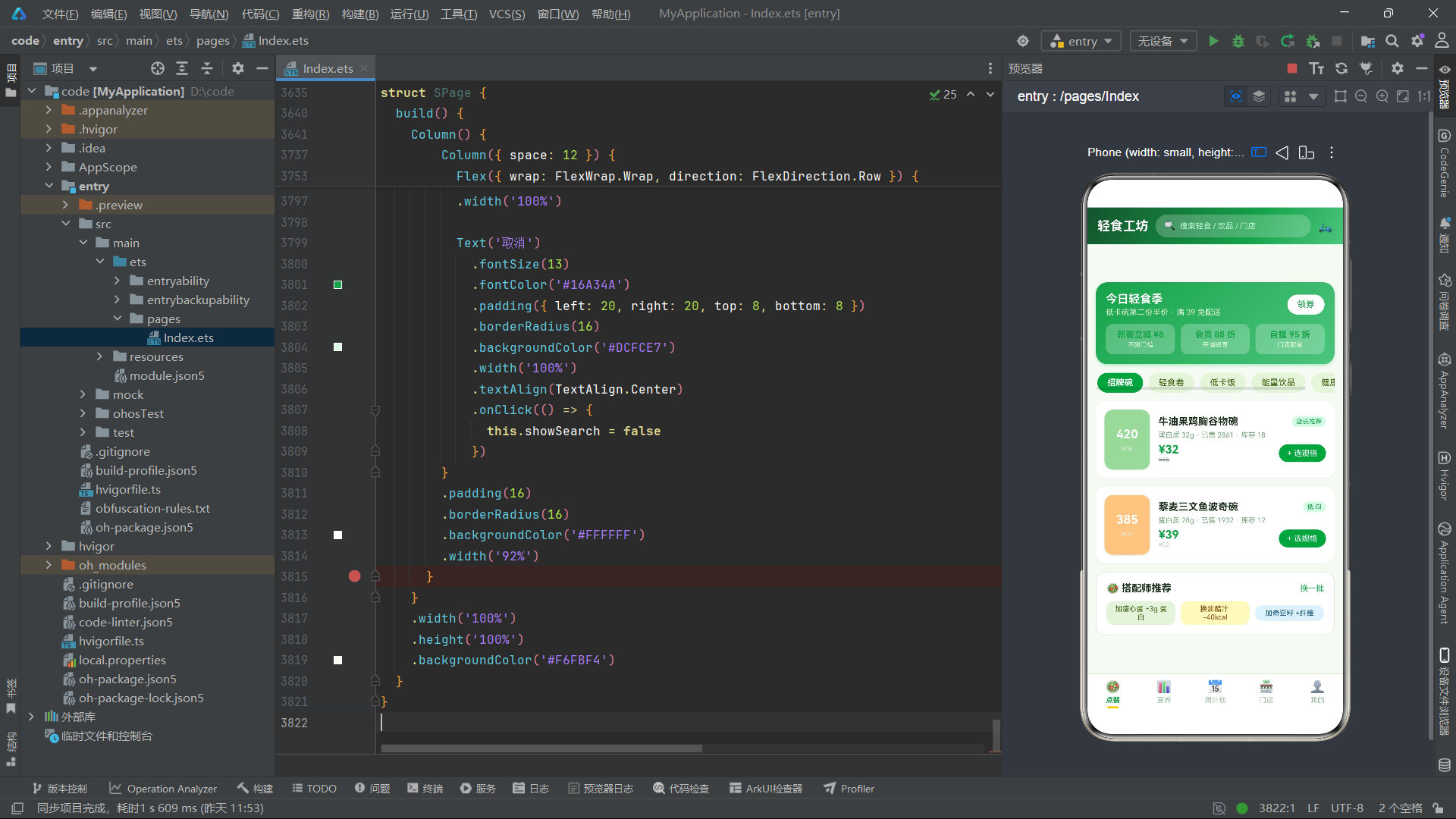
本文将深入分析一个名为"轻食沙拉工坊"的餐饮健康类应用的完整技术实现。该应用以牛油果绿 #16A34A 与柠檬黄 #FACC15 为主题色,底色为清新的农场绿 #F6FBF4,包含点餐、营养、周计划、门店、我的五个底部 Tab。应用集成了完整的购物车系统(支持规格选择、数量调整、热卡计算)、BMI 身体质量指数计算器、七日饮食计划 CRUD 管理、门店排队取号系统、营养柱状图数据可视化等丰富功能。通过对该应用的逐层拆解,读者将深入理解 ArkTS 在组件化设计、状态管理、弹框交互、数据可视化以及业务逻辑实现等方面的技术细节。
一、接口定义层分析
轻食沙拉工坊应用共定义了 8 个接口,覆盖了商品、购物车、营养、计划、门店、菜单等全部业务数据模型。
1.1 商品与购物车接口
interface SaladGoods {
  id: number
  name: string
  cat: string
  kcal: number
  protein: number
  price: number
  originPrice: number
  color: string
  tag: string
  sold: number
  stock: number
}

interface CartRow {
  id: number
  name: string
  spec: string
  price: number
  num: number
}
SaladGoods 接口定义了轻食商品的数据模型。cat 字段存储商品分类(招牌碗、轻食卷、低卡饭、能量饮品、健康小食),用于点餐 Tab 中的分类筛选;kcal 字段存储热量值(千卡),这是轻食类应用最核心的数据维度,在商品卡片左侧以大号字体突出显示;protein 字段存储蛋白质含量(克),用于商品详情和营养档案展示;tag 字段存储商品标签(如"店长推荐"、“低 GI”、“高蛋白”),以小号标签形式展示在商品名称旁;color 字段存储商品卡片的背景色,使用了柔和的农场色系(如 #A7D7A0 浅绿、#F9C78A 暖黄、#A8D8D8 薄荷蓝等)。
CartRow 接口定义了购物车行的数据结构。spec 字段存储规格名称(如"大碗+溏心蛋"、“标准杯”),与商品本身的价格分离——同一商品的不同规格可能产生不同的价格。num 字段存储购买数量,支持在购物车中动态增减。
1.2 营养与计划接口
interface NutriItem {
  id: number
  name: string
  value: number
  max: number
  unit: string
  color: string
  food: string
}

interface PlanCell {
  id: number
  day: string
  meal: string
  name: string
  kcal: number
  done: boolean
}
NutriItem 接口定义了营养素的数据模型。value 字段存储已摄入量,max 字段存储每日推荐上限,两者配合生成营养进度条的填充比例。unit 字段存储计量单位(克),color 字段存储该营养素的主题色——蛋白质用绿色 #16A34A、碳水用黄色 #FACC15、脂肪用橙色 #F97316、膳食纤维用蓝色 #0EA5E9,这种颜色编码使用户能够快速区分不同营养素。food 字段存储主要食物来源,在营养详情弹框中展示。
PlanCell 接口定义了周计划中每一餐的数据模型。day 字段存储星期(周一至周日),meal 字段存储餐段(早餐、午餐、晚餐、加餐),done 字段是一个布尔值,标记该餐是否已完成打卡。这个字段直接驱动计划卡片的视觉状态——已完成餐次的文字变灰、背景变浅、打卡按钮变为"已吃"文字。
1.3 门店与菜单接口
interface ShopRow {
  id: number
  name: string
  dist: string
  queue: number
  score: string
  tag: string
  color: string
  hours: string
}

interface WeekBar {
  day: string
  kcal: number
}

interface MineMenu {
  id: number
  icon: string
  name: string
  desc: string
  color: string
}

interface TabMetaS {
  name: string
  icon: string
}
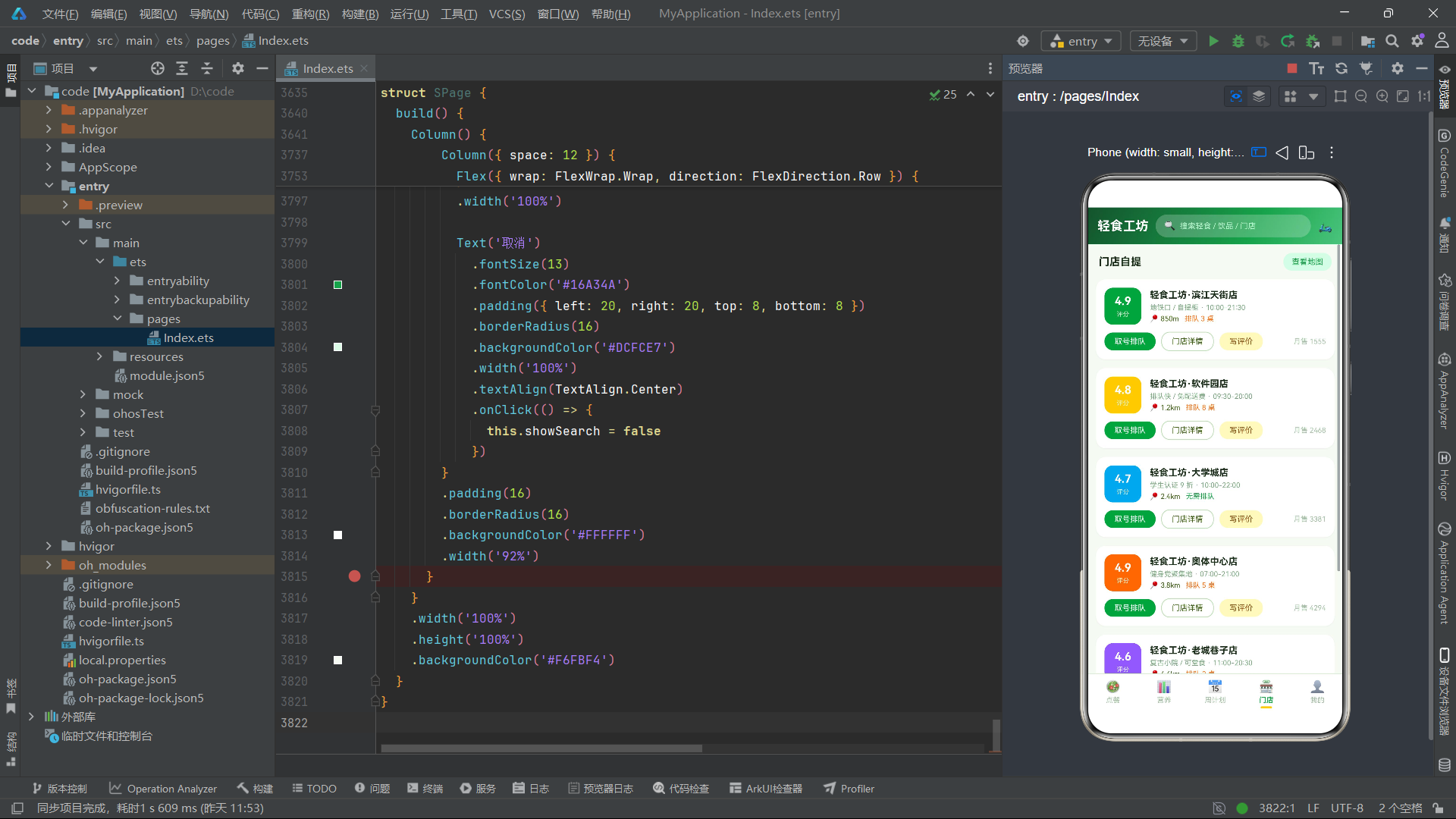
ShopRow 接口定义了门店数据模型。dist 字段存储距离信息(如"850m"、“1.2km”),以字符串形式存储便于直接展示;queue 字段存储当前排队人数,当值为 0 时显示"无需排队",否则显示"排队 N 桌";score 字段存储评分(如"4.9"),在门店卡片左侧以大号白字突出显示;hours 字段存储营业时间区间;color 字段存储门店主题色,不同门店使用不同颜色以增强视觉区分度。
WeekBar 接口定义了周热量柱状图的数据单元,day 存储星期标签,kcal 存储当日总热量摄入。MineMenu 接口定义了"我的"页面菜单项的数据模型,icon 字段使用 emoji 图标,desc 字段存储菜单项的描述文本。TabMetaS 接口定义了底部导航栏标签的元数据。
二、全局常量与枚举分析
2.1 分类标签与商品数据
const CAT_CHIPS: string[] = ['招牌碗', '轻食卷', '低卡饭', '能量饮品', '健康小食']

const SALAD_GOODS: SaladGoods[] = [
  { id: 1, name: '牛油果鸡胸谷物碗', cat: '招牌碗', kcal: 420, protein: 32, price: 32, originPrice: 45, color: '#A7D7A0', tag: '店长推荐', sold: 2861, stock: 18 },
  { id: 2, name: '藜麦三文鱼波奇碗', cat: '招牌碗', kcal: 385, protein: 28, price: 39, originPrice: 52, color: '#F9C78A', tag: '低 GI', sold: 1932, stock: 12 },
  { id: 3, name: '凯撒鸡肉卷饼', cat: '轻食卷', kcal: 340, protein: 22, price: 26, originPrice: 34, color: '#F7E8A4', tag: '高蛋白', sold: 3240, stock: 25 },
  { id: 4, name: '金枪鱼全麦卷', cat: '轻食卷', kcal: 310, protein: 24, price: 28, originPrice: 38, color: '#A8D8D8', tag: '控卡', sold: 1560, stock: 30 },
  { id: 5, name: '紫薯鸡丝低卡饭', cat: '低卡饭', kcal: 360, protein: 26, price: 25, originPrice: 32, color: '#D8B4D8', tag: '饱腹', sold: 2103, stock: 16 },
  { id: 6, name: '糙米牛肉能量饭', cat: '低卡饭', kcal: 480, protein: 35, price: 36, originPrice: 48, color: '#E8A0A0', tag: '健身增肌', sold: 1744, stock: 9 },
  { id: 7, name: '羽衣甘蓝苹果汁', cat: '能量饮品', kcal: 120, protein: 4, price: 18, originPrice: 24, color: '#9BD49B', tag: '轻断食', sold: 4102, stock: 40 },
  { id: 8, name: '冷萃燕麦拿铁', cat: '能量饮品', kcal: 150, protein: 6, price: 22, originPrice: 28, color: '#D9C1A3', tag: '0 植脂末', sold: 3021, stock: 35 },
  { id: 9, name: '无糖希腊酸奶杯', cat: '健康小食', kcal: 160, protein: 15, price: 15, originPrice: 20, color: '#F4E6D0', tag: '0 蔗糖', sold: 2560, stock: 22 },
  { id: 10, name: '烤鹰嘴豆脆脆', cat: '健康小食', kcal: 140, protein: 8, price: 12, originPrice: 16, color: '#E8C97E', tag: '解馋', sold: 3890, stock: 50 }
]
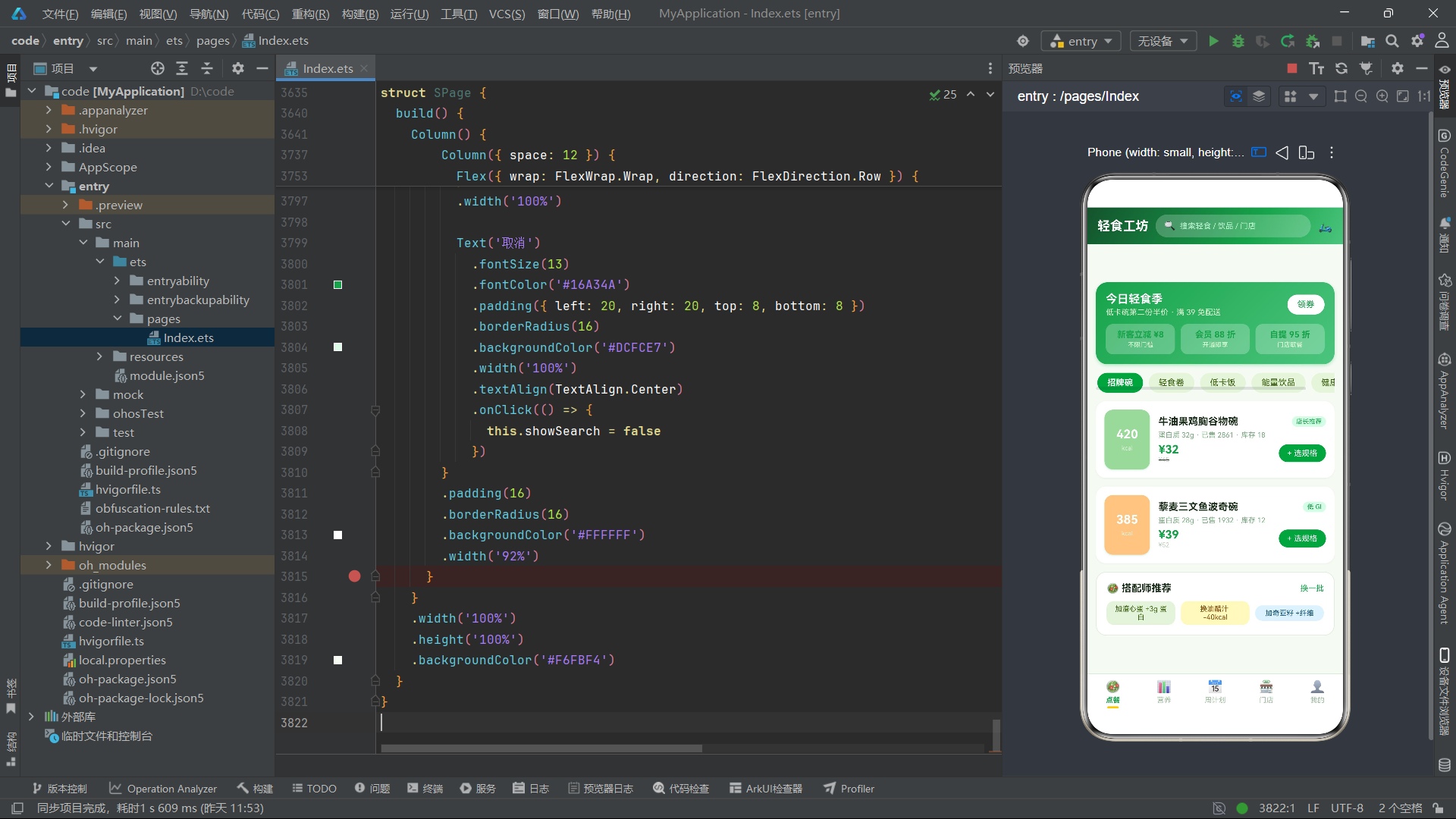
CAT_CHIPS 常量数组定义了五个商品分类标签,这些标签将在点餐 Tab 的顶部以横向滚动条的形式展示,用户点击不同分类可以筛选对应类别的商品。
SALAD_GOODS 常量数组包含十件商品,覆盖了五个分类。热量值从 120kcal(羽衣甘蓝苹果汁)到 480kcal(糙米牛肉能量饭)不等,蛋白质含量从 4g 到 35g。每件商品的 color 字段使用了柔和的莫兰迪色系,这些颜色将作为商品卡片左侧热量色块的背景色,在视觉上形成丰富的色彩层次。商品标签(tag 字段)涵盖了减脂、增肌、控卡、轻断食等不同饮食场景的需求,帮助用户快速找到适合自己目标的产品。
2.2 营养、计划与门店数据
const NUTRI_ITEMS: NutriItem[] = [
  { id: 1, name: '蛋白质', value: 68, max: 100, unit: 'g', color: '#16A34A', food: '鸡胸肉 / 希腊酸奶' },
  { id: 2, name: '碳水', value: 120, max: 200, unit: 'g', color: '#FACC15', food: '藜麦 / 紫薯 / 糙米' },
  { id: 3, name: '脂肪', value: 42, max: 60, unit: 'g', color: '#F97316', food: '牛油果 / 三文鱼' },
  { id: 4, name: '膳食纤维', value: 18, max: 30, unit: 'g', color: '#0EA5E9', food: '羽衣甘蓝 / 苹果' }
]

const PLAN_CELLS: PlanCell[] = [
  { id: 1, day: '周一', meal: '午餐', name: '牛油果鸡胸谷物碗', kcal: 420, done: true },
  { id: 2, day: '周一', meal: '晚餐', name: '凯撒鸡肉卷饼', kcal: 340, done: true },
  { id: 3, day: '周二', meal: '午餐', name: '藜麦三文鱼波奇碗', kcal: 385, done: true },
  { id: 4, day: '周二', meal: '晚餐', name: '紫薯鸡丝低卡饭', kcal: 360, done: false },
  { id: 5, day: '周三', meal: '午餐', name: '糙米牛肉能量饭', kcal: 480, done: false },
  // ... 更多计划项
]

const SHOP_ROWS: ShopRow[] = [
  { id: 1, name: '轻食工坊·滨江天街店', dist: '850m', queue: 3, score: '4.9', tag: '地铁口 / 自提柜', color: '#16A34A', hours: '10:00-21:30' },
  { id: 2, name: '轻食工坊·软件园店', dist: '1.2km', queue: 8, score: '4.8', tag: '排队快 / 免配送费', color: '#FACC15', hours: '09:30-20:00' },
  { id: 3, name: '轻食工坊·大学城店', dist: '2.4km', queue: 0, score: '4.7', tag: '学生认证 9 折', color: '#0EA5E9', hours: '10:00-22:00' },
  { id: 4, name: '轻食工坊·奥体中心店', dist: '3.8km', queue: 5, score: '4.9', tag: '健身党聚集地', color: '#F97316', hours: '07:00-21:00' },
  { id: 5, name: '轻食工坊·老城巷子店', dist: '4.6km', queue: 2, score: '4.6', tag: '复古小院 / 可堂食', color: '#8B5CF6', hours: '11:00-20:30' }
]

const WEEK_BARS: WeekBar[] = [
  { day: '周一', kcal: 760 },
  { day: '周二', kcal: 745 },
  { day: '周三', kcal: 820 },
  { day: '周四', kcal: 690 },
  { day: '周五', kcal: 725 },
  { day: '周六', kcal: 1080 },
  { day: '周日', kcal: 500 }
]
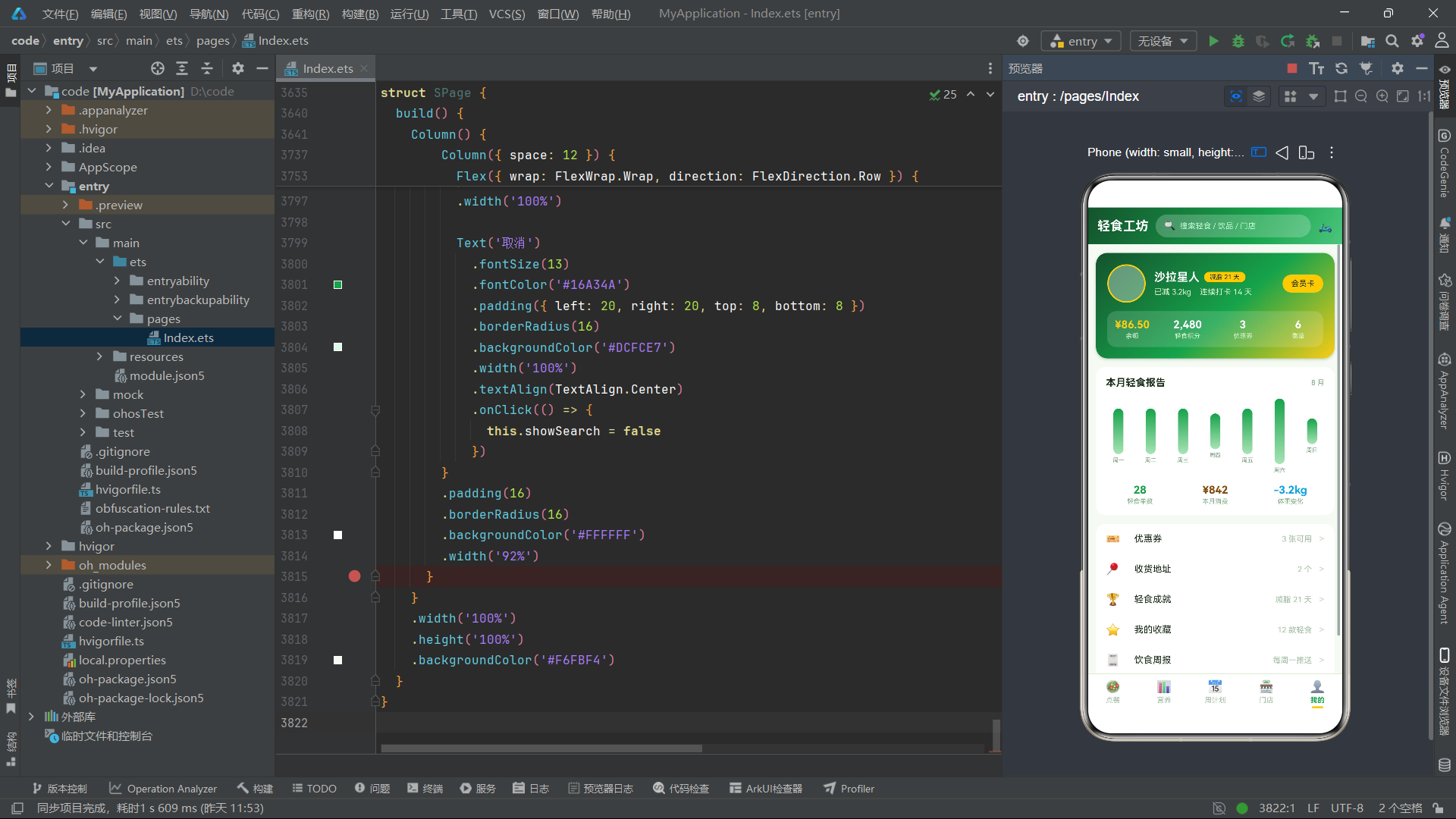
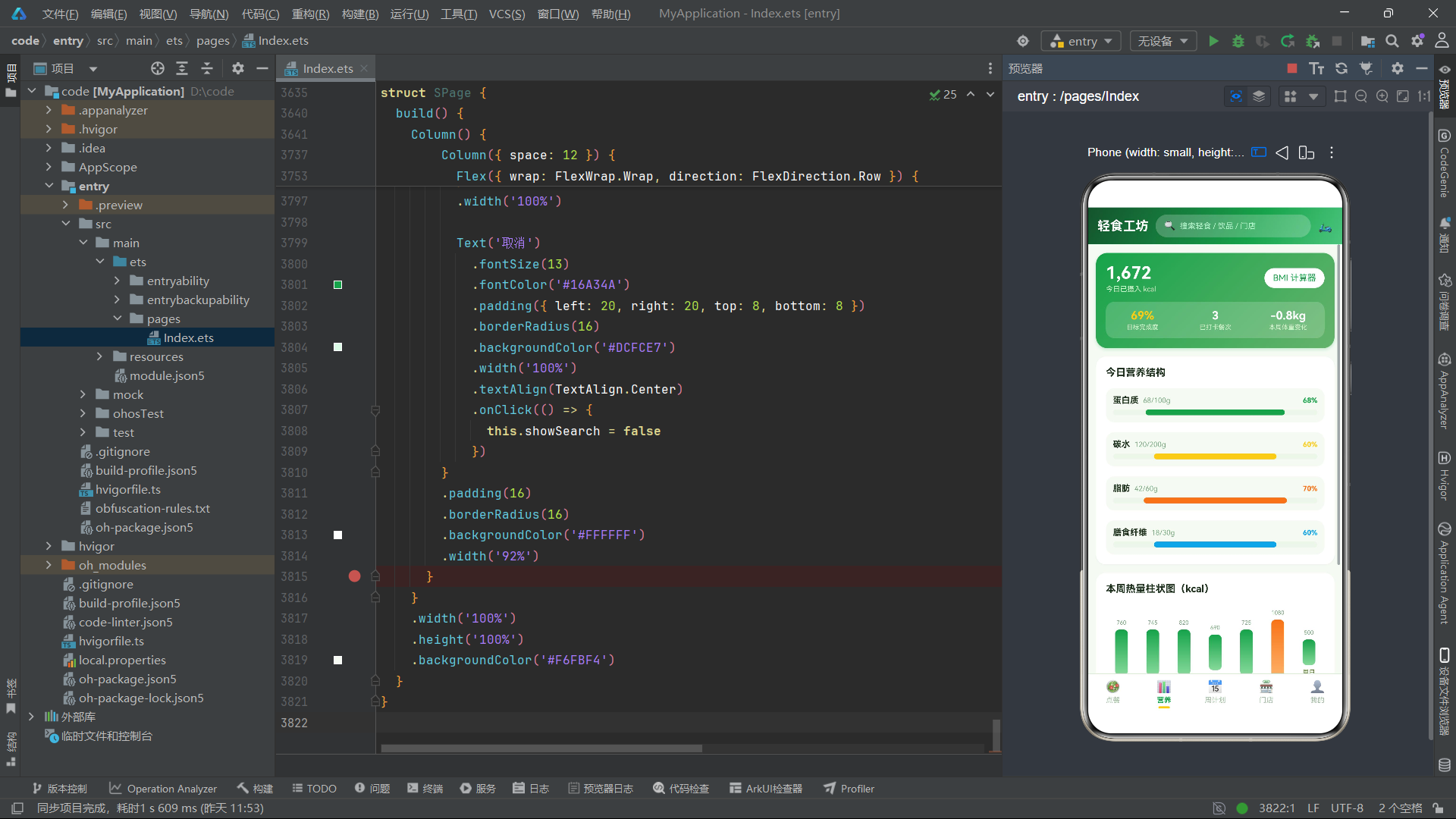
NUTRI_ITEMS 定义了四种营养素的摄入数据。蛋白质已摄入 68g(上限 100g),碳水 120g(上限 200g),脂肪 42g(上限 60g),膳食纤维 18g(上限 30g)。每种营养素配有独立的主题色和食物来源描述,这些数据将驱动营养 Tab 中的进度条可视化。
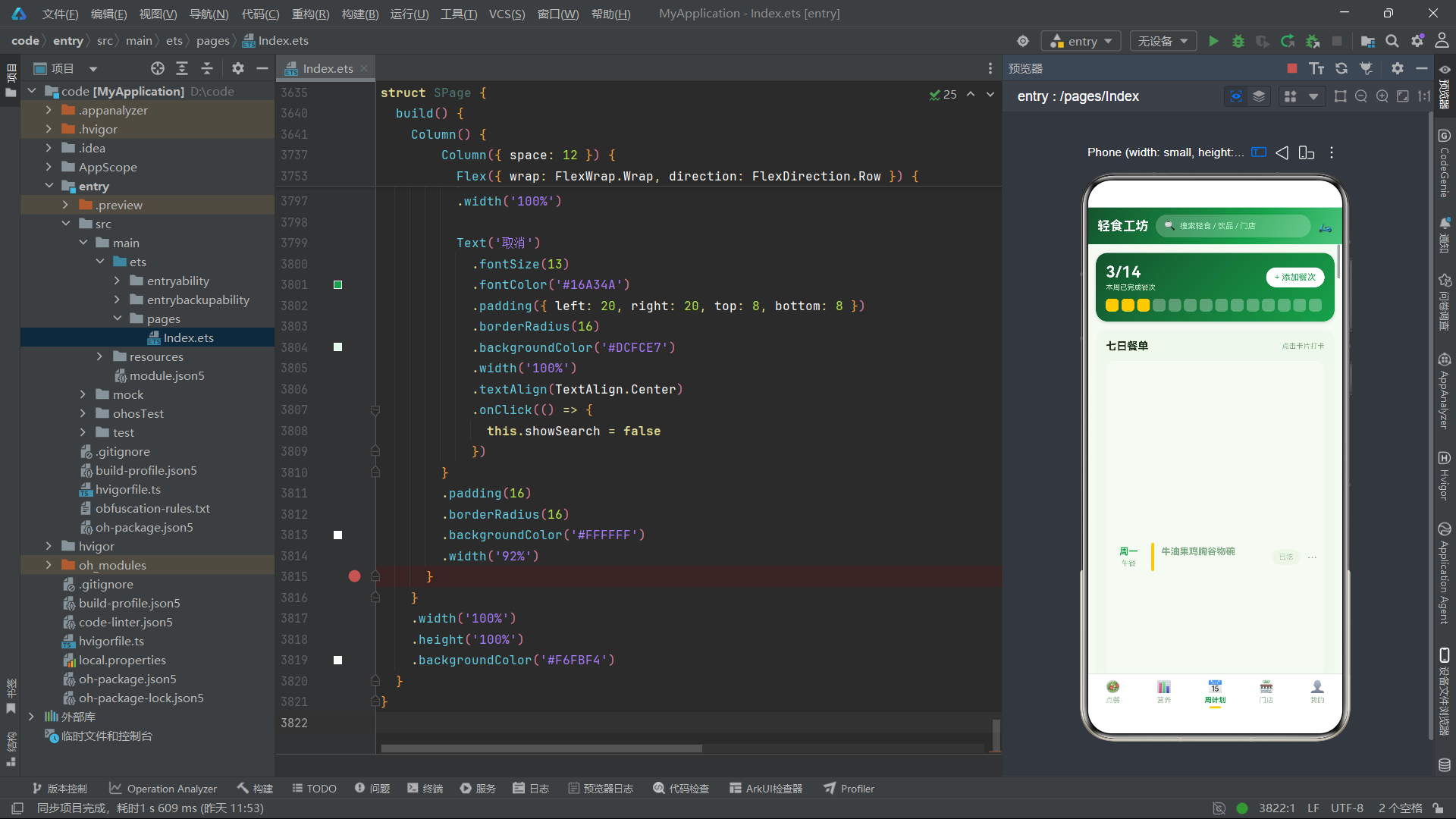
PLAN_CELLS 定义了十四餐的周计划,覆盖周一至周日的午餐和晚餐。前三餐的 done 字段为 true(已完成打卡),其余为 false。这种初始状态设计展示了"部分完成"的周计划场景,用户可以继续打卡未完成的餐次。
SHOP_ROWS 定义了五家门店数据。queue 字段的值从 0 到 8 不等——大学城店排队为 0(无需排队),软件园店排队为 8(较忙),这种差异化的排队数据为门店选择提供了决策依据。每家门店的 color 字段使用了不同的主题色,在门店卡片的评分色块中作为背景色。
WEEK_BARS 定义了七日热量数据。周一至周五的热量在 690-820kcal 之间波动(达标范围内),周六飙升至 1080kcal(超标,可能是放纵餐),周日降至 500kcal(轻断食日)。这种数据分布将驱动热量柱状图的双色渲染——达标日使用绿色柱体,超标日使用橙色柱体。
2.3 菜单与导航常量
const MINE_MENUS: MineMenu[] = [
  { id: 1, icon: '🎫', name: '优惠券', desc: '3 张可用', color: '#FACC15' },
  { id: 2, icon: '📍', name: '收货地址', desc: '2 个', color: '#16A34A' },
  { id: 3, icon: '🏆', name: '轻食成就', desc: '减脂 21 天', color: '#F97316' },
  { id: 4, icon: '⭐', name: '我的收藏', desc: '12 款轻食', color: '#0EA5E9' },
  { id: 5, icon: '🧾', name: '饮食周报', desc: '每周一推送', color: '#8B5CF6' },
  { id: 6, icon: '⚙️', name: '偏好设置', desc: '忌口 / 过敏原', color: '#64748B' }
]

const MAIN_TABS_S: TabMetaS[] = [
  { name: '点餐', icon: '🥗' },
  { name: '营养', icon: '📊' },
  { name: '周计划', icon: '📅' },
  { name: '门店', icon: '🏪' },
  { name: '我的', icon: '👤' }
]
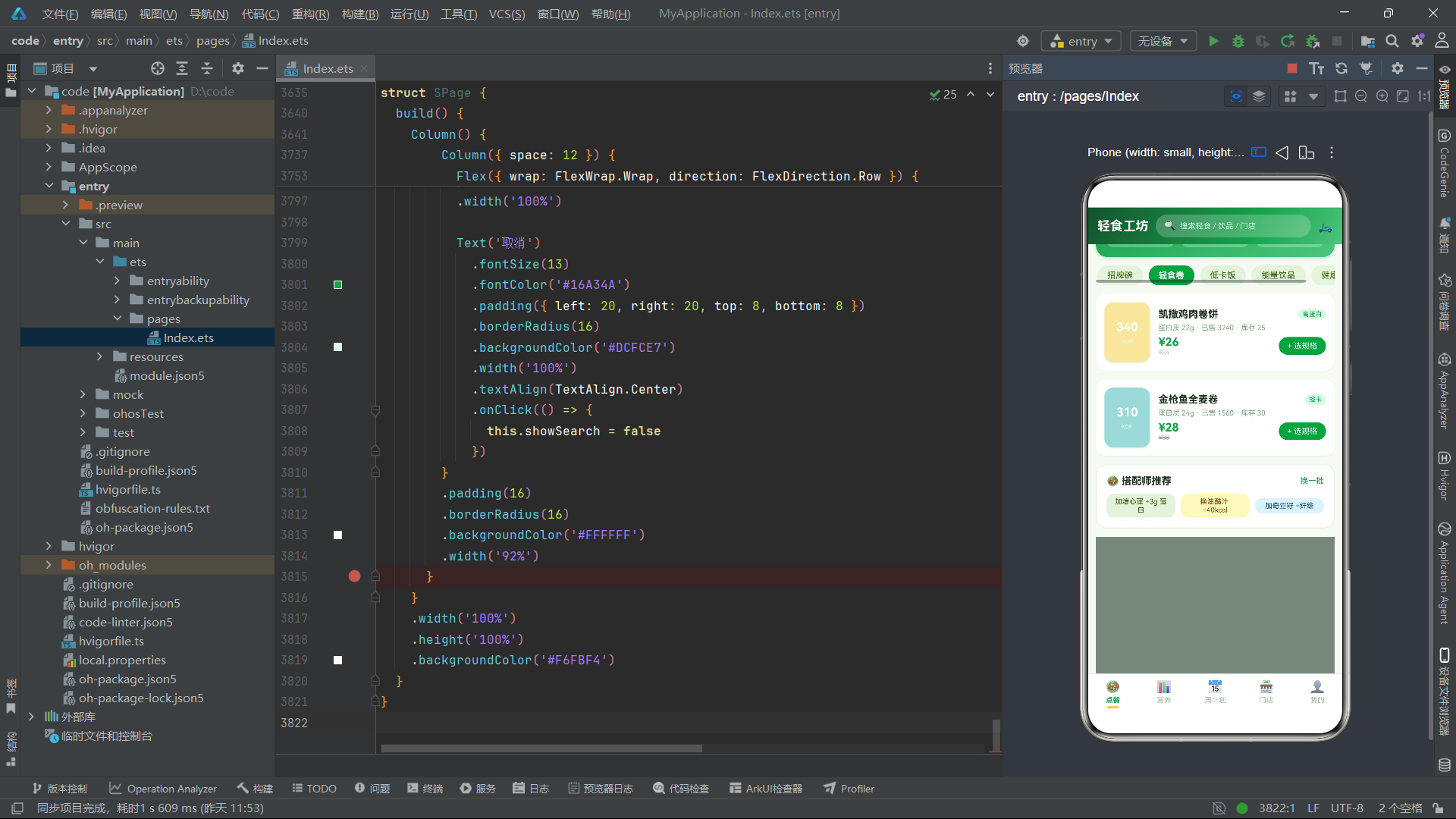
MINE_MENUS 定义了六个菜单项,每项包含 emoji 图标、名称、描述和主题色。MAIN_TABS_S 定义了五个底部导航标签,注意该应用只有五个 Tab(不同于其他应用的六个 Tab),反映了轻食类应用精简的功能模块设计。
三、全局纯函数分析
3.1 热量柱状图高度计算函数
function kcalBarH(k: number): number {
  if (k >= 1000) {
    return 92
  }
  if (k >= 850) {
    return 78
  }
  if (k >= 700) {
    return 64
  }
  if (k >= 550) {
    return 50
  }
  return 36
}
kcalBarH 函数接收一个热量值参数 k,返回柱状图中对应柱子的高度(vp)。函数使用五个分段阈值将热量值映射到离散高度:大于等于 1000kcal 时高度为 92vp,850-999kcal 为 78vp,700-849kcal 为 64vp,550-699kcal 为 50vp,低于 550kcal 为 36vp。这种分段映射确保了不同热量级别的柱子在视觉上有足够的区分度,同时避免了极端值(如 500kcal 和 1080kcal)之间的柱高差异过大。
3.2 营养进度条宽度计算函数
function nutriBarW(v: number, m: number): number {
  if (m <= 0) {
    return 10
  }
  if (v >= m) {
    return 100
  }
  return Math.round(v * 100 / m)
}
nutriBarW 函数接收已摄入量 v 和每日上限 m 两个参数,返回进度条的填充百分比。函数首先处理除零保护——当 m 小于等于 0 时返回最小值 10,避免运行时错误。当摄入量超过上限时返回 100(满格)。正常情况下使用 Math.round(v * 100 / m) 计算百分比并四舍五入。这个函数被营养 Tab 中的四种营养素进度条调用,根据各自的 value 和 max 字段动态计算填充宽度。
3.3 全局 @Builder 弹框遮罩
@Builder
function modalOverlay(onClose: () => void) {
  Column()
    .width('100%')
    .height('100%')
    .backgroundColor('rgba(22,40,25,0.55)')
    .onClick(() => {
      onClose()
    })
}
modalOverlay 是全局弹框遮罩构建函数,背景色使用了 rgba(22,40,25,0.55)——一种深绿色的半透明颜色,alpha 值为 0.55。与谷子集市应用的深蓝灰遮罩不同,这里选择了绿色调的遮罩以匹配轻食主题。该 @Builder 函数在应用的全部五个 Tab 中被复用,涵盖规格选择、购物车、领券中心、营养详情、BMI 计算器、营养师建议、添加餐次、编辑餐次、删除确认、换着吃、排队取号、门店详情、评价门店、周边地图、余额充值、收货地址、会员卡、偏好设置和搜索等近二十种弹框场景。
四、各 Tab 组件深度分析
4.1 点餐 Tab(OrderTab)
点餐 Tab 是应用的核心功能模块,集成了商品浏览、分类筛选、规格选择、购物车管理等完整的点餐流程。
状态变量与购物车方法
@Component
export struct OrderTab {
  @State catIdx: number = 0
  @State showBuy: boolean = false
  @State showCart: boolean = false
  @State showCoupon: boolean = false
  @State showDetail: boolean = false
  @State showTopping: boolean = false
  @State specIdx: number = 0
  @State topIdx: number = 0
  @State buyNum: number = 1
  @State selGoods: SaladGoods = SALAD_GOODS[0]
  @State cartList: CartRow[] = [
    { id: 1, name: '牛油果鸡胸谷物碗', spec: '大碗+溏心蛋', price: 38, num: 1 },
    { id: 2, name: '羽衣甘蓝苹果汁', spec: '标准杯', price: 18, num: 2 }
  ]

  addToCart() {
    const specName: string[] = ['小碗 320g', '大碗 450g', '套餐+饮品']
    const priceArr: number[] = [this.selGoods.price, this.selGoods.price + 8, this.selGoods.price + 18]
    let found = -1
    for (let i = 0; i < this.cartList.length; i++) {
      if (this.cartList[i].id === this.selGoods.id) {
        found = i
      }
    }
    const r: CartRow[] = []
    for (let i = 0; i < this.cartList.length; i++) {
      r.push(this.cartList[i])
    }
    if (found >= 0) {
      const row: CartRow = {
        id: this.cartList[found].id,
        name: this.cartList[found].name,
        spec: specName[this.specIdx],
        price: priceArr[this.specIdx],
        num: this.cartList[found].num + this.buyNum
      }
      r[found] = row
    } else {
      r.push({
        id: this.selGoods.id,
        name: this.selGoods.name,
        spec: specName[this.specIdx],
        price: priceArr[this.specIdx],
        num: this.buyNum
      })
    }
    this.cartList = r
    this.showBuy = false
    this.showCart = true
  }

  cartTotal(): number {
    let t = 0
    for (let i = 0; i < this.cartList.length; i++) {
      t += this.cartList[i].price * this.cartList[i].num
    }
    return t
  }

  cartKcal(): number {
    let t = 0
    for (let i = 0; i < this.cartList.length; i++) {
      t += Math.round(this.cartList[i].price * 3.5)
    }
    return t
  }
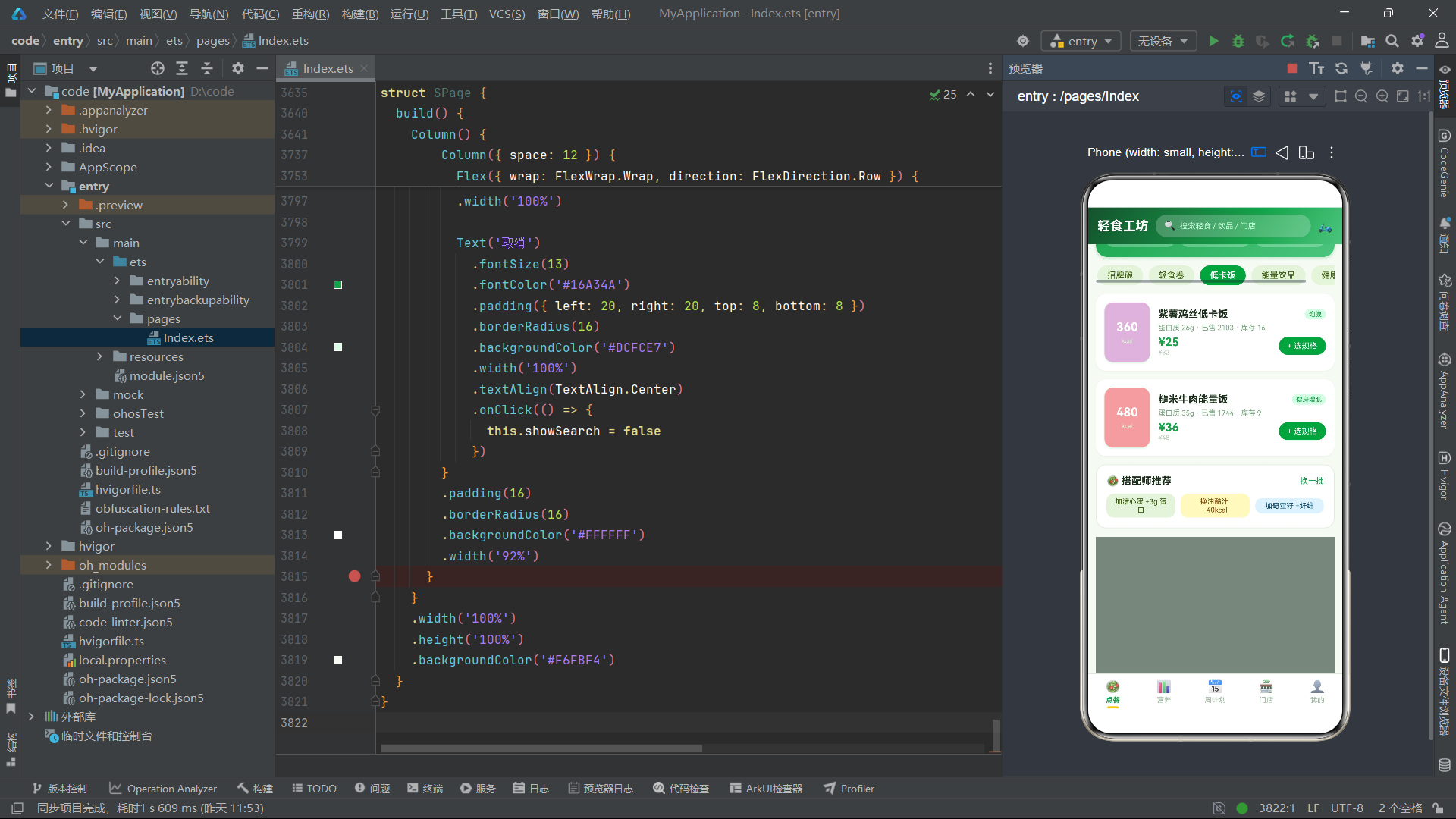
addToCart 方法是购物车系统的核心逻辑。方法首先根据 specIdx 索引从规格名称数组和价格数组中获取对应的规格名称和价格——小碗不加价、大碗加 8 元、套餐加 18 元。然后遍历购物车列表查找是否已存在相同 id 的商品,如果存在则更新规格和数量(累加 buyNum),如果不存在则创建新的购物车行。最终将新数组赋值给 cartList 状态变量,关闭规格选择弹框并自动打开购物车弹框。
cartTotal 方法遍历购物车列表累加每行的 price * num,返回总金额。cartKcal 方法使用 price * 3.5 的近似公式估算热量摄入,这个公式基于"每元价格约对应 3.5 千卡热量"的经验估算,虽然不是精确的营养计算,但为用户提供了快速的热量参考。
商品列表与分类筛选
Scroll() {
  Row({ space: 8 }) {
    ForEach(CAT_CHIPS, (c: string, i: number) => {
      Text(c)
        .fontSize(12)
        .fontWeight(this.catIdx === i ? FontWeight.Bold : FontWeight.Normal)
        .fontColor(this.catIdx === i ? '#FFFFFF' : '#3F6212')
        .padding({ left: 14, right: 14, top: 7, bottom: 7 })
        .borderRadius(16)
        .backgroundColor(this.catIdx === i ? '#16A34A' : '#E7F4DC')
        .onClick(() => {
          this.catIdx = i
        })
    }, (c: string) => c)
  }
  .padding({ left: 2, right: 2 })
}
.scrollable(ScrollDirection.Horizontal)
.width('100%')

ForEach(SALAD_GOODS, (g: SaladGoods) => {
  if (g.cat === CAT_CHIPS[this.catIdx]) {
    Row({ space: 12 }) {
      Column({ space: 4 }) {
        Text(g.kcal + '')
          .fontSize(17)
          .fontWeight(FontWeight.Bold)
          .fontColor('#FFFFFF')
        Text('kcal')
          .fontSize(9)
          .fontColor('#E3F5DC')
      }
      .width(64)
      .height(84)
      .borderRadius(12)
      .backgroundColor(g.color)
      .justifyContent(FlexAlign.Center)
      .shadow({ radius: 6, color: 'rgba(22,163,74,0.2)', offsetX: 0, offsetY: 3 })

      Column({ space: 5 }) {
        Row({ space: 6 }) {
          Text(g.name)
            .fontSize(14)
            .fontWeight(FontWeight.Bold)
            .fontColor('#1A2E1A')
            .maxLines(1)
            .textOverflow({ overflow: TextOverflow.Ellipsis })
            .layoutWeight(1)
            .onClick(() => {
              this.selGoods = g
              this.showDetail = true
            })
          Text(g.tag)
            .fontSize(9)
            .fontColor('#16A34A')
            .padding({ left: 6, right: 6, top: 2, bottom: 2 })
            .borderRadius(8)
            .backgroundColor('#DCFCE7')
        }
        .width('100%')

        Text('蛋白质 ' + g.protein + 'g · 已售 ' + g.sold + ' · 库存 ' + g.stock)
          .fontSize(10)
          .fontColor('#7CA982')
          .width('100%')

        Row({ space: 8 }) {
          Column({ space: 0 }) {
            Text('¥' + g.price)
              .fontSize(16)
              .fontWeight(FontWeight.Bold)
              .fontColor('#16A34A')
            Text('¥' + g.originPrice)
              .fontSize(9)
              .fontColor('#B9CDB9')
              .decoration({ type: TextDecorationType.LineThrough })
          }
          .alignItems(HorizontalAlign.Start)
          .layoutWeight(1)

          Text('+ 选规格')
            .fontSize(11)
            .fontColor('#FFFFFF')
            .padding({ left: 12, right: 12, top: 6, bottom: 6 })
            .borderRadius(13)
            .backgroundColor('#16A34A')
            .onClick(() => {
              this.selGoods = g
              this.specIdx = 0
              this.buyNum = 1
              this.showBuy = true
            })
        }
        .width('100%')
      }
      .alignItems(HorizontalAlign.Start)
      .layoutWeight(1)
    }
    .width('100%')
    .padding(12)
    .borderRadius(14)
    .backgroundColor('#FFFFFF')
    .shadow({ radius: 5, color: 'rgba(26,46,26,0.06)', offsetX: 0, offsetY: 2 })
  }
}, (g: SaladGoods) => (g.id.toString() + this.catIdx.toString()))
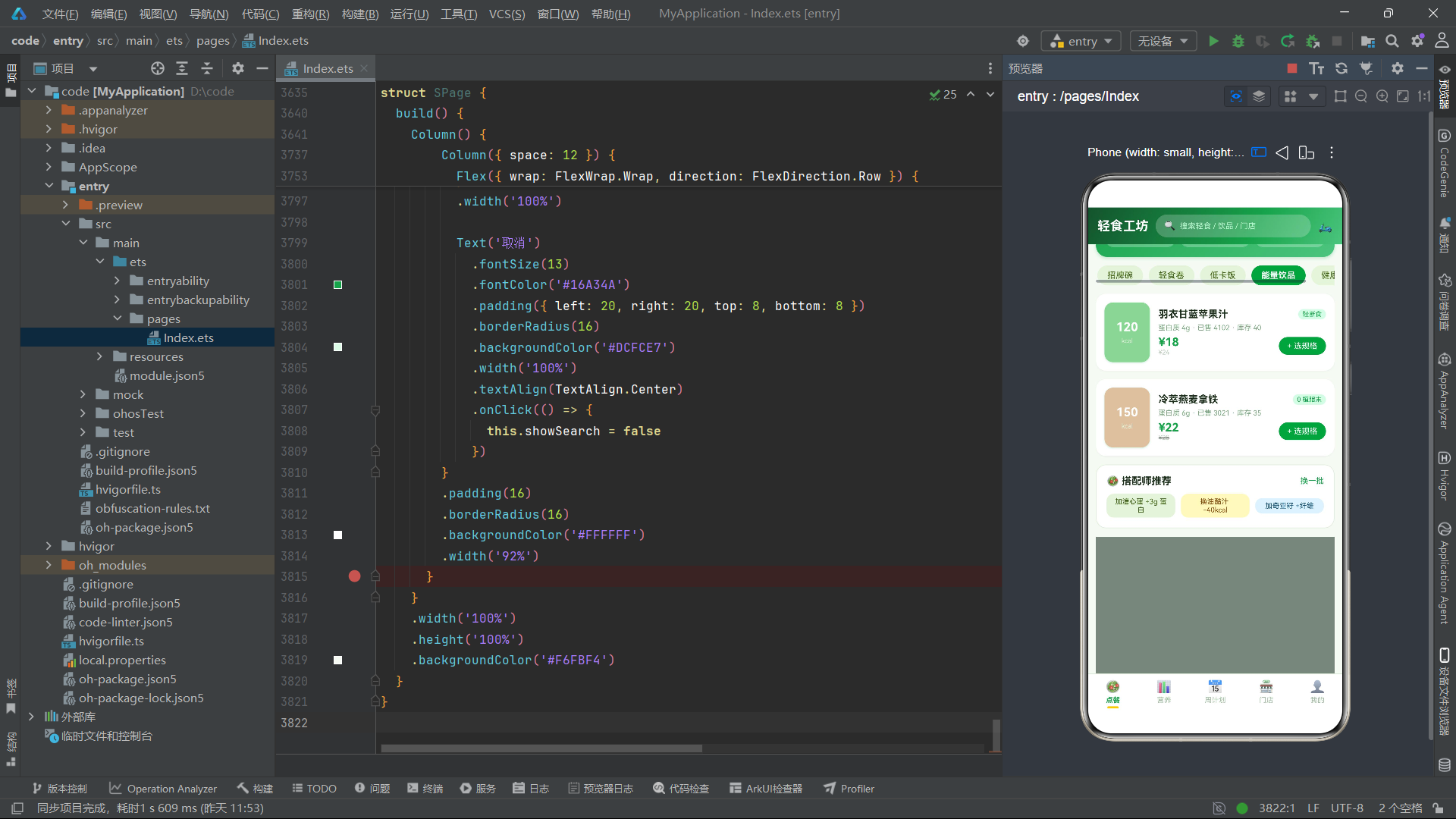
分类筛选条使用横向 Scroll 容器包裹 ForEach 生成的标签按钮。选中的分类标签使用绿色背景白字加粗,未选中标签使用浅绿色 #E7F4DC 背景深绿色文字。
商品列表使用 ForEach 遍历 SALAD_GOODS 数组,但在内部使用 if (g.cat === CAT_CHIPS[this.catIdx]) 条件判断来筛选当前分类的商品。这种"全量遍历+条件渲染"的方式确保了 ForEach 的键值稳定性(键值包含 catIdx),同时实现了分类筛选效果。每个商品卡片左侧的 64x84vp 色块以大号白色字体展示热量值,这种设计使热量信息成为视觉焦点,符合轻食应用的用户关注点。
值得注意的是,ForEach 的键值函数使用了 (g.id.toString() + this.catIdx.toString()) 的组合键——将商品 ID 和当前分类索引拼接为唯一键。这种设计确保了当用户切换分类时,ForEach 能够正确识别列表项的变化并执行高效的 diff 更新。
4.2 营养 Tab(NutriTab)
营养 Tab 展示了用户的营养摄入情况和本周热量走势,并提供了 BMI 计算器工具。
BMI 计算器
@State inputH: string = ''
@State inputW: string = ''
@State bmiVal: string = ''

calcBmi() {
  const h: number = Number(this.inputH === '' ? '170' : this.inputH) / 100
  const w: number = Number(this.inputW === '' ? '60' : this.inputW)
  const v: number = w / (h * h)
  if (v < 18.5) {
    this.bmiVal = v.toFixed(1) + ' 偏瘦'
  } else if (v < 24) {
    this.bmiVal = v.toFixed(1) + ' 标准'
  } else if (v < 28) {
    this.bmiVal = v.toFixed(1) + ' 偏胖'
  } else {
    this.bmiVal = v.toFixed(1) + ' 肥胖'
  }
}
calcBmi 方法实现了 BMI(Body Mass Index,身体质量指数)的计算逻辑。方法首先将身高从厘米转换为米(除以 100),然后使用公式 体重 / 身高^2 计算 BMI 值。当用户未输入身高或体重时,使用默认值 170cm 和 60kg 进行计算。计算结果通过四段式条件判断分类——小于 18.5 为"偏瘦",18.5-23.9 为"标准",24-27.9 为"偏胖",大于等于 28 为"肥胖"。结果使用 toFixed(1) 保留一位小数,并拼接对应的分类文字后赋值给 bmiVal 状态变量,触发结果文本的条件渲染。
营养进度条
ForEach(NUTRI_ITEMS, (n: NutriItem) => {
  Column({ space: 6 }) {
    Row({ space: 6 }) {
      Text(n.name)
        .fontSize(12)
        .fontWeight(FontWeight.Bold)
        .fontColor('#1A2E1A')
      Text(n.value + '/' + n.max + n.unit)
        .fontSize(10)
        .fontColor('#7CA982')
        .layoutWeight(1)
      Text(nutriBarW(n.value, n.max) + '%')
        .fontSize(10)
        .fontWeight(FontWeight.Bold)
        .fontColor(n.color)
    }
    .width('100%')

    Column({ space: 0 }) {
      Column()
        .height(8)
        .borderRadius(4)
        .width(nutriBarW(n.value, n.max) + '%')
        .linearGradient({
          angle: 0,
          colors: [[n.color, 0], [n.color, 1]]
        })
    }
    .width('100%')
    .height(8)
    .borderRadius(4)
    .backgroundColor('#EEF6EA')
  }
  .width('100%')
  .padding(10)
  .borderRadius(12)
  .backgroundColor('#F6FBF4')
  .onClick(() => {
    this.selNutri = n
    this.showItem = true
  })
}, (n: NutriItem) => n.id.toString())
营养进度条由两层 Column 组合实现——外层 Column 作为轨道(背景色 #EEF6EA,高度 8vp,圆角 4vp),内层 Column 作为填充条(宽度通过 nutriBarW(n.value, n.max) 计算的百分比,使用 n.color 作为渐变色)。进度条上方显示了营养素名称、已摄入量/上限和百分比,三者在同一行内使用 layoutWeight 实现弹性布局。点击进度条卡片会打开营养详情弹框,展示已摄入量、每日上限、剩余额度和主要食物来源。
热量柱状图
Row({ space: 0 }) {
  ForEach(WEEK_BARS, (w: WeekBar) => {
    Column({ space: 5 }) {
      Text(w.kcal + '')
        .fontSize(8)
        .fontColor('#7CA982')
      Column()
        .width(18)
        .height(kcalBarH(w.kcal))
        .borderRadius(6)
        .linearGradient({
          angle: 180,
          colors: w.kcal > 1000 ? [['#F97316', 0], ['#FDBA74', 1]] : [['#16A34A', 0], ['#86D99A', 1]]
        })
      Text(w.day)
        .fontSize(9)
        .fontColor('#3F6212')
    }
    .layoutWeight(1)
    .alignItems(HorizontalAlign.Center)
    .onClick(() => {
      this.showTip = true
    })
  }, (w: WeekBar) => w.day)
}
.width('100%')
.height(140)
.justifyContent(FlexAlign.End)
热量柱状图通过 ForEach 遍历 WEEK_BARS 数组生成七根柱子,每根柱子使用 layoutWeight(1) 等分容器宽度。柱体高度通过全局函数 kcalBarH(w.kcal) 计算,柱体颜色根据热量阈值动态切换——超过 1000kcal 时使用橙色渐变(#F97316 到 #FDBA74),达标时使用绿色渐变(#16A34A 到 #86D99A)。容器使用 justifyContent(FlexAlign.End) 使柱子底部对齐,上方留出空间显示热量数值标签。
4.3 周计划 Tab(PlanTab)
周计划 Tab 实现了七日饮食计划的完整 CRUD 管理功能。
@Component
export struct PlanTab {
  @State planList: PlanCell[] = PLAN_CELLS
  @State showAdd: boolean = false
  @State showEdit: boolean = false
  @State showDel: boolean = false
  @State showSwap: boolean = false
  @State editIdx: number = -1
  @State delIdx: number = -1
  @State swapIdx: number = -1
  @State inputDay: string = '周一'
  @State inputMeal: string = '午餐'
  @State inputName: string = ''
  @State inputKcal: string = ''
  @State dayIdx: number = 0
  @State mealIdx: number = 0

  toggleDone(idx: number) {
    const r: PlanCell[] = []
    for (let i = 0; i < this.planList.length; i++) {
      if (i === idx) {
        r.push({
          id: this.planList[i].id,
          day: this.planList[i].day,
          meal: this.planList[i].meal,
          name: this.planList[i].name,
          kcal: this.planList[i].kcal,
          done: !this.planList[i].done
        })
      } else {
        r.push(this.planList[i])
      }
    }
    this.planList = r
  }

  swapPlan() {
    const r: PlanCell[] = []
    for (let i = 0; i < this.planList.length; i++) {
      if (i === this.swapIdx) {
        r.push({
          id: this.planList[i].id,
          day: this.planList[i].day,
          meal: this.planList[i].meal,
          name: '羽衣甘蓝苹果汁 + 鹰嘴豆脆脆',
          kcal: 260,
          done: this.planList[i].done
        })
      } else {
        r.push(this.planList[i])
      }
    }
    this.planList = r
    this.showSwap = false
  }
toggleDone 方法是周计划的核心交互方法,用于切换餐次的打卡状态。方法采用不可变更新模式——创建新数组,遍历原数组复制元素,在目标索引处创建一个 done 字段取反的新对象。这种设计确保了 @State planList 的引用变化能够被框架检测到,从而触发计划列表的 UI 刷新。
swapPlan 方法实现了"换着吃"功能——将指定餐次的餐品替换为预设的轻断食组合(羽衣甘蓝苹果汁 + 鹰嘴豆脆脆,260kcal)。这种快捷替换功能为用户提供了饮食多样性选择,无需手动编辑即可快速调整计划。
计划列表中每个卡片包含星期标签、餐段标签、竖条指示器、餐品名称、热量值和操作按钮。已完成餐次的卡片使用浅绿色背景 #F6FBF4,未完成的使用白色背景,竖条指示器从柠檬黄 #FACC15 变为浅灰色 #D6E8D0。打卡按钮在未完成状态显示"打卡"(绿色背景),完成后显示"已吃"(灰色背景),点击任一区域均可切换状态。
4.4 门店 Tab(ShopTab)
门店 Tab 展示了周边门店信息,支持排队取号、门店详情查看和评价功能。
takeNumber() {
  const prefix: string[] = ['A', 'B', 'C', 'D', 'E']
  this.queueNo = prefix[this.takeIdx] + '0' + (this.selShop.queue + 17)
  this.showQueue = false
}
takeNumber 方法是排队取号的核心逻辑。方法根据 takeIdx(就餐人数索引)从前缀数组中取对应字母(1人=A、2人=B、3-4人=C、5人+=D),然后拼接当前排队人数加 17 得到号码序号(加 17 是因为已有排队人数),最终生成如"A020"的排队号码。号码生成后关闭排队弹框,排队号码卡片会出现在门店列表下方。
门店列表中每个卡片左侧的 52x52vp 评分色块使用门店主题色作为背景,以大号白字展示评分。排队信息使用条件渲染——当 queue > 0 时显示"排队 N 桌"(橙色),否则显示"无需排队"(绿色),这种颜色编码帮助用户快速识别门店繁忙程度。
4.5 我的 Tab(SMineTab)
我的 Tab 展示了用户信息、钱包余额、轻食报告、功能菜单等内容。
@Component
export struct SMineTab {
  @State showRecharge: boolean = false
  @State showAddr: boolean = false
  @State showVip: boolean = false
  @State showSetting: boolean = false
  @State amountIdx: number = 1
用户信息卡片使用了从深绿到牛油果绿再到柠檬黄的三色渐变(['#14532D', 0], ['#16A34A', 0.55], ['#FACC15', 1]),角度为 140 度。这种三色渐变在视觉上从深到浅、从冷到暖过渡,象征着从坚持到收获的过程。卡片中的头像使用了半透明白色背景配合柠檬黄边框,用户名旁的"减脂 21 天"标签使用柠檬黄背景深色文字。
余额充值弹框提供了三档充值选项——50 元(无赠送)、100 元(送 10 元券)、200 元(送 25 元券)。选中档位使用不同颜色突出显示:50 元和 200 元使用绿色背景,100 元使用黄色背景(推荐档位)。这种差异化视觉设计引导用户选择推荐档位。
菜单列表使用 ForEach 遍历 MINE_MENUS 数组生成六个菜单项,每项包含 emoji 图标、名称、描述和箭头。菜单项的 onClick 事件根据 m.id 的值打开不同的弹框——id 为 1 时打开充值弹框,id 为 2 时打开地址弹框,id 为 6 时打开设置弹框。这种基于 id 的条件路由是菜单交互的常见模式。
五、主入口页面分析
@Entry
@Component
struct SPage {
  @State activeTab: number = 0
  @State showSearch: boolean = false
  @State searchKw: string = ''

  build() {
    Column() {
      Column() {
        Row({ space: 10 }) {
          Text('轻食工坊')
            .fontSize(18)
            .fontWeight(FontWeight.Bold)
            .fontColor('#FFFFFF')

          Row({ space: 6 }) {
            Text('🔍')
              .fontSize(13)
            Text('搜索轻食 / 饮品 / 门店')
              .fontSize(11)
              .fontColor('#BBF7D0')
              .layoutWeight(1)
          }
          .layoutWeight(1)
          .height(32)
          .padding({ left: 12, right: 12 })
          .borderRadius(16)
          .backgroundColor('rgba(255,255,255,0.22)')
          .onClick(() => {
            this.showSearch = true
          })

          Text('🛵')
            .fontSize(17)
        }
        .width('100%')
        .padding({ left: 14, right: 14, top: 10, bottom: 10 })
      }
      .width('100%')
      .linearGradient({
        angle: 120,
        colors: [['#14532D', 0], ['#16A34A', 0.65], ['#4CC57E', 1]]
      })

      Column() {
        if (this.activeTab === 0) {
          OrderTab()
        } else if (this.activeTab === 1) {
          NutriTab()
        } else if (this.activeTab === 2) {
          PlanTab()
        } else if (this.activeTab === 3) {
          ShopTab()
        } else {
          SMineTab()
        }
      }
      .layoutWeight(1)
      .width('100%')

      Row({ space: 0 }) {
        ForEach(MAIN_TABS_S, (t: TabMetaS, i: number) => {
          Column({ space: 3 }) {
            Text(t.icon)
              .fontSize(17)
            Text(t.name)
              .fontSize(10)
              .fontWeight(this.activeTab === i ? FontWeight.Bold : FontWeight.Normal)
              .fontColor(this.activeTab === i ? '#16A34A' : '#A3BFA3')
            if (this.activeTab === i) {
              Column()
                .width(16)
                .height(3)
                .borderRadius(2)
                .backgroundColor('#FACC15')
            } else {
              Column()
                .width(16)
                .height(3)
                .borderRadius(2)
                .backgroundColor('rgba(0,0,0,0)')
            }
          }
          .layoutWeight(1)
          .padding({ top: 8, bottom: 8 })
          .alignItems(HorizontalAlign.Center)
          .onClick(() => {
            this.activeTab = i
          })
        }, (t: TabMetaS) => t.name)
      }
      .width('100%')
      .backgroundColor('#FFFFFF')
SPage 组件的页面结构从上到下分为三层:顶部导航栏、内容区和底部导航栏。
顶部导航栏使用 120 度三色渐变(深绿 #14532D 到牛油果绿 #16A34A 再到浅绿 #4CC57E),包含应用标题"轻食工坊"、搜索入口和配送图标。搜索入口使用半透明白色背景的胶囊形按钮。
内容区使用 if-else if-else 条件链根据 activeTab 渲染对应的 Tab 组件,五个 Tab 分别对应 OrderTab、NutriTab、PlanTab、ShopTab 和 SMineTab。
底部导航栏使用 ForEach 遍历 MAIN_TABS_S 生成五个标签。选中标签的图标下方的指示条使用柠檬黄 #FACC15,未选中标签的指示条使用透明色 rgba(0,0,0,0)——这种设计保持了指示条的空间占位(高度始终为 3vp),避免了选中/取消选中时标签内容的位置跳动。
六、流程图
6.1 应用架构流程图
6.2 弹框交互流程图
七、技术对比表格
| 技术维度 | 实现方案 | 设计特点 | 优势分析 | 适用场景 |
|---|---|---|---|---|
| UI 声明范式 | ArkTS 声明式 UI | 数据驱动视图,@State 变量变更自动触发 UI 刷新 | 无需手动操作 DOM,代码简洁可维护 | 所有 ArkTS 应用 |
| 组件化架构 | @Component + @Entry | 五个独立 Tab 组件 + 一个主入口组件 | 职责分离,功能模块独立 | 多功能模块应用 |
| 购物车系统 | 不可变数组更新 + 规格价格映射 | addToCart 方法支持合并同商品、规格选择、价格计算 | 精确的购物车状态管理,自动弹出购物车 | 电商/餐饮点餐 |
| BMI 计算 | Number 转换 + 公式计算 + 四段分类 | 身高体重输入 -> BMI 值 -> 分类标签 | 实时计算,默认值兜底,四段式健康评估 | 健康类工具 |
| 营养可视化 | nutriBarW 函数 + 条件渐变进度条 | 百分比宽度计算 + 营养素主题色渐变 | 轻量级进度条,无需图表库,颜色编码区分 | 营养摄入展示 |
| 热量柱状图 | kcalBarH 函数 + 双色条件渐变 | 分段高度映射 + 达标/超标颜色切换 | 零依赖图表,直观的热量趋势展示 | 周热量走势 |
| CRUD 模式 | 不可变数组更新 | 创建新数组 -> 遍历 -> 条件替换 -> 赋值 | 确保状态变化被检测,触发 UI 刷新 | 周计划管理 |
| 弹框交互 | 布尔状态 + @Builder modalOverlay | 近20种弹框统一遮罩+条件渲染 | 交互模式统一,遮罩层复用 | 表单输入、确认操作 |
| 分类筛选 | ForEach + if 条件判断 | 全量遍历+条件渲染+组合键值 | 键值稳定,diff 高效,筛选实时 | 商品分类浏览 |
| 渐变主题 | linearGradient 三色渐变 | 深绿->牛油果绿->柠檬黄 140度渐变 | 品牌色彩体系,从冷到暖的视觉过渡 | 用户卡片、横幅 |
| 排队系统 | 字母前缀 + 序号拼接 | takeNumber 方法生成排队号 | 简洁的号码生成逻辑,支持不同人数 | 门店排队取号 |
| 条件指示条 | 透明色占位 + 主题色填充 | 选中/未选中均渲染指示条,颜色不同 | 避免选中切换时的位置跳动 | 底部导航栏 |
安装DevEco Studio程序

选择目标安装目录:

设置环境变量,但是需要重启一下:

新建一个空白模板:

设置API为24的模板项目:
初始化项目,自动下载相关依赖:

完整代码:
// 主题:牛油果绿 #16A34A × 柠檬黄 #FACC15,底色 #F6FBF4,清新农场风
// 5 个底部 Tab:点餐 / 营养 / 周计划 / 门店 / 我的
interface SaladGoods {
id: number
name: string
cat: string
kcal: number
protein: number
price: number
originPrice: number
color: string
tag: string
sold: number
stock: number
}
interface CartRow {
id: number
name: string
spec: string
price: number
num: number
}
interface NutriItem {
id: number
name: string
value: number
max: number
unit: string
color: string
food: string
}
interface PlanCell {
id: number
day: string
meal: string
name: string
kcal: number
done: boolean
}
interface ShopRow {
id: number
name: string
dist: string
queue: number
score: string
tag: string
color: string
hours: string
}
interface WeekBar {
day: string
kcal: number
}
interface MineMenu {
id: number
icon: string
name: string
desc: string
color: string
}
interface TabMetaS {
name: string
icon: string
}
const CAT_CHIPS: string[] = ['招牌碗', '轻食卷', '低卡饭', '能量饮品', '健康小食']
const SALAD_GOODS: SaladGoods[] = [
{ id: 1, name: '牛油果鸡胸谷物碗', cat: '招牌碗', kcal: 420, protein: 32, price: 32, originPrice: 45, color: '#A7D7A0', tag: '店长推荐', sold: 2861, stock: 18 },
{ id: 2, name: '藜麦三文鱼波奇碗', cat: '招牌碗', kcal: 385, protein: 28, price: 39, originPrice: 52, color: '#F9C78A', tag: '低 GI', sold: 1932, stock: 12 },
{ id: 3, name: '凯撒鸡肉卷饼', cat: '轻食卷', kcal: 340, protein: 22, price: 26, originPrice: 34, color: '#F7E8A4', tag: '高蛋白', sold: 3240, stock: 25 },
{ id: 4, name: '金枪鱼全麦卷', cat: '轻食卷', kcal: 310, protein: 24, price: 28, originPrice: 38, color: '#A8D8D8', tag: '控卡', sold: 1560, stock: 30 },
{ id: 5, name: '紫薯鸡丝低卡饭', cat: '低卡饭', kcal: 360, protein: 26, price: 25, originPrice: 32, color: '#D8B4D8', tag: '饱腹', sold: 2103, stock: 16 },
{ id: 6, name: '糙米牛肉能量饭', cat: '低卡饭', kcal: 480, protein: 35, price: 36, originPrice: 48, color: '#E8A0A0', tag: '健身增肌', sold: 1744, stock: 9 },
{ id: 7, name: '羽衣甘蓝苹果汁', cat: '能量饮品', kcal: 120, protein: 4, price: 18, originPrice: 24, color: '#9BD49B', tag: '轻断食', sold: 4102, stock: 40 },
{ id: 8, name: '冷萃燕麦拿铁', cat: '能量饮品', kcal: 150, protein: 6, price: 22, originPrice: 28, color: '#D9C1A3', tag: '0 植脂末', sold: 3021, stock: 35 },
{ id: 9, name: '无糖希腊酸奶杯', cat: '健康小食', kcal: 160, protein: 15, price: 15, originPrice: 20, color: '#F4E6D0', tag: '0 蔗糖', sold: 2560, stock: 22 },
{ id: 10, name: '烤鹰嘴豆脆脆', cat: '健康小食', kcal: 140, protein: 8, price: 12, originPrice: 16, color: '#E8C97E', tag: '解馋', sold: 3890, stock: 50 }
]
const NUTRI_ITEMS: NutriItem[] = [
{ id: 1, name: '蛋白质', value: 68, max: 100, unit: 'g', color: '#16A34A', food: '鸡胸肉 / 希腊酸奶' },
{ id: 2, name: '碳水', value: 120, max: 200, unit: 'g', color: '#FACC15', food: '藜麦 / 紫薯 / 糙米' },
{ id: 3, name: '脂肪', value: 42, max: 60, unit: 'g', color: '#F97316', food: '牛油果 / 三文鱼' },
{ id: 4, name: '膳食纤维', value: 18, max: 30, unit: 'g', color: '#0EA5E9', food: '羽衣甘蓝 / 苹果' }
]
const PLAN_CELLS: PlanCell[] = [
{ id: 1, day: '周一', meal: '午餐', name: '牛油果鸡胸谷物碗', kcal: 420, done: true },
{ id: 2, day: '周一', meal: '晚餐', name: '凯撒鸡肉卷饼', kcal: 340, done: true },
{ id: 3, day: '周二', meal: '午餐', name: '藜麦三文鱼波奇碗', kcal: 385, done: true },
{ id: 4, day: '周二', meal: '晚餐', name: '紫薯鸡丝低卡饭', kcal: 360, done: false },
{ id: 5, day: '周三', meal: '午餐', name: '糙米牛肉能量饭', kcal: 480, done: false },
{ id: 6, day: '周三', meal: '晚餐', name: '金枪鱼全麦卷', kcal: 310, done: false },
{ id: 7, day: '周四', meal: '午餐', name: '牛油果鸡胸谷物碗', kcal: 420, done: false },
{ id: 8, day: '周四', meal: '晚餐', name: '无糖希腊酸奶杯', kcal: 160, done: false },
{ id: 9, day: '周五', meal: '午餐', name: '藜麦三文鱼波奇碗', kcal: 385, done: false },
{ id: 10, day: '周五', meal: '晚餐', name: '凯撒鸡肉卷饼', kcal: 340, done: false },
{ id: 11, day: '周六', meal: '午餐', name: '放纵餐·自由搭配', kcal: 600, done: false },
{ id: 12, day: '周六', meal: '晚餐', name: '羽衣甘蓝苹果汁', kcal: 120, done: false },
{ id: 13, day: '周日', meal: '午餐', name: '紫薯鸡丝低卡饭', kcal: 360, done: false },
{ id: 14, day: '周日', meal: '晚餐', name: '烤鹰嘴豆脆脆', kcal: 140, done: false }
]
const SHOP_ROWS: ShopRow[] = [
{ id: 1, name: '轻食工坊·滨江天街店', dist: '850m', queue: 3, score: '4.9', tag: '地铁口 / 自提柜', color: '#16A34A', hours: '10:00-21:30' },
{ id: 2, name: '轻食工坊·软件园店', dist: '1.2km', queue: 8, score: '4.8', tag: '排队快 / 免配送费', color: '#FACC15', hours: '09:30-20:00' },
{ id: 3, name: '轻食工坊·大学城店', dist: '2.4km', queue: 0, score: '4.7', tag: '学生认证 9 折', color: '#0EA5E9', hours: '10:00-22:00' },
{ id: 4, name: '轻食工坊·奥体中心店', dist: '3.8km', queue: 5, score: '4.9', tag: '健身党聚集地', color: '#F97316', hours: '07:00-21:00' },
{ id: 5, name: '轻食工坊·老城巷子店', dist: '4.6km', queue: 2, score: '4.6', tag: '复古小院 / 可堂食', color: '#8B5CF6', hours: '11:00-20:30' }
]
const WEEK_BARS: WeekBar[] = [
{ day: '周一', kcal: 760 },
{ day: '周二', kcal: 745 },
{ day: '周三', kcal: 820 },
{ day: '周四', kcal: 690 },
{ day: '周五', kcal: 725 },
{ day: '周六', kcal: 1080 },
{ day: '周日', kcal: 500 }
]
const MINE_MENUS: MineMenu[] = [
{ id: 1, icon: '🎫', name: '优惠券', desc: '3 张可用', color: '#FACC15' },
{ id: 2, icon: '📍', name: '收货地址', desc: '2 个', color: '#16A34A' },
{ id: 3, icon: '🏆', name: '轻食成就', desc: '减脂 21 天', color: '#F97316' },
{ id: 4, icon: '⭐', name: '我的收藏', desc: '12 款轻食', color: '#0EA5E9' },
{ id: 5, icon: '🧾', name: '饮食周报', desc: '每周一推送', color: '#8B5CF6' },
{ id: 6, icon: '⚙️', name: '偏好设置', desc: '忌口 / 过敏原', color: '#64748B' }
]
function kcalBarH(k: number): number {
if (k >= 1000) {
return 92
}
if (k >= 850) {
return 78
}
if (k >= 700) {
return 64
}
if (k >= 550) {
return 50
}
return 36
}
function nutriBarW(v: number, m: number): number {
if (m <= 0) {
return 10
}
if (v >= m) {
return 100
}
return Math.round(v * 100 / m)
}
@Builder
function modalOverlay(onClose: () => void) {
Column()
.width('100%')
.height('100%')
.backgroundColor('rgba(22,40,25,0.55)')
.onClick(() => {
onClose()
})
}
// ==================== Tab 1 点餐 ====================
@Component
export struct OrderTab {
@State catIdx: number = 0
@State showBuy: boolean = false
@State showCart: boolean = false
@State showCoupon: boolean = false
@State showDetail: boolean = false
@State showTopping: boolean = false
@State specIdx: number = 0
@State topIdx: number = 0
@State buyNum: number = 1
@State selGoods: SaladGoods = SALAD_GOODS[0]
@State cartList: CartRow[] = [
{ id: 1, name: '牛油果鸡胸谷物碗', spec: '大碗+溏心蛋', price: 38, num: 1 },
{ id: 2, name: '羽衣甘蓝苹果汁', spec: '标准杯', price: 18, num: 2 }
]
addToCart() {
const specName: string[] = ['小碗 320g', '大碗 450g', '套餐+饮品']
const priceArr: number[] = [this.selGoods.price, this.selGoods.price + 8, this.selGoods.price + 18]
const exist: number = -1
let found = exist
for (let i = 0; i < this.cartList.length; i++) {
if (this.cartList[i].id === this.selGoods.id) {
found = i
}
}
const r: CartRow[] = []
for (let i = 0; i < this.cartList.length; i++) {
r.push(this.cartList[i])
}
if (found >= 0) {
const row: CartRow = {
id: this.cartList[found].id,
name: this.cartList[found].name,
spec: specName[this.specIdx],
price: priceArr[this.specIdx],
num: this.cartList[found].num + this.buyNum
}
r[found] = row
} else {
r.push({
id: this.selGoods.id,
name: this.selGoods.name,
spec: specName[this.specIdx],
price: priceArr[this.specIdx],
num: this.buyNum
})
}
this.cartList = r
this.showBuy = false
this.showCart = true
}
changeNum(idx: number, delta: number) {
const r: CartRow[] = []
for (let i = 0; i < this.cartList.length; i++) {
if (i === idx) {
const next: number = this.cartList[i].num + delta
if (next > 0) {
r.push({
id: this.cartList[i].id,
name: this.cartList[i].name,
spec: this.cartList[i].spec,
price: this.cartList[i].price,
num: next
})
}
} else {
r.push(this.cartList[i])
}
}
this.cartList = r
}
cartTotal(): number {
let t = 0
for (let i = 0; i < this.cartList.length; i++) {
t += this.cartList[i].price * this.cartList[i].num
}
return t
}
cartKcal(): number {
let t = 0
for (let i = 0; i < this.cartList.length; i++) {
t += Math.round(this.cartList[i].price * 3.5)
}
return t
}
build() {
Scroll() {
Column({ space: 12 }) {
Column({ space: 10 }) {
Row({ space: 10 }) {
Column({ space: 3 }) {
Text('今日轻食季')
.fontSize(16)
.fontWeight(FontWeight.Bold)
.fontColor('#FFFFFF')
Text('低卡碗第二份半价 · 满 39 免配送')
.fontSize(11)
.fontColor('#DCF5D3')
}
.alignItems(HorizontalAlign.Start)
.layoutWeight(1)
Text('领券')
.fontSize(12)
.fontColor('#16A34A')
.padding({ left: 14, right: 14, top: 7, bottom: 7 })
.borderRadius(14)
.backgroundColor('#FFFFFF')
.onClick(() => {
this.showCoupon = true
})
}
.width('100%')
Row({ space: 8 }) {
Column({ space: 2 }) {
Text('新客立减 ¥8')
.fontSize(12)
.fontWeight(FontWeight.Bold)
.fontColor('#16A34A')
Text('不限门槛')
.fontSize(9)
.fontColor('#DCF5D3')
}
.layoutWeight(1)
.alignItems(HorizontalAlign.Center)
.padding({ top: 8, bottom: 8 })
.borderRadius(10)
.backgroundColor('rgba(255,255,255,0.25)')
Column({ space: 2 }) {
Text('会员 88 折')
.fontSize(12)
.fontWeight(FontWeight.Bold)
.fontColor('#16A34A')
Text('开通即享')
.fontSize(9)
.fontColor('#DCF5D3')
}
.layoutWeight(1)
.alignItems(HorizontalAlign.Center)
.padding({ top: 8, bottom: 8 })
.borderRadius(10)
.backgroundColor('rgba(255,255,255,0.25)')
Column({ space: 2 }) {
Text('自提 95 折')
.fontSize(12)
.fontWeight(FontWeight.Bold)
.fontColor('#16A34A')
Text('门店取餐')
.fontSize(9)
.fontColor('#DCF5D3')
}
.layoutWeight(1)
.alignItems(HorizontalAlign.Center)
.padding({ top: 8, bottom: 8 })
.borderRadius(10)
.backgroundColor('rgba(255,255,255,0.25)')
}
.width('100%')
}
.padding(14)
.borderRadius(16)
.linearGradient({
angle: 135,
colors: [['#16A34A', 0], ['#4CC57E', 1]]
})
.shadow({ radius: 12, color: 'rgba(22,163,74,0.28)', offsetX: 0, offsetY: 5 })
.width('100%')
Scroll() {
Row({ space: 8 }) {
ForEach(CAT_CHIPS, (c: string, i: number) => {
Text(c)
.fontSize(12)
.fontWeight(this.catIdx === i ? FontWeight.Bold : FontWeight.Normal)
.fontColor(this.catIdx === i ? '#FFFFFF' : '#3F6212')
.padding({ left: 14, right: 14, top: 7, bottom: 7 })
.borderRadius(16)
.backgroundColor(this.catIdx === i ? '#16A34A' : '#E7F4DC')
.onClick(() => {
this.catIdx = i
})
}, (c: string) => c)
}
.padding({ left: 2, right: 2 })
}
.scrollable(ScrollDirection.Horizontal)
.width('100%')
ForEach(SALAD_GOODS, (g: SaladGoods) => {
if (g.cat === CAT_CHIPS[this.catIdx]) {
Row({ space: 12 }) {
Column({ space: 4 }) {
Text(g.kcal + '')
.fontSize(17)
.fontWeight(FontWeight.Bold)
.fontColor('#FFFFFF')
Text('kcal')
.fontSize(9)
.fontColor('#E3F5DC')
}
.width(64)
.height(84)
.borderRadius(12)
.backgroundColor(g.color)
.justifyContent(FlexAlign.Center)
.shadow({ radius: 6, color: 'rgba(22,163,74,0.2)', offsetX: 0, offsetY: 3 })
Column({ space: 5 }) {
Row({ space: 6 }) {
Text(g.name)
.fontSize(14)
.fontWeight(FontWeight.Bold)
.fontColor('#1A2E1A')
.maxLines(1)
.textOverflow({ overflow: TextOverflow.Ellipsis })
.layoutWeight(1)
.onClick(() => {
this.selGoods = g
this.showDetail = true
})
Text(g.tag)
.fontSize(9)
.fontColor('#16A34A')
.padding({ left: 6, right: 6, top: 2, bottom: 2 })
.borderRadius(8)
.backgroundColor('#DCFCE7')
}
.width('100%')
Text('蛋白质 ' + g.protein + 'g · 已售 ' + g.sold + ' · 库存 ' + g.stock)
.fontSize(10)
.fontColor('#7CA982')
.width('100%')
Row({ space: 8 }) {
Column({ space: 0 }) {
Text('¥' + g.price)
.fontSize(16)
.fontWeight(FontWeight.Bold)
.fontColor('#16A34A')
Text('¥' + g.originPrice)
.fontSize(9)
.fontColor('#B9CDB9')
.decoration({ type: TextDecorationType.LineThrough })
}
.alignItems(HorizontalAlign.Start)
.layoutWeight(1)
Text('+ 选规格')
.fontSize(11)
.fontColor('#FFFFFF')
.padding({ left: 12, right: 12, top: 6, bottom: 6 })
.borderRadius(13)
.backgroundColor('#16A34A')
.onClick(() => {
this.selGoods = g
this.specIdx = 0
this.buyNum = 1
this.showBuy = true
})
}
.width('100%')
}
.alignItems(HorizontalAlign.Start)
.layoutWeight(1)
}
.width('100%')
.padding(12)
.borderRadius(14)
.backgroundColor('#FFFFFF')
.shadow({ radius: 5, color: 'rgba(26,46,26,0.06)', offsetX: 0, offsetY: 2 })
}
}, (g: SaladGoods) => (g.id.toString() + this.catIdx.toString()))
Column({ space: 10 }) {
Row({ space: 8 }) {
Text('🥗 搭配师推荐')
.fontSize(14)
.fontWeight(FontWeight.Bold)
.fontColor('#1A2E1A')
.layoutWeight(1)
Text('换一批')
.fontSize(11)
.fontColor('#16A34A')
.onClick(() => {
this.showTopping = true
})
}
.width('100%')
Row({ space: 8 }) {
Text('加溏心蛋 +3g 蛋白')
.fontSize(10)
.fontColor('#3F6212')
.padding({ left: 10, right: 10, top: 5, bottom: 5 })
.borderRadius(10)
.backgroundColor('#E7F4DC')
.layoutWeight(1)
.textAlign(TextAlign.Center)
Text('换油醋汁 -40kcal')
.fontSize(10)
.fontColor('#854D0E')
.padding({ left: 10, right: 10, top: 5, bottom: 5 })
.borderRadius(10)
.backgroundColor('#FEF9C3')
.layoutWeight(1)
.textAlign(TextAlign.Center)
Text('加奇亚籽 +纤维')
.fontSize(10)
.fontColor('#0C4A6E')
.padding({ left: 10, right: 10, top: 5, bottom: 5 })
.borderRadius(10)
.backgroundColor('#E0F2FE')
.layoutWeight(1)
.textAlign(TextAlign.Center)
}
.width('100%')
}
.width('100%')
.padding(14)
.borderRadius(14)
.backgroundColor('#FFFFFF')
.border({ width: 1, color: '#E2EEDD' })
if (this.showBuy) {
modalOverlay(() => {
this.showBuy = false
})
Column({ space: 14 }) {
Row() {
Text('选择规格')
.fontSize(16)
.fontWeight(FontWeight.Bold)
.fontColor('#1A2E1A')
Row()
.layoutWeight(1)
Text('×')
.fontSize(18)
.fontColor('#9CA3AF')
.onClick(() => {
this.showBuy = false
})
}
.width('100%')
Row({ space: 10 }) {
Column()
.width(60)
.height(76)
.borderRadius(10)
.backgroundColor(this.selGoods.color)
Column({ space: 4 }) {
Text(this.selGoods.name)
.fontSize(14)
.fontWeight(FontWeight.Bold)
.fontColor('#1A2E1A')
Text(this.selGoods.kcal + ' kcal · 蛋白质 ' + this.selGoods.protein + 'g')
.fontSize(11)
.fontColor('#7CA982')
Text('现做现配 · 30 分钟达')
.fontSize(10)
.fontColor('#16A34A')
}
.alignItems(HorizontalAlign.Start)
.layoutWeight(1)
}
.width('100%')
Column({ space: 8 }) {
Text('分量')
.fontSize(12)
.fontColor('#3F6212')
.width('100%')
Row({ space: 8 }) {
Text('小碗 320g')
.fontSize(12)
.fontColor(this.specIdx === 0 ? '#FFFFFF' : '#3F6212')
.padding({ left: 14, right: 14, top: 7, bottom: 7 })
.borderRadius(12)
.backgroundColor(this.specIdx === 0 ? '#16A34A' : '#E7F4DC')
.onClick(() => {
this.specIdx = 0
})
Text('大碗 450g +¥8')
.fontSize(12)
.fontColor(this.specIdx === 1 ? '#FFFFFF' : '#3F6212')
.padding({ left: 14, right: 14, top: 7, bottom: 7 })
.borderRadius(12)
.backgroundColor(this.specIdx === 1 ? '#16A34A' : '#E7F4DC')
.onClick(() => {
this.specIdx = 1
})
Text('套餐+饮品 +¥18')
.fontSize(12)
.fontColor(this.specIdx === 2 ? '#FFFFFF' : '#3F6212')
.padding({ left: 14, right: 14, top: 7, bottom: 7 })
.borderRadius(12)
.backgroundColor(this.specIdx === 2 ? '#16A34A' : '#E7F4DC')
.onClick(() => {
this.specIdx = 2
})
}
.width('100%')
}
.width('100%')
Row() {
Text('数量')
.fontSize(13)
.fontColor('#3F6212')
Row()
.layoutWeight(1)
Row({ space: 0 }) {
Text('−')
.fontSize(16)
.fontColor(this.buyNum <= 1 ? '#D6E8D0' : '#16A34A')
.padding(8)
.onClick(() => {
if (this.buyNum > 1) {
this.buyNum--
}
})
Text(this.buyNum.toString())
.fontSize(13)
.fontColor('#1A2E1A')
.padding({ left: 12, right: 12 })
Text('+')
.fontSize(16)
.fontColor(this.buyNum >= 5 ? '#D6E8D0' : '#16A34A')
.padding(8)
.onClick(() => {
if (this.buyNum < 5) {
this.buyNum++
}
})
}
.borderRadius(8)
.backgroundColor('#E7F4DC')
}
.width('100%')
Row() {
Column({ space: 1 }) {
Text('合计')
.fontSize(11)
.fontColor('#7CA982')
Text('¥' + (this.selGoods.price + this.specIdx * 10 - this.specIdx * this.specIdx * 2) * this.buyNum)
.fontSize(20)
.fontWeight(FontWeight.Bold)
.fontColor('#16A34A')
}
.alignItems(HorizontalAlign.Start)
Row()
.layoutWeight(1)
Text('加入购物车')
.fontSize(13)
.fontColor('#1A2E1A')
.padding({ left: 20, right: 20, top: 9, bottom: 9 })
.borderRadius(18)
.linearGradient({
angle: 90,
colors: [['#FACC15', 0.0], ['#FDE68A', 1.0]]
})
.onClick(() => {
this.addToCart()
})
}
.width('100%')
}
.padding(16)
.borderRadius(16)
.backgroundColor('#FFFFFF')
.width('92%')
}
if (this.showCart) {
modalOverlay(() => {
this.showCart = false
})
Column({ space: 12 }) {
Row() {
Text('购物车 · ' + this.cartList.length + ' 件')
.fontSize(16)
.fontWeight(FontWeight.Bold)
.fontColor('#1A2E1A')
Row()
.layoutWeight(1)
Text('×')
.fontSize(18)
.fontColor('#9CA3AF')
.onClick(() => {
this.showCart = false
})
}
.width('100%')
ForEach(this.cartList, (c: CartRow, idx: number) => {
Row({ space: 10 }) {
Column()
.width(6)
.height(44)
.borderRadius(3)
.backgroundColor('#FACC15')
Column({ space: 3 }) {
Text(c.name)
.fontSize(13)
.fontWeight(FontWeight.Bold)
.fontColor('#1A2E1A')
Text(c.spec + ' · ¥' + c.price)
.fontSize(10)
.fontColor('#7CA982')
}
.alignItems(HorizontalAlign.Start)
.layoutWeight(1)
Row({ space: 6 }) {
Text('−')
.fontSize(14)
.fontColor('#16A34A')
.padding(5)
.onClick(() => {
this.changeNum(idx, -1)
})
Text(c.num.toString())
.fontSize(12)
.fontColor('#1A2E1A')
.padding({ left: 6, right: 6 })
Text('+')
.fontSize(14)
.fontColor('#16A34A')
.padding(5)
.onClick(() => {
this.changeNum(idx, 1)
})
}
.borderRadius(8)
.backgroundColor('#E7F4DC')
}
.width('100%')
.padding(8)
.borderRadius(10)
.backgroundColor('#F6FBF4')
}, (c: CartRow) => (c.id.toString() + c.num.toString()))
Row({ space: 10 }) {
Column({ space: 2 }) {
Text('预计摄入')
.fontSize(10)
.fontColor('#7CA982')
Text(this.cartKcal() + ' kcal')
.fontSize(13)
.fontWeight(FontWeight.Bold)
.fontColor('#F97316')
}
.alignItems(HorizontalAlign.Start)
.layoutWeight(1)
Column({ space: 2 }) {
Text('合计')
.fontSize(10)
.fontColor('#7CA982')
Text('¥' + this.cartTotal())
.fontSize(16)
.fontWeight(FontWeight.Bold)
.fontColor('#16A34A')
}
.alignItems(HorizontalAlign.End)
Text('去结算')
.fontSize(13)
.fontColor('#FFFFFF')
.padding({ left: 18, right: 18, top: 9, bottom: 9 })
.borderRadius(18)
.backgroundColor('#16A34A')
.onClick(() => {
this.showCart = false
})
}
.width('100%')
.padding({ top: 8, bottom: 8 })
}
.padding(16)
.borderRadius(16)
.backgroundColor('#FFFFFF')
.width('92%')
.constraintSize({ maxHeight: '80%' })
}
if (this.showCoupon) {
modalOverlay(() => {
this.showCoupon = false
})
Column({ space: 10 }) {
Text('领券中心')
.fontSize(16)
.fontWeight(FontWeight.Bold)
.fontColor('#1A2E1A')
.width('100%')
Row({ space: 10 }) {
Column({ space: 4 }) {
Text('¥8')
.fontSize(22)
.fontWeight(FontWeight.Bold)
.fontColor('#16A34A')
Text('新客无门槛')
.fontSize(10)
.fontColor('#7CA982')
}
.width(90)
.padding({ top: 12, bottom: 12 })
.borderRadius(12)
.backgroundColor('#DCFCE7')
.alignItems(HorizontalAlign.Center)
Column({ space: 3 }) {
Text('新客立减券')
.fontSize(13)
.fontWeight(FontWeight.Bold)
.fontColor('#1A2E1A')
Text('全品类可用 · 有效期 7 天')
.fontSize(10)
.fontColor('#7CA982')
}
.alignItems(HorizontalAlign.Start)
.layoutWeight(1)
Text('领取')
.fontSize(11)
.fontColor('#FFFFFF')
.padding({ left: 12, right: 12, top: 5, bottom: 5 })
.borderRadius(12)
.backgroundColor('#16A34A')
.onClick(() => {
this.showCoupon = false
})
}
.width('100%')
.padding(10)
.borderRadius(12)
.backgroundColor('#F6FBF4')
Row({ space: 10 }) {
Column({ space: 4 }) {
Text('5折')
.fontSize(20)
.fontWeight(FontWeight.Bold)
.fontColor('#854D0E')
Text('第二件适用')
.fontSize(10)
.fontColor('#A16207')
}
.width(90)
.padding({ top: 12, bottom: 12 })
.borderRadius(12)
.backgroundColor('#FEF9C3')
.alignItems(HorizontalAlign.Center)
Column({ space: 3 }) {
Text('低卡碗半价券')
.fontSize(13)
.fontWeight(FontWeight.Bold)
.fontColor('#1A2E1A')
Text('招牌碗 / 轻食卷可用 · 每日限 1 张')
.fontSize(10)
.fontColor('#7CA982')
}
.alignItems(HorizontalAlign.Start)
.layoutWeight(1)
Text('领取')
.fontSize(11)
.fontColor('#854D0E')
.padding({ left: 12, right: 12, top: 5, bottom: 5 })
.borderRadius(12)
.backgroundColor('#FACC15')
.onClick(() => {
this.showCoupon = false
})
}
.width('100%')
.padding(10)
.borderRadius(12)
.backgroundColor('#FFFBEB')
Row({ space: 10 }) {
Column({ space: 4 }) {
Text('免运费')
.fontSize(16)
.fontWeight(FontWeight.Bold)
.fontColor('#0C4A6E')
Text('3 次')
.fontSize(10)
.fontColor('#0369A1')
}
.width(90)
.padding({ top: 12, bottom: 12 })
.borderRadius(12)
.backgroundColor('#E0F2FE')
.alignItems(HorizontalAlign.Center)
Column({ space: 3 }) {
Text('免配送费卡')
.fontSize(13)
.fontWeight(FontWeight.Bold)
.fontColor('#1A2E1A')
Text('3km 内可用 · 周末通用')
.fontSize(10)
.fontColor('#7CA982')
}
.alignItems(HorizontalAlign.Start)
.layoutWeight(1)
Text('领取')
.fontSize(11)
.fontColor('#FFFFFF')
.padding({ left: 12, right: 12, top: 5, bottom: 5 })
.borderRadius(12)
.backgroundColor('#0EA5E9')
.onClick(() => {
this.showCoupon = false
})
}
.width('100%')
.padding(10)
.borderRadius(12)
.backgroundColor('#F0F9FF')
Text('知道了')
.fontSize(13)
.fontColor('#FFFFFF')
.padding({ left: 20, right: 20, top: 8, bottom: 8 })
.borderRadius(16)
.backgroundColor('#16A34A')
.width('100%')
.textAlign(TextAlign.Center)
.onClick(() => {
this.showCoupon = false
})
}
.padding(16)
.borderRadius(16)
.backgroundColor('#FFFFFF')
.width('92%')
.constraintSize({ maxHeight: '80%' })
}
if (this.showDetail) {
modalOverlay(() => {
this.showDetail = false
})
Column({ space: 12 }) {
Text('营养档案')
.fontSize(16)
.fontWeight(FontWeight.Bold)
.fontColor('#1A2E1A')
.width('100%')
Column({ space: 4 })
.width('100%')
.height(90)
.borderRadius(12)
.backgroundColor(this.selGoods.color)
Text(this.selGoods.name)
.fontSize(15)
.fontWeight(FontWeight.Bold)
.fontColor('#1A2E1A')
.width('100%')
Row({ space: 8 }) {
Column({ space: 2 }) {
Text(this.selGoods.kcal + '')
.fontSize(16)
.fontWeight(FontWeight.Bold)
.fontColor('#F97316')
Text('热量 kcal')
.fontSize(9)
.fontColor('#7CA982')
}
.layoutWeight(1)
.alignItems(HorizontalAlign.Center)
Column({ space: 2 }) {
Text(this.selGoods.protein + 'g')
.fontSize(16)
.fontWeight(FontWeight.Bold)
.fontColor('#16A34A')
Text('蛋白质')
.fontSize(9)
.fontColor('#7CA982')
}
.layoutWeight(1)
.alignItems(HorizontalAlign.Center)
Column({ space: 2 }) {
Text('低')
.fontSize(16)
.fontWeight(FontWeight.Bold)
.fontColor('#0EA5E9')
Text('GI 值')
.fontSize(9)
.fontColor('#7CA982')
}
.layoutWeight(1)
.alignItems(HorizontalAlign.Center)
Column({ space: 2 }) {
Text('无')
.fontSize(16)
.fontWeight(FontWeight.Bold)
.fontColor('#8B5CF6')
Text('蔗糖')
.fontSize(9)
.fontColor('#7CA982')
}
.layoutWeight(1)
.alignItems(HorizontalAlign.Center)
}
.width('100%')
.padding({ top: 10, bottom: 10 })
.borderRadius(12)
.backgroundColor('#F6FBF4')
Text('适合:减脂期午餐 / 健身后 30 分钟补给 / 晚餐轻断食')
.fontSize(11)
.fontColor('#7CA982')
.width('100%')
Text('立即搭配')
.fontSize(13)
.fontColor('#1A2E1A')
.padding({ left: 20, right: 20, top: 9, bottom: 9 })
.borderRadius(16)
.linearGradient({
angle: 90,
colors: [['#FACC15', 0.0], ['#FDE68A', 1.0]]
})
.width('100%')
.textAlign(TextAlign.Center)
.onClick(() => {
this.showDetail = false
this.specIdx = 0
this.buyNum = 1
this.showBuy = true
})
}
.padding(16)
.borderRadius(16)
.backgroundColor('#FFFFFF')
.width('92%')
.constraintSize({ maxHeight: '80%' })
}
if (this.showTopping) {
modalOverlay(() => {
this.showTopping = false
})
Column({ space: 12 }) {
Text('自由加料')
.fontSize(16)
.fontWeight(FontWeight.Bold)
.fontColor('#1A2E1A')
.width('100%')
Flex({ wrap: FlexWrap.Wrap, direction: FlexDirection.Row }) {
Text('溏心蛋 +¥3')
.fontSize(11)
.fontColor(this.topIdx === 0 ? '#FFFFFF' : '#3F6212')
.padding({ left: 12, right: 12, top: 6, bottom: 6 })
.borderRadius(11)
.backgroundColor(this.topIdx === 0 ? '#16A34A' : '#E7F4DC')
.margin(4)
.onClick(() => {
this.topIdx = 0
})
Text('鸡胸肉 +¥5')
.fontSize(11)
.fontColor(this.topIdx === 1 ? '#FFFFFF' : '#3F6212')
.padding({ left: 12, right: 12, top: 6, bottom: 6 })
.borderRadius(11)
.backgroundColor(this.topIdx === 1 ? '#16A34A' : '#E7F4DC')
.margin(4)
.onClick(() => {
this.topIdx = 1
})
Text('牛油果 +¥6')
.fontSize(11)
.fontColor(this.topIdx === 2 ? '#FFFFFF' : '#3F6212')
.padding({ left: 12, right: 12, top: 6, bottom: 6 })
.borderRadius(11)
.backgroundColor(this.topIdx === 2 ? '#16A34A' : '#E7F4DC')
.margin(4)
.onClick(() => {
this.topIdx = 2
})
Text('奇亚籽 +¥2')
.fontSize(11)
.fontColor(this.topIdx === 3 ? '#FFFFFF' : '#3F6212')
.padding({ left: 12, right: 12, top: 6, bottom: 6 })
.borderRadius(11)
.backgroundColor(this.topIdx === 3 ? '#16A34A' : '#E7F4DC')
.margin(4)
.onClick(() => {
this.topIdx = 3
})
Text('油醋汁替换')
.fontSize(11)
.fontColor(this.topIdx === 4 ? '#FFFFFF' : '#854D0E')
.padding({ left: 12, right: 12, top: 6, bottom: 6 })
.borderRadius(11)
.backgroundColor(this.topIdx === 4 ? '#FACC15' : '#FEF9C3')
.margin(4)
.onClick(() => {
this.topIdx = 4
})
}
.width('100%')
Text('加料最多可叠加 3 种,热量会同步计入营养档案')
.fontSize(10)
.fontColor('#7CA982')
.width('100%')
Row({ space: 10 }) {
Text('先不加')
.fontSize(13)
.fontColor('#64748B')
.padding({ left: 20, right: 20, top: 8, bottom: 8 })
.borderRadius(16)
.backgroundColor('#F1F5F9')
.layoutWeight(1)
.textAlign(TextAlign.Center)
.onClick(() => {
this.showTopping = false
})
Text('确认加料')
.fontSize(13)
.fontColor('#FFFFFF')
.padding({ left: 20, right: 20, top: 8, bottom: 8 })
.borderRadius(16)
.backgroundColor('#16A34A')
.layoutWeight(1)
.textAlign(TextAlign.Center)
.onClick(() => {
this.showTopping = false
})
}
.width('100%')
}
.padding(16)
.borderRadius(16)
.backgroundColor('#FFFFFF')
.width('90%')
}
}
.padding(12)
}
.backgroundColor('#F6FBF4')
.layoutWeight(1)
}
}
// ==================== Tab 2 营养 ====================
@Component
export struct NutriTab {
@State showItem: boolean = false
@State showBmi: boolean = false
@State showTip: boolean = false
@State selNutri: NutriItem = NUTRI_ITEMS[0]
@State inputH: string = ''
@State inputW: string = ''
@State bmiVal: string = ''
calcBmi() {
const h: number = Number(this.inputH === '' ? '170' : this.inputH) / 100
const w: number = Number(this.inputW === '' ? '60' : this.inputW)
const v: number = w / (h * h)
if (v < 18.5) {
this.bmiVal = v.toFixed(1) + ' 偏瘦'
} else if (v < 24) {
this.bmiVal = v.toFixed(1) + ' 标准'
} else if (v < 28) {
this.bmiVal = v.toFixed(1) + ' 偏胖'
} else {
this.bmiVal = v.toFixed(1) + ' 肥胖'
}
}
build() {
Scroll() {
Column({ space: 12 }) {
Column({ space: 12 }) {
Row({ space: 8 }) {
Column({ space: 3 }) {
Text('1,672')
.fontSize(24)
.fontWeight(FontWeight.Bold)
.fontColor('#FFFFFF')
Text('今日已摄入 kcal')
.fontSize(10)
.fontColor('#DCF5D3')
}
.alignItems(HorizontalAlign.Start)
.layoutWeight(1)
Text('BMI 计算器')
.fontSize(12)
.fontColor('#16A34A')
.padding({ left: 12, right: 12, top: 7, bottom: 7 })
.borderRadius(14)
.backgroundColor('#FFFFFF')
.onClick(() => {
this.showBmi = true
})
}
.width('100%')
Row({ space: 0 }) {
Column({ space: 2 }) {
Text('69%')
.fontSize(16)
.fontWeight(FontWeight.Bold)
.fontColor('#FACC15')
Text('目标完成度')
.fontSize(9)
.fontColor('#DCF5D3')
}
.layoutWeight(1)
.alignItems(HorizontalAlign.Center)
Column({ space: 2 }) {
Text('3')
.fontSize(16)
.fontWeight(FontWeight.Bold)
.fontColor('#FFFFFF')
Text('已打卡餐次')
.fontSize(9)
.fontColor('#DCF5D3')
}
.layoutWeight(1)
.alignItems(HorizontalAlign.Center)
Column({ space: 2 }) {
Text('-0.8kg')
.fontSize(16)
.fontWeight(FontWeight.Bold)
.fontColor('#FFFFFF')
Text('本周体重变化')
.fontSize(9)
.fontColor('#DCF5D3')
}
.layoutWeight(1)
.alignItems(HorizontalAlign.Center)
}
.width('100%')
.padding({ top: 10, bottom: 10 })
.borderRadius(12)
.backgroundColor('rgba(255,255,255,0.18)')
}
.padding(14)
.borderRadius(16)
.linearGradient({
angle: 135,
colors: [['#16A34A', 0], ['#65B36B', 1]]
})
.shadow({ radius: 12, color: 'rgba(22,163,74,0.25)', offsetX: 0, offsetY: 5 })
.width('100%')
Column({ space: 14 }) {
Text('今日营养结构')
.fontSize(14)
.fontWeight(FontWeight.Bold)
.fontColor('#1A2E1A')
.width('100%')
ForEach(NUTRI_ITEMS, (n: NutriItem) => {
Column({ space: 6 }) {
Row({ space: 6 }) {
Text(n.name)
.fontSize(12)
.fontWeight(FontWeight.Bold)
.fontColor('#1A2E1A')
Text(n.value + '/' + n.max + n.unit)
.fontSize(10)
.fontColor('#7CA982')
.layoutWeight(1)
Text(nutriBarW(n.value, n.max) + '%')
.fontSize(10)
.fontWeight(FontWeight.Bold)
.fontColor(n.color)
}
.width('100%')
Column({ space: 0 }) {
Column()
.height(8)
.borderRadius(4)
.width(nutriBarW(n.value, n.max) + '%')
.linearGradient({
angle: 0,
colors: [[n.color, 0], [n.color, 1]]
})
}
.width('100%')
.height(8)
.borderRadius(4)
.backgroundColor('#EEF6EA')
}
.width('100%')
.padding(10)
.borderRadius(12)
.backgroundColor('#F6FBF4')
.onClick(() => {
this.selNutri = n
this.showItem = true
})
}, (n: NutriItem) => n.id.toString())
}
.width('100%')
.padding(14)
.borderRadius(14)
.backgroundColor('#FFFFFF')
.shadow({ radius: 4, color: 'rgba(26,46,26,0.05)', offsetX: 0, offsetY: 2 })
Column({ space: 12 }) {
Text('本周热量柱状图(kcal)')
.fontSize(14)
.fontWeight(FontWeight.Bold)
.fontColor('#1A2E1A')
.width('100%')
Row({ space: 0 }) {
ForEach(WEEK_BARS, (w: WeekBar) => {
Column({ space: 5 }) {
Text(w.kcal + '')
.fontSize(8)
.fontColor('#7CA982')
Column()
.width(18)
.height(kcalBarH(w.kcal))
.borderRadius(6)
.linearGradient({
angle: 180,
colors: w.kcal > 1000 ? [['#F97316', 0], ['#FDBA74', 1]] : [['#16A34A', 0], ['#86D99A', 1]]
})
Text(w.day)
.fontSize(9)
.fontColor('#3F6212')
}
.layoutWeight(1)
.alignItems(HorizontalAlign.Center)
.onClick(() => {
this.showTip = true
})
}, (w: WeekBar) => w.day)
}
.width('100%')
.height(140)
.justifyContent(FlexAlign.End)
Row({ space: 6 }) {
Column()
.width(10)
.height(10)
.borderRadius(3)
.backgroundColor('#16A34A')
Text('达标 ≤1000')
.fontSize(9)
.fontColor('#7CA982')
Column()
.width(10)
.height(10)
.borderRadius(3)
.backgroundColor('#F97316')
.margin({ left: 8 })
Text('超标 >1000')
.fontSize(9)
.fontColor('#7CA982')
Row()
.layoutWeight(1)
Text('查看建议')
.fontSize(10)
.fontColor('#16A34A')
.onClick(() => {
this.showTip = true
})
}
.width('100%')
}
.width('100%')
.padding(14)
.borderRadius(14)
.backgroundColor('#FFFFFF')
Column({ space: 10 }) {
Text('饮食黑名单(本周)')
.fontSize(14)
.fontWeight(FontWeight.Bold)
.fontColor('#1A2E1A')
.width('100%')
Row({ space: 8 }) {
Text('奶茶 x3')
.fontSize(11)
.fontColor('#9A3412')
.padding({ left: 10, right: 10, top: 5, bottom: 5 })
.borderRadius(10)
.backgroundColor('#FFEDD5')
Text('油炸 x1')
.fontSize(11)
.fontColor('#9A3412')
.padding({ left: 10, right: 10, top: 5, bottom: 5 })
.borderRadius(10)
.backgroundColor('#FFEDD5')
Text('蛋糕 x2')
.fontSize(11)
.fontColor('#9A3412')
.padding({ left: 10, right: 10, top: 5, bottom: 5 })
.borderRadius(10)
.backgroundColor('#FFEDD5')
Text('烧烤 x1')
.fontSize(11)
.fontColor('#9A3412')
.padding({ left: 10, right: 10, top: 5, bottom: 5 })
.borderRadius(10)
.backgroundColor('#FFEDD5')
}
.width('100%')
Text('已比上周减少 2 次,继续坚持可解锁「自律青铜」徽章')
.fontSize(10)
.fontColor('#7CA982')
.width('100%')
}
.width('100%')
.padding(14)
.borderRadius(14)
.backgroundColor('#FFFFFF')
.border({ width: 1, color: '#E2EEDD' })
if (this.showItem) {
modalOverlay(() => {
this.showItem = false
})
Column({ space: 12 }) {
Text(this.selNutri.name + '详情')
.fontSize(16)
.fontWeight(FontWeight.Bold)
.fontColor('#1A2E1A')
.width('100%')
Row({ space: 8 }) {
Column({ space: 2 }) {
Text(this.selNutri.value + this.selNutri.unit)
.fontSize(18)
.fontWeight(FontWeight.Bold)
.fontColor(this.selNutri.color)
Text('已摄入')
.fontSize(9)
.fontColor('#7CA982')
}
.layoutWeight(1)
.alignItems(HorizontalAlign.Center)
Column({ space: 2 }) {
Text(this.selNutri.max + this.selNutri.unit)
.fontSize(18)
.fontWeight(FontWeight.Bold)
.fontColor('#3F6212')
Text('每日上限')
.fontSize(9)
.fontColor('#7CA982')
}
.layoutWeight(1)
.alignItems(HorizontalAlign.Center)
Column({ space: 2 }) {
Text((this.selNutri.max - this.selNutri.value) + this.selNutri.unit)
.fontSize(18)
.fontWeight(FontWeight.Bold)
.fontColor('#0EA5E9')
Text('剩余额度')
.fontSize(9)
.fontColor('#7CA982')
}
.layoutWeight(1)
.alignItems(HorizontalAlign.Center)
}
.width('100%')
.padding({ top: 10, bottom: 10 })
.borderRadius(12)
.backgroundColor('#F6FBF4')
Text('主要来源:' + this.selNutri.food)
.fontSize(12)
.fontColor('#3F6212')
.width('100%')
Text('补充建议:晚餐可再增加一份优质蛋白,避免睡前 2 小时进食。')
.fontSize(11)
.fontColor('#7CA982')
.lineHeight(17)
.width('100%')
Text('关闭')
.fontSize(13)
.fontColor('#FFFFFF')
.padding({ left: 20, right: 20, top: 8, bottom: 8 })
.borderRadius(16)
.backgroundColor('#16A34A')
.width('100%')
.textAlign(TextAlign.Center)
.onClick(() => {
this.showItem = false
})
}
.padding(16)
.borderRadius(16)
.backgroundColor('#FFFFFF')
.width('100%')
Text('取消')
.fontSize(13)
.fontColor('#16A34A')
.padding({ left: 20, right: 20, top: 8, bottom: 8 })
.borderRadius(16)
.backgroundColor('#DCFCE7')
.width('100%')
.textAlign(TextAlign.Center)
.onClick(() => {
this.showSearch = false
})
}
.padding(16)
.borderRadius(16)
.backgroundColor('#FFFFFF')
.width('92%')
}
}
.width('100%')
.height('100%')
.backgroundColor('#F6FBF4')
}
}
八、总结
通过对轻食沙拉工坊应用的深度技术解析,我们可以清晰地看到基于 HarmonyOS 6.1.1 的 ArkTS 声明式 UI 框架在餐饮健康类应用中的强大表现力。该应用以五个 Tab 组件为功能骨架——点餐 Tab 提供完整的商品浏览与购物车流程,营养 Tab 展示营养摄入可视化与 BMI 计算工具,周计划 Tab 管理七日饮食计划的 CRUD 全流程,门店 Tab 提供门店信息与排队取号功能,我的 Tab 展示用户数据与设置入口。每个 Tab 组件都拥有独立的状态空间和完整的业务逻辑闭环,组件之间通过主入口页面的条件渲染进行切换,实现了功能模块的完全解耦。
在购物车系统的实现中,addToCart 方法展示了 ArkTS 状态管理的最佳实践。方法通过不可变数组更新模式确保状态变化被框架检测——先创建新数组、遍历复制旧数据、根据商品是否已存在进行合并或新增、最后将新数组赋值给 cartList 状态变量。规格选择通过 specIdx 索引从预定义的规格名称和价格数组中获取对应值,实现了规格与价格的联动。cartTotal 和 cartKcal 方法分别计算购物车总金额和估算热量摄入,其中热量估算使用 price * 3.5 的经验公式,为用户提供了快速的热量参考。BMI 计算器通过 calcBmi 方法实现了身体质量指数的实时计算,使用 Number 函数进行类型转换、toFixed(1) 格式化结果、四段式条件判断分类健康等级,展示了 ArkTS 中数值计算的典型模式。
在数据可视化方面,营养 Tab 的进度条和热量柱状图展示了两种不同的轻量级图表实现方案。营养进度条通过 nutriBarW 全局函数计算填充百分比,使用嵌套 Column 实现轨道与填充条的分层效果,每种营养素使用独立的主题色渐变。热量柱状图通过 kcalBarH 全局函数计算柱体高度,使用条件渐变切换达标(绿色)与超标(橙色)的视觉状态。这两种图表实现完全不依赖第三方库,仅使用 ArkTS 原生的布局组件和样式属性即可完成,体现了声明式 UI 框架在数据可视化方面的灵活性。周计划 Tab 的 toggleDone 方法通过不可变更新模式切换餐次打卡状态,swapPlan 方法实现了快捷的餐品替换功能,这些 CRUD 操作全面采用了"创建新数组 -> 条件替换 -> 重新赋值"的模式,确保了状态变化能够可靠地触发 UI 局部刷新。整体来看,该应用的技术实现充分展现了 HarmonyOS ArkTS 在声明式 UI 开发、组件化架构设计、响应式状态管理以及轻量级数据可视化等方面的综合能力。

openEuler 是由开放原子开源基金会孵化的全场景开源操作系统项目,面向数字基础设施四大核心场景(服务器、云计算、边缘计算、嵌入式),全面支持 ARM、x86、RISC-V、loongArch、PowerPC、SW-64 等多样性计算架构
更多推荐
 0
0 0
0- 0


 已为社区贡献5条内容

所有评论(0)