个人Linux操作系统学习笔记13 - 进程控制与程序替换
目录
进程控制
1. 进程创建
1.4 写时拷贝
-
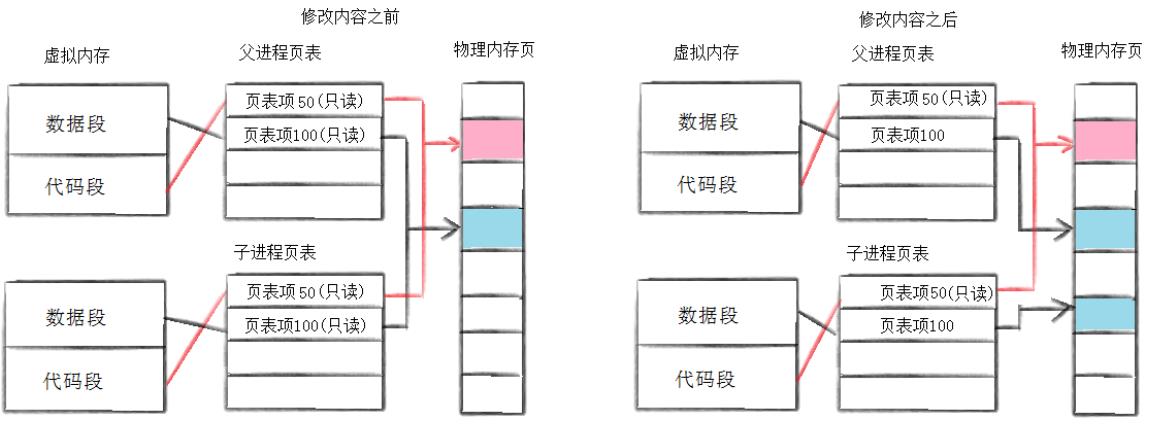
默认情况下,代码段权限为可读可执行,数据段权限为可读可写。
-
当父进程调用
fork时,数据段会变为只读!子进程继承的数据段也继承为只读。
-
当父子进程其中一个进程需要修改数据段时,会将数据段修改为可读可写,然后由操作系统进行写时拷贝,将数据段变为两份,然后再让需要修改数据的进程将它对应的数据段改为可写并修改数据
2. 进程终止
先释放代码和数据,后释放内核结构
2.1 进程终止情况
-
代码运行完毕,结果正确
-
代码运行完毕,结果不正确
-
代码异常终止
2.2 退出码
2.2.1 代码正常退出
在main函数中的返回值——return 0是程序的退出码!
// myproc.c
#include <stdio.h>
int main()
{
  // ...
  return 0;
}
$ ./myproc
$ echo $?
0
在Linux系统中使用echo $?打印上一个执行程序的退出码
因此可以通过判断一个程序的退出码来得知程序是否正常退出
可以自定义各种退出码表示的错误,例如1表示发生某种错误,2表示另一种错误……
其中,C语言自带一份错误码表
#include <stdio.h>
#include <string.h>
int main()
{
  for(int i = 0; i < 140; ++i)
    printf("%d -> %s\n", i, strerror(i));
  return 0;
}
0 -> Success
1 -> Operation not permitted
2 -> No such file or directory
3 -> No such process
4 -> Interrupted system call
5 -> Input/output error
6 -> No such device or address
7 -> Argument list too long
8 -> Exec format error
9 -> Bad file descriptor
10 -> No child processes
11 -> Resource temporarily unavailable
12 -> Cannot allocate memory
13 -> Permission denied
14 -> Bad address
15 -> Block device required
16 -> Device or resource busy
17 -> File exists
18 -> Invalid cross-device link
19 -> No such device
20 -> Not a directory
21 -> Is a directory
22 -> Invalid argument
23 -> Too many open files in system
24 -> Too many open files
25 -> Inappropriate ioctl for device
26 -> Text file busy
27 -> File too large
28 -> No space left on device
29 -> Illegal seek
30 -> Read-only file system
31 -> Too many links
32 -> Broken pipe
33 -> Numerical argument out of domain
34 -> Numerical result out of range
35 -> Resource deadlock avoided
36 -> File name too long
37 -> No locks available
38 -> Function not implemented
39 -> Directory not empty
40 -> Too many levels of symbolic links
41 -> Unknown error 41
42 -> No message of desired type
43 -> Identifier removed
44 -> Channel number out of range
45 -> Level 2 not synchronized
46 -> Level 3 halted
47 -> Level 3 reset
48 -> Link number out of range
49 -> Protocol driver not attached
50 -> No CSI structure available
51 -> Level 2 halted
52 -> Invalid exchange
53 -> Invalid request descriptor
54 -> Exchange full
55 -> No anode
56 -> Invalid request code
57 -> Invalid slot
58 -> Unknown error 58
59 -> Bad font file format
60 -> Device not a stream
61 -> No data available
62 -> Timer expired
63 -> Out of streams resources
64 -> Machine is not on the network
65 -> Package not installed
66 -> Object is remote
67 -> Link has been severed
68 -> Advertise error
69 -> Srmount error
70 -> Communication error on send
71 -> Protocol error
72 -> Multihop attempted
73 -> RFS specific error
74 -> Bad message
75 -> Value too large for defined data type
76 -> Name not unique on network
77 -> File descriptor in bad state
78 -> Remote address changed
79 -> Can not access a needed shared library
80 -> Accessing a corrupted shared library
81 -> .lib section in a.out corrupted
82 -> Attempting to link in too many shared libraries
83 -> Cannot exec a shared library directly
84 -> Invalid or incomplete multibyte or wide character
85 -> Interrupted system call should be restarted
86 -> Streams pipe error
87 -> Too many users
88 -> Socket operation on non-socket
89 -> Destination address required
90 -> Message too long
91 -> Protocol wrong type for socket
92 -> Protocol not available
93 -> Protocol not supported
94 -> Socket type not supported
95 -> Operation not supported
96 -> Protocol family not supported
97 -> Address family not supported by protocol
98 -> Address already in use
99 -> Cannot assign requested address
100 -> Network is down
101 -> Network is unreachable
102 -> Network dropped connection on reset
103 -> Software caused connection abort
104 -> Connection reset by peer
105 -> No buffer space available
106 -> Transport endpoint is already connected
107 -> Transport endpoint is not connected
108 -> Cannot send after transport endpoint shutdown
109 -> Too many references: cannot splice
110 -> Connection timed out
111 -> Connection refused
112 -> Host is down
113 -> No route to host
114 -> Operation already in progress
115 -> Operation now in progress
116 -> Stale file handle
117 -> Structure needs cleaning
118 -> Not a XENIX named type file
119 -> No XENIX semaphores available
120 -> Is a named type file
121 -> Remote I/O error
122 -> Disk quota exceeded
123 -> No medium found
124 -> Wrong medium type
125 -> Operation canceled
126 -> Required key not available
127 -> Key has expired
128 -> Key has been revoked
129 -> Key was rejected by service
130 -> Owner died
131 -> State not recoverable
132 -> Operation not possible due to RF-kill
133 -> Memory page has hardware error
134 -> Unknown error 134
135 -> Unknown error 135
136 -> Unknown error 136
137 -> Unknown error 137
138 -> Unknown error 138
139 -> Unknown error 139
140 -> Unknown error 140
使用错误码案例:
#include <stdio.h>
#include <string.h>
#include <errno.h>

int main()
{
  // errno = 0
  FILE* fp = fopen("./logtxt", "r"); //已知不存在该文件
  // errno = !0  此时errno变成错误码的数值
  if(fp == NULL)
  {
    printf("%d: %s\n", errno, strerror(errno));
    return errno;
  }
  return 0;
}
$ ./myproc
2: No such file or directory
$ echo $?
2
真实案例:
$ ls -l aaaaa
ls: cannot access aaaaa: No such file or directory # 对应退出码2
2.2.2 代码异常终止
代码异常终止——运行期间被信号终止
此时退出码没有意义——return没有被执行
演示信号终止:
#include <stdio.h>
#include <unistd.h>
int main()
{
  while(1)
  {
    printf("I am a process!\n");
    sleep(1);
  }
}
$ ./myproc
I am a process!
I am a process!
# ...
复制 SSH 渠道
$ ps ajx | grep myproc
18374 21625 21625 18374 pts/2    21625 S+    1004   0:00 ./myproc
21630 21683 21682 21630 pts/3    21682 S+    1004   0:00 grep --color=auto myproc
$ kill -9 21625
# ...
I am a process!
I am a process!
Killed
进程出异常的本质:进程收到信号!
2.2.3 进程终止的情况
-
代码跑完 (代码运行期间没有收到信号) 0 && return 0 -> signumber :0 && 退出码: 0
-
signumber :0 && 退出码 !0
-
signumber : !0 && 退出码无意义
进程执行的结果状态,可以用两个数字表示:int sig,int exit_code
用户不需要维护
——当一个进程退出时,OS会把进程退出的详细信息写入进程的 task_struct 结构体中
——所以进程退出时,需要僵尸状态维护自己的退出状态
int exit_code, exit_signal;
进程常见的退出方法:
正常退出:
-
从main返回
-
调用exit
-
_exit
异常退出:
- ctrl + c,信号终止
exit退出
#include <stdio.h>
#include <string.h>
#include <errno.h>
#include <unistd.h>
#include <stdlib.h>
int main()
{
  printf("process: pid: %d, ppid: %d\n", getpid(), getppid());
  exit(0);
}
退出码为0;
#include <stdio.h>
#include <string.h>
#include <errno.h>
#include <unistd.h>
#include <stdlib.h>
void Print()
{
  printf("hello world\n");
  exit(1);
}

int main()
{
  printf("process: pid: %d, ppid: %d\n",getpid(), getppid());
  Print();
  exit(0);
}
退出码为1;
在任意位置调用exit都可以结束进程,return表示函数结束!
_exit退出
#include <stdio.h>
#include <string.h>
#include <errno.h>
#include <unistd.h>
#include <stdlib.h>

void Print()
{
  printf("hello world\n");
  _exit(1);
}

int main()
{
  printf("process: pid: %d, ppid: %d\n",getpid(), getppid());
  Print();
  exit(0);
退出码为1;
exit与_exit的区别
- exit
#include <stdio.h>
#include <unistd.h>
#include <stdlib.h>
int main()
{
  printf("hello world");
  sleep(3);
  exit(11);
}
现象:先暂停3秒,再显示出字符
$ ./myproc
hello world[user]$
因为打印的字符在缓冲区中没有刷新
- _exit
#include <stdio.h>
#include <unistd.h>
#include <stdlib.h>
int main()
{
  printf("hello world");
  sleep(3);
  _exit(11);
}
现象:未看到打印的字符
$ ./myproc
[user]$
二者区别:
-
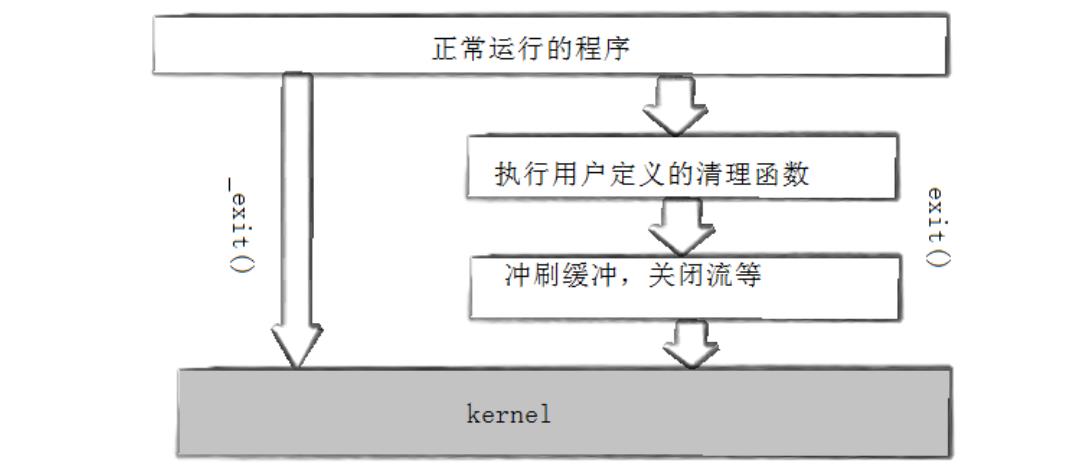
exit终止进程会强制刷新缓冲区
-
_exit不会强制刷新
-
exit是库函数,_exit是系统调用
-
exit的底层调用的就是_exit! -
真正终止进程的是
_exit,exit在终止前加上了刷新缓冲区的操作——缓冲区和刷新缓冲区的操作,一定不在内核中!!!!
——缓冲区其实是C/C++维护的
-
终止进程的最佳实践是
exit!
3. 进程等待
3.1 进程等待的必要性
子进程退出后会变成僵尸,可能会造成僵尸进程问题,引发内存泄漏
kill命令无法处理僵尸进程
父进程需要知道子进程是否正确完成任务,是否正确退出……等信息
因此父进程通过进程等待的方式,回收子进程资源,获取子进程退出信息
3.2 进程等待的方法
3.2.1 wait方法
#include<sys/types.h>
#include<sys/wait.h>
pid_t wait(int* status);
返回值:
    成功返回被等待进程pid,失败返回-1。
参数:
    输出型参数,获取⼦进程退出状态,不关⼼则可以设置成为NULL
- 父进程等待子进程:
#include <stdio.h>
#include <unistd.h>
#include <stdlib.h>
#include <sys/types.h>
#include <sys/wait.h>
int main()
{
  pid_t id = fork();
  if(id == 0)
  {
    int cnt = 5;
    while(cnt--)
    {
      printf("child process: pid: %d\n", getpid());
      sleep(1);
    }
    exit(0); //终止子进程
  }
  else if(id > 0)
  {
    sleep(10);
    pid_t rid = wait(NULL);
    if(rid == id)
    {
      printf("pid: %d wait success!\n", getpid());
    }
    sleep(5);
    exit(0);
  }
}
当子进程在执行时,父进程一直在等待子进程变成僵尸
- 获取子进程退出信息
pid_ t waitpid(pid_t pid, int *status, int options);
返回值:
    当正常返回的时候waitpid返回收集到的子进程的进程ID;
    如果设置了选项WNOHANG,⽽调⽤中waitpid发现没有已退出的子进程可收集,则返回0;
    如果调用中出错,则返回-1,这时errno会被设置成相应的值以指示错误所在;
参数:
    pid:
        Pid=-1,等待任一个子进程。与wait等效。
        Pid>0.等待其进程ID与pid相等的子进程。
    status: 输出型参数
        WIFEXITED(status): 若为正常终止子进程返回的状态,则为真。(查看进程是否是正常退出)
        WEXITSTATUS(status): 若WIFEXITED非零,提取进程退出码。(查看进程的退出码)
    options:默认为0,表⽰阻塞等待
waitpid 是 wait 的子集,最佳实践是用 waitpid
#include <stdio.h>
#include <unistd.h>
#include <stdlib.h>
#include <sys/types.h>
#include <sys/wait.h>
int main()
{
  pid_t id = fork();
  if(id == 0)
  {
    int cnt = 5;
    while(cnt--)
    {
      printf("child process: pid: %d\n", getpid());
      sleep(1);
    }
    exit(1); //终止子进程
  }
  else if(id > 0)
  {
    sleep(10);
    //pid_t rid = wait(NULL);
    int status = 0;
    pid_t rid = waitpid(id, &status, 0);
    if(rid == id)
    {
      printf("pid: %d wait success! status: %d\n", getpid(), status);
    }
    sleep(5);
    exit(0);
  }
}
运行结果:
$ ./myproc
child process: pid: 31110
child process: pid: 31110
child process: pid: 31110
child process: pid: 31110
child process: pid: 31110
pid: 31109 wait success! status: 256
发现与子进程的退出码不一致(子进程:exit(1); )
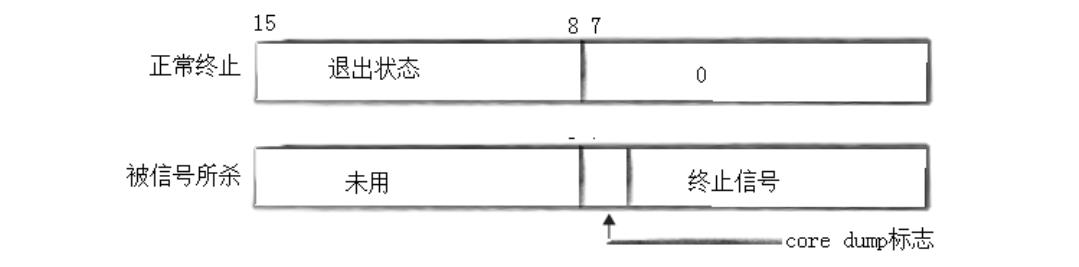
因为status不是保存退出码,而是保存退出信息——包括退出码和完成情况
status不能简单的当作整形来看待,可以当作位图来看待,具体细节如下图(只研究status低16比特位):
-
低8位是进程退出的信号编号,高8位是进程的退出码
-
通过位图结构传递信息
-
在实验案例中,退出码为1,退出状态为0(正常退出)
因此位图为0000 0001 0000 0000,因此为256
-
使用位操作获取信息:
if(rid == id)
{
    int exit_code = (status >> 8) & 0xFF;
    int exit_sig = status & 0x7F;
    printf("pid: %d wait success! status: %d, exit_code: %d, exit_sig: %d\n",
        getpid(), status, exit_code, exit_sig);
}
-
fork之后,父子进程谁先运行?
不确定,由调度器决定
-
一般父子进程谁先退出?
子进程先退出,父进程负责回收资源
-
什么情况下,waitpid会等待失败?
等待的不是自己的进程
-
父进程在等待子进程时的状态称为阻塞状态!
-
获取status的退出信息有两个重要的宏
-
WIFEXITED
#define WIFEXITED(status) (status & 0x7F)获取退出信号
如果退出信号为0,则为真;否则为假
-
WEXITSTATUS
#define WEXITSTATUS(status) ((status >> 8) & 0xFF)获取退出码
-
-
waitpid的第三个参数
options默认为0此时父进程采用的是阻塞状态进行等待——在等待时无法执行其它操作
-
第三个参数为
WNOHANG为非阻塞等待在等待时间可以执行其它操作
#include <stdio.h> #include <unistd.h> #include <sys/wait.h> #include <sys/types.h> #include <stdlib.h> int main() { printf("parent pid: %d, ppid: %d\n", getpid(), getppid()); pid_t id = fork(); if(id < 0) { perror("fork"); exit(1); } else if(id == 0) { int cnt = 5; while(cnt--) { printf("chile pid: %d, ppid: %d\n", getpid(), getppid()); sleep(1); //int *p = NULL; //*p = 100; } exit(10); } else { while(1) { int status = 0; pid_t rid = waitpid(id, &status, WNOHANG); if(rid > 0) { printf("wait success, rid: %d, exit_code: %d\n", rid, WEXITSTATUS(status)); break; } else if(rid == 0) { printf("waiting child process...\n"); usleep(100000); } else { perror("waitpid"); break; } } } } -
非阻塞等待期间进行其它工作示例:
#include <stdio.h> #include <unistd.h> #include <sys/wait.h> #include <sys/types.h> #include <stdlib.h> #include <iostream> #include <vector> typedef void (*callback_t)(); void PrintLog() { printf("work\n"); } void SyncDisk() { printf("work\n"); } void WriteDataToMysql() { printf("work\n"); } int main() { printf("parent pid: %d, ppid: %d\n", getpid(), getppid()); std::vector<callback_t> tasks; tasks.push_back(PrintLog); tasks.push_back(SyncDisk); tasks.push_back(WriteDataToMysql); pid_t id = fork(); if(id < 0) { perror("fork"); exit(1); } else if(id == 0) { int cnt = 5; while(cnt--) { printf("chile pid: %d, ppid: %d\n", getpid(), getppid()); sleep(1); } exit(10); } else { while(1) { int status = 0; pid_t rid = waitpid(id, &status, WNOHANG); if(rid > 0) { printf("wait success, rid: %d, exit_code: %d\n", rid, WEXITSTATUS(status)); break; } else if(rid == 0) { printf("waiting child process...\n"); usleep(100000); for(auto &task : tasks) task(); } else { perror("waitpid"); break; } } } } -
实战创建多进程案例
#include <stdio.h>
#include <unistd.h>
#include <sys/wait.h>
#include <sys/types.h>
#include <stdlib.h>
#include <iostream>
#include <vector>

typedef void (*callback_t)();

enum
{
  OK,
  USAGE_ERR
};

void Task()
{
  int cnt = 5;
  while(cnt--)
  {
    printf("child process working Task, pid: %d, ppid: %d\n", getpid(), getppid());
  }
}
void Task2()
{
  int cnt = 5;
  while(cnt--)
  {
    printf("child process working Task2, pid: %d, ppid: %d\n", getpid(), getppid());
  }
}

// 一般而言:
// 输入:const &
// 输出:*
// 输入输出:&
void CreateChildProcess(int num, std::vector<pid_t> *subs, callback_t cb)
{
  for(int i = 0; i < num; ++i)
  {
    pid_t id = fork();
    if(id == 0)
    {
      //Task();
      cb();
      exit(0);
    }
    subs->push_back(id);
  }
}

void WaitAllChild(const std::vector<pid_t> &subs)
{
  for(const auto &pid : subs)
  {
    int status = 0;
    pid_t rid = waitpid(pid, &status, 0);
    if(rid > 0)
    {
      printf("child process: %d Exit, exit code: %d\n", rid, WEXITSTATUS(status));
    }
  }
}
// 启停多进程方案
int main(int argc, char *argv[])
{
  if(argc != 2)
  {
    std::cout << "Usage: " << argv[0] << " process_num" << std::endl;
    exit(USAGE_ERR);
  }
  int num = std::stoi(argv[1]);
  std::vector<pid_t> subs;
  //std::vector<callback_t> cbs; // TODO

  // 创建多进程
  CreateChildProcess(num, &subs, Task);

  // 等待多进程
  WaitAllChild(subs);

  return OK;
}
进程程序替换
execl函数
#include <stdio.h>
#include <unistd.h>
int main()
{
  printf("process: %d\n", getpid());

  execl("/usr/bin/ls", "-a", "-l", NULL);

  printf("working...\n");

  return 0;
}
运行结果:
$ ./myexec
process: 29710
total 20
-rw-rw-r-- 1 ... Makefile
-rwxrwxr-x 1 ... myexec
-rw-rw-r-- 1 ... myexec.c
可以发现,程序中打印working的代码没有被执行——程序被替换了!
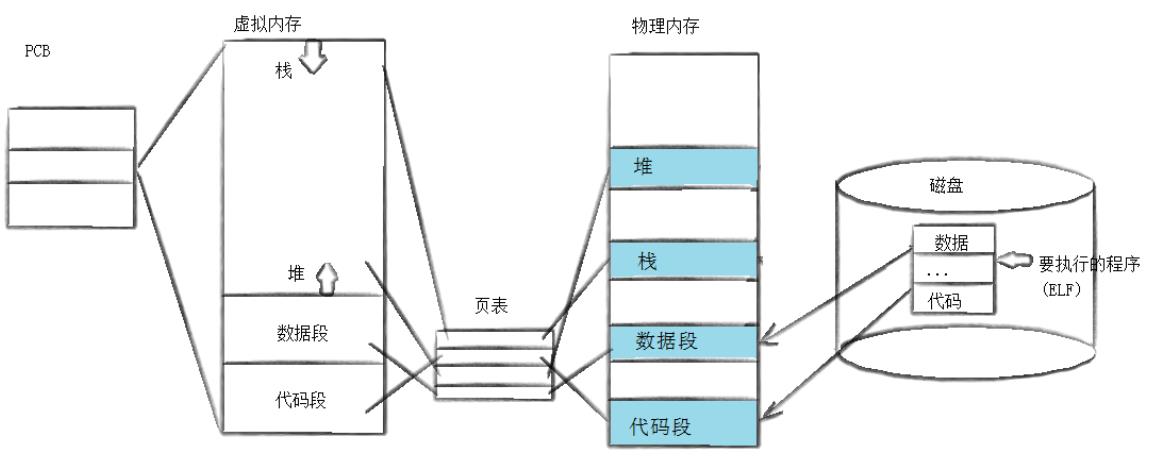
进程替换原理图:
-
当需要程序替换时,会从磁盘中将需要的程序:新数据覆盖原本的数据段,新代码覆盖原本的代码段——这个步骤被称为程序替换
-
如果新的程序代码或数据大小有变化,则会涉及修改页表的操作
-
程序替换没有创建新进程
——修改的是物理内存,虚拟内存不变
——只改变页表右侧,pid等均未改变
-
程序替换的本质:把代码和数据,拷贝到内存中
——程序运行前,必须先被加载到内存
——只有OS才有能力完成该过程(硬件的管理者)
——OS必须提供系统接口完成该过程
-
后续的代码不执行,因为已经被替换掉了
-
exec*系列的函数,成功的时候,没有返回值!
——因为后续的代码已被替换
替换子进程
#include <stdio.h>
#include <unistd.h>
#include <stdlib.h>
#include <sys/wait.h>
#include <sys/types.h>
int main()
{
  printf("process: %d\n", getpid());
  pid_t id = fork();
  if(id == 0)
  {
    execl("/usr/bin/ls", "-a", "-l", NULL);
    exit(0);
  }
  wait(NULL);
  printf("working...\n");
  return 0;
}
运行结果:
$ ./myexec
process: 31458
total 20
-rw-rw-r-- 1 ... Makefile
-rwxrwxr-x 1 ... myexec
-rw-rw-r-- 1 ... myexec.c
working...
man查询execl:
#include <unistd.h>

extern char **environ;

int execl(const char *path, const char *arg, ...);
int execlp(const char *file, const char *arg, ...);
int execle(const char *path, const char *arg,
           ..., char * const envp[]);
int execv(const char *path, char *const argv[]);
int execvp(const char *file, char *const argv[]);
int execvpe(const char *file, char *const argv[],
            char *const envp[])
-
execl
int execl(const char *path, const char *arg, ...);path为程序路径...为可变参数execl 中的 l 可理解为 list,因为后面的参数和 list 一样
execl("/usr/bin/ls", "ls", "-a", "-l", NULL); -
execlp
p指PATH
int execlp(const char* file, const char* arg, ...)不需要路径,只需要程序名
execlp会自动去环境变量PATH所表明的路径下查找
execlp("ls", "ls", "-a", "-l", "-n", NULL);为什么有两次
ls传参?不重复。第一个ls表示查找哪个程序;第二个表示如何执行,命令行怎么操作,就怎么传
-
execle
-
execv
v指vector,将参数保存在应该数组中,视为参数表
char* argv[] = { (char*)"ls", (char*)"-a", (char*)"-l", NULL }; execv("/usr/bin/ls", argv); -
execvp
-
execvpe
e指env
int execvpe(const char* file, char* const argv[], char* const envp[]);可以传入指定的环境变量表
调用一个自己写的程序:(othercmd是一个c++程序)
int main()
{
  printf("process: %d\n", getpid());
  pid_t id = fork();
  if(id == 0)
  {
    execl("./othercmd", "othercmd", NULL);
    exit(0);
  }
}
可以运行任何类型的程序,包括.sh脚本
#include <stdio.h>
#include <unistd.h>
#include <stdlib.h>
#include <sys/wait.h>
#include <sys/types.h>
int main()
{
  printf("process: %d\n", getpid());

  pid_t id = fork();
  if(id == 0)
  {
    char* myargv[] = {
      (char*)"./cmd/othercmd",
      (char*)"-a",
      (char*)"-b",
      NULL
    };
    char* myenv[] = {
      (char*)"PATH=/home/my/bite/2025_10_21/exec/cmd",
      NULL
    };
    execvpe("./cmd/othercmd", myargv, myenv);
    exit(3);
  }
  int status = 0;
  pid_t rid = waitpid(id, &status, 0);
  if(rid > 0)
  {
    printf("wait success, exit code: %d\n", WEXITSTATUS(status));
  }
  return 0;
}
运行结果:
$ ./myexec
process: 18435
argv[0]: ./cmd/othercmd
argv[1]: -a
argv[2]: -b

env[0]->PATH=/home/my/bite/2025_10_21/exec/cmd
a c++ program
wait success, exit code: 0$ ./myexec
process: 18435
argv[0]: ./cmd/othercmd
argv[1]: -a
argv[2]: -b

env[0]->PATH=/home/my/bite/2025_10_21/exec/cmd
a c++ program
wait success, exit code: 0
结论:
命令行参数表和环境变量表,都是父进程通过 exec* 传递的
封面图来源于网络,如有侵权,请联系删除!

openEuler 是由开放原子开源基金会孵化的全场景开源操作系统项目,面向数字基础设施四大核心场景(服务器、云计算、边缘计算、嵌入式),全面支持 ARM、x86、RISC-V、loongArch、PowerPC、SW-64 等多样性计算架构
更多推荐

 1
1 0
0- 0


 已为社区贡献8条内容

所有评论(0)