AI 工作台和企业 AI 系统,到底差在哪?从代码层面拆给你看
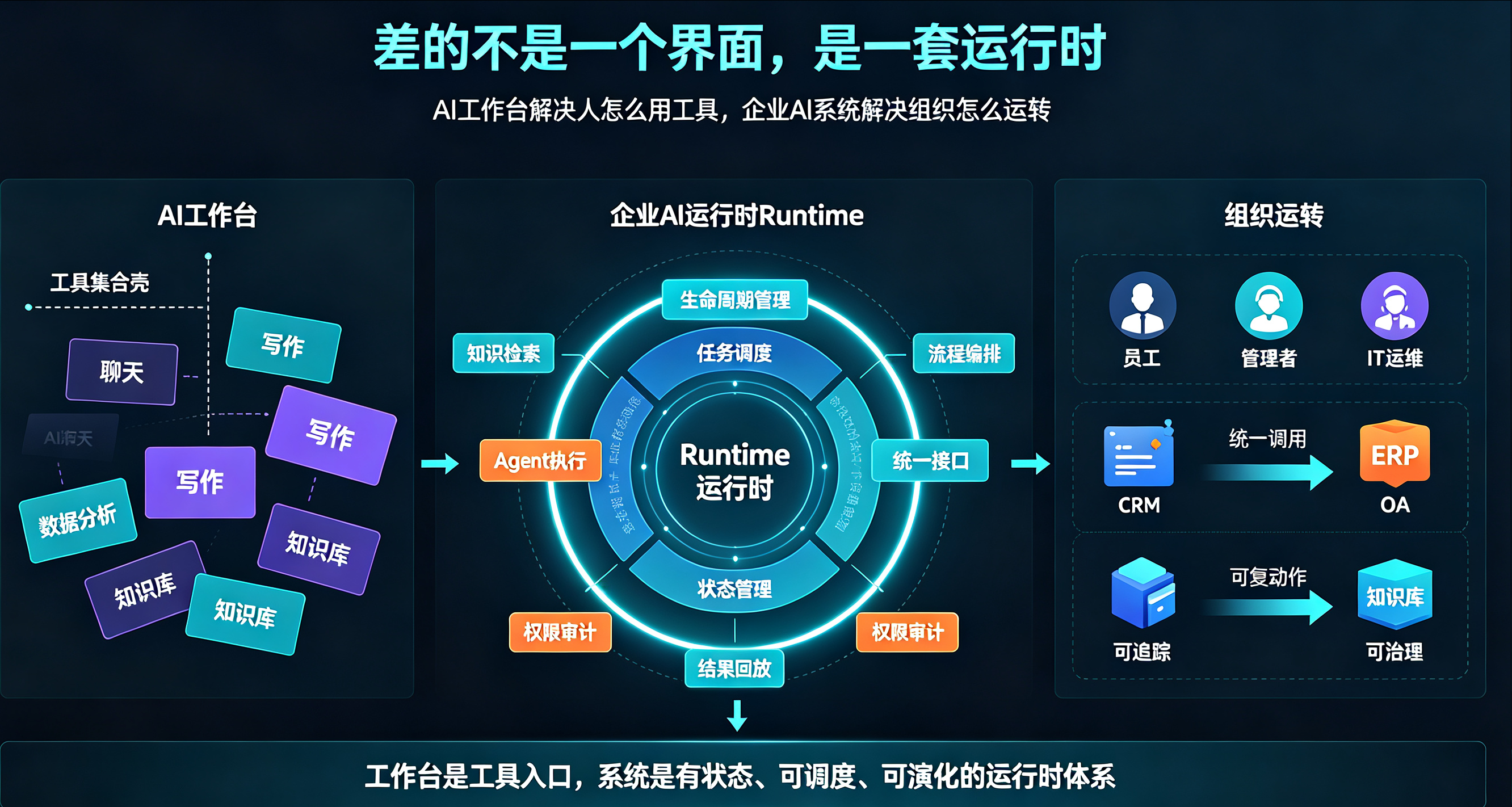
一、先给结论:差的不是一个界面,是一套运行时(Runtime)
我做 7 年企业数字化,现在自己做企业 AI 操作系统(XEAOS)。经常有人问:你们这个小舍科技的企业系统和 AI 工作台有什么区别?不都是把 AI 工具放一起用吗?
我的判断是:
AI 工作台解决"人怎么用工具",企业 AI 系统解决"组织怎么运转"。 落到代码上,工作台是一堆独立工具的壳,系统是一套有生命周期、有调度、有状态管理的运行时。
XEAOS 里把每个可独立执行的 AI 能力抽象成一个 Runtime(运行时),统一实现一个接口。这个接口是整个系统架构的基石,也是和工作台最本质的代码差异。
二、数据层:工具各自为政 vs 唯一真相源
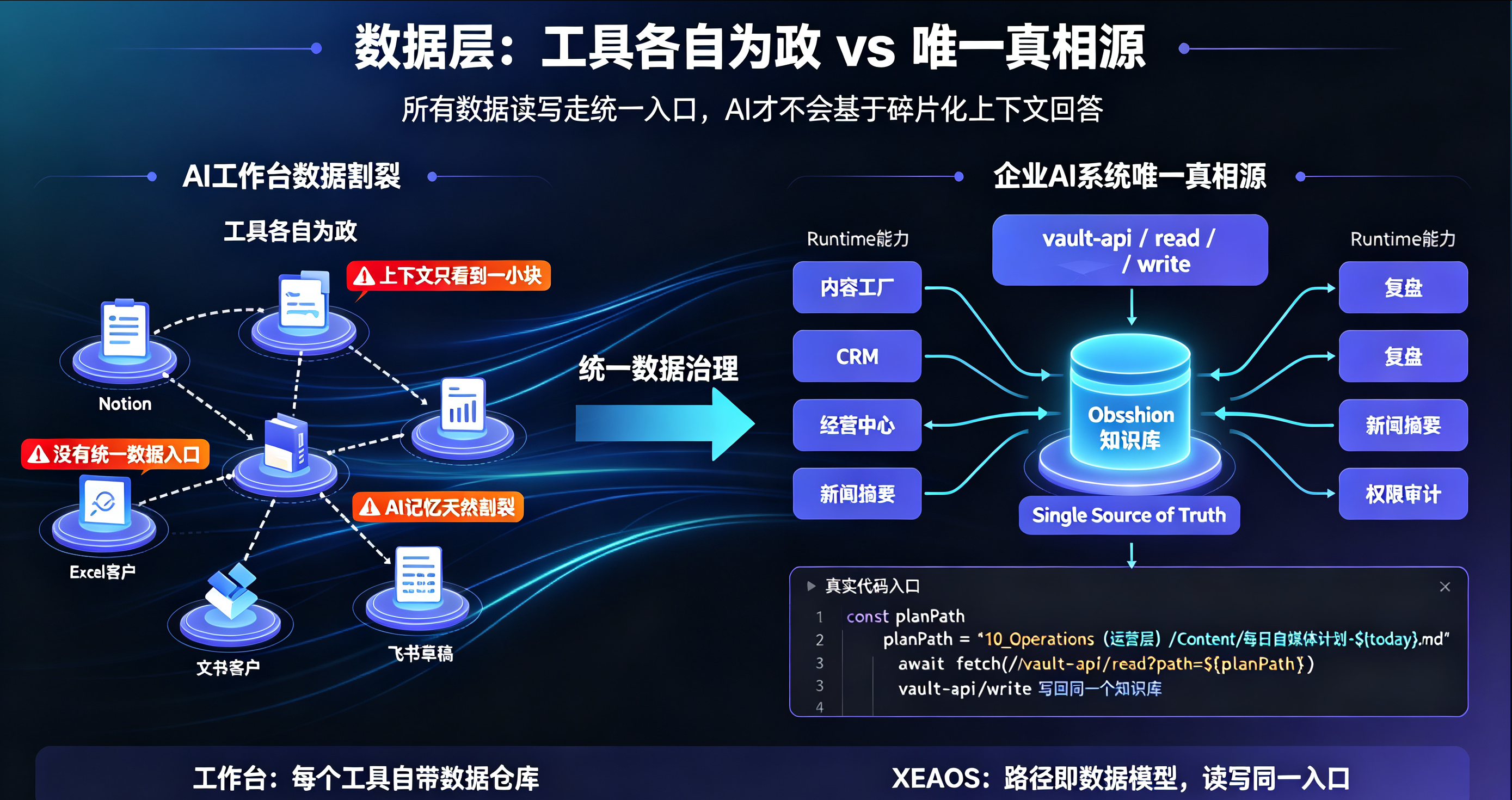
工作台的典型状态:文档在 Notion、客户在 Excel、内容草稿在飞书,每个 AI 工具各管一段,彼此不通。你说"让 AI 帮我写个方案",它只能基于它看到的那一小块上下文写——因为代码层面,根本没有一个统一的数据入口。
企业 AI 系统必须有一个唯一真相源(Single Source of Truth)。XEAOS 定死一条铁律:所有数据读写都走 Obsidian 知识库,通过 vault-api 统一读写。看我们内容工厂的真实代码:
class=class="tok-str">"tok-com">// src/services/contentPlan.ts —— 读取今日自媒体计划
async getTodayPlan(): Promise<ContentPlanItem[]> {
const today = new Date().toISOString().slice(0, 10);class=class="tok-str">"tok-com">// 1. 尝试读取自媒体计划文件(唯一真相源:Obsidian)
const planPath = class="tok-str">`10_Operations(运营层)/Content/每日自媒体计划-${today}.md`;
try {
const resp = await fetch(class="tok-str">`/vault-api/read?path=${encodeURIComponent(planPath)}`);
if (resp.ok) {
const result = await resp.json();
if (result.success && result.content) {
const parsed = this.parsePlanFromMarkdown(result.content, today);
if (parsed.length > 0) return parsed;
}
}
} catch {
class=class="tok-str">"tok-com">// 降级:读不到计划文件时,从新闻摘要派生
}class=class="tok-str">"tok-com">// 2. 关联降级:从今日 Hermes 新闻摘要派生内容计划主题
try {
const newsPlan = await this.derivePlanFromNewsDigest(today);
if (newsPlan.length > 0) return newsPlan;
} catch (err) {
console.warn(class="tok-str">'[ContentPlanService] 从每日动态派生失败:', err);
}
class=class="tok-str">"tok-com">// ...
}
注意两个细节:
路径即数据模型:10_Operations(运营层)/Content/每日自媒体计划-{date}.md——数据按企业业务结构组织,不是按工具组织。任何 Runtime 要读数据,都走同一套路径规范。
写回也是同一入口:内容工厂生成完计划,/vault-api/write 写回同一个知识库,CRM、经营中心、复盘都能读到同一份。数据不再散落,这就是"唯一真相源"在代码层的落地。
工作台为什么做不到?因为工作台的架构是"每个工具自带数据仓库",没有统一数据入口,AI 的"记忆"天然是割裂的。
三、调度层:人点一下 vs 运行时管理器统一调度
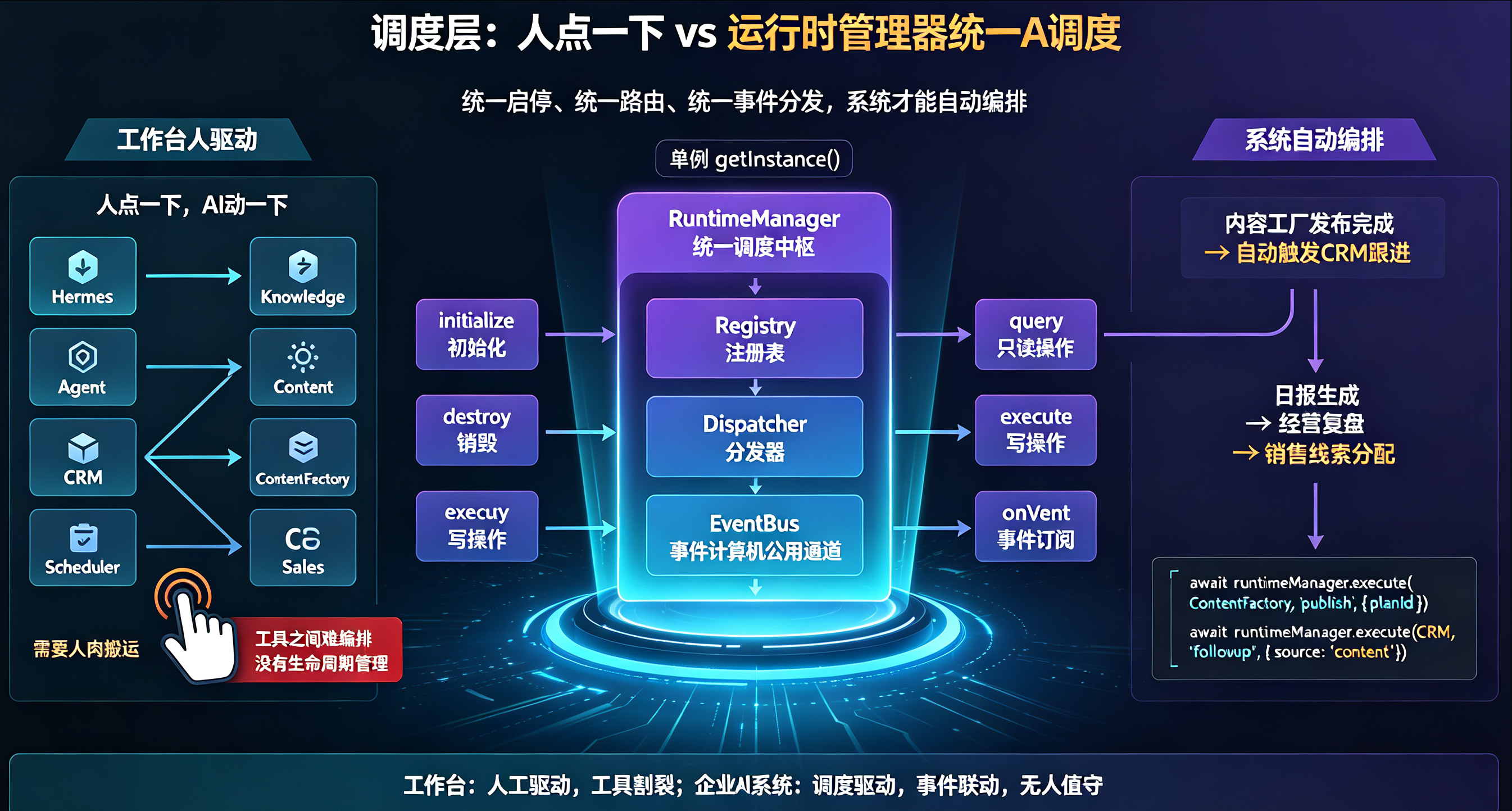
工作台的执行模型是"人驱动":人点一下,AI 动一下。系统不一样——它有一个统一的调度中枢(RuntimeManager),所有 Runtime 的启停、路由、事件分发都归它管。看核心接口定义:
class=class="tok-str">"tok-com">// src/types/runtime.ts —— Runtime 统一协议(精简)
export enum RuntimeName {
Hermes = class="tok-str">'hermes', class=class="tok-str">"tok-com">// 企业大脑(对话/决策)
Knowledge = class="tok-str">'knowledge', class=class="tok-str">"tok-com">// 知识中心
Agent = class="tok-str">'agent', class=class="tok-str">"tok-com">// Agent 智能体
Content = class="tok-str">'content', class=class="tok-str">"tok-com">// 内容
CRM = class="tok-str">'crm', class=class="tok-str">"tok-com">// 客户管理
Scheduler = class="tok-str">'scheduler', class=class="tok-str">"tok-com">// 定时调度
ContentFactory = class="tok-str">'content_factory', class=class="tok-str">"tok-com">// 内容工厂
CEO = class="tok-str">'ceo', class=class="tok-str">"tok-com">// AI CEO(日报/复盘)
Sales = class="tok-str">'sales', class=class="tok-str">"tok-com">// AI 销售(客户跟进)
class=class="tok-str">"tok-com">// ... 30+ 个 Runtime
}export interface IRuntime {
readonly name: RuntimeName;
readonly status: RuntimeStatus;
initialize(): Promise<void>; class=class="tok-str">"tok-com">// 生命周期:初始化
destroy?(): Promise<void>; class=class="tok-str">"tok-com">// 生命周期:销毁
query?(params?: unknown): Promise<any>; class=class="tok-str">"tok-com">// 只读操作
execute?(command: string, params?: unknown): Promise<any>; class=class="tok-str">"tok-com">// 写操作
getInfo(): RuntimeInfo;
onEvent?(event: RuntimeEvent): void; class=class="tok-str">"tok-com">// 事件订阅
}
这个接口的设计意图很明确:
统一生命周期(initialize/destroy):所有 Runtime 由 RuntimeManager 统一启停,系统重启后能恢复状态——工作台没有"生命周期"概念,工具死了就死了
统一操作语义(query/execute):读走 query、写走 execute,调度层可以统一做路由、权限、工作区隔离,不用管每个工具的内部实现
统一事件机制(onEvent):Runtime 之间通过事件总线通信,而不是互相硬调——这是"编排"的代码基础
再看 RuntimeManager 如何统一调度(单例 + 分发器):
class=class="tok-str">"tok-com">// src/runtime/RuntimeManager.ts —— 调度中枢(精简)
export class RuntimeManager {
private static instance: RuntimeManager | null = null;
private readonly registry: RuntimeRegistry; class=class="tok-str">"tok-com">// 注册表:Runtime 名 → 实例
private readonly dispatcher: RuntimeDispatcher; class=class="tok-str">"tok-com">// 分发器:命令 → Runtime
private readonly eventBus: EventBus; class=class="tok-str">"tok-com">// 事件总线private constructor() {
this.registry = new RuntimeRegistry();
this.dispatcher = new RuntimeDispatcher();
this.eventBus = new EventBus();
}static getInstance(): RuntimeManager {
if (!RuntimeManager.instance) {
RuntimeManager.instance = new RuntimeManager();
}
return RuntimeManager.instance;
}class=class="tok-str">"tok-com">// 统一执行入口:任何业务代码都通过这里调 Runtime
async execute(
name: RuntimeName,
command: string,
params?: Record<string, any>,
workspaceId?: string
): Promise<RuntimeResponse> {
class=class="tok-str">"tok-com">// 1. 注入工作区上下文(多租户数据隔离)
const paramsWithWorkspace = { ...params, _workspaceId: workspaceId ?? class="tok-str">'default' };
class=class="tok-str">"tok-com">// 2. 交给分发器:按 name 找到 Runtime,执行 command
const data = await this.dispatcher.execute(runtime, command, paramsWithWorkspace);
class=class="tok-str">"tok-com">// 3. 统一返回协议:success/data/error/runtime
return { success: true, data, runtime: name };
}
}
这套设计解决的是工作台架构的致命伤——调度。工作台里你想让"内容工厂生成完 → CRM 自动跟进新线索",没有统一调度层,只能靠人肉在两个工具间搬运。系统里这就是一行:
class=class="tok-str">"tok-com">// 编排示例:内容发布后,把线索推给 CRM
await runtimeManager.execute(RuntimeName.ContentFactory, class="tok-str">'publish', { planId });
await runtimeManager.execute(RuntimeName.CRM, class="tok-str">'followup', { source: class="tok-str">'content' });
事件总线再往上一层,甚至可以做到"内容工厂发布完成 → 自动触发 CRM 跟进",完全无人值守。
四、执行层:一个 Runtime 的实现长什么样
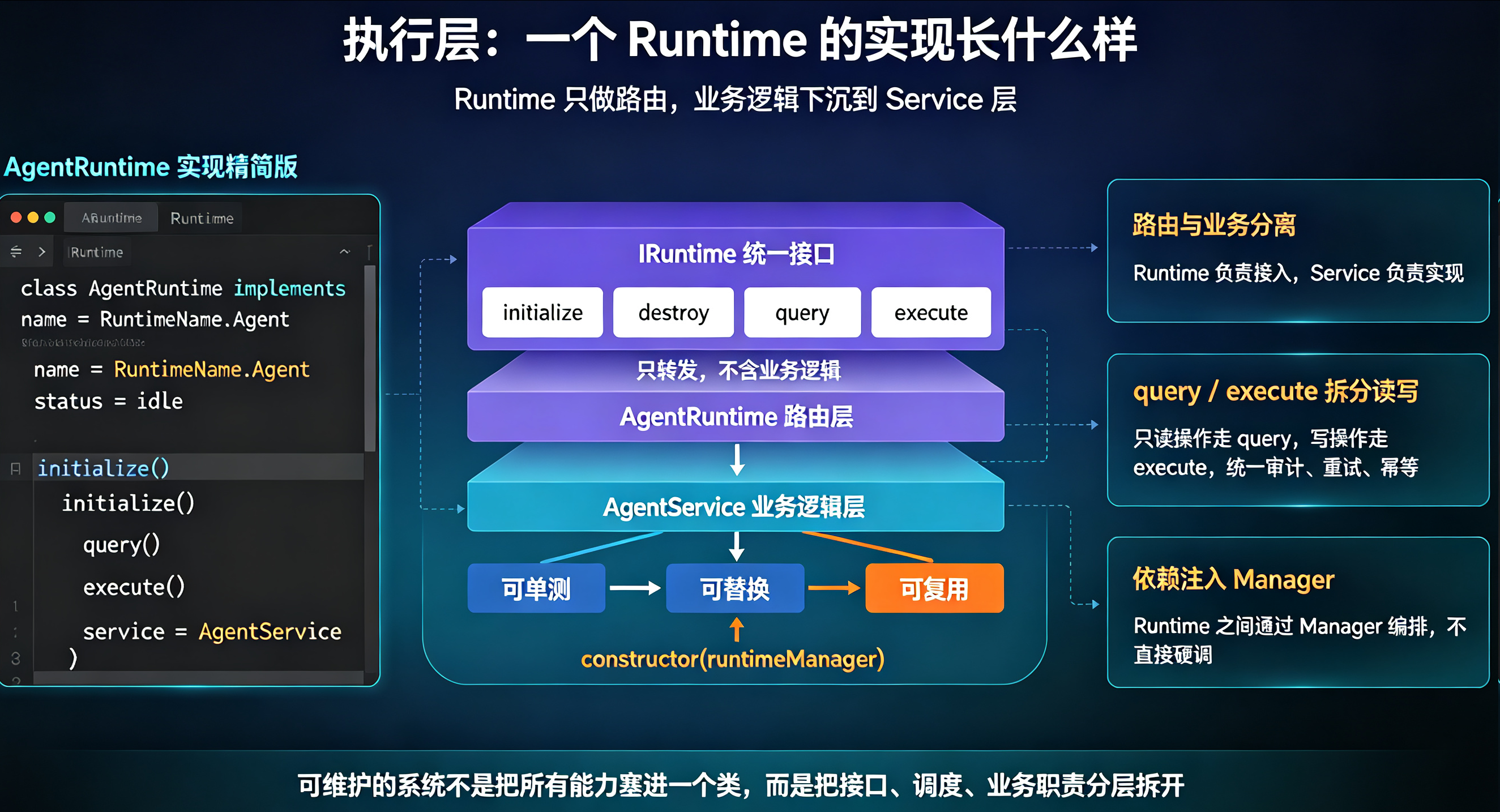
接口和调度有了,具体怎么干活?看 AgentRuntime 的真实实现——它只做路由,业务逻辑全在 Service 层:
class=class="tok-str">"tok-com">// src/runtime/AgentRuntime/runtime.ts —— Runtime 实现(精简)
import { IRuntime, RuntimeName, RuntimeStatus } from class="tok-str">'../../types/runtime';
import { AgentService } from class="tok-str">'./service';
import { AgentQuery, AgentCommand } from class="tok-str">'./types';export class AgentRuntime implements IRuntime {
readonly name = RuntimeName.Agent;
status: RuntimeStatus = class="tok-str">'idle';
private service: AgentService;
private startTime: number = Date.now();constructor(runtimeManager: RuntimeManager, service?: AgentService) {
this.service = service ?? new AgentService(runtimeManager);
}class=class="tok-str">"tok-com">// 生命周期:初始化
async initialize(): Promise<void> {
this.status = class="tok-str">'loading';
await this.service.initialize();
this.status = class="tok-str">'ready';
console.log(class="tok-str">'[AgentRuntime] Initialized');
}class=class="tok-str">"tok-com">// 只读操作:list / get / get_execution ...
async query<T>(params?: unknown): Promise<T> {
const { type, ...rest } = params as { type: AgentQuery; [key: string]: any };
return (await this.service.query(type, rest)) as T;
}class=class="tok-str">"tok-com">// 写操作:register / unregister / run / cancel / retry
async execute<T>(command: string, params?: unknown): Promise<T> {
return (await this.service.execute(
command as AgentCommand,
params as Record<string, any>
)) as T;
}
}
三个工程细节值得注意:
Runtime 只是路由层,不含业务逻辑——业务在 Service 里,方便单测、替换、复用。这是"可维护的编排"的前提。
query/execute 拆分读写——query 是只读幂等操作,execute 是写操作。调度层可以在 execute 上统一做审计、做重试、做幂等,这是工作台给不了的能力。
构造函数注入 RuntimeManager——Runtime 之间通过 Manager 互相调用,形成一张可编排的网,而不是一盘散沙。
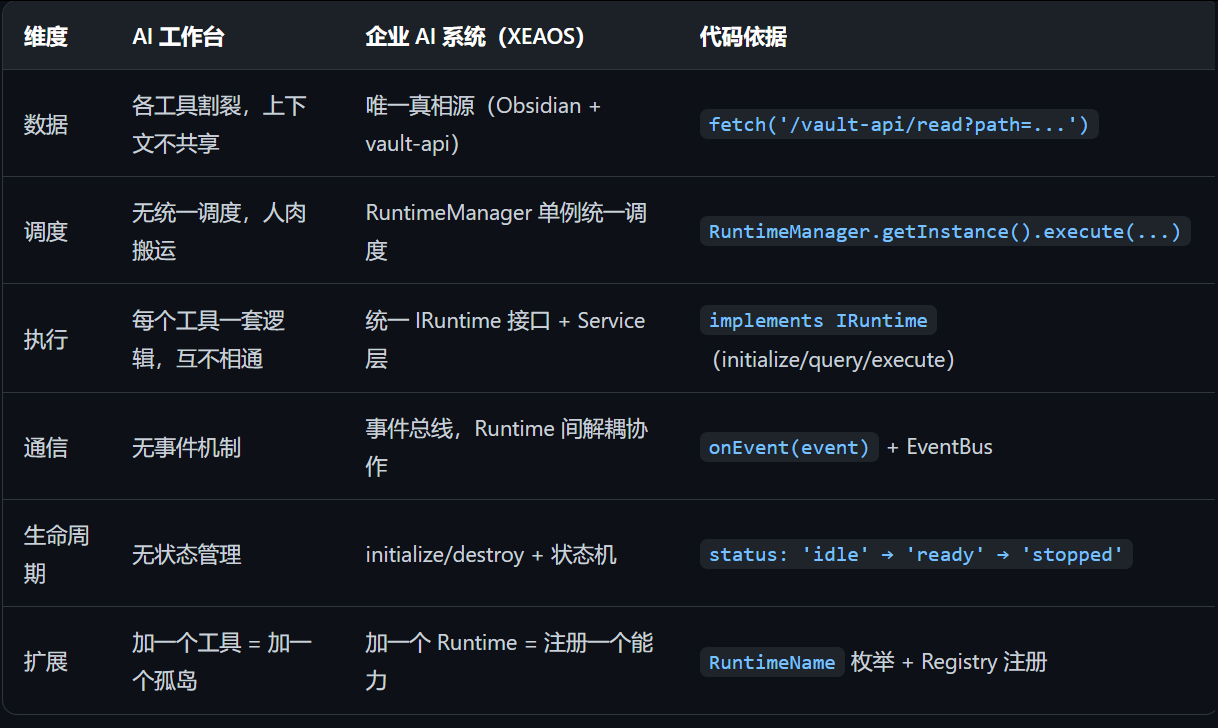
五、一张表说清区别(这次带代码依据)
六、你怎么选
如果你是一个开发者/自由职业者,工作流复杂度不高,AI 工作台够用了,别过度设计——上 Runtime 编排对单人是过度工程。
如果你在运营一家公司,发现 AI 工具越用越多、数据越来越散、内容产出了但没人看、客户线索靠运气——那你缺的不是工具,是把工具串起来的运行时。
我的经验是:先想清楚你要什么结果,再决定上工作台还是上系统。 要"帮我把活干完",上工具;要"让组织自己转起来",上系统。而判断标准就一条:你的数据有没有唯一入口?你的 AI 能力有没有统一调度? 两个都没有,那就是工作台,别叫它系统。

openEuler 是由开放原子开源基金会孵化的全场景开源操作系统项目,面向数字基础设施四大核心场景(服务器、云计算、边缘计算、嵌入式),全面支持 ARM、x86、RISC-V、loongArch、PowerPC、SW-64 等多样性计算架构
更多推荐
 15
15 0
0- 0


 已为社区贡献3条内容

所有评论(0)