一、spdlog 介绍

spdlog 是一个高性能、超快速、零配置的 C++ 日志库,它旨在提供简洁的 API 和丰富的功能,同时保持高性能的日志记录。它支持多种输出目标、格式化选项、线程安全以及异步日志记录。

特点:

  • 高性能: spdlog 专为速度而设计,即使在高负载情况下也能保持良好的性能。
  • 零配置: 无需复杂的配置,只需包含头文件即可在项目中使用。
  • 异步日志: 支持异步日志记录,减少对主线程的影响。
  • 格式化: 支持自定义日志消息的格式化,包括时间戳、线程 ID、日志级别等。
  • 多平台: 跨平台兼容,支持 Windows、Linux、macOS 等操作系统。
  • 丰富的 API: 提供丰富的日志级别和操作符重载,方便记录各种类型的日志。

二、spdlog 安装

1. 直接命令安装(适用于 Ubuntu/Debian 系统)

(1)步骤:

1

2

sudo apt-get update                 # 更新软件源

sudo apt-get install libspdlog-dev  # 安装开发库

(2)特点:

  • 简单快捷: 适合快速部署,无需手动编译。
  • 版本受限: 依赖系统仓库的版本,可能非最新(如 Ubuntu 20.04 默认版本较旧)。

(3)验证安装:

  • 检查头文件: ls /usr/include/spdlog/
  • 检查库文件: ls /usr/lib/x86_64-linux-gnu/libspdlog*

2. 源码编译安装

1

2

3

4

5

6

7

8

9

10

11

12

13

# 下载源码

git clone https://github.com/gabime/spdlog.git

# 切换目录

cd spdlog/

# 创建并进入构建目录

mkdir build

cd build/

# 执行构建命令,生成 Makefile

cmake ..

# 编译代码

make

# 安装到系统目录(默认 /usr/local)

sudo make install

三、spdlog 的重要组成结构

1. 日志输出等级枚举

  • 日志输出等级枚举:

1

2

3

4

5

6

7

8

9

10

11

12

13

14

15

namespace spdlog {

     namespace level {

            enum level_enum : int

            {

                 trace = SPDLOG_LEVEL_TRACE,

                 debug = SPDLOG_LEVEL_DEBUG,

                 info = SPDLOG_LEVEL_INFO,

                 warn = SPDLOG_LEVEL_WARN,

                 error = SPDLOG_LEVEL_ERROR,

                 critical = SPDLOG_LEVEL_CRITICAL,

                 off = SPDLOG_LEVEL_OFF,

                 n_levels

            };

     }

}

在 spdlog/include/spdlog/common.h 头文件中,其宏定义如下:

#define SPDLOG_LEVEL_TRACE 0
#define SPDLOG_LEVEL_DEBUG 1
#define SPDLOG_LEVEL_INFO 2
#define SPDLOG_LEVEL_WARN 3
#define SPDLOG_LEVEL_ERROR 4
#define SPDLOG_LEVEL_CRITICAL 5
#define SPDLOG_LEVEL_OFF 6

2. (同步)日志记录器类(含 自定义日志输出格式 接口的使用介绍 )

  • (同步)日志记录器类:

1

2

3

4

5

6

7

8

9

10

11

12

13

14

15

16

17

18

19

20

21

22

23

24

25

26

27

28

29

30

namespace spdlog {

    class logger

    {

         // 构造函数

         logger(std::string name);

         logger(std::string name, sink_ptr single_sink);

         logger(std::string name, sinks_init_list sinks);

         // 设置输出等级(只输出 高于或等于 此等级的日志)

         void set_level(level::level_enum log_level);

         // 自定义 日志输出格式

         void set_pattern(const std::string& pattern);

         // 以不同等级 输出日志信息的接口

         template<typename... Args>

         void trace(fmt::format_string<Args...> fmt, Args &&...args)

         template<typename... Args>

         void debug(fmt::format_string<Args...> fmt, Args &&...args)

         template<typename... Args>

         void info(fmt::format_string<Args...> fmt, Args &&...args)

         template<typename... Args>

         void warn(fmt::format_string<Args...> fmt, Args &&...args)

         template<typename... Args>

         void error(fmt::format_string<Args...> fmt, Args &&...args)

         template<typename... Args>

         void critical(fmt::format_string<Args...> fmt, Args &&...args)

         // 立刻刷新日志信息

         void flush();

         // 设置刷新策略(指定一个日志等级,一旦有 高于或等于指定等级的日志,立刻刷新日志信息)

         void flush_on(level::level_enum log_level);

    };

}

  • logger类内,set_pattern接口的使用:

假设Log 是logger类对象的智能指针

1

2

3

4

5

6

7

8

9

10

11

Log->set_pattern("%Y-%m-%d %H:%M:%S [%t] [%-8l] %v");

%t - 线程 ID(Thread ID)

%n - 日志器名称(Logger name)

%l - 日志级别名称(Level name),如 INFO, DEBUG, ERROR 等

%v - 日志内容(message)

%Y - 年(Year)

%m - 月(Month)

%d - 日(Day)

%H - 小时(24-hour format)

%M - 分钟(Minute)

%S - 秒(Second)

3. 线程池类(含 单例模式管理全局线程池实例 的介绍 )

  • spdlog中只有一种线程池实现,即spdlog::details::thread_pool类

1

2

3

4

5

6

7

8

9

10

11

namespace spdlog {

    namespace details {

        class thread_pool

        {

             thread_pool(size_t q_max_items, size_t threads_n, std::function<void()> on_thread_start,

                         std::function<void()> on_thread_stop);

             thread_pool(size_t q_max_items, size_t threads_n, std::function<void()> on_thread_start);

             thread_pool(size_t q_max_items, size_t threads_n);

         };

     }

 }

  • 单例模式的实现

通过registry类(单例)持有 全局线程池实例:

1

2

3

4

5

6

7

8

9

10

11

12

13

14

15

16

17

18

19

20

21

22

23

24

25

26

27

28

29

30

31

32

33

34

35

36

37

38

39

40

41

42

43

// registry 类(单例)管理全局线程池

namespace spdlog {

    namespace details {

          class registry

          {

              std::shared_ptr<thread_pool> _tp; // 全局线程池实例

              std::mutex _mutex;                // 线程安全锁

          public:

              // 获取单例实例(线程安全)

              static registry &instance()

              {

                  static registry s_instance; // 静态实例(C++11保证线程安全)

                  return s_instance;

              }

              // 获取全局线程池(延迟初始化)

              std::shared_ptr<thread_pool> get_tp()

              {

                  std::lock_guard<std::mutex> lock(_mutex);

                  if (!_tp)

                  {

                      // 首次调用时创建默认线程池(8192队列 + 1线程)

                      _tp = std::make_shared<thread_pool>(8192, 1);

                  }

                  return _tp;

              }

              // 重置全局线程池(线程安全)

              void set_tp(std::shared_ptr<thread_pool> new_tp)

              {

                  std::lock_guard<std::mutex> lock(_mutex);

                  // 先停止旧线程池的所有任务

                  if (_tp)

                  {

                      _tp->shutdown(); // 内部停止所有工作线程

                  }

                  _tp = std::move(new_tp); // 替换为新线程池

              }

          private:

              registry() = default;            // 禁用外部构造

              registry(const registry&) = delete; // 禁用拷贝

              registry& operator=(const registry&) = delete; // 禁用赋值

          };

     }

}

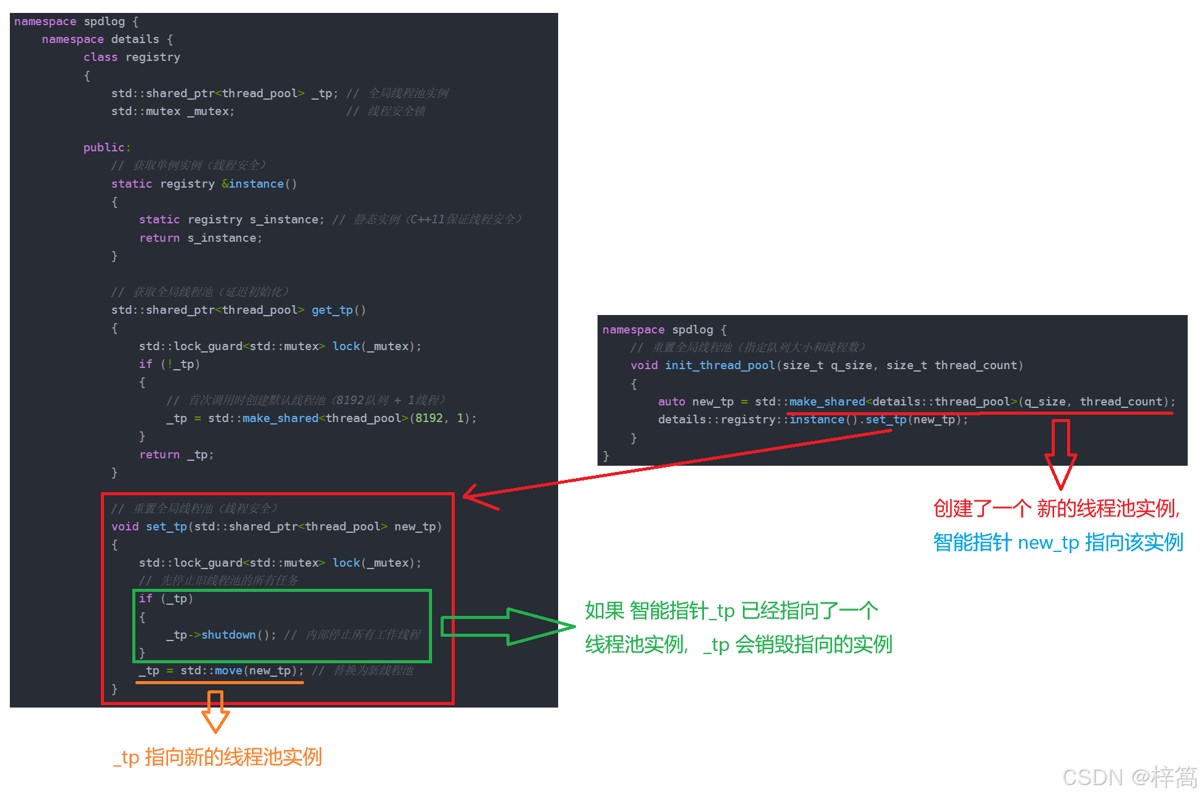
  • 通过spdlog库中的 spdlog::init_thread_pool() 和 spdlog::thread_pool() 函数 来使用 registry类(单例)持有的 全局线程池实例

1

2

3

4

5

6

7

8

9

10

11

12

13

namespace spdlog {

    // 获取全局线程池的共享指针

    std::shared_ptr<details::thread_pool> thread_pool()

    {

        return details::registry::instance().get_tp();

    }

    // 重置全局线程池(指定队列大小和线程数)

    void init_thread_pool(size_t q_size, size_t thread_count)

    {

        auto new_tp = std::make_shared<details::thread_pool>(q_size, thread_count);

        details::registry::instance().set_tp(new_tp);

    }

}

  • 注意: spdlog::init_thread_pool() 重置全局线程池时,如果 static registry s_instance(registry类单例,静态对象)的 _tp已经指向了一个线程池实例,_tp会销毁指向的线程池实例,然后指向新创建的线程池实例
4. 异步日志记录器类(与 日志记录器类 对比)

  • async_logger 是异步日志的核心实现类,继承自 logger 基类。它通过线程池和任务队列实现异步日志记录:

1

2

3

4

5

6

7

8

9

namespace spdlog {

    class async_logger final : public logger

    {

         async_logger(std::string logger_name, sinks_init_list sinks_list, std::weak_ptr<details::thread_pool> tp,

                      async_overflow_policy overflow_policy = async_overflow_policy::block);

         async_logger(std::string logger_name, sink_ptr single_sink, std::weak_ptr<details::thread_pool> tp,

                      async_overflow_policy overflow_policy = async_overflow_policy::block);

    }

}

类型日志写入流程线程模型
(同步)日志记录器主线程直接调用I/O操作(如文件写入、控制台输出)
• 日志生成 → 立即执行磁盘/网络I/O → 主线程阻塞等待完成
单线程模型:日志I/O占用主线程时间片
异步日志记录器主线程将日志存入内存队列(任务队列)
• 日志生成 → 存入队列 → 立即返回主线程
• 后台线程池消费队列并执行I/O
生产者-消费者模型:主线程与I/O线程分离

关键区别:异步日志通过内存队列缓冲和线程池异步刷盘,避免主线程因I/O等待被阻塞

5. 日志记录器工厂类

1

2

3

4

5

6

7

8

9

10

11

12

13

14

15

16

17

18

19

using async_factory = async_factory_impl<async_overflow_policy::block>;

//创建一个彩色输出到标准输出的日志记录器,默认工厂 创建同步日志记录器

template<typename Factory = spdlog::synchronous_factory>

std::shared_ptr<logger> stdout_color_mt(const std::string &logger_name,

                                        color_mode mode = color_mode::automatic);

//标准错误

template<typename Factory = spdlog::synchronous_factory>

std::shared_ptr<logger> stderr_color_mt(const std::string &logger_name,

                                        color_mode mode = color_mode::automatic);

// 指定文件

template<typename Factory = spdlog::synchronous_factory>

std::shared_ptr<logger> basic_logger_mt(const std::string &logger_name, const filename_t &filename,

                                        bool truncate = false,

                                        const file_event_handlers &event_handlers = {})

//循环文件

template<typename Factory = spdlog::synchronous_factory>

std::shared_ptr<logger> rotating_logger_mt(const std::string &logger_name, const filename_t &filename,

                                           size_t max_file_size, size_t max_files,

                                           bool rotate_on_open = false)

日志记录器工厂类:封装了 日志记录器类对象 的构建 和 配置过程
有了日志记录器工厂类,我们不需要关心 日志记录器类对象 的构建 和 配置过程,可以通过API接口一键构造 日志记录器类对象

spdlog::basic_logger_mt()接口 的 第三个参数 truncate 的功能:

行为适用场景
true若日志文件已存在,清空文件内容,从头开始写入新日志。需要覆盖旧日志的场景(如临时调试)
false (默认)若日志文件已存在,追加新日志到文件末尾;若文件不存在则创建新文件。长期运行的程序需保留历史日志的场景
  • 创建 同步日志记录器对象

采用默认工厂,创建的都是 同步日志记录器对象

(1)创建 向标准输出写入日志 的同步日志记录器对象

1

2

3

// 使用stdout_color_mt接口,只需指定 要创建的日志记录器对象的名字,

// 它就会创建 指定名字的日志记录器对象,并返回指向该对象的智能指针

auto log = spdlog::stdout_color_mt("sync_logger");

(2)创建 向指定文件写入日志 的同步日志记录器对象

1

2

3

// 使用basic_logger_mt接口,需指定 要创建的日志记录器对象的名字 和 文件,

// 它就会创建 向指定文件写入日志的 指定名字的日志记录器对象,并返回指向该对象的智能指针

auto file_log = spdlog::basic_logger_mt("file_sync_logger", "log.txt");

  • 创建 异步日志记录器对象

要创建异步日志记录器对象,需要显式指定 工厂类型(spdlog::async_factory)

(1)创建 向标准输出写入日志 的异步日志记录器对象

1

auto log = spdlog::stdout_color_mt<spdlog::async_factory>("sync_logger");

(2)创建 向指定文件写入日志 的异步日志记录器对象

1

auto file_log = spdlog::basic_logger_mt<spdlog::async_factory>("file_sync_logger", "log.txt");

6. 全局接口

1

2

3

4

5

6

7

8

9

10

namespace spdlog {

    // 日志刷新策略-每隔 N 秒刷新一次

    void flush_every(std::chrono::seconds interval);

    // 设置输出等级(只输出 高于或等于 此等级的日志)

    void set_level(level::level_enum log_level);

    // 设置刷新策略(指定一个日志等级,一旦有 高于或等于指定等级的日志,立刻刷新日志信息)

    void flush_on(level::level_enum log_level);

    // 自定义 日志输出格式

    void set_pattern(const std::string& pattern);

}

注:全局配置的 优先级低于 日志记录器对象的专属配置!

spdlog 采用作用域逐级覆盖的配置策略:

  • 全局配置(spdlog::set_level()、spdlog::flush_on()、spdlog::set_pattern())

影响所有未单独配置的日志记录器,作为默认值存在。

  • 日志记录器专属配置 (logger->set_level()、logger->flush_on()、logger->set_pattern())

每个日志器对象独立配置,优先级高于全局配置。

四、spdlog 的使用

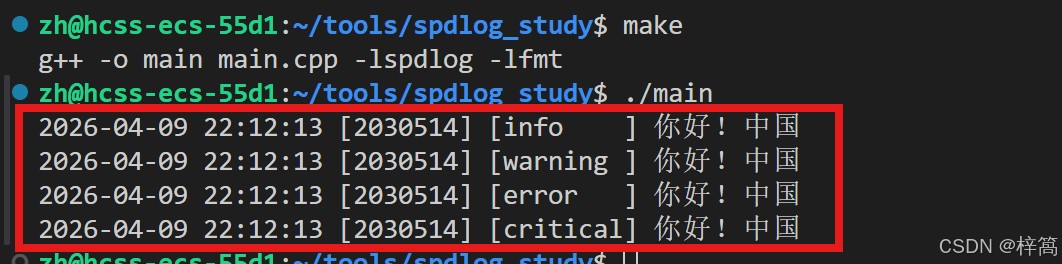
1. 通过全局接口配置,创建同步日志器 (向标准输出写日志)

要使用spdlog库,在你的 C++ 源文件中必须包含 spdlog 的头文件:

1

#include <spdlog/spdlog.h>

  • 通过全局接口配置,创建同步日志器 (向标准输出写日志)

1

2

3

4

5

6

7

8

9

10

11

12

13

14

15

16

17

18

19

20

21

22

23

#include <spdlog/spdlog.h>

#include <spdlog/sinks/stdout_color_sinks.h> // 包含 spdlog::stdout_color_mt() 的实现

int main()

{

    // 1. 全局配置

    spdlog::flush_on(spdlog::level::level_enum::info);

    // 设置输出等级(只输出 高于或等于 info等级的日志)

    spdlog::set_level(spdlog::level::level_enum::info);

    // 自定义 日志输出格式

    spdlog::set_pattern("%Y-%m-%d %H:%M:%S [%t] [%-8l] %v");

    // 日志刷新策略-每隔 1 秒刷新一次

    spdlog::flush_every(std::chrono::seconds(1));

    // 2. 创建同步日志器(向标准输出写日志)

    auto log = spdlog::stdout_color_mt("sync_logger");

    // 3. 使用同步日志器 向标准输出写日志

    log->trace("你好!{}", "中国");     // {}是占位符,不区分数据类型

    log->debug("你好!{}","中国");

    log->info("你好!{}","中国");

    log->warn("你好!{}","中国");

    log->error("你好!{}","中国");

    log->critical("你好!{}","中国");

    return 0;

}

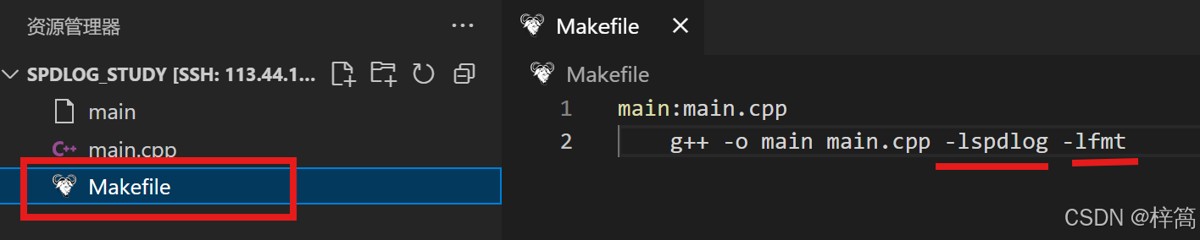
注:spdlog库依赖 fmt库,所以链接时,还需要显式指定fmt库

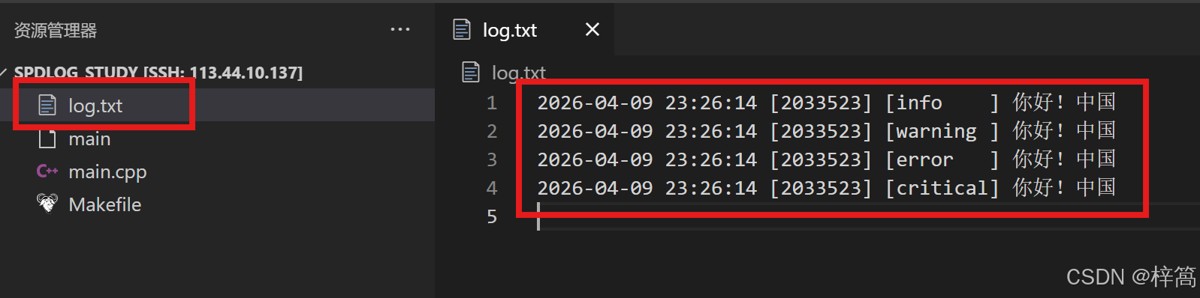
2. 创建同步日志器 (向指定文件写日志),并使用同步日志器的专用配置接口

1

2

3

4

5

6

7

8

9

10

11

12

13

14

15

16

17

18

19

20

21

22

#include <spdlog/spdlog.h>

#include <spdlog/sinks/basic_file_sink.h> // 包含 spdlog::basic_logger_mt() 的实现

int main()

{

    // 1. 全局配置

    // 日志刷新策略-每隔 1 秒刷新一次

    spdlog::flush_every(std::chrono::seconds(1));

    // 2. 创建同步日志器(向当前目录下的log.txt文件 写日志)

    auto file_log = spdlog::basic_logger_mt("sync_logger", "log.txt");

    // 使用同步日志器的专用配置接口

    file_log->flush_on(spdlog::level::level_enum::info);

    file_log->set_level(spdlog::level::level_enum::info);

    file_log->set_pattern("%Y-%m-%d %H:%M:%S [%t] [%-8l] %v");

    // 3. 使用同步日志器 向指定文件写日志

    file_log->trace("你好!{}", "中国");     // {}是占位符,不区分数据类型

    file_log->debug("你好!{}","中国");

    file_log->info("你好!{}","中国");

    file_log->warn("你好!{}","中国");

    file_log->error("你好!{}","中国");

    file_log->critical("你好!{}","中国");

    return 0;

}

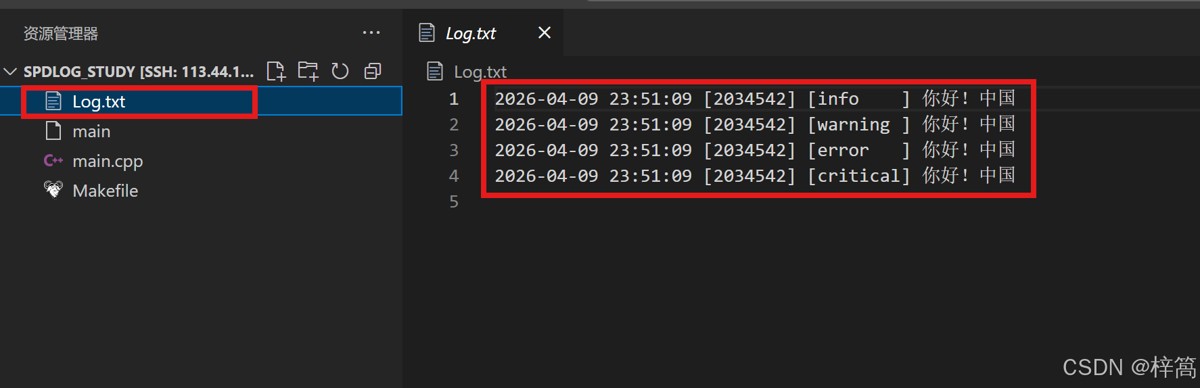
3. 创建异步日志器 (向指定文件写日志)

1

2

3

4

5

6

7

8

9

10

11

12

13

14

15

16

17

18

19

20

21

22

23

24

25

26

27

28

#include <spdlog/spdlog.h>

#include <spdlog/sinks/basic_file_sink.h> // 包含 spdlog::basic_logger_mt() 的实现

#include <spdlog/async.h>                 // 包含 spdlog::async_factory工厂类的实现

int main()

{

    // 1. 全局配置

    // 日志刷新策略-每隔 1 秒刷新一次

    spdlog::flush_every(std::chrono::seconds(1));

    // 初始化全局线程池 的任务队列数 和 线程数量

    spdlog::init_thread_pool(4096, 2);

    // 2. 显式指定工厂类, 创建异步日志器(向当前目录下的log.txt文件 写日志)

    // 创建异步日志器对象时,需要指定 线程池实例,

    // basic_logger_mt接口 创建异步日志器对象时,会指定 全局线程池实例,

    // 如果之前未初始化全局线程池的配置,全局线程池实例采用默认配置:8192队列 + 1线程

    auto file_log = spdlog::basic_logger_mt<spdlog::async_factory>("sync_logger", "log.txt");

    // 使用异步日志器的专用配置接口

    file_log->flush_on(spdlog::level::level_enum::info);

    file_log->set_level(spdlog::level::level_enum::info);

    file_log->set_pattern("%Y-%m-%d %H:%M:%S [%t] [%-8l] %v");

    // 3. 使用异步日志器 向指定文件写日志

    file_log->trace("你好!{}", "中国");     // {}是占位符,不区分数据类型

    file_log->debug("你好!{}","中国");

    file_log->info("你好!{}","中国");

    file_log->warn("你好!{}","中国");

    file_log->error("你好!{}","中国");

    file_log->critical("你好!{}","中国");

    return 0;

}

到此这篇关于高性能C++ 日志实战:spdlog 核心架构解析与最佳实践指南的文章就介绍到这了



Logo

openEuler 是由开放原子开源基金会孵化的全场景开源操作系统项目,面向数字基础设施四大核心场景(服务器、云计算、边缘计算、嵌入式),全面支持 ARM、x86、RISC-V、loongArch、PowerPC、SW-64 等多样性计算架构

更多推荐