快速掌握Linux(2)(时间相关函数)(文件IO)
5.时间相关函数
1)time()
#include <time.h>
time_t time(time_t *tloc);
功能:获取1970-1-1 00:00:00到现在的秒数
参数:
tloc:保存秒数的变量的地址
返回值:
获得的秒数
2)ctime()
char *ctime(const time_t *timep);
功能:将秒数转换成字符串时间
参数:
timep :秒数的变量的地址
返回值:
字符串时间
3)localtiome()
struct tm *localtime(const time_t *timep);
功能:将秒数转换成日历时间
struct tm {
int tm_sec; /* Seconds (0-60) */
int tm_min; /* Minutes (0-59) */
int tm_hour; /* Hours (0-23) */
int tm_mday; /* Day of the month (1-31) */
int tm_mon; /* Month (0-11) */
int tm_year; /* Year - 1900 */
int tm_wday; /* Day of the week (0-6, Sunday = 0) */
int tm_yday; /* Day in the year (0-365, 1 Jan = 0) */
int tm_isdst; /* Daylight saving time */
};
6. 文件IO
文件IO: Linux内核提供的文件操作接口。属于系统调用。
学习接口:
1.打开文件 : open()
2.读文件、写文件 : read() 、write()
3.关闭文件 : close()
函数接口:
1)open
#include <sys/types.h>
#include <sys/stat.h>
#include <fcntl.h>
int open(const char *pathname, int flags);
int open(const char *pathname, int flags, mode_t mode);
功能:打开一个文件并获得一个文件描述符
参数:
pathname:要打开的文件的文件名
flags:打开方式
O_RDONLY :只读
O_WRONLY :只写
O_RDWR :读写
O_CREAT :创建
O_TRUNC : 清空
O_APPEND : 追加
"r" O_RDONLY
"r+" O_RDWR
"w" O_WRONLY | O_TRUNC | O_CREAT, 0664
"w+" O_RDWR | O_TRUNC | O_CREAT,0664
"a" O_WRONLY | O_CREAT | O_APPEND, 0664
"a+" O_RDWR | O_CREAT | O_APPEND, 0664
mode:用户自己、同组用户、其他用户对该文件的读写执行权限
(mode & ~umask)
普通文件:0664
权限给满:0777
rwxrwxr-x
返回值:
成功:文件描述符
失败:-1
文件描述符:
当打开一个文件时,系统会为已打开的文件分配一个文件描述符用来标记该文件。
文件描述符:小的,非负的整形数据
操作系统默认可分配出的文件描述符:0-1023: 总共1024个
文件描述符的分配原则:最小未被使用
系统默认已打开的文件:
标准IO: 文件IO
FILE * int
stdin 0(STDIN_FILENO)
stdout 1(STDOUT_FILENO)
stderr 2 (STDERR_FILENO)
2)close
#include <unistd.h>
int close(int fd);
功能:关闭文件
参数:
fd:文件描述符
返回值:
成功:0
失败:-1
注意:
只打开文件,使用完不关闭文件会造成文件描述符泄露。
3)write
ssize_t write(int fd, const void *buf, size_t count);
功能:向文件中写入数据
参数:
fd :要写入的文件描述符
buf:要写入的数据首地址
count:希望写入的字节数
返回值:
成功:实际写入的字节数
失败:-1
4)read
ssize_t read(int fd, void *buf, size_t count);
功能:从文件中读取数据
参数:
fd:要读的文件的文件描述符
buf:存储读取数据的空间首地址
count:希望读到的字节数
返回值:
成功:返回实际读到的字节数
失败:-1
到达文件文件末尾:0
文件拷贝:
int file_copy(const char *srcfile, const char *dstfile)
{
int fdsrc = open(srcfile, O_RDONLY);
int fddst = open(dstfile, O_WRONLY | O_CREAT | O_TRUNC, 0664);
if (-1 == fdsrc || -1 == fddst)
{
printf("open error\n");
return -1;
}
char buff[1024] = {0};
ssize_t size = 0;
while ((size = read(fdsrc, buff, sizeof(buff))) > 0)
{
write(fddst, buff, size);
}
close(fdsrc);
close(fddst);
return 0;
}
5)文件定位函数:
(1)lseek()
off_t lseek(int fd, off_t offset, int whence);
功能:重新定位文件的读写位置
参数:
fd:文件描述符
offset:偏移量
whence:要偏移的起始位置
SEEK_SET :从文件开头偏移
SEEK_CUR: 从当前读写位置偏移
SEEK_END :从文件末尾偏移
返回值:
成功:返回当前读写位置到文件开头的偏移量
失败:-1
7.文件IO和标准IO的区别
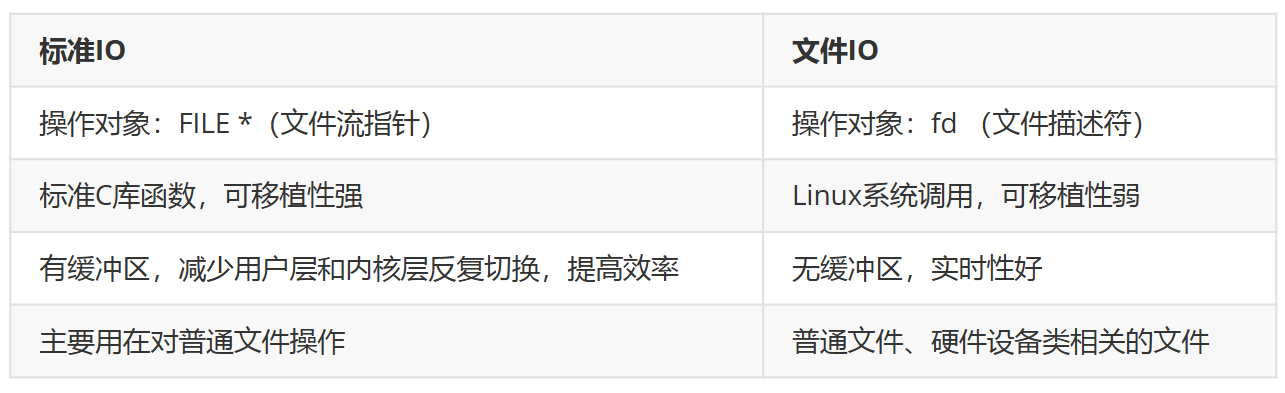
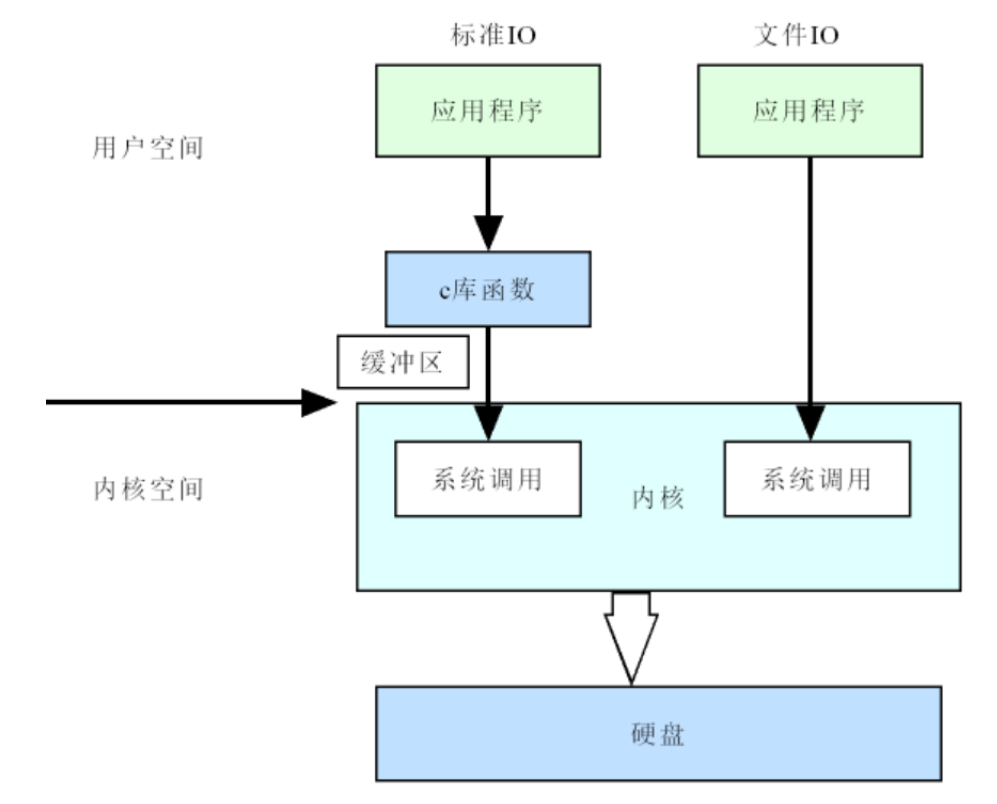
缓冲区
(1)行缓冲
默认大小1024字节(1K),主要使用在人机交互终端上。
刷新条件:
-
- 遇到'\n'刷新
- 程序结束刷新
- 使用fflush()强制刷新
- 缓冲区满时自动刷新
(2)全缓冲
默认大小4096字节(4K),文件交互
刷新条件:
- 程序结束刷新
- 文件关闭自动刷新
- 全缓冲区满时自动刷新
- 使用fflush()强制刷新
(3)无缓冲
0k, ,出错信息输出,标准出错设备
stderr

openEuler 是由开放原子开源基金会孵化的全场景开源操作系统项目,面向数字基础设施四大核心场景(服务器、云计算、边缘计算、嵌入式),全面支持 ARM、x86、RISC-V、loongArch、PowerPC、SW-64 等多样性计算架构
更多推荐
 3
3 0
0- 0


 已为社区贡献3条内容

所有评论(0)