Linux入门攻坚——78、XEN虚拟化-1
虚拟化主要分两种类型:
Type-I型:基于Hypervisor/VMM的虚拟机,虚拟机直接运行于硬件之上;
Type-II型:基于宿主机的虚拟机,虚拟机需要借助宿主机模拟的硬件运行;
IaaS(基础设施即服务,Infrastructure as a Service):提供跨多主机的云运行环境,xen,kvm等
提供内容:虚拟服务器、存储、网络等基础硬件资源。
用户管理:操作系统、应用程序、数据及运行环境。
PaaS(平台即服务,Platform as a Service):OS级别虚拟化,容器级虚拟化;
提供内容:在 IaaS 基础上增加了操作系统、数据库、开发工具等运行环境。
用户管理:仅需关注应用程序代码和数据。
SaaS(软件即服务,Software as a Service):
提供内容:完整的软件应用,如在线办公、客户管理系统。
用户管理:无需管理任何底层设施,直接使用软件功能。
以上三类有时被称为三个核心云服务模型或云计算服务模型。
Bridge实操:
安装:yum install bridge-utils
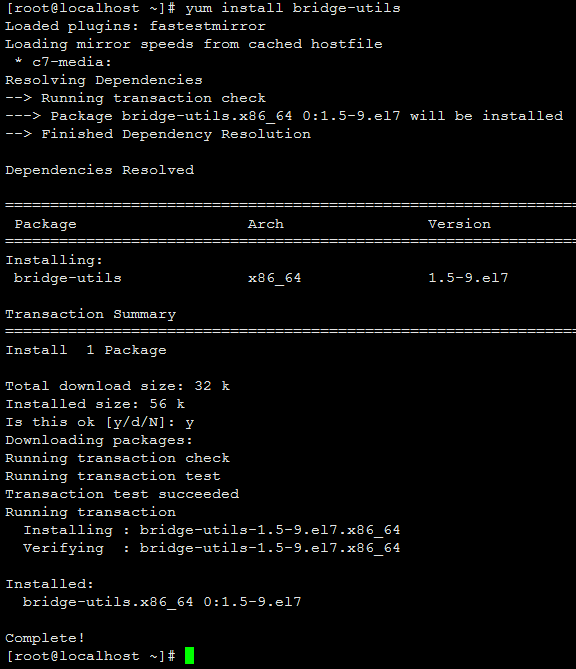
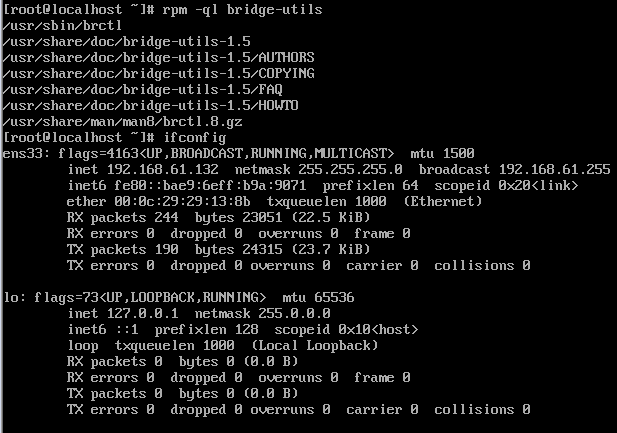
安装后的文件列表:
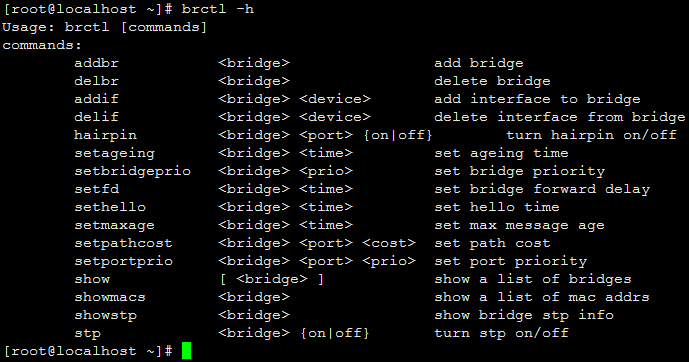
brctl命令的用法:
添加网桥:
brctl add br0 #添加桥设备
brctl stp br0 on #桥设备启动STP协议,自动生成树协议,避免环路

ifconfig eth0 0 up #取消物理网卡的IP地址配置

做完这一步,我的Xshell就断开了连接,在虚拟机终端操作:
brctl addif br0 eth0 #为桥设备添加物理网卡接口
ifconfig br0 IP/NETMASK up # 为桥设备配置IP地址

此时再次使用Xshell连接终端,成功。
route add default gw GW #配置默认路由
这一步没做,查看路由:

默认增加了路由,转发接口为br0
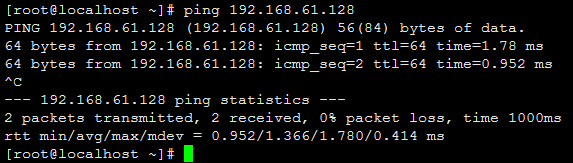
测试与其他虚拟机的连通性:
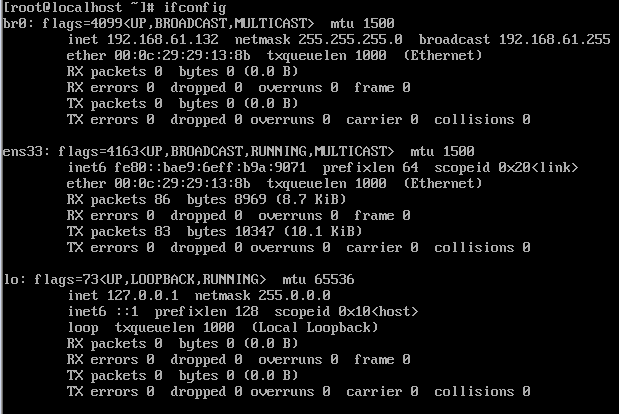
查看网络:
Xen虚拟化:剑桥大学开发的,开源VMM,半虚拟化,Type I型虚拟化。
半虚拟化Para-Virtulization(也有称为类虚拟化)主要思想是通过修改暴露给虚拟机(Guest机)的硬件抽象,以及修改其上层的操作系统(Guest OS),使操作系统(Guest OS)与VMM配合工作,修改后的操作系统能够意识到虚拟环境的存在。因为虚拟机操作系统需要修改,有可能导致的一个后果就是原先能够运行其上的应用软件不好用了,所以要尽可能保持上层操作系统和应用软件的兼容性。Xen就是在x86等体系结构上,只需对客户机操作系统做少量的修改,无需对应用程序做任何修改,就能使常用的操作系统如Linux、Windows等运行在Xen上的虚拟系统。
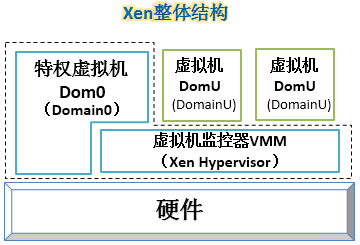
虚线框围住的部分表示虚拟化层的范围,是由一个VMM和一个特权虚拟机组成。
在Xen的术语中,每一个系统就是一个域(Domain),特权虚拟机被称为Domain0,即Dom0,其他虚拟机被称为DomainU,即DomU。由于是半虚拟化,Dom0和DomU的操作系统都需要移植才能够运行,也就是说,需要对应操作系统的特定版本或者是对内核安装特定补丁。
Xen组成部分:
(1)Xen Hypervisor:分配CPU,Memory,interrupts(中断),即负责CPU调度、内存管理及设备虚拟化,直接运行于硬件之上的微内核。
(2)Dom0:特权域,I/O分配,半虚拟化。是首个启动的虚拟机,拥有直接访问物理设备的权限,负责加载设备驱动、管理其他虚拟机生命周期及提供控制接口。
网络设备:net-front(GuestOS中),net-backend
块设备:block-front(GuestOS中),block-backend
Linux Kernel:2.6.37:开始支持运行Dom0,3.0:对关键特性优化
提供管理DomU工具栈:用于实现对虚拟机进行添加、启动、快照、停止、删除等;
(3)DomU:运行用户应用的普通虚拟机,通过前端驱动与 Domain0 的后端驱动通信,实现网络与存储请求的处理。
在虚拟化模式上,Xen 提供三种选择以适应不同需求:
半虚拟化(PV,Para-Virtulization):需修改客户机内核以调用 Hypervisor 提供的超调用,性能最优但兼容性受限,适合 Linux 等开源系统 。
完全虚拟化(HVM,Hardware Virtual Machine):硬件辅助管理虚拟化(完全化),依赖 Intel VT-x/AMD-V 硬件支持,无需修改内核,可运行 Windows 等未修改系统,通过模拟设备或 PVHVM 驱动优化性能 。
混合模式(PVH): PV on HVM,结合 PV 的超调用与 HVM 的硬件加速,实现无模拟设备的轻量级虚拟化。
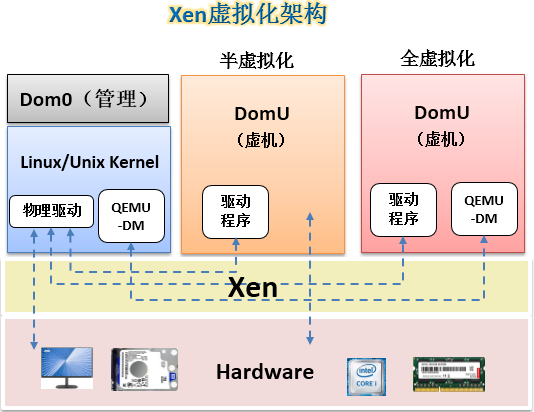
XEN的Hypervisor是服务器经过BIOS启动之后载入的首个程序,然后启动一个具有特定权限的虚拟机,称之为Domain0(简称Dom0)。Dom0的操作系统可以是Linux或Unix,Domain0实现对Hypervisor控制和管理功能。在所承载的虚拟机中,Dom0是唯一可以直接访问物理硬件(如存储和网卡)的虚拟机,它通过本身加载的物理驱动,为其它虚拟机(DomainU,简称DomU)提供访问存储和网卡的桥梁。
XEN支持两种类型的虚拟机,一类是半虚拟化(PV,Paravirtualization),另一类是全虚拟化(XEN称其为 HVM,Hardware Virtual Machine)。半虚拟化需要特定内核的操作系统,如基于Linux paravirt_ops(Linux内核的一套编译选项)框架的Linux内核,而Windows操作系统由于其封闭性则不能被XEN的半虚拟化所支持,XEN的半虚拟化有个特别之处就是不要求CPU具备硬件辅助虚拟化,这非常适用于2007年之前的旧服务器虚拟化改造。全虚拟化支持原生的操作系统, 特别是针对Windows这类操作系统,XEN的全虚拟化要求CPU具备硬件辅助虚拟化,它修改的Qemu仿真所有硬件,包括:BIOS、IDE控制器、 VGA显示卡、USB控制器和网卡等。为了提升I/O性能,全虚拟化特别针对磁盘和网卡采用半虚拟化设备来代替仿真设备,这些设备驱动称之为PV on HVM,为了使PV on HVM有最佳性能。CPU应具备MMU硬件辅助虚拟化。
半虚拟化接口的标准化:x86架构上支持半虚拟化的系统很多,每个虚拟化系统对于硬件抽象的接口各有不同,于是Linux中定义了一些标准的半虚拟化接口来覆盖和统一各个半虚拟化解决方案的接口。VMI(Virtual Machine Interface)是VMware提出的一种操作系统与VMM连接的方法。VMI方案中,在操作系统启动时,会加载一个模块,或称为ROM,之后操作系统会调用这个模块中的方法与VMM交互,在启动时,操作系统能够根据下层所运行的VMM加载不同的ROM,于是同一个操作系统镜像就能够在不同的VMM上运行而不需重新编译。Linux内核开发人员将部分ROM的功能加入到Linux内核中,并使用一个统一的接口Paravirt_ops(pv_ops)来调用。
Xen的PV技术:
不依赖CPU的HVM特性,但要求Gues0tOS的内核做出修改以知晓自己运行于PV环境;
运行于DomU中的OS:Linux(2.6.24+)、NetBSD、FreeBSD、OpenSolaris
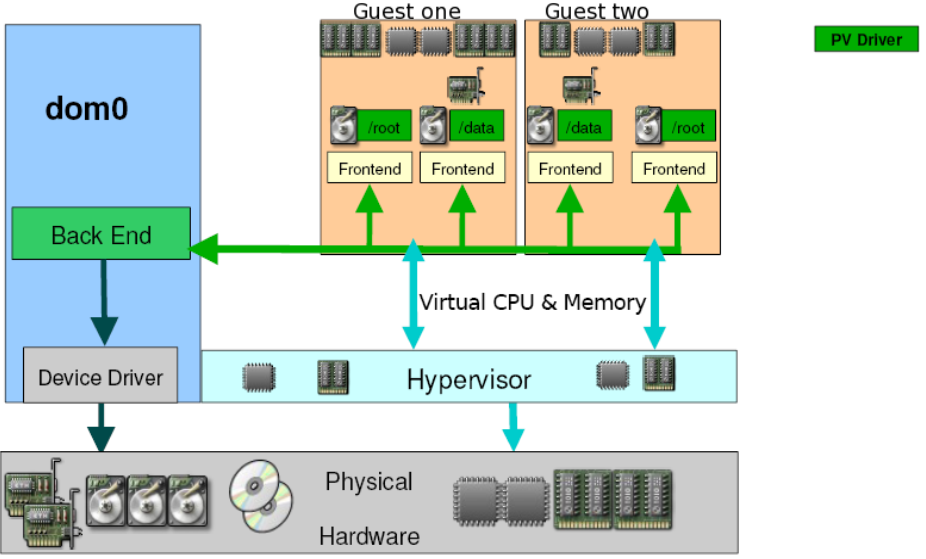
Xen的HVM技术:
依赖于Intel VT或AMD-V,还要依赖于Qemu来模拟IO设备;
运行于DomU中的OS:几乎所有支持此X86平台的OS;
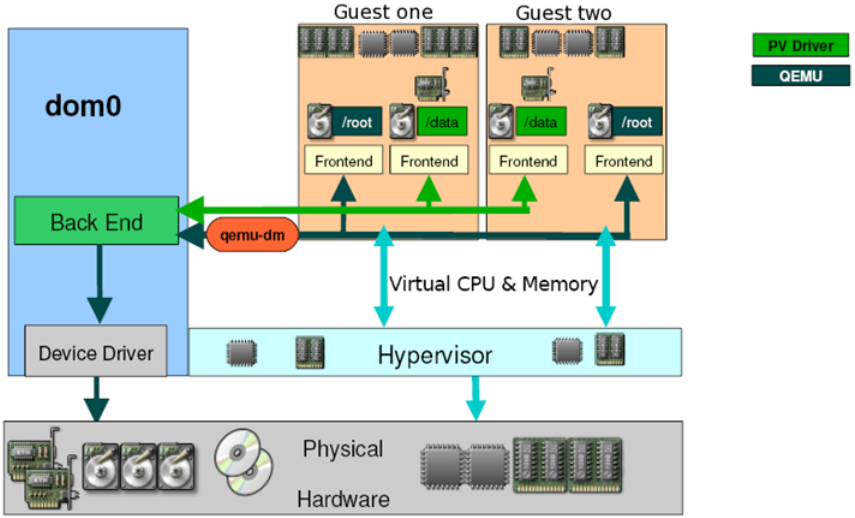
PV on HVM:
CPU为HVM模式运行,但IO设备为PV模式运行;
运行于DomU中的OS:只要OS能驱动PV接口类型的IO设备的OS
net-front,blk-front
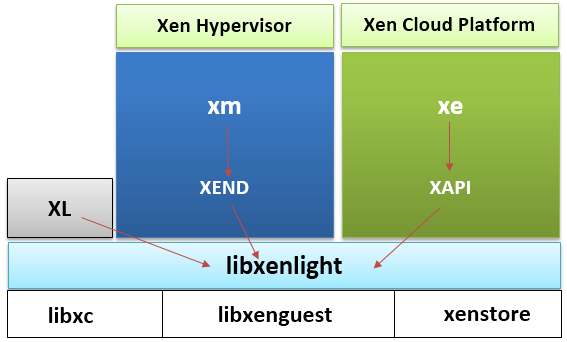
Xen的工具栈:
xm/xend:在Xen Hypervisor的Dom0中要启动xend服务,以接收xm发来的命令。
xm:命令行工具,有诸多子命令:create,destroy,stop,pause,...
xl:基于libxenlight提供的轻量级的命令行工具,取代xm
xe/xapi:提供了对xen管理的api,因此多用于cloud环境;Xen server,XCP
XenStore:为各Domain提供的共享信息存储空间,有着层级结构的名称空间,位于Dom0;
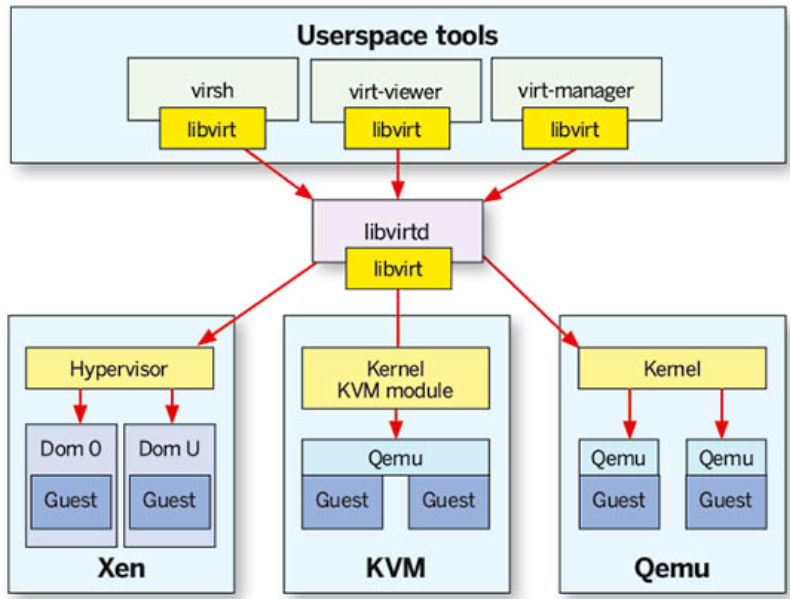
virsh/libvirt:libvirt 是一套管理虚拟化平台(如 KVM、QEMU、Xen)的开源 API、守护进程(libvirtd)和工具集;virsh 是其命令行前端工具,用于创建、控制和监控虚拟机(“域”);
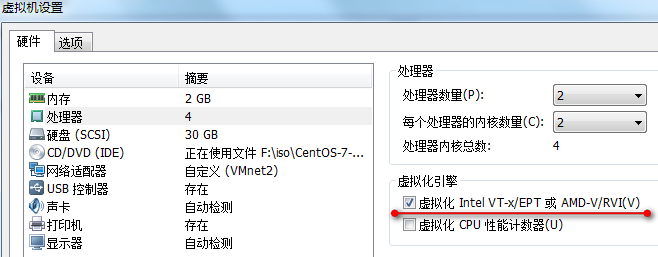
Xen的使用:
在虚拟机上安装虚拟机软件Xen,需要虚拟机CPU配置虚拟化引擎,如下,同时内存设置大一些
CentOS对Xen的支持:
RHEL5.7-:默认的虚拟化技术为xen;kernel version:2.6.18
kernel- 、kernel-xen
RHEL 6+:仅支持kvm
Dom0:不支持; DomU:支持
如何在CentOS6.X上使用Xen:
(1)编译3.0以上版本的内核,启动对Dom0的支持;
(2)编译xen程序;
制作好相关程序包的项目:
xen4centos
xen made easy
使用xen4centos:
yum install kernel xen
Xen4CentOS是一个已停止维护的CentOS虚拟化SIG(Special Interest Group)项目,曾为CentOS 6提供Xen 4.x 虚拟化堆栈(含内核、xl/libvirt支持),因RHEL/CentOS 7+ 默认转向 KVM而于 2017 年后废弃,不支持 CentOS 7或更高版本。
在阿里云镜像中CentOS的过期支持分支vault中:centos-vault/7.9.2009/virt/x86_64/有如下版本:
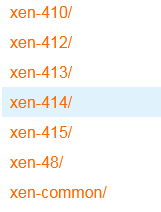
将:https://mirrors.aliyun.com/centos-vault/7.9.2009/virt/x86_64/xen-48/作为yum源,然后
yum install kernel xen 显示:
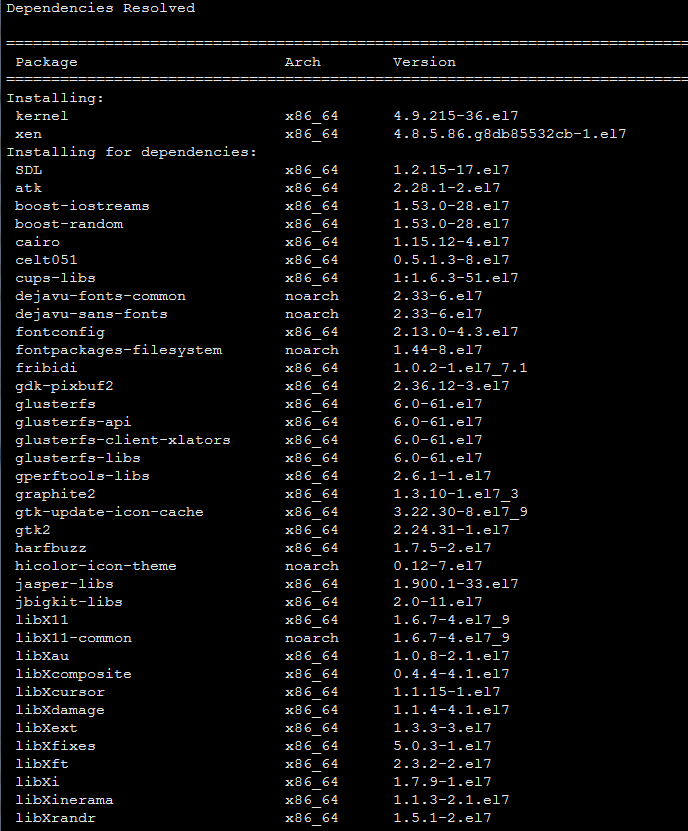
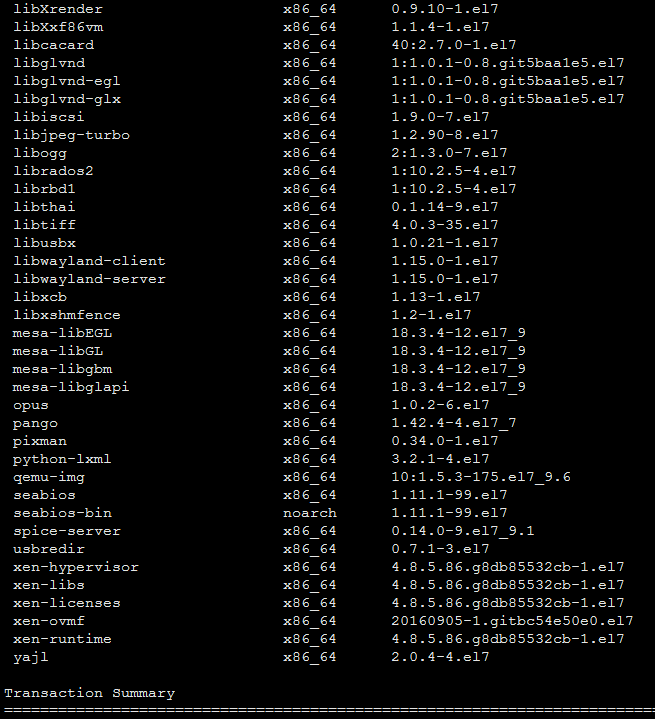
xen的安装,主要是两个方面,一个是xen,主要是提供运行于硬件之上的Hypervisor层,其二,是作为Dom0的虚拟机内核,就是这里的kernel。
xen-48与其他版本在yum源的组织上不同,xen-48作为centos7.9上的最低版本,其所有软件包都被放置在xen-48/目录下,而其他高版本,是在xen-1x/目录下,又安首字母建立了c/d/e/i/k/l/p/q/s/x/子目录。
xen-48版本提供的各软件包解析,这个目录下包含了低版本的软件包:
关键的几个软件包:
kernel-4.9.112-32.el7.x86_64.rpm:支持xen的虚拟机内核。
kernel-devel-xxxx.el7.x86_64.rpm :RHEL(或 CentOS 7)系统中用于编译内核模块(如第三方驱动、DKMS 模块)的开发包,包含与指定内核版本匹配的头文件、Makefile 和构建脚本,但不包含运行内核本身。
kernel-headers-xxxx.el7.x86_64.rpm : Red Hat/CentOS 7 系统中用于提供 Linux 内核的 C 头文件和内核 API 定义的软件包。
libvirt-5.1.0-9.xen48.el7.x86_64.rpm :CentOS 7 系统中用于管理虚拟化平台(特别是 Xen)的开源 API、守护进程和工具的核心软件包。核心功能:提供 libvirtd 守护进程和客户端库(如 libvirt.so),用于统一管理包括 Xen、KVM/QEMU、LXC 等在内的多种虚拟化技术。包含内容:基础 API、命令行工具(如 virsh)、与虚拟机监控程序(Hypervisor,此处重点是 Xen)通信的驱动模块,但不包含 QEMU 或 LXC 驱动(这些在 libvirt-daemon-driver-* 包中)。典型用途:在启用 Xen 虚拟化的 CentOS 7 系统上,用于创建、启动、停止和管理虚拟机(DomU),通常与 xen-hypervisor 和 xen-libs 配合使用。
libvirt-daemon-5.1.0-9.xen48.el7.x86_64.rpm :RHEL7(或CentOS 7)系统中用于提供虚拟化管理守护进程(libvirtd)的 RPM 软件包,支持 Xen 虚拟化平台。核心作用:安装 libvirtd 守护进程,它是 libvirt 框架的服务端组件,负责与底层虚拟化技术(此处为 Xen)交互,管理虚拟机生命周期(创建、启动、停止、配置等)。典型用途:在启用 Xen hypervisor 的环境中运行虚拟机,通过 virsh、virt-manager 或 API 调用管理域(VM);不包含 QEMU/KVM 驱动(需额外安装 libvirt-daemon-driver-qemu)。注意:该包不包含客户端工具(如 virsh 命令),后者属于 libvirt-client。
xen-4.8.5.86.g8db85532cb-1.el7.x86_64.rpm : CentOS/RHEL 7 系统上 Xen 虚拟化平台(版本 4.8.5,含特定 Git 提交 g8db85532cb)的二进制 RPM 安装包,用于提供硬件级虚拟化支持(HVM)和半虚拟化(PV),实现运行多个隔离虚拟机。核心作用:提供 Xen Hypervisor(虚拟机监控器)、工具栈(如 xl 或 xm)及运行时库,用于创建、管理虚拟机(如配合 QEMU 或 PV 客户端)。典型用途:在物理服务器上部署虚拟化环境(如 OpenStack、KVM 替代方案或专用虚拟主机平台),不包含完整虚拟机镜像,仅含管理 hypervisor 所需组件。安装后需启用 Xen 服务(如 systemctl enable xencommons)并配置引导加载器(GRUB)以 Xen hypervisor 启动系统,方可运行虚拟机。
xen-devel-4.8.5.86.g8db85532cb-1.el7.x86_64.rpm : Xen 虚拟化平台的开发包;
xen-hypervisor-4.8.5.86.g8db85532cb-1.el7.x86_64.rpm : CentOS 7(el7)x86_64 系统上用于安装 Xen 类型 1(裸金属)虚拟化 hypervisor 的 RPM 软件包,核心作用是在硬件上直接运行虚拟机监控程序(Xen Hypervisor),实现多虚拟机(DomU)的隔离与资源调度。包含 Xen hypervisor 内核(xen.gz),系统启动时由 bootloader(如 GRUB)加载,作为最底层虚拟化层,接管 CPU、内存、中断等硬件抽象。不包含管理工具(如 xl、libvirt)或 Dom0 驱动,仅提供 hypervisor 二进制文件;完整虚拟化需配合 xen-libs、xen-tools 和适配内核(如 kernel-xen)。
安装后需配置 GRUB 引导项并重启,使系统以 Xen hypervisor 为启动内核,此时主机成为 Dom0(管理域)运行的基础平台。
xen-libs-4.8.5.86.g8db85532cb-1.el7.x86_64.rpm : Xen 虚拟化平台的运行时库包,提供虚拟机管理与硬件抽象所需的共享库(如 libxenstore、libxenctrl 等),供 xen-tools、libvirt 或其他虚拟化组件调用。
xen-runtime-4.8.5.86.g8db85532cb-1.el7.x86_64.rpm : CentOS/RHEL 7 系统中 Xen 虚拟化平台的运行时组件包,提供启动和管理虚拟机所需的用户空间工具(如 xl、xenstored 等),但不包含内核模块(需 xen-linux 系列包)。用途:支撑 Xen Hypervisor 上的虚拟机管理(非虚拟化内核本身),用于命令行操作、DOM0 通信、配置解析等。依赖注意:单独安装此包无法启用虚拟化,需搭配 xen(或 xen-libs、xen-hypervisor)及支持虚拟化的 CPU/BIOS(如 Intel VT-x/AMD-V)。
其他软件包说明:Linux入门攻坚——Xen虚拟化软件包说明
安装测试使用xen4-15:
yum install kernel xen
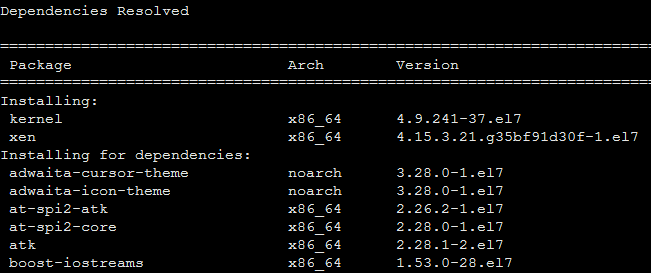
安装内核为4.9.241,当前的版本:3.10.0。
安装完毕后,/boot目录下的文件:
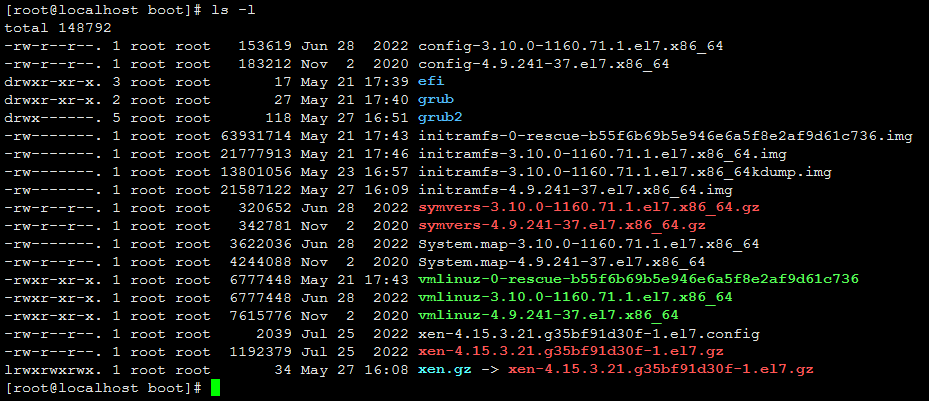
| 文件名 | 作用 |
| vmlinuz-... | 压缩的可执行 Linux 内核镜像,系统启动的核心。 |
| initramfs-...img | 初始内存盘镜像,提供启动所需的临时根文件系统。 |
| config-... | 编译该内核时使用的配置文件,记录了内核功能的开启/关闭状态。 |
| System.map-... | 内核符号表,用于调试和内核开发,将符号名称映射到内存地址。 |
| symvers-....gz | 内核符号版本文件,用于外部模块编译时的版本校验。 |
可以看到,内核vmlinuz、临时根文件系统initramfs、内核配置文件config、内核符号表文件system.map、内核符号版本文件sysmvers都相应增加了4.9.241版本,这些是Dom0的内核启动相关文件,xen-4.15.3.21是xen的Hypervisor内核启动文件,经过了压缩,有一个链接文件xen.gz指向它,主要是为了升级方便,修改一下链接就行。
安装完毕后,查看grub配置文件/etc/grub2.cfg,这是一个链接文件,链接到/boot/grub2/grub.cfg:
这个配置文件是grub2的配置文件,为自动生成,一般不手工修改。
对此文件进行结构折叠:
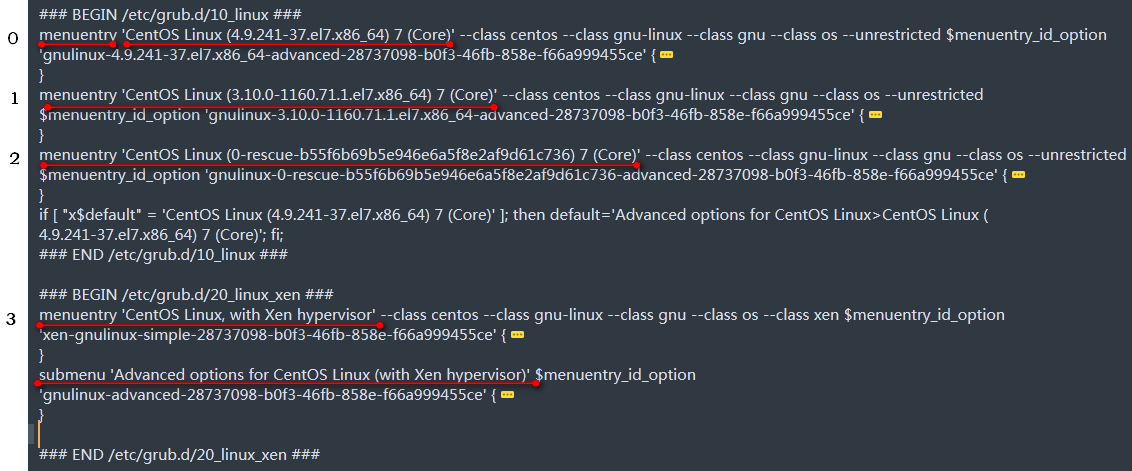
主菜单应该有4个条目,还有一个子菜单。
0菜单是4.9.241内核,经过xen的修改,就是Dom0的内核;
1菜单是升级前的原3.10.0内核操作系统;
2菜单是救援模式启动;
3菜单是xen的Hypervisor启动;
从配置文件的前面default值的设置,其实为${saved_entry}的值,这个值在/boot/grub2/grubenv中:saved_entry=CentOS Linux (4.9.241-37.el7.x86_64) 7 (Core)
所以默认是启动第0项菜单。
不太明白的是第3项菜单前的条件语句,对default进行了重新设置,个人理解的大体意思是如果默认启动是 'CentOS Linux (4.9.241-37.el7.x86_64) 7 (Core)' ,其实就是第0项菜单,那么default就设置为'Advanced options for CentOS Linux>CentOS Linux (4.9.241-37.el7.x86_64) 7 (Core)',这个意思是找子菜单CentOS Linux下的CentOS Linux (4.9.241-37.el7.x86_64) 7 (Core)项吗?
再看子菜单:
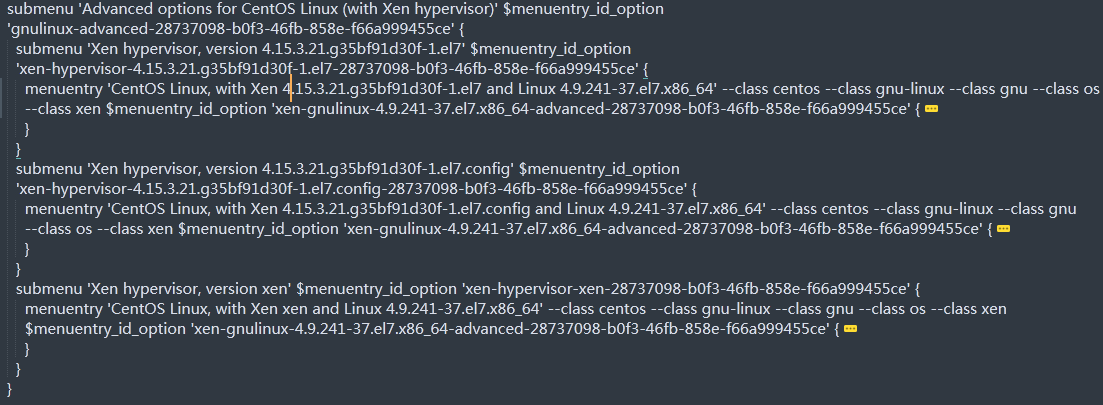
实际上,这些子菜单的启动加载,与主菜单第3项基本是一样的:
主菜单第3项:
 multiboot /xen-4.15.3.21.g35bf91d30f-1.el7.gz placeholder   ${xen_rm_opts}
  echo  'Loading Linux 4.9.241-37.el7.x86_64 ...'
  module  /vmlinuz-4.9.241-37.el7.x86_64 placeholder root=/dev/mapper/centos-root ro crashkernel=auto rd.lvm.lv=centos/root rd.lvm.lv=centos/swap rhgb quiet
子菜单:
multiboot /xen-4.15.3.21.g35bf91d30f-1.el7.gz placeholder   ${xen_rm_opts}
echo  'Loading Linux 4.9.241-37.el7.x86_64 ...'
module  /vmlinuz-4.9.241-37.el7.x86_64 placeholder root=/dev/mapper/centos-root ro crashkernel=auto rd.lvm.lv=centos/root rd.lvm.lv=centos/swap rhgb quiet
===========================================================================
multiboot /xen-4.15.3.21.g35bf91d30f-1.el7.config placeholder   ${xen_rm_opts}
echo  'Loading Linux 4.9.241-37.el7.x86_64 ...'
module  /vmlinuz-4.9.241-37.el7.x86_64 placeholder root=/dev/mapper/centos-root ro crashkernel=auto rd.lvm.lv=centos/root rd.lvm.lv=centos/swap rhgb quiet
===========================================================================
multiboot /xen.gz placeholder   ${xen_rm_opts}
echo  'Loading Linux 4.9.241-37.el7.x86_64 ...'
module  /vmlinuz-4.9.241-37.el7.x86_64 placeholder root=/dev/mapper/centos-root ro crashkernel=auto rd.lvm.lv=centos/root rd.lvm.lv=centos/swap rhgb quiet
从这些加载项,都是multiboot都是加载的/xen-4.15.3.21,是xen的Hypervisor,multiboot个人理解类似linux(或linux16),在grub版本1中,用的是kernel,即加载内核,module加载的是/vmlinuz-4.9.241-37.el7.x86_64,这个是Dom0的内核,即适配了xen的Linux内核,他不是作为内核运行的,是作为一个模块,也就是Hypervisor上的一个应用运行的。
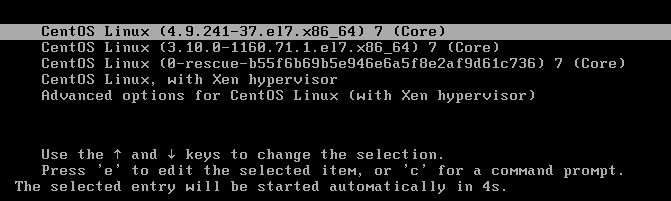
进入Advanced子菜单:
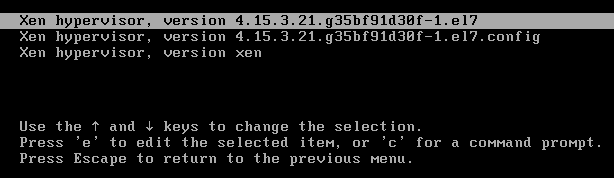
正常应该运行主菜单第3项,出现错误:
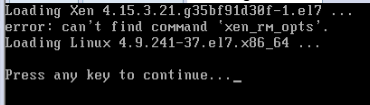
错误原因是较旧版本的grub.cfg脚本中存在错误,主要是以下语句:
if [ "$grub_platform" = "pc" -o "$grub_platform" = "" ]; then
xen_rm_opts
else
xen_rm_opts="no-real-mode edd=off"
fi
xen_rm_opts是变量,赋值需要写xen_rm_opts=,否则当成了命令。
安装完kernel xen后,需要重新生成grub.cfg配置文件,生成前,修改/etc/default/grub,对于grub2来说,因为配置文件是命令生成的,一般不能手工修改,要修改,通过其他关联文件,如/etc/default/grub:
GRUB_TIMEOUT=5
GRUB_DISTRIBUTOR="$(sed 's, release .*$,,g' /etc/system-release)"
GRUB_DEFAULT="CentOS Linux, with Xen hypervisor"
GRUB_DISABLE_SUBMENU=true
GRUB_TERMINAL_OUTPUT="console"
GRUB_CMDLINE_LINUX="crashkernel=auto rd.lvm.lv=centos/root rd.lvm.lv=centos/swap rhgb quiet"
GRUB_DISABLE_RECOVERY="true"
GRUB_CMDLINE_XEN_DEFAULT="dom0_mem=1024M,max:1024M cpuinfo com1=115200,8n1 console=com1,tty loglvl=all guest_loglvl=all"
GRUB_CMDLINE_XEN_REPLACE_DEFAULT="console=hvc0 earlyprintk=xen nomodeset"
| 参数 | 含义 |
| dom0_mem=1024M,max:1024M | 设置 Domain0 的初始内存为 1024 MB,并限制其最大可用内存也为 1024 MB。max: 后面是上限,可防止 Dom0 占用过多主机内存。 |
| cpuinfo | 指示 Xen 在启动时打印 CPU 详细信息(型号、特性、缓存等)到控制台,便于诊断硬件支持情况。 |
| com1=115200,8n1 | 将第一个串行端口(COM1)配置为波特率 115200、8 数据位、无校验、1 停止位,用于串口控制台输出。 |
| console=com1,tty | 指定 Xen 控制台同时输出到串口(com1)和本地终端(tty),这样即使显示器黑屏也能通过串口远程查看启动信息。 |
| loglvl=all | 将 Xen 自身日志级别设为最详细,输出所有级别的日志消息。 |
| guest_loglvl=all | 将客户机(虚拟机)相关日志级别也设为最详细,便于排查虚拟机问题。 |
上面这些参数通常放在 GRUB_CMDLINE_XEN_DEFAULT 中,用于 Xen 内核启动。dom0_mem 设置 Domain0 的内存限制,max:1024M 表示上限也是 1024M,防止 Dom0 占用过多内存。cpuinfo 可能是在启动时打印 CPU 信息(但常见的是在 GRUB 命令行中添加,用于调试)。串口重定向用于调试,特别是当服务器启动黑屏时可以通过串口控制台查看输出。loglvl=all 和 guest_loglvl=all 启用详细日志。这是 Virtualizor 文档中调整 Dom0 内存以避免启动问题的示例。这些参数是 Xen 虚拟化平台在 GRUB 引导配置中传递给 Xen 内核的启动参数,常用于调整 Domain0(管理域)行为及调试输出。
| 参数 | 含义 |
| console=hvc0 | 指定 Linux 控制台使用 Xen 虚拟串口设备 hvc0。在半虚拟化环境中,hvc0 是 Domain0 与 Xen 管理程序之间的标准通信通道,让你的终端能直接接收到内核启动日志和登录提示。 |
| earlyprintk=xen | 启用早期内核打印,并通过 Xen 管理程序输出。这样即使在没有物理显卡或显示输出的虚拟环境中,也能在系统引导的最早阶段看到内核诊断信息,对排查开机黑屏或启动挂死问题至关重要。 |
| nomodeset | 禁用内核模式设置(KMS),阻止内核在启动早期尝试初始化显卡并设置高分辨率显示模式。在虚拟环境中,这可以避免因虚拟显卡驱动不兼容而导致的黑屏、花屏或启动卡死。 |
上面这条参数组合常放在GRUB_CMDLINE_LINUX_XEN_REPLACE_DEFAULT中,是传递给 Linux Dom0 内核(而不是 Xen hypervisor)的内核启动参数。
修改完毕后,执行:
grub2-mkconfig -o /boot/grub2/grub.cfg
新的grub.cfg如下:
#
# DO NOT EDIT THIS FILE
#
# It is automatically generated by grub2-mkconfig using templates
# from /etc/grub.d and settings from /etc/default/grub
#

### BEGIN /etc/grub.d/00_header ###
set pager=1

if [ -s $prefix/grubenv ]; then
  load_env
fi
if [ "${next_entry}" ] ; then
   set default="${next_entry}"
   set next_entry=
   save_env next_entry
   set boot_once=true
else
   set default="CentOS Linux, with Xen hypervisor"
fi

if [ x"${feature_menuentry_id}" = xy ]; then
  menuentry_id_option="--id"
else
  menuentry_id_option=""
fi

export menuentry_id_option

if [ "${prev_saved_entry}" ]; then
  set saved_entry="${prev_saved_entry}"
  save_env saved_entry
  set prev_saved_entry=
  save_env prev_saved_entry
  set boot_once=true
fi

function savedefault {
  if [ -z "${boot_once}" ]; then
    saved_entry="${chosen}"
    save_env saved_entry
  fi
}

function load_video {
  if [ x$feature_all_video_module = xy ]; then
    insmod all_video
  else
    insmod efi_gop
    insmod efi_uga
    insmod ieee1275_fb
    insmod vbe
    insmod vga
    insmod video_bochs
    insmod video_cirrus
  fi
}

terminal_output console
if [ x$feature_timeout_style = xy ] ; then
  set timeout_style=menu
  set timeout=5
# Fallback normal timeout code in case the timeout_style feature is
# unavailable.
else
  set timeout=5
fi
### END /etc/grub.d/00_header ###

### BEGIN /etc/grub.d/00_tuned ###
set tuned_params=""
set tuned_initrd=""
### END /etc/grub.d/00_tuned ###

### BEGIN /etc/grub.d/01_users ###
if [ -f ${prefix}/user.cfg ]; then
  source ${prefix}/user.cfg
  if [ -n "${GRUB2_PASSWORD}" ]; then
    set superusers="root"
    export superusers
    password_pbkdf2 root ${GRUB2_PASSWORD}
  fi
fi
### END /etc/grub.d/01_users ###

### BEGIN /etc/grub.d/10_linux ###
menuentry 'CentOS Linux (4.9.215-36.el7.x86_64) 7 (Core)' --class centos --class gnu-linux --class gnu --class os --unrestricted $menuentry_id_option 'gnulinux-4.9.215-36.el7.x86_64-advanced-28737098-b0f3-46fb-858e-f66a999455ce' {
	load_video
	set gfxpayload=keep
	insmod gzio
	insmod part_msdos
	insmod xfs
	set root='hd0,msdos1'
	if [ x$feature_platform_search_hint = xy ]; then
	  search --no-floppy --fs-uuid --set=root --hint-bios=hd0,msdos1 --hint-efi=hd0,msdos1 --hint-baremetal=ahci0,msdos1 --hint='hd0,msdos1'  6e7b6324-4c7f-4b44-8d40-a31796d87c9b
	else
	  search --no-floppy --fs-uuid --set=root 6e7b6324-4c7f-4b44-8d40-a31796d87c9b
	fi
	linux16 /vmlinuz-4.9.215-36.el7.x86_64 root=/dev/mapper/centos-root ro crashkernel=auto rd.lvm.lv=centos/root rd.lvm.lv=centos/swap rhgb quiet
	initrd16 /initramfs-4.9.215-36.el7.x86_64.img
}
menuentry 'CentOS Linux (3.10.0-1160.71.1.el7.x86_64) 7 (Core)' --class centos --class gnu-linux --class gnu --class os --unrestricted $menuentry_id_option 'gnulinux-3.10.0-1160.71.1.el7.x86_64-advanced-28737098-b0f3-46fb-858e-f66a999455ce' {
	load_video
	set gfxpayload=keep
	insmod gzio
	insmod part_msdos
	insmod xfs
	set root='hd0,msdos1'
	if [ x$feature_platform_search_hint = xy ]; then
	  search --no-floppy --fs-uuid --set=root --hint-bios=hd0,msdos1 --hint-efi=hd0,msdos1 --hint-baremetal=ahci0,msdos1 --hint='hd0,msdos1'  6e7b6324-4c7f-4b44-8d40-a31796d87c9b
	else
	  search --no-floppy --fs-uuid --set=root 6e7b6324-4c7f-4b44-8d40-a31796d87c9b
	fi
	linux16 /vmlinuz-3.10.0-1160.71.1.el7.x86_64 root=/dev/mapper/centos-root ro crashkernel=auto rd.lvm.lv=centos/root rd.lvm.lv=centos/swap rhgb quiet
	initrd16 /initramfs-3.10.0-1160.71.1.el7.x86_64.img
}
menuentry 'CentOS Linux (0-rescue-b55f6b69b5e946e6a5f8e2af9d61c736) 7 (Core)' --class centos --class gnu-linux --class gnu --class os --unrestricted $menuentry_id_option 'gnulinux-0-rescue-b55f6b69b5e946e6a5f8e2af9d61c736-advanced-28737098-b0f3-46fb-858e-f66a999455ce' {
	load_video
	insmod gzio
	insmod part_msdos
	insmod xfs
	set root='hd0,msdos1'
	if [ x$feature_platform_search_hint = xy ]; then
	  search --no-floppy --fs-uuid --set=root --hint-bios=hd0,msdos1 --hint-efi=hd0,msdos1 --hint-baremetal=ahci0,msdos1 --hint='hd0,msdos1'  6e7b6324-4c7f-4b44-8d40-a31796d87c9b
	else
	  search --no-floppy --fs-uuid --set=root 6e7b6324-4c7f-4b44-8d40-a31796d87c9b
	fi
	linux16 /vmlinuz-0-rescue-b55f6b69b5e946e6a5f8e2af9d61c736 root=/dev/mapper/centos-root ro crashkernel=auto rd.lvm.lv=centos/root rd.lvm.lv=centos/swap rhgb quiet
	initrd16 /initramfs-0-rescue-b55f6b69b5e946e6a5f8e2af9d61c736.img
}

### END /etc/grub.d/10_linux ###

### BEGIN /etc/grub.d/20_linux_xen ###
menuentry 'CentOS Linux, with Xen hypervisor' --class centos --class gnu-linux --class gnu --class os --class xen $menuentry_id_option 'xen-gnulinux-simple-28737098-b0f3-46fb-858e-f66a999455ce' {
	insmod part_msdos
	insmod xfs
	set root='hd0,msdos1'
	if [ x$feature_platform_search_hint = xy ]; then
	  search --no-floppy --fs-uuid --set=root --hint-bios=hd0,msdos1 --hint-efi=hd0,msdos1 --hint-baremetal=ahci0,msdos1 --hint='hd0,msdos1'  6e7b6324-4c7f-4b44-8d40-a31796d87c9b
	else
	  search --no-floppy --fs-uuid --set=root 6e7b6324-4c7f-4b44-8d40-a31796d87c9b
	fi
	echo	'Loading Xen 4.8.5.86.g8db85532cb-1.el7 ...'
        if [ "$grub_platform" = "pc" -o "$grub_platform" = "" ]; then
            xen_rm_opts=
        else
            xen_rm_opts="no-real-mode edd=off"
        fi
	multiboot	/xen-4.8.5.86.g8db85532cb-1.el7.gz placeholder  dom0_mem=1024M,max:1024M cpuinfo com1=115200,8n1 console=com1,tty loglvl=all guest_loglvl=all ${xen_rm_opts}
	echo	'Loading Linux 4.9.215-36.el7.x86_64 ...'
	module	/vmlinuz-4.9.215-36.el7.x86_64 placeholder root=/dev/mapper/centos-root ro crashkernel=auto rd.lvm.lv=centos/root rd.lvm.lv=centos/swap rhgb quiet
	echo	'Loading initial ramdisk ...'
	module	--nounzip   /initramfs-4.9.215-36.el7.x86_64.img
}
submenu 'Advanced options for CentOS Linux (with Xen hypervisor)' $menuentry_id_option 'gnulinux-advanced-28737098-b0f3-46fb-858e-f66a999455ce' {
	submenu 'Xen hypervisor, version 4.8.5.86.g8db85532cb-1.el7' $menuentry_id_option 'xen-hypervisor-4.8.5.86.g8db85532cb-1.el7-28737098-b0f3-46fb-858e-f66a999455ce' {
		menuentry 'CentOS Linux, with Xen 4.8.5.86.g8db85532cb-1.el7 and Linux 4.9.215-36.el7.x86_64' --class centos --class gnu-linux --class gnu --class os --class xen $menuentry_id_option 'xen-gnulinux-4.9.215-36.el7.x86_64-advanced-28737098-b0f3-46fb-858e-f66a999455ce' {
			insmod part_msdos
			insmod xfs
			set root='hd0,msdos1'
			if [ x$feature_platform_search_hint = xy ]; then
			  search --no-floppy --fs-uuid --set=root --hint-bios=hd0,msdos1 --hint-efi=hd0,msdos1 --hint-baremetal=ahci0,msdos1 --hint='hd0,msdos1'  6e7b6324-4c7f-4b44-8d40-a31796d87c9b
			else
			  search --no-floppy --fs-uuid --set=root 6e7b6324-4c7f-4b44-8d40-a31796d87c9b
			fi
			echo	'Loading Xen 4.8.5.86.g8db85532cb-1.el7 ...'
		        if [ "$grub_platform" = "pc" -o "$grub_platform" = "" ]; then
		            xen_rm_opts=
		        else
		            xen_rm_opts="no-real-mode edd=off"
		        fi
			multiboot	/xen-4.8.5.86.g8db85532cb-1.el7.gz placeholder  dom0_mem=1024M,max:1024M cpuinfo com1=115200,8n1 console=com1,tty loglvl=all guest_loglvl=all ${xen_rm_opts}
			echo	'Loading Linux 4.9.215-36.el7.x86_64 ...'
			module	/vmlinuz-4.9.215-36.el7.x86_64 placeholder root=/dev/mapper/centos-root ro crashkernel=auto rd.lvm.lv=centos/root rd.lvm.lv=centos/swap rhgb quiet
			echo	'Loading initial ramdisk ...'
			module	--nounzip   /initramfs-4.9.215-36.el7.x86_64.img
		}
	}
	submenu 'Xen hypervisor, version 4.8.5.86.g8db85532cb-1.el7.config' $menuentry_id_option 'xen-hypervisor-4.8.5.86.g8db85532cb-1.el7.config-28737098-b0f3-46fb-858e-f66a999455ce' {
		menuentry 'CentOS Linux, with Xen 4.8.5.86.g8db85532cb-1.el7.config and Linux 4.9.215-36.el7.x86_64' --class centos --class gnu-linux --class gnu --class os --class xen $menuentry_id_option 'xen-gnulinux-4.9.215-36.el7.x86_64-advanced-28737098-b0f3-46fb-858e-f66a999455ce' {
			insmod part_msdos
			insmod xfs
			set root='hd0,msdos1'
			if [ x$feature_platform_search_hint = xy ]; then
			  search --no-floppy --fs-uuid --set=root --hint-bios=hd0,msdos1 --hint-efi=hd0,msdos1 --hint-baremetal=ahci0,msdos1 --hint='hd0,msdos1'  6e7b6324-4c7f-4b44-8d40-a31796d87c9b
			else
			  search --no-floppy --fs-uuid --set=root 6e7b6324-4c7f-4b44-8d40-a31796d87c9b
			fi
			echo	'Loading Xen 4.8.5.86.g8db85532cb-1.el7.config ...'
		        if [ "$grub_platform" = "pc" -o "$grub_platform" = "" ]; then
		            xen_rm_opts=
		        else
		            xen_rm_opts="no-real-mode edd=off"
		        fi
			multiboot	/xen-4.8.5.86.g8db85532cb-1.el7.config placeholder  dom0_mem=1024M,max:1024M cpuinfo com1=115200,8n1 console=com1,tty loglvl=all guest_loglvl=all ${xen_rm_opts}
			echo	'Loading Linux 4.9.215-36.el7.x86_64 ...'
			module	/vmlinuz-4.9.215-36.el7.x86_64 placeholder root=/dev/mapper/centos-root ro crashkernel=auto rd.lvm.lv=centos/root rd.lvm.lv=centos/swap rhgb quiet
			echo	'Loading initial ramdisk ...'
			module	--nounzip   /initramfs-4.9.215-36.el7.x86_64.img
		}
	}
	submenu 'Xen hypervisor, version xen' $menuentry_id_option 'xen-hypervisor-xen-28737098-b0f3-46fb-858e-f66a999455ce' {
		menuentry 'CentOS Linux, with Xen xen and Linux 4.9.215-36.el7.x86_64' --class centos --class gnu-linux --class gnu --class os --class xen $menuentry_id_option 'xen-gnulinux-4.9.215-36.el7.x86_64-advanced-28737098-b0f3-46fb-858e-f66a999455ce' {
			insmod part_msdos
			insmod xfs
			set root='hd0,msdos1'
			if [ x$feature_platform_search_hint = xy ]; then
			  search --no-floppy --fs-uuid --set=root --hint-bios=hd0,msdos1 --hint-efi=hd0,msdos1 --hint-baremetal=ahci0,msdos1 --hint='hd0,msdos1'  6e7b6324-4c7f-4b44-8d40-a31796d87c9b
			else
			  search --no-floppy --fs-uuid --set=root 6e7b6324-4c7f-4b44-8d40-a31796d87c9b
			fi
			echo	'Loading Xen xen ...'
		        if [ "$grub_platform" = "pc" -o "$grub_platform" = "" ]; then
		            xen_rm_opts=
		        else
		            xen_rm_opts="no-real-mode edd=off"
		        fi
			multiboot	/xen.gz placeholder  dom0_mem=1024M,max:1024M cpuinfo com1=115200,8n1 console=com1,tty loglvl=all guest_loglvl=all ${xen_rm_opts}
			echo	'Loading Linux 4.9.215-36.el7.x86_64 ...'
			module	/vmlinuz-4.9.215-36.el7.x86_64 placeholder root=/dev/mapper/centos-root ro crashkernel=auto rd.lvm.lv=centos/root rd.lvm.lv=centos/swap rhgb quiet
			echo	'Loading initial ramdisk ...'
			module	--nounzip   /initramfs-4.9.215-36.el7.x86_64.img
		}
	}
}

### END /etc/grub.d/20_linux_xen ###

### BEGIN /etc/grub.d/20_ppc_terminfo ###
### END /etc/grub.d/20_ppc_terminfo ###

### BEGIN /etc/grub.d/30_os-prober ###
### END /etc/grub.d/30_os-prober ###

### BEGIN /etc/grub.d/40_custom ###
# This file provides an easy way to add custom menu entries.  Simply type the
# menu entries you want to add after this comment.  Be careful not to change
# the 'exec tail' line above.
### END /etc/grub.d/40_custom ###

### BEGIN /etc/grub.d/41_custom ###
if [ -f  ${config_directory}/custom.cfg ]; then
  source ${config_directory}/custom.cfg
elif [ -z "${config_directory}" -a -f  $prefix/custom.cfg ]; then
  source $prefix/custom.cfg;
fi
### END /etc/grub.d/41_custom ###
注意xen_rm_opts判断赋值语句修改了,同时xen的启动加载语句也变了:
multiboot /xen.gz 。。。
module /vmlinuz-4.9.215-36.el7.x86_64 。。。
module --nounzip /initramfs-4.9.215-36.el7.x86_64.img
这才是一个完整的xen Hypervisor启动,先是xen Hypervisor启动,然后加载模块vmlinuz-4.9.215-36,这是内核,还要加载模块initramfs-4.9.215-36,这是根文件系统。
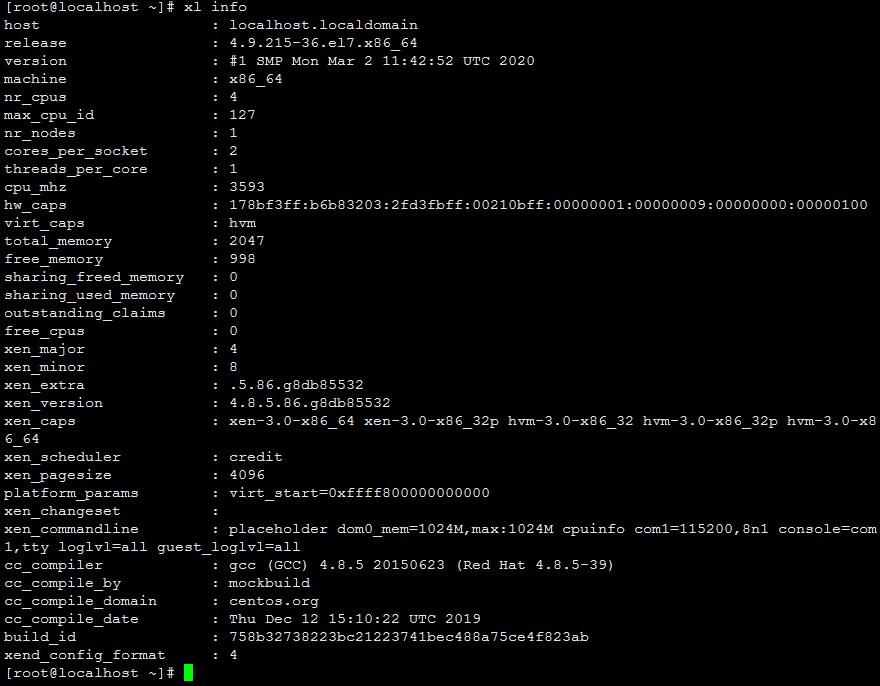
又出现一个问题是:启动窗口是黑屏,但是使用xshell能够连接到dom0:
查看内核版本:uname -a

执行xl info:
#/boot/grub2/grub.cfg  <---  /etc/grub2.cfg  配置文件
#
# DO NOT EDIT THIS FILE
#
# It is automatically generated by grub2-mkconfig using templates
# from /etc/grub.d and settings from /etc/default/grub
#

### BEGIN /etc/grub.d/00_header ###
set pager=1

if [ -s $prefix/grubenv ]; then
  load_env
fi
if [ "${next_entry}" ] ; then
   set default="${next_entry}"
   set next_entry=
   save_env next_entry
   set boot_once=true
else
   set default="${saved_entry}"
fi

if [ x"${feature_menuentry_id}" = xy ]; then
  menuentry_id_option="--id"
else
  menuentry_id_option=""
fi

export menuentry_id_option

if [ "${prev_saved_entry}" ]; then
  set saved_entry="${prev_saved_entry}"
  save_env saved_entry
  set prev_saved_entry=
  save_env prev_saved_entry
  set boot_once=true
fi

function savedefault {
  if [ -z "${boot_once}" ]; then
    saved_entry="${chosen}"
    save_env saved_entry
  fi
}

function load_video {
  if [ x$feature_all_video_module = xy ]; then
    insmod all_video
  else
    insmod efi_gop
    insmod efi_uga
    insmod ieee1275_fb
    insmod vbe
    insmod vga
    insmod video_bochs
    insmod video_cirrus
  fi
}

terminal_output console
if [ x$feature_timeout_style = xy ] ; then
  set timeout_style=menu
  set timeout=5
# Fallback normal timeout code in case the timeout_style feature is
# unavailable.
else
  set timeout=5
fi
### END /etc/grub.d/00_header ###

### BEGIN /etc/grub.d/00_tuned ###
set tuned_params=""
set tuned_initrd=""
### END /etc/grub.d/00_tuned ###

### BEGIN /etc/grub.d/01_users ###
if [ -f ${prefix}/user.cfg ]; then
  source ${prefix}/user.cfg
  if [ -n "${GRUB2_PASSWORD}" ]; then
    set superusers="root"
    export superusers
    password_pbkdf2 root ${GRUB2_PASSWORD}
  fi
fi
### END /etc/grub.d/01_users ###

### BEGIN /etc/grub.d/10_linux ###
menuentry 'CentOS Linux (4.9.241-37.el7.x86_64) 7 (Core)' --class centos --class gnu-linux --class gnu --class os --unrestricted $menuentry_id_option 'gnulinux-4.9.241-37.el7.x86_64-advanced-28737098-b0f3-46fb-858e-f66a999455ce' {
  load_video
  set gfxpayload=keep
  insmod gzio
  insmod part_msdos
  insmod xfs
  set root='hd0,msdos1'
  if [ x$feature_platform_search_hint = xy ]; then
    search --no-floppy --fs-uuid --set=root --hint-bios=hd0,msdos1 --hint-efi=hd0,msdos1 --hint-baremetal=ahci0,msdos1 --hint='hd0,msdos1'  6e7b6324-4c7f-4b44-8d40-a31796d87c9b
  else
    search --no-floppy --fs-uuid --set=root 6e7b6324-4c7f-4b44-8d40-a31796d87c9b
  fi
  linux16 /vmlinuz-4.9.241-37.el7.x86_64 root=/dev/mapper/centos-root ro crashkernel=auto rd.lvm.lv=centos/root rd.lvm.lv=centos/swap rhgb quiet LANG=en_US.UTF-8
  initrd16 /initramfs-4.9.241-37.el7.x86_64.img
}
menuentry 'CentOS Linux (3.10.0-1160.71.1.el7.x86_64) 7 (Core)' --class centos --class gnu-linux --class gnu --class os --unrestricted $menuentry_id_option 'gnulinux-3.10.0-1160.71.1.el7.x86_64-advanced-28737098-b0f3-46fb-858e-f66a999455ce' {
  load_video
  set gfxpayload=keep
  insmod gzio
  insmod part_msdos
  insmod xfs
  set root='hd0,msdos1'
  if [ x$feature_platform_search_hint = xy ]; then
    search --no-floppy --fs-uuid --set=root --hint-bios=hd0,msdos1 --hint-efi=hd0,msdos1 --hint-baremetal=ahci0,msdos1 --hint='hd0,msdos1'  6e7b6324-4c7f-4b44-8d40-a31796d87c9b
  else
    search --no-floppy --fs-uuid --set=root 6e7b6324-4c7f-4b44-8d40-a31796d87c9b
  fi
  linux16 /vmlinuz-3.10.0-1160.71.1.el7.x86_64 root=/dev/mapper/centos-root ro crashkernel=auto rd.lvm.lv=centos/root rd.lvm.lv=centos/swap rhgb quiet
  initrd16 /initramfs-3.10.0-1160.71.1.el7.x86_64.img
}
menuentry 'CentOS Linux (0-rescue-b55f6b69b5e946e6a5f8e2af9d61c736) 7 (Core)' --class centos --class gnu-linux --class gnu --class os --unrestricted $menuentry_id_option 'gnulinux-0-rescue-b55f6b69b5e946e6a5f8e2af9d61c736-advanced-28737098-b0f3-46fb-858e-f66a999455ce' {
  load_video
  insmod gzio
  insmod part_msdos
  insmod xfs
  set root='hd0,msdos1'
  if [ x$feature_platform_search_hint = xy ]; then
    search --no-floppy --fs-uuid --set=root --hint-bios=hd0,msdos1 --hint-efi=hd0,msdos1 --hint-baremetal=ahci0,msdos1 --hint='hd0,msdos1'  6e7b6324-4c7f-4b44-8d40-a31796d87c9b
  else
    search --no-floppy --fs-uuid --set=root 6e7b6324-4c7f-4b44-8d40-a31796d87c9b
  fi
  linux16 /vmlinuz-0-rescue-b55f6b69b5e946e6a5f8e2af9d61c736 root=/dev/mapper/centos-root ro crashkernel=auto rd.lvm.lv=centos/root rd.lvm.lv=centos/swap rhgb quiet
  initrd16 /initramfs-0-rescue-b55f6b69b5e946e6a5f8e2af9d61c736.img
}
if [ "x$default" = 'CentOS Linux (4.9.241-37.el7.x86_64) 7 (Core)' ]; then default='Advanced options for CentOS Linux>CentOS Linux (4.9.241-37.el7.x86_64) 7 (Core)'; fi;
### END /etc/grub.d/10_linux ###

### BEGIN /etc/grub.d/20_linux_xen ###
menuentry 'CentOS Linux, with Xen hypervisor' --class centos --class gnu-linux --class gnu --class os --class xen $menuentry_id_option 'xen-gnulinux-simple-28737098-b0f3-46fb-858e-f66a999455ce' {
  insmod part_msdos
  insmod xfs
  set root='hd0,msdos1'
  if [ x$feature_platform_search_hint = xy ]; then
    search --no-floppy --fs-uuid --set=root --hint-bios=hd0,msdos1 --hint-efi=hd0,msdos1 --hint-baremetal=ahci0,msdos1 --hint='hd0,msdos1'  6e7b6324-4c7f-4b44-8d40-a31796d87c9b
  else
    search --no-floppy --fs-uuid --set=root 6e7b6324-4c7f-4b44-8d40-a31796d87c9b
  fi
  echo  'Loading Xen 4.15.3.21.g35bf91d30f-1.el7 ...'
        if [ "$grub_platform" = "pc" -o "$grub_platform" = "" ]; then
            xen_rm_opts
        else
            xen_rm_opts="no-real-mode edd=off"
        fi
  multiboot /xen-4.15.3.21.g35bf91d30f-1.el7.gz placeholder   ${xen_rm_opts}
  echo  'Loading Linux 4.9.241-37.el7.x86_64 ...'
  module  /vmlinuz-4.9.241-37.el7.x86_64 placeholder root=/dev/mapper/centos-root ro crashkernel=auto rd.lvm.lv=centos/root rd.lvm.lv=centos/swap rhgb quiet
}
submenu 'Advanced options for CentOS Linux (with Xen hypervisor)' $menuentry_id_option 'gnulinux-advanced-28737098-b0f3-46fb-858e-f66a999455ce' {
  submenu 'Xen hypervisor, version 4.15.3.21.g35bf91d30f-1.el7' $menuentry_id_option 'xen-hypervisor-4.15.3.21.g35bf91d30f-1.el7-28737098-b0f3-46fb-858e-f66a999455ce' {
    menuentry 'CentOS Linux, with Xen 4.15.3.21.g35bf91d30f-1.el7 and Linux 4.9.241-37.el7.x86_64' --class centos --class gnu-linux --class gnu --class os --class xen $menuentry_id_option 'xen-gnulinux-4.9.241-37.el7.x86_64-advanced-28737098-b0f3-46fb-858e-f66a999455ce' {
      insmod part_msdos
      insmod xfs
      set root='hd0,msdos1'
      if [ x$feature_platform_search_hint = xy ]; then
        search --no-floppy --fs-uuid --set=root --hint-bios=hd0,msdos1 --hint-efi=hd0,msdos1 --hint-baremetal=ahci0,msdos1 --hint='hd0,msdos1'  6e7b6324-4c7f-4b44-8d40-a31796d87c9b
      else
        search --no-floppy --fs-uuid --set=root 6e7b6324-4c7f-4b44-8d40-a31796d87c9b
      fi
      echo  'Loading Xen 4.15.3.21.g35bf91d30f-1.el7 ...'
            if [ "$grub_platform" = "pc" -o "$grub_platform" = "" ]; then
                xen_rm_opts
            else
                xen_rm_opts="no-real-mode edd=off"
            fi
      multiboot /xen-4.15.3.21.g35bf91d30f-1.el7.gz placeholder   ${xen_rm_opts}
      echo  'Loading Linux 4.9.241-37.el7.x86_64 ...'
      module  /vmlinuz-4.9.241-37.el7.x86_64 placeholder root=/dev/mapper/centos-root ro crashkernel=auto rd.lvm.lv=centos/root rd.lvm.lv=centos/swap rhgb quiet
    }
  }
  submenu 'Xen hypervisor, version 4.15.3.21.g35bf91d30f-1.el7.config' $menuentry_id_option 'xen-hypervisor-4.15.3.21.g35bf91d30f-1.el7.config-28737098-b0f3-46fb-858e-f66a999455ce' {
    menuentry 'CentOS Linux, with Xen 4.15.3.21.g35bf91d30f-1.el7.config and Linux 4.9.241-37.el7.x86_64' --class centos --class gnu-linux --class gnu --class os --class xen $menuentry_id_option 'xen-gnulinux-4.9.241-37.el7.x86_64-advanced-28737098-b0f3-46fb-858e-f66a999455ce' {
      insmod part_msdos
      insmod xfs
      set root='hd0,msdos1'
      if [ x$feature_platform_search_hint = xy ]; then
        search --no-floppy --fs-uuid --set=root --hint-bios=hd0,msdos1 --hint-efi=hd0,msdos1 --hint-baremetal=ahci0,msdos1 --hint='hd0,msdos1'  6e7b6324-4c7f-4b44-8d40-a31796d87c9b
      else
        search --no-floppy --fs-uuid --set=root 6e7b6324-4c7f-4b44-8d40-a31796d87c9b
      fi
      echo  'Loading Xen 4.15.3.21.g35bf91d30f-1.el7.config ...'
            if [ "$grub_platform" = "pc" -o "$grub_platform" = "" ]; then
                xen_rm_opts
            else
                xen_rm_opts="no-real-mode edd=off"
            fi
      multiboot /xen-4.15.3.21.g35bf91d30f-1.el7.config placeholder   ${xen_rm_opts}
      echo  'Loading Linux 4.9.241-37.el7.x86_64 ...'
      module  /vmlinuz-4.9.241-37.el7.x86_64 placeholder root=/dev/mapper/centos-root ro crashkernel=auto rd.lvm.lv=centos/root rd.lvm.lv=centos/swap rhgb quiet
    }
  }
  submenu 'Xen hypervisor, version xen' $menuentry_id_option 'xen-hypervisor-xen-28737098-b0f3-46fb-858e-f66a999455ce' {
    menuentry 'CentOS Linux, with Xen xen and Linux 4.9.241-37.el7.x86_64' --class centos --class gnu-linux --class gnu --class os --class xen $menuentry_id_option 'xen-gnulinux-4.9.241-37.el7.x86_64-advanced-28737098-b0f3-46fb-858e-f66a999455ce' {
      insmod part_msdos
      insmod xfs
      set root='hd0,msdos1'
      if [ x$feature_platform_search_hint = xy ]; then
        search --no-floppy --fs-uuid --set=root --hint-bios=hd0,msdos1 --hint-efi=hd0,msdos1 --hint-baremetal=ahci0,msdos1 --hint='hd0,msdos1'  6e7b6324-4c7f-4b44-8d40-a31796d87c9b
      else
        search --no-floppy --fs-uuid --set=root 6e7b6324-4c7f-4b44-8d40-a31796d87c9b
      fi
      echo  'Loading Xen xen ...'
            if [ "$grub_platform" = "pc" -o "$grub_platform" = "" ]; then
                xen_rm_opts
            else
                xen_rm_opts="no-real-mode edd=off"
            fi
      multiboot /xen.gz placeholder   ${xen_rm_opts}
      echo  'Loading Linux 4.9.241-37.el7.x86_64 ...'
      module  /vmlinuz-4.9.241-37.el7.x86_64 placeholder root=/dev/mapper/centos-root ro crashkernel=auto rd.lvm.lv=centos/root rd.lvm.lv=centos/swap rhgb quiet
    }
  }
}

### END /etc/grub.d/20_linux_xen ###

### BEGIN /etc/grub.d/20_ppc_terminfo ###
### END /etc/grub.d/20_ppc_terminfo ###

### BEGIN /etc/grub.d/30_os-prober ###
### END /etc/grub.d/30_os-prober ###

### BEGIN /etc/grub.d/40_custom ###
# This file provides an easy way to add custom menu entries.  Simply type the
# menu entries you want to add after this comment.  Be careful not to change
# the 'exec tail' line above.
### END /etc/grub.d/40_custom ###

### BEGIN /etc/grub.d/41_custom ###
if [ -f  ${config_directory}/custom.cfg ]; then
  source ${config_directory}/custom.cfg
elif [ -z "${config_directory}" -a -f  $prefix/custom.cfg ]; then
  source $prefix/custom.cfg;
fi
### END /etc/grub.d/41_custom ###
查看虚拟机 xl list :


openEuler 是由开放原子开源基金会孵化的全场景开源操作系统项目,面向数字基础设施四大核心场景(服务器、云计算、边缘计算、嵌入式),全面支持 ARM、x86、RISC-V、loongArch、PowerPC、SW-64 等多样性计算架构
更多推荐
 5
5 0
0- 0


 已为社区贡献3条内容

所有评论(0)