HarmonyOS 6.1.1 ArkTS API 24电竞房预订社区应用全链路开发:开黑队友匹配与水友赛的技术架构深度解析
引言:HarmonyOS 6.1.1赋能电竞本地生活服务的ArkTS技术实践
HarmonyOS 6.1.1作为华为面向全场景智慧生活的分布式操作系统旗舰版本,其ArkTS声明式开发框架在API 24阶段已经形成了完整且成熟的组件化渲染体系。ArkTS通过@Entry、@Component、@State、@Observed、@Builder等装饰器构建了一套从数据模型到UI渲染的全链路声明式开发范式,开发者只需描述UI应该是什么样子,而非如何一步步构建UI,框架自动处理数据变更到视图更新的映射关系。这种声明式范式在构建包含大量列表项、多维度数据展示、复杂弹框交互的本地生活服务类社区应用时,能够显著提升开发效率并降低维护成本。本项目以电竞房预订·开黑队友匹配社区「今晚开黑」为业务场景,完整展示了如何基于HarmonyOS ArkTS API 24技术栈构建一套面向年轻电竞用户群体的本地生活服务应用。
ArkTS的开发理念核心在于数据驱动视图——开发者通过@State声明组件内可观察状态变量,通过@Observed标记数据模型类使其属性变更可被追踪,当状态变量或@Observed实例属性发生变更时,框架自动计算受影响的UI区域并触发最小粒度的重渲染。在「今晚开黑」应用中,我们以深空靛蓝(#283593)为主色调,搭配电光青(#00B0FF)为强调色,构建出科技感与游戏感并存的视觉体系——深空靛蓝呼应电竞房间的暗光环境与屏幕蓝光,电光青则注入了游戏UI中常见的能量光效元素。八Tab机械键帽式内容导航和五Tab底部主Tab构成了应用的双层导航架构,四个弹框覆盖了订房、档案编辑、取消预订、赛事报名四类核心操作,特效层通过闪电闪烁、手柄脉动和GG弹跳为应用注入了电竞场景的动态活力。
从业务价值维度分析,「今晚开黑」解决的是电竞爱好者在线下开黑场景中的三大痛点。第一是场地痛点——寻找有空机的电竞房需要逐家电话确认,应用通过实时房态列表和闪电匹配功能解决了信息不对称问题。第二是人源痛点——开黑需要队友但朋友圈未必同段位同时段有空,应用通过段位/角色匹配的队友列表解决了人源匹配问题。第三是激励痛点——单纯开黑缺乏持续动力,应用通过水友赛事、段位天梯榜和开黑战绩统计构建了从娱乐到竞技的激励阶梯。三层痛点从低到高覆盖了电竞用户从休闲到进阶的完整需求谱系,将单次线下娱乐活动延伸为持续性的社区参与。
在技术架构层面,本项目采用单页面八Tab条件渲染架构,通过currentTab状态变量控制八个内容页面的显隐切换——开黑房、找队友、赛事、段位榜、零食柜、外设库、包夜卡、战绩。每个页面以@Builder函数封装,包含独立的列表渲染、卡片布局和交互逻辑。四个弹框(订开黑房ROOM ORDER、编辑开黑档案GAMER CARD、取消预订蓝青警示卡、报名水友赛ENTRY FORM)通过modalOverlay统一管理。特效层fxLayer以100毫秒间隔的fxTick变量驱动五种动画元素。底部五Tab导航对应开黑房、找队友、凸起加号、赛事、战绩五个高频入口。整个应用以深空靛蓝渐变头部+白色卡片列表+电光青强调色的视觉层次展开,构建出沉浸式的电竞服务社区体验。
一、色彩体系与@Observed数据模型架构
1.1 ColorPalette接口定义与COLORS常量
在HarmonyOS ArkTS应用中,色彩体系的统一管理是确保视觉一致性和品牌辨识度的技术基石。本项目通过interface ColorPalette定义了包含16个色彩字段的色彩描述契约,随后通过const COLORS常量实例化这一接口,将深空靛蓝与电光青的色彩方案注入应用的每一个视觉元素。
interface ColorPalette {
  primary: string;
  primaryLight: string;
  primaryDark: string;
  accent: string;
  accentLight: string;
  bg: string;
  cardBg: string;
  textPrimary: string;
  textSecondary: string;
  textHint: string;
  border: string;
  success: string;
  warning: string;
  danger: string;
  white: string;
  gold: string;
}

const COLORS: ColorPalette = {
  primary: '#283593',
  primaryLight: '#E8EAF6',
  primaryDark: '#1A237E',
  accent: '#00B0FF',
  accentLight: '#E1F5FE',
  bg: '#F4F6FC',
  cardBg: '#FFFFFF',
  textPrimary: '#1E2557',
  textSecondary: '#5A6390',
  textHint: '#A6AECB',
  border: '#DFE3F2',
  success: '#43A047',
  warning: '#FB8C00',
  danger: '#E53935',
  white: '#FFFFFF',
  gold: '#FFD180'
};
上述代码完整展示了色彩体系的定义逻辑。primary字段取值#283593是Material Design Indigo色板中的800级深靛蓝,传达出电竞房间暗光环境的沉稳基调。primaryDark取值#1A237E用于渐变起点和深色按钮背景,比主色更深一层。accent字段取值#00B0FF是Light Blue色板A400级电光青,饱和度极高,模拟游戏UI中常见的能量光效,用于按钮、价格、标签等需要视觉突出的元素。accentLight取值#E1F5FE为浅青色背景,用于标签底色和弹框头部。textPrimary取值#1E2557是带靛蓝调的深色文本色,textSecondary取值#5A6390和textHint取值#A6AECB构成三级文本灰阶,确保信息层级清晰。success/warning/danger三功能色分别用于预订成功、比赛进行、取消预订等语义场景。gold取值#FFD180为暖金色,用于段位标签和冠军标识。通过interface类型约束,所有色彩字段在编译期获得类型安全检查。
1.2 @Observed数据模型类体系
「今晚开黑」定义了八个@Observed数据模型类,覆盖了电竞房、队友、赛事、排行、零食、外设、时长卡和战绩统计等全部业务实体。
@Observed
class RoomItem {
  id: number = 0;
  name: string = '';
  icon: string = '';
  dist: string = '';
  price: number = 0;
  hour: number = 0;
  pcs: number = 0;
  booked: number = 0;
  constructor(id: number, name: string, icon: string, dist: string,
    price: number, hour: number, pcs: number, booked: number) {
    this.id = id; this.name = name; this.icon = icon; this.dist = dist;
    this.price = price; this.hour = hour;
    this.pcs = pcs; this.booked = booked;
  }
}

@Observed
class MateItem {
  id: number = 0;
  name: string = '';
  avatar: string = '';
  rank: string = '';
  role: string = '';
  onlines: number = 0;
  followed: number = 0;
  constructor(id: number, name: string, avatar: string, rank: string,
    role: string, onlines: number, followed: number) {
    this.id = id; this.name = name; this.avatar = avatar;
    this.rank = rank; this.role = role;
    this.onlines = onlines; this.followed = followed;
  }
}

@Observed
class MatchItem {
  id: number = 0;
  title: string = '';
  game: string = '';
  prize: string = '';
  teams: number = 0;
  joined: number = 0;
  constructor(id: number, title: string, game: string, prize: string,
    teams: number, joined: number) {
    this.id = id; this.title = title; this.game = game;
    this.prize = prize; this.teams = teams; this.joined = joined;
  }
}
RoomItem是电竞房列表的核心模型,name字段存储房型名称如"五连坐豪华黑房·RTX4080",dist字段存储距离如"0.5km",price字段存储每小时价格,hour字段存储起订小时数,pcs字段存储房位人数,booked用0/1标记当前用户是否已预订。MateItem是队友匹配模型,rank字段存储段位如"最强王者",role字段存储常玩位置如"打野",onlines字段存储今晚同段位在线人数(万人),followed用0/1标记是否已组队。MatchItem是水友赛事模型,title存储赛事名称,game存储游戏名称,prize存储奖励描述,teams存储队伍规模,joined用0/1标记是否已报名。@Observed装饰确保这些属性变更时自动触发UI重渲染——例如用户点击"订房"按钮后,RoomItem的booked属性从0变为1,对应卡片立即更新为"已锁定"状态,无需手动调用任何更新方法。
1.3 静态数据数组与辅助函数
const ROOM_LIST: RoomItem[] = [
  new RoomItem(1, '五连坐豪华黑房 · RTX4080', '🖥️', '0.5km', 88, 5, 5, 0),
  new RoomItem(2, '双排情侣舱 · 粉色主题', '💗', '0.8km', 58, 4, 2, 0),
  new RoomItem(3, '包场大厅 · 10 人团建', '🏟️', '1.2km', 388, 6, 10, 0),
  new RoomItem(4, '吃鸡专属房 · 240Hz 屏', '🎯', '0.6km', 78, 5, 4, 0),
  new RoomItem(5, '主机PS5房 · 4K大屏', '🎮', '1.5km', 98, 4, 4, 0),
  new RoomItem(6, '静音自习电竞位', '🔇', '0.3km', 18, 6, 1, 0),
  new RoomItem(7, '顶配水冷房 · i9+4090', '💧', '2.1km', 128, 5, 5, 0),
  new RoomItem(8, '怀旧街机房 · 摇杆格斗', '🕹️', '1.8km', 48, 5, 8, 0),
];

const MATE_LIST: MateItem[] = [
  new MateItem(1, '峡谷指挥官', '🎖️', '最强王者', '打野', 268, 0),
  new MateItem(2, '下路弹药库', '🔫', '钻石一', 'ADC', 190, 0),
  new MateItem(3, '辅助小天使', '😇', '钻石三', '辅助', 154, 0),
  new MateItem(4, '上单一霸', '🛡️', '大师', '上单', 231, 0),
  new MateItem(5, '中单法王', '🔮', '钻石二', '中单', 176, 0),
];

const MATCH_LIST: MatchItem[] = [
  new MatchItem(1, '周五水友赛 · 峡谷5v5', '英雄联盟',
    '冠军 1000 元 + 免单月卡', 32, 0),
  new MatchItem(2, '周末吃鸡争霸', '和平精英',
    '前三名包夜卡×3', 64, 0),
  new MatchItem(3, '街机格斗之夜', '街霸6',
    '限量摇杆一个', 16, 0),
  new MatchItem(4, 'CS2 枪王争霸', 'CS2',
    '冠军队外设套装', 24, 0),
];

function statBar(n: number): number {
  return n * 9 + 10;
}
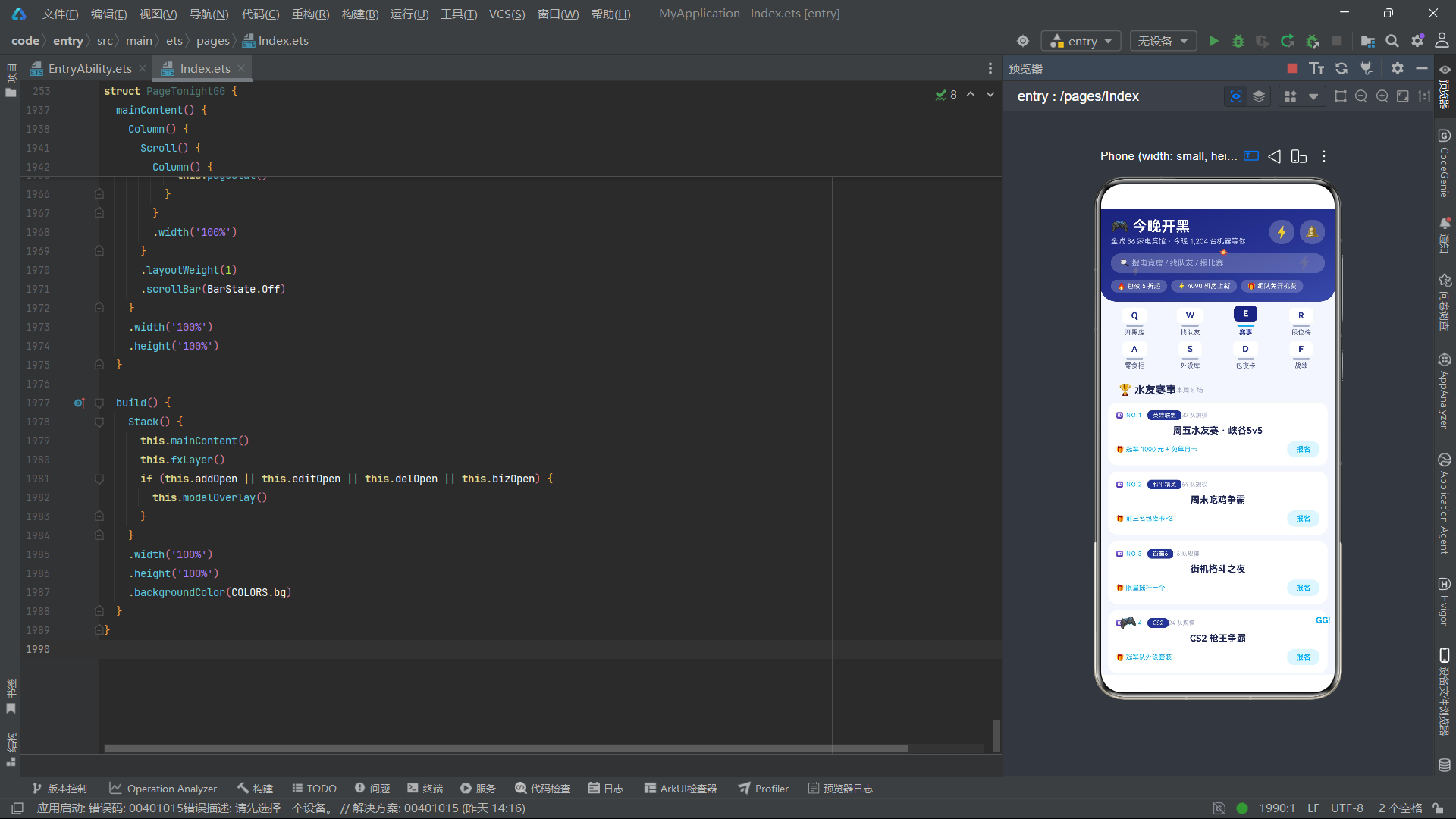
ROOM_LIST预置了12条电竞房数据,覆盖五连坐、双排、包场、吃鸡房、PS5主机房、静音自习位、水冷顶配、街机房、Switch派对房、VR舱、通宵包夜房、主播直播房等多种房型,满足从单人到团建的全场景需求。MATE_LIST预置了10位队友数据,段位从黄金到最强王者,角色覆盖上单、打野、中单、ADC、辅助等全部位置,onlines字段记录今晚同段位在线万人数据用于社交推荐。MATCH_LIST预置了8场水友赛事数据,游戏覆盖英雄联盟、和平精英、街霸6、CS2、金铲铲、马里奥派对、王者荣耀、红警2等多品类,奖励从现金到包夜卡到外设套装。辅助函数statBar将每日游戏时长映射为柱状图高度(n*9+10),用于战绩页面的可视化展示。
二、组件状态管理与生命周期
2.1 @State状态变量声明体系
@Entry
@Component
struct PageTonightGG {
  @State currentTab: number = 0;
  @State bottomTab: number = 0;
  @State roomList: RoomItem[] = ROOM_LIST;
  @State mateList: MateItem[] = MATE_LIST;
  @State matchList: MatchItem[] = MATCH_LIST;
  @State snackList: SnackItem[] = SNACK_LIST;
  @State gearList: GearItem[] = GEAR_LIST;
  @State cardList: CardItem[] = CARD_LIST;
  @State addOpen: boolean = false;
  @State editOpen: boolean = false;
  @State delOpen: boolean = false;
  @State bizOpen: boolean = false;
  @State addRoom: number = 0;
  @State addHour: number = 5;
  @State editRole: number = 1;
  @State editMic: number = 1;
  @State delIndex: number = 0;
  @State bizGame: number = 0;
  @State bizNum: number = 5;
  @State fxTick: number = 0;
  private timer: number = -1;
PageTonightGG组件声明了七个列表型@State变量(roomList到cardList),分别引用外部const数组作为初始值。四个布尔弹框状态变量控制四种弹框显隐。addRoom存储开房弹框中选中的房型索引,addHour存储时长(默认5小时),editRole存储档案编辑弹框中的位置索引(默认1即打野),editMic用0/1标记麦克风开关,bizGame存储报名弹框中选中的赛事索引,bizNum存储队伍人数(默认5人)。fxTick是特效驱动核心变量。private timer存储定时器ID。每个@State变量在变更时自动触发引用该变量的UI区域重渲染——例如修改addHour从5到6时,弹框中显示时长和合计金额的Text组件会重渲染,其他UI不受影响,实现了精准的局部更新。
2.2 生命周期定时器与业务操作方法
  aboutToAppear(): void {
    this.timer = setInterval(() => {
      this.fxTick += 1;
    }, 100);
  }

  aboutToDisappear(): void {
    if (this.timer >= 0) {
      clearInterval(this.timer);
    }
  }

  doAdd(): void {
    this.roomList.unshift(new RoomItem(996,
      ADD_ROOMS[this.addRoom] + ' · 新预订', '🖥️', '0.5km',
      (this.addRoom + 2) * 18, this.addHour,
      this.addRoom + 1, 1));
    this.addOpen = false;
  }

  doDel(): void {
    if (this.delIndex >= 0 && this.delIndex < this.roomList.length) {
      this.roomList.splice(this.delIndex, 1);
    }
    this.delOpen = false;
  }

  doBiz(): void {
    if (this.matchList.length > 0) {
      this.matchList[0].joined = 1;
      this.matchList.splice(0, 1, this.matchList[0]);
    }
    this.bizOpen = false;
  }

  doChangeMate(): void {
    if (this.mateList.length > 2) {
      this.mateList.unshift(this.mateList[this.mateList.length - 1]);
      this.mateList.splice(this.mateList.length - 1, 1);
    }
  }
定时器以100毫秒间隔递增fxTick,驱动闪电闪烁、手柄脉动和GG弹跳特效。选择100毫秒而非更短的间隔,是考虑到电竞场景的特效需要快速但不刺眼——100毫秒的频率既能产生明显的闪烁感,又避免了高频更新带来的渲染开销。doAdd方法在提交开房订单时,根据选中的房型和时长计算价格((addRoom+2)*18),通过unshift将新预订插入列表头部。doDel方法从roomList中删除指定索引的预订项。doBiz方法将matchList首项的joined属性设为1表示已报名。doChangeMate方法通过将队友列表末尾元素移至头部实现"换一批"轮换效果。这些业务方法的共同模式是修改属性→splice替换→关闭弹框,这是ArkTS中处理列表数据变更的标准操作序列。
三、特效层与头部导航系统
3.1 fxLayer特效构建器
  @Builder
  fxLayer() {
    Column() {
      Text('⚡')
        .fontSize(20)
        .fontColor(COLORS.accent)
        .opacity(this.fxTick % 2 === 0 ? 1 : 0.1)
        .position({ x: 300, y: 70 })
      Text('⚡')
        .fontSize(13)
        .fontColor(COLORS.gold)
        .opacity(this.fxTick % 3 === 0 ? 1 : 0.15)
        .position({ x: 46, y: 88 })
      Text('🎮')
        .fontSize(22)
        .rotate({ angle: (this.fxTick % 6) * 10 - 25,
          centerX: '50%', centerY: '50%' })
        .scale({ x: this.fxTick % 2 === 0 ? 1.12 : 0.94,
          y: this.fxTick % 2 === 0 ? 1.12 : 0.94 })
        .position({ x: 28, y: 620 })
      Text('GG!')
        .fontSize(13)
        .fontWeight(FontWeight.Bold)
        .fontColor(COLORS.accent)
        .opacity(this.fxTick % 2 === 1 ? 1 : 0.2)
        .translate({ y: this.fxTick % 4 < 2 ? 0 : -8 })
        .position({ x: 330, y: 630 })
      Text('💥')
        .fontSize(14)
        .scale({ x: this.fxTick % 3 === 0 ? 1.3 : 0.85,
          y: this.fxTick % 3 === 0 ? 1.3 : 0.85 })
        .position({ x: 180, y: 58 })
    }
    .width('100%')
    .height('100%')
    .hitTestBehavior(HitTestMode.None)
    .position({ x: 0, y: 0 })
  }
fxLayer实现了五种电竞场景特效元素。两个闪电⚡通过不同周期的opacity闪烁模拟电流效果——第一个闪电用accent电光青色、2周期在1和0.1之间交替产生快速闪烁感;第二个闪电用gold金色、3周期在1和0.15之间交替产生慢速闪烁感,两个闪电的非同步闪烁产生了雷电交加的视觉效果。手柄🎮通过rotate实现摆动(6周期从-25度到25度),配合scale的2周期交替缩放(1.12和0.94),模拟手柄在玩家手中握持时的脉动感。"GG!"文字用accent电光青色,2周期反相闪烁(fxTick%2===1时为1),配合translate的4周期上下位移(0和-8),实现了"GG弹跳"效果——模拟游戏结束时的GG字幕弹出。爆炸💥通过scale的3周期交替(1.3和0.85)实现爆裂脉动。整个特效层设置HitTestBehavior(HitTestMode.None)不拦截触摸事件,绝对定位铺满全屏。
3.2 header头部构建器
  @Builder
  header() {
    Column() {
      Row() {
        Column() {
          Text('🎮 今晚开黑')
            .fontSize(22)
            .fontWeight(FontWeight.Bold)
            .fontColor(COLORS.white)
          Text('全城 86 家电竞馆 · 今晚 1,204 台机器等你')
            .fontSize(11)
            .fontColor('#C5CAE9')
            .margin({ top: 3 })
        }
        .alignItems(HorizontalAlign.Start)

        Row() {
          Text('⚡')
            .fontSize(18)
            .padding(8)
            .backgroundColor('#33FFFFFF')
            .borderRadius(18)
            .onClick(() => {
              this.addOpen = true;
            })
          Text('🔔')
            .fontSize(18)
            .padding(8)
            .backgroundColor('#33FFFFFF')
            .borderRadius(18)
            .margin({ left: 8 })
        }
      }
      .width('100%')
      .justifyContent(FlexAlign.SpaceBetween)
      .padding({ left: 16, right: 16, top: 14 })

      Row() {
        Text('🔍 搜电竞房 / 找队友 / 报比赛')
          .fontSize(12)
          .fontColor('#A9B2D6')
          .padding({ left: 14, right: 14, top: 8, bottom: 8 })
          .backgroundColor('#33FFFFFF')
          .borderRadius(18)
          .layoutWeight(1)
      }
      .width('100%')
      .padding({ left: 16, right: 16, top: 12 })

      Row() {
        Text('🔥 包夜 5 折起')
          .fontSize(10)
          .fontColor(COLORS.white)
          .padding({ left: 10, right: 10, top: 4, bottom: 4 })
          .backgroundColor('#33FFFFFF')
          .borderRadius(12)
        Text('⚡ 4090 机房上新')
          .fontSize(10)
          .fontColor(COLORS.white)
          .padding({ left: 10, right: 10, top: 4, bottom: 4 })
          .backgroundColor('#33FFFFFF')
          .borderRadius(12)
          .margin({ left: 6 })
        Text('🎁 组队免开机费')
          .fontSize(10)
          .fontColor(COLORS.white)
          .padding({ left: 10, right: 10, top: 4, bottom: 4 })
          .backgroundColor('#33FFFFFF')
          .borderRadius(12)
          .margin({ left: 6 })
      }
      .width('100%')
      .padding({ left: 16, right: 16, top: 10 })
    }
    .width('100%')
    .linearGradient({
      angle: 160,
      colors: [['#1A237E', 0], ['#283593', 0.6], ['#3949AB', 1]]
    })
    .borderRadius({ bottomLeft: 24, bottomRight: 24 })
    .padding({ bottom: 14 })
  }
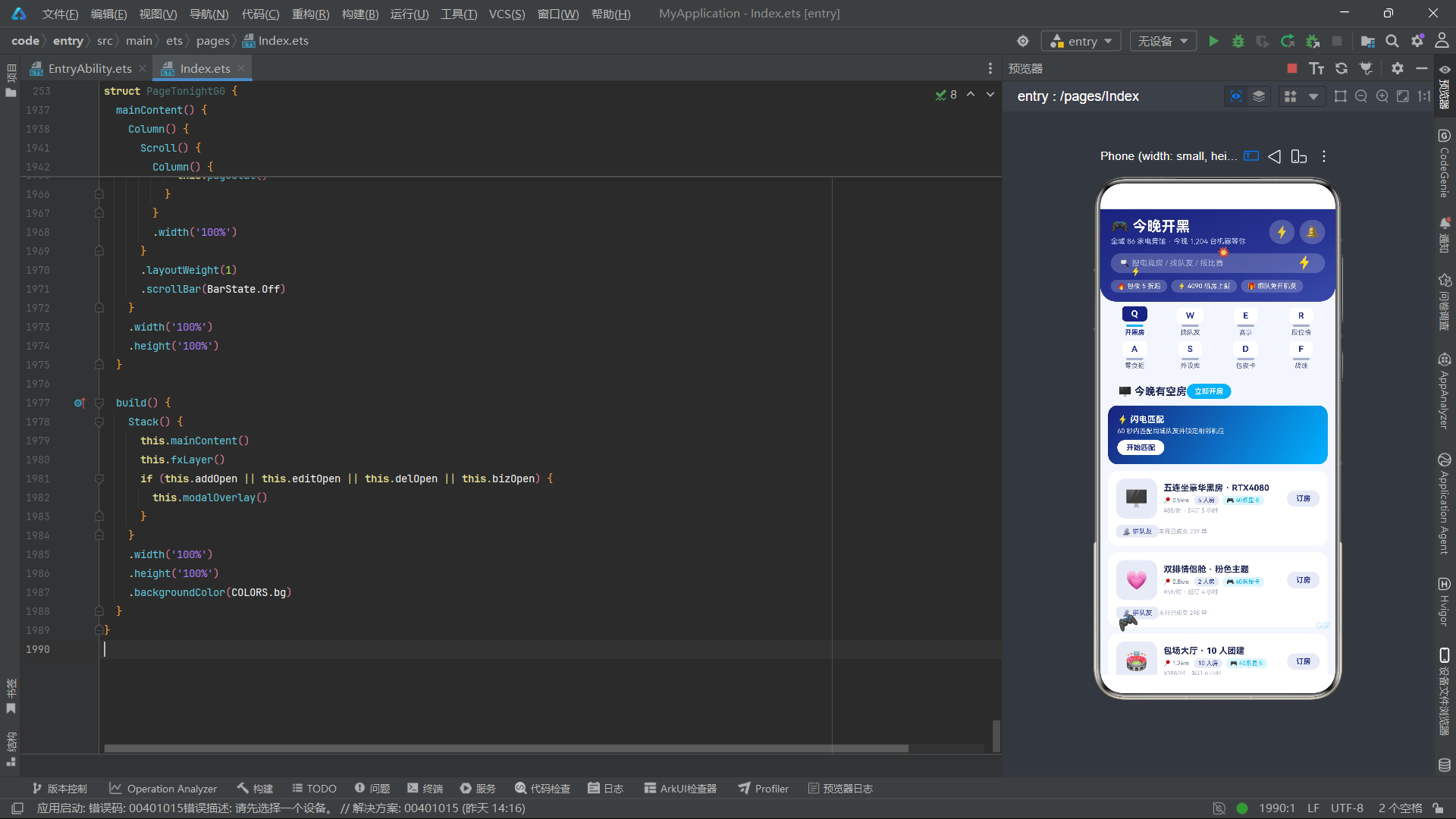
header构建器以linearGradient渐变背景呈现,从#1A237E(最深靛蓝)过渡到#3949AB(浅靛蓝),160度方向营造由深到浅的层次。顶部Row左侧展示应用名"🎮今晚开黑"和运营数据"全城86家电竞馆·今晚1,204台机器等你",右侧放置闪电按钮⚡(点击触发开房弹框)和通知铃铛🔔。搜索框以半透明白色#33FFFFFF叠加渐变背景,提示文案"搜电竞房/找队友/报比赛"涵盖三大核心功能。底部促销标签行展示"🔥包夜5折起"“⚡4090机房上新”"🎁组队免开机费"三个运营信息。底部圆角24实现与内容区的柔和过渡。
3.3 keyTab机械键帽式Tab与subNav
  @Builder
  keyTab(name: string, kchar: string, idx: number) {
    Column() {
      Column() {
        Text(kchar)
          .fontSize(13)
          .fontWeight(FontWeight.Bold)
          .fontColor(idx === this.currentTab ?
            COLORS.white : COLORS.primary)
          .padding({ left: 14, right: 14, top: 4, bottom: 4 })
          .backgroundColor(idx === this.currentTab ?
            COLORS.primaryDark : COLORS.cardBg)
          .borderRadius(6)
      }
      .offset({ y: idx === this.currentTab ? -3 : 0 })

      Row()
        .width(26)
        .height(3)
        .backgroundColor(idx === this.currentTab ?
          COLORS.accent : COLORS.textHint)
        .borderRadius(2)
        .margin({ top: 2 })

      Text(name)
        .fontSize(10)
        .fontWeight(idx === this.currentTab ?
          FontWeight.Bold : FontWeight.Normal)
        .fontColor(idx === this.currentTab ?
          COLORS.primary : COLORS.textSecondary)
        .margin({ top: 3 })
    }
    .layoutWeight(1)
    .alignItems(HorizontalAlign.Center)
    .onClick(() => {
      this.currentTab = idx;
    })
  }

  @Builder
  subNav() {
    Column() {
      Row() {
        this.keyTab('开黑房', 'Q', 0)
        this.keyTab('找队友', 'W', 1)
        this.keyTab('赛事', 'E', 2)
        this.keyTab('段位榜', 'R', 3)
      }
      .width('100%')

      Row() {
        this.keyTab('零食柜', 'A', 4)
        this.keyTab('外设库', 'S', 5)
        this.keyTab('包夜卡', 'D', 6)
        this.keyTab('战绩', 'F', 7)
      }
      .width('100%')
      .margin({ top: 8 })
    }
    .width('100%')
    .padding({ left: 10, right: 10, top: 10, bottom: 10 })
    .backgroundColor(COLORS.bg)
  }
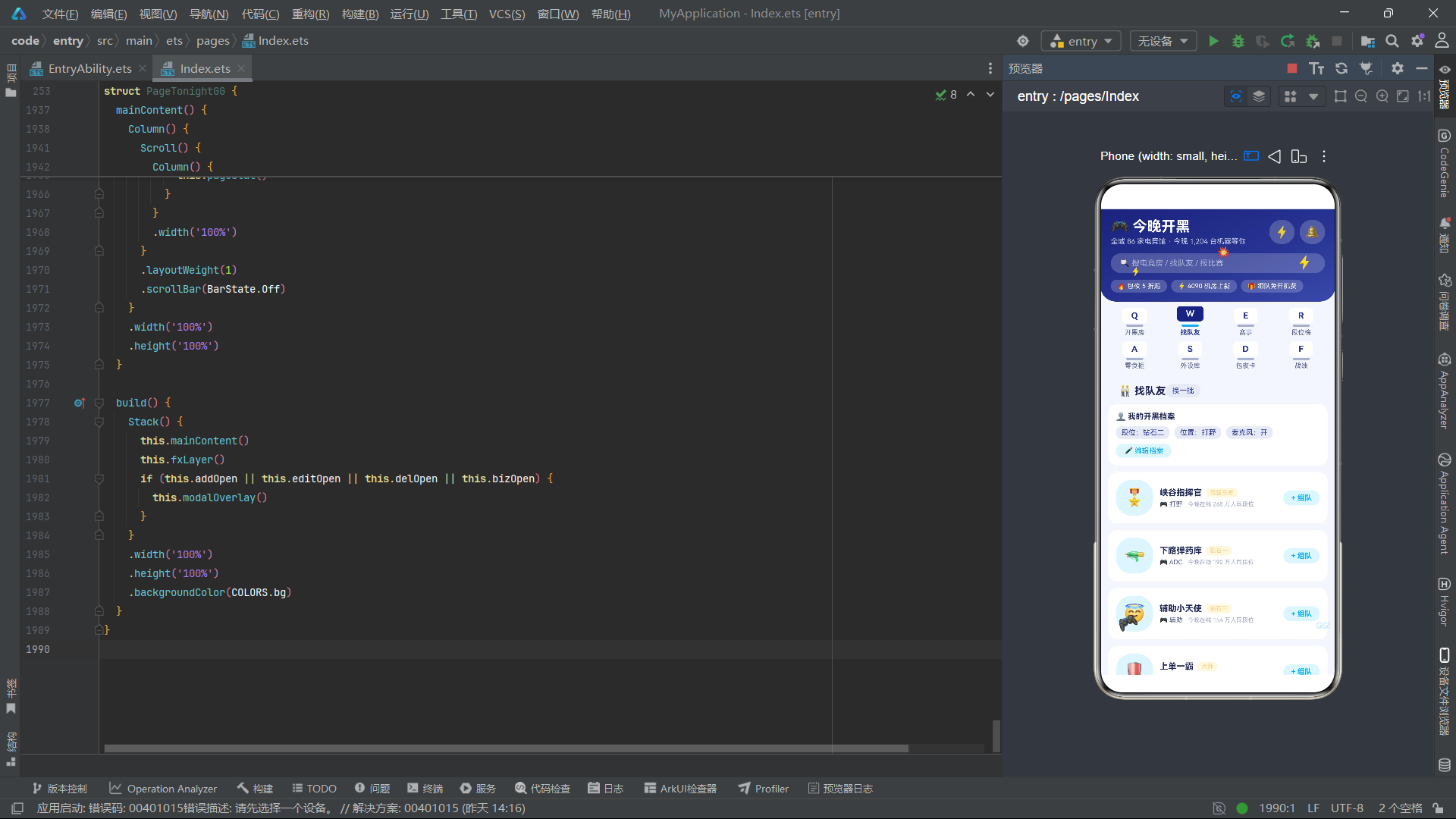
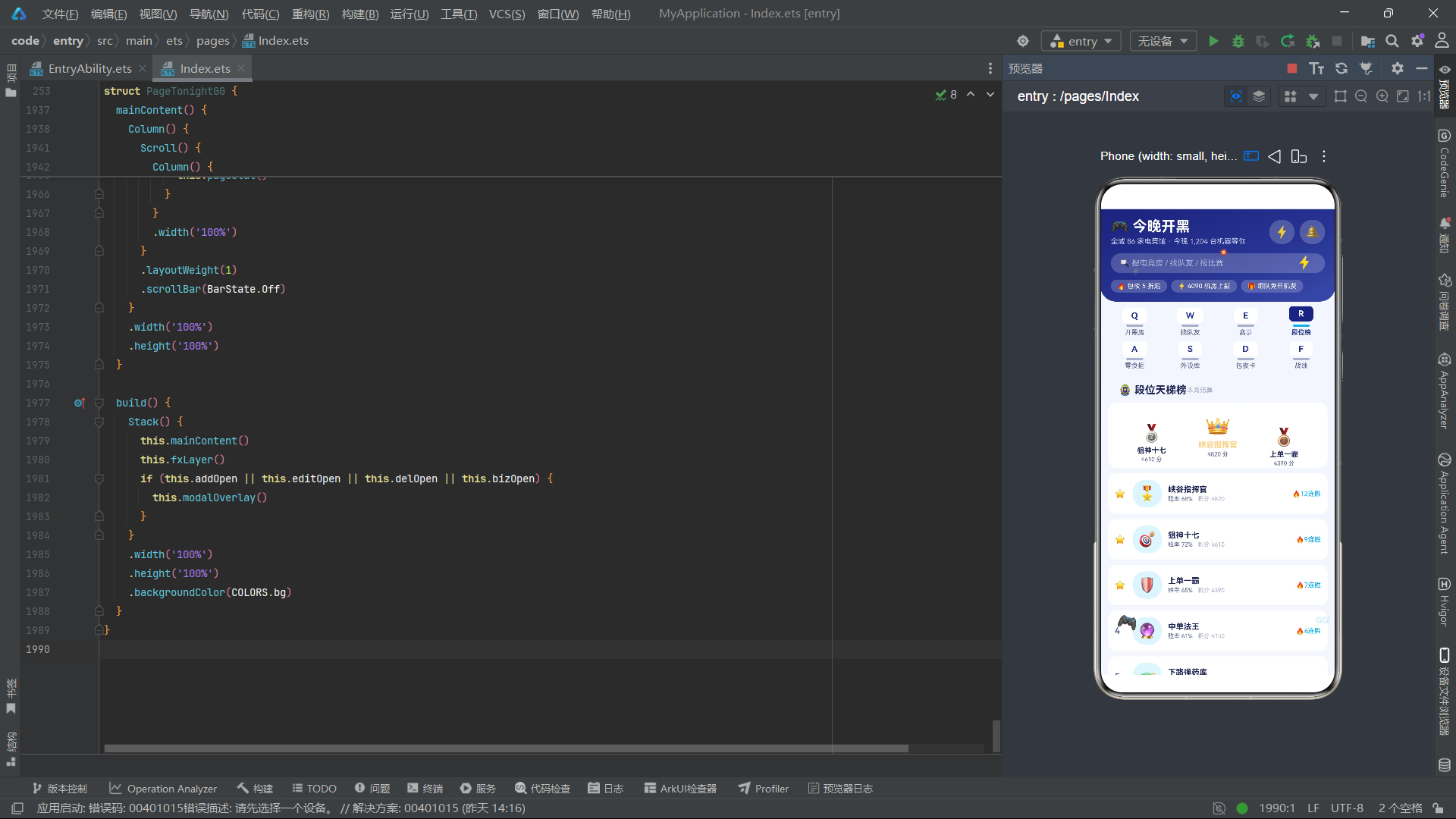
keyTab构建器是「今晚开黑」最具辨识度的UI组件——机械键帽式Tab设计。每个Tab由顶部的键帽字符(Q/W/E/R/A/S/D/F,对应机械键盘第一二排的按键排布)、键轴厚度条和底部的功能名称组成。键帽字符用Text组件展示,选中态为primaryDark深色底白字且通过offset向上偏移3px模拟键帽按下上浮效果,未选中态为cardBg白色底primary色字。键帽下方的Row模拟键轴厚度条,选中态为accent电光青色,未选中态为textHint灰色。subNav以4+4双排布局排列八个键帽Tab——第一排Q开黑房、W找队友、E赛事、R段位榜,第二排A零食柜、S外设库、D包夜卡、F战绩。这种机械键帽式设计将电竞外设的物理元素融入数字界面,使得应用的视觉语言与电竞文化高度统一。
四、内容页面构建器群
4.1 pageRoom开黑房页面
  @Builder
  pageRoom() {
    Column() {
      Row() {
        Text('🖥️ 今晚有空房')
          .fontSize(16)
          .fontWeight(FontWeight.Bold)
          .fontColor(COLORS.textPrimary)
        Text('立即开房')
          .fontSize(11)
          .fontWeight(FontWeight.Bold)
          .fontColor(COLORS.white)
          .padding({ left: 12, right: 12, top: 5, bottom: 5 })
          .backgroundColor(COLORS.accent)
          .borderRadius(12)
          .margin({ left: 'auto' })
          .onClick(() => {
            this.addOpen = true;
          })
      }
      .width('100%')
      .padding({ left: 16, right: 16, top: 12 })

      Column() {
        Text('⚡ 闪电匹配')
          .fontSize(13)
          .fontWeight(FontWeight.Bold)
          .fontColor(COLORS.white)
        Text('60 秒内匹配同城队友并锁定相邻机位')
          .fontSize(10)
          .fontColor('#E8EAF6')
          .margin({ top: 4 })
        Text('开始匹配')
          .fontSize(11)
          .fontWeight(FontWeight.Bold)
          .fontColor(COLORS.primaryDark)
          .padding({ left: 14, right: 14, top: 5, bottom: 5 })
          .backgroundColor(COLORS.white)
          .borderRadius(12)
          .margin({ top: 8 })
          .onClick(() => {
            this.currentTab = 1;
          })
      }
      .width('100%')
      .padding(14)
      .alignItems(HorizontalAlign.Start)
      .linearGradient({
        angle: 120,
        colors: [['#1A237E', 0], ['#00B0FF', 1]]
      })
      .borderRadius(14)
      .margin({ top: 10 })
pageRoom页面顶部标题行右侧"立即开房"按钮(accent青底白字)触发addOpen弹框。闪电匹配卡片使用linearGradient从primaryDark靛蓝到accent电光青的120度渐变背景,展示"60秒内匹配同城队友并锁定相邻机位"的核心功能说明,"开始匹配"按钮点击后切换到Tab1找队友页面。这种渐变卡片设计在电竞应用中极具视觉冲击力,靛蓝到青色的过渡模拟了电流从暗到亮的能量流动效果。
      ForEach(this.roomList, (r: RoomItem, ri: number) => {
        Column() {
          Row() {
            Text(r.icon)
              .fontSize(28)
              .padding(14)
              .backgroundColor(COLORS.primaryLight)
              .borderRadius(14)
            Column() {
              Text(r.name)
                .fontSize(13)
                .fontWeight(FontWeight.Bold)
                .fontColor(COLORS.textPrimary)
                .maxLines(1)
              Row() {
                Text('📍 ' + r.dist)
                  .fontSize(9)
                  .fontColor(COLORS.textSecondary)
                Text(r.pcs.toString() + ' 人房')
                  .fontSize(9)
                  .fontColor(COLORS.primary)
                  .padding({ left: 6, right: 6, top: 2, bottom: 2 })
                  .backgroundColor(COLORS.primaryLight)
                  .borderRadius(6)
                  .margin({ left: 8 })
                Text('🎮 40系显卡')
                  .fontSize(9)
                  .fontColor(COLORS.accent)
                  .padding({ left: 6, right: 6, top: 2, bottom: 2 })
                  .backgroundColor(COLORS.accentLight)
                  .borderRadius(6)
                  .margin({ left: 6 })
              }
              .margin({ top: 4 })
              Text('¥' + r.price.toString() + '/时 · 起订 ' +
                r.hour.toString() + ' 小时')
                .fontSize(9)
                .fontColor(COLORS.textHint)
                .margin({ top: 3 })
            }
            .alignItems(HorizontalAlign.Start)
            .layoutWeight(1)
            .margin({ left: 10 })

            Text(r.booked === 1 ? '已锁定' : '订房')
              .fontSize(11)
              .fontWeight(FontWeight.Bold)
              .fontColor(r.booked === 1 ? COLORS.white : COLORS.primary)
              .padding({ left: 14, right: 14, top: 6, bottom: 6 })
              .backgroundColor(r.booked === 1 ?
                COLORS.primaryDark : COLORS.primaryLight)
              .borderRadius(12)
              .onClick(() => {
                r.booked = r.booked === 1 ? 0 : 1;
                this.roomList.splice(ri, 1, r);
              })
          }
          .width('100%')

          Row() {
            Text(r.booked === 1 ? '❌ 取消预订' : '👥 拼队友')
              .fontSize(10)
              .fontColor(r.booked === 1 ? COLORS.danger : COLORS.primary)
              .padding({ left: 10, right: 10, top: 4, bottom: 4 })
              .backgroundColor(r.booked === 1 ?
                '#FFEBEE' : COLORS.primaryLight)
              .borderRadius(8)
              .onClick(() => {
                if (r.booked === 1) {
                  this.delIndex = ri;
                  this.delOpen = true;
                } else {
                  this.currentTab = 1;
                }
              })
            Text('本月已成交 ' + (r.id * 89 + 120).toString() + ' 单')
              .fontSize(9)
              .fontColor(COLORS.textHint)
              .margin({ left: 'auto' })
          }
          .width('100%')
          .margin({ top: 10 })
        }
        .width('100%')
        .padding(12)
        .backgroundColor(COLORS.cardBg)
        .borderRadius(14)
        .margin({ top: 10 })
      }, (r: RoomItem) => 'rm' + r.id.toString() + '_' + r.booked.toString())
电竞房卡片是pageRoom的核心列表项。左侧emoji图标以28号字体配合primaryLight背景圆角展示房型形象。中间信息区展示房型名称、距离标签、房位人数标签(primary色primaryLight底)、显卡配置标签(accent色accentLight底)和价格信息。右侧"订房"按钮通过booked属性的0/1切换——未订房为primaryLight底primary色文字"订房",已订房为primaryDark底白字"已锁定"。卡片底部操作行根据booked状态展示不同功能——已订房时显示"❌取消预订"(danger红色#FFEBEE底)触发delOpen弹框,未订房时显示"👥拼队友"切换到Tab1找队友页面。右侧"本月已成交X单"通过id*89+120计算模拟成交量数据,增强信任感。ForEach键值拼接了id和booked,确保预订状态变化时正确触发diff更新。
4.2 pageMate找队友页面
      Column() {
        Text('👤 我的开黑档案')
          .fontSize(12)
          .fontWeight(FontWeight.Bold)
          .fontColor(COLORS.textPrimary)
        Row() {
          Text('段位:钻石二')
            .fontSize(11)
            .fontColor(COLORS.primary)
            .padding({ left: 8, right: 8, top: 3, bottom: 3 })
            .backgroundColor(COLORS.primaryLight)
            .borderRadius(8)
          Text('位置:' + EDIT_ROLES[this.editRole])
            .fontSize(11)
            .fontColor(COLORS.primary)
            .padding({ left: 8, right: 8, top: 3, bottom: 3 })
            .backgroundColor(COLORS.primaryLight)
            .borderRadius(8)
            .margin({ left: 8 })
          Text('麦克风:' + (this.editMic === 1 ? '开' : '关'))
            .fontSize(11)
            .fontColor(COLORS.primary)
            .padding({ left: 8, right: 8, top: 3, bottom: 3 })
            .backgroundColor(COLORS.primaryLight)
            .borderRadius(8)
            .margin({ left: 8 })
        }
        .margin({ top: 8 })
        Text('✏️ 编辑档案')
          .fontSize(11)
          .fontColor(COLORS.accent)
          .padding({ left: 12, right: 12, top: 4, bottom: 4 })
          .backgroundColor(COLORS.accentLight)
          .borderRadius(10)
          .margin({ top: 8 })
          .onClick(() => {
            this.editOpen = true;
          })
      }
      .width('100%')
      .padding(12)
      .alignItems(HorizontalAlign.Start)
      .backgroundColor(COLORS.cardBg)
      .borderRadius(14)
      .margin({ top: 10 })
pageMate页面顶部是"我的开黑档案"卡片,展示当前用户的段位(钻石二)、常玩位置(通过EDIT_ROLES数组映射)和麦克风状态。这三个字段在弹框modalBodyEdit中可编辑。档案卡片的设计理念是让用户在匹配队友前先完善自己的信息——段位和位置是队友匹配的核心维度,麦克风状态影响语音沟通能力。下方队友列表ForEach展示每位队友的头像、昵称、段位标签(gold金色#FFF8E1底)、角色和今晚同段位在线人数。“+组队"按钮通过followed属性的0/1切换实现组队状态管理,选中态为primaryDark底白字"已组队”,未选中态为accentLight底accent色字"+组队"。
4.3 pageRank段位天梯榜与pageStat战绩
  @Builder
  pageRank() {
    Column() {
      Row() {
        Text('🏅 段位天梯榜')
          .fontSize(16)
          .fontWeight(FontWeight.Bold)
          .fontColor(COLORS.textPrimary)
        Text('本周结算')
          .fontSize(10)
          .fontColor(COLORS.textHint)
          .margin({ left: 'auto' })
      }
      .width('100%')
      .padding({ left: 16, right: 16, top: 12 })

      Row() {
        Column() {
          Text('🥈')
            .fontSize(26)
          Text(this.rankList2Name(1))
            .fontSize(11)
            .fontWeight(FontWeight.Bold)
            .fontColor(COLORS.textPrimary)
            .margin({ top: 4 })
          Text(this.rankList2Score(1))
            .fontSize(9)
            .fontColor(COLORS.textSecondary)
            .margin({ top: 2 })
        }
        .layoutWeight(1)
        .alignItems(HorizontalAlign.Center)
        .offset({ y: 12 })

        Column() {
          Text('👑')
            .fontSize(32)
          Text(this.rankList2Name(0))
            .fontSize(12)
            .fontWeight(FontWeight.Bold)
            .fontColor(COLORS.gold)
            .margin({ top: 4 })
          Text(this.rankList2Score(0))
            .fontSize(9)
            .fontColor(COLORS.textSecondary)
            .margin({ top: 2 })
        }
        .layoutWeight(1)
        .alignItems(HorizontalAlign.Center)

        Column() {
          Text('🥉')
            .fontSize(26)
          Text(this.rankList2Name(2))
            .fontSize(11)
            .fontWeight(FontWeight.Bold)
            .fontColor(COLORS.textPrimary)
            .margin({ top: 4 })
          Text(this.rankList2Score(2))
            .fontSize(9)
            .fontColor(COLORS.textSecondary)
            .margin({ top: 2 })
        }
        .layoutWeight(1)
        .alignItems(HorizontalAlign.Center)
        .offset({ y: 18 })
      }
      .width('100%')
      .padding(16)
      .backgroundColor(COLORS.cardBg)
      .borderRadius(14)
      .margin({ top: 10 })
pageRank段位天梯榜页面顶部是领奖台式的三甲展示——中间👑冠军用32号字体和gold金色名称居中展示且位置最高,左右🥈亚军和🥉季军用26号字体分别通过offset向下偏移12px和18px模拟领奖台的高度差。这种通过offset实现的高度差设计是排行榜视觉的常见手法,比真实的阶梯背景图更轻量且自适应。下方完整排行列表ForEach展示排名序号(前三名用⭐标识)、头像、昵称、胜率和积分、连胜标签。rankList2Name和rankList2Score两个辅助方法通过索引安全地访问RANK_LIST数据,当索引越界时返回"虚位以待"和"0分",保证了数据不足时的优雅降级。
五、弹框系统与底部导航
5.1 modalBodyAdd开黑房弹框
  @Builder
  modalBodyAdd() {
    Column() {
      Column() {
        Text('ROOM ORDER · 开房单')
          .fontSize(9)
          .letterSpacing(2)
          .fontColor(COLORS.accent)
        Text('🖥️ 订开黑房')
          .fontSize(13)
          .fontWeight(FontWeight.Bold)
          .fontColor(COLORS.textPrimary)
          .margin({ top: 4 })
        Text('今晚 86 家门店有机位 · 免开机费')
          .fontSize(10)
          .fontColor(COLORS.textSecondary)
          .margin({ top: 3 })
      }
      .width('100%')
      .padding(12)
      .backgroundColor(COLORS.accentLight)
      .borderRadius(12)

      Column() {
        Text('房型选择')
          .fontSize(12)
          .fontWeight(FontWeight.Bold)
          .fontColor(COLORS.textPrimary)
        Row() {
          ForEach(ADD_ROOMS, (ar: string, ai: number) => {
            Text(ar)
              .fontSize(11)
              .fontColor(this.addRoom === ai ?
                COLORS.white : COLORS.textSecondary)
              .padding({ left: 10, right: 10, top: 6, bottom: 6 })
              .backgroundColor(this.addRoom === ai ?
                COLORS.primary : COLORS.bg)
              .borderRadius(10)
              .margin({ right: 6 })
              .onClick(() => {
                this.addRoom = ai;
              })
          }, (ar: string) => 'ar' + ar)
        }
        .margin({ top: 8 })
      }
      .width('100%')
      .alignItems(HorizontalAlign.Start)
      .margin({ top: 14 })

      Column() {
        Text('时长(小时)')
          .fontSize(12)
          .fontWeight(FontWeight.Bold)
          .fontColor(COLORS.textPrimary)
        Row() {
          Text('-')
            .fontSize(16)
            .fontColor(COLORS.textSecondary)
            .padding({ left: 16, right: 16, top: 6, bottom: 6 })
            .backgroundColor(COLORS.bg)
            .borderRadius(10)
            .onClick(() => {
              this.decHour();
            })
          Text(this.addHour.toString() + ' 小时')
            .fontSize(16)
            .fontWeight(FontWeight.Bold)
            .fontColor(COLORS.primary)
            .padding({ left: 20, right: 20 })
          Text('+')
            .fontSize(16)
            .fontColor(COLORS.textSecondary)
            .padding({ left: 16, right: 16, top: 6, bottom: 6 })
            .backgroundColor(COLORS.bg)
            .borderRadius(10)
            .onClick(() => {
              this.incHour();
            })
        }
        .margin({ top: 8 })
      }
      .width('100%')
      .alignItems(HorizontalAlign.Start)
      .margin({ top: 14 })

      Row() {
        Text('含外设全套 + 每人一杯快乐水')
          .fontSize(10)
          .fontColor(COLORS.textSecondary)
        Text('合计 ¥' + ((this.addRoom + 2) * 18 *
          this.addHour).toString())
          .fontSize(13)
          .fontWeight(FontWeight.Bold)
          .fontColor(COLORS.accent)
          .margin({ left: 'auto' })
      }
      .width('100%')
      .padding(10)
      .backgroundColor(COLORS.primaryLight)
      .borderRadius(10)
      .margin({ top: 14 })
ROOM ORDER弹框头部以accentLight浅青底展示弹框代号"ROOM ORDER"(letterSpacing(2)增加字间距)、功能标题"🖥️订开黑房"和引导文案"今晚86家门店有机位·免开机费"。房型选择区通过ForEach遍历ADD_ROOMS数组(五连坐/双排舱/包场/通宵房),选中态为primary深色底白字,未选中态为bg背景底次要色字。时长选择器采用"-数值+"三段式步进器,decHour和incHour方法在2到12之间调整时长。合计金额实时计算((addRoom+2)18addHour)并展示在primaryLight底的提示行中,"含外设全套+每人一杯快乐水"作为增值服务说明。底部"取消"和"锁定机位"按钮分别控制弹框关闭和提交逻辑。
5.2 modalBodyDel取消预订蓝青警示卡
  @Builder
  modalBodyDel() {
    Column() {
      Column() {
        Text('⚠️ CANCEL ORDER · 取消预订')
          .fontSize(9)
          .letterSpacing(2)
          .fontColor(COLORS.accent)
        Text('确认取消这台机器的预订吗?')
          .fontSize(14)
          .fontWeight(FontWeight.Bold)
          .fontColor(COLORS.textPrimary)
          .margin({ top: 6 })
      }
      .width('100%')
      .padding(14)
      .backgroundColor(COLORS.primaryDark)
      .borderRadius(12)

      Row() {
        Column() {
          Text('3')
            .fontSize(20)
            .fontWeight(FontWeight.Bold)
            .fontColor(COLORS.accent)
          Text('队友将收到提醒')
            .fontSize(9)
            .fontColor(COLORS.textSecondary)
            .margin({ top: 3 })
        }
        .layoutWeight(1)
        .alignItems(HorizontalAlign.Center)

        Column() {
          Text('2min')
            .fontSize(20)
            .fontWeight(FontWeight.Bold)
            .fontColor(COLORS.accent)
          Text('免费取消倒计时')
            .fontSize(9)
            .fontColor(COLORS.textSecondary)
            .margin({ top: 3 })
        }
        .layoutWeight(1)
        .alignItems(HorizontalAlign.Center)

        Column() {
          Text('0')
            .fontSize(20)
            .fontWeight(FontWeight.Bold)
            .fontColor(COLORS.success)
          Text('超时后扣费')
            .fontSize(9)
            .fontColor(COLORS.textSecondary)
            .margin({ top: 3 })
        }
        .layoutWeight(1)
        .alignItems(HorizontalAlign.Center)
      }
      .width('100%')
      .padding(12)
      .backgroundColor(COLORS.cardBg)
      .borderRadius(12)
      .margin({ top: 14 })

      Text('2 分钟内取消全额退款,超时将收取首小时 30% 房费,已组队队友会同步收到解散通知。')
        .fontSize(10)
        .fontColor(COLORS.textSecondary)
        .margin({ top: 12 })
取消预订弹框CANCEL ORDER采用了蓝青警示卡的设计语言——与麻将项目的红绿警示卡和球鞋项目的黑橙警示卡不同,这里使用primaryDark深靛蓝头部背景配合accent电光青标签,传递出电竞主题的警示语义。三列数据卡片展示取消操作的影响:左列"3位队友将收到提醒"用accent青色强调社交影响,中列"2min免费取消倒计时"用accent青色强调时间紧迫性,右列"0超时后扣费"用success绿色表示当前不扣费。这种蓝青对比的警示设计在电竞场景中具有很高的语义契合度——靛蓝代表虚拟空间的严肃感,电光青代表即时性的紧迫感。底部说明文案详细解释了取消规则——“2分钟内全额退款”“超时收取首小时30%房费”“已组队队友收到解散通知”,通过透明的规则说明降低取消操作的决策摩擦。
5.3 modalBodyBiz报名水友赛弹框
  @Builder
  modalBodyBiz() {
    Column() {
      Column() {
        Text('ENTRY FORM · 报名表')
          .fontSize(9)
          .letterSpacing(2)
          .fontColor(COLORS.accent)
        Text('🏆 报名水友赛')
          .fontSize(13)
          .fontWeight(FontWeight.Bold)
          .fontColor(COLORS.textPrimary)
          .margin({ top: 4 })
        Text('本周 8 场比赛 · 报名即送参赛皮肤')
          .fontSize(10)
          .fontColor(COLORS.textSecondary)
          .margin({ top: 3 })
      }
      .width('100%')
      .padding(12)
      .backgroundColor(COLORS.accentLight)
      .borderRadius(12)

      Column() {
        Text('参赛项目')
          .fontSize(12)
          .fontWeight(FontWeight.Bold)
          .fontColor(COLORS.textPrimary)
        Row() {
          ForEach(ENTRY_GAMES, (eg: string, ei: number) => {
            Text(eg)
              .fontSize(11)
              .fontColor(this.bizGame === ei ?
                COLORS.white : COLORS.textSecondary)
              .padding({ left: 12, right: 12, top: 6, bottom: 6 })
              .backgroundColor(this.bizGame === ei ?
                COLORS.primary : COLORS.bg)
              .borderRadius(10)
              .margin({ right: 8 })
              .onClick(() => {
                this.bizGame = ei;
              })
          }, (eg: string) => 'eg' + eg)
        }
        .margin({ top: 8 })
      }
      .width('100%')
      .alignItems(HorizontalAlign.Start)
      .margin({ top: 14 })

      Column() {
        Text('队伍人数(人)')
          .fontSize(12)
          .fontWeight(FontWeight.Bold)
          .fontColor(COLORS.textPrimary)
        Row() {
          Text('-')
            .fontSize(16)
            .fontColor(COLORS.textSecondary)
            .padding({ left: 16, right: 16, top: 6, bottom: 6 })
            .backgroundColor(COLORS.bg)
            .borderRadius(10)
            .onClick(() => {
              this.decNum();
            })
          Text(this.bizNum.toString() + ' 人')
            .fontSize(16)
            .fontWeight(FontWeight.Bold)
            .fontColor(COLORS.primary)
            .padding({ left: 20, right: 20 })
          Text('+')
            .fontSize(16)
            .fontColor(COLORS.textSecondary)
            .padding({ left: 16, right: 16, top: 6, bottom: 6 })
            .backgroundColor(COLORS.bg)
            .borderRadius(10)
            .onClick(() => {
              this.incNum();
            })
        }
        .margin({ top: 8 })
      }
      .width('100%')
      .alignItems(HorizontalAlign.Start)
      .margin({ top: 14 })
ENTRY FORM报名弹框头部以accentLight浅青底展示弹框代号"ENTRY FORM"、功能标题"🏆报名水友赛"和引导文案"本周8场比赛·报名即送参赛皮肤"。参赛项目选择区通过ForEach遍历ENTRY_GAMES数组(峡谷5v5/吃鸡争霸/云顶杯),选中态为primary深色底白字。队伍人数选择器在2到10之间调整。底部提示行展示"报名费¥0·需本店会员"和"奖励池¥3,200",通过零报名费和高奖励池的组合降低报名门槛。"确认报名"按钮调用doBiz方法将matchList首项的joined设为1,完成报名流程。
5.4 modalOverlay与bottomBar
  @Builder
  modalOverlay() {
    Stack({ alignContent: Alignment.Bottom }) {
      Column()
        .width('100%')
        .height('100%')
        .backgroundColor('#66000000')
        .onClick(() => {
          this.addOpen = false;
          this.editOpen = false;
          this.delOpen = false;
          this.bizOpen = false;
        })

      Column() {
        if (this.addOpen) {
          this.modalBodyAdd()
        }
        if (this.editOpen) {
          this.modalBodyEdit()
        }
        if (this.delOpen) {
          this.modalBodyDel()
        }
        if (this.bizOpen) {
          this.modalBodyBiz()
        }
      }
      .width('92%')
      .margin({ bottom: 20 })
    }
    .width('100%')
    .height('100%')
  }

  @Builder
  bottomBar() {
    Row() {
      Column() {
        Text('🖥️')
          .fontSize(20)
        Text('开黑房')
          .fontSize(10)
          .fontColor(this.bottomTab === 0 ?
            COLORS.primary : COLORS.textHint)
          .margin({ top: 2 })
      }
      .layoutWeight(1)
      .onClick(() => {
        this.bottomTab = 0;
        this.currentTab = 0;
      })
      // ... 其他Tab
      Column() {
        Column() {
          Text('➕')
            .fontSize(22)
            .fontWeight(FontWeight.Bold)
            .fontColor(COLORS.white)
        }
        .width(48)
        .height(48)
        .justifyContent(FlexAlign.Center)
        .backgroundColor(COLORS.accent)
        .borderRadius(24)
        .offset({ y: -14 })
        .onClick(() => {
          this.addOpen = true;
        })
      }
      .layoutWeight(1)
    }
    .width('100%')
    .padding({ top: 8, bottom: 8 })
    .backgroundColor(COLORS.cardBg)
    .borderRadius({ topLeft: 20, topRight: 20 })
  }
modalOverlay与bottomBar的架构与本项目群的其他应用一致——Stack底层半透明遮罩、顶层92%宽度弹框内容区、四个if条件判断弹框互斥渲染。bottomBar底部五Tab为开黑房、找队友、凸起加号、赛事、我的战绩,中间加号按钮使用accent电光青圆形背景向上偏移14px,点击触发addOpen弹框。底部导航与内容Tab的映射关系为:开黑房→Tab0、找队友→Tab1、赛事→Tab2、战绩→Tab7,实现了底部5Tab与内容8Tab的交叉导航。
六、build主架构与页面路由
  @Builder
  mainContent() {
    Column() {
      this.header()
      this.subNav()
      Scroll() {
        Column() {
          if (this.currentTab === 0) {
            this.pageRoom()
          }
          if (this.currentTab === 1) {
            this.pageMate()
          }
          if (this.currentTab === 2) {
            this.pageMatch()
          }
          if (this.currentTab === 3) {
            this.pageRank()
          }
          if (this.currentTab === 4) {
            this.pageSnack()
          }
          if (this.currentTab === 5) {
            this.pageGear()
          }
          if (this.currentTab === 6) {
            this.pageCard()
          }
          if (this.currentTab === 7) {
            this.pageStat()
          }
        }
        .width('100%')
      }
      .layoutWeight(1)
      .scrollBar(BarState.Off)
    }
    .width('100%')
    .height('100%')
  }

  build() {
    Stack() {
      this.mainContent()
      this.fxLayer()
      if (this.addOpen || this.editOpen || this.delOpen || this.bizOpen) {
        this.modalOverlay()
      }
    }
    .width('100%')
    .height('100%')
    .backgroundColor(COLORS.bg)
  }
}
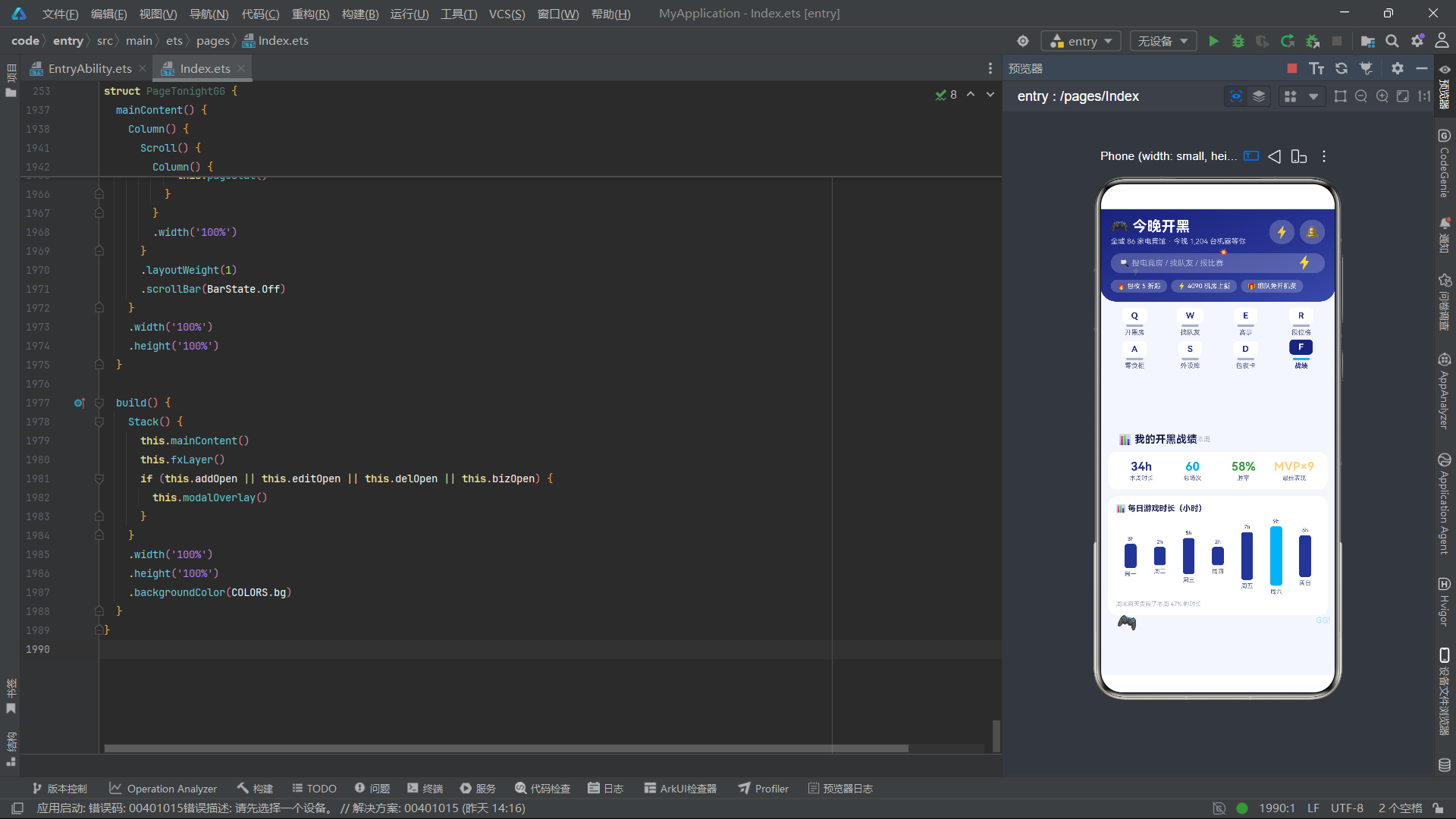
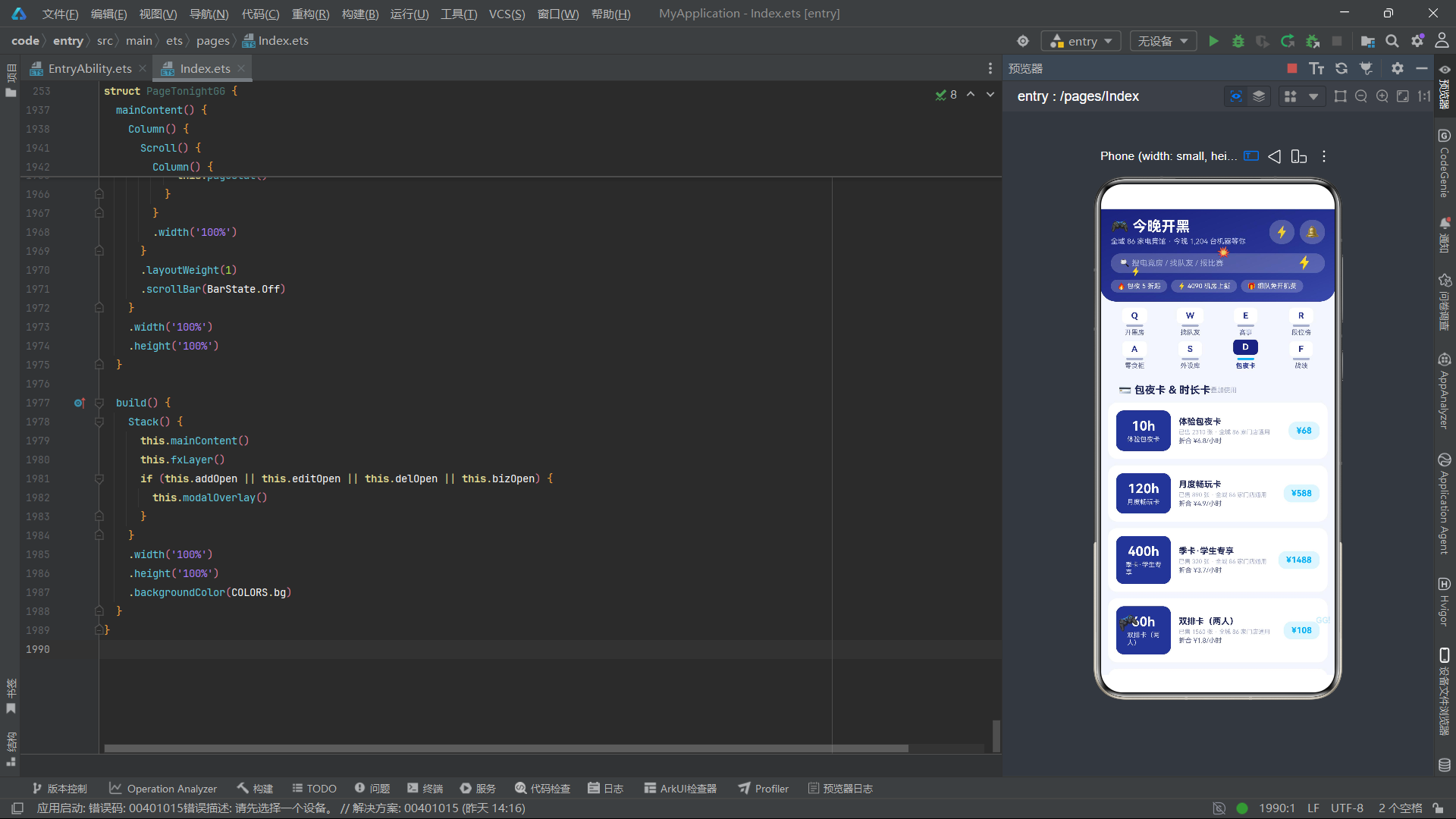
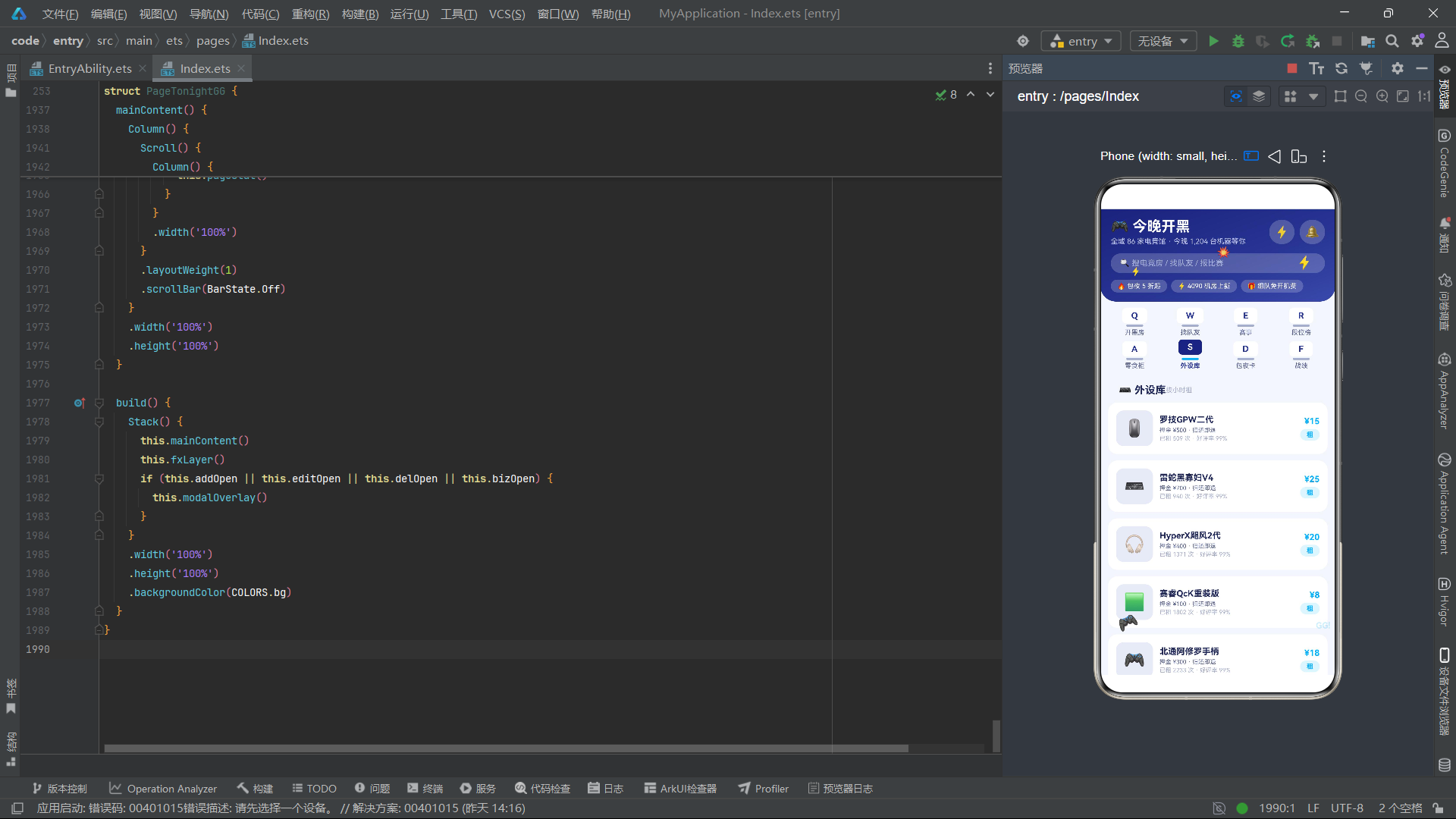
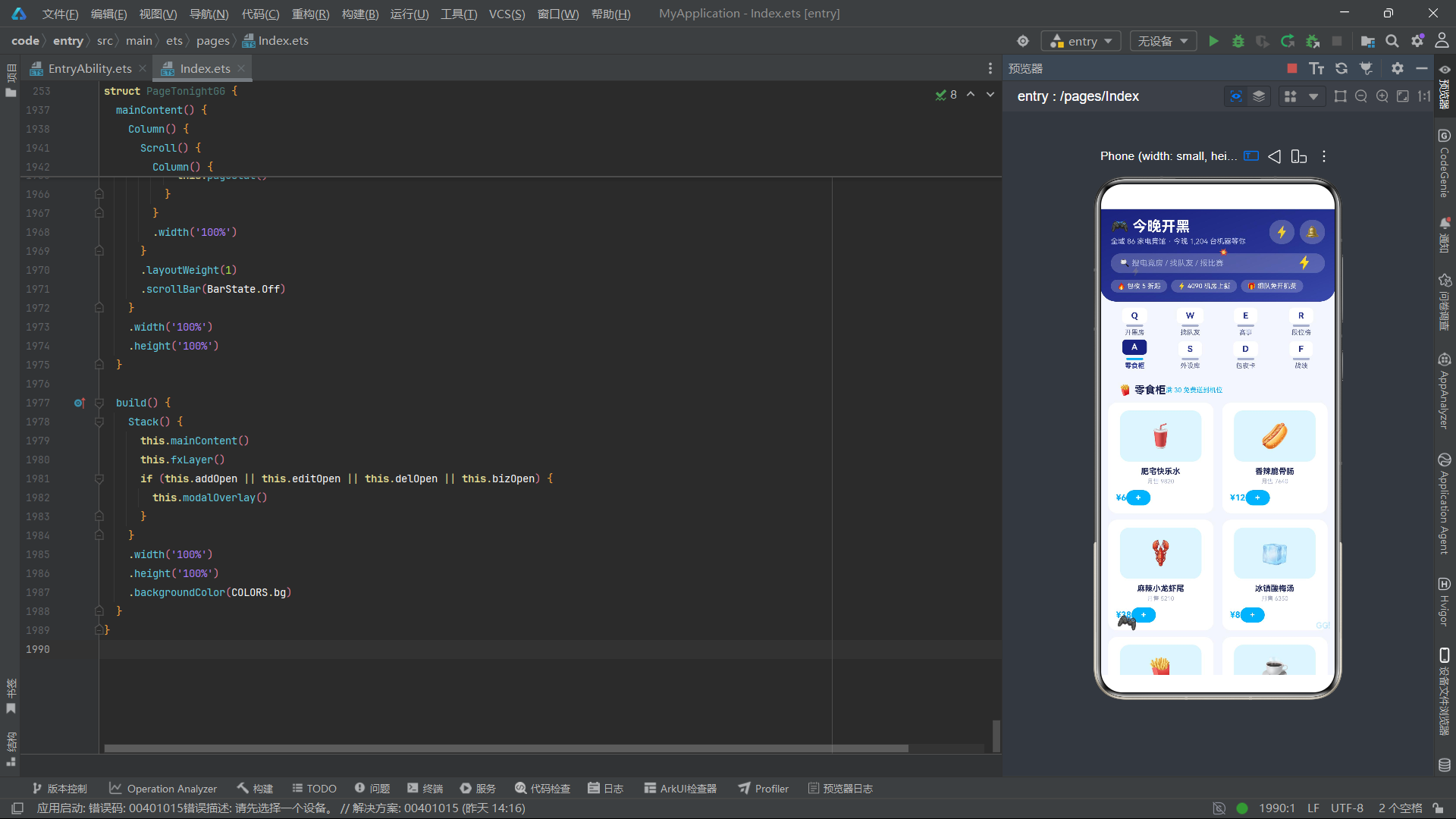
mainContent组织了八个内容页面的条件渲染,Scroll组件包裹所有页面,layoutWeight(1)占据头部和导航栏之外的全部剩余空间,scrollBar隐藏保证视觉洁净。八个内容页面覆盖了电竞服务的完整链路:pageRoom电竞房预订、pageMate队友匹配、pageMatch水友赛事、pageRank段位排行榜、pageSnack零食点单、pageGear外设租赁、pageCard包夜卡购买、pageStat开黑战绩统计。build方法以Stack三层叠加架构组织应用——mainContent主内容层、fxLayer特效层、条件渲染的modalOverlay弹框层。这种从预订到匹配到竞技到消费到统计的全链路页面布局,体现了电竞社区应用的产品完整性。
七、组件架构流程图
八、数据模型对比表
| 数据模型 | 字段数量 | 核心字段 | 业务场景 | 交互状态字段 |
|---|---|---|---|---|
| RoomItem | 8 | name, dist, price, hour, pcs | 电竞房列表 | booked (0/1预订状态) |
| MateItem | 7 | name, rank, role, onlines | 队友匹配列表 | followed (0/1组队状态) |
| MatchItem | 6 | title, game, prize, teams | 水友赛事列表 | joined (0/1报名状态) |
| RankItem | 6 | name, score, winRate, streak | 段位天梯排行 | 无 (纯展示数据) |
| SnackItem | 6 | name, icon, price, sales | 零食点单网格 | added (0/1加购状态) |
| GearItem | 6 | name, price, deposit | 外设租赁列表 | rented (0/1租赁状态) |
| CardItem | 6 | name, hours, price, sold | 包夜卡列表 | bought (0/1购买状态) |
| StatItem | 4 | day, hours, wins | 每日战绩柱状图 | 无 (纯展示数据) |
安装DevEco Studio程序

选择目标安装目录:

设置环境变量,但是需要重启一下:

新建一个空白模板:

设置API为24的模板项目:
初始化项目,自动下载相关依赖:

完整代码:
// 风格:深空靛蓝+电光青;内容tab:8个双排4+4机械键帽式(顶部键帽方块+底部键轴厚度条,选中键帽上浮);底部5主tab
// 弹框:订开黑房(开房单ROOM ORDER)/ 编辑开黑档案(电竞档案卡GAMER CARD)/ 取消预订(蓝青警示卡)/ 报名水友赛(报名表ENTRY FORM)
// 特效:闪电闪烁 + 手柄脉动 + GG弹跳
interface ColorPalette {
primary: string;
primaryLight: string;
primaryDark: string;
accent: string;
accentLight: string;
bg: string;
cardBg: string;
textPrimary: string;
textSecondary: string;
textHint: string;
border: string;
success: string;
warning: string;
danger: string;
white: string;
gold: string;
}
const COLORS: ColorPalette = {
primary: '#283593',
primaryLight: '#E8EAF6',
primaryDark: '#1A237E',
accent: '#00B0FF',
accentLight: '#E1F5FE',
bg: '#F4F6FC',
cardBg: '#FFFFFF',
textPrimary: '#1E2557',
textSecondary: '#5A6390',
textHint: '#A6AECB',
border: '#DFE3F2',
success: '#43A047',
warning: '#FB8C00',
danger: '#E53935',
white: '#FFFFFF',
gold: '#FFD180'
};
@Observed
class RoomItem {
id: number = 0;
name: string = '';
icon: string = '';
dist: string = '';
price: number = 0;
hour: number = 0;
pcs: number = 0;
booked: number = 0;
constructor(id: number, name: string, icon: string, dist: string, price: number, hour: number, pcs: number, booked: number) {
this.id = id; this.name = name; this.icon = icon; this.dist = dist; this.price = price;
this.hour = hour; this.pcs = pcs; this.booked = booked;
}
}
@Observed
class MateItem {
id: number = 0;
name: string = '';
avatar: string = '';
rank: string = '';
role: string = '';
onlines: number = 0;
followed: number = 0;
constructor(id: number, name: string, avatar: string, rank: string, role: string, onlines: number, followed: number) {
this.id = id; this.name = name; this.avatar = avatar; this.rank = rank; this.role = role;
this.onlines = onlines; this.followed = followed;
}
}
@Observed
class MatchItem {
id: number = 0;
title: string = '';
game: string = '';
prize: string = '';
teams: number = 0;
joined: number = 0;
constructor(id: number, title: string, game: string, prize: string, teams: number, joined: number) {
this.id = id; this.title = title; this.game = game; this.prize = prize; this.teams = teams; this.joined = joined;
}
}
@Observed
class RankItem {
id: number = 0;
name: string = '';
avatar: string = '';
score: number = 0;
winRate: number = 0;
streak: number = 0;
constructor(id: number, name: string, avatar: string, score: number, winRate: number, streak: number) {
this.id = id; this.name = name; this.avatar = avatar; this.score = score; this.winRate = winRate; this.streak = streak;
}
}
@Observed
class SnackItem {
id: number = 0;
name: string = '';
icon: string = '';
price: number = 0;
sales: number = 0;
added: number = 0;
constructor(id: number, name: string, icon: string, price: number, sales: number, added: number) {
this.id = id; this.name = name; this.icon = icon; this.price = price; this.sales = sales; this.added = added;
}
}
@Observed
class GearItem {
id: number = 0;
name: string = '';
icon: string = '';
price: number = 0;
deposit: number = 0;
rented: number = 0;
constructor(id: number, name: string, icon: string, price: number, deposit: number, rented: number) {
this.id = id; this.name = name; this.icon = icon; this.price = price; this.deposit = deposit; this.rented = rented;
}
}
@Observed
class CardItem {
id: number = 0;
name: string = '';
hours: number = 0;
price: number = 0;
sold: number = 0;
bought: number = 0;
constructor(id: number, name: string, hours: number, price: number, sold: number, bought: number) {
this.id = id; this.name = name; this.hours = hours; this.price = price; this.sold = sold; this.bought = bought;
}
}
@Observed
class StatItem {
id: number = 0;
day: string = '';
hours: number = 0;
wins: number = 0;
constructor(id: number, day: string, hours: number, wins: number) {
this.id = id; this.day = day; this.hours = hours; this.wins = wins;
}
}
const ROOM_LIST: RoomItem[] = [
new RoomItem(1, '五连坐豪华黑房 · RTX4080', '🖥️', '0.5km', 88, 5, 5, 0),
new RoomItem(2, '双排情侣舱 · 粉色主题', '💗', '0.8km', 58, 4, 2, 0),
new RoomItem(3, '包场大厅 · 10 人团建', '🏟️', '1.2km', 388, 6, 10, 0),
new RoomItem(4, '吃鸡专属房 · 240Hz 屏', '🎯', '0.6km', 78, 5, 4, 0),
new RoomItem(5, '主机PS5房 · 4K大屏', '🎮', '1.5km', 98, 4, 4, 0),
new RoomItem(6, '静音自习电竞位', '🔇', '0.3km', 18, 6, 1, 0),
new RoomItem(7, '顶配水冷房 · i9+4090', '💧', '2.1km', 128, 5, 5, 0),
new RoomItem(8, '怀旧街机房 · 摇杆格斗', '🕹️', '1.8km', 48, 5, 8, 0),
new RoomItem(9, 'Switch派对房 · 体感游戏', '🎊', '0.9km', 68, 4, 6, 0),
new RoomItem(10, 'VR对战舱 · 双人决斗', '🥽', '2.6km', 108, 4, 2, 0),
new RoomItem(11, '通宵包夜房 · 通宵到早8', '🌙', '0.5km', 68, 10, 5, 0),
new RoomItem(12, '主播直播房 · 声卡补光', '🎙️', '1.1km', 158, 5, 3, 0)
];
const MATE_LIST: MateItem[] = [
new MateItem(1, '峡谷指挥官', '🎖️', '最强王者', '打野', 268, 0),
new MateItem(2, '下路弹药库', '🔫', '钻石一', 'ADC', 190, 0),
new MateItem(3, '辅助小天使', '😇', '钻石三', '辅助', 154, 0),
new MateItem(4, '上单一霸', '🛡️', '大师', '上单', 231, 0),
new MateItem(5, '中单法王', '🔮', '钻石二', '中单', 176, 0),
new MateItem(6, '夜宵局局长', '🍜', '黄金一', '随便玩', 88, 0),
new MateItem(7, '狙神十七', '🎯', '超凡入圣', '步枪手', 312, 0),
new MateItem(8, '苟分大师', '🐔', '皇冠', '伏地魔', 120, 0),
new MateItem(9, '打野养猪人', '🐗', '翡翠一', '打野', 95, 0),
new MateItem(10, '云顶赌狗', '🃏', '大师', '下棋', 143, 0)
];
const MATCH_LIST: MatchItem[] = [
new MatchItem(1, '周五水友赛 · 峡谷5v5', '英雄联盟', '冠军 1000 元 + 免单月卡', 32, 0),
new MatchItem(2, '周末吃鸡争霸', '和平精英', '前三名包夜卡×3', 64, 0),
new MatchItem(3, '街机格斗之夜', '街霸6', '限量摇杆一个', 16, 0),
new MatchItem(4, 'CS2 枪王争霸', 'CS2', '冠军队外设套装', 24, 0),
new MatchItem(5, '云顶赌狗杯', '金铲铲', '冠军 666 元', 48, 0),
new MatchItem(6, 'Switch 马派乱斗', '马里奥派对', '冠军免单一个月', 12, 0),
new MatchItem(7, '王者荣耀开黑节', '王者荣耀', '皮肤码 + 零食大礼包', 96, 0),
new MatchItem(8, '怀旧红警复活赛', '红警2', '情怀奖杯 + 老玩家徽章', 8, 0)
];
const RANK_LIST: RankItem[] = [
new RankItem(1, '峡谷指挥官', '🎖️', 4820, 68, 12),
new RankItem(2, '狙神十七', '🎯', 4610, 72, 9),
new RankItem(3, '上单一霸', '🛡️', 4390, 65, 7),
new RankItem(4, '中单法王', '🔮', 4150, 61, 4),
new RankItem(5, '下路弹药库', '🔫', 3980, 59, 0),
new RankItem(6, '云顶赌狗', '🃏', 3760, 58, 3),
new RankItem(7, '辅助小天使', '😇', 3520, 55, 0),
new RankItem(8, '苟分大师', '🐔', 3310, 53, 2),
new RankItem(9, '夜宵局局长', '🍜', 3090, 51, 1),
new RankItem(10, '打野养猪人', '🐗', 2880, 49, 0)
];
const SNACK_LIST: SnackItem[] = [
new SnackItem(1, '肥宅快乐水', '🥤', 6, 9820, 0),
new SnackItem(2, '香辣脆骨肠', '🌭', 12, 7640, 0),
new SnackItem(3, '麻辣小龙虾尾', '🦞', 38, 5210, 0),
new SnackItem(4, '冰镇酸梅汤', '🧊', 8, 6350, 0),
new SnackItem(5, '巨无霸薯塔', '🍟', 15, 8890, 0),
new SnackItem(6, '气泡冰美式', '☕', 16, 4320, 0),
new SnackItem(7, '地狱辣翅中', '🍗', 22, 5980, 0),
new SnackItem(8, '泡面全家桶', '🍜', 10, 12100, 0)
];
const GEAR_LIST: GearItem[] = [
new GearItem(1, '罗技GPW二代', '🖱️', 15, 500, 0),
new GearItem(2, '雷蛇黑寡妇V4', '⌨️', 25, 700, 0),
new GearItem(3, 'HyperX飓风2代', '🎧', 20, 400, 0),
new GearItem(4, '赛睿QcK重装版', '🟩', 8, 100, 0),
new GearItem(5, '北通阿修罗手柄', '🎮', 18, 300, 0),
new GearItem(6, '图马思特T248', '🏎️', 60, 1500, 0),
new GearItem(7, 'HORI格斗摇杆', '🕹️', 45, 800, 0),
new GearItem(8, '罗技C920摄像头', '📷', 22, 600, 0)
];
const CARD_LIST: CardItem[] = [
new CardItem(1, '体验包夜卡', 10, 68, 2310, 0),
new CardItem(2, '月度畅玩卡', 120, 588, 890, 0),
new CardItem(3, '季卡·学生专享', 400, 1488, 320, 0),
new CardItem(4, '双排卡(两人)', 60, 108, 1560, 0),
new CardItem(5, '周末早鸟卡', 30, 88, 2870, 0),
new CardItem(6, '年卡·至尊黑卡', 2000, 5888, 96, 0)
];
const STAT_LIST: StatItem[] = [
new StatItem(1, '周一', 3, 6),
new StatItem(2, '周二', 2, 4),
new StatItem(3, '周三', 5, 9),
new StatItem(4, '周四', 2, 3),
new StatItem(5, '周五', 7, 12),
new StatItem(6, '周六', 9, 16),
new StatItem(7, '周日', 6, 10)
];
const ADD_ROOMS: string[] = ['🖥️ 五连坐', '💗 双排舱', '🏟️ 包场', '🌙 通宵房'];
const EDIT_ROLES: string[] = ['上单', '打野', '中单', 'ADC', '辅助'];
const ENTRY_GAMES: string[] = ['🏆 峡谷5v5', '🎯 吃鸡争霸', '🃏 云顶杯'];
function statBar(n: number): number {
return n * 9 + 10;
}
@Entry
@Component
struct PageTonightGG {
@State currentTab: number = 0;
@State bottomTab: number = 0;
@State roomList: RoomItem[] = ROOM_LIST;
@State mateList: MateItem[] = MATE_LIST;
@State matchList: MatchItem[] = MATCH_LIST;
@State snackList: SnackItem[] = SNACK_LIST;
@State gearList: GearItem[] = GEAR_LIST;
@State cardList: CardItem[] = CARD_LIST;
@State addOpen: boolean = false;
@State editOpen: boolean = false;
@State delOpen: boolean = false;
@State bizOpen: boolean = false;
@State addRoom: number = 0;
@State addHour: number = 5;
@State editRole: number = 1;
@State editMic: number = 1;
@State delIndex: number = 0;
@State bizGame: number = 0;
@State bizNum: number = 5;
@State fxTick: number = 0;
private timer: number = -1;
aboutToAppear(): void {
this.timer = setInterval(() => {
this.fxTick += 1;
}, 100);
}
aboutToDisappear(): void {
if (this.timer >= 0) {
clearInterval(this.timer);
}
}
doAdd(): void {
this.roomList.unshift(new RoomItem(996, ADD_ROOMS[this.addRoom] + ' · 新预订', '🖥️', '0.5km', (this.addRoom + 2) * 18, this.addHour, this.addRoom + 1, 1));
this.addOpen = false;
}
doEdit(): void {
this.editOpen = false;
}
doDel(): void {
if (this.delIndex >= 0 && this.delIndex < this.roomList.length) {
this.roomList.splice(this.delIndex, 1);
}
this.delOpen = false;
}
doBiz(): void {
if (this.matchList.length > 0) {
this.matchList[0].joined = 1;
this.matchList.splice(0, 1, this.matchList[0]);
}
this.bizOpen = false;
}
doChangeMate(): void {
if (this.mateList.length > 2) {
this.mateList.unshift(this.mateList[this.mateList.length - 1]);
this.mateList.splice(this.mateList.length - 1, 1);
}
}
incHour(): void {
if (this.addHour < 12) {
this.addHour += 1;
}
}
decHour(): void {
if (this.addHour > 2) {
this.addHour -= 1;
}
}
incNum(): void {
if (this.bizNum < 10) {
this.bizNum += 1;
}
}
decNum(): void {
if (this.bizNum > 2) {
this.bizNum -= 1;
}
}
@Builder
fxLayer() {
Column() {
Text('⚡')
.fontSize(20)
.fontColor(COLORS.accent)
.opacity(this.fxTick % 2 === 0 ? 1 : 0.1)
.position({ x: 300, y: 70 })
Text('⚡')
.fontSize(13)
.fontColor(COLORS.gold)
.opacity(this.fxTick % 3 === 0 ? 1 : 0.15)
.position({ x: 46, y: 88 })
Text('🎮')
.fontSize(22)
.rotate({ angle: (this.fxTick % 6) * 10 - 25, centerX: '50%', centerY: '50%' })
.scale({ x: this.fxTick % 2 === 0 ? 1.12 : 0.94, y: this.fxTick % 2 === 0 ? 1.12 : 0.94 })
.position({ x: 28, y: 620 })
Text('GG!')
.fontSize(13)
.fontWeight(FontWeight.Bold)
.fontColor(COLORS.accent)
.opacity(this.fxTick % 2 === 1 ? 1 : 0.2)
.translate({ y: this.fxTick % 4 < 2 ? 0 : -8 })
.position({ x: 330, y: 630 })
Text('💥')
.fontSize(14)
.scale({ x: this.fxTick % 3 === 0 ? 1.3 : 0.85, y: this.fxTick % 3 === 0 ? 1.3 : 0.85 })
.position({ x: 180, y: 58 })
}
.width('100%')
.height('100%')
.hitTestBehavior(HitTestMode.None)
.position({ x: 0, y: 0 })
}
@Builder
header() {
Column() {
Row() {
Column() {
Text('🎮 今晚开黑')
.fontSize(22)
.fontWeight(FontWeight.Bold)
.fontColor(COLORS.white)
Text('全城 86 家电竞馆 · 今晚 1,204 台机器等你')
.fontSize(11)
.fontColor('#C5CAE9')
.margin({ top: 3 })
}
.alignItems(HorizontalAlign.Start)
Row() {
Text('⚡')
.fontSize(18)
.padding(8)
.backgroundColor('#33FFFFFF')
.borderRadius(18)
.onClick(() => {
this.addOpen = true;
})
Text('🔔')
.fontSize(18)
.padding(8)
.backgroundColor('#33FFFFFF')
.borderRadius(18)
.margin({ left: 8 })
}
}
.width('100%')
.justifyContent(FlexAlign.SpaceBetween)
.padding({ left: 16, right: 16, top: 14 })
Row() {
Text('🔍 搜电竞房 / 找队友 / 报比赛')
.fontSize(12)
.fontColor('#A9B2D6')
.padding({ left: 14, right: 14, top: 8, bottom: 8 })
.backgroundColor('#33FFFFFF')
.borderRadius(18)
.layoutWeight(1)
}
.width('100%')
.padding({ left: 16, right: 16, top: 12 })
Row() {
Text('🔥 包夜 5 折起')
.fontSize(10)
.fontColor(COLORS.white)
.padding({ left: 10, right: 10, top: 4, bottom: 4 })
.backgroundColor('#33FFFFFF')
.borderRadius(12)
Text('⚡ 4090 机房上新')
.fontSize(10)
.fontColor(COLORS.white)
.padding({ left: 10, right: 10, top: 4, bottom: 4 })
.backgroundColor('#33FFFFFF')
.borderRadius(12)
.margin({ left: 6 })
Text('🎁 组队免开机费')
.fontSize(10)
.fontColor(COLORS.white)
.padding({ left: 10, right: 10, top: 4, bottom: 4 })
.backgroundColor('#33FFFFFF')
.borderRadius(12)
.margin({ left: 6 })
}
.width('100%')
.padding({ left: 16, right: 16, top: 10 })
}
.width('100%')
.linearGradient({
angle: 160,
colors: [['#1A237E', 0], ['#283593', 0.6], ['#3949AB', 1]]
})
.borderRadius({ bottomLeft: 24, bottomRight: 24 })
.padding({ bottom: 14 })
}
@Builder
keyTab(name: string, kchar: string, idx: number) {
Column() {
Column() {
Text(kchar)
.fontSize(13)
.fontWeight(FontWeight.Bold)
.fontColor(idx === this.currentTab ? COLORS.white : COLORS.primary)
.padding({ left: 14, right: 14, top: 4, bottom: 4 })
.backgroundColor(idx === this.currentTab ? COLORS.primaryDark : COLORS.cardBg)
.borderRadius(6)
}
.offset({ y: idx === this.currentTab ? -3 : 0 })
Row()
.width(26)
.height(3)
.backgroundColor(idx === this.currentTab ? COLORS.accent : COLORS.textHint)
.borderRadius(2)
.margin({ top: 2 })
Text(name)
.fontSize(10)
.fontWeight(idx === this.currentTab ? FontWeight.Bold : FontWeight.Normal)
.fontColor(idx === this.currentTab ? COLORS.primary : COLORS.textSecondary)
.margin({ top: 3 })
}
.layoutWeight(1)
.alignItems(HorizontalAlign.Center)
.onClick(() => {
this.currentTab = idx;
})
}
@Builder
subNav() {
Column() {
Row() {
this.keyTab('开黑房', 'Q', 0)
this.keyTab('找队友', 'W', 1)
this.keyTab('赛事', 'E', 2)
this.keyTab('段位榜', 'R', 3)
}
.width('100%')
Row() {
this.keyTab('零食柜', 'A', 4)
this.keyTab('外设库', 'S', 5)
this.keyTab('包夜卡', 'D', 6)
this.keyTab('战绩', 'F', 7)
}
.width('100%')
.margin({ top: 8 })
}
.width('100%')
.padding({ left: 10, right: 10, top: 10, bottom: 10 })
.backgroundColor(COLORS.bg)
}
@Builder
pageRoom() {
Column() {
Row() {
Text('🖥️ 今晚有空房')
.fontSize(16)
.fontWeight(FontWeight.Bold)
.fontColor(COLORS.textPrimary)
Text('立即开房')
.fontSize(11)
.fontWeight(FontWeight.Bold)
.fontColor(COLORS.white)
.padding({ left: 12, right: 12, top: 5, bottom: 5 })
.backgroundColor(COLORS.accent)
.borderRadius(12)
.margin({ left: 'auto' })
.onClick(() => {
this.addOpen = true;
})
}
.width('100%')
.padding({ left: 16, right: 16, top: 12 })
Column() {
Text('⚡ 闪电匹配')
.fontSize(13)
.fontWeight(FontWeight.Bold)
.fontColor(COLORS.white)
Text('60 秒内匹配同城队友并锁定相邻机位')
.fontSize(10)
.fontColor('#E8EAF6')
.margin({ top: 4 })
Text('开始匹配')
.fontSize(11)
.fontWeight(FontWeight.Bold)
.fontColor(COLORS.primaryDark)
.padding({ left: 14, right: 14, top: 5, bottom: 5 })
.backgroundColor(COLORS.white)
.borderRadius(12)
.margin({ top: 8 })
.onClick(() => {
this.currentTab = 1;
})
}
.width('100%')
.padding(14)
.alignItems(HorizontalAlign.Start)
.linearGradient({
angle: 120,
colors: [['#1A237E', 0], ['#00B0FF', 1]]
})
.borderRadius(14)
.margin({ top: 10 })
ForEach(this.roomList, (r: RoomItem, ri: number) => {
Column() {
Row() {
Text(r.icon)
.fontSize(28)
.padding(14)
.backgroundColor(COLORS.primaryLight)
.borderRadius(14)
Column() {
Text(r.name)
.fontSize(13)
.fontWeight(FontWeight.Bold)
.fontColor(COLORS.textPrimary)
.maxLines(1)
Row() {
Text('📍 ' + r.dist)
.fontSize(9)
.fontColor(COLORS.textSecondary)
Text(r.pcs.toString() + ' 人房')
.fontSize(9)
.fontColor(COLORS.primary)
.padding({ left: 6, right: 6, top: 2, bottom: 2 })
.backgroundColor(COLORS.primaryLight)
.borderRadius(6)
.margin({ left: 8 })
Text('🎮 40系显卡')
.fontSize(9)
.fontColor(COLORS.accent)
.padding({ left: 6, right: 6, top: 2, bottom: 2 })
.backgroundColor(COLORS.accentLight)
.borderRadius(6)
.margin({ left: 6 })
}
.margin({ top: 4 })
Text('¥' + r.price.toString() + '/时 · 起订 ' + r.hour.toString() + ' 小时')
.fontSize(9)
.fontColor(COLORS.textHint)
.margin({ top: 3 })
}
.alignItems(HorizontalAlign.Start)
.layoutWeight(1)
.margin({ left: 10 })
Text(r.booked === 1 ? '已锁定' : '订房')
.fontSize(11)
.fontWeight(FontWeight.Bold)
.fontColor(r.booked === 1 ? COLORS.white : COLORS.primary)
.padding({ left: 14, right: 14, top: 6, bottom: 6 })
.backgroundColor(r.booked === 1 ? COLORS.primaryDark : COLORS.primaryLight)
.borderRadius(12)
.onClick(() => {
r.booked = r.booked === 1 ? 0 : 1;
this.roomList.splice(ri, 1, r);
})
}
.width('100%')
Row() {
Text(r.booked === 1 ? '❌ 取消预订' : '👥 拼队友')
.fontSize(10)
.fontColor(r.booked === 1 ? COLORS.danger : COLORS.primary)
.padding({ left: 10, right: 10, top: 4, bottom: 4 })
.backgroundColor(r.booked === 1 ? '#FFEBEE' : COLORS.primaryLight)
.borderRadius(8)
.onClick(() => {
if (r.booked === 1) {
this.delIndex = ri;
this.delOpen = true;
} else {
this.currentTab = 1;
}
})
Text('本月已成交 ' + (r.id * 89 + 120).toString() + ' 单')
.fontSize(9)
.fontColor(COLORS.textHint)
.margin({ left: 'auto' })
}
.width('100%')
.margin({ top: 10 })
}
.width('100%')
.padding(12)
.backgroundColor(COLORS.cardBg)
.borderRadius(14)
.margin({ top: 10 })
}, (r: RoomItem) => 'rm' + r.id.toString() + '_' + r.booked.toString())
}
.width('100%')
.padding({ left: 12, right: 12, bottom: 16 })
}
@Builder
pageMate() {
Column() {
Row() {
Text('🧑🤝🧑 找队友')
.fontSize(16)
.fontWeight(FontWeight.Bold)
.fontColor(COLORS.textPrimary)
Text('换一批')
.fontSize(11)
.fontColor(COLORS.primary)
.padding({ left: 10, right: 10, top: 4, bottom: 4 })
.backgroundColor(COLORS.primaryLight)
.borderRadius(12)
.margin({ left: 'auto' })
.onClick(() => {
this.doChangeMate();
})
}
.width('100%')
.padding({ left: 16, right: 16, top: 12 })
Column() {
Text('👤 我的开黑档案')
.fontSize(12)
.fontWeight(FontWeight.Bold)
.fontColor(COLORS.textPrimary)
Row() {
Text('段位:钻石二')
.fontSize(11)
.fontColor(COLORS.primary)
.padding({ left: 8, right: 8, top: 3, bottom: 3 })
.backgroundColor(COLORS.primaryLight)
.borderRadius(8)
Text('位置:' + EDIT_ROLES[this.editRole])
.fontSize(11)
.fontColor(COLORS.primary)
.padding({ left: 8, right: 8, top: 3, bottom: 3 })
.backgroundColor(COLORS.primaryLight)
.borderRadius(8)
.margin({ left: 8 })
Text('麦克风:' + (this.editMic === 1 ? '开' : '关'))
.fontSize(11)
.fontColor(COLORS.primary)
.padding({ left: 8, right: 8, top: 3, bottom: 3 })
.backgroundColor(COLORS.primaryLight)
.borderRadius(8)
.margin({ left: 8 })
}
.margin({ top: 8 })
Text('✏️ 编辑档案')
.fontSize(11)
.fontColor(COLORS.accent)
.padding({ left: 12, right: 12, top: 4, bottom: 4 })
.backgroundColor(COLORS.accentLight)
.borderRadius(10)
.margin({ top: 8 })
.onClick(() => {
this.editOpen = true;
})
}
.width('100%')
.padding(12)
.alignItems(HorizontalAlign.Start)
.backgroundColor(COLORS.cardBg)
.borderRadius(14)
.margin({ top: 10 })
ForEach(this.mateList, (m: MateItem) => {
Row() {
Text(m.avatar)
.fontSize(26)
.padding(12)
.backgroundColor(COLORS.accentLight)
.borderRadius(24)
Column() {
Row() {
Text(m.name)
.fontSize(13)
.fontWeight(FontWeight.Bold)
.fontColor(COLORS.textPrimary)
Text(m.rank)
.fontSize(9)
.fontColor(COLORS.gold)
.padding({ left: 6, right: 6, top: 2, bottom: 2 })
.backgroundColor('#FFF8E1')
.borderRadius(6)
.margin({ left: 6 })
}
Row() {
Text('🎮 ' + m.role)
.fontSize(10)
.fontColor(COLORS.textSecondary)
Text('今晚在线 ' + m.onlines.toString() + ' 万人同段位')
.fontSize(9)
.fontColor(COLORS.textHint)
.margin({ left: 8 })
}
.margin({ top: 4 })
}
.alignItems(HorizontalAlign.Start)
.layoutWeight(1)
.margin({ left: 10 })
Text(m.followed === 1 ? '已组队' : '+ 组队')
.fontSize(11)
.fontWeight(FontWeight.Bold)
.fontColor(m.followed === 1 ? COLORS.white : COLORS.accent)
.padding({ left: 12, right: 12, top: 5, bottom: 5 })
.backgroundColor(m.followed === 1 ? COLORS.primaryDark : COLORS.accentLight)
.borderRadius(12)
.onClick(() => {
m.followed = m.followed === 1 ? 0 : 1;
this.mateList.splice(m.id - 1, 1, m);
})
}
.width('100%')
.padding(12)
.backgroundColor(COLORS.cardBg)
.borderRadius(14)
.margin({ top: 10 })
}, (m: MateItem) => 'mt' + m.id.toString() + '_' + m.followed.toString())
}
.width('100%')
.padding({ left: 12, right: 12, bottom: 16 })
}
@Builder
pageMatch() {
Column() {
Row() {
Text('🏆 水友赛事')
.fontSize(16)
.fontWeight(FontWeight.Bold)
.fontColor(COLORS.textPrimary)
Text('本周 8 场')
.fontSize(10)
.fontColor(COLORS.textHint)
.margin({ left: 'auto' })
}
.width('100%')
.padding({ left: 16, right: 16, top: 12 })
ForEach(this.matchList, (mt: MatchItem) => {
Column() {
Row() {
Text('🆔 NO.' + mt.id.toString())
.fontSize(9)
.letterSpacing(1)
.fontColor(COLORS.accent)
Text(mt.game)
.fontSize(9)
.fontColor(COLORS.white)
.padding({ left: 8, right: 8, top: 2, bottom: 2 })
.backgroundColor(COLORS.primary)
.borderRadius(6)
.margin({ left: 8 })
Text(mt.teams.toString() + ' 队规模')
.fontSize(9)
.fontColor(COLORS.textHint)
.margin({ left: 'auto' })
}
.width('100%')
Text(mt.title)
.fontSize(14)
.fontWeight(FontWeight.Bold)
.fontColor(COLORS.textPrimary)
.margin({ top: 8 })
Row() {
Text('🎁 ' + mt.prize)
.fontSize(10)
.fontColor(COLORS.accent)
.layoutWeight(1)
.maxLines(1)
Text(mt.joined === 1 ? '已报名' : '报名')
.fontSize(11)
.fontWeight(FontWeight.Bold)
.fontColor(mt.joined === 1 ? COLORS.white : COLORS.accent)
.padding({ left: 14, right: 14, top: 6, bottom: 6 })
.backgroundColor(mt.joined === 1 ? COLORS.primaryDark : COLORS.accentLight)
.borderRadius(12)
.onClick(() => {
this.bizOpen = true;
})
}
.width('100%')
.margin({ top: 8 })
}
.width('100%')
.padding(12)
.backgroundColor(COLORS.cardBg)
.borderRadius(14)
.margin({ top: 10 })
}, (mt: MatchItem) => 'ms' + mt.id.toString() + '_' + mt.joined.toString())
}
.width('100%')
.padding({ left: 12, right: 12, bottom: 16 })
}
@Builder
pageRank() {
Column() {
Row() {
Text('🏅 段位天梯榜')
.fontSize(16)
.fontWeight(FontWeight.Bold)
.fontColor(COLORS.textPrimary)
Text('本周结算')
.fontSize(10)
.fontColor(COLORS.textHint)
.margin({ left: 'auto' })
}
.width('100%')
.padding({ left: 16, right: 16, top: 12 })
Row() {
Column() {
Text('🥈')
.fontSize(26)
Text(this.rankList2Name(1))
.fontSize(11)
.fontWeight(FontWeight.Bold)
.fontColor(COLORS.textPrimary)
.margin({ top: 4 })
Text(this.rankList2Score(1))
.fontSize(9)
.fontColor(COLORS.textSecondary)
.margin({ top: 2 })
}
.layoutWeight(1)
.alignItems(HorizontalAlign.Center)
.offset({ y: 12 })
Column() {
Text('👑')
.fontSize(32)
Text(this.rankList2Name(0))
.fontSize(12)
.fontWeight(FontWeight.Bold)
.fontColor(COLORS.gold)
.margin({ top: 4 })
Text(this.rankList2Score(0))
.fontSize(9)
.fontColor(COLORS.textSecondary)
.margin({ top: 2 })
}
.layoutWeight(1)
.alignItems(HorizontalAlign.Center)
Column() {
Text('🥉')
.fontSize(26)
Text(this.rankList2Name(2))
.fontSize(11)
.fontWeight(FontWeight.Bold)
.fontColor(COLORS.textPrimary)
.margin({ top: 4 })
Text(this.rankList2Score(2))
.fontSize(9)
.fontColor(COLORS.textSecondary)
.margin({ top: 2 })
}
.layoutWeight(1)
.alignItems(HorizontalAlign.Center)
.offset({ y: 18 })
}
.width('100%')
.padding(16)
.backgroundColor(COLORS.cardBg)
.borderRadius(14)
.margin({ top: 10 })
ForEach(RANK_LIST, (rk: RankItem, ri: number) => {
Row() {
Text(ri < 3 ? '⭐' : (ri + 1).toString())
.fontSize(13)
.fontWeight(FontWeight.Bold)
.fontColor(ri < 3 ? COLORS.accent : COLORS.textSecondary)
.width(28)
Text(rk.avatar)
.fontSize(22)
.padding(8)
.backgroundColor(COLORS.accentLight)
.borderRadius(18)
Column() {
Text(rk.name)
.fontSize(12)
.fontWeight(FontWeight.Bold)
.fontColor(COLORS.textPrimary)
Row() {
Text('胜率 ' + rk.winRate.toString() + '%')
.fontSize(9)
.fontColor(COLORS.textSecondary)
Text('积分 ' + rk.score.toString())
.fontSize(9)
.fontColor(COLORS.textHint)
.margin({ left: 8 })
}
.margin({ top: 2 })
}
.alignItems(HorizontalAlign.Start)
.layoutWeight(1)
.margin({ left: 10 })
Text(rk.streak > 0 ? '🔥' + rk.streak.toString() + '连胜' : '—')
.fontSize(10)
.fontColor(COLORS.accent)
}
.width('100%')
.padding(10)
.backgroundColor(COLORS.cardBg)
.borderRadius(12)
.margin({ top: 8 })
}, (rk: RankItem) => 'rkb' + rk.id.toString())
}
.width('100%')
.padding({ left: 12, right: 12, bottom: 16 })
}
rankList2Name(i: number): string {
if (i < RANK_LIST.length) {
return RANK_LIST[i].name;
}
return '虚位以待';
}
rankList2Score(i: number): string {
if (i < RANK_LIST.length) {
return RANK_LIST[i].score.toString() + ' 分';
}
return '0 分';
}
@Builder
pageSnack() {
Column() {
Row() {
Text('🍟 零食柜')
.fontSize(16)
.fontWeight(FontWeight.Bold)
.fontColor(COLORS.textPrimary)
Text('满 30 免费送到机位')
.fontSize(10)
.fontColor(COLORS.accent)
.margin({ left: 'auto' })
}
.width('100%')
.padding({ left: 16, right: 16, top: 12 })
Flex({ wrap: FlexWrap.Wrap, justifyContent: FlexAlign.SpaceBetween }) {
ForEach(this.snackList, (s: SnackItem) => {
Column() {
Text(s.icon)
.fontSize(36)
.padding({ top: 18, bottom: 18, left: 40, right: 40 })
.backgroundColor(COLORS.accentLight)
.borderRadius(14)
Text(s.name)
.fontSize(12)
.fontWeight(FontWeight.Bold)
.fontColor(COLORS.textPrimary)
.margin({ top: 8 })
Text('月售 ' + s.sales.toString())
.fontSize(9)
.fontColor(COLORS.textHint)
.margin({ top: 3 })
Row() {
Text('¥' + s.price.toString())
.fontSize(13)
.fontWeight(FontWeight.Bold)
.fontColor(COLORS.accent)
Text(s.added === 1 ? '已加购' : '+')
.fontSize(13)
.fontWeight(FontWeight.Bold)
.fontColor(COLORS.white)
.padding({ left: s.added === 1 ? 10 : 12, right: s.added === 1 ? 10 : 12, top: 4, bottom: 4 })
.backgroundColor(s.added === 1 ? COLORS.primaryDark : COLORS.accent)
.borderRadius(12)
.margin({ left: 'auto' })
.onClick(() => {
s.added = s.added === 1 ? 0 : 1;
this.snackList.splice(s.id - 1, 1, s);
})
}
.width('100%')
.margin({ top: 8 })
}
.width('48%')
.padding(12)
.backgroundColor(COLORS.cardBg)
.borderRadius(14)
.margin({ top: 10 })
}, (s: SnackItem) => 'sn' + s.id.toString() + '_' + s.added.toString())
}
.width('100%')
}
.width('100%')
.padding({ left: 12, right: 12, bottom: 16 })
}
@Builder
pageGear() {
Column() {
Row() {
Text('⌨️ 外设库')
.fontSize(16)
.fontWeight(FontWeight.Bold)
.fontColor(COLORS.textPrimary)
Text('按小时租')
.fontSize(10)
.fontColor(COLORS.textHint)
.margin({ left: 'auto' })
}
.width('100%')
.padding({ left: 16, right: 16, top: 12 })
ForEach(this.gearList, (g: GearItem) => {
Row() {
Text(g.icon)
.fontSize(26)
.padding(12)
.backgroundColor(COLORS.primaryLight)
.borderRadius(12)
Column() {
Text(g.name)
.fontSize(13)
.fontWeight(FontWeight.Bold)
.fontColor(COLORS.textPrimary)
Text('押金 ¥' + g.deposit.toString() + ' · 归还即退')
.fontSize(9)
.fontColor(COLORS.textSecondary)
.margin({ top: 3 })
Text('已租 ' + (g.id * 431 + 78).toString() + ' 次 · 好评率 99%')
.fontSize(9)
.fontColor(COLORS.textHint)
.margin({ top: 2 })
}
.alignItems(HorizontalAlign.Start)
.layoutWeight(1)
.margin({ left: 10 })
Column() {
Text('¥' + g.price.toString())
.fontSize(13)
.fontWeight(FontWeight.Bold)
.fontColor(COLORS.accent)
Text(g.rented === 1 ? '已租' : '租')
.fontSize(10)
.fontWeight(FontWeight.Bold)
.fontColor(g.rented === 1 ? COLORS.white : COLORS.accent)
.padding({ left: 10, right: 10, top: 3, bottom: 3 })
.backgroundColor(g.rented === 1 ? COLORS.primaryDark : COLORS.accentLight)
.borderRadius(10)
.margin({ top: 4 })
.onClick(() => {
g.rented = g.rented === 1 ? 0 : 1;
this.gearList.splice(g.id - 1, 1, g);
})
}
.alignItems(HorizontalAlign.End)
}
.width('100%')
.padding(12)
.backgroundColor(COLORS.cardBg)
.borderRadius(14)
.margin({ top: 10 })
}, (g: GearItem) => 'gr' + g.id.toString() + '_' + g.rented.toString())
}
.width('100%')
.padding({ left: 12, right: 12, bottom: 16 })
}
@Builder
pageCard() {
Column() {
Row() {
Text('💳 包夜卡 & 时长卡')
.fontSize(16)
.fontWeight(FontWeight.Bold)
.fontColor(COLORS.textPrimary)
Text('叠加使用')
.fontSize(10)
.fontColor(COLORS.textHint)
.margin({ left: 'auto' })
}
.width('100%')
.padding({ left: 16, right: 16, top: 12 })
ForEach(this.cardList, (c: CardItem) => {
Row() {
Column() {
Text(c.hours.toString() + 'h')
.fontSize(20)
.fontWeight(FontWeight.Bold)
.fontColor(COLORS.white)
Text(c.name)
.fontSize(10)
.fontColor('#E8EAF6')
.margin({ top: 3 })
}
.width(84)
.padding(12)
.alignItems(HorizontalAlign.Center)
.backgroundColor(COLORS.primary)
.borderRadius(12)
Column() {
Text(c.name)
.fontSize(13)
.fontWeight(FontWeight.Bold)
.fontColor(COLORS.textPrimary)
Text('已售 ' + c.sold.toString() + ' 张 · 全城 86 家门店通用')
.fontSize(9)
.fontColor(COLORS.textHint)
.margin({ top: 3 })
Text('折合 ¥' + (c.price / c.hours).toFixed(1) + '/小时')
.fontSize(10)
.fontColor(COLORS.textSecondary)
.margin({ top: 2 })
}
.alignItems(HorizontalAlign.Start)
.layoutWeight(1)
.margin({ left: 12 })
Text(c.bought === 1 ? '已购' : '¥' + c.price.toString())
.fontSize(13)
.fontWeight(FontWeight.Bold)
.fontColor(c.bought === 1 ? COLORS.white : COLORS.accent)
.padding({ left: 12, right: 12, top: 6, bottom: 6 })
.backgroundColor(c.bought === 1 ? COLORS.primaryDark : COLORS.accentLight)
.borderRadius(12)
.onClick(() => {
c.bought = c.bought === 1 ? 0 : 1;
this.cardList.splice(c.id - 1, 1, c);
})
}
.width('100%')
.padding(12)
.backgroundColor(COLORS.cardBg)
.borderRadius(14)
.margin({ top: 10 })
}, (c: CardItem) => 'cd' + c.id.toString() + '_' + c.bought.toString())
}
.width('100%')
.padding({ left: 12, right: 12, bottom: 16 })
}
@Builder
pageStat() {
Column() {
Row() {
Text('📊 我的开黑战绩')
.fontSize(16)
.fontWeight(FontWeight.Bold)
.fontColor(COLORS.textPrimary)
Text('本周')
.fontSize(10)
.fontColor(COLORS.textHint)
.margin({ left: 'auto' })
}
.width('100%')
.padding({ left: 16, right: 16, top: 12 })
Row() {
Column() {
Text('34h')
.fontSize(18)
.fontWeight(FontWeight.Bold)
.fontColor(COLORS.primary)
Text('本周时长')
.fontSize(9)
.fontColor(COLORS.textSecondary)
.margin({ top: 2 })
}
.layoutWeight(1)
.alignItems(HorizontalAlign.Center)
Column() {
Text('60')
.fontSize(18)
.fontWeight(FontWeight.Bold)
.fontColor(COLORS.accent)
Text('总场次')
.fontSize(9)
.fontColor(COLORS.textSecondary)
.margin({ top: 2 })
}
.layoutWeight(1)
.alignItems(HorizontalAlign.Center)
Column() {
Text('58%')
.fontSize(18)
.fontWeight(FontWeight.Bold)
.fontColor(COLORS.success)
Text('胜率')
.fontSize(9)
.fontColor(COLORS.textSecondary)
.margin({ top: 2 })
}
.layoutWeight(1)
.alignItems(HorizontalAlign.Center)
Column() {
Text('MVP×9')
.fontSize(18)
.fontWeight(FontWeight.Bold)
.fontColor(COLORS.gold)
Text('最佳表现')
.fontSize(9)
.fontColor(COLORS.textSecondary)
.margin({ top: 2 })
}
.layoutWeight(1)
.alignItems(HorizontalAlign.Center)
}
.width('100%')
.padding(12)
.backgroundColor(COLORS.cardBg)
.borderRadius(14)
.margin({ top: 10 })
Column() {
Text('📊 每日游戏时长(小时)')
.fontSize(12)
.fontWeight(FontWeight.Bold)
.fontColor(COLORS.textPrimary)
Row() {
ForEach(STAT_LIST, (st: StatItem) => {
Column() {
Text(st.hours.toString() + 'h')
.fontSize(8)
.fontColor(COLORS.primary)
Column()
.width(18)
.height(statBar(st.hours))
.backgroundColor(st.day === '周六' ? COLORS.accent : COLORS.primary)
.borderRadius(4)
.margin({ top: 3 })
Text(st.day)
.fontSize(9)
.fontColor(COLORS.textSecondary)
.margin({ top: 4 })
}
.layoutWeight(1)
.alignItems(HorizontalAlign.Center)
}, (st: StatItem) => 'st' + st.id.toString())
}
.margin({ top: 8 })
Text('周末两天贡献了本周 47% 的时长')
.fontSize(9)
.fontColor(COLORS.textHint)
.margin({ top: 8 })
}
.width('100%')
.padding(12)
.alignItems(HorizontalAlign.Start)
.backgroundColor(COLORS.cardBg)
.borderRadius(14)
.margin({ top: 10 })
}
.width('100%')
.padding({ left: 12, right: 12, bottom: 16 })
}
@Builder
modalBodyAdd() {
Column() {
Column() {
Text('ROOM ORDER · 开房单')
.fontSize(9)
.letterSpacing(2)
.fontColor(COLORS.accent)
Text('🖥️ 订开黑房')
.fontSize(13)
.fontWeight(FontWeight.Bold)
.fontColor(COLORS.textPrimary)
.margin({ top: 4 })
Text('今晚 86 家门店有机位 · 免开机费')
.fontSize(10)
.fontColor(COLORS.textSecondary)
.margin({ top: 3 })
}
.width('100%')
.padding(12)
.backgroundColor(COLORS.accentLight)
.borderRadius(12)
Column() {
Text('房型选择')
.fontSize(12)
.fontWeight(FontWeight.Bold)
.fontColor(COLORS.textPrimary)
Row() {
ForEach(ADD_ROOMS, (ar: string, ai: number) => {
Text(ar)
.fontSize(11)
.fontColor(this.addRoom === ai ? COLORS.white : COLORS.textSecondary)
.padding({ left: 10, right: 10, top: 6, bottom: 6 })
.backgroundColor(this.addRoom === ai ? COLORS.primary : COLORS.bg)
.borderRadius(10)
.margin({ right: 6 })
.onClick(() => {
this.addRoom = ai;
})
}, (ar: string) => 'ar' + ar)
}
.margin({ top: 8 })
}
.width('100%')
.alignItems(HorizontalAlign.Start)
.margin({ top: 14 })
Column() {
Text('时长(小时)')
.fontSize(12)
.fontWeight(FontWeight.Bold)
.fontColor(COLORS.textPrimary)
Row() {
Text('-')
.fontSize(16)
.fontColor(COLORS.textSecondary)
.padding({ left: 16, right: 16, top: 6, bottom: 6 })
.backgroundColor(COLORS.bg)
.borderRadius(10)
.onClick(() => {
this.decHour();
})
Text(this.addHour.toString() + ' 小时')
.fontSize(16)
.fontWeight(FontWeight.Bold)
.fontColor(COLORS.primary)
.padding({ left: 20, right: 20 })
Text('+')
.fontSize(16)
.fontColor(COLORS.textSecondary)
.padding({ left: 16, right: 16, top: 6, bottom: 6 })
.backgroundColor(COLORS.bg)
.borderRadius(10)
.onClick(() => {
this.incHour();
})
}
.margin({ top: 8 })
}
.width('100%')
.alignItems(HorizontalAlign.Start)
.margin({ top: 14 })
Row() {
Text('含外设全套 + 每人一杯快乐水')
.fontSize(10)
.fontColor(COLORS.textSecondary)
Text('合计 ¥' + ((this.addRoom + 2) * 18 * this.addHour).toString())
.fontSize(13)
.fontWeight(FontWeight.Bold)
.fontColor(COLORS.accent)
.margin({ left: 'auto' })
}
.width('100%')
.padding(10)
.backgroundColor(COLORS.primaryLight)
.borderRadius(10)
.margin({ top: 14 })
Row() {
Text('取消')
.fontSize(13)
.fontColor(COLORS.textSecondary)
.padding({ left: 18, right: 18, top: 10, bottom: 10 })
.backgroundColor(COLORS.bg)
.borderRadius(20)
.onClick(() => {
this.addOpen = false;
})
Text('锁定机位')
.fontSize(13)
.fontWeight(FontWeight.Bold)
.fontColor(COLORS.white)
.padding({ left: 22, right: 22, top: 10, bottom: 10 })
.backgroundColor(COLORS.accent)
.borderRadius(20)
.margin({ left: 12 })
.onClick(() => {
this.doAdd();
})
}
.width('100%')
.justifyContent(FlexAlign.End)
.margin({ top: 18 })
}
.width('100%')
.padding(16)
.backgroundColor(COLORS.cardBg)
.borderRadius(20)
.constraintSize({ maxHeight: '80%' })
}
@Builder
modalBodyEdit() {
Column() {
Column() {
Text('GAMER CARD · 开黑档案')
.fontSize(9)
.letterSpacing(2)
.fontColor(COLORS.primary)
Text('✏️ 编辑开黑档案')
.fontSize(13)
.fontWeight(FontWeight.Bold)
.fontColor(COLORS.textPrimary)
.margin({ top: 4 })
Text('档案越真实,匹配的队友越靠谱')
.fontSize(10)
.fontColor(COLORS.textSecondary)
.margin({ top: 3 })
}
.width('100%')
.padding(12)
.backgroundColor(COLORS.primaryLight)
.borderRadius(12)
Column() {
Text('常玩位置')
.fontSize(12)
.fontWeight(FontWeight.Bold)
.fontColor(COLORS.textPrimary)
Row() {
ForEach(EDIT_ROLES, (ro: string, ri: number) => {
Text(ro)
.fontSize(11)
.fontColor(this.editRole === ri ? COLORS.white : COLORS.textSecondary)
.padding({ left: 12, right: 12, top: 6, bottom: 6 })
.backgroundColor(this.editRole === ri ? COLORS.accent : COLORS.bg)
.borderRadius(10)
.margin({ right: 6 })
.onClick(() => {
this.editRole = ri;
})
}, (ro: string) => 'ro' + ro)
}
.margin({ top: 8 })
}
.width('100%')
.alignItems(HorizontalAlign.Start)
.margin({ top: 14 })
Row() {
Text('🎤 语音麦克风')
.fontSize(12)
.fontColor(COLORS.textPrimary)
Text(this.editMic === 1 ? '已开启' : '已静音')
.fontSize(11)
.fontWeight(FontWeight.Bold)
.fontColor(this.editMic === 1 ? COLORS.accent : COLORS.textHint)
.padding({ left: 12, right: 12, top: 4, bottom: 4 })
.backgroundColor(this.editMic === 1 ? COLORS.accentLight : COLORS.bg)
.borderRadius(10)
.margin({ left: 'auto' })
.onClick(() => {
this.editMic = this.editMic === 1 ? 0 : 1;
})
}
.width('100%')
.padding(12)
.backgroundColor(COLORS.cardBg)
.borderRadius(10)
.margin({ top: 14 })
Row() {
Text('当前段位:钻石二(隐藏分 1,842)')
.fontSize(10)
.fontColor(COLORS.textSecondary)
}
.width('100%')
.padding(10)
.backgroundColor(COLORS.primaryLight)
.borderRadius(10)
.margin({ top: 10 })
Row() {
Text('取消')
.fontSize(13)
.fontColor(COLORS.textSecondary)
.padding({ left: 18, right: 18, top: 10, bottom: 10 })
.backgroundColor(COLORS.bg)
.borderRadius(20)
.onClick(() => {
this.editOpen = false;
})
Text('保存档案')
.fontSize(13)
.fontWeight(FontWeight.Bold)
.fontColor(COLORS.white)
.padding({ left: 22, right: 22, top: 10, bottom: 10 })
.backgroundColor(COLORS.primary)
.borderRadius(20)
.margin({ left: 12 })
.onClick(() => {
this.doEdit();
})
}
.width('100%')
.justifyContent(FlexAlign.End)
.margin({ top: 18 })
}
.width('100%')
.padding(16)
.backgroundColor(COLORS.cardBg)
.borderRadius(20)
.constraintSize({ maxHeight: '80%' })
}
@Builder
modalBodyDel() {
Column() {
Column() {
Text('⚠️ CANCEL ORDER · 取消预订')
.fontSize(9)
.letterSpacing(2)
.fontColor(COLORS.accent)
Text('确认取消这台机器的预订吗?')
.fontSize(14)
.fontWeight(FontWeight.Bold)
.fontColor(COLORS.textPrimary)
.margin({ top: 6 })
}
.width('100%')
.padding(14)
.backgroundColor(COLORS.primaryDark)
.borderRadius(12)
Row() {
Column() {
Text('3')
.fontSize(20)
.fontWeight(FontWeight.Bold)
.fontColor(COLORS.accent)
Text('队友将收到提醒')
.fontSize(9)
.fontColor(COLORS.textSecondary)
.margin({ top: 3 })
}
.layoutWeight(1)
.alignItems(HorizontalAlign.Center)
Column() {
Text('2min')
.fontSize(20)
.fontWeight(FontWeight.Bold)
.fontColor(COLORS.accent)
Text('免费取消倒计时')
.fontSize(9)
.fontColor(COLORS.textSecondary)
.margin({ top: 3 })
}
.layoutWeight(1)
.alignItems(HorizontalAlign.Center)
Column() {
Text('0')
.fontSize(20)
.fontWeight(FontWeight.Bold)
.fontColor(COLORS.success)
Text('超时后扣费')
.fontSize(9)
.fontColor(COLORS.textSecondary)
.margin({ top: 3 })
}
.layoutWeight(1)
.alignItems(HorizontalAlign.Center)
}
.width('100%')
.padding(12)
.backgroundColor(COLORS.cardBg)
.borderRadius(12)
.margin({ top: 14 })
Text('2 分钟内取消全额退款,超时将收取首小时 30% 房费,已组队队友会同步收到解散通知。')
.fontSize(10)
.fontColor(COLORS.textSecondary)
.margin({ top: 12 })
Row() {
Text('取消')
.fontSize(13)
.fontColor(COLORS.textSecondary)
.padding({ left: 18, right: 18, top: 10, bottom: 10 })
.backgroundColor(COLORS.bg)
.borderRadius(20)
.onClick(() => {
this.delOpen = false;
})
Text('确认取消预订')
.fontSize(13)
.fontWeight(FontWeight.Bold)
.fontColor(COLORS.white)
.padding({ left: 22, right: 22, top: 10, bottom: 10 })
.backgroundColor(COLORS.danger)
.borderRadius(20)
.margin({ left: 12 })
.onClick(() => {
this.doDel();
})
}
.width('100%')
.justifyContent(FlexAlign.End)
.margin({ top: 18 })
}
.width('100%')
.padding(16)
.backgroundColor(COLORS.cardBg)
.borderRadius(20)
.constraintSize({ maxHeight: '80%' })
}
@Builder
modalBodyBiz() {
Column() {
Column() {
Text('ENTRY FORM · 报名表')
.fontSize(9)
.letterSpacing(2)
.fontColor(COLORS.accent)
Text('🏆 报名水友赛')
.fontSize(13)
.fontWeight(FontWeight.Bold)
.fontColor(COLORS.textPrimary)
.margin({ top: 4 })
Text('本周 8 场比赛 · 报名即送参赛皮肤')
.fontSize(10)
.fontColor(COLORS.textSecondary)
.margin({ top: 3 })
}
.width('100%')
.padding(12)
.backgroundColor(COLORS.accentLight)
.borderRadius(12)
Column() {
Text('参赛项目')
.fontSize(12)
.fontWeight(FontWeight.Bold)
.fontColor(COLORS.textPrimary)
Row() {
ForEach(ENTRY_GAMES, (eg: string, ei: number) => {
Text(eg)
.fontSize(11)
.fontColor(this.bizGame === ei ? COLORS.white : COLORS.textSecondary)
.padding({ left: 12, right: 12, top: 6, bottom: 6 })
.backgroundColor(this.bizGame === ei ? COLORS.primary : COLORS.bg)
.borderRadius(10)
.margin({ right: 8 })
.onClick(() => {
this.bizGame = ei;
})
}, (eg: string) => 'eg' + eg)
}
.margin({ top: 8 })
}
.width('100%')
.alignItems(HorizontalAlign.Start)
.margin({ top: 14 })
Column() {
Text('队伍人数(人)')
.fontSize(12)
.fontWeight(FontWeight.Bold)
.fontColor(COLORS.textPrimary)
Row() {
Text('-')
.fontSize(16)
.fontColor(COLORS.textSecondary)
.padding({ left: 16, right: 16, top: 6, bottom: 6 })
.backgroundColor(COLORS.bg)
.borderRadius(10)
.onClick(() => {
this.decNum();
})
Text(this.bizNum.toString() + ' 人')
.fontSize(16)
.fontWeight(FontWeight.Bold)
.fontColor(COLORS.primary)
.padding({ left: 20, right: 20 })
Text('+')
.fontSize(16)
.fontColor(COLORS.textSecondary)
.padding({ left: 16, right: 16, top: 6, bottom: 6 })
.backgroundColor(COLORS.bg)
.borderRadius(10)
.onClick(() => {
this.incNum();
})
}
.margin({ top: 8 })
}
.width('100%')
.alignItems(HorizontalAlign.Start)
.margin({ top: 14 })
Row() {
Text('报名费 ¥0 · 需本店会员')
.fontSize(10)
.fontColor(COLORS.textSecondary)
Text('奖励池 ¥3,200')
.fontSize(13)
.fontWeight(FontWeight.Bold)
.fontColor(COLORS.accent)
.margin({ left: 'auto' })
}
.width('100%')
.padding(10)
.backgroundColor(COLORS.primaryLight)
.borderRadius(10)
.margin({ top: 14 })
Row() {
Text('取消')
.fontSize(13)
.fontColor(COLORS.textSecondary)
.padding({ left: 18, right: 18, top: 10, bottom: 10 })
.backgroundColor(COLORS.bg)
.borderRadius(20)
.onClick(() => {
this.bizOpen = false;
})
Text('确认报名')
.fontSize(13)
.fontWeight(FontWeight.Bold)
.fontColor(COLORS.white)
.padding({ left: 22, right: 22, top: 10, bottom: 10 })
.backgroundColor(COLORS.primary)
.borderRadius(20)
.margin({ left: 12 })
.onClick(() => {
this.doBiz();
})
}
.width('100%')
.justifyContent(FlexAlign.End)
.margin({ top: 18 })
}
.width('100%')
.padding(16)
.backgroundColor(COLORS.cardBg)
.borderRadius(20)
.constraintSize({ maxHeight: '80%' })
}
@Builder
modalOverlay() {
Stack({ alignContent: Alignment.Bottom }) {
Column()
.width('100%')
.height('100%')
.backgroundColor('#66000000')
.onClick(() => {
this.addOpen = false;
this.editOpen = false;
this.delOpen = false;
this.bizOpen = false;
})
Column() {
if (this.addOpen) {
this.modalBodyAdd()
}
if (this.editOpen) {
this.modalBodyEdit()
}
if (this.delOpen) {
this.modalBodyDel()
}
if (this.bizOpen) {
this.modalBodyBiz()
}
}
.width('92%')
.margin({ bottom: 20 })
}
.width('100%')
.height('100%')
}
@Builder
bottomBar() {
Row() {
Column() {
Text('🖥️')
.fontSize(20)
Text('开黑房')
.fontSize(10)
.fontColor(this.bottomTab === 0 ? COLORS.primary : COLORS.textHint)
.margin({ top: 2 })
}
.layoutWeight(1)
.onClick(() => {
this.bottomTab = 0;
this.currentTab = 0;
})
Column() {
Text('🧑🤝🧑')
.fontSize(20)
Text('找队友')
.fontSize(10)
.fontColor(this.bottomTab === 1 ? COLORS.primary : COLORS.textHint)
.margin({ top: 2 })
}
.layoutWeight(1)
.onClick(() => {
this.bottomTab = 1;
this.currentTab = 1;
})
Column() {
Column() {
Text('➕')
.fontSize(22)
.fontWeight(FontWeight.Bold)
.fontColor(COLORS.white)
}
.width(48)
.height(48)
.justifyContent(FlexAlign.Center)
.backgroundColor(COLORS.accent)
.borderRadius(24)
.offset({ y: -14 })
.onClick(() => {
this.addOpen = true;
})
}
.layoutWeight(1)
Column() {
Text('🏆')
.fontSize(20)
Text('赛事')
.fontSize(10)
.fontColor(this.bottomTab === 3 ? COLORS.primary : COLORS.textHint)
.margin({ top: 2 })
}
.layoutWeight(1)
.onClick(() => {
this.bottomTab = 3;
this.currentTab = 2;
})
Column() {
Text('📊')
.fontSize(20)
Text('我的战绩')
.fontSize(10)
.fontColor(this.bottomTab === 4 ? COLORS.primary : COLORS.textHint)
.margin({ top: 2 })
}
.layoutWeight(1)
.onClick(() => {
this.bottomTab = 4;
this.currentTab = 7;
})
}
.width('100%')
.padding({ top: 8, bottom: 8 })
.backgroundColor(COLORS.cardBg)
.borderRadius({ topLeft: 20, topRight: 20 })
}
@Builder
mainContent() {
Column() {
this.header()
this.subNav()
Scroll() {
Column() {
if (this.currentTab === 0) {
this.pageRoom()
}
if (this.currentTab === 1) {
this.pageMate()
}
if (this.currentTab === 2) {
this.pageMatch()
}
if (this.currentTab === 3) {
this.pageRank()
}
if (this.currentTab === 4) {
this.pageSnack()
}
if (this.currentTab === 5) {
this.pageGear()
}
if (this.currentTab === 6) {
this.pageCard()
}
if (this.currentTab === 7) {
this.pageStat()
}
}
.width('100%')
}
.layoutWeight(1)
.scrollBar(BarState.Off)
}
.width('100%')
.height('100%')
}
build() {
Stack() {
this.mainContent()
this.fxLayer()
if (this.addOpen || this.editOpen || this.delOpen || this.bizOpen) {
this.modalOverlay()
}
}
.width('100%')
.height('100%')
.backgroundColor(COLORS.bg)
}
}
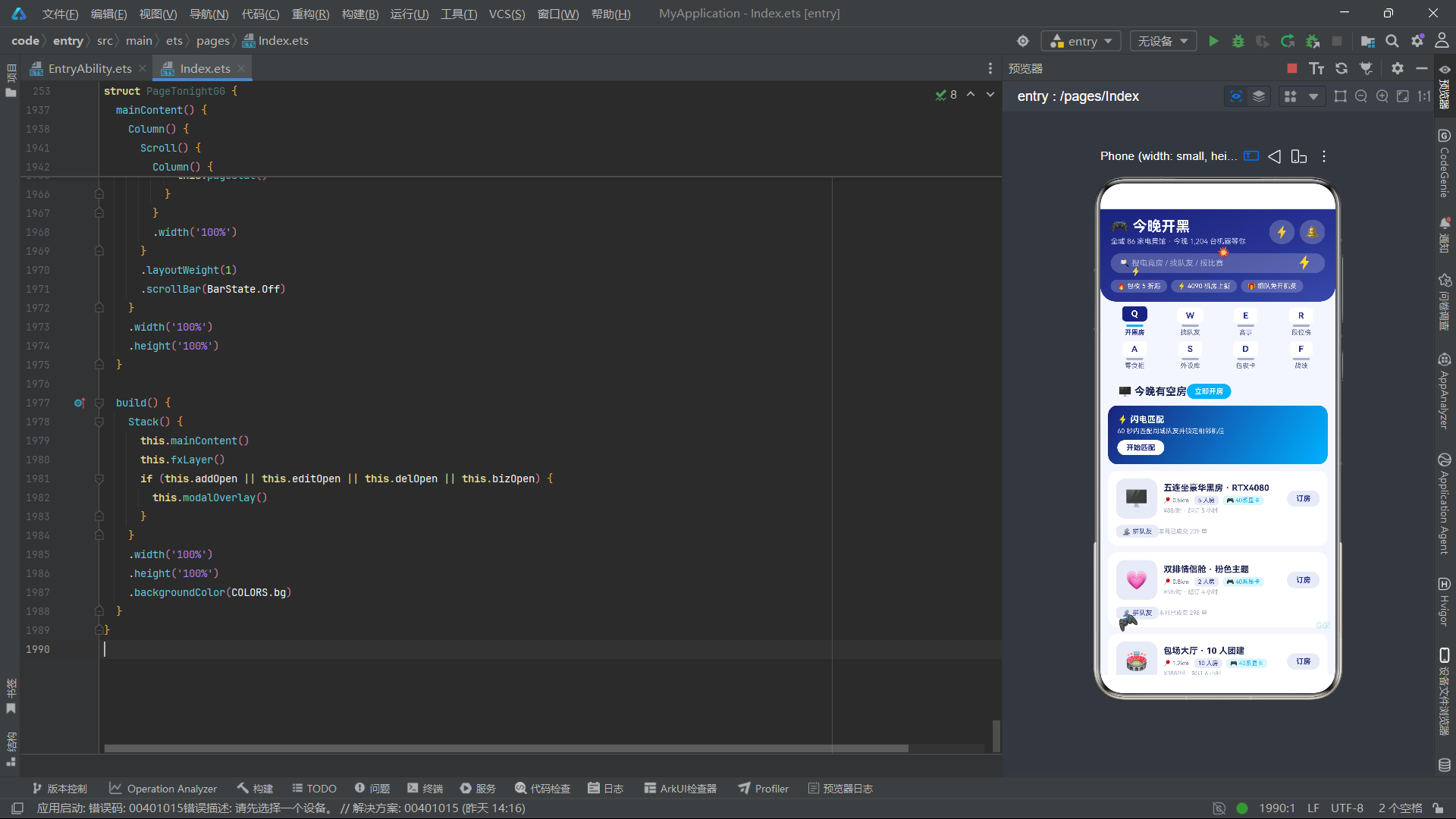
结语:
从「今晚开黑」项目的完整实现来看,HarmonyOS ArkTS在电竞本地生活服务社区应用开发中展现出了卓越的工程效率和表现力。声明式UI范式使得八Tab内容切换、四弹框状态管理、复杂列表渲染等业务场景的实现代码结构清晰、可维护性强。@Observed装饰器在RoomItem、MateItem、MatchItem等模型类上的应用,确保了预订状态切换、组队状态管理、赛事报名等交互操作能够以最小粒度触发UI更新,在包含十余条数据的列表中保持了流畅的渲染性能。@Builder装饰器对keyTab机械键帽组件、header头部、fxLayer特效层等通用UI片段的封装复用,保证了八Tab视觉的一致性和特效的统一管理。这种以装饰器为核心的声明式开发范式,使得开发者能够以数据流向为骨架组织代码,而非以命令式操作为骨架,大幅降低了复杂交互界面的认知负担。
从产品设计的完整性角度审视,「今晚开黑」的八个内容Tab构成了从预订到匹配到竞技到消费到统计的完整服务闭环。pageRoom和pageMate承载核心交易功能(订房和找人),pageMatch和pageRank承载竞技激励功能(赛事和排行),pageSnack和pageGear承载延伸消费功能(零食和外设),pageCard承载储值功能(包夜卡),pageStat承载数据回馈功能(战绩统计)。这种全链路页面布局不是简单的功能堆砌,而是基于电竞用户旅程的系统性设计——用户从找场地(开黑房)到找队友(找队友)到参加比赛(赛事)到查看排名(段位榜)到消费零食(零食柜)到租外设(外设库)到买储值卡(包夜卡)到看数据(战绩),每一步都有对应的页面支撑。四个弹框分别对应创建(订开黑房)、编辑(开黑档案)、删除(取消预订)、交易(报名水友赛)四类核心操作,覆盖了CRUD操作的全部场景。
在视觉设计层面,深空靛蓝+电光青的双色对比策略是本项目的核心视觉创新。深空靛蓝#283593传达出电竞房间的暗光环境与屏幕蓝光的沉浸感,电光青#00B0FF注入了游戏UI中常见的能量光效元素,两者的反差对比使得应用在视觉上既沉浸又充满活力。linearGradient渐变头部、机械键帽式Tab设计、蓝青警示弹框、闪电手柄GG特效,这些视觉元素都紧密围绕"电竞开黑"这一核心场景展开,形成了高度统一的视觉语言。特别是keyTab机械键帽设计,将机械键盘的物理元素融入数字界面,以Q/W/E/R/A/S/D/F八个按键字符对应八个功能Tab,是业务场景与UI设计深度融合的典范。
在交互体验层面,本项目通过fxTick定时器驱动的五种特效元素(闪电闪烁、手柄脉动、GG弹跳、爆裂脉动),为电竞场景注入了持续的动态活力。这些特效通过不同周期的取模运算实现了非同步运动——两个闪电以2周期和3周期交替闪烁产生雷电交加效果,手柄以6周期旋转配合2周期缩放产生脉动感,GG文字以2周期反相闪烁配合4周期位移产生弹跳效果,爆炸以3周期缩放产生脉动感。hitTestBehavior(HitTestMode.None)确保特效层不拦截触摸事件。这种轻量级特效方案在不需要复杂物理动画的社区应用中具有很高的性价比。
@Observed/@State/@Builder三件套构成了完整的声明式开发工具链,足以支撑中等复杂度的商业应用开发。展望未来,随着HarmonyOS 6.1.1在跨设备协同能力上的持续增强,电竞服务类应用可以进一步探索手机端预订+手表端到店提醒+智慧屏战绩展示的多设备协同场景。例如用户在手机端预订电竞房后,手表可在到店时间前10分钟震动提醒;开黑结束后,智慧屏自动展示战绩统计和精彩操作回放。ArkTS的分布式状态管理能力(@StorageLink、@Provide/@Consume)将为多设备数据同步提供更加原生的支持。「今晚开黑」项目的技术实践,为HarmonyOS在电竞本地生活服务社区的落地提供了一个完整且可复用的技术参考方案,展示了ArkTS声明式范式在构建高频交互、多维度数据展示、丰富视觉特效的垂直社区应用中的全面技术优势。

openEuler 是由开放原子开源基金会孵化的全场景开源操作系统项目,面向数字基础设施四大核心场景(服务器、云计算、边缘计算、嵌入式),全面支持 ARM、x86、RISC-V、loongArch、PowerPC、SW-64 等多样性计算架构
更多推荐

 2
2 0
0- 0


 已为社区贡献2条内容

所有评论(0)